lock TOYOTA LAND CRUISER 2000 Workshop Manual
[x] Cancel search | Manufacturer: TOYOTA, Model Year: 2000, Model line: LAND CRUISER, Model: TOYOTA LAND CRUISER 2000Pages: 235, PDF Size: 5.13 MB
Page 102 of 235

L/C 100_U
124 2000 L/C 100 (OM60866U)
1 2 3 4 5 6 (Preset buttons)
These buttons are used to preset and
tune in radio stations.
To preset a station to a button: Tune in
the desired station (see “TUNE” knob or
“SEEK” button). Push and hold down the
button until you hear a beep—this will set
the station to the button. The button num-
ber will appear on the display.
To tune in to a preset station: Push the
button for the station you want. The but-
ton number and station frequency will ap-
pear on the display.
These systems can store one AM and two
FM stations for each button (The display
will show “AM”, “FM1” or “FM2” when you
push “AM” “FM1·2”).
(Eject button)
Cassette tape
Push the cassette tape eject button to
eject a cassette.
After you turn the ignition to “LOCK”, you
will be able to eject a cassette, but you
will not be able to reinsert it. Compact disc
To eject one compact disc only: Push and
release the compact disc eject button. If
you hold the button too long (if the audio
system is on at this time, you hear a
beep.), the mechanism will change to the
mode for ejecting all the discs loaded in
the changer. You can also eject any spe-
cific one of the discs loaded in the player
as follows:
1. Push either side of the “DISC” button until the number of the disc you want
to eject is displayed.
2. Push and release the compact disc eject button.
To eject all the discs loaded in the player:
Push and hold the compact disc eject but-
ton (until you hear a beep when the audio
system is on). The last compact disc
played before pushing the button will be
ejected first. If a disc is left in the slot
for a long time, the function to eject all
the discs will be automatically cancelled.
After you turn the ignition to “LOCK”, you
will be able to eject one compact disc
only or all the discs loaded in the player,
but you will not be able to reinsert it or
them.
(Program)
Push “
” to select the other side of a
cassette tape. The display indicates which
side is currently selected (“
” indicates
top side, “
” indicates bottom side).
Auto −reverse feature: After the cassette
player reaches the end of a tape side, it
automatically reverses and begins to play
the other side. This is true whether the
cassette was playing or fast forwarding.
(Reverse/Fast forward buttons)
Cassette Player
Push the fast forward button to fast for-
ward a cassette tape. “FF” will appear on
the display. Push the reverse button to
rewind a tape. “REW” will appear on the
display.
To stop the tape while it is fast forward-
ing, push the fast forward button or
“TAPE”; to stop the tape while it is re-
winding, push the reverse button or
“TAPE”.
Page 107 of 235

L/C 100_U129
2000 L/C 100 (OM60866U)
There must be at least 3 seconds of blank
space between tracks for the track button
to work correctly. In addition, the feature
may not work well with some spoken
word, live, or classical recordings.
ST (Stereo reception) display
Your radio automatically changes to stereo
reception when a stereo broadcast is re-
ceived. “ST” appears on the display. If the
signal becomes weak, the radio reduces
the amount of channel separation to prev-
ent the weak signal from creating noise.
If the signal becomes extremely weak, the
radio switches from stereo to mono recep-
tion.
TA P E
Push “TAPE” to switch from radio or com-
pact disc operation to cassette operation.
If the audio system is off, you can turn
on the cassette player by pushing “TAPE”.
In both cases, a cassette must already be
loaded in the player.
TRACK (Track up/down button):
Compact disc player
By using this button, you can skip up or
down to a different track.
Push either side of the track button until
the number of the track you want to listen
to appears on the display. If you want to
return to the beginning of the current
track, push the down side of the button
one time, quickly.
TUNE (Tuning)
Your Toyota has an electronic tuning radio
(ETR). Turn the knob clockwise to step up
the frequency. Turn the knob counterclock-
wise to step down the frequency.
NOTICE
To ensure the correct audio system
operation:
Be careful not to spill beverages
over the audio system.
Do not put anything other than a
cassette tape or Compact Disc into
the slot.
The use of cellular phone inside or
near the vehicle may cause a noise
from the speakers of the audio sys-
tem which you are listening to.
However, this does not indicate a
malfunction.
RADIO RECEPTION
Usually, a problem with radio reception
does not mean there is a problem with
your radio—it is just the normal result of
conditions outside the vehicle.
For example, nearby buildings and terrain
can interfere with FM reception. Power
lines or telephone wires can interfere with
AM signals. And of course, radio signals
have a limited range. The farther you are
from a station, the weaker its signal will
be. In addition, reception conditions
change constantly as your vehicle moves.Car audio system operating
hints
Page 108 of 235

L/C 100_U
130 2000 L/C 100 (OM60866U)
Here are some common reception prob-
lems that probably do not indicate a prob-
lem with your radio: FM
Fading and drifting stations—Generally, the
effective range of FM is about 40 km (25
miles). Once outside this range, you may
notice fading and drifting, which increase
with the distance from the radio transmit-
ter. They are often accompanied by distor-
tion.
Multi
−path—FM signals are reflective,
making it possible for two signals to reach
your antenna at the same time. If this
happens, the signals will cancel each oth-
er out, causing a momentary flutter or
loss of reception.
Static and fluttering—These occur when
signals are blocked by buildings, trees, or
other large objects. Increasing the bass
level may reduce static and fluttering.
Station swapping—If the FM signal you
are listening to is interrupted or weak-
ened, and there is another strong station
nearby on the FM band, your radio may
tune in the second station until the origi-
nal signal can be picked up again. AM
Fading—AM broadcasts are reflected by
the upper atmosphere—especially at night.
These reflected signals can interfere with
those received directly from the radio sta-
tion, causing the radio station to sound
alternately strong and weak.
Station interference—When a reflected sig-
nal and a signal received directly from a
radio station are very nearly the same
frequency, they can interfere with each
other, making it difficult to hear the broad-
cast.
Static—AM is easily affected by external
sources of electrical noise, such as high
tension power lines, lightening, or electri-
cal motors. This results in static.
CARING FOR YOUR CASSETTE PLAYER
AND TAPES
For the best performance for your cas-
sette player and tapes:
Clean the tape head and other parts regu-
larly.
A dirty tape head or tape path can
decrease sound quality and tangle your
cassette tapes. The easiest way to
clean them is by using a cleaning tape.
(A wet type is recommended.) Use high
−quality cassettes.
Low −quality cassette tapes can cause
many problems, including poor sound,
inconsistent playing speed, and
constant auto −reversing. They can also
get stuck or tangled in the cassette
player.
Do not use a cassette if it has been
damaged or tangled or if its label is
peeling off.
Do not leave a cassette in the player
if you are not listening to it, especially
if it is hot outside.
Store cassettes in their cases and out
of direct sunlight.
Avoid using cassettes with a total play-
ing time longer than 100 minutes (50
minutes per side). The tape used in
these cassettes is thin and could get
stuck or tangled in the cassette player.
Page 115 of 235
L/C 100_U137
2000 L/C 100 (OM60866U)
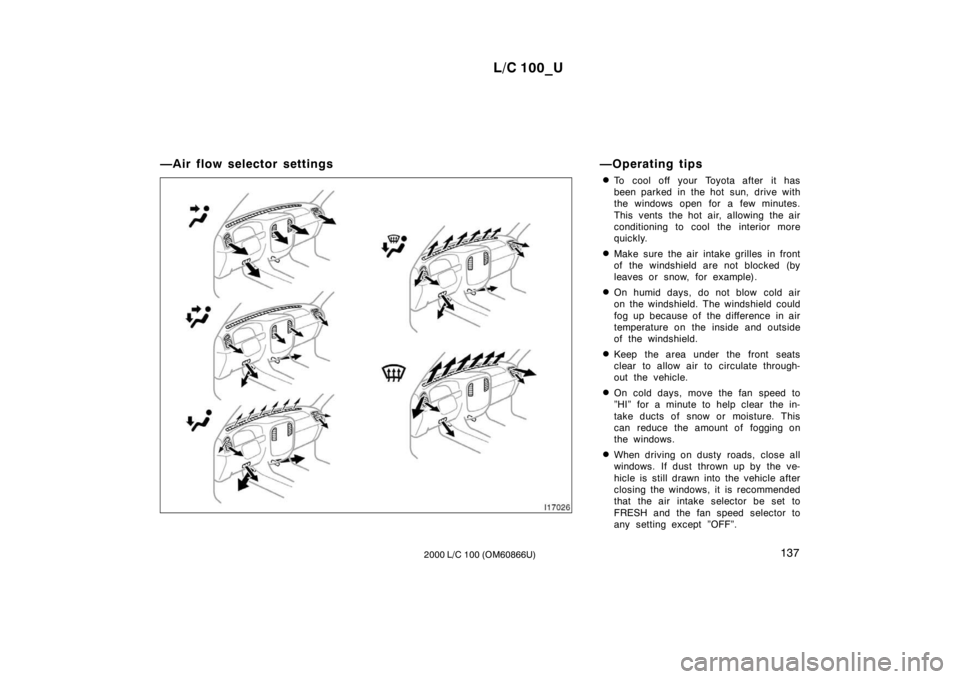
—Air flow selector settings
—Operating tips
To cool off your Toyota after it has
been parked in the hot sun, drive with
the windows open for a few minutes.
This vents the hot air, allowing the air
conditioning to cool the interior more
quickly.
Make sure the air intake grilles in front
of the windshield are not blocked (by
leaves or snow, for example).
On humid days, do not blow cold air
on the windshield. The windshield could
fog up because of the difference in air
temperature on the inside and outside
of the windshield.
Keep the area under the front seats
clear to allow air to circulate through-
out the vehicle.
On cold days, move the fan speed to
”HI” for a minute to help clear the in-
take ducts of snow or moisture. This
can reduce the amount of fogging on
the windows.
When driving on dusty roads, close all
windows. If dust thrown up by the ve-
hicle is still drawn into the vehicle after
closing the windows, it is recommended
that the air intake selector be set to
FRESH and the fan speed selector to
any setting except ”OFF”.
Page 123 of 235
L/C 100_U145
2000 L/C 100 (OM60866U) OPERATION OF INSTRUMENTS AND
CONTROLS
Other equipment
Clock146
. . . . . . . . . . . . . . . . . . . . . . . . . . . . . . . . . . . . . . . . . . . . . . . . . . . . . .
Outside temperature display146
. . . . . . . . . . . . . . . . . . . . . . . . . . . . . . . . .
Cigarette lighter and ashtray147
. . . . . . . . . . . . . . . . . . . . . . . . . . . . . . . . .
Power outlets147
. . . . . . . . . . . . . . . . . . . . . . . . . . . . . . . . . . . . . . . . . . . . . .
Fuel pump shut −off system148
. . . . . . . . . . . . . . . . . . . . . . . . . . . . . . . . . .
Rear console box149
. . . . . . . . . . . . . . . . . . . . . . . . . . . . . . . . . . . . . . . . . . .
Glove box150
. . . . . . . . . . . . . . . . . . . . . . . . . . . . . . . . . . . . . . . . . . . . . . . . . .
Garage door opener box150
. . . . . . . . . . . . . . . . . . . . . . . . . . . . . . . . . . . .
Auxiliary boxes153
. . . . . . . . . . . . . . . . . . . . . . . . . . . . . . . . . . . . . . . . . . . . .
Cup holders156
. . . . . . . . . . . . . . . . . . . . . . . . . . . . . . . . . . . . . . . . . . . . . . . .
Tie −down hooks157
. . . . . . . . . . . . . . . . . . . . . . . . . . . . . . . . . . . . . . . . . . . .
Luggage cover158
. . . . . . . . . . . . . . . . . . . . . . . . . . . . . . . . . . . . . . . . . . . . .
Floor mat159
. . . . . . . . . . . . . . . . . . . . . . . . . . . . . . . . . . . . . . . . . . . . . . . . . .
SECTION 1− 9
Page 124 of 235
L/C 100_U
146 2000 L/C 100 (OM60866U)
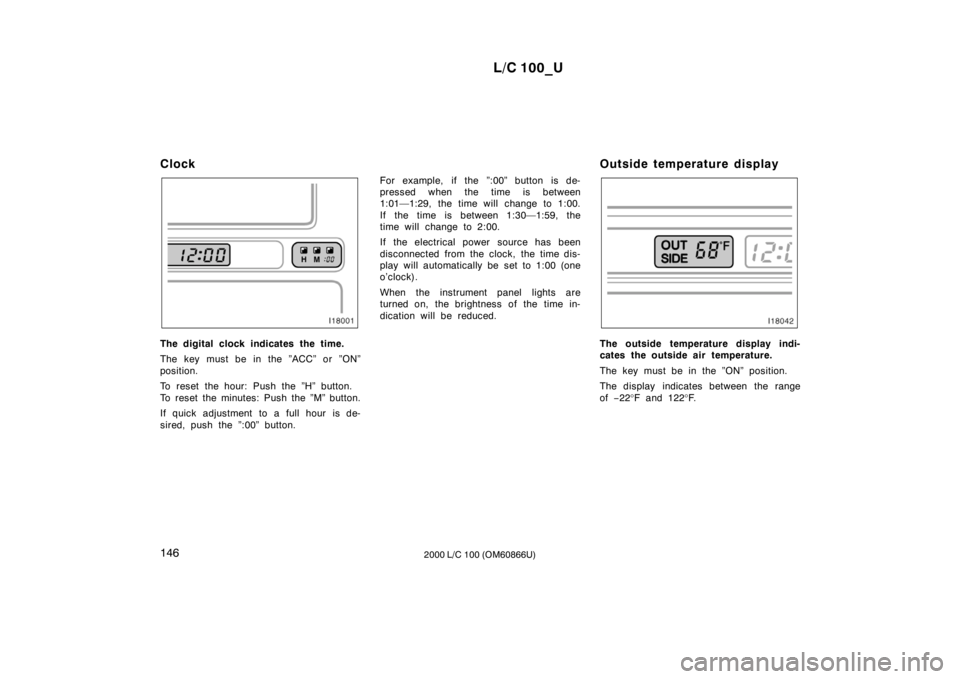
Clock
The digital clock indicates the time.
The key must be in the ”ACC” or ”ON”
position.
To reset the hour: Push the ”H” button.
To reset the minutes: Push the ”M” button.
If quick adjustment to a full hour is de-
sired, push the ”:00” button.
For example, if the ”:00” button is de-
pressed when the time is between
1:01—1:29, the time will change to 1:00.
If the time is between 1:30—1:59, the
time will change to 2:00.
If the electrical power source has been
disconnected from the clock, the time dis-
play will automatically be set to 1:00 (one
o’clock).
When the instrument panel lights are
turned on, the brightness of the time in-
dication will be reduced.
Outside temperature displayThe outside temperature display indi-
cates the outside air temperature.
The key must be in the ”ON” position.
The display indicates between the range of
−22 °F and 122 °F.
Page 125 of 235
L/C 100_U147
2000 L/C 100 (OM60866U)
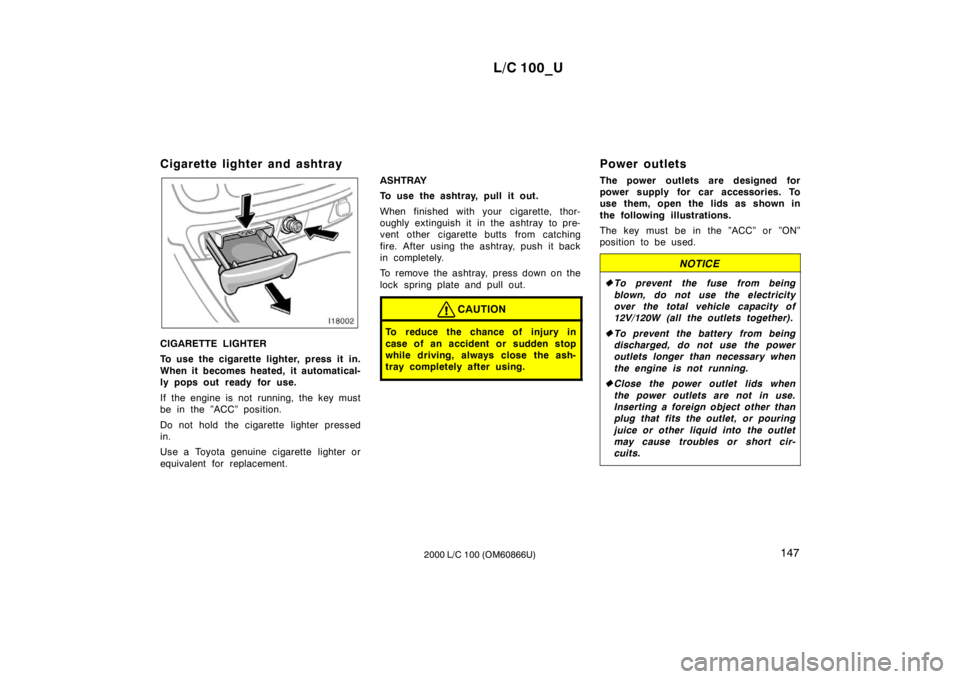
Cigarette lighter and ashtray
CIGARETTE LIGHTER
To use the cigarette lighter, press it in.
When it becomes heated, it automatical-
ly pops out ready for use.
If the engine is not running, the key must
be in the ”ACC” position.
Do not hold the cigarette lighter pressed
in.
Use a Toyota genuine cigarette lighter or
equivalent for replacement.
ASHTRAY
To use the ashtray, pull it out.
When finished with your cigarette, thor-
oughly extinguish it in the ashtray to pre-
vent other cigarette butts from catching
fire. After using the ashtray, push it back
in completely.
To remove the ashtray, press down on the
lock spring plate and pull out.
CAUTION
To reduce the chance of injury in
case of an accident or sudden stop
while driving, always close the ash-
tray completely after using.
Power outlets
The power outlets are designed for
power supply for car accessories. To
use them, open the lids as shown in
the following illustrations.
The key must be in the ”ACC” or ”ON”
position to be used.
NOTICE
To prevent the fuse from being
blown, do not use the electricity
over the total vehicle capacity of
12V/120W (all the outlets together).
To prevent the battery from being
discharged, do not use the power
outlets longer than necessary when
the engine is not running.
Close the power outlet lids when
the power outlets are not in use.
Inserting a foreign object other than
plug that fits the outlet, or pouring
juice or other liquid into the outlet
may cause troubles or short cir-
cuits.
Page 128 of 235
L/C 100_U
150 2000 L/C 100 (OM60866U)
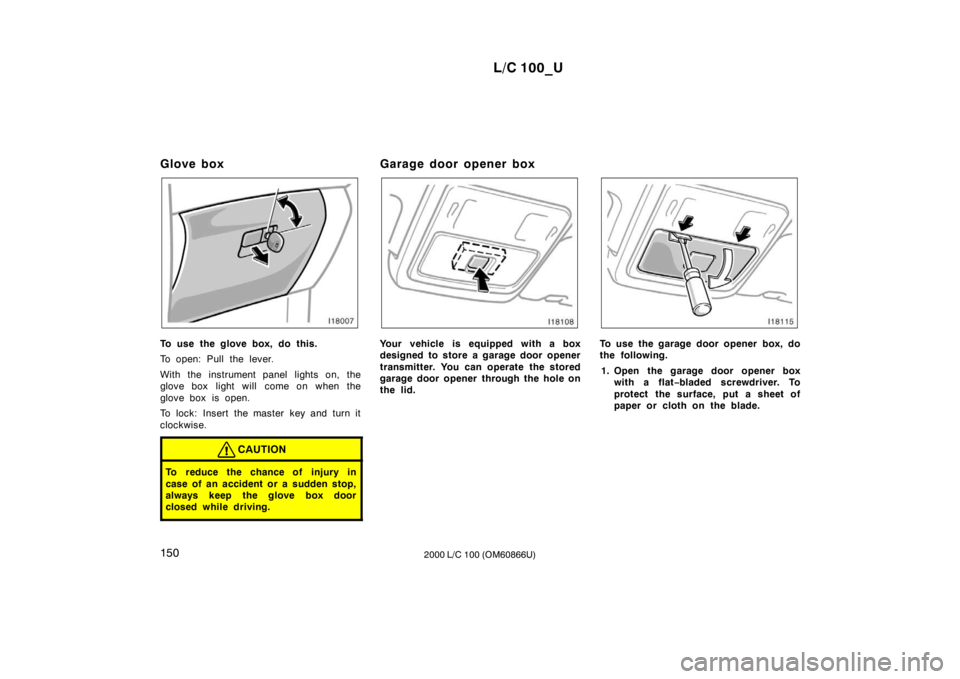
Glove box
To use the glove box, do this.
To open: Pull the lever.
With the instrument panel lights on, the
glove box light will come on when the
glove box is open.
To lock: Insert the master key and turn it
clockwise.
CAUTION
To reduce the chance of injury in
case of an accident or a sudden stop,
always keep the glove box door
closed while driving.
Garage door opener box
Your vehicle is equipped with a box
designed to store a garage door opener
transmitter. You can operate the stored
garage door opener through the hole on
the lid.To use the garage door opener box, do
the following.
1. Open the garage door opener box with a flat −bladed screwdriver. To
protect the surface, put a sheet of
paper or cloth on the blade.
Page 137 of 235
L/C 100_U159
2000 L/C 100 (OM60866U)
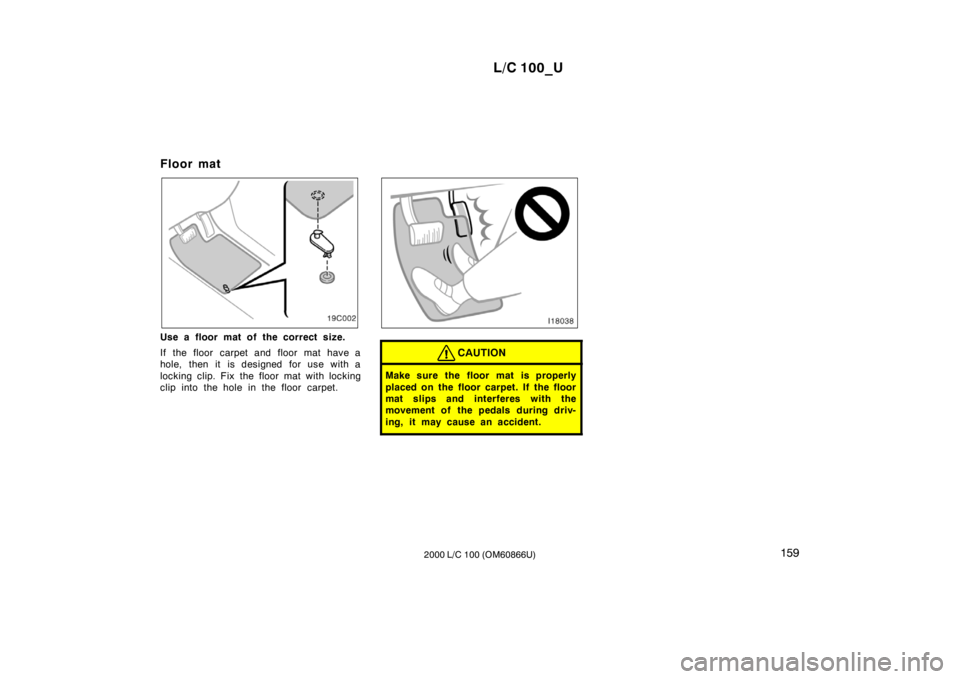
Floor mat
Use a floor mat of the correct size.
If the floor carpet and floor mat have a
hole, then it is designed for use with a
locking clip. Fix the floor mat with locking
clip into the hole in the floor carpet.
CAUTION
Make sure the floor mat is properly
placed on the floor carpet. If the floor
mat slips and interferes with the
movement of the pedals during driv-
ing, it may cause an accident.
Page 148 of 235
L/C 100_U
170 2000 L/C 100 (OM60866U)
There may be the case that the brake
system warning light stays on for a
bout
60 seconds after the engine is started. It
is normal if the light goes out after a
while.
Depressing the brake pedal repeatedly
may turn on the brake system warning
light and buzzer. It is normal if the light
goes out and the buzzer stops sounding
after a few seconds.
You may hear a small sound in the engine
compartment after the engine is started or
the brake pedal is depressed repeatedly.
This is a pump pulsating sound of the
brake system, and it is not a malfunction.
CAUTION
Do not pump the brake pedal if the
engine stalls. Each push on the
pedal uses up your brake fluid
pressure reserve.
Even if the power assist is com-
pletely lost, the brakes will still
work. But you will have to push the
pedal hard, much harder than nor-
mal. And your braking distance will
be longer.
ANTI −LOCK BRAKE SYSTEM
(with “ABS” warning light)
The anti −lock brake system is designed
to help prevent lock −up of the wheels
during a sudden braking or braking on
slippery road surfaces. This assists in
providing stability and steering perfor-
mance of the vehicle under these cir-
cumstances.
Effective way to press the ”ABS” brake
pedal: When the anti −lock brake system
function is in action, just hold the brake
pedal down more firmly. Especially in a
panic stop, you need to keep it de-
pressed more firmly, and do not pump
the brake. Pumping the brake pedal
makes the stopping distance longer.
The anti −lock brake system becomes op-
erative after the vehicle has accelerated
to a speed in excess of approximately 10
km/h (6 mph). It stops operating when the
vehicle decelerates to a speed below
approximately 5 km/h (3 mph).
Depressing the brake pedal on slippery
road surfaces such as on the manhole
cover, the steel plate under the construc-
tion, joints in the bridge, etc. on a rainy
day tends to activate the anti −lock brake
system. You may hear a click or motor sound in
the engine compartment for a few seconds
when the engine is started or just after
the vehicle is started. This means that the
anti
−lock brake system is in the self
check mode, and does not indicate a mal-
function.
When the anti −lock brake system is ac-
tivated, the following conditions may
occur, however, do not indicate a mal-
function of the system:
You may hear the anti −lock brake sys-
tem operating and feel the brake pedal
pulsating and the vibrations of the body
and steering wheel. You may also hear
the motor sound in the engine compart-
ment even after the vehicle is stopped.
At the end of the anti −lock brake sys-
tem activation, the brake pedal may
move a little forward.