light TOYOTA LAND CRUISER 2012 Owners Manual
[x] Cancel search | Manufacturer: TOYOTA, Model Year: 2012, Model line: LAND CRUISER, Model: TOYOTA LAND CRUISER 2012Pages: 692, PDF Size: 29.3 MB
Page 330 of 692
330 2-5. Driving information
L/C200_EE (OM60G38E)
Guidance
Your vehicle will handle differently when towing a trailer. In order to
avoid accident, death or serious injury, keep the following in mind
when towing:
Checking connections between trailer and lights
Stop the vehicle and check the operation of the connection
between the trailer and lights after driving for a brief period as well
as before setting off.
Practicing driving with a coupled trailer
Get the feel for turning, stopping and reversing with the trailer
coupled by practicing in an area with no or light traffic.
When reversing with a coupled trailer, hold the section of the
steering wheel nearest to you and rotate clockwise to turn the
trailer left or counterclockwise to turn right. Always rotate gradu-
ally to prevent steering error. Have someone guide you when
reversing to lessen the risk of accident.
Increasing vehicle-to-vehicle distance
At a speed of 10 km/h (6 mph), the distance to the vehicle running
ahead of you should be equivalent to or greater than the combined
length of your vehicle and trailer. Avoid sudden braking that may
cause skidding. Otherwise, the vehicle may spin out of control.
This is especially true when driving on wet or slippery road sur-
faces.
Page 335 of 692
3Interior features
335
L/C200_EE (OM60G38E)
3-3. Using the Bluetooth® audio
system
Bluetooth
® audio
system ............................ 402
Using the Bluetooth
®
audio system .................. 407
Operating a Bluetooth
®
enabled portable
player .............................. 410
Setting up a Bluetooth
®
enabled portable
player .............................. 413
Bluetooth
® audio
system setup .................. 417
3-4. Using the hands-free system
(for cellular phone)
Hands-free system
(for cellular phone).......... 418
Using the hands-free
system ............................ 423
Making a phone call.......... 430
Setting a cellular phone .... 434
Security and
system setup .................. 438
Using the phone book....... 442
3-5. Using the interior lights
Interior lights list................ 448
• Interior lights ................... 449
• Personal lights ................ 4503-6. Using the storage features
List of storage features ..... 452
• Glove box ....................... 453
• Console box.................... 454
• Overhead console .......... 455
• Cup holders .................... 456
• Bottle holders.................. 458
• Card holder ..................... 460
• Auxiliary box ................... 460
3-7. Other interior features
Cool box............................ 461
Sun visors ......................... 463
Vanity mirror ..................... 464
Clock ................................. 465
Outside temperature
display ............................ 466
Ashtray.............................. 468
Cigarette lighter ................ 470
Power outlet ...................... 471
Heated steering wheel ...... 474
Seat heaters and
ventilators ....................... 476
Armrest ............................. 480
Assist grip ......................... 481
Floor mats ......................... 482
Luggage compartment
features........................... 484
Page 372 of 692
372 3-2. Using the audio system
L/C200_EE (OM60G38E)
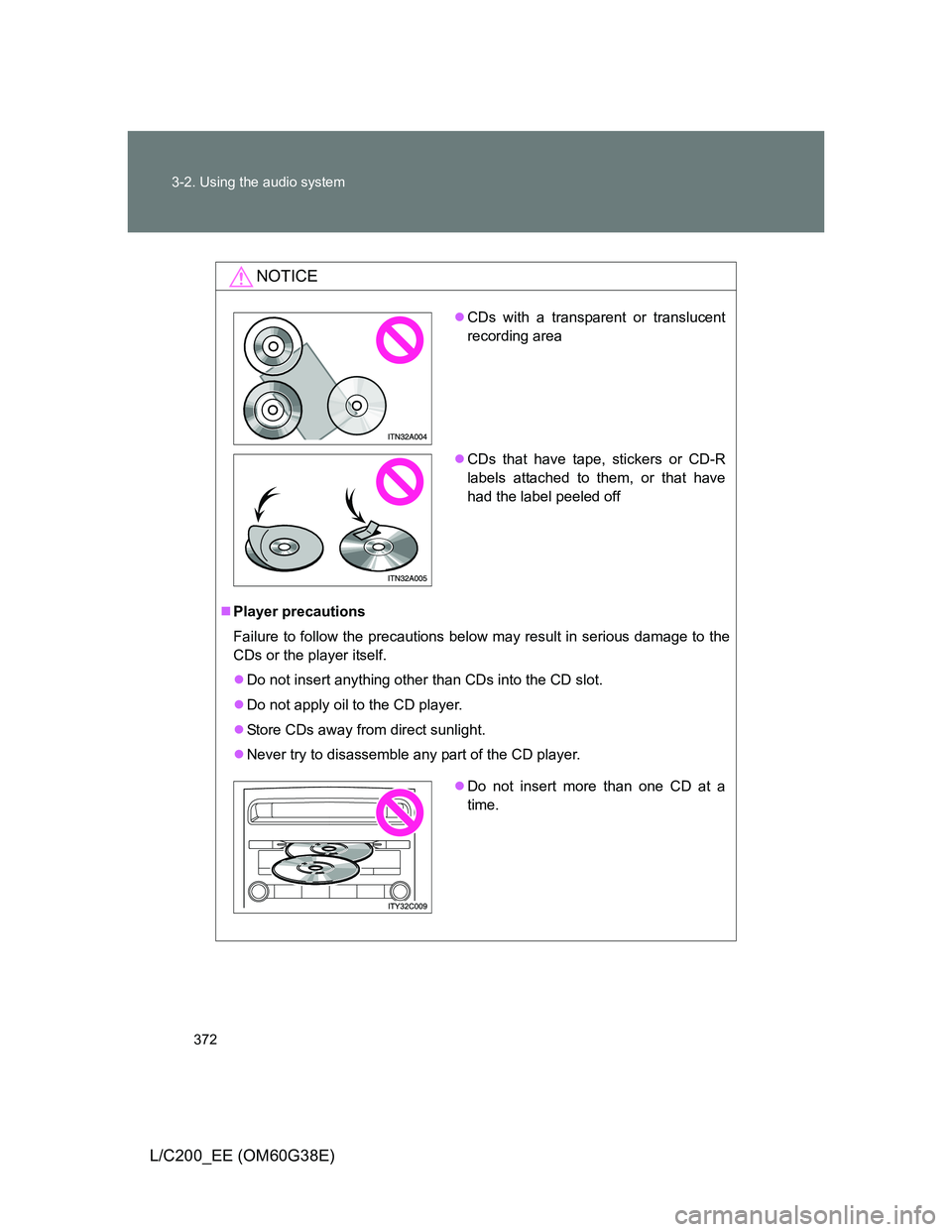
NOTICE
Player precautions
Failure to follow the precautions below may result in serious damage to the
CDs or the player itself.
Do not insert anything other than CDs into the CD slot.
Do not apply oil to the CD player.
Store CDs away from direct sunlight.
Never try to disassemble any part of the CD player.
CDs with a transparent or translucent
recording area
CDs that have tape, stickers or CD-R
labels attached to them, or that have
had the label peeled off
Do not insert more than one CD at a
time.
Page 381 of 692
381 3-2. Using the audio system
3
Interior features
L/C200_EE (OM60G38E)
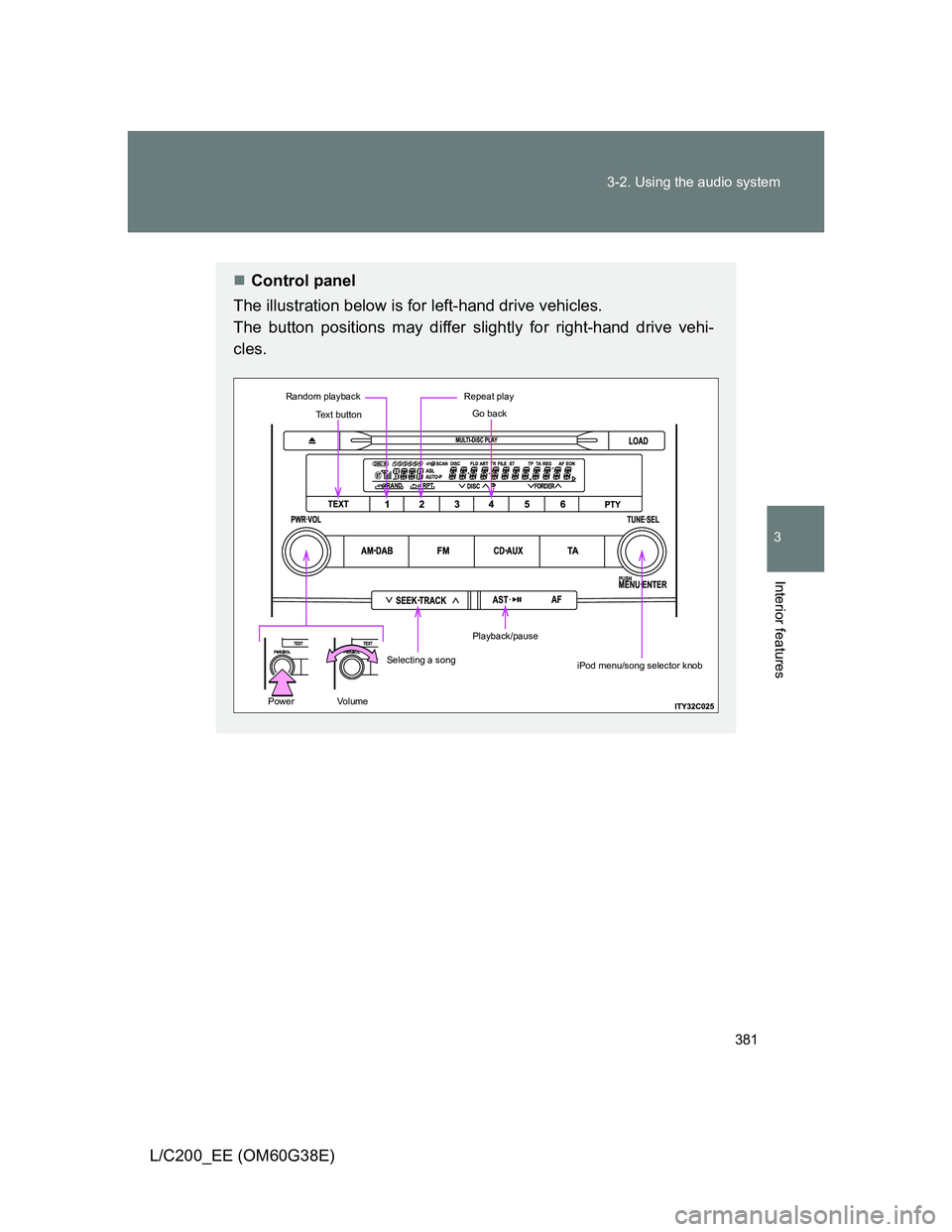
Control panel
The illustration below is for left-hand drive vehicles.
The button positions may differ slightly for right-hand drive vehi-
cles.
Text button
Repeat play
Selecting a song
Playback/pause
Random playback
PowerVo l u m e
Go back
iPod menu/song selector knob
Page 389 of 692
389 3-2. Using the audio system
3
Interior features
L/C200_EE (OM60G38E)
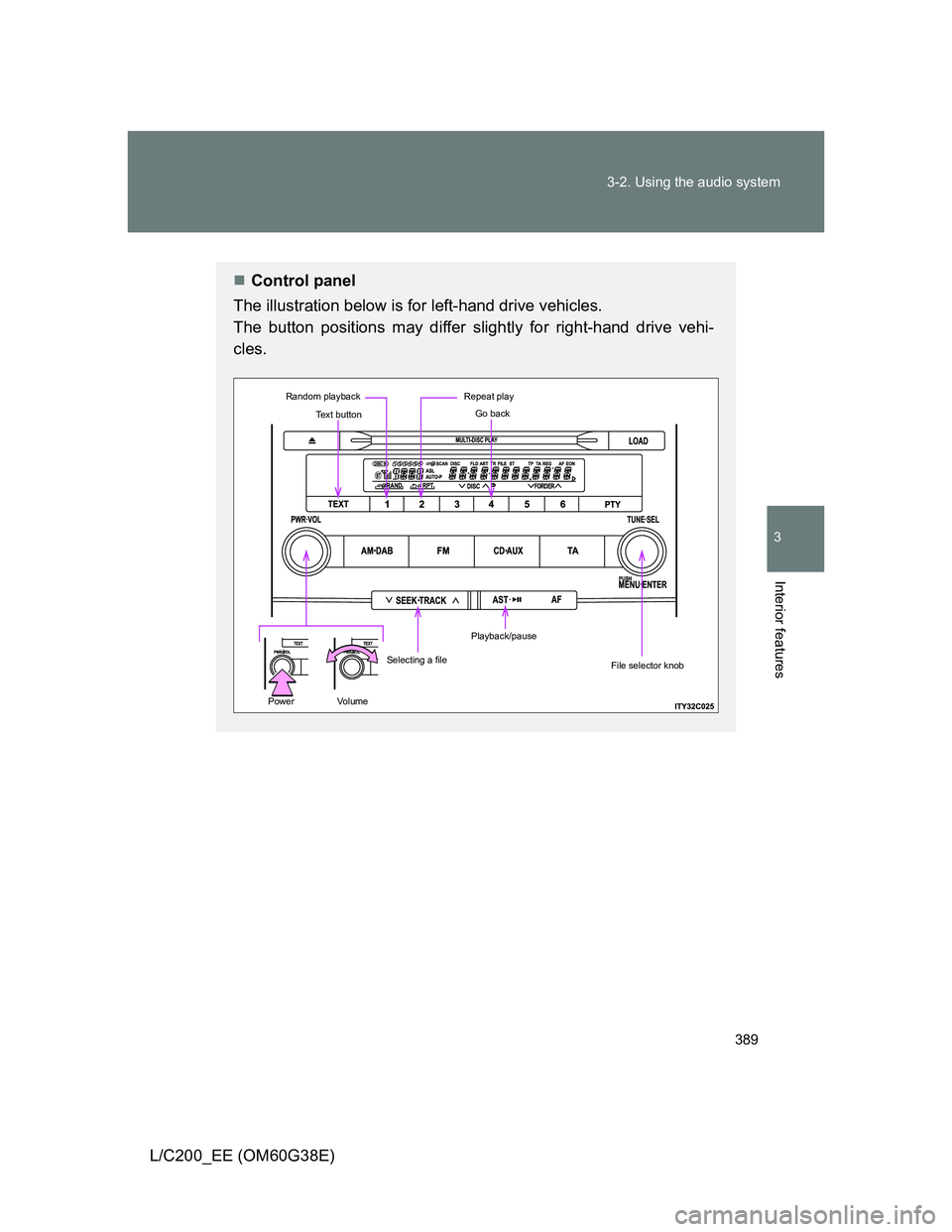
Control panel
The illustration below is for left-hand drive vehicles.
The button positions may differ slightly for right-hand drive vehi-
cles.
Text button
Repeat play
Selecting a file
Playback/pause
Random playback
PowerVo l u m e
Go back
File selector knob
Page 407 of 692
407
3-3. Using the Bluetooth® audio system
3
Interior features
L/C200_EE (OM60G38E)
Using the Bluetooth® audio system
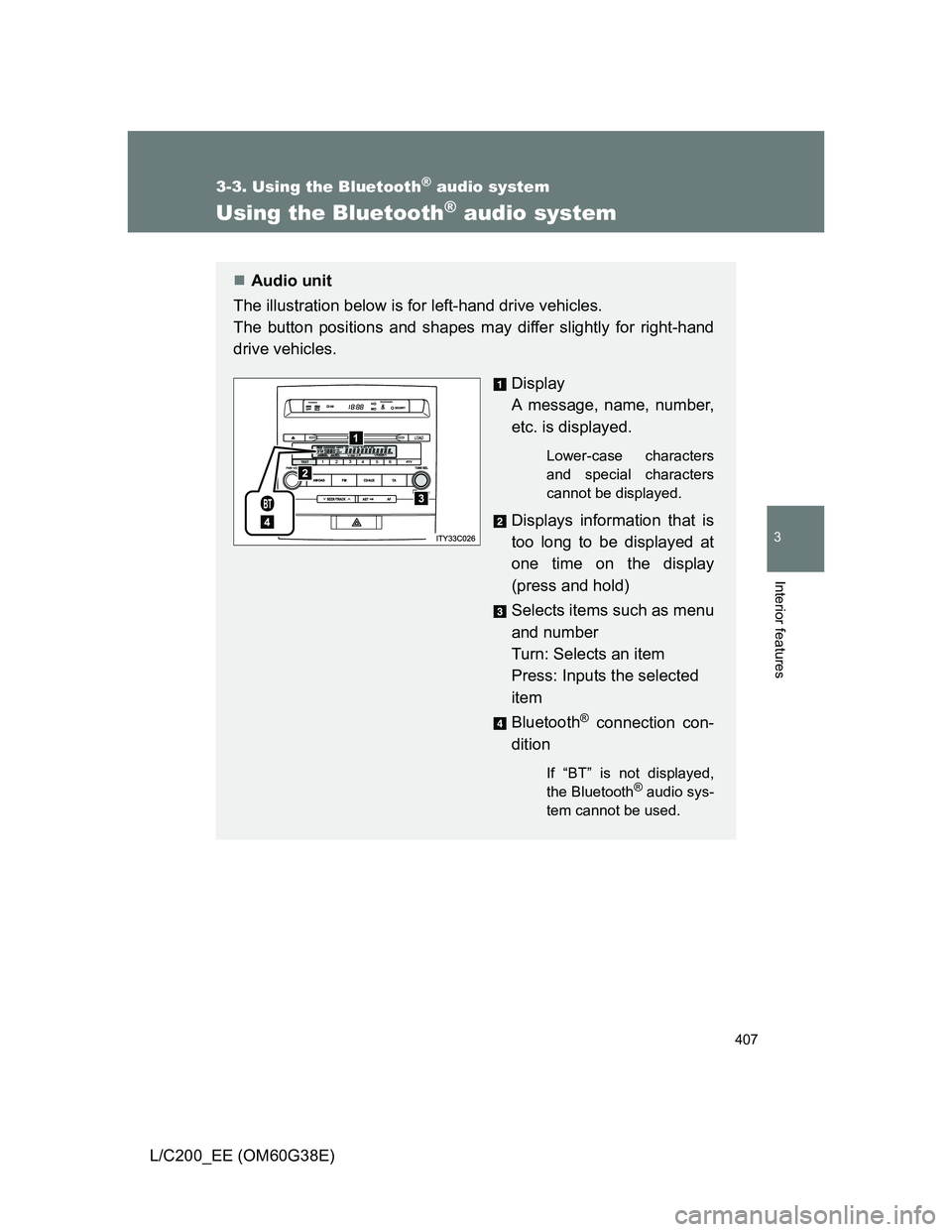
Audio unit
The illustration below is for left-hand drive vehicles.
The button positions and shapes may differ slightly for right-hand
drive vehicles.
Display
A message, name, number,
etc. is displayed.
Lower-case characters
and special characters
cannot be displayed.
Displays information that is
too long to be displayed at
one time on the display
(press and hold)
Selects items such as menu
and number
Turn: Selects an item
Press: Inputs the selected
item
Bluetooth
® connection con-
dition
If “BT” is not displayed,
the Bluetooth® audio sys-
tem cannot be used.
Page 410 of 692
410
3-3. Using the Bluetooth® audio system
L/C200_EE (OM60G38E)
Operating a Bluetooth® enabled por table player
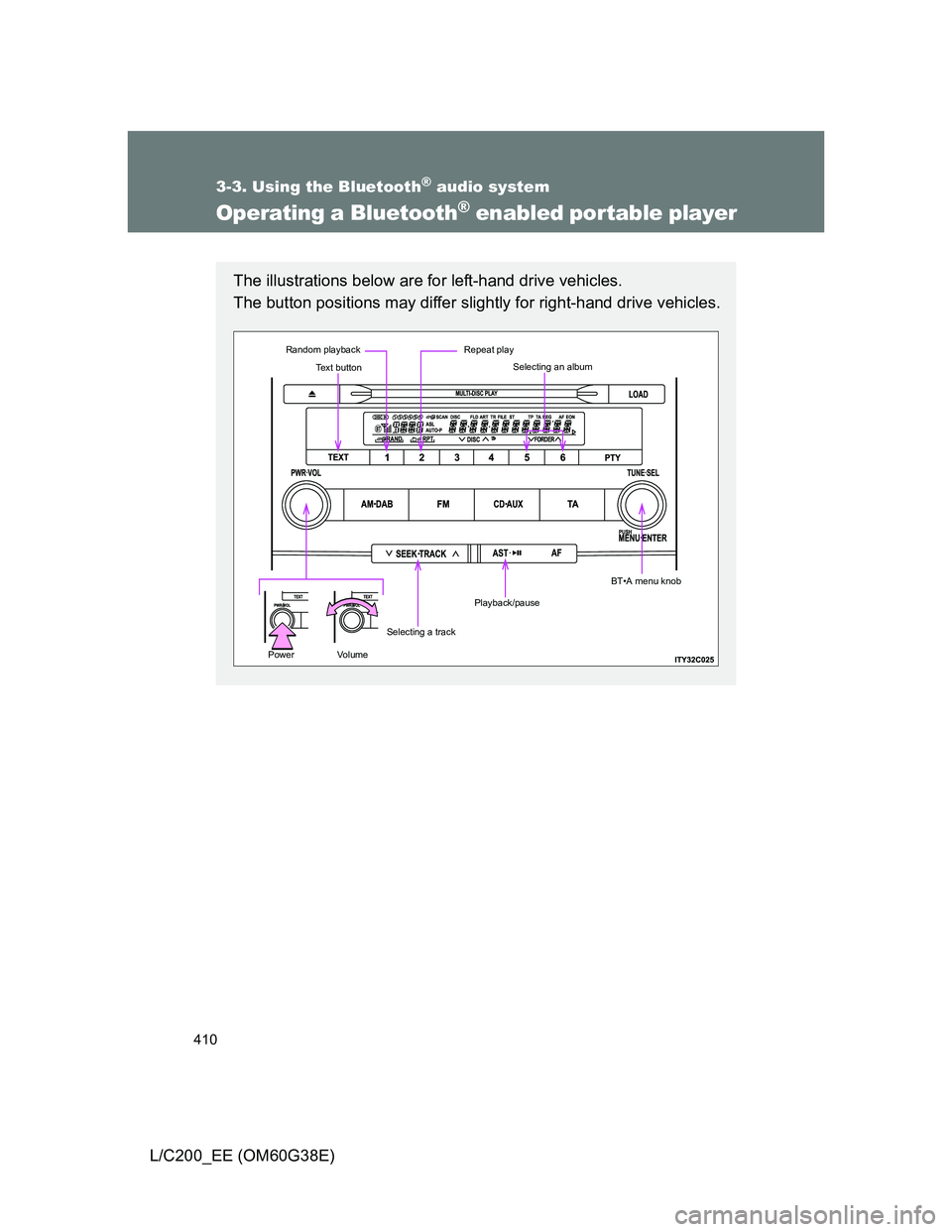
The illustrations below are for left-hand drive vehicles.
The button positions may differ slightly for right-hand drive vehicles.
Text button
Repeat play
Selecting a track
Playback/pause
Random playback
PowerVo l u m e
Selecting an album
BT•A menu knob
Page 423 of 692
423
3-4. Using the hands-free system (for cellular phone)
3
Interior features
L/C200_EE (OM60G38E)
Using the hands-free system
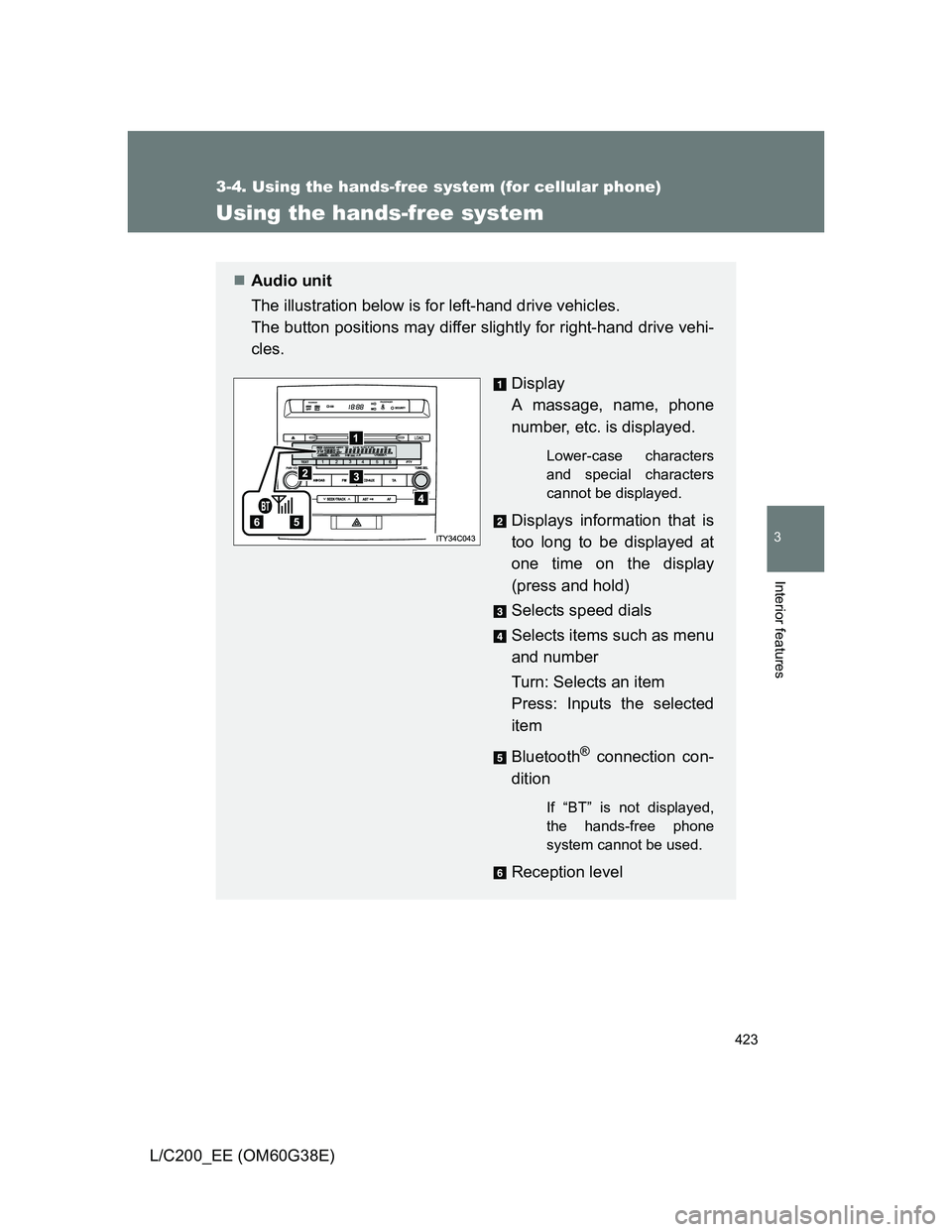
Audio unit
The illustration below is for left-hand drive vehicles.
The button positions may differ slightly for right-hand drive vehi-
cles.
Display
A massage, name, phone
number, etc. is displayed.
Lower-case characters
and special characters
cannot be displayed.
Displays information that is
too long to be displayed at
one time on the display
(press and hold)
Selects speed dials
Selects items such as menu
and number
Turn: Selects an item
Press: Inputs the selected
item
Bluetooth
® connection con-
dition
If “BT” is not displayed,
the hands-free phone
system cannot be used.
Reception level
Page 448 of 692
448
L/C200_EE (OM60G38E)
3-5. Using the interior lights
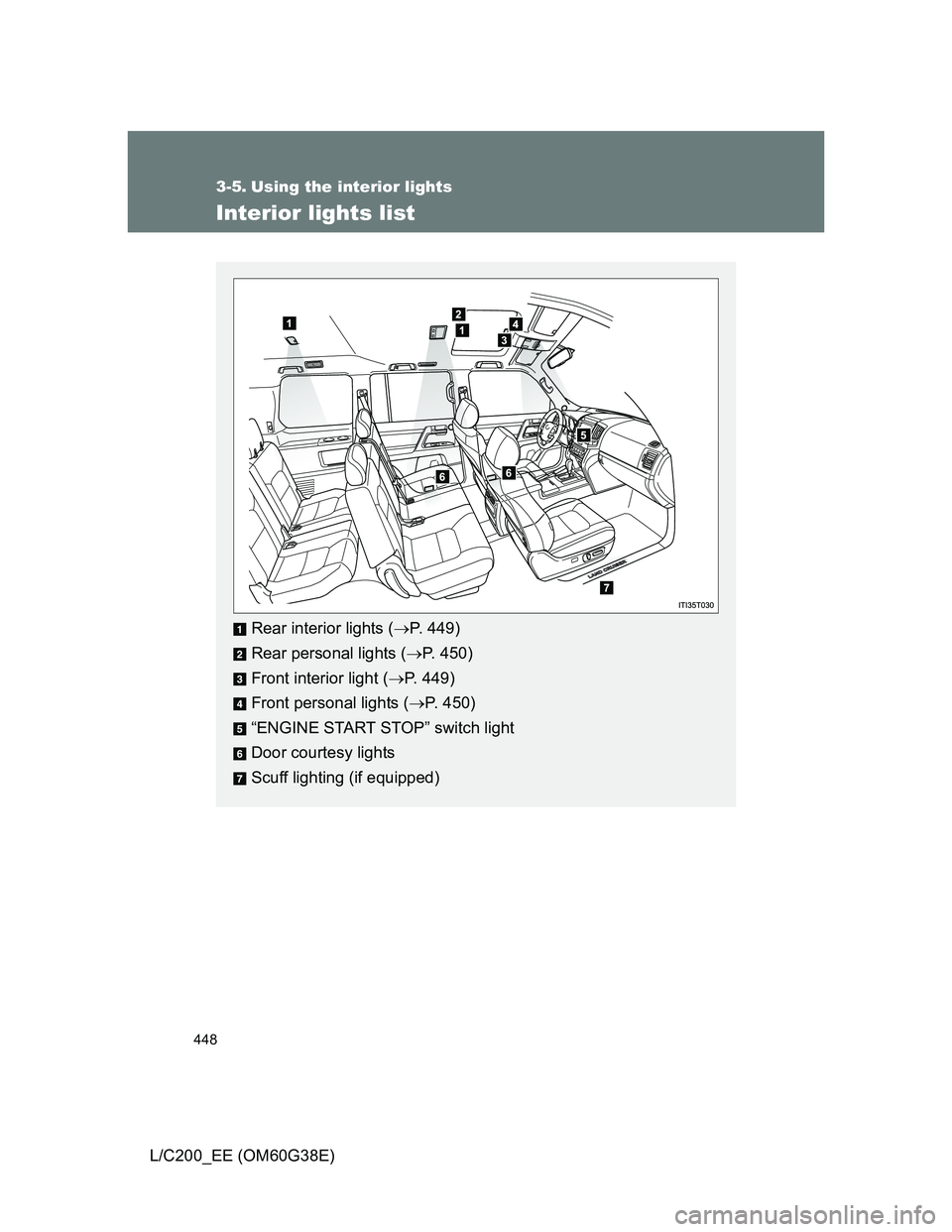
Interior lights list
Rear interior lights (P. 449)
Rear personal lights (P. 450)
Front interior light (P. 449)
Front personal lights (P. 450)
“ENGINE START STOP” switch light
Door courtesy lights
Scuff lighting (if equipped)
Page 449 of 692
449 3-5. Using the interior lights
3
Interior features
L/C200_EE (OM60G38E)
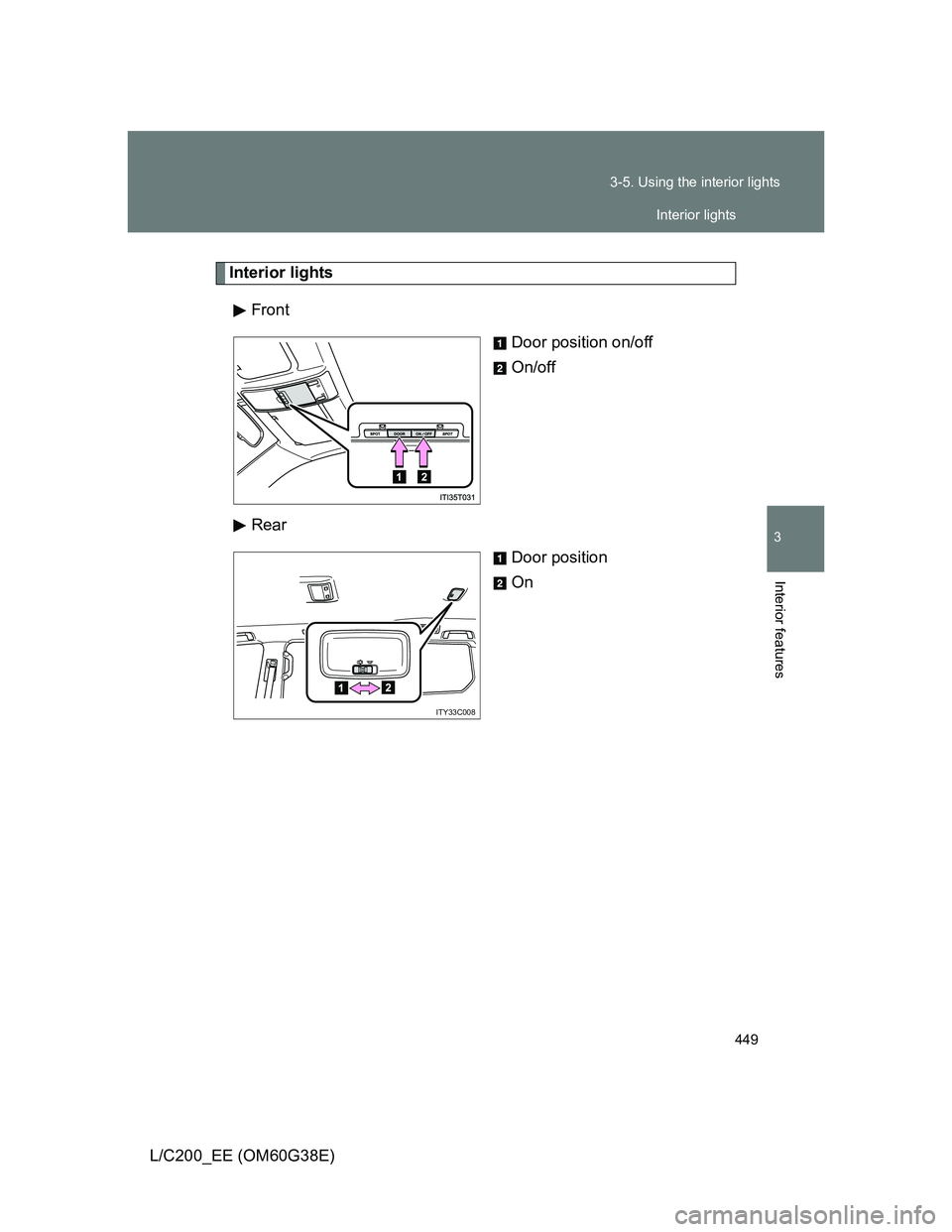
Interior lights
Front
Door position on/off
On/off
Rear
Door position
On
ITY33C008
Interior lights