light TOYOTA LAND CRUISER 2012 Manual PDF
[x] Cancel search | Manufacturer: TOYOTA, Model Year: 2012, Model line: LAND CRUISER, Model: TOYOTA LAND CRUISER 2012Pages: 692, PDF Size: 29.3 MB
Page 237 of 692
237
2-4. Using other driving systems
2
When driving
L/C200_EE (OM60G38E)
Toyota parking assist-sensor
: If equipped
The distance from your vehicle to nearby obstacles when parallel
parking or maneuvering into a garage is measured by the sensors
and communicated via the multi-information display, touch screen
and a buzzer. Always check the surrounding area when using this
system.
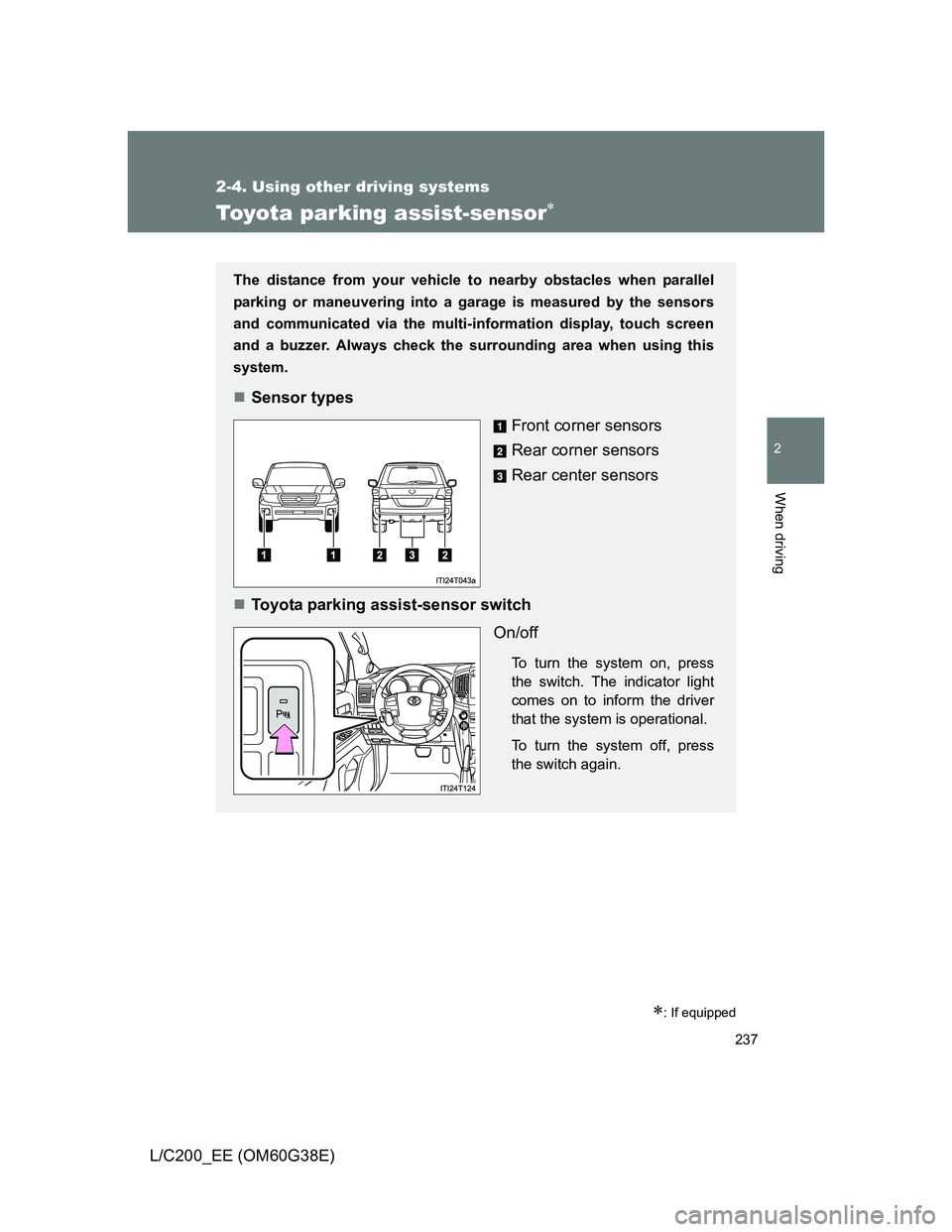
Sensor types
Front corner sensors
Rear corner sensors
Rear center sensors
Toyota parking assist-sensor switch
On/off
To turn the system on, press
the switch. The indicator light
comes on to inform the driver
that the system is operational.
To turn the system off, press
the switch again.
Page 245 of 692
245 2-4. Using other driving systems
2
When driving
L/C200_EE (OM60G38E)
Sensor detection information
The sensor’s detection areas are limited to the areas around the vehi-
cle’s front corner and rear bumpers.
Certain vehicle conditions and the surrounding environment may affect
the ability of the sensor to correctly detect obstacles. Particular instances
where this may occur are listed below.
• There is dirt, snow or ice on the sensor. (Wiping the sensors will
resolve this problem.)
• The sensor is frozen. (Thawing the area will resolve this problem.)
In especially cold weather, if a sensor is frozen the screen may show
an abnormal display, or obstacles may not be detected.
• The sensor is covered in any way.
• The vehicle is leaning considerably to one side.
• On an extremely bumpy road, on an incline, on gravel, or on grass
• The vicinity of the vehicle is noisy due to vehicle horns, motorcycle
engines, air brakes of large vehicles, or other loud noises producing
ultrasonic waves.
• There is another vehicle equipped with parking assist sensors in the
vicinity.
• The sensor is coated with a sheet of spray or heavy rain.
• The vehicle is equipped with a fender pole or wireless antenna.
• Towing eyelets are installed.
• The bumper or sensor receives a strong impact.
• The vehicle is approaching a tall or curved curb.
• In harsh sunlight or intense cold weather
• The area directly under the bumpers is not detected.
• If obstacles draw too close to the sensor.
• A non-genuine Toyota suspension (lowered suspension etc.) is
installed.
• People may not be detected if they are wearing certain types of cloth-
ing.
In addition to the examples above, there are instances in which, because
of their shape, signs and other objects may be judged by the sensor to be
closer than they are.
Page 252 of 692
252 2-4. Using other driving systems
L/C200_EE (OM60G38E)
Extra high mode
If the vehicle becomes stuck or the Crawl Control system requests the vehi-
cle height be raised, extra high mode may be automatically selected when
the vehicle height is in high mode with the four-wheel drive control switch in
the “L4” position.
The vehicle height is raised to 20 mm (0.8 in.) higher than the high mode
height, or slightly higher.
Extra high mode will change back to high mode when:
• The vehicle speed exceeds 10 km/h (6 mph)
• The four-wheel drive control switch is shifted to “H4”.
If you push “ ” when in extra high mode, normal mode is selected.
Extra high mode cannot be manually selected.
Turning off the height control
The system will remain off until the height control OFF switch is pushed
again, even if the “ENGINE START STOP” switch is turned off.
Even if the system is turned off, the system automatically modulated if
the vehicle speed exceeds following.
• 30 km/h (18 mph) with high or low mode
• 80 km/h (50 mph) with normal mode
Page 257 of 692
257 2-4. Using other driving systems
2
When driving
L/C200_EE (OM60G38E)
NOTICE
When parking in areas with limited overhead height
After leaving the vehicle or unloading the luggage, the vehicle height may be
slightly higher than normal. Take care when overhead height is limited.
To avoid damage to the vehicle
Normal mode will be switched to automatically even if the vehicle is started
off in low mode. Take care when overhead height is limited.
Do not select the low mode when driving on bumpy roads, as the under-
body of the vehicle may contact the road surface.
Avoid rapid changes to the vehicle height
As the pump may overheat. Leave at a few seconds between selections
when changing the vehicle height mode.
Page 260 of 692
260 2-4. Using other driving systems
L/C200_EE (OM60G38E)
Shifting between “H4” and “L4”
Shifting from “H4” to “L4”
Stop the vehicle completely.
Shift the shift lever to “N”.
Push and turn the four-wheel drive control switch fully clock-
wise.
Maintain this condition until the low speed four-wheel drive indica-
tor light turns on.
Shifting from “L4” to “H4”
Stop the vehicle completely.
Shift the shift lever to “N”.
Turn the four-wheel drive control switch fully counterclock-
wise.
Maintain this condition until the low speed four-wheel drive indica-
tor light turns off.
The four-wheel drive control switch can be operated when
The “ENGINE START STOP” switch is in IGNITION ON mode.
The shift lever is in the “N” position.
The vehicle is stopped completely.
The low speed four-wheel drive indicator light
The indicator light blinks while shifting between “H4” and “L4”.
STEP1
STEP2
STEP3
STEP1
STEP2
STEP3
Page 261 of 692
261 2-4. Using other driving systems
2
When driving
L/C200_EE (OM60G38E)
Advice for driving on slippery roads
If you shift the four-wheel drive control switch to “L4” and the shift lever to
the “2” range of “S” while driving in steep off-road areas, the output of the
brake can be controlled effectively by the Active TRC, which assists the
driver to control the driving power of 4 wheels.
Use the “1” range of “S” of the shift lever for maximum power and traction
when your wheels get stuck or when driving down a steep incline.
The center differential lock indicator light
The indicator light blinks while locking/unlocking the center differential.
The center differential lock/unlock button can be operated when
The “ENGINE START STOP” switch is in IGNITION ON mode.
The vehicle speed is less than 100 km/h (60 mph).
Locking/unlocking the center differential
When the center differential is locked, VSC is automatically turned off.
(The center differential lock and VSC OFF indicator lights come on.)
If the operation is not completed, the center differential lock indicator
blinks. If the indicator light does not turn off when unlocking the center
differential, drive straight ahead while accelerating or decelerating, or
drive in reverse.
If the center differential lock/unlock is not completed within 5 seconds
while the cruise control system is on, cancel the cruise control system.
Page 262 of 692
262 2-4. Using other driving systems
L/C200_EE (OM60G38E)
If the low speed four-wheel drive indicator light or the center differen-
tial lock indicator light blinks
If the low speed four-wheel drive indicator light continues to blink when
using the four-wheel drive control switch, stop the vehicle completely,
move the shift lever to “N” and operate the switch again.
If the shift lever is moved before the low speed four-wheel drive indicator
turns on/off, the transfer mode may not be shifted completely. The trans-
fer mode disengages both the front and rear driveshafts from the power-
train and allows the vehicle to move regardless of the shift position. (At
this time, the indicator blinks and the buzzer sounds.)
Therefore, the vehicle is free to roll even if the automatic transmission is in
“P”. You or someone else could be seriously injured. You must complete
the shifting of the transfer mode.
To complete the shifting, stop the vehicle completely, return the shift lever
to “N”, and confirm that the shift was completed (the indicator turns on/off).
If the engine coolant temperature is too low, the four-wheel drive control
system may not be able to shift. When the engine is warmer operate the
switch again.
If the low speed four-wheel drive indicator light or the center differential lock
indicator light continues to blink even after attempting the above, there may
be a malfunction in the engine, the brake system or the four-wheel drive sys-
tem. In this case, you may not be able to shift between “H4” and “L4”, and
the center differential lock may not be operable. Have the vehicle inspected
by any authorized Toyota dealer or repairer, or another duly qualified and
equipped professional immediately.
Page 269 of 692
269 2-4. Using other driving systems
2
When driving
L/C200_EE (OM60G38E)
Sounds and vibrations caused by the Crawl Control system
A sound may be heard from the engine compartment when the engine is
started or just after the vehicle begins to move. This sound does not indi-
cate that a malfunction has occurred in Crawl Control system.
Either of the following conditions may occur when the Crawl Control sys-
tem is operating. None of these are indicators that a malfunction has
occurred.
• Vibrations may be felt through the vehicle body and steering.
• A motor sound may be heard after the vehicle comes to a stop.
When there is a malfunction in the system
Warning lights and/or warning messages will turn on. (P. 573, 579)
CAUTION
When using Crawl Control and Turn Assist function
Do not rely solely on the Crawl Control and Turn Assist function. This func-
tion does not extend the vehicle’s performance limitations. Always thor-
oughly check the road conditions, and drive safely.
These conditions may cause the system not to operate properly
When driving on the following surfaces, the system may not be able to main-
tain a fixed low speed, which may result in an accident:
Extremely steep inclines.
Extremely uneven surfaces.
Snow-covered roads, or other slippery surfaces.
NOTICE
When using Turn Assist function
The Turn Assist function is a function to assist turning performance when
driving off road. The function may be less effective on paved road surfaces.
Page 274 of 692
274 2-4. Using other driving systems
L/C200_EE (OM60G38E)
Automatic system cancelation
In the following situations, the Multi-terrain Select indicator will go off, and
Multi-terrain Select will be canceled automatically.
When the four-wheel drive control switch is in “H4”.
When Active TRC and VSC are off.
When Crawl Control is on.
When it is difficult to generate traction
MUD & SAND mode provides the largest amount of tire slippage, followed
by LOOSE ROCK, MOGUL, ROCK & DIRT and ROCK mode.
Drivability can be improved by selecting a mode which provides a smaller
amount of tire slippage than the current mode when the amount of tire slip-
page is large, or conversely selecting a mode which provides a larger
amount of tire slippage than the current mode when the amount of tire slip-
page is small.
When the vehicle is stuck
Switching the transfer and differential
For the operation of the following functions, refer to the following pages.
Four-wheel drive system (P. 259)
Center differential lock (P. 259)
When the brake system operates continuously
The brake system may overheat. In this case, a buzzer will sound, either the
“TRC OFF” will be displayed on the multi-information display, and Multi-ter-
rain Select will be temporarily inoperable. In this event, stop the vehicle
immediately in a safe place, and allow the brake system to cool down suffi-
ciently. (There is no problem with continuing normal driving.)
After a short time, the message on the multi-information display will go off,
and you will be able to use Multi-terrain Select.
When there is a malfunction in the system
The slip indicator light will come on. Have the vehicle inspected by any
authorized Toyota dealer or repairer, or another duly qualified and equipped
professional, immediately.
Page 296 of 692
296 2-4. Using other driving systems
L/C200_EE (OM60G38E)
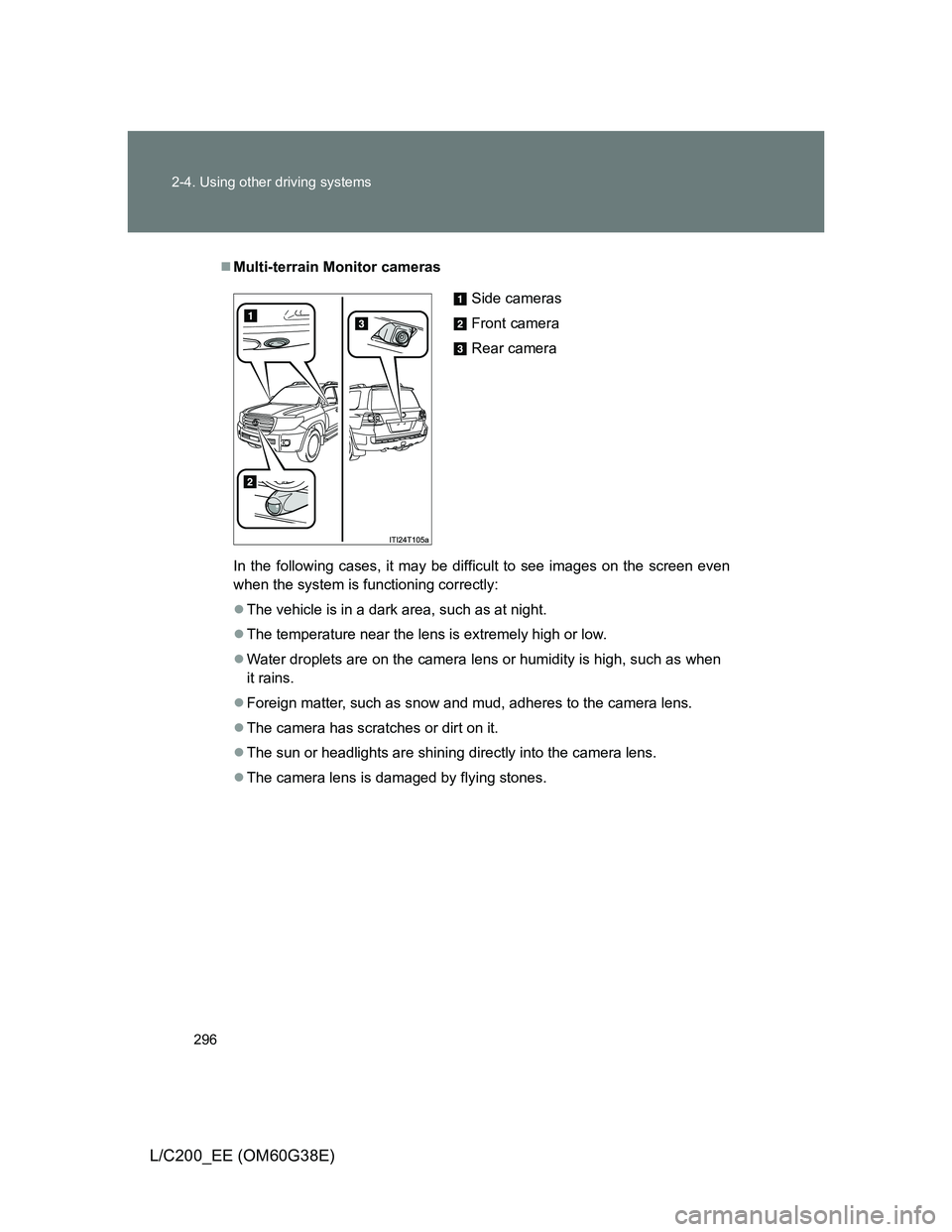
Multi-terrain Monitor cameras
In the following cases, it may be difficult to see images on the screen even
when the system is functioning correctly:
The vehicle is in a dark area, such as at night.
The temperature near the lens is extremely high or low.
Water droplets are on the camera lens or humidity is high, such as when
it rains.
Foreign matter, such as snow and mud, adheres to the camera lens.
The camera has scratches or dirt on it.
The sun or headlights are shining directly into the camera lens.
The camera lens is damaged by flying stones.
Side cameras
Front camera
Rear camera