light TOYOTA LAND CRUISER 2012 Manual Online
[x] Cancel search | Manufacturer: TOYOTA, Model Year: 2012, Model line: LAND CRUISER, Model: TOYOTA LAND CRUISER 2012Pages: 692, PDF Size: 29.3 MB
Page 297 of 692
297 2-4. Using other driving systems
2
When driving
L/C200_EE (OM60G38E)
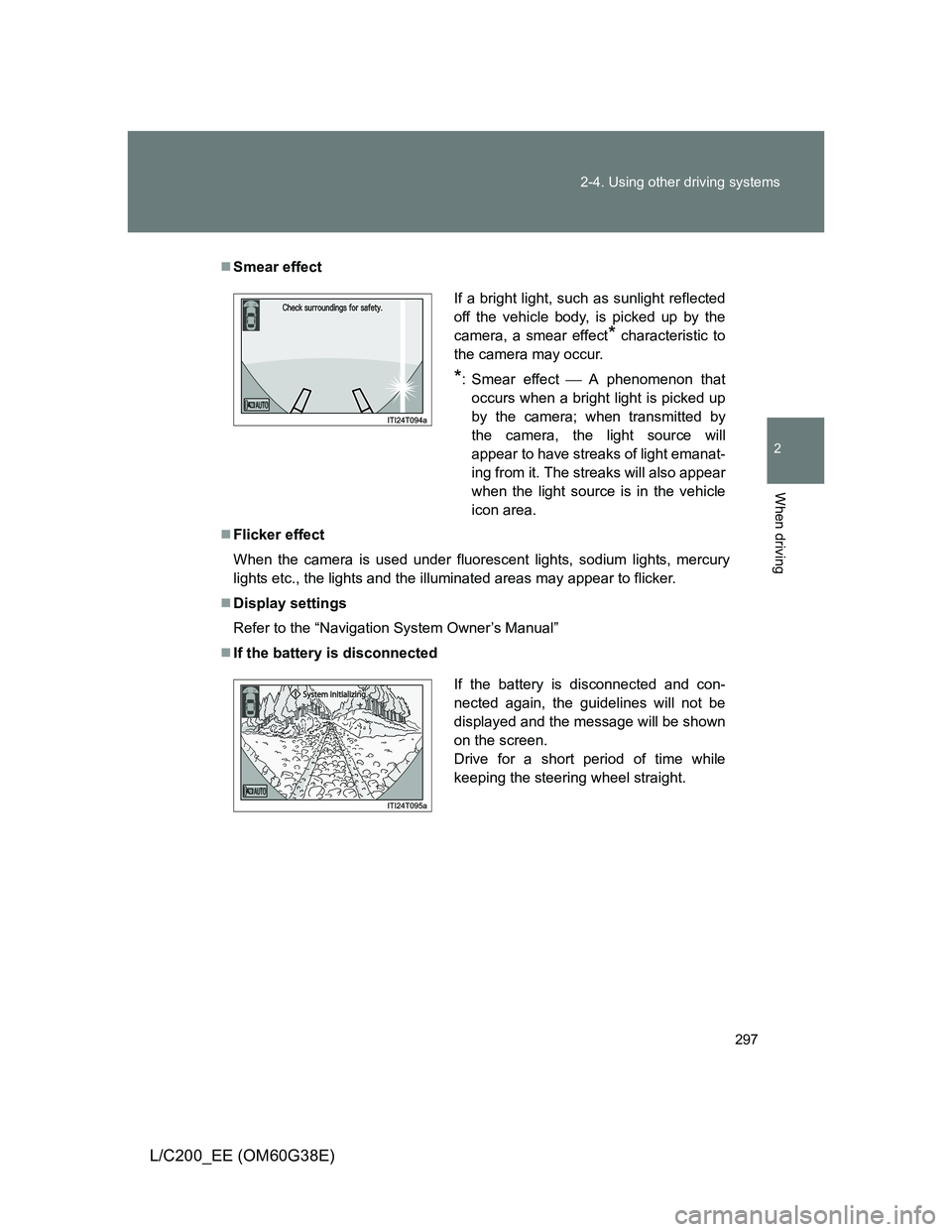
Smear effect
Flicker effect
When the camera is used under fluorescent lights, sodium lights, mercury
lights etc., the lights and the illuminated areas may appear to flicker.
Display settings
Refer to the “Navigation System Owner’s Manual”
If the battery is disconnected
If a bright light, such as sunlight reflected
off the vehicle body, is picked up by the
camera, a smear effect
* characteristic to
the camera may occur.
*: Smear effectA phenomenon that
occurs when a bright light is picked up
by the camera; when transmitted by
the camera, the light source will
appear to have streaks of light emanat-
ing from it. The streaks will also appear
when the light source is in the vehicle
icon area.
If the battery is disconnected and con-
nected again, the guidelines will not be
displayed and the message will be shown
on the screen.
Drive for a short period of time while
keeping the steering wheel straight.
Page 298 of 692
298 2-4. Using other driving systems
L/C200_EE (OM60G38E)
CAUTION
When using the Multi-terrain Monitor system
Observe the following precautions to avoid an accident that could result in
death or serious injuries:
Never depend solely on the monitor system.
Always check visually and with the mirrors to confirm your intended path is
clear.
Depicted distances between objects and flat surfaces differ from actual
distances.
Do not use the system if the hood or doors are open.
Conditions which may affect the Multi-terrain Monitor system
If the front or the rear of the vehicle or the outside rear view mirror has
been hit, the camera’s position and mounting angle may have changed.
Have the vehicle inspected by any authorized Toyota dealer or repairer, or
another duly qualified and equipped professional.
As the camera has a water proof construction, do not detach, disassemble
or modify it. This may cause incorrect operation.
Rapid temperature changes, such as when hot water is poured on the
vehicle in cold weather, may cause the system to function abnormally.
If the camera lens is dirty, it cannot transmit a clear image. Rinse with
water and wipe with a soft cloth. If the camera lens is extremely dirty, wash
with a mild cleanser and rinse.
Do not strongly rub the camera lens. If the camera lens is scratched, it
cannot transmit a clear image.
Do not allow organic solvent, car wax, window cleaner or glass coat to
adhere to the camera. If this happens, wipe it off as soon as possible.
The displayed image may be darker and moving images may be slightly
distorted when the system is cold.
Situations unsuitable for Multi-terrain Monitor
• On icy or slick road surfaces, or in snow
• When using tire chains
Page 301 of 692
301 2-4. Using other driving systems
2
When driving
L/C200_EE (OM60G38E)
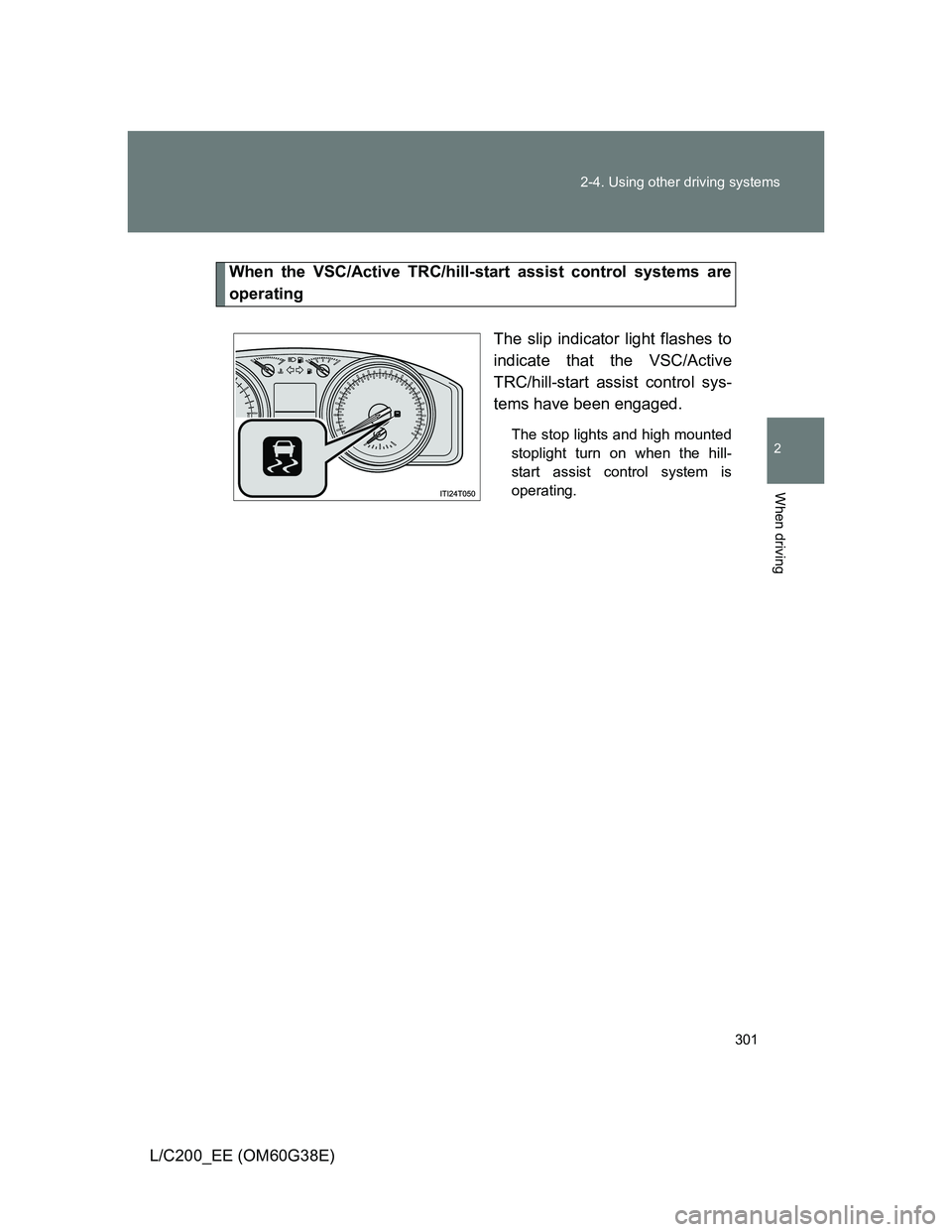
When the VSC/Active TRC/hill-start assist control systems are
operating
The slip indicator light flashes to
indicate that the VSC/Active
TRC/hill-start assist control sys-
tems have been engaged.
The stop lights and high mounted
stoplight turn on when the hill-
start assist control system is
operating.
Page 302 of 692
302 2-4. Using other driving systems
L/C200_EE (OM60G38E)
To disable Active TRC and/or VSC system
If the vehicle gets stuck in fresh snow or mud, Active TRC and VSC
system may reduce power from the engine to the wheels. You may
need to turn the system off to enable you to rock the vehicle in order
to free it.
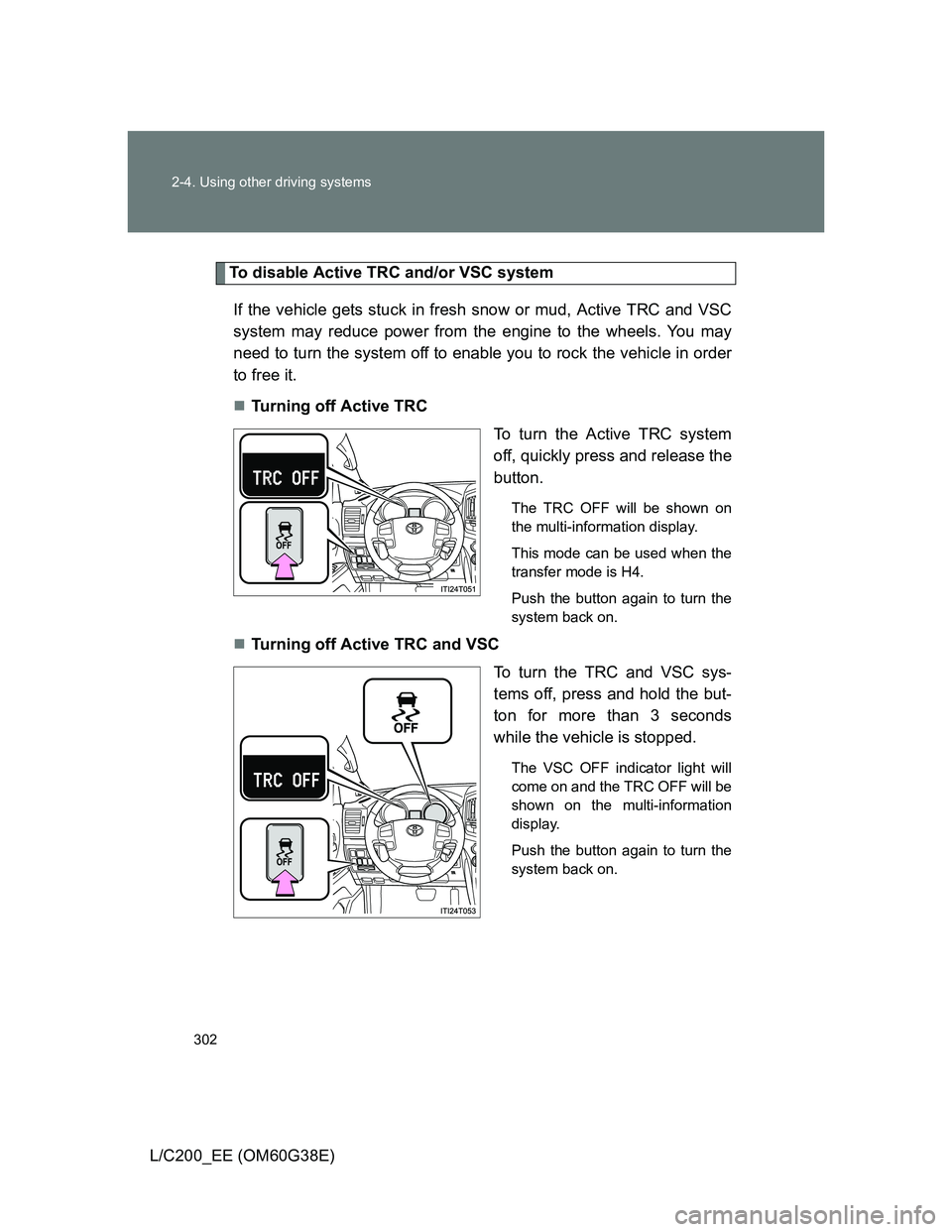
Turning off Active TRC
To turn the Active TRC system
off, quickly press and release the
button.
The TRC OFF will be shown on
the multi-information display.
This mode can be used when the
transfer mode is H4.
Push the button again to turn the
system back on.
Turning off Active TRC and VSC
To turn the TRC and VSC sys-
tems off, press and hold the but-
ton for more than 3 seconds
while the vehicle is stopped.
The VSC OFF indicator light will
come on and the TRC OFF will be
shown on the multi-information
display.
Push the button again to turn the
system back on.
Page 303 of 692
303 2-4. Using other driving systems
2
When driving
L/C200_EE (OM60G38E)
Automatic reactivation of Active TRC and VSC
Turning the “ENGINE START STOP” switch off after turning off the Active
TRC and VSC systems will automatically re-enable them.
Automatic Active TRC reactivation
If only the Active TRC system is turned off, the Active TRC system will turn
on when vehicle speed increases.
Automatic Active TRC and VSC reactivation
If the Active TRC and VSC systems are turned off, the systems will not turn
on even when vehicle speed increases.
If the brake system overheats
The brake system may overheat. In this case, a buzzer will sound, and the
“TRC OFF” will be displayed on the multi-information display, and Active
TRC and hill-start assist control will be temporarily inoperable. In this event,
stop the vehicle immediately in a safe place, and allow the brake system to
cool down sufficiently until the “TRC OFF” on the multi-information display
go off. (There is no problem with continuing normal driving.)
Sounds and vibrations caused by the Multi Terrain ABS, brake assist,
Active TRC, VSC, hill-start assist control and VGRS
A sound may be heard from the engine compartment when the engine is
started or just after the vehicle begins to move. This sound does not indi-
cate that a malfunction has occurred in any of these systems.
Any of the following conditions may occur when the above systems are
operating. None of these indicates that a malfunction has occurred.
• Vibrations may be felt through the vehicle body and steering.
• A motor sound may be heard after the vehicle comes to a stop.
• The brake pedal may pulsate slightly after the Multi Terrain ABS is acti-
vated.
• The brake pedal may move down slightly after the Multi Terrain ABS is
activated.
Page 304 of 692
304 2-4. Using other driving systems
L/C200_EE (OM60G38E)
Hill-start assist control is operational when
The shift lever is in “D” or “S”.
The brake pedal is not depressed.
VGRS is disabled in the following situations
During stopping or the steering wheel has been moved for a long time
while driving at lower speeds.
After the engine is restarted at less than -30°C (-22°F).
If you disconnect the battery with the steering wheel turned, the center
position of the steering wheel could be slightly and temporary changed.
To initialize the VGRS, drive for a short while.
CAUTION
Any of the following conditions may result in an accident which could cause
death or serious injury:
The Multi Terrain ABS does not operate effectively when
The limits of tire gripping performance have been exceeded.
The vehicle hydroplanes while driving at high speed on the wet or slick
road.
Stopping distance when the Multi Terrain ABS is operating may exceed
that of normal conditions
The Multi Terrain ABS is not designed to shorten the vehicle’s stopping dis-
tance. Always maintain a safe distance from the vehicle in front of you in the
following situations.
When driving on dirt, gravel or snow-covered roads
When driving with tire chains
When driving over bumps in the road
When driving over roads with potholes or uneven roads
Page 305 of 692
305 2-4. Using other driving systems
2
When driving
L/C200_EE (OM60G38E)
CAUTION
Active TRC may not operate effectively when
Directional control and power may not be achievable while driving on slip-
pery road surfaces, even if the Active TRC is operating.
Do not drive the vehicle in conditions where stability and power may be lost.
If the hill-start assist control does not operate effectively
Do not overly rely on the hill-start assist control. The hill-start assist control
may not operate effectively on steep inclines and roads covered in ice.
When Active TRC and VSC are off
Be especially careful and drive at a speed appropriate to the road condi-
tions. As there are systems to help to ensure vehicle stability and driving
force, do not turn off Active TRC and VSC unless necessary.
When the VSC is activated
The slip indicator light flashes. Always drive carefully.
Reckless driving may cause an accident. Exercise particular care when the
indicator light flashes.
Replacing tires
Make sure that all tires are of the same size, brand, tread pattern and total
load capacity. In addition, make sure that the tires are inflated to the speci-
fied tire pressure level.
The Multi Terrain ABS and VSC will not function correctly if different tires are
fitted on the vehicle.
Contact any authorized Toyota dealer or repairer, or another duly qualified
and equipped professional for further information when replacing tires or
wheels.
Handling of tires and suspension
Using tires with any kind of problem or modifying the suspension will affect
the driving assist systems, and may cause the system to malfunction.
Page 312 of 692
312 2-4. Using other driving systems
L/C200_EE (OM60G38E)
CAUTION
If the malfunction indicator light comes on
The malfunction indicator light comes on if you continue driving while the
DPF system warning message “DPF FULL ENGINE SERVICE REQUIRED”
appears on the display. In this event, damage may be caused to the vehicle
or an accident may occur. Have the vehicle inspected by any authorized Toy-
ota dealer or repairer, or another duly qualified and equipped professional,
immediately.
NOTICE
To prevent the DPF system from failing
Do not drive for long periods of time while the DPF system warning mes-
sage “DPF FULL ENGINE SERVICE REQUIRED” appears on the display
Do not use fuel other than the specified type
Do not use engine oil other than the recommended type
Do not modify the exhaust pipe
Page 320 of 692
320 2-5. Driving information
L/C200_EE (OM60G38E)
Before driving the vehicle
Perform the following according to the driving conditions.
Do not try to forcibly open a window or move a wiper that is
frozen. Pour warm water over the frozen area to melt the ice.
Wipe away the water immediately to prevent it from freezing.
To ensure proper operation of the climate control system fan,
remove any snow that has accumulated on the air inlet vents
in front of the windshield.
Check for and remove any excess ice or snow that may have
accumulated on the exterior lights, vehicle’s roof, chassis,
around the tires or on the brakes.
Remove any snow or mud from the bottom of your shoes
before getting in the vehicle.
When driving the vehicle
Accelerate the vehicle slowly, keep a safe distance between you
and the vehicle ahead, and drive at a reduced speed suitable to
road conditions.
When parking the vehicle
Park the vehicle and move the shift lever to “P” without setting
the parking brake. The parking brake may freeze up, preventing
it from being released. If necessary, block the wheels to prevent
inadvertent sliding or creeping.
Page 328 of 692
328 2-5. Driving information
L/C200_EE (OM60G38E)Wait for about 20 seconds until the rear vehicle height is low-
ered by the automatic leveling function.
Make sure the hitch is disconnected. If not, raise the hitch
higher and repeat steps 2 through 5.
Move the vehicle forward in the “LO” mode where the hitch
does not touch anything in the “N” (normal) mode.
Put the 4-Wheel AHC in the “N” mode.
Tire information
Increase the air pressure of the trailer tires in accordance with the total trailer
weight and according to the values recommended by the manufacturer of
your trailer.
Trailer lights
Please consult at any authorized dealer or repairer, or another duly qualified
and equipped professional when installing trailer lights, as incorrect installa-
tion may cause damage to the vehicle’s lights. Please take care to comply
with your state’s laws when installing trailer lights.
Break-in schedule
Toyota recommends that vehicles fitted with new power train components
should not be used for towing trailers for the first 800 km (500 miles).
Maintenance
Maintenance must be performed more frequently when using the vehicle
for towing due to the greater weight burden placed on the vehicle com-
pared to normal driving.
Retighten all bolts securing the hitching ball and bracket after towing for
approximately 1000 km (600 miles).
STEP5
STEP6
STEP7
STEP8