warning TOYOTA LAND CRUISER 2012 User Guide
[x] Cancel search | Manufacturer: TOYOTA, Model Year: 2012, Model line: LAND CRUISER, Model: TOYOTA LAND CRUISER 2012Pages: 692, PDF Size: 29.3 MB
Page 207 of 692
207
2-2. Instrument cluster
2
When driving
L/C200_EE (OM60G38E)
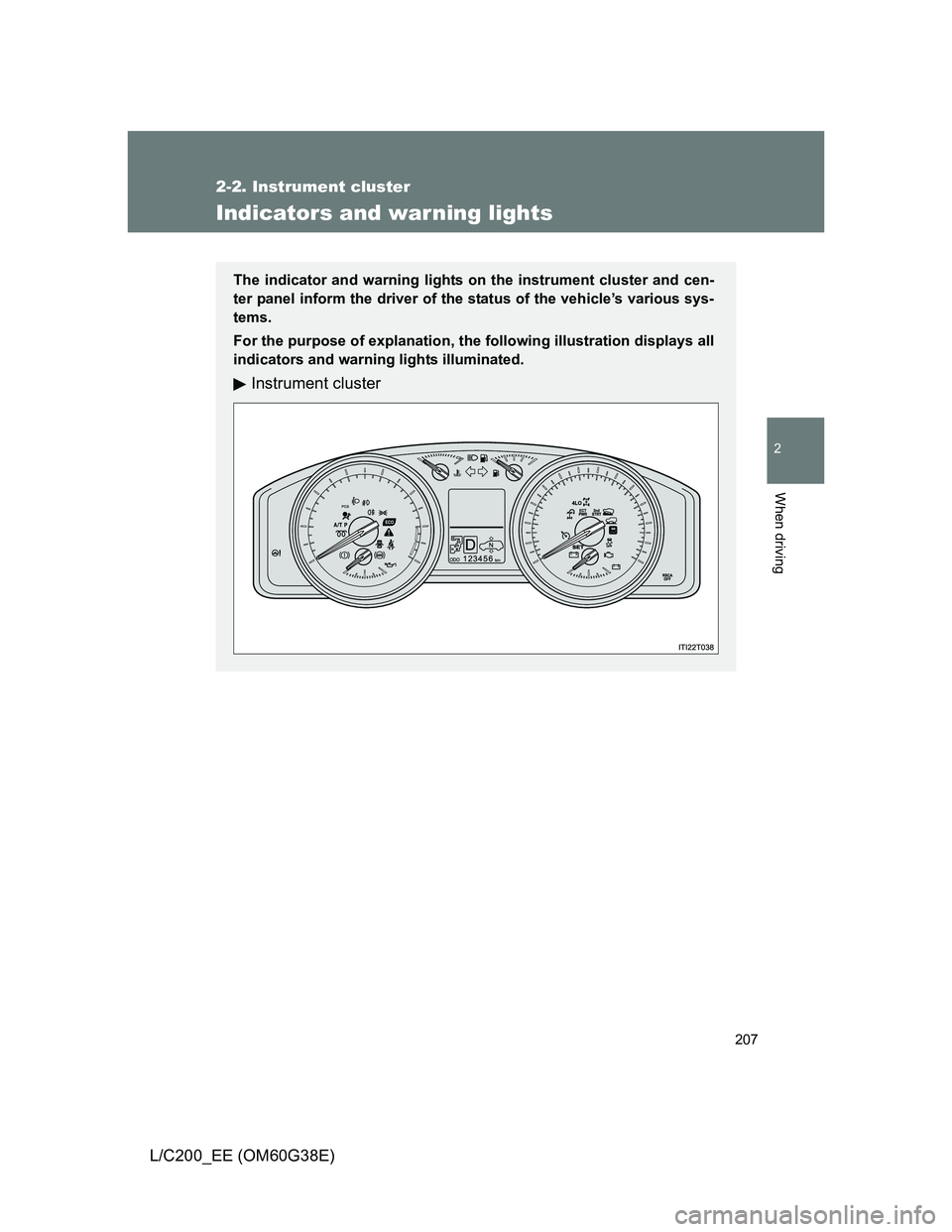
Indicators and warning lights
The indicator and warning lights on the instrument cluster and cen-
ter panel inform the driver of the status of the vehicle’s various sys-
tems.
For the purpose of explanation, the following illustration displays all
indicators and warning lights illuminated.
Instrument cluster
Page 210 of 692
210 2-2. Instrument cluster
L/C200_EE (OM60G38E)
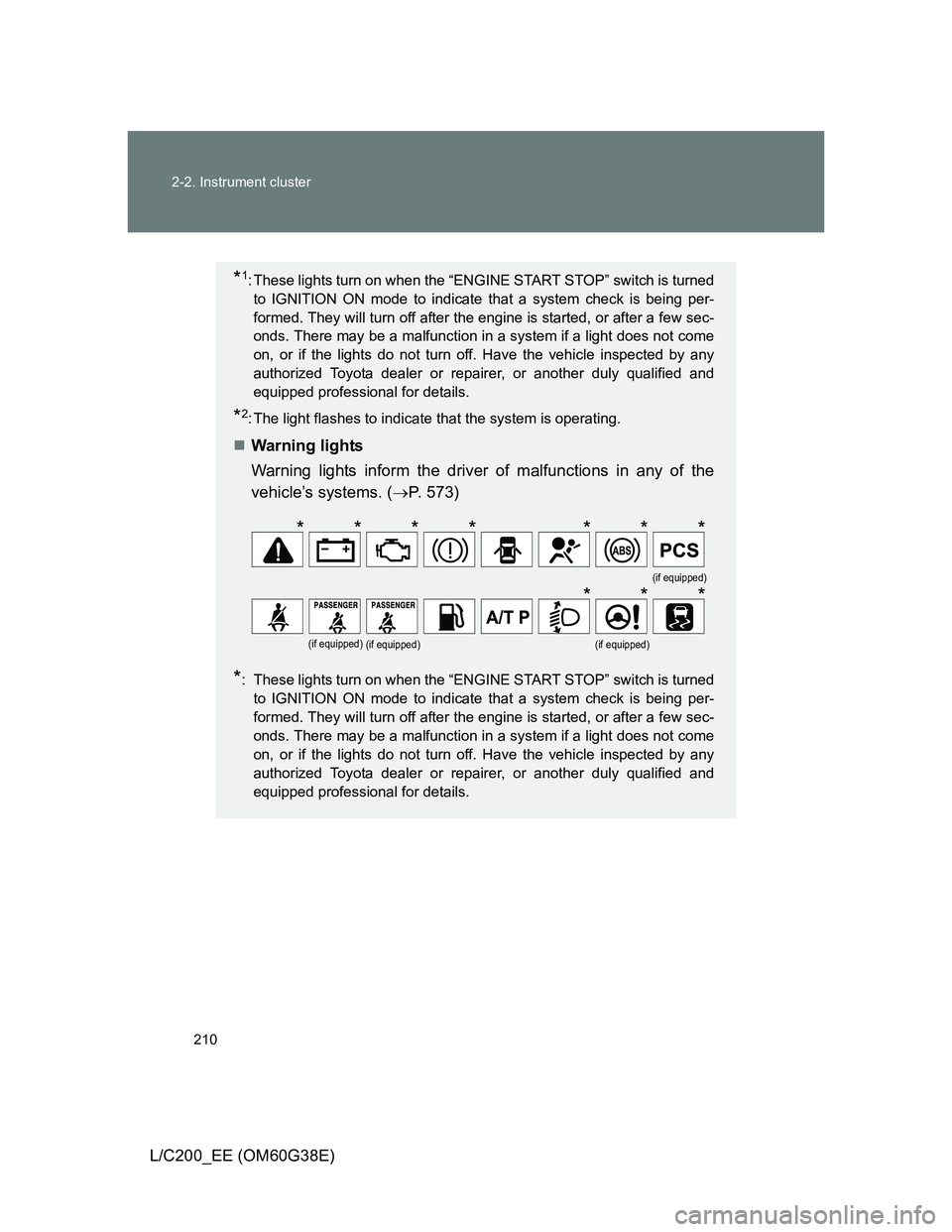
*1: These lights turn on when the “ENGINE START STOP” switch is turned
to IGNITION ON mode to indicate that a system check is being per-
formed. They will turn off after the engine is started, or after a few sec-
onds. There may be a malfunction in a system if a light does not come
on, or if the lights do not turn off. Have the vehicle inspected by any
authorized Toyota dealer or repairer, or another duly qualified and
equipped professional for details.
*2: The light flashes to indicate that the system is operating.
Warning lights
Warning lights inform the driver of malfunctions in any of the
vehicle’s systems. (P. 573)
*: These lights turn on when the “ENGINE START STOP” switch is turned
to IGNITION ON mode to indicate that a system check is being per-
formed. They will turn off after the engine is started, or after a few sec-
onds. There may be a malfunction in a system if a light does not come
on, or if the lights do not turn off. Have the vehicle inspected by any
authorized Toyota dealer or repairer, or another duly qualified and
equipped professional for details.
(if equipped)
(if equipped)(if equipped)(if equipped)
*******
***
Page 211 of 692
211 2-2. Instrument cluster
2
When driving
L/C200_EE (OM60G38E)
CAUTION
If a safety system warning light does not come on
Should a safety system light such as Multi Terrain ABS and the SRS airbag
warning light not come on when you start the engine, this could mean that
these systems are not available to help protect you in an accident, which
could result in death or serious injury. Have the vehicle inspected by any
authorized Toyota dealer or repairer, or another duly qualified and equipped
professional, immediately if this occurs.
Page 213 of 692
213 2-2. Instrument cluster
2
When driving
L/C200_EE (OM60G38E)
Shift position and shift range (P. 194)
Displays the selected shift position or selected shift range.
Warning messages (P. 579)
Automatically displayed when a malfunction occurs in one of the vehi-
cle’s system.
Page 235 of 692
235 2-4. Using other driving systems
2
When driving
L/C200_EE (OM60G38E)
Cruise control can be set when
Vehicles with an automatic transmission: The shift lever is in the “D” or
more than range “4” of “S” has been selected.
Vehicle speed is above approximately 40 km/h (25 mph).
Accelerating after setting the vehicle speed
The vehicle can be accelerated normally. After acceleration, the set
speed resumes.
Even without canceling the cruise control, the set speed can be
increased by first accelerating the vehicle to the desired speed and then
pushing the lever down to set the new speed.
Automatic cruise control cancelation
Cruise control will stop maintaining the vehicle speed in any of the following
situations.
Actual vehicle speed falls more than approximately 16 km/h (10 mph)
below the preset vehicle speed.
At this time, the memorized set speed is not retained.
Actual vehicle speed is below approximately 40 km/h (25 mph).
VSC is activated (if equipped).
The switching operation continues for 5 seconds or more after the center
differential lock switch has been operated.
If the warning message for the cruise control is shown on the multi-
information display
Press the “ON-OFF” button once to deactivate the system, and then press
the button again to reactivate the system.
If the cruise control speed cannot be set or if the cruise control cancels
immediately after being activated, there may be a malfunction in the cruise
control system. Have the vehicle inspected by any authorized Toyota dealer
or repairer, or another duly qualified and equipped professional.
Page 241 of 692
241 2-4. Using other driving systems
2
When driving
L/C200_EE (OM60G38E)Buzzer operation and distance to an obstacle
A beep sounds when the corner sensors and rear center sensors
are operating.
The buzzer beeps faster as the vehicle approaches an obstacle.
When the vehicle comes within the following distance of the obsta-
cle, the buzzer sounds continuously:
• Front corner sensors: Approximately 25 cm (0.8 ft.)
• Rear corner sensors: Approximately 30 cm (1.0 ft.)
• Rear center sensors: Approximately 50 cm (1.6 ft.)
When 2 or more obstacles are detected simultaneously, the beep
system responds to the nearest obstacle. If one or both come
within the above distances, the beep will repeat a long tone, fol-
lowed by fast beeps.
You can change the volume of the warning beeps. (P. 243)
Page 243 of 692
243 2-4. Using other driving systems
2
When driving
L/C200_EE (OM60G38E)
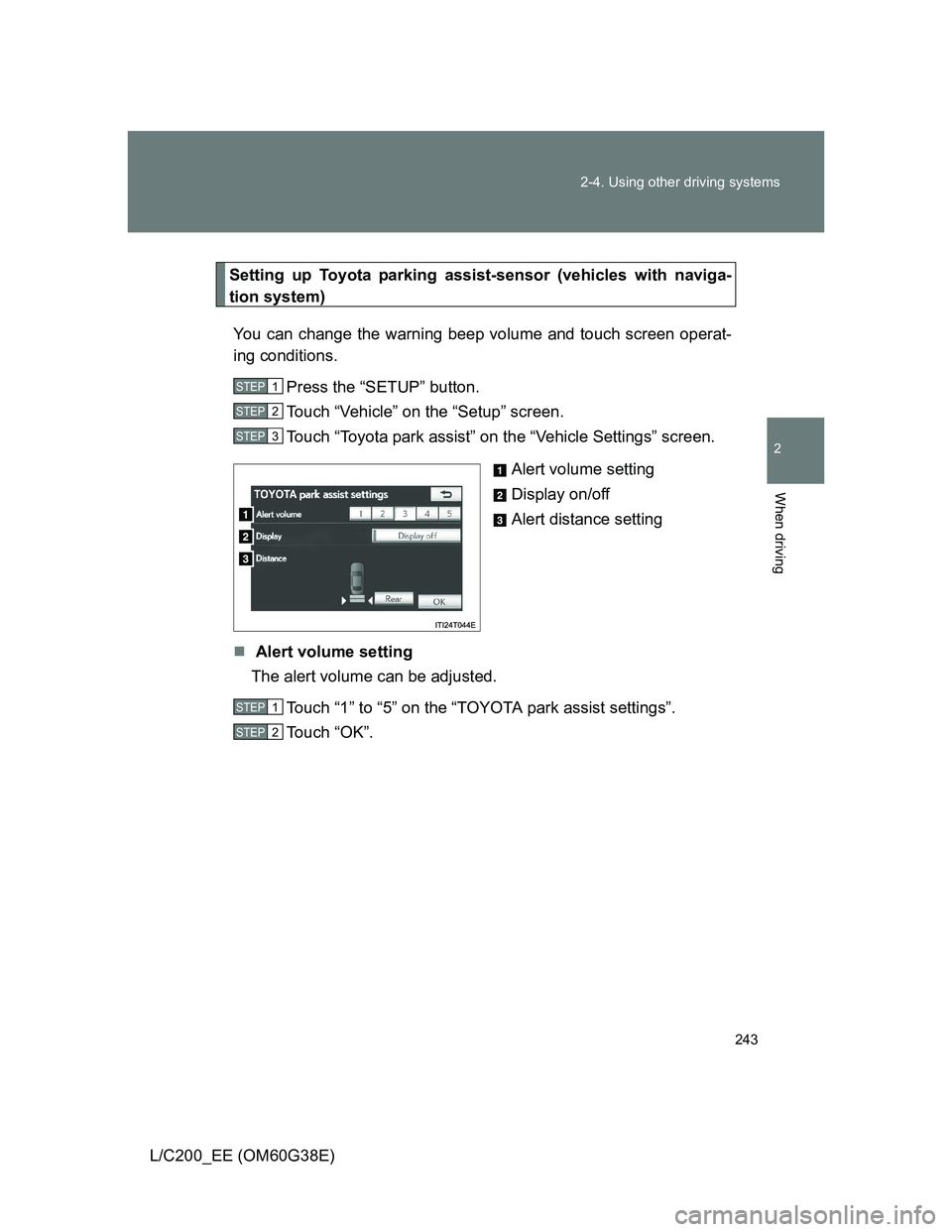
Setting up Toyota parking assist-sensor (vehicles with naviga-
tion system)
You can change the warning beep volume and touch screen operat-
ing conditions.
Press the “SETUP” button.
Touch “Vehicle” on the “Setup” screen.
Touch “Toyota park assist” on the “Vehicle Settings” screen.
Alert volume setting
Display on/off
Alert distance setting
Alert volume setting
The alert volume can be adjusted.
Touch “1” to “5” on the “TOYOTA park assist settings”.
Touch “OK”.
STEP1
STEP2
STEP3
STEP1
STEP2
Page 244 of 692
244 2-4. Using other driving systems
L/C200_EE (OM60G38E)Display on/off setting
On or off can be selected for Toyota parking assist-sensor display.
Touch “Display Off”.
When the “Display Off” indicator is turned on, the display of Toyota
parking assist-sensor will be off. Touch “Display Off” again to turn the
display of Toyota parking assist-sensor on.
Touch “OK”.
Alert distance setting
Front or rear center sensors display and tone indication can be set.
Touch “Rear”.
Long distance or short distance can be selected.
Touch “OK”.
The Toyota parking assist-sensor can be operated when
Front corner sensors:
• The “ENGINE START STOP” switch is in IGNITION ON mode.
• The shift lever is in a position other than “P”.
• The vehicle speed is less than approximately 10 km/h (6 mph).
Rear corner and rear center sensors:
• The “ENGINE START STOP” switch is in IGNITION ON mode.
• The shift lever is in “R”.
Toyota parking assist-sensor display
When an obstacle is detected while the Toyota parking assist monitor or
Multi-terrain monitor is in use, the warning indicator will appear in the top
right of the screen even if the display setting has been set to off.
STEP1
STEP2
STEP1
STEP2
Page 246 of 692
246 2-4. Using other driving systems
L/C200_EE (OM60G38E)
The shape of the obstacle may prevent the sensor from detecting it. Pay
particular attention to the following obstacles:
• Wires, fences, ropes, etc.
• Cotton, snow and other materials that absorb sound waves
• Sharply-angled objects
• Low obstacles
• Tall obstacles with upper sections projecting outwards in the direction
of your vehicle
The following situations may occur during use.
• Depending on the shape of the obstacle and other factors, the detec-
tion distance may shorten, or detection may be impossible.
• Obstacles may not be detected if they are too close to the sensor
• There will be a short delay between obstacle detection and display.
Even at slow speeds, there is a possibility that the obstacle will come
within the sensor’s detection areas before the display is shown and the
warning beep sounds.
• Thin posts or objects lower than the sensor may not be detected for
collision when approached, even if they have been detected once.
• It might be difficult to hear beeps due to the volume of audio system or
air flow noise of air conditioning system.
If a message is displayed on the multi-information display
P. 579
Page 255 of 692
255 2-4. Using other driving systems
2
When driving
L/C200_EE (OM60G38E)
Propeller shaft noise
If the vehicle height is adjusted on a slope, or with the shift lever in a position
other than “P” or “N” while the vehicle is stopped, you may hear a sound
caused by the expansion and contraction of the propeller shaft. This does
not indicate a malfunction.
4-Wheel AHC failure warning
If a malfunction occurs in the 4-Wheel AHC, normal mode is automatically
selected. However, the system may not switch to normal mode depending
on the location of the malfunction.
The warning message is displayed on the multi-information display, and the
4-Wheel AHC cannot be activated until the malfunction is corrected.
Stop the engine and start it again. If the warning message turns off, the sys-
tem is operating correctly. If the warning message continues to be displayed,
have the vehicle checked at any authorized Toyota dealer or repairer, or
another duly qualified and equipped professional as soon as possible.