ECU TOYOTA LAND CRUISER 2012 Service Manual
[x] Cancel search | Manufacturer: TOYOTA, Model Year: 2012, Model line: LAND CRUISER, Model: TOYOTA LAND CRUISER 2012Pages: 692, PDF Size: 29.3 MB
Page 428 of 692
428 3-4. Using the hands-free system (for cellular phone)
L/C200_EE (OM60G38E)
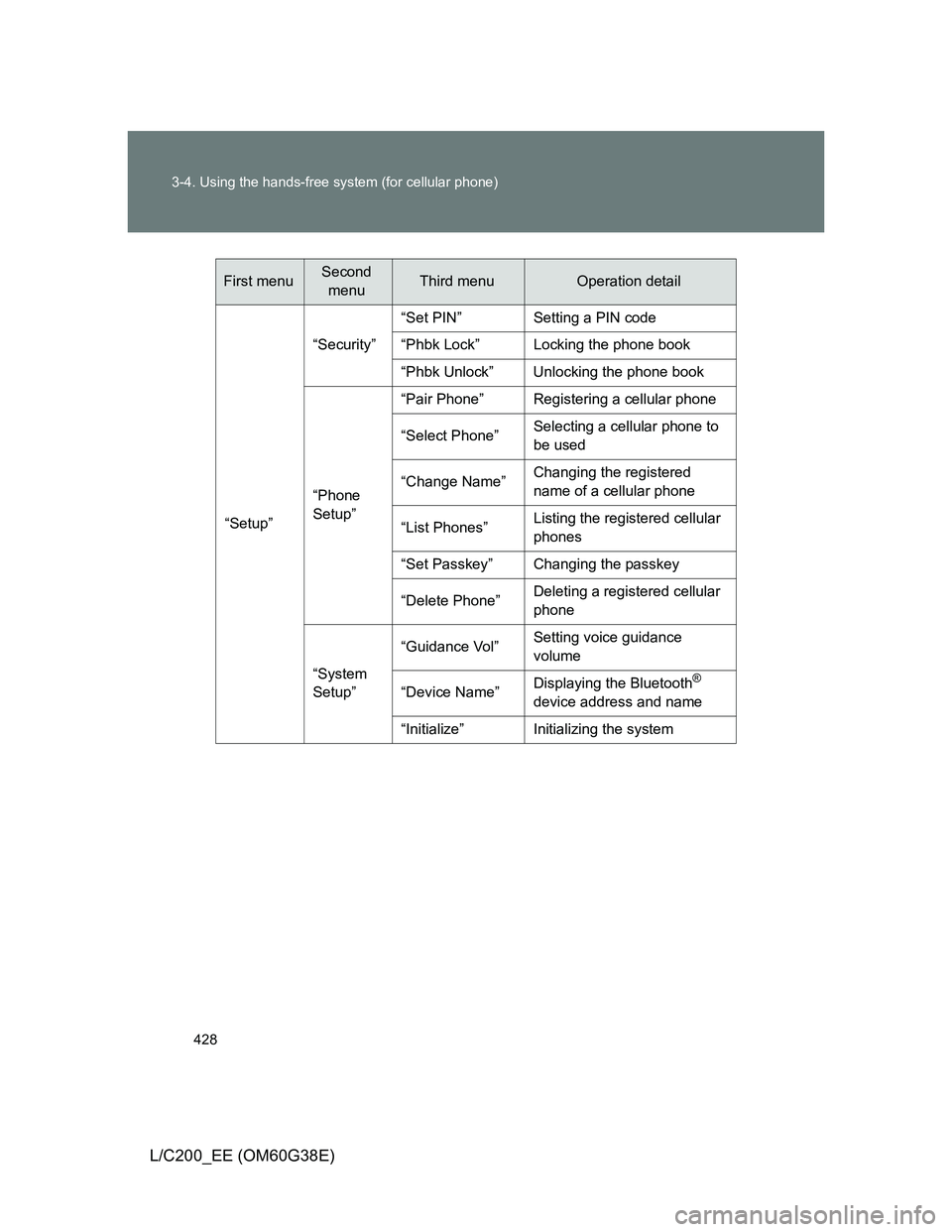
“Setup”“Security”“Set PIN” Setting a PIN code
“Phbk Lock” Locking the phone book
“Phbk Unlock” Unlocking the phone book
“Phone
Setup”“Pair Phone” Registering a cellular phone
“Select Phone”Selecting a cellular phone to
be used
“Change Name”Changing the registered
name of a cellular phone
“List Phones”Listing the registered cellular
phones
“Set Passkey” Changing the passkey
“Delete Phone”Deleting a registered cellular
phone
“System
Setup”“Guidance Vol”Setting voice guidance
volume
“Device Name”Displaying the Bluetooth
®
device address and name
“Initialize” Initializing the system
First menuSecond
menuThird menuOperation detail
Page 438 of 692
438
3-4. Using the hands-free system (for cellular phone)
L/C200_EE (OM60G38E)
Security and system setup
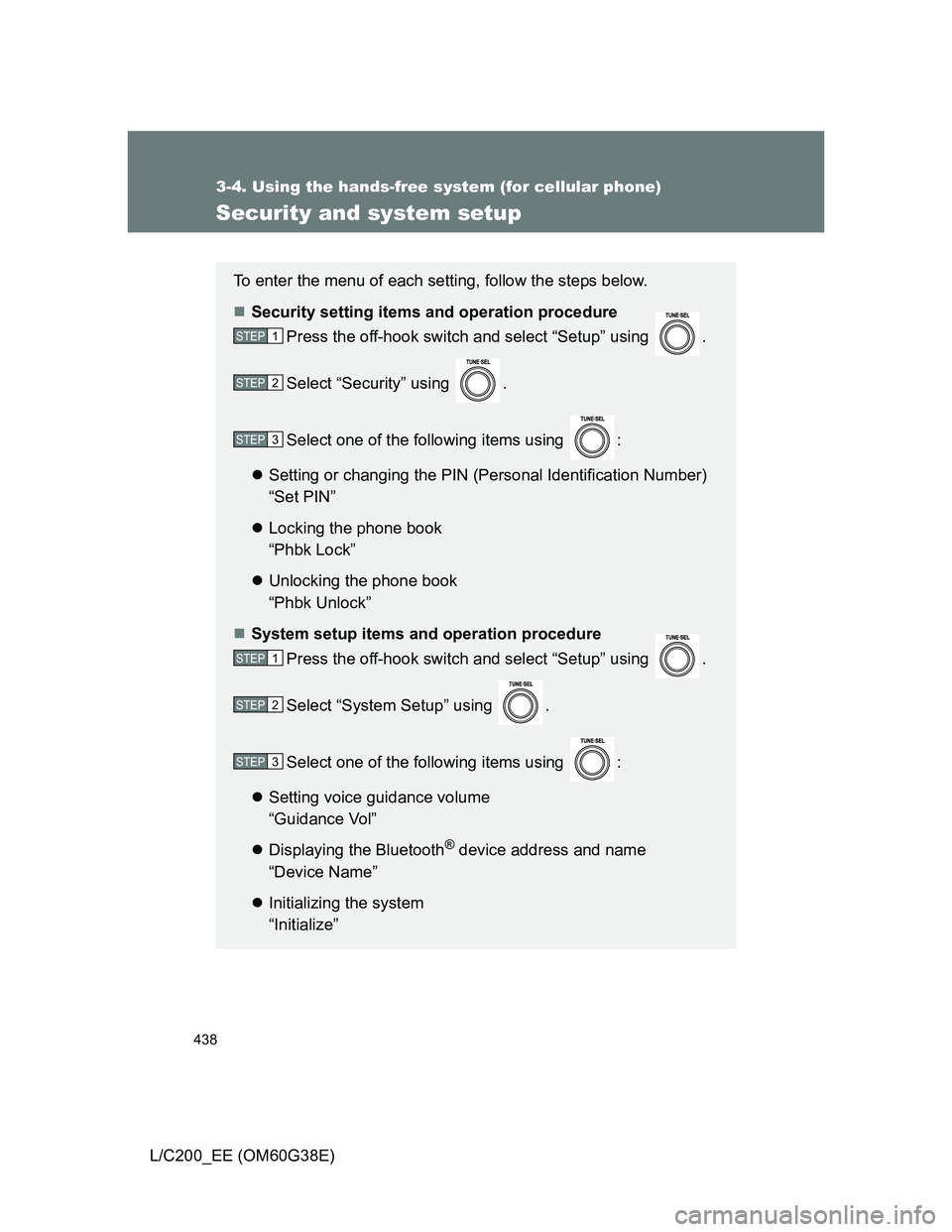
To enter the menu of each setting, follow the steps below.
Security setting items and operation procedure
Press the off-hook switch and select “Setup” using .
Select “Security” using .
Select one of the following items using :
Setting or changing the PIN (Personal Identification Number)
“Set PIN”
Locking the phone book
“Phbk Lock”
Unlocking the phone book
“Phbk Unlock”
System setup items and operation procedure
Press the off-hook switch and select “Setup” using .
Select “System Setup” using .
Select one of the following items using :
Setting voice guidance volume
“Guidance Vol”
Displaying the Bluetooth
® device address and name
“Device Name”
Initializing the system
“Initialize”
STEP1
STEP2
STEP3
STEP1
STEP2
STEP3
Page 441 of 692
441 3-4. Using the hands-free system (for cellular phone)
3
Interior features
L/C200_EE (OM60G38E)
Initialization
The following data in the system can be initialized:
• Phone book
• Outgoing and incoming history
• Speed dials
• Registered cellular phone data
• Security code
• Registered Bluetooth
® enabled portable player data
• Passkey for the cellular phones
• Passkey for the Bluetooth
® audio players
• Guidance volume
• Receiver volume
• Ring tone volume
Once the initialization has been completed, the data cannot be restored
to its original state.
When the phone book is locked
The following functions cannot be used:
Dialing by inputting a name
Speed dialing
Dialing a number stored in the call history memory
Using the phone book
Page 482 of 692
482
3-7. Other interior features
L/C200_EE (OM60G38E)
Floor mats
Use only floor mats designed specifically for vehicles of the same
model and model year as your vehicle. Fix them securely in place
onto the carpet.
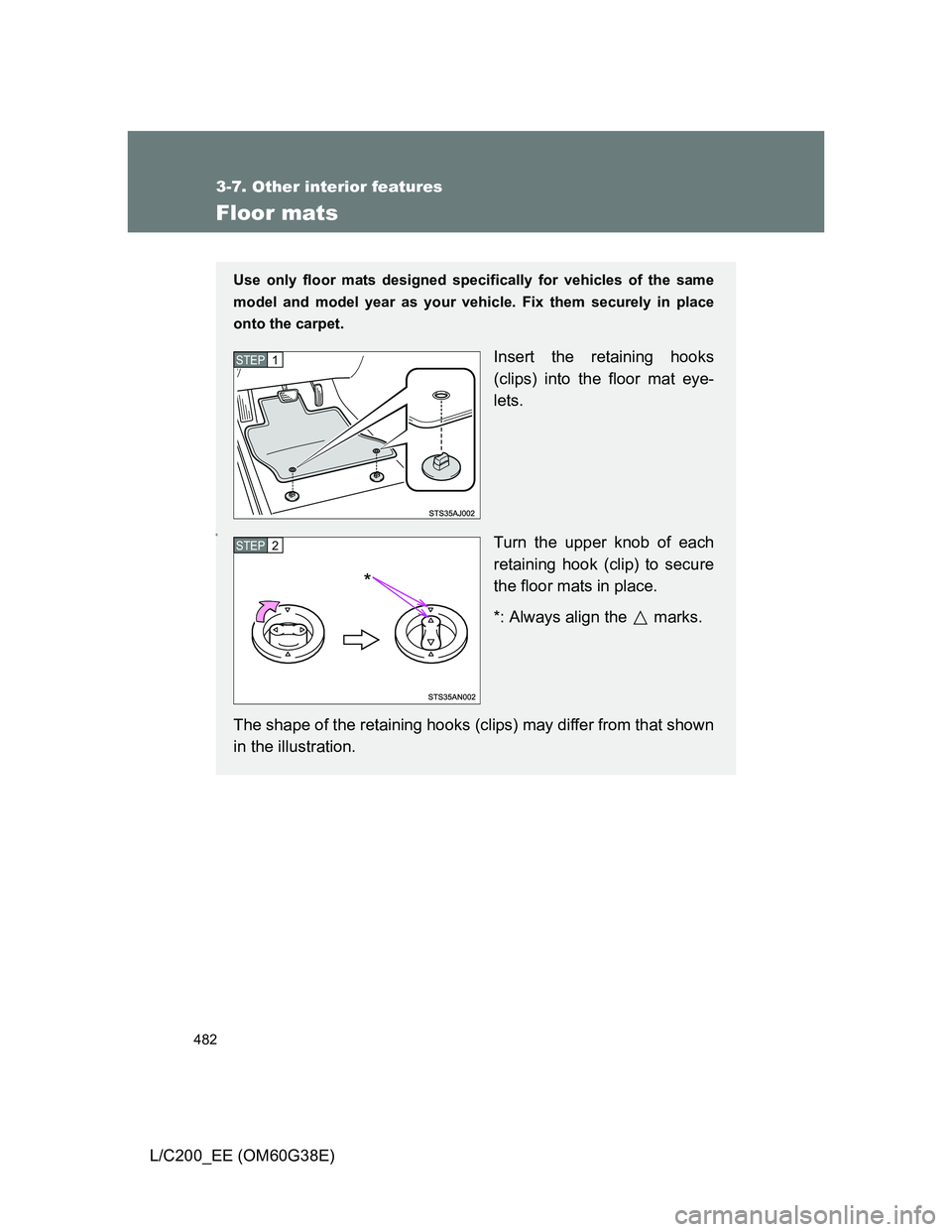
Insert the retaining hooks
(clips) into the floor mat eye-
lets.
0Turn the upper knob of each
retaining hook (clip) to secure
the floor mats in place.
*: Always align the marks.
The shape of the retaining hooks (clips) may differ from that shown
in the illustration.
STEP1
STEP2
*
Page 483 of 692
483 3-7. Other interior features
3
Interior features
L/C200_EE (OM60G38E)
CAUTION
Observe the following precautions.
Failure to do so may cause the driver’s floor mat to slip, possibly interfering
with the pedals while driving. An unexpectedly high speed may result or it may
become difficult to stop the vehicle, leading to a serious accident.
When installing the driver’s floor mat
Do not use floor mats designed for other models or different model year
vehicles, even if they are Toyota Genuine floor mats.
Only use floor mats designed for the driver’s seat.
Always install the floor mat securely using the retaining hooks (clips) pro-
vided.
Do not use two or more floor mats on top of each other.
Do not place the floor mat bottom-side up or upside-down.
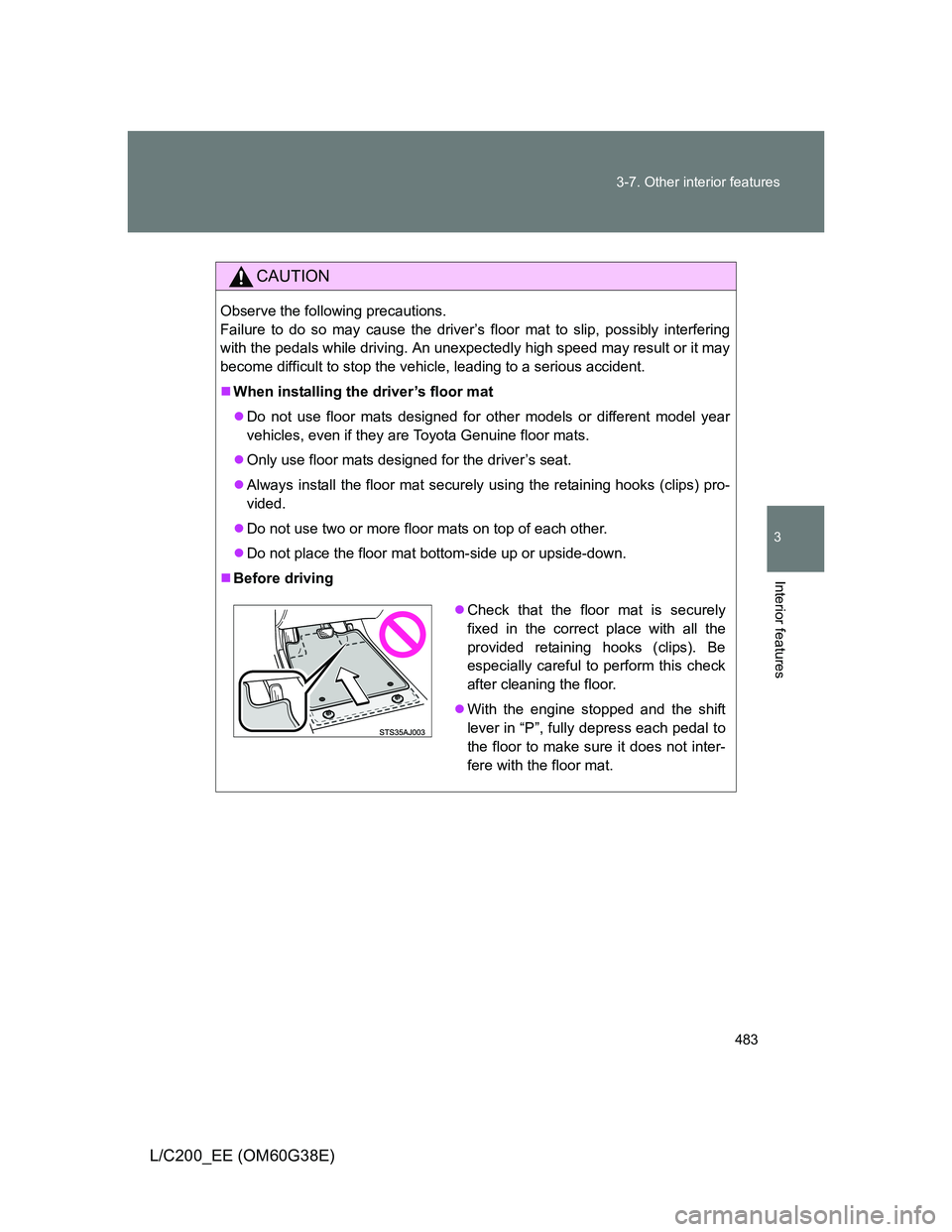
Before driving
Check that the floor mat is securely
fixed in the correct place with all the
provided retaining hooks (clips). Be
especially careful to perform this check
after cleaning the floor.
With the engine stopped and the shift
lever in “P”, fully depress each pedal to
the floor to make sure it does not inter-
fere with the floor mat.
Page 484 of 692
484
3-7. Other interior features
L/C200_EE (OM60G38E)
Luggage compar tment features
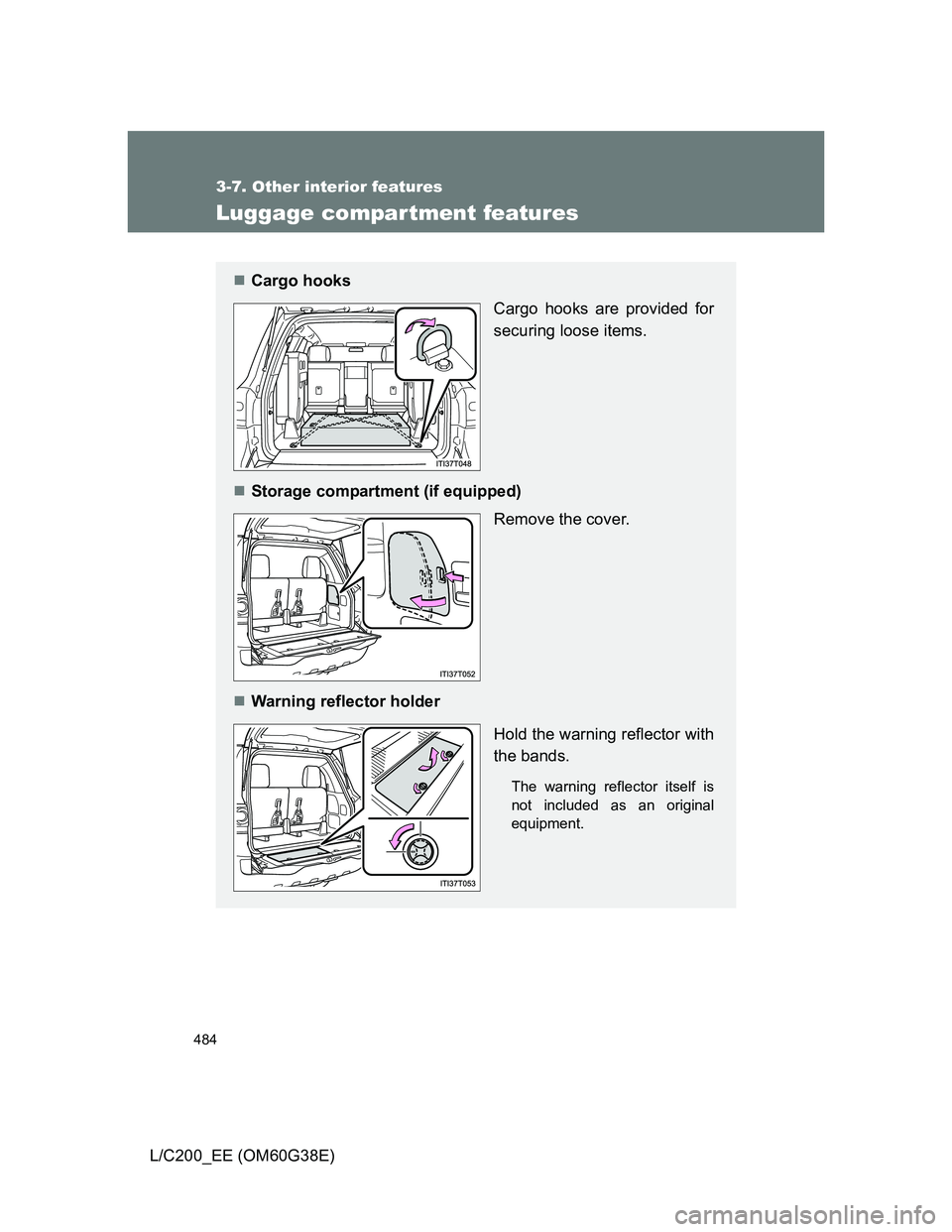
Cargo hooks
Cargo hooks are provided for
securing loose items.
Storage compartment (if equipped)
Remove the cover.
Warning reflector holder
Hold the warning reflector with
the bands.
The warning reflector itself is
not included as an original
equipment.
Page 504 of 692
504 4-3. Do-it-yourself maintenance
L/C200_EE (OM60G38E)
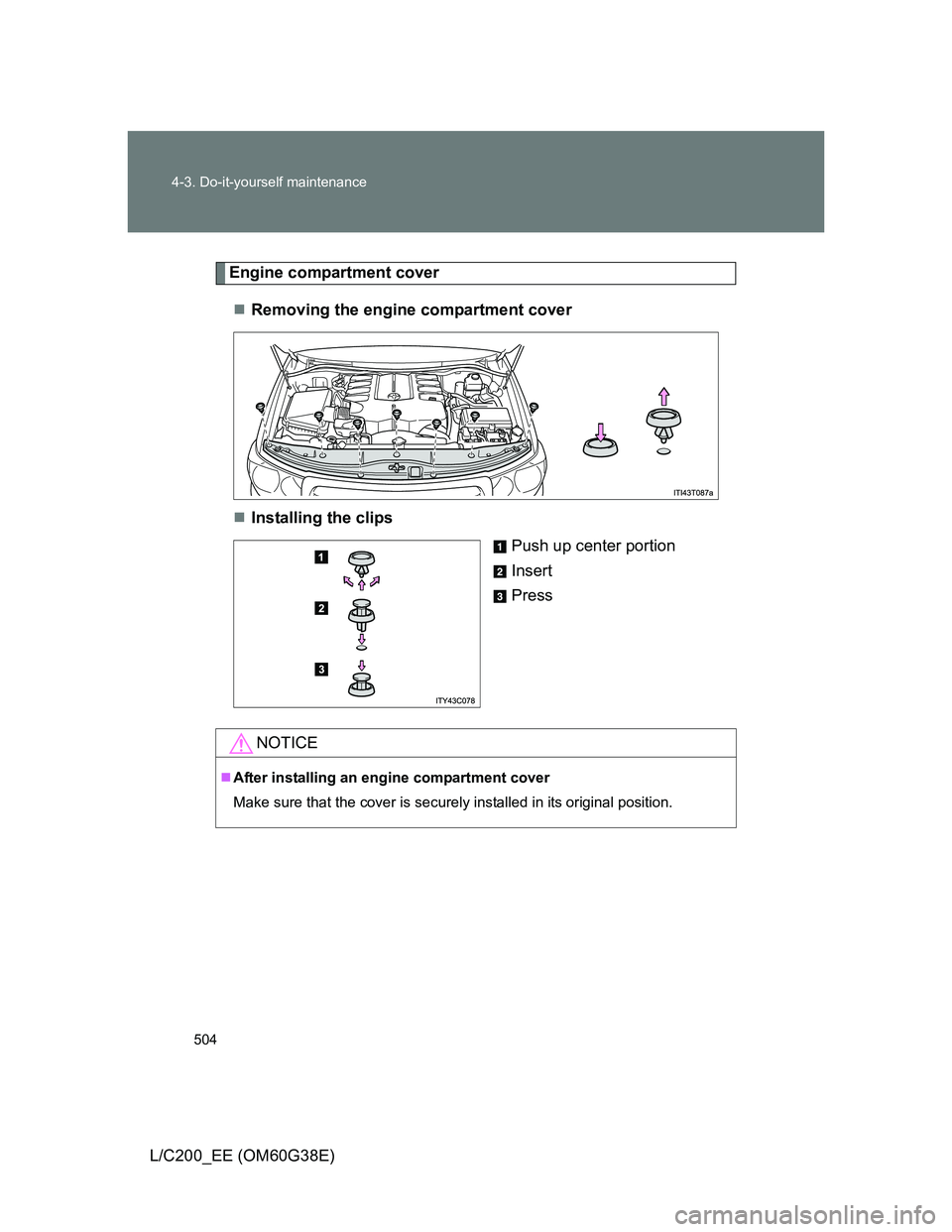
Engine compartment cover
Removing the engine compartment cover
Installing the clips
Push up center portion
Insert
Press
NOTICE
After installing an engine compartment cover
Make sure that the cover is securely installed in its original position.
Page 512 of 692
512 4-3. Do-it-yourself maintenance
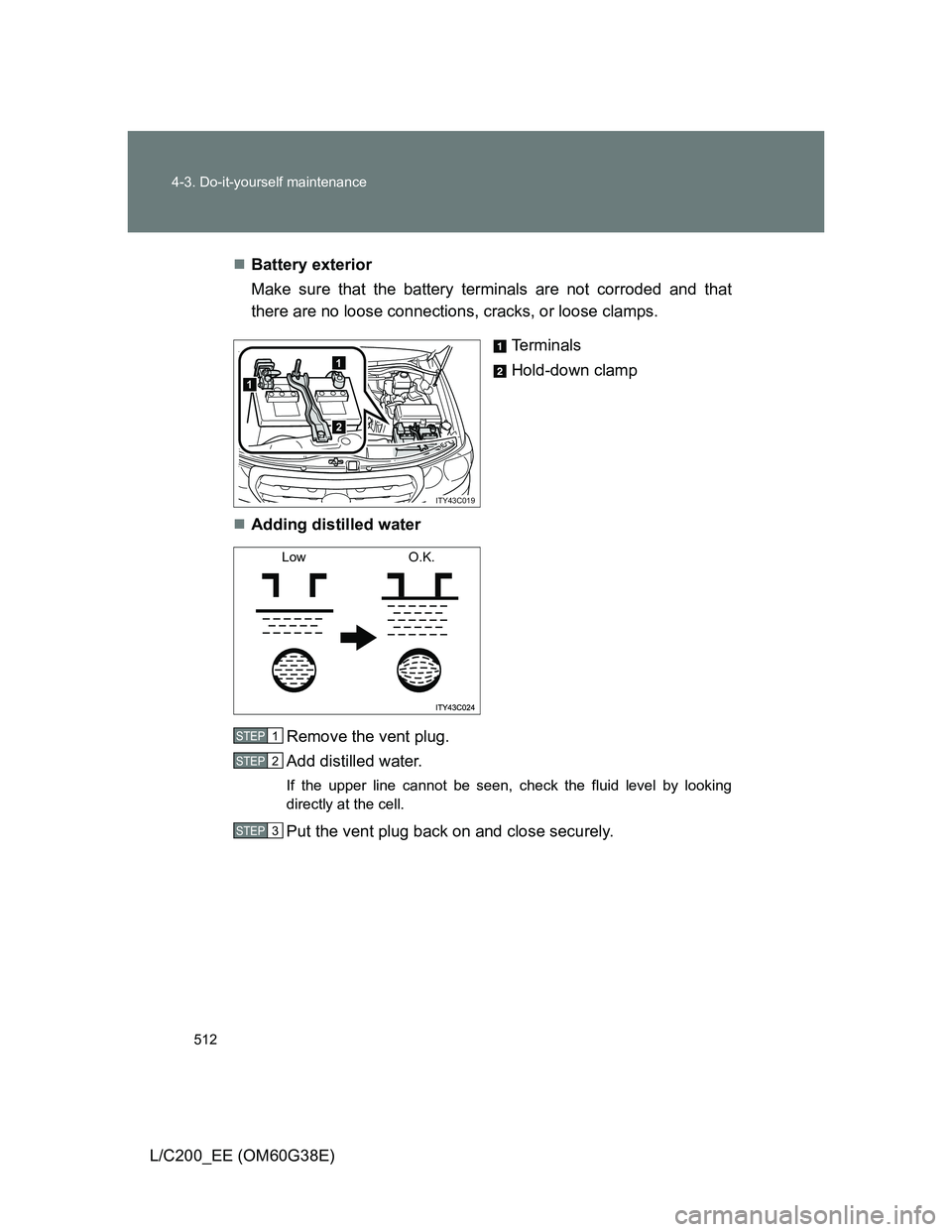
L/C200_EE (OM60G38E)Battery exterior
Make sure that the battery terminals are not corroded and that
there are no loose connections, cracks, or loose clamps.
Terminals
Hold-down clamp
Adding distilled water
Remove the vent plug.
Add distilled water.
If the upper line cannot be seen, check the fluid level by looking
directly at the cell.
Put the vent plug back on and close securely.
1
1
2
ITY43C019
Low O.K.
STEP1
STEP2
STEP3
Page 537 of 692
537 4-3. Do-it-yourself maintenance
4
Maintenance and care
L/C200_EE (OM60G38E)
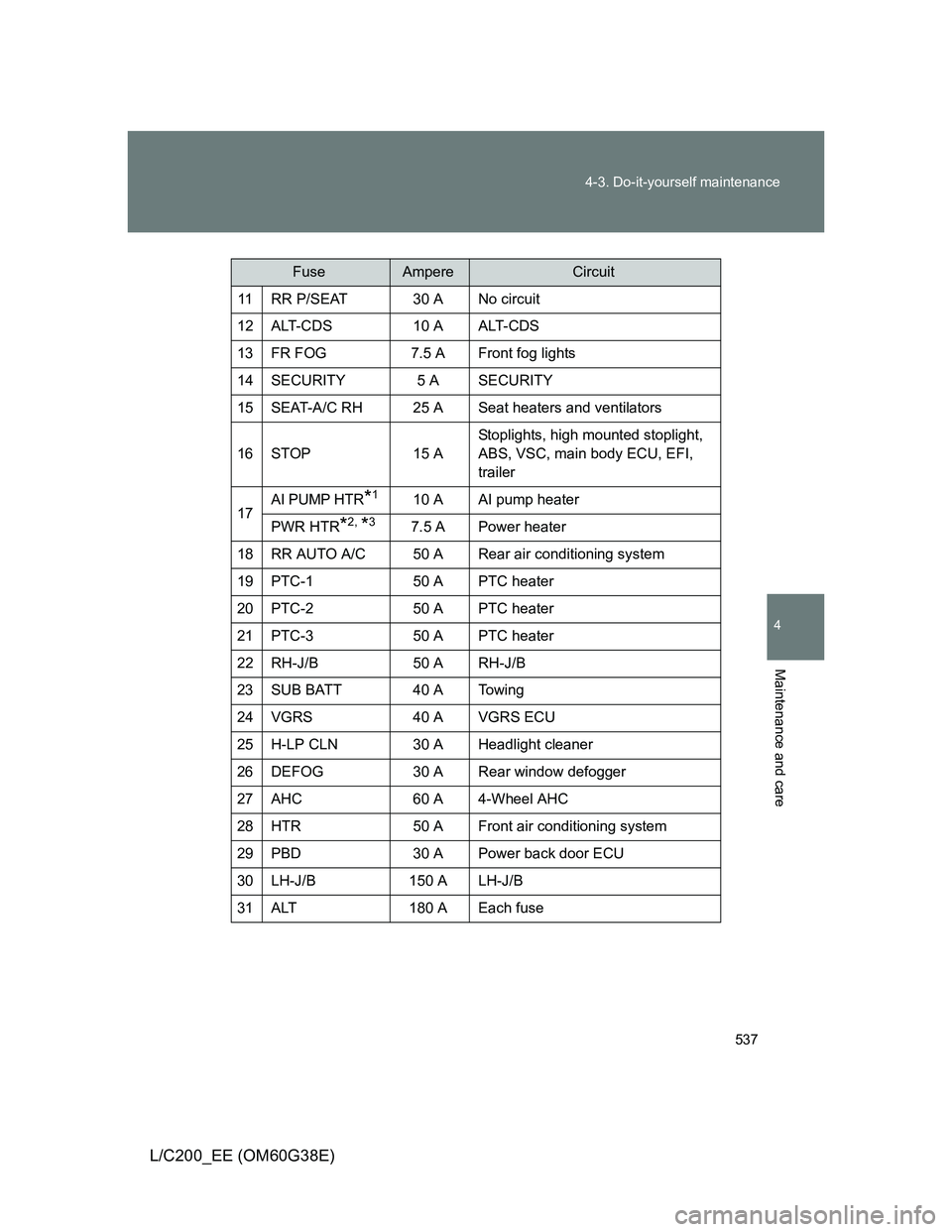
11 RR P/SEAT 30 A No circuit
12 ALT-CDS 10 A ALT-CDS
13 FR FOG 7.5 A Front fog lights
14 SECURITY 5 A SECURITY
15 SEAT-A/C RH 25 A Seat heaters and ventilators
16 STOP 15 AStoplights, high mounted stoplight,
ABS, VSC, main body ECU, EFI,
trailer
17
AI PUMP HTR*110 A AI pump heater
PWR HTR
*2, *37.5 A Power heater
18 RR AUTO A/C 50 A Rear air conditioning system
19 PTC-1 50 A PTC heater
20 PTC-2 50 A PTC heater
21 PTC-3 50 A PTC heater
22 RH-J/B 50 A RH-J/B
23 SUB BATT 40 A Towing
24 VGRS 40 A VGRS ECU
25 H-LP CLN 30 A Headlight cleaner
26 DEFOG 30 A Rear window defogger
27 AHC 60 A 4-Wheel AHC
28 HTR 50 A Front air conditioning system
29 PBD 30 A Power back door ECU
30 LH-J/B 150 A LH-J/B
31 ALT 180 A Each fuse
FuseAmpereCircuit
Page 538 of 692
538 4-3. Do-it-yourself maintenance
L/C200_EE (OM60G38E)
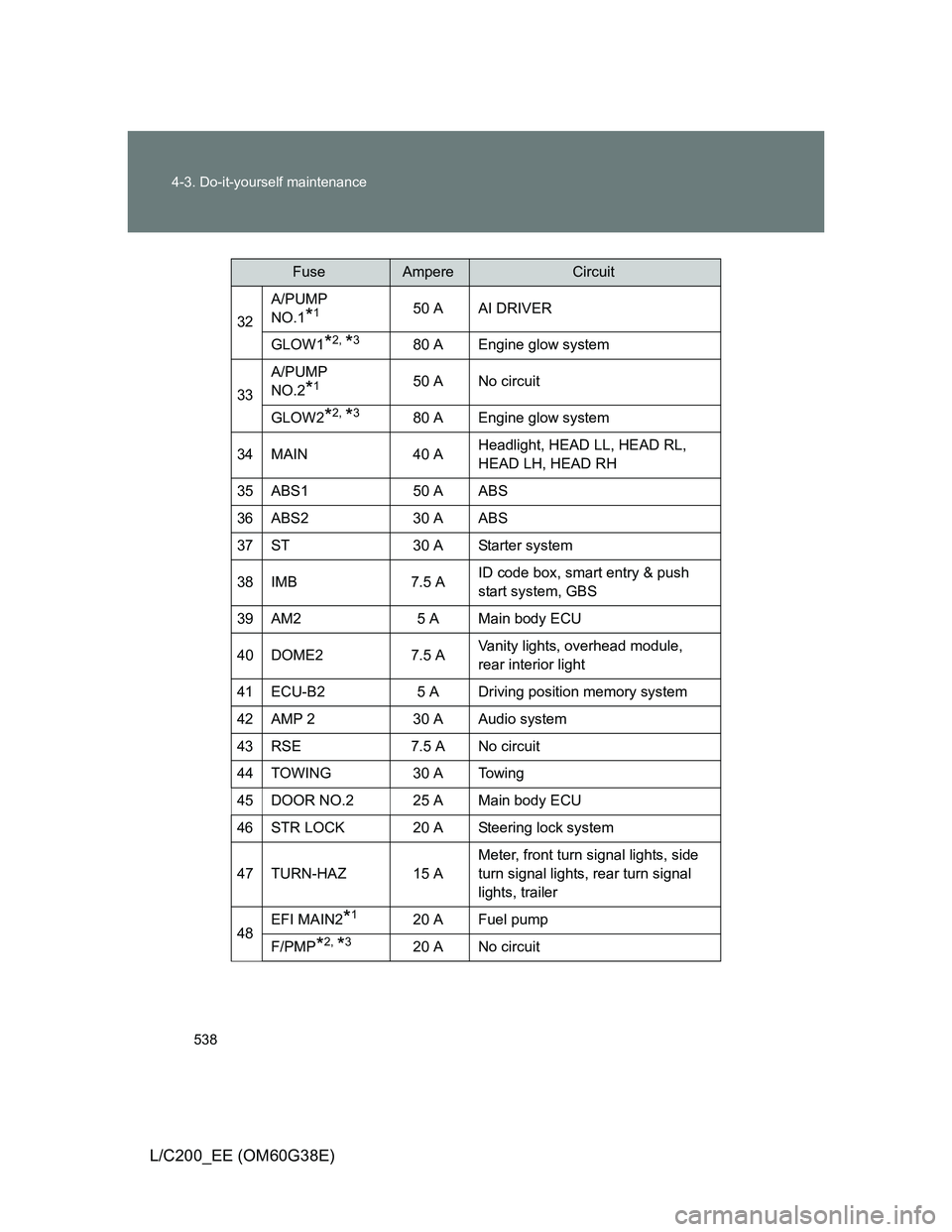
32A/PUMP
NO.1*150 A AI DRIVER
GLOW1
*2, *380 A Engine glow system
33A/PUMP
NO.2
*150 A No circuit
GLOW2
*2, *380 A Engine glow system
34 MAIN 40 AHeadlight, HEAD LL, HEAD RL,
HEAD LH, HEAD RH
35 ABS1 50 A ABS
36 ABS2 30 A ABS
37 ST 30 A Starter system
38 IMB 7.5 AID code box, smart entry & push
start system, GBS
39 AM2 5 A Main body ECU
40 DOME2 7.5 AVanity lights, overhead module,
rear interior light
41 ECU-B2 5 A Driving position memory system
42 AMP 2 30 A Audio system
43 RSE 7.5 A No circuit
44 TOWING 30 A Towing
45 DOOR NO.2 25 A Main body ECU
46 STR LOCK 20 A Steering lock system
47 TURN-HAZ 15 AMeter, front turn signal lights, side
turn signal lights, rear turn signal
lights, trailer
48EFI MAIN2*120 A Fuel pump
F/PMP*2, *320 A No circuit
FuseAmpereCircuit