key TOYOTA LAND CRUISER 2012 Workshop Manual
[x] Cancel search | Manufacturer: TOYOTA, Model Year: 2012, Model line: LAND CRUISER, Model: TOYOTA LAND CRUISER 2012Pages: 692, PDF Size: 29.3 MB
Page 590 of 692
590 5-2. Steps to take in an emergency
L/C200_EE (OM60G38E)
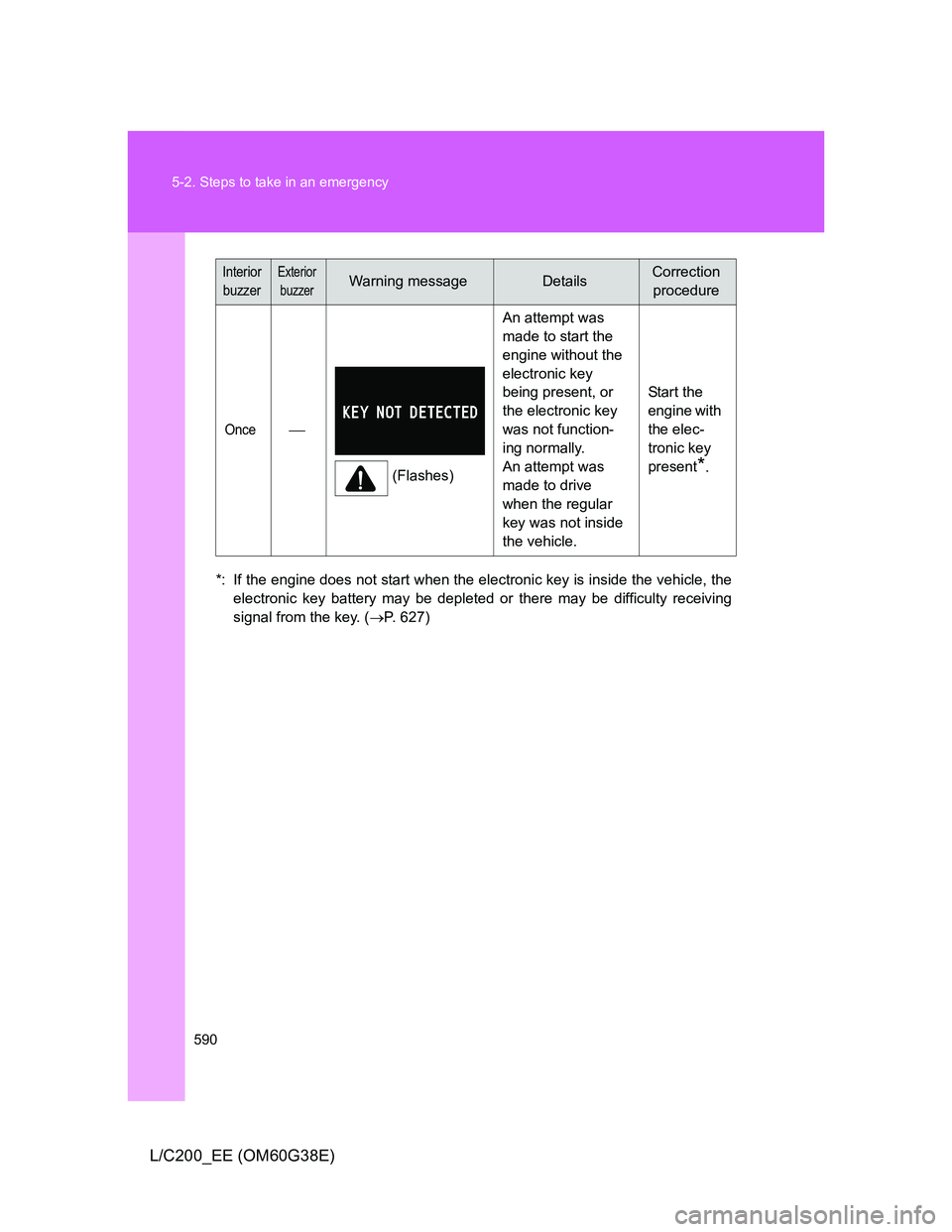
*: If the engine does not start when the electronic key is inside the vehicle, the
electronic key battery may be depleted or there may be difficulty receiving
signal from the key. (P. 627)
Once
(Flashes)An attempt was
made to start the
engine without the
electronic key
being present, or
the electronic key
was not function-
ing normally.
An attempt was
made to drive
when the regular
key was not inside
the vehicle.Start the
engine with
the elec-
tronic key
present
*.
Interior
buzzerExterior
buzzerWarning messageDetailsCorrection
procedure
Page 591 of 692
5
591 5-2. Steps to take in an emergency
When trouble arises
L/C200_EE (OM60G38E)
Interior
buzzerExterior
buzzerWarning messageDetailsCorrection
procedure
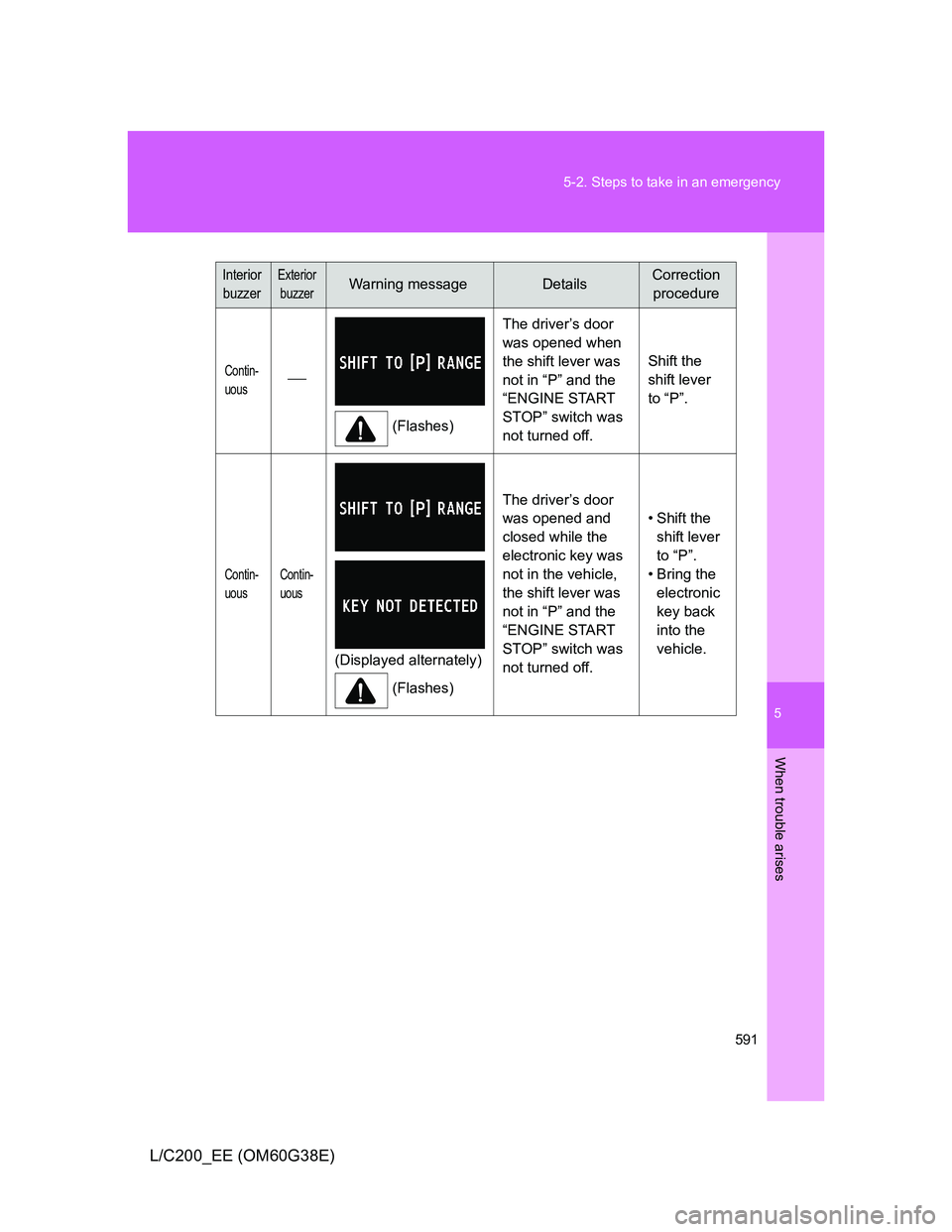
Contin-
uous
(Flashes)The driver’s door
was opened when
the shift lever was
not in “P” and the
“ENGINE START
STOP” switch was
not turned off.Shift the
shift lever
to “P”.
Contin-
uousContin-
uous
(Displayed alternately)
(Flashes)The driver’s door
was opened and
closed while the
electronic key was
not in the vehicle,
the shift lever was
not in “P” and the
“ENGINE START
STOP” switch was
not turned off. • Shift the
shift lever
to “P”.
• Bring the
electronic
key back
into the
vehicle.
Page 592 of 692
592 5-2. Steps to take in an emergency
L/C200_EE (OM60G38E)
Interior
buzzerExterior
buzzerWarning messageDetailsCorrection
procedure
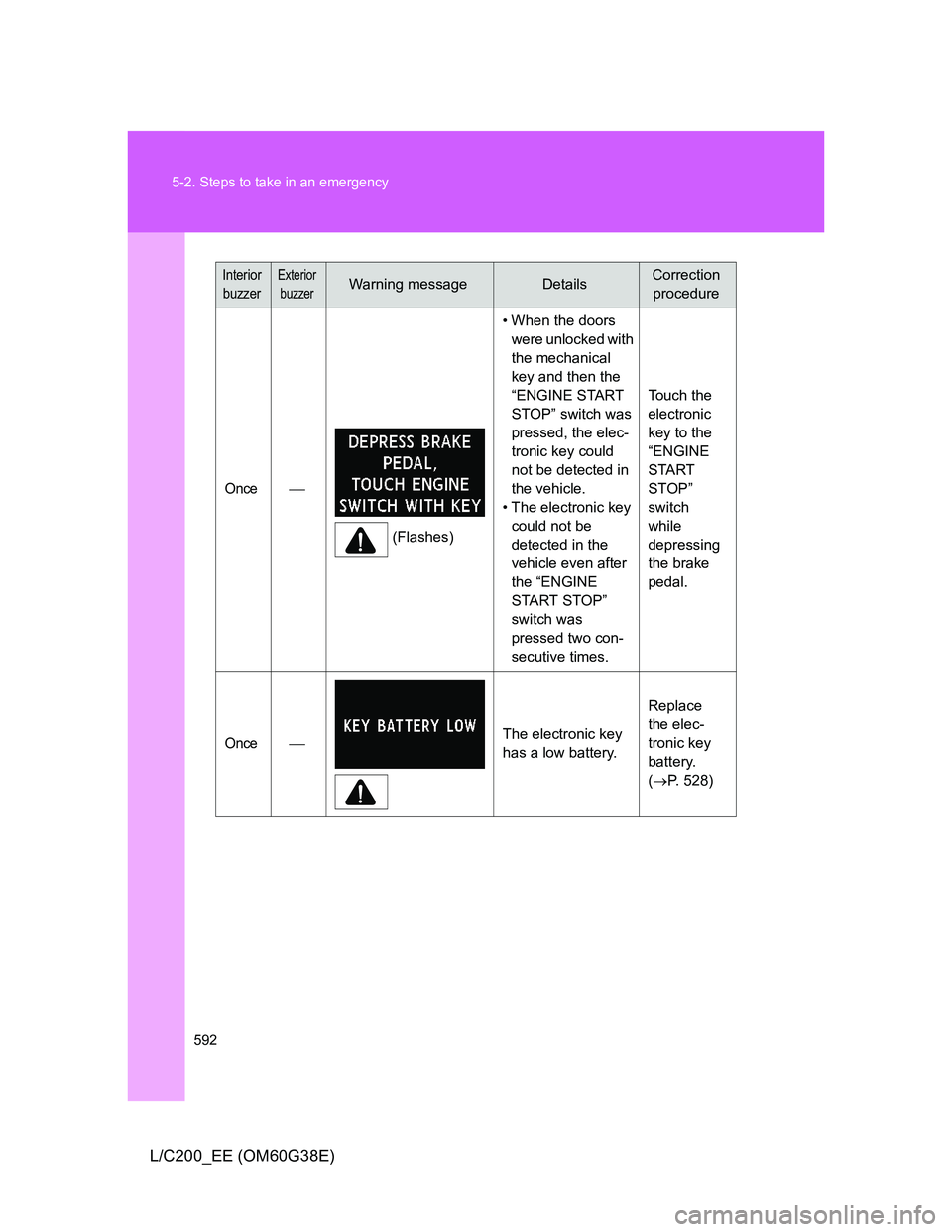
Once
(Flashes)• When the doors
were unlocked with
the mechanical
key and then the
“ENGINE START
STOP” switch was
pressed, the elec-
tronic key could
not be detected in
the vehicle.
• The electronic key
could not be
detected in the
vehicle even after
the “ENGINE
START STOP”
switch was
pressed two con-
secutive times. Touch the
electronic
key to the
“ENGINE
START
STOP”
switch
while
depressing
the brake
pedal.
OnceThe electronic key
has a low battery.Replace
the elec-
tronic key
battery.
(P. 528)
Page 626 of 692
626
5-2. Steps to take in an emergency
L/C200_EE (OM60G38E)
If you lose your keys
New genuine Toyota keys can be made by any authorized Toyota
dealer or repairer, or another duly qualified and equipped profes-
sional, using the other key and the key number stamped on your key
number plate.
Page 627 of 692
5
627
5-2. Steps to take in an emergency
When trouble arises
L/C200_EE (OM60G38E)
If the electronic key does not operate properly
Locking and unlocking the doors and key linked functions
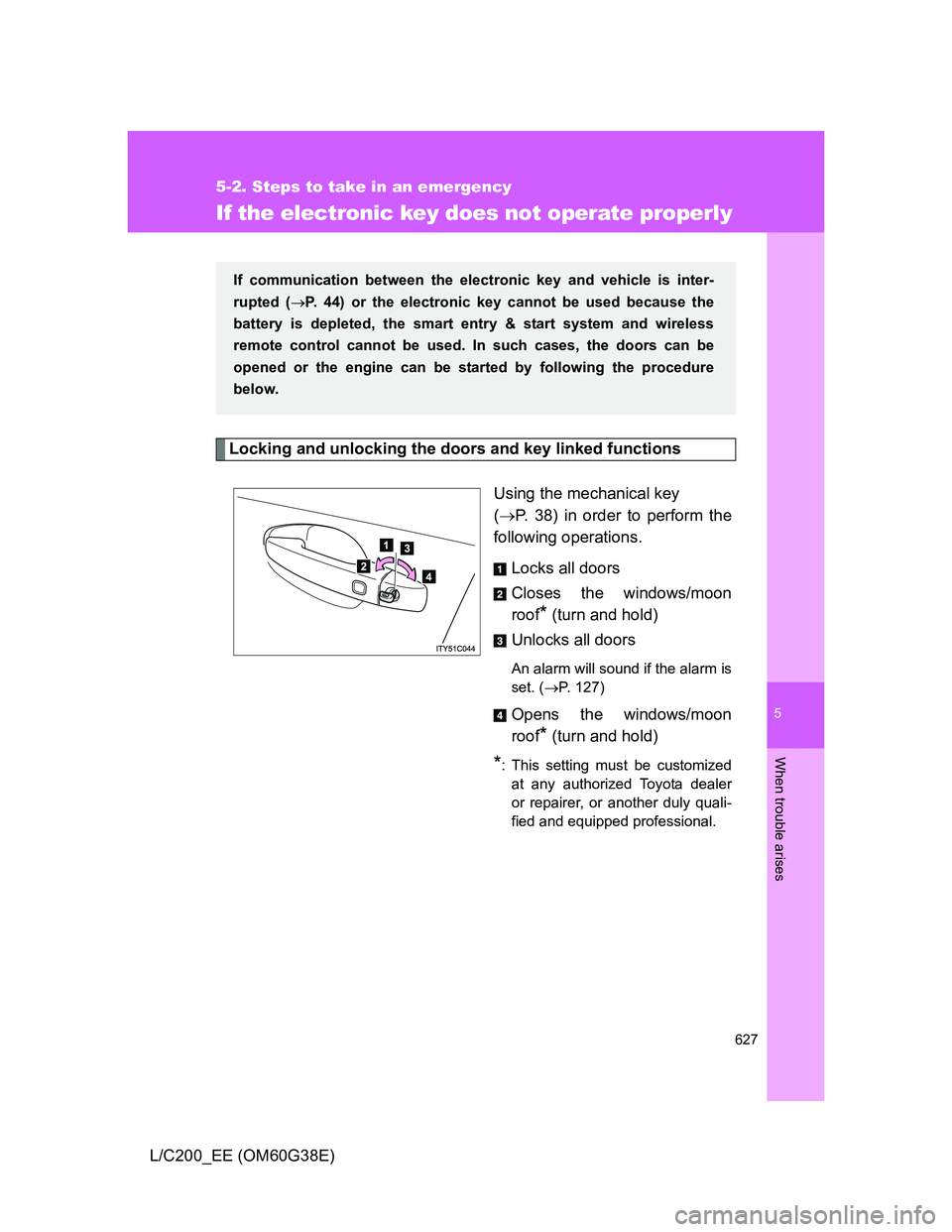
Using the mechanical key
(P. 38) in order to perform the
following operations.
Locks all doors
Closes the windows/moon
roof
* (turn and hold)
Unlocks all doors
An alarm will sound if the alarm is
set. (P. 127)
Opens the windows/moon
roof
* (turn and hold)
*: This setting must be customized
at any authorized Toyota dealer
or repairer, or another duly quali-
fied and equipped professional.
If communication between the electronic key and vehicle is inter-
rupted (P. 44) or the electronic key cannot be used because the
battery is depleted, the smart entry & start system and wireless
remote control cannot be used. In such cases, the doors can be
opened or the engine can be started by following the procedure
below.
Page 628 of 692
628 5-2. Steps to take in an emergency
L/C200_EE (OM60G38E)
Changing “ENGINE START STOP” switch modes and starting the
engine
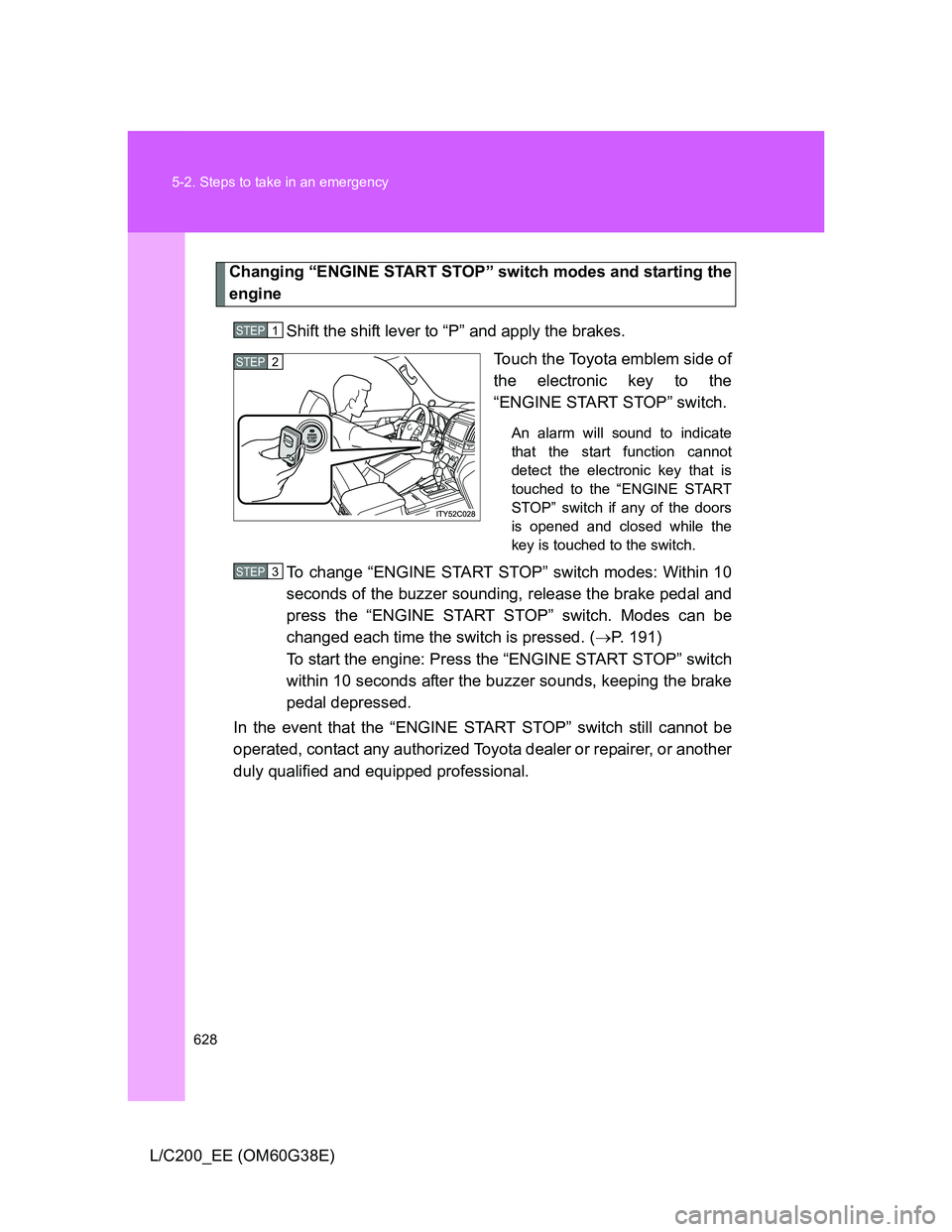
Shift the shift lever to “P” and apply the brakes.
Touch the Toyota emblem side of
the electronic key to the
“ENGINE START STOP” switch.
An alarm will sound to indicate
that the start function cannot
detect the electronic key that is
touched to the “ENGINE START
STOP” switch if any of the doors
is opened and closed while the
key is touched to the switch.
To change “ENGINE START STOP” switch modes: Within 10
seconds of the buzzer sounding, release the brake pedal and
press the “ENGINE START STOP” switch. Modes can be
changed each time the switch is pressed. (P. 191)
To start the engine: Press the “ENGINE START STOP” switch
within 10 seconds after the buzzer sounds, keeping the brake
pedal depressed.
In the event that the “ENGINE START STOP” switch still cannot be
operated, contact any authorized Toyota dealer or repairer, or another
duly qualified and equipped professional.
STEP1
STEP2
STEP3
Page 629 of 692
5
629 5-2. Steps to take in an emergency
When trouble arises
L/C200_EE (OM60G38E)
Stopping the engine
Shift the shift lever to “P” and press the “ENGINE START STOP” switch as
you normally do when stopping the engine.
Replacing the key battery
As this above procedure is a temporary measure, it is recommended that the
electronic key battery be replaced immediately when the battery depletes.
(P. 528)
Alarm
Using the mechanical key to lock the doors will not set the alarm system.
If a door is unlocked using the mechanical key when the alarm system is set,
the alarm may be triggered. (P. 127)
Page 667 of 692
667 6-2. Customization
6
Vehicle specifications
L/C200_EE (OM60G38E)
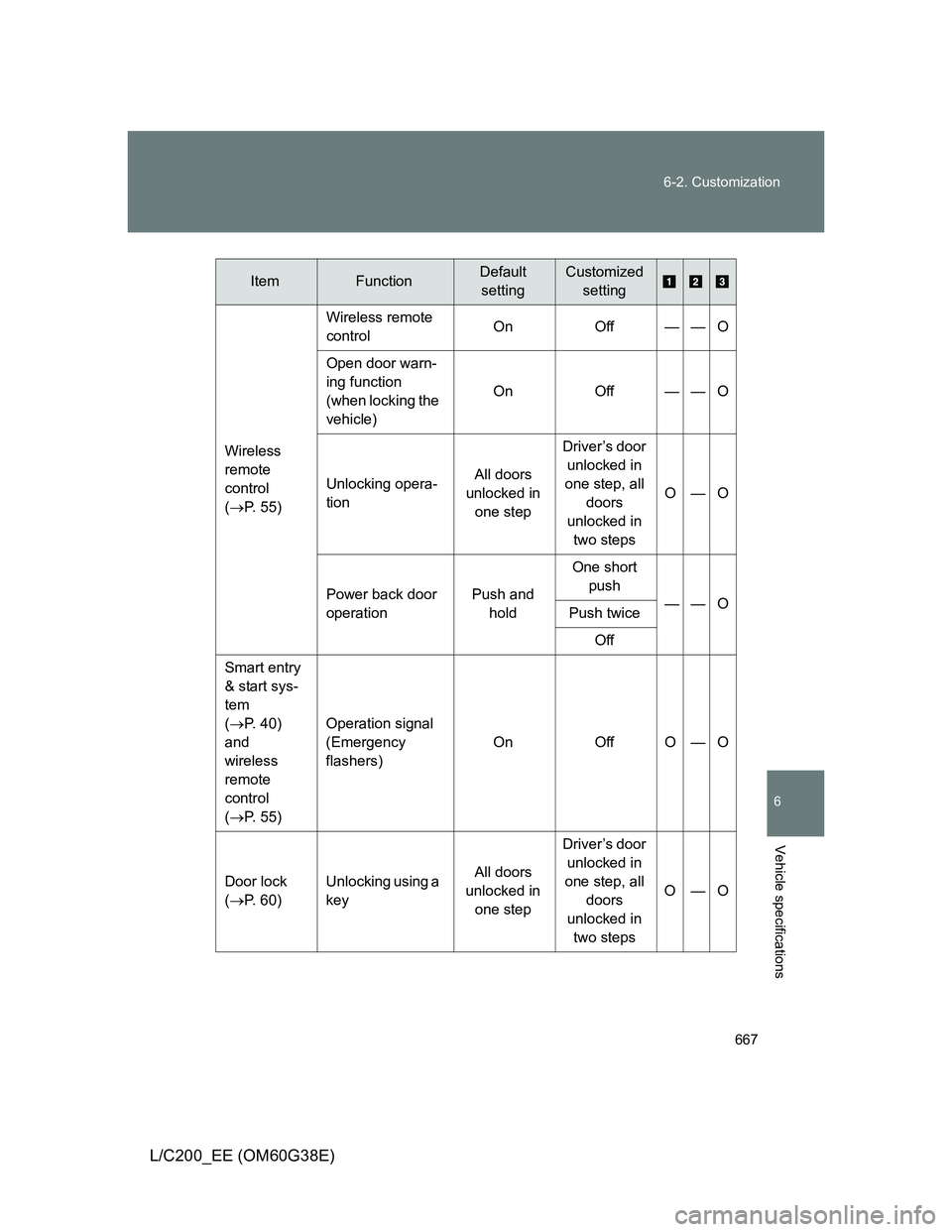
Wireless
remote
control
(P. 55)Wireless remote
controlOn Off — — O
Open door warn-
ing function
(when locking the
vehicle)On Off — — O
Unlocking opera-
tionAll doors
unlocked in
one stepDriver’s door
unlocked in
one step, all
doors
unlocked in
two stepsO—O
Power back door
operationPush and
holdOne short
push
——O
Push twice
Off
Smart entry
& start sys-
tem
(P. 40)
and
wireless
remote
control
(P. 55) Operation signal
(Emergency
flashers)On Off O — O
Door lock
(P. 60)Unlocking using a
keyAll doors
unlocked in
one stepDriver’s door
unlocked in
one step, all
doors
unlocked in
two stepsO—O
ItemFunctionDefault
settingCustomized
setting
Page 668 of 692
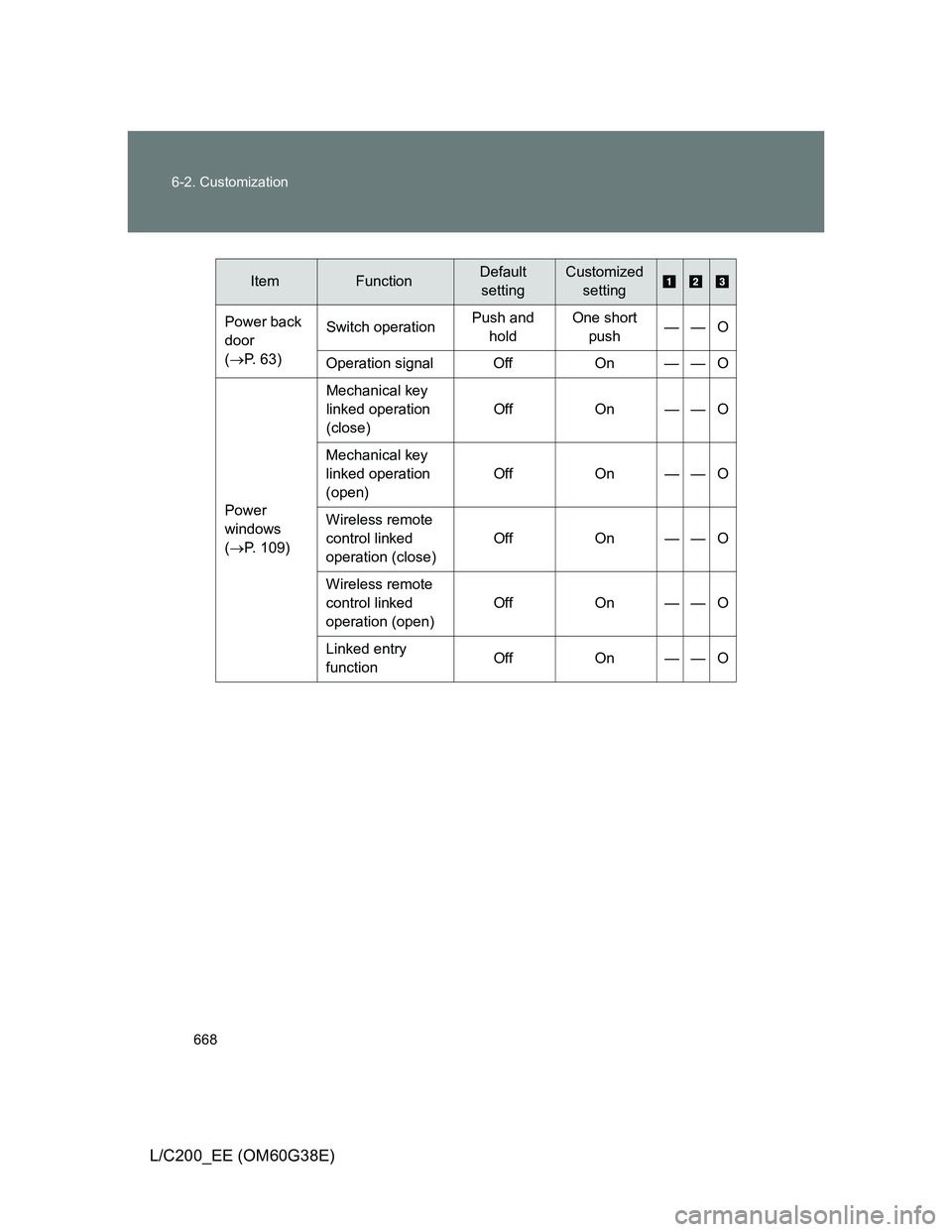
668 6-2. Customization
L/C200_EE (OM60G38E)
Power back
door
(P. 63)Switch operationPush and
holdOne short
push——O
Operation signal Off On — — O
Power
windows
(P. 109)Mechanical key
linked operation
(close)Off On — — O
Mechanical key
linked operation
(open)Off On — — O
Wireless remote
control linked
operation (close)Off On — — O
Wireless remote
control linked
operation (open)Off On — — O
Linked entry
functionOff On — — O
ItemFunctionDefault
settingCustomized
setting
Page 669 of 692
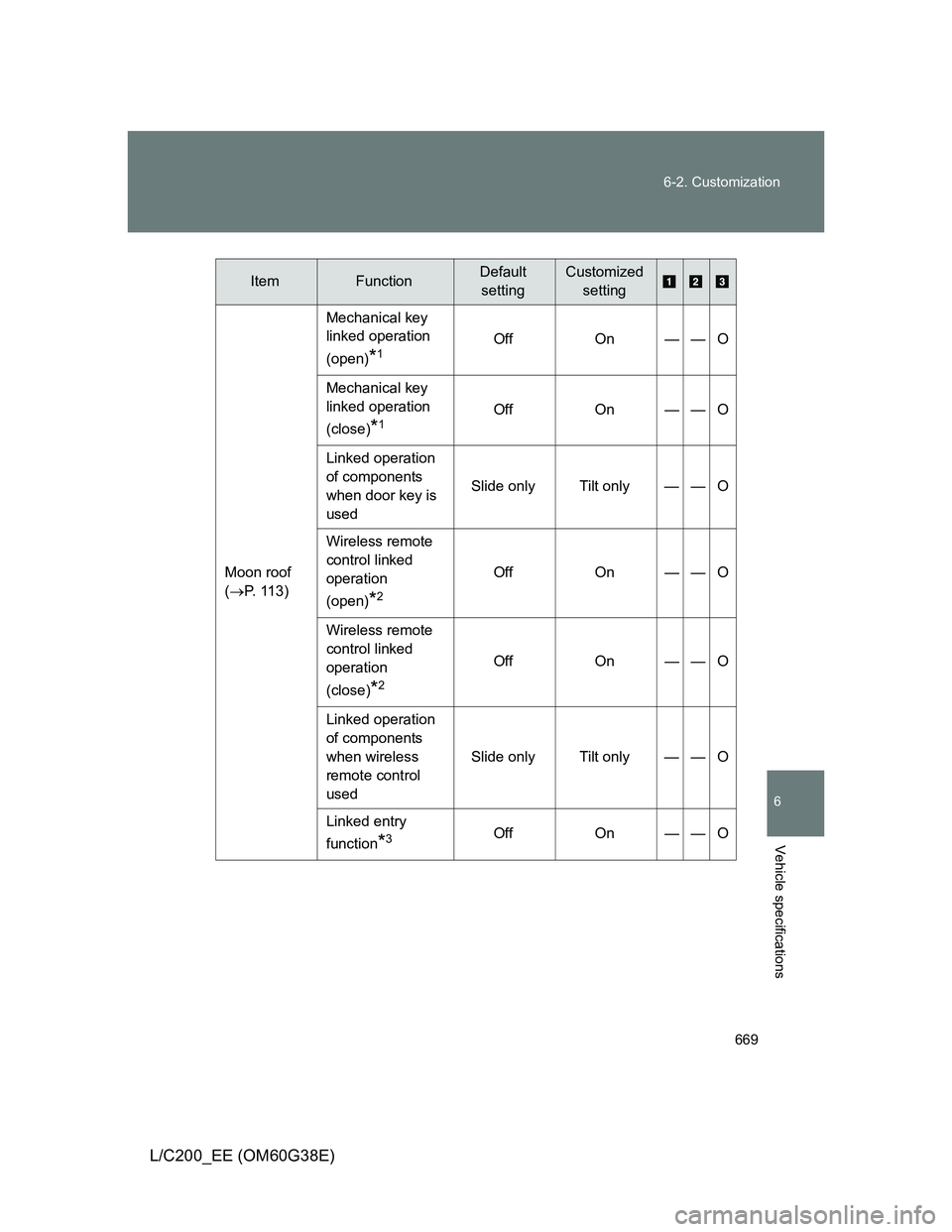
669 6-2. Customization
6
Vehicle specifications
L/C200_EE (OM60G38E)
Moon roof
(P. 113)Mechanical key
linked operation
(open)
*1Off On — — O
Mechanical key
linked operation
(close)
*1Off On — — O
Linked operation
of components
when door key is
usedSlide only Tilt only — — O
Wireless remote
control linked
operation
(open)
*2
Off On — — O
Wireless remote
control linked
operation
(close)
*2
Off On — — O
Linked operation
of components
when wireless
remote control
usedSlide only Tilt only — — O
Linked entry
function
*3Off On — — O
ItemFunctionDefault
settingCustomized
setting