door lock TOYOTA LAND CRUISER 2012 Repair Manual
[x] Cancel search | Manufacturer: TOYOTA, Model Year: 2012, Model line: LAND CRUISER, Model: TOYOTA LAND CRUISER 2012Pages: 692, PDF Size: 29.3 MB
Page 542 of 692
542 4-3. Do-it-yourself maintenance
L/C200_EE (OM60G38E)
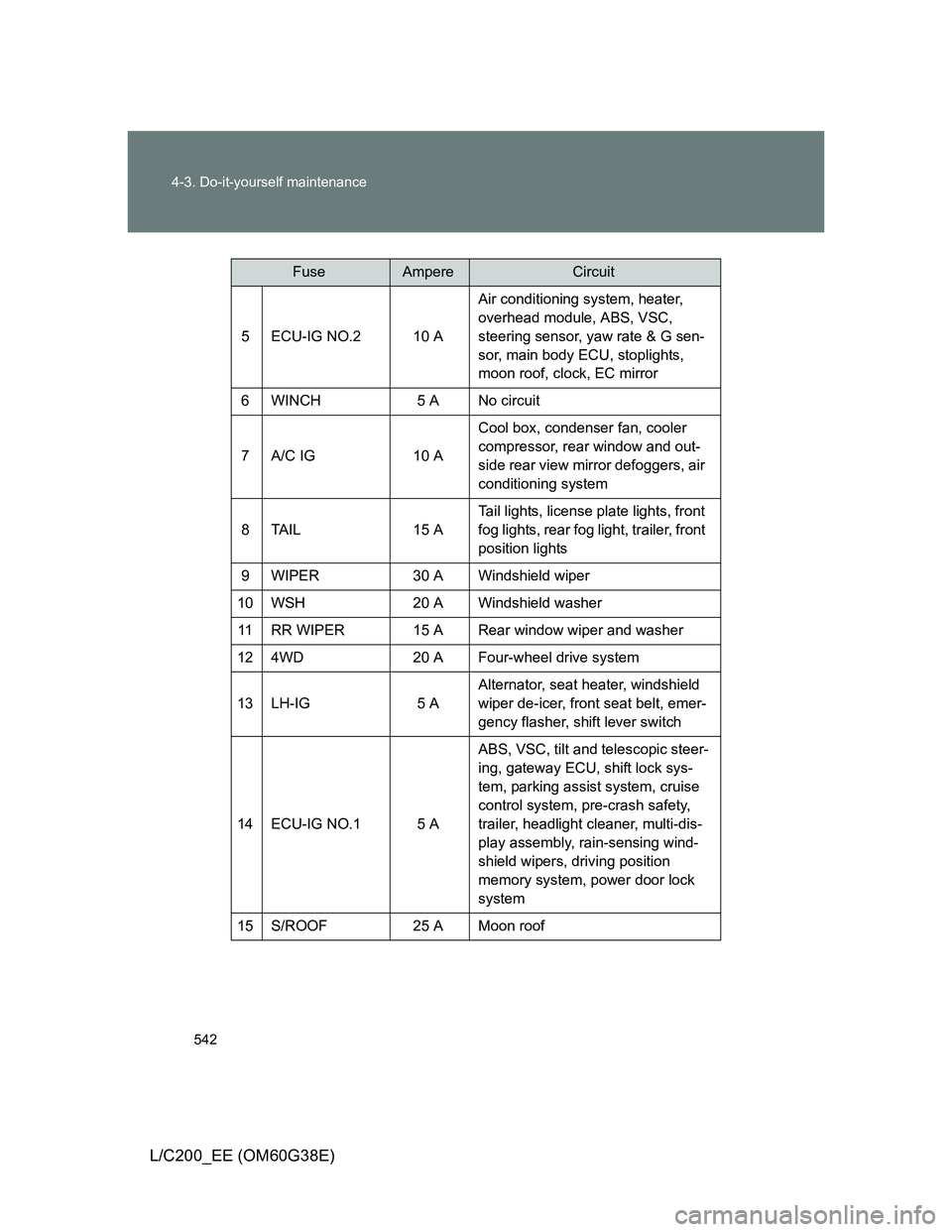
5 ECU-IG NO.2 10 AAir conditioning system, heater,
overhead module, ABS, VSC,
steering sensor, yaw rate & G sen-
sor, main body ECU, stoplights,
moon roof, clock, EC mirror
6 WINCH 5 A No circuit
7 A/C IG 10 ACool box, condenser fan, cooler
compressor, rear window and out-
side rear view mirror defoggers, air
conditioning system
8TAIL 15 ATail lights, license plate lights, front
fog lights, rear fog light, trailer, front
position lights
9 WIPER 30 A Windshield wiper
10 WSH 20 A Windshield washer
11 RR WIPER 15 A Rear window wiper and washer
12 4WD 20 A Four-wheel drive system
13 LH-IG 5 AAlternator, seat heater, windshield
wiper de-icer, front seat belt, emer-
gency flasher, shift lever switch
14 ECU-IG NO.1 5 AABS, VSC, tilt and telescopic steer-
ing, gateway ECU, shift lock sys-
tem, parking assist system, cruise
control system, pre-crash safety,
trailer, headlight cleaner, multi-dis-
play assembly, rain-sensing wind-
shield wipers, driving position
memory system, power door lock
system
15 S/ROOF 25 A Moon roof
FuseAmpereCircuit
Page 544 of 692
544 4-3. Do-it-yourself maintenance
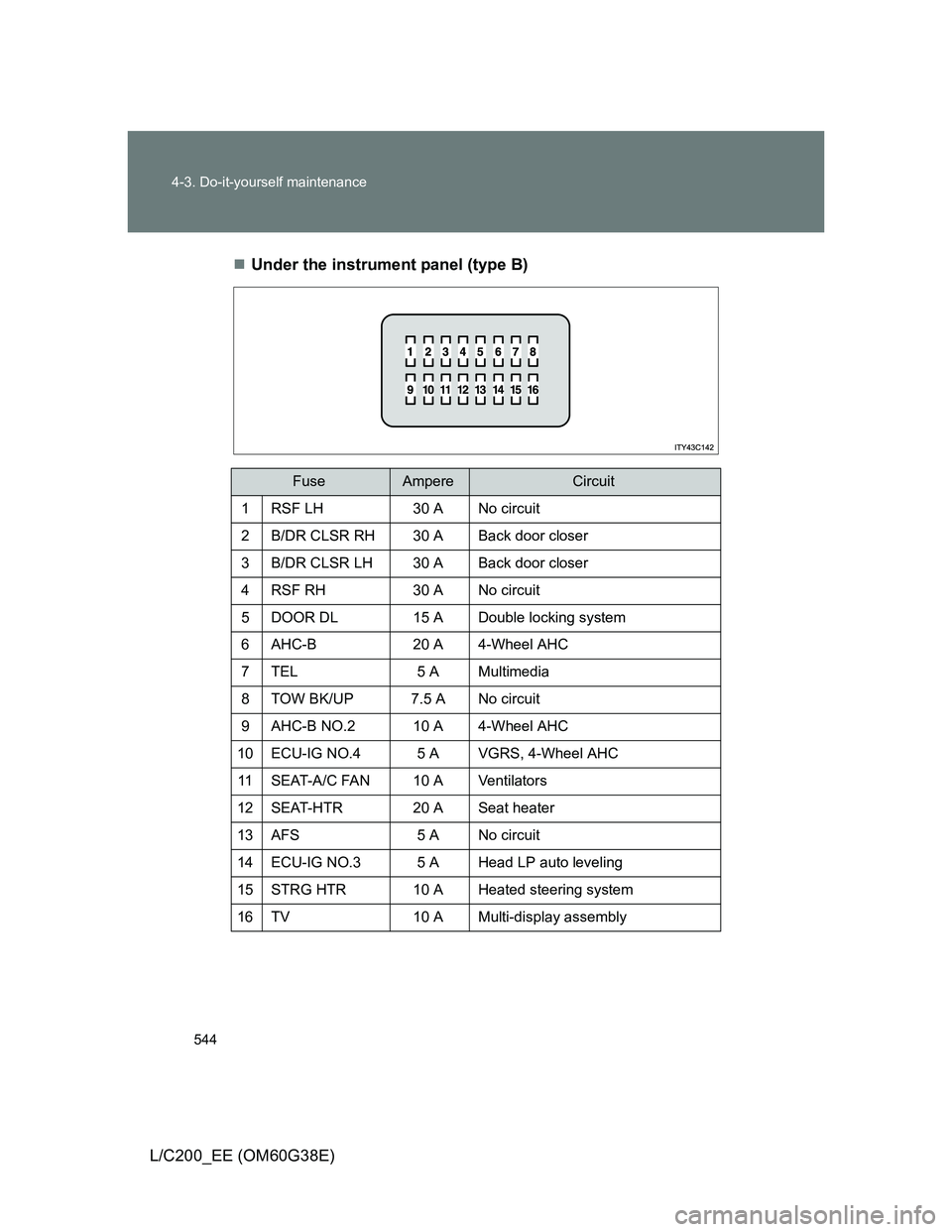
L/C200_EE (OM60G38E)Under the instrument panel (type B)
FuseAmpereCircuit
1 RSF LH 30 A No circuit
2 B/DR CLSR RH 30 A Back door closer
3 B/DR CLSR LH 30 A Back door closer
4 RSF RH 30 A No circuit
5 DOOR DL 15 A Double locking system
6 AHC-B 20 A 4-Wheel AHC
7 TEL 5 A Multimedia
8 TOW BK/UP 7.5 A No circuit
9 AHC-B NO.2 10 A 4-Wheel AHC
10 ECU-IG NO.4 5 A VGRS, 4-Wheel AHC
11 SEAT-A/C FAN 10 A Ventilators
12 SEAT-HTR 20 A Seat heater
13 AFS 5 A No circuit
14 ECU-IG NO.3 5 A Head LP auto leveling
15 STRG HTR 10 A Heated steering system
16 TV 10 A Multi-display assembly
Page 553 of 692
553 4-3. Do-it-yourself maintenance
4
Maintenance and care
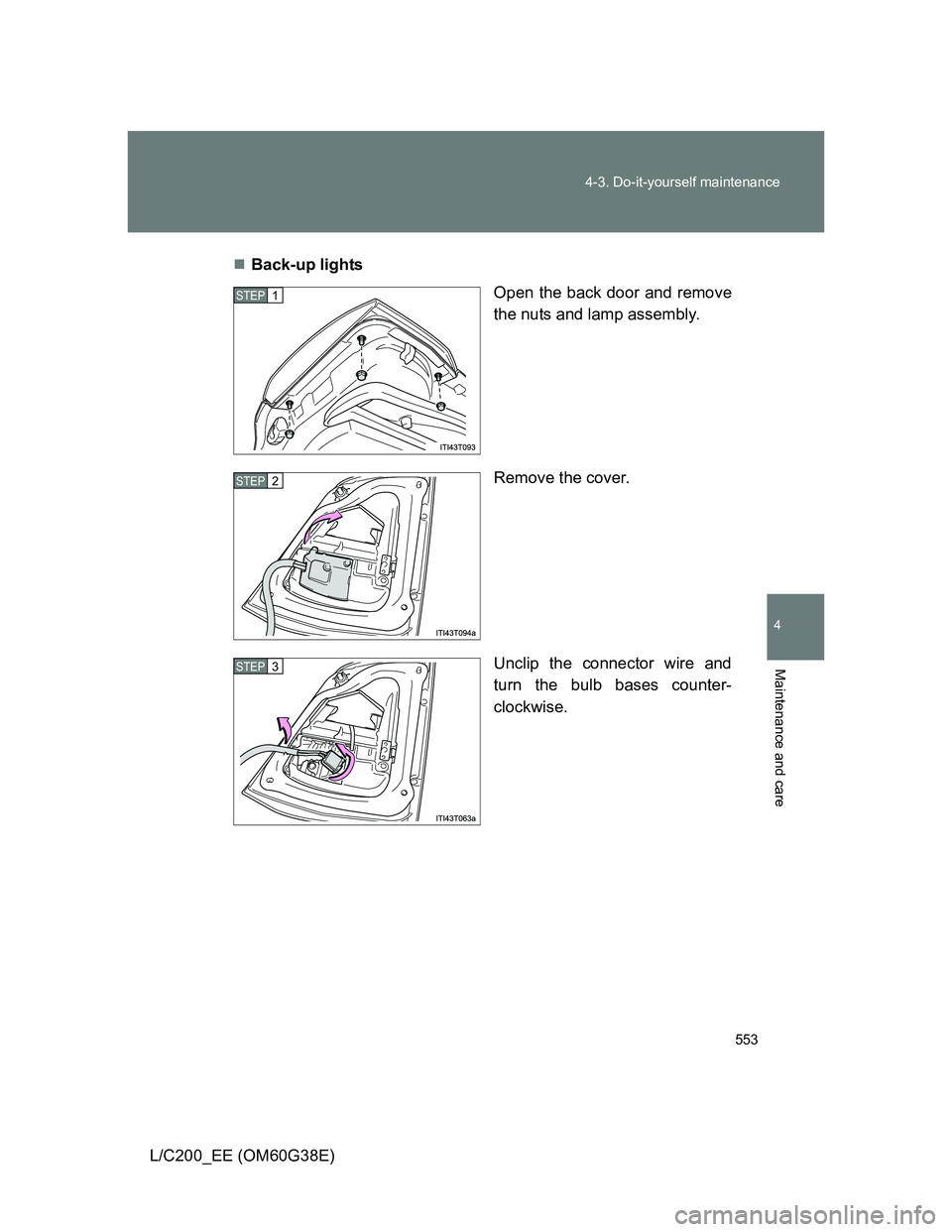
L/C200_EE (OM60G38E)Back-up lights
Open the back door and remove
the nuts and lamp assembly.
Remove the cover.
Unclip the connector wire and
turn the bulb bases counter-
clockwise.
STEP1
STEP2
STEP3
Page 555 of 692
555 4-3. Do-it-yourself maintenance
4
Maintenance and care
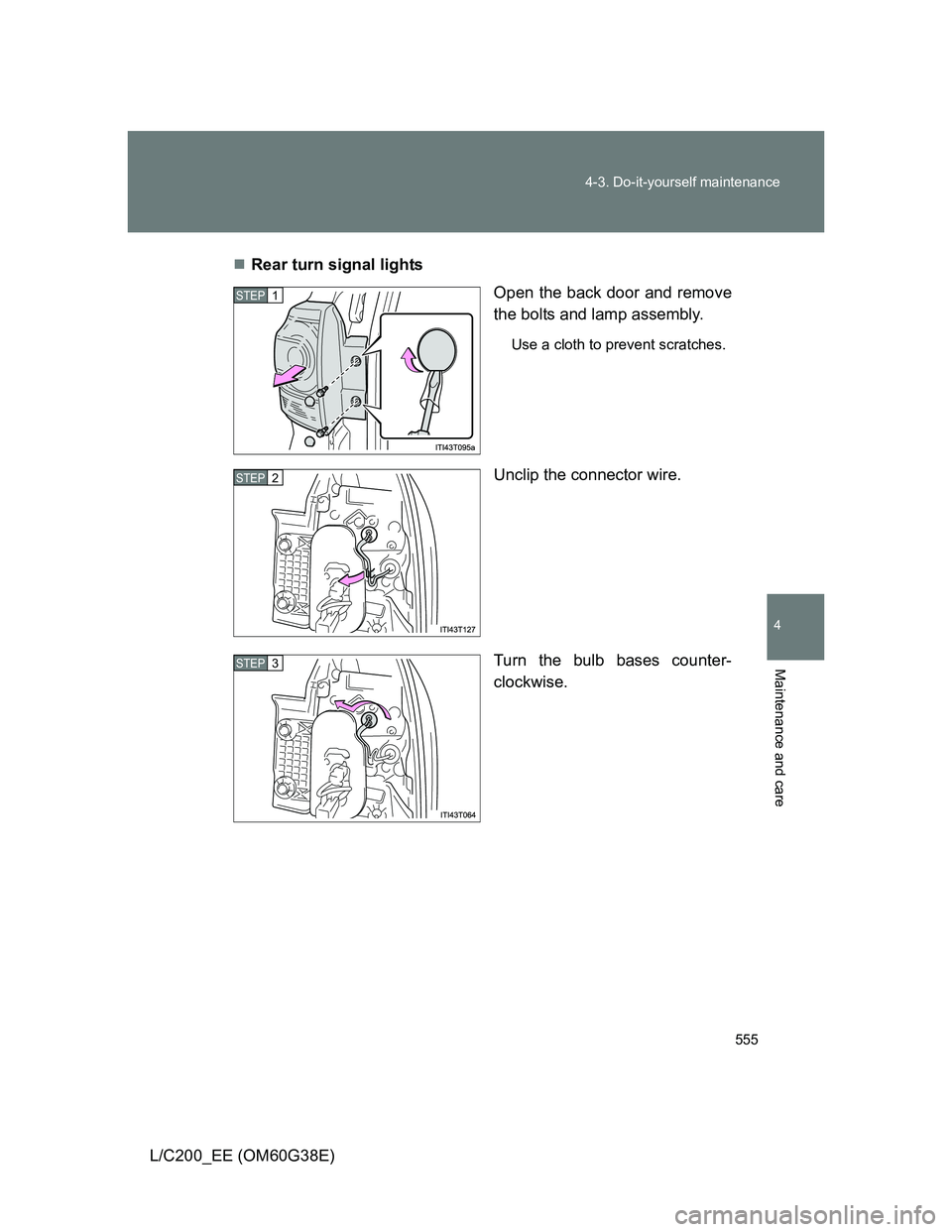
L/C200_EE (OM60G38E)Rear turn signal lights
Open the back door and remove
the bolts and lamp assembly.
Use a cloth to prevent scratches.
Unclip the connector wire.
Turn the bulb bases counter-
clockwise.
STEP1
STEP2
STEP3
Page 558 of 692
558 4-3. Do-it-yourself maintenance
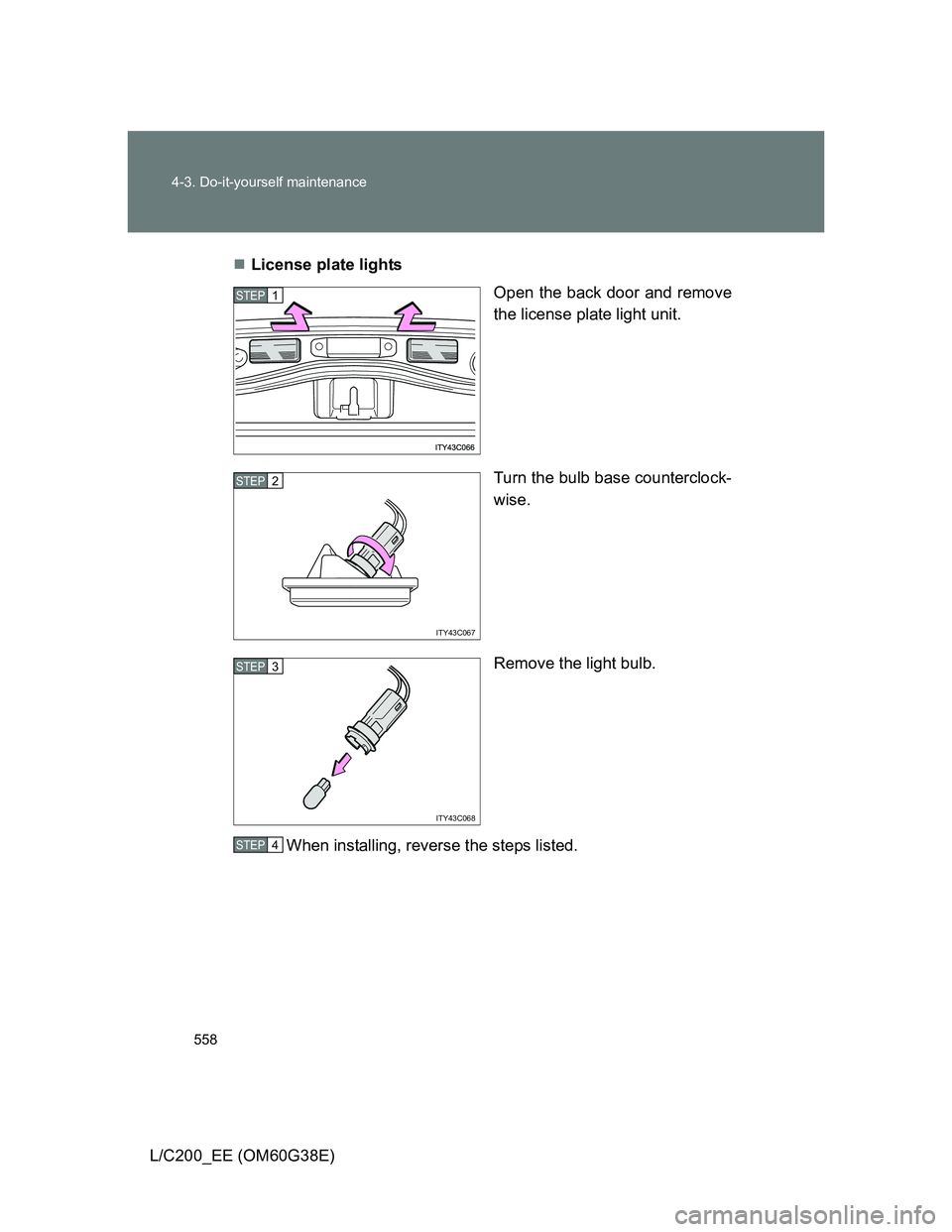
L/C200_EE (OM60G38E)License plate lights
Open the back door and remove
the license plate light unit.
Turn the bulb base counterclock-
wise.
Remove the light bulb.
When installing, reverse the steps listed.
STEP1
ITY43C067
STEP2
ITY43C068
STEP3
STEP4
Page 592 of 692
592 5-2. Steps to take in an emergency
L/C200_EE (OM60G38E)
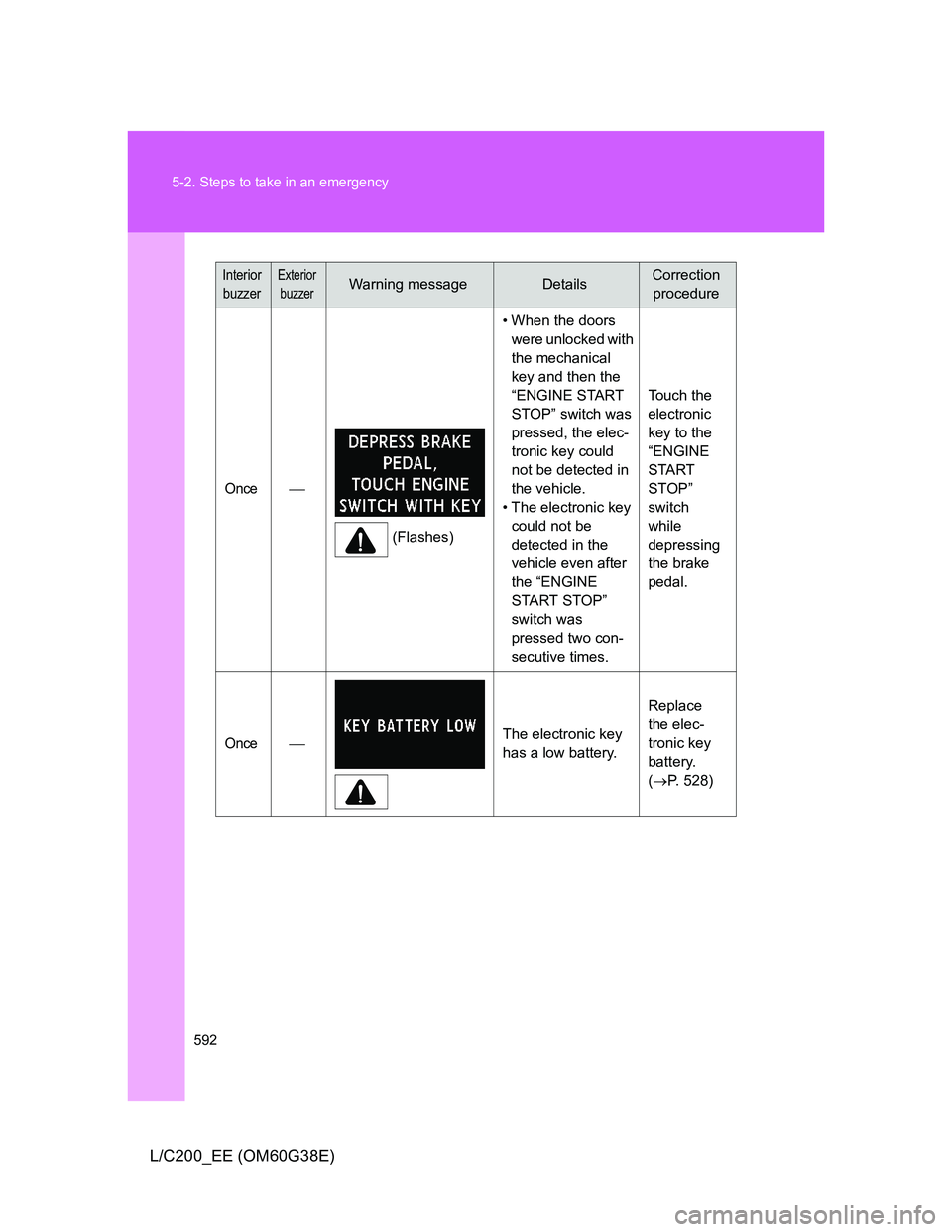
Interior
buzzerExterior
buzzerWarning messageDetailsCorrection
procedure
Once
(Flashes)• When the doors
were unlocked with
the mechanical
key and then the
“ENGINE START
STOP” switch was
pressed, the elec-
tronic key could
not be detected in
the vehicle.
• The electronic key
could not be
detected in the
vehicle even after
the “ENGINE
START STOP”
switch was
pressed two con-
secutive times. Touch the
electronic
key to the
“ENGINE
START
STOP”
switch
while
depressing
the brake
pedal.
OnceThe electronic key
has a low battery.Replace
the elec-
tronic key
battery.
(P. 528)
Page 593 of 692
5
593 5-2. Steps to take in an emergency
When trouble arises
L/C200_EE (OM60G38E)
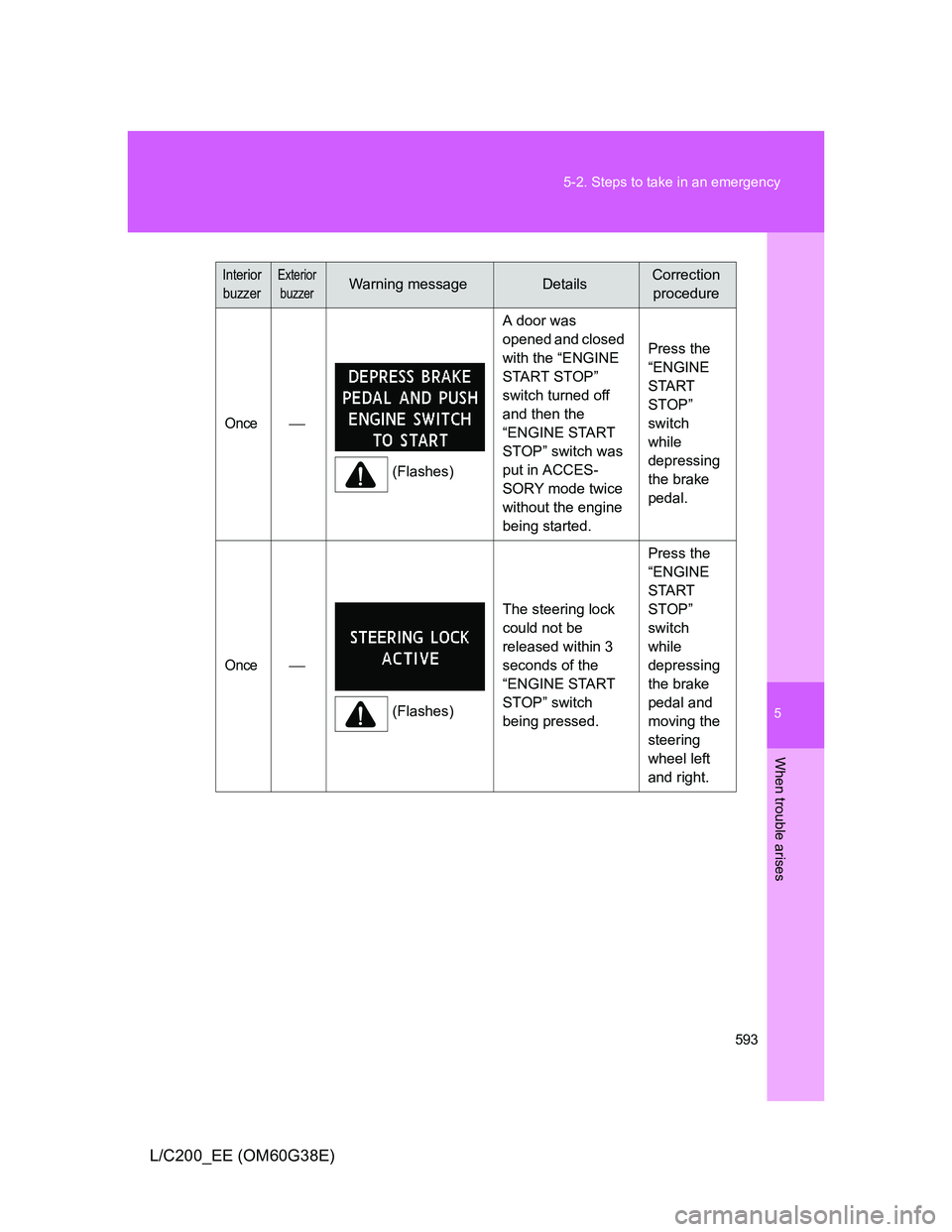
Interior
buzzerExterior
buzzerWarning messageDetailsCorrection
procedure
Once
(Flashes)A door was
opened and closed
with the “ENGINE
START STOP”
switch turned off
and then the
“ENGINE START
STOP” switch was
put in ACCES-
SORY mode twice
without the engine
being started.Press the
“ENGINE
START
STOP”
switch
while
depressing
the brake
pedal.
Once
(Flashes)The steering lock
could not be
released within 3
seconds of the
“ENGINE START
STOP” switch
being pressed. Press the
“ENGINE
START
STOP”
switch
while
depressing
the brake
pedal and
moving the
steering
wheel left
and right.
Page 627 of 692
5
627
5-2. Steps to take in an emergency
When trouble arises
L/C200_EE (OM60G38E)
If the electronic key does not operate properly
Locking and unlocking the doors and key linked functions
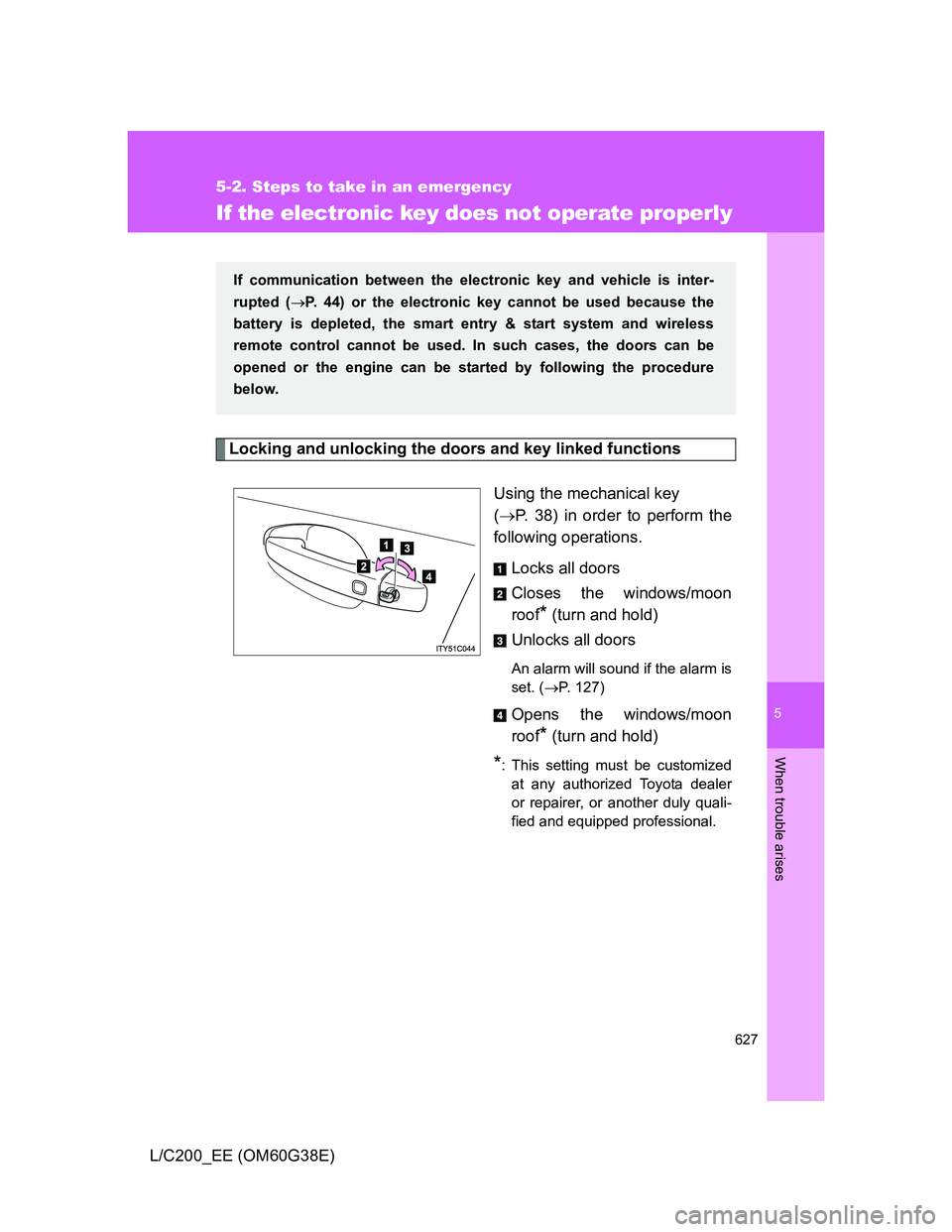
Using the mechanical key
(P. 38) in order to perform the
following operations.
Locks all doors
Closes the windows/moon
roof
* (turn and hold)
Unlocks all doors
An alarm will sound if the alarm is
set. (P. 127)
Opens the windows/moon
roof
* (turn and hold)
*: This setting must be customized
at any authorized Toyota dealer
or repairer, or another duly quali-
fied and equipped professional.
If communication between the electronic key and vehicle is inter-
rupted (P. 44) or the electronic key cannot be used because the
battery is depleted, the smart entry & start system and wireless
remote control cannot be used. In such cases, the doors can be
opened or the engine can be started by following the procedure
below.
Page 629 of 692
5
629 5-2. Steps to take in an emergency
When trouble arises
L/C200_EE (OM60G38E)
Stopping the engine
Shift the shift lever to “P” and press the “ENGINE START STOP” switch as
you normally do when stopping the engine.
Replacing the key battery
As this above procedure is a temporary measure, it is recommended that the
electronic key battery be replaced immediately when the battery depletes.
(P. 528)
Alarm
Using the mechanical key to lock the doors will not set the alarm system.
If a door is unlocked using the mechanical key when the alarm system is set,
the alarm may be triggered. (P. 127)
Page 666 of 692
666 6-2. Customization
L/C200_EE (OM60G38E)
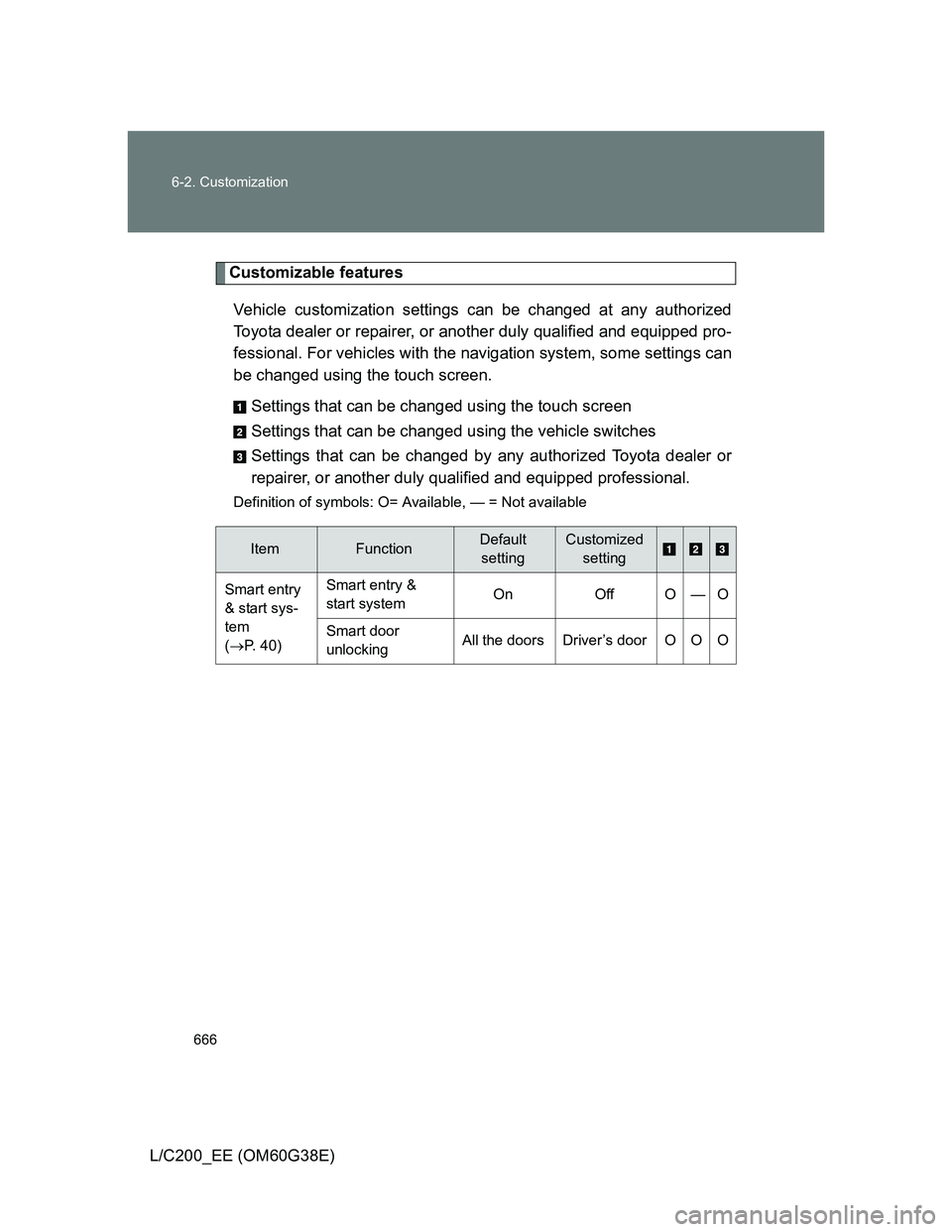
Customizable features
Vehicle customization settings can be changed at any authorized
Toyota dealer or repairer, or another duly qualified and equipped pro-
fessional. For vehicles with the navigation system, some settings can
be changed using the touch screen.
Settings that can be changed using the touch screen
Settings that can be changed using the vehicle switches
Settings that can be changed by any authorized Toyota dealer or
repairer, or another duly qualified and equipped professional.
Definition of symbols: O= Available, — = Not available
ItemFunctionDefault
settingCustomized
setting
Smart entry
& start sys-
tem
(P. 40)Smart entry &
start systemOn Off O — O
Smart door
unlockingAll the doors Driver’s door O O O