steering TOYOTA LAND CRUISER 2012 Manual PDF
[x] Cancel search | Manufacturer: TOYOTA, Model Year: 2012, Model line: LAND CRUISER, Model: TOYOTA LAND CRUISER 2012Pages: 692, PDF Size: 29.3 MB
Page 290 of 692
290 2-4. Using other driving systems
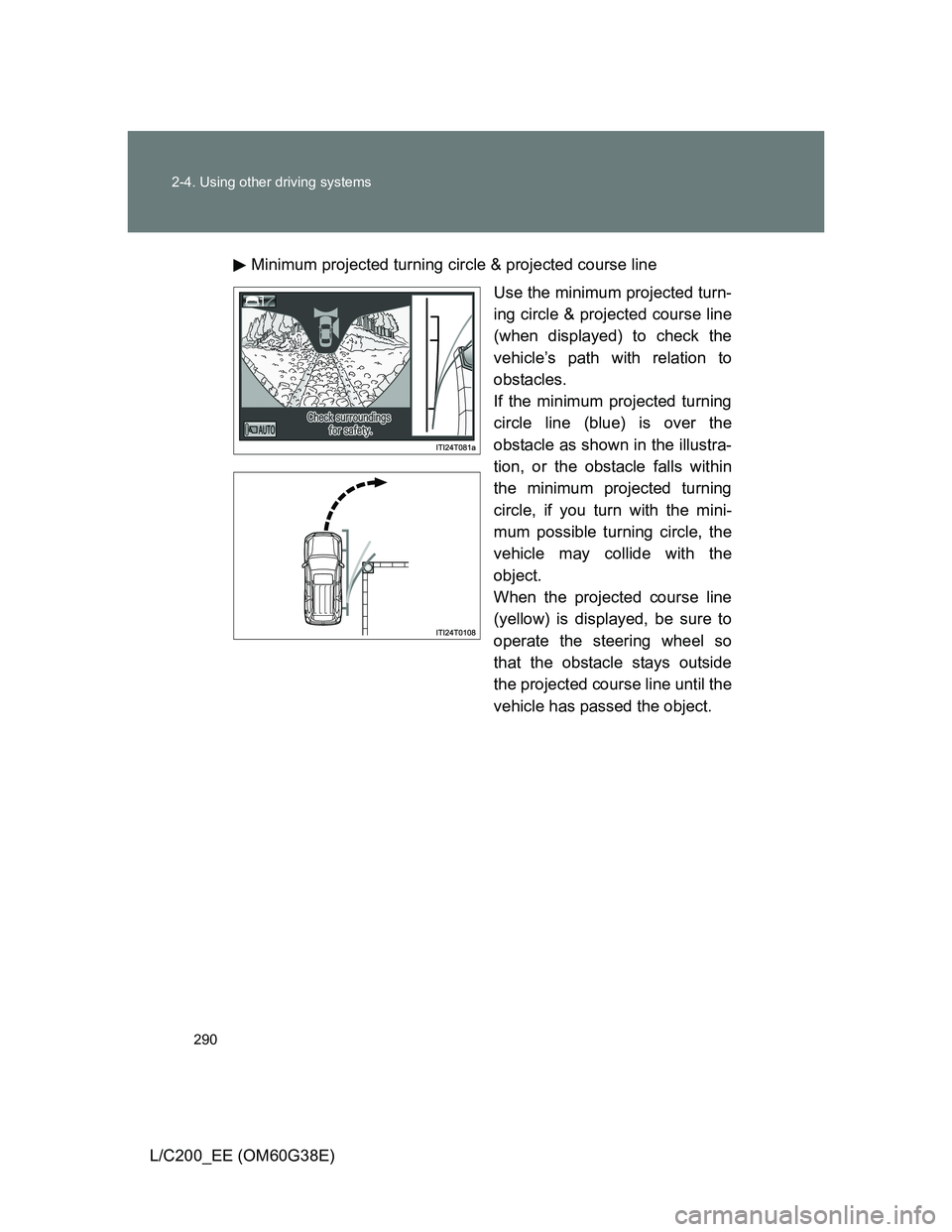
L/C200_EE (OM60G38E)Minimum projected turning circle & projected course line
Use the minimum projected turn-
ing circle & projected course line
(when displayed) to check the
vehicle’s path with relation to
obstacles.
If the minimum projected turning
circle line (blue) is over the
obstacle as shown in the illustra-
tion, or the obstacle falls within
the minimum projected turning
circle, if you turn with the mini-
mum possible turning circle, the
vehicle may collide with the
object.
When the projected course line
(yellow) is displayed, be sure to
operate the steering wheel so
that the obstacle stays outside
the projected course line until the
vehicle has passed the object.
Page 297 of 692
297 2-4. Using other driving systems
2
When driving
L/C200_EE (OM60G38E)
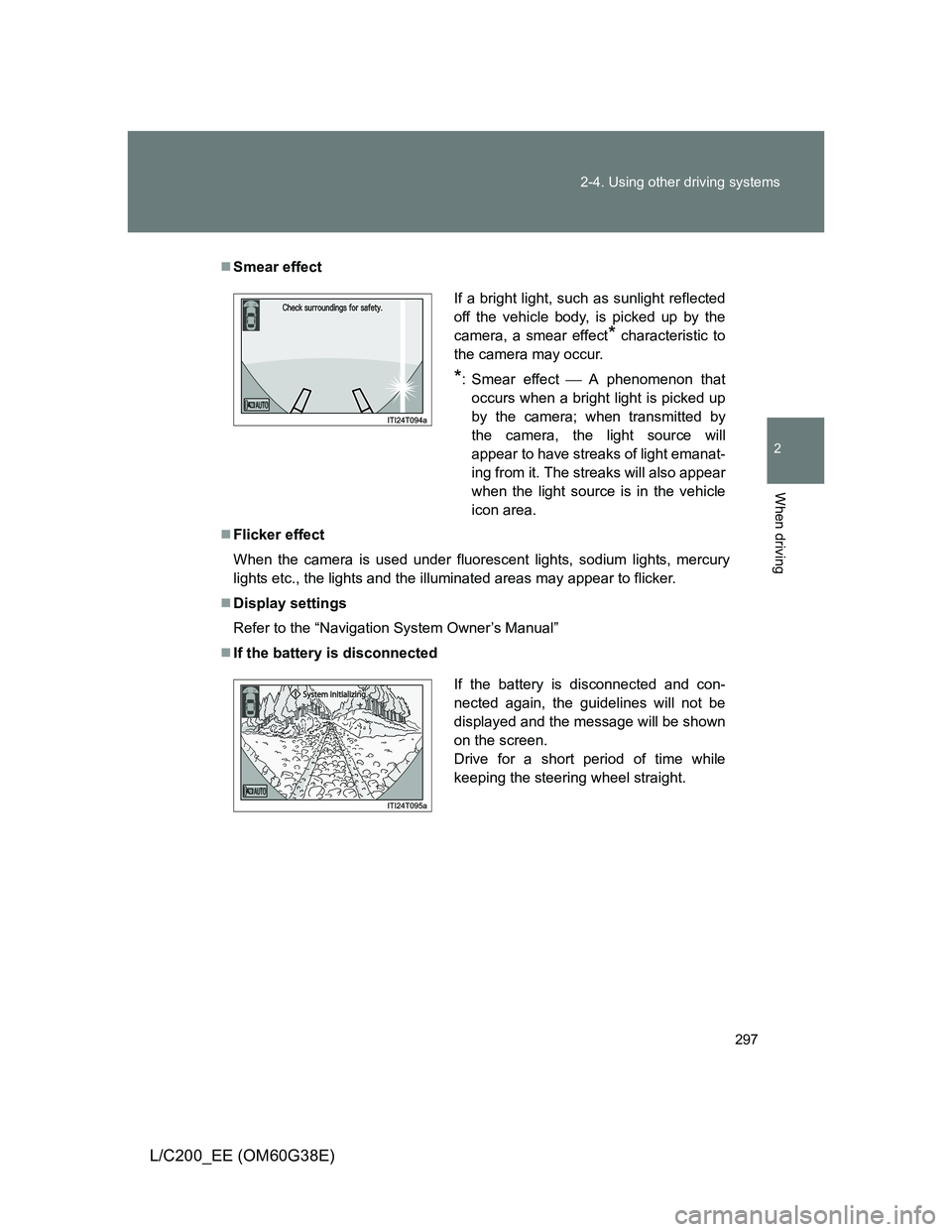
Smear effect
Flicker effect
When the camera is used under fluorescent lights, sodium lights, mercury
lights etc., the lights and the illuminated areas may appear to flicker.
Display settings
Refer to the “Navigation System Owner’s Manual”
If the battery is disconnected
If a bright light, such as sunlight reflected
off the vehicle body, is picked up by the
camera, a smear effect
* characteristic to
the camera may occur.
*: Smear effectA phenomenon that
occurs when a bright light is picked up
by the camera; when transmitted by
the camera, the light source will
appear to have streaks of light emanat-
ing from it. The streaks will also appear
when the light source is in the vehicle
icon area.
If the battery is disconnected and con-
nected again, the guidelines will not be
displayed and the message will be shown
on the screen.
Drive for a short period of time while
keeping the steering wheel straight.
Page 299 of 692
299 2-4. Using other driving systems
2
When driving
L/C200_EE (OM60G38E)
CAUTION
Conditions which may affect the Multi-terrain Monitor system
If the tires are changed, the position of the guide lines displayed on the
screen may be incorrect. When changing the tires, consult any authorized
Toyota dealer or repairer, or another duly qualified and equipped profes-
sional.
Depending on the circumstances of the vehicle (number of passengers,
amount of luggage, etc.), the position of the guide lines displayed on the
screen may change. Be sure to check visually behind and all around the
vehicle before proceeding.
Depending on the overall length of the vehicle (if a frontal protection sys-
tem is installed or the bumper has been replaced, etc.), the position of the
distance guidelines displayed on the front monitor may change. Be sure to
check visually behind and all around the vehicle before proceeding.
When washing the vehicle, do not apply intensive bursts of water to the
camera or camera area. Doing so may result in the camera malfunction-
ing.
NOTICE
When using the Multi-terrain Monitor
Even if an obstacle is no longer visible on the side monitor, do not turn the
steering wheel further in the direction the vehicle is turning until the vehicle
has moved completely past the obstacle. If the steering wheel is turned to
full lock, the vehicle will turn in the smallest possible turning circle, and
may collide with the obstacle.
It may be difficult to judge distance with the image from the front camera
due to the characteristics of the lens. Drive carefully while checking the
actual distance to the obstacles displayed on the screen. Also, give your
full attention to sudden bumps in the road.
Page 300 of 692
300
2-4. Using other driving systems
L/C200_EE (OM60G38E)
Driving assist systems
To help enhance driving safety and performance, the following sys-
tems operate automatically in response to various driving situations.
Be aware, however, that these systems are supplementary and
should not be relied upon too heavily when operating the vehicle.
Multi Terrain ABS (Anti-lock Brake System)
Helps to prevent wheel lock when the brakes are applied suddenly, or if
the brakes are applied while driving on a slippery road surface, or in off-
road conditions (such as rough roads, sand and mud).
Brake assist
Generates an increased level of braking force after the brake pedal is
depressed, when the system detects a panic stop situation.
VSC (Vehicle Stability Control)
Helps the driver to control skidding when swerving suddenly or turning
on slippery road surfaces.
Active TRC (Traction Control)
Helps to maintain drive power and prevent the 4 wheels from spinning
when starting the vehicle or accelerating on slippery roads.
Hill-start assist control
Helps prevent the vehicle from rolling backwards when starting on an
incline or slippery slope.
KDSS (Kinetic Dynamic Suspension System) (if equipped)
KDSS helps to ensure ride comfort and handling response by using a
hydraulic control system to control the suspension stabilizer bars in
response to road surface and driving conditions during cornering or off-
road driving.
VGRS (Variable Gear Ratio Steering) (if equipped)
Helps to adjust the wheel turning angle in accordance with the vehicle
speed and steering wheel movement.
Pre-Crash Safety (if equipped)
P. 307
Page 303 of 692
303 2-4. Using other driving systems
2
When driving
L/C200_EE (OM60G38E)
Automatic reactivation of Active TRC and VSC
Turning the “ENGINE START STOP” switch off after turning off the Active
TRC and VSC systems will automatically re-enable them.
Automatic Active TRC reactivation
If only the Active TRC system is turned off, the Active TRC system will turn
on when vehicle speed increases.
Automatic Active TRC and VSC reactivation
If the Active TRC and VSC systems are turned off, the systems will not turn
on even when vehicle speed increases.
If the brake system overheats
The brake system may overheat. In this case, a buzzer will sound, and the
“TRC OFF” will be displayed on the multi-information display, and Active
TRC and hill-start assist control will be temporarily inoperable. In this event,
stop the vehicle immediately in a safe place, and allow the brake system to
cool down sufficiently until the “TRC OFF” on the multi-information display
go off. (There is no problem with continuing normal driving.)
Sounds and vibrations caused by the Multi Terrain ABS, brake assist,
Active TRC, VSC, hill-start assist control and VGRS
A sound may be heard from the engine compartment when the engine is
started or just after the vehicle begins to move. This sound does not indi-
cate that a malfunction has occurred in any of these systems.
Any of the following conditions may occur when the above systems are
operating. None of these indicates that a malfunction has occurred.
• Vibrations may be felt through the vehicle body and steering.
• A motor sound may be heard after the vehicle comes to a stop.
• The brake pedal may pulsate slightly after the Multi Terrain ABS is acti-
vated.
• The brake pedal may move down slightly after the Multi Terrain ABS is
activated.
Page 304 of 692
304 2-4. Using other driving systems
L/C200_EE (OM60G38E)
Hill-start assist control is operational when
The shift lever is in “D” or “S”.
The brake pedal is not depressed.
VGRS is disabled in the following situations
During stopping or the steering wheel has been moved for a long time
while driving at lower speeds.
After the engine is restarted at less than -30°C (-22°F).
If you disconnect the battery with the steering wheel turned, the center
position of the steering wheel could be slightly and temporary changed.
To initialize the VGRS, drive for a short while.
CAUTION
Any of the following conditions may result in an accident which could cause
death or serious injury:
The Multi Terrain ABS does not operate effectively when
The limits of tire gripping performance have been exceeded.
The vehicle hydroplanes while driving at high speed on the wet or slick
road.
Stopping distance when the Multi Terrain ABS is operating may exceed
that of normal conditions
The Multi Terrain ABS is not designed to shorten the vehicle’s stopping dis-
tance. Always maintain a safe distance from the vehicle in front of you in the
following situations.
When driving on dirt, gravel or snow-covered roads
When driving with tire chains
When driving over bumps in the road
When driving over roads with potholes or uneven roads
Page 315 of 692
315 2-5. Driving information
2
When driving
L/C200_EE (OM60G38E)
CAUTION
Off-road driving precautions
Always observe the following precautions to help minimize the risk of serious
personal injury or damage to your vehicle:
Drive carefully when off the road. Do not take unnecessary risks by driving
in dangerous places.
Do not grip the steering wheel spokes when driving off-road. A bad bump
could jerk the wheel and injure your hands. Keep both hands and espe-
cially your thumbs on the outside of the rim.
Always check your brakes for effectiveness immediately after driving in
sand, mud, water or snow.
After driving through tall grass, mud, rock, sand, rivers, etc., check that
there is no grass, bush, paper, rags, stone, sand, etc. adhering or trapped
on the underbody. Clear off any such matter from the underbody. If the
vehicle is used with these materials trapped or adhering to the underbody,
a breakdown or fire could occur.
When driving off-road or in rugged terrain, do not drive at excessive
speeds, jump, make sharp turns, strike objects, etc. This may cause loss
of control or vehicle rollover causing death or serious injury. You are also
risking expensive damage to your vehicle’s suspension and chassis.
Page 322 of 692
322 2-5. Driving information
L/C200_EE (OM60G38E)
CAUTION
Driving with snow tires
Observe the following precautions to reduce the risk of accidents.
Failing to do so may result in a loss of vehicle control and cause death or
serious injury.
Use tires of the size specified for your vehicle.
Maintain the recommended level of tire inflation pressure.
Do not drive at speeds in excess of the speed limit or the speed limit spec-
ified for the snow tires being used.
Snow tires should be installed on all wheels.
Driving with tire chains
Observe the following precautions to reduce the risk of accidents.
Failing to do so may result in the vehicle being unable to be driven safely,
and may cause death or serious injury.
Do not drive in excess of the speed limit specified for the tire chains being
used or 50 km/h (30 mph), whichever is lower.
Avoid driving on bumpy road surfaces or over potholes.
Avoid sudden acceleration, abrupt steering, sudden braking and shifting
operations that cause sudden engine braking.
Slow down sufficiently before entering a curve to ensure that vehicle con-
trol is maintained.
When installing tire chains
Vehicles with the 4-Wheel AHC: Turn off the vehicle height control.
The vehicle height may change due to the automatic leveling function and
you may catch part of your body in the vehicle, resulting in an accident.
(P. 248)
Page 330 of 692
330 2-5. Driving information
L/C200_EE (OM60G38E)
Guidance
Your vehicle will handle differently when towing a trailer. In order to
avoid accident, death or serious injury, keep the following in mind
when towing:
Checking connections between trailer and lights
Stop the vehicle and check the operation of the connection
between the trailer and lights after driving for a brief period as well
as before setting off.
Practicing driving with a coupled trailer
Get the feel for turning, stopping and reversing with the trailer
coupled by practicing in an area with no or light traffic.
When reversing with a coupled trailer, hold the section of the
steering wheel nearest to you and rotate clockwise to turn the
trailer left or counterclockwise to turn right. Always rotate gradu-
ally to prevent steering error. Have someone guide you when
reversing to lessen the risk of accident.
Increasing vehicle-to-vehicle distance
At a speed of 10 km/h (6 mph), the distance to the vehicle running
ahead of you should be equivalent to or greater than the combined
length of your vehicle and trailer. Avoid sudden braking that may
cause skidding. Otherwise, the vehicle may spin out of control.
This is especially true when driving on wet or slippery road sur-
faces.
Page 331 of 692
331 2-5. Driving information
2
When driving
L/C200_EE (OM60G38E)Sudden acceleration/steering input/cornering
Executing sharp turns when towing may result in the trailer collid-
ing with your vehicle. Decelerate well in advance when approach-
ing turns and take them slowly and carefully to avoid sudden
braking.
Important points regarding turning
The wheels of the trailer will travel closer to the inside of the curve
than the wheels of the vehicle. To make allowance for this, take the
turns wider than you would normally.
Important points regarding stability
Vehicle movement resulting from uneven road surfaces and strong
crosswinds will affect handling. The vehicle may also be rocked by
passing buses or large trucks. Frequently check behind when mov-
ing alongside such vehicles. As soon as such vehicle movement
occurs, immediately start to decelerate smoothly by slowly apply-
ing the brakes. Always steer the vehicle straight ahead while brak-
ing.
Passing other vehicles
Consider the total combined length of your vehicle and trailer, and
ensure that the vehicle-to-vehicle distance is sufficient before exe-
cuting lane changes.