steering TOYOTA LAND CRUISER 2012 Repair Manual
[x] Cancel search | Manufacturer: TOYOTA, Model Year: 2012, Model line: LAND CRUISER, Model: TOYOTA LAND CRUISER 2012Pages: 692, PDF Size: 29.3 MB
Page 202 of 692
202
2-1. Driving procedures
L/C200_EE (OM60G38E)
Horn
After adjusting the steering wheel (vehicles with manual tilt and tele-
scopic steering wheel)
Make sure that the steering wheel is securely locked.
The horn may not sound if the steering wheel is not securely locked.
(P. 101)
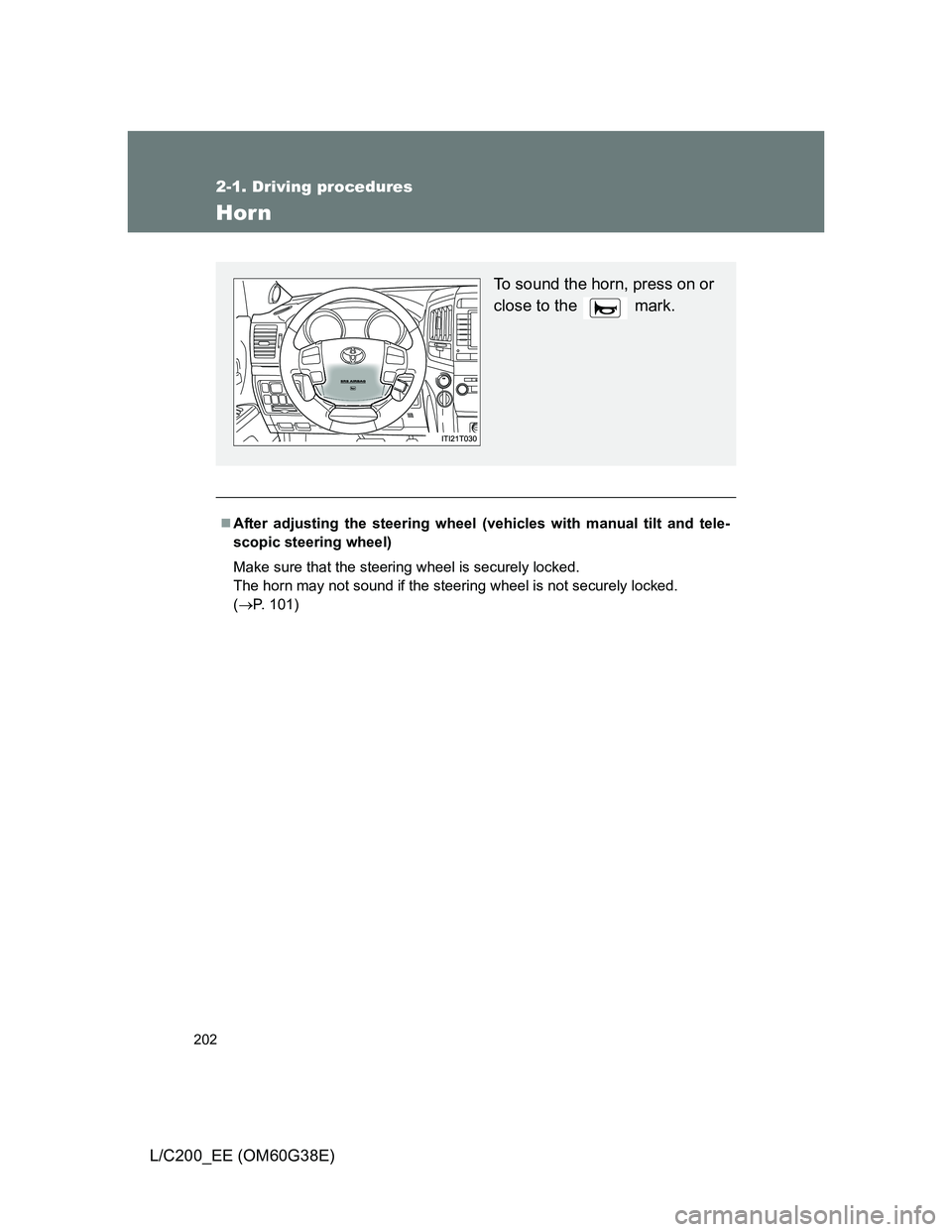
To sound the horn, press on or
close to the mark.
Page 254 of 692
254 2-4. Using other driving systems
L/C200_EE (OM60G38E)
In the following cases the 4-Wheel AHC will not operate
The brake pedal has been depressed for a few seconds or longer while
the vehicle is stopped.
Vehicle height control has not been frequently used.
The suspension fluid temperature is lower than -30°C (-22°F).
There is ice on the suspension.
Driving on bumpy roads which may cause the suspension to fully elon-
gate.
If the steering wheel is abruptly turned more than 3/4 of a revolution with
the center differential lock system activated.
Cold weather operation
It may take longer for the vehicle height to change if the suspension fluid
temperature drops below -15°C (5°F).
The 4-Wheel AHC does not operate when the suspension fluid temperature
drops below -30°C (-22°F).
In this case, even if the height select switch is pressed, the vehicle height
will not change. Once the vehicle has been driven for a short time and
the suspension fluid has been warmed to within normal operating limits,
the 4-Wheel AHC will begin operating and the vehicle height will auto-
matically change to the selected mode.
When the suspension fluid is around -30°C (-22°F), the vehicle height
may not be able to be raised, even if the 4-Wheel AHC is operating. In
this case, push “ ” then “ ” on the height select switch after driving for
a short time longer to select the desired vehicle height.
Parking and stopping tips
If you immediately stop the engine after off-road driving, the vehicle
height may gradually lower. When parking, make sure there is nothing
under the vehicle that may come in contact with the underbody. The vehi-
cle will return to the set height when the engine is started.
The vehicle height may change as the temperature changes when the
engine is stopped. The vehicle will return to the set height when the
engine is started.
Page 256 of 692
256 2-4. Using other driving systems
L/C200_EE (OM60G38E)
CAUTION
When switching the vehicle height mode
Before lowering the vehicle height, check that there are no people under or
around the vehicle, and check for obstacles.
If you do not do this, body parts may be caught in the vehicle, possibly lead-
ing to an accident.
Using the high mode
The high mode should only be used when driving on rough roads, for exam-
ple when driving off-road. Because the vehicle’s center of gravity will
become higher when in the mode, the vehicle may become unstable when
turning abruptly, resulting in an accident.
When jacking up the vehicle or installing tire chains
Turn off the height control and stop the engine, otherwise the vehicle height
may change due to the automatic leveling function, and you may catch part
of your body in the vehicle, resulting in an accident.
When crossing rivers
Select the high mode and turn off the height control. Drive at 30 km/h
(18 mph) or lower. Otherwise the vehicle height may change due to the auto-
matic leveling function, resulting in an accident.
If your vehicle must be towed
Put the vehicle height in the normal mode and turn off the height control, oth-
erwise the vehicle height may change due to the automatic leveling function
and you may catch part of your body in the vehicle, resulting in an accident.
If your vehicle becomes stuck in a ditch
Turn off the height control, otherwise the vehicle height may change due to
the automatic leveling function, resulting in an accident.
When loading cargo on the roof luggage carrier
Do not switch to high mode. Sudden steering could cause the vehicle to lose
stability due to the vehicle’s higher center of gravity, possibly leading to an
accident.
Page 265 of 692
265 2-4. Using other driving systems
2
When driving
L/C200_EE (OM60G38E)
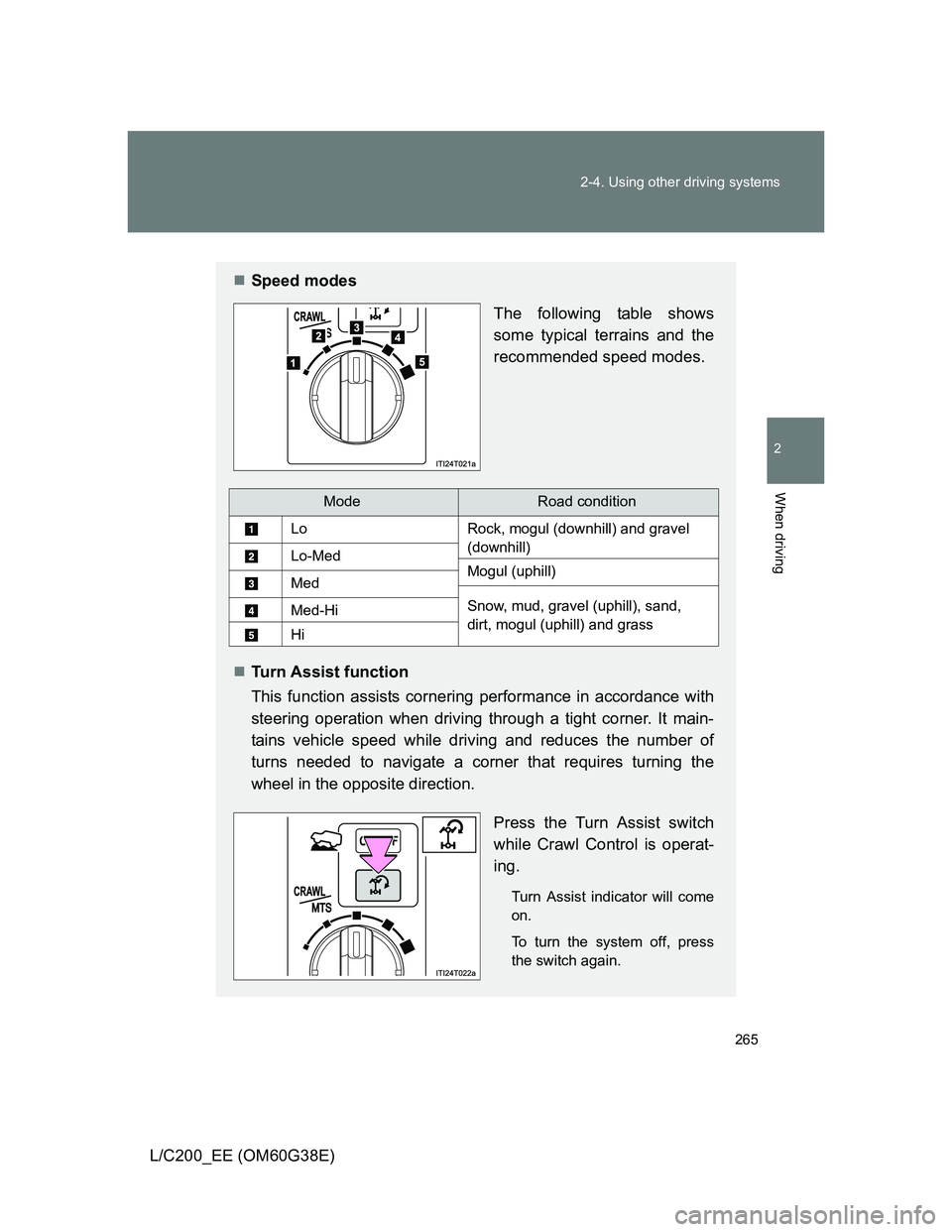
Speed modes
The following table shows
some typical terrains and the
recommended speed modes.
Turn Assist function
This function assists cornering performance in accordance with
steering operation when driving through a tight corner. It main-
tains vehicle speed while driving and reduces the number of
turns needed to navigate a corner that requires turning the
wheel in the opposite direction.
Press the Turn Assist switch
while Crawl Control is operat-
ing.
Turn Assist indicator will come
on.
To turn the system off, press
the switch again.
ModeRoad condition
LoRock, mogul (downhill) and gravel
(downhill)
Lo-MedMogul (uphill)Med
Snow, mud, gravel (uphill), sand,
dirt, mogul (uphill) and grassMed-Hi
Hi
Page 267 of 692
267 2-4. Using other driving systems
2
When driving
L/C200_EE (OM60G38E)
The Crawl Control and Turn Assist function can be operated when
Crawl Control
The engine is running.
The shift lever is in any gear other than “P” or “N”.
The four-wheel drive control switch is in “L4”.
The driver’s door is closed.
Turn Assist function
Crawl Control is operating.
The center differential is not locked.
The accelerator and brake are not being operated.
The shift lever is in any gear other than “P”, “R” or “N”.
The steering wheel is turned very far.
Automatic system cancelation
Crawl Control
In the following situations, the buzzer will sound intermittently and Crawl
Control will be canceled automatically. In this event, the Crawl Control indi-
cator will flash and then go off, the Turn Assist indicator will go off (if the Turn
Assist function is in use), and a message stating that Crawl Control has
been turned off will be displayed on the multi-information display for several
seconds
When the shift lever is moved to “P” or “N”.
When the four-wheel drive control switch is in “H4”.
When the driver’s door is opened.
Turn Assist function
When the center differential is locked, the buzzer will sound intermittently
and the Turn Assist function will be canceled automatically. In this event, the
Turn Assist indicator will go off, and a message stating that the Turn Assist
function has been turned off will be displayed on the multi-information dis-
play for several seconds.
Page 269 of 692
269 2-4. Using other driving systems
2
When driving
L/C200_EE (OM60G38E)
Sounds and vibrations caused by the Crawl Control system
A sound may be heard from the engine compartment when the engine is
started or just after the vehicle begins to move. This sound does not indi-
cate that a malfunction has occurred in Crawl Control system.
Either of the following conditions may occur when the Crawl Control sys-
tem is operating. None of these are indicators that a malfunction has
occurred.
• Vibrations may be felt through the vehicle body and steering.
• A motor sound may be heard after the vehicle comes to a stop.
When there is a malfunction in the system
Warning lights and/or warning messages will turn on. (P. 573, 579)
CAUTION
When using Crawl Control and Turn Assist function
Do not rely solely on the Crawl Control and Turn Assist function. This func-
tion does not extend the vehicle’s performance limitations. Always thor-
oughly check the road conditions, and drive safely.
These conditions may cause the system not to operate properly
When driving on the following surfaces, the system may not be able to main-
tain a fixed low speed, which may result in an accident:
Extremely steep inclines.
Extremely uneven surfaces.
Snow-covered roads, or other slippery surfaces.
NOTICE
When using Turn Assist function
The Turn Assist function is a function to assist turning performance when
driving off road. The function may be less effective on paved road surfaces.
Page 280 of 692
280 2-4. Using other driving systems
L/C200_EE (OM60G38E)
Display
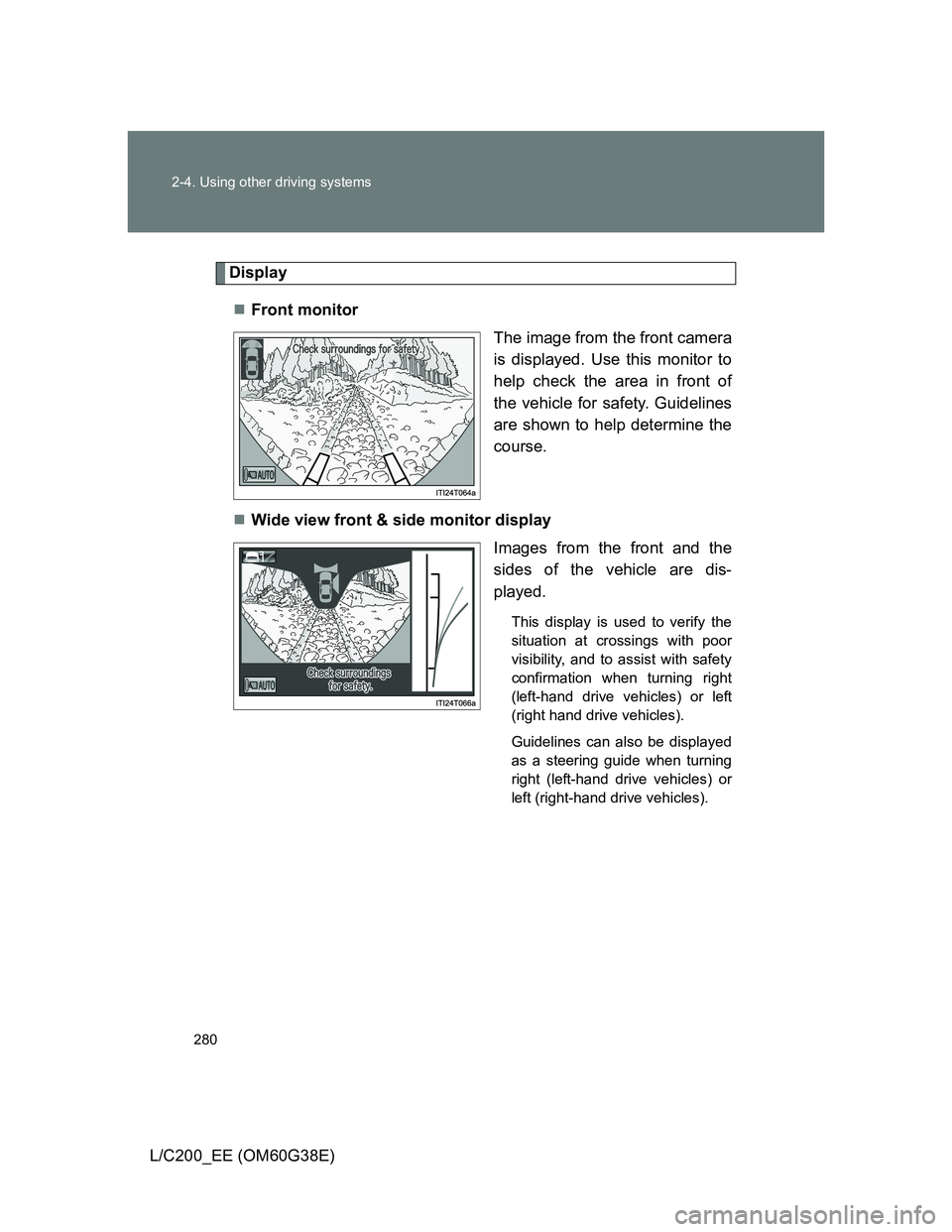
Front monitor
The image from the front camera
is displayed. Use this monitor to
help check the area in front of
the vehicle for safety. Guidelines
are shown to help determine the
course.
Wide view front & side monitor display
Images from the front and the
sides of the vehicle are dis-
played.
This display is used to verify the
situation at crossings with poor
visibility, and to assist with safety
confirmation when turning right
(left-hand drive vehicles) or left
(right hand drive vehicles).
Guidelines can also be displayed
as a steering guide when turning
right (left-hand drive vehicles) or
left (right-hand drive vehicles).
Page 282 of 692
282 2-4. Using other driving systems
L/C200_EE (OM60G38E)
Using the monitor
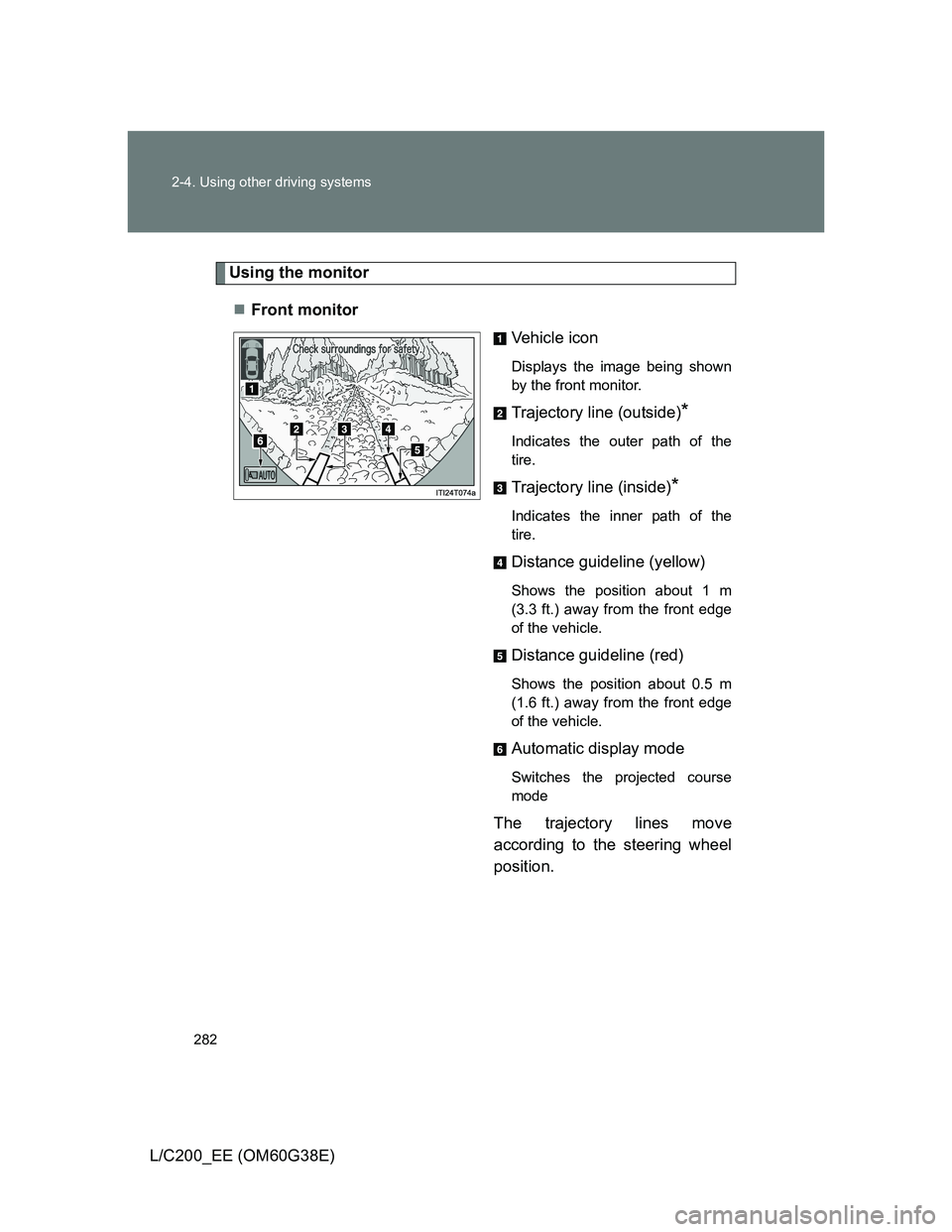
Front monitor
Vehicle icon
Displays the image being shown
by the front monitor.
Trajectory line (outside)*
Indicates the outer path of the
tire.
Trajectory line (inside)*
Indicates the inner path of the
tire.
Distance guideline (yellow)
Shows the position about 1 m
(3.3 ft.) away from the front edge
of the vehicle.
Distance guideline (red)
Shows the position about 0.5 m
(1.6 ft.) away from the front edge
of the vehicle.
Automatic display mode
Switches the projected course
mode
The trajectory lines move
according to the steering wheel
position.
Page 283 of 692
283 2-4. Using other driving systems
2
When driving
L/C200_EE (OM60G38E)
*: While the Turn Assist function
of Crawl Control is operating,
the trajectory lines will be dis-
played as dotted lines. At this
time, there may be a differ-
ence between the trajectory
lines and the actual course of
progression.
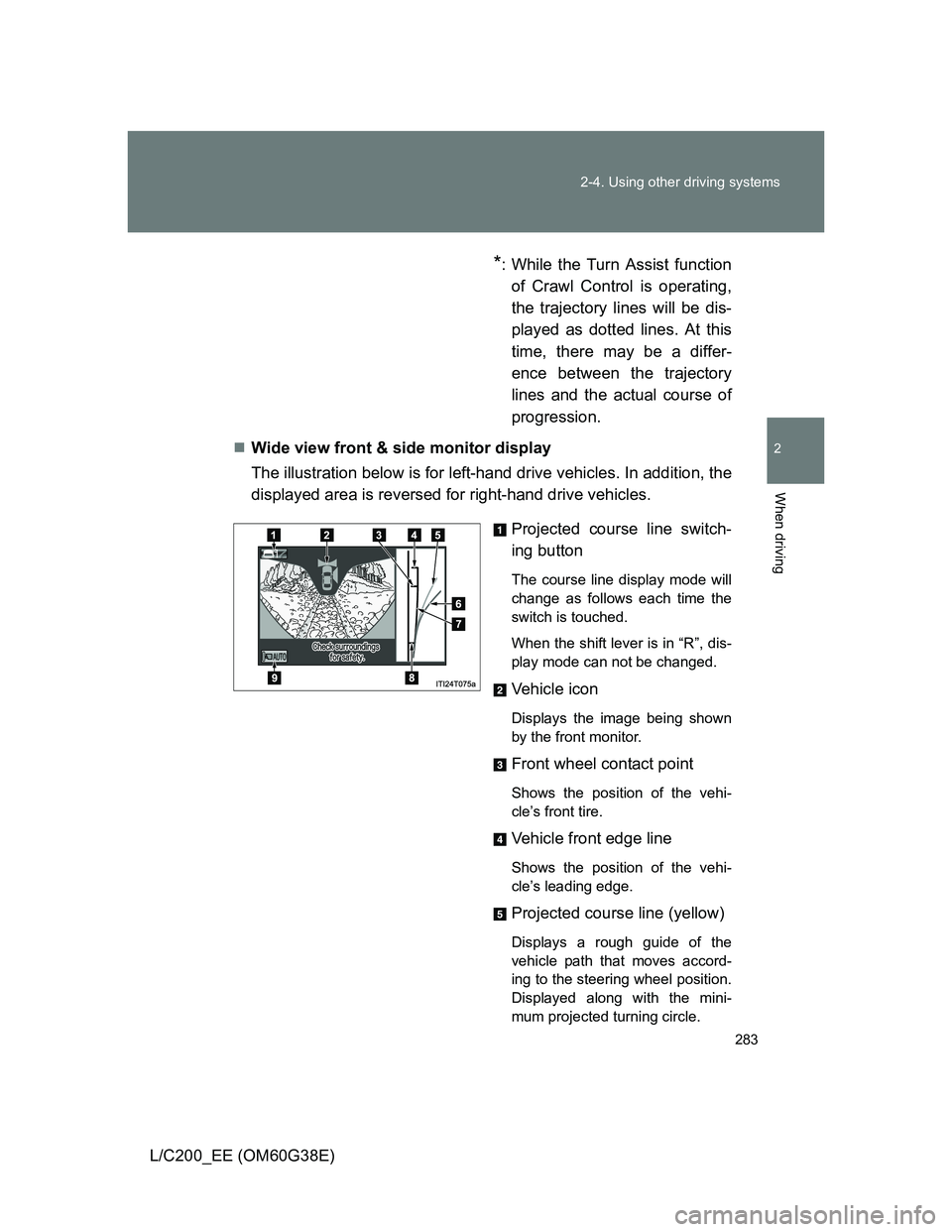
Wide view front & side monitor display
The illustration below is for left-hand drive vehicles. In addition, the
displayed area is reversed for right-hand drive vehicles.
Projected course line switch-
ing button
The course line display mode will
change as follows each time the
switch is touched.
When the shift lever is in “R”, dis-
play mode can not be changed.
Vehicle icon
Displays the image being shown
by the front monitor.
Front wheel contact point
Shows the position of the vehi-
cle’s front tire.
Vehicle front edge line
Shows the position of the vehi-
cle’s leading edge.
Projected course line (yellow)
Displays a rough guide of the
vehicle path that moves accord-
ing to the steering wheel position.
Displayed along with the mini-
mum projected turning circle.
Page 284 of 692
284 2-4. Using other driving systems
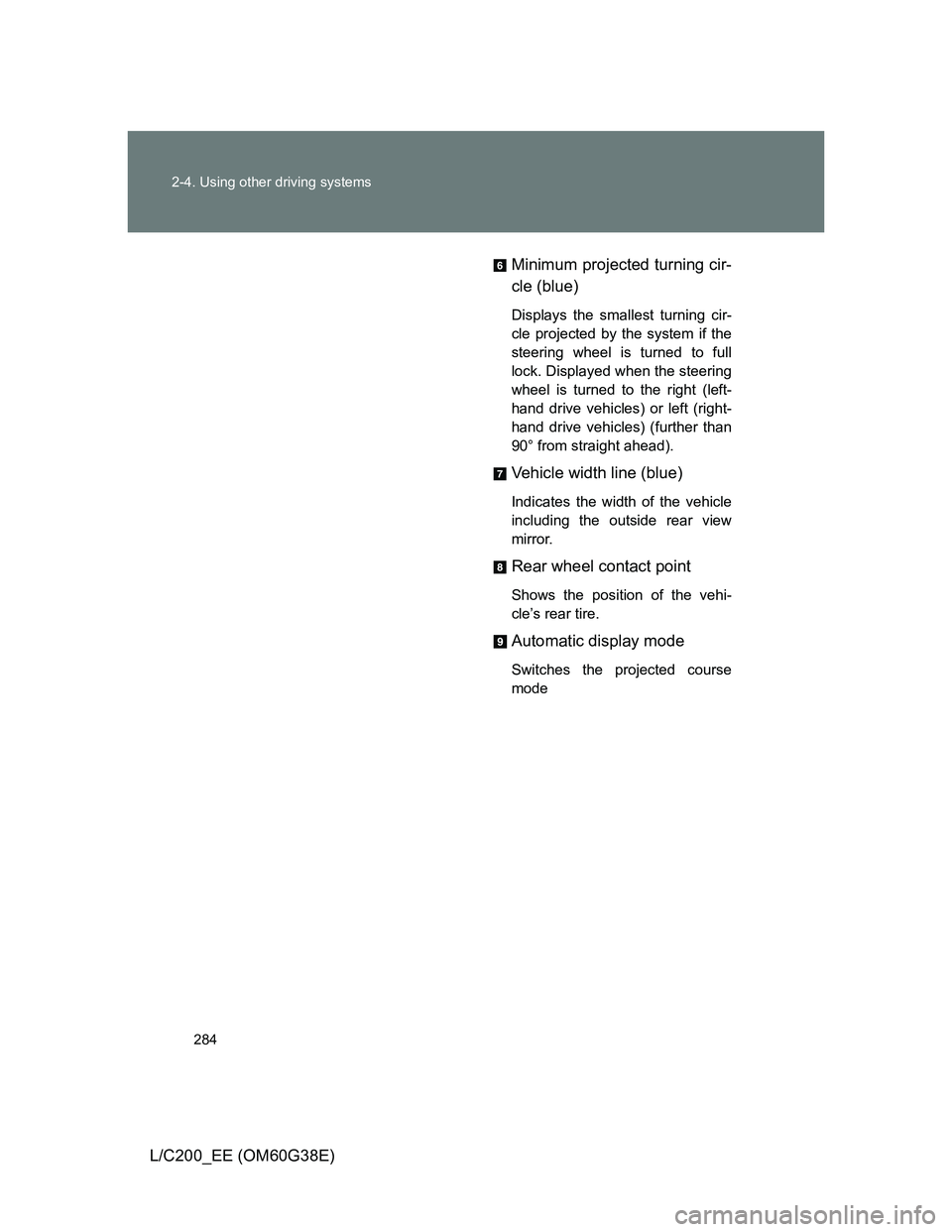
L/C200_EE (OM60G38E)Minimum projected turning cir-
cle (blue)
Displays the smallest turning cir-
cle projected by the system if the
steering wheel is turned to full
lock. Displayed when the steering
wheel is turned to the right (left-
hand drive vehicles) or left (right-
hand drive vehicles) (further than
90° from straight ahead).
Vehicle width line (blue)
Indicates the width of the vehicle
including the outside rear view
mirror.
Rear wheel contact point
Shows the position of the vehi-
cle’s rear tire.
Automatic display mode
Switches the projected course
mode