sensor TOYOTA LAND CRUISER 2017 J200 Workshop Manual
[x] Cancel search | Manufacturer: TOYOTA, Model Year: 2017, Model line: LAND CRUISER, Model: TOYOTA LAND CRUISER 2017 J200Pages: 608, PDF Size: 15.88 MB
Page 348 of 608
348
LC200_OM_OM60P24U_(U)
4-5. Using the driving support systems
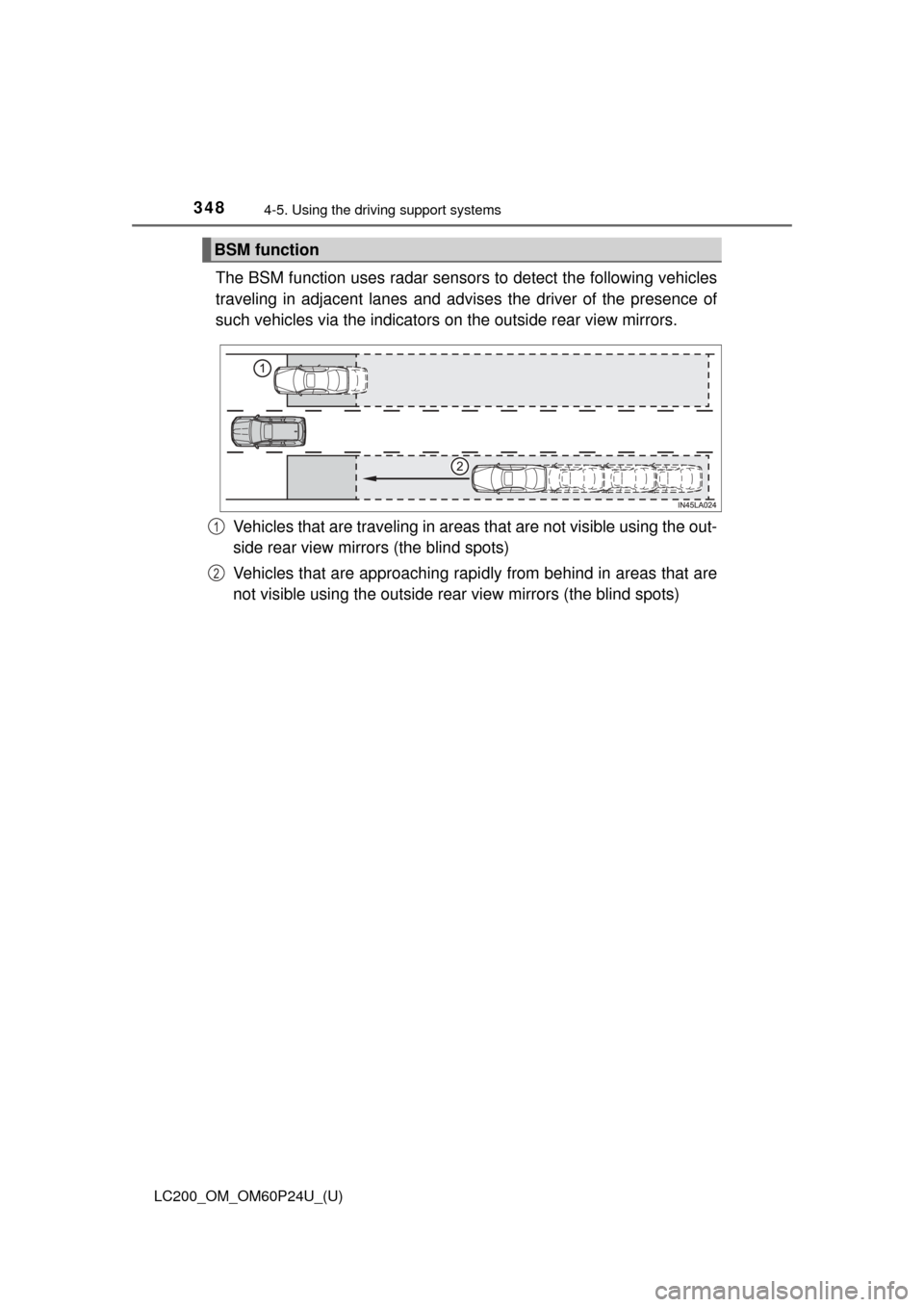
The BSM function uses radar sensor s to detect the following vehicles
traveling in adjacent lanes and advise s the driver of the presence of
such vehicles via the indicators on the outside rear view mirrors.
Vehicles that are traveling in areas that are not visible using the out-
side rear view mirrors (the blind spots)
Vehicles that are approaching rapi dly from behind in areas that are
not visible using the outside rear view mirrors (the blind spots)
BSM function
1
2
Page 351 of 608
LC200_OM_OM60P24U_(U)
3514-5. Using the driving support systems
4
Driving
■Conditions under which the BSM function may not function correctly
●The BSM function may not detect vehicles correctly in the following situa-
tions:
• When the sensor is misaligned due to a strong impact to the sensor or its
surrounding area
• When mud, snow, ice, a sticker, etc. is covering the sensor or surround-
ing area on the rear bumper
• When driving on a road surface that is wet with standing water during bad weather, such as heavy rain, snow, or fog
• When multiple vehicles are approaching with only a small gap between each vehicle
• When the distance between your vehicle and a following vehicle is short
• When there is a significant difference in speed between your vehicle and the vehicle that enters the detection area
• When the difference in speed between your vehicle and another vehicle
is changing
• When a vehicle enters a detection area traveling at about the same speed as your vehicle
• As your vehicle starts from a stop, a vehicle remains in the detection area
• When driving up and down consecutive steep inclines, such as hills, dips in the road, etc.
• When driving on roads with sharp bends, consecutive curves, or uneven surfaces
• When vehicle lanes are wide, or when driving on the edge of a lane, and
the vehicle in an adjacent lane is far away from your vehicle
• When a bicycle carrier or other accessory is installed to the rear of the
vehicle
• When there is a significant difference in height between your vehicle and the vehicle that enters the detection area
• Immediately after the BSM function is turned on
● Instances of the BSM function unnecessarily detecting a vehicle and/or
object may increase in the following situations:
• When the sensor is misaligned due to a strong impact to the sensor or its
surrounding area
• When the distance between your vehicle and a guardrail, wall, etc. that enters the detection area is short
• When driving up and down consecutive steep inclines, such as hills, dips in the road, etc.
• When vehicle lanes are narrow, or when driving on the edge of a lane,
and a vehicle traveling in a lane other than the adjacent lanes enters the
detection area
• When driving on roads with sharp bends, consecutive curves, or uneven
surfaces
• When the tires are slipping or spinning
• When the distance between your vehicle and a following vehicle is short
• When a bicycle carrier or other accessory is installed to the rear of the vehicle
Page 352 of 608
352
LC200_OM_OM60P24U_(U)
4-5. Using the driving support systems
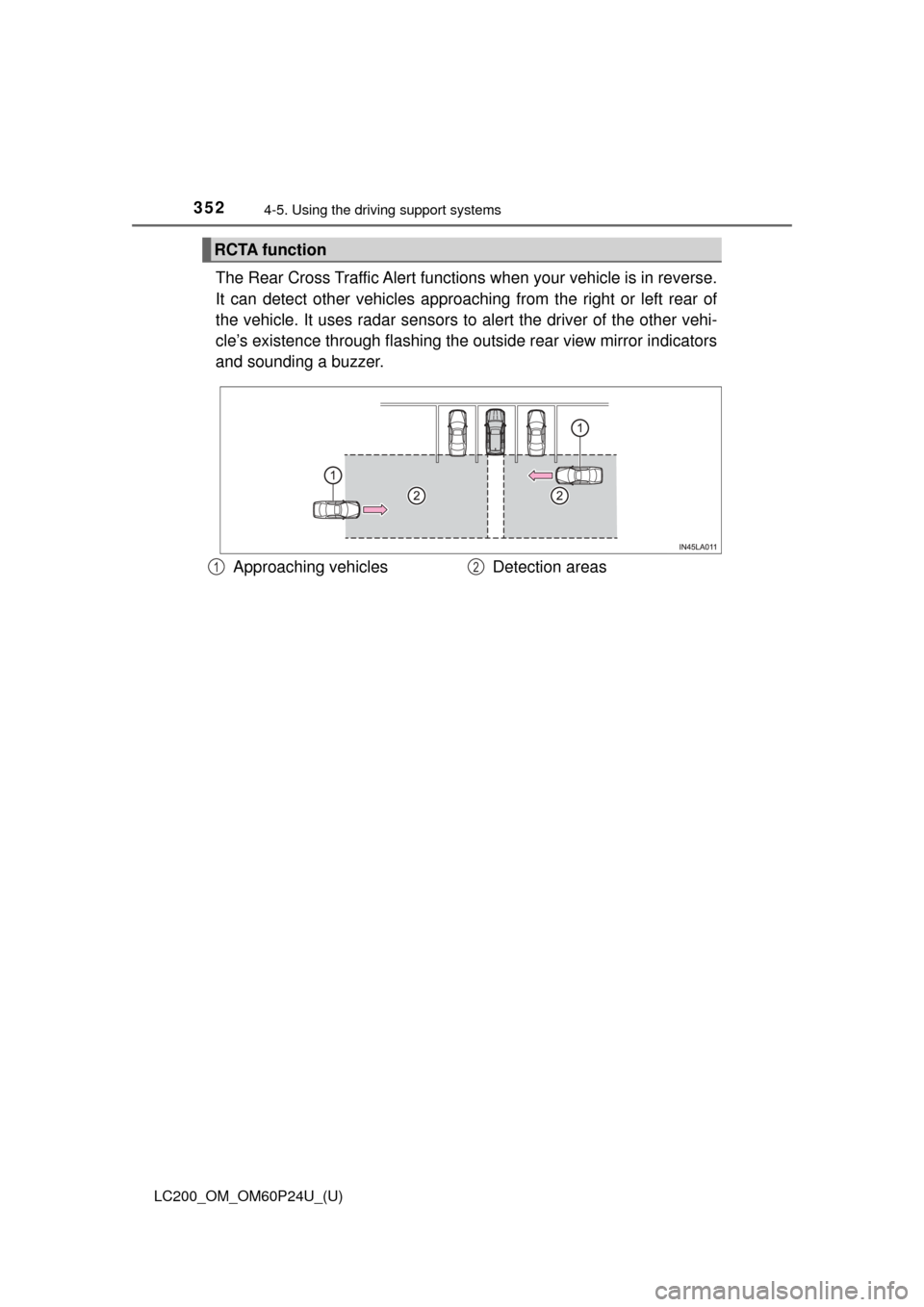
The Rear Cross Traffic Alert functions when your vehicle is in reverse.
It can detect other vehicles approaching from the right or left rear of
the vehicle. It uses radar sensors to alert the driver of the other vehi-
cle’s existence through fl ashing the outside rear view mirror indicators
and sounding a buzzer.
RCTA function
Approaching vehicles Detection areas12
Page 355 of 608
LC200_OM_OM60P24U_(U)
3554-5. Using the driving support systems
4
Driving
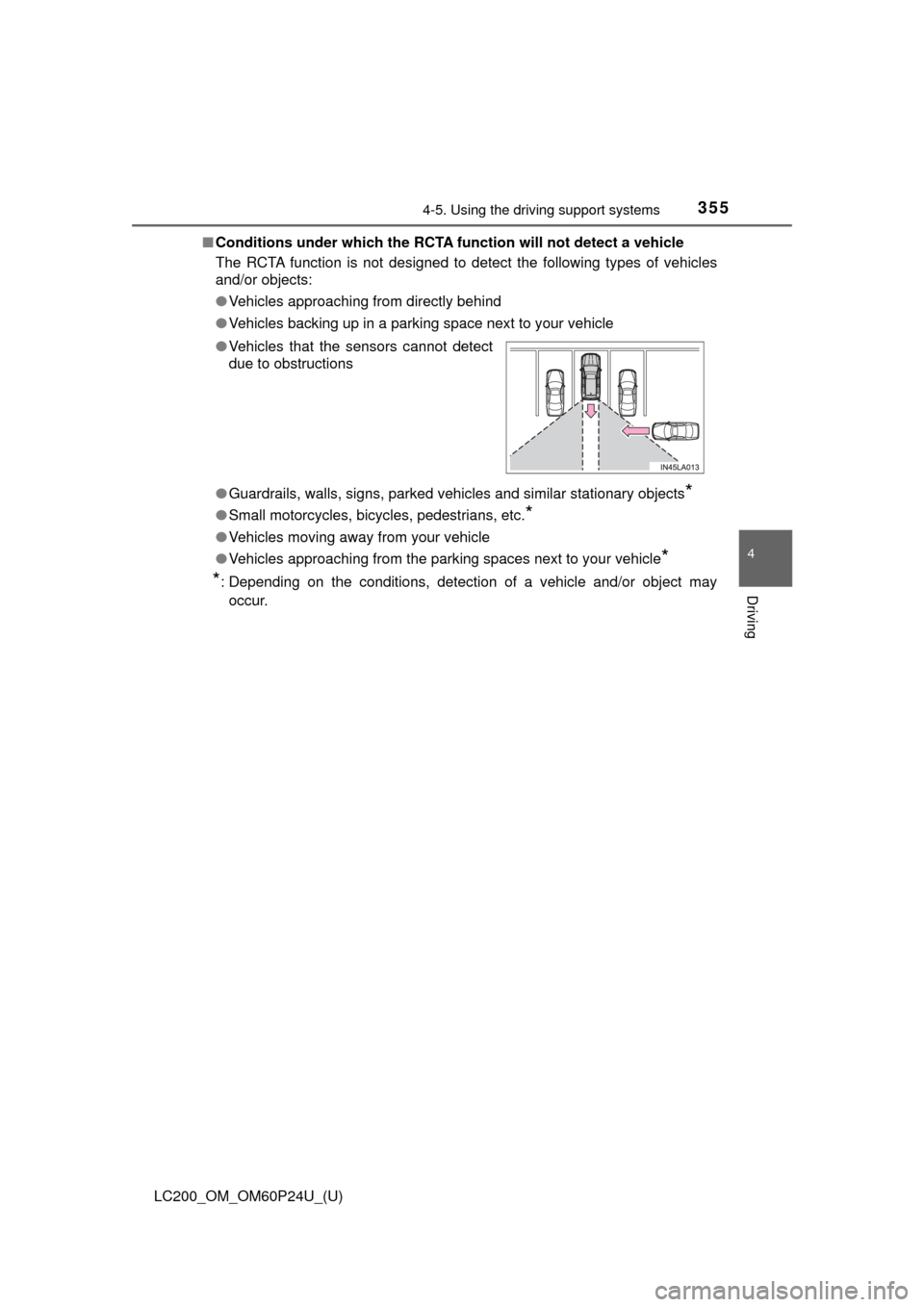
■Conditions under which the RCTA fu nction will not detect a vehicle
The RCTA function is not designed to detect the following types of vehicles
and/or objects:
● Vehicles approaching from directly behind
● Vehicles backing up in a parking space next to your vehicle
● Guardrails, walls, signs, parked vehi cles and similar stationary objects
*
●Small motorcycles, bicycles, pedestrians, etc.*
●Vehicles moving away from your vehicle
● Vehicles approaching from the parking spaces next to your vehicle
*
*
: Depending on the conditions, detection of a vehicle and/or object may
occur.
●
Vehicles that the sensors cannot detect
due to obstructions
Page 356 of 608
356
LC200_OM_OM60P24U_(U)
4-5. Using the driving support systems
■Conditions under which the RCTA function may not function correctly
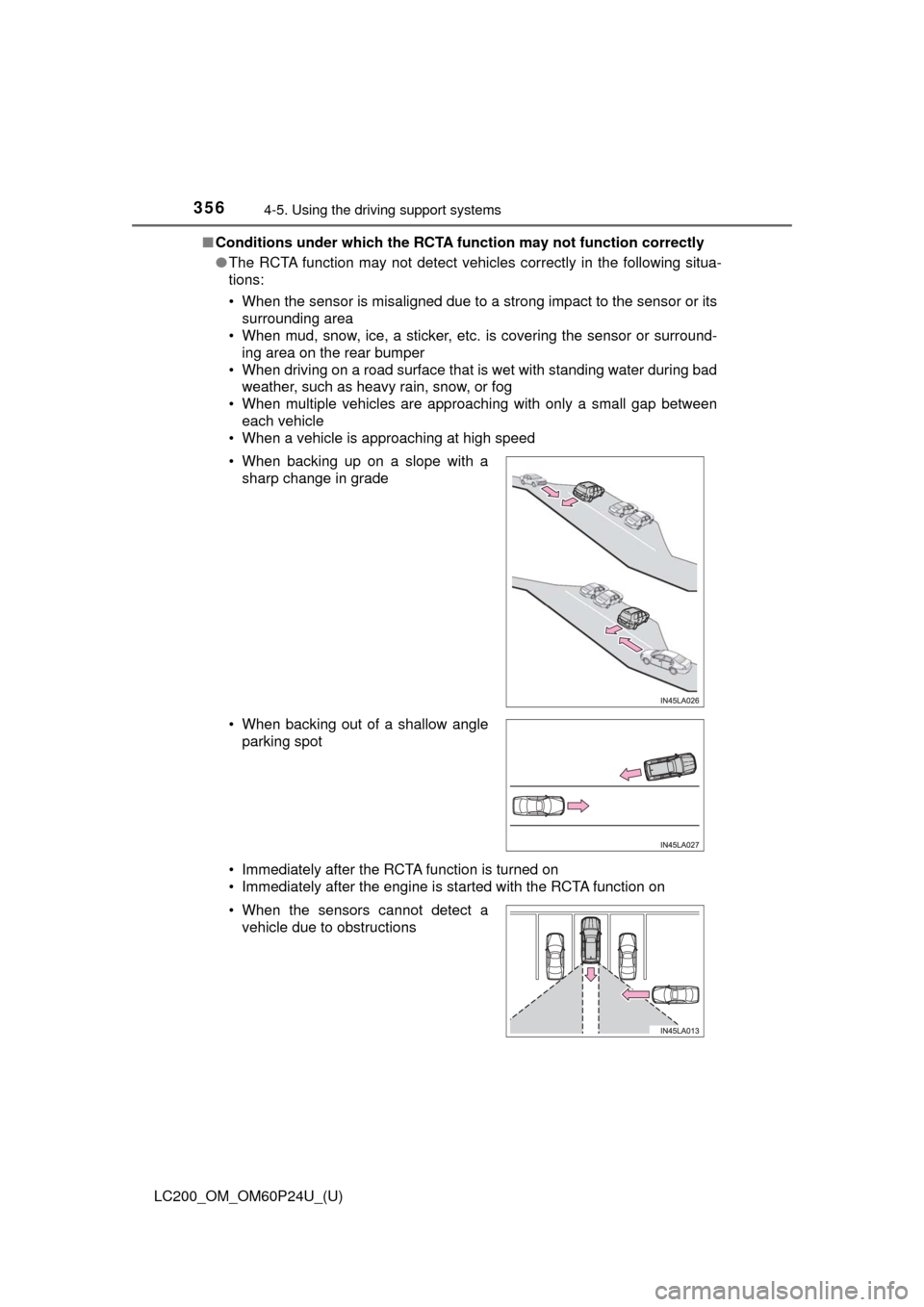
●The RCTA function may not detect vehicles correctly in the following situa-
tions:
• When the sensor is misaligned due to a strong impact to the sensor or its
surrounding area
• When mud, snow, ice, a sticker, etc. is covering the sensor or surround-
ing area on the rear bumper
• When driving on a road surface that is wet with standing water during bad weather, such as heavy rain, snow, or fog
• When multiple vehicles are approaching with only a small gap between each vehicle
• When a vehicle is approaching at high speed
• Immediately after the RCTA function is turned on
• Immediately after the engine is started with the RCTA function on • When backing up on a slope with a
sharp change in grade
• When backing out of a shallow angle parking spot
• When the sensors cannot detect a vehicle due to obstructions
Page 435 of 608
LC200_OM_OM60P24U_(U)
4356-1. Maintenance and care
6
Maintenance and care
■Notes for a smart key system
●If the door handle becomes wet while the electronic key is within the effec-
tive range, the door may lock and unlock repeatedly. Place the key in a posi-
tion 2 m (6 ft.) or more separate from the vehicle while the vehicle is being
washed. (Take care to ensure that the key is not stolen.)
● If the electronic key is inside the vehicle and a door handle becomes wet
during a car wash, a message may be shown on the multi-information dis-
play and a buzzer will sound outside the vehicle. To turn off the alarm, lock
all the doors.
WARNING
■When washing the vehicle
Do not apply water to the inside of the engine compartment. Doing so may
cause the electrical components etc. to catch fire.
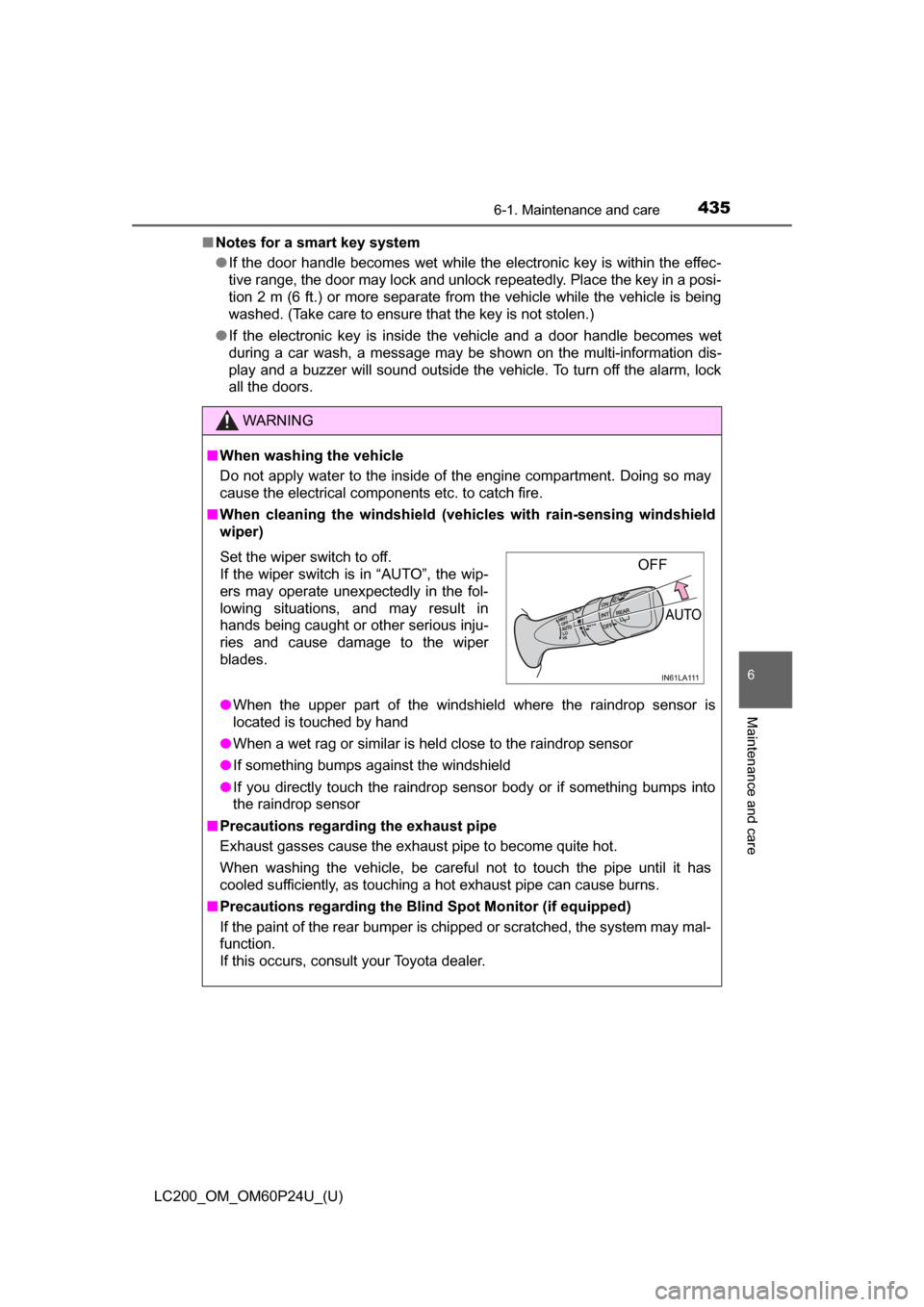
■ When cleaning the windshield (vehicles with rain-sensing windshield
wiper)
● When the upper part of the windshield where the raindrop sensor is
located is touched by hand
● When a wet rag or similar is held close to the raindrop sensor
● If something bumps against the windshield
● If you directly touch the raindrop sensor body or if something bumps into
the raindrop sensor
■ Precautions regarding the exhaust pipe
Exhaust gasses cause the exhaust pipe to become quite hot.
When washing the vehicle, be careful not to touch the pipe until it has
cooled sufficiently, as touching a hot exhaust pipe can cause burns.
■ Precautions regarding the Blind Spot Monitor (if equipped)
If the paint of the rear bumper is chipped or scratched, the system may mal-
function.
If this occurs, consult your Toyota dealer.
Set the wiper switch to off.
If the wiper switch is in “AUTO”, the wip-
ers may operate unexpectedly in the fol-
lowing situations, and may result in
hands being caught or other serious inju-
ries and cause damage to the wiper
blades.OFF
AUTO
Page 511 of 608
5117-2. Steps to take in an emergency
LC200_OM_OM60P24U_(U)
7
When trouble arises
ABS warning lightIndicates a malfunction in:
• The Multi Terrain ABS; or
• The brake assist system
→ Have the vehicle inspected by your Toyota dealer
immediately.
Slip indicator
Indicates a malfunction in: or
• The VSC (Vehicle Stability Control) system;
• Trailer Sway Control;
• Active TRAC (Traction Control) system;
• The hill-start assist control system
• The Multi-terrain Select; or
• The Crawl Control;
The light will flash when any of the above systems other
than the Multi-terrain Select are operating.
→ Have the vehicle inspected by your Toyota dealer
immediately.
(if equipped)
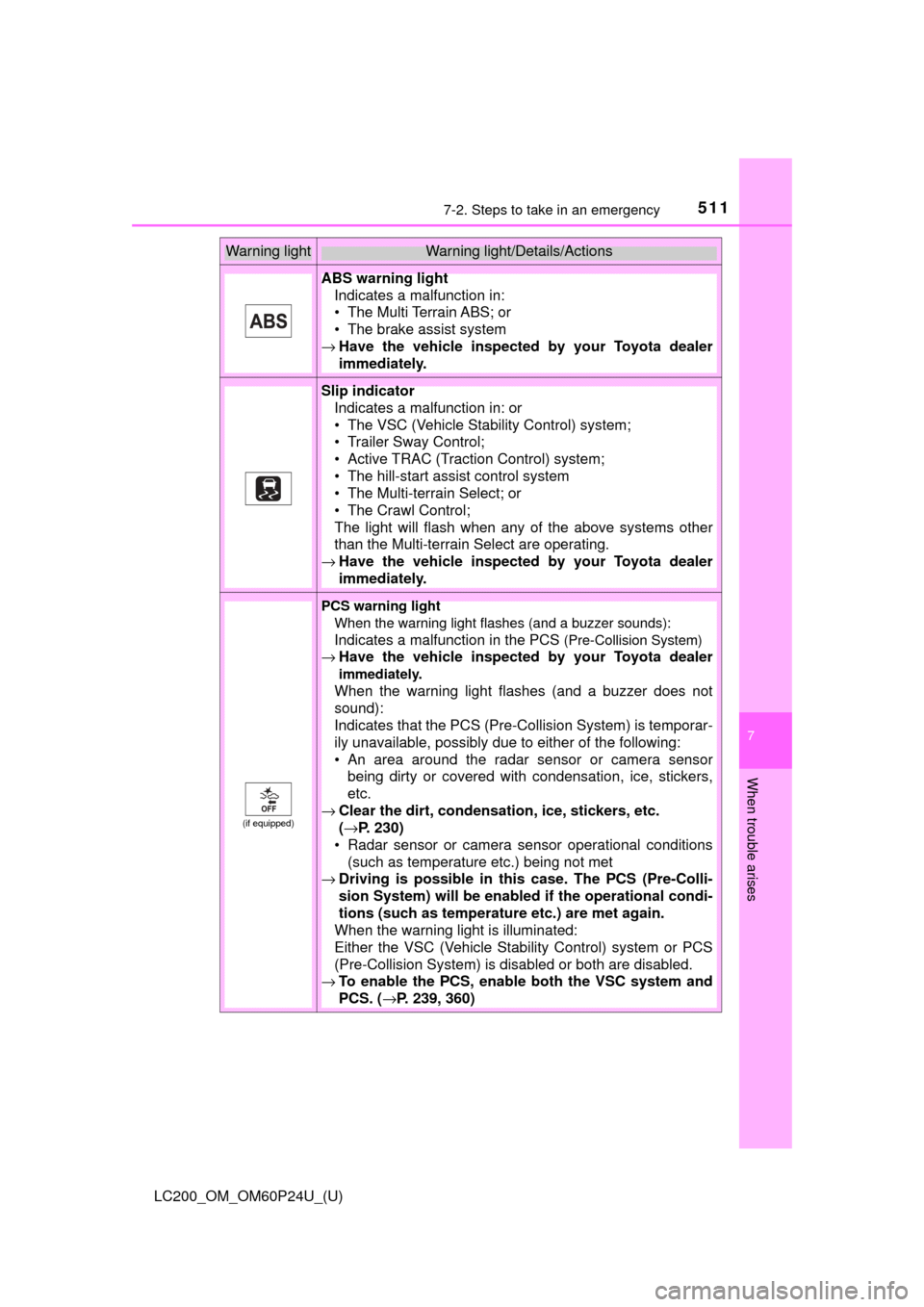
PCS warning light
When the warning light flashes (and a buzzer sounds):
Indicates a malfunction in the PCS
(Pre-Collision System)
→ Have the vehicle inspected by your Toyota dealer
immediately.
When the warning light flashes (and a buzzer does not
sound):
Indicates that the PCS (Pre-Collision System) is temporar-
ily unavailable, possibly due to either of the following:
• An area around the radar sensor or camera sensor
being dirty or covered with condensation, ice, stickers,
etc.
→ Clear the dirt, condensation, ice, stickers, etc.
(→P. 230)
• Radar sensor or camera sensor operational conditions
(such as temperature etc.) being not met
→ Driving is possible in th is case. The PCS (Pre-Colli-
sion System) will be enabled if the operational condi-
tions (such as temperature etc.) are met again.
When the warning light is illuminated:
Either the VSC (Vehicle Stability Control) system or PCS
(Pre-Collision System) is disabled or both are disabled.
→ To enable the PCS, enable both the VSC system and
PCS. ( →P. 239, 360)
Warning lightWarning light/Details/Actions
Page 514 of 608
5147-2. Steps to take in an emergency
LC200_OM_OM60P24U_(U)
■SRS warning light
This warning light system monitors the airbag sensor assembly, front impact
sensors, side impact sensors (rear), side impact sensors (front door), safing
sensor (rear), driver’s seat belt buckle switch, driver’s seat position sensor,
front passenger’s seat belt buckle switch, airbags, interconnecting wiring and
power sources, front passenger occupant classification system, “AIR BAG
ON” and “AIR BAG OFF” indicator lights, seat belt pretensioners, “RSCA
OFF” indicator light. (→P. 38)
■ Front passenger detection sensor, seat belt reminder and warning
buzzer
● If luggage is placed on the front passenger seat, the front passenger de\
tec-
tion sensor may cause the warning light to flash and the warning buzzer to
sound even if a passenger is not sitting in the seat.
● If a cushion is placed on the seat, the sensor may not detect a passenger,
and the warning light may not operate properly.
■ If the malfunction indicator la mp comes on while driving
First check the following:
● Is the fuel tank empty?
If it is, fill the fuel tank immediately.
● Is the fuel tank cap loose?
If it is, tighten it securely.
The light will go off after several driving trips.
If the light does not go off even after several trips, contact your Toyota dealer
as soon as possible.
■ If the low speed four-wheel drive indi cator light or the center differential
lock indicator light blinks
Take the specified steps. ( →P. 283)
If the brake system warning light or the malfunction indicator light also comes
on, or the low speed four-wheel drive indicator light or the center differential
lock indicator light continues to blink after taking the specified steps, there
may be a malfunction in the engine, the brake system or the four-wheel drive
system. In this case, you may not be able to transfer between “H4” and “L4”
modes, and the center differential lock may not be able to be locked or
unlocked. Have the vehicle inspected by your Toyota dealer immediately.
Page 578 of 608
578
LC200_OM_OM60P24U_(U)
8-2. Customization
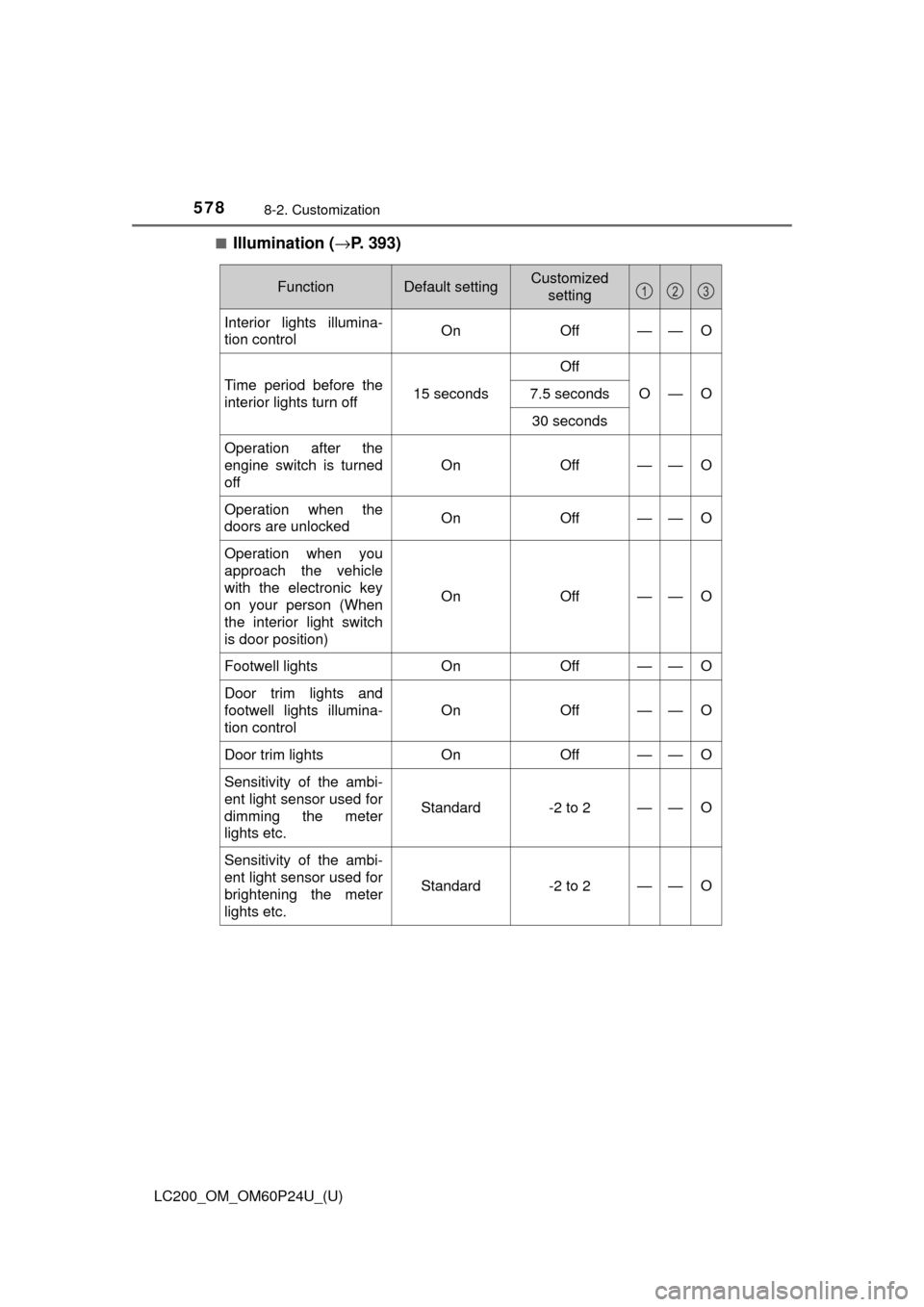
■Illumination (→P. 393)
FunctionDefault settingCustomized
setting
Interior lights illumina-
tion control On Off——O
Time period before the
interior lights turn off 15 secondsOff
O—O
7.5 seconds
30 seconds
Operation after the
engine switch is turned
off On Off
——O
Operation when the
doors are unlocked
On Off——O
Operation when you
approach the vehicle
with the electronic key
on your person (When
the interior light switch
is door position)On
Off
——O
Footwell lights OnOff——O
Door trim lights and
footwell lights illumina-
tion control On Off
——O
Door trim lights
OnOff——O
Sensitivity of the ambi-
ent light sensor used for
dimming the meter
lights etc.
Standard-2 to 2——O
Sensitivity of the ambi-
ent light sensor used for
brightening the meter
lights etc.
Standard-2 to 2——O
123
Page 579 of 608
LC200_OM_OM60P24U_(U)
5798-2. Customization
8
Vehicle specifications
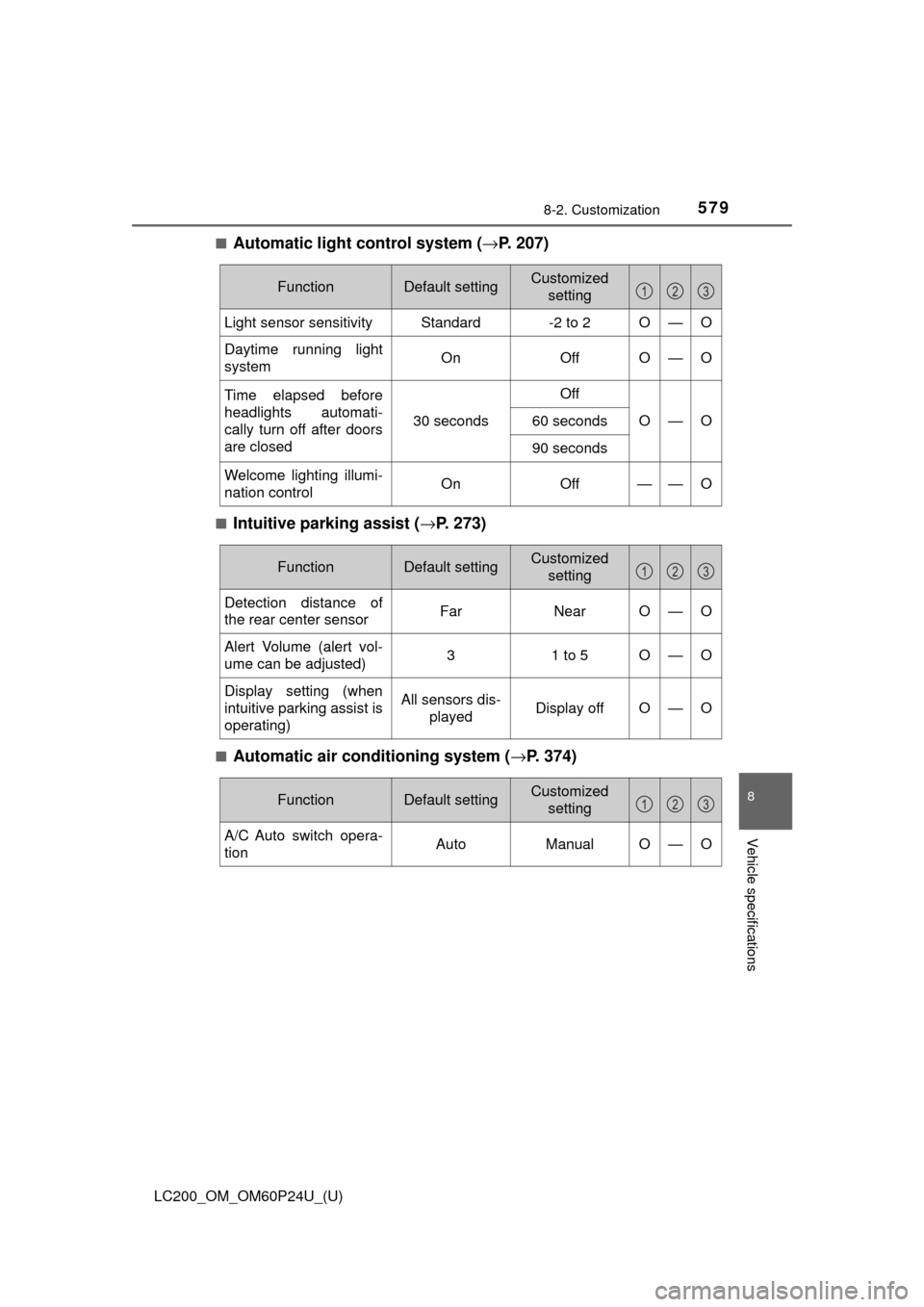
■Automatic light control system (→P. 207)
■Intuitive parking assist (→ P. 273)
■Automatic air conditioning system (→P. 374)
FunctionDefault settingCustomized
setting
Light sensor sensitivityStandard-2 to 2O—O
Daytime running light
system On OffO—O
Time elapsed before
headlights automati-
cally turn off after doors
are closed
30 secondsOffO—O60 seconds
90 seconds
Welcome lighting illumi-
nation control
On Off——O
123
FunctionDefault settingCustomized
setting
Detection distance of
the rear center sensor Far NearO—O
Alert Volume (alert vol-
ume can be adjusted) 3 1 to 5
O—O
Display setting (when
intuitive parking assist is
operating) All sensors dis-
played Display off
O—O
123
FunctionDefault settingCustomized
setting
A/C Auto switch opera-
tion Auto ManualO—O
123