tire TOYOTA LAND CRUISER 2017 J200 Owners Manual
[x] Cancel search | Manufacturer: TOYOTA, Model Year: 2017, Model line: LAND CRUISER, Model: TOYOTA LAND CRUISER 2017 J200Pages: 608, PDF Size: 15.88 MB
Page 5 of 608

5
1
8 7
6
5
4
3
2
LC200_OM_OM60P24U_(U)
9
6-1. Maintenance and careCleaning and protecting the vehicle exterior .......... 434
Cleaning and protecting the vehicle interior ........... 437
6-2. Maintenance Maintenance requirements ................... 440
General maintenance ........ 443
Emission inspection and maintenance (I/M)
programs ......................... 446
6-3. Do-it-yourself maintenance Do-it-yourself service precautions ..................... 447
Hood.................................. 449
Engine compartment ......... 450
Tires .................................. 463
Tire inflation pressure........ 472
Wheels .............................. 475
Air conditioning filter .......... 477
Electronic key battery ........ 479
Checking and replacing fuses ............................... 481
Headlight aim .................... 485
Light bulbs ......................... 487 7-1. Essential information
Emergency flashers ........... 500
If your vehicle has to be stopped in
an emergency.................. 501
7-2. Steps to take in an emergency
If your vehicle needs to be towed ...................... 502
If you think something is wrong............................... 508
Fuel pump shut off system ............................. 509
If a warning light turns on or a warning buzzer
sounds ............................. 510
If a warning message is displayed ......................... 519
If you have a flat tire .......... 524
If the engine will not start ................................. 538
If the electronic key does not operate properly ........ 540
If the vehicle battery is discharged ....................... 543
If your vehicle overheats.... 546
If the vehicle becomes stuck ................................ 549
6Maintenance and care7When trouble arises
Page 6 of 608
TABLE OF CONTENTS6
LC200_OM_OM60P24U_(U)8-1. Specifications
Maintenance data (fuel, oil level, etc.) .......... 552
Fuel information ................ 560
Tire information ................. 563
8-2. Customization Customizable features ...... 574
8-3. Initialization Items to initialize................ 584
Reporting safety defects for U.S. owners ........................ 586 What to do if...
(Troubleshooting) ..................... 588
Alphabetical index ...................... 592
8Vehicle specifications
9For U.S. owners
Index
For vehicles with a navigation system or a mu ltimedia system, refer
to the “NAVIGATION SYSTEM OWNER’S MANUAL” for information
regarding the equipment listed below. • Navigation system
• Audio/video system
• Rear seat entertainment system
• Hands-free system (for cellular phone)
Page 15 of 608
15Pictorial index
LC200_OM_OM60P24U_(U)Windshield wipers . . . . . . . . . . . . . . . . . . . . . . . . . . . . . . . . . P. 217
Rear window wiper . . . . . . . . . . . . . . . . . . . . . . . . . . . . . . . . P. 221
Precautions against winter season . . . . . . . . . . . . . . . . . . . . . P. 370
To prevent freezing (windshield wiper de-icer
*). . . . . . . . . . . . P. 380
Precautions against car wash . . . . . . . . . . . . . . . . . . . . . . . . . P. 435
Fuel filler door . . . . . . . . . . . . . . . . . . . . . . . . . . . . . . . . . . . . P. 224
Refueling method . . . . . . . . . . . . . . . . . . . . . . . . . . . . . . . . . . . P. 224
Fuel type/fuel tank capacity . . . . . . . . . . . . . . . . . . . . . . . . . . . P. 554
Tires . . . . . . . . . . . . . . . . . . . . . . . . . . . . . . . . . . . . . . . . . . P. 463
Tire size/inflation pressure . . . . . . . . . . . . . . . . . . . . . . . . . P. 558
Winter tires/tire chain . . . . . . . . . . . . . . . . . . . . . . . . . . . . . P. 370
Checking/rotation/tire pressure warning system . . . . . . . . . P. 463
Coping with flat tires . . . . . . . . . . . . . . . . . . . . . . . . . . . . . . P. 524
Hood . . . . . . . . . . . . . . . . . . . . . . . . . . . . . . . . . . . . . . . . . . . . P. 449
Opening . . . . . . . . . . . . . . . . . . . . . . . . . . . . . . . . . . . . . . . . . . P. 449
Engine oil . . . . . . . . . . . . . . . . . . . . . . . . . . . . . . . . . . . . . . . . . P. 554
Coping with overheat . . . . . . . . . . . . . . . . . . . . . . . . . . . . . . . . P. 546
Camera
* . . . . . . . . . . . . . . . . . . . . . . . . . . . . . . . . . . . . . . . . . P. 294
Headlights/daytime running lights . . . . . . . . . . . . . . . . . . . . P. 207
Parking lights . . . . . . . . . . . . . . . . . . . . . . . . . . . . . . . . . . . . . P. 207
Fog lights . . . . . . . . . . . . . . . . . . . . . . . . . . . . . . . . . . . . . . . . P. 216
Turn signal lights . . . . . . . . . . . . . . . . . . . . . . . . . . . . . . . . . . P. 205
Stop/tail lights
Hill-start assist control . . . . . . . . . . . . . . . . . . . . . . . . . . . . . . . P. 358
License plate lights . . . . . . . . . . . . . . . . . . . . . . . . . . . . . . . . P. 207
Back-up lights
Shifting the shift lever to R . . . . . . . . . . . . . . . . . . . . . . . . . . . . P. 199
Side marker lights . . . . . . . . . . . . . . . . . . . . . . . . . . . . . . . . . P. 207
4
5
6
7
8
Light bulbs of the exter ior lights for driving
(Replacing method: P. 487, Watts: P. 552)
*: If equipped
9
10
11
12
13
14
15
16
Page 19 of 608
19Pictorial index
LC200_OM_OM60P24U_(U)
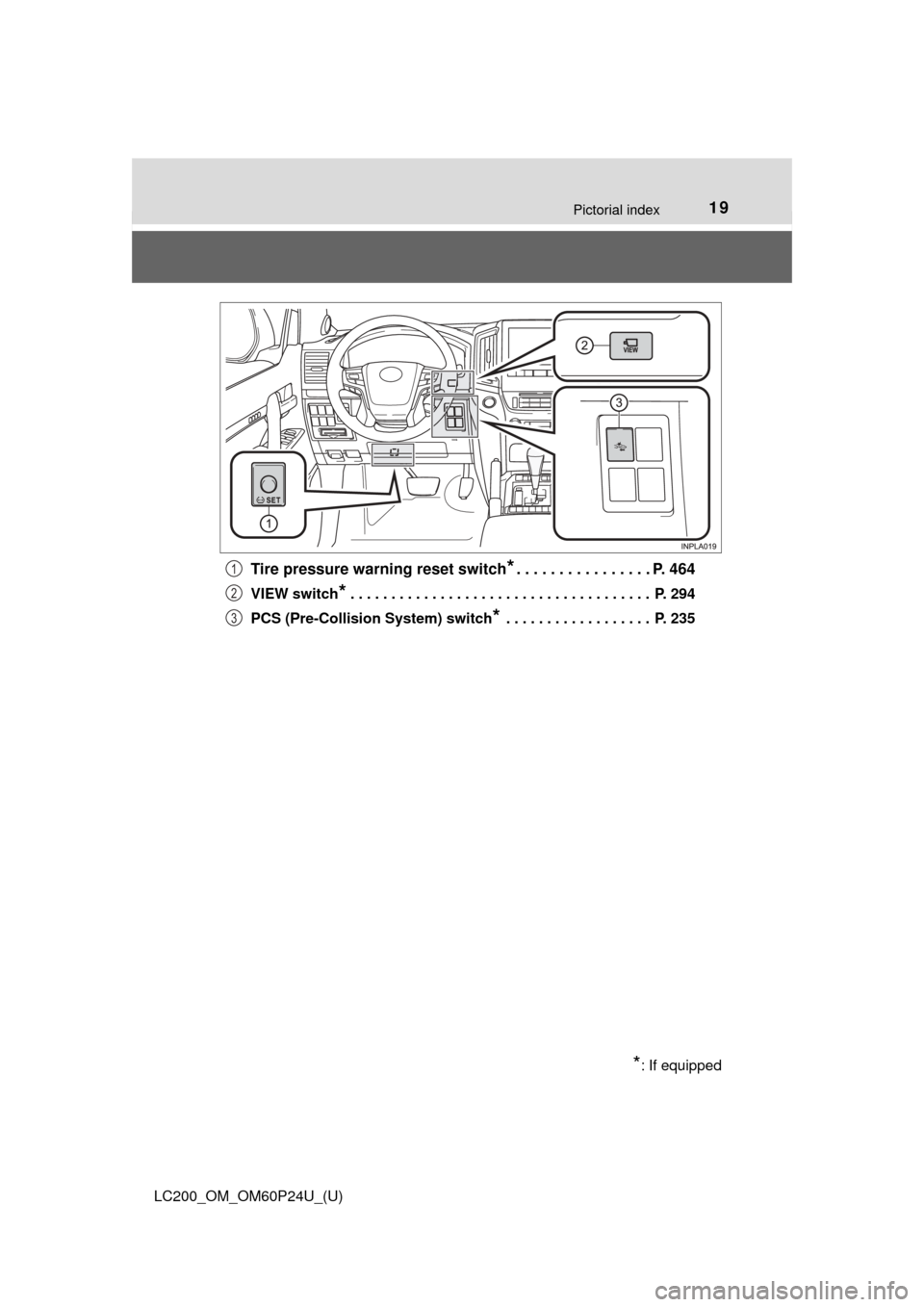
Tire pressure warning reset switch*. . . . . . . . . . . . . . . . P. 464
VIEW switch* . . . . . . . . . . . . . . . . . . . . . . . . . . . . . . . . . . . . . P. 294
PCS (Pre-Collision System) switch
* . . . . . . . . . . . . . . . . . . P. 235
*: If equipped
1
2
3
Page 29 of 608
291-1. For safe use
LC200_OM_OM60P24U_(U)
1
For safety and security
Make sure that you can see backward clearly by adjusting the inside
and outside rear view mirrors properly. (→P. 145, 147)
Adjusting the mirrors
WARNING
Observe the following precautions.
Failure to do so may result in death or serious injury.
● Do not adjust the position of the driver’s seat while driving.
Doing so could cause the driver to lose control of the vehicle.
● Do not place a cushion between the driver or passenger and the seatback.
A cushion may prevent correct posture from being achieved, and reduce
the effectiveness of the seat belt and head restraint.
● Do not place anything under the front seats.
Objects placed under the front seats may become jammed in the seat
tracks and stop the seat from locking in place. This may lead to an acci-
dent and the adjustment mechanism may also be damaged.
● Always observe the legal speed limit when driving on public roads.
● When driving over long distances, take regular breaks before you start to
feel tired.
Also, if you feel tired or sleepy while driving, do not force yourself to con-
tinue driving and take a break immediately.
Page 81 of 608
LC200_OM_OM60P24U_(U)
812. Instrument cluster
2
Instrument cluster
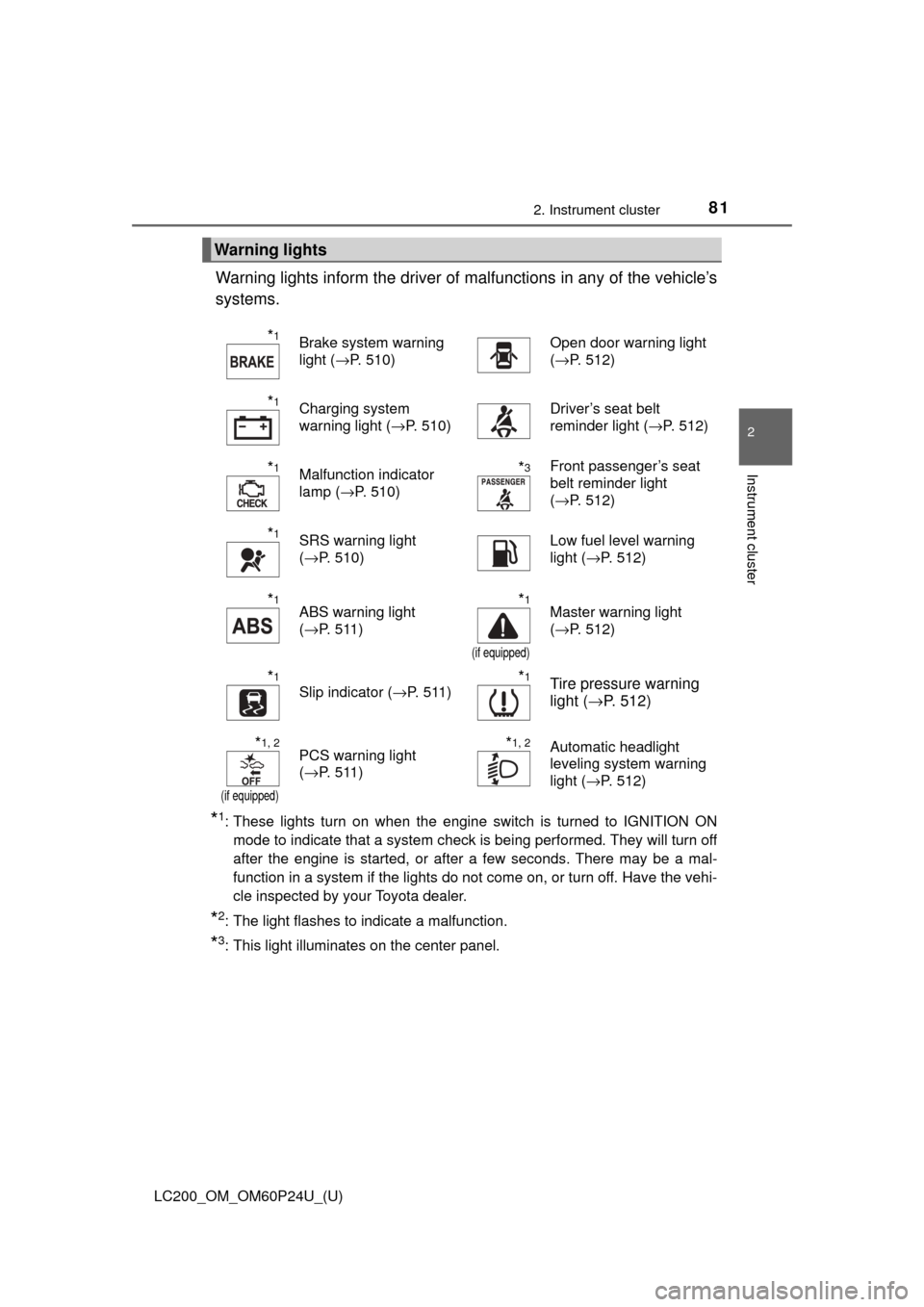
Warning lights inform the driver of malfunctions in any of the vehicle’s
systems.
*1: These lights turn on when the engine switch is turned to IGNITION ON mode to indicate that a system check is being performed. They will turn off
after the engine is started, or after a few seconds. There may be a mal-
function in a system if the lights do not come on, or turn off. Have the vehi-
cle inspected by your Toyota dealer.
*2: The light flashes to indicate a malfunction.
*3: This light illuminates on the center panel.
Warning lights
*1Brake system warning
light ( →P. 510)Open door warning light
(→P. 512)
*1Charging system
warning light ( →P. 510)Driver’s seat belt
reminder light ( →P. 512)
*1Malfunction indicator
lamp (→P. 510)*3Front passenger’s seat
belt reminder light
(→P. 512)
*1SRS warning light
(→P. 510)Low fuel level warning
light ( →P. 512)
*1ABS warning light
(→P. 511)*1
(if equipped)
Master warning light
(→P. 512)
*1
Slip indicator ( →P. 511)*1Tire pressure warning
light (→P. 512)
*1, 2
(if equipped)
PCS warning light
(→P. 511)*1, 2Automatic headlight
leveling system warning
light ( →P. 512)
Page 94 of 608
94
LC200_OM_OM60P24U_(U)
2. Instrument cluster
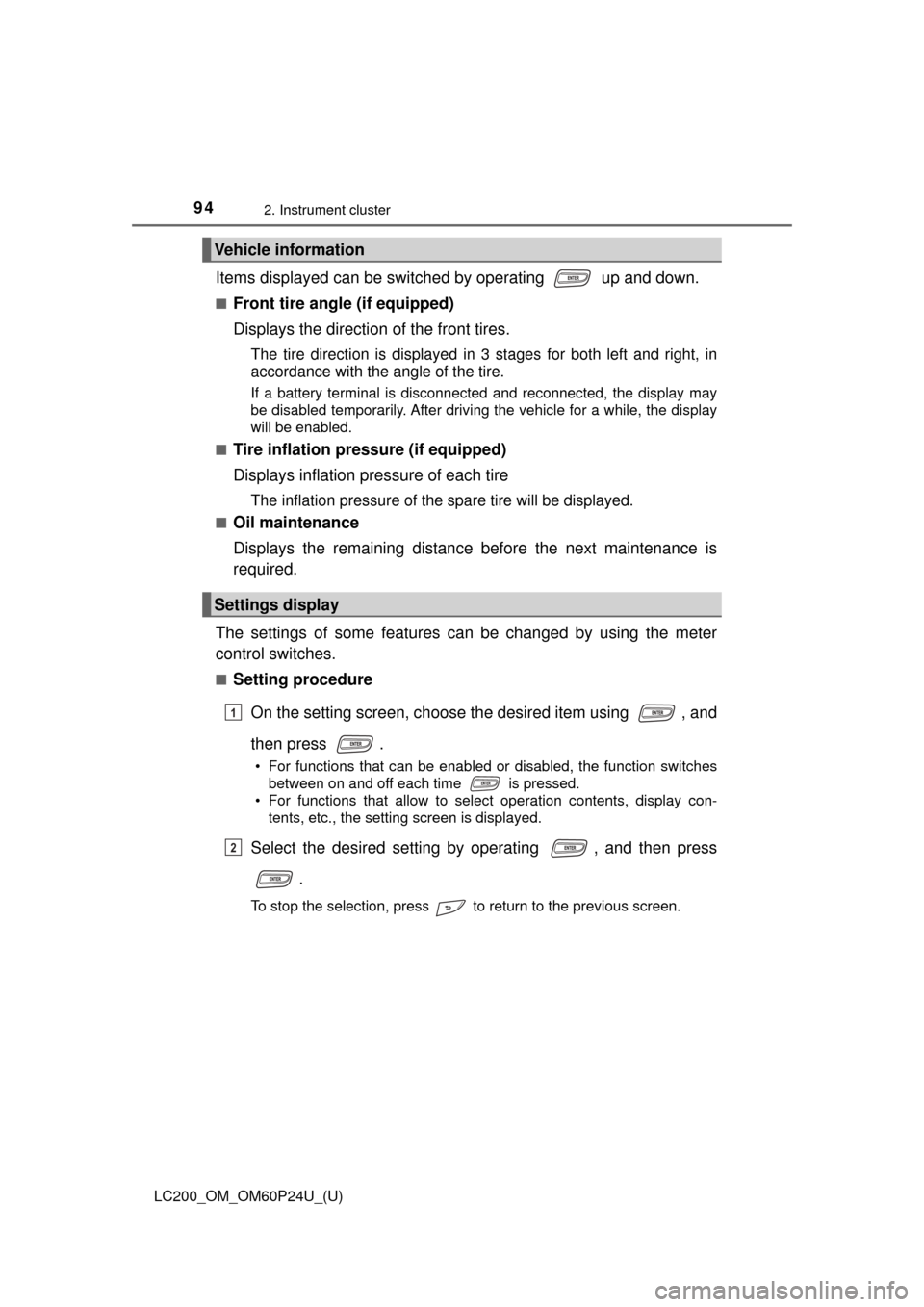
Items displayed can be switched by operating up and down.
■Front tire angle (if equipped)
Displays the direction of the front tires.
The tire direction is displayed in 3 stages for both left and right, in
accordance with the angle of the tire.
If a battery terminal is disconnected and reconnected, the display may
be disabled temporarily. After driving the vehicle for a while, the display
will be enabled.
■
Tire inflation pressure (if equipped)
Displays inflation pressure of each tire
The inflation pressure of the spare tire will be displayed.
■Oil maintenance
Displays the remaining distance before the next maintenance is
required.
The settings of some features can be changed by using the meter
control switches.
■Setting procedure On the setting screen, choose the desired item using , and
then press .
• For functions that can be enabled or disabled, the function switches between on and off each time is pressed.
• For functions that allow to select operation contents, display con-
tents, etc., the setting screen is displayed.
Select the desired setting by operating , and then press
.
To stop the selection, press to return to the previous screen.
Vehicle information
Settings display
1
2
Page 97 of 608
LC200_OM_OM60P24U_(U)
972. Instrument cluster
2
Instrument cluster
■Tire inflation pressure
●It may take a few minutes to display the tire inflation pressure after the
engine switch is turned to IGNITION ON mode. It may also take a few
minutes to display the tire inflation pressure after inflation pressure has
been adjusted.
●“---” may be displayed if the tire information cannot be determined due to
unfavorable radio wave conditions.
●Tire inflation pressure changes with temperature. The displayed values
may also be different from the values measured using a tire pressure
gauge.
■ When setting up the display
Stop the vehicle in a safe place, apply the parking brake, and shift the shift
lever to P
■ Suspension of the settings display
In the following situations, the settings display using the meter control
switches will be suspended.
●When a warning message appears on the multi-information display
● When the vehicle begins to move
■ Liquid crystal display
Small spots or light spots may appear on the display. This phenomenon is
characteristic of liquid crystal displays, and there is no problem continuing to
use the display.
WARNING
■Caution for use while driving
For safety, avoid operating the meter control switch while driving as much
as possible, and do not look continuously at the multi-information display
while driving. Stop the vehicle and operate the meter control switch. Failure
to do so may cause a steering wheel operation error, resulting in an unex-
pected accident.
■ Cautions while setting up the display
As the engine needs to be running during setting up the display, ensure that
the vehicle is parked in a place with adequate ventilation. In a closed area
such as a garage, exhaust gases including harmful carbon monoxide (CO)
may collect and enter the vehicle. This may lead to death or a serious
health hazard.
NOTICE
■While setting up the display
To prevent battery discharge, ensure that the engine is running while setting
up the display features.
Page 161 of 608

LC200_OM_OM60P24U_(U)
1614-1. Before driving
4
Driving
■When starting off on an uphill
Hill-start assist control is activated. ( →P. 358)
■ Driving in the rain
●Drive carefully when it is raining, because visibility will be reduced, the win-
dows may become fogged-up, and the road will be slippery.
● Drive carefully when it starts to rain, because the road surface will be espe-
cially slippery.
● Refrain from high speeds when driving on an expressway in the rain,
because there may be a layer of water between the tires and the road sur-
face, preventing the steering and brakes from operating properly.
■ Engine speed while driving
In the following conditions, the engine speed may become high while driving.
This is due to automatic up-shifting control or down-shifting implementation to
meet driving conditions. It does not indicate sudden acceleration.
●The vehicle is judged to be driving uphill or downhill
● When the accelerator pedal is released
● When the brake pedal is depressed
■ Restraining engine output (Brake Override System)
●When the accelerator and brake pedals are depressed at the same time, the
engine output may be restrained.
● A warning message is displayed on the multi-information display while the
system is operating. If a warning message is shown on the multi-information
display, read the message and follow the instructions.
■ Breaking in your new Toyota
To extend the life of the vehicle, observing the following precautions is recom-
mended:
●For the first 200 miles (300 km):
Avoid sudden stops.
● For the first 500 miles (800 km):
Do not tow a trailer.
● For the first 600 miles (1000 km):
• Do not drive at extremely high speeds.
• Avoid sudden acceleration.
• Do not drive continuously in the low gears.
• Do not drive at a constant speed for extended periods.
Page 163 of 608

LC200_OM_OM60P24U_(U)
1634-1. Before driving
4
Driving
WARNING
Observe the following precautions.
Failure to do so may result in death or serious injury.
■When starting the vehicle
Always keep your foot on the brake pedal while stopped with the engine
running. This prevents the vehicle from creeping.
■ When driving the vehicle
● Do not drive if you are unfamiliar with the location of the brake and accel-
erator pedals to avoid depressing the wrong pedal.
• Accidentally depressing the accelerator pedal instead of the brake
pedal will result in sudden acceleration that may lead to an accident.
• When backing up, you may twist your body around, leading to a diffi- culty in operating the pedals. Make sure to operate the pedals properly.
• Make sure to keep a correct driving posture even when moving the vehicle only slightly. This allows you to depress the brake and accelera-
tor pedals properly.
• Depress the brake pedal using your right foot. Depressing the brake pedal using your left foot may delay response in an emergency, result-
ing in an accident.
● Do not drive the vehicle over or stop the vehicle near flammable materials.
The exhaust system and exhaust gases can be extremely hot. These hot
parts may cause a fire if there is any flammable material nearby.
● During normal driving, do not turn off the engine. Turning the engine off
while driving will not cause loss of steering or braking control, but the
power assist to these systems will be lost. This will make it more difficult to
steer and brake, so you should pull over and stop the vehicle as soon as it
is safe to do so.
However, in the event of an emergency, such as if it becomes impossible
to stop the vehicle in the normal way: →P. 501
● Use engine braking (downshift) to maintain a safe speed when driving
down a steep hill.
Using the brakes continuously may cause the brakes to overheat and lose
effectiveness. ( →P. 199)
● Do not adjust the positions of the steering wheel, the seat, or the inside or
outside rear view mirrors while driving.
Doing so may result in a loss of vehicle control.
● Always check that all passengers’ arms, heads or other parts of their body
are not outside the vehicle.
● Do not drive in excess of the speed limit. Even if the legal speed limit per-
mits it, do not drive over 85 mph (140 km/h) unless your vehicle has high-
speed capability tires. Driving over 85 mph (140 km/h) may result in tire
failure, loss of control and possible injury. Be sure to consult a tire dealer
to determine whether the tires on your vehicle are high-speed capability
tires or not before driving at such speeds.