cruise control TOYOTA MIRAI 2020 (in English) User Guide
[x] Cancel search | Manufacturer: TOYOTA, Model Year: 2020, Model line: MIRAI, Model: TOYOTA MIRAI 2020Pages: 528, PDF Size: 11.98 MB
Page 257 of 528
2575-5. Using the driving support systems
5
Driving
MIRAI_OM_USA_OM62073U
Example of acceleration
When there are no longer any preceding vehicles driving slower
than the set speed
The system accelerates until the set speed is reached. The system then
returns to constant speed cruising.
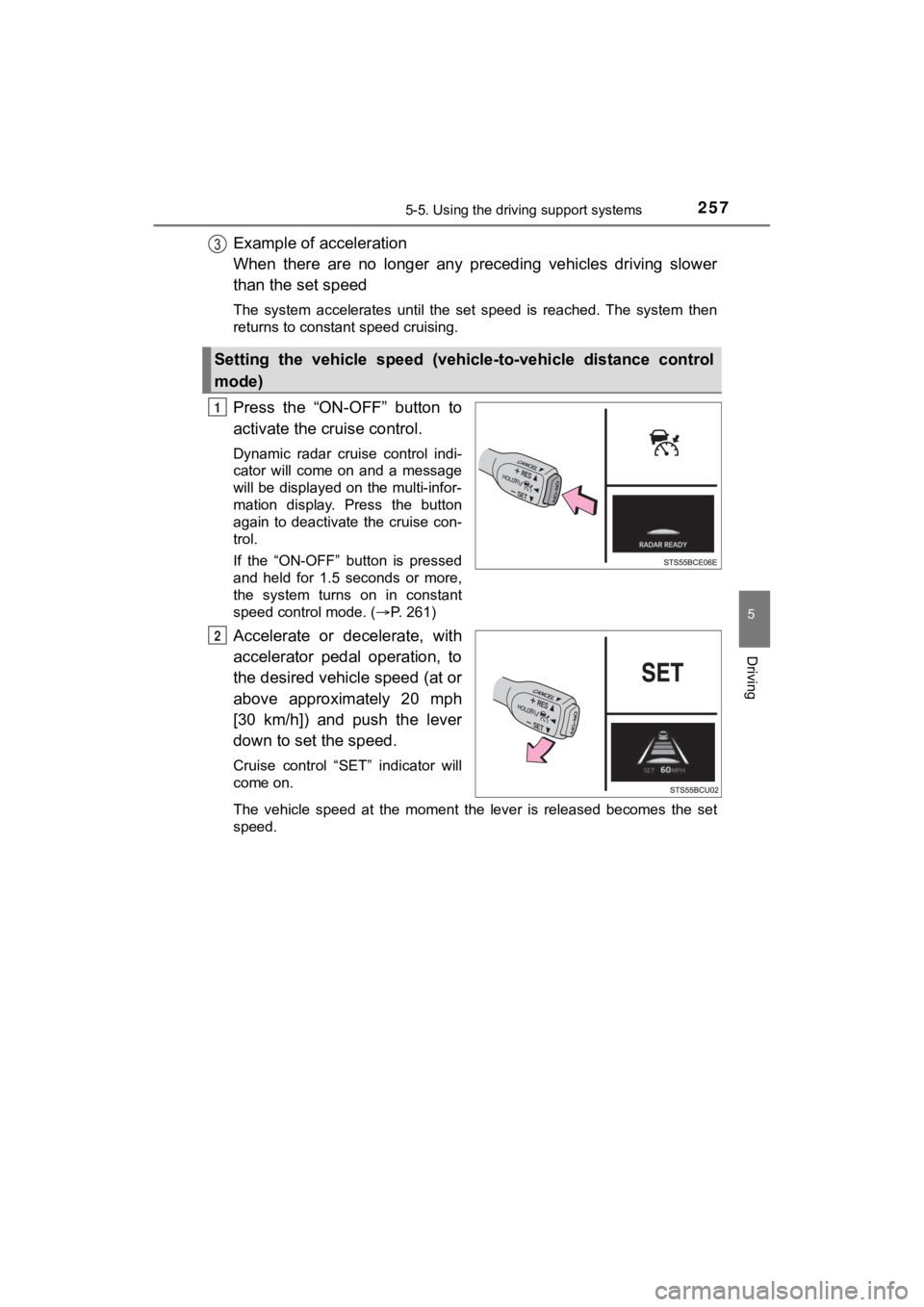
Press the “ON-OFF” button to
activate the cruise control.
Dynamic radar cruise control indi-
cator will come on and a message
will be displayed on the multi-infor-
mation display. Press the button
again to deactivate the cruise con-
trol.
If the “ON-OFF” button is pressed
and held for 1.5 seconds or more,
the system turns on in constant
speed control mode. ( P. 261)
Accelerate or decelerate, with
accelerator pedal operation, to
the desired vehicle speed (at or
above approximately 20 mph
[30 km/h]) and push the lever
down to set the speed.
Cruise control “SET” indicator will
come on.
The vehicle speed at the moment the lever is released becomes the set
speed.
Setting the vehicle speed (vehicle-to-vehicle distance control
mode)
1
2
Page 260 of 528
2605-5. Using the driving support systems
MIRAI_OM_USA_OM62073U
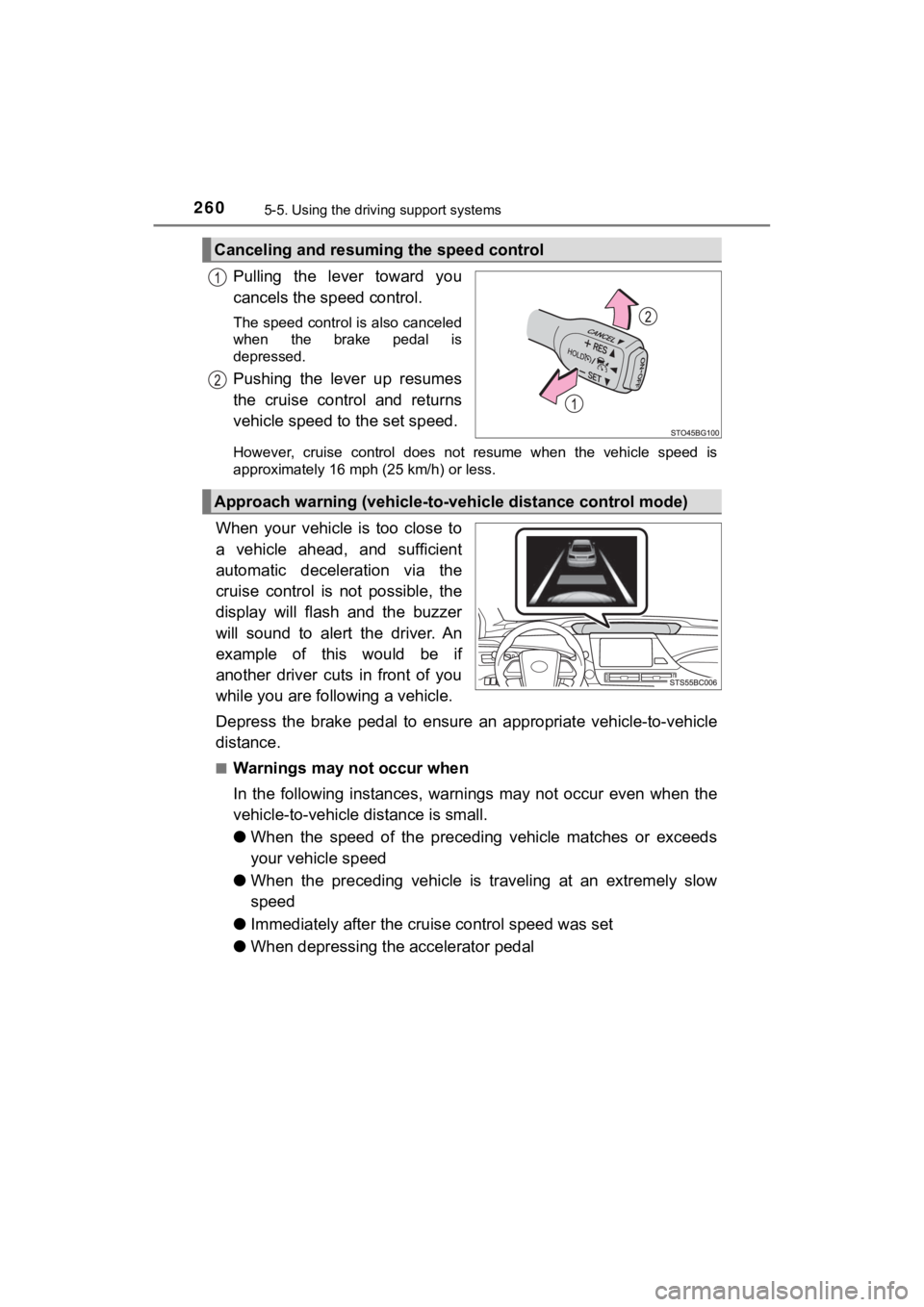
Pulling the lever toward you
cancels the speed control.
The speed control is also canceled
when the brake pedal is
depressed.
Pushing the lever up resumes
the cruise control and returns
vehicle speed to the set speed.
However, cruise control does not resume when the vehicle speed is
approximately 16 mph (25 km/h) or less.
When your vehicle is too close to
a vehicle ahead, and sufficient
automatic deceleration via the
cruise control is not possible, the
display will flash and the buzzer
will sound to alert the driver. An
example of this would be if
another driver cuts in front of you
while you are foll owing a vehicle.
Depress the brake pedal to ensure an appropriate vehicle-to-veh icle
distance.
■Warnings may not occur when
In the following instances, war nings may not occur even when th e
vehicle-to-vehicle distance is small.
● When the speed of the preceding vehicle matches or exceeds
your vehicle speed
● When the preceding vehicle is traveling at an extremely slow
speed
● Immediately after the cruise control speed was set
● When depressing the accelerator pedal
Canceling and resuming the speed control
Approach warning (vehicle-to-v ehicle distance control mode)
Page 261 of 528
2615-5. Using the driving support systems
5
Driving
MIRAI_OM_USA_OM62073U
When constant speed control mode is selected, your vehicle will main-
tain a set speed without controllin g the vehicle-to-vehicle distance.
Select this mode only when vehic le-to-vehicle distance control mode
does not function correctly due to a dirty radar, etc.
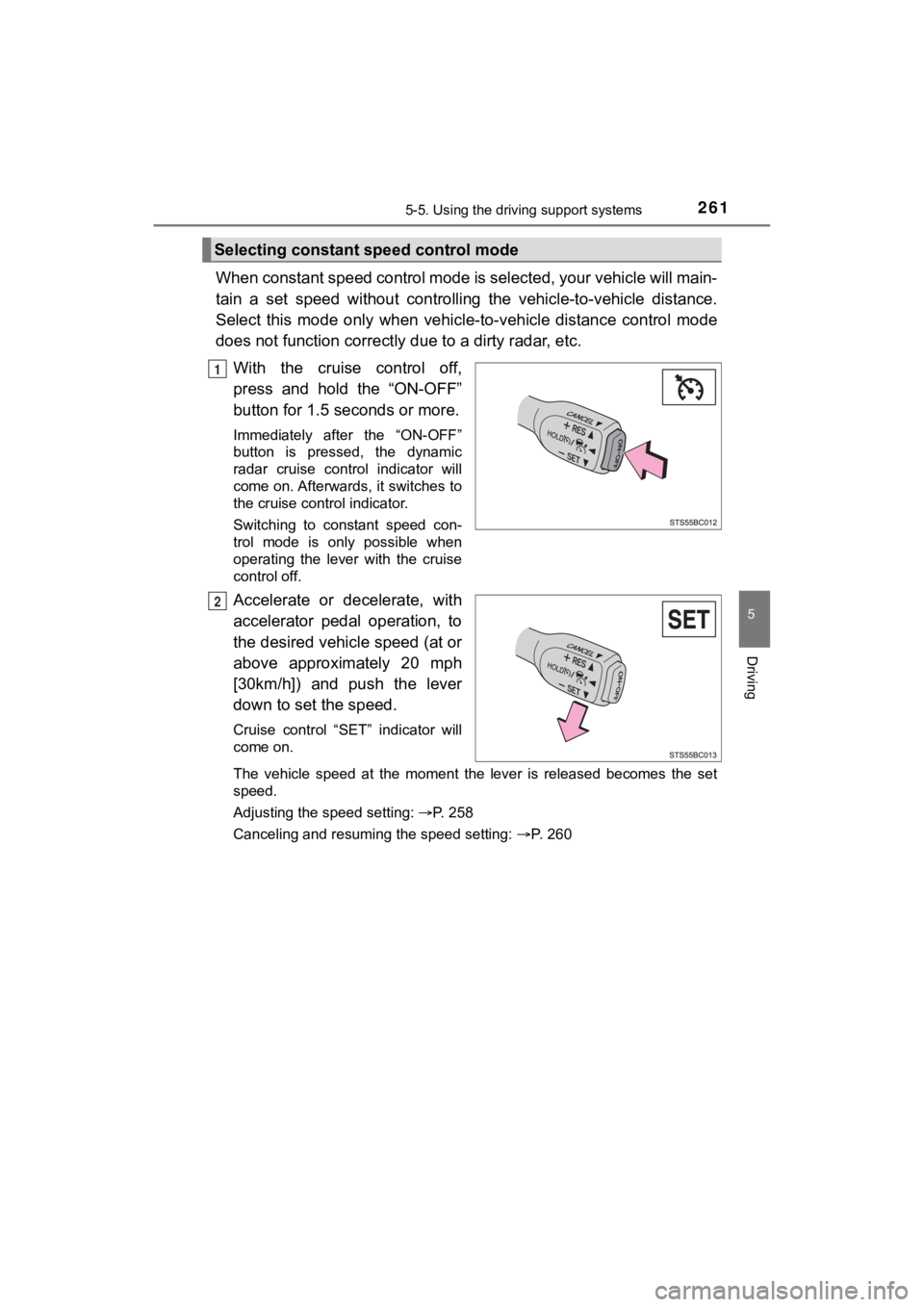
With the cruise control off,
press and hold the “ON-OFF”
button for 1.5 seconds or more.
Immediately after the “ON-OFF”
button is pressed, the dynamic
radar cruise control indicator will
come on. Afterwards, it switches to
the cruise control indicator.
Switching to constant speed con-
trol mode is only possible when
operating the lever with the cruise
control off.
Accelerate or decelerate, with
accelerator pedal operation, to
the desired vehicle speed (at or
above approximately 20 mph
[30km/h]) and push the lever
down to set the speed.
Cruise control “SET” indicator will
come on.
The vehicle speed at the moment the lever is released becomes the set
speed.
Adjusting the speed setting: P. 258
Canceling and resuming the speed setting: P. 260
Selecting constant speed control mode
1
2
Page 262 of 528
2625-5. Using the driving support systems
MIRAI_OM_USA_OM62073U
■Dynamic radar cruise control can be set when
●The shift position is in D.
● Depending on the control mode, this item can be set at the foll owing
speeds.
• Vehicle-to-vehicle distance c ontrol mode: Approximately 20 mph (30 km/h)
or more
• Constant speed control mode: Approximately 20 mph (30 km/h) or more
■ Accelerating after setting the vehicle speed
The vehicle can accelerate by operating the accelerator pedal. After acceler-
ating, the set speed resumes. However, during vehicle-to-vehicl e distance
control mode, the vehicle speed may decrease below the set spee d in order
to maintain the distance to the preceding vehicle.
■ Automatic cancelation of vehicle-to-vehicle distance control mode
Vehicle-to-vehicle distance control mode is automatically cance led in the fol-
lowing situations.
● Actual vehicle speed falls below approximately 16 mph (25 km/h) .
● VSC is activated.
● TRAC is activated for a period of time.
● When the VSC or TRAC system is turned off.
● The sensor cannot detect correctly because it is covered in some way.
● Pre-collision braking is activated.
If vehicle-to-vehicle distance control mode is automatically ca nceled for any
reasons other than the above, there may be a malfunction in the system.
Contact your Toyota dealer.
■ Automatic cancelation of c onstant speed control mode
Constant speed control mode is automatically canceled in the following situa-
tions:
● Actual vehicle speed is more than approximately 10 mph (16 km/h ) below
the set vehicle speed.
● Actual vehicle speed falls below approximately 20 mph (30 km/h) .
● VSC is activated.
● TRAC is activated for a period of time.
● When the VSC or TRAC system is turned off.
● Pre-collision braking is activated.
If constant speed control mode is automatically canceled for any reasons
other than the above, there may be a malfunction in the system. Contact your
Toyota dealer.
■ Brake operation
A brake operation sound may be heard and the brake pedal response may
change, but these are not malfunctions.
Page 263 of 528
2635-5. Using the driving support systems
5
Driving
MIRAI_OM_USA_OM62073U■
Warning messages and buzzers for d ynamic radar cruise control
Warning messages and buzzers are used to indicate a system malfunction or
to inform the driver of the need for caution while driving. If a warning message
is shown on the multi-information display, read the message and follow the
instructions. ( P. 224, 426)
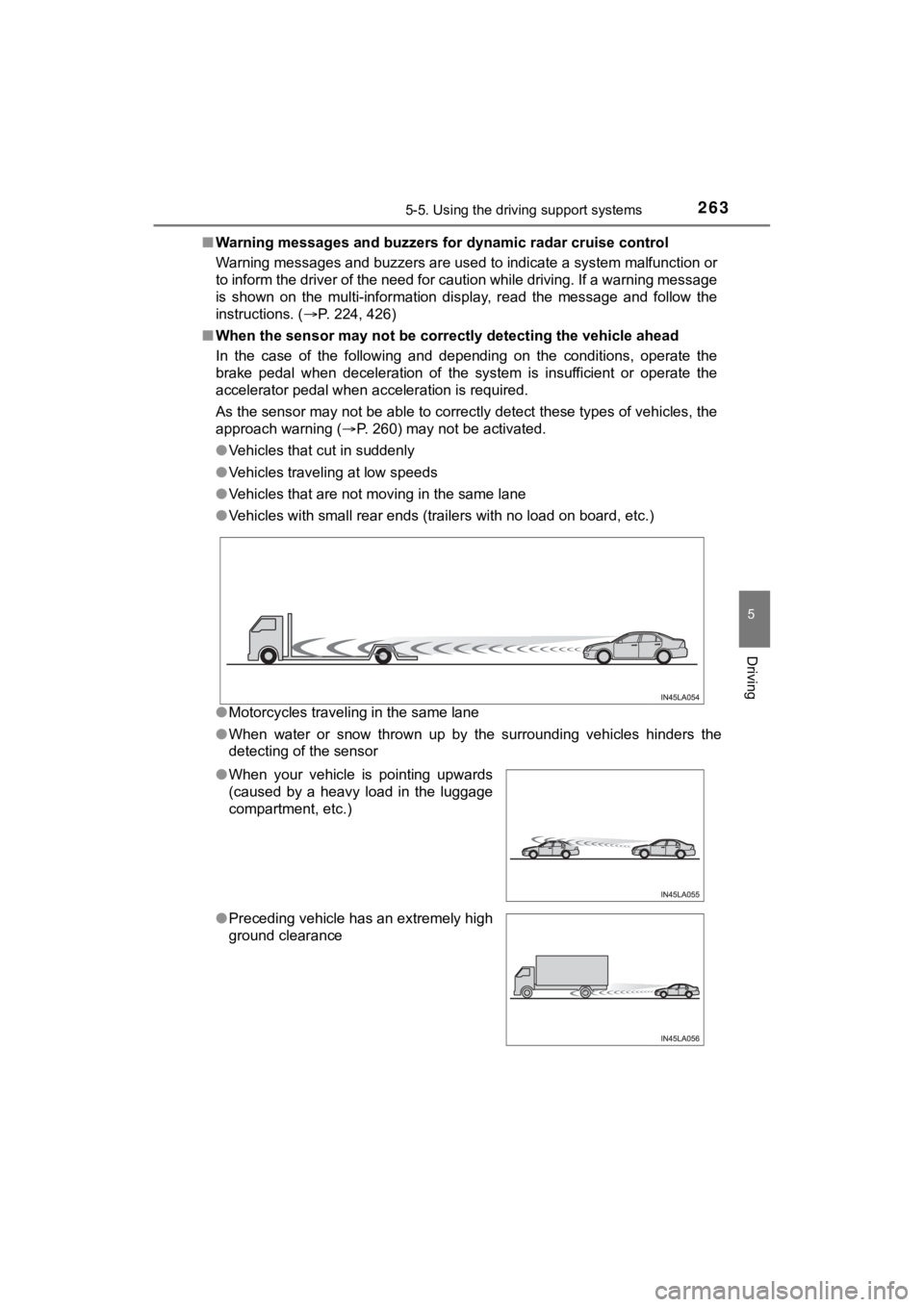
■ When the sensor may not be correctly detect ing the vehicle ahead
In the case of the following and depending on the conditions, o perate the
brake pedal when deceleration of the system is insufficient or operate the
accelerator pedal when acceleration is required.
As the sensor may not be able to correctly detect these types o f vehicles, the
approach warning ( P. 260) may not be activated.
● Vehicles that cut in suddenly
● Vehicles traveling at low speeds
● Vehicles that are not moving in the same lane
● Vehicles with small rear ends (trailers with no load on board, etc.)
● Motorcycles traveling in the same lane
● When water or snow thrown up by the surrounding vehicles hinders the
detecting of the sensor
● When your vehicle is pointing upwards
(caused by a heavy load in the luggage
compartment, etc.)
● Preceding vehicle has an extremely high
ground clearance
Page 427 of 528
4278-2. Steps to take in an emergency
MIRAI_OM_USA_OM62073U
8
When trouble arises
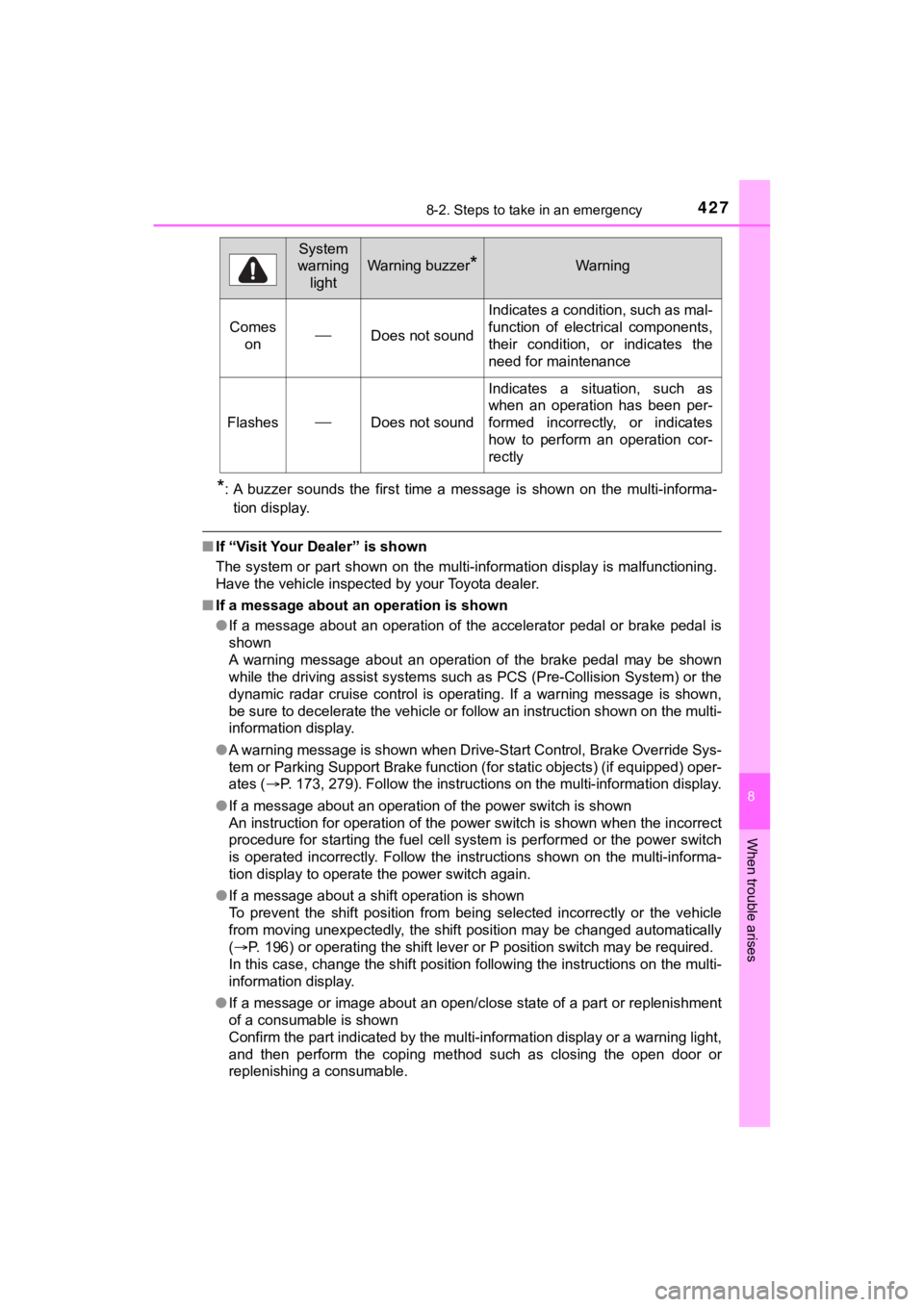
*: A buzzer sounds the first time a message is shown on the multi-informa-
tion display.
■ If “Visit Your Dealer” is shown
The system or part shown on the multi-information display is ma lfunctioning.
Have the vehicle inspected by your Toyota dealer.
■ If a message about an operation is shown
● If a message about an operation of the accelerator pedal or bra ke pedal is
shown
A warning message about an operation of the brake pedal may be shown
while the driving assist systems such as PCS (Pre-Collision Sys tem) or the
dynamic radar cruise control is operating. If a warning message is shown,
be sure to decelerate the vehicle or follow an instruction show n on the multi-
information display.
● A warning message is shown when Drive-Start Control, Brake Over ride Sys-
tem or Parking Support Brake function (for static objects) (if equipped) oper-
ates ( P. 173, 279). Follow the instructions on the multi-information display.
● If a message about an operation of the power switch is shown
An instruction for operation of the power switch is shown when the incorrect
procedure for starting the fuel cell system is performed or the power switch
is operated incorrectly. Follow the instructions shown on the m ulti-informa-
tion display to operate the power switch again.
● If a message about a shift operation is shown
To prevent the shift position from being selected incorrectly o r the vehicle
from moving unexpectedly, the shift position may be changed aut omatically
( P. 196) or operating the shift lever or P position switch may b e required.
In this case, change the shift position following the instructions on the multi-
information display.
● If a message or image about an open/close state of a part or replenishment
of a consumable is shown
Confirm the part indicated by the multi-information display or a warning light,
and then perform the coping method such as closing the open doo r or
replenishing a consumable.
Comes onDoes not sound
Indicates a condition, such as mal-
function of electrical components,
their condition, or indicates the
need for maintenance
FlashesDoes not sound
Indicates a situation, such as
when an operation has been per-
formed incorrectly, or indicates
how to perform an operation cor-
rectly
System
warning
light
Warning buzzer*Warning
Page 431 of 528
![TOYOTA MIRAI 2020 (in English) User Guide 4318-2. Steps to take in an emergency
MIRAI_OM_USA_OM62073U
8
When trouble arises
■If “Shifted to [N] Position To Shift to [P], Stop Your Vehicle and Press [P]
Switch” is displayed
When the v](/img/14/42628/w960_42628-430.png "TOYOTA MIRAI 2020 (in English) User Guide 4318-2. Steps to take in an emergency
MIRAI_OM_USA_OM62073U
8
When trouble arises
■If “Shifted to [N] Position To Shift to [P], Stop Your Vehicle and Press [P]
Switch” is displayed
When the v")
4318-2. Steps to take in an emergency
MIRAI_OM_USA_OM62073U
8
When trouble arises
■If “Shifted to [N] Position To Shift to [P], Stop Your Vehicle and Press [P]
Switch” is displayed
When the vehicle is moving, a warning message is displayed when the P
position switch is operated and attempting to shift the shift p osition to P.
The shift position is changed to N.
Operate the P position switch after the vehicle has been brough t to a com-
plete stop.
■ If “Smart Key System Malfunction See Owner’s Manual” is displayed
P. 145
■ If “Front Camera Unavailable” or “Front Camera Unavailable See
Owner’s Manual” is displayed
The following systems may be suspended until the problem shown in the
message is resolved. ( P. 224)
● PCS (Pre-Collision System)
● LDA (Lane Departure Alert with steering control)
● Automatic High Beam
● RSA (Road Sign Assist) (if equipped)
● Dynamic radar cruise control
■ If “Radar Cruise Control Unavailable See Owner's Manual” is sho wn
The dynamic radar cruise control system is suspended temporaril y or until the
problem shown in the message is resolved. (causes and coping me thods:
P. 224)
■ If “Radar Cruise Control Unavailable” is shown
The dynamic radar cruise control system cannot be used temporar ily. Use the
system when it becomes available again.
■ If the shift position cannot be changed or the power switch is turned to
ACCESSORY mode even if trying to turn the power switch off when a
warning message is shown
If the 12-volt battery is discharged or the shift control syste m is malfunction-
ing, the followings may occur.
● The shift position may not be changed to P.
When parking, stop the vehicle on level ground and apply the pa rking brake
firmly.
● The fuel cell system may not start.
● The power switch may be turned to ACCESSORY mode even if trying to
turn the power switch off.
In this case, the power switch may be turned off after applying the parking
brake.
● The automatic P position selection function ( P. 191) may not operate.
Before turning the power switch off, be sure to press the P pos ition switch
and check that the shift position is in P by the shift position indicator or P
position switch indicator.
■ Warning buzzer
P. 424
Page 515 of 528
515Alphabetical index
MIRAI_OM_USA_OM62073U
Child-protectors....................... 135
Cleaning ........................... 352, 356Aluminum wheels.................. 353
Exterior ................................. 352
Interior................................... 356
Seat belts .............................. 357
Clock ......................................... 328
Coat hooks ............................... 329
Condenser ................................ 371
Console box ............................. 321
Coolant Capacity ................................ 469
Checking ............................... 370
Preparing and checking Warning light ...................... 418
Cooling system ........................ 370 Fuel cell system
overheating......................... 457
Cruise control Dynamic radar cruise
control................................. 253
Cup holders.............................. 322
Curtain shield airbags ............... 37
Customizable features ............ 484 Daytime running light
system.................................... 203
Defogger Outside rear view mirrors ..... 309
Rear window ......................... 309
Windshield ............................ 309
Dimensions .............................. 466
Dinghy towing.......................... 185
Display Drive information .................. 118
Dynamic radar cruise control ................................ 253
Energy monitor ..................... 118
LDA (Lane Departure Alert with steering control) .......... 238
Multi-information display ....... 117
Parking Support Brake function
(for static objects) .............. 279
Warning message ................ 426
Do-it-yourself maintenance .... 364
Door courtesy lights Location ................................ 317
Wattage ................................ 471
Door lock Doors .................................... 132
Key ....................................... 449
Smart key system ................. 132
Wireless remote control ........ 132D
*: Refer to the “NAVIGATION SYSTEM OWNER’S MANUAL”.
Page 516 of 528

516Alphabetical index
MIRAI_OM_USA_OM62073U
DoorsAutomatic door locking
and unlocking systems ....... 135
Door glasses ......................... 167
Door lock............................... 134
Door windows ....................... 167
Open door warning buzzer ... 136
Open door warning light........ 420
Outside rear view mirrors...... 164
Rear door child-protector ...... 135
Drive information ..................... 118
Driver’s seat belt reminder
light......................................... 421
Driver’s seat position
memory .................................. 153
Driving Break-in tips .......................... 174
Correct driving posture ........... 28
Driving advice ....................... 102
Fuel cell vehicle driving tips .. 102
Procedures ........................... 172
Winter drive tips .................... 301
Driving position memory ........ 153
Memory recall function.......... 155
Dynamic radar cruise control .................................... 253 ECB (Electronically Controlled
Brake System) ...................... 295
Eco drive mode........................ 195
EDR (Event data recorder).......... 9
Electric motor (traction motor) Location ............................ 86, 91
Specification ......................... 468
Electric Power Steering
(EPS) ...................................... 296 Function ................................ 296
Warning light......................... 419
Electronic key Battery-saving function ......... 145
If the electronic key does not operate properly ................. 449
Replacing the battery............ 400
Electronically Controlled
Brake System (ECB) ............. 295
Emergency flashers ................ 408E
Page 521 of 528
521Alphabetical index
MIRAI_OM_USA_OM62073U
MaintenanceDo-it-yourself maintenance ... 364
General maintenance ........... 361
Maintenance data ................. 466
Maintenance
requirements ...................... 359
Master warning light........ 421, 426
Meter ......................................... 111 Indicators .............................. 109
Instrument panel light control................................. 113
Meters ................................... 111
Multi-information display ....... 117
Warning lights ....................... 107
Warning message ................. 426
Meter light control ................... 113
Mirrors Inside rear view mirror .......... 162
Outside rear view mirror defoggers ........................... 309
Outside rear view mirrors...... 164
Vanity mirrors........................ 327
MP3 disc
*
Multi-information display ........ 117
Drive information................... 118
Dynamic radar cruise control................................. 253
Energy monitor ..................... 118
LDA (Lane Departure Alert with steering control) .......... 238
Parking Support Brake function
(for static objects) ............... 279
Switching the display ............ 113
Warning message ................. 426 Navigation system
*
Odometer ................................. 111
Opener
Fuel door .............................. 215
Hood ..................................... 366
Trunk .................................... 138
Outside rear view mirrors ....... 164 Adjusting and folding ............ 164
BSM (Blind spot monitor)...... 300
Outside rear view mirror defoggers ........................... 309
Outside temperature
display.................................... 111
Overhead console ................... 324
Overheating ............................. 457
MN
O
*: Refer to the “NAVIGATION SYSTEM OWNER’S MANUAL”.