parking brake TOYOTA MIRAI 2020 (in English) User Guide
[x] Cancel search | Manufacturer: TOYOTA, Model Year: 2020, Model line: MIRAI, Model: TOYOTA MIRAI 2020Pages: 528, PDF Size: 11.98 MB
Page 178 of 528
1785-1. Before driving
MIRAI_OM_USA_OM62073U
WARNING
Observe the following precautions.
Failure to do so may result in death or serious injury.
■When the vehicle is parked
● Do not leave a door or window open if the curved glass is coate d with a
metallized film such as a silver-colored one. Reflected sunligh t may cause
the glass to act as a lens, causing a fire.
● Always apply the parking brake, shift the shift position to P, stop the fuel
cell system and lock the vehicle.
Do not leave the vehicle unattended while the “READY” indicator is illumi-
nated.
If the vehicle is parked with the shift position in P but the p arking brake is
not set, the vehicle may start to move, possibly leading to an accident.
■ When taking a nap in the vehicle
Always turn the fuel cell system off. Otherwise, if you accidentally move the
shift lever or depress the accelerator pedal, causing the vehic le to uninten-
tionally move, which can lead to an accident, resulting in deat h or serious
injury.
■ When braking
● When the brakes are wet, drive more cautiously.
Braking distance increases when the brakes are wet, and this ma y cause
one side of the vehicle to brake differently than the other sid e. Also, the
parking brake may not securely hold the vehicle.
● If the electronically controlled brake system does not operate, do not fol-
low other vehicles closely and avoid hills or sharp turns that require brak-
ing.
In this case, braking is still possible, but the brake pedal sh ould be
depressed more firmly than usual. Also, the braking distance wi ll increase.
Have your brakes fixed immediately.
● The brake system consists of 2 or more individual hydraulic systems; if
one of the systems fails, the other(s) will still operate. In t his case, the
brake pedal should be depressed more firmly than usual and the braking
distance will increase. Have your brakes fixed immediately.
NOTICE
■ When driving the vehicle
● Do not depress the accelerator and brake pedals at the same tim e during
driving, as this may restrain the fuel cell system output.
● Do not use the accelerator pedal or depress the accelerator and brake
pedals at the same time to hold the vehicle on a hill.
■ When parking the vehicle
Always set the parking brake, and shift the shift position to P . Failure to do
so may cause the vehicle to move or the vehicle may accelerate suddenly if
the accelerator pedal is accidentally depressed.
Page 186 of 528
1865-2. Driving procedures
MIRAI_OM_USA_OM62073U
Power switch
Check that the parking brake is set.
Firmly depress the brake pedal.
will be displayed on the multi-information display.
If it is not displayed, the fuel cell system cannot be started.
When shift position N is selected, the fuel cell system cannot start. Select
the P position when starting the fuel cell system. (
P. 194)
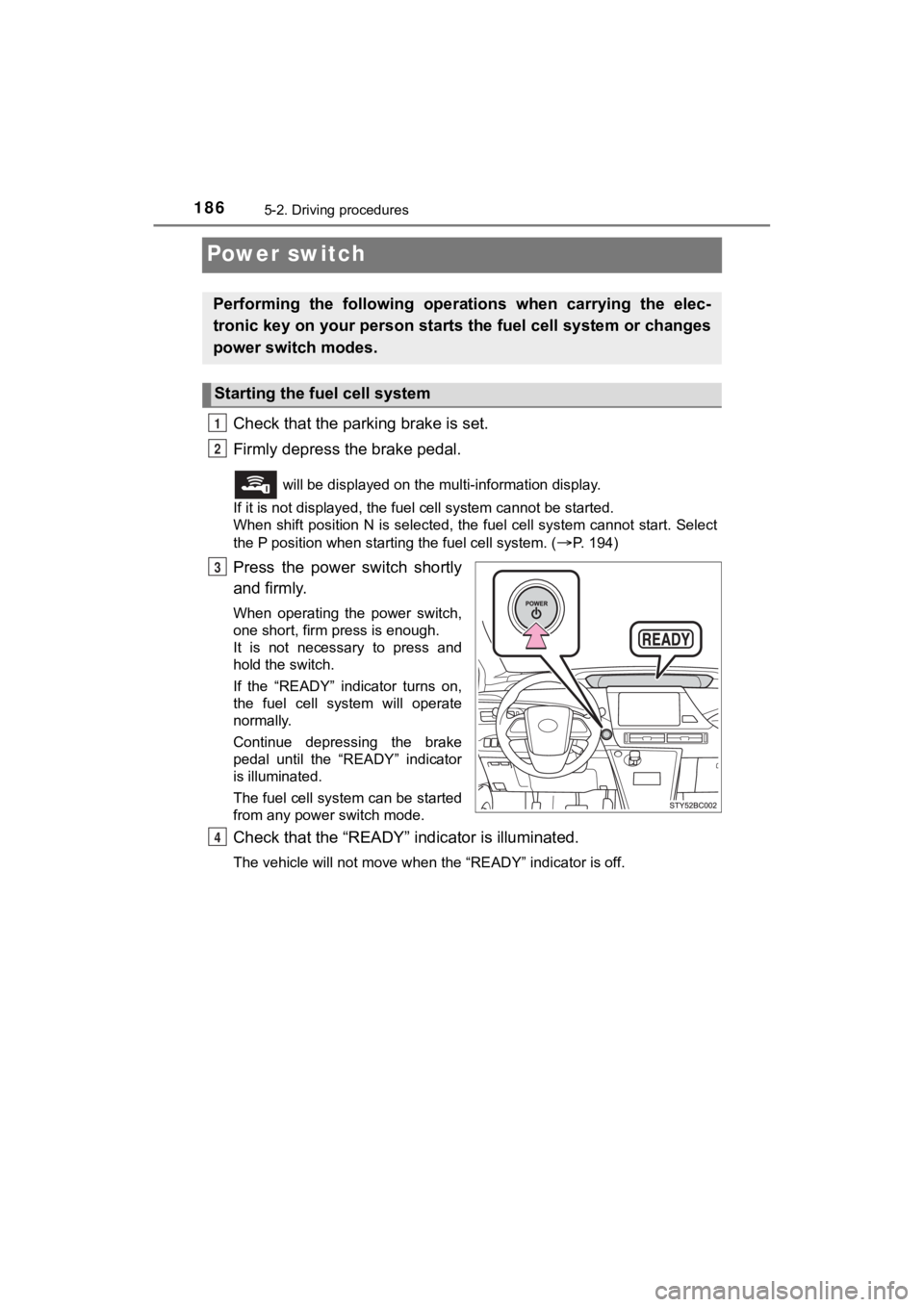
Press the power switch shortly
and firmly.
When operating the power switch,
one short, firm press is enough.
It is not necessary to press and
hold the switch.
If the “READY” indicator turns on,
the fuel cell system will operate
normally.
Continue depressing the brake
pedal until the “READY” indicator
is illuminated.
The fuel cell system can be started
from any power switch mode.
Check that the “R EADY” indicator is illuminated.
The vehicle will not move when the “READY” indicator is off.
Performing the following opera tions when carrying the elec-
tronic key on your person starts the fuel cell system or changes
power switch modes.
Starting the fuel cell system
1
2
3
4
Page 187 of 528
1875-2. Driving procedures
5
Driving
MIRAI_OM_USA_OM62073U
Stop the vehicle completely.
Set the parking brake. ( P. 2 0 0 )
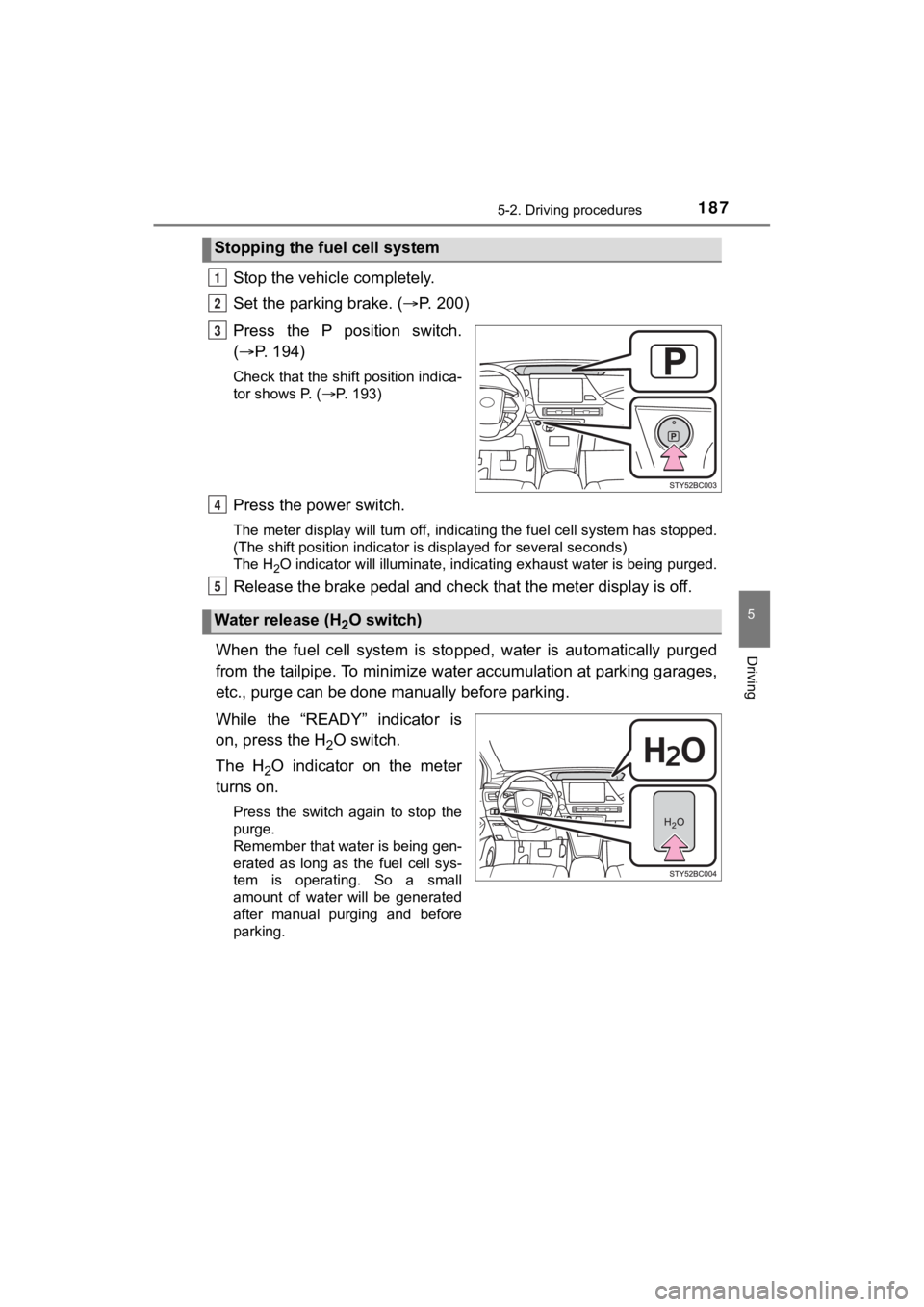
Press the P position switch.
( P. 194)
Check that the shift position indica-
tor shows P. ( P. 193)
Press the power switch.
The meter display will turn off, indicating the fuel cell syste m has stopped.
(The shift position indicator is displayed for several seconds)
The H
2O indicator will illuminate, indicating exhaust water is being purged.
Release the brake pedal and check that the meter display is off.
When the fuel cell system is sto pped, water is automatically purged
from the tailpipe. To minimize water accumulation at parking ga rages,
etc., purge can be done manually before parking.
While the “READY” indicator is
on, press the H
2O switch.
The H
2O indicator on the meter
turns on.
Press the switch again to stop the
purge.
Remember that water is being gen-
erated as long as the fuel cell sys-
tem is operating. So a small
amount of water will be generated
after manual purging and before
parking.
Stopping the fue l cell system
1
2
3
Water release (H2O switch)
4
5
Page 190 of 528

1905-2. Driving procedures
MIRAI_OM_USA_OM62073U■
Parking the vehicle during cold weather
●Water may automatically purge from the tailpipe, even when the fuel cell
system is off, in order to prevent liquid in the fuel cell stac k, hydrogen pipe-
lines, etc., from freezing.
● It is normal to hear hissing and other sounds during purge. ( P. 88)
● The H
2O indicator on the meter will illuminate during purge.
■ Water release function during cold weather
In the following cases, the fuel cell system automatic drainage may not oper-
ate. It may not be possible to start the fuel cell system due t o the fuel cell
stack, hydrogen pipes, etc, being frozen.
• When transporting or towing the vehicle in frozen areas
• When the 12-volt battery terminals are disconnected and remain as such
in frozen areas
Operate the water release function with the following procedure beforehand
to prevent water from freezing in the system.
Turn the power switch to ON mode and press the H
2O switch.
Check that the H
2O indicator on the meter turns on.
While depressing the brake, press the power switch to start the fuel cell
system.
Check that the “READY” indicator turns on.
Press the power switch to stop the fuel cell system.
The water release is automatically performed. During water purg e, the
H
2O indicator turns on. (Longer than normal water purge)
■ Conditions affecting operation
P. 146
■ Notes for the entry function
P. 147
■ If the fuel cell system does not start
●The immobilizer system may not have been deactivated. ( P. 78)
Contact your Toyota dealer.
● Check that the shift position is P. ( P. 193)
The fuel cell system cannot be started when the shift position is N.
If P position is not selected, “Shift to P position to start” w ill be displayed on
the multi-information display.
● Check that the fuel door is closed.
When the fuel door is open, the fuel cell system cannot be star ted.
Close the fuel door before starting the system. ( P. 216)
1
2
3
Page 191 of 528

1915-2. Driving procedures
5
Driving
MIRAI_OM_USA_OM62073U■
If “Smart Key System Malfunction See Owner’s Manual” is displayed on
the multi-information display
The system may be malfunctioning. Have the vehicle inspected by your
Toyota dealer immediately.
■ If the “READY” indicator does not come on
In the event that the “READY” indicator does not come on even a fter perform-
ing the proper procedures for starting the vehicle, contact you r Toyota dealer
immediately.
■ If the fuel cell system is malfunctioning
P. 426
■ If the electronic key battery is depleted
P. 400
■ Operation of the power switch
If the switch is not pressed shortly and firmly, the power swit ch mode may not
change or the fuel cell system may not start.
■ Automatic P position selection function
●When the shift position is other than P, pressing the power swi tch with the
vehicle stopped completely will cause the shift position to cha nge to P auto-
matically, and then the power switch will turn off.
● When turning the power switch off with the shift position other than P, firmly
depress the brake pedal and confirm that the shift position* ha s changed to
P before slowly releasing the brake pedal.
*: Even after the instrument panel display has been turned off, t he shift
position indicator will continue to be displayed for several se conds.
■ If the shift control system malfunctions
The power switch will not be able to be turned off. In this occurs, the switch
can be turned off by applying the parking brake.
If the system malfunctions, have your vehicle serviced by your Toyota dealer
immediately.
■ If the smart key system has been d eactivated in a customized setting
P. 486
Page 194 of 528
1945-2. Driving procedures
MIRAI_OM_USA_OM62073U
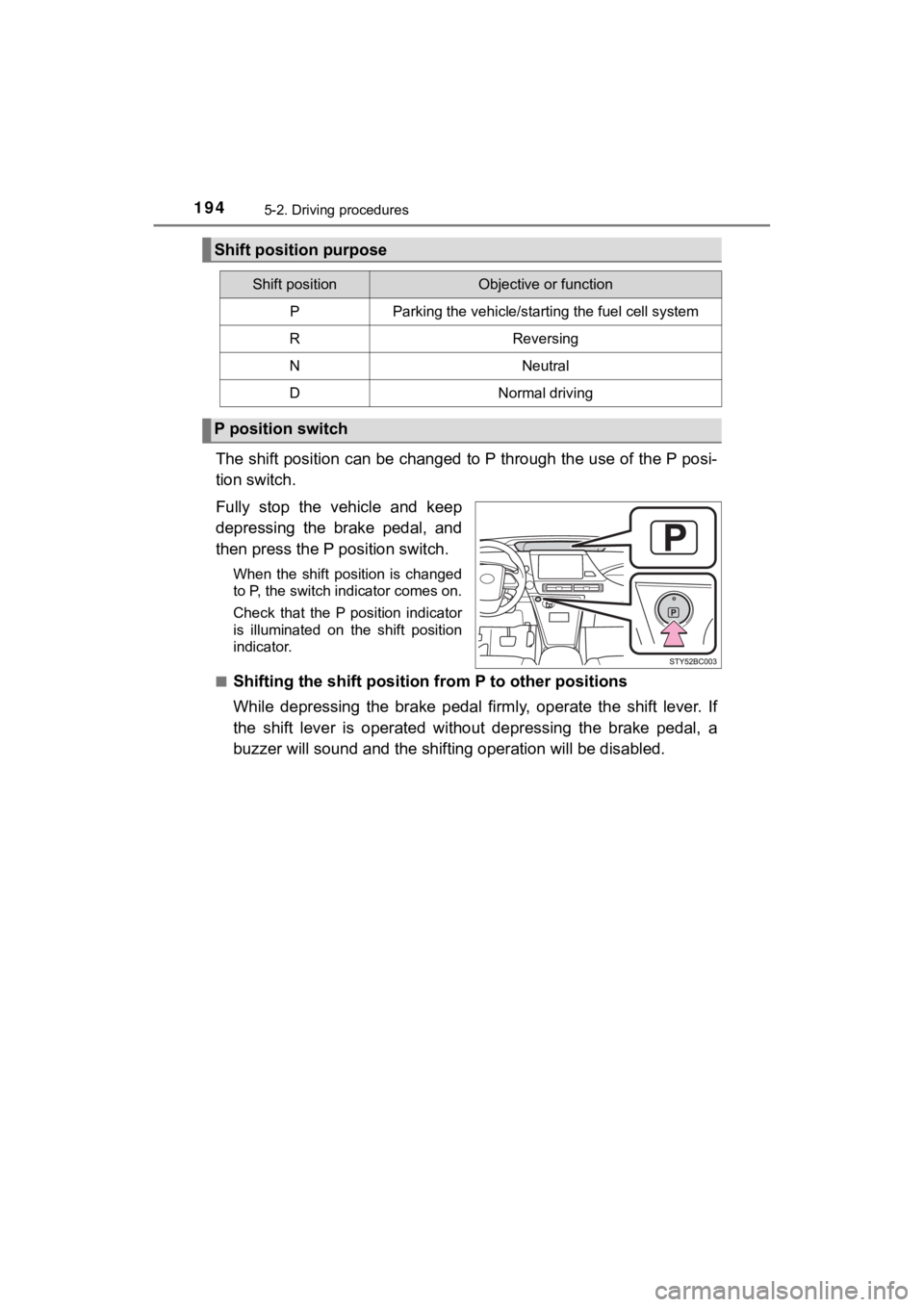
The shift position can be changed to P through the use of the P posi-
tion switch.
Fully stop the vehicle and keep
depressing the brake pedal, and
then press the P position switch.
When the shift position is changed
to P, the switch indicator comes on.
Check that the P position indicator
is illuminated on the shift position
indicator.
■
Shifting the shift position from P to other positions
While depressing the brake pedal firmly, operate the shift leve r. I f
the shift lever is operated without depressing the brake pedal, a
buzzer will sound and the shifting operation will be disabled.
Shift position purpose
Shift positionObjective or function
PParking the vehicle/starting the fuel cell system
RReversing
NNeutral
DNormal driving
P position switch
Page 200 of 528
2005-2. Driving procedures
MIRAI_OM_USA_OM62073U
Parking brake
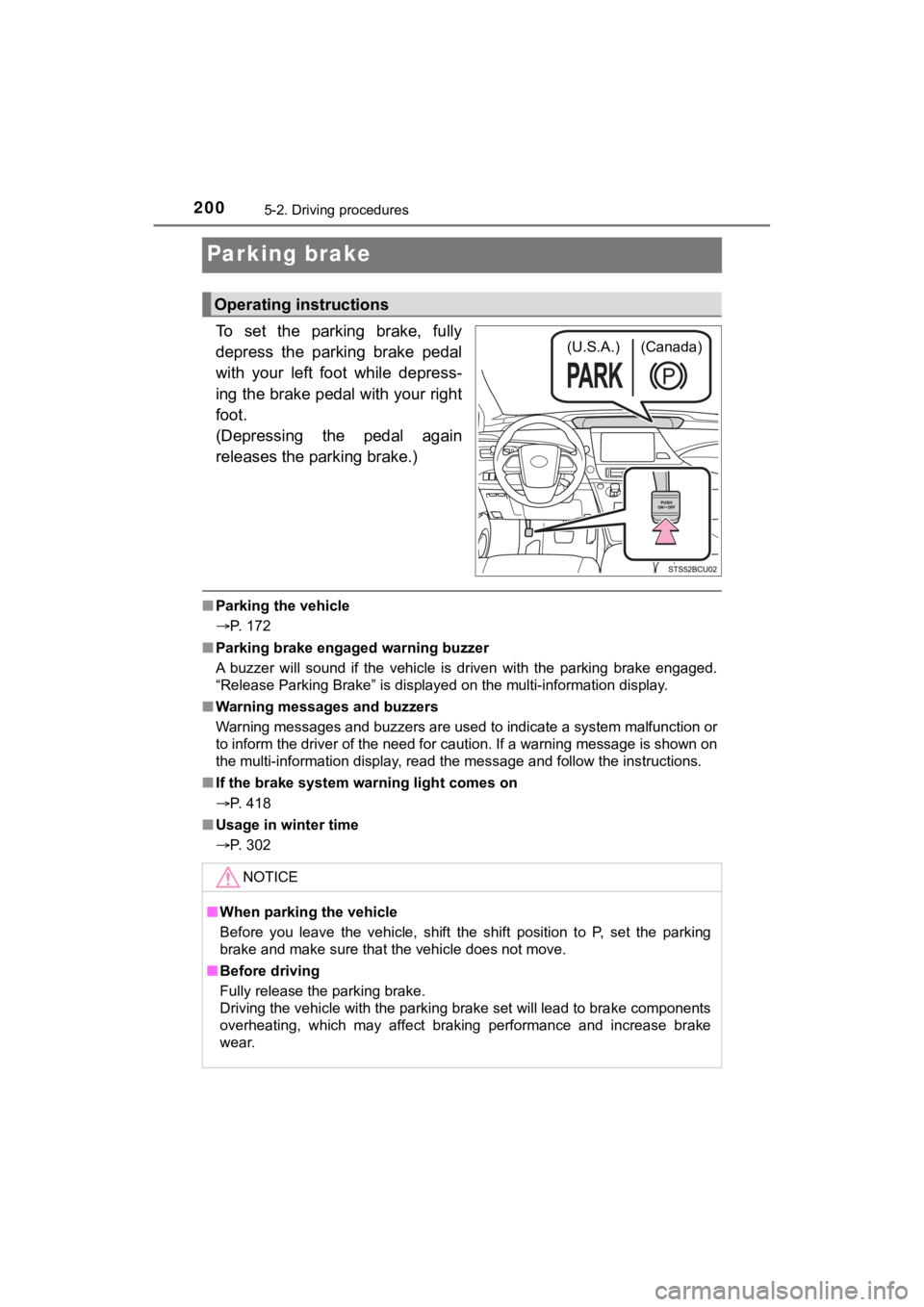
To set the parking brake, fully
depress the parking brake pedal
with your left foot while depress-
ing the brake pedal with your right
foot.
(Depressing the pedal again
releases the parking brake.)
■Parking the vehicle
P. 172
■ Parking brake engaged warning buzzer
A buzzer will sound if the vehicle is driven with the parking b rake engaged.
“Release Parking Brake” is displayed on the multi-information d isplay.
■ Warning messages and buzzers
Warning messages and buzzers are used to indicate a system malfunction or
to inform the driver of the need for caution. If a warning message is shown on
the multi-information display, read the message and follow the instructions.
■ If the brake system warning light comes on
P. 418
■ Usage in winter time
P. 302
Operating instructions
(U.S.A.) (Canada)
NOTICE
■When parking the vehicle
Before you leave the vehicle, shift the shift position to P, se t the parking
brake and make sure that the vehicle does not move.
■ Before driving
Fully release the parking brake.
Driving the vehicle with the parking brake set will lead to bra ke components
overheating, which may affect braking performance and increase brake
wear.
Page 203 of 528
2035-3. Operating the lights and wipers
5
Driving
MIRAI_OM_USA_OM62073U
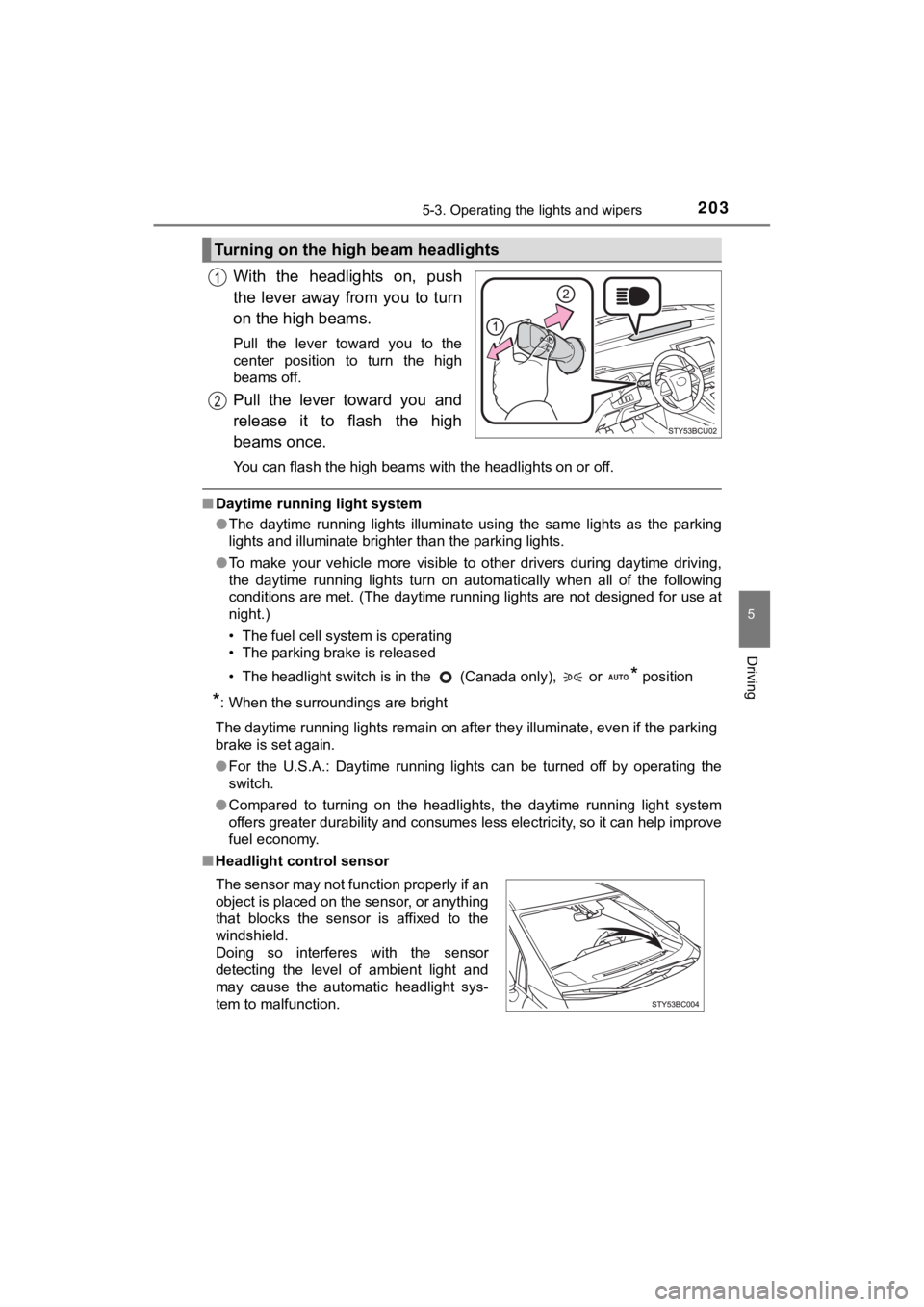
With the headlights on, push
the lever away from you to turn
on the high beams.
Pull the lever toward you to the
center position to turn the high
beams off.
Pull the lever toward you and
release it to flash the high
beams once.
You can flash the high beams with the headlights on or off.
■Daytime running light system
●The daytime running lights illuminate using the same lights as the parking
lights and illuminate brighter than the parking lights.
● To make your vehicle more visible to other drivers during dayti me driving,
the daytime running lights turn on automatically when all of the following
conditions are met. (The daytime running lights are not designe d for use at
night.)
• The fuel cell system is operating
• The parking brake is released
• The headlight switch is in the (Canada only), or
* position
*: When the surroundings are bright
The daytime running lights remain on after they illuminate, even if the parking
brake is set again.
● For the U.S.A.: Daytime running lights can be turned off by ope rating the
switch.
● Compared to turning on the headlights, the daytime running ligh t system
offers greater durability and consumes less electricity, so it can help improve
fuel economy.
■ Headlight control sensor
Turning on the high beam headlights
The sensor may not function properly if an
object is placed on the sensor, or anything
that blocks the sensor is affixed to the
windshield.
Doing so interferes with the sensor
detecting the level of ambient light and
may cause the automatic headlight sys-
tem to malfunction.
Page 213 of 528
2135-4. Refueling
5
Driving
MIRAI_OM_USA_OM62073U
Opening the fuel door
●Close the all the doors and windows.
● Set the parking brake.
● Shift the shift position to P.
● Turn the power switch off.
● Turn off the headlights.
■Fuel Type
Compressed hydrogen gas
■ Notes on fueling
●Fueling will not be possible if the pressure inside the vehicle ’s hydrogen tanks
is higher than the supply pressure of the hydrogen station. If the hydrogen
tanks are more than half full, the vehicle will be unable to fu el at a H35 dis-
penser.
A hydrogen station with a H70 dispenser (supply pressure of 101 50 psi
[70 MPa, 714 kgf/cm
2, 700 bar] is necessary to completely fill hydrogen tanks.
● If the fueling cannot be completed due to trouble with the station equipment,
call the number indicated on the equipment.
● Fuel with compressed hydrogen g as only at hydrogen stations.
● Fuel at hydrogen stations confor ming with the Society of Automo-
tive Engineers (SAE) J2601 fueling protocol or laws that may
supersede such SAE protocols.
● Refer to the Mirai Station Finder Application in Connected ser-
vices, https://www.toyota.com/connected-services
(for U.S. own-
ers) or https://www.toyota.ca/connected
(for Canadian owners), or
call 1-800-331-4331 (for U.S. owners) or 1-888-869-6828 (for
Canadian owners).
● Observe any notic es or instructions show n at hydrogen stations.
● The filling time and amount of fuel may depend on outside tem-
perature and the equipment at that hydrogen station.
● Vehicles with expired hydrogen tanks must not be used. ( P. 94)
Consult your Toyota dealer.
Before filling
Page 270 of 528

2705-5. Using the driving support systems
MIRAI_OM_USA_OM62073U■
Sensor detection information
●The sensor’s detection areas are limited to the areas around th e vehicle’s
bumper.
● Certain vehicle conditions and the surrounding environment may affect the
ability of a sensor to correctly detect an obstacle. Particular instances where
this may occur are listed below.
• There is dirt, snow or ice on the sensor. (Wiping the sensors will resolve
this problem.)
• The sensor is frozen. (Thawing the area will resolve this problem.)
In especially cold weather, if a sensor is frozen the screen ma y show an
abnormal display, or obstacles may not be detected.
• The sensor is covered in any way.
• The vehicle is leaning considerably to one side.
• On an extremely bumpy road, on an incline, on gravel, or on grass.
• The vicinity of the vehicle is noisy due to vehicle horns, motorcycle
engines, air brakes of large vehicles, or other loud noises pro ducing ultra-
sonic waves.
• There is another vehicle equipped with parking assist sensors in the
vicinity.
• The sensor is coated with a sheet of spray or heavy rain.
• The vehicle is equipped with a fender pole or wireless antenna .
• Towing eyelets are installed.
• The bumper or sensor receives a strong impact.
• A backlit license plate, license plate holder, etc., are insta lled.
• The vehicle is approaching a tall or curved curb.
• In harsh sunlight or intense cold weather.
• The area directly under the bumpers is not detected.
• If obstacles draw too close to the sensor.
• A non-genuine Toyota suspension (lowered suspension etc.) is i nstalled.
• People may not be detected if they are wearing certain types o f clothing.
In addition to the examples above, there are instances in which, because of
their shape, signs and other objects may be judged by a sensor to be closer
than they are.
● The shape of the obstacle may prevent a sensor from detecting i t. Pay par-
ticular attention to the following obstacles:
• Wires, fences, ropes, etc.
• Cotton, snow and other materials that absorb sound waves
• Sharply-angled objects
• Low obstacles
• Tall obstacles with upper sections projecting outwards in the direction of your vehicle