steering TOYOTA MIRAI 2020 (in English) User Guide
[x] Cancel search | Manufacturer: TOYOTA, Model Year: 2020, Model line: MIRAI, Model: TOYOTA MIRAI 2020Pages: 528, PDF Size: 11.98 MB
Page 47 of 528
471-1. For safe use
1
For safety and security
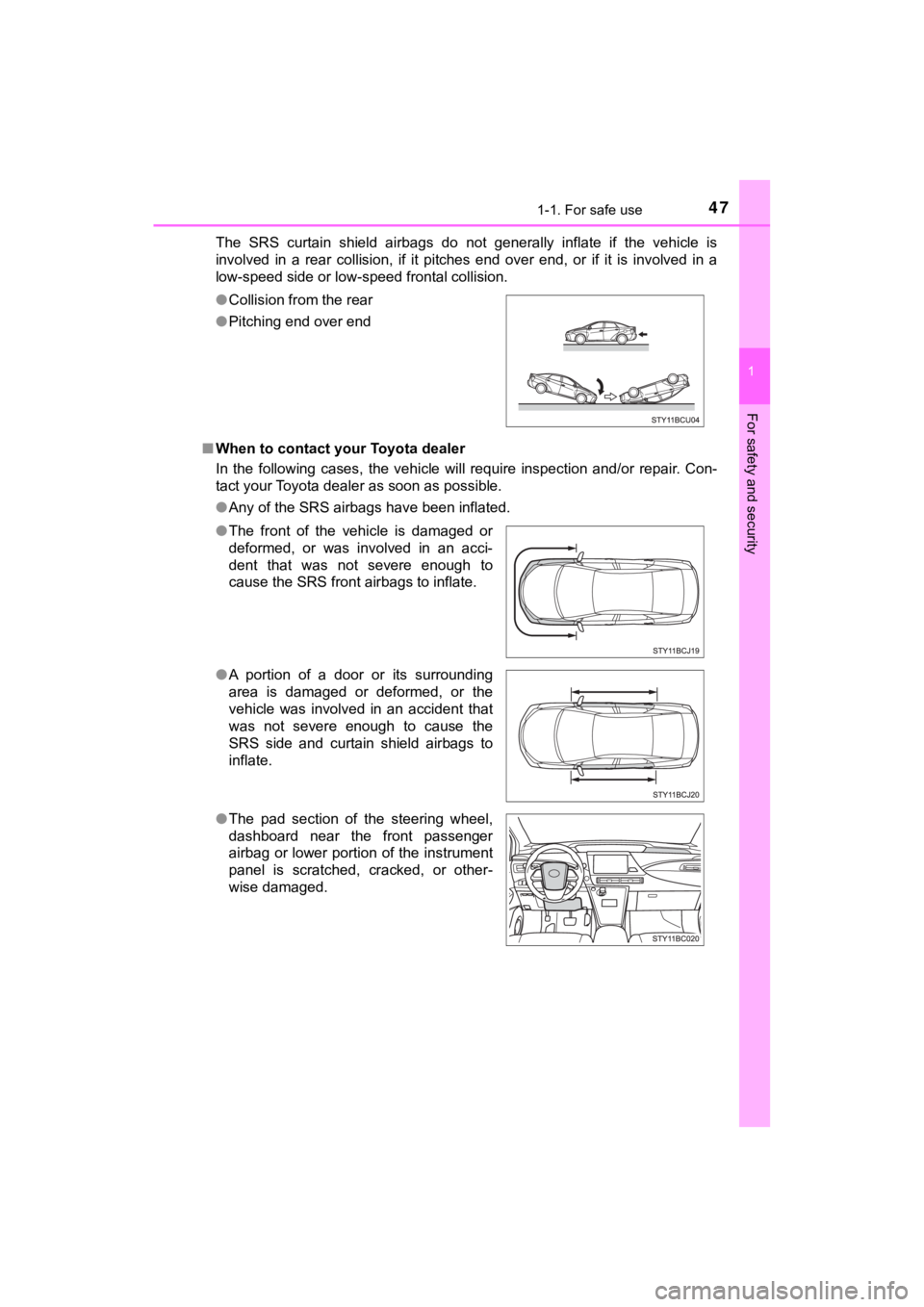
MIRAI_OM_USA_OM62073UThe SRS curtain shield airbags do not generally inflate if the
vehicle is
involved in a rear collision, if it pitches end over end, or if it is involved in a
low-speed side or low-speed frontal collision.
■ When to contact your Toyota dealer
In the following cases, the vehicle will require inspection and/or repair. Con-
tact your Toyota dealer as soon as possible.
●Any of the SRS airbags have been inflated.
●
Collision from the rear
● Pitching end over end
● The front of the vehicle is damaged or
deformed, or was involved in an acci-
dent that was not severe enough to
cause the SRS front airbags to inflate.
● A portion of a door or its surrounding
area is damaged or deformed, or the
vehicle was involved in an accident that
was not severe enough to cause the
SRS side and curtain shield airbags to
inflate.
● The pad section of the steering wheel,
dashboard near the front passenger
airbag or lower portion of the instrument
panel is scratched, cracked, or other-
wise damaged.
Page 107 of 528
1073. Instrument cluster
3
Instrument cluster
MIRAI_OM_USA_OM62073U
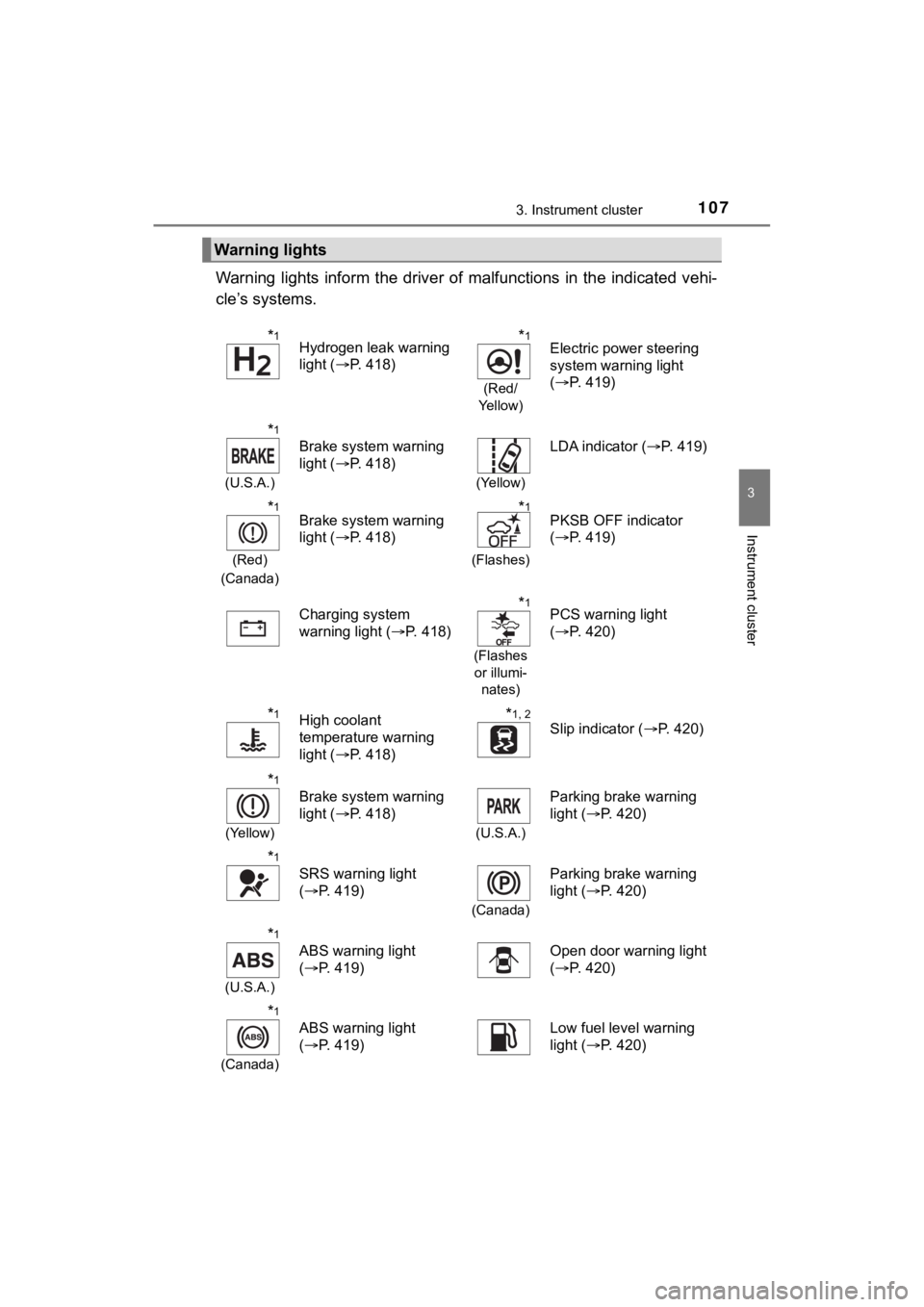
Warning lights inform the driver of malfunctions in the indicated vehi-
cle’s systems.
Warning lights
*1Hydrogen leak warning
light ( P. 418)*1
(Red/
Ye l l o w )
Electric power steering
system warning light
( P. 419)
*1
(U.S.A.)
Brake system warning
light ( P. 418)
(Yellow)
LDA indicator ( P. 419)
*1
(Red)
(Canada)
Brake system warning
light ( P. 418)*1
(Flashes)
PKSB OFF indicator
(P. 419)
Charging system
warning light ( P. 418)
*1
(Flashes
or illumi- nates)
PCS warning light
(P. 420)
*1High coolant
temperature warning
light ( P. 418)*1, 2
Slip indicator ( P. 420)
*1
(Yellow)
Brake system warning
light (P. 418)
(U.S.A.)
Parking brake warning
light (P. 420)
*1
SRS warning light
(P. 419)
(Canada)
Parking brake warning
light ( P. 420)
*1
(U.S.A.)
ABS warning light
(P. 419)Open door warning light
(P. 420)
*1
(Canada)
ABS warning light
(P. 419)Low fuel level warning
light ( P. 420)
Page 109 of 528
1093. Instrument cluster
3
Instrument cluster
MIRAI_OM_USA_OM62073U
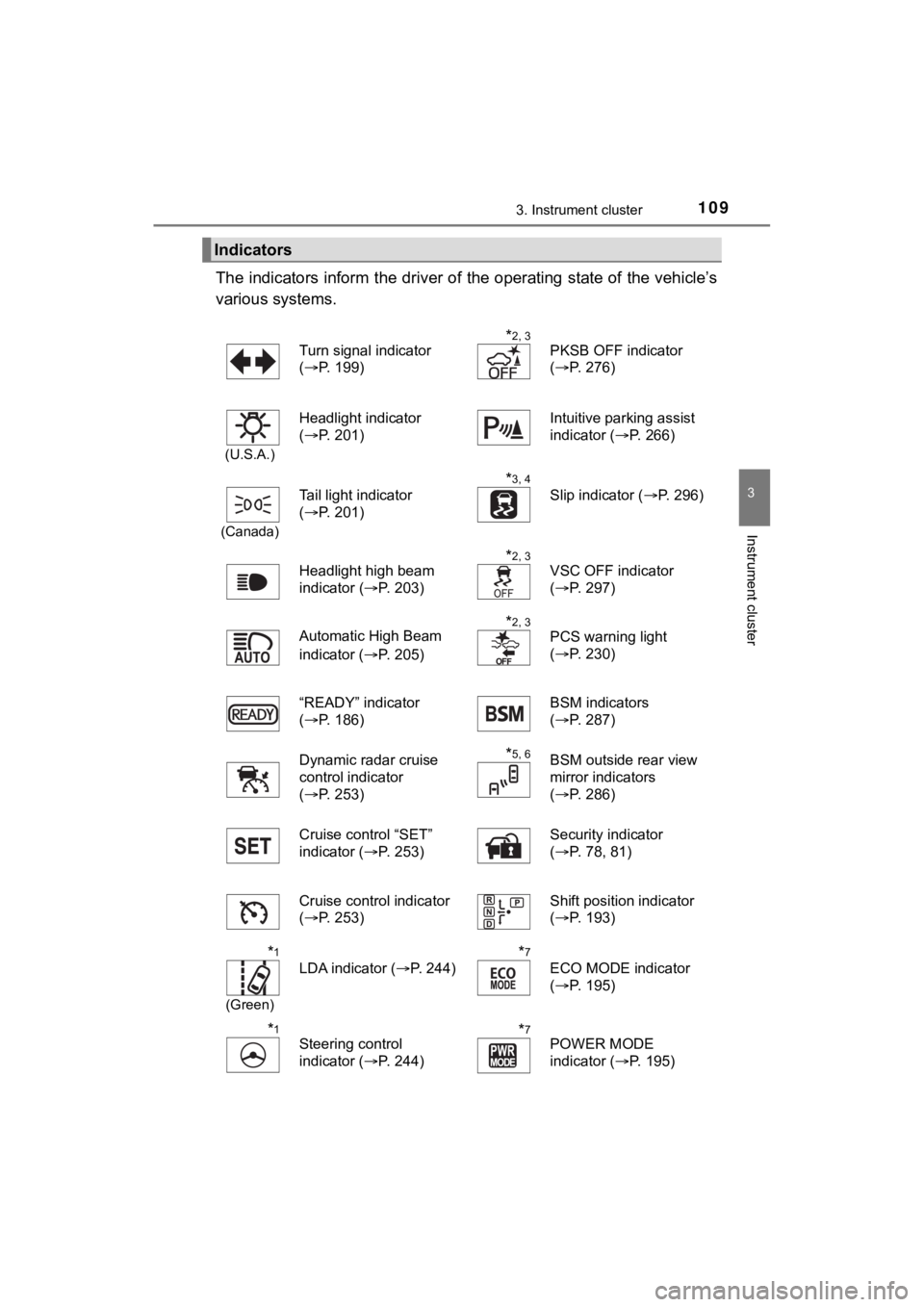
The indicators inform the driver of the operating state of the vehicle’s
various systems.
Indicators
Turn signal indicator
( P. 199)*2, 3
PKSB OFF indicator
(P. 276)
(U.S.A.)
Headlight indicator
(P. 201)Intuitive parking assist
indicator ( P. 266)
(Canada)
Tail light indicator
(P. 201)
*3, 4 Slip indicator ( P. 296)
Headlight high beam
indicator ( P. 203)
*2, 3
VSC OFF indicator
(P. 297)
Automatic High Beam
indicator ( P. 205)
*2, 3
PCS warning light
(P. 230)
“READY” indicator
( P. 186)
BSM indicators
(P. 287)
Dynamic radar cruise
control indicator
( P. 253)
*5, 6BSM outside rear view
mirror indicators
(P. 286)
Cruise control “SET”
indicator ( P. 253) Security indicator
(
P. 78, 81)
Cruise control indicator
( P. 253) Shift position indicator
(
P. 193)
*1
(Green)
LDA indicator ( P. 244)
*7
ECO MODE indicator
(P. 195)
*1
Steering control
indicator ( P. 244)*7POWER MODE
indicator (P. 195)
Page 117 of 528
1173. Instrument cluster
3
Instrument cluster
MIRAI_OM_USA_OM62073U
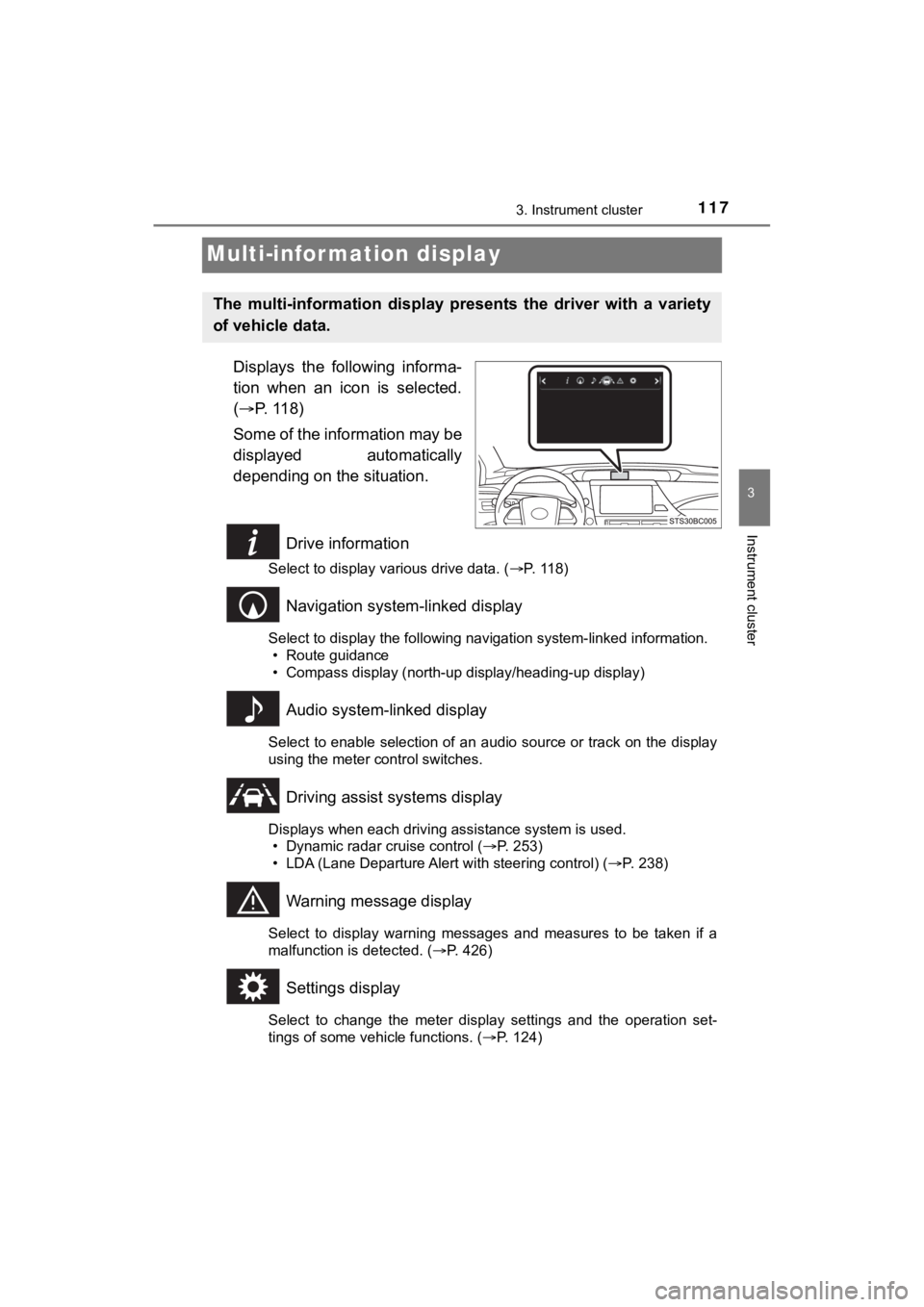
Multi-infor mation display
Displays the following informa-
tion when an icon is selected.
( P. 118)
Some of the information may be
displayed automatically
depending on the situation.
Drive information
Select to display various drive data. ( P. 118)
Navigation system-linked display
Select to display the following navigation system-linked information.
• Route guidance
• Compass display (north-up display/heading-up display)
Audio system-linked display
Select to enable selection of an audio source or track on the d isplay
using the meter control switches.
Driving assist systems display
Displays when each driving assistance system is used. • Dynamic radar cruise control ( P. 253)
• LDA (Lane Departure Alert with steering control) ( P. 238)
Warning message display
Select to display warning messages and measures to be taken if a
malfunction is detected. ( P. 426)
Settings display
Select to change the meter display settings and the operation set-
tings of some vehicle functions. ( P. 124)
The multi-information display pre sents the driver with a variety
of vehicle data.
Page 124 of 528
1243. Instrument cluster
MIRAI_OM_USA_OM62073U
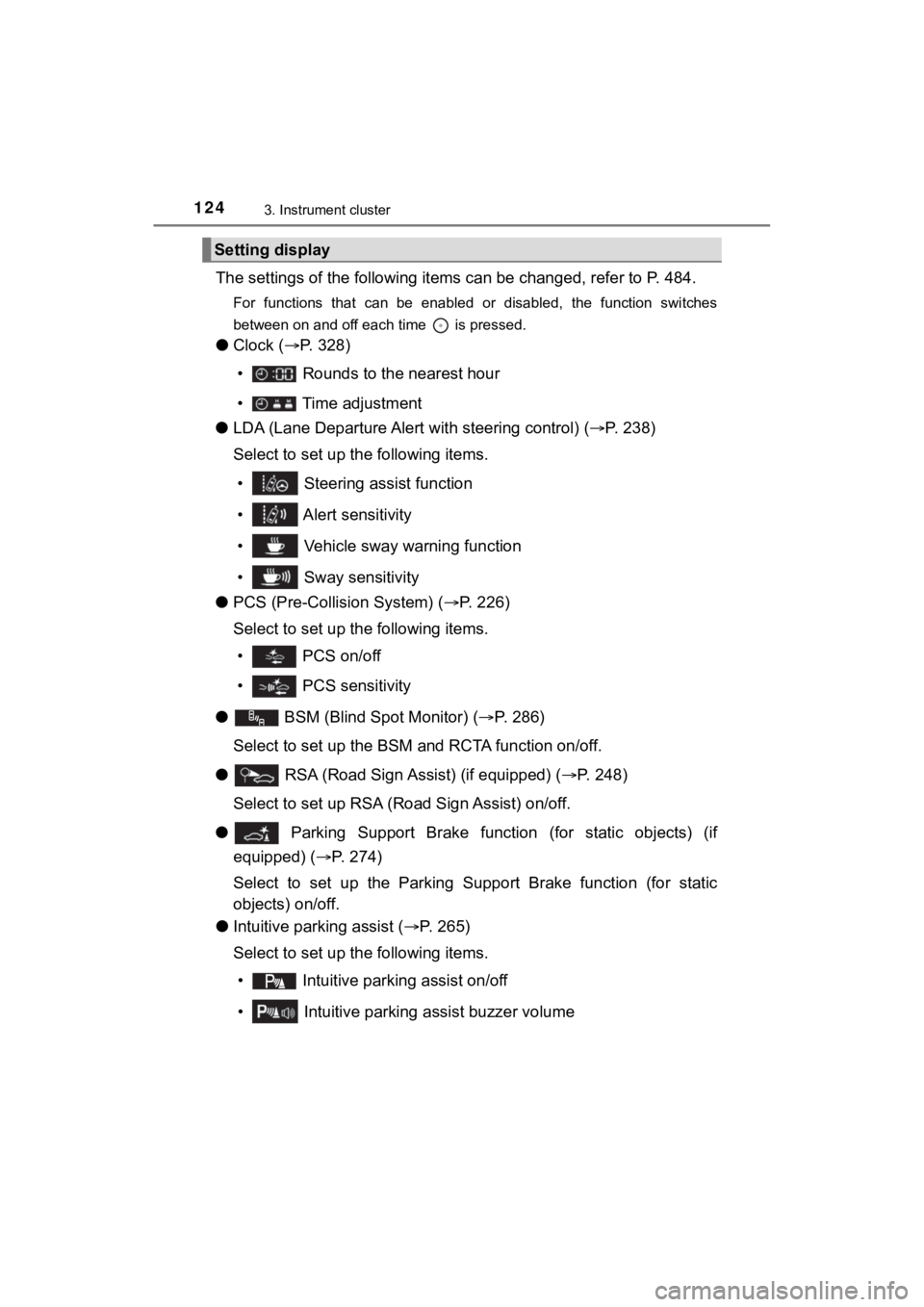
The settings of the following items can be changed, refer to P. 484.
For functions that can be enabled or disabled, the function swi tches
between on and off each time is pressed.
● Clock ( P. 328)
• Rounds to the nearest hour
• Time adjustment
● LDA (Lane Departure Alert with steering control) (P. 2 3 8 )
Select to set up the following items.
• Steering assist function
• Alert sensitivity
• Vehicle sway warning function
• Sway sensitivity
● PCS (Pre-Collis ion System) (P. 226)
Select to set up the following items.
• PCS on/off
• PCS sensitivity
●
BSM (Blind Spot Monitor) ( P. 286)
Select to set up the BSM and RCTA function on/off.
● RSA (Road Sign Assist) (if equipped) ( P. 248)
Select to set up RSA (Ro ad Sign Assist) on/off.
●
Parking Support Brake function (for static objects) (if
equipped) ( P. 274)
Select to set up the Parking Supp ort Brake function (for static
objects) on/off.
● Intuitive parking assist ( P. 265)
Select to set up the following items.
• Intuitive parkin g assist on/off
• Intuitive parking assist buzzer volume
Setting display
Page 127 of 528
127
4
Operation of
each component
MIRAI_OM_USA_OM62073U 4-1. Key information
Keys .................................. 128
4-2. Opening, closing and locking the doors
Doors ................................ 132
Trunk ................................. 138
Smart key system ............. 143
4-3. Adjusting the seats Front seats ........................ 151
Driving position memory ... 153
Head restraints.................. 158
4-4. Adjusting the steering wheel and mirrors
Steering wheel .................. 160
Inside rear view mirror ...... 162
Outside rear view mirrors ............................. 164
4-5. Opening and closing the windows
Power windows ................. 167
Page 151 of 528
1514-3. Adjusting the seats
4
Operation of each component
MIRAI_OM_USA_OM62073U
Front seats
■Power easy access system
The driver’s seat and steering wheel move in accordance with po wer switch
mode and the driver’s seat belt condition. ( P. 153)
■ Adjusting the seat
Be careful to not allow the head restraint to touch the ceiling .
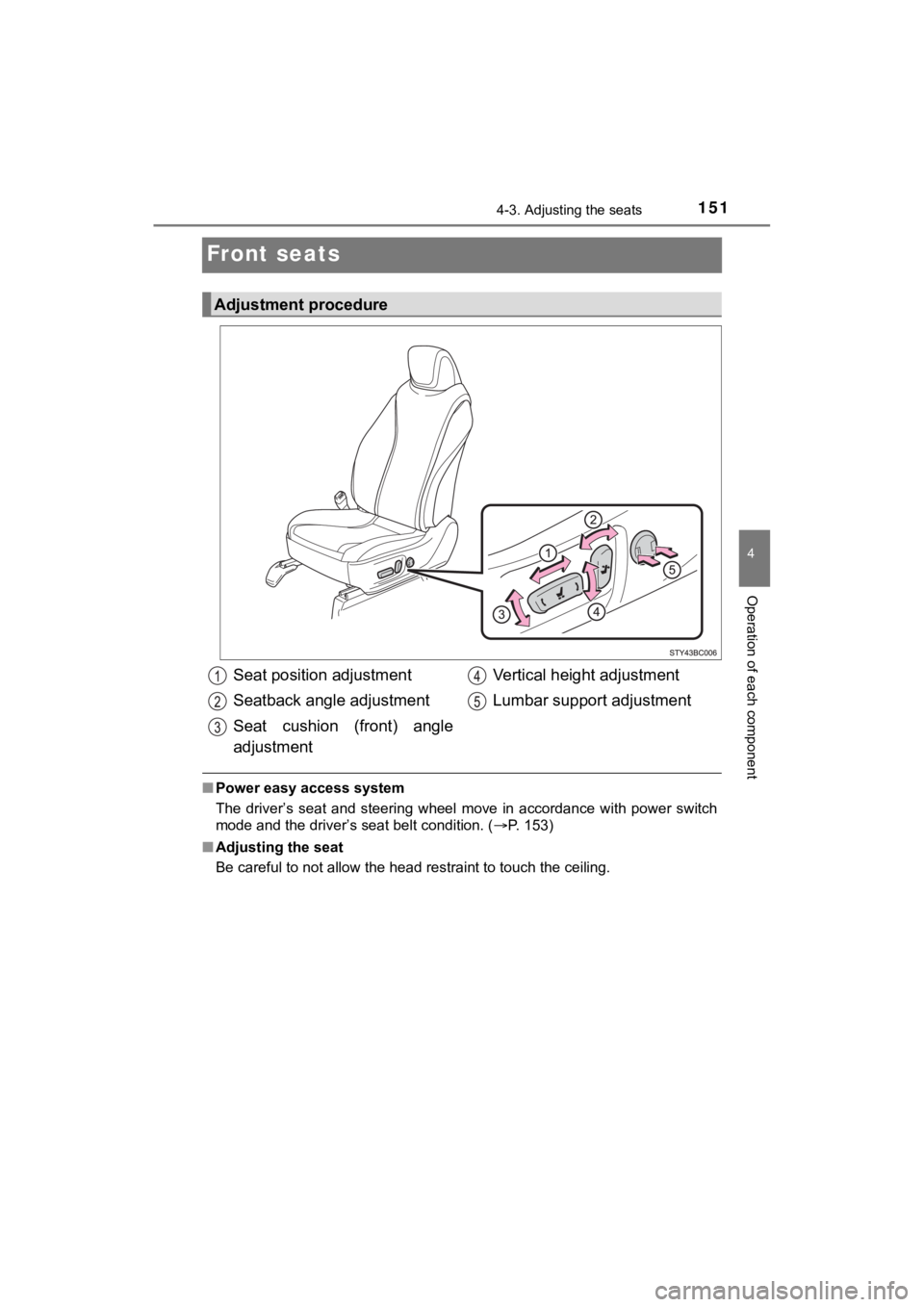
Adjustment procedure
Seat position adjustment
Seatback angle adjustment
Seat cushion (front) angle
adjustment Vertical height adjustment
Lumbar support adjustment
Page 153 of 528
1534-3. Adjusting the seats
4
Operation of each component
MIRAI_OM_USA_OM62073U
Driving position memor y
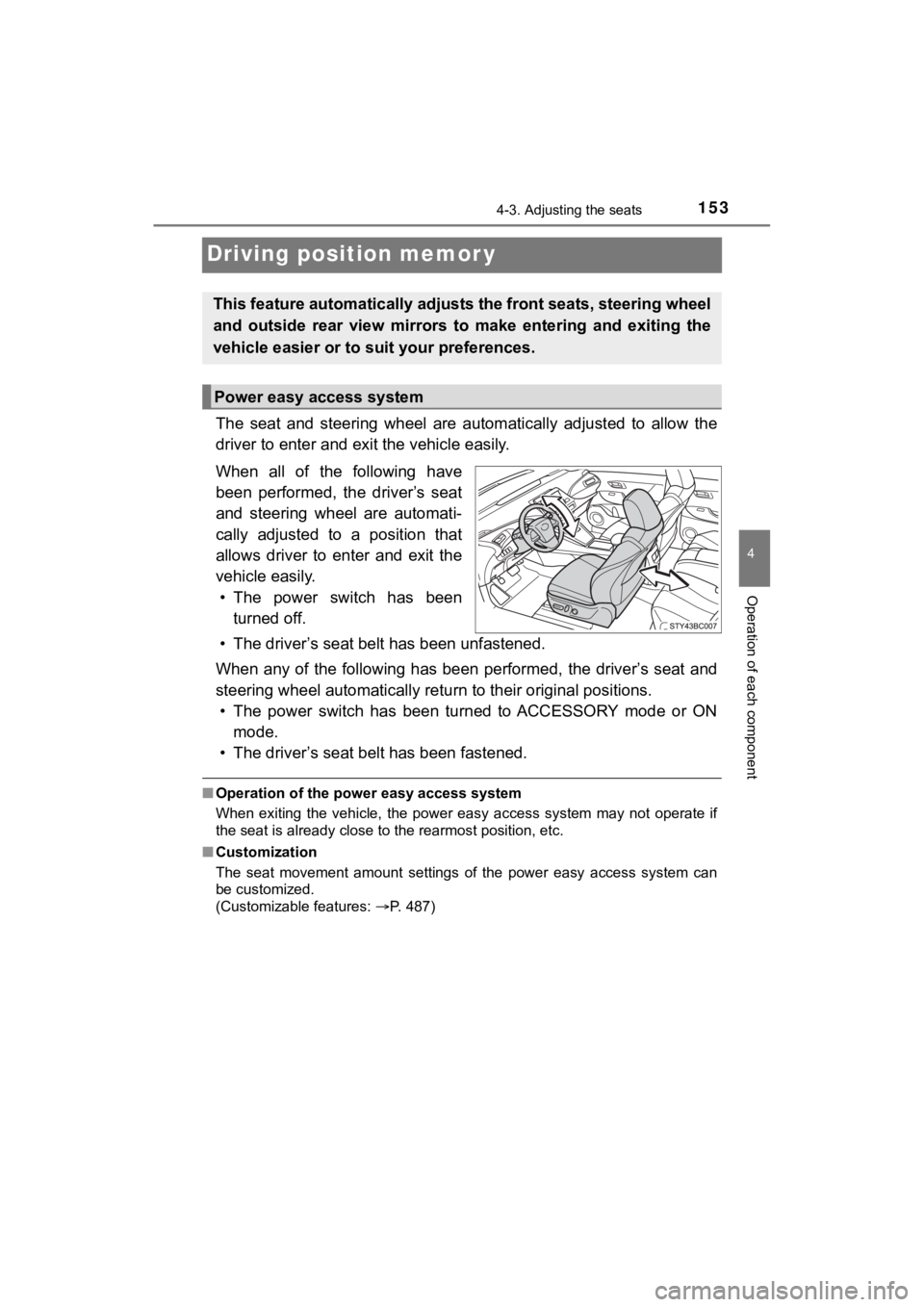
The seat and steering wheel are automatically adjusted to allow the
driver to enter and exi t the vehicle easily.
When all of the following have
been performed, the driver’s seat
and steering wheel are automati-
cally adjusted to a position that
allows driver to enter and exit the
vehicle easily. • The power switch has been turned off.
• The driver’s seat belt has been unfastened.
When any of the following has be en performed, the driver’s seat and
steering wheel automatically ret urn to their original positions.
• The power switch has been turned to ACCESSORY mode or ON mode.
• The driver’s seat belt has been fastened.
■ Operation of the power easy access system
When exiting the vehicle, the power easy access system may not operate if
the seat is already close to the rearmost position, etc.
■ Customization
The seat movement amount settings of the power easy access syst em can
be customized.
(Customizable features: P. 487)
This feature automatically adjusts the front seats, steering wh eel
and outside rear view mirrors to make entering and exiting the
vehicle easier or to suit your preferences.
Power easy access system
Page 154 of 528
1544-3. Adjusting the seats
MIRAI_OM_USA_OM62073U
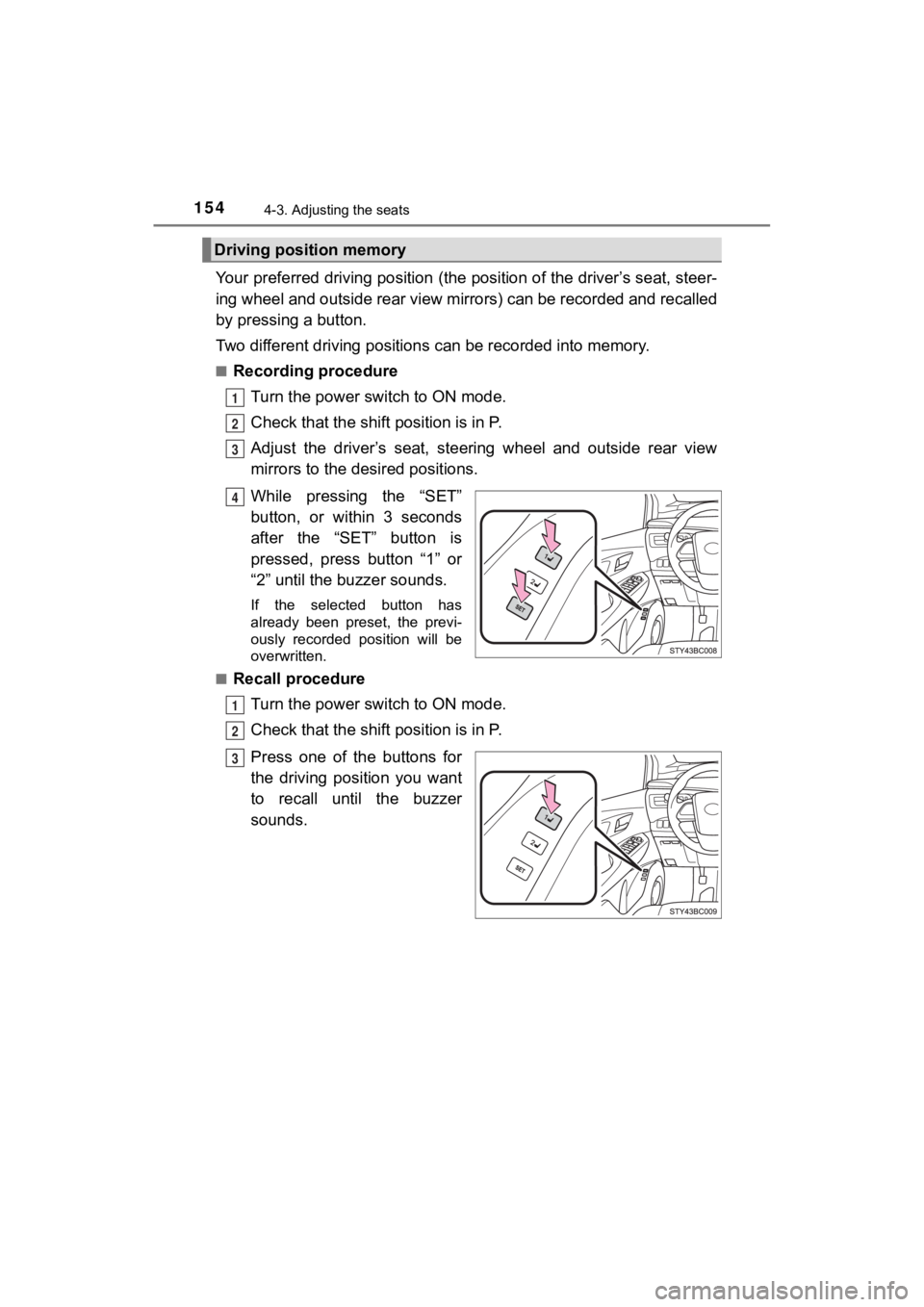
Your preferred driving position (the position of the driver’s seat, steer-
ing wheel and outside rear view mirrors) can be recorded and re called
by pressing a button.
Two different driving positions can be recorded into memory.
■Recording procedure
Turn the power switch to ON mode.
Check that the shif t position is in P.
Adjust the driver’s seat, steering wheel and outside rear view
mirrors to the desired positions.
While pressing the “SET”
button, or within 3 seconds
after the “SET” button is
pressed, press button “1” or
“2” until the buzzer sounds.
If the selected button has
already been preset, the previ-
ously recorded position will be
overwritten.
■
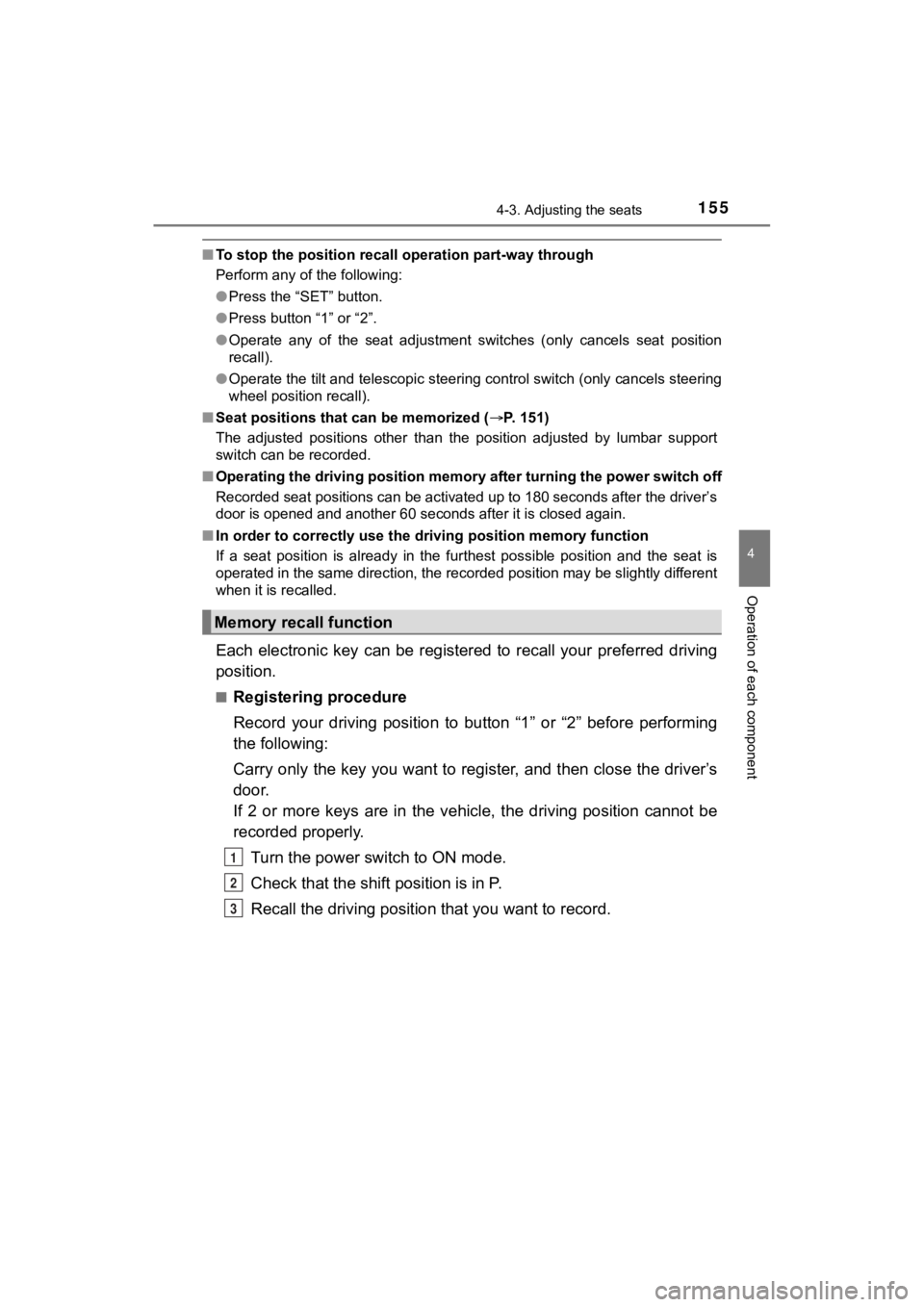
Recall procedure
Turn the power switch to ON mode.
Check that the shif t position is in P.
Press one of the buttons for
the driving position you want
to recall until the buzzer
sounds.
Driving position memory
1
2
3
4
1
2
3
Page 155 of 528
1554-3. Adjusting the seats
4
Operation of each component
MIRAI_OM_USA_OM62073U
■To stop the position recall operation part-way through
Perform any of the following:
●Press the “SET” button.
● Press button “1” or “2”.
● Operate any of the seat adjustment switches (only cancels seat position
recall).
● Operate the tilt and telescopic steering control switch (only cancels steering
wheel position recall).
■ Seat positions that can be memorized ( P. 151)
The adjusted positions other than the position adjusted by lumb ar support
switch can be recorded.
■ Operating the driving position m emory after turning the power switch off
Recorded seat positions can be activated up to 180 seconds after the driver’s
door is opened and another 60 seconds after it is closed again.
■ In order to correctly use the dr iving position memory function
If a seat position is already in the furthest possible position and the seat is
operated in the same direction, the recorded position may be sl ightly different
when it is recalled.
Each electronic key can be registered to recall your preferred driving
position.
■Registering procedure
Record your driving position to button “1” or “2” before perfor ming
the following:
Carry only the key you want to register, and then close the dri ver’s
door.
If 2 or more keys are in the vehicle, the driving position cann ot be
recorded properly.
Turn the power switch to ON mode.
Check that the shif t position is in P.
Recall the driving position that you want to record.
Memory recall function
1
2
3