key TOYOTA MIRAI 2020 (in English) Workshop Manual
[x] Cancel search | Manufacturer: TOYOTA, Model Year: 2020, Model line: MIRAI, Model: TOYOTA MIRAI 2020Pages: 528, PDF Size: 11.98 MB
Page 431 of 528
![TOYOTA MIRAI 2020 (in English) Workshop Manual 4318-2. Steps to take in an emergency
MIRAI_OM_USA_OM62073U
8
When trouble arises
■If “Shifted to [N] Position To Shift to [P], Stop Your Vehicle and Press [P]
Switch” is displayed
When the v](/img/14/42628/w960_42628-430.png "TOYOTA MIRAI 2020 (in English) Workshop Manual 4318-2. Steps to take in an emergency
MIRAI_OM_USA_OM62073U
8
When trouble arises
■If “Shifted to [N] Position To Shift to [P], Stop Your Vehicle and Press [P]
Switch” is displayed
When the v")
4318-2. Steps to take in an emergency
MIRAI_OM_USA_OM62073U
8
When trouble arises
■If “Shifted to [N] Position To Shift to [P], Stop Your Vehicle and Press [P]
Switch” is displayed
When the vehicle is moving, a warning message is displayed when the P
position switch is operated and attempting to shift the shift p osition to P.
The shift position is changed to N.
Operate the P position switch after the vehicle has been brough t to a com-
plete stop.
■ If “Smart Key System Malfunction See Owner’s Manual” is displayed
P. 145
■ If “Front Camera Unavailable” or “Front Camera Unavailable See
Owner’s Manual” is displayed
The following systems may be suspended until the problem shown in the
message is resolved. ( P. 224)
● PCS (Pre-Collision System)
● LDA (Lane Departure Alert with steering control)
● Automatic High Beam
● RSA (Road Sign Assist) (if equipped)
● Dynamic radar cruise control
■ If “Radar Cruise Control Unavailable See Owner's Manual” is sho wn
The dynamic radar cruise control system is suspended temporaril y or until the
problem shown in the message is resolved. (causes and coping me thods:
P. 224)
■ If “Radar Cruise Control Unavailable” is shown
The dynamic radar cruise control system cannot be used temporar ily. Use the
system when it becomes available again.
■ If the shift position cannot be changed or the power switch is turned to
ACCESSORY mode even if trying to turn the power switch off when a
warning message is shown
If the 12-volt battery is discharged or the shift control syste m is malfunction-
ing, the followings may occur.
● The shift position may not be changed to P.
When parking, stop the vehicle on level ground and apply the pa rking brake
firmly.
● The fuel cell system may not start.
● The power switch may be turned to ACCESSORY mode even if trying to
turn the power switch off.
In this case, the power switch may be turned off after applying the parking
brake.
● The automatic P position selection function ( P. 191) may not operate.
Before turning the power switch off, be sure to press the P pos ition switch
and check that the shift position is in P by the shift position indicator or P
position switch indicator.
■ Warning buzzer
P. 424
Page 447 of 528
4478-2. Steps to take in an emergency
MIRAI_OM_USA_OM62073U
8
When trouble arises
If the fuel cell system will not start
One of the following may be the cause of the problem:
● The electronic key may not be functioning properly. (P. 449)
● There may not be sufficient f uel in the vehicle’s tank.
Refuel the vehicle.
● The fuel door may be open. ( P. 2 1 6 )
● There may be a mal function in the immobilizer system.
( P. 78)
● There may be a malfunction i n the shift control system.
* ( P. 429)
● The fuel cell system may be malf unctioning due to an electrical
problem such as electronic key battery depletion or a blown fus e.
However, depending on the type of malfunction, an interim mea-
sure is available to star t the fuel cell system. (P. 191, 448)
● The electronic key may be in battery-saving mode. ( P. 145)
*: It may not be possible to shift the shift position from P to a nother position.
One of the following may be the cause of the problem:
● The 12-volt battery may be discharged. ( P. 452)
● The 12-volt battery terminal conn ections may be loose or corroded.
( P. 374)
Reasons for the fuel cell system not starting vary depending on
the situation. Check the followi ng and perform the appropriate
procedure:
The fuel cell system will not start even though the correct sta rt-
ing procedure is being followed. ( P. 186)
The interior lights and headlights are dim, or the horn does no t
sound or sounds at a low volume.
Page 449 of 528
4498-2. Steps to take in an emergency
MIRAI_OM_USA_OM62073U
8
When trouble arises
If the electronic key does not operate
properly
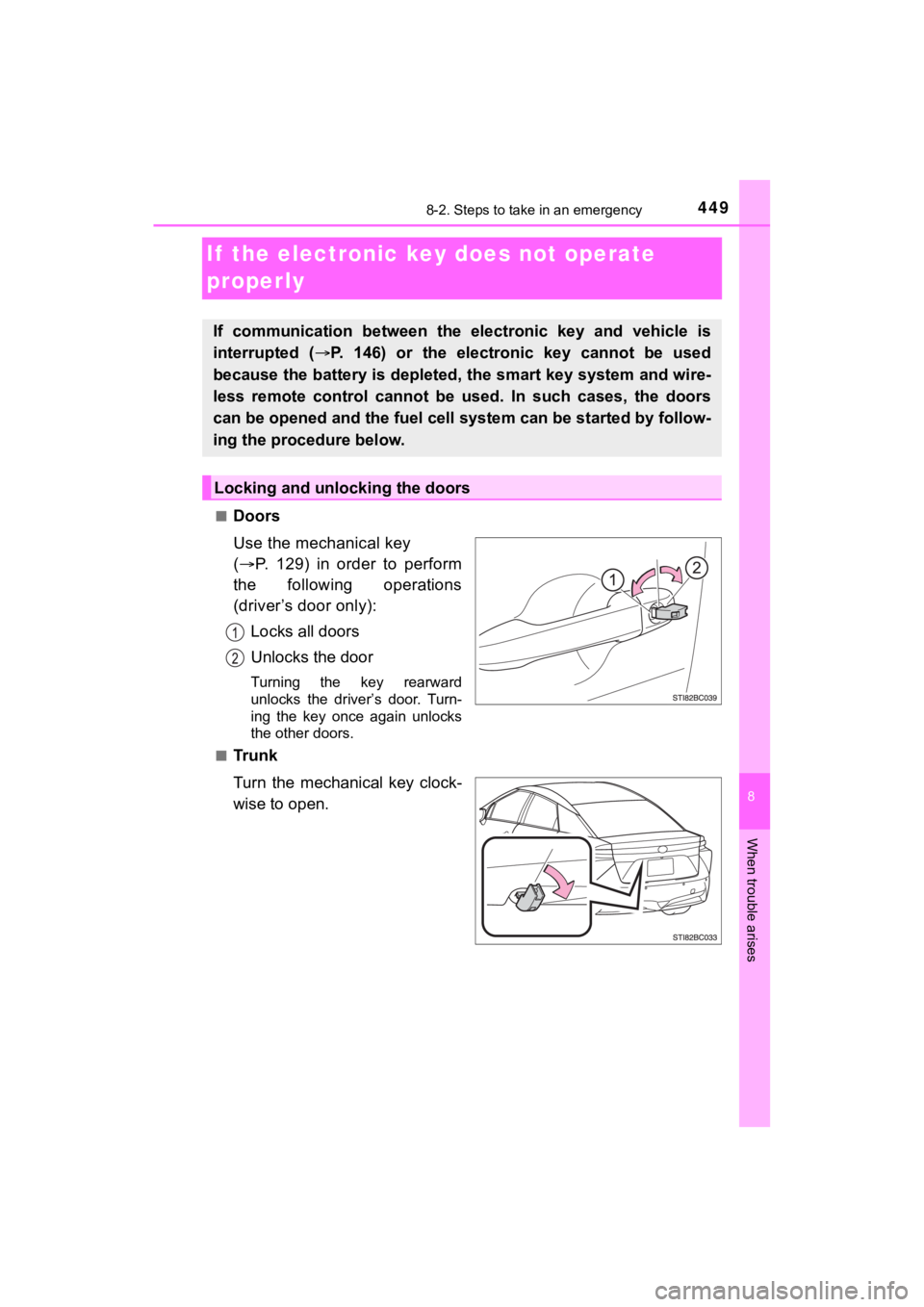
■Doors
Use the mechanical key
( P. 129) in order to perform
the following operations
(driver’s door only):
Locks all doors
Unlocks the door
Turning the key rearward
unlocks the driver’s door. Turn-
ing the key once again unlocks
the other doors.
■
Tr u n k
Turn the mechanical key clock-
wise to open.
If communication between the electronic key and vehicle is
interrupted ( P. 146) or the electronic key cannot be used
because the battery is depleted, the smart key system and wire-
less remote control cannot be used. In such cases, the doors
can be opened and the fuel cell system can be started by follow -
ing the procedure below.
Locking and unlocking the doors
Page 450 of 528
4508-2. Steps to take in an emergency
MIRAI_OM_USA_OM62073U
■Key linked functions
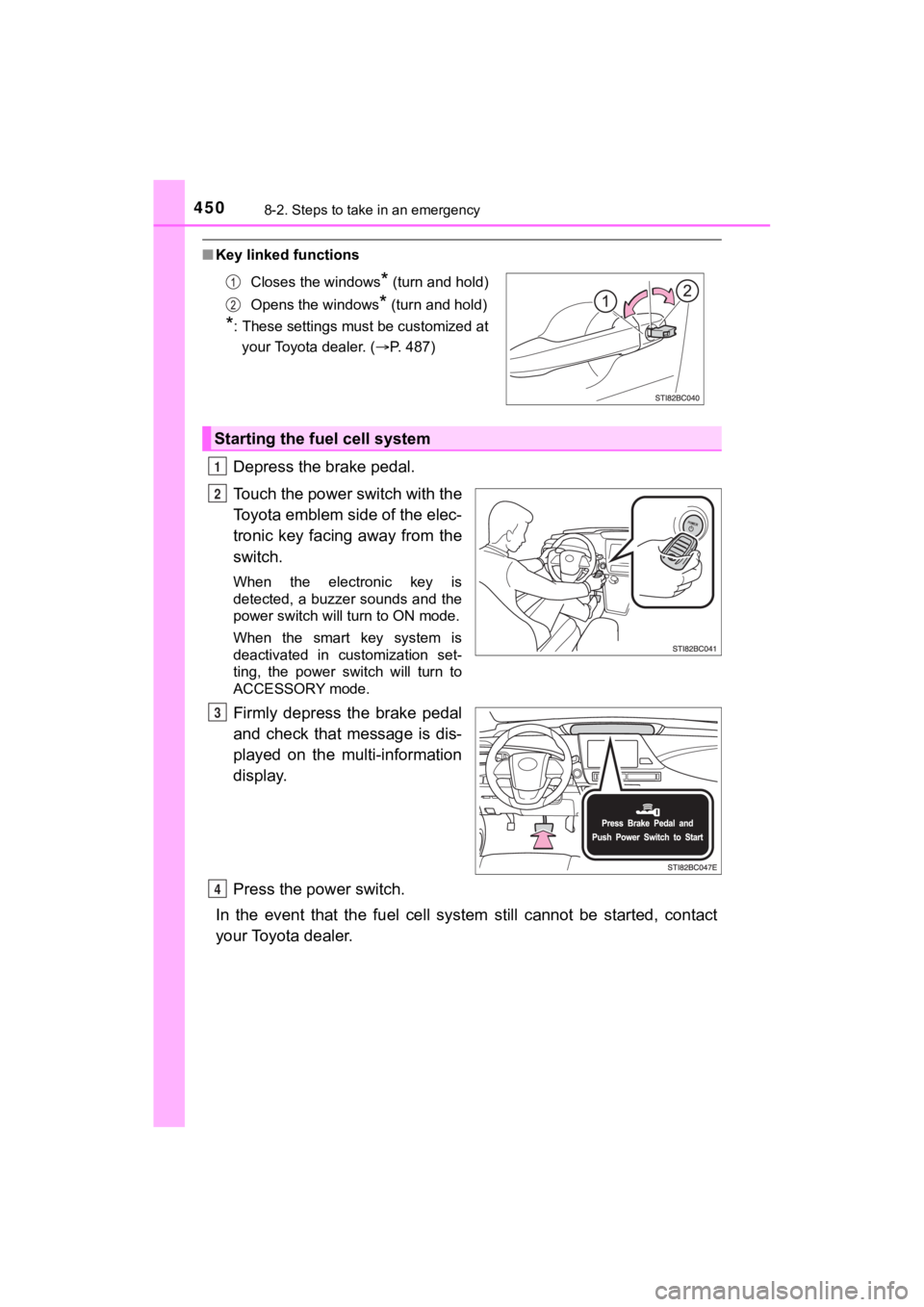
Depress the brake pedal.
Touch the power switch with the
Toyota emblem side of the elec-
tronic key facing away from the
switch.
When the electronic key is
detected, a buzzer sounds and the
power switch will turn to ON mode.
When the smart key system is
deactivated in customization set-
ting, the power switch will turn to
ACCESSORY mode.
Firmly depress the brake pedal
and check that message is dis-
played on the multi-information
display.
Press the power switch.
In the event that the fuel cell system still cannot be started, contact
your Toyota dealer.
Closes the windows* (turn and hold)
Opens the windows
* (turn and hold)
*: These settings must be customized at your Toyota dealer. ( P. 487)
Starting the fuel cell system
1
2
3
4
Page 451 of 528
4518-2. Steps to take in an emergency
MIRAI_OM_USA_OM62073U
8
When trouble arises
■Stopping the fuel cell system
Shift the shift position to P and press the power switch as you normally do
when stopping the fuel cell system.
■ Replacing the key battery
As the above procedure is a temporary measure, it is recommende d that the
electronic key battery be replaced immediately when the battery is depleted.
( P. 400)
■ Alarm
Using the mechanical key to lock the doors will not set the ala rm system.
If a door is unlocked using the mechanical key when the alarm system is set,
the alarm may be triggered. ( P. 82)
■ When the electronic key does not work properly
●Make sure that the smart key system has not been deactivated in the cus-
tomization setting. If it is off, turn the function on.
(Customizable features P. 486)
● Check if battery-saving mode is set. If it is set, cancel the f unction.
( P. 145)
■ Changing power switch modes
Release the brake pedal and press the power switch in step abo ve.
The fuel cell system does not start and modes will be changed each time the
switch is pressed. ( P. 188)
WARNING
■When using the mechanical key and operating the power windows
Operate the power window after checking to make sure that there is no pos-
sibility of any passenger having any of their body parts caught in the win-
dow.
Also, do not allow children to operate the mechanical key. It is possible for
children and other passengers to get caught in the power window .
3
Page 452 of 528
4528-2. Steps to take in an emergency
MIRAI_OM_USA_OM62073U
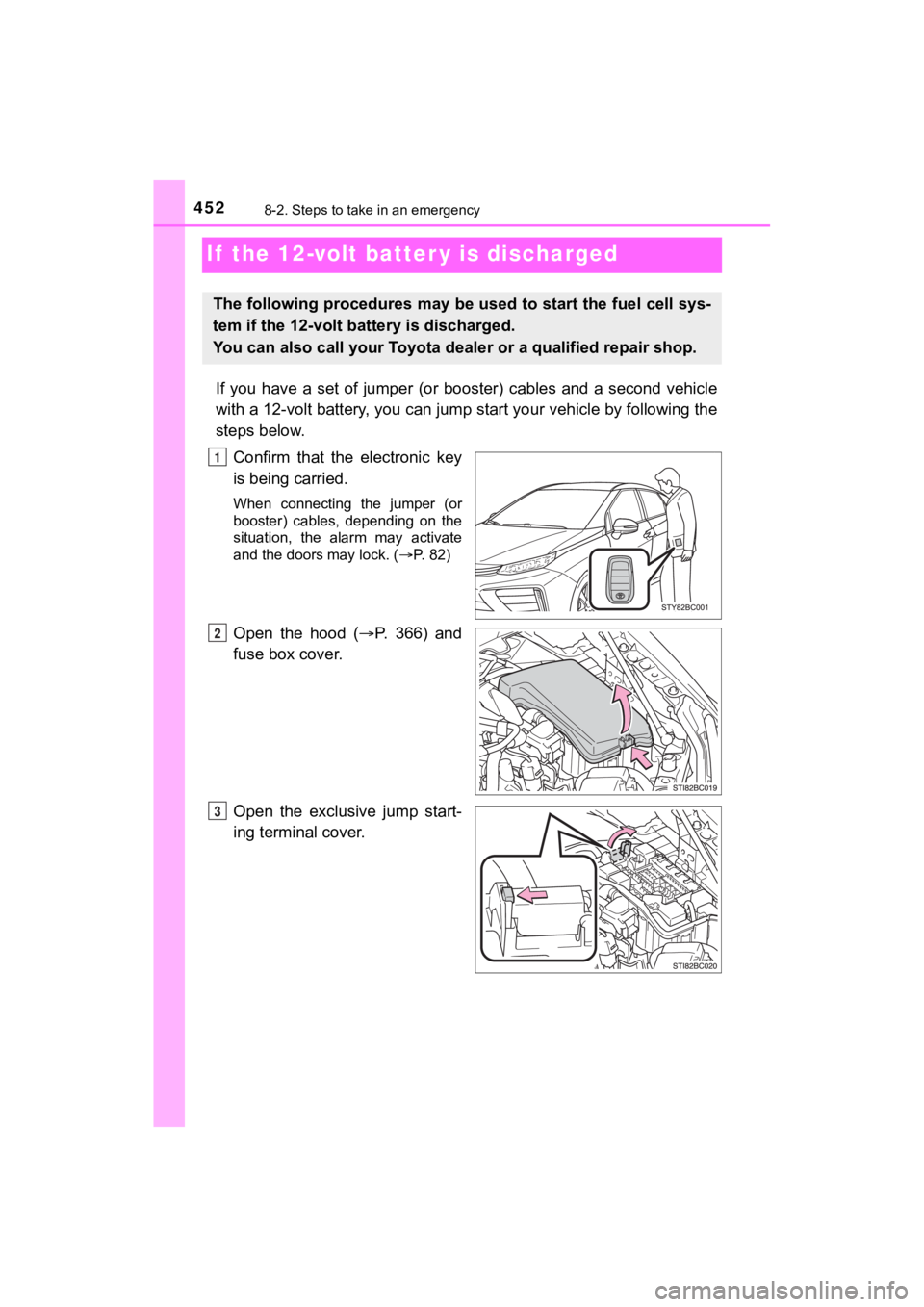
If the 12-volt batter y is discharged
If you have a set of jumper (or booster) cables and a second vehicle
with a 12-volt battery, you can jump start your vehicle by foll owing the
steps below.
Confirm that the electronic key
is being carried.
When connecting the jumper (or
booster) cables, depending on the
situation, the alarm may activate
and the doors may lock. ( P. 82)
Open the hood (P. 366) and
fuse box cover.
Open the exclusive jump start-
ing terminal cover.
The following procedures may be u sed to start the fuel cell sys-
tem if the 12-volt battery is discharged.
You can also call your Toyota de aler or a qualified repair shop.
1
2
3
Page 454 of 528

4548-2. Steps to take in an emergency
MIRAI_OM_USA_OM62073U
Make sure the “READY” indicator comes on. If the indicator does
not come on, contact your Toyota dealer.
Once the fuel cell system has started, remove the jumper cables in
the exact reverse order from which they were connected.
Close the exclusive jump starting terminal cover, reinstall the motor
cover and the fuse box cover to its original position.
Once the fuel cell system starts, have the vehicle inspected at your
Toyota dealer as soon as possible.
■ Starting the fuel cell system when the 12-volt battery is discharged
The fuel cell system cannot be started by push-starting.
■ To prevent 12-volt battery discharge
●Turn off the headlights and the audio system while the fuel cell system is off.
● Turn off any unnecessary electrical components when the vehicle is running
at a low speed for an extended period, such as in heavy traffic .
■ Charging the 12-volt battery
The electricity stored in the 12-volt battery will discharge gr adually even when
the vehicle is not in use, due to natural discharge and the dra ining effects of
certain electrical appliances. If the vehicle is left for a lon g time, the 12-volt
battery may discharge, and the fuel cell system may be unable to start. (The
12-volt battery recharges automatically while the fuel cell sys tem is operat-
ing.)
■ When the 12-volt battery is removed or discharged
● In some cases, it may not be possible to unlock the doors using the smart
key system when the 12-volt battery is discharged. Use the wire less remote
control or the mechanical key to lock or unlock the doors.
● The fuel cell system may not start on the first attempt after t he 12-volt bat-
tery has recharged but will start normally after the second att empt. This is
not a malfunction.
● The power switch mode is memorized by the vehicle. When the 12- volt bat-
tery is reconnected, the system will return to the mode it was in before the
12-volt battery was discharged. Before disconnecting the 12-volt battery,
turn the power switch off.
If you are unsure what mode the power switch was in before the 12-volt bat-
tery discharged, be especially careful when reconnecting the 12 -volt battery.
● If the 12-volt battery is depleted with the shift position in P , it will not be pos-
sible to shift the shift position other than P. In this case, the vehicle cannot
be towed without lifting both front wheels because the front wheels are
locked by the parking lock. ( P. 412)
8
9
10
Page 485 of 528
4859-2. Customization
MIRAI_OM_USA_OM62073U
9
Vehicle specifications
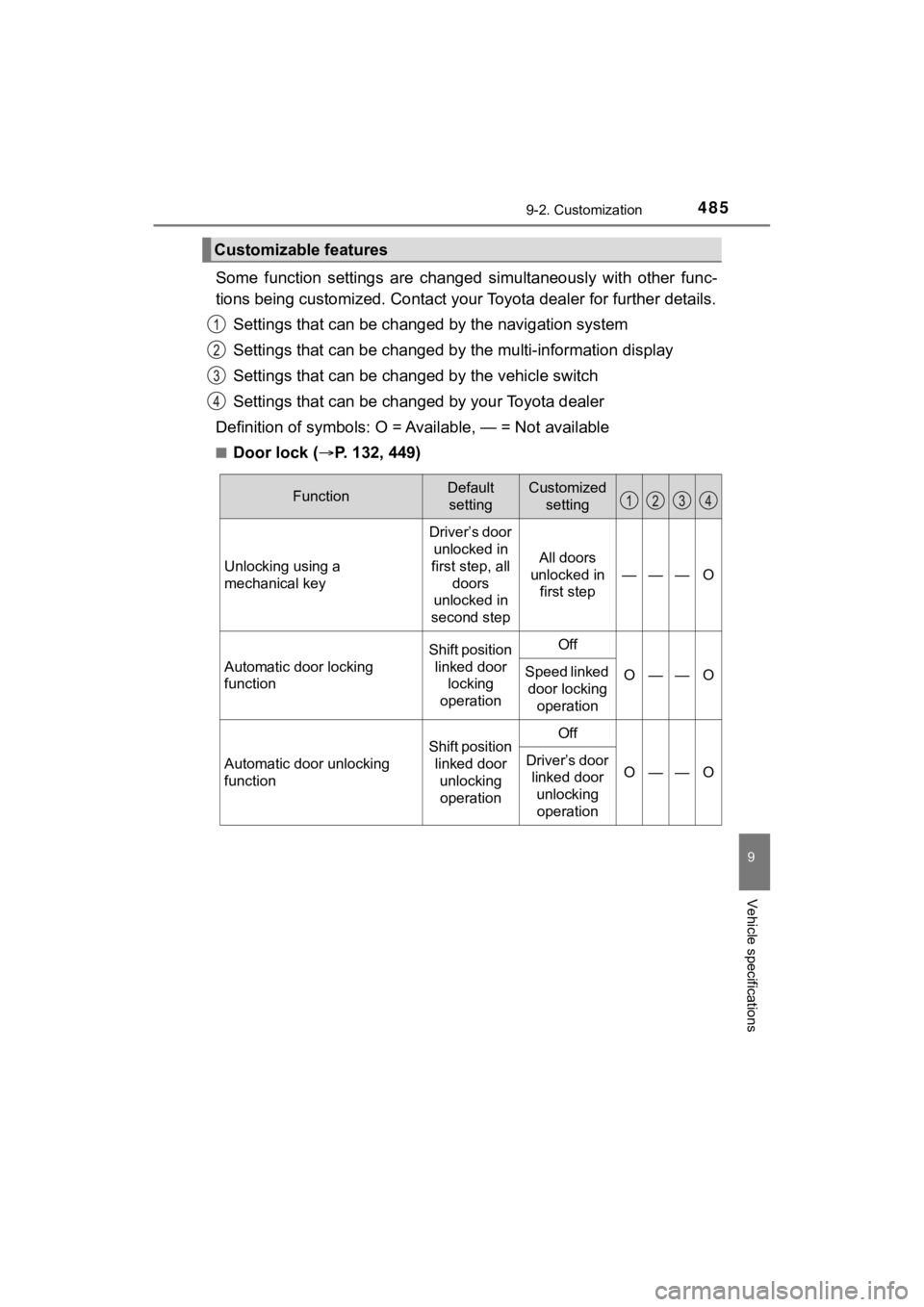
Some function settings are changed simultaneously with other func-
tions being customized. Contact your Toyota dealer for further details.
Settings that can be changed by the navigation system
Settings that can be changed by the multi-information display
Settings that can be chan ged by the vehicle switch
Settings that can be chan ged by your Toyota dealer
Definition of symbols: O = A vailable, — = Not available
■Door lock (P. 132, 449)
Customizable features
FunctionDefault
settingCustomized setting
Unlocking using a
mechanical key
Driver’s door unlocked in
first step, all
doors
unlocked in
second step
All doors
unlocked in first step
———O
Automatic door locking
function
Shift position
linked door locking
operationOff
O——OSpeed linked door locking
operation
Automatic door unlocking
function
Shift position linked door
unlocking operationOff
O——ODriver’s door linked door
unlocking operation
Page 486 of 528
4869-2. Customization
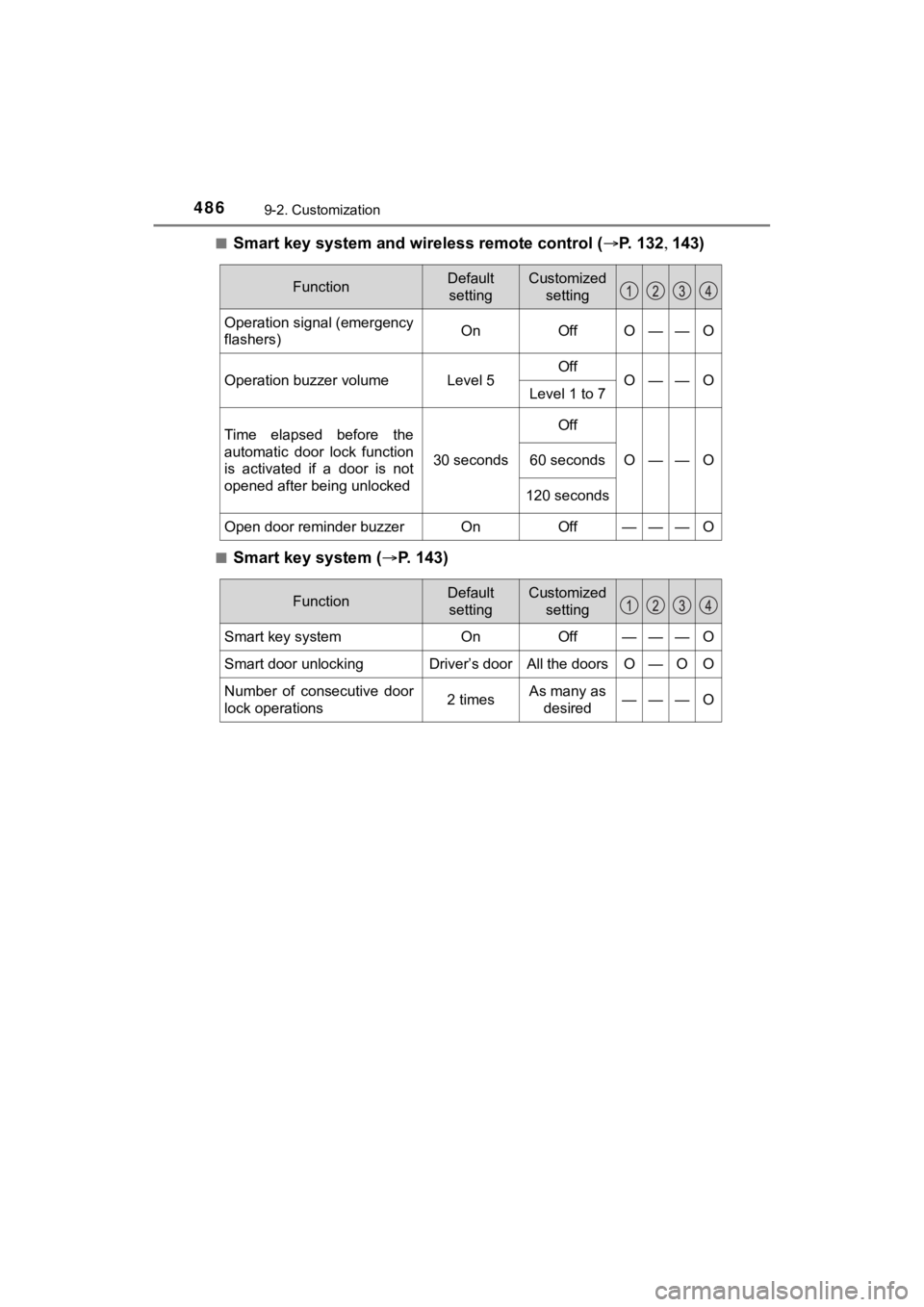
MIRAI_OM_USA_OM62073U■
Smart key system and wireless remote control (
P. 132 143)
■Smart key system ( P. 1 4 3 )
FunctionDefault
settingCustomized setting
Operation signal (emergency
flashers)OnOffO——O
Operation buzzer volumeLevel 5OffO——OLevel 1 to 7
Time elapsed before the
automatic door lock function
is activated if a door is not
opened after being unlocked
30 seconds
Off
O——O60 seconds
120 seconds
Open door reminder buzzerOnOff———O
FunctionDefault
settingCustomized setting
Smart key systemOnOff———O
Smart door unlockingDriver’s doorAll the doorsO—OO
Number of consecutive door
lock operations2 timesAs many as desired———O
Page 487 of 528
4879-2. Customization
MIRAI_OM_USA_OM62073U
9
Vehicle specifications
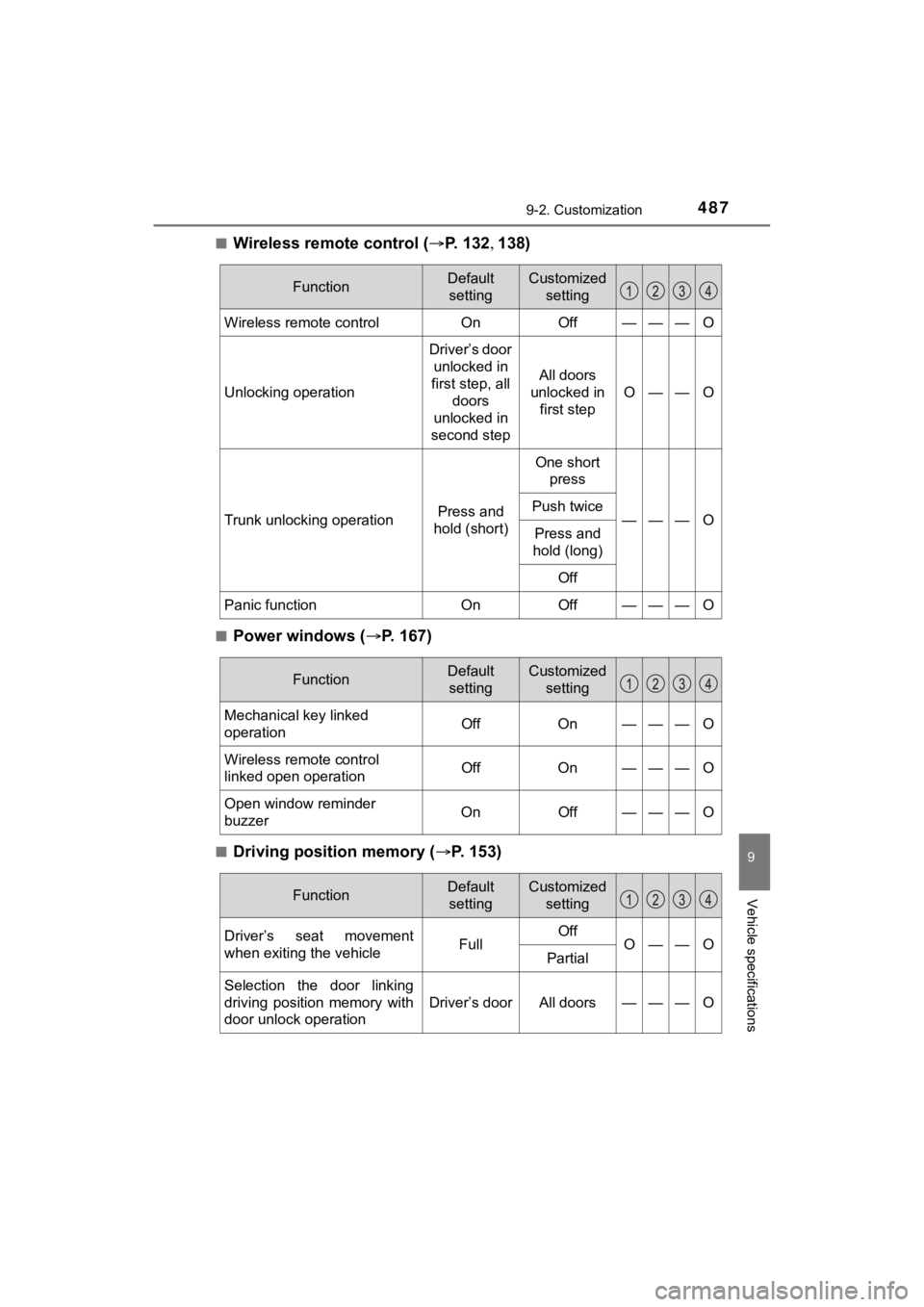
■Wireless remote control (P. 1 3 2 138)
■Power windows ( P. 167)
■Driving position memory ( P. 153)
FunctionDefault
settingCustomized setting
Wireless remote controlOnOff———O
Unlocking operation
Driver’s door
unlocked in
first step, all doors
unlocked in
second step
All doors
unlocked in first step
O——O
Trunk unlocking operationPress and
hold (short)
One short press
———OPush twice
Press and
hold (long)
Off
Panic functionOnOff———O
FunctionDefault settingCustomized setting
Mechanical key linked
operationOffOn———O
Wireless remote control
linked open operationOffOn———O
Open window reminder
buzzerOnOff———O
FunctionDefault settingCustomized setting
Driver’s seat movement
when exiting the vehicleFullOffO——OPartial
Selection the door linking
driving position memory with
door unlock operation
Driver’s doorAll doors———O