key TOYOTA MIRAI 2020 (in English) Service Manual
[x] Cancel search | Manufacturer: TOYOTA, Model Year: 2020, Model line: MIRAI, Model: TOYOTA MIRAI 2020Pages: 528, PDF Size: 11.98 MB
Page 321 of 528
3216-3. Using the storage features
6
Interior features
MIRAI_OM_USA_OM62073U
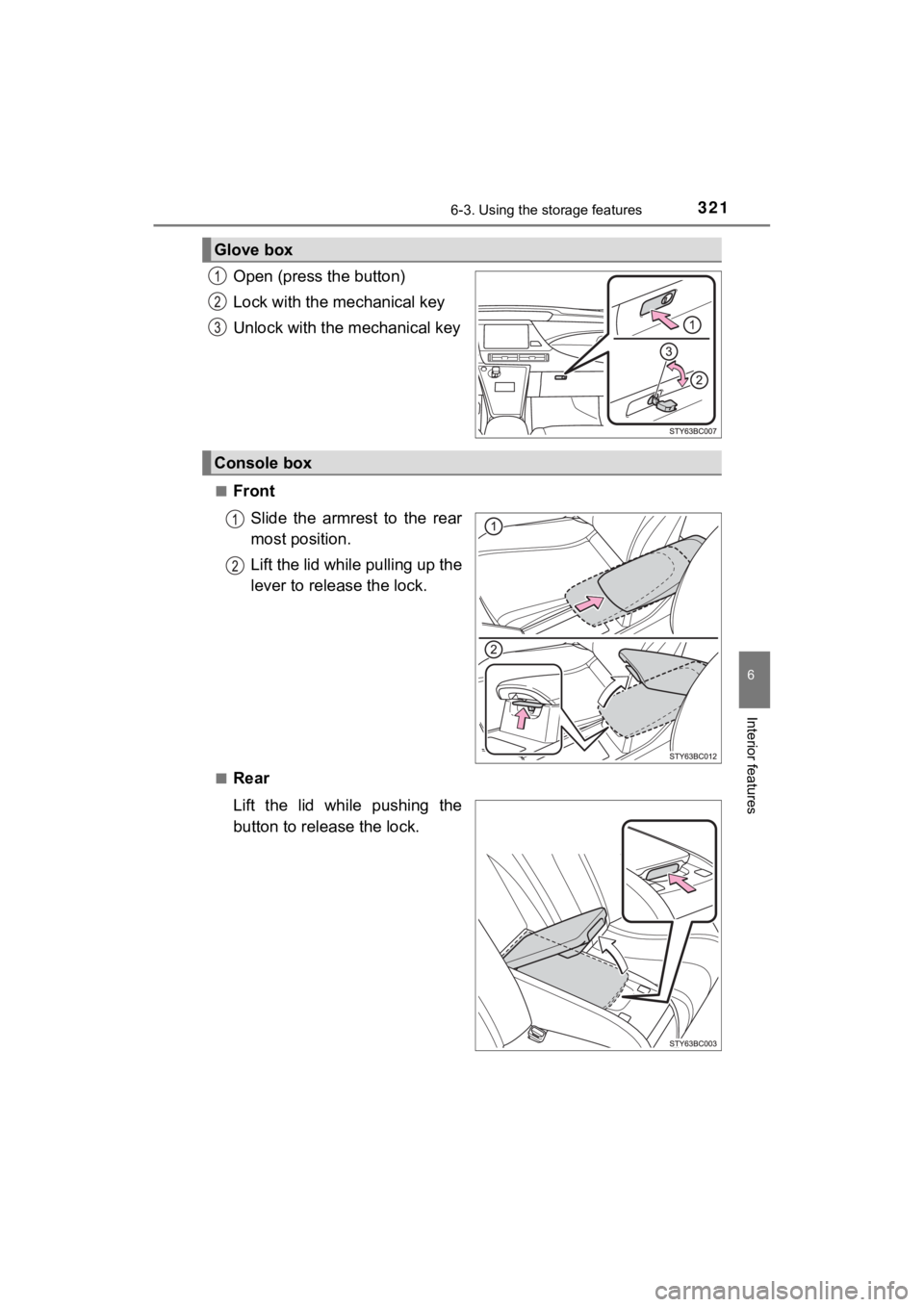
Open (press the button)
Lock with the mechanical key
Unlock with the mechanical key
■Front
Slide the armrest to the rear
most position.
Lift the lid while pulling up the
lever to release the lock.
■Rear
Lift the lid while pushing the
button to release the lock.
Glove box
Console box
Page 337 of 528
3376-4. Other interior features
6
Interior features
MIRAI_OM_USA_OM62073U
■The wireless charger can be operated when
The power switch is in ACCESSORY or ON mode.
■ Usable portable devices
Qi standard wireless charge standard can be used on compatible devices.
However, not all Qi standard devices and compatibility are guar anteed.
Starting with mobile phones and smart phones, it is aimed for l ow power elec-
trically supplied portable devices of no more than 5 W.
■ When covers and accessories are attached to portable devices
Do not charge in situations where cover and accessories not able to handle
Qi are attached to the portable device. Depending on the type o f cover and
accessory, it may not be possible to charge. When charging is not performed
even with the portable device placed on the charge area, remove the cover
and accessories.
■ While charging, noise enters the AM radio
Turn off the wireless charger and confirm that the noise has decreased. If the
noise decreases, continuously pushing the power supply switch o f the wire-
less charger for 2 seconds, the frequency of the charger can be changed and
the noise can be reduced.
Also, on that occasion, the operation indicator light will flas h orange 2 times.
■ Important points of the wireless charger
●If the electronic key cannot be detected within the vehicle int erior, charging
cannot be done. When the door is opened and closed, charging ma y be
temporarily suspended.
● When charging, the wireless charging device and portable device will get
warmer, however this is not a malfunction.
When a portable device gets warm while charging, charging may s top due
to the protection function on the portable device side. In this case, when the
temperature of the portable device drops significantly, charge again.
■ Operation sounds
When the power supply is turned on, while searching for the portable device a
sound will be produced, however this is not a malfunction.
■ Cleaning
P. 357
Page 342 of 528

3426-4. Other interior features
MIRAI_OM_USA_OM62073U
NOTICE
■Conditions in which the function may not operate correctly
In the following conditions, it may not operate correctly
● The portable device is fully charged
● There is foreign matter between the charge area and portable de vice
● The temperature of the portable device gets higher from charging
● The charging surface of the portable device is facing up
● The placement of the portable device is out of alignment with t he charge
area
● Near a TV tower, electric power plant, gas station, radio stati on, large dis-
play, airport or other facility that generates strong radio wav es or electrical
noise
● When the electronic key is in contact with, or is covered by th e following
metallic objects
• Cards to which aluminum foil is attached
• Cigarette boxes that have aluminum foil inside
• Metallic wallets or bags
• Coins
• Hand warmers made of metal
• Media such as CDs and DVDs
● When other wireless keys (that emit radio waves) are being used nearby
In addition, excluding the above-mentioned, when the charger do es not per-
form normally or the operation display lamp is flashing continu ously, it is
considered that the wireless charger is malfunctioning. Contact your Toyota
dealer.
■ To prevent failure or damage to data
● Do not bring magnetic cards, such as credit cards, or magnetic recording
media, etc., close to the charger while charging, otherwise, da ta may dis-
appear under the influence of magnetism. Also, do not bring pre cision
instruments such as wrist watches, etc., close to the charger, as such
objects may break.
● Do not leave portable devices in the cabin. The temperature ins ide the
cabin may become high, when under the sun, and cause damage to the
device.
■ To prevent 12-volt b attery discharge
When the fuel cell system is stopped, do not use the wireless c harger for a
long time.
Page 351 of 528
351
7Maintenance and care
MIRAI_OM_USA_OM62073U7-1. Maintenance and care
Cleaning and protecting the vehicle exterior .......... 352
Cleaning and protecting the vehicle interior ........... 356
7-2. Maintenance Maintenance requirements ................... 359
General maintenance........ 361
7-3. Do-it-yourself maintenance
Do-it-yourself service precautions ..................... 364
Hood ................................. 366
Positioning a floor jack ...... 367
Motor compartment ........... 369
12-volt battery ................... 374
Tires .................................. 378
Replacing the tire .............. 386
Tire inflation pressure ....... 393
Wheels .............................. 396
Air conditioning filter.......... 398
Electronic key battery........ 400
Checking and replacing fuses ............................... 402
Light bulbs......................... 405
Page 353 of 528
3537-1. Maintenance and care
MIRAI_OM_USA_OM62073U
7
Maintenance and care
■When using a car wash
If the door handle becomes wet while the electronic key is within the effective
range, the door may lock and unlock repeatedly. In that case, f ollow the fol-
lowing correction procedures to wash the vehicle:
● Place the key in a position 6 ft. (2 m) or more separate from t he vehicle
while the vehicle is being washed. (Take care to ensure that th e key is not
stolen.)
● Set the electronic key to battery-saving mode to disable the sm art key sys-
tem. ( P. 145)
■ Aluminum wheels
●Remove any dirt immediately by using a neutral detergent.
● Wash detergent off with water immediately after use.
● To protect the paint from damage, make sure to observe the following pre-
cautions.
• Do not use acidic, alkaline or abrasive detergent
• Do not use hard brushes
• Do not use detergent on the wheels when they are hot, such as after driv-
ing or parking in hot weather
■ Bumpers
Do not scrub with abrasive cleaners.
■ Front side windows water-repellent coating
●The following precautions can extend the effectiveness of the water-repel-
lent coating.
• Remove any dirt, etc., from the front side windows regularly.
• Do not allow dirt and dust to accumulate on the windows for a long
period.
Clean the windows with a soft, damp cloth as soon as possible.
• Do not use wax or glass cleaners that contain abrasives when c leaning
the windows.
• Do not use any metallic objects to remove condensation build u p.
● When the water-repellent performance has become insufficient, t he coating
can be repaired. Contact your Toyota dealer.
■ Restoration work for rain clearin g effect of the rain clearing mirror
The rain clearing effect on the mirror surface will gradually r ecover after expo-
sure to sunlight ( P. 165). However, if you want to restore the effect immedi-
ately, conduct the following procedures:
Apply water to the mirror surface to wash the dirt away from it .
Remove the dirt by using a clean, soft and wet cloth.
Clean the mirror surface with glass cleaner or detergent. When detergent is
used, rinse the mirror surface with a lot of water.
Wipe water on the mirror surface by using a clean and soft clot h, etc.
Park your vehicle outdoors to expose the mirror surface to sunl ight for
about 5 hours. (The restoration time differs depending on the amount and
type of dirt.)
1
2
3
4
5
Page 375 of 528
3757-3. Do-it-yourself maintenance
MIRAI_OM_USA_OM62073U
7
Maintenance and care
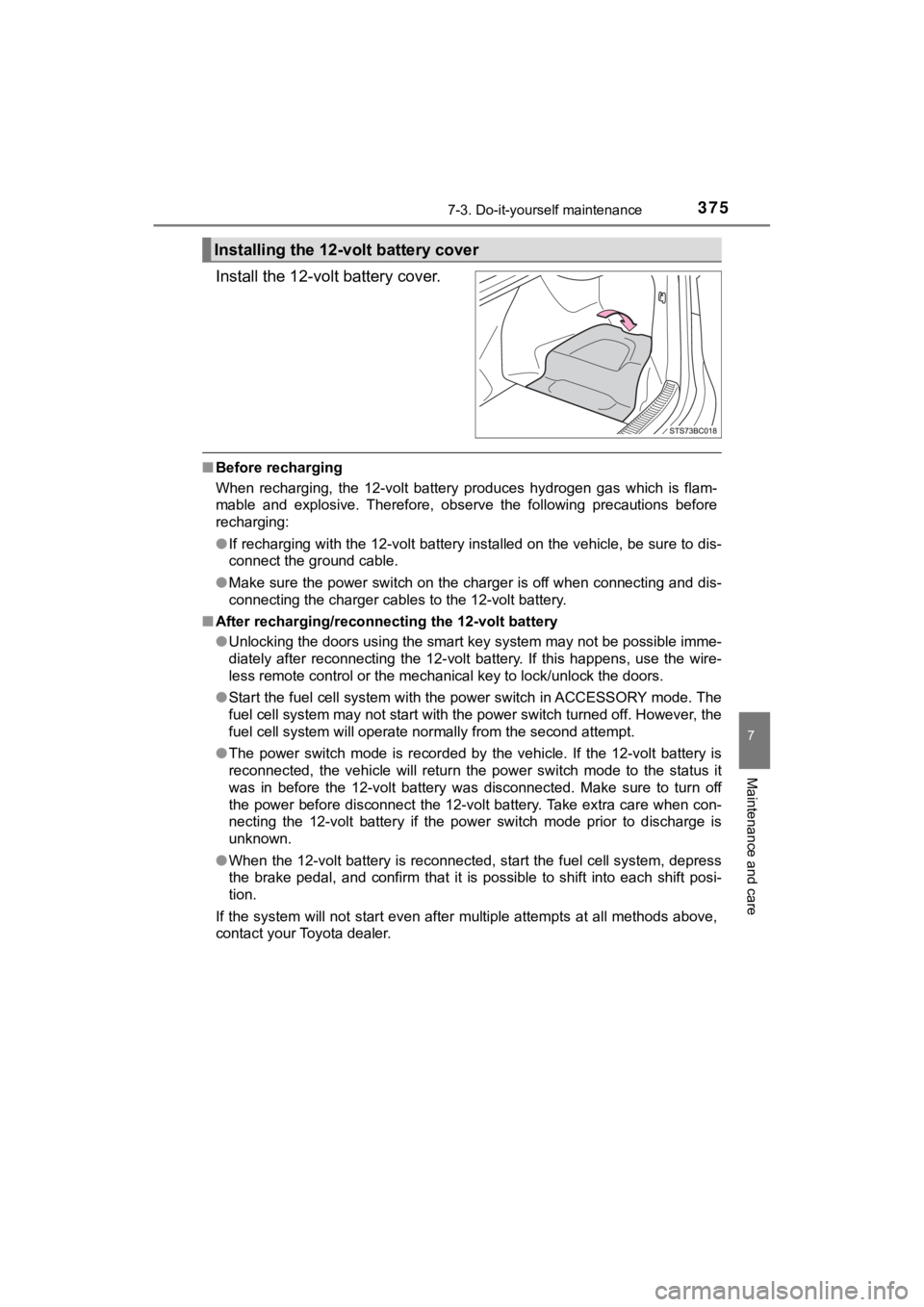
Install the 12-volt battery cover.
■Before recharging
When recharging, the 12-volt battery produces hydrogen gas which is flam-
mable and explosive. Therefore, observe the following precautio ns before
recharging:
● If recharging with the 12-volt battery installed on the vehicle , be sure to dis-
connect the ground cable.
● Make sure the power switch on the charger is off when connectin g and dis-
connecting the charger cables to the 12-volt battery.
■ After recharging/reconnecting the 12-volt battery
●Unlocking the doors using the smart key system may not be possi ble imme-
diately after reconnecting the 12-volt battery. If this happens, use the wire-
less remote control or the mechanical key to lock/unlock the do ors.
● Start the fuel cell system with the power switch in ACCESSORY m ode. The
fuel cell system may not start with the power switch turned off. However, the
fuel cell system will operate normally from the second attempt.
● The power switch mode is recorded by the vehicle. If the 12-vol t battery is
reconnected, the vehicle will return the power switch mode to t he status it
was in before the 12-volt battery was disconnected. Make sure t o turn off
the power before disconnect the 12-volt battery. Take extra car e when con-
necting the 12-volt battery if the power switch mode prior to d ischarge is
unknown.
● When the 12-volt battery is reconnected, start the fuel cell sy stem, depress
the brake pedal, and confirm that it is possible to shift into each shift posi-
tion.
If the system will not start even after multiple attempts at al l methods above,
contact your Toyota dealer.
Installing the 12-volt battery cover
Page 400 of 528
4007-3. Do-it-yourself maintenance
MIRAI_OM_USA_OM62073U
Electronic key batter y
●Flathead screwdriver
● Small flathead screwdriver
● Lithium battery CR2032
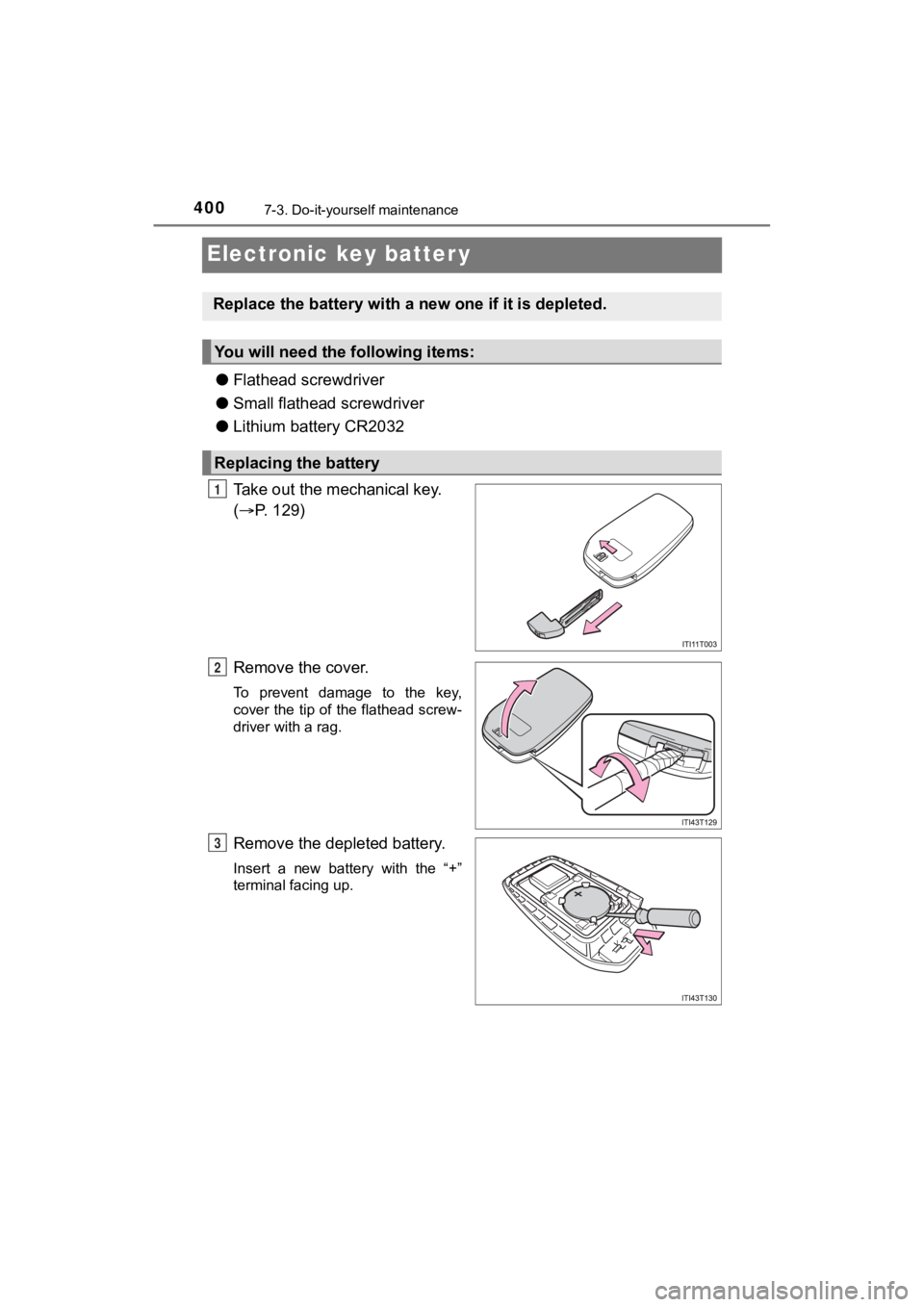
Take out the mechanical key.
( P. 129)
Remove the cover.
To prevent damage to the key,
cover the tip of the flathead screw-
driver with a rag.
Remove the depleted battery.
Insert a new battery with the “+”
terminal facing up.
Replace the battery with a n ew one if it is depleted.
You will need the following items:
Replacing the battery
1
2
3
Page 401 of 528
4017-3. Do-it-yourself maintenance
MIRAI_OM_USA_OM62073U
7
Maintenance and care
■Use a CR2032 lithium battery
●Batteries can be purchased at your Toyota dealer, local electri cal appliance
shops or camera stores.
● Replace only with the same or equivalent type recommended by the manu-
facturer.
● Dispose of used batteries according to local laws.
■ If the electronic key battery is depleted
The following symptoms may occur:
●The smart key system and wireless remote control will not funct ion properly.
● The operational range will be reduced.
WARNING
■Removed battery a nd other parts
These parts are small and if swallowed by a child, they can cause choking.
Keep away from children. Failure to do so could result in death or serious
injury.
NOTICE
■ For normal operation after replacing the battery
Observe the following precautions to prevent accidents:
● Always work with dry hands.
Moisture may cause the battery to rust.
● Do not touch or move any other component inside the remote cont rol.
● Do not bend either of the battery terminals.
Page 407 of 528
407
8When trouble arises
MIRAI_OM_USA_OM62073U8-1. Essential information
Emergency flashers .......... 408
If your vehicle has to be stopped in an
emergency ...................... 409
If the vehicle is trapped in rising water.................. 410
8-2. Steps to take in an emergency
If your vehicle needs to be towed ......................... 411
If you think something is wrong .............................. 417
If a warning light turns on or a warning buzzer
sounds ............................ 418
If a warning message is displayed......................... 426
If you have a flat tire.......... 432
If the fuel cell system will not start ........................... 447
If the electronic key does not operate properly ........ 449
If the 12-volt battery is discharged ...................... 452
If your vehicle overheats ... 457
If the vehicle becomes stuck ............................... 463
Page 411 of 528
4118-2. Steps to take in an emergency
MIRAI_OM_USA_OM62073U
8
When trouble arises
If your vehicle needs to be towed
In the following situations, it is not possible to be towed by another
vehicle using cables or chains, as the front wheels may be lock ed due
to the parking lock. Contact your Toyota dealer or commercial towing
service.
● There is a malfunction in t he shift control system. (P. 428)
● There is a malfunction in the immobilizer system. ( P. 78)
● There is a malfunction in the smart key system. (P. 449)
● The 12-volt battery is discharged. ( P. 4 5 2 )
If towing is necessary, we recommend having your vehicle
towed by your Toyota dealer o r commercial towing service,
using a wheel-lift type t ruck or flatbed truck.
Use a safety chain system for all towing, and abide by all stat e/
provincial and local laws.
Situations when it is not possibl e to be towed by another vehicle