reset TOYOTA MIRAI 2020 Owners Manual (in English)
[x] Cancel search | Manufacturer: TOYOTA, Model Year: 2020, Model line: MIRAI, Model: TOYOTA MIRAI 2020Pages: 56, PDF Size: 3.21 MB
Page 4 of 56
2
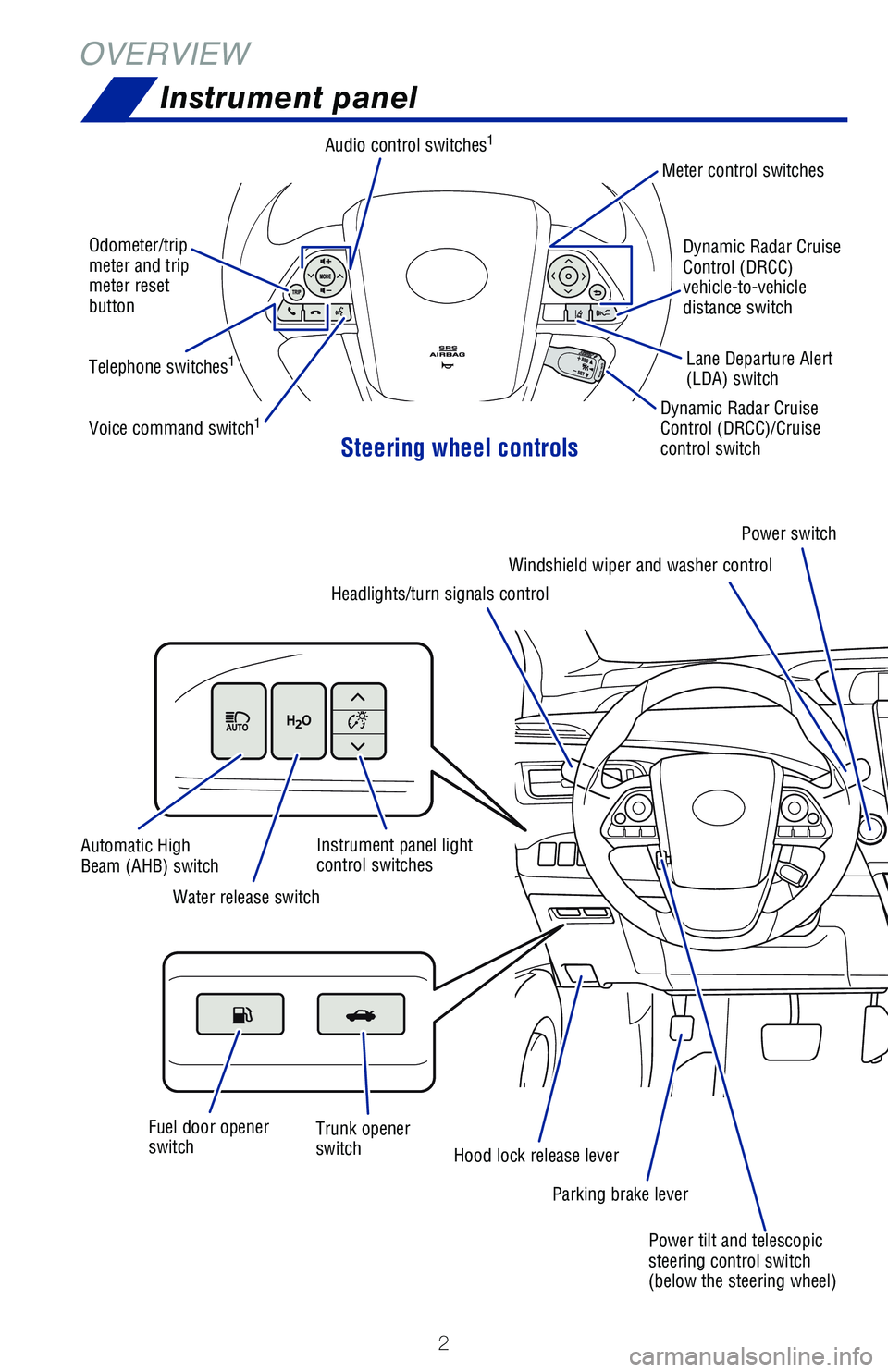
OVERVIEWInstrument panel
Steering wheel controls
Odometer/trip
meter and trip
meter reset
button
Telephone switches
1
Voice command switch1
Audio control switches1
Dynamic Radar Cruise
Control (DRCC)/Cruise
control switch
Power switch
Parking brake lever
Hood lock release lever
Trunk opener
switch
Fuel door opener
switch Water release switch
Automatic High
Beam (AHB) switch
Power tilt and telescopic
steering control switch
(below the steering wheel)
Instrument panel light
control switches
Meter control switches
Dynamic Radar Cruise
Control (DRCC)
vehicle-to-vehicle
distance switchLane Departure Alert
(LDA) switch
Headlights/turn signals control Windshield wiper and washer control
Page 26 of 56
24
FEATURES & OPERATIONS
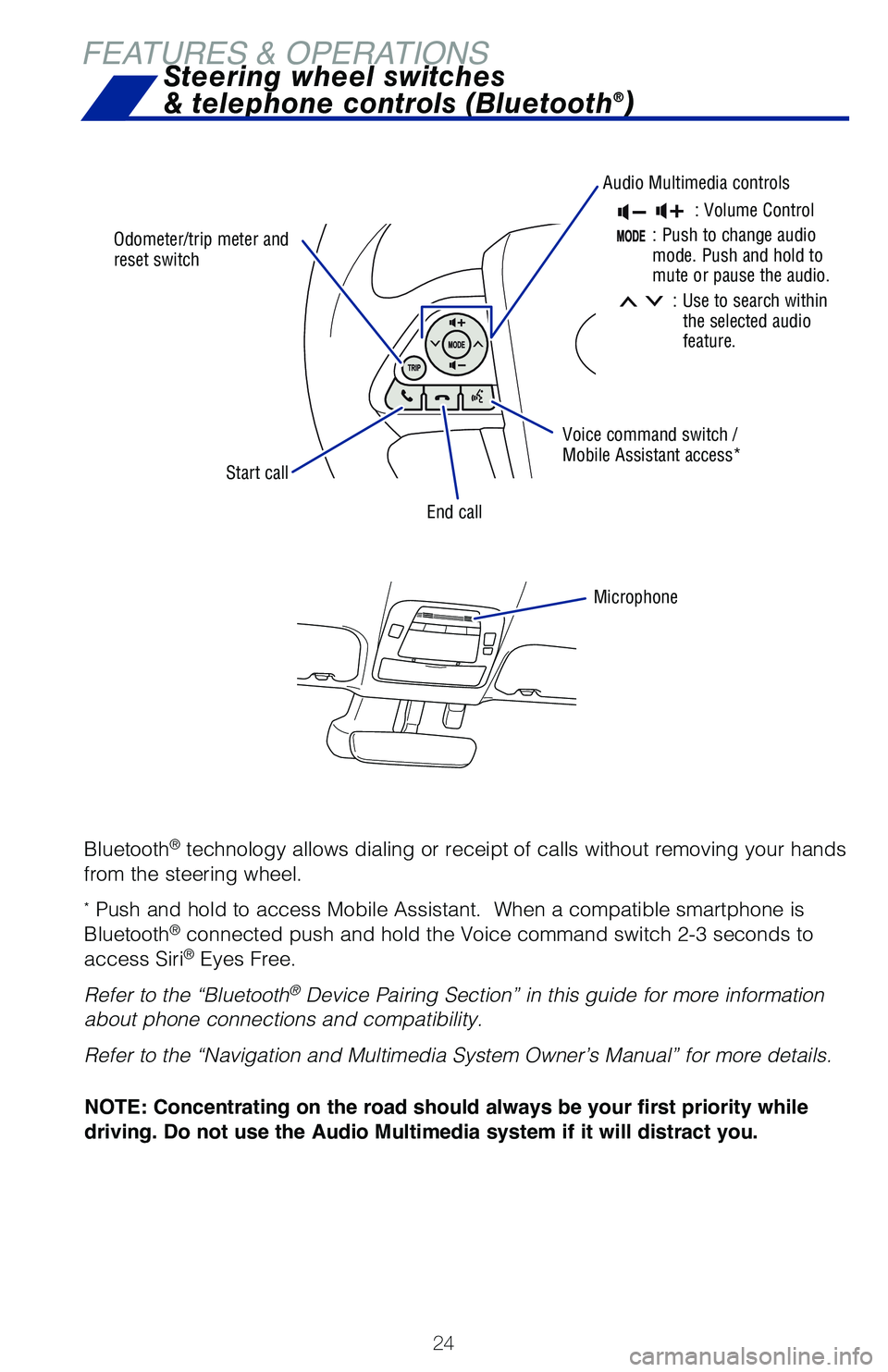
Odometer/trip meter and
reset switch
Audio Multimedia controls
Voice command switch /
Mobile Assistant access*
End call
Microphone
Start call
Steering wheel switches
& telephone controls (Bluetooth®)
: Volume Control
:Push to change audio
mode. Push and hold to
mute or pause the audio.
: Use to search within
the selected audio
feature.
Bluetooth® technology allows dialing or receipt of calls without removing your han\
ds
from the steering wheel.
* Push and hold to access Mobile Assistant. When a compatible smartphone\
is
Bluetooth® connected push and hold the Voice command switch 2-3 seconds to
access Siri® Eyes Free.
Refer to the “Bluetooth
® Device Pairing Section” in this guide for more information
about phone connections and compatibility.
Refer to the “Navigation and Multimedia System Owner’s Manual” \
for more details.
NOTE: Concentrating on the road should always be your first priority while
driving. Do not use the Audio Multimedia system if it will distract you.
Page 36 of 56
 34
TOYOTA SAFETY SENSE™
LDA in TSS 2.0 uses an in-vehicle camera designed to detect visible whit\
e and
yellow lane markers or road edge in front of the vehicle and the vehicle\
’s position
on t")
34
TOYOTA SAFETY SENSE™
LDA in TSS 2.0 uses an in-vehicle camera designed to detect visible whit\
e and
yellow lane markers or road edge in front of the vehicle and the vehicle\
’s position
on the road. If the system determines that the vehicle is starting to un\
intentionally
deviate from its lane, the system alerts the driver with an audio and vi\
sual alert.
When the alerts occur, the driver must check the surrounding road situat\
ion and
carefully operate the steering wheel to move the vehicle back to the cen\
ter part of
their lane.
LDA is designed to function at speeds of approximately 32 mph (50 km/h) or higher
on relatively straight roadways.
In addition to the alert function, LDA w/SA also features a steering ass\
ist
function. When enabled, if the system determines that the vehicle is on \
a path to
unintentionally depart from its lane, the system may provide small corrective steering
inputs to the steering wheel for a short period of time to help keep the\
vehicle in its
lane.
If the vehicle repeatedly deviates from the lane, the vehicle drifts wit\
hin the lane due
to inattention, or the driver abruptly operates the steering wheel after\
an inattentive
period, when enabled, the vehicle sway warning function alerts the drive\
r with an
audio and visual alert, urging them to take a break.
Lane Departure Alert with Steering Assist
(LDA w/SA)
TURNING THE LDA SYSTEM ON/OFF
Press the LDA switch to turn the LDA system on. Depress again to turn it\
off.
Note: Operation of the LDA system and setting adjustments continues in the
same condition regardless of Ignition cycle until changed by the driver or the
system is reset.
Refer to the Toyota Owner’s Manual for additional information on LDA \
operation,
settings adjustments, limitations, and precautions before attempting to \
use it.
Press to ONMulti-Information Display
Page 38 of 56
36
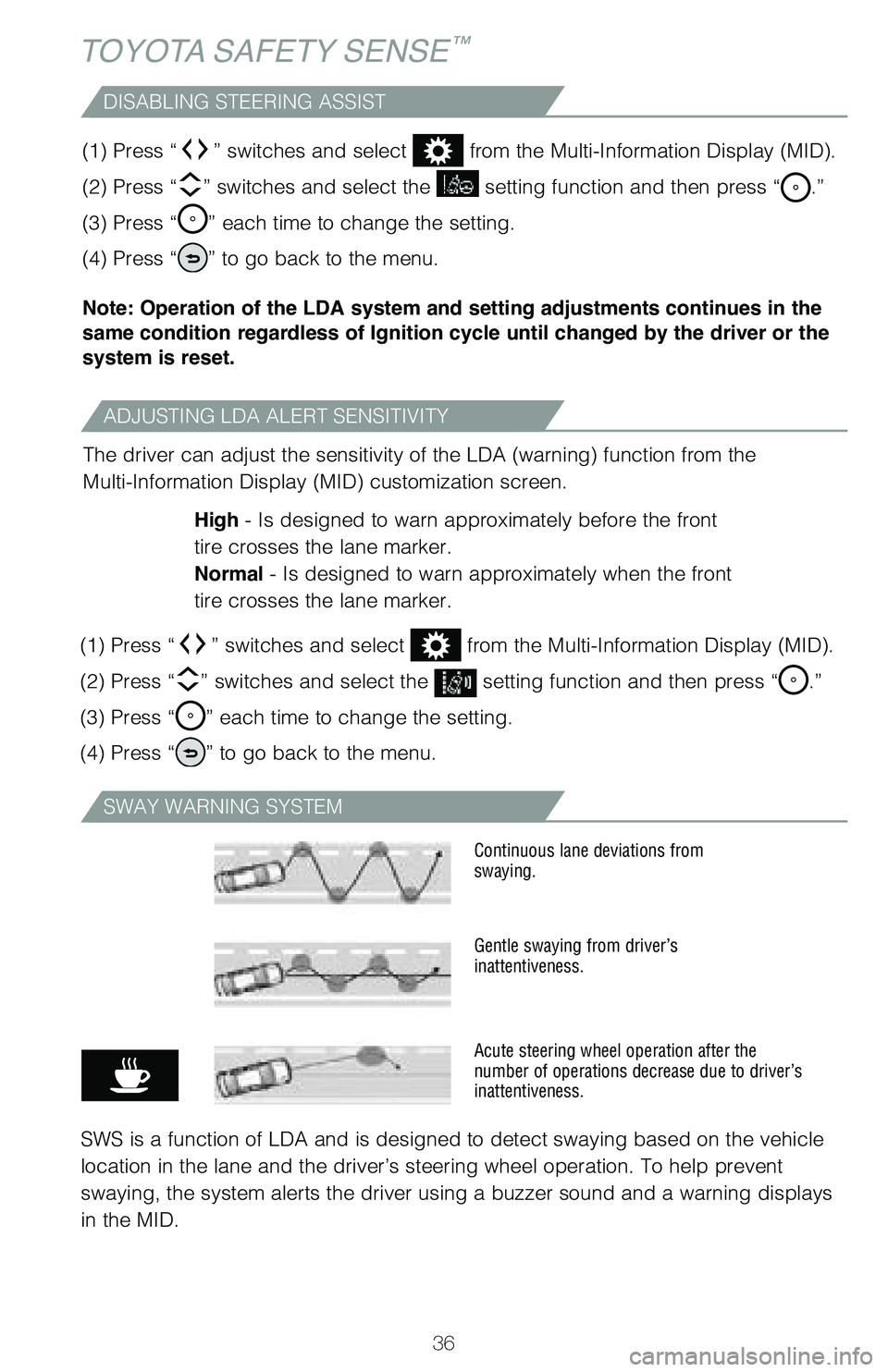
ADJUSTING LDA ALERT SENSITIVITY
DISABLING STEERING ASSIST
The driver can adjust the sensitivity of the LDA (warning) function from the
Multi-Information Display (MID) customization screen.High - Is designed to warn approximately before the front
tire crosses the lane marker.
Normal - Is designed to warn approximately when the front
tire crosses the lane marker.
(1) Press “
” switches and select from the Multi-Information Display (MID).
(2) Press “
” switches and select the setting function and then press “.”
(3) Press “
” each time to change the setting.
(4) Press “
” to go back to the menu.
(1) Press “
” switches and select from the Multi-Information Display (MID).
(2) Press “
” switches and select the setting function and then press “.”
(3) Press “
” each time to change the setting.
(4) Press “
” to go back to the menu.
Note: Operation of the LDA system and setting adjustments continues in the
same condition regardless of Ignition cycle until changed by the driver or the
system is reset.
TOYOTA SAFETY SENSE™
SWAY WARNING SYSTEM
SWS is a function of LDA and is designed to detect swaying based on the \
vehicle
location in the lane and the driver’s steering wheel operation. To he\
lp prevent
swaying, the system alerts the driver using a buzzer sound and a warning displays
in the MID.
Continuous lane deviations from
swaying.
Gentle swaying from driver’s
inattentiveness.
Acute steering wheel operation after the
number of operations decrease due to driver’s
inattentiveness.
Page 39 of 56
37
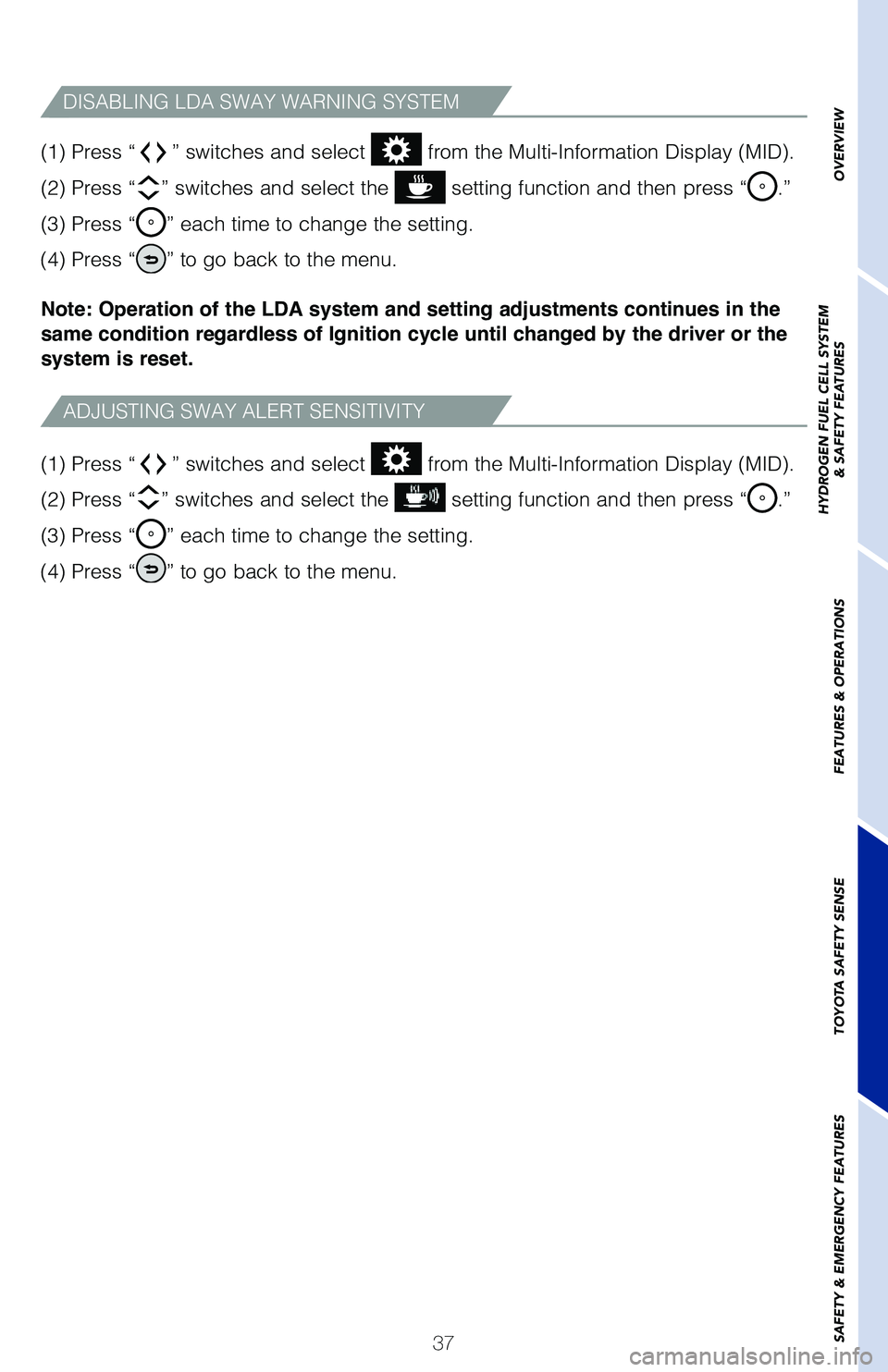
(1) Press “
” switches and select from the Multi-Information Display (MID).
(2) Press “
” switches and select the setting function and then press “.”
(3) Press “
” each time to change the setting.
(4) Press “
” to go back to the menu.
(1) Press “
” switches and select from the Multi-Information Display (MID).
(2) Press “
” switches and select the setting function and then press “.”
(3) Press “
” each time to change the setting.
(4) Press “
” to go back to the menu.
Note: Operation of the LDA system and setting adjustments continues in the
same condition regardless of Ignition cycle until changed by the driver or the
system is reset.
ADJUSTING SWAY ALERT SENSITIVITY
DISABLING LDA SWAY WARNING SYSTEM
OVERVIEW
HYDROGEN FUEL CELL SYSTEM
& SAFETY FEATURES
FEATURES & OPERATIONS
TOYOTA SAFETY SENSE
SAFETY & EMERGENCY FEATURES
Page 41 of 56
39
ADJUSTING DISTANCE
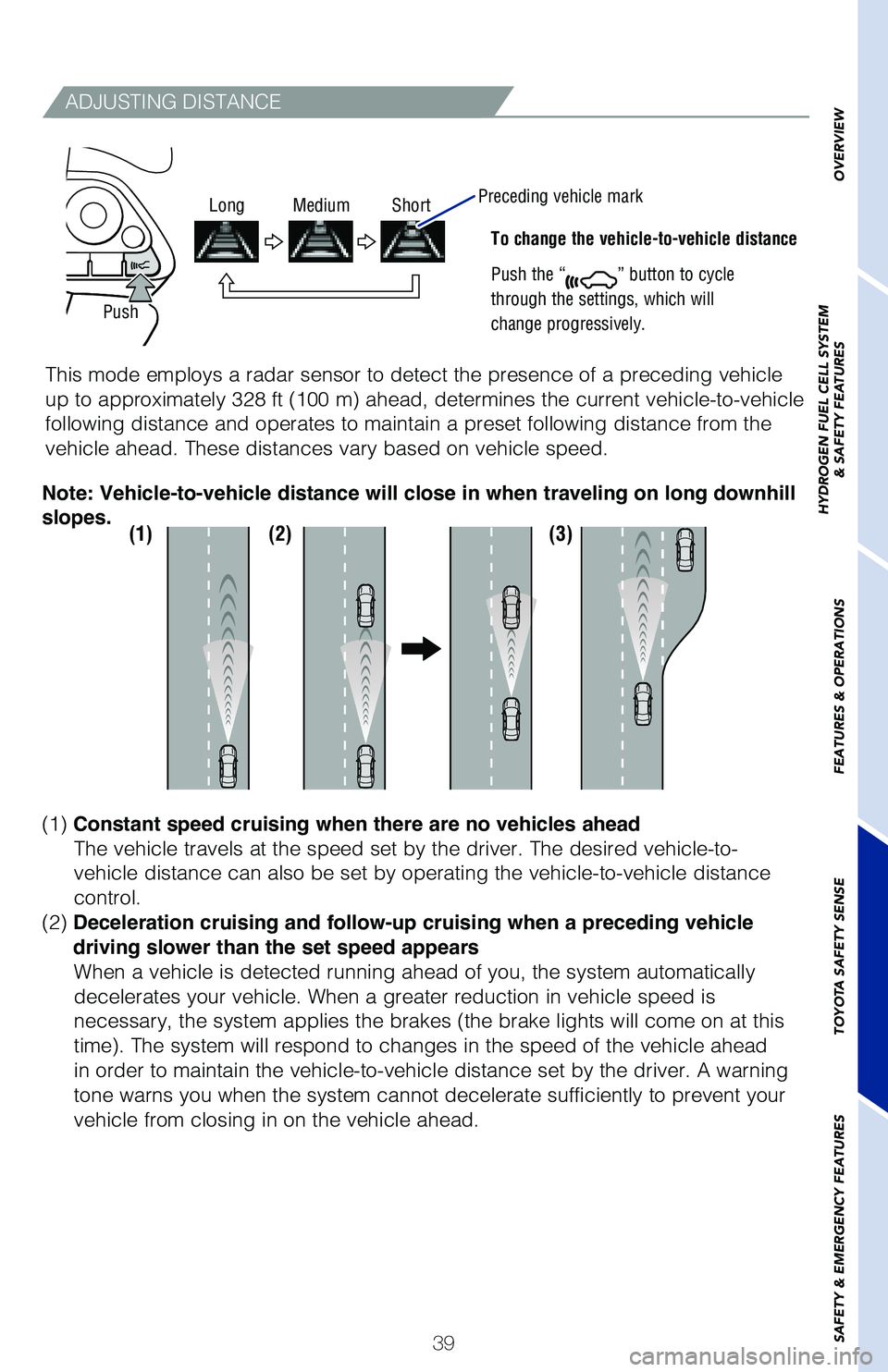
To change the vehicle-to-vehicle distance
Push the “
” button to cycle
through the settings, which will
change progressively.
This mode employs a radar sensor to detect the presence of a preceding v\
ehicle
up to approximately 328 ft (100 m) ahead, determines the current vehicle-to-vehicle
following distance and operates to maintain a preset following distance \
from the
vehicle ahead. These distances vary based on vehicle speed.
(1)(2)(3)
(1) Constant speed cruising when there are no vehicles ahead
The vehicle travels at the speed set by the driver. The desired vehicle-\
to-
vehicle distance can also be set by operating the vehicle-to-vehicle dis\
tance
control.
(2) Deceleration cruising and follow-up cruising when a preceding vehicle
driving slower than the set speed appears When a vehicle is detected running ahead of you, the system automaticall\
y
decelerates your vehicle. When a greater reduction in vehicle speed is
necessary, the system applies the brakes (the brake lights will come on at this
time). The system will respond to changes in the speed of the vehicle ahead
in order to maintain the vehicle-to-vehicle distance set by the driver. \
A warning
tone warns you when the system cannot decelerate sufficiently to prevent\
your
vehicle from closing in on the vehicle ahead.
Note: Vehicle-to-vehicle distance will close in when traveling on long downhill
slopes.
Push
Long Medium Short
Preceding vehicle mark
OVERVIEW
HYDROGEN FUEL CELL SYSTEM
& SAFETY FEATURES
FEATURES & OPERATIONS
TOYOTA SAFETY SENSE
SAFETY & EMERGENCY FEATURES