USB port TOYOTA MIRAI 2021 Accessories, Audio & Navigation (in English)
[x] Cancel search | Manufacturer: TOYOTA, Model Year: 2021, Model line: MIRAI, Model: TOYOTA MIRAI 2021Pages: 344, PDF Size: 12.08 MB
Page 55 of 344
552-3. Apple CarPlay®/Android Auto™
2
Basic function
2-3.Apple CarPlay®/Android Auto™
1Enable Siri on the device to
be connected. 2
Connect the device to the
USB port. ( P.127)
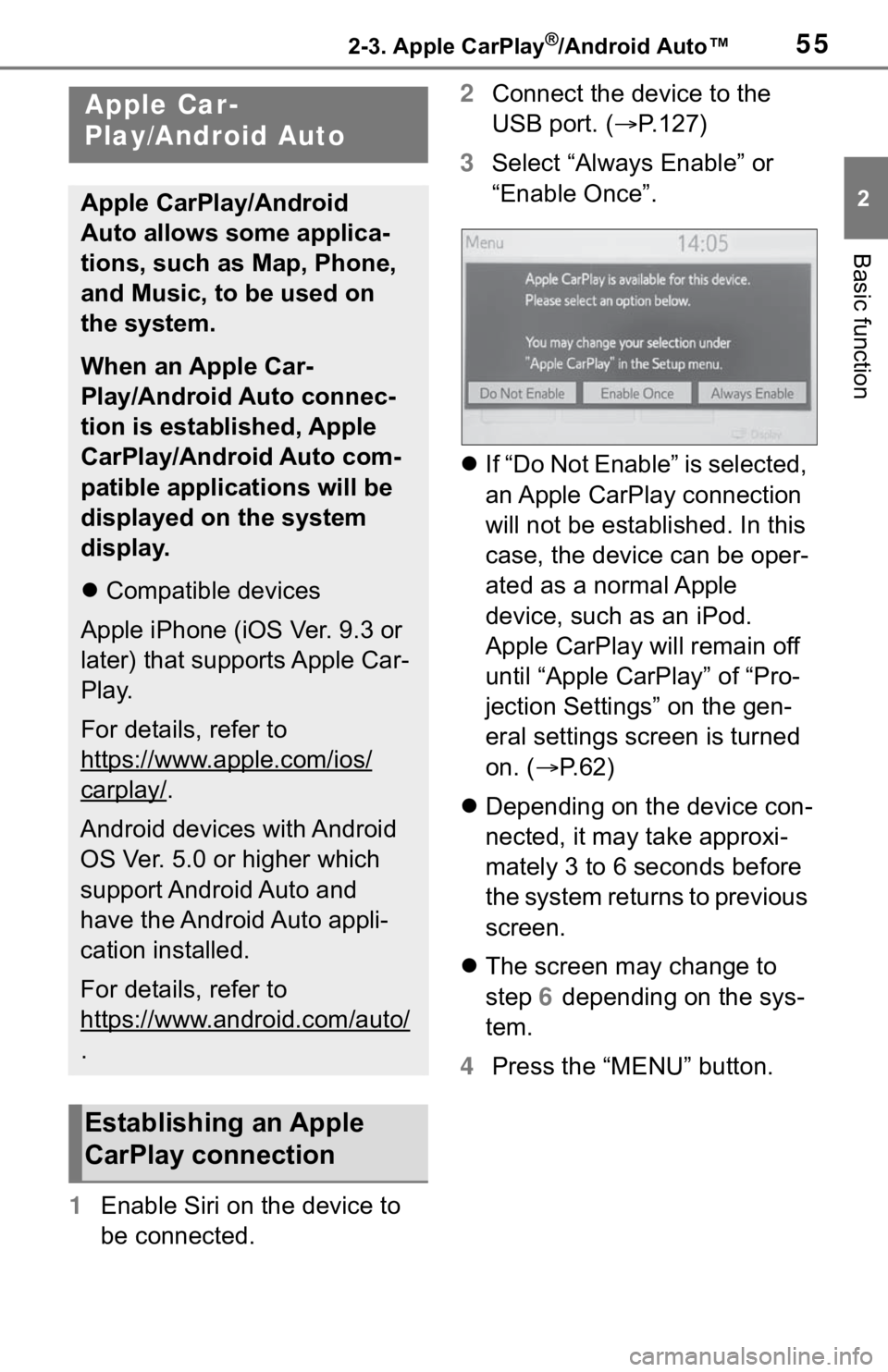
3 Select “Always Enable” or
“Enable Once”.
If “Do Not Enable” is selected,
an Apple CarPlay connection
will not be established. In this
case, the device can be oper-
ated as a normal Apple
device, such as an iPod.
Apple CarPlay will remain off
until “Apple CarPlay” of “Pro-
jection Settings” on the gen-
eral settings screen is turned
on. ( P. 6 2 )
Depending on the device con-
nected, it may take approxi-
mately 3 to 6 seconds before
the system returns to previous
screen.
The screen may change to
step 6 depending on the sys-
tem.
4 Press the “MENU” button.
Apple Car-
Play/Android Auto
Apple CarPlay/Android
Auto allows some applica-
tions, such as Map, Phone,
and Music, to be used on
the system.
When an Apple Car-
Play/Android Auto connec-
tion is established, Apple
CarPlay/Android Auto com-
patible applications will be
displayed on the system
display.
Compatible devices
Apple iPhone (iOS Ver. 9.3 or
later) that supports Apple Car-
Play.
For details, refer to
https://www.apple.com/ios/
carplay/.
Android devices with Android
OS Ver. 5.0 or higher which
support Android Auto and
have the Android Auto appli-
cation installed.
For details, refer to
https://www.android.com/auto/
.
Establishing an Apple
CarPlay connection
Page 56 of 344
562-3. Apple CarPlay®/Android Auto™
8-inch display model
12.3-inch display model
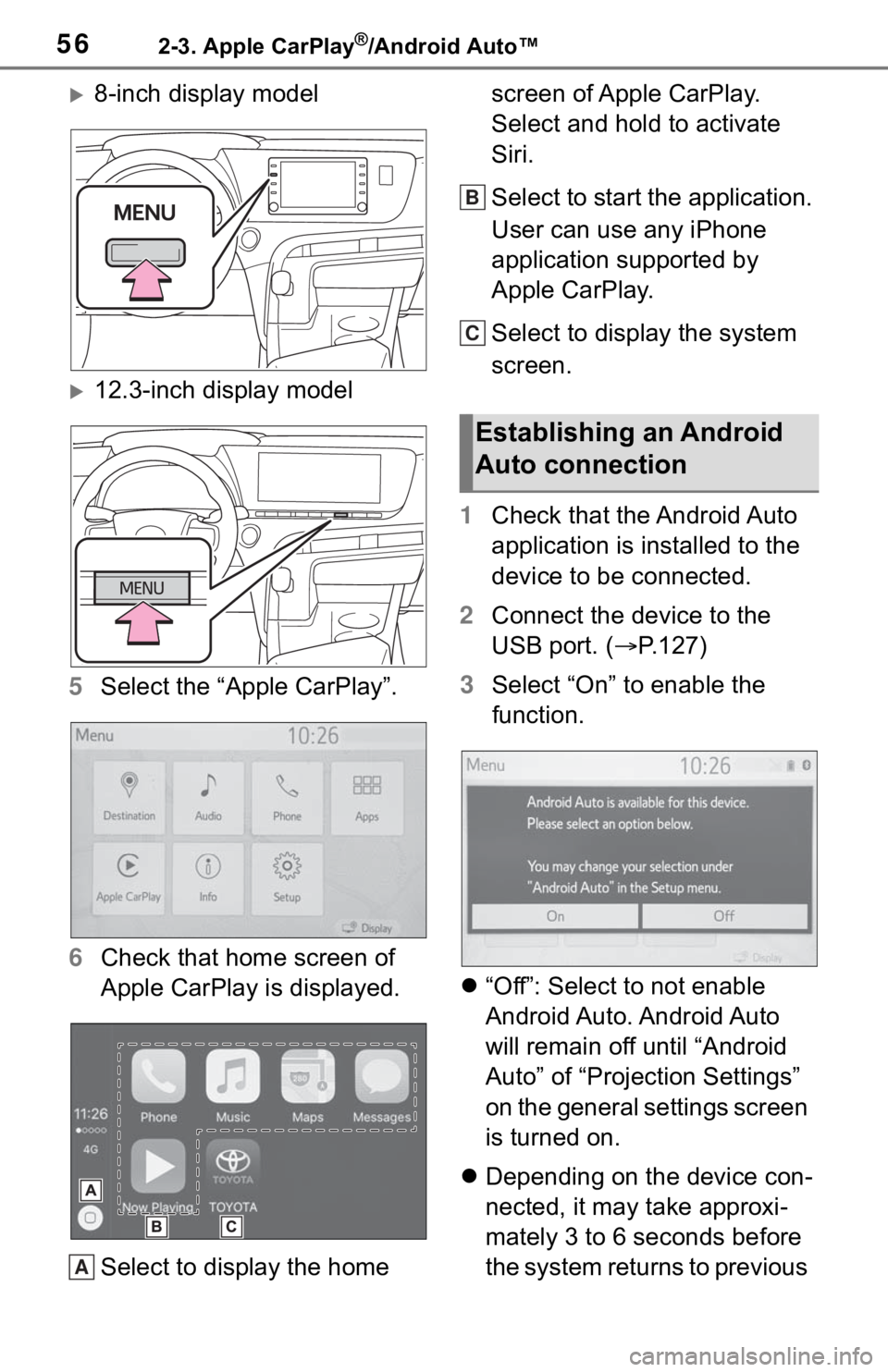
5 Select the “Apple CarPlay”.
6 Check that home screen of
Apple CarPlay is displayed.
Select to display the home screen of Apple CarPlay.
Select and hold to activate
Siri.
Select to start the application.
User can use any iPhone
application supported by
Apple CarPlay.
Select to display the system
screen.
1 Check that the Android Auto
application is installed to the
device to be connected.
2 Connect the device to the
USB port. ( P.127)
3 Select “On” to enable the
function.
“Off”: Select to not enable
Android Auto. Android Auto
will remain off until “Android
Auto” of “Projection Settings”
on the general settings screen
is turned on.
Depending on the device con-
nected, it may take approxi-
mately 3 to 6 seconds before
the system returns to previous
A
Establishing an Android
Auto connection
B
C
Page 57 of 344
572-3. Apple CarPlay®/Android Auto™
2
Basic function
screen.
The screen may change to
step 6 depending on the sys-
tem.
4 Press the “MENU” button.
8-inch display model
12.3-inch display model
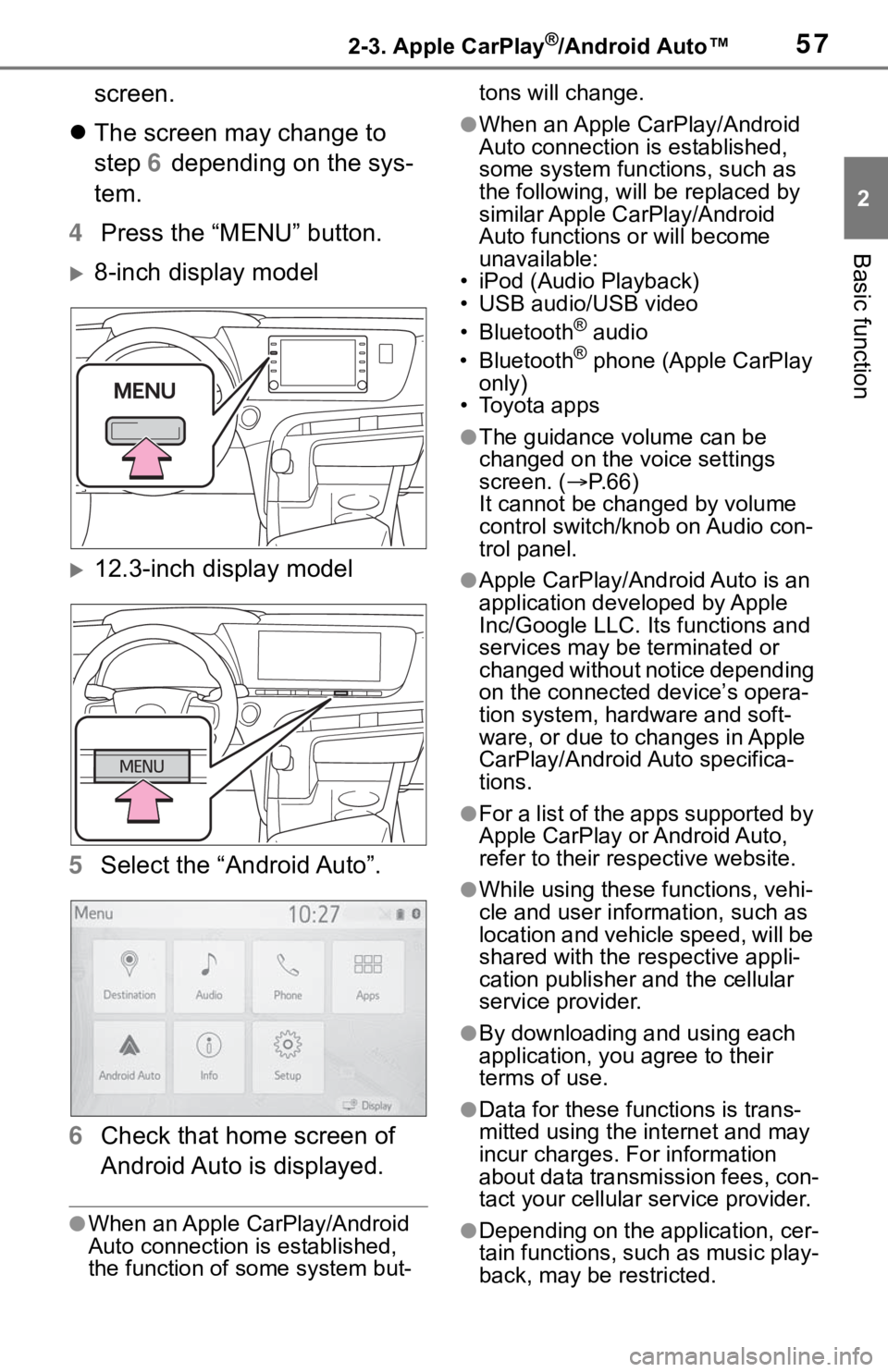
5 Select the “Android Auto”.
6 Check that home screen of
Android Auto is displayed.
●When an Apple CarPlay/Android
Auto connection is established,
the function of some system but- tons will change.
●When an Apple CarPlay/Android
Auto connection is established,
some system functions, such as
the following, will
be replaced by
similar Apple CarPlay/Android
Auto functions or will become
unavailable:
• iPod (Audio Playback)
• USB audio/USB video
• Bluetooth
® audio
• Bluetooth® phone (Apple CarPlay
only)
• Toyota apps
●The guidance volume can be
changed on the voice settings
screen. ( P. 6 6 )
It cannot be changed by volume
control switch/knob on Audio con-
trol panel.
●Apple CarPlay/Android Auto is an
application developed by Apple
Inc/Google LLC. Its functions and
services may be terminated or
changed without notice depending
on the connected device’s opera-
tion system, hardware and soft-
ware, or due to changes in Apple
CarPlay/Android Auto specifica-
tions.
●For a list of the apps supported by
Apple CarPlay or Android Auto,
refer to their respective website.
●While using these functions, vehi-
cle and user information, such as
location and vehicle speed, will be
shared with the respective appli-
cation publisher and the cellular
service provider.
●By downloading and using each
application, you agree to their
terms of use.
●Data for these functions is trans-
mitted using the in ternet and may
incur charges. For information
about data transmission fees, con-
tact your cellular service provider.
●Depending on the application, cer-
tain functions, such as music play-
back, may be restricted.
Page 58 of 344
582-3. Apple CarPlay®/Android Auto™
●As the applications for each func-
tion are provided by a third-party,
they may be subject to change or
discontinuation without notice. For
details, refer to the website of the
function.
●If the vehicle’s navigation system
is being used for route guidance
and a route is set using the Apple
CarPlay/Android Auto Maps app,
route guidance w ill be performed
through Apple CarPlay/Android
Auto. If the Apple CarPlay/Android
Auto Maps app is being used for
route guidance and a route is set
using the vehicle’s navigation sys-
tem, route guidance will be per-
formed by the vehicle’s navigation
system.
●If the USB cable is disconnected,
operation of Apple Car-
Play/Android Aut o will end. At this
time, sound out put will stop and
change to the system screen.
●Use of the Apple CarPlay logo
means that a vehicle user inter-
face meets Apple performance
standards. Apple is not responsi-
ble for the operation of this vehicle
or its compliance with safety and
regulatory standards. Please note that the use of this accessory with
an Apple product may affect wire-
less performance.
●Apple CarPlay is a trademark of
Apple Inc.
●Android™ and Android Auto™ are
trademarks of Google LLC.
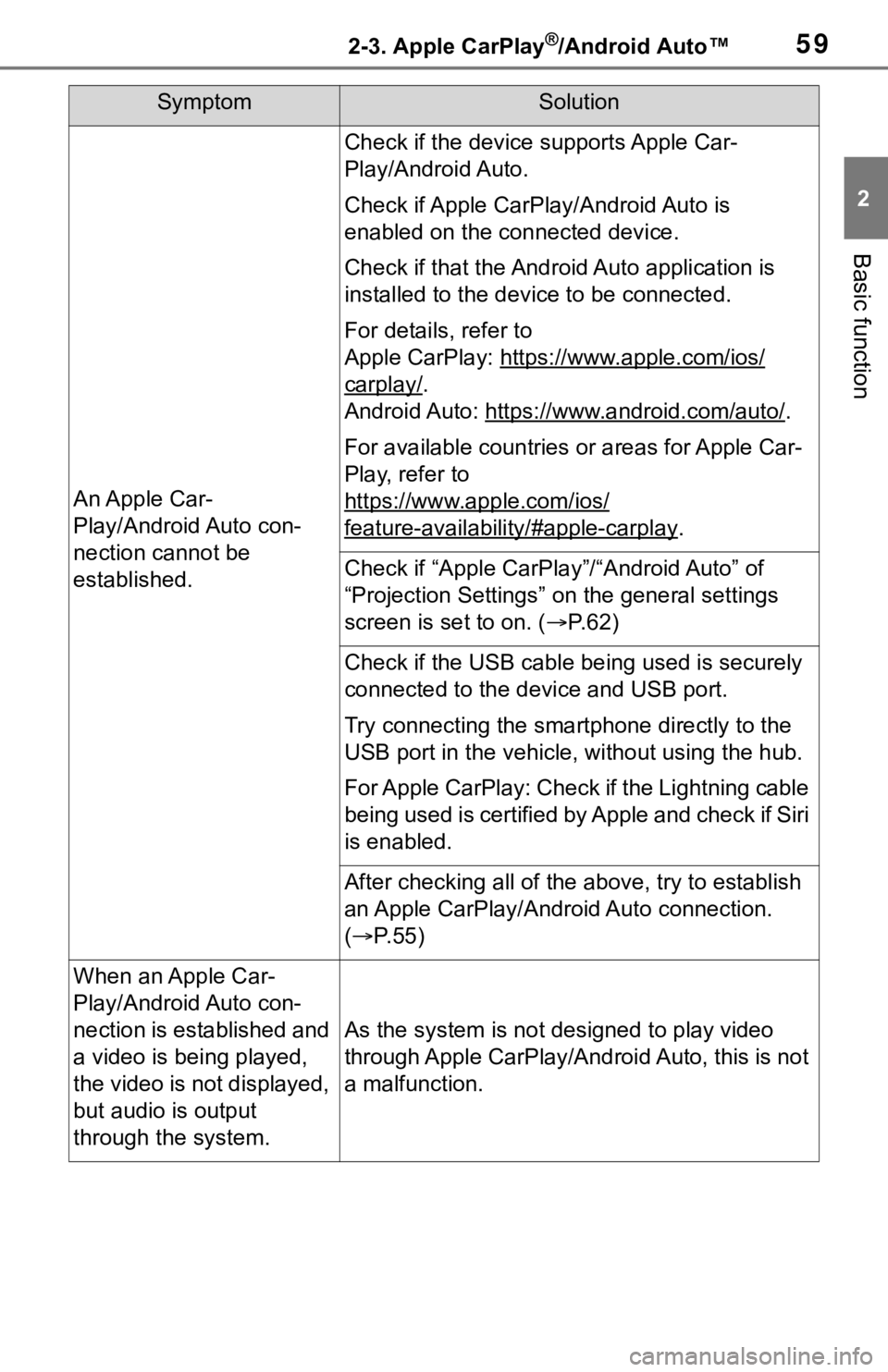
If you are experiencing difficulti
es with Apple CarPlay/Android Auto,
check the following table.
WA R N I N G
●Do not connect smartphone or
operate the cont rols while driv-
ing.
NOTICE
●Do not leave your smartphone
in the vehicle. In particular, high
temperatures inside the vehicle
may damage the smartphone.
●Do not push down on or apply
unnecessary pressure to the
smartphone while it is con-
nected as this may damage the
smartphone or its terminal.
●Do not insert foreign objects into
the port as this may damage the
smartphone or its terminal.
Troubleshooting
Page 59 of 344
592-3. Apple CarPlay®/Android Auto™
2
Basic function
SymptomSolution
An Apple Car-
Play/Android Auto con-
nection cannot be
established.
Check if the device supports Apple Car-
Play/Android Auto.
Check if Apple CarPlay/Android Auto is
enabled on the connected device.
Check if that the Androi d Auto application is
installed to the device to be connected.
For details, refer to
Apple CarPlay: https: //www.apple.com/ios/
carplay/.
Android Auto: https://w ww.android.com/auto/
.
For available countries or areas for Apple Car-
Play, refer to
https://www.apple.com/ios/
feature-availability/#apple-carplay.
Check if “Apple CarPla y”/“Android Auto” of
“Projection Settings” on the general settings
screen is set to on. ( P. 6 2 )
Check if the USB cable be ing used is securely
connected to the device and USB port.
Try connecting the smartphone directly to the
USB port in the vehicle, without using the hub.
For Apple CarPlay: Check if the Lightning cable
being used is certified by Apple and check if Siri
is enabled.
After checking all of the above, try to establish
an Apple CarPlay/Android Auto connection.
( P. 5 5 )
When an Apple Car-
Play/Android Auto con-
nection is established and
a video is being played,
the video is not displayed,
but audio is output
through the system.
As the system is not designed to play video
through Apple CarPlay/Android Auto, this is not
a malfunction.
Page 125 of 344
1274-1. Basic operation
4
Audio/visual system
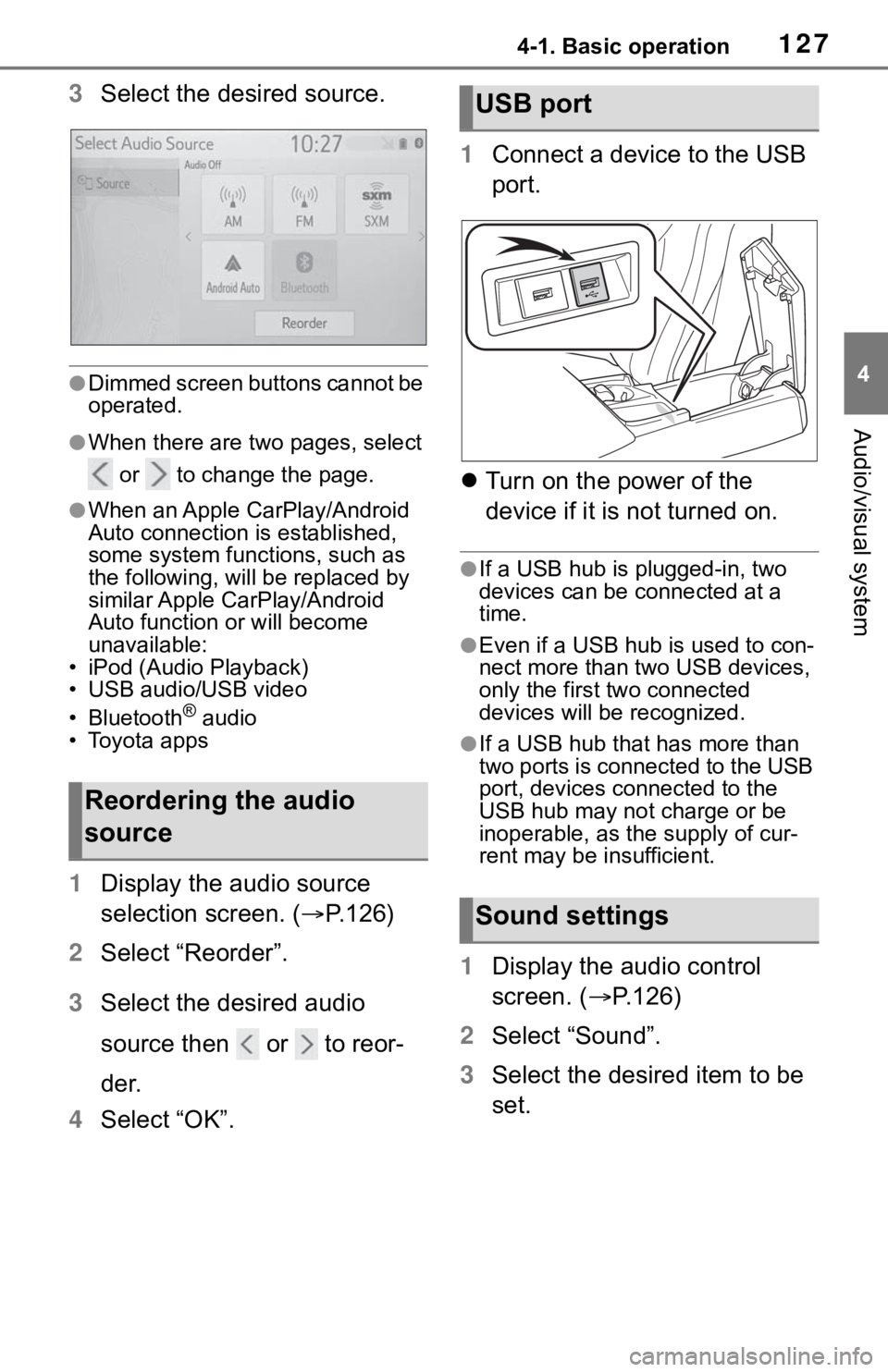
3Select the desired source.
●Dimmed screen buttons cannot be
operated.
●When there are two pages, select
or to change the page.
●When an Apple CarPlay/Android
Auto connection is established,
some system functions, such as
the following, will be replaced by
similar Apple CarPlay/Android
Auto function or will become
unavailable:
• iPod (Audio Playback)
• USB audio/USB video
• Bluetooth
® audio
• Toyota apps
1 Display the audio source
selection screen. ( P.126)
2 Select “Reorder”.
3 Select the desired audio
source then or to reor-
der.
4 Select “OK”. 1
Connect a device to the USB
port.
Turn on the power of the
device if it is not turned on.
●If a USB hub is plugged-in, two
devices can be connected at a
time.
●Even if a USB hub is used to con-
nect more than two USB devices,
only the first two connected
devices will be recognized.
●If a USB hub that has more than
two ports is connected to the USB
port, devices connected to the
USB hub may not charge or be
inoperable, as the supply of cur-
rent may be insufficient.
1 Display the audio control
screen. ( P.126)
2 Select “Sound”.
3 Select the desired item to be
set.
Reordering the audio
source
USB port
Sound settings
Page 139 of 344
1414-3. Media operation
4
Audio/visual system
• random (1 folder/album random) folder/album random (all
folder/album random) off
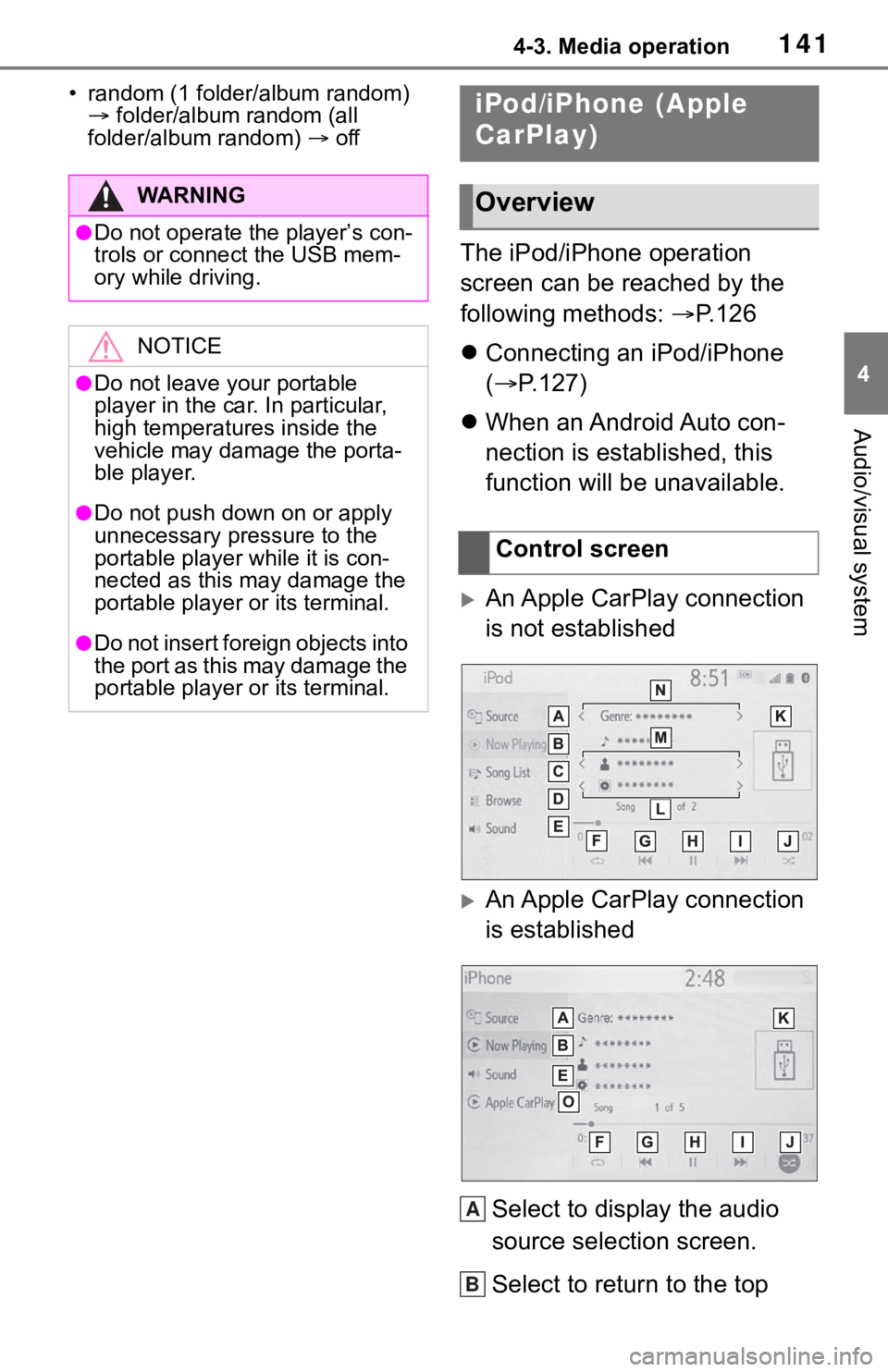
The iPod/iPhone operation
screen can be reached by the
following methods: P.126
Connecting an iPod/iPhone
( P.127)
When an Android Auto con-
nection is established, this
function will be unavailable.
An Apple CarPlay connection
is not established
An Apple CarPlay connection
is established
Select to display the audio
source selection screen.
Select to return to the top
WA R N I N G
●Do not operate the player’s con-
trols or connect the USB mem-
ory while driving.
NOTICE
●Do not leave your portable
player in the car. In particular,
high temperatures inside the
vehicle may damage the porta-
ble player.
●Do not push down on or apply
unnecessary pressure to the
portable player while it is con-
nected as this may damage the
portable player or its terminal.
●Do not insert foreign objects into
the port as this may damage the
portable player or its terminal.
iPod/iPhone (Apple
CarPlay)
Overview
Control screen
A
B
Page 141 of 344
1434-3. Media operation
4
Audio/visual system
and the songs in the iPod/iPhone,
a cover art may be displayed. This
function can be changed to “On”
or “Off”. (P.153) It may take time
to display the co ver art, and the
iPod/iPhone may n ot be operated
while the cover art display is in
process.
●When an iPod/iPhone is con-
nected and the audio source is
changed to iPod/iPhone mode,
the iPod/iPhone will resume play-
ing from the same point it was last
used.
●Depending on the iPod/iPhone
that is connected to the system,
certain functions may not be avail-
able.
●If an iPhone is connected via
Bluetooth® and USB at the same
time, system operation may
become unstable. For known
phone compatibility information,
refer to
https://www.toyota.com/audio-
multimedia.
●Tracks selected by operating a
connected iPod/i Phone may not
be recognized or displayed prop-
erly.
●The system may not function
properly if a conversion adapter is
used to connect a device.
The track currently being lis-
tened to can be repeated.
1 Select .
●Each time is selected, the
mode changes as follows:
When shuffle is off (iPhone 5 or
later)
• track repeat album repeat off
When shuffle is off (iPhone 4s or
earlier)
• track repeat off
When shuffle is on
• track repeat off
Tracks or albums can be auto-
matically and randomly
selected.
1 Select .
●Each time is selected, the
mode changes as follows:
• shuffle (1 album shuffle) album
shuffle (all album shuffle) off
Repeating
Random order
WA R N I N G
●Do not operate the player’s con-
trols or connect the iPod/iPhone
while driving.
NOTICE
●Do not leave your portable
player in the car. In particular,
high temperatures inside the
vehicle may damage the porta-
ble player.
●Do not push down on or apply
unnecessary pressure to the
portable player while it is con-
nected as this may damage the
portable player or its terminal.
●Do not insert foreign objects into
the port as this may damage the
portable player or its terminal.
Page 154 of 344
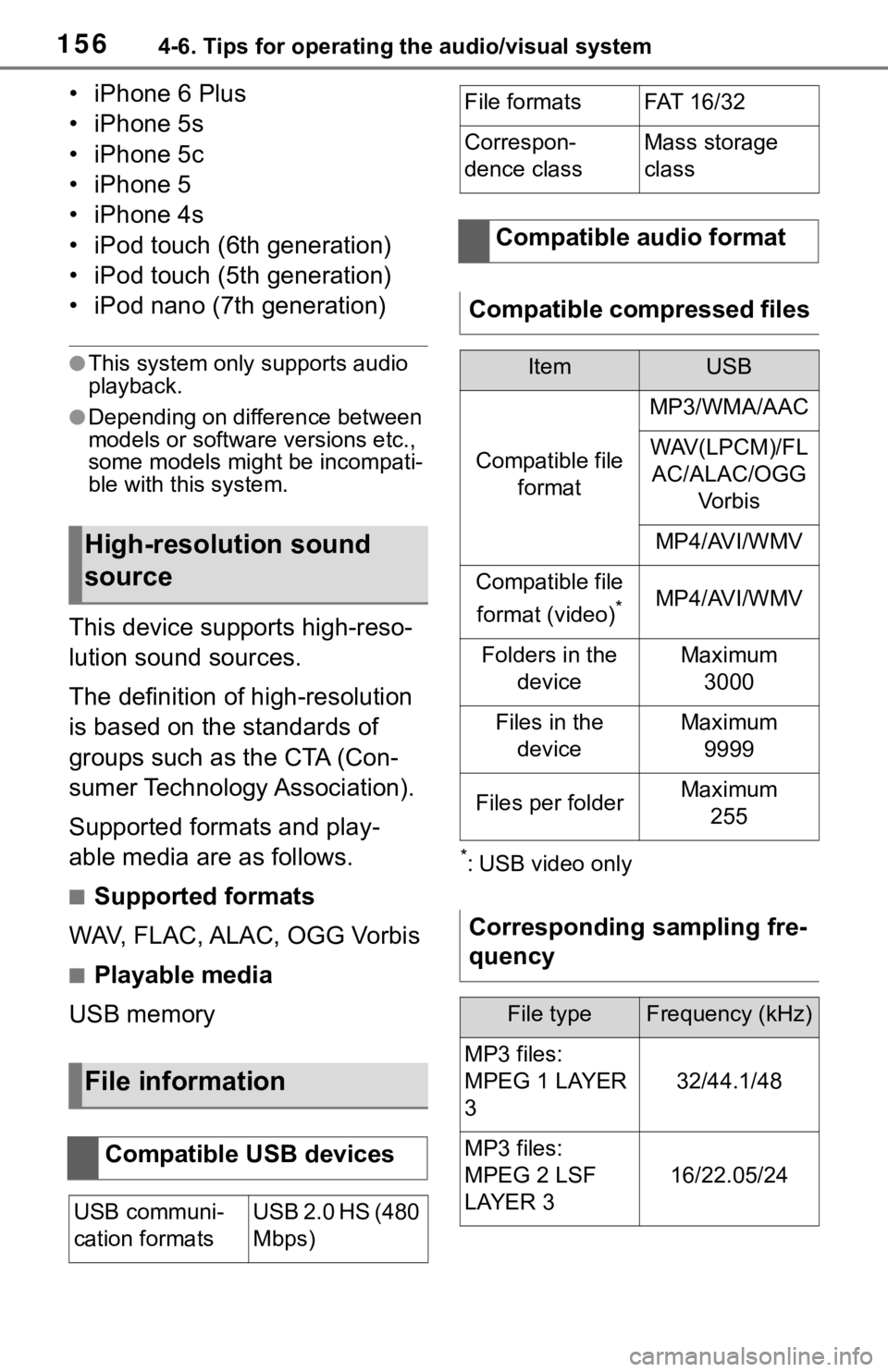
1564-6. Tips for operating the audio/visual system
• iPhone 6 Plus
• iPhone 5s
• iPhone 5c
• iPhone 5
• iPhone 4s
• iPod touch (6th generation)
• iPod touch (5th generation)
• iPod nano (7th generation)
●This system only supports audio
playback.
●Depending on difference between
models or software versions etc.,
some models might be incompati-
ble with this system.
This device supports high-reso-
lution sound sources.
The definition of high-resolution
is based on the standards of
groups such as the CTA (Con-
sumer Technology Association).
Supported formats and play-
able media are as follows.
■Supported formats
WAV, FLAC, ALAC, OGG Vorbis
■Playable media
USB memory
*: USB video only
High-resolution sound
source
File information
Compatible USB devices
USB communi-
cation formatsUSB 2.0 HS (480
Mbps)
File formatsFAT 16 /3 2
Correspon-
dence classMass storage
class
Compatible audio format
Compatible compressed files
ItemUSB
Compatible file format
MP3/WMA/AAC
WAV(LPCM)/FLAC/ALAC/OGG Vo r b i s
MP4/AVI/WMV
Compatible file
format (video)
*MP4/AVI/WMV
Folders in the deviceMaximum3000
Files in the deviceMaximum 9999
Files per folderMaximum 255
Corresponding sampling fre-
quency
File typeFrequency (kHz)
MP3 files:
MPEG 1 LAYER
3
32/44.1/48
MP3 files:
MPEG 2 LSF
LAYER 3
16/22.05/24
Page 159 of 344
1614-6. Tips for operating the audio/visual system
4
Audio/visual system
WMA files are Ver. 7, 8 and 9.
Windows Media is either a
registered trademark or trade-
mark of Microsoft Corpora-
tion in the United States
and/or other countries. This
product is protected by certain
intellectual property rights of
Microsoft. Use or distribution
of such technology outside of
this product is prohibited with-
out a license from Microsoft.
■AAC
AAC is short for Advanced
Audio Coding and refers to an
audio compression technol-
ogy standard used with
MPEG2 and MPEG4.
■MPEG4
This product is licensed under
the MPEG-4 patent portfolio
license, AVC patent portfolio
license and VC-1 patent port-
folio license for the personal
use of a consumer or other
uses in which it does not
receive remuneration to
(i) encode video in compli-
ance with the MPEG-4 Visual
Standard, AVC Standard and
VC-1 Standard (“MPEG-
4/AVC/VC-1 Video”) and/or
(ii) decode MPEG-4/AVC/VC-
1 Video that was encoded by
a consumer engaged in a per-
sonal activity and/or was
obtained from a video pro-
vider licensed to provide
MPEG-4/AVC/VC-1 Video. No license is granted or shall
be implied for any other use.
Additional information may be
obtained from MPEG LA,
L.L.C. See
http://www.mpegla.com
.
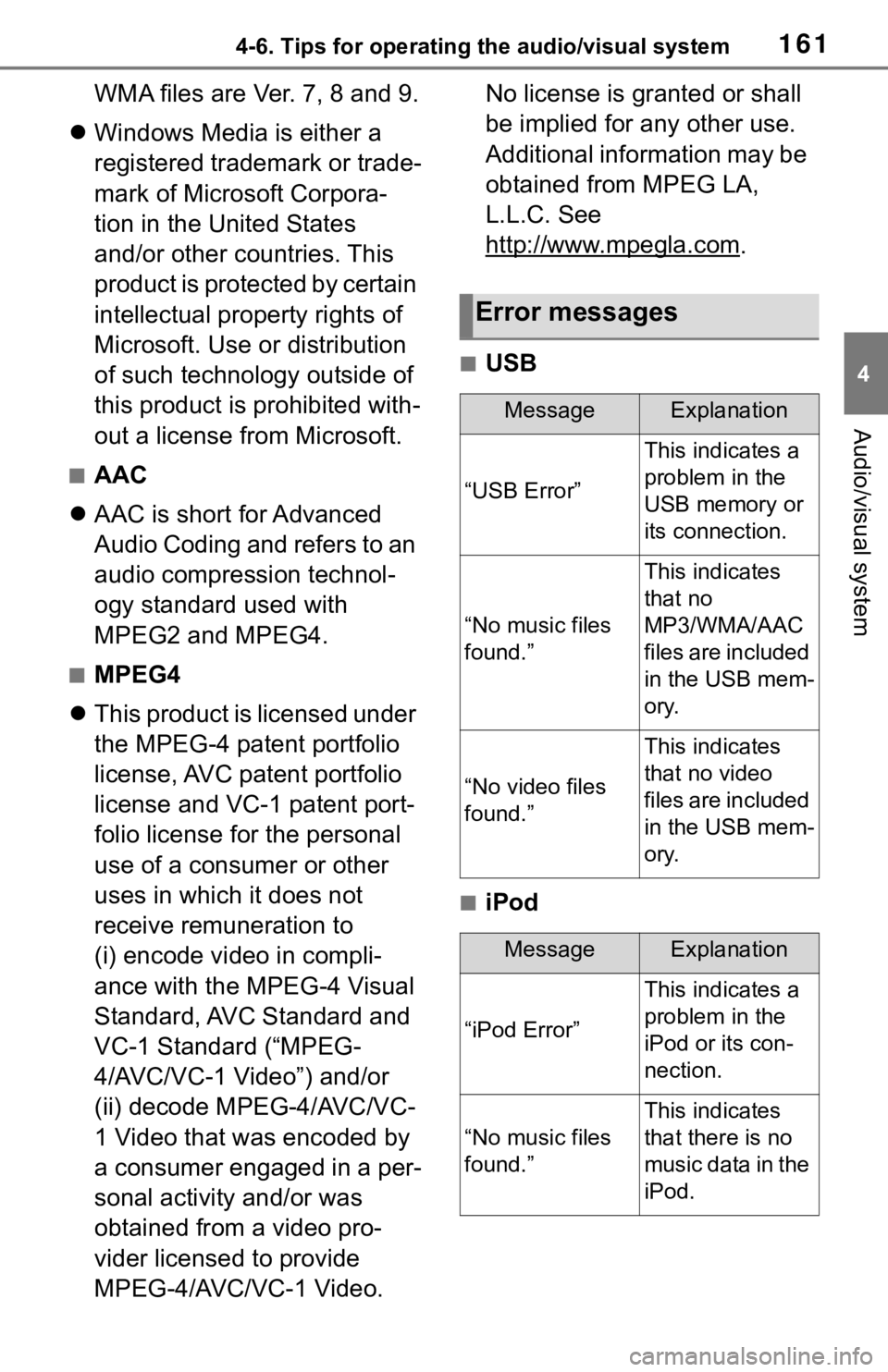
■USB
■iPod
Error messages
MessageExplanation
“USB Error”
This indicates a
problem in the
USB memory or
its connection.
“No music files
found.”
This indicates
that no
MP3/WMA/AAC
files are included
in the USB mem-
ory.
“No video files
found.”
This indicates
that no video
files are included
in the USB mem-
ory.
MessageExplanation
“iPod Error”
This indicates a
problem in the
iPod or its con-
nection.
“No music files
found.”
This indicates
that there is no
music data in the
iPod.