mirror TOYOTA MIRAI 2022 Owner's Manual
[x] Cancel search | Manufacturer: TOYOTA, Model Year: 2022, Model line: MIRAI, Model: TOYOTA MIRAI 2022Pages: 556, PDF Size: 17.34 MB
Page 150 of 556
1504-4. Adjusting the steering wheel and mirrors
Owners Manual_USA_M62084_en
NOTICE
●Do not smoke, use matches,
use cigarette lighters or allow
open flames near the mirror. It
may damage the mirror or
cause a fire.
●Do not remove, disassemble or
modify the mirror.
■To prevent the camera from
malfunctioning
●Observe the following precau-
tions, otherwise the Digital
Rearview Mirror may not oper-
ate properly.
• Do not strike or hit the camera
or subject it to a strong impact,
as the camera installation posi-
tion and angle may be changed.
• Do not remove, disassemble or modify the camera.
• When washing the camera, rinse it with a la rge quantity of
water and then wipe it clean
with a soft cloth dampened with
water.
Do not strongly rub the camera
lens, as it may be scratched and
will not be able to transmit a
clear image.
• Do not allow organic solvent, car wax, window cleaner or
glass coat to adhere to the cam-
era cover. If this happens, wipe
it off as soon as possible.
• Do not apply hot water to the camera in cold weather, as the
sudden change of temperature
may cause the camera to not
operate properly.
• When using a high pressure washer to wash the vehicle, do
not directly spra y the camera
and its surrounding area, as
doing so may cause the camera
to not operate properly.
●Do not subject the camera to a
strong impact as this could
cause a malfunction.
If this happens, have the vehicle
inspected by your Toyota dealer
as soon as possible.
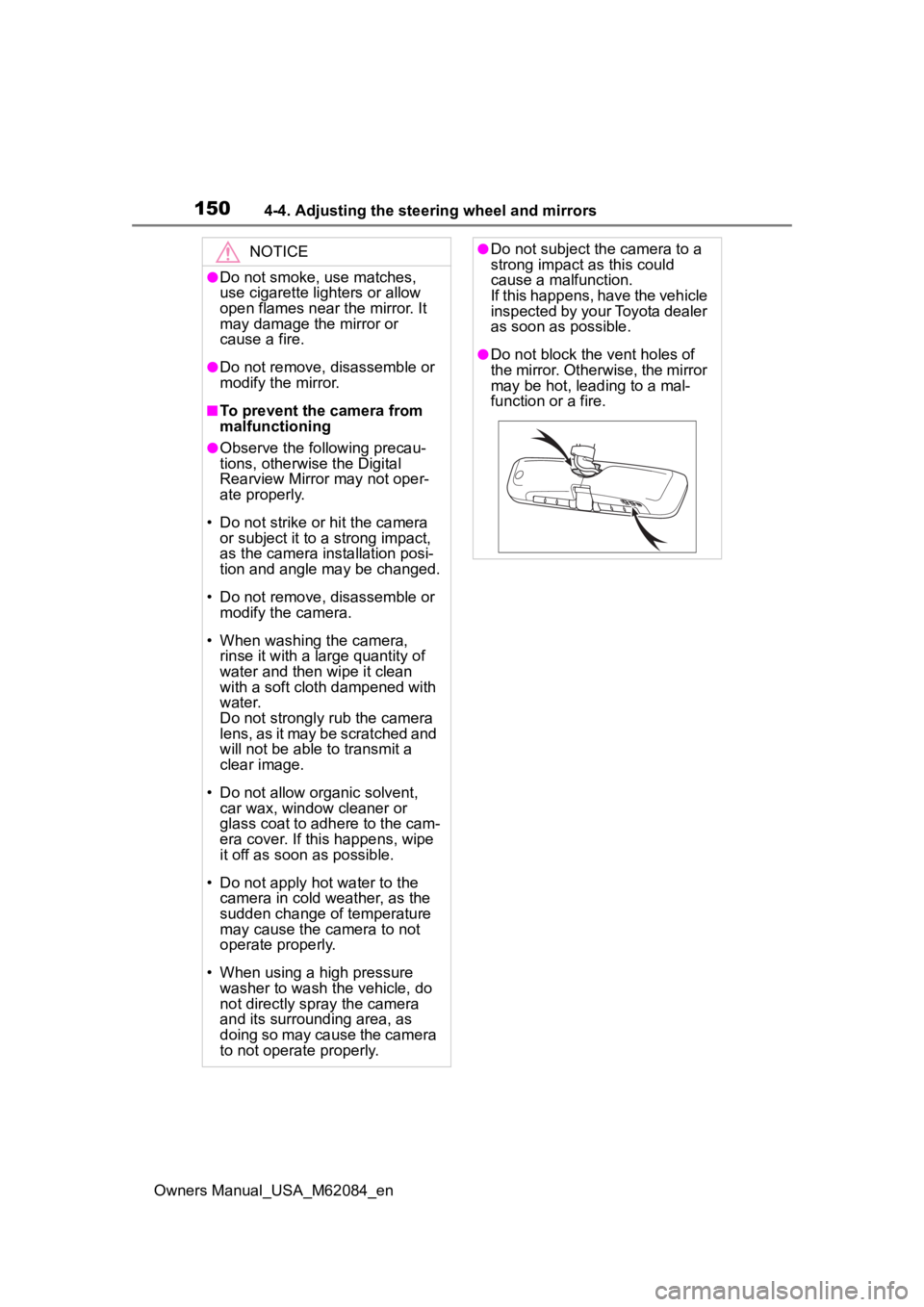
●Do not block the vent holes of
the mirror. Otherwise, the mirror
may be hot, leading to a mal-
function or a fire.
Page 151 of 556
1514-4. Adjusting the steering wheel and mirrors
Owners Manual_USA_M62084_en
4
Before driving
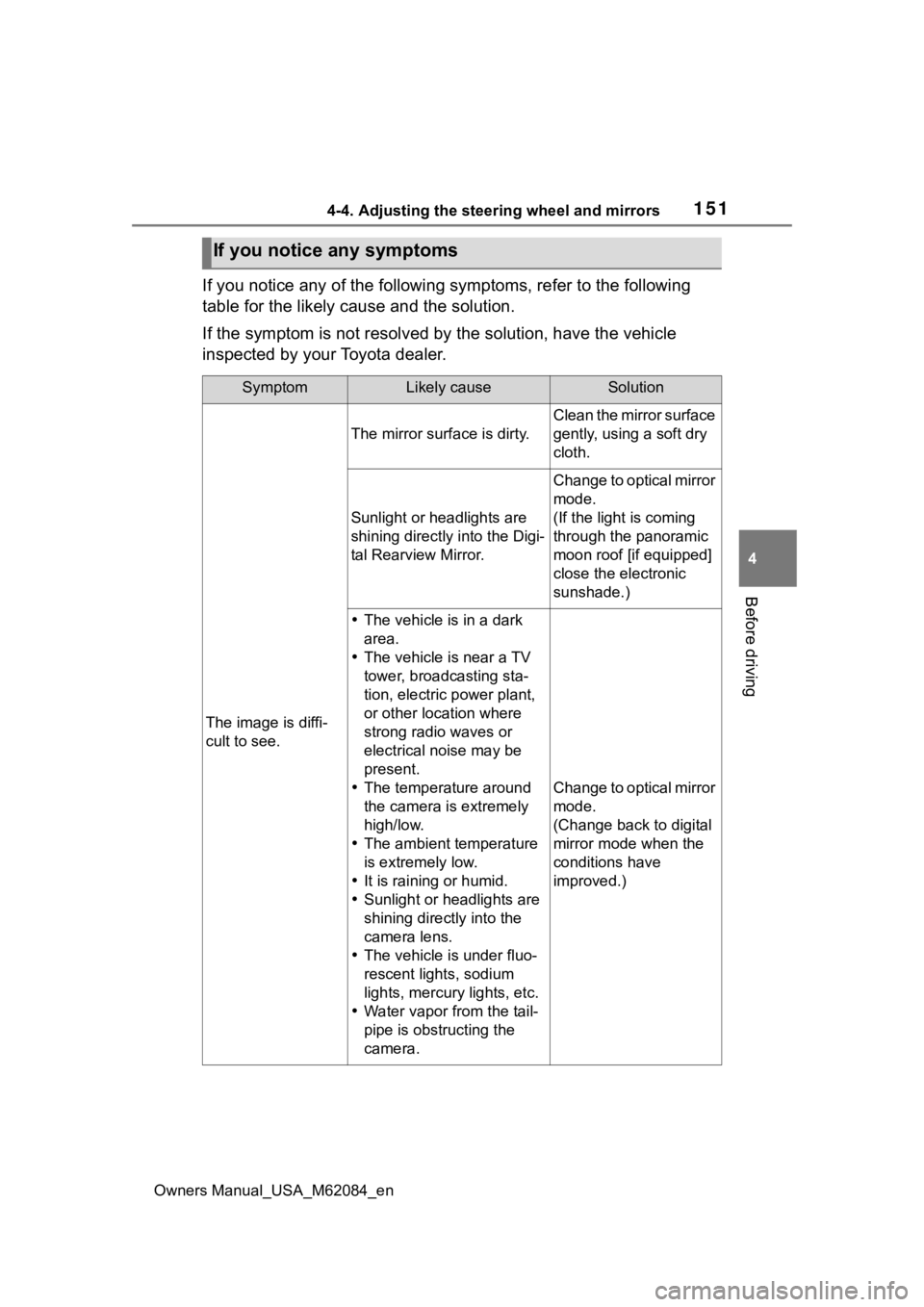
If you notice any of the following symptoms, refer to the follo wing
table for the likely cause and the solution.
If the symptom is not resolved by the solution, have the vehicl e
inspected by your Toyota dealer.
If you notice any symptoms
SymptomLikely causeSolution
The image is diffi-
cult to see.
The mirror surface is dirty.
Clean the mirror surface
gently, using a soft dry
cloth.
Sunlight or headlights are
shining directly into the Digi-
tal Rearview Mirror.
Change to optical mirror
mode.
(If the light is coming
through the panoramic
moon roof [if equipped]
close the electronic
sunshade.)
The vehicle is in a dark
area.
The vehicle is near a TV
tower, broadcasting sta-
tion, electric power plant,
or other location where
strong radio waves or
electrical noise may be
present.
The temperature around
the camera is extremely
high/low.
The ambient temperature
is extremely low.
It is raining or humid.
Sunlight or headlights are
shining directly into the
camera lens.
The vehicle is under fluo-
rescent lights, sodium
lights, mercury lights, etc.
Water vapor from the tail-
pipe is obstructing the
camera.
Change to optical mirror
mode.
(Change back to digital
mirror mode when the
conditions have
improved.)
Page 152 of 556
1524-4. Adjusting the steering wheel and mirrors
Owners Manual_USA_M62084_en
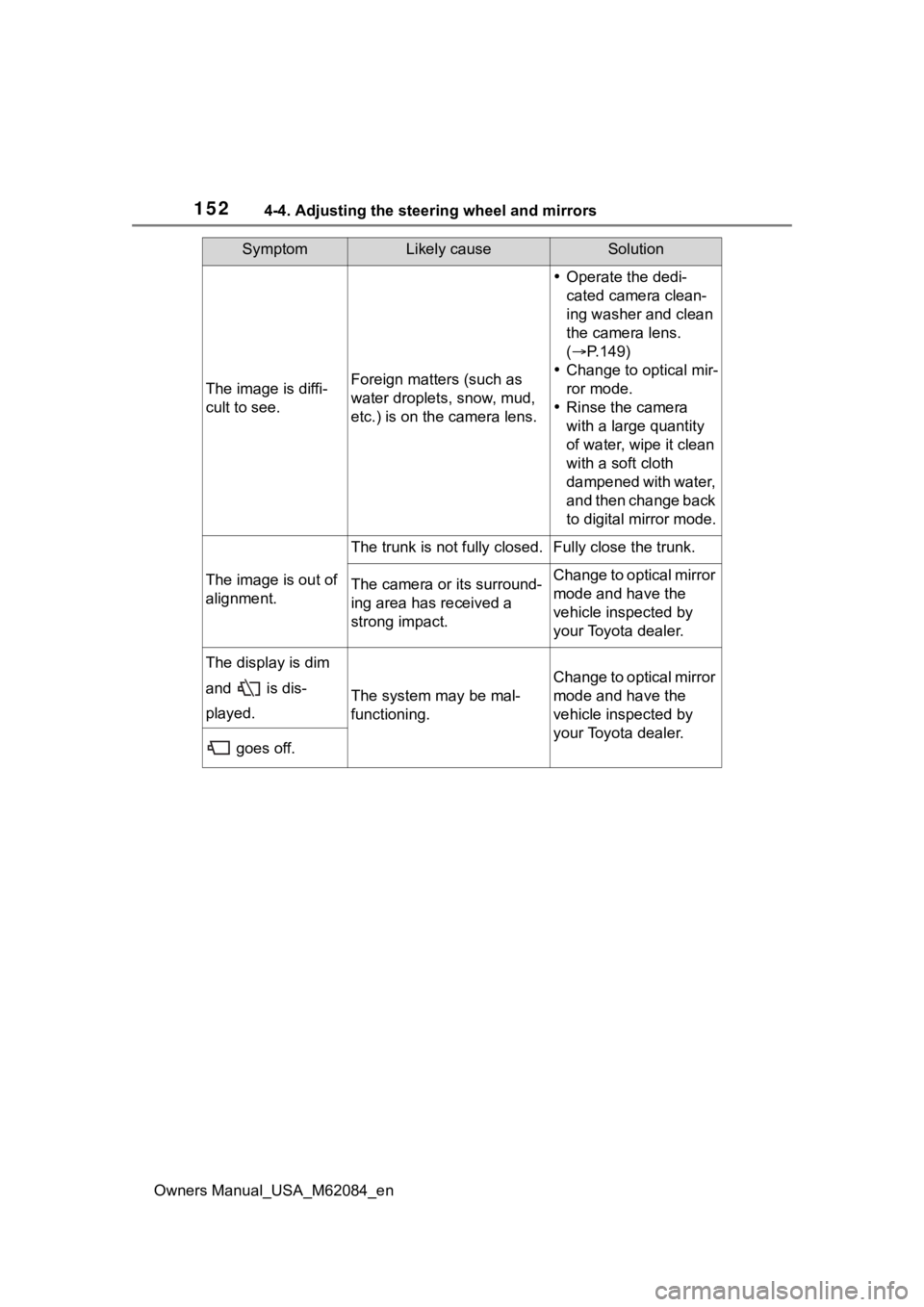
The image is diffi-
cult to see.Foreign matters (such as
water droplets, snow, mud,
etc.) is on the camera lens.
Operate the dedi-
cated camera clean-
ing washer and clean
the camera lens.
( P.149)
Change to optical mir-
ror mode.
Rinse the camera
with a large quantity
of water, wipe it clean
with a soft cloth
dampened with water,
and then change back
to digital mirror mode.
The image is out of
alignment.
The trunk is not fully closed.Fully close the trunk.
The camera or its surround-
ing area has received a
strong impact.Change to optical mirror
mode and have the
vehicle inspected by
your Toyota dealer.
The display is dim
and is dis-
played.
The system may be mal-
functioning.
Change to optical mirror
mode and have the
vehicle inspected by
your Toyota dealer.
goes off.
SymptomLikely causeSolution
Page 153 of 556
1534-4. Adjusting the steering wheel and mirrors
Owners Manual_USA_M62084_en
4
Before driving
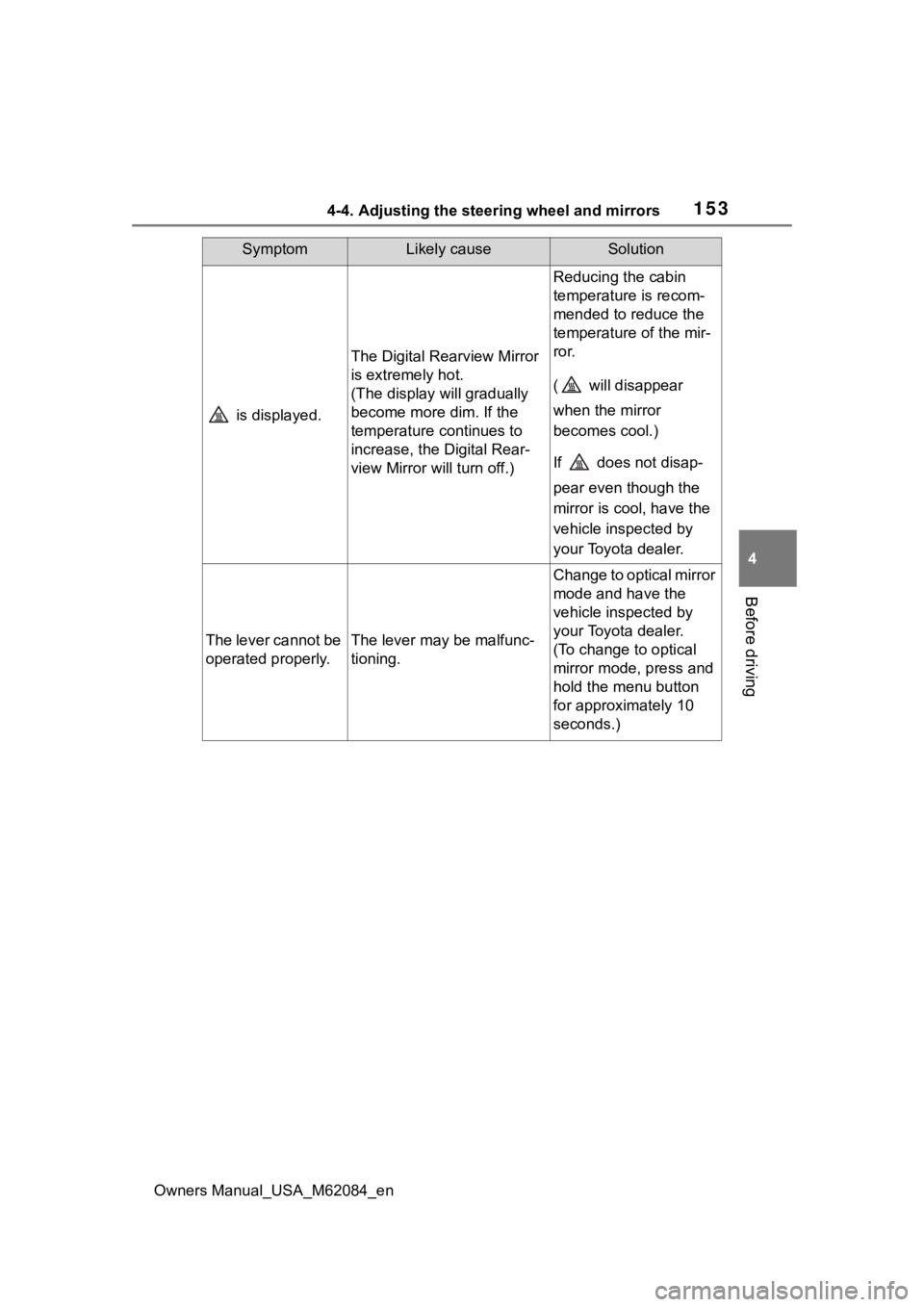
is displayed.
The Digital Rearview Mirror
is extremely hot.
(The display will gradually
become more dim. If the
temperature continues to
increase, the Digital Rear-
view Mirror will turn off.)
Reducing the cabin
temperature is recom-
mended to reduce the
temperature of the mir-
ror.
( will disappear
when the mirror
becomes cool.)
If does not disap-
pear even though the
mirror is cool, have the
vehicle inspected by
your Toyota dealer.
The lever cannot be
operated properly.The lever may be malfunc-
tioning.
Change to optical mirror
mode and have the
vehicle inspected by
your Toyota dealer.
(To change to optical
mirror mode, press and
hold the menu button
for approximately 10
seconds.)
SymptomLikely causeSolution
Page 154 of 556
1544-4. Adjusting the steering wheel and mirrors
Owners Manual_USA_M62084_en
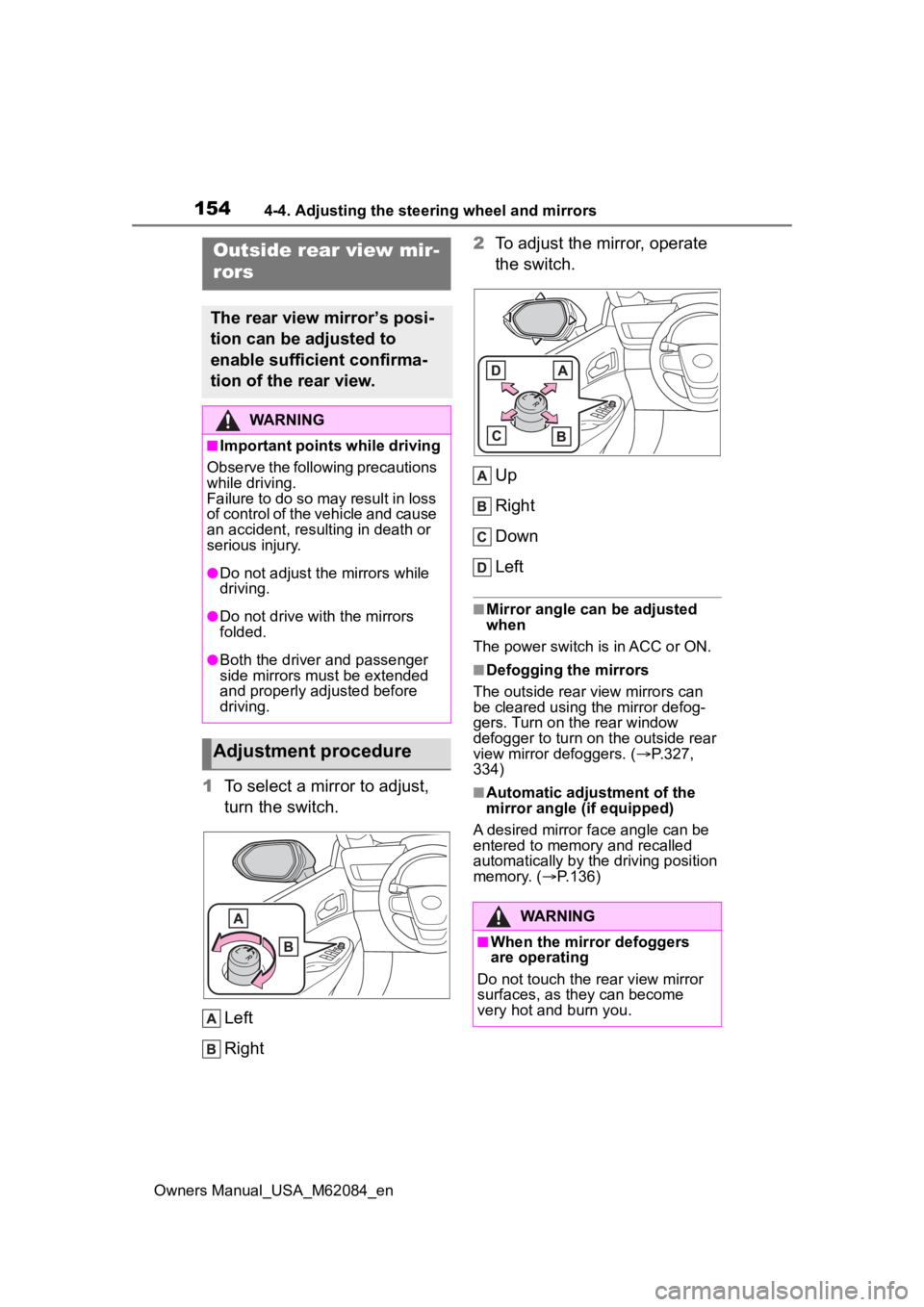
1To select a mirror to adjust,
turn the switch.
Left
Right 2
To adjust the mirror, operate
the switch.
Up
Right
Down
Left
■Mirror angle can be adjusted
when
The power switch is in ACC or ON.
■Defogging the mirrors
The outside rear view mirrors can
be cleared using the mirror defog-
gers. Turn on the rear window
defogger to turn on the outside rear
view mirror defoggers. ( P.327,
334)
■Automatic adjustment of the
mirror angle (if equipped)
A desired mirror face angle can be
entered to memory and recalled
automatically by the driving position
memory. ( P.136)
Outside rear view mir-
rors
The rear view mirror’s posi-
tion can be adjusted to
enable sufficient confirma-
tion of the rear view.
WARNING
■Important points while driving
Observe the following precautions
while driving.
Failure to do so may result in loss
of control of the vehicle and cause
an accident, resul ting in death or
serious injury.
●Do not adjust the mirrors while
driving.
●Do not drive with the mirrors
folded.
●Both the driver and passenger
side mirrors must be extended
and properly adjusted before
driving.
Adjustment procedure
WARNING
■When the mirror defoggers
are operating
Do not touch the rear view mirror
surfaces, as they can become
very hot and burn you.
Page 155 of 556
1554-4. Adjusting the steering wheel and mirrors
Owners Manual_USA_M62084_en
4
Before driving
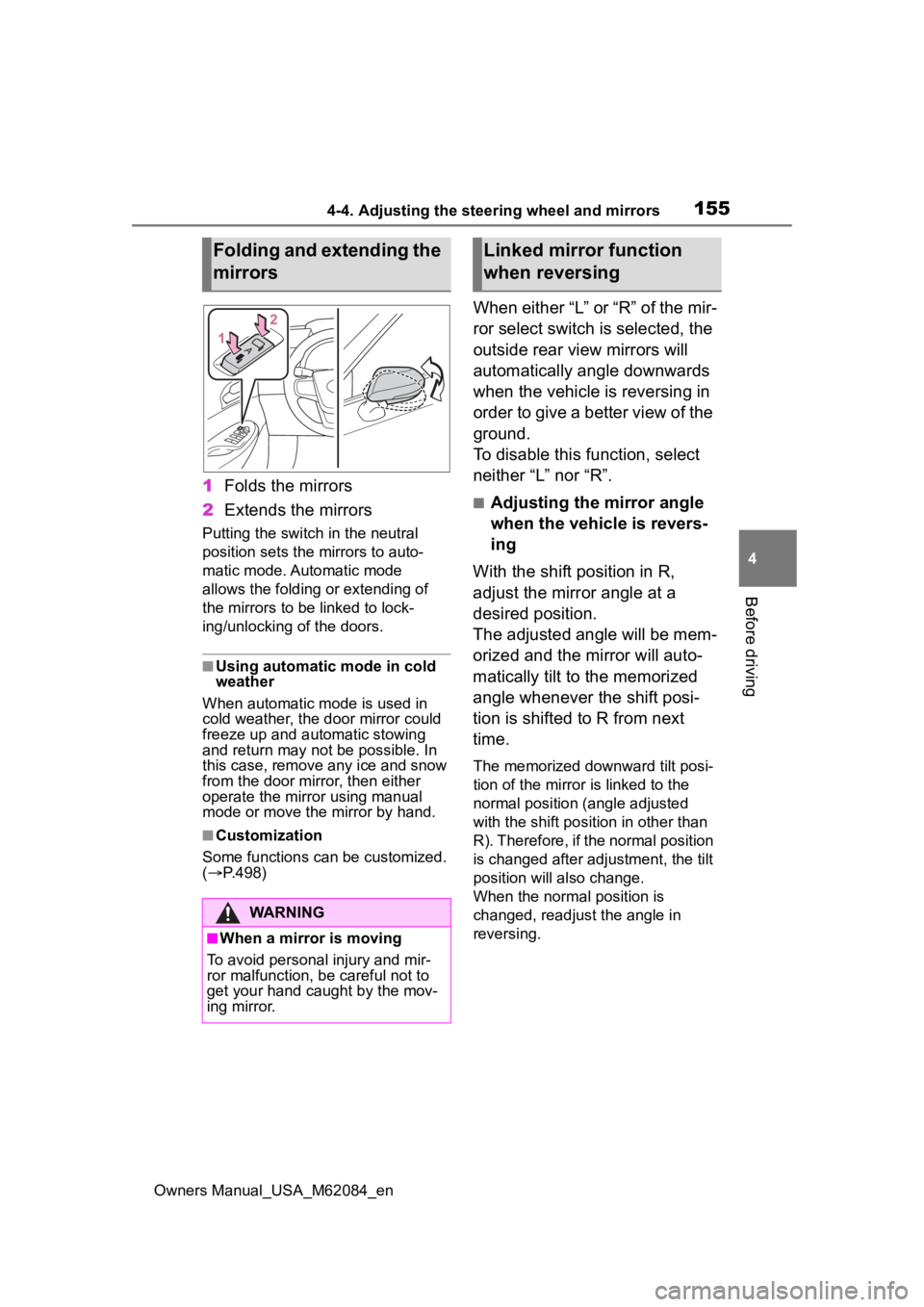
1 Folds the mirrors
2 Extends the mirrors
Putting the switch in the neutral
position sets the mirrors to auto-
matic mode. Automatic mode
allows the folding or extending of
the mirrors to be linked to lock-
ing/unlocking of the doors.
■Using automatic mode in cold
weather
When automatic mode is used in
cold weather, the door mirror could
freeze up and aut omatic stowing
and return may not be possible. In
this case, remove any ice and snow
from the door mirror, then either
operate the mirror using manual
mode or move the mirror by hand.
■Customization
Some functions can be customized.
( P.498)
When either “L” or “R” of the mir-
ror select switch is selected, the
outside rear view mirrors will
automatically angle downwards
when the vehicle is reversing in
order to give a better view of the
ground.
To disable this function, select
neither “L” nor “R”.
■Adjusting the mirror angle
when the vehicle is revers-
ing
With the shift position in R,
adjust the mirror angle at a
desired position.
The adjusted angle will be mem-
orized and the mirror will auto-
matically tilt to the memorized
angle whenever the shift posi-
tion is shifted to R from next
time.
The memorized downward tilt posi-
tion of the mirror is linked to the
normal position (angle adjusted
with the shift posit ion in other than
R). Therefore, if the normal position
is changed after adjustment, the tilt
position will also change.
When the normal position is
changed, readjust the angle in
reversing.
Folding and extending the
mirrors
WARNING
■When a mirror is moving
To avoid personal injury and mir-
ror malfunction, be careful not to
get your hand caught by the mov-
ing mirror.
Linked mirror function
when reversing
Page 163 of 556
1635-1. Before driving
Owners Manual_USA_M62084_en
5
Driving
WARNING
■When starting the vehicle
Always keep your foot on the
brake pedal while stopped with
the “READY” indicator is illumi-
nated. This prevents the vehicle
from creeping.
■When driving the vehicle
●Do not drive if y ou are unfamil-
iar with the location of the brake
and accelerator pedals to avoid
depressing the wrong pedal.
• Accidentally depressing the accelerator pedal instead of the
brake pedal will result in sudden
acceleration that may lead to an
accident.
• When backing up, you may twist your body around, leading to dif-
ficulty in operating the pedals.
Make sure to operate the pedals
properly.
• Make sure to keep a correct driving posture even when mov-
ing the vehicle only slightly. This
allows you to depress the brake
and accelerator pedals properly.
• Depress the brake pedal using your right foot. Depressing the
brake pedal using your left foot
may delay respon se in an emer-
gency, resulting in an accident.
●The driver should pay extra
attention to pedes trians as this
vehicle is powered only by an
electric motor (traction motor).
As there is no engine noise, the
pedestrians may misjudge the
vehicle’s movement. Even with
the acoustic vehicle alerting
system activate, d rive with care
as pedestrians in the vicinity
may still not notice the vehicle if
the surrounding area is noisy.
●During normal driving, do not
turn off the fuel cell system.
Turning the fuel cell system off
while driving will not cause loss
of steering or braking control,
however, power assist to the
steering will be lost. This will
make it more difficult to steer
smoothly, so you should pull
over and stop the vehicle as
soon as it is safe to do so.
In the event of a n emergency,
such as if it becomes impossible
to stop the vehicle in the normal
way: P. 4 3 2
●Using the brakes continuously
may cause the brakes to over-
heat and lose effectiveness
when driving down a steep hill.
●Do not adjust the positions of
the steering wheel, the seat, or
the inside or outside rear view
mirrors while driving.
Doing so may result in a loss of
vehicle control.
●Always check that all passen-
gers’ arms, heads or other parts
of their body are not outside the
vehicle.
●Do not drive in excess of the
speed limit. Even if the legal
speed limit permits it, do not
drive over 85 mph (140 km/h)
unless your vehicle has high-
speed capability tires. Driving
over 85 mph (140 km/h) may
result in tire fa ilure, loss of con-
trol and possible injury. Be sure
to consult a tire dealer to deter-
mine whether the tires on your
vehicle are high-speed capabil-
ity tires or not before driving at
such speeds.
■When driving on slippery
road surfaces
●Sudden braking, acceleration
and steering may cause tire
slippage and reduce your ability
to control the vehicle.
Page 195 of 556
1955-3. Operating the lights and wipers
Owners Manual_USA_M62084_en
5
Driving
• When driving in inclement weather (heavy rain, snow, fog, sand-
storms, etc.)
• When the windshield is obscured by fog, mist, ice, dirt, etc.
• When the windshield is cracked or
damaged
• When the front camera is deformed or dirty
• When the temperature of the front camera is extremely high
• When the surrounding brightness
level is equal to that of headlights,
tail lights or fog lights
• When headlights or tail lights of
vehicles ahead are turned off,
dirty, changing color, or not aimed
properly
• When the vehicle is hit by water, snow, dust, etc., from a preceding
vehicle
• When driving thr ough an area of
intermittently changing brightness
and darkness
• When frequently and repeatedly driving ascending/descending
roads, or roads with rough, bumpy
or uneven surfaces (such as
stone-paved roads, gravel roads,
etc.)
• When frequently and repeatedly taking curves or driving on a wind-
ing road
• When there is a hi ghly reflective
object ahead of th e vehicle, such
as a sign or mirror
• When the back of a preceding vehicle is highly reflective, such as
a container on a truck
• When the vehicle’s headlights are damaged or dirty, or are not aimed
properly
• When the vehicle is listing or titling due to a flat tire, a trailer being
towed, etc.
• When the headlights are changed between the high beams and low
beams repeatedly in an abnormal
manner
• When the driver believes that the high beams may be flashing or
dazzling pedestrians or other driv-
ers■Temporarily lowering sensor
sensitivity
The sensitivity of the sensor can be
temporarily lowered.
1 Turn the power s witch off while
the following conditions are met.
●The headlight switch is in or
.
●The headlight switch lever is in
low beam position.
●Automatic High Beam switch is
on.
2 Turn the power switch to ON.
3 Within 60 seconds after step 2,
repeat pushing the headlight
switch lever to the high beam
position then pulling it to the orig-
inal position quickly 10 times,
then leave the lever in the origi-
nal position.
4 If the sensitivity is changed, the
AHB indicator is turn on and off 3
times.
■Switching to the high
beams
Push the lever away from you.
The AHB indicator will turn off and
the high beam indi cator will turn on.
Pull the lever to its original position
to activate the Automatic High
Beam system.
Turning the high beams
on/off manually
Page 199 of 556
1995-3. Operating the lights and wipers
Owners Manual_USA_M62084_en
5
Driving
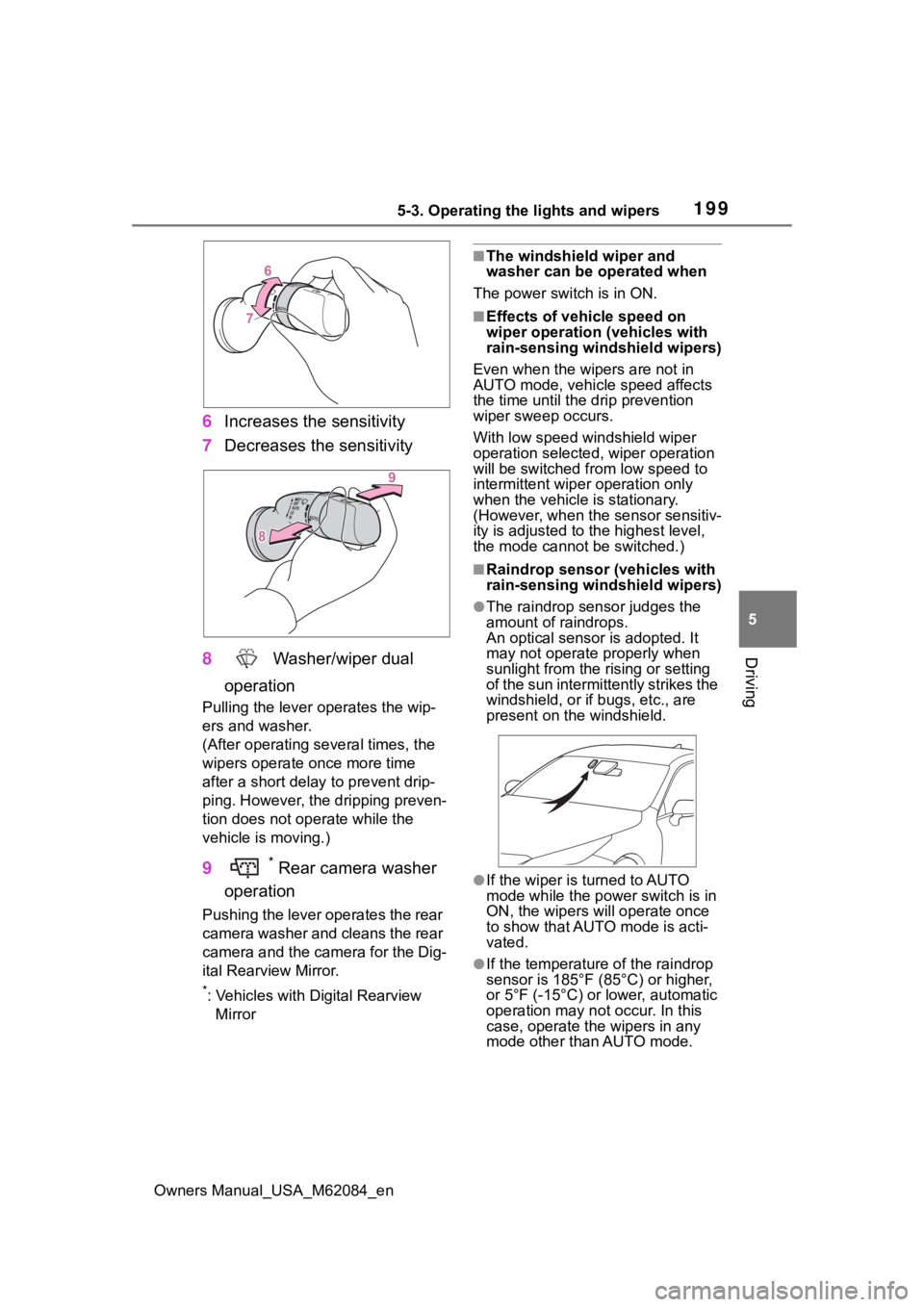
6 Increases the sensitivity
7 Decreases the sensitivity
8 Washer/wiper dual
operation
Pulling the lever o perates the wip-
ers and washer.
(After operating several times, the
wipers operate once more time
after a short delay to prevent drip-
ping. However, the dripping preven-
tion does not operate while the
vehicle is moving.)
9* Rear camera washer
operation
Pushing the lever operates the rear
camera washer and cleans the rear
camera and the camera for the Dig-
ital Rearview Mirror.
*: Vehicles with Digital Rearview Mirror
■The windshield wiper and
washer can be operated when
The power switch is in ON.
■Effects of vehicle speed on
wiper operation (vehicles with
rain-sensing windshield wipers)
Even when the wipers are not in
AUTO mode, vehicle speed affects
the time until the drip prevention
wiper sweep occurs.
With low speed windshield wiper
operation selected, wiper operation
will be switched fro m low speed to
intermittent wiper operation only
when the vehicle is stationary.
(However, when the sensor sensitiv-
ity is adjusted to the highest level,
the mode cannot be switched.)
■Raindrop sensor (vehicles with
rain-sensing windshield wipers)
●The raindrop sensor judges the
amount of raindrops.
An optical sensor is adopted. It
may not operate properly when
sunlight from the rising or setting
of the sun intermittently strikes the
windshield, or if b ugs, etc., are
present on the windshield.
●If the wiper is turned to AUTO
mode while the power switch is in
ON, the wipers will operate once
to show that AUTO mode is acti-
vated.
●If the temperature of the raindrop
sensor is 185°F (85°C) or higher,
or 5°F (-15°C) or lower, automatic
operation may not occur. In this
case, operate the wipers in any
mode other than AUTO mode.
Page 209 of 556
2095-5. Using the driving support systems
Owners Manual_USA_M62084_en
5
Driving
■Certification
P.546
WARNING
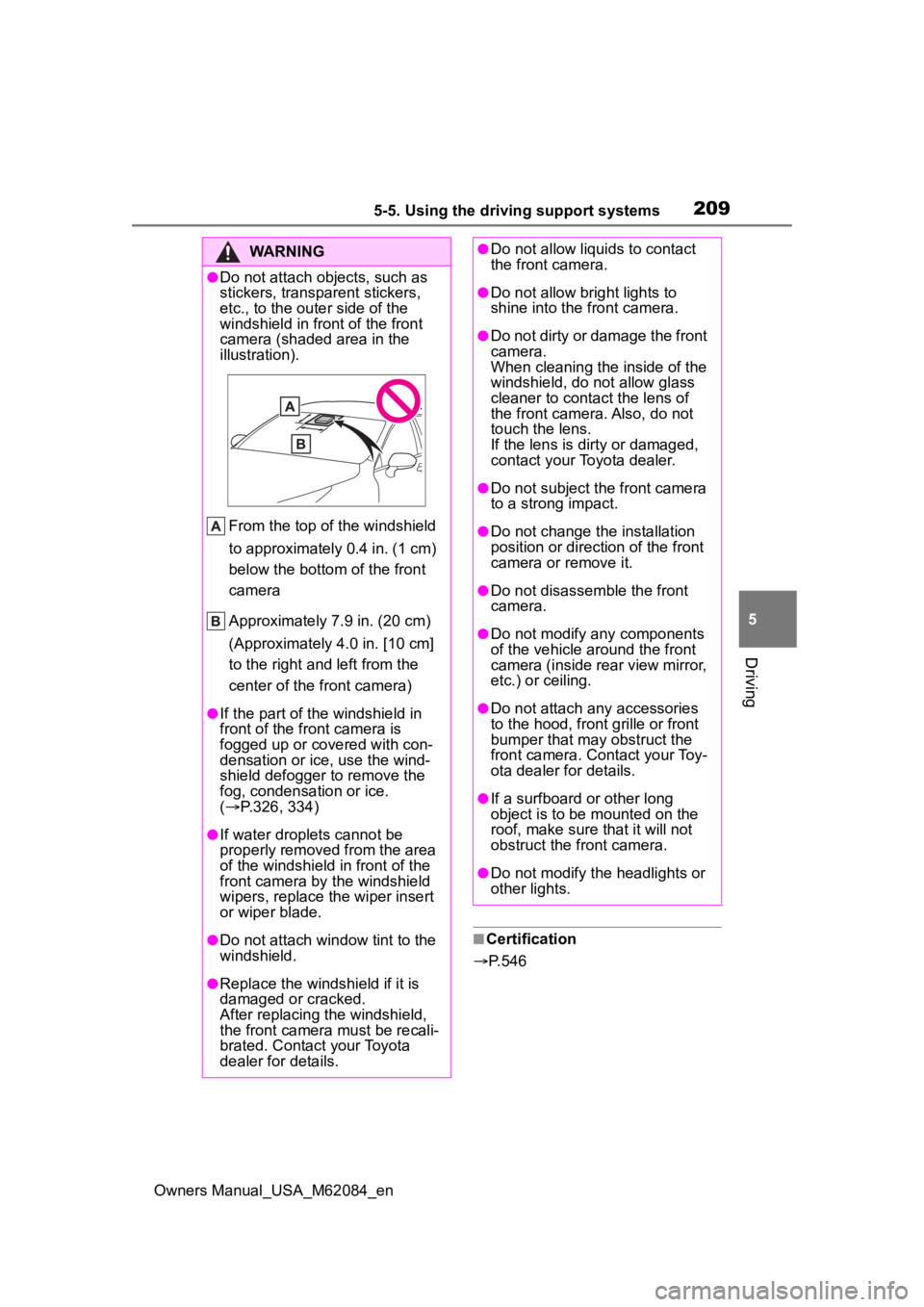
●Do not attach objects, such as
stickers, transparent stickers,
etc., to the oute r side of the
windshield in fr ont of the front
camera (shaded area in the
illustration).
From the top of the windshield
to approximately 0.4 in. (1 cm)
below the bottom of the front
camera
Approximately 7.9 in. (20 cm)
(Approximately 4.0 in. [10 cm]
to the right and left from the
center of the front camera)
●If the part of the windshield in
front of the front camera is
fogged up or covered with con-
densation or ice, use the wind-
shield defogger to remove the
fog, condensation or ice.
( P.326, 334)
●If water droplets cannot be
properly removed from the area
of the windshield in front of the
front camera by the windshield
wipers, replace the wiper insert
or wiper blade.
●Do not attach win dow tint to the
windshield.
●Replace the windshield if it is
damaged or cracked.
After replacing the windshield,
the front camera must be recali-
brated. Contact your Toyota
dealer for details.
●Do not allow liquids to contact
the front camera.
●Do not allow bright lights to
shine into the front camera.
●Do not dirty or damage the front
camera.
When cleaning the inside of the
windshield, do not allow glass
cleaner to contact the lens of
the front camera. Also, do not
touch the lens.
If the lens is dirty or damaged,
contact your Toyota dealer.
●Do not subject the front camera
to a strong impact.
●Do not change the installation
position or direction of the front
camera or remove it.
●Do not disassemble the front
camera.
●Do not modify any components
of the vehicle around the front
camera (inside rear view mirror,
etc.) or ceiling.
●Do not attach any accessories
to the hood, front grille or front
bumper that may obstruct the
front camera. Contact your Toy-
ota dealer for details.
●If a surfboard or other long
object is to be mounted on the
roof, make sure that it will not
obstruct the front camera.
●Do not modify the headlights or
other lights.