mirror TOYOTA MIRAI 2022 Service Manual
[x] Cancel search | Manufacturer: TOYOTA, Model Year: 2022, Model line: MIRAI, Model: TOYOTA MIRAI 2022Pages: 556, PDF Size: 17.34 MB
Page 325 of 556
3256-1. Using the air conditioning system and defogger
Owners Manual_USA_M62084_en
6
Interior features
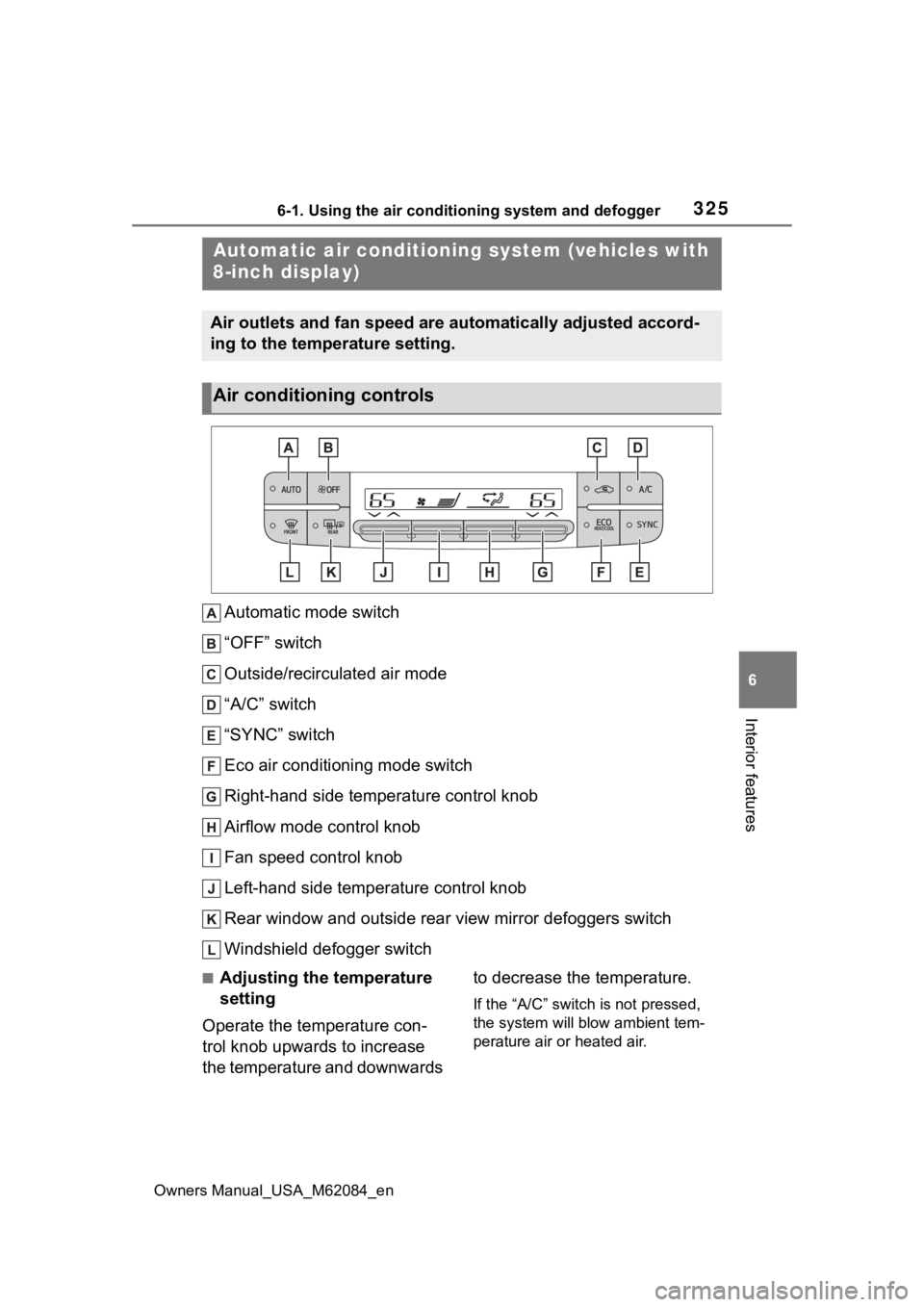
Automatic mode switch
“OFF” switch
Outside/recirculated air mode
“A/C” switch
“SYNC” switch
Eco air conditioning mode switch
Right-hand side temperature control knob
Airflow mode control knob
Fan speed control knob
Left-hand side temperature control knob
Rear window and outside rear view mirror defoggers switch
Windshield defogger switch
■Adjusting the temperature
setting
Operate the temperature con-
trol knob upwards to increase
the temperature and downwards to decrease the temperature.
If the “A/C” switch is not pressed,
the system will blow ambient tem-
perature air or heated air.
Automatic air conditioning
system (vehicles with
8-inch display)
Air outlets and fan speed are automatically adjusted accord-
ing to the temperature setting.
Air conditioning controls
Page 327 of 556
3276-1. Using the air conditioning system and defogger
Owners Manual_USA_M62084_en
6
Interior features
To return to the previous mode,
press the windshield defogger
switch again when the windshield is
defogged.
When the windshield defogger
switch is on, the indicator illumi-
nates on the windshield defogger
switch.
■Defogging the rear window
and outside rear view mir-
rors
Defoggers are used to defog the
rear window and to remove rain-
drops, dew and frost from the
outside rear view mirrors.
Press the rear window and out-
side rear view mirror defoggers
switch.
The defoggers will automatically
turn off after 15 minutes.
When the rear window and outside
rear view mirror defoggers switch is
on, the indicator illuminates on the
rear window and ou tside rear view
mirror defoggers switch.
■When the outside temperature
exceeds 75°F (24°C) and the air
conditioning system is on
●In order to reduce the air condi-
tioning power consumption, the air
conditioning system may switch to
recirculated air mode automati-
cally.
This may also reduce fuel con-
sumption.
●Recirculated air mode is selected
as a default mode when the power
switch is turned to ON.
●It is possible to switch to outside
air mode at any time by pressing
the outside/recirculated air mode
switch.
■Fogging up of the windows
●The windows will easily fog up
when the humidity in the vehicle is
high. Turning the cooling and
dehumidification function on will
dehumidify the air from the outlets
and defog the windshield effec-
tively.
●If you turn the cooling and dehu-
midification function off, the win-
dows may fog up more easily.
●The windows may fog up if the
recirculated air mode is used.
■When driving on dusty roads
Close all windows. If dust thrown up
by the vehicle is still drawn into the
vehicle after closing the windows, it
is recommended that the air intake
mode be set to outside air mode and
the fan speed to a ny setting except
off.
■Outside/recirculated air mode
●Setting to the recirculated air
mode temporarily is recom-
mended in preventing dirty air
from entering the vehicle interior
and helping to c ool the vehicle
when the outside air temperature
is high.
●Outside/recirculated air mode may
automatically switch depending on
the temperature setting or the
inside temperature.
■When the outside temperature
falls to nearly 32°F (0°C)
The dehumidification function may
not operate even when “A/C” switch
is pressed.
■Operation of the air condition-
ing system in Eco drive mode
●In Eco drive mode, the air condi-
tioning system is controlled as fol-
lows to prioritize fuel efficiency:
• Fuel cell system and compressor
operation controlled to restrict
heating/cooling capacity
• Fan speed restri cted when auto-
matic mode is selected
Page 329 of 556
3296-1. Using the air conditioning system and defogger
Owners Manual_USA_M62084_en
6
Interior features
1 Press the “AUTO” switch.
2 Adjust the temperature set-
ting.
3 To stop the operation, press
the “OFF” switch.
If the fan speed setting or air
flow modes are operated, the
automatic mode indicator goes
off. However, automatic mode
for functions other than that
operated is maintained.
■Using automatic mode
Fan speed is adjusted automati-
cally according to the temperature
setting and the ambient conditions. Therefore, the fan may stop for a
while until warm or
cool air is ready
to flow immediately after the auto-
matic mode switch is pressed.
To turn on the “SYNC” mode,
press the “SYNC” switch.
The driver’s side temperature con-
trol knob can be used to adjust the
temperature for the driver’s and
passenger’s side. To enter individ-
ual mode, operate the passenger’s
side temperature control knob or
press the “SYNC” switch again.
When the “SYNC” mode is on, the
indicator illuminates on the “SYNC”
switch.
This feature is used to prevent
ice from building up on the wind-
shield and wiper blades.
Press the switch to turn the sys-
tem on/off.
The indicator comes on when the
system is on.
The windshield wiper de-icer will
automatically turn off after approxi-
mately 15 minutes.
WARNING
■When the outside rear view
mirror defoggers are operat-
ing
Do not touch the rear view mirror
surfaces when the outside rear
view mirror defoggers are on.
NOTICE
■To prevent 12-volt battery dis-
charge
Do not leave the air conditioning
system on longer than necessary
when the fuel cell system is off.
■When repairing/replacing
parts of the air conditioning
system
Have repair/replacement per-
formed by your Toyota dealer.
When a part of the air conditioning
system, such as the evaporator, is
to be replaced, it must be
replaced with a new one.
Using automatic mode
Adjusting the temperature
for driver and passenger
seats simultaneously
(“SYNC” mode)
Windshield wiper de-icer
(if equipped)
Page 333 of 556
3336-1. Using the air conditioning system and defogger
Owners Manual_USA_M62084_en
6
Interior features
Outside/recirculated air mode switch
Eco air conditioning mode switch
“A/C” switch
Rear air conditioning contro l screen select switch
Automatic mode switch
Windshield defogger switch
Rear window and outside rear view mirror defoggers switch
“OFF” switch
■Adjusting the temperature
setting
Press of the temperature
control switches on the air con-
ditioning control panel or select of the temperature control
switches on the air conditioning
control screen to increases the
temperature.
Press of the temperature
control switches on the air con-
ditioning control panel or select
of the temperature control
switches on the air conditioning
control screen to decreases the
temperature.
If the switch is pr essed and held or
selected and held, the temperature
will continuously change.
If the indicator on the “A/C” switch
does not illuminate , the system will
blow ambient temperature air or heated air.
■Setting the fan speed
Press the fan speed increase
switch on the air conditioning
control panel or select the fan
speed increase switch on the air
conditioning control screen to
increase the fan speed.
Press the fan speed decrease
switch on the air conditioning
control panel or select the fan
speed decrease switch on the
air conditioning control screen to
decrease the fan speed.
Press the “OFF” s witch on the air
conditioning control panel to turn
the fan off.
■Change the airflow mode
Select the airflow mode control
switch on the air conditioning
control screen.
The airflow mode changes each
time the switch is selected.
: Air flows to the upper body
: Air flows to the upper body
Page 334 of 556

3346-1. Using the air conditioning system and defogger
Owners Manual_USA_M62084_en
and feet: Air flows to the feet
: Air flows to the feet and the
windshield defogger operates
■Switching between outside
air and recirculated air
modes
Select the outside/recirculated
air mode switch on the air condi-
tioning control screen.
The mode switches between out-
side air mode and recirculated air
mode each time the switch is
selected.
When recirculated air mode is
selected, the indicator illuminates
on the outside/recirculated air
mode switch.
■Set cooling and dehumidifi-
cation function
Select the “A/C” switch on the
air conditioning control screen.
When the function i s on, the indica-
tor illuminates on th e “A/C” switch.
■Eco air conditioning mode
The air conditioning is controlled
with low fuel consumption priori-
tized such as reducing fan
speed, etc.
Select the eco air conditioning
mode switch on the air condi-
tioning control screen.
When the eco air conditioning
mode is on, the indicator illumi-
nates on the eco air conditioning
mode switch.
■Defogging the windshield
Defoggers are used to defog the
windshield and front side win-
dows.
Press the windshield defogger
switch on the air conditioning
control panel.
Set the outside/recirculated air
mode switch to outside air mode if
the recirculated air mode is used. (It
may switch automatically.)
To defog the windshield and the
side windows quickly, turn the air
flow and temperature up.
To return to the previous mode,
press the windshield defogger
switch again when the windshield is
defogged.
When the windshield defogger
switch is on, the indicator illumi-
nates on the windshield defogger
switch.
■Defogging the rear window
and outside rear view mir-
rors
Defoggers are used to defog the
rear window and to remove rain-
drops, dew and frost from the
outside rear view mirrors.
Press the rear window and out-
side rear view mirror defoggers
switch on the air conditioning
control panel.
The defoggers will automatically
turn off after 15 minutes.
When the rear window and outside
rear view mirror defoggers switch is
on, the indicator illuminates on the
rear window and outside rear view
Page 335 of 556
3356-1. Using the air conditioning system and defogger
Owners Manual_USA_M62084_en
6
Interior features
mirror defoggers switch.
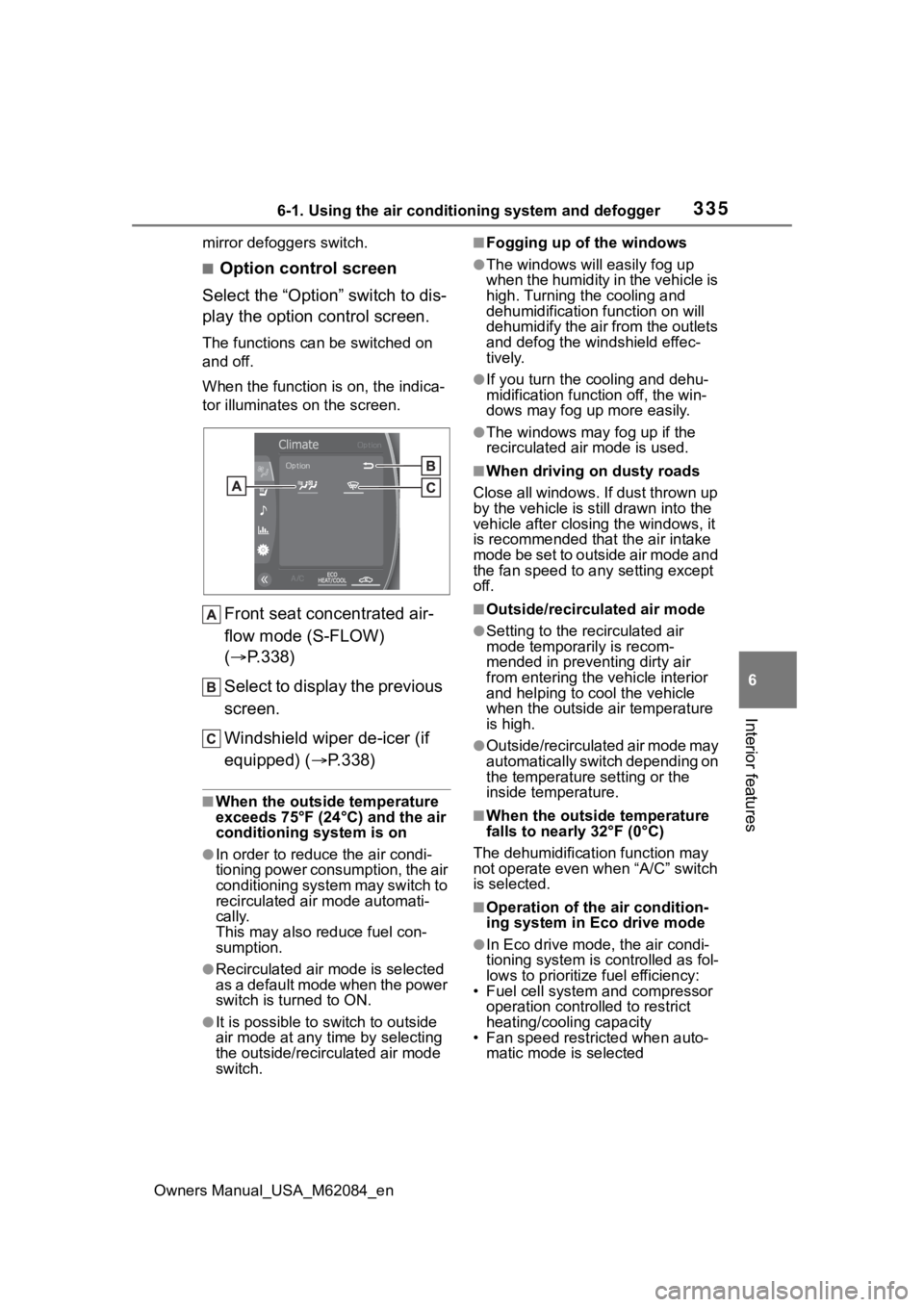
■Option control screen
Select the “Option” switch to dis-
play the option control screen.
The functions can be switched on
and off.
When the function i s on, the indica-
tor illuminates on the screen.
Front seat concentrated air-
flow mode (S-FLOW)
( P.338)
Select to display the previous
screen.
Windshield wiper de-icer (if
equipped) ( P.338)
■When the outside temperature
exceeds 75°F (24°C) and the air
conditioning system is on
●In order to reduce the air condi-
tioning power consumption, the air
conditioning system may switch to
recirculated air mode automati-
cally.
This may also reduce fuel con-
sumption.
●Recirculated air mode is selected
as a default mode when the power
switch is turned to ON.
●It is possible to switch to outside
air mode at any time by selecting
the outside/recirculated air mode
switch.
■Fogging up of the windows
●The windows will easily fog up
when the humidity in the vehicle is
high. Turning the cooling and
dehumidification function on will
dehumidify the air from the outlets
and defog the windshield effec-
tively.
●If you turn the cooling and dehu-
midification function off, the win-
dows may fog up more easily.
●The windows may fog up if the
recirculated air mode is used.
■When driving on dusty roads
Close all windows. If dust thrown up
by the vehicle is still drawn into the
vehicle after closing the windows, it
is recommended that the air intake
mode be set to outside air mode and
the fan speed to a ny setting except
off.
■Outside/recirculated air mode
●Setting to the recirculated air
mode temporarily is recom-
mended in preventing dirty air
from entering the vehicle interior
and helping to c ool the vehicle
when the outside air temperature
is high.
●Outside/recirculated air mode may
automatically switch depending on
the temperature setting or the
inside temperature.
■When the outside temperature
falls to nearly 32°F (0°C)
The dehumidification function may
not operate even when “A/C” switch
is selected.
■Operation of the air condition-
ing system in Eco drive mode
●In Eco drive mode, the air condi-
tioning system is controlled as fol-
lows to prioritize fuel efficiency:
• Fuel cell system and compressor
operation controlled to restrict
heating/cooling capacity
• Fan speed restri cted when auto-
matic mode is selected
Page 337 of 556
3376-1. Using the air conditioning system and defogger
Owners Manual_USA_M62084_en
6
Interior features
1 Press the “AUTO” switch on
the air conditioning control
panel.
2 Adjust the temperature set-
ting.
3 To stop the operation, press
the “OFF” switch on the air
conditioning control panel.
If the fan speed setting or air
flow modes are operated, the
automatic mode indicator goes
off. However, automatic mode
for functions other than that
operated is maintained.
■Using automatic mode
Fan speed is adjusted automati-
cally according to the temperature
setting and the ambient conditions.
Therefore, the fan may stop for a
while until warm or cool air is ready
to flow immediately after the auto-
matic mode switch is pressed.
Vehicles with DUAL-ZONE
climate control
To turn on the “SYNC” mode,
select the “SYNC” switch on the
air conditioning control screen.
The driver’s side temperature con-
trol switches can b e used to adjust
the temperature for the driver’s and
passenger’s side. To enter individ-
ual mode, operate the passenger’s
side temperature co ntrol switches
or select the “SYNC” switch again.
When the “SYNC” mode is on, the
indicator illuminates on the “SYNC”
switch.
Vehicles with 3-ZONE cli-
mate control
To turn on the “3-ZONE” mode,
select the “3-ZONE” switch on
the air conditioning control
screen.
The driver’s side temperature con-
trol switches can b e used to adjust
the temperature for the driver’s and
passenger’s side. To enter individ-
ual mode, operate the passenger’s
side temperature co ntrol switches
WARNING
■To prevent the windshield
from fogging up
Do not use the windshield defog-
ger switch during cool air opera-
tion in extremely humid weather.
The difference between the tem-
perature of the outside air and
that of the windshield can cause
the outer surface of the wind-
shield to fog up, blocking your
vision.
■When the outside rear view
mirror defoggers are operat-
ing
Do not touch the rear view mirror
surfaces when the outside rear
view mirror defoggers are on.
NOTICE
■To prevent 12-volt battery dis-
charge
Do not leave the air conditioning
system on longer than necessary
when the fuel cell system is off.
Using automatic mode
Adjusting the temperature
for driver and passenger
seats simultaneously
(“SYNC” mode)
Page 369 of 556
3696-4. Using the other interior features
Owners Manual_USA_M62084_en
6
Interior features
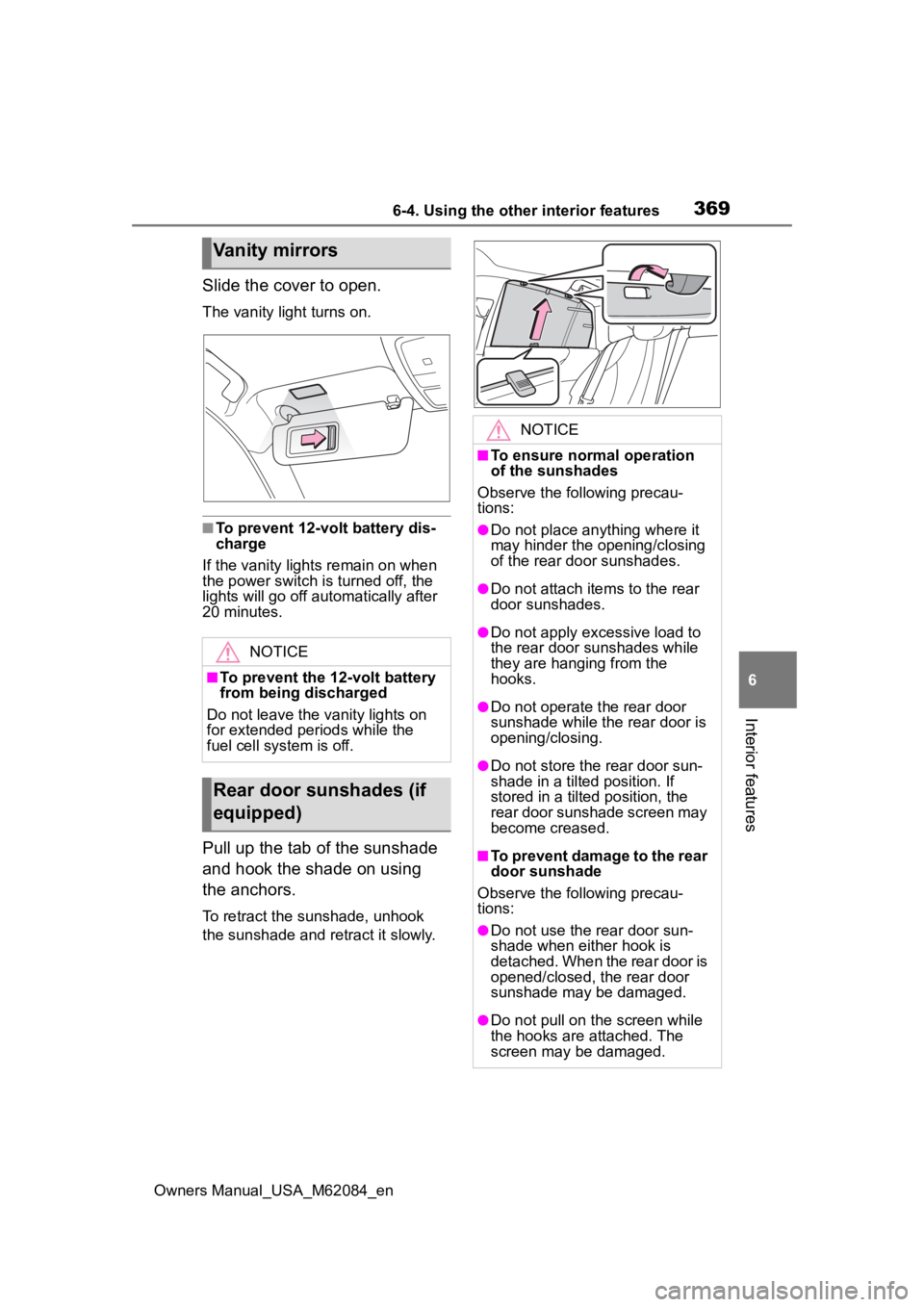
Slide the cover to open.
The vanity light turns on.
■To prevent 12-volt battery dis-
charge
If the vanity light s remain on when
the power switch is turned off, the
lights will go off automatically after
20 minutes.
Pull up the tab of the sunshade
and hook the shade on using
the anchors.
To retract the sunshade, unhook
the sunshade and re tract it slowly.
Vanity mirrors
NOTICE
■To prevent the 12-volt battery
from being discharged
Do not leave the vanity lights on
for extended periods while the
fuel cell system is off.
Rear door sunshades (if
equipped)
NOTICE
■To ensure normal operation
of the sunshades
Observe the following precau-
tions:
●Do not place anything where it
may hinder the opening/closing
of the rear door sunshades.
●Do not attach ite ms to the rear
door sunshades.
●Do not apply excessive load to
the rear door sunshades while
they are hanging from the
hooks.
●Do not operate t he rear door
sunshade while the rear door is
opening/closing.
●Do not store the rear door sun-
shade in a tilted position. If
stored in a tilted position, the
rear door sunshade screen may
become creased.
■To prevent damage to the rear
door sunshade
Observe the following precau-
tions:
●Do not use the rear door sun-
shade when either hook is
detached. When the rear door is
opened/closed, the rear door
sunshade may be damaged.
●Do not pull on t he screen while
the hooks are attached. The
screen may be damaged.
Page 372 of 556
3726-4. Using the other interior features
Owners Manual_USA_M62084_en
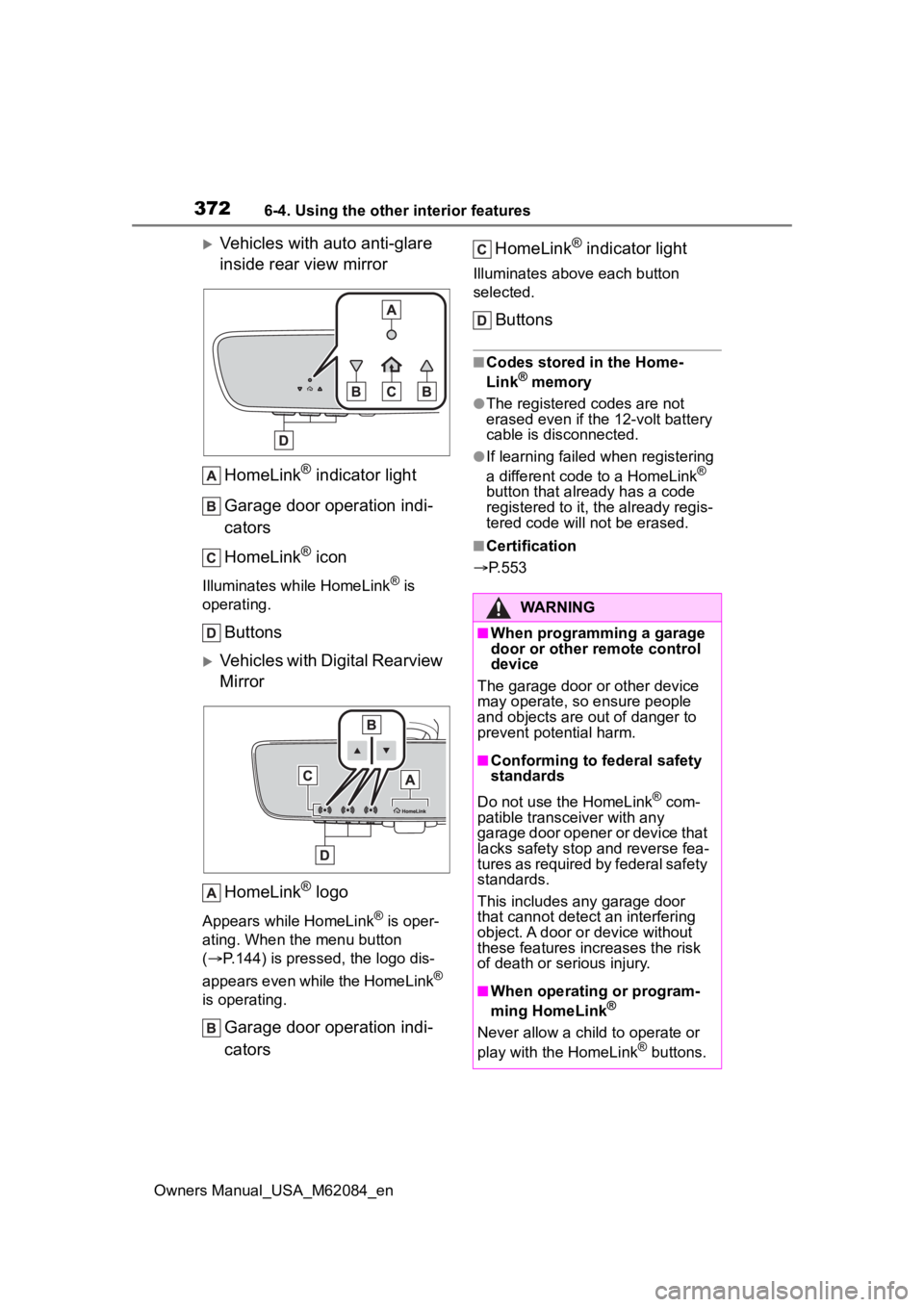
Vehicles with auto anti-glare
inside rear view mirrorHomeLink
® indicator light
Garage door operation indi-
cators
HomeLink
® icon
Illuminates while HomeLink® is
operating.
Buttons
Vehicles with Digital Rearview
Mirror
HomeLink
® logo
Appears while HomeLink® is oper-
ating. When the menu button
( P.144) is pressed, the logo dis-
appears even while the HomeLink
®
is operating.
Garage door operation indi-
cators HomeLink
® indicator light
Illuminates above each button
selected.
Buttons
■Codes stored in the Home-
Link® memory
●The registered codes are not
erased even if the 12-volt battery
cable is disconnected.
●If learning failed when registering
a different code to a HomeLink®
button that already has a code
registered to it, the already regis-
tered code will not be erased.
■Certification
P.553
WARNING
■When programming a garage
door or other remote control
device
The garage door or other device
may operate, so ensure people
and objects are out of danger to
prevent potential harm.
■Conforming to federal safety
standards
Do not use the HomeLink
® com-
patible transce iver with any
garage door opener or device that
lacks safety stop and reverse fea-
tures as required by federal safety
standards.
This includes any garage door
that cannot detect an interfering
object. A door or device without
these features increases the risk
of death or serious injury.
■When operating or program-
ming HomeLink®
Never allow a child to operate or
play with the HomeLink® buttons.
Page 373 of 556
3736-4. Using the other interior features
Owners Manual_USA_M62084_en
6
Interior features
■Before programming Home-
Link
®
During programming, it is pos-
sible that garage doors,
gates, or other devices may
operate. For this reason,
make sure that people and
objects are clear of the
garage door or other devices
to prevent injury or other
potential harm.
It is recommended that a new
battery be placed in the
remote control transmitter for
more accurate programming.
Garage door opener motors
manufactured after 1995 may
be equipped with rolling code
protection. If this is the case,
you may need a stepladder or
other sturdy, safe device to
reach the “Learn” or “Smart”
button on the garage door
opener motor.
■Programming HomeLink®
Steps 1 through 3 must be per-
formed within 60 seconds, oth-
erwise the indicator light will
stop flashing and programming
will not be successfully com-
pleted.
1 Press and release the Home-
Link
® button you want to pro-
gram and check that the HomeLink
® indicator light
flashes (orange).
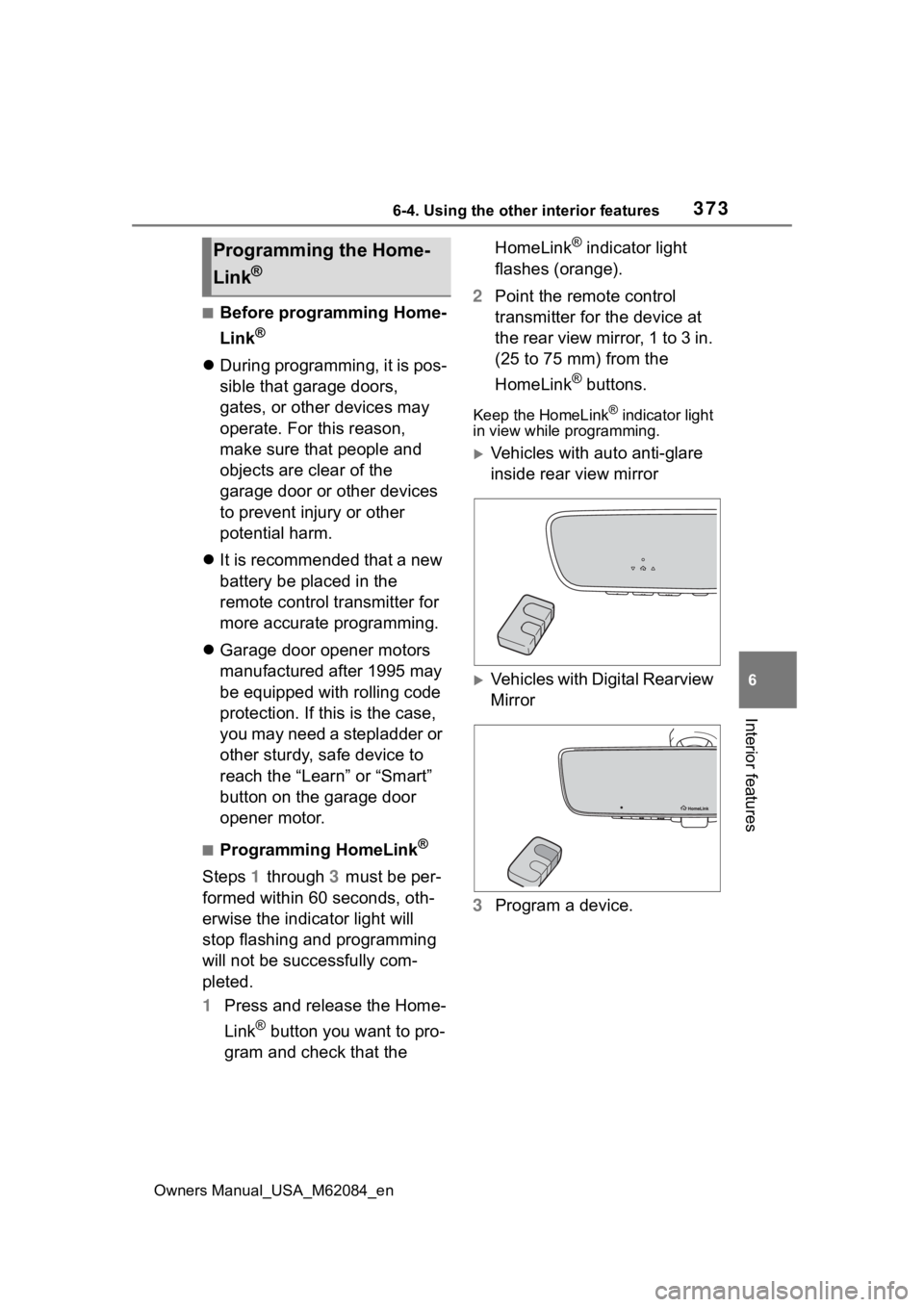
2 Point the remote control
transmitter for the device at
the rear view mirror, 1 to 3 in.
(25 to 75 mm) from the
HomeLink
® buttons.
Keep the HomeLink® indicator light
in view while programming.
Vehicles with auto anti-glare
inside rear view mirror
Vehicles with Digital Rearview
Mirror
3 Program a device.
Programming the Home-
Link
®