mirror TOYOTA MIRAI 2022 Owner's Guide
[x] Cancel search | Manufacturer: TOYOTA, Model Year: 2022, Model line: MIRAI, Model: TOYOTA MIRAI 2022Pages: 556, PDF Size: 17.34 MB
Page 249 of 556
2495-5. Using the driving support systems
Owners Manual_USA_M62084_en
5
Driving
*: If equipped
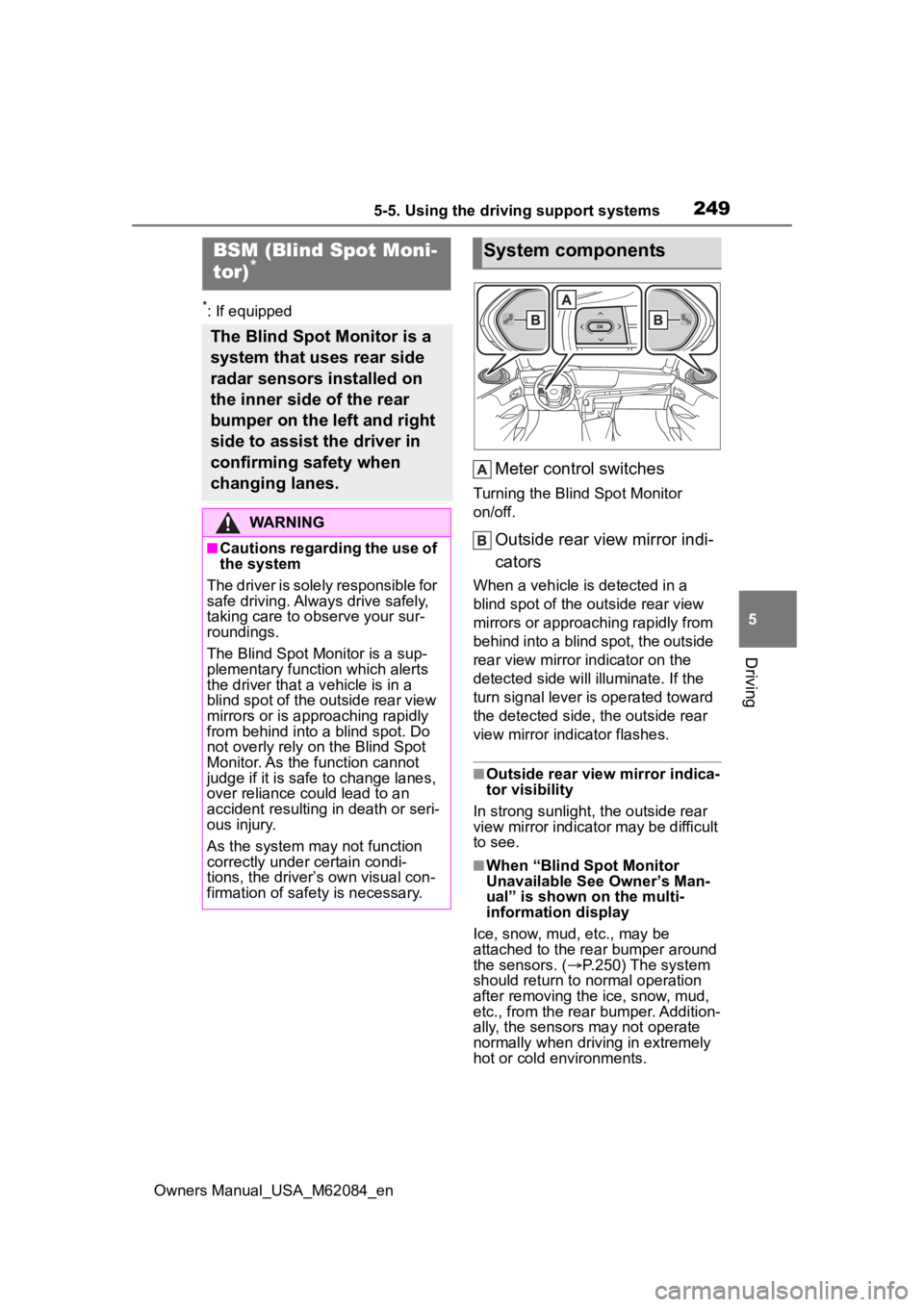
Meter control switches
Turning the Blind Spot Monitor
on/off.
Outside rear view mirror indi-
cators
When a vehicle is detected in a
blind spot of the outside rear view
mirrors or approaching rapidly from
behind into a blind spot, the outside
rear view mirror indicator on the
detected side will illuminate. If the
turn signal lever is operated toward
the detected side, the outside rear
view mirror indicator flashes.
■Outside rear vie w mirror indica-
tor visibility
In strong sunlight, the outside rear
view mirror indicator may be difficult
to see.
■When “Blind Spot Monitor
Unavailable See Owner’s Man-
ual” is shown on the multi-
information display
Ice, snow, mud, etc., may be
attached to the rear bumper around
the sensors. ( P.250) The system
should return to normal operation
after removing the ice, snow, mud,
etc., from the rear bumper. Addition-
ally, the sensors may not operate
normally when drivin g in extremely
hot or cold environments.
BSM (Blind Spot Moni-
tor)*
The Blind Spot Monitor is a
system that uses rear side
radar sensors installed on
the inner side of the rear
bumper on the left and right
side to assist the driver in
confirming safety when
changing lanes.
WARNING
■Cautions regarding the use of
the system
The driver is solely responsible for
safe driving. Always drive safely,
taking care to o bserve your sur-
roundings.
The Blind Spot Monitor is a sup-
plementary function which alerts
the driver that a v ehicle is in a
blind spot of the outside rear view
mirrors or is approaching rapidly
from behind into a blind spot. Do
not overly rely on the Blind Spot
Monitor. As the function cannot
judge if it is safe to change lanes,
over reliance could lead to an
accident resulting in death or seri-
ous injury.
As the system may not function
correctly under certain condi-
tions, the driver’s own visual con-
firmation of safety is necessary.
System components
Page 251 of 556
2515-5. Using the driving support systems
Owners Manual_USA_M62084_en
5
Driving
Use the meter control switches
to turn on/off the function.
( P.100)
1 Press or to select .
2 Press or to select “
BSM” and then press .
When the BSM function is disabled,
the BSM OFF indicator illuminates.
(Each time the power switch is
turned off then ch anged to ON, the
Blind Spot Monitor will be enabled
automatically.)
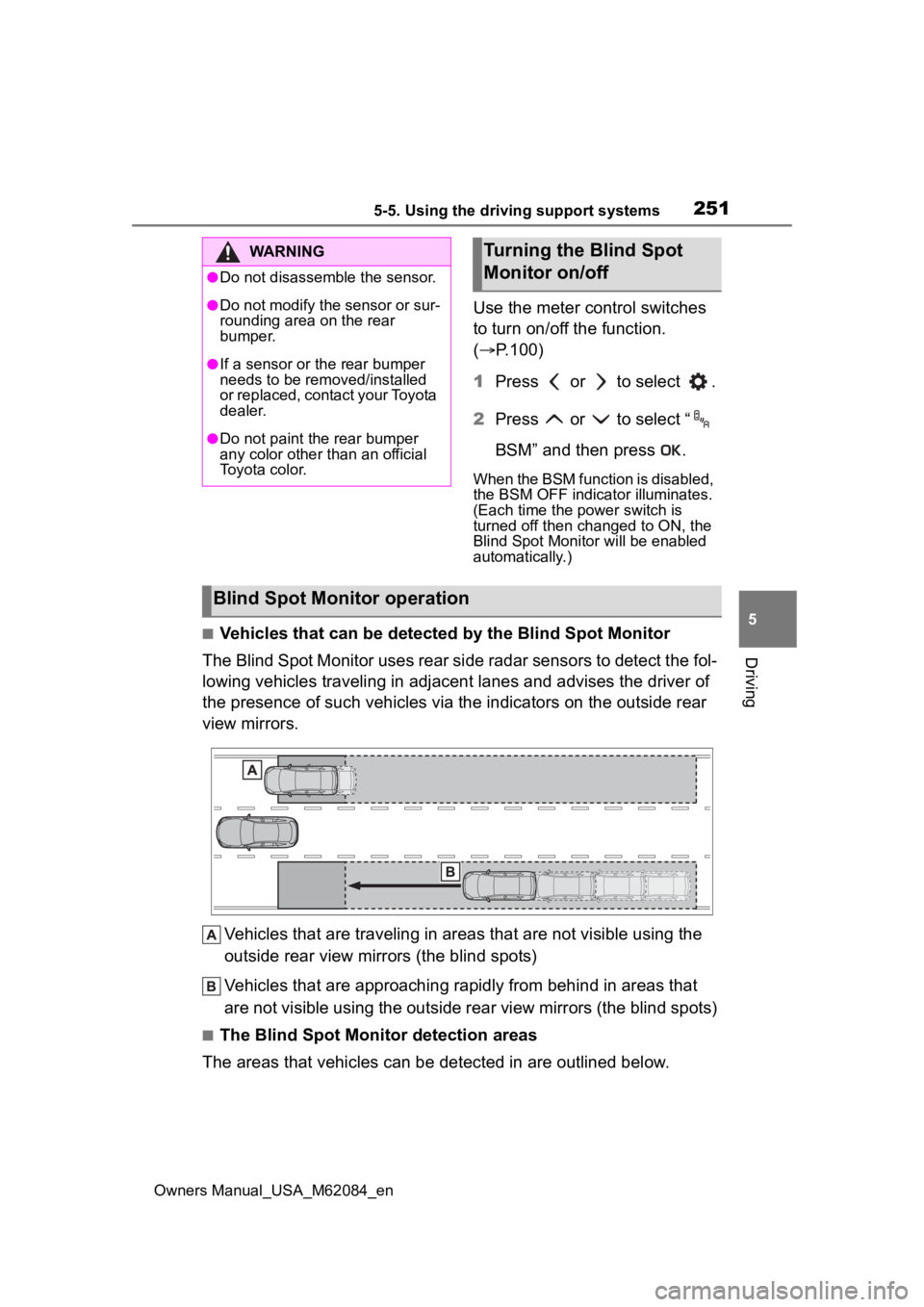
■Vehicles that can be detected by the Blind Spot Monitor
The Blind Spot Monitor uses rear side radar sensors to detect the fol-
lowing vehicles traveling in adjacent lanes and advises the driver of
the presence of such vehicles via the indicators on the outside rear
view mirrors.
Vehicles that are traveling in areas that are not visible using the
outside rear view mirrors (the blind spots)
Vehicles that are approaching r apidly from behind in areas that
are not visible using the outside rear view mirrors (the blind spots)
■The Blind Spot Monitor detection areas
The areas that vehicles can be detected in are outlined below.
WARNING
●Do not disassemble the sensor.
●Do not modify the sensor or sur-
rounding area on the rear
bumper.
●If a sensor or th e rear bumper
needs to be removed/installed
or replaced, contact your Toyota
dealer.
●Do not paint the rear bumper
any color other than an official
Toyota color.
Turning the Blind Spot
Monitor on/off
Blind Spot Monitor operation
Page 252 of 556
2525-5. Using the driving support systems
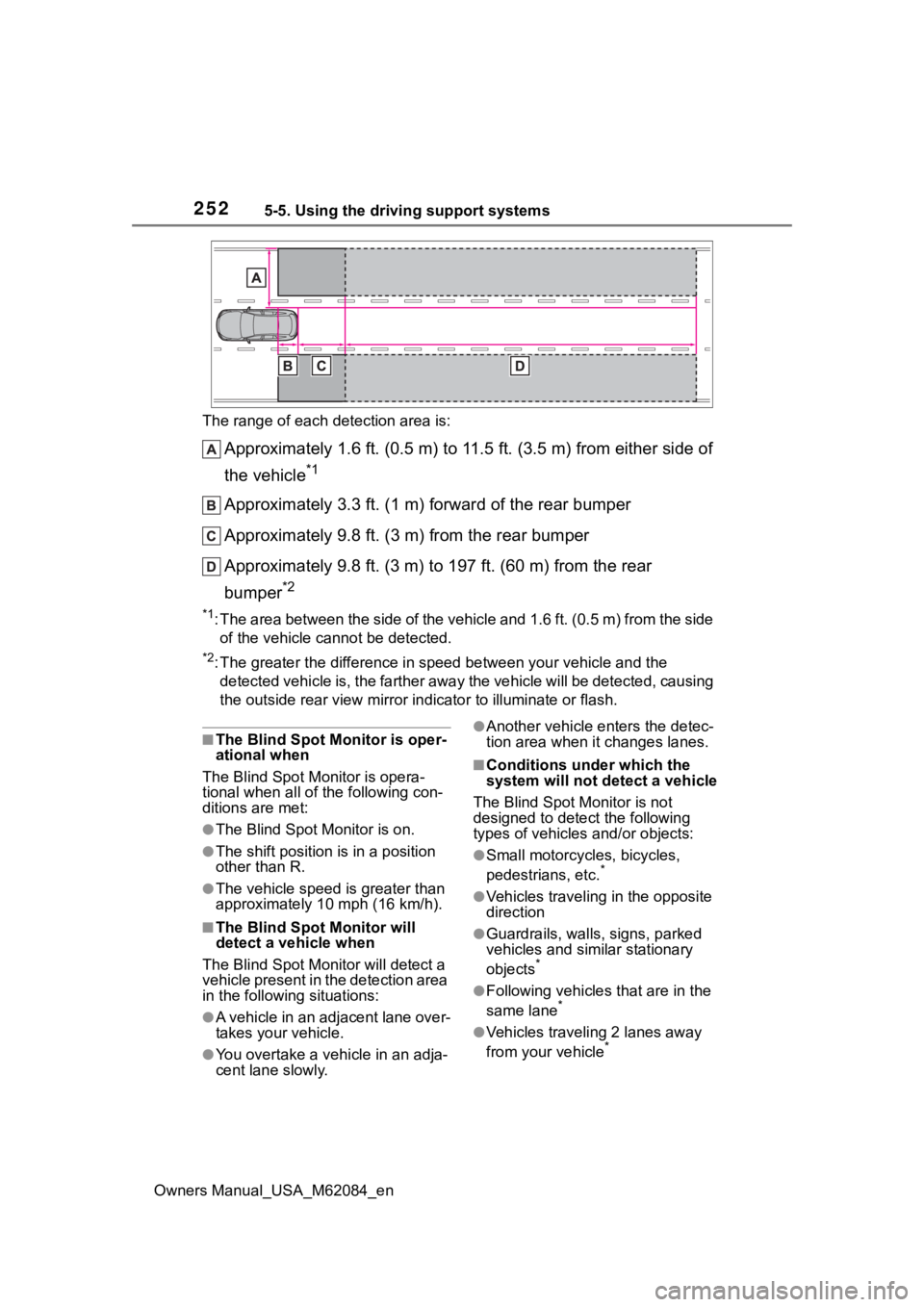
Owners Manual_USA_M62084_enThe range of each detection area is:
Approximately 1.6 ft. (0.5 m) to 11.5 ft. (3.5 m) from either s
ide of
the vehicle
*1
Approximately 3.3 ft. (1 m) forward of the rear bumper
Approximately 9.8 ft. (3 m) from the rear bumper
Approximately 9.8 ft. (3 m) to 197 ft. (60 m) from the rear
bumper
*2
*1: The area between the side of the vehicle and 1.6 ft. (0.5 m) f rom the side
of the vehicle cannot be detected.
*2: The greater the difference in speed between your vehicle and t he
detected vehicle is, the farthe r away the vehicle will be detec ted, causing
the outside r ear view mirror indicato r to illuminate or flash.
■The Blind Spot Monitor is oper-
ational when
The Blind Spot Monitor is opera-
tional when all of the following con-
ditions are met:
●The Blind Spot Monitor is on.
●The shift position is in a position
other than R.
●The vehicle speed is greater than
approximately 10 mph (16 km/h).
■The Blind Spot Monitor will
detect a vehicle when
The Blind Spot Mon itor will detect a
vehicle present in the detection area
in the followin g situations:
●A vehicle in an adjacent lane over-
takes your vehicle.
●You overtake a vehicle in an adja-
cent lane slowly.
●Another vehicle enters the detec-
tion area when it changes lanes.
■Conditions under which the
system will not detect a vehicle
The Blind Spot Monitor is not
designed to detect the following
types of vehicles and/or objects:
●Small motorcycles, bicycles,
pedestrians, etc.*
●Vehicles traveling in the opposite
direction
●Guardrails, walls, signs, parked
vehicles and similar stationary
objects
*
●Following vehicles that are in the
same lane*
●Vehicles traveling 2 lanes away
from your vehicle*
Page 264 of 556
2645-5. Using the driving support systems
Owners Manual_USA_M62084_en
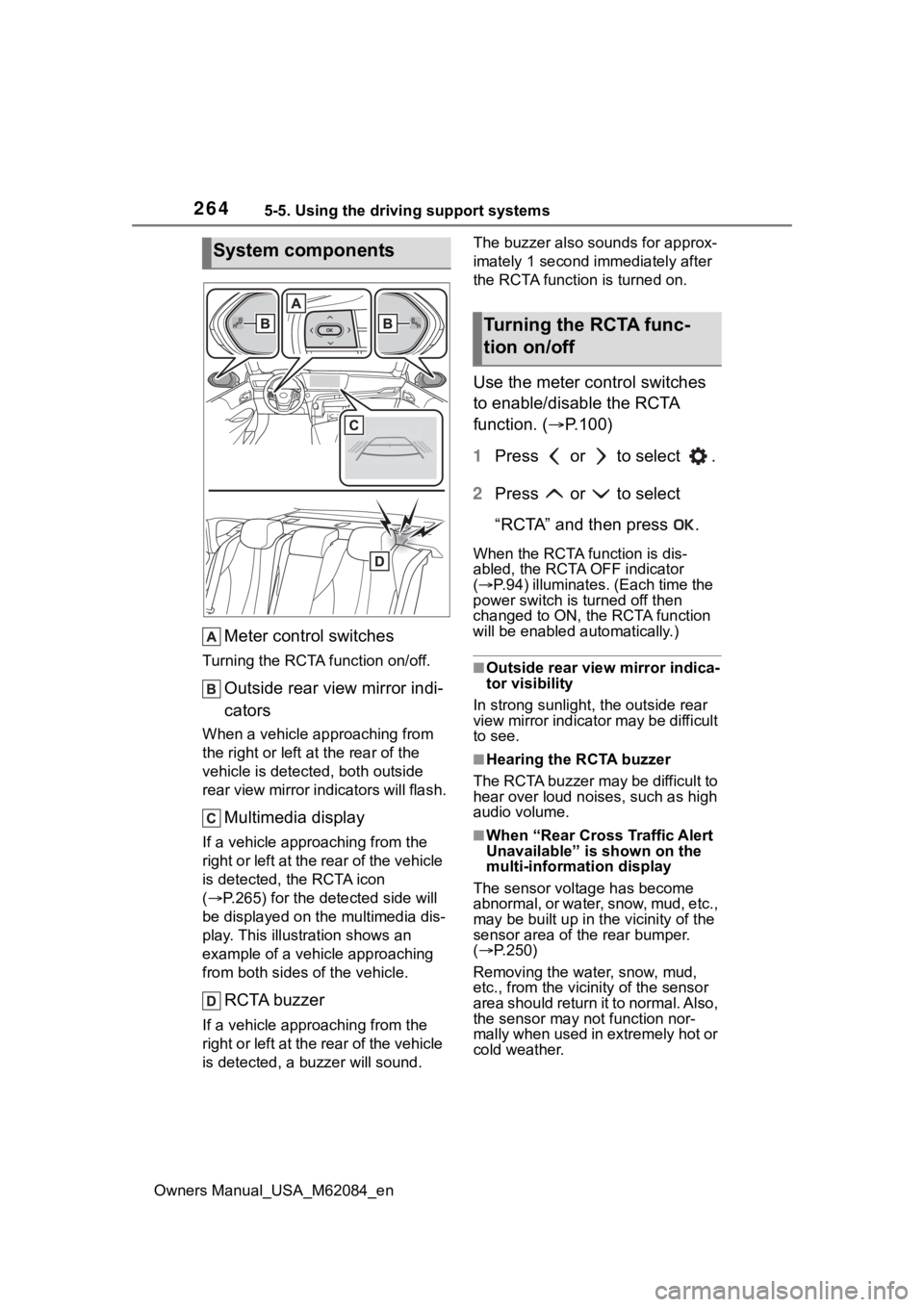
Meter control switches
Turning the RCTA function on/off.
Outside rear view mirror indi-
cators
When a vehicle approaching from
the right or left at the rear of the
vehicle is detected, both outside
rear view mirror i ndicators will flash.
Multimedia display
If a vehicle approaching from the
right or left at the rear of the vehicle
is detected, the RCTA icon
( P.265) for the det ected side will
be displayed on the multimedia dis-
play. This illustration shows an
example of a vehicle approaching
from both sides of the vehicle.
RCTA buzzer
If a vehicle appr oaching from the
right or left at the rear of the vehicle
is detected, a b uzzer will sound. The buzzer also sounds for approx-
imately 1 second immediately after
the RCTA function is turned on.
Use the meter control switches
to enable/disable the RCTA
function. (
P.100)
1 Press or to select .
2 Press or to select
“RCTA” and then press .
When the RCTA function is dis-
abled, the RCTA OFF indicator
( P.94) illuminates. (Each time the
power switch is turned off then
changed to ON, t he RCTA function
will be enabled a utomatically.)
■Outside rear vie w mirror indica-
tor visibility
In strong sunlight, the outside rear
view mirror indicator may be difficult
to see.
■Hearing the RCTA buzzer
The RCTA buzzer may be difficult to
hear over loud noises, such as high
audio volume.
■When “Rear Cross Traffic Alert
Unavailable” is shown on the
multi-information display
The sensor voltage has become
abnormal, or water, snow, mud, etc.,
may be built up in th e vicinity of the
sensor area of the rear bumper.
( P.250)
Removing the water, snow, mud,
etc., from the vicini ty of the sensor
area should return it to normal. Also,
the sensor may not function nor-
mally when used in extremely hot or
cold weather.
System components
Turning the RCTA func-
tion on/off
Page 265 of 556
2655-5. Using the driving support systems
Owners Manual_USA_M62084_en
5
Driving
■When “Rear Cross Traffic Alert
Malfunction Visit Your Dealer”
is shown on the multi-informa-
tion display
There may be a sensor malfunction
or misaligned. Have the vehicle
inspected at your Toyota dealer.
■Radar sensors
P. 2 5 0
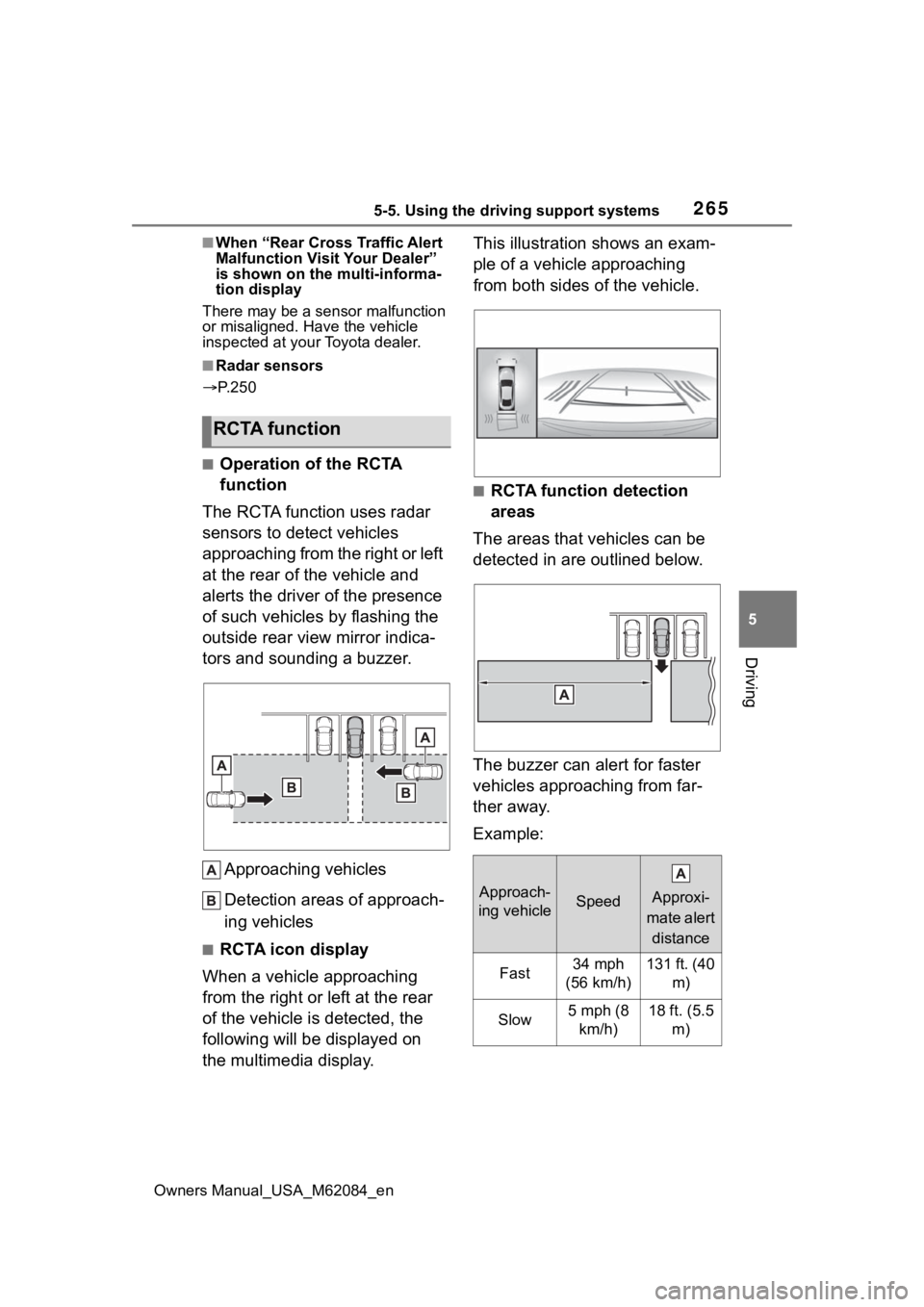
■Operation of the RCTA
function
The RCTA function uses radar
sensors to detect vehicles
approaching from the right or left
at the rear of the vehicle and
alerts the driver of the presence
of such vehicles by flashing the
outside rear view mirror indica-
tors and sounding a buzzer.
Approaching vehicles
Detection areas of approach-
ing vehicles
■RCTA icon display
When a vehicle approaching
from the right or left at the rear
of the vehicle is detected, the
following will be displayed on
the multimedia display. This illustration shows an exam-
ple of a vehicle approaching
from both sides of the vehicle.
■RCTA function detection
areas
The areas that vehicles can be
detected in are outlined below.
The buzzer can alert for faster
vehicles approaching from far-
ther away.
Example:
RCTA function
Approach-
ing vehicleSpeed
Approxi-
mate alert
distance
Fast34 mph
(56 km/h)131 ft. (40 m)
Slow5 mph (8 km/h)18 ft. (5.5 m)
Page 284 of 556
2845-5. Using the driving support systems
Owners Manual_USA_M62084_en
*: If equipped
■Function description
The Advanced Park assists in
backing into or parallel parking
in a spot selected on the multi-
media display, or departing from
a parking space, by delivering
operation guidance through dis-
plays and buzzer operation, as
well as changing the shift posi-
tion, operating the steering
wheel, accelerator pedal, and
brake pedal.
Additionally, the panoramic view
monitor can display the area in
front, behind, and from above
the vehicle, helping confirm the
condition of the area around the
vehicle. For details on the pan-
oramic view monitor refer to the
“NAVIGATION AND MULTIME-
DIA SYSTEM OWNER’S MAN-
UAL”.
Depending on the condition of
the road surface or the vehicle,
the distance between the vehi-
cle and a parking space, etc., it
may not be possible to assist in
parking in the target space.
Toyota Teammate
Advanced Park*
Advanced Park
WARNING
■When using the Advanced
Park
●Do not overly rely on the
Advanced Park. As with a nor-
mal vehicle, take care to
observe your surroundings
while the vehicle is moving.
●Always pay attention to the
vehicle’s surroundings while
operating.
●The Advanced Park supports
the driver when parking and
leaving a parking space. While
checking the safety of the area
around the vehicle, make sure
to depress the brake pedal as
necessary to slow or stop the
vehicle.
●As low objects (curb stones,
parking blocks, etc.) may not be
detected, make sure to check
the safety of the area around
your vehicle and depress the
brake pedal to stop the vehicle if
it may collide with an object.
●While the Advanced Park is
operating, if it is likely that your
vehicle will collide with a nearby
vehicle, parking block, object, or
person, depress the brake
pedal to stop the vehicle and
press the advance park main
switch to disable.
●Never use only the multimedia
display to view the area behind
the vehicle. The image dis-
played may dif fer than the
actual situation. Using only the
screen when backing up may
lead to an accident, such as a
collision with another vehicle.
When backing up, make sure to
look directly or use the mirrors
to check the safe ty of the area
around your vehicle, especially
behind the vehicle.
Page 286 of 556
2865-5. Using the driving support systems
Owners Manual_USA_M62084_en
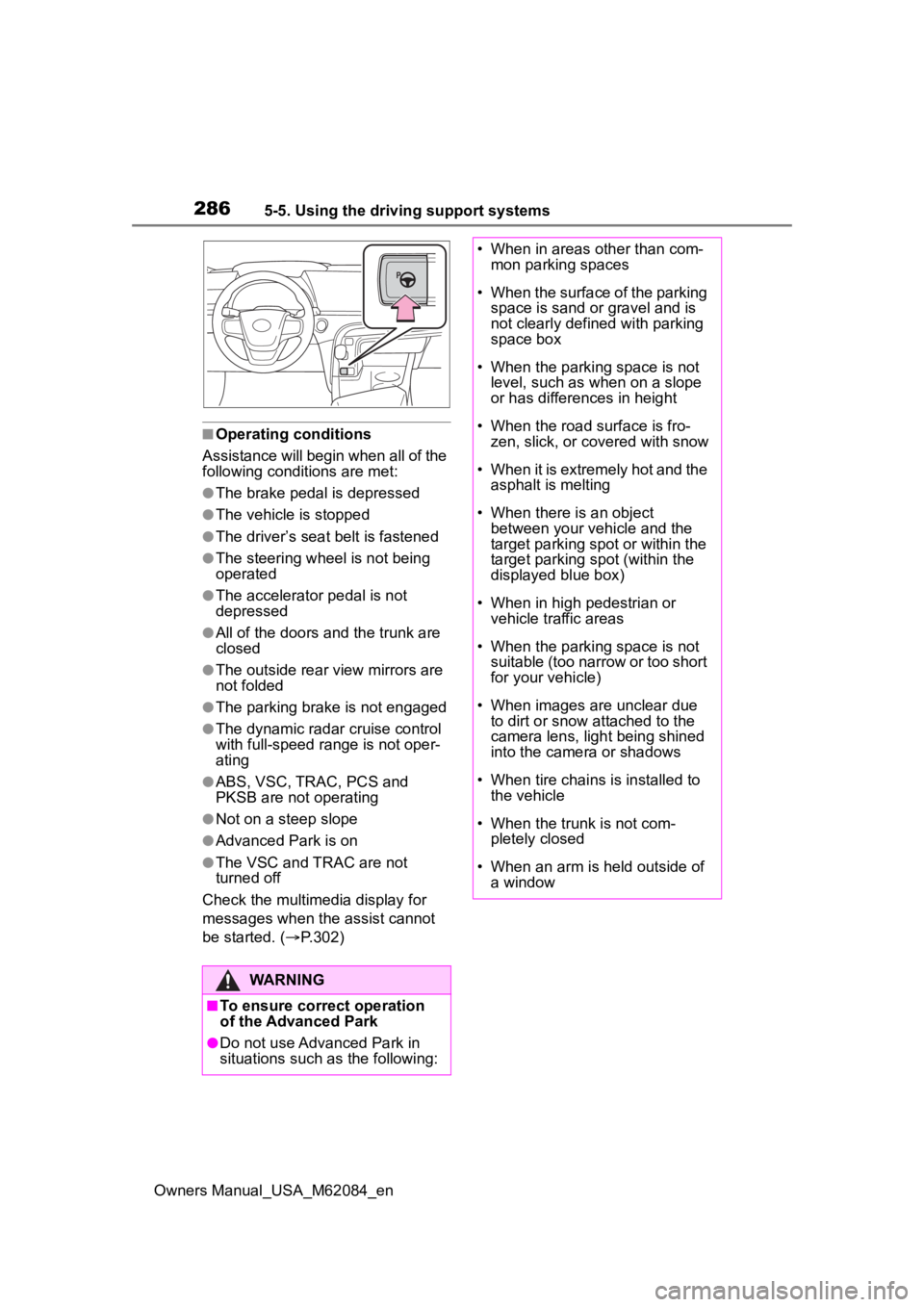
■Operating conditions
Assistance will begin when all of the
following condit ions are met:
●The brake pedal is depressed
●The vehicle is stopped
●The driver’s seat belt is fastened
●The steering wheel is not being
operated
●The accelerator pedal is not
depressed
●All of the doors and the trunk are
closed
●The outside rear view mirrors are
not folded
●The parking brake is not engaged
●The dynamic radar cruise control
with full-speed range is not oper-
ating
●ABS, VSC, TRAC, PCS and
PKSB are not operating
●Not on a steep slope
●Advanced Park is on
●The VSC and TRAC are not
turned off
Check the multimedia display for
messages when the assist cannot
be started. ( P.302)
WARNING
■To ensure correct operation
of the Advanced Park
●Do not use Advanced Park in
situations such as the following:
• When in areas other than com-
mon parking spaces
• When the surface of the parking space is sand or gravel and is
not clearly defined with parking
space box
• When the parking space is not level, such as when on a slope
or has differences in height
• When the road surface is fro- zen, slick, or covered with snow
• When it is extremely hot and the asphalt is melting
• When there is an object between your vehicle and the
target parking spot or within the
target parking spot (within the
displayed blue box)
• When in high pedestrian or vehicle traffic areas
• When the parking space is not suitable (too narrow or too short
for your vehicle)
• When images are unclear due to dirt or snow attached to the
camera lens, light being shined
into the camera or shadows
• When tire chains is installed to the vehicle
• When the trunk is not com- pletely closed
• When an arm is h eld outside of
a window
Page 289 of 556
2895-5. Using the driving support systems
Owners Manual_USA_M62084_en
5
Driving
ft. (2.5 m), the line will be dis-
played 8.2 ft. (2.5 m) in front of
the vehicle.
■Intuitive parking assist pop-up
display
Regardless of whether the intuitive
parking assist is off or on ( P.255),
if an object is dete cted by the intui-
tive parking assist when the
Advanced Park is operating, the
intuitive parking assist pop up dis-
play will automatically be displayed
over the guidance display.
■Brake control operation when
Advanced Park is operating
While the Advanced Park is operat-
ing, if it is determines that the possi-
bility of collision with detected
moving or stationary object is high,
the fuel cell system output restric-
tion control and b rake control will
operate.
●If brake control operates,
Advanced Park operation will be
suspended and a message will be
displayed on the multi-information
display.
●If Advanced Park operation is sus-
pended 3 times by brake control
operation, the Advanced Park will
be disabled.
In situations such as the follow-
ing, Advanced Park operation
will be canceled or suspended.
Assistance will be canceled
when:
The Advanced Park main
switch is pushed
The shift position is changed
to P
The parking brake is engaged
A door or the trunk is opened
The driver’s seat belt is unfas-
tened
The outside rear view mirrors
are folded
The TRAC or VSC is turned
off
The TRAC, VSC or ABS oper-
ates
The power switch is pushed
The Advanced Park deter-
mines assistance cannot be
continued in the current park-
ing environment
The Advanced Park malfunc-
tions
If assistance has been can-
celed, a message will be dis-
played on the multimedia
display. ( P.306) Firmly hold
the steering wheel and depress
the brake pedal to stop the vehi-
cle. As Advanced Park opera-
tion has been canceled, begin
the operation again or continue
parking manually, using the
steering wheel.
Assistance will be suspended
when:
The steering wheel is oper-
ated
The accelerator pedal is
depressed
The shift position is changed
to other than P
Advanced Park cancel-
ation/suspension
Page 303 of 556
3035-5. Using the driving support systems
Owners Manual_USA_M62084_en
5
Driving
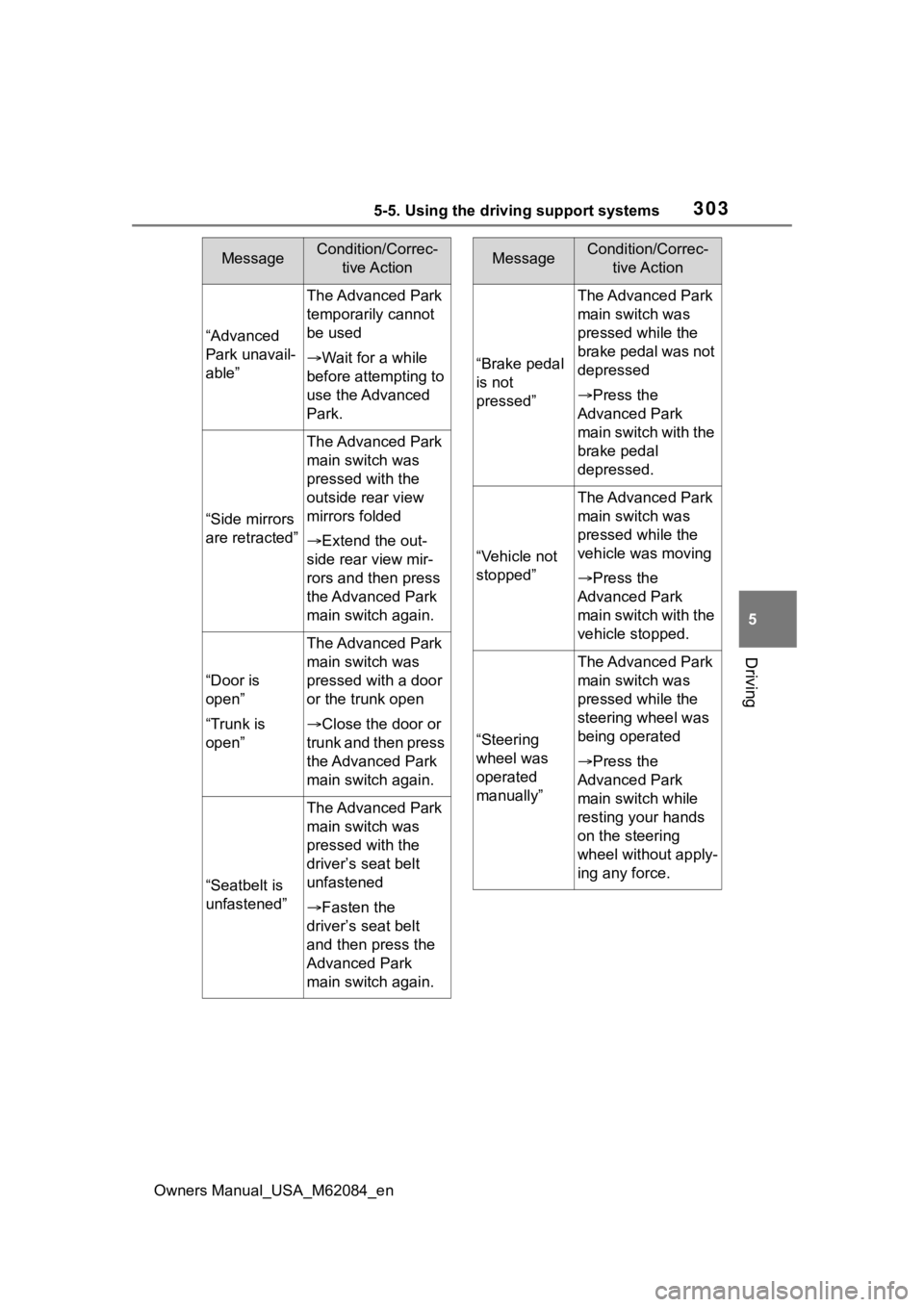
“Advanced
Park unavail-
able”
The Advanced Park
temporarily cannot
be used
Wait for a while
before attempting to
use the Advanced
Park.
“Side mirrors
are retracted”
The Advanced Park
main switch was
pressed with the
outside rear view
mirrors folded
Extend the out-
side rear view mir-
rors and then press
the Advanced Park
main switch again.
“Door is
open”
“Trunk is
open”
The Advanced Park
main switch was
pressed with a door
or the trunk open
Close the door or
trunk and then press
the Advanced Park
main switch again.
“Seatbelt is
unfastened”
The Advanced Park
main switch was
pressed with the
driver’s seat belt
unfastened
Fasten the
driver’s seat belt
and then press the
Advanced Park
main switch again.
MessageCondition/Correc- tive Action
“Brake pedal
is not
pressed”
The Advanced Park
main switch was
pressed while the
brake pedal was not
depressed
Press the
Advanced Park
main switch with the
brake pedal
depressed.
“Vehicle not
stopped”
The Advanced Park
main switch was
pressed while the
vehicle was moving
Press the
Advanced Park
main switch with the
vehicle stopped.
“Steering
wheel was
operated
manually”
The Advanced Park
main switch was
pressed while the
steering wheel was
being operated
Press the
Advanced Park
main switch while
resting your hands
on the steering
wheel without apply-
ing any force.
MessageCondition/Correc- tive Action
Page 307 of 556
3075-5. Using the driving support systems
Owners Manual_USA_M62084_en
5
Driving
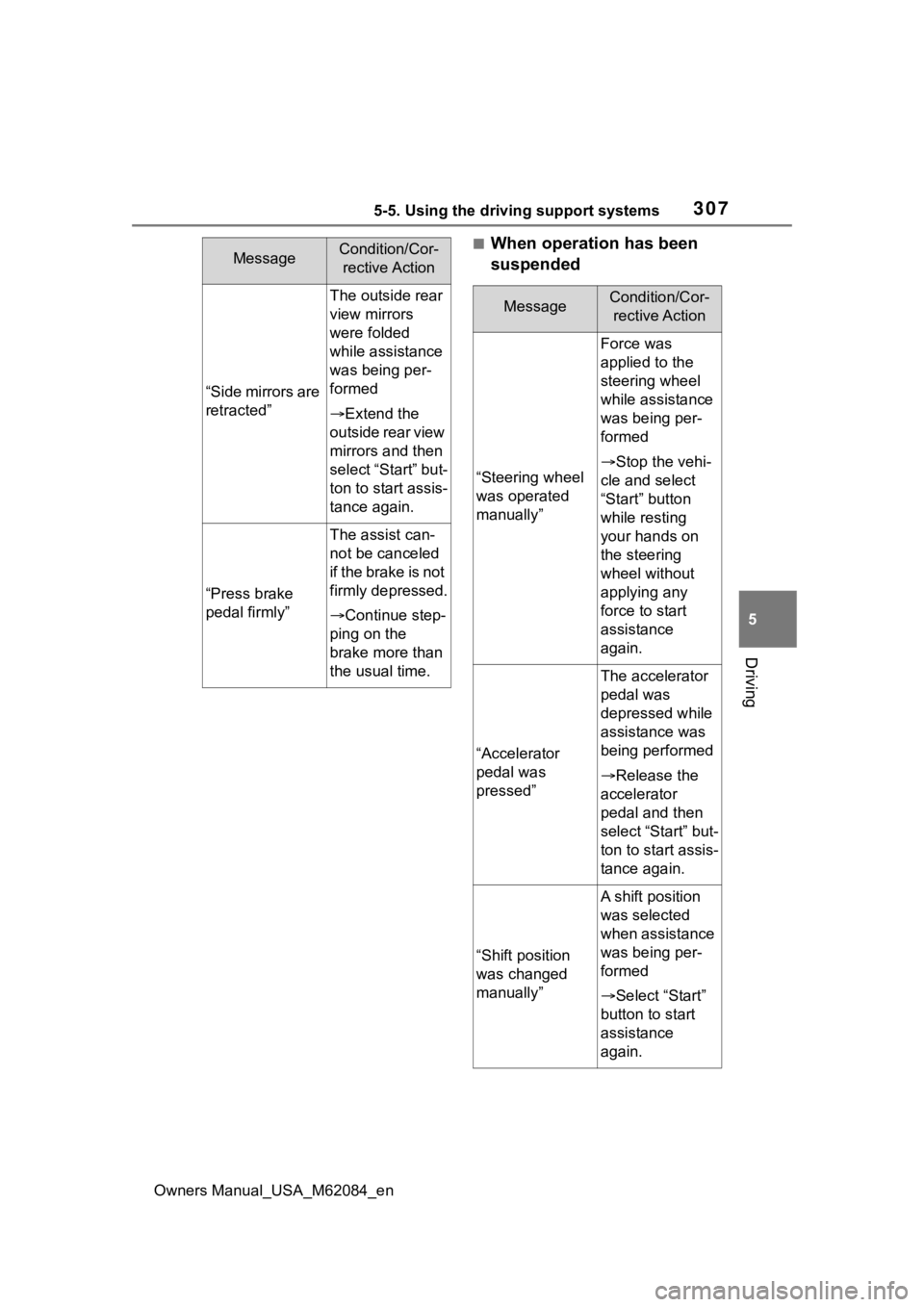
■When operation has been
suspended
“Side mirrors are
retracted”
The outside rear
view mirrors
were folded
while assistance
was being per-
formed
Extend the
outside rear view
mirrors and then
select “Start” but-
ton to start assis-
tance again.
“Press brake
pedal firmly”
The assist can-
not be canceled
i f t h e b r a k e i s n o t
firmly depressed.
Continue step-
ping on the
brake more than
the usual time.
MessageCondition/Cor- rective Action
MessageCondition/Cor- rective Action
“Steering wheel
was operated
manually”
Force was
applied to the
steering wheel
while assistance
was being per-
formed
Stop the vehi-
cle and select
“Start” button
while resting
your hands on
the steering
wheel without
applying any
force to start
assistance
again.
“Accelerator
pedal was
pressed”
The accelerator
pedal was
depressed while
assistance was
being performed
Release the
accelerator
pedal and then
select “Start” but-
ton to start assis-
tance again.
“Shift position
was changed
manually”
A shift position
was selected
when assistance
was being per-
formed
Select “Start”
button to start
assistance
again.