change time TOYOTA MIRAI 2022 Service Manual
[x] Cancel search | Manufacturer: TOYOTA, Model Year: 2022, Model line: MIRAI, Model: TOYOTA MIRAI 2022Pages: 556, PDF Size: 17.34 MB
Page 293 of 556
2935-5. Using the driving support systems
Owners Manual_USA_M62084_en
5
Driving
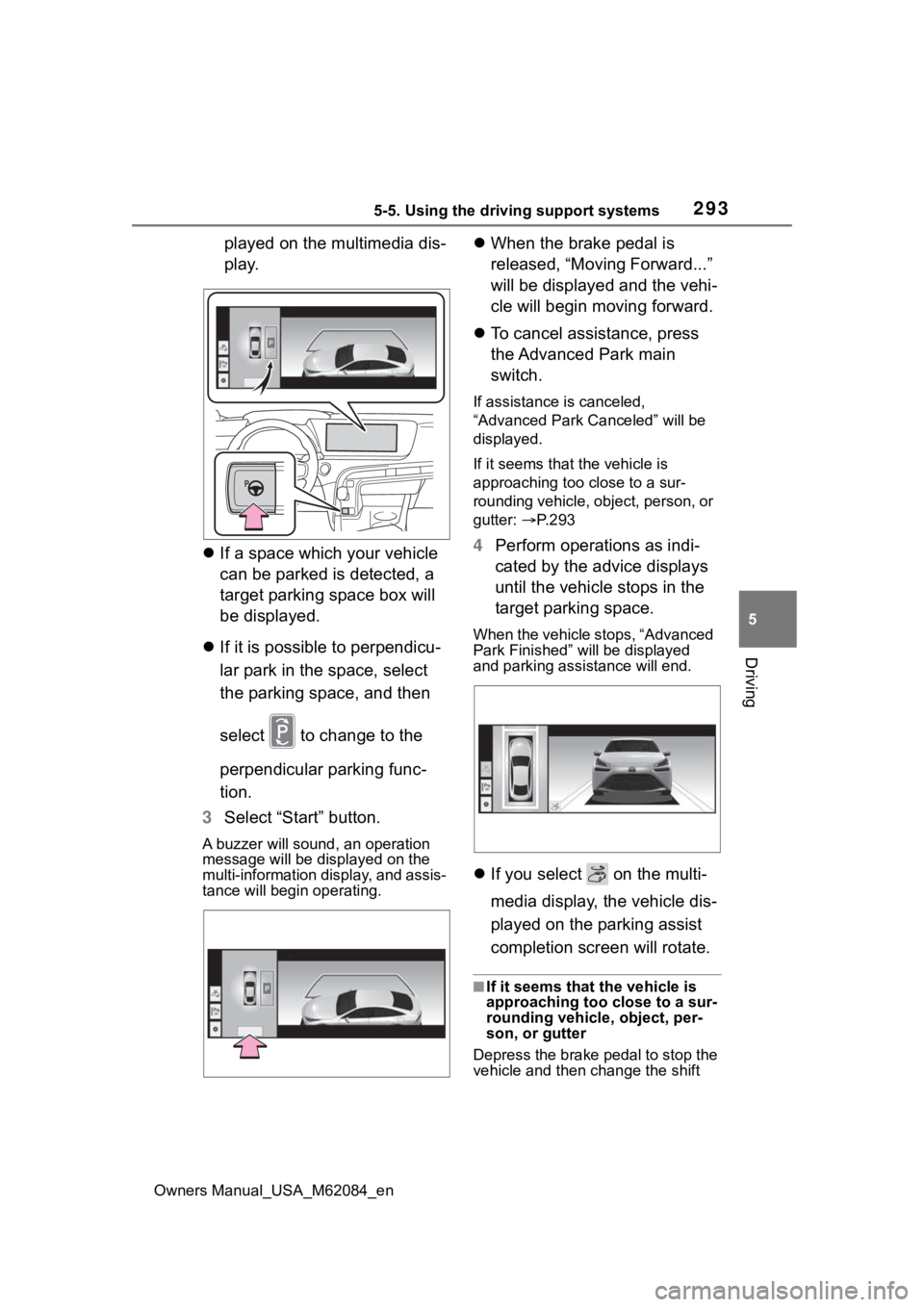
played on the multimedia dis-
play.
If a space which your vehicle
can be parked is detected, a
target parking space box will
be displayed.
If it is possible to perpendicu-
lar park in the space, select
the parking space, and then
select to change to the
perpendicular parking func-
tion.
3 Select “Start” button.
A buzzer will sound, an operation
message will be dis played on the
multi-information display, and assis-
tance will begin operating.
When the brake pedal is
released, “Moving Forward...”
will be displayed and the vehi-
cle will begin moving forward.
To cancel assistance, press
the Advanced Park main
switch.
If assistance is canceled,
“Advanced Park Canceled” will be
displayed.
If it seems that the vehicle is
approaching too close to a sur-
rounding vehicle, object, person, or
gutter: P. 2 9 3
4 Perform operations as indi-
cated by the advice displays
until the vehicle stops in the
target parking space.
When the vehicle stops, “Advanced
Park Finished” will be displayed
and parking assistance will end.
If you select on the multi-
media display, the vehicle dis-
played on the parking assist
completion screen will rotate.
■If it seems that the vehicle is
approaching too close to a sur-
rounding vehicle, object, per-
son, or gutter
Depress the brake pedal to stop the
vehicle and then change the shift
Page 294 of 556
2945-5. Using the driving support systems
Owners Manual_USA_M62084_enposition to change the direction of
travel of the vehicle. At this time,
assist will be suspended. However,
if the “Start” butt
on is selected,
assist will resume and the vehicle
will move in the direction corre-
sponding to the selected shift posi-
tion.
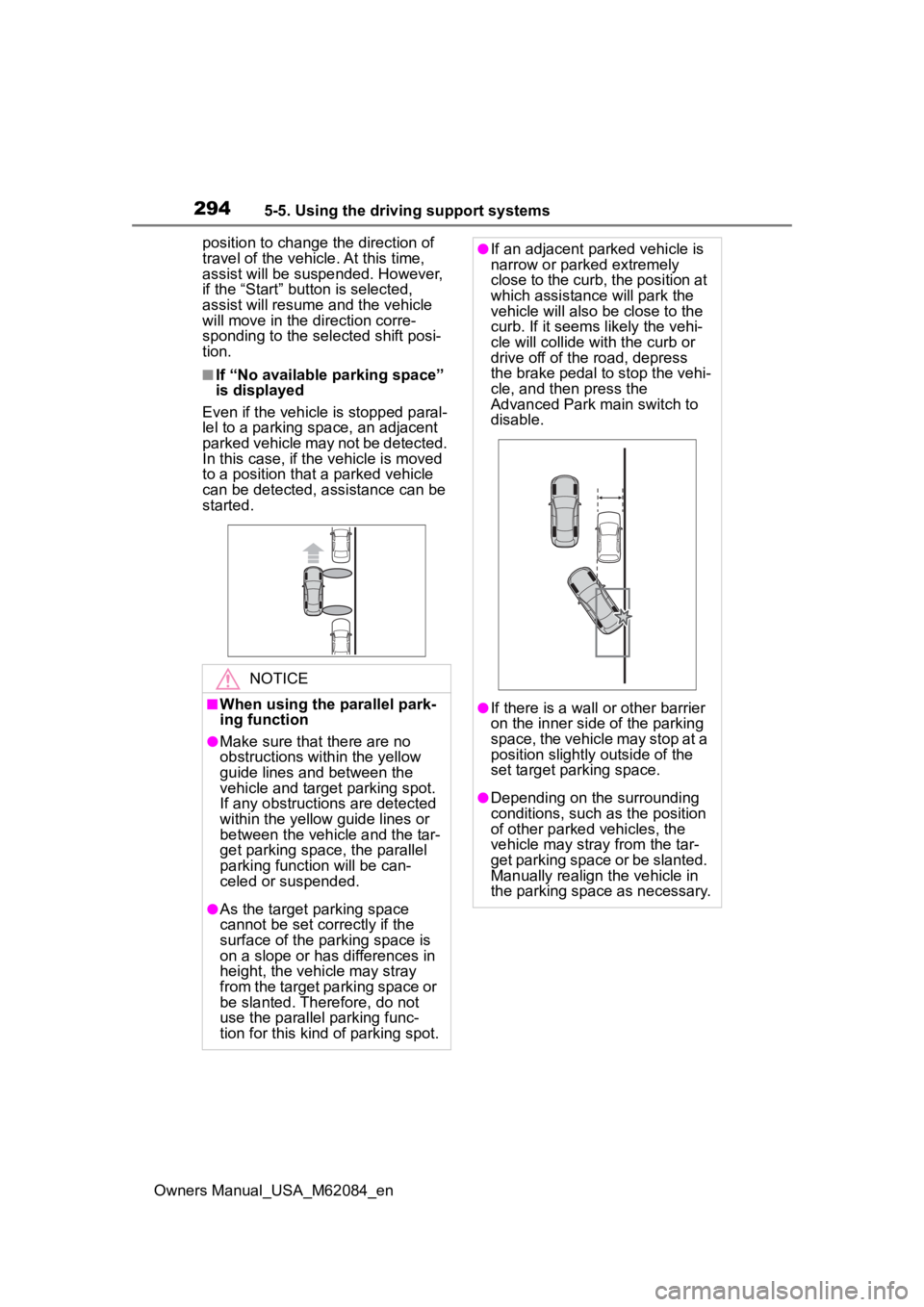
■If “No available parking space”
is displayed
Even if the vehicle is stopped paral-
lel to a parking space, an adjacent
parked vehicle may not be detected.
In this case, if the vehicle is moved
to a position that a parked vehicle
can be detected, assistance can be
started.
NOTICE
■When using the parallel park-
ing function
●Make sure that there are no
obstructions within the yellow
guide lines and between the
vehicle and target parking spot.
If any obstructions are detected
within the yellow guide lines or
between the vehicle and the tar-
get parking space, the parallel
parking function will be can-
celed or suspended.
●As the target parking space
cannot be set correctly if the
surface of the parking space is
on a slope or has differences in
height, the vehicle may stray
from the target parking space or
be slanted. Therefore, do not
use the parallel parking func-
tion for this kind of parking spot.
●If an adjacent parked vehicle is
narrow or parked extremely
close to the curb, the position at
which assistance will park the
vehicle will also be close to the
curb. If it seems likely the vehi-
cle will collide with the curb or
drive off of the road, depress
the brake pedal to stop the vehi-
cle, and then press the
Advanced Park main switch to
disable.
●If there is a wall or other barrier
on the inner side of the parking
space, the vehicle may stop at a
position slightly outside of the
set target par king space.
●Depending on the surrounding
conditions, such as the position
of other parked vehicles, the
vehicle may stray from the tar-
get parking space or be slanted.
Manually realign the vehicle in
the parking space as necessary.
Page 295 of 556
2955-5. Using the driving support systems
Owners Manual_USA_M62084_en
5
Driving
■Function description
When departing from a parallel
parking spot, by selecting the
direction you wish to depart, the
parallel parking departure func-
tion will provide assistance,
through shift position changes,
steering wheel, brake pedal,
and accelerator pedal opera-
tions, to guide the vehicle to a
position which you can depart
from the parking space.
■Leaving a parking space
using the parallel parking
departure function
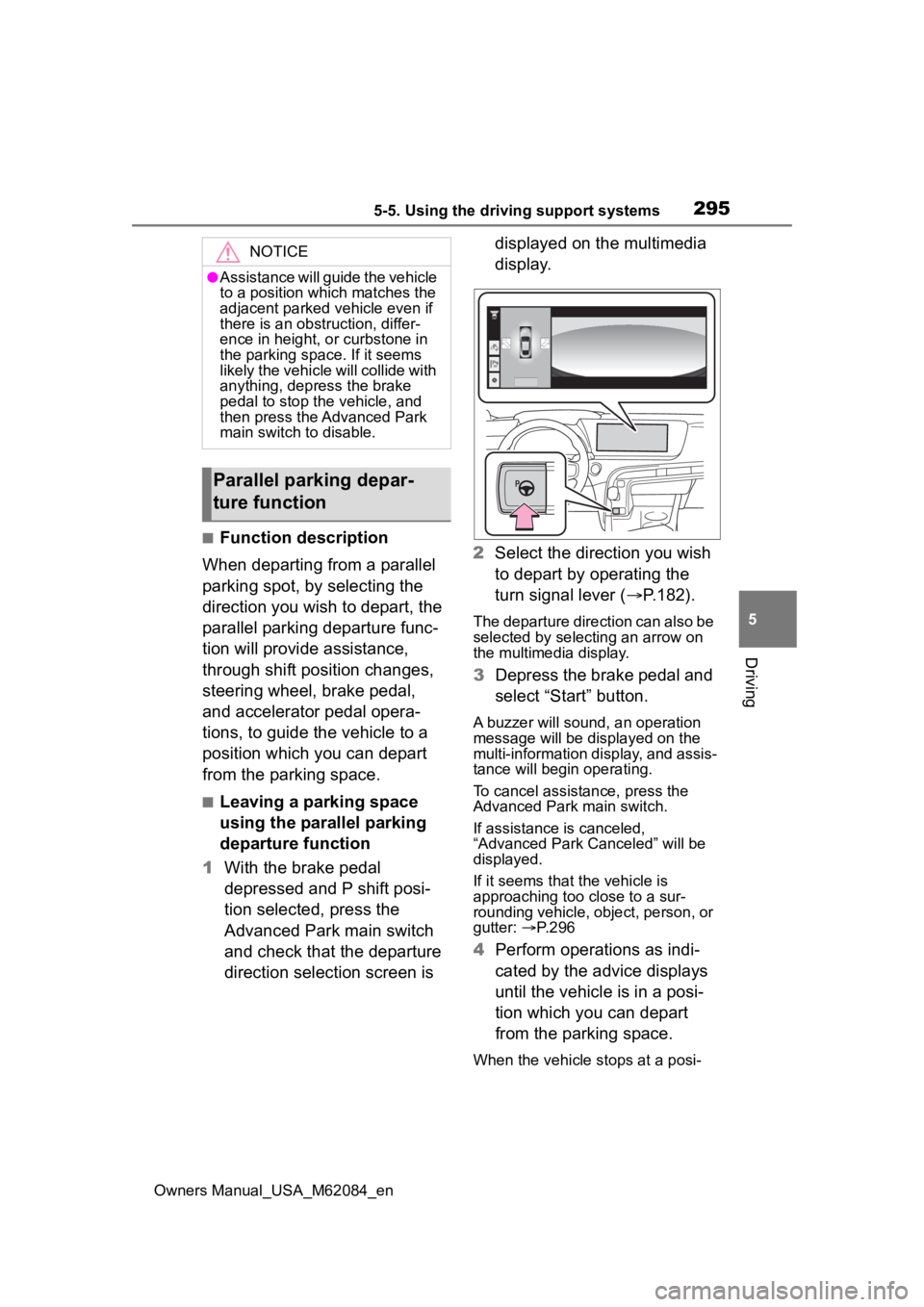
1 With the brake pedal
depressed and P shift posi-
tion selected, press the
Advanced Park main switch
and check that the departure
direction selection screen is displayed on the multimedia
display.
2 Select the direction you wish
to depart by operating the
turn signal lever ( P.182).
The departure direction can also be
selected by selecting an arrow on
the multimedia display.
3Depress the brake pedal and
select “Start” button.
A buzzer will sound, an operation
message will be displayed on the
multi-information display, and assis-
tance will begin operating.
To cancel assistance, press the
Advanced Park main switch.
If assistance is canceled,
“Advanced Park Canceled” will be
displayed.
If it seems that the vehicle is
approaching too close to a sur-
rounding vehicle, object, person, or
gutter: P. 2 9 6
4 Perform operations as indi-
cated by the advice displays
until the vehicle is in a posi-
tion which you can depart
from the parking space.
When the vehicle stops at a posi-
NOTICE
●Assistance will guide the vehicle
to a position which matches the
adjacent parked vehicle even if
there is an obstruction, differ-
ence in height, or curbstone in
the parking space. If it seems
likely the vehicle will collide with
anything, depress the brake
pedal to stop the vehicle, and
then press the Advanced Park
main switch to disable.
Parallel parking depar-
ture function
Page 296 of 556
2965-5. Using the driving support systems
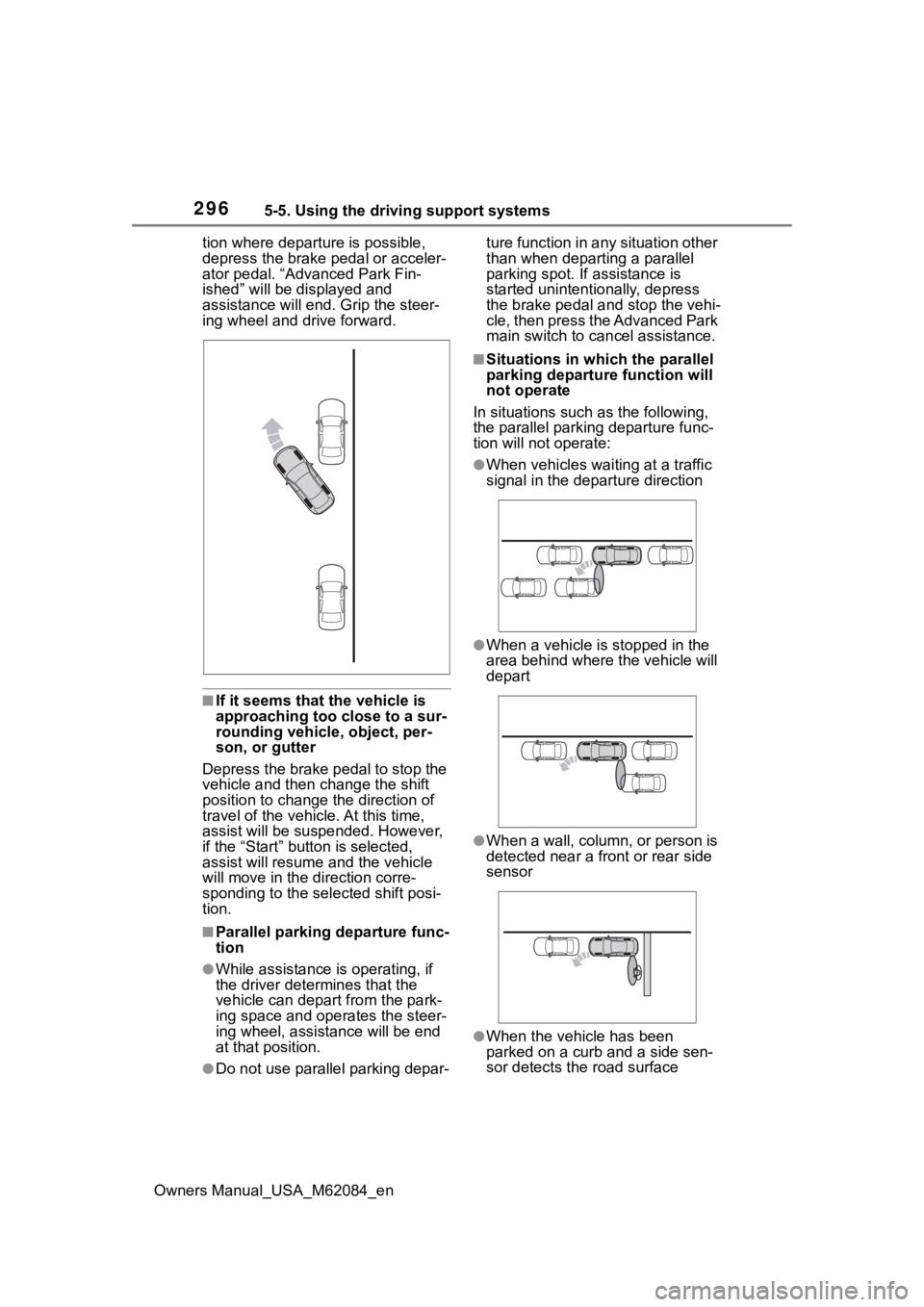
Owners Manual_USA_M62084_ention where departure is possible,
depress the brake p
edal or acceler-
ator pedal. “Advanced Park Fin-
ished” will be displayed and
assistance will end. Grip the steer-
ing wheel and drive forward.
■If it seems that the vehicle is
approaching too close to a sur-
rounding vehicle, object, per-
son, or gutter
Depress the brake pedal to stop the
vehicle and then ch ange the shift
position to change the direction of
travel of the vehicle. At this time,
assist will be sus pended. However,
if the “Start” butt on is selected,
assist will resume and the vehicle
will move in the direction corre-
sponding to the selected shift posi-
tion.
■Parallel parking departure func-
tion
●While assistance is operating, if
the driver determines that the
vehicle can depart from the park-
ing space and operates the steer-
ing wheel, assistance will be end
at that position.
●Do not use parallel parking depar- ture function in any situation other
than when departing a parallel
parking spot. If assistance is
started unintentionally, depress
the brake pedal and stop the vehi-
cle, then press the Advanced Park
main switch to can
cel assistance.
■Situations in which the parallel
parking departure function will
not operate
In situations such as the following,
the parallel parkin g departure func-
tion will not operate:
●When vehicles waiting at a traffic
signal in the departure direction
●When a vehicle is stopped in the
area behind where the vehicle will
depart
●When a wall, column, or person is
detected near a front or rear side
sensor
●When the vehicle has been
parked on a curb and a side sen-
sor detects th e road surface
Page 300 of 556
3005-5. Using the driving support systems
Owners Manual_USA_M62084_en
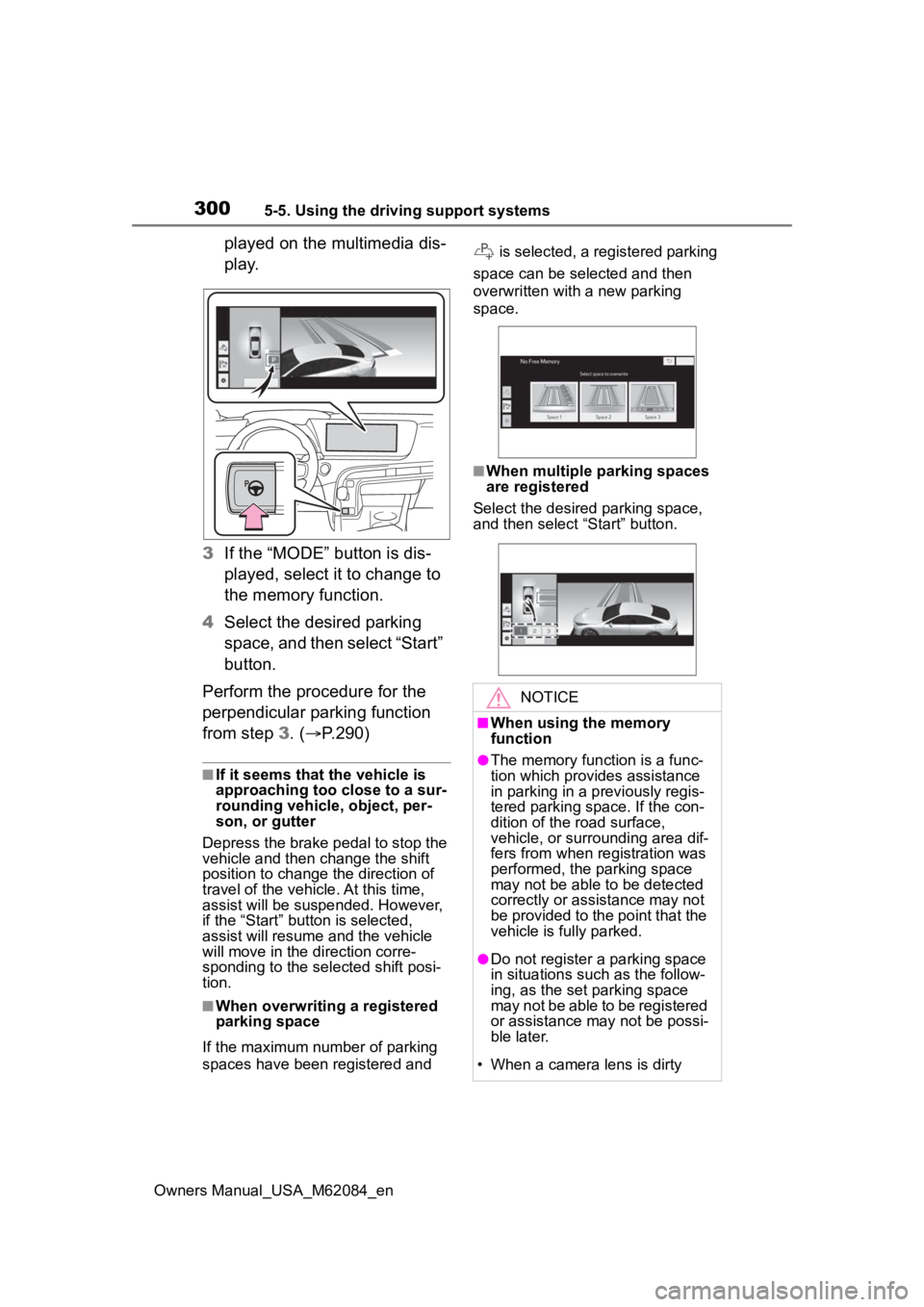
played on the multimedia dis-
p l a y.
3 If the “MODE” button is dis-
played, select it to change to
the memory function.
4 Select the desired parking
space, and then select “Start”
button.
Perform the procedure for the
perpendicular parking function
from step 3. (P.290)
■If it seems that the vehicle is
approaching too close to a sur-
rounding vehicle, object, per-
son, or gutter
Depress the brake pedal to stop the
vehicle and then ch ange the shift
position to change the direction of
travel of the vehicle. At this time,
assist will be suspended. However,
if the “Start” butt on is selected,
assist will resume and the vehicle
will move in the direction corre-
sponding to the selected shift posi-
tion.
■When overwriting a registered
parking space
If the maximum number of parking
spaces have been registered and is selected, a registered parking
space can be selected and then
overwritten with a new parking
space.
■When multiple parking spaces
are registered
Select the desired parking space,
and then select “Start” button.
NOTICE
■When using the memory
function
●The memory function is a func-
tion which provides assistance
in parking in a previously regis-
tered parking space. If the con-
dition of the road surface,
vehicle, or surrounding area dif-
fers from when registration was
performed, the parking space
may not be able to be detected
correctly or assistance may not
be provided to the point that the
vehicle is fully parked.
●Do not register a parking space
in situations such as the follow-
ing, as the set parking space
may not be able to be registered
or assistance may not be possi-
ble later.
• When a camera lens is dirty
Page 301 of 556
3015-5. Using the driving support systems
Owners Manual_USA_M62084_en
5
Driving
NOTICE
• When it is raining or snowing
• During night (if the surrounding area is not sufficiently illumi-
nated)
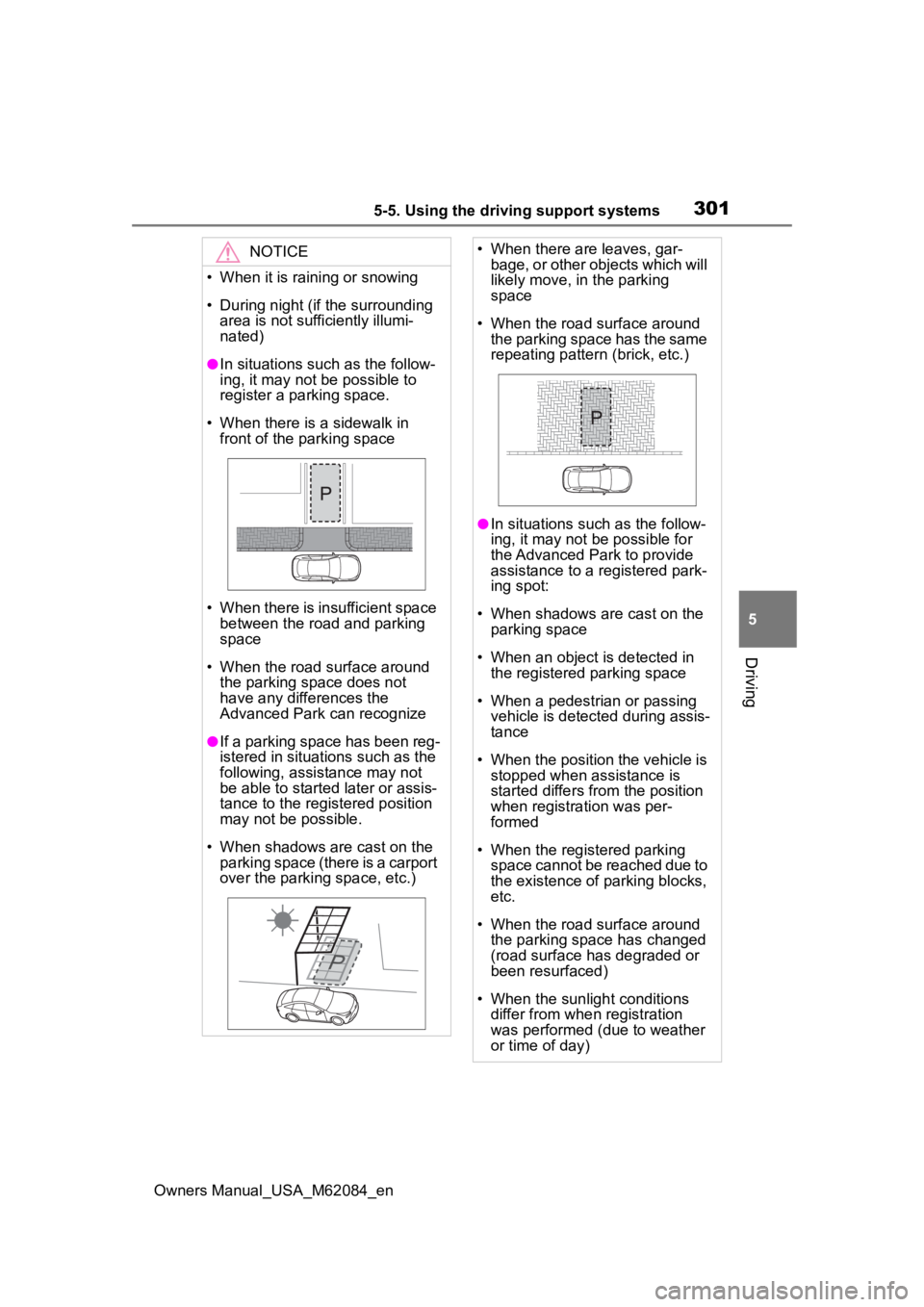
●In situations such as the follow-
ing, it may not be possible to
register a parking space.
• When there is a sidewalk in front of the parking space
• When there is insufficient space between the road and parking
space
• When the road surface around the parking space does not
have any differences the
Advanced Park can recognize
●If a parking space has been reg-
istered in situations such as the
following, assistance may not
be able to started later or assis-
tance to the registered position
may not be possible.
• When shadows are cast on the parking space (there is a carport
over the parking space, etc.)
• When there are leaves, gar- bage, or other objects which will
likely move, in the parking
space
• When the road surface around the parking space has the same
repeating pattern (brick, etc.)
●In situations such as the follow-
ing, it may not be possible for
the Advanced Park to provide
assistance to a registered park-
ing spot:
• When shadows are cast on the parking space
• When an object is detected in the registered parking space
• When a pedestrian or passing vehicle is detected during assis-
tance
• When the position the vehicle is stopped when assistance is
started differs from the position
when registration was per-
formed
• When the registered parking space cannot be reached due to
the existence of parking blocks,
etc.
• When the road surface around the parking space has changed
(road surface has degraded or
been resurfaced)
• When the sunlight conditions differ from when registration
was performed (due to weather
or time of day)
Page 302 of 556
3025-5. Using the driving support systems
Owners Manual_USA_M62084_en
The following messages will be
displayed on the multimedia dis-
play in the following cases when
the Advanced Park cannot oper-ate, or operation is canceled or
suspended. Perform the appro-
priate corrective action accord-
ing to the message displayed.
■When the Advanced Park
cannot operate
NOTICE
• When a bright light is shined on
the parking space
• When a light is temporarily shined on the parking space
(lights of another vehicle, secu-
rity light, etc.)
• When a camera lens is dirty or covered with water droplets
If assistance is ended during reg-
istration, perform registration
again.
●When registering a parking
space to the memory function, if
the road surface cannot be
detected “No available parking
space to registe r” will be dis-
played.
●When using the memory func-
tion, make sure to stop immedi-
ately in front of the stop
position. Otherwise the parking
space may not be able to be
detected correctly and assis-
tance may not be provided to
the point that the vehicle is fully
parked.
●Do not use the memory function
if a camera has been subjected
to a strong impact or images of
the panoramic view monitor are
misaligned.
●If a camera has been replaced,
as the installation angle of the
camera will have changed, it will
be necessary to register parking
spaces of the memory function.
Displayed messages
MessageCondition/Correc-
tive Action
“Advanced
Park mal-
function. Visit
your dealer.”
The Advanced Park
may be malfunction-
ing
Turn the power
switch off and then
start the fuel cell
system again. If the
message is dis-
played again, have
the vehicle
inspected by your
Toyota dealer.
“Parking
brake is
applied”
The Advanced Park
main switch was
pressed with the
parking brake
engaged
Release the park-
ing brake and then
press the Advanced
Park main switch
again.
“Remove dirt
from camera”
A camera lens is
covered with ice,
snow, mud, etc.
(Camera being dis-
played on the multi-
media display)
Remove the ice,
snow, mud, etc.
Page 304 of 556
3045-5. Using the driving support systems
Owners Manual_USA_M62084_en
“Accelerator
pedal was
pressed”
The Advanced Park
main switch was
pressed while the
accelerator pedal
was depressed
Press the
Advanced Park
main switch with the
accelerator pedal
released.
“Shift posi-
tion was
changed
manually”
The shift position
was changed and
the Advanced Park
could not begin
operating
Change the shift
position back to the
previous position
and then press the
Advanced Park
main switch to turn
on.
“Operation
timed out”
A certain amount of
time has elapsed
since the Advanced
Park main switch
was pressed
Press the
Advanced Park
main switch again to
turn on.
“Advanced
Park switch
pushed”
The Advanced Park
main switch was
pressed and was
turned off
Press the
Advanced Park
main switch again to
turn on.
MessageCondition/Correc- tive Action
“Unavailable.
Steep slope.”
The Advanced Park
main switch was
pressed while on a
steep slope
As it is danger-
ous to use
Advanced Park on a
steep slope, move
the vehicle to a level
area before using it.
“No available
parking
space”
The Advanced Park
main switch was
pressed in a location
where a parking
space cannot be
detected
Assistance cannot
be performed when
a parking space
cannot be detected.
Move the vehicle to
a location where a
parking space or
parking lines can be
detected before
using the Advanced
Park.
“Unavailable.
Road too nar-
row.”
“Unavailable.
Road ahead
too narrow.”
The Advanced Park
main switch was
pressed at a narrow
parking space
Assistance cannot
be performed for
narrow parking
spaces. Move the
vehicle to a wider
parking space
before using the
Advanced Parking.
MessageCondition/Correc- tive Action
Page 307 of 556
3075-5. Using the driving support systems
Owners Manual_USA_M62084_en
5
Driving
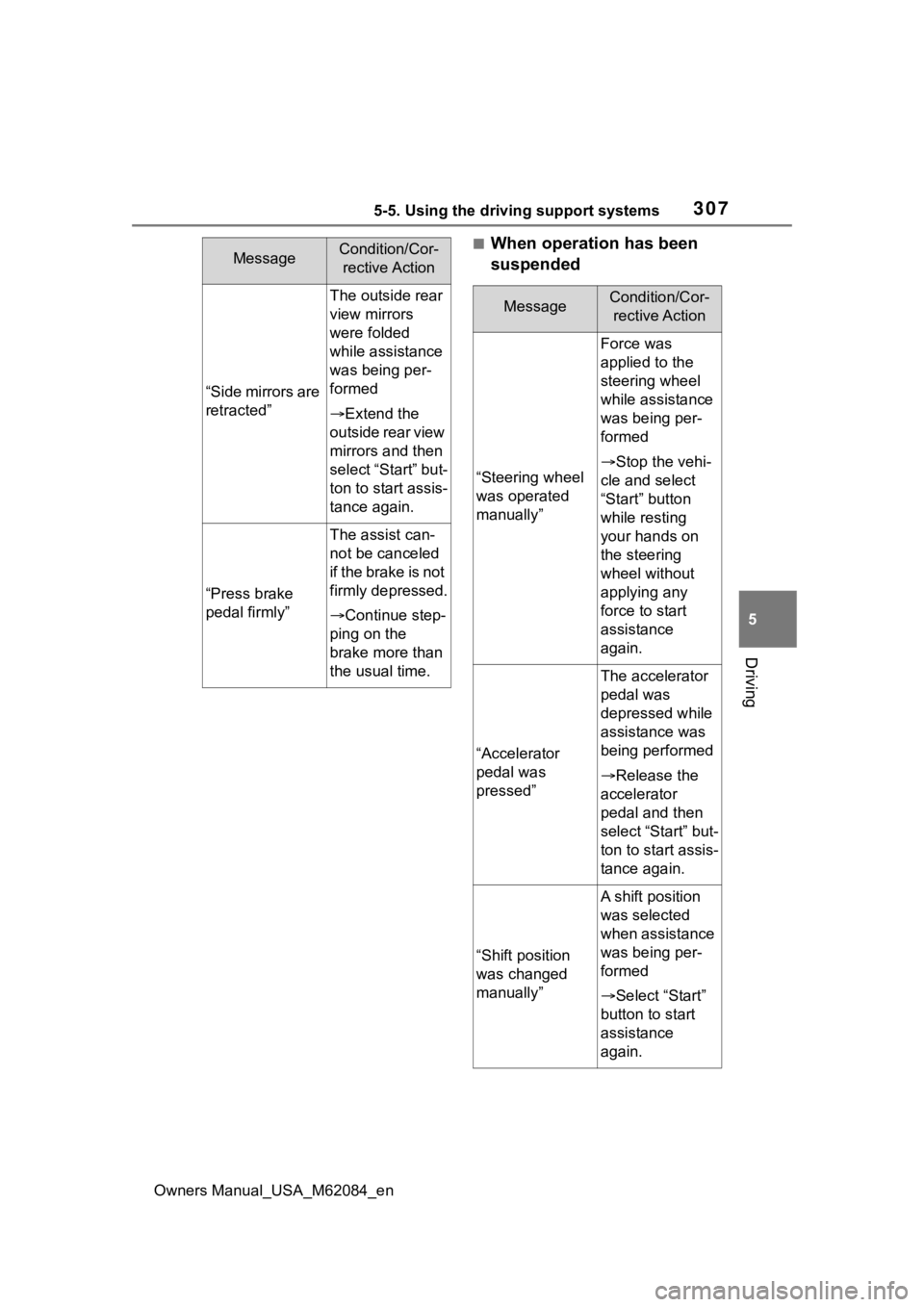
■When operation has been
suspended
“Side mirrors are
retracted”
The outside rear
view mirrors
were folded
while assistance
was being per-
formed
Extend the
outside rear view
mirrors and then
select “Start” but-
ton to start assis-
tance again.
“Press brake
pedal firmly”
The assist can-
not be canceled
i f t h e b r a k e i s n o t
firmly depressed.
Continue step-
ping on the
brake more than
the usual time.
MessageCondition/Cor- rective Action
MessageCondition/Cor- rective Action
“Steering wheel
was operated
manually”
Force was
applied to the
steering wheel
while assistance
was being per-
formed
Stop the vehi-
cle and select
“Start” button
while resting
your hands on
the steering
wheel without
applying any
force to start
assistance
again.
“Accelerator
pedal was
pressed”
The accelerator
pedal was
depressed while
assistance was
being performed
Release the
accelerator
pedal and then
select “Start” but-
ton to start assis-
tance again.
“Shift position
was changed
manually”
A shift position
was selected
when assistance
was being per-
formed
Select “Start”
button to start
assistance
again.
Page 311 of 556
3115-5. Using the driving support systems
Owners Manual_USA_M62084_en
5
Driving
are detected, they may cause the
target parking space to be mis-
aligned.
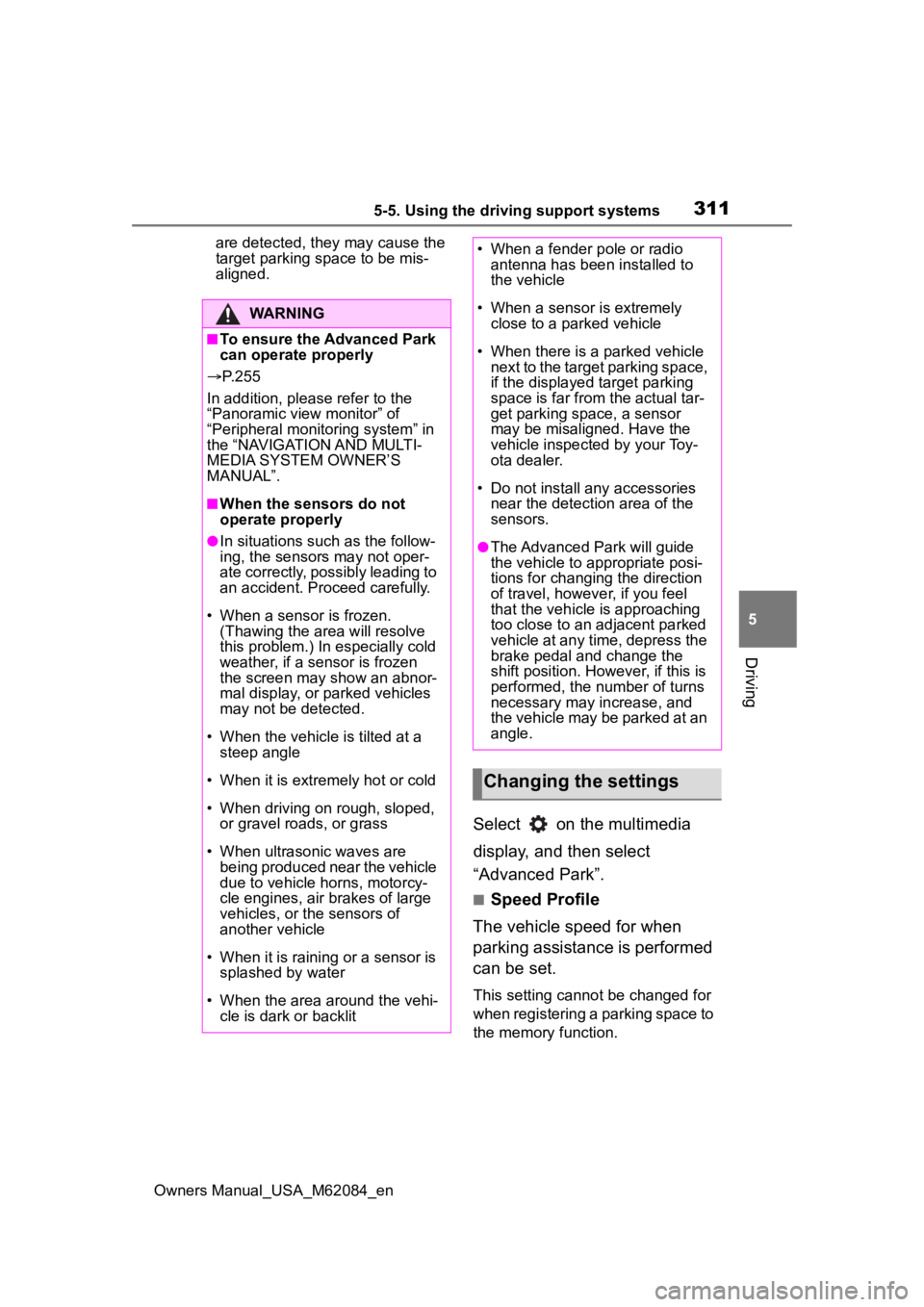
Select on the multimedia
display, and then select
“Advanced Park”.
■Speed Profile
The vehicle speed for when
parking assistance is performed
can be set.
This setting cannot be changed for
when registering a parking space to
the memory function.
WARNING
■To ensure the Advanced Park
can operate properly
P. 2 5 5
In addition, please refer to the
“Panoramic view monitor” of
“Peripheral monito ring system” in
the “NAVIGATION AND MULTI-
MEDIA SYSTEM OWNER’S
MANUAL”.
■When the sensors do not
operate properly
●In situations such as the follow-
ing, the sensors may not oper-
ate correctly, possibly leading to
an accident. Proceed carefully.
• When a sensor is frozen. (Thawing the area will resolve
this problem.) In especially cold
weather, if a sensor is frozen
the screen may show an abnor-
mal display, or parked vehicles
may not be detected.
• When the vehicl e is tilted at a
steep angle
• When it is extremely hot or cold
• When driving on rough, sloped, or gravel roads, or grass
• When ultrasonic waves are being produced near the vehicle
due to vehicle horns, motorcy-
cle engines, air brakes of large
vehicles, or the sensors of
another vehicle
• When it is raining or a sensor is splashed by water
• When the area around the vehi- cle is dark or backlit
• When a fender pole or radio antenna has been installed to
the vehicle
• When a sensor is extremely close to a parked vehicle
• When there is a parked vehicle next to the target parking space,
if the displayed target parking
space is far from the actual tar-
get parking space, a sensor
may be misaligned. Have the
vehicle inspected by your Toy-
ota dealer.
• Do not install any accessories near the detection area of the
sensors.
●The Advanced Park will guide
the vehicle to appropriate posi-
tions for changing the direction
of travel, however, if you feel
that the vehicle is approaching
too close to an adjacent parked
vehicle at any time, depress the
brake pedal and change the
shift position. However, if this is
performed, the number of turns
necessary may increase, and
the vehicle may be parked at an
angle.
Changing the settings