change time TOYOTA MIRAI 2022 Workshop Manual
[x] Cancel search | Manufacturer: TOYOTA, Model Year: 2022, Model line: MIRAI, Model: TOYOTA MIRAI 2022Pages: 556, PDF Size: 17.34 MB
Page 319 of 556
3195-5. Using the driving support systems
Owners Manual_USA_M62084_en
5
Driving
WARNING
●When Active Cornering Assist
frequently operates, Active Cor-
nering Assist may temporarily
stop operating to ensure proper
operation of the brakes, TRAC
and VSC.
■Hill-start assist control does
not operate effectively when
●Do not overly rely on hill-start
assist control. Hill-start assist
control may not operate effec-
tively on steep inclines and
roads covered with ice.
●Unlike the parking brake, hill-
start assist control is not
intended to hold the vehicle sta-
tionary for an extended period
of time. Do not attempt to use
hill-start assist control to hold
the vehicle on an incline, as
doing so may lead to an acci-
dent.
■When the TRAC/ABS/VSC is
activated
The slip indicator light flashes.
Always drive carefully. Reckless
driving may cause an accident.
Exercise particular care when the
indicator light flashes.
■When the TRAC/VSC systems
are turned off
Be especially careful and drive at
a speed appropriate to the road
conditions. As these are the sys-
tems to help ensure vehicle stabil-
ity and driving force, do not turn
the TRAC/VSC systems off
unless necessary.
■Secondary Collision Brake
Do not rely solely upon the Sec-
ondary Collision Brake. This sys-
tem is designed to help reduce
the possibility of further damage
due to a secondary collision, how-
ever, that effect changes accord-
ing to various conditions. Overly
relying on the system may result
in death or serious injury.
■Replacing tires
Make sure that all tires are of the
specified size, brand, tread pat-
tern and total load capacity. In
addition, make sure that the tires
are inflated to the recommended
tire inflation p ressure level.
The ABS, TRAC and VSC sys-
tems will not functi on correctly if
different tires are installed on the
vehicle.
Contact your Toyota dealer for fur-
ther information when replacing
tires or wheels.
■Handling of tires and the sus-
pension
Using tires with any kind of prob-
lem or modifying the suspension
will affect the driving assist sys-
tems, and may cause a system to
malfunction.
Page 326 of 556
3266-1. Using the air conditioning system and defogger
Owners Manual_USA_M62084_en
■Setting the fan speed
Press the fan speed increase
switch to increase the fan speed
and the fan speed decrease
switch to decrease the fan
speed.
Press the “OFF” switch to turn the
fan off.
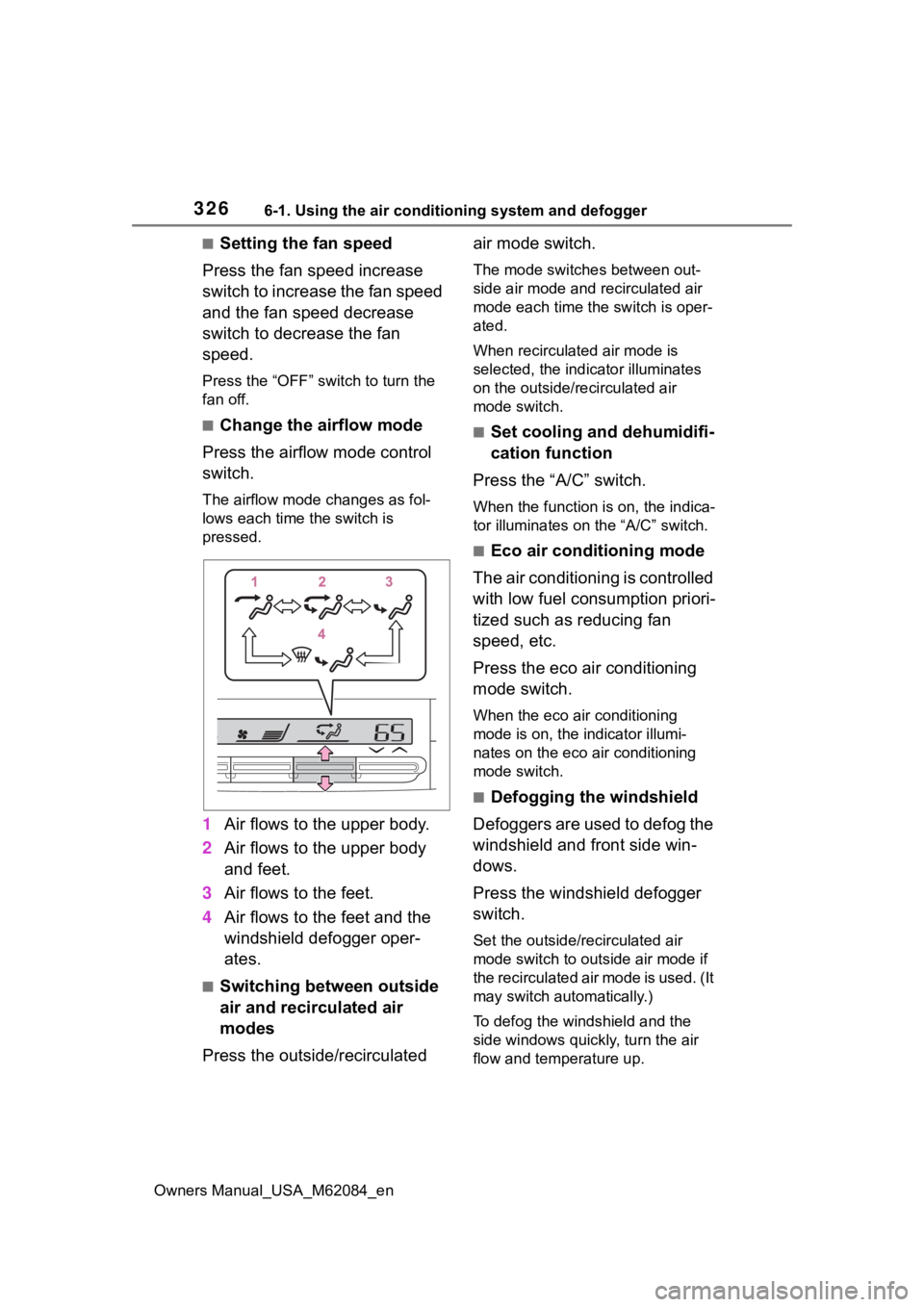
■Change the airflow mode
Press the airflow mode control
switch.
The airflow mode changes as fol-
lows each time the switch is
pressed.
1 Air flows to the upper body.
2 Air flows to the upper body
and feet.
3 Air flows to the feet.
4 Air flows to the feet and the
windshield defogger oper-
ates.
■Switching between outside
air and recirculated air
modes
Press the outside/recirculated air mode switch.
The mode switches
between out-
side air mode and recirculated air
mode each time the switch is oper-
ated.
When recirculated air mode is
selected, the indicator illuminates
on the outside/recirculated air
mode switch.
■Set cooling and dehumidifi-
cation function
Press the “A/C” switch.
When the function is on, the indica-
tor illuminates on the “A/C” switch.
■Eco air conditioning mode
The air conditioning is controlled
with low fuel consumption priori-
tized such as reducing fan
speed, etc.
Press the eco air conditioning
mode switch.
When the eco air conditioning
mode is on, the indicator illumi-
nates on the eco air conditioning
mode switch.
■Defogging the windshield
Defoggers are used to defog the
windshield and front side win-
dows.
Press the windshield defogger
switch.
Set the outside/recirculated air
mode switch to outside air mode if
the recirculated air mode is used. (It
may switch automatically.)
To defog the windshield and the
side windows quickly, turn the air
flow and temperature up.
Page 328 of 556
3286-1. Using the air conditioning system and defogger
Owners Manual_USA_M62084_en
●To improve air conditioning perfor-
mance, perform the following
operations:
• Adjust the fan speed
• Turn off Eco drive mode ( P.313)
• Turn off Eco air conditioning mode
●When the driving mode is set to
Eco drive mode, the Eco air condi-
tioning mode will be turned on
automatically. Even in this case,
the Eco air conditioning mode can
be turned off by pressing the Eco
air conditioning mode switch.
■Ventilation and air conditioning
odors
●To let fresh air in, set the air condi-
tioning system to the outside air
mode.
●During use, various odors from
inside and outside the vehicle may
enter into and a ccumulate in the
air conditioning system. This may
then cause odor to be emitted
from the vents.
●In order to suppress odors that
occur when the a ir conditioning
system starts, the air flow mode
may change to blow air to the feet
or air may stop blowing for a short
period of time immediately after
the air conditioning system is
started in automatic mode.
●When parking, the system auto-
matically switches to outside air
mode to encourage better air cir-
culation throughout the vehicle,
helping to reduce odors that occur
when starting the vehicle.
■Air conditioning filter
P. 4 1 9
■Air conditioning system refrig-
erant
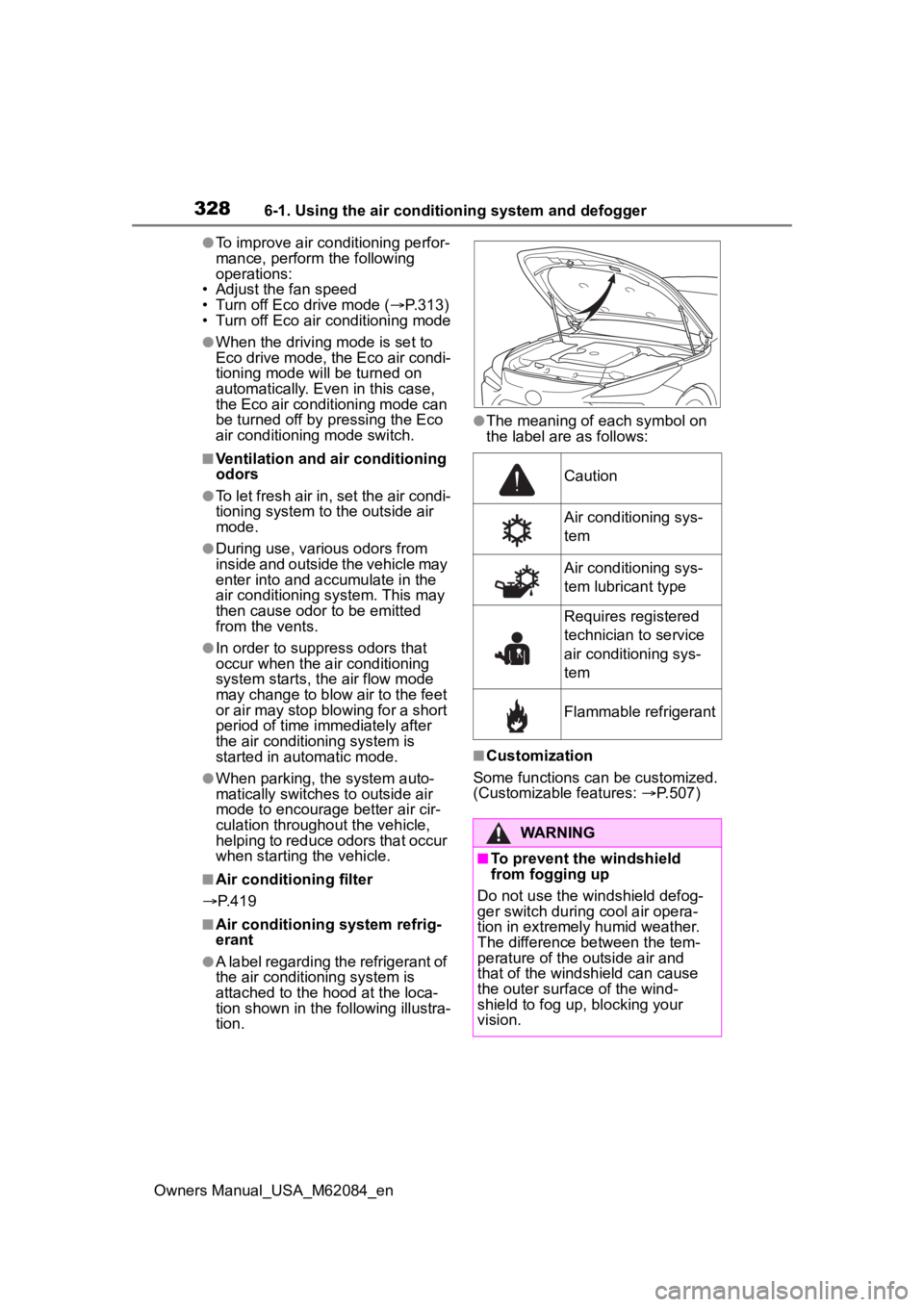
●A label regarding the refrigerant of
the air conditioning system is
attached to the ho od at the loca-
tion shown in the f ollowing illustra-
tion.
●The meaning of each symbol on
the label are as follows:
■Customization
Some functions can be customized.
(Customizable features: P.507)
Caution
Air conditioning sys-
tem
Air conditioning sys-
tem lubricant type
Requires registered
technician to service
air conditioning sys-
tem
Flammable refrigerant
WARNING
■To prevent the windshield
from fogging up
Do not use the windshield defog-
ger switch during cool air opera-
tion in extremely humid weather.
The difference between the tem-
perature of the outside air and
that of the windshield can cause
the outer surface of the wind-
shield to fog up, blocking your
vision.
Page 333 of 556

3336-1. Using the air conditioning system and defogger
Owners Manual_USA_M62084_en
6
Interior features
Outside/recirculated air mode switch
Eco air conditioning mode switch
“A/C” switch
Rear air conditioning contro l screen select switch
Automatic mode switch
Windshield defogger switch
Rear window and outside rear view mirror defoggers switch
“OFF” switch
■Adjusting the temperature
setting
Press of the temperature
control switches on the air con-
ditioning control panel or select of the temperature control
switches on the air conditioning
control screen to increases the
temperature.
Press of the temperature
control switches on the air con-
ditioning control panel or select
of the temperature control
switches on the air conditioning
control screen to decreases the
temperature.
If the switch is pr essed and held or
selected and held, the temperature
will continuously change.
If the indicator on the “A/C” switch
does not illuminate , the system will
blow ambient temperature air or heated air.
■Setting the fan speed
Press the fan speed increase
switch on the air conditioning
control panel or select the fan
speed increase switch on the air
conditioning control screen to
increase the fan speed.
Press the fan speed decrease
switch on the air conditioning
control panel or select the fan
speed decrease switch on the
air conditioning control screen to
decrease the fan speed.
Press the “OFF” s witch on the air
conditioning control panel to turn
the fan off.
■Change the airflow mode
Select the airflow mode control
switch on the air conditioning
control screen.
The airflow mode changes each
time the switch is selected.
: Air flows to the upper body
: Air flows to the upper body
Page 336 of 556
3366-1. Using the air conditioning system and defogger
Owners Manual_USA_M62084_en
●To improve air conditioning perfor-
mance, perform the following
operations:
• Adjust the fan speed
• Turn off Eco drive mode ( P.313)
• Turn off Eco air conditioning mode
●When the driving mode is set to
Eco drive mode, the Eco air condi-
tioning mode will be turned on
automatically. Even in this case,
the Eco air conditioning mode can
be turned off by s electing the Eco
air conditioning mode switch.
■When cleaning the air condi-
tioning control panel
Touch switches may respond when
cleaning. Turn the power switch to
OFF before proceeding with clean-
ing.
■Ventilation and air conditioning
odors
●To let fresh air in, set the air condi-
tioning system to the outside air
mode.
●During use, various odors from
inside and outside the vehicle may
enter into and a ccumulate in the
air conditioning system. This may
then cause odor to be emitted
from the vents.
●In order to suppress odors that
occur when the a ir conditioning
system starts, the air flow mode
may change to blow air to the feet
or air may stop blowing for a short
period of time immediately after
the air conditioning system is
started in automatic mode.
●When parking, the system auto-
matically switches to outside air
mode to encourage better air cir-
culation throughout the vehicle,
helping to reduce odors that occur
when starting the vehicle.
■Air conditioning filter
P. 4 1 9
■Air conditioning system refrig-
erant
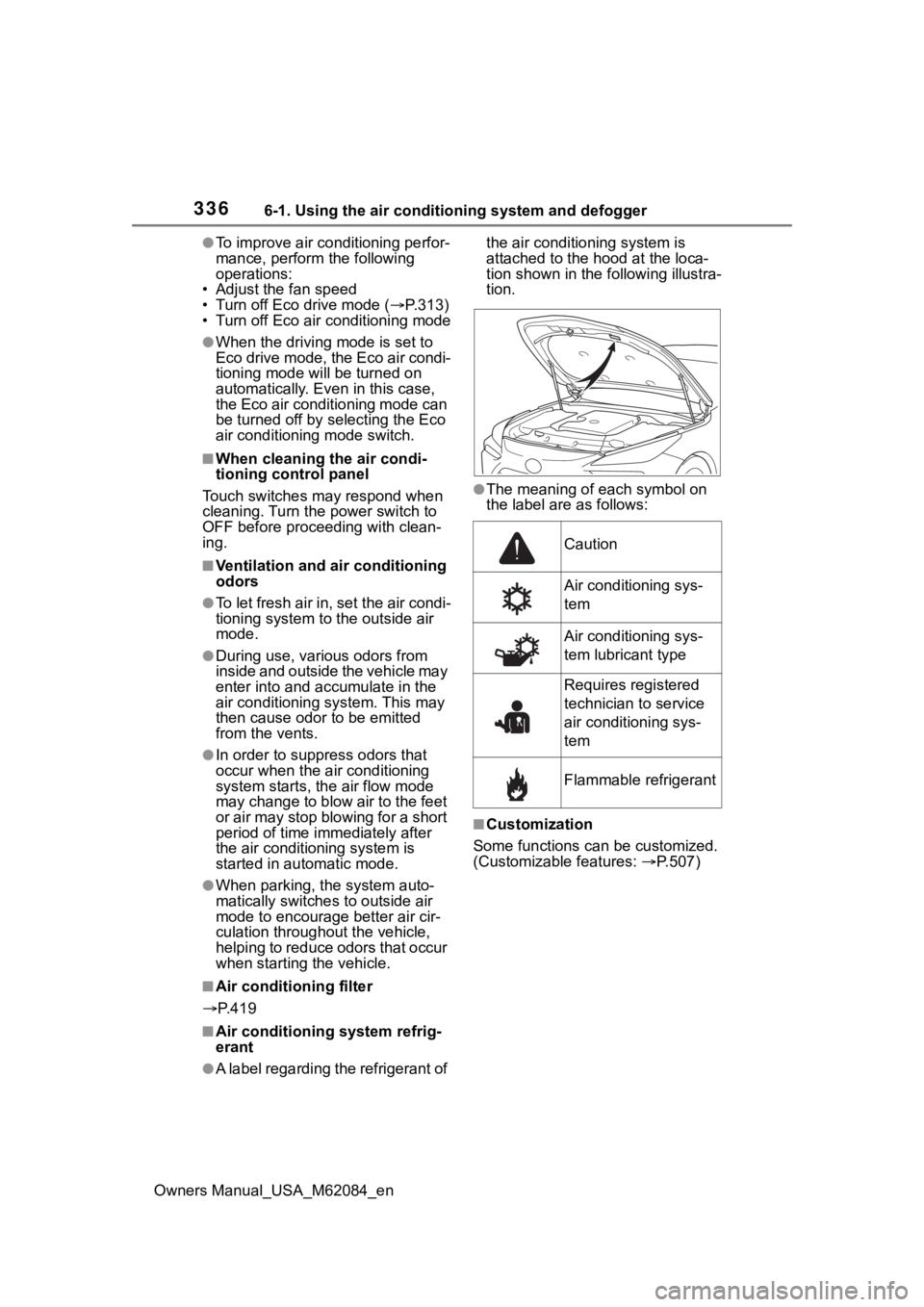
●A label regarding the refrigerant of the air conditioning system is
attached to the h
ood at the loca-
tion shown in the following illustra-
tion.
●The meaning of each symbol on
the label are as follows:
■Customization
Some functions can be customized.
(Customizable features: P.507)
Caution
Air conditioning sys-
tem
Air conditioning sys-
tem lubricant type
Requires registered
technician to service
air conditioning sys-
tem
Flammable refrigerant
Page 344 of 556
3446-1. Using the air conditioning system and defogger
Owners Manual_USA_M62084_en
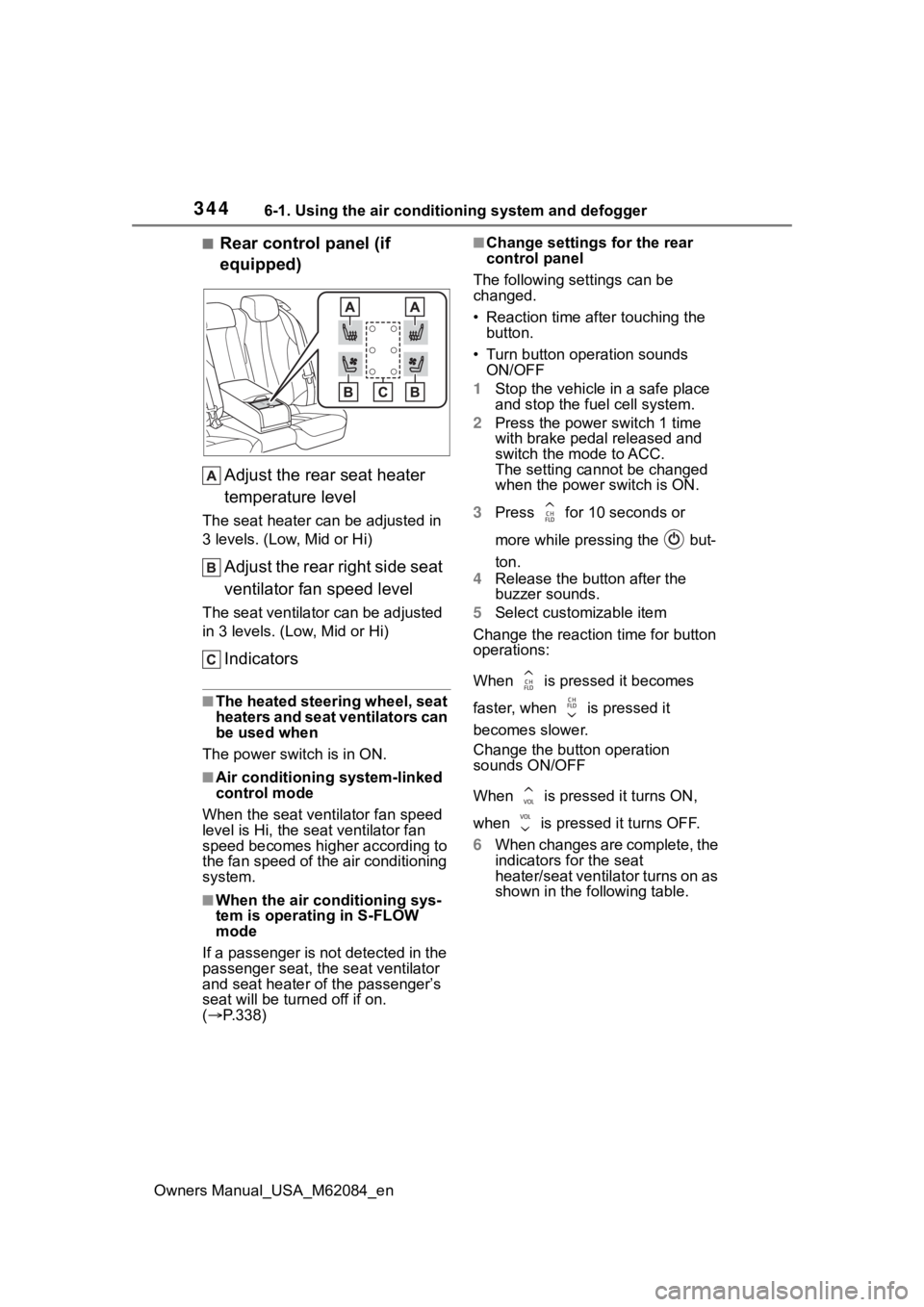
■Rear control panel (if
equipped)Adjust the rear seat heater
temperature level
The seat heater can be adjusted in
3 levels. (Low, Mid or Hi)
Adjust the rear right side seat
ventilator fan speed level
The seat ventilator can be adjusted
in 3 levels. (Low, Mid or Hi)
Indicators
■The heated steering wheel, seat
heaters and seat ventilators can
be used when
The power swit ch is in ON.
■Air conditioning system-linked
control mode
When the seat ventilator fan speed
level is Hi, the s eat ventilator fan
speed becomes higher according to
the fan speed of the air conditioning
system.
■When the air conditioning sys-
tem is operating in S-FLOW
mode
If a passenger is not detected in the
passenger seat, the seat ventilator
and seat heater of the passenger’s
seat will be turne d off if on.
( P.338)
■Change settings for the rear
control panel
The following settings can be
changed.
• Reaction time after touching the button.
• Turn button operation sounds ON/OFF
1 Stop the vehicle in a safe place
and stop the fuel cell system.
2 Press the power switch 1 time
with brake pedal released and
switch the mode to ACC.
The setting cannot be changed
when the power switch is ON.
3 Press for 10 seconds or
more while pressing the but-
ton.
4 Release the button after the
buzzer sounds.
5 Select customizable item
Change the reaction time for button
operations:
When is pressed it becomes
faster, when is pressed it
becomes slower.
Change the button operation
sounds ON/OFF
When is pressed it turns ON,
when is pressed it turns OFF.
6 When changes are complete, the
indicators for the seat
heater/seat ventilator turns on as
shown in the following table.
Page 353 of 556
3536-4. Using the other interior features
Owners Manual_USA_M62084_en
6
Interior features
6-4.Using the other interior features
The following functions can be
displayed and operated on the
side display.
Operate a button to change the dis-
played function screen.
The displayed function can be
changed by performing an up or
down flick operation on the side dis-
play.
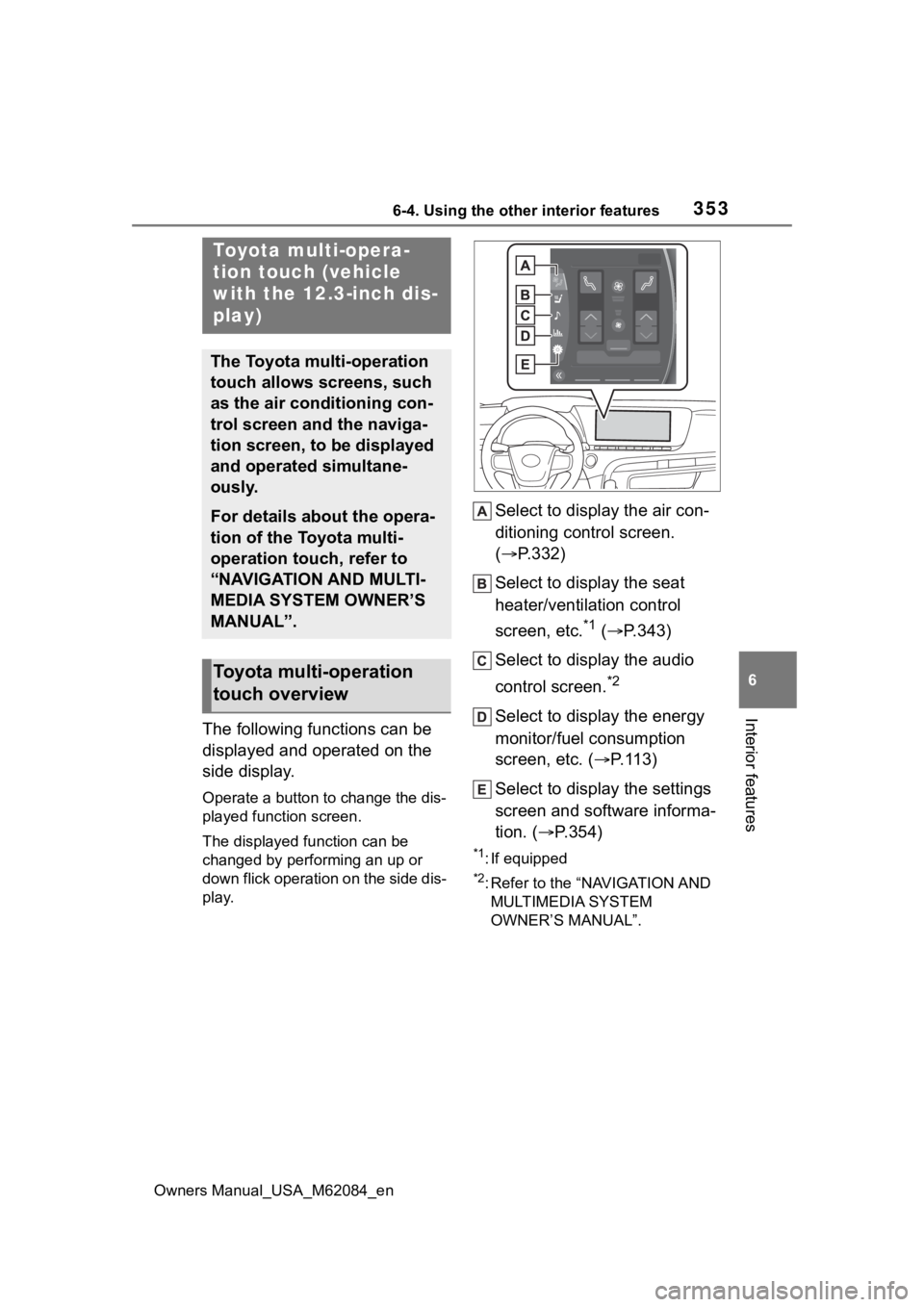
Select to display the air con-
ditioning control screen.
( P.332)
Select to display the seat
heater/ventilation control
screen, etc.
*1 ( P.343)
Select to display the audio
control screen.
*2
Select to display the energy
monitor/fuel consumption
screen, etc. ( P.113)
Select to display the settings
screen and software informa-
tion. ( P.354)
*1: If equipped
*2: Refer to the “NAVIGATION AND
MULTIMEDIA SYSTEM
OWNER’S MANUAL”.
Toyota multi-opera-
tion touch (vehicle
with the 12.3-inch dis-
play)
The Toyota multi-operation
touch allows screens, such
as the air conditioning con-
trol screen and the naviga-
tion screen, to be displayed
and operated simultane-
ously.
For details about the opera-
tion of the Toyota multi-
operation touch, refer to
“NAVIGATION AND MULTI-
MEDIA SYSTEM OWNER’S
MANUAL”.
Toyota multi-operation
touch overview
Page 360 of 556
3606-4. Using the other interior features
Owners Manual_USA_M62084_encover and accessories not able to
handle Qi are attached to the porta-
ble device. Depending on the type
of cover and accessory, it may not
be possible to charge. When
charging is not performed even with
the portable devic
e placed on the
charge area, remove the cover and
accessories.
■While charging, noise enters
the AM radio
Turn off the wireless charger and
confirm that the noise has
decreased. If the noise decreases,
continuously pushing the power
supply switch of the wireless char-
ger for 2 seconds, the frequency of
the charger can be changed and the
noise can be reduced. Also, on that
occasion, the operation indicator
light will flash orange 2 times.
■Important points of the wire-
less charger
●If the electronic key cannot be
detected within the vehicle inte-
rior, charging cannot be done.
When the door is opened and
closed, charging may be tempo-
rarily suspended.
●When charging, the wireless
charging device and portable
device will get warmer, however
this is not a malfunction.
When a portable device gets
warm while charging, charging
may stop due to the protection
function on the portable device
side. In this case, when the tem-
perature of the portable device
drops significantly, charge again.
■Operation sounds
When the power su pply is turned
on, while searching for the portable
device a sound will be produced,
however this is not a malfunction.
■Certification
P. 5 5 0
WARNING
■Caution while driving
When charging a portable device,
for safety reasons, the driver
should not operate the main part
of the portable device while driv-
ing.
■Caution regarding interfer-
ence with electronic devices
People with implantable cardiac
pacemakers, cardiac resynchroni-
zation therapy-pacemakers or
implantable cardioverter def ibrilla-
tors, as well as any other electri-
cal medical device, should consult
their physician about the usage of
the wireless charger. The opera-
tions of the wireless charger may
have an affect on medical
devices.
■To prevent damage or burns
Observe the following precau-
tions.
Failure to do so may result in a
possibility of equipment failure
and damage, catch fire, burns due
to overheat.
●Do not insert any metallic
objects between the charging
area and the portable device
while charging
●Do not place containers with liq-
uid such as water on the wire-
less charger.
●Do not attach sti ckers, metallic
objects, etc., to the charger area
or portable device
●Do not cover wit h cloth, etc.,
and charge
●Do not charge portable devices
other than designated
Page 365 of 556

3656-4. Using the other interior features
Owners Manual_USA_M62084_en
6
Interior features
3 Disconnect each plug from
the power outlets.
4 Close the lid of each power
outlet.
■The power outlet can be used
when
The READY indicato r is illuminated.
■Electronic devices that can be
connected to the power outlets
Use electronic devices in which the
total power cons umption of all
devices connected to the 120 VAC
power outlets is less than 1500 W.
Depending on the device being
used, the current flow may become
high and the electric power for a
moment may exce ed the regulated
capacity. If the regulated capacity is
exceeded by the electronic devices
being used, the protection function
of the power outlet may operate and
power outlet may not be able to be
used, but this is not a malfunction.
However, observe th e following pre-
cautions:
●Depending on the devices used, it
may cause interference with TV
and radio broadcasts.
●Observe the precautions that are
stated in the instruction manuals
for each of the electronic devices.
●It is assumed th at many typical
general electronic devices will not
be used within th e vehicle. The
following problems may occur
when using electronic devices
within the vehicle.
• Electronic device malfunction due to vibrations while driving.
• Electronic device malfunction or poor operations due to tempera-
ture changes
* within the vehicle.
• The installation is unstable and
may not operate normally as the
compartment within the vehicle is
not flat.
*: Depending on the weather, sea- son, usage environm
ent, etc., the
vehicle compartment may
undergo extreme high or low tem-
peratures.
■Power Outlet
●The power outlet is a device in
order to use ele ctronic devices
within the vehicle.
●While a power outlet is being
used, a cooling fan sound may be
heard from near a rear seat. This
does not indicate a malfunction.
■Devices which may not operate
correctly
The following 120 VAC devices may
not operate properly even if their
power consumption is less than
1500 W:
●Devices with high initial peak watt-
age
●Measuring devices that process
precise data
●Devices that require an extremely
stable power supply
●Devices that require a constant
power supply from the power out-
let, such as a device with a timer.
■When the power supply func-
tion cannot be used
If the AC120V switch is pressed but
the switch indicator does not illumi-
nate, the protection circuit may have
operated.
In this case, perform the appropriate
procedures as follows.
●Disconnect the plug of each
device from the power outlets,
check that the total power con-
sumption of all de vices to be con-
nected to the power outlets is less
than 1500 W, reconnect the
devices and then press the
AC120V switch again.
●Disconnect the plug of each
device from the power outlets,
check that the devices are not
malfunctioning, reconnect the
Page 406 of 556
4067-3. Do-it-yourself maintenance
Owners Manual_USA_M62084_en
■Situations in which the tire
pressure warning system may
not operate properly
●In the following cases, the tire
pressure warning system may not
operate properly.
• If non-genuine Toyota wheels are used.
• If a tire has been replaced with a tire that is not an OE (Original
Equipment) tire.
• If a tire has been replaced with a tire that is not of the specified size.
• If tire chains, etc. are installed.
• If a window tint that affects the
radio wave signals is installed.
• If there is a lot of snow or ice on
the vehicle, particularly around the
wheels or wheel housings.
• If the tire inflation pressure is
much higher than the specified
level.
• If wheels not equipped with tire
pressure warning valves and
transmitter are used.
• If the ID code on the tire pressure
warning valves and transmitters is
not registered in the tire pressure
warning computer.
●Performance may be affected in
the following situations.
• When driving near a TV tower, electric power plant, gas station,
radio station, large display, airport
or other facility that generates
strong radio waves or electrical
noise
• When carrying a portable radio, cellular phone, cordless phone or
other wireless communication
device
If tire position information is not cor-
rectly displayed due to the radio
wave conditions, the display may be
corrected by changing the location
of the vehicle as the radio wave
conditions may change.
●When the vehicle is stopped, the
time taken for the warning to start
or turn off may be longer.
●When the inflation pressure of a
tire drops rapidly, for example when a tire has burst, the warning
may not operate.
■Warning performance of the tire
pressure warning system
The warning of the tire pressure
warning system w ill change in
accordance the conditions under
which it was initia lized. For this rea-
son, the system may give a warning
even if the tire pressure does not
reach a low enough level, or if the
pressure is higher than the pressure
that was adjusted to when the sys-
tem was initialized.
■Tire pressure warning system
certification
P.553
When replacing the tires or
wheels, the tire pressure warn-
ing valves and transmitters must
be installed to the wheels which
will be installed to the vehicle.
When new tire pressure warning
valves and transmitters are
installed, new ID codes must be
registered in the tire pressure
warning computer and the tire
pressure warning system must
be initialized. ( P.409)
■Replacing tires and wheels
If the ID codes of the tire pressure
warning valves and transmitters are
not registered, the tire pressure
warning system will not work prop-
erly. In this case, after driving for
about 10 minutes, the tire pressure
warning light will blink for approxi-
mately 1 minute and then illuminate
to indicate a system malfunction.
Installing tire pressure
warning valves and trans-
mitters