light TOYOTA MIRAI 2022 Service Manual
[x] Cancel search | Manufacturer: TOYOTA, Model Year: 2022, Model line: MIRAI, Model: TOYOTA MIRAI 2022Pages: 556, PDF Size: 17.34 MB
Page 113 of 556
1133-1. Instrument cluster
Owners Manual_USA_M62084_en
3
Vehicle status information and indicators
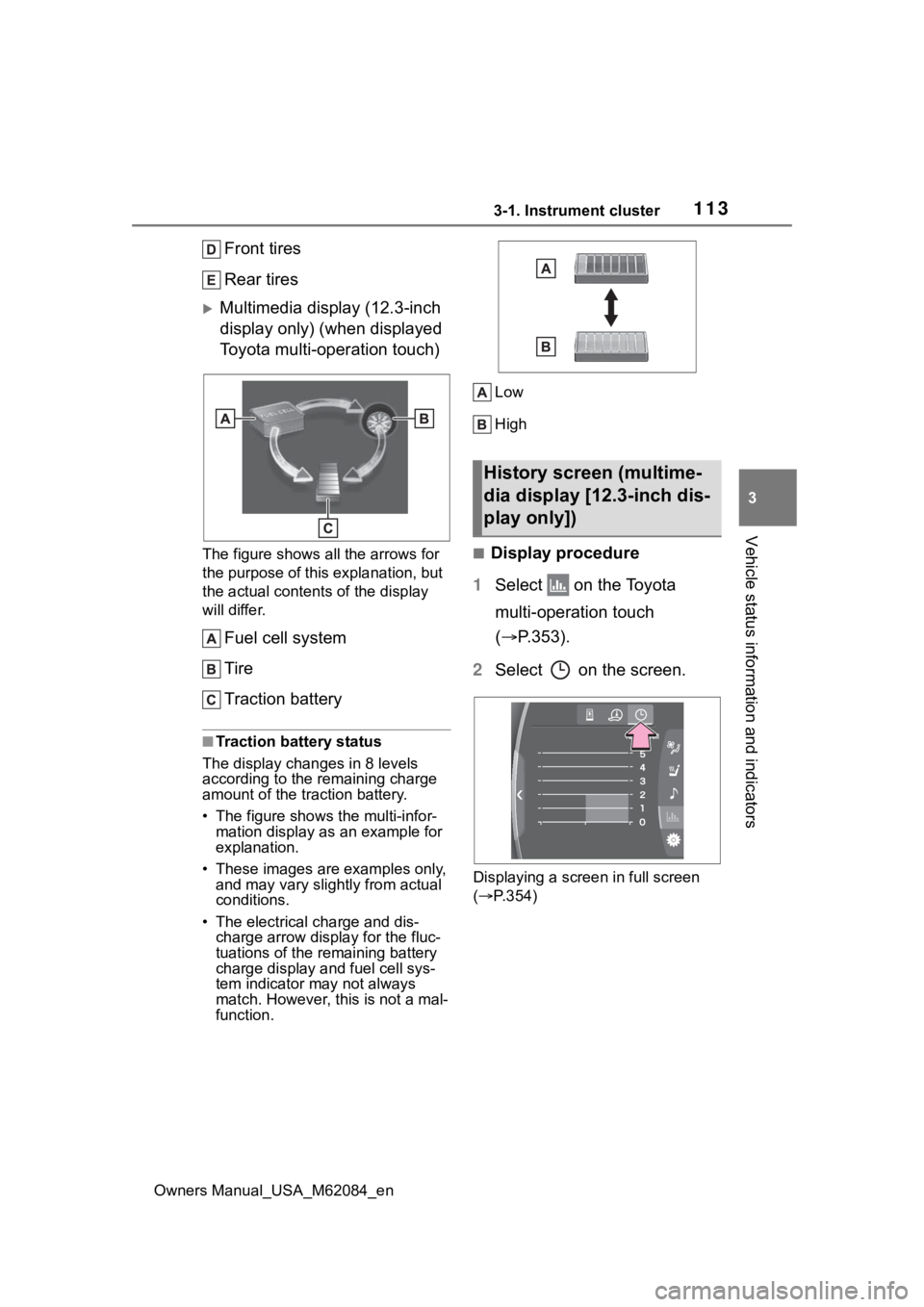
Front tires
Rear tires
Multimedia display (12.3-inch
display only) (when displayed
Toyota multi-operation touch)
The figure shows all the arrows for
the purpose of this explanation, but
the actual contents of the display
will differ.
Fuel cell system
Tire
Traction battery
■Traction battery status
The display changes in 8 levels
according to the remaining charge
amount of the traction battery.
• The figure shows the multi-infor- mation display as an example for
explanation.
• These images are examples only, and may vary slight ly from actual
conditions.
• The electrical charge and dis- charge arrow display for the fluc-
tuations of the remaining battery
charge display and fuel cell sys-
tem indicator ma y not always
match. However, this is not a mal-
function. Low
High
■Display procedure
1 Select on the Toyota
multi-operation touch
( P.353).
2 Select on the screen.
Displaying a screen in full screen
( P.354)
History screen (multime-
dia display [12.3-inch dis-
play only])
Page 114 of 556
1143-1. Instrument cluster
Owners Manual_USA_M62084_en
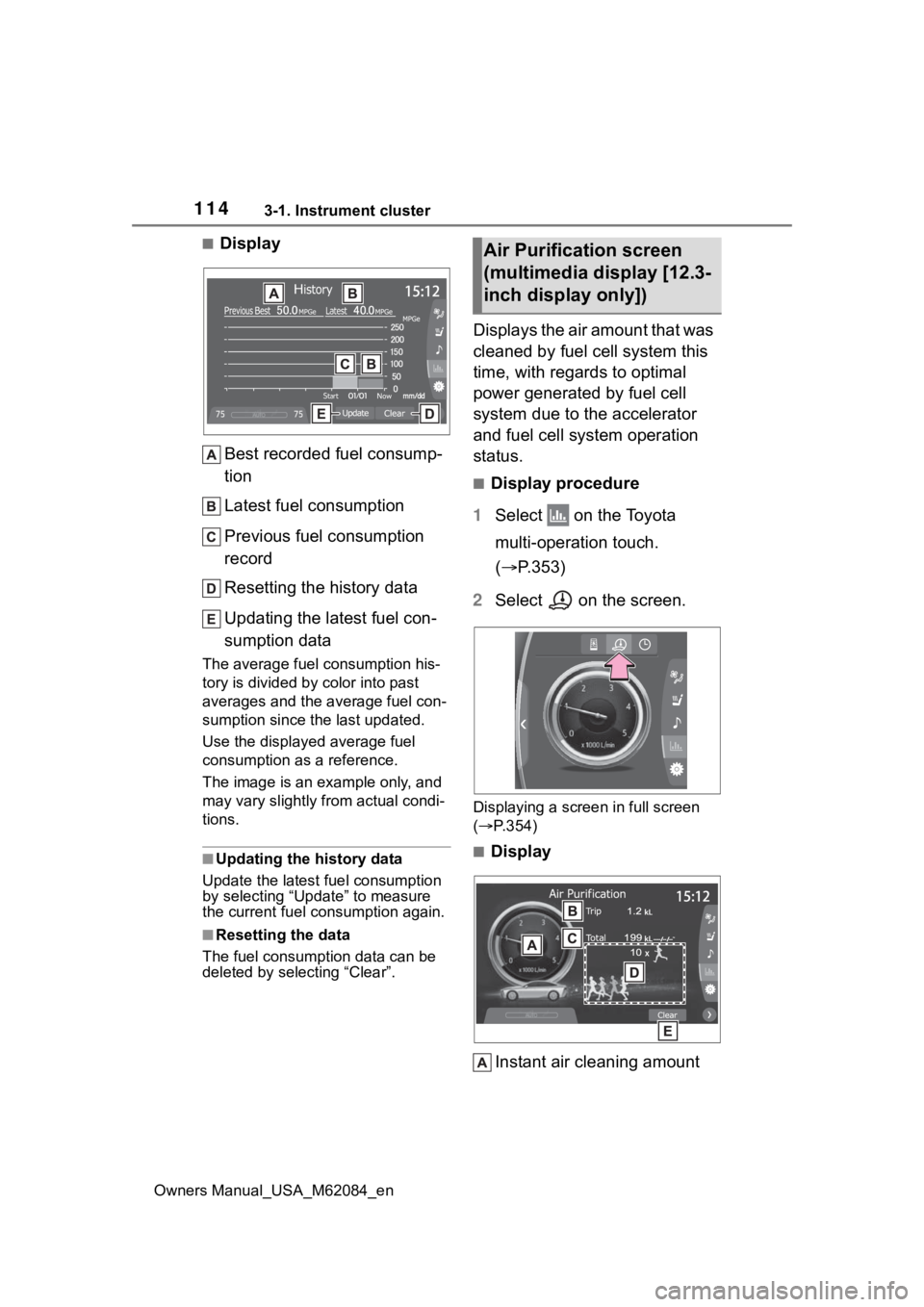
■DisplayBest recorded fuel consump-
tion
Latest fuel consumption
Previous fuel consumption
record
Resetting the history data
Updating the latest fuel con-
sumption data
The average fuel consumption his-
tory is divided by color into past
averages and the average fuel con-
sumption since the last updated.
Use the displayed average fuel
consumption as a reference.
The image is an example only, and
may vary slightly f rom actual condi-
tions.
■Updating the history data
Update the latest fuel consumption
by selecting “Upda te” to measure
the current fuel consumption again.
■Resetting the data
The fuel consumption data can be
deleted by selecting “Clear”.
Displays the air amount that was
cleaned by fuel cell system this
time, with regards to optimal
power generated by fuel cell
system due to the accelerator
and fuel cell system operation
status.
■Display procedure
1 Select on the Toyota
multi-operation touch.
( P.353)
2 Select on the screen.
Displaying a screen in full screen
( P.354)
■Display
Instant air cleaning amount
Air Purification screen
(multimedia display [12.3-
inch display only])
Page 115 of 556

1153-1. Instrument cluster
Owners Manual_USA_M62084_en
3
Vehicle status information and indicators
Displays the instant air cleaning
amount per unit of time.
Air cleaning amount estima-
tion display
Displays the total amount of air
cleaning from starting the fuel cell
system.
Air cleaning amount between
resets
Displays the total air cleaning esti-
mated amount after resets.
Runner display
Runners increase depending on the
estimated amount of air cleaning
between resets.
Resetting the data
Clear all the history up to now.
The image is an example only, and
may vary slightly f rom actual condi-
tions.
■Data in Air purification is
reseted when
“Clear” is selected to reset data in
air cleaning amount between resets
and runner display.
■Display Runner
When ten runners are collected,
they are absorbed into a runner
mark.
■Display
●The actual amount of air may dif-
fer because the amount of air
required for power generation
changes due to usage environ-
ment (climate, altitude, etc.) and
the status of power generation, as
well as driving conditions.
●The instant air cleaning amount
may operate slowly and may be
delayed in operating, but this is
not a malfunction.
Page 119 of 556
1194-1. Key information
Owners Manual_USA_M62084_en
4
Before driving
approximately 10 days after a new
electronic key has been registered.
If this message is displayed but you
have not had a new electronic key
registered, ask your Toyota dealer to
check if an unknow n electronic key
(other than those in your posses-
sion) has been registered.
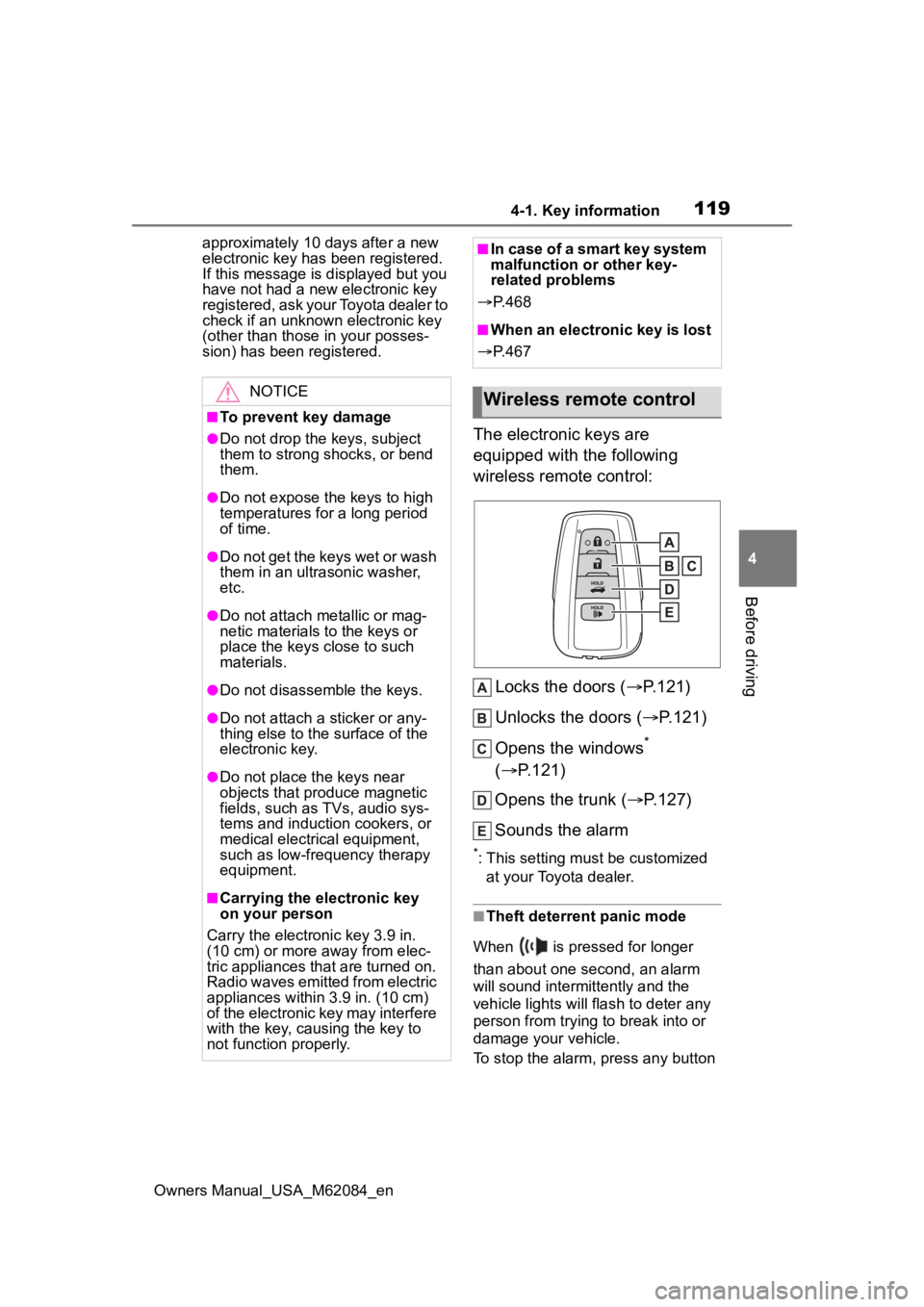
The electronic keys are
equipped with the following
wireless remote control:
Locks the doors ( P.121)
Unlocks the doors ( P.121)
Opens the windows
*
( P.121)
Opens the trunk ( P.127)
Sounds the alarm
*: This setting must be customized at your Toyota dealer.
■Theft deterrent panic mode
When is pressed for longer
than about one second, an alarm
will sound intermittently and the
vehicle lights will flash to deter any
person from trying to break into or
damage your vehicle.
To stop the alarm, press any button
NOTICE
■To prevent key damage
●Do not drop the keys, subject
them to strong shocks, or bend
them.
●Do not expose the keys to high
temperatures for a long period
of time.
●Do not get the keys wet or wash
them in an ultrasonic washer,
etc.
●Do not attach metallic or mag-
netic materials to the keys or
place the keys close to such
materials.
●Do not disassemble the keys.
●Do not attach a sticker or any-
thing else to the surface of the
electronic key.
●Do not place th e keys near
objects that produce magnetic
fields, such as TVs, audio sys-
tems and induction cookers, or
medical electrical equipment,
such as low-frequency therapy
equipment.
■Carrying the electronic key
on your person
Carry the electronic key 3.9 in.
(10 cm) or more away from elec-
tric appliances that are turned on.
Radio waves emitted from electric
appliances within 3.9 in. (10 cm)
of the electronic key may interfere
with the key, causing the key to
not function properly.
■In case of a smart key system
malfunction or other key-
related problems
P. 4 6 8
■When an electronic key is lost
P. 4 6 7
Wireless remote control
Page 121 of 556
1214-2. Opening, closing and locking the doors and trunk
Owners Manual_USA_M62084_en
4
Before driving
4-2.Opening, closing and locking the doors and trunk
■Smart key system (entry
function)
Carry the electronic key to
enable this function.
1 Grip the driver’s door handle
to unlock the door. Holding
the driver’s door handle for
approximately 2 seconds
unlocks all the doors. Grip
any passenger door handle
to unlock all the doors.
*
Make sure to touch the sensor on
the back of the handle.
The doors cannot be unlocked for 3
seconds after the doors are locked.
2Touch the lock sensor (inden-
tation on the surface of the
door handle) to lock all the
doors.
Check that the door is securely
locked.
*: The door unlock settings can be
changed.
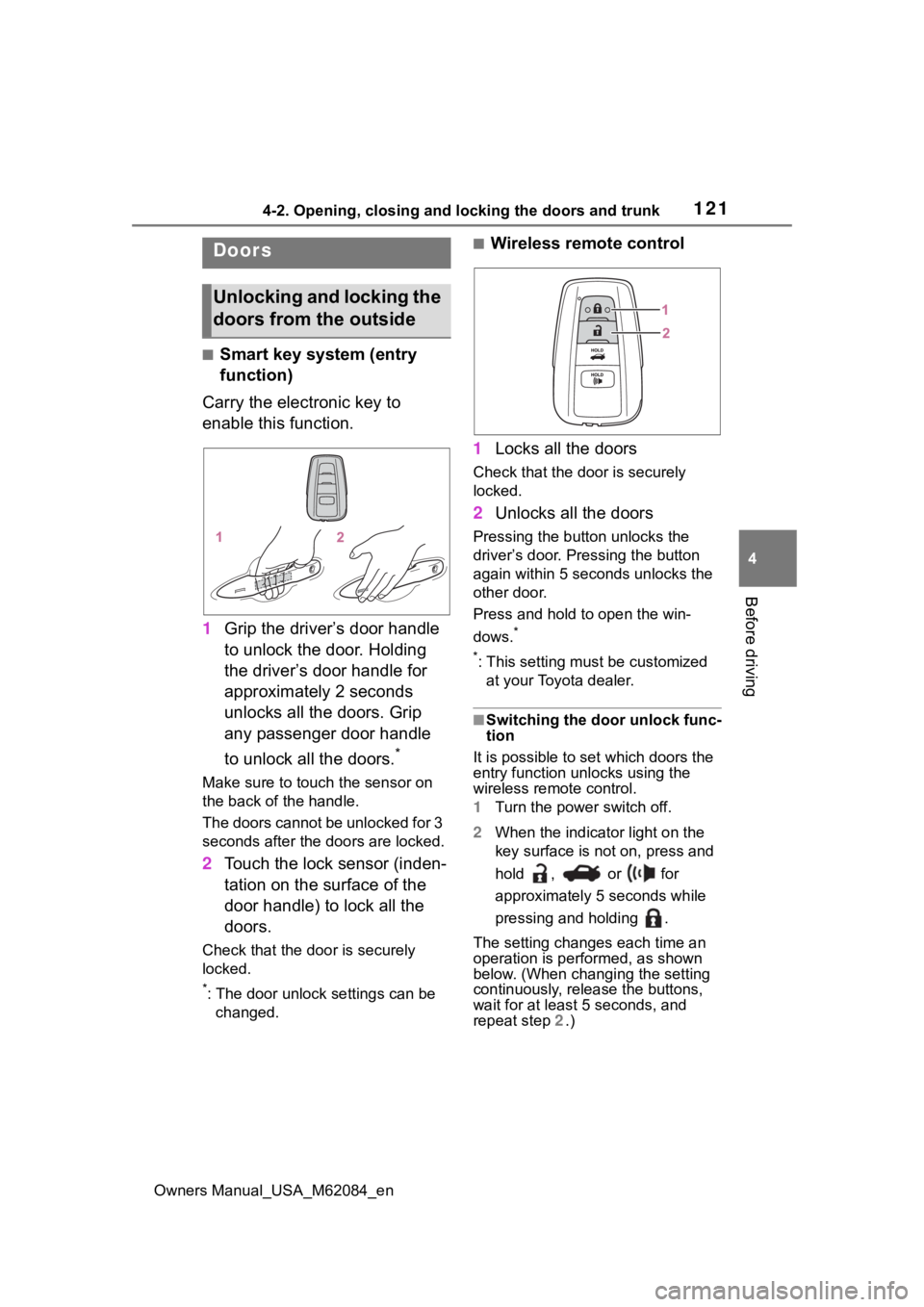
■Wireless remote control
1 Locks all the doors
Check that the d oor is securely
locked.
2 Unlocks all the doors
Pressing the button unlocks the
driver’s door. Pressing the button
again within 5 seconds unlocks the
other door.
Press and hold to open the win-
dows.
*
*
: This setting must be customized at your Toyota dealer.
■Switching the door unlock func-
tion
It is possible to set which doors the
entry function unlocks using the
wireless remote control.
1 Turn the power switch off.
2 When the indicator light on the
key surface is not on, press and
hold , or for
approximately 5 seconds while
pressing and holding .
The setting changes each time an
operation is per formed, as shown
below. (When changing the setting
continuously, release the buttons,
wait for at least 5 seconds, and
repeat step 2 .)
Doors
Unlocking and locking the
doors from the outside
Page 127 of 556
1274-2. Opening, closing and locking the doors and trunk
Owners Manual_USA_M62084_en
4
Before driving
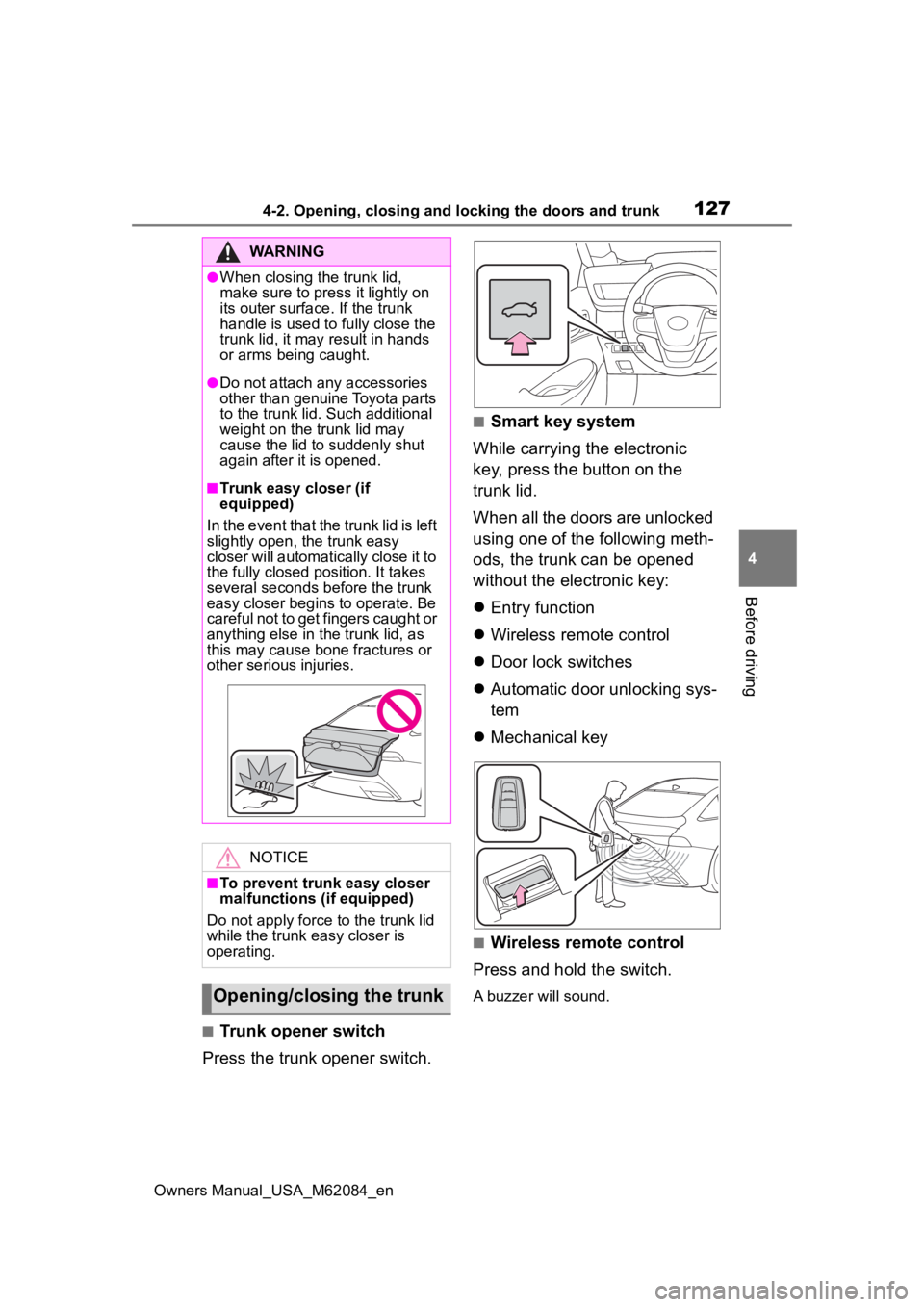
■Trunk opener switch
Press the trunk opener switch.
■Smart key system
While carrying the electronic
key, press the button on the
trunk lid.
When all the doors are unlocked
using one of the following meth-
ods, the trunk can be opened
without the electronic key:
Entry function
Wireless remote control
Door lock switches
Automatic door unlocking sys-
tem
Mechanical key
■Wireless remote control
Press and hold the switch.
A buzzer will sound.
WARNING
●When closing the trunk lid,
make sure to press it lightly on
its outer surface. If the trunk
handle is used to fully close the
trunk lid, it may result in hands
or arms being caught.
●Do not attach any accessories
other than genuine Toyota parts
to the trunk lid . Such additional
weight on the trunk lid may
cause the lid to suddenly shut
again after it is opened.
■Trunk easy closer (if
equipped)
In the event that the trunk lid is left
slightly open , the trunk easy
closer will automatically close it to
the fully closed po sition. It takes
several seconds before the trunk
easy closer begins to operate. Be
careful not to get fingers caught or
anything else in the trunk lid, as
this may cause bone fractures or
other serious injuries.
NOTICE
■To prevent trunk easy closer
malfunctions ( if equipped)
Do not apply force to the trunk lid
while the trunk easy closer is
operating.
Opening/closing the trunk
Page 128 of 556
1284-2. Opening, closing and locking the doors and trunk
Owners Manual_USA_M62084_en
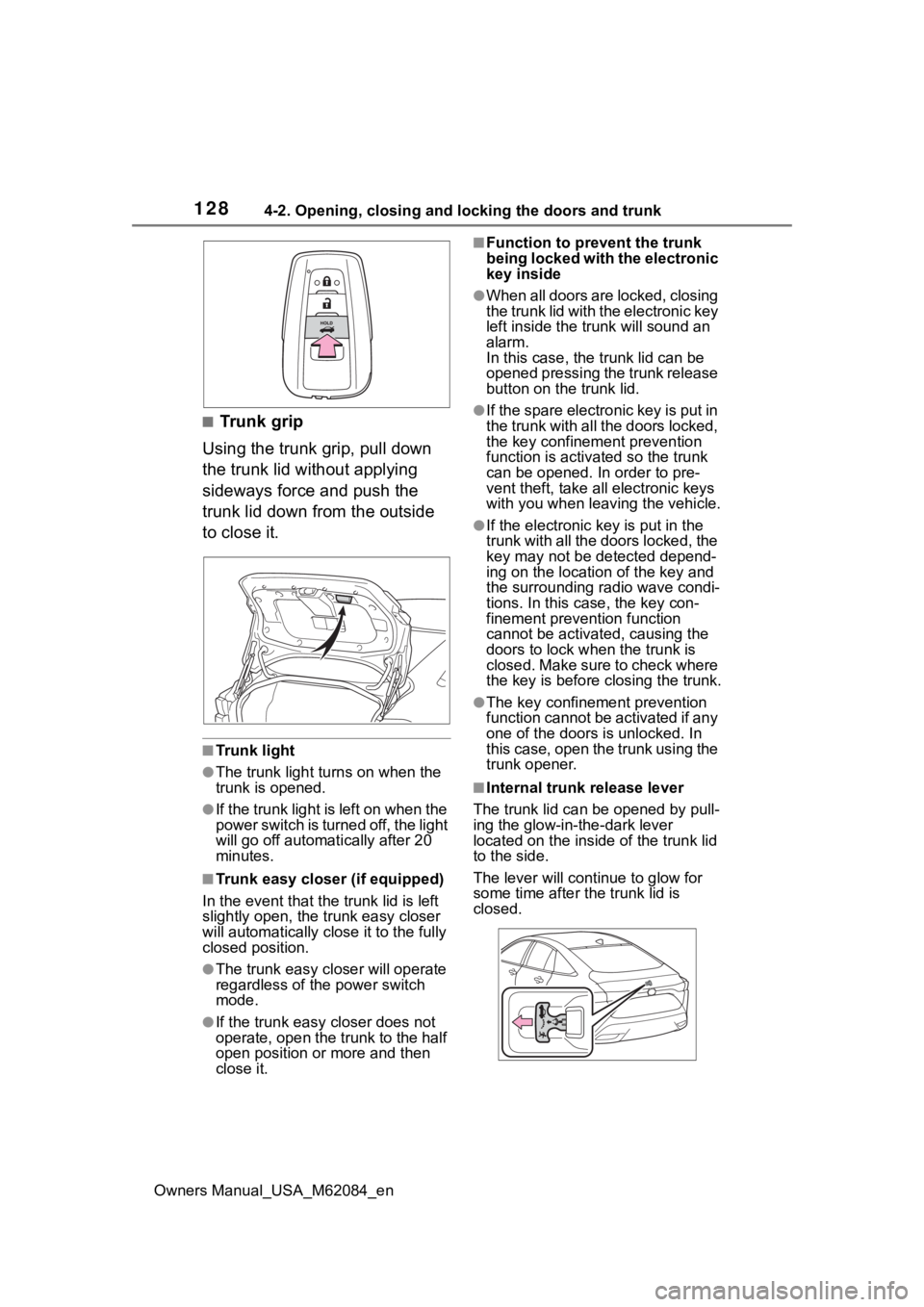
■Trunk grip
Using the trunk grip, pull down
the trunk lid without applying
sideways force and push the
trunk lid down from the outside
to close it.
■Trunk light
●The trunk light turns on when the
trunk is opened.
●If the trunk light is left on when the
power switch is turned off, the light
will go off automat ically after 20
minutes.
■Trunk easy closer (if equipped)
In the event that the trunk lid is left
slightly open, the trunk easy closer
will automatically close it to the fully
closed position.
●The trunk easy closer will operate
regardless of the power switch
mode.
●If the trunk easy closer does not
operate, open the trunk to the half
open position or more and then
close it.
■Function to prevent the trunk
being locked with the electronic
key inside
●When all doors are locked, closing
the trunk lid with the electronic key
left inside the trunk will sound an
alarm.
In this case, the trunk lid can be
opened pressing the trunk release
button on the trunk lid.
●If the spare electronic key is put in
the trunk with all the doors locked,
the key confinement prevention
function is activated so the trunk
can be opened. In order to pre-
vent theft, take all electronic keys
with you when leaving the vehicle.
●If the electronic key is put in the
trunk with all the doors locked, the
key may not be detected depend-
ing on the location of the key and
the surrounding radio wave condi-
tions. In this case, the key con-
finement prevention function
cannot be activated, causing the
doors to lock when the trunk is
closed. Make sure to check where
the key is before closing the trunk.
●The key confinement prevention
function cannot be activated if any
one of the doors i s unlocked. In
this case, open the trunk using the
trunk opener.
■Internal trunk release lever
The trunk lid can b e opened by pull-
ing the glow-in-the-dark lever
located on the inside of the trunk lid
to the side.
The lever will contin ue to glow for
some time after the trunk lid is
closed.
Page 133 of 556
1334-2. Opening, closing and locking the doors and trunk
Owners Manual_USA_M62084_en
4
Before driving
doors detecting the electronic key
can be used to unl ock the vehicle.
●Even if the electronic key is not
inside the vehicle, it may be possi-
ble to start the fuel cell system if
the electronic key is near the win-
dow.
●The doors may unlock or lock if a
large amount of water splashes on
the door handle, such as in the
rain or in a car wash, when the
electronic key is within the effec-
tive range. (The doors will auto-
matically be locked after
approximately 60 seconds if the
doors are not opened and closed.)
●If the wireless remote control is
used to lock the doors when the
electronic key is near the vehicle,
there is a possib ility that the door
may not be unlocke d by the entry
function. (Use the wireless remote
control to unloc k the doors.)
●Touching the door lock sensor
while wearing gloves may delay or
prevent lock operation.
●When the lock op eration is per-
formed using the lock sensor, rec-
ognition signals will be shown up
to two consecutive times. After
this, no recogniti on signals will be
given.
●If the door handle becomes wet
while the electronic key is within
the effective ran ge, the door may
lock and unlock repeatedly. In this
case, follow the fo llowing correc-
tion procedures to wash the vehi-
cle:
• Place the electronic key in a loca- tion 6 ft. (2 m) or more away from
the vehicle. (Take care to ensure
that the key is not stolen.)
• Set the electronic key to battery- saving mode to disable the smart
key system. ( P.131)
●If the electronic key is inside the
vehicle and a door handle
becomes wet during a car wash, a
message may be shown on the
multi-informatio n display and a buzzer will sound outside the vehi-
cle. To turn off the alarm, lock all
the doors.
●The lock sensor may not work
properly if it comes into contact
with ice, snow, m
ud, etc. Clean
the lock sensor and attempt to
operate it again.
●A sudden approach to the effec-
tive range or door handle may pre-
vent the doors from being
unlocked. In this case, return the
door handle to the original position
and check that t he doors unlock
before pulling the door handle
again.
●If there is another electronic key in
the detection area, it may take
slightly longer to unlock the doors
after the door handle is gripped.
■When the vehicle is not driven
for extended periods
●To prevent theft of the vehicle, do
not leave the electronic key within
6 ft. (2 m) of the vehicle.
●The smart key system can be
deactivated in advance.
●Setting the electronic key to bat-
tery-saving mode helps to reduce
key battery depletion. ( P.131)
■To operate the system properly
●Make sure to carry the electronic
key when operating the system.
Do not get the electronic key too
close to the vehicle when operat-
ing the system from the outside of
the vehicle.
Depending on the position and hold-
ing condition of the electronic key,
the key may not be detected cor-
rectly and the system may not oper-
ate properly. (The alarm may go off
accidentally, or the door lock pre-
vention function m ay not operate.)
●Do not leave the electronic key
inside the trunk.
The key confinement prevention
function may not operate, depend-
Page 137 of 556
1374-3. Adjusting the seats
Owners Manual_USA_M62084_en
4
Before driving
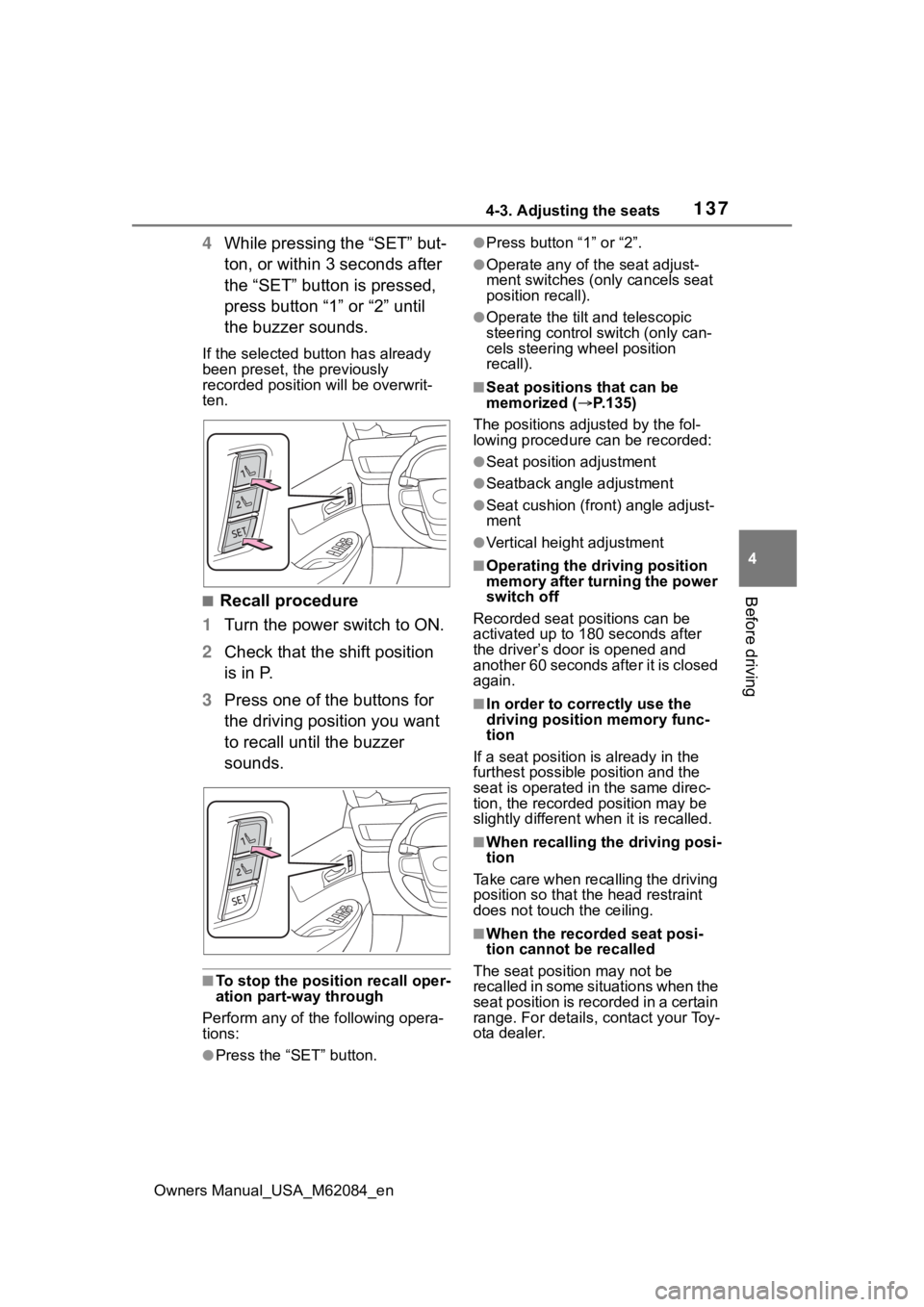
4 While pressing the “SET” but-
ton, or within 3 seconds after
the “SET” button is pressed,
press button “1” or “2” until
the buzzer sounds.
If the selected button has already
been preset, the previously
recorded position will be overwrit-
ten.
■Recall procedure
1 Turn the power switch to ON.
2 Check that the shift position
is in P.
3 Press one of the buttons for
the driving position you want
to recall until the buzzer
sounds.
■To stop the position recall oper-
ation part-way through
Perform any of the following opera-
tions:
●Press the “SET” button.
●Press button “1” or “2”.
●Operate any of t he seat adjust-
ment switches (only cancels seat
position recall).
●Operate the tilt and telescopic
steering control switch (only can-
cels steering wheel position
recall).
■Seat positions that can be
memorized ( P.135)
The positions adjusted by the fol-
lowing procedure can be recorded:
●Seat position adjustment
●Seatback angle adjustment
●Seat cushion (front) angle adjust-
ment
●Vertical height adjustment
■Operating the driving position
memory after turning the power
switch off
Recorded seat positions can be
activated up to 180 seconds after
the driver’s door is opened and
another 60 seconds after it is closed
again.
■In order to corre ctly use the
driving position memory func-
tion
If a seat position is already in the
furthest possible position and the
seat is operated in the same direc-
tion, the recorded position may be
slightly different w hen it is recalled.
■When recalling the driving posi-
tion
Take care when recalling the driving
position so that the head restraint
does not touch the ceiling.
■When the recorded seat posi-
tion cannot be recalled
The seat positi on may not be
recalled in some situations when the
seat position is recorded in a certain
range. For details, contact your Toy-
ota dealer.
Page 138 of 556
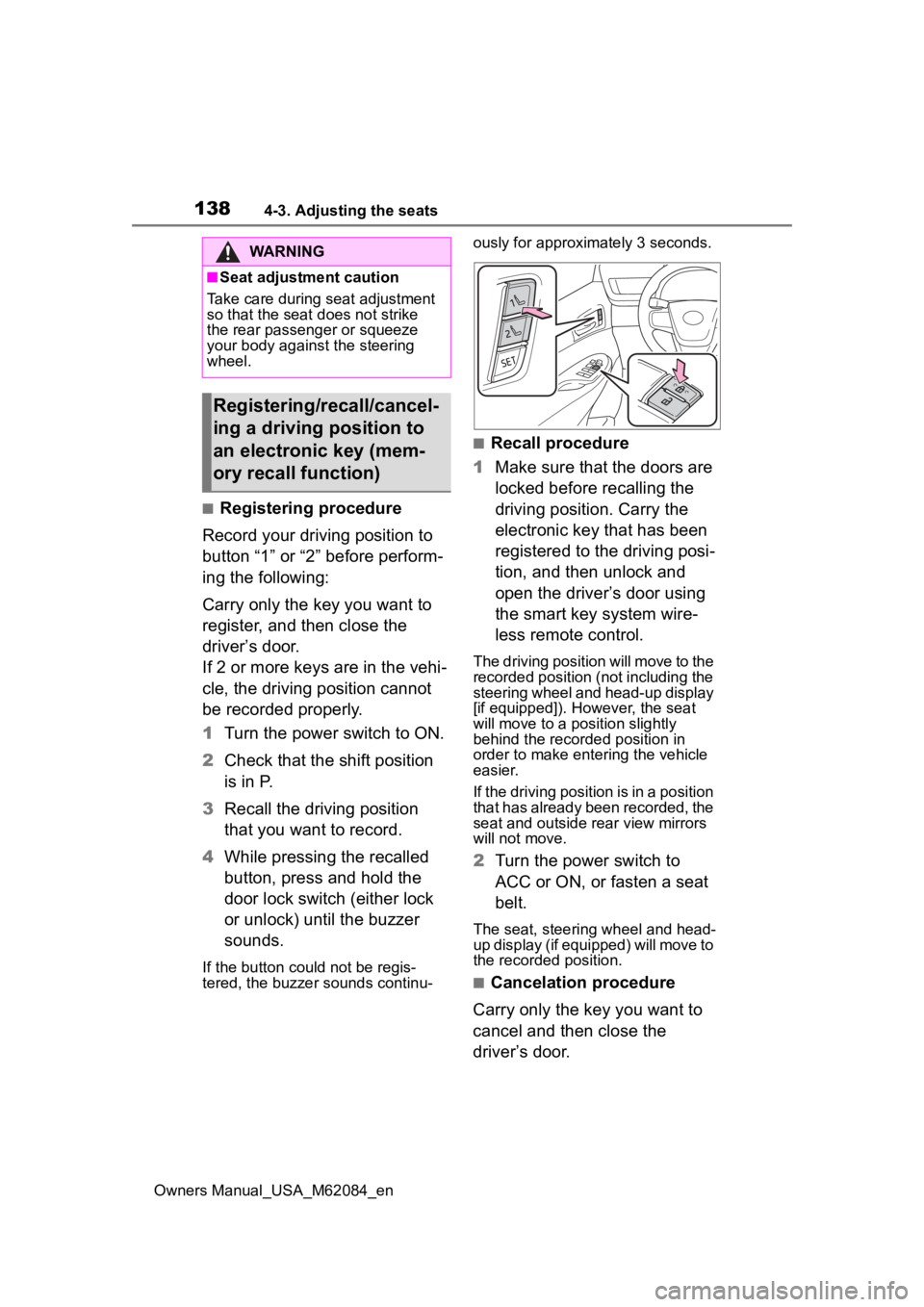
1384-3. Adjusting the seats
Owners Manual_USA_M62084_en
■Registering procedure
Record your driving position to
button “1” or “2” before perform-
ing the following:
Carry only the key you want to
register, and then close the
driver’s door.
If 2 or more keys are in the vehi-
cle, the driving position cannot
be recorded properly.
1 Turn the power switch to ON.
2 Check that the shift position
is in P.
3 Recall the driving position
that you want to record.
4 While pressing the recalled
button, press and hold the
door lock switch (either lock
or unlock) until the buzzer
sounds.
If the button could not be regis-
tered, the buzzer sounds continu- ously for approxim
ately 3 seconds.
■Recall procedure
1 Make sure that the doors are
locked before recalling the
driving position. Carry the
electronic key that has been
registered to the driving posi-
tion, and then unlock and
open the driver’s door using
the smart key system wire-
less remote control.
The driving position will move to the
recorded position (not including the
steering wheel and head-up display
[if equipped]). However, the seat
will move to a position slightly
behind the recorded position in
order to make entering the vehicle
easier.
If the driving position is in a position
that has already been recorded, the
seat and outside rear view mirrors
will not move.
2Turn the power switch to
ACC or ON, or fasten a seat
belt.
The seat, steering wheel and head-
up display (if equipped) will move to
the recorded position.
■Cancelation procedure
Carry only the key you want to
cancel and then close the
driver’s door.
WARNING
■Seat adjustment caution
Take care during seat adjustment
so that the seat d oes not strike
the rear passenger or squeeze
your body again st the steering
wheel.
Registering/recall/cancel-
ing a driving position to
an electronic key (mem-
ory recall function)