light TOYOTA MIRAI 2022 Repair Manual
[x] Cancel search | Manufacturer: TOYOTA, Model Year: 2022, Model line: MIRAI, Model: TOYOTA MIRAI 2022Pages: 556, PDF Size: 17.34 MB
Page 164 of 556
1645-1. Before driving
Owners Manual_USA_M62084_en
WARNING
●Sudden acceleration or regen-
erative braking due to shifting
could cause the vehicle to skid.
●After driving through a puddle,
lightly depress the brake pedal
to make sure that the brakes
are functioning properly. Wet
brake pads may prevent the
brakes from functioning prop-
erly. If the brakes on only one
side are wet and not functioning
properly, steering control may
be affected.
■When shifting the shift posi-
tion
●Do not let the vehicle roll back-
ward while a forward driving
position is selected, or roll for-
ward while the shift position is in
R.
Doing so may result in an acci-
dent or damage to the vehicle.
●Do not shift the shift position to
P while the vehicle is moving.
Doing so can damage the trans-
mission and may result in a loss
of vehicle control.
●Do not shift the shift position to
R while the vehicle is moving
forward.
Doing so can damage the trans-
mission and may result in a loss
of vehicle control.
●Do not shift the shift position to
a driving position while the vehi-
cle is moving backward.
Doing so can damage the trans-
mission and may result in a loss
of vehicle control.
●Changing the shif t position to N
while the vehicle is moving will
disengage the fuel cell system.
Regenerative braking is not
available with the fuel cell sys-
tem disengaged.
●Be careful not to change the
shift position with the accelera-
tor pedal depressed. Changing
the shift position to any posi-
tions other than P or N may lead
to unexpected rapid accelera-
tion of the vehicle that may
cause an acciden t and result in
death or serious injury.
After changing the shift position,
make sure to confirm the cur-
rent shift position displayed on
the shift position indicator inside
the meter.
■If you hear a squealing or
scraping noise (brake pad
wear limit indicators)
Have the brake pads checked and
replaced by your Toyota dealer as
soon as possible.
Rotor damage may result if the
pads are not replaced when
needed.
It is dangerous to drive the vehicle
when the wear limits of the brake
pads and/or those of the brake
discs are exceeded.
■When the vehicle is stopped
●Do not depress the accelerator
pedal unnecessarily.
If the shift position is in any
position other than P or N, the
vehicle may accelerate sud-
denly and unexpectedly, caus-
ing an accident.
●In order to prevent accidents
due to the vehic le rolling away,
always keep depressing the
brake pedal while stopped with
the “READY” indicator is illumi-
nated, and apply the parking
brake as necessary.
Page 165 of 556
1655-1. Before driving
Owners Manual_USA_M62084_en
5
Driving
WARNING
●If the vehicle is stopped on an
incline, in order to prevent acci-
dents caused by the vehicle roll-
ing forward or backward, always
depress the brake pedal and
securely apply the parking
brake as needed.
■When the vehicle is parked
●Do not leave glasses, cigarette
lighters, spray cans, or soft
drink cans in the vehicle when it
is in the sun.
Doing so may result in the fol-
lowing:
• Gas may leak from a cigarette lighter or spray can, and may
lead to a fire.
• The temperature inside the vehicle may cause the plastic
lenses and plastic material of
glasses to deform or crack.
• Soft drink cans may fracture, causing the contents to spray
over the interior of the vehicle,
and may also caus e a short cir-
cuit in the vehicle’s electrical
components.
●Do not leave cigarette lighters in
the vehicle. If a cigarette lighter
is in a place such as the glove
box or on the floor, it may be lit
accidentally when luggage is
loaded or the seat is adjusted,
causing a fire.
●Do not attach adhesive discs to
the windshield or windows. Do
not place containers such as air
fresheners on the instrument
panel or dashboard. Adhesive
discs or containers may act as
lenses, causing a fire in the
vehicle.
●Do not leave a door or window
open if the curved glass is
coated with a metallized film
such as a silver-colored one.
Reflected sunlight may cause
the glass to act a s a lens, caus-
ing a fire.
●Always apply the parking brake,
shift the shift position to P, stop
the fuel cell system and lock the
vehicle.
Do not leave the vehicle unat-
tended while the “READY” indi-
cator is illuminated.
If the vehicle is parked with the
shift position in P but the park-
ing brake is not set, the vehicle
may start to move, possibly
leading to an accident.
■When taking a nap in the vehi-
cle
Always turn the fuel cell system
off. Otherwise, if you accidentally
move the shift lever or depress
the accelerator pedal, causing the
vehicle to unintentionally move,
which can lead to an accident,
resulting in death o r serious injury.
■When braking
●When the brakes are wet, drive
more cautiously.
Braking distance increases
when the brakes are wet, and
this may cause one side of the
vehicle to brake d ifferently than
the other side. Also, the parking
brake may not securely hold the
vehicle.
●If the electronically controlled
brake system does not operate,
do not follow other vehicles
closely and avoid hills or sharp
turns that require braking.
In this case, braking is still pos-
sible, but the brake pedal
should be depressed more
firmly than usual. Also, the brak-
ing distance will increase. Have
your brakes fixed immediately.
Page 174 of 556
1745-2. Driving procedures
Owners Manual_USA_M62084_enperforming the proper procedures
for starting the vehicle, contact your
Toyota dealer immediately.
■If the fuel cell system is mal-
functioning
P. 4 5 1
■Electronic key battery
P. 4 2 3
■Operation of the power switch
●If the switch is not pressed shortly
and firmly, the power switch mode
may not change or the fuel cell
system may not start.
●If attempting to restart the fuel cell
system immediately after turning
the power switch off, the fuel cell
system may not start in some
cases. After turn ing the power
switch off, please wait a few sec-
onds before restarting the fuel cell
system.
■Customization
If the smart key system has been
deactivated in a customized setting,
refer to P.468.1 Stop the vehicle completely.
2 Set the parking brake.
( P.183)
3 Press the P position switch.
( P.178)
Check that the shif t position indica-
tor shows P and the parking brake
indicator is illuminated.
4 Press the power switch.
The fuel cell system will stop, and
the meter disp lay will be extin-
guished (the shift position indicator
will be extinguished a few seconds
after the meter display).
5 Release the brake pedal and
check that “ACCESSORY” or
“IGNITION ON” is not shown
on the meter.
■Stopping the fuel cell system in
cold temperatures
●When the power switch is pressed
and the fuel cell system is stopped
WARNING
■When starting the fuel cell
system
Always start the fuel cell system
while sitting in the driver’s seat.
Do not depress the accelerator
pedal while starting the fuel cell
system under any circumstances.
Doing so may cause an accident
resulting in death or serious injury.
■Caution while driving
If fuel cell system failure occurs
while the vehicle is moving, do not
lock or open the doors until the
vehicle reaches a safe and com-
plete stop. The steering lock func-
tion will activate and this may lead
to an accident, resulting in death
or serious injury.
NOTICE
■When starting the fuel cell
system
If the fuel cell system becomes
difficult to start, have your vehicle
checked by your Toyota dealer
immediately.
■Symptoms indicating a mal-
function with the power
switch
If the power switch seems to be
operating somewhat differently
than usual, such as the switch
sticking slightly, there may be a
malfunction. Contact your Toyota
dealer immediately.
Stopping the fuel cell sys-
tem
Page 178 of 556
1785-2. Driving procedures
Owners Manual_USA_M62084_en
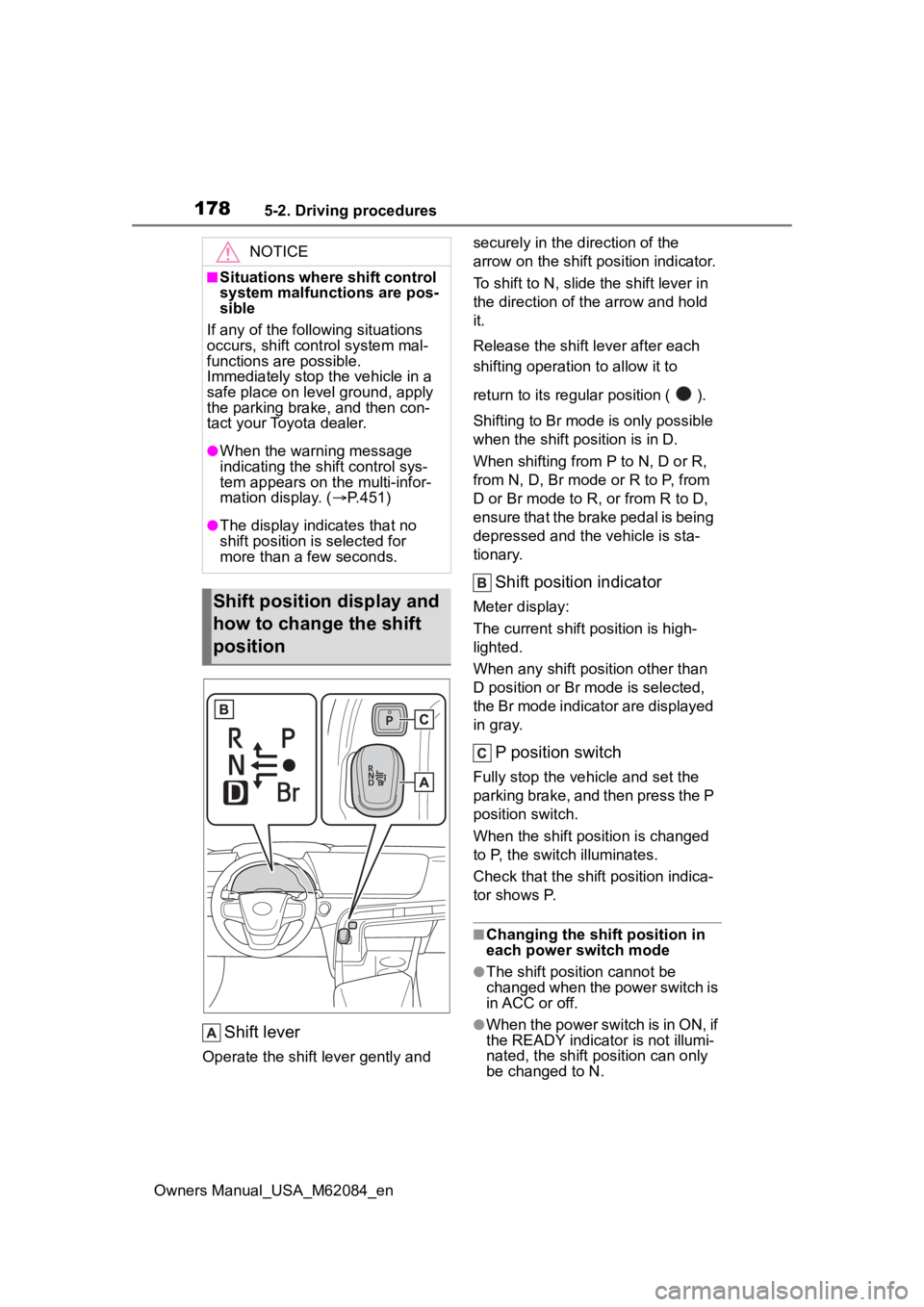
Shift lever
Operate the shift lever gently and securely in the direction of the
arrow on the shift position indicator.
To shift to N, slide the shift lever in
the direction of the arrow and hold
it.
Release the shift
lever after each
shifting operati on to allow it to
return to its regu lar position ( ).
Shifting to Br mode is only possible
when the shift position is in D.
When shifting from P to N, D or R,
from N, D, Br mode o r R to P, from
D or Br mode to R, or from R to D,
ensure that the brake pedal is being
depressed and the vehicle is sta-
tionary.
Shift position indicator
Meter display:
The current shift position is high-
lighted.
When any shift position other than
D position or Br mode is selected,
the Br mode indicator are displayed
in gray.
P position switch
Fully stop the vehicle and set the
parking brake, and then press the P
position switch.
When the shift position is changed
to P, the switch illuminates.
Check that the shif t position indica-
tor shows P.
■Changing the shift position in
each power switch mode
●The shift position cannot be
changed when the power switch is
in ACC or off.
●When the power switch is in ON, if
the READY indicator is not illumi-
nated, the shift position can only
be changed to N.
NOTICE
■Situations where shift control
system malfunctions are pos-
sible
If any of the following situations
occurs, shift cont rol system mal-
functions are possible.
Immediately stop the vehicle in a
safe place on level ground, apply
the parking brake, and then con-
tact your Toyota dealer.
●When the warning message
indicating the shift control sys-
tem appears on the multi-infor-
mation display. ( P.451)
●The display indicates that no
shift position is selected for
more than a few seconds.
Shift position display and
how to change the shift
position
Page 182 of 556
1825-2. Driving procedures
Owners Manual_USA_M62084_en
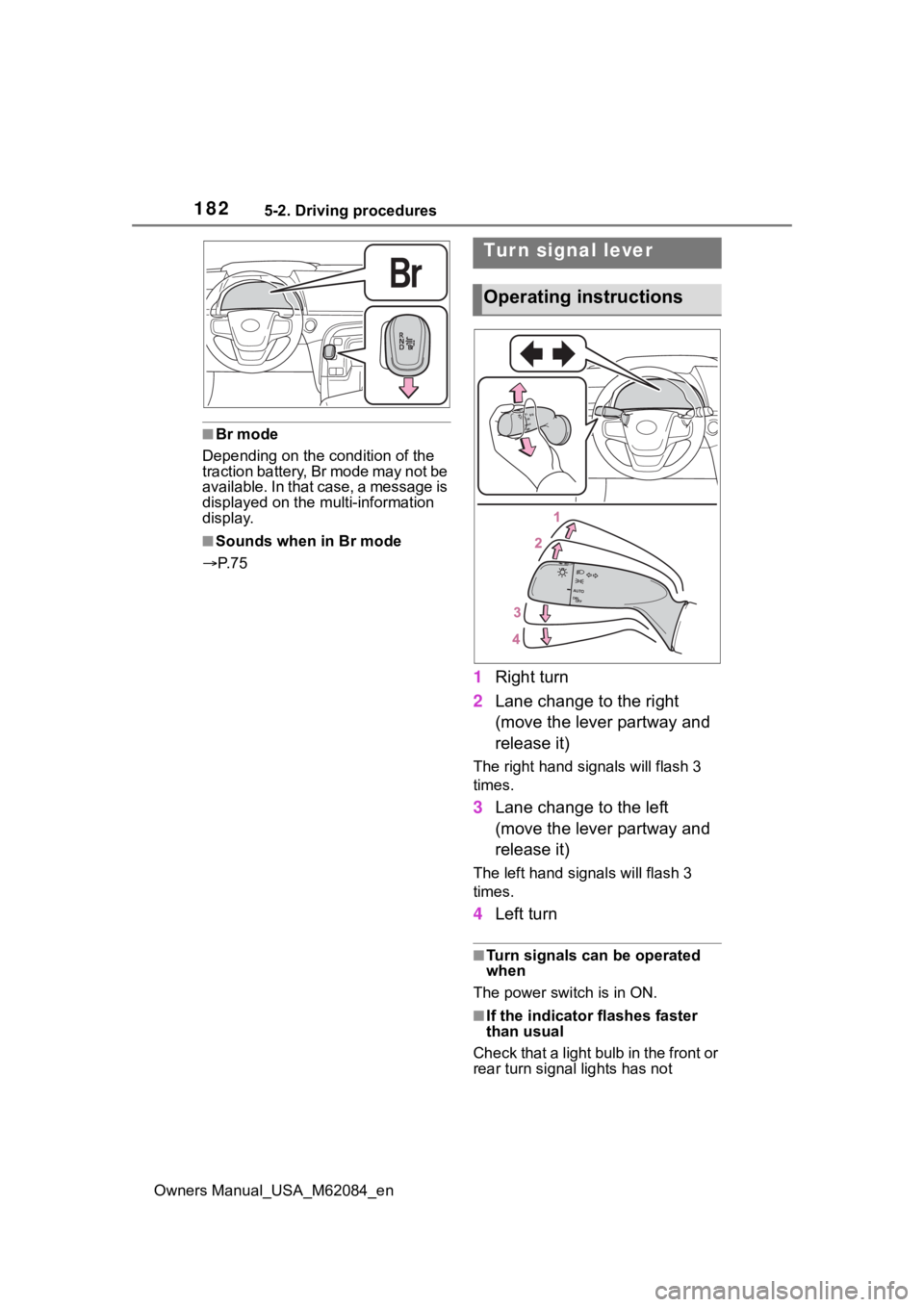
■Br mode
Depending on the condition of the
traction battery, Br mode may not be
available. In that case, a message is
displayed on the multi-information
display.
■Sounds when in Br mode
P. 7 5
1 Right turn
2 Lane change to the right
(move the lever partway and
release it)
The right hand s ignals will flash 3
times.
3 Lane change to the left
(move the lever partway and
release it)
The left hand signals will flash 3
times.
4Left turn
■Turn signals can be operated
when
The power switch is in ON.
■If the indicator flashes faster
than usual
Check that a light bulb in the front or
rear turn signal lights has not
Tur n signal lever
Operating instructions
Page 183 of 556
1835-2. Driving procedures
Owners Manual_USA_M62084_en
5
Driving
burned out.
■If the turn signals stop flashing
before a lane change has been
performed
Operate the lever again.
■Customization
Some functions can be customized.
( P.498)
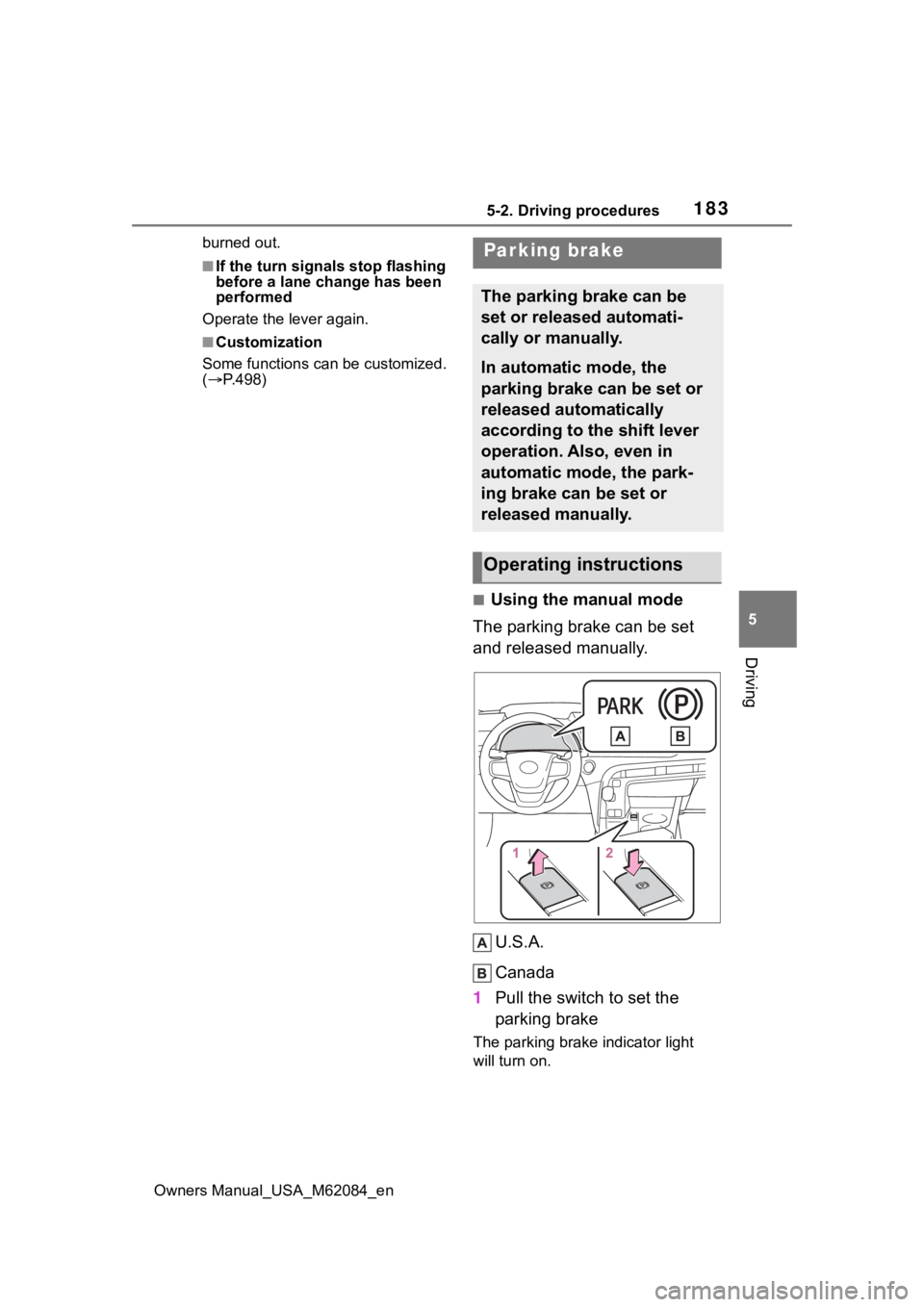
■Using the manual mode
The parking brake can be set
and released manually.
U.S.A.
Canada
1 Pull the switch to set the
parking brake
The parking brake indicator light
will turn on.
Parking brake
The parking brake can be
set or released automati-
cally or manually.
In automatic mode, the
parking brake can be set or
released automatically
according to the shift lever
operation. Also, even in
automatic mode, the park-
ing brake can be set or
released manually.
Operating instructions
Page 184 of 556
1845-2. Driving procedures
Owners Manual_USA_M62084_enPull and hold the parking brake
switch if an emergency occurs and
it is necessary to operate the park-
ing brake while driving.
2
Push the switch to release
the parking brake
• Operate the parking brake switch
while depressing the brake pedal.
• Using the parking brake auto- matic release function, the park-
ing brake can be released by
depressing the accelerator pedal.
When using this function, slowly
depress the accelerator pedal.
Make sure that t he parking brake
indicator light turn off.
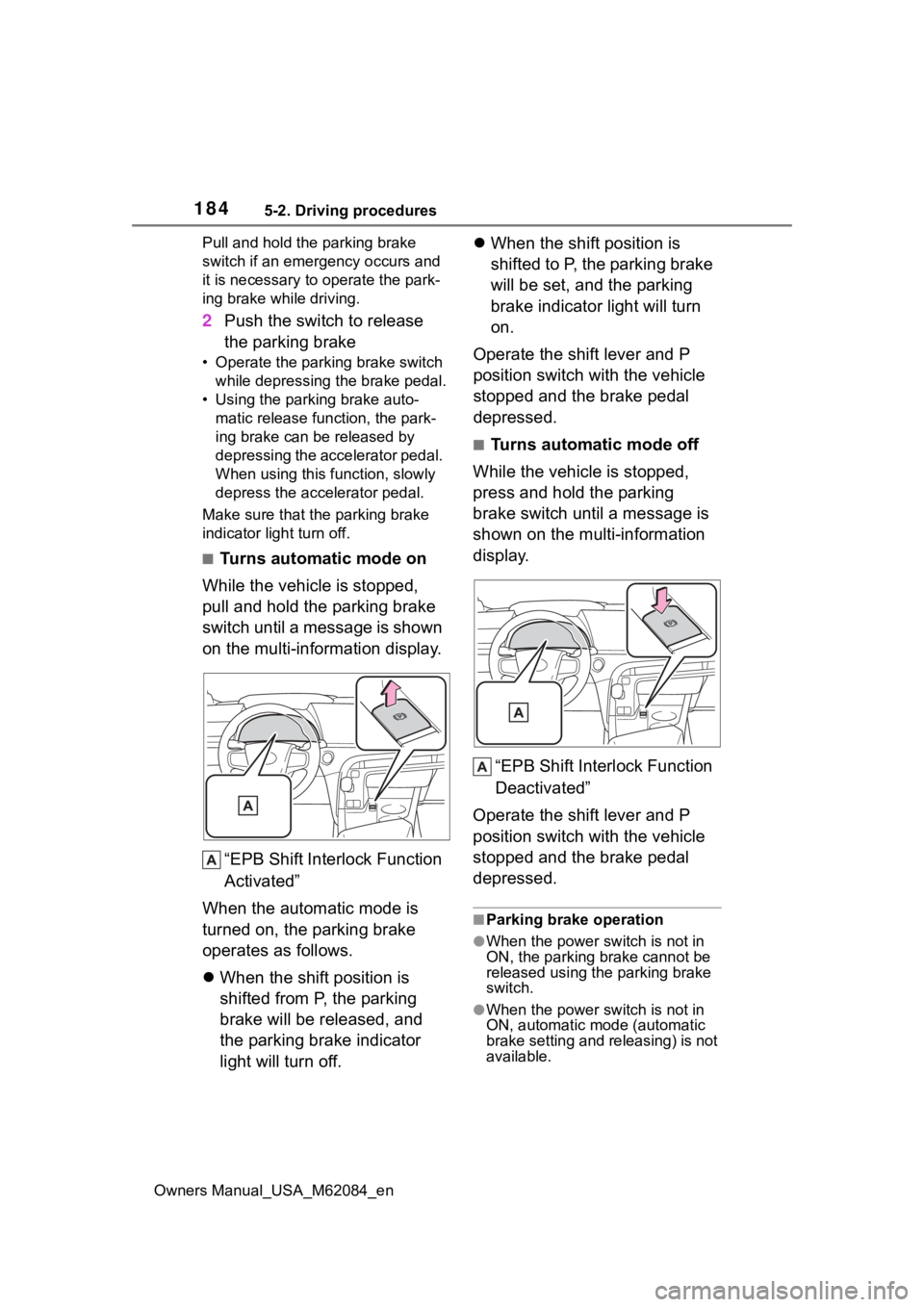
■Turns automatic mode on
While the vehicle is stopped,
pull and hold the parking brake
switch until a message is shown
on the multi-information display.
“EPB Shift Inte rlock Function
Activated”
When the automatic mode is
turned on, the parking brake
operates as follows.
When the shift position is
shifted from P, the parking
brake will be released, and
the parking brake indicator
light will turn off.
When the shift position is
shifted to P, the parking brake
will be set, and the parking
brake indicator light will turn
on.
Operate the shift lever and P
position switch with the vehicle
stopped and the brake pedal
depressed.
■Turns automatic mode off
While the vehicle is stopped,
press and hold the parking
brake switch until a message is
shown on the multi-information
display.
“EPB Shift Interlock Function
Deactivated”
Operate the shift lever and P
position switch with the vehicle
stopped and the brake pedal
depressed.
■Parking brake operation
●When the power switch is not in
ON, the parking brake cannot be
released using the parking brake
switch.
●When the power switch is not in
ON, automatic mode (automatic
brake setting and releasing) is not
available.
Page 185 of 556
1855-2. Driving procedures
Owners Manual_USA_M62084_en
5
Driving
■Parking brake automatic
release function
●When the shift position is shifted
from P, the parking brake will be
released in automatic mode.
●When all of the following condi-
tions are met in manual mode, the
parking brake can be released by
depressing the accelerator pedal.
• The driver’s door is closed
• The driver is wearing the seat belt
• The shift position is in D or R
■If “Parking Brake Temporarily
Unavailable” i s displayed on
the multi-information display
If the parking brake is operated
repeatedly over a short period of
time, the system may restrict opera-
tion to prevent overheating. If this
happens, refrain from operating the
parking brake. Nor mal operation will
return after about 1 minute.
■If “Parking Brake Unavailable”
is displayed on the multi-infor-
mation display
Operate the parking brake switch. If
the message does not disappear
after operating the switch several
times, the system may be malfunc-
tioning. Have the vehicle inspected
by your Toyota dealer.
■Parking brake operation sound
When the parking brake operates, a
motor sound (whirring sound) may
be heard. This does not indicate a
malfunction.
■Parking brake operation
●Depending on the power switch
mode, the parking brake indicator
light will turn on and stay on as
described below:
ON: Comes on until the parking
brake is released.
Not in ON: Stays on for approxi-
mately 15 seconds.
●When the power switch is turned
off with the parking brake set, the
parking brake indicator light will
stay on for about 15 seconds. This does not indicate a malfunction.
■When the parking brake switch
malfunctions
Automatic mode (automatic brake
setting and releas ing) will be turned
on automatically.
■Parking the vehicle
P.161
■Parking brake engaged warning
buzzer
A buzzer will sound if the vehicle is
driven with the parking brake
engaged. “Parking Brake ON” is dis-
played on the multi-information dis-
play. (with the vehicle reached a
speed of 3 mph [5 km/h])
■If the parking brake indicator
flashes
P.447
■Usage in winter time
P.320
WARNING
■When parking the vehicle
Do not leave a child in the vehicle
alone. The parking brake may be
released unintentionally and there
is the danger of the vehicle mov-
ing that may lead to an accident
resulting in death o r serious injury.
NOTICE
■When parking the vehicle
Before you leave the vehicle, set
the parking brake, shift the shift
position to P and make sure that
the vehicle does not move.
■When the system malfunc-
tions
Stop the vehicle in a safe place
and check the warning messages.
Page 187 of 556
1875-2. Driving procedures
Owners Manual_USA_M62084_en
5
Driving
belt.
●The parking brake is engaged.
If any of the conditions above are
detected when the brake hold sys-
tem is enabled, the system will turn
off and the brake hold standby indi-
cator light will go of f. In addition, if
any of the conditions are detected
while the system is holding the
brake, a warning buzzer will sound
and a message will be shown on the
multi-information display. The park-
ing brake will then be set automati-
cally.
■Brake hold function
●If the brake pedal is left released
for a period of about 3 minutes
after the system has started hold-
ing the brake, the parking brake
will be set automatically. In this
case, a warning buzzer sounds
and a message is shown on the
multi-informat ion display.
●To turn the system off while the
system is holding the brake, firmly
depress the brake pedal and
press the button again.
●The brake hold function may not
hold the vehicle when the vehicle
is on a steep inclin e. In this situa-
tion, it may be necessary for the
driver to apply the brakes. A warn-
ing buzzer will sound and the
multi-informatio n display will
inform the driver of this situation. If
a warning message is shown on
the multi-information display, read
the message and follow the
instructions.
■When the parking brake is set
automatically while the system
is holding the brakes
Perform any of the following opera-
tions to release the parking brake.
●Depress the accelerator pedal.
(The parking brake will not be
released automatic ally if the seat
belt is not fastened.)
●Operate the parking brake switch
with the brake pedal depressed. Make sure that the parking brake
indicator light goes off. (
P.183)
■When an inspection at your
Toyota dealer is necessary
When the brake hold standby indi-
cator (green) does not illuminate
even when the brake hold switch is
pressed with the brake hold system
operating conditions met, the sys-
tem may be malf unctioning. Have
the vehicle inspected at your Toyota
dealer.
■If “Brake Hold Malfunction
Press Brake to Deactivate Visit
Your Dealer” or “Brake Hold
Malfunction Visit Your Dealer”
is displayed on the multi-infor-
mation display
The system may be malfunctioning.
Have the vehicle inspected by your
Toyota dealer.
■Warning messages and buzzers
Warning messages and buzzers are
used to indicate a system malfunc-
tion or to inform the driver of the
need for caution. If a warning mes-
sage is shown on the multi-informa-
tion display, read the message and
follow the instructions.
■If the brake hold operated indi-
cator flashes
P.446
WARNING
■When the vehicle is on a
steep incline
When using the br ake hold sys-
tem on a steep inc line exercise
caution. The brake hold function
may not hold the vehicle in such a
situation.
Page 191 of 556
1915-3. Operating the lights and wipers
Owners Manual_USA_M62084_en
5
Driving
5-3.Operating the lights and wipers
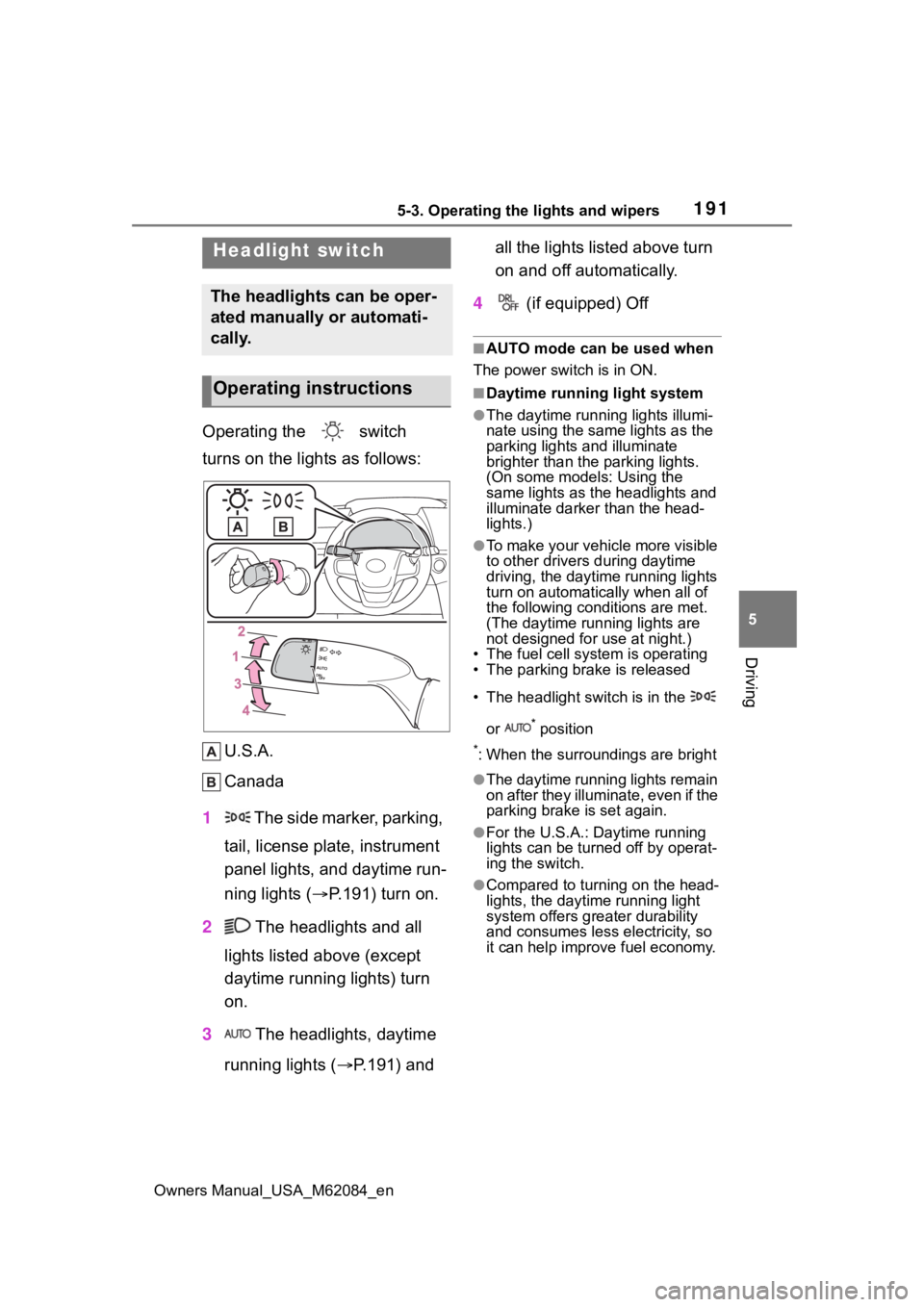
Operating the switch
turns on the lights as follows: U.S.A.
Canada
1 The side marker, parking,
tail, license plate, instrument
panel lights, and daytime run-
ning lights ( P.191) turn on.
2 The headlights and all
lights listed above (except
daytime running lights) turn
on.
3 The headlights, daytime
running lights ( P.191) and all the lights listed above turn
on and off automatically.
4 (if equipped) Off
■AUTO mode can be used when
The power switch is in ON.
■Daytime running light system
●The daytime runn ing lights illumi-
nate using the same lights as the
parking lights and illuminate
brighter than the parking lights.
(On some models: Using the
same lights as the headlights and
illuminate darker than the head-
lights.)
●To make your vehicle more visible
to other drivers during daytime
driving, the daytime running lights
turn on automatically when all of
the following conditions are met.
(The daytime running lights are
not designed for use at night.)
• The fuel cell system is operating
• The parking brake is released
• The headlight switch is in the
or
* position
*: When the surroundings are bright
●The daytime running lights remain
on after they illuminate, even if the
parking brake is set again.
●For the U.S.A.: Daytime running
lights can be turned off by operat-
ing the switch.
●Compared to turning on the head-
lights, the daytime running light
system offers greater durability
and consumes less electricity, so
it can help improve fuel economy.
Headlight switch
The headlights can be oper-
ated manually or automati-
cally.
Operating instructions