parking brake TOYOTA MIRAI 2022 Workshop Manual
[x] Cancel search | Manufacturer: TOYOTA, Model Year: 2022, Model line: MIRAI, Model: TOYOTA MIRAI 2022Pages: 556, PDF Size: 17.34 MB
Page 299 of 556
2995-5. Using the driving support systems
Owners Manual_USA_M62084_en
5
Driving
gutter: P.300
When the brake pedal is
released, “Moving Forward...”
will be displayed and the vehi-
cle will begin moving forward.
6 Perform operations as indi-
cated by the advice displays
until the vehicle stops in the
target parking space.
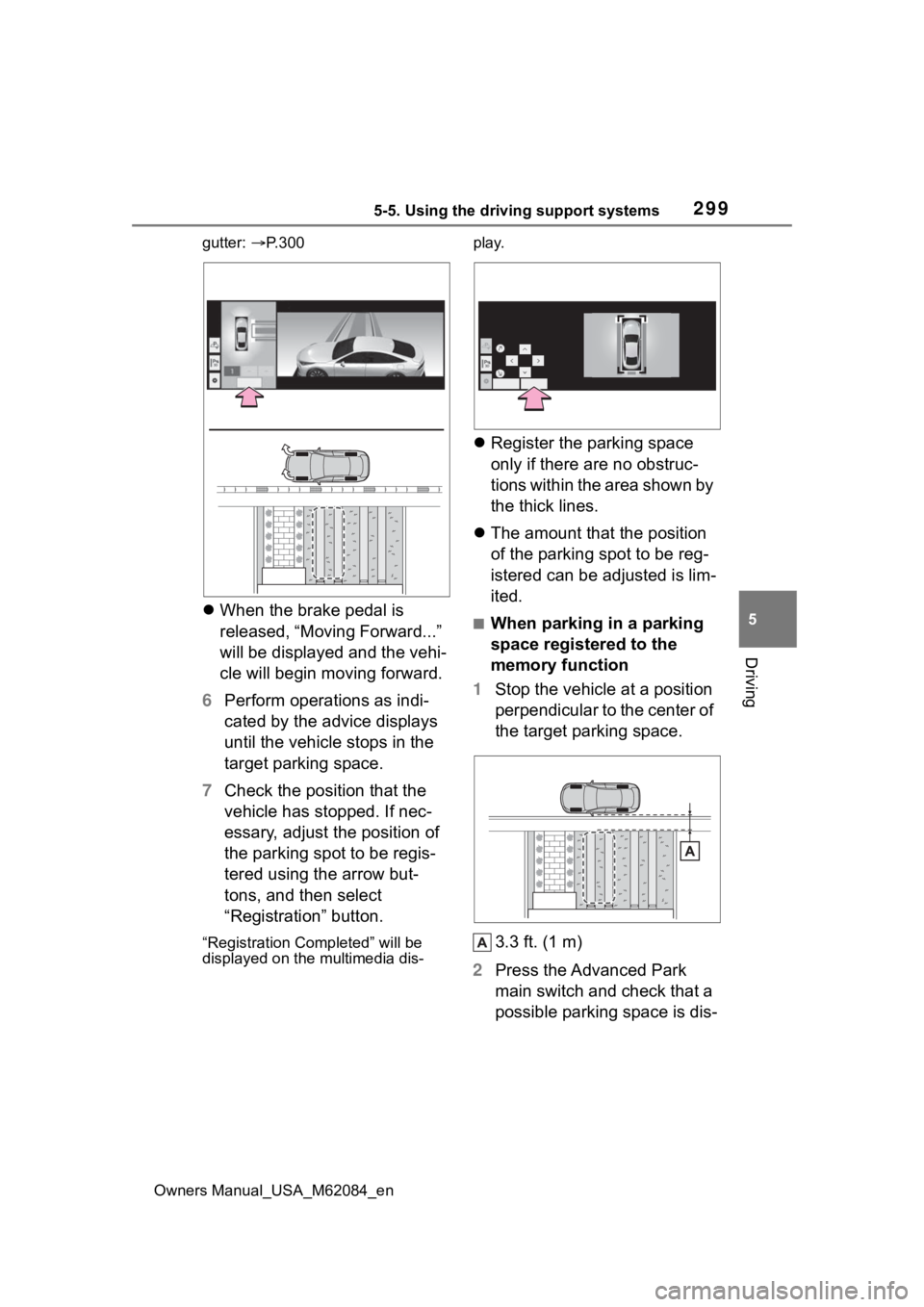
7 Check the position that the
vehicle has stopped. If nec-
essary, adjust the position of
the parking spot to be regis-
tered using the arrow but-
tons, and then select
“Registration” button.
“Registration Completed” will be
displayed on the multimedia dis- play.
Register the parking space
only if there are no obstruc-
tions within the area shown by
the thick lines.
The amount that the position
of the parking spot to be reg-
istered can be adjusted is lim-
ited.
■When parking in a parking
space registered to the
memory function
1 Stop the vehicle at a position
perpendicular to the center of
the target parking space.
3.3 ft. (1 m)
2 Press the Advanced Park
main switch and check that a
possible parking space is dis-
Page 300 of 556
3005-5. Using the driving support systems
Owners Manual_USA_M62084_en
played on the multimedia dis-
p l a y.
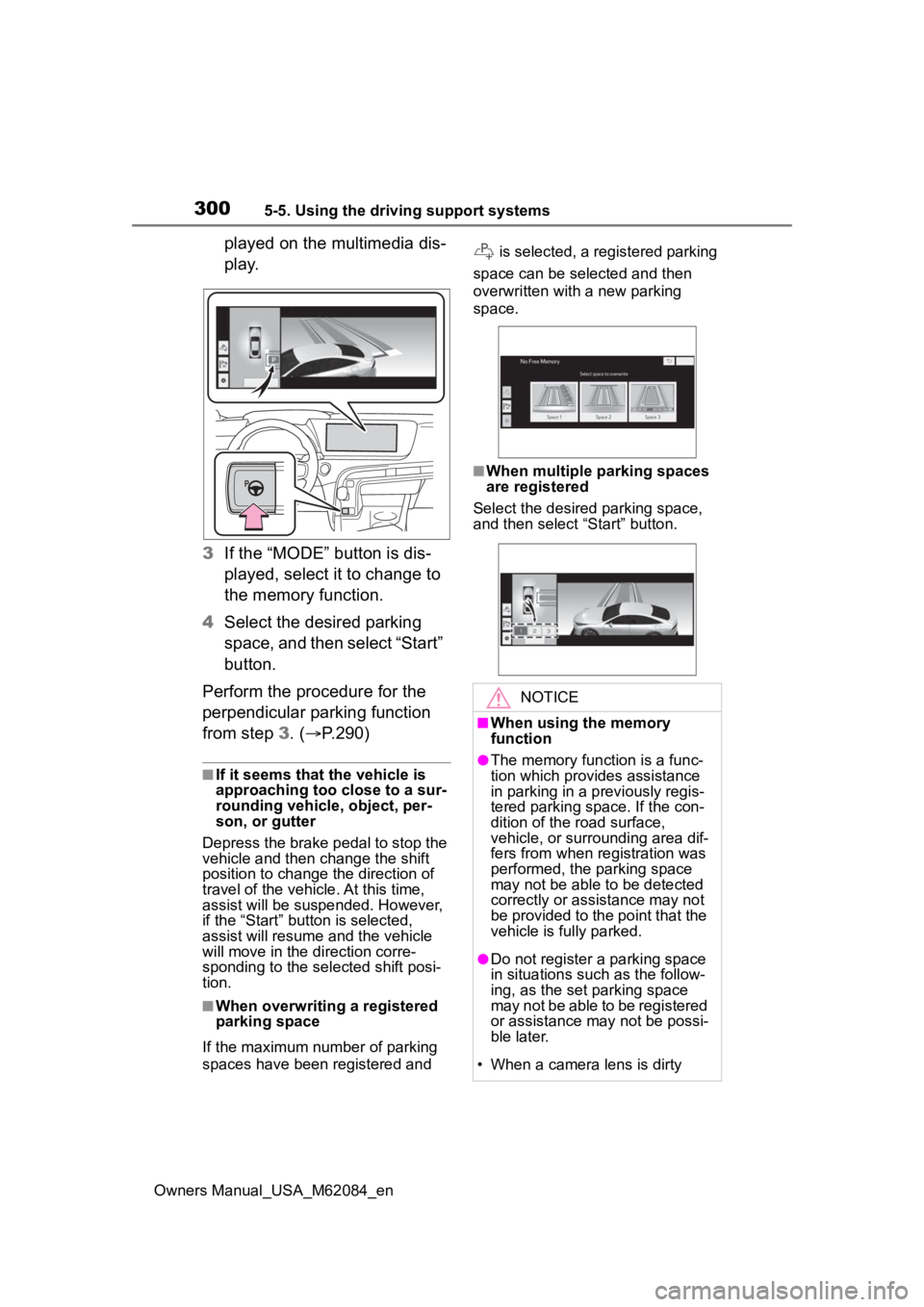
3 If the “MODE” button is dis-
played, select it to change to
the memory function.
4 Select the desired parking
space, and then select “Start”
button.
Perform the procedure for the
perpendicular parking function
from step 3. (P.290)
■If it seems that the vehicle is
approaching too close to a sur-
rounding vehicle, object, per-
son, or gutter
Depress the brake pedal to stop the
vehicle and then ch ange the shift
position to change the direction of
travel of the vehicle. At this time,
assist will be suspended. However,
if the “Start” butt on is selected,
assist will resume and the vehicle
will move in the direction corre-
sponding to the selected shift posi-
tion.
■When overwriting a registered
parking space
If the maximum number of parking
spaces have been registered and is selected, a registered parking
space can be selected and then
overwritten with a new parking
space.
■When multiple parking spaces
are registered
Select the desired parking space,
and then select “Start” button.
NOTICE
■When using the memory
function
●The memory function is a func-
tion which provides assistance
in parking in a previously regis-
tered parking space. If the con-
dition of the road surface,
vehicle, or surrounding area dif-
fers from when registration was
performed, the parking space
may not be able to be detected
correctly or assistance may not
be provided to the point that the
vehicle is fully parked.
●Do not register a parking space
in situations such as the follow-
ing, as the set parking space
may not be able to be registered
or assistance may not be possi-
ble later.
• When a camera lens is dirty
Page 302 of 556
3025-5. Using the driving support systems
Owners Manual_USA_M62084_en
The following messages will be
displayed on the multimedia dis-
play in the following cases when
the Advanced Park cannot oper-ate, or operation is canceled or
suspended. Perform the appro-
priate corrective action accord-
ing to the message displayed.
■When the Advanced Park
cannot operate
NOTICE
• When a bright light is shined on
the parking space
• When a light is temporarily shined on the parking space
(lights of another vehicle, secu-
rity light, etc.)
• When a camera lens is dirty or covered with water droplets
If assistance is ended during reg-
istration, perform registration
again.
●When registering a parking
space to the memory function, if
the road surface cannot be
detected “No available parking
space to registe r” will be dis-
played.
●When using the memory func-
tion, make sure to stop immedi-
ately in front of the stop
position. Otherwise the parking
space may not be able to be
detected correctly and assis-
tance may not be provided to
the point that the vehicle is fully
parked.
●Do not use the memory function
if a camera has been subjected
to a strong impact or images of
the panoramic view monitor are
misaligned.
●If a camera has been replaced,
as the installation angle of the
camera will have changed, it will
be necessary to register parking
spaces of the memory function.
Displayed messages
MessageCondition/Correc-
tive Action
“Advanced
Park mal-
function. Visit
your dealer.”
The Advanced Park
may be malfunction-
ing
Turn the power
switch off and then
start the fuel cell
system again. If the
message is dis-
played again, have
the vehicle
inspected by your
Toyota dealer.
“Parking
brake is
applied”
The Advanced Park
main switch was
pressed with the
parking brake
engaged
Release the park-
ing brake and then
press the Advanced
Park main switch
again.
“Remove dirt
from camera”
A camera lens is
covered with ice,
snow, mud, etc.
(Camera being dis-
played on the multi-
media display)
Remove the ice,
snow, mud, etc.
Page 306 of 556
3065-5. Using the driving support systems
Owners Manual_USA_M62084_en
■When operation has been
canceled
MessageCondition/Cor-rective Action
“Door is open”
A door was
opened while
assistance was
being performed
Close the door
and then operate
the Advanced
Park again.
“Seatbelt is
unfastened”
The driver’s seat
belt was unfas-
tened while
assistance was
being performed
Fasten the
driver’s seat belt
and then operate
the Advance
Park again.
“Parking brake is
applied”
The parking
brake was
engaged while
assistance was
being performed
Release the
parking brake
and then operate
the Advance
Park again.
“Unavailable.
Obstacle
nearby.”
An object
entered the trav-
eling direction of
the vehicle
Move the
object or use the
Advanced Park
in a location free
of obstructions
“Advanced Park
malfunction.
Press brake
pedal.”
The Advanced
Park may be
malfunctioning
Depress the
brake pedal and
stop the vehicle
in a safe loca-
tion.
“Cannot control
speed”
The Advanced
Park was oper-
ated on a slope
or location with
differences in
height and the
vehicle speed
can no longer be
controlled
Use the
Advanced Park
in a level loca-
tion.
“Operation timed
out”
A certain amount
of time has
elapsed since
assistance
began
Perform the
operation again
from the begin-
ning.
MessageCondition/Cor- rective Action
Page 311 of 556
3115-5. Using the driving support systems
Owners Manual_USA_M62084_en
5
Driving
are detected, they may cause the
target parking space to be mis-
aligned.
Select on the multimedia
display, and then select
“Advanced Park”.
■Speed Profile
The vehicle speed for when
parking assistance is performed
can be set.
This setting cannot be changed for
when registering a parking space to
the memory function.
WARNING
■To ensure the Advanced Park
can operate properly
P. 2 5 5
In addition, please refer to the
“Panoramic view monitor” of
“Peripheral monito ring system” in
the “NAVIGATION AND MULTI-
MEDIA SYSTEM OWNER’S
MANUAL”.
■When the sensors do not
operate properly
●In situations such as the follow-
ing, the sensors may not oper-
ate correctly, possibly leading to
an accident. Proceed carefully.
• When a sensor is frozen. (Thawing the area will resolve
this problem.) In especially cold
weather, if a sensor is frozen
the screen may show an abnor-
mal display, or parked vehicles
may not be detected.
• When the vehicl e is tilted at a
steep angle
• When it is extremely hot or cold
• When driving on rough, sloped, or gravel roads, or grass
• When ultrasonic waves are being produced near the vehicle
due to vehicle horns, motorcy-
cle engines, air brakes of large
vehicles, or the sensors of
another vehicle
• When it is raining or a sensor is splashed by water
• When the area around the vehi- cle is dark or backlit
• When a fender pole or radio antenna has been installed to
the vehicle
• When a sensor is extremely close to a parked vehicle
• When there is a parked vehicle next to the target parking space,
if the displayed target parking
space is far from the actual tar-
get parking space, a sensor
may be misaligned. Have the
vehicle inspected by your Toy-
ota dealer.
• Do not install any accessories near the detection area of the
sensors.
●The Advanced Park will guide
the vehicle to appropriate posi-
tions for changing the direction
of travel, however, if you feel
that the vehicle is approaching
too close to an adjacent parked
vehicle at any time, depress the
brake pedal and change the
shift position. However, if this is
performed, the number of turns
necessary may increase, and
the vehicle may be parked at an
angle.
Changing the settings
Page 317 of 556
3175-5. Using the driving support systems
Owners Manual_USA_M62084_en
5
Driving
■Operating conditions of hill-
start assist control
When the following five conditions
are met, the hill-start assist control
will operate:
●The shift position is in a position
other than P or N (when stating off
forward/backward on an upward
incline)
●The vehicle is stopped
●The accelerator pedal is not
depressed
●The parking brake is not engaged
●Power switch is turned to ON
■Automatic system cancelation
of hill-start as sist control
The hill-start assis t control will turn
off in any of the following situations:
●Shift the shift position to P or N
●The accelerator pedal is
depressed
●The parking brake is engaged
●2 seconds at maximum elapsed
after the brake pedal is released
●Power switch is turned to OFF
■Sounds and vibrations caused
by the ABS, brake assist, VSC,
TRAC and hill-start assist con-
trol systems
●A sound may be heard from the
fuel cell unit compartment when
the brake pedal is depressed
repeatedly, when the fuel cell sys-
tem is started or just after the vehi-
cle begins to move. This sound
does not indicate that a malfunc-
tion has occurred in any of these
systems.
●Any of the following conditions
may occur when t he above sys-
tems are operating. None of these
indicates that a malfunction has
occurred.
• Vibrations may be felt through the vehicle body and steering.
• A motor sound may be heard also
after the vehicle comes to a stop. • The brake pedal
may pulsate
slightly after the ABS is activated.
• The brake pedal may move down
slightly after the ABS is activated.
■ECB operating sound
ECB operating sound may be heard
in the following cases, but it does
not indicate that a malfunction has
occurred.
●Operating sound heard from the
fuel cell unit compartment when
the brake pedal is operated.
●Motor sound of the brake system
heard from the f ront part of the
vehicle when the driver’s door is
opened.
●Operating sound heard from the
fuel cell unit compartment when
one or two minutes passed after
the stop of the fuel cell system.
■Active Cornering Assist opera-
tion sounds and vibrations
When the Active Cornering Assist is
operated, operation sounds and
vibrations may be generated from
the brake system, but this is not a
malfunction.
■EPS operation sound
When the steering wheel is oper-
ated, a motor sound (whirring
sound) may be heard. This does not
indicate a malfunction.
■Automatic reactivation of TRAC
and VSC systems
After turning th e TRAC and VSC
systems off, the systems will be
automatically re-enabled in the fol-
lowing situations:
●When the power switch is turned
off
●If only the TRAC sy stem is turned
off, the TRAC will turn on when
vehicle speed increases
If both the TRAC and VSC sys-
tems are turned of f, automatic re-
enabling will not occur when vehi-
cle speed increases.
Page 319 of 556
3195-5. Using the driving support systems
Owners Manual_USA_M62084_en
5
Driving
WARNING
●When Active Cornering Assist
frequently operates, Active Cor-
nering Assist may temporarily
stop operating to ensure proper
operation of the brakes, TRAC
and VSC.
■Hill-start assist control does
not operate effectively when
●Do not overly rely on hill-start
assist control. Hill-start assist
control may not operate effec-
tively on steep inclines and
roads covered with ice.
●Unlike the parking brake, hill-
start assist control is not
intended to hold the vehicle sta-
tionary for an extended period
of time. Do not attempt to use
hill-start assist control to hold
the vehicle on an incline, as
doing so may lead to an acci-
dent.
■When the TRAC/ABS/VSC is
activated
The slip indicator light flashes.
Always drive carefully. Reckless
driving may cause an accident.
Exercise particular care when the
indicator light flashes.
■When the TRAC/VSC systems
are turned off
Be especially careful and drive at
a speed appropriate to the road
conditions. As these are the sys-
tems to help ensure vehicle stabil-
ity and driving force, do not turn
the TRAC/VSC systems off
unless necessary.
■Secondary Collision Brake
Do not rely solely upon the Sec-
ondary Collision Brake. This sys-
tem is designed to help reduce
the possibility of further damage
due to a secondary collision, how-
ever, that effect changes accord-
ing to various conditions. Overly
relying on the system may result
in death or serious injury.
■Replacing tires
Make sure that all tires are of the
specified size, brand, tread pat-
tern and total load capacity. In
addition, make sure that the tires
are inflated to the recommended
tire inflation p ressure level.
The ABS, TRAC and VSC sys-
tems will not functi on correctly if
different tires are installed on the
vehicle.
Contact your Toyota dealer for fur-
ther information when replacing
tires or wheels.
■Handling of tires and the sus-
pension
Using tires with any kind of prob-
lem or modifying the suspension
will affect the driving assist sys-
tems, and may cause a system to
malfunction.
Page 321 of 556
3215-6. Driving tips
Owners Manual_USA_M62084_en
5
Driving
is frozen. Pour warm water
over the frozen area to melt
the ice. Wipe away the water
immediately to prevent it from
freezing.
To ensure proper operation of
the climate control system
fan, remove any snow that
has accumulated on the air
inlet vents in front of the wind-
shield.
Check for and remove any
excess ice or snow that may
have accumulated on the
exterior lights, vehicle’s roof,
chassis, around the tires or on
the brakes.
Remove any snow or mud
from the bottom of your shoes
before getting in the vehicle.
Accelerate the vehicle slowly,
keep a safe distance between
you and the vehicle ahead, and
drive at a reduced speed suit-
able to road conditions.
Park the vehicle and shift the
shift position to P without setting
the parking brake. The parking
brake may freeze up, preventing
it from being released. If the
vehicle is parked without setting
the parking brake, make sure to
block the wheels. Failure to do so may be danger-
ous because it may cause the
vehicle to move unexpectedly,
possibly leading to an accident.
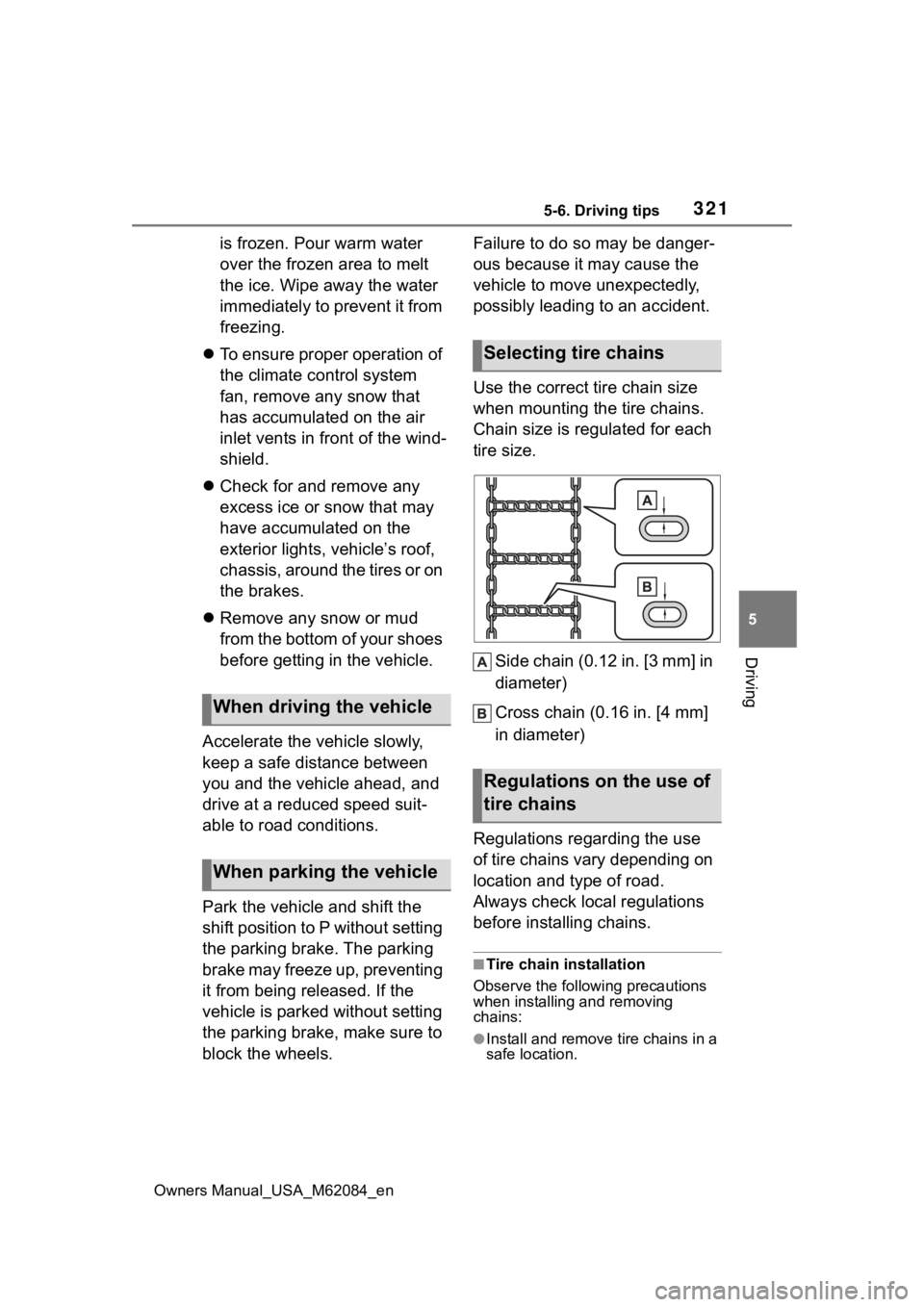
Use the correct tire chain size
when mounting the tire chains.
Chain size is regulated for each
tire size.
Side chain (0.12 in. [3 mm] in
diameter)
Cross chain (0.16 in. [4 mm]
in diameter)
Regulations regarding the use
of tire chains vary depending on
location and type of road.
Always check local regulations
before installing chains.
■Tire chain installation
Observe the followi ng precautions
when installing and removing
chains:
●Install and remove tire chains in a
safe location.
When driving the vehicle
When parking the vehicle
Selecting tire chains
Regulations on the use of
tire chains
Page 364 of 556
3646-4. Using the other interior features
Owners Manual_USA_M62084_en
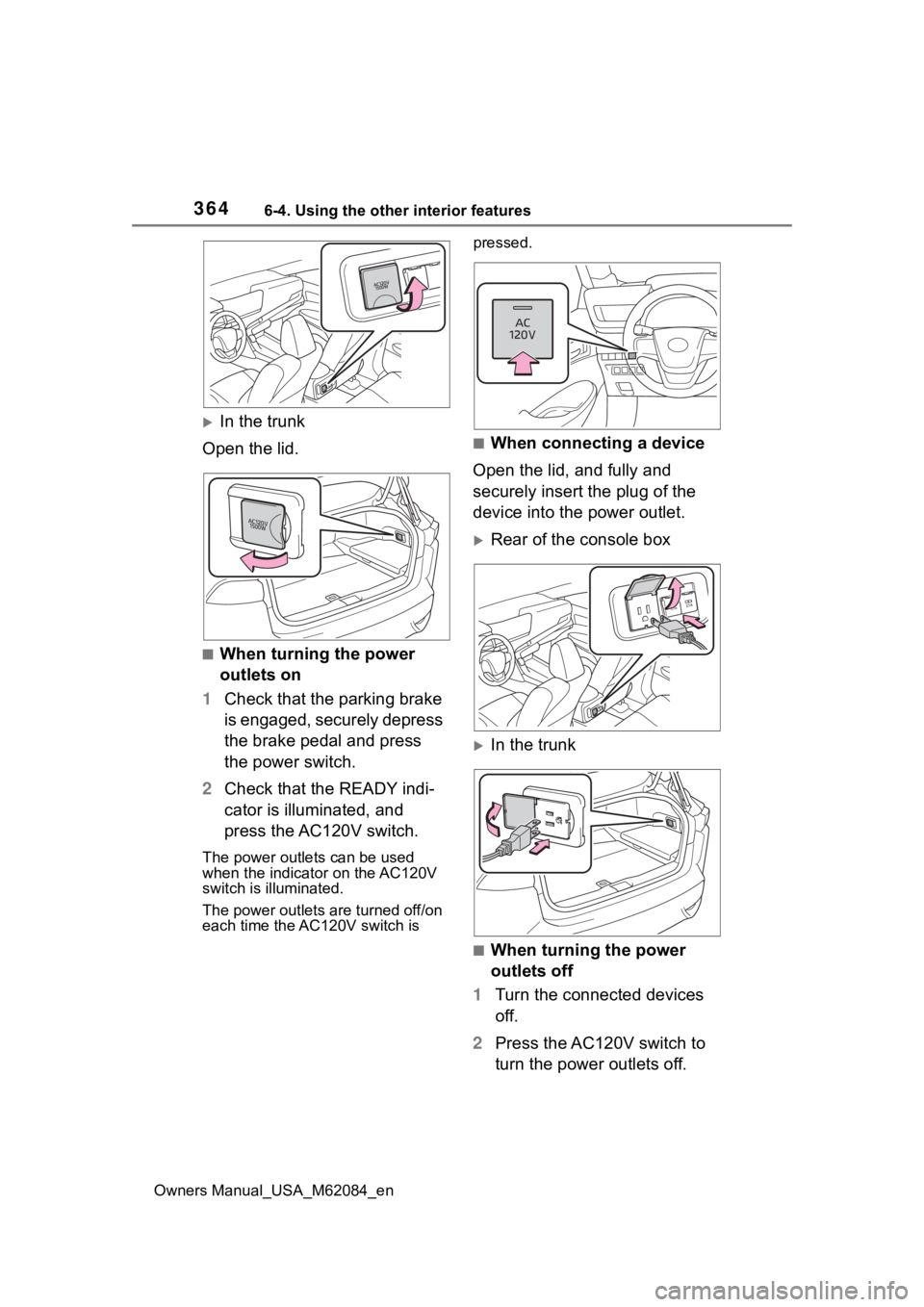
In the trunk
Open the lid.
■When turning the power
outlets on
1 Check that the parking brake
is engaged, securely depress
the brake pedal and press
the power switch.
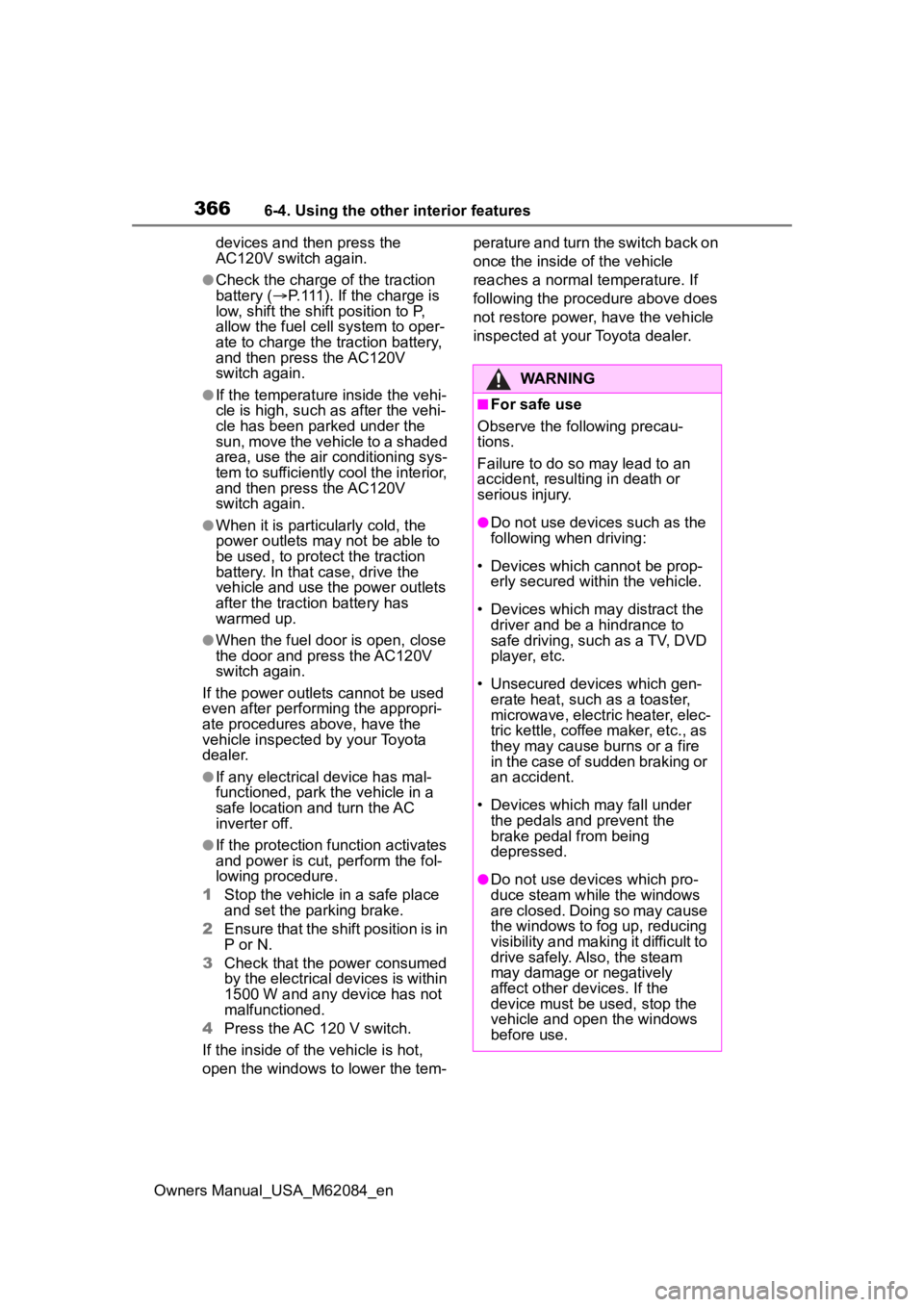
2 Check that the READY indi-
cator is illuminated, and
press the AC120V switch.
The power outlets can be used
when the indicator on the AC120V
switch is illuminated.
The power outlets are turned off/on
each time the AC120V switch is pressed.
■When connecting a device
Open the lid, and fully and
securely insert the plug of the
device into the power outlet.
Rear of the console box
In the trunk
■When turning the power
outlets off
1 Turn the connected devices
off.
2 Press the AC120V switch to
turn the power outlets off.
Page 366 of 556
3666-4. Using the other interior features
Owners Manual_USA_M62084_endevices and then press the
AC120V switch again.
●Check the charge of the traction
battery (
P.111). If the charge is
low, shift the shift position to P,
allow the fuel ce ll system to oper-
ate to charge the traction battery,
and then press the AC120V
switch again.
●If the temperature inside the vehi-
cle is high, such as after the vehi-
cle has been parked under the
sun, move the vehicle to a shaded
area, use the air conditioning sys-
tem to sufficiently cool the interior,
and then press the AC120V
switch again.
●When it is particularly cold, the
power outlets may not be able to
be used, to protect the traction
battery. In that case, drive the
vehicle and use the power outlets
after the traction battery has
warmed up.
●When the fuel door is open, close
the door and press the AC120V
switch again.
If the power outlets cannot be used
even after performing the appropri-
ate procedures above, have the
vehicle inspected by your Toyota
dealer.
●If any electrical device has mal-
functioned, park the vehicle in a
safe location and turn the AC
inverter off.
●If the protection f unction activates
and power is cut, perform the fol-
lowing procedure.
1 Stop the vehicle in a safe place
and set the parking brake.
2 Ensure that the shift position is in
P or N.
3 Check that the power consumed
by the electrical devices is within
1500 W and any device has not
malfunctioned.
4 Press the AC 120 V switch.
If the inside of the vehicle is hot,
open the windows to lower the tem- perature and turn the switch back on
once the inside of the vehicle
reaches a normal temperature. If
following the procedure above does
not restore power, have the vehicle
inspected at your Toyota dealer.
WARNING
■For safe use
Observe the following precau-
tions.
Failure to do so may lead to an
accident, resulting in death or
serious injury.
●Do not use devices such as the
following when driving:
• Devices which cannot be prop- erly secured within the vehicle.
• Devices which may distract the driver and be a hindrance to
safe driving, such as a TV, DVD
player, etc.
• Unsecured devices which gen- erate heat, such as a toaster,
microwave, electric heater, elec-
tric kettle, coffee maker, etc., as
they may cause burns or a fire
in the case of sudden braking or
an accident.
• Devices which may fall under the pedals and prevent the
brake pedal from being
depressed.
●Do not use devices which pro-
duce steam while the windows
are closed. Doing so may cause
the windows to fog up, reducing
visibility and making it difficult to
drive safely. Also, the steam
may damage or negatively
affect other devices. If the
device must be used, stop the
vehicle and open the windows
before use.