warning light TOYOTA MIRAI 2022 Repair Manual
[x] Cancel search | Manufacturer: TOYOTA, Model Year: 2022, Model line: MIRAI, Model: TOYOTA MIRAI 2022Pages: 556, PDF Size: 17.34 MB
Page 371 of 556
3716-4. Using the other interior features
Owners Manual_USA_M62084_en
6
Interior features
*: If equipped
■HomeLink® programming pro-
cedure
The programming procedures can
also be found at the following URL.
Website: www.homelink.com/toyota
For support, contact customer sup-
port at the following.
Help Line: 1-800-355-3515
The HomeLink® wireless control
system in your vehicle has 3
buttons which can be pro-
grammed to operate 3 different
devices. Refer to the program-
ming methods on the following
pages to determine the method
which is appropriate for the
device.
WARNING
■When the rear sunshade is
being extended or retracted
Do not place fi ngers or other
objects in the shade mechanism
or in the opening as injury may
result.
NOTICE
■To ensure normal operation
of the rear sunshade
Observe the following precau-
tions:
●Do not place exce ssive load on
the motor or other components.
●Do not place objects where they
may hinder opening and closing
operations.
●Do not attach items to the rear
sunshade.
●Keep the opening clean and
clear of obstructions.
●Do not operate the rear sun-
shade continuously for long
periods of time.
Garage door opener*
The garage door opener can
be programmed using the
HomeLink
® to operate
garage doors, gates, entry
doors, door locks, home
lighting systems, security
systems, and other devices.
System components
Page 372 of 556
3726-4. Using the other interior features
Owners Manual_USA_M62084_en
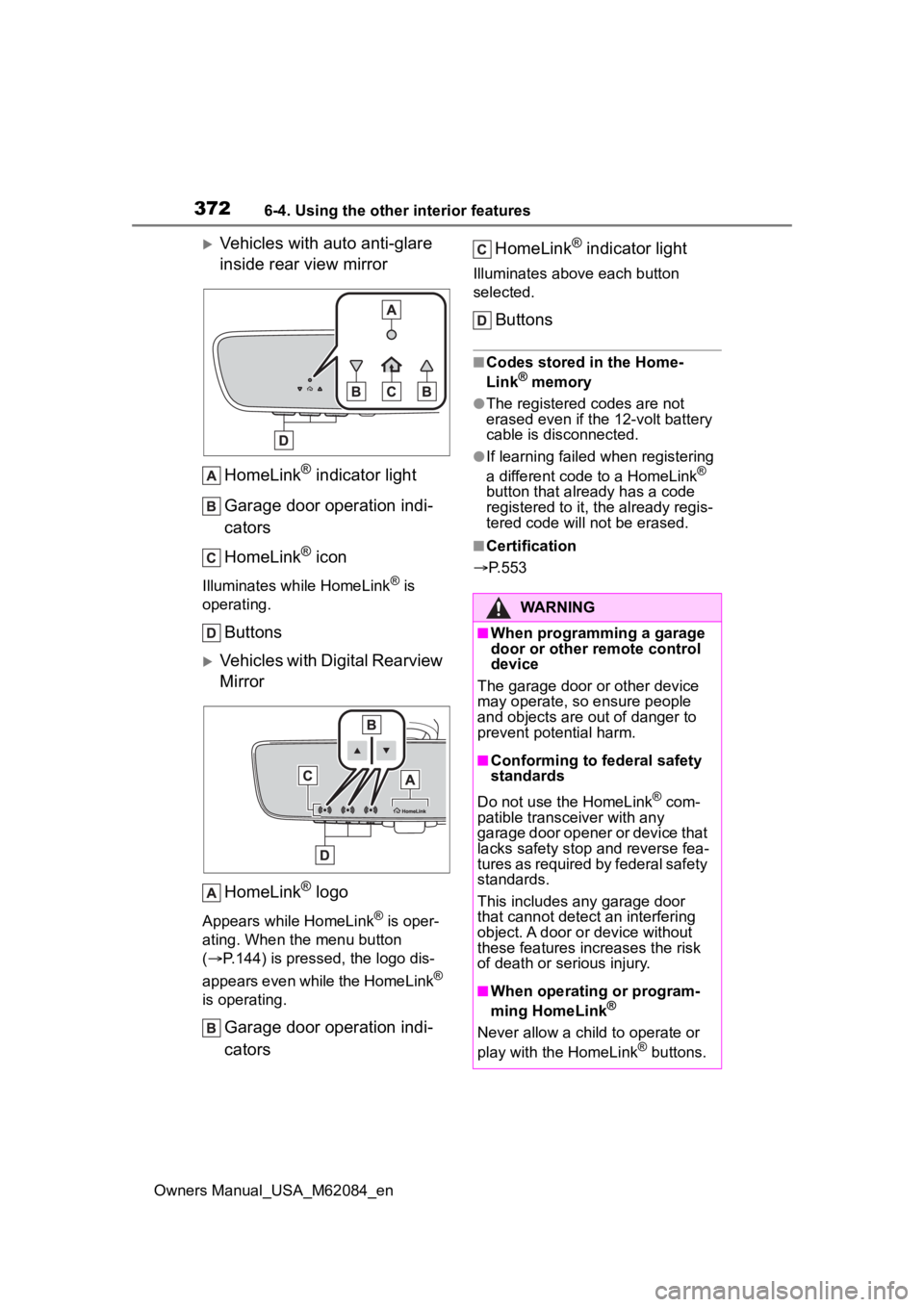
Vehicles with auto anti-glare
inside rear view mirrorHomeLink
® indicator light
Garage door operation indi-
cators
HomeLink
® icon
Illuminates while HomeLink® is
operating.
Buttons
Vehicles with Digital Rearview
Mirror
HomeLink
® logo
Appears while HomeLink® is oper-
ating. When the menu button
( P.144) is pressed, the logo dis-
appears even while the HomeLink
®
is operating.
Garage door operation indi-
cators HomeLink
® indicator light
Illuminates above each button
selected.
Buttons
■Codes stored in the Home-
Link® memory
●The registered codes are not
erased even if the 12-volt battery
cable is disconnected.
●If learning failed when registering
a different code to a HomeLink®
button that already has a code
registered to it, the already regis-
tered code will not be erased.
■Certification
P.553
WARNING
■When programming a garage
door or other remote control
device
The garage door or other device
may operate, so ensure people
and objects are out of danger to
prevent potential harm.
■Conforming to federal safety
standards
Do not use the HomeLink
® com-
patible transce iver with any
garage door opener or device that
lacks safety stop and reverse fea-
tures as required by federal safety
standards.
This includes any garage door
that cannot detect an interfering
object. A door or device without
these features increases the risk
of death or serious injury.
■When operating or program-
ming HomeLink®
Never allow a child to operate or
play with the HomeLink® buttons.
Page 393 of 556
3937-3. Do-it-yourself maintenance
Owners Manual_USA_M62084_en
7
Maintenance and care
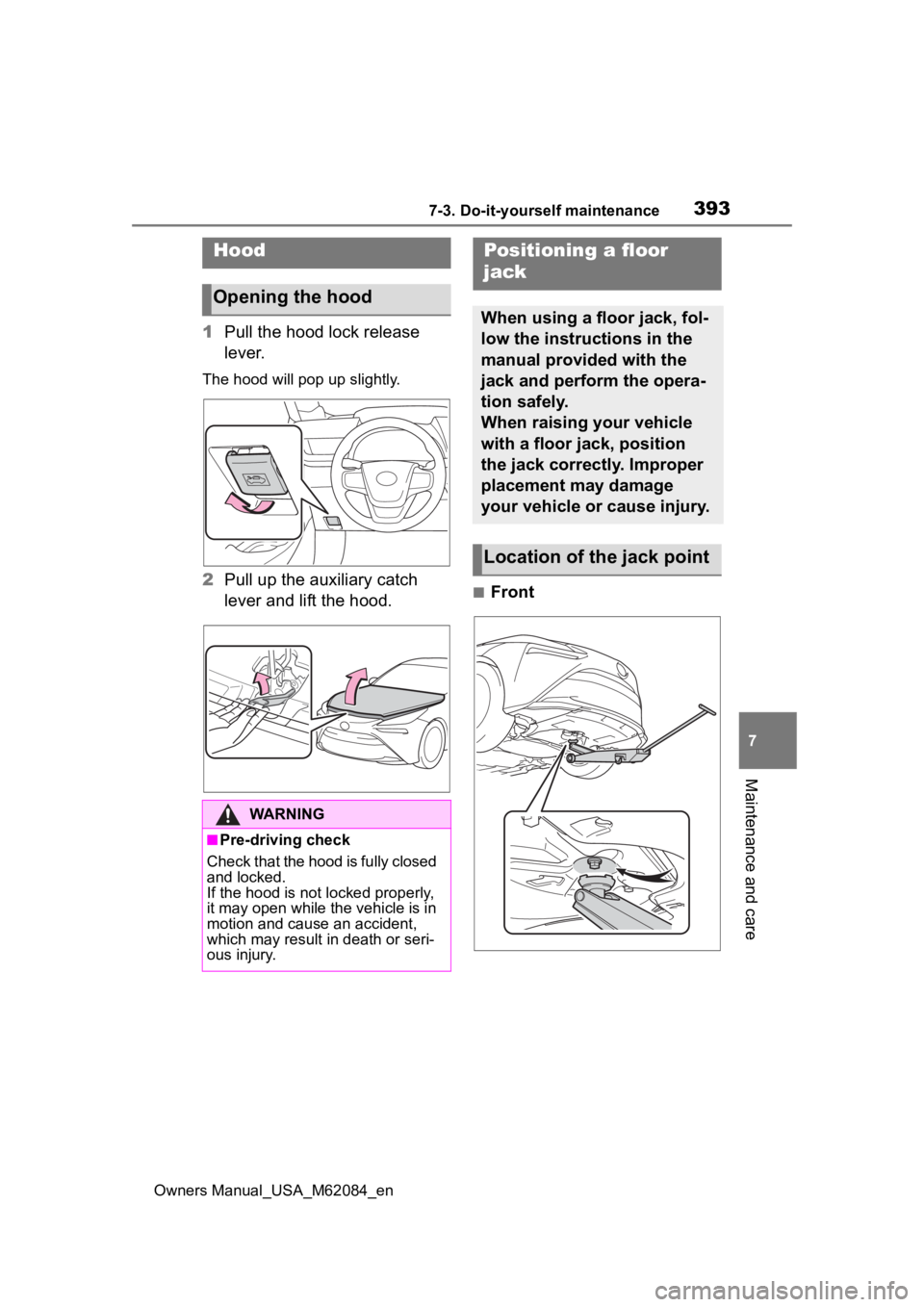
1 Pull the hood lock release
lever.
The hood will pop up slightly.
2Pull up the auxiliary catch
lever and lift the hood.■Front
Hood
Opening the hood
WARNING
■Pre-driving check
Check that the hood is fully closed
and locked.
If the hood is not locked properly,
it may open while the vehicle is in
motion and cause an accident,
which may result in death or seri-
ous injury.
Positioning a floor
jack
When using a floor jack, fol-
low the instructions in the
manual provided with the
jack and perform the opera-
tion safely.
When raising your vehicle
with a floor jack, position
the jack correctly. Improper
placement may damage
your vehicle or cause injury.
Location of the jack point
Page 399 of 556
3997-3. Do-it-yourself maintenance
Owners Manual_USA_M62084_en
7
Maintenance and care
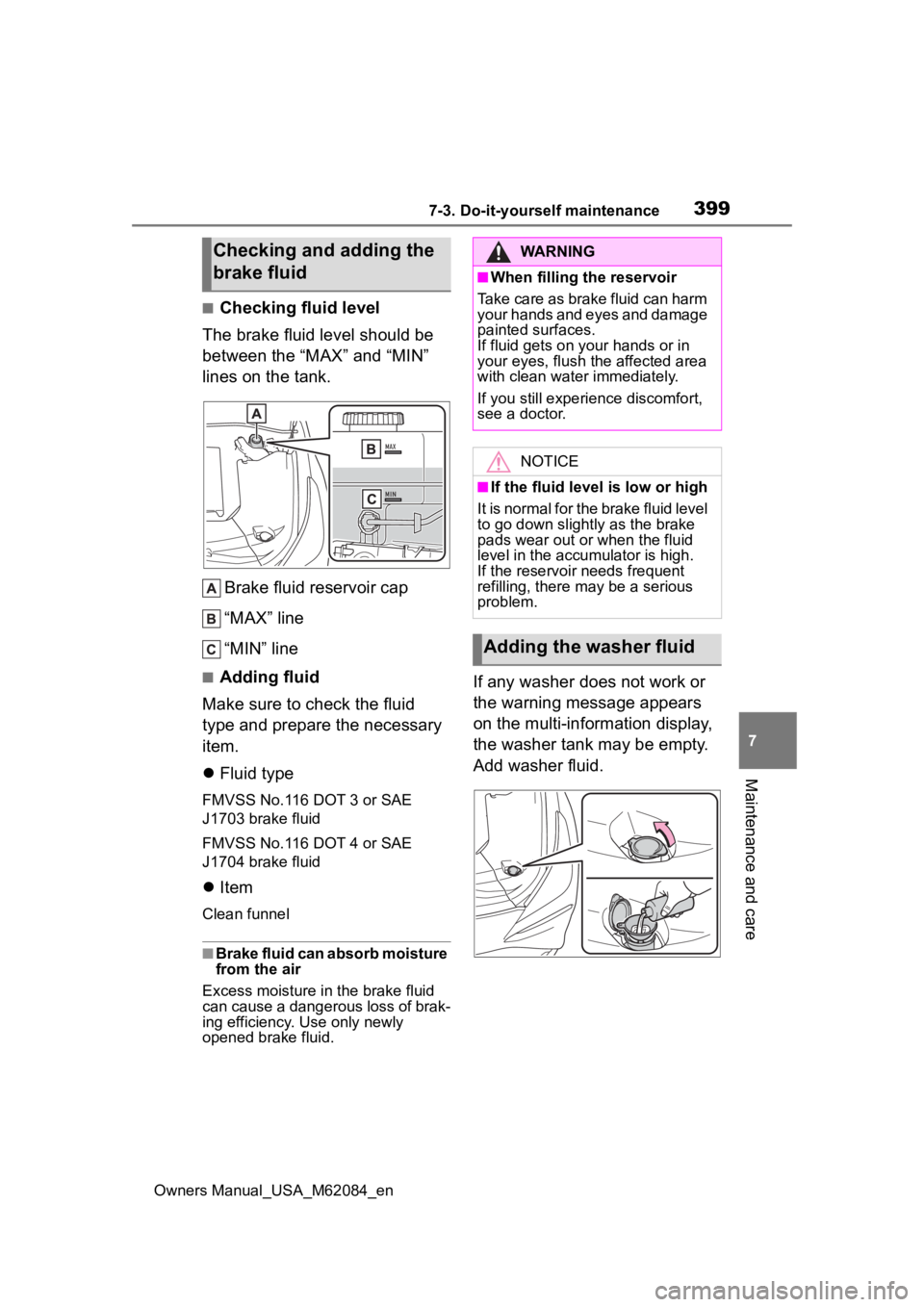
■Checking fluid level
The brake fluid level should be
between the “MAX” and “MIN”
lines on the tank.
Brake fluid reservoir cap
“MAX” line
“MIN” line
■Adding fluid
Make sure to check the fluid
type and prepare the necessary
item.
Fluid type
FMVSS No.116 DOT 3 or SAE
J1703 brake fluid
FMVSS No.116 DOT 4 or SAE
J1704 brake fluid
Item
Clean funnel
■Brake fluid can absorb moisture
from the air
Excess moisture in the brake fluid
can cause a dangerous loss of brak-
ing efficiency. Use only newly
opened brake fluid.
If any washer does not work or
the warning message appears
on the multi-information display,
the washer tank may be empty.
Add washer fluid.
Checking and adding the
brake fluidWARNING
■When filling the reservoir
Take care as brake fluid can harm
your hands and eyes and damage
painted surfaces.
If fluid gets on your hands or in
your eyes, flush the affected area
with clean water immediately.
If you still experi ence discomfort,
see a doctor.
NOTICE
■If the fluid level is low or high
It is normal for the brake fluid level
to go down slight ly as the brake
pads wear out or when the fluid
level in the accumulator is high.
If the reservoir needs frequent
refilling, there m ay be a serious
problem.
Adding the washer fluid
Page 401 of 556
4017-3. Do-it-yourself maintenance
Owners Manual_USA_M62084_en
7
Maintenance and care
●The power switch mode is
recorded by the vehicle. If the 12-
volt battery is reconnected, the
vehicle will return the power
switch mode to the status it was in
before the 12-volt battery was dis-
connected. Make sure to turn off
the power switch before discon-
necting the 12-volt battery. Take
extra care when connecting the
12-volt battery if the power switch
mode prior to discharge is
unknown.
●When the 12-volt b attery is recon-
nected, start the fuel cell system,
depress the brake pedal, and con-
firm that it is possible to shift into
each shift position.
If the system will not start even after
multiple attempts, contact your Toy-
ota dealer.
WARNING
■Chemicals in the 12-volt bat-
tery
The 12-volt battery contains poi-
sonous and corrosi ve sulfuric acid
and may produce hydrogen gas
which is flammable and explosive.
To reduce the risk of death or seri-
ous injury, take th e following pre-
cautions while working on or near
the 12-volt battery:
●Do not cause sparks by touch-
ing the 12-volt battery terminals
with tools.
●Do not smoke or light a match
near the 12-volt battery.
●Avoid contact with eyes, skin
and clothes.
●Never inhale or swallow electro-
lyte.
●Wear protective safety glasses
when working near the 12-volt
battery.
●Keep children away from the
12-volt battery.
■Where to safely charge the
12-volt battery
Always charge the 12-volt battery
in an open area. Do not charge
the 12-volt battery in a garage or
closed room where there is insuf-
ficient ventilation.
■Emergency measures regard-
ing electrolyte
●If electrolyte gets in your eyes
Flush your eyes with clean
water for at least 15 minutes
and get immediate medical
attention. If possible, continue
to apply water with a sponge or
cloth while traveling to the near-
est medical facility.
●If electrolyte gets on your skin
Wash the affected area thor-
oughly. If you feel pain or burn-
ing, get medical attention
immediately.
●If electrolyte gets on your
clothes
It can soak through clothing on
to your skin. Imm ediately take
off the clothing and follow the
procedure above if necessary.
●If you accidentally swallow elec-
trolyte
Drink a large quantity of water
or milk. Get emergency medical
attention immediately.
■When replacing the 12-volt
battery
Use a 12-volt battery designed for
this vehicle. Failu re to do so may
cause gas (hydrogen) to enter the
passenger compartment, causing
a fire or explosion.
For replacement of the 12-volt
battery, contact your Toyota
dealer.
Page 405 of 556
4057-3. Do-it-yourself maintenance
Owners Manual_USA_M62084_en
7
Maintenance and care
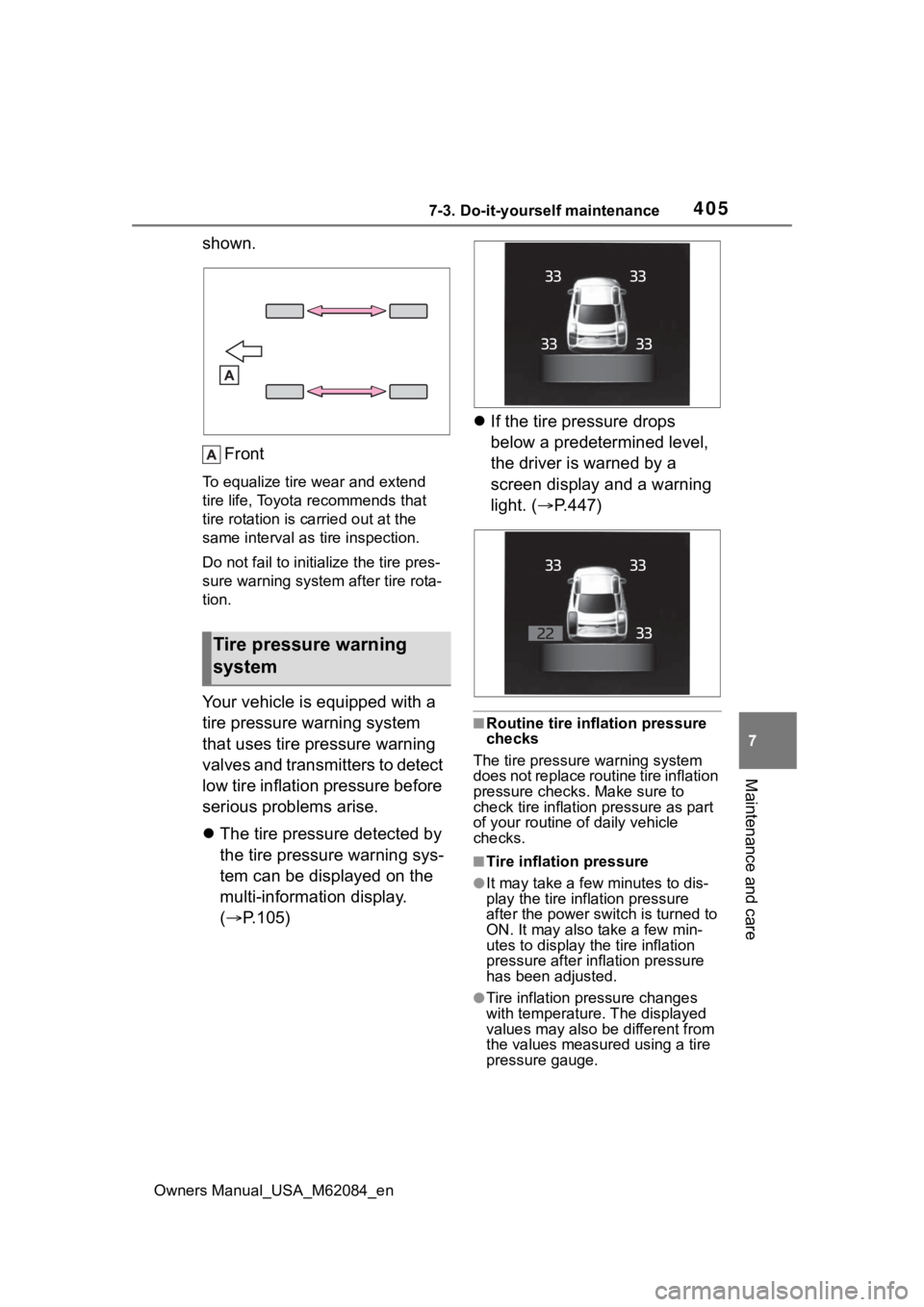
shown. Front
To equalize tire wear and extend
tire life, Toyota recommends that
tire rotation is c arried out at the
same interval as tire inspection.
Do not fail to initialize the tire pres-
sure warning system after tire rota-
tion.
Your vehicle is equipped with a
tire pressure warning system
that uses tire pressure warning
valves and transmitters to detect
low tire inflation pressure before
serious problems arise.
The tire pressure detected by
the tire pressure warning sys-
tem can be displayed on the
multi-information display.
( P.105)
If the tire pressure drops
below a predetermined level,
the driver is warned by a
screen display and a warning
light. ( P.447)
■Routine tire inflation pressure
checks
The tire pressure warning system
does not replace routine tire inflation
pressure checks . Make sure to
check tire inflation pressure as part
of your routine o f daily vehicle
checks.
■Tire inflation pressure
●It may take a few minutes to dis-
play the tire inflation pressure
after the power switch is turned to
ON. It may also take a few min-
utes to display the tire inflation
pressure after infl ation pressure
has been adjusted.
●Tire inflation pressure changes
with temperature. The displayed
values may also be different from
the values measured using a tire
pressure gauge.
Tire pressure warning
system
Page 406 of 556
4067-3. Do-it-yourself maintenance
Owners Manual_USA_M62084_en
■Situations in which the tire
pressure warning system may
not operate properly
●In the following cases, the tire
pressure warning system may not
operate properly.
• If non-genuine Toyota wheels are used.
• If a tire has been replaced with a tire that is not an OE (Original
Equipment) tire.
• If a tire has been replaced with a tire that is not of the specified size.
• If tire chains, etc. are installed.
• If a window tint that affects the
radio wave signals is installed.
• If there is a lot of snow or ice on
the vehicle, particularly around the
wheels or wheel housings.
• If the tire inflation pressure is
much higher than the specified
level.
• If wheels not equipped with tire
pressure warning valves and
transmitter are used.
• If the ID code on the tire pressure
warning valves and transmitters is
not registered in the tire pressure
warning computer.
●Performance may be affected in
the following situations.
• When driving near a TV tower, electric power plant, gas station,
radio station, large display, airport
or other facility that generates
strong radio waves or electrical
noise
• When carrying a portable radio, cellular phone, cordless phone or
other wireless communication
device
If tire position information is not cor-
rectly displayed due to the radio
wave conditions, the display may be
corrected by changing the location
of the vehicle as the radio wave
conditions may change.
●When the vehicle is stopped, the
time taken for the warning to start
or turn off may be longer.
●When the inflation pressure of a
tire drops rapidly, for example when a tire has burst, the warning
may not operate.
■Warning performance of the tire
pressure warning system
The warning of the tire pressure
warning system w ill change in
accordance the conditions under
which it was initia lized. For this rea-
son, the system may give a warning
even if the tire pressure does not
reach a low enough level, or if the
pressure is higher than the pressure
that was adjusted to when the sys-
tem was initialized.
■Tire pressure warning system
certification
P.553
When replacing the tires or
wheels, the tire pressure warn-
ing valves and transmitters must
be installed to the wheels which
will be installed to the vehicle.
When new tire pressure warning
valves and transmitters are
installed, new ID codes must be
registered in the tire pressure
warning computer and the tire
pressure warning system must
be initialized. ( P.409)
■Replacing tires and wheels
If the ID codes of the tire pressure
warning valves and transmitters are
not registered, the tire pressure
warning system will not work prop-
erly. In this case, after driving for
about 10 minutes, the tire pressure
warning light will blink for approxi-
mately 1 minute and then illuminate
to indicate a system malfunction.
Installing tire pressure
warning valves and trans-
mitters
Page 407 of 556
4077-3. Do-it-yourself maintenance
Owners Manual_USA_M62084_en
7
Maintenance and care
■The tire pressure warning
system must be initialized
in the following circum-
stances:
When the tire inflation pres-
sure is changed such as
when changing traveling
speed or load weight.
When the tire inflation pres-
sure is changed such as
when the tire size is changed.
When rotating the tires.
After performing the transmit-
ter ID code registration proce-
dure. ( P.409) When the tire pressure warning
system is initialized, the current
tire inflation pressure is set as
the benchmark pressure.
■How to initialize the tire
pressure warning system
1 Park the vehicle in a safe
place, turn the power switch
off and wait 20 minutes or
more.
Initialization cannot be performed
while the vehicle is moving.
2Adjust the tire inflation pres-
sure to the specified cold tire
inflation pressure level.
Make sure to adjust the tire pres-
sure to the specifie d cold tire infla-
tion pressure level. The tire
pressure warning system will oper-
ate based on this pressure level.
3Start the fuel cell system.
4 Press or of the meter
control switch to select .
5 Press or to select
“Vehicle Settings” and then
press and hold .
6 Press or to select
“TPWS” and then press .
7 Press or to select “Set
Pressure”. Then press and
hold until the tire pressure
warning light starts blinking.
A message is displayed on the
multi-information di splay. Also, “--”
is displayed for inflation pressure of
NOTICE
■Repairing or replacing tires,
wheels, tire pressure warn-
ing valves, transmitters and
tire valve caps
●When removing or fitting the
wheels, tires or the tire pressure
warning valves and transmit-
ters, contact your Toyota dealer
as the tire pr essure warning
valves and transmitters may be
damaged if not handled cor-
rectly.
●Make sure to install the tire
valve caps. If the tire valve caps
are not installed, water could
enter the tire pressure warning
valves, corrode the valve, and
cause sticking and air leaks.
●When replacing ti re valve caps,
do not use tire valve caps other
than those specified. The cap
may become stuck.
Initializing the tire pres-
sure warning system
Page 408 of 556
4087-3. Do-it-yourself maintenance
Owners Manual_USA_M62084_eneach tire on the multi-information
display while the tire pressure
warning system determines the
position.
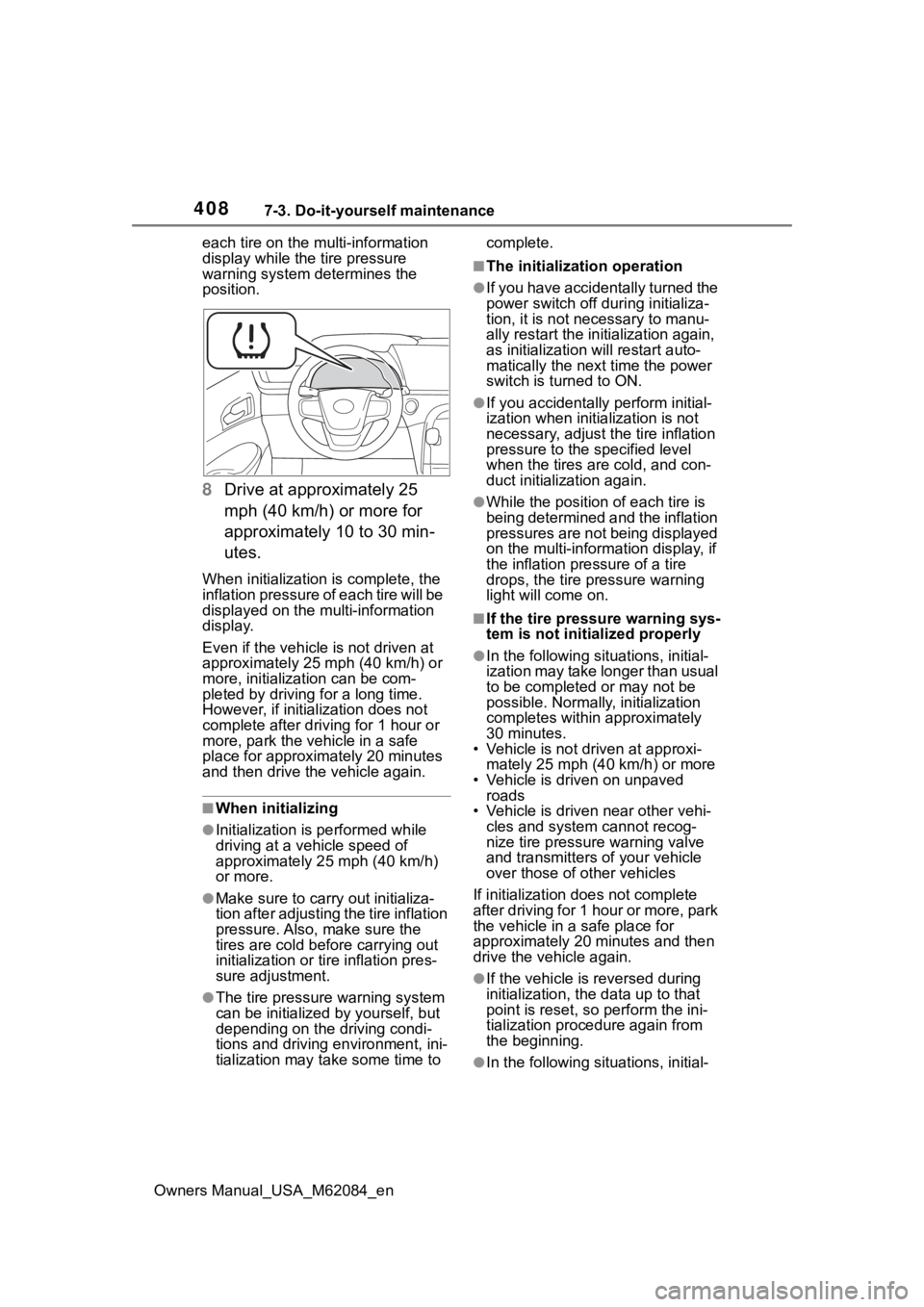
8
Drive at approximately 25
mph (40 km/h) or more for
approximately 10 to 30 min-
utes.
When initialization is complete, the
inflation pressure of each tire will be
displayed on the multi-information
display.
Even if the vehicle is not driven at
approximately 25 mph (40 km/h) or
more, initializat ion can be com-
pleted by driving for a long time.
However, if initia lization does not
complete after driving for 1 hour or
more, park the vehicle in a safe
place for approximately 20 minutes
and then drive th e vehicle again.
■When initializing
●Initialization is performed while
driving at a vehicle speed of
approximately 25 mph (40 km/h)
or more.
●Make sure to carry out initializa-
tion after adjusting the tire inflation
pressure. Also, make sure the
tires are cold before carrying out
initialization or tir e inflation pres-
sure adjustment.
●The tire pressure warning system
can be initialized by yourself, but
depending on the driving condi-
tions and driving environment, ini-
tialization may take some time to complete.
■The initialization operation
●If you have accidentally turned the
power switch off during initializa-
tion, it is not necessary to manu-
ally restart the initialization again,
as initialization will restart auto-
matically the next time the power
switch is turned to ON.
●If you accidentally perform initial-
ization when initia
lization is not
necessary, adjust the tire inflation
pressure to the s pecified level
when the tires are cold, and con-
duct initialization again.
●While the position of each tire is
being determined and the inflation
pressures are not being displayed
on the multi-information display, if
the inflation pressure of a tire
drops, the tire pressure warning
light will come on.
■If the tire pressure warning sys-
tem is not initia lized properly
●In the following situations, initial-
ization may take longer than usual
to be completed or may not be
possible. Normally, initialization
completes within approximately
30 minutes.
• Vehicle is not dr iven at approxi-
mately 25 mph (40 km/h) or more
• Vehicle is driven on unpaved roads
• Vehicle is driven near other vehi-
cles and system cannot recog-
nize tire pressure warning valve
and transmitters o f your vehicle
over those of other vehicles
If initialization does not complete
after driving for 1 hour or more, park
the vehicle in a safe place for
approximately 20 minutes and then
drive the vehicle again.
●If the vehicle is reversed during
initialization, the data up to that
point is reset, so p erform the ini-
tialization procedure again from
the beginning.
●In the following situations, initial-
Page 409 of 556
4097-3. Do-it-yourself maintenance
Owners Manual_USA_M62084_en
7
Maintenance and care
ization will not be started or was
not completed properly and the
system will not operate properly.
Perform the initialization proce-
dure again.
• If, when attempting to start initial-
ization, the tire pressure warning
light does not blink 3 times.
• If, when the vehicle has been
driven for about 20 minutes after
performing initialization, the tire
pressure warning light blinks for
approximately 1 minute and then
illuminates.
If initialization cannot be completed
after performing the above proce-
dure, contact your Toyota dealer.
Every tire pressure warning
valve and transmitter has a
unique ID code. When replacing
a tire pressure warning valve
and transmitter, it is necessary
to register the ID codes.
When registering the ID codes,
perform the following procedure.
1 When registering the ID
codes, perform the following
procedure.Park the vehicle in
a safe place and turn the
power switch off, wait for approximately 15 minutes or
more and perform the proce-
dure.
2 Start the fuel cell system.
( P.172)
3 Press or of the meter
control switch to select .
4 Press or to select
“Vehicle Settings” and then
press and hold .
5 Press or to select
“TPWS” and then press .
6 Press or to select
“Change Wheel”. Then press
and hold until the tire
pressure warning light blinks
slowly 3 times.
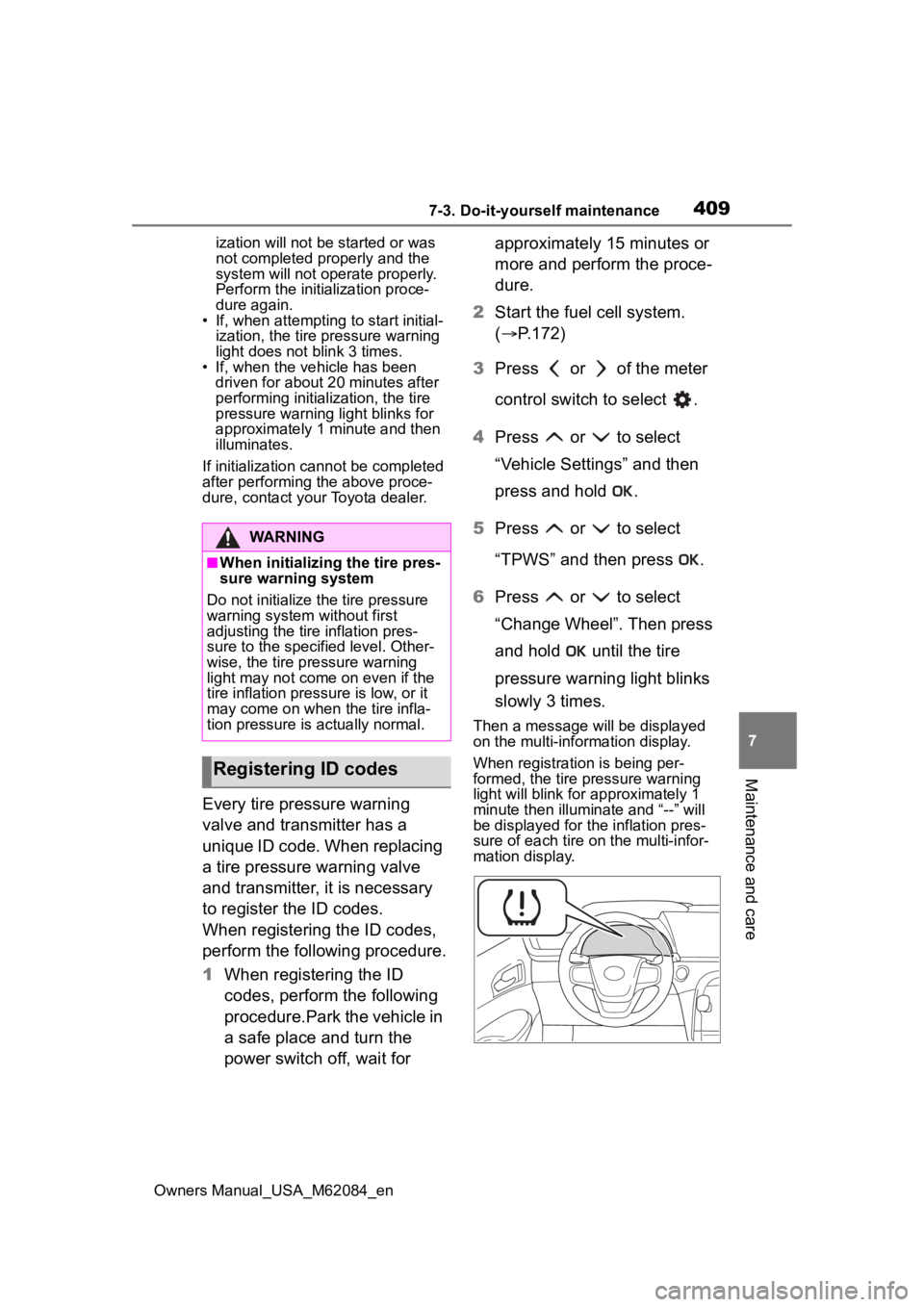
Then a message will be displayed
on the multi-information display.
When registration is being per-
formed, the tire pressure warning
light will blink for approximately 1
minute then illuminate and “--” will
be displayed for the inflation pres-
sure of each tire on the multi-infor-
mation display.
WARNING
■When initializing the tire pres-
sure warning system
Do not initialize the tire pressure
warning system without first
adjusting the tire inflation pres-
sure to the specified level. Other-
wise, the tire pressure warning
light may not come on even if the
tire inflation press ure is low, or it
may come on when the tire infla-
tion pressure is actually normal.
Registering ID codes