warning light TOYOTA MIRAI 2022 Owner's Manual
[x] Cancel search | Manufacturer: TOYOTA, Model Year: 2022, Model line: MIRAI, Model: TOYOTA MIRAI 2022Pages: 556, PDF Size: 17.34 MB
Page 93 of 556
933-1. Instrument cluster
Owners Manual_USA_M62084_en
3
Vehicle status information and indicators
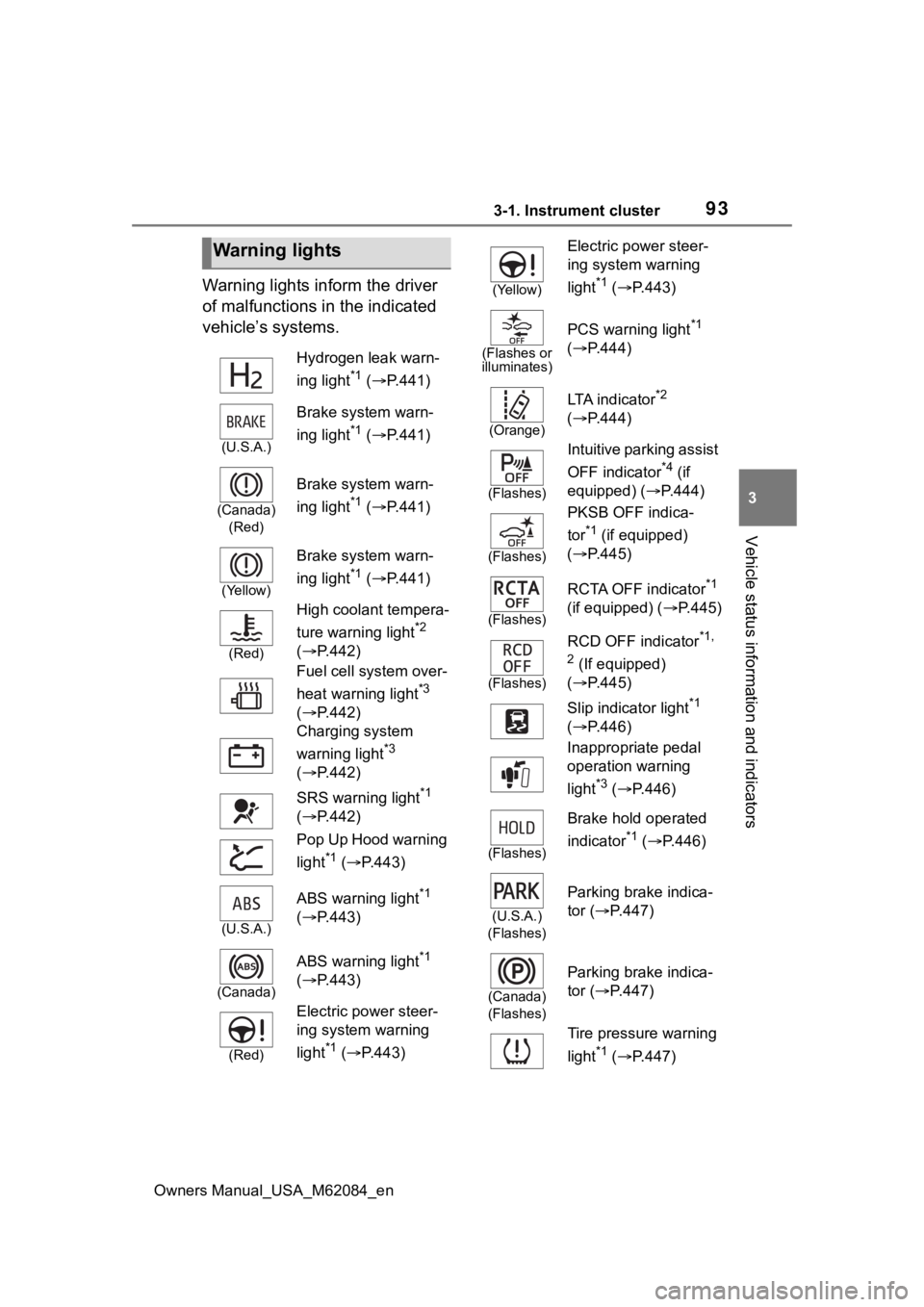
Warning lights inform the driver
of malfunctions in the indicated
vehicle’s systems.
Warning lights
Hydrogen leak warn-
ing light
*1 ( P.441)
(U.S.A.)
Brake system warn-
ing light
*1 ( P.441)
(Canada)
(Red)
Brake system warn-
ing light
*1 ( P.441)
(Yellow)
Brake system warn-
ing light
*1 ( P.441)
(Red)
High coolant tempera-
ture warning light
*2
( P.442)
Fuel cell system over-
heat warning light
*3
( P.442)
Charging system
warning light
*3
( P.442)
SRS warning light
*1
( P.442)
Pop Up Hood warning
light
*1 ( P.443)
(U.S.A.)
ABS warning light*1
( P.443)
(Canada)
ABS warning light*1
( P.443)
(Red)
Electric power steer-
ing system warning
light
*1 ( P.443)
(Yellow)
Electric power steer-
ing system warning
light
*1 ( P.443)
(Flashes or
illuminates)
PCS warning light*1
( P.444)
(Orange)
LTA indicator*2
( P.444)
(Flashes)
Intuitive parking assist
OFF indicator
*4 (if
equipped) ( P.444)
(Flashes)
PKSB OFF indica-
tor
*1 (if equipped)
( P.445)
(Flashes)
RCTA OFF indicator*1
(if equipped) ( P.445)
(Flashes)
RCD OFF indicator*1,
2
(If equipped)
( P.445)
Slip indicator light
*1
( P.446)
Inappropriate pedal
operation warning
light
*3 ( P.446)
(Flashes)
Brake hold operated
indicator
*1 ( P.446)
(U.S.A.)
(Flashes)
Parking brake indica-
tor ( P.447)
(Canada)
(Flashes)
Parking brake indica-
tor ( P.447)
Tire pressure warning
light
*1 ( P.447)
Page 94 of 556
943-1. Instrument cluster
Owners Manual_USA_M62084_en
*1: These lights turn on when the power switch is turned to ON to
indicate that a system check is
being performed. They will turn
off after the fuel cell system is
on, or after a few seconds. There
may be a malfunction in a sys-
tem if the light does not come on,
or turn off. Have the vehicle
inspected by your Toyota dealer.
*2: This light illuminates on the multi-information display.
*3: This light illuminates on the multi-informatio n display with a
message.
*4: Intuitive parking assist OFF indi- cator turns on when the power
switch is turned to ON while the
Intuitive parking assist function is
on. It will turn off after a few sec-
onds.
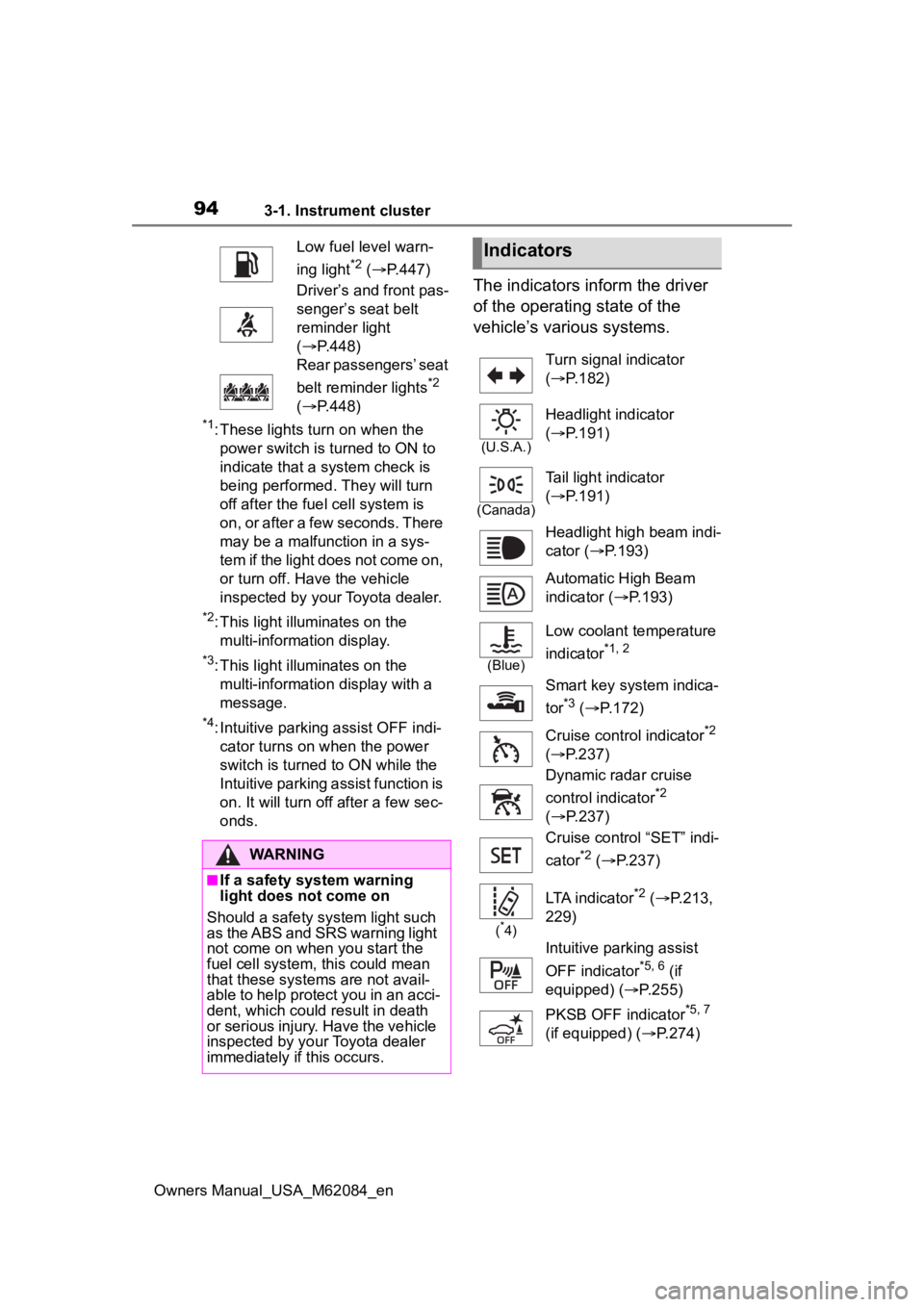
The indicators inform the driver
of the operating state of the
vehicle’s various systems.
Low fuel level warn-
ing light
*2 ( P.447)
Driver’s and front pas-
senger’s seat belt
reminder light
( P.448)
Rear passengers’ seat
belt reminder lights
*2
( P.448)
WARNING
■If a safety system warning
light does not come on
Should a safety system light such
as the ABS and SRS warning light
not come on when you start the
fuel cell system, this could mean
that these systems are not avail-
able to help protect you in an acci-
dent, which could result in death
or serious injury. Have the vehicle
inspected by your Toyota dealer
immediately if this occurs.
Indicators
Turn signal indicator
( P.182)
(U.S.A.)
Headlight indicator
( P.191)
(Canada)
Tail light indicator
( P.191)
Headlight high beam indi-
cator ( P.193)
Automatic High Beam
indicator ( P.193)
(Blue)
Low coolant temperature
indicator
*1, 2
Smart key system indica-
tor
*3 ( P.172)
Cruise control indicator
*2
( P.237)
Dynamic radar cruise
control indicator
*2
( P.237)
Cruise control “SET” indi-
cator
*2 ( P.237)
(*4)
LTA indicator*2 ( P.213,
229)
Intuitive parking assist
OFF indicator
*5, 6 (if
equipped) ( P.255)
PKSB OFF indicator
*5, 7
(if equipped) ( P.274)
Page 95 of 556
953-1. Instrument cluster
Owners Manual_USA_M62084_en
3
Vehicle status information and indicators
*1: Indicates the coolant tempera- ture is cool.
*2: This light illuminates on the multi-information display.
*3: This light illuminates on the multi-information display with a
message.
*4: Depending on the operating con-ditions of the system, the color
and state (illuminat ed/blinking) of
the indicator change.
*5: The light comes on when the system is turned off.
*6: Intuitive parking assist OFF indi-cator turns on wh en the power
switch is turned t o ON while the
Intuitive parking assist function is
on. It will turn off after a few sec-
onds.
*7: These lights tu rn on when the
power switch is turned to ON to
indicate that a system check is
being performed. They will turn
off after the fuel cell system is
on, or after a few seconds. There
may be a malfunction in a sys-
tem if the lights do not turn on, or
turn off. Have the vehicle
(Flashes)
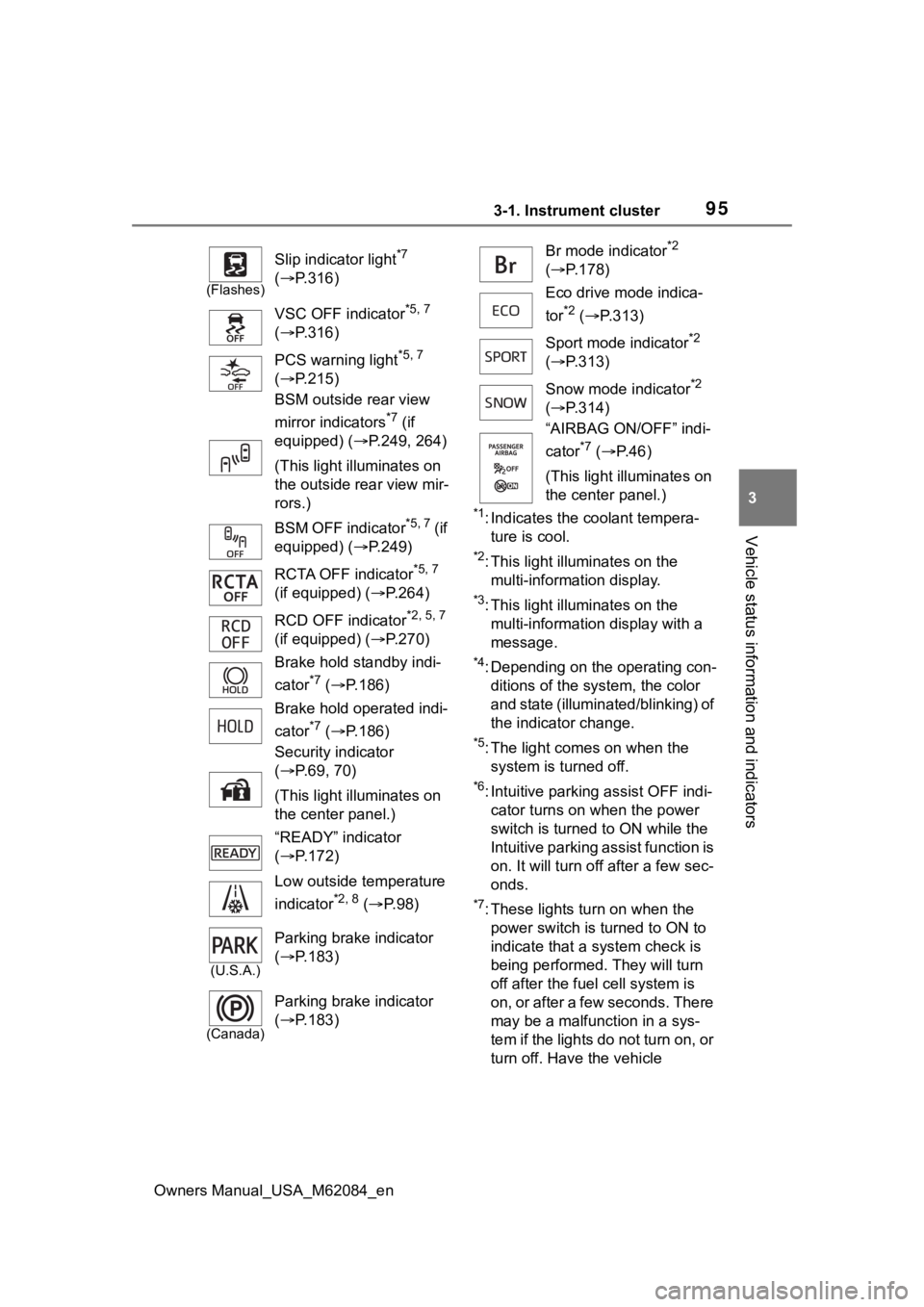
Slip indicator light*7
( P.316)
VSC OFF indicator
*5, 7
( P.316)
PCS warning light
*5, 7
( P.215)
BSM outside rear view
mirror indicators
*7 (if
equipped) ( P.249, 264)
(This light illuminates on
the outside rear view mir-
rors.)
BSM OFF indicator
*5, 7 (if
equipped) ( P.249)
RCTA OFF indicator
*5, 7
(if equipped) ( P.264)
RCD OFF indicator
*2, 5, 7
(if equipped) ( P.270)
Brake hold standby indi-
cator
*7 ( P.186)
Brake hold operated indi-
cator
*7 ( P.186)
Security indicator
( P.69, 70)
(This light illuminates on
the center panel.)
“READY” indicator
( P.172)
Low outside temperature
indicator
*2, 8 ( P. 9 8 )
(U.S.A.)
Parking brake indicator
( P.183)
(Canada)
Parking brake indicator
( P.183)
Br mode indicator*2
( P.178)
Eco drive mode indica-
tor
*2 ( P.313)
Sport mode indicator
*2
( P.313)
Snow mode indicator
*2
( P.314)
“AIRBAG ON/OFF” indi-
cator
*7 ( P. 4 6 )
(This light illuminates on
the center panel.)
Page 99 of 556
993-1. Instrument cluster
Owners Manual_USA_M62084_en
3
Vehicle status information and indicators
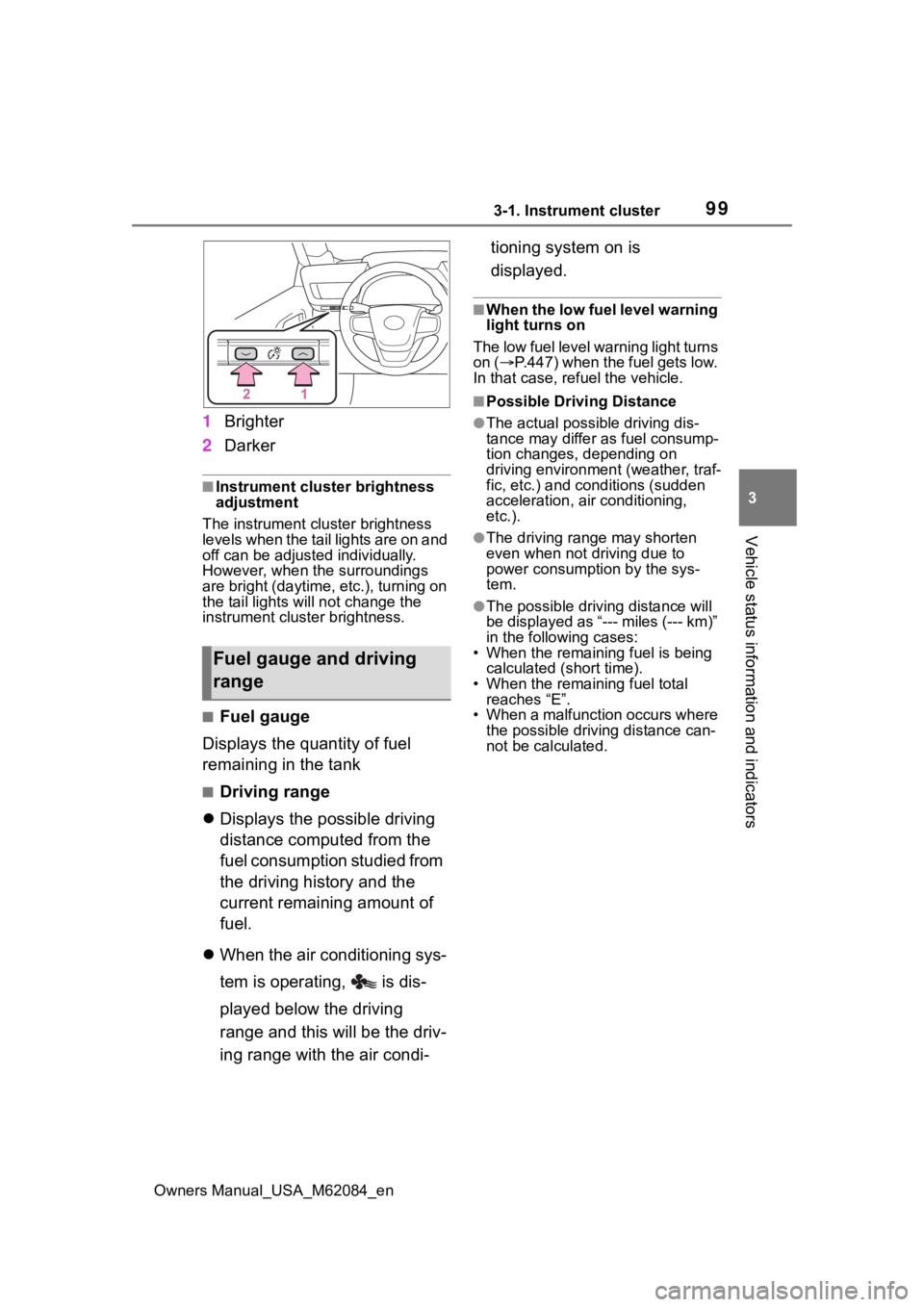
1 Brighter
2 Darker
■Instrument cluster brightness
adjustment
The instrument cluster brightness
levels when the tail lights are on and
off can be adjusted individually.
However, when the surroundings
are bright (daytime, etc.), turning on
the tail lights will not chan ge the
instrument cluster brightness.
■Fuel gauge
Displays the quantity of fuel
remaining in the tank
■Driving range
Displays the possible driving
distance computed from the
fuel consumption studied from
the driving history and the
current remaining amount of
fuel.
When the air conditioning sys-
tem is operating, is dis-
played below the driving
range and this will be the driv-
ing range with the air condi- tioning system on is
displayed.
■When the low fuel level warning
light turns on
The low fuel level warning light turns
on ( P.447) when the fuel gets low.
In that case, refuel the vehicle.
■Possible Drivi ng Distance
●The actual possible driving dis-
tance may differ as fuel consump-
tion changes, depending on
driving environment (weather, traf-
fic, etc.) and conditions (sudden
acceleration, air conditioning,
etc.).
●The driving range may shorten
even when not driving due to
power consumption by the sys-
tem.
●The possible driving distance will
be displayed as “--- miles (--- km)”
in the following cases:
• When the remaining fuel is being calculated (short time).
• When the remaining fuel total
reaches “E”.
• When a malfunction occurs where the possible driving distance can-
not be calculated.
Fuel gauge and driving
range
Page 100 of 556
1003-1. Instrument cluster
Owners Manual_USA_M62084_en
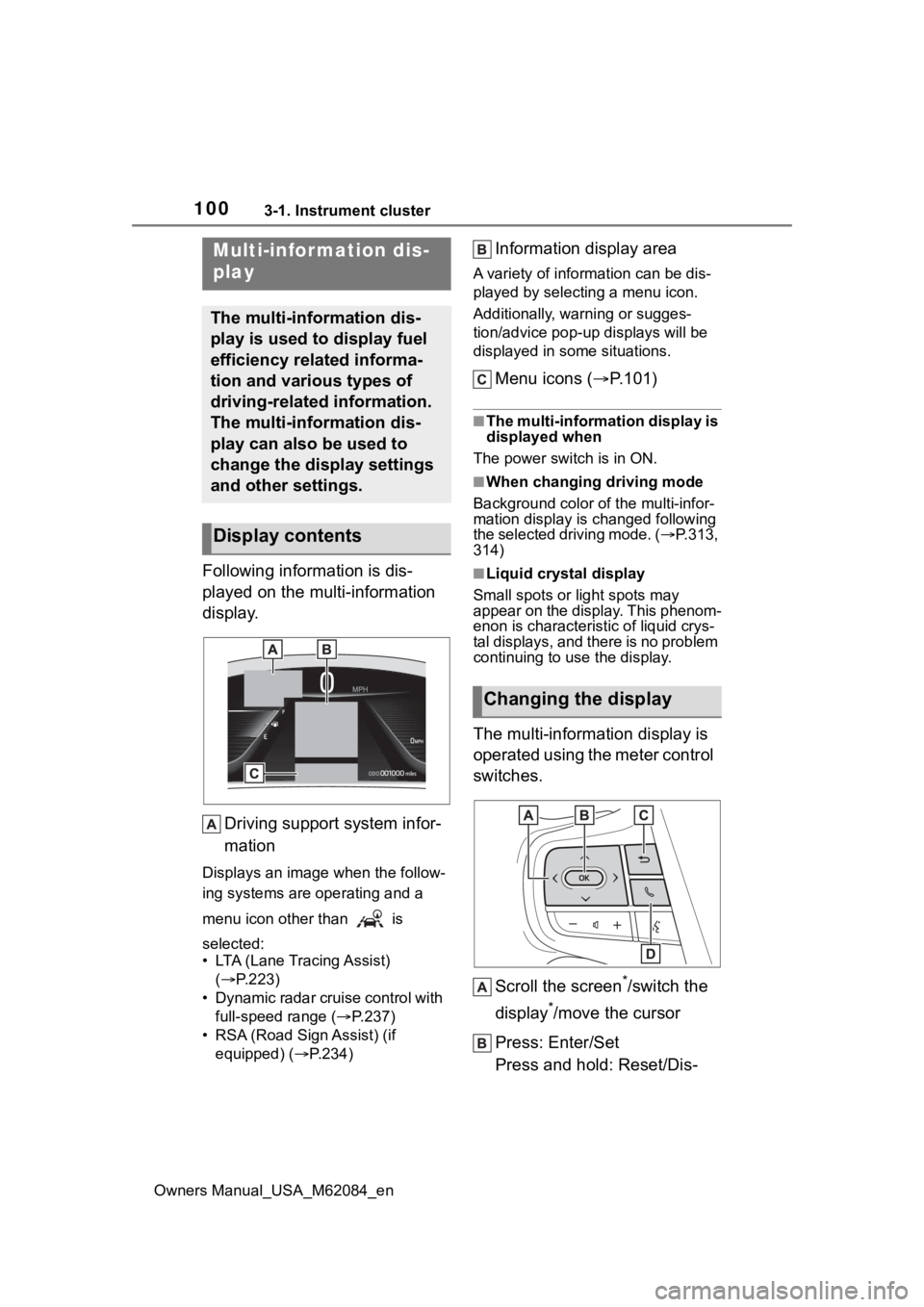
Following information is dis-
played on the multi-information
display.Driving support system infor-
mation
Displays an image when the follow-
ing systems are operating and a
menu icon other than is
selected:
• LTA (Lane Tracing Assist) ( P.223)
• Dynamic radar cruise control with full-speed range ( P.237)
• RSA (Road Sign Assist) (if equipped) ( P.234)
Information display area
A variety of information can be dis-
played by selecting a menu icon.
Additionally, warning or sugges-
tion/advice pop-up displays will be
displayed in some situations.
Menu icons ( P.101)
■The multi-information display is
displayed when
The power switch is in ON.
■When changing driving mode
Background color of the multi-infor-
mation display is changed following
the selected driving mode. ( P.313,
314)
■Liquid crystal display
Small spots or light spots may
appear on the display. This phenom-
enon is characteristic of liquid crys-
tal displays, and there is no problem
continuing to use the display.
The multi-information display is
operated using the meter control
switches.
Scroll the screen
*/switch the
display
*/move the cursor
Press: Enter/Set
Press and hold: Reset/Dis-
Multi-infor mation dis-
play
The multi-information dis-
play is used to display fuel
efficiency related informa-
tion and various types of
driving-related information.
The multi-information dis-
play can also be used to
change the display settings
and other settings.
Display contents
Changing the display
Page 106 of 556
1063-1. Instrument cluster
Owners Manual_USA_M62084_enrelated settings for that function
are not selectable.
Select to display warning mes-
sages and measures to be
taken if a malfunction is
detected. (
P.451)
Displays suggestions to the
driver in the following situations.
To select a response to a dis-
played suggestion, use the
meter control switches.
■Suggestion to turn on the
headlights
If the headlight switch is in other
than or , and the vehicle
speed is 3 mph (5 km/h) or
higher for a certain amount of
time when the surroundings are
dark, a suggestion message will
be displayed.
■Suggestion to turn off the
headlights
If the headlights are left on for a
certain amount of time after the
power switch has been turned
off, a suggestion message will be displayed.
When the headlight switch is in
the AUTO position: The mes-
sage asking if you wish to turn
the headlights off is displayed.
To turn the headlights off, select
“Yes”.
If the driver’s door is opened after
the power switch is turned off, this
suggestion message will not be dis-
played.
■Customization
The suggestion fu nction can be
turned on/off. (Customizable fea-
tures: P.498)
NOTICE
■During setting up the display
To prevent 12-volt battery dis-
charge, ensure that the fuel cell
system is operating while setting
up the display features.
Warning message display
Suggestion function
Page 127 of 556
1274-2. Opening, closing and locking the doors and trunk
Owners Manual_USA_M62084_en
4
Before driving
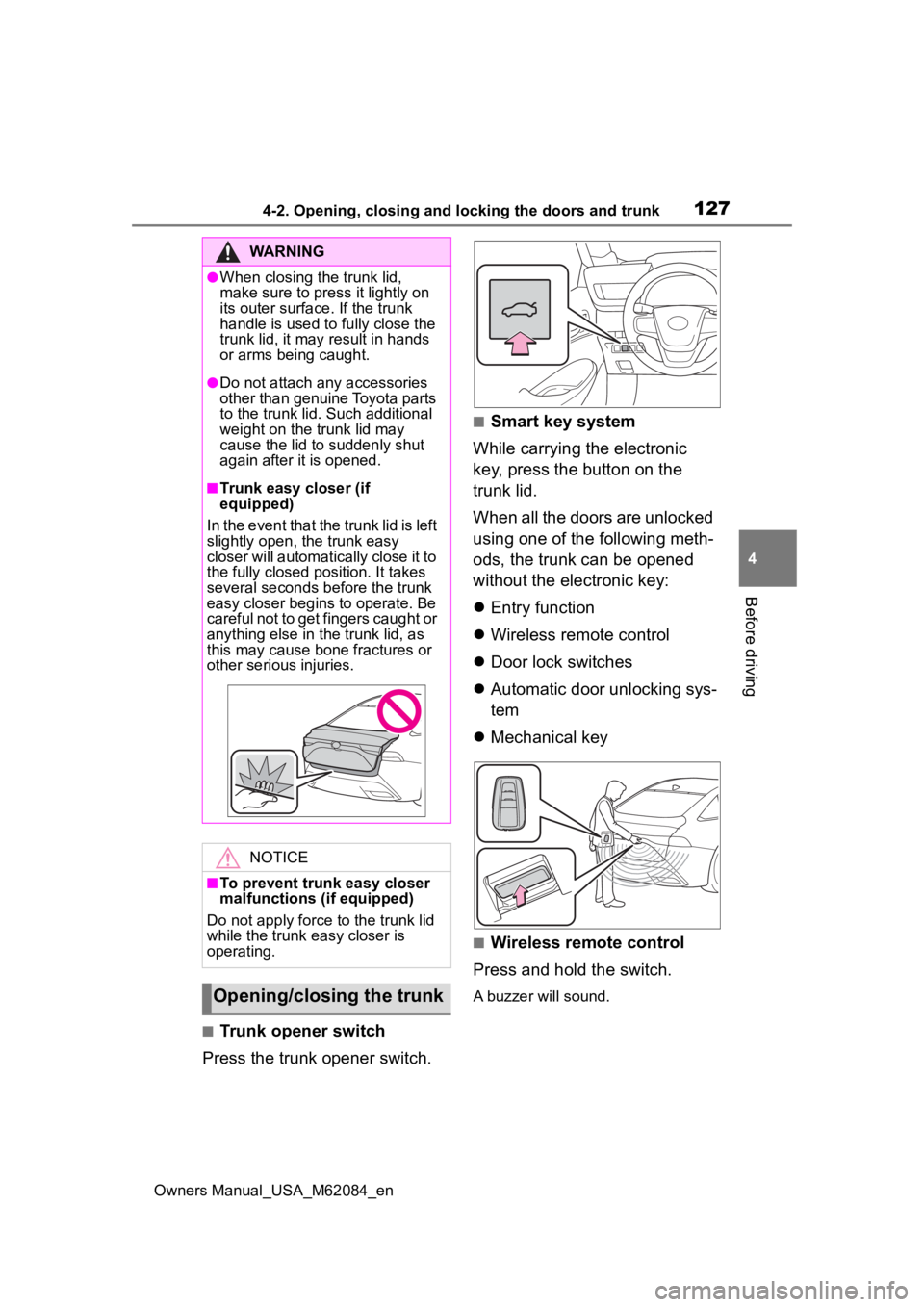
■Trunk opener switch
Press the trunk opener switch.
■Smart key system
While carrying the electronic
key, press the button on the
trunk lid.
When all the doors are unlocked
using one of the following meth-
ods, the trunk can be opened
without the electronic key:
Entry function
Wireless remote control
Door lock switches
Automatic door unlocking sys-
tem
Mechanical key
■Wireless remote control
Press and hold the switch.
A buzzer will sound.
WARNING
●When closing the trunk lid,
make sure to press it lightly on
its outer surface. If the trunk
handle is used to fully close the
trunk lid, it may result in hands
or arms being caught.
●Do not attach any accessories
other than genuine Toyota parts
to the trunk lid . Such additional
weight on the trunk lid may
cause the lid to suddenly shut
again after it is opened.
■Trunk easy closer (if
equipped)
In the event that the trunk lid is left
slightly open , the trunk easy
closer will automatically close it to
the fully closed po sition. It takes
several seconds before the trunk
easy closer begins to operate. Be
careful not to get fingers caught or
anything else in the trunk lid, as
this may cause bone fractures or
other serious injuries.
NOTICE
■To prevent trunk easy closer
malfunctions ( if equipped)
Do not apply force to the trunk lid
while the trunk easy closer is
operating.
Opening/closing the trunk
Page 138 of 556
1384-3. Adjusting the seats
Owners Manual_USA_M62084_en
■Registering procedure
Record your driving position to
button “1” or “2” before perform-
ing the following:
Carry only the key you want to
register, and then close the
driver’s door.
If 2 or more keys are in the vehi-
cle, the driving position cannot
be recorded properly.
1 Turn the power switch to ON.
2 Check that the shift position
is in P.
3 Recall the driving position
that you want to record.
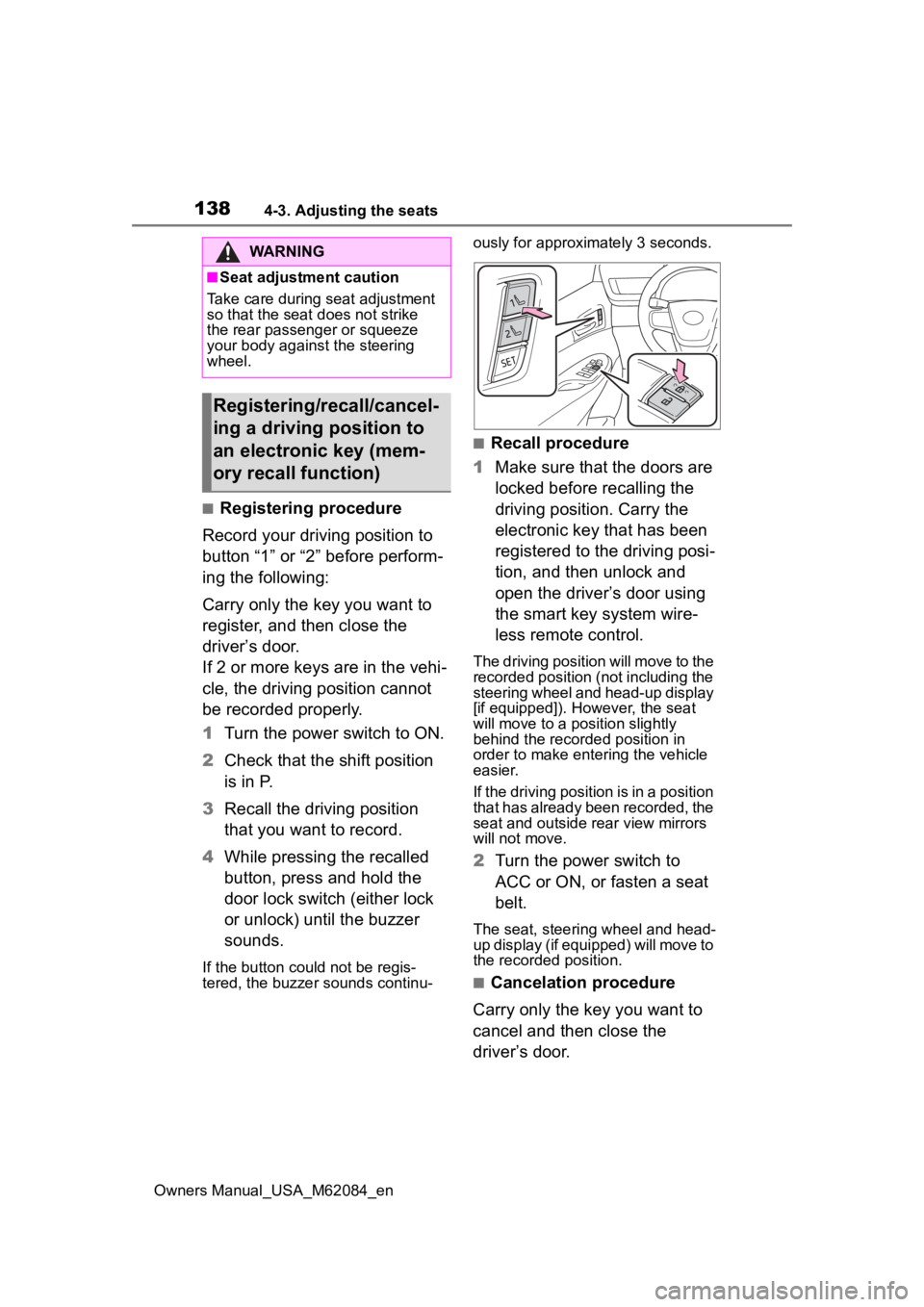
4 While pressing the recalled
button, press and hold the
door lock switch (either lock
or unlock) until the buzzer
sounds.
If the button could not be regis-
tered, the buzzer sounds continu- ously for approxim
ately 3 seconds.
■Recall procedure
1 Make sure that the doors are
locked before recalling the
driving position. Carry the
electronic key that has been
registered to the driving posi-
tion, and then unlock and
open the driver’s door using
the smart key system wire-
less remote control.
The driving position will move to the
recorded position (not including the
steering wheel and head-up display
[if equipped]). However, the seat
will move to a position slightly
behind the recorded position in
order to make entering the vehicle
easier.
If the driving position is in a position
that has already been recorded, the
seat and outside rear view mirrors
will not move.
2Turn the power switch to
ACC or ON, or fasten a seat
belt.
The seat, steering wheel and head-
up display (if equipped) will move to
the recorded position.
■Cancelation procedure
Carry only the key you want to
cancel and then close the
driver’s door.
WARNING
■Seat adjustment caution
Take care during seat adjustment
so that the seat d oes not strike
the rear passenger or squeeze
your body again st the steering
wheel.
Registering/recall/cancel-
ing a driving position to
an electronic key (mem-
ory recall function)
Page 143 of 556
1434-4. Adjusting the steering wheel and mirrors
Owners Manual_USA_M62084_en
4
Before driving
*: If equipped
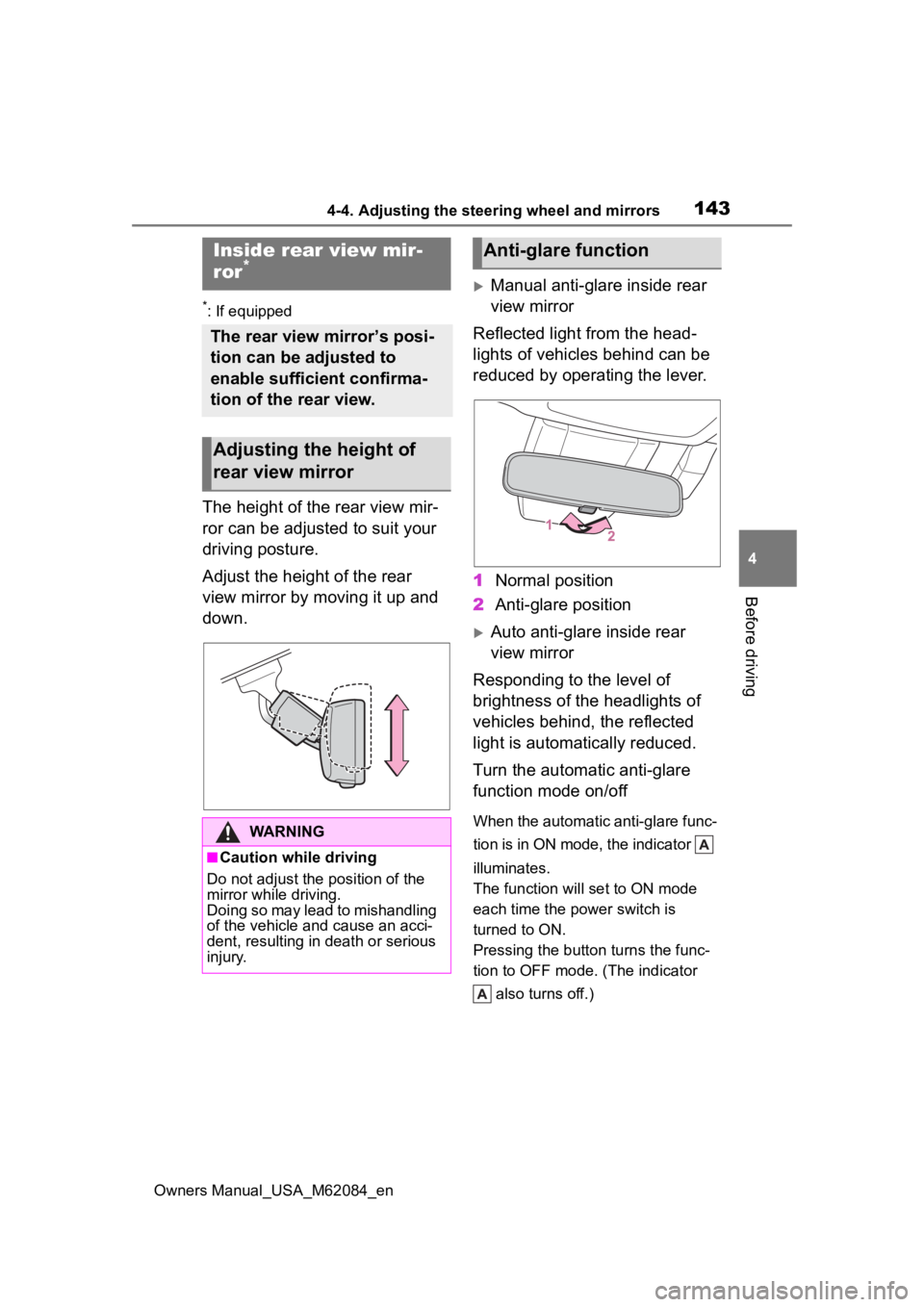
The height of the rear view mir-
ror can be adjusted to suit your
driving posture.
Adjust the height of the rear
view mirror by moving it up and
down.
Manual anti-glare inside rear
view mirror
Reflected light from the head-
lights of vehicles behind can be
reduced by operating the lever.
1 Normal position
2 Anti-glare position
Auto anti-glare inside rear
view mirror
Responding to the level of
brightness of the headlights of
vehicles behind, the reflected
light is automatically reduced.
Turn the automatic anti-glare
function mode on/off
When the automatic anti-glare func-
tion is in ON mode, the indicator
illuminates.
The function will set to ON mode
each time the power switch is
turned to ON.
Pressing the button turns the func-
tion to OFF mode. (The indicator also turns off.)
Inside rear view mir-
ror*
The rear view mirror’s posi-
tion can be adjusted to
enable sufficient confirma-
tion of the rear view.
Adjusting the height of
rear view mirror
WARNING
■Caution while driving
Do not adjust the position of the
mirror while driving.
Doing so may lead to mishandling
of the vehicle and cause an acci-
dent, resulting in death or serious
injury.
Anti-glare function
Page 145 of 556
1454-4. Adjusting the steering wheel and mirrors
Owners Manual_USA_M62084_en
4
Before driving
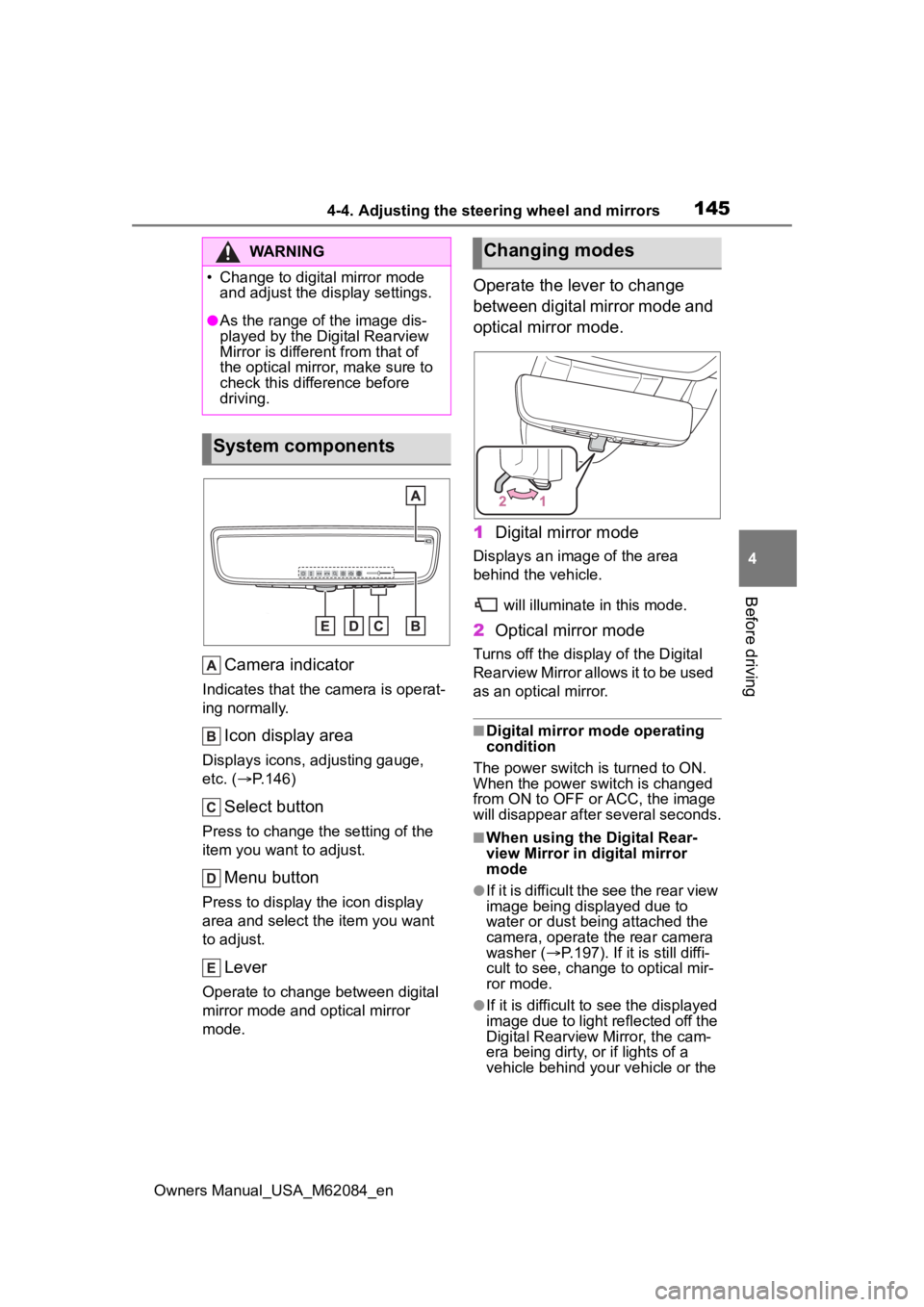
Camera indicator
Indicates that the camera is operat-
ing normally.
Icon display area
Displays icons, adjusting gauge,
etc. ( P.146)
Select button
Press to change the setting of the
item you want to adjust.
Menu button
Press to display the icon display
area and select the item you want
to adjust.
Lever
Operate to change between digital
mirror mode and optical mirror
mode.
Operate the lever to change
between digital mirror mode and
optical mirror mode.
1 Digital mirror mode
Displays an ima ge of the area
behind the vehicle.
will illuminate in this mode.
2Optical mirror mode
Turns off the display of the Digital
Rearview Mirror allows it to be used
as an optical mirror.
■Digital mirror mode operating
condition
The power switch is turned to ON.
When the power switch is changed
from ON to OFF o r ACC, the image
will disappear after several seconds.
■When using the Digital Rear-
view Mirror in d igital mirror
mode
●If it is difficult the see the rear view
image being displayed due to
water or dust being attached the
camera, operate the rear camera
washer ( P.197). If it is still diffi-
cult to see, change to optical mir-
ror mode.
●If it is difficult to see the displayed
image due to light reflected off the
Digital Rearview Mirror, the cam-
era being dirty, or if lights of a
vehicle behind your vehicle or the
WARNING