warning light TOYOTA MIRAI 2022 Owner's Guide
[x] Cancel search | Manufacturer: TOYOTA, Model Year: 2022, Model line: MIRAI, Model: TOYOTA MIRAI 2022Pages: 556, PDF Size: 17.34 MB
Page 148 of 556
1484-4. Adjusting the steering wheel and mirrors
Owners Manual_USA_M62084_en
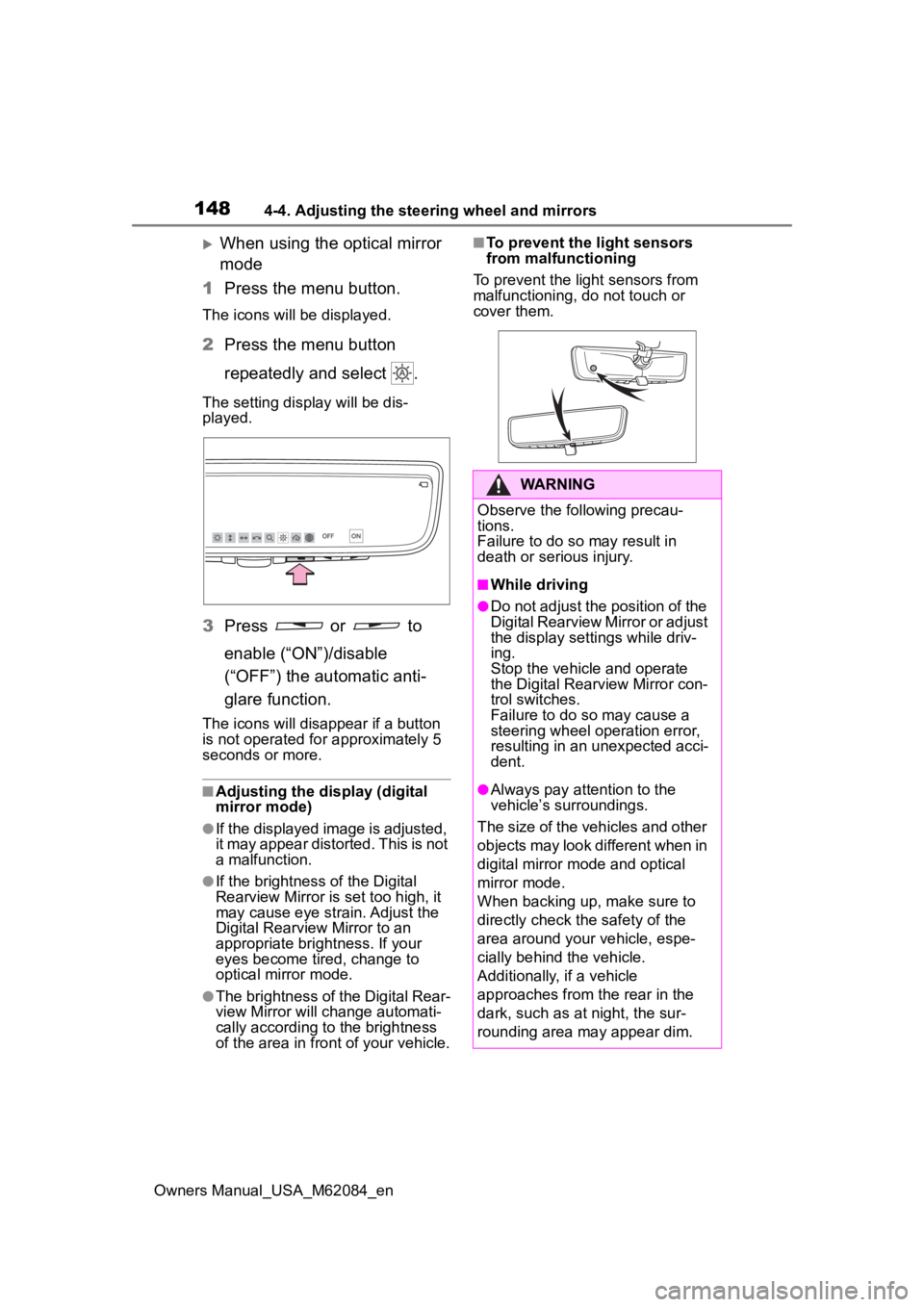
When using the optical mirror
mode
1 Press the menu button.
The icons will be displayed.
2Press the menu button
repeatedly and select .
The setting display will be dis-
played.
3Press or to
enable (“ON”)/disable
(“OFF”) the automatic anti-
glare function.
The icons will disappear if a button
is not operated fo r approximately 5
seconds or more.
■Adjusting the display (digital
mirror mode)
●If the displayed image is adjusted,
it may appear distorted. This is not
a malfunction.
●If the brightness of the Digital
Rearview Mirror is set too high, it
may cause eye strain. Adjust the
Digital Rearvie w Mirror to an
appropriate brightness. If your
eyes become tired, change to
optical mirror mode.
●The brightness of the Digital Rear-
view Mirror will ch ange automati-
cally according to the brightness
of the area in front of your vehicle.
■To prevent the light sensors
from malfunctioning
To prevent the light sensors from
malfunctioning, do not touch or
cover them.
WARNING
Observe the following precau-
tions.
Failure to do so may result in
death or serious injury.
■While driving
●Do not adjust the position of the
Digital Rearview Mirror or adjust
the display settings while driv-
ing.
Stop the vehicle and operate
the Digital Rearview Mirror con-
trol switches.
Failure to do so may cause a
steering wheel operation error,
resulting in an unexpected acci-
dent.
●Always pay attention to the
vehicle’s surroundings.
The size of the vehicles and other
objects may look different when in
digital mirror mode and optical
mirror mode.
When backing up, make sure to
directly check the safety of the
area around your vehicle, espe-
cially behind the vehicle.
Additionally, if a vehicle
approaches from the rear in the
dark, such as at night, the sur-
rounding area may appear dim.
Page 163 of 556
1635-1. Before driving
Owners Manual_USA_M62084_en
5
Driving
WARNING
■When starting the vehicle
Always keep your foot on the
brake pedal while stopped with
the “READY” indicator is illumi-
nated. This prevents the vehicle
from creeping.
■When driving the vehicle
●Do not drive if y ou are unfamil-
iar with the location of the brake
and accelerator pedals to avoid
depressing the wrong pedal.
• Accidentally depressing the accelerator pedal instead of the
brake pedal will result in sudden
acceleration that may lead to an
accident.
• When backing up, you may twist your body around, leading to dif-
ficulty in operating the pedals.
Make sure to operate the pedals
properly.
• Make sure to keep a correct driving posture even when mov-
ing the vehicle only slightly. This
allows you to depress the brake
and accelerator pedals properly.
• Depress the brake pedal using your right foot. Depressing the
brake pedal using your left foot
may delay respon se in an emer-
gency, resulting in an accident.
●The driver should pay extra
attention to pedes trians as this
vehicle is powered only by an
electric motor (traction motor).
As there is no engine noise, the
pedestrians may misjudge the
vehicle’s movement. Even with
the acoustic vehicle alerting
system activate, d rive with care
as pedestrians in the vicinity
may still not notice the vehicle if
the surrounding area is noisy.
●During normal driving, do not
turn off the fuel cell system.
Turning the fuel cell system off
while driving will not cause loss
of steering or braking control,
however, power assist to the
steering will be lost. This will
make it more difficult to steer
smoothly, so you should pull
over and stop the vehicle as
soon as it is safe to do so.
In the event of a n emergency,
such as if it becomes impossible
to stop the vehicle in the normal
way: P. 4 3 2
●Using the brakes continuously
may cause the brakes to over-
heat and lose effectiveness
when driving down a steep hill.
●Do not adjust the positions of
the steering wheel, the seat, or
the inside or outside rear view
mirrors while driving.
Doing so may result in a loss of
vehicle control.
●Always check that all passen-
gers’ arms, heads or other parts
of their body are not outside the
vehicle.
●Do not drive in excess of the
speed limit. Even if the legal
speed limit permits it, do not
drive over 85 mph (140 km/h)
unless your vehicle has high-
speed capability tires. Driving
over 85 mph (140 km/h) may
result in tire fa ilure, loss of con-
trol and possible injury. Be sure
to consult a tire dealer to deter-
mine whether the tires on your
vehicle are high-speed capabil-
ity tires or not before driving at
such speeds.
■When driving on slippery
road surfaces
●Sudden braking, acceleration
and steering may cause tire
slippage and reduce your ability
to control the vehicle.
Page 164 of 556
1645-1. Before driving
Owners Manual_USA_M62084_en
WARNING
●Sudden acceleration or regen-
erative braking due to shifting
could cause the vehicle to skid.
●After driving through a puddle,
lightly depress the brake pedal
to make sure that the brakes
are functioning properly. Wet
brake pads may prevent the
brakes from functioning prop-
erly. If the brakes on only one
side are wet and not functioning
properly, steering control may
be affected.
■When shifting the shift posi-
tion
●Do not let the vehicle roll back-
ward while a forward driving
position is selected, or roll for-
ward while the shift position is in
R.
Doing so may result in an acci-
dent or damage to the vehicle.
●Do not shift the shift position to
P while the vehicle is moving.
Doing so can damage the trans-
mission and may result in a loss
of vehicle control.
●Do not shift the shift position to
R while the vehicle is moving
forward.
Doing so can damage the trans-
mission and may result in a loss
of vehicle control.
●Do not shift the shift position to
a driving position while the vehi-
cle is moving backward.
Doing so can damage the trans-
mission and may result in a loss
of vehicle control.
●Changing the shif t position to N
while the vehicle is moving will
disengage the fuel cell system.
Regenerative braking is not
available with the fuel cell sys-
tem disengaged.
●Be careful not to change the
shift position with the accelera-
tor pedal depressed. Changing
the shift position to any posi-
tions other than P or N may lead
to unexpected rapid accelera-
tion of the vehicle that may
cause an acciden t and result in
death or serious injury.
After changing the shift position,
make sure to confirm the cur-
rent shift position displayed on
the shift position indicator inside
the meter.
■If you hear a squealing or
scraping noise (brake pad
wear limit indicators)
Have the brake pads checked and
replaced by your Toyota dealer as
soon as possible.
Rotor damage may result if the
pads are not replaced when
needed.
It is dangerous to drive the vehicle
when the wear limits of the brake
pads and/or those of the brake
discs are exceeded.
■When the vehicle is stopped
●Do not depress the accelerator
pedal unnecessarily.
If the shift position is in any
position other than P or N, the
vehicle may accelerate sud-
denly and unexpectedly, caus-
ing an accident.
●In order to prevent accidents
due to the vehic le rolling away,
always keep depressing the
brake pedal while stopped with
the “READY” indicator is illumi-
nated, and apply the parking
brake as necessary.
Page 165 of 556
1655-1. Before driving
Owners Manual_USA_M62084_en
5
Driving
WARNING
●If the vehicle is stopped on an
incline, in order to prevent acci-
dents caused by the vehicle roll-
ing forward or backward, always
depress the brake pedal and
securely apply the parking
brake as needed.
■When the vehicle is parked
●Do not leave glasses, cigarette
lighters, spray cans, or soft
drink cans in the vehicle when it
is in the sun.
Doing so may result in the fol-
lowing:
• Gas may leak from a cigarette lighter or spray can, and may
lead to a fire.
• The temperature inside the vehicle may cause the plastic
lenses and plastic material of
glasses to deform or crack.
• Soft drink cans may fracture, causing the contents to spray
over the interior of the vehicle,
and may also caus e a short cir-
cuit in the vehicle’s electrical
components.
●Do not leave cigarette lighters in
the vehicle. If a cigarette lighter
is in a place such as the glove
box or on the floor, it may be lit
accidentally when luggage is
loaded or the seat is adjusted,
causing a fire.
●Do not attach adhesive discs to
the windshield or windows. Do
not place containers such as air
fresheners on the instrument
panel or dashboard. Adhesive
discs or containers may act as
lenses, causing a fire in the
vehicle.
●Do not leave a door or window
open if the curved glass is
coated with a metallized film
such as a silver-colored one.
Reflected sunlight may cause
the glass to act a s a lens, caus-
ing a fire.
●Always apply the parking brake,
shift the shift position to P, stop
the fuel cell system and lock the
vehicle.
Do not leave the vehicle unat-
tended while the “READY” indi-
cator is illuminated.
If the vehicle is parked with the
shift position in P but the park-
ing brake is not set, the vehicle
may start to move, possibly
leading to an accident.
■When taking a nap in the vehi-
cle
Always turn the fuel cell system
off. Otherwise, if you accidentally
move the shift lever or depress
the accelerator pedal, causing the
vehicle to unintentionally move,
which can lead to an accident,
resulting in death o r serious injury.
■When braking
●When the brakes are wet, drive
more cautiously.
Braking distance increases
when the brakes are wet, and
this may cause one side of the
vehicle to brake d ifferently than
the other side. Also, the parking
brake may not securely hold the
vehicle.
●If the electronically controlled
brake system does not operate,
do not follow other vehicles
closely and avoid hills or sharp
turns that require braking.
In this case, braking is still pos-
sible, but the brake pedal
should be depressed more
firmly than usual. Also, the brak-
ing distance will increase. Have
your brakes fixed immediately.
Page 174 of 556
1745-2. Driving procedures
Owners Manual_USA_M62084_enperforming the proper procedures
for starting the vehicle, contact your
Toyota dealer immediately.
■If the fuel cell system is mal-
functioning
P. 4 5 1
■Electronic key battery
P. 4 2 3
■Operation of the power switch
●If the switch is not pressed shortly
and firmly, the power switch mode
may not change or the fuel cell
system may not start.
●If attempting to restart the fuel cell
system immediately after turning
the power switch off, the fuel cell
system may not start in some
cases. After turn ing the power
switch off, please wait a few sec-
onds before restarting the fuel cell
system.
■Customization
If the smart key system has been
deactivated in a customized setting,
refer to P.468.1 Stop the vehicle completely.
2 Set the parking brake.
( P.183)
3 Press the P position switch.
( P.178)
Check that the shif t position indica-
tor shows P and the parking brake
indicator is illuminated.
4 Press the power switch.
The fuel cell system will stop, and
the meter disp lay will be extin-
guished (the shift position indicator
will be extinguished a few seconds
after the meter display).
5 Release the brake pedal and
check that “ACCESSORY” or
“IGNITION ON” is not shown
on the meter.
■Stopping the fuel cell system in
cold temperatures
●When the power switch is pressed
and the fuel cell system is stopped
WARNING
■When starting the fuel cell
system
Always start the fuel cell system
while sitting in the driver’s seat.
Do not depress the accelerator
pedal while starting the fuel cell
system under any circumstances.
Doing so may cause an accident
resulting in death or serious injury.
■Caution while driving
If fuel cell system failure occurs
while the vehicle is moving, do not
lock or open the doors until the
vehicle reaches a safe and com-
plete stop. The steering lock func-
tion will activate and this may lead
to an accident, resulting in death
or serious injury.
NOTICE
■When starting the fuel cell
system
If the fuel cell system becomes
difficult to start, have your vehicle
checked by your Toyota dealer
immediately.
■Symptoms indicating a mal-
function with the power
switch
If the power switch seems to be
operating somewhat differently
than usual, such as the switch
sticking slightly, there may be a
malfunction. Contact your Toyota
dealer immediately.
Stopping the fuel cell sys-
tem
Page 178 of 556
1785-2. Driving procedures
Owners Manual_USA_M62084_en
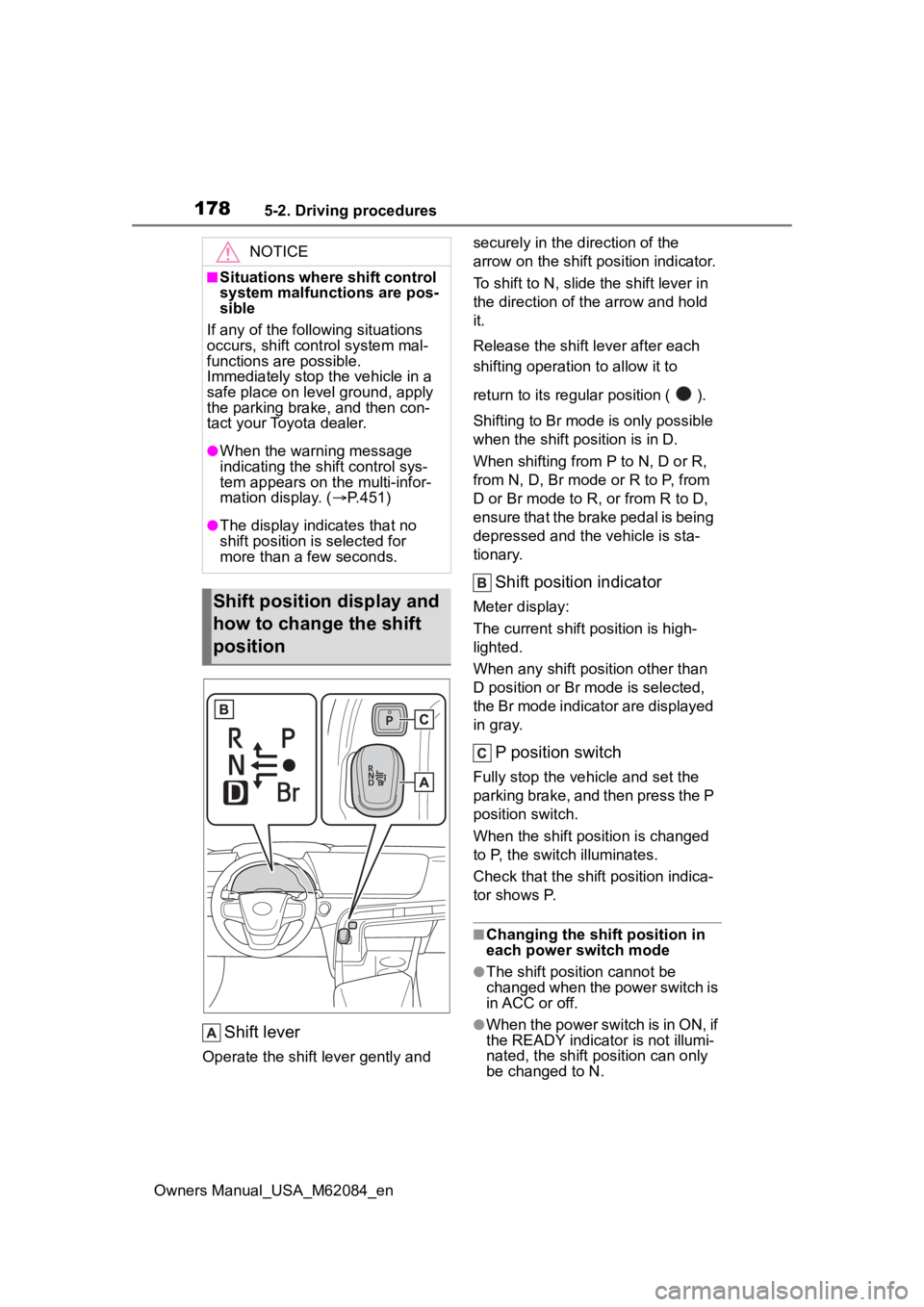
Shift lever
Operate the shift lever gently and securely in the direction of the
arrow on the shift position indicator.
To shift to N, slide the shift lever in
the direction of the arrow and hold
it.
Release the shift
lever after each
shifting operati on to allow it to
return to its regu lar position ( ).
Shifting to Br mode is only possible
when the shift position is in D.
When shifting from P to N, D or R,
from N, D, Br mode o r R to P, from
D or Br mode to R, or from R to D,
ensure that the brake pedal is being
depressed and the vehicle is sta-
tionary.
Shift position indicator
Meter display:
The current shift position is high-
lighted.
When any shift position other than
D position or Br mode is selected,
the Br mode indicator are displayed
in gray.
P position switch
Fully stop the vehicle and set the
parking brake, and then press the P
position switch.
When the shift position is changed
to P, the switch illuminates.
Check that the shif t position indica-
tor shows P.
■Changing the shift position in
each power switch mode
●The shift position cannot be
changed when the power switch is
in ACC or off.
●When the power switch is in ON, if
the READY indicator is not illumi-
nated, the shift position can only
be changed to N.
NOTICE
■Situations where shift control
system malfunctions are pos-
sible
If any of the following situations
occurs, shift cont rol system mal-
functions are possible.
Immediately stop the vehicle in a
safe place on level ground, apply
the parking brake, and then con-
tact your Toyota dealer.
●When the warning message
indicating the shift control sys-
tem appears on the multi-infor-
mation display. ( P.451)
●The display indicates that no
shift position is selected for
more than a few seconds.
Shift position display and
how to change the shift
position
Page 185 of 556
1855-2. Driving procedures
Owners Manual_USA_M62084_en
5
Driving
■Parking brake automatic
release function
●When the shift position is shifted
from P, the parking brake will be
released in automatic mode.
●When all of the following condi-
tions are met in manual mode, the
parking brake can be released by
depressing the accelerator pedal.
• The driver’s door is closed
• The driver is wearing the seat belt
• The shift position is in D or R
■If “Parking Brake Temporarily
Unavailable” i s displayed on
the multi-information display
If the parking brake is operated
repeatedly over a short period of
time, the system may restrict opera-
tion to prevent overheating. If this
happens, refrain from operating the
parking brake. Nor mal operation will
return after about 1 minute.
■If “Parking Brake Unavailable”
is displayed on the multi-infor-
mation display
Operate the parking brake switch. If
the message does not disappear
after operating the switch several
times, the system may be malfunc-
tioning. Have the vehicle inspected
by your Toyota dealer.
■Parking brake operation sound
When the parking brake operates, a
motor sound (whirring sound) may
be heard. This does not indicate a
malfunction.
■Parking brake operation
●Depending on the power switch
mode, the parking brake indicator
light will turn on and stay on as
described below:
ON: Comes on until the parking
brake is released.
Not in ON: Stays on for approxi-
mately 15 seconds.
●When the power switch is turned
off with the parking brake set, the
parking brake indicator light will
stay on for about 15 seconds. This does not indicate a malfunction.
■When the parking brake switch
malfunctions
Automatic mode (automatic brake
setting and releas ing) will be turned
on automatically.
■Parking the vehicle
P.161
■Parking brake engaged warning
buzzer
A buzzer will sound if the vehicle is
driven with the parking brake
engaged. “Parking Brake ON” is dis-
played on the multi-information dis-
play. (with the vehicle reached a
speed of 3 mph [5 km/h])
■If the parking brake indicator
flashes
P.447
■Usage in winter time
P.320
WARNING
■When parking the vehicle
Do not leave a child in the vehicle
alone. The parking brake may be
released unintentionally and there
is the danger of the vehicle mov-
ing that may lead to an accident
resulting in death o r serious injury.
NOTICE
■When parking the vehicle
Before you leave the vehicle, set
the parking brake, shift the shift
position to P and make sure that
the vehicle does not move.
■When the system malfunc-
tions
Stop the vehicle in a safe place
and check the warning messages.
Page 187 of 556
1875-2. Driving procedures
Owners Manual_USA_M62084_en
5
Driving
belt.
●The parking brake is engaged.
If any of the conditions above are
detected when the brake hold sys-
tem is enabled, the system will turn
off and the brake hold standby indi-
cator light will go of f. In addition, if
any of the conditions are detected
while the system is holding the
brake, a warning buzzer will sound
and a message will be shown on the
multi-information display. The park-
ing brake will then be set automati-
cally.
■Brake hold function
●If the brake pedal is left released
for a period of about 3 minutes
after the system has started hold-
ing the brake, the parking brake
will be set automatically. In this
case, a warning buzzer sounds
and a message is shown on the
multi-informat ion display.
●To turn the system off while the
system is holding the brake, firmly
depress the brake pedal and
press the button again.
●The brake hold function may not
hold the vehicle when the vehicle
is on a steep inclin e. In this situa-
tion, it may be necessary for the
driver to apply the brakes. A warn-
ing buzzer will sound and the
multi-informatio n display will
inform the driver of this situation. If
a warning message is shown on
the multi-information display, read
the message and follow the
instructions.
■When the parking brake is set
automatically while the system
is holding the brakes
Perform any of the following opera-
tions to release the parking brake.
●Depress the accelerator pedal.
(The parking brake will not be
released automatic ally if the seat
belt is not fastened.)
●Operate the parking brake switch
with the brake pedal depressed. Make sure that the parking brake
indicator light goes off. (
P.183)
■When an inspection at your
Toyota dealer is necessary
When the brake hold standby indi-
cator (green) does not illuminate
even when the brake hold switch is
pressed with the brake hold system
operating conditions met, the sys-
tem may be malf unctioning. Have
the vehicle inspected at your Toyota
dealer.
■If “Brake Hold Malfunction
Press Brake to Deactivate Visit
Your Dealer” or “Brake Hold
Malfunction Visit Your Dealer”
is displayed on the multi-infor-
mation display
The system may be malfunctioning.
Have the vehicle inspected by your
Toyota dealer.
■Warning messages and buzzers
Warning messages and buzzers are
used to indicate a system malfunc-
tion or to inform the driver of the
need for caution. If a warning mes-
sage is shown on the multi-informa-
tion display, read the message and
follow the instructions.
■If the brake hold operated indi-
cator flashes
P.446
WARNING
■When the vehicle is on a
steep incline
When using the br ake hold sys-
tem on a steep inc line exercise
caution. The brake hold function
may not hold the vehicle in such a
situation.
Page 193 of 556
1935-3. Operating the lights and wipers
Owners Manual_USA_M62084_en
5
Driving
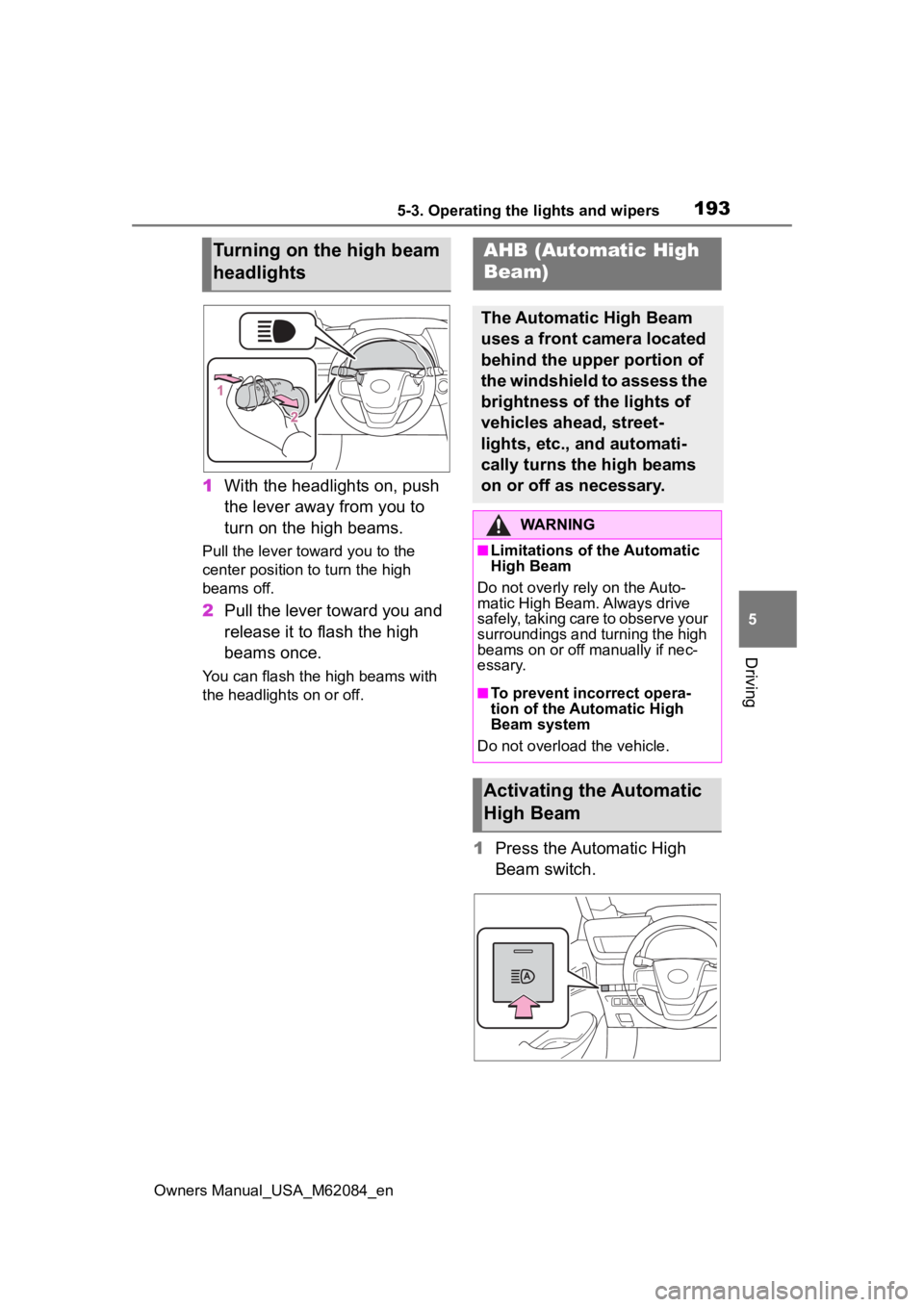
1 With the headlights on, push
the lever away from you to
turn on the high beams.
Pull the lever toward you to the
center position to turn the high
beams off.
2Pull the lever toward you and
release it to flash the high
beams once.
You can flash the high beams with
the headlights on or off.
1Press the Automatic High
Beam switch.
Turning on the high beam
headlightsAHB (Automatic High
Beam)
The Automatic High Beam
uses a front camera located
behind the upper portion of
the windshield to assess the
brightness of the lights of
vehicles ahead, street-
lights, etc., and automati-
cally turns the high beams
on or off as necessary.
WARNING
■Limitations of the Automatic
High Beam
Do not overly rely on the Auto-
matic High Beam. Always drive
safely, taking care to observe your
surroundings and turning the high
beams on or off manually if nec-
essary.
■To prevent inc orrect opera-
tion of the Automatic High
Beam system
Do not overload the vehicle.
Activating the Automatic
High Beam
Page 200 of 556
2005-3. Operating the lights and wipers
Owners Manual_USA_M62084_en
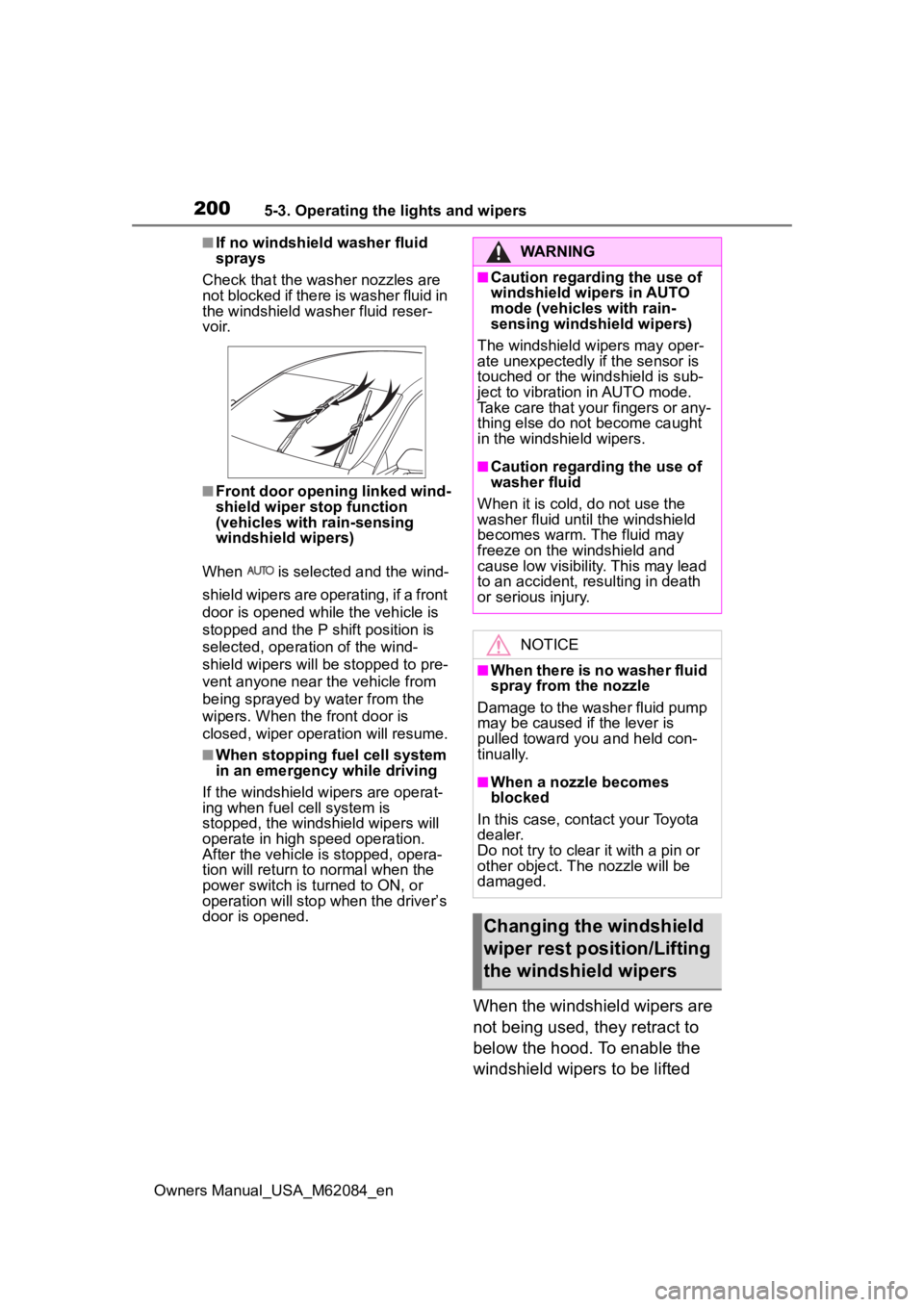
■If no windshield washer fluid
sprays
Check that the wash er nozzles are
not blocked if there is washer fluid in
the windshield washer fluid reser-
v oi r.
■Front door opening linked wind-
shield wiper stop function
(vehicles with rain-sensing
windshield wipers)
When is selected and the wind-
shield wipers are operating, if a front
door is opened while the vehicle is
stopped and the P shift position is
selected, operation of the wind-
shield wipers will be stopped to pre-
vent anyone near the vehicle from
being sprayed by water from the
wipers. When the front door is
closed, wiper operation will resume.
■When stopping fuel cell system
in an emergency while driving
If the windshield wipers are operat-
ing when fuel cell system is
stopped, the windshield wipers will
operate in high speed operation.
After the vehicle is stopped, opera-
tion will return to normal when the
power switch is turned to ON, or
operation will stop w hen the driver’s
door is opened.
When the windshield wipers are
not being used, they retract to
below the hood. To enable the
windshield wipers to be lifted
WARNING
■Caution regarding the use of
windshield wipers in AUTO
mode (vehicles with rain-
sensing windshield wipers)
The windshield wipers may oper-
ate unexpectedly if the sensor is
touched or the windshield is sub-
ject to vibration in AUTO mode.
Take care that your fingers or any-
thing else do not become caught
in the windshield wipers.
■Caution regarding the use of
washer fluid
When it is cold, do not use the
washer fluid unt il the windshield
becomes warm. The fluid may
freeze on the windshield and
cause low visibility. This may lead
to an accident, resulting in death
or serious injury.
NOTICE
■When there is no washer fluid
spray from the nozzle
Damage to the washer fluid pump
may be caused if the lever is
pulled toward you and held con-
tinually.
■When a nozzle becomes
blocked
In this case, contact your Toyota
dealer.
Do not try to clear it with a pin or
other object. The nozzle will be
damaged.
Changing the windshield
wiper rest position/Lifting
the windshield wipers