fuel TOYOTA MIRAI 2023 Owners Manual
[x] Cancel search | Manufacturer: TOYOTA, Model Year: 2023, Model line: MIRAI, Model: TOYOTA MIRAI 2023Pages: 572, PDF Size: 17.71 MB
Page 317 of 572
3175-5. Using the driving support systems
Owners Manual_USA_M62064_en
5
Driving
changed to P
The parking brake is engaged
A door or the trunk is opened
The driver’s seat belt is unfas-
tened
The outside rear view mirrors
are folded
The TRAC or VSC is turned
off
The TRAC, VSC or ABS oper-
ates
The power switch is pressed
The system determines assis-
tance cannot be continued in
the current parking environ-
ment
The system malfunctions
While the vehicle was
stopped, “Cancel” was
selected on the multimedia
display
■Assistance will be sus-
pended when
In situations such as the follow-
ing, Advanced Park operation
will be suspended.
Assistance can be started again by
following the directions displayed
on the multimedia display.
Also, when assistance is sus-
pended, if the shift position is
changed twice with the brake pedal
depressed, assistance will be can-
celed in that shift position. How-
ever, if assistance is suspended by
changing the shi ft position, assis-
tance will be cance led if the shift position is changed once.
The steering wheel is oper-
ated
The accelerator pedal is
depressed
The shift position has been
changed
A moving object or stationary
object that may collide with
your vehicle has been
detected, resulting in the
operation of the fuel cell sys-
tem output control/braking
control
Camera switch is pressed
Select on the multimedia dis-
play, and then select “Advanced
Park”.
■Speed Profile
The vehicle speed for when
assistance is performed can be
set.
This setting cann ot be changed
when registering a parking space to
the memory function.
■Obstacle detection range
The distance from which obsta-
cles will be avoided while assis-
tance is being performed can be
set.
■Preferred parking method
The preferred parking direction
Changing the Advanced
Park settings
Page 319 of 572
3195-5. Using the driving support systems
Owners Manual_USA_M62064_en
5
Driving
■Clear registered parking
space
The parking spaces registered
to the memory function can be
deleted. Parking space informa-
tion cannot be deleted when
assistance is being performed
or when registering parking
space information to the mem-
ory function.
The operating state, assistance
operation, etc. of the Advanced
Park is displayed on the multi-
media display. If a message is
displayed, respond according to
the content displayed.
■If “No available parking space”
is displayed
Move the vehicle to a location where
a parking space or parking lines can
be detected.
■If “Unavailable in current condi-
tion” is displayed
Move the vehicle to another location and use the system.
■If “Not enough space to exit” is
displayed
The parallel parking exit function
cannot be used due to a situation
such as the distance between your
vehicle and vehicles parked in front
of and behind your vehicle being
short, the existence of an object in
the exit direction, etc.
Check the conditions of the area
around your vehicle and exit from
the parking space manually.
■If “Cannot control speed” is
displayed
The system judged that it cannot
adjust the speed of the vehicle when
using the system in an area with a
slope or step and assistance was
canceled.
Use the system in a level location.
■If “Obstacle detected” is dis-
played
As a moving object or stationary
object that may collide with your
vehicle has been detected, the fuel
cell system output control/braking
control operates to suspend
Advanced Park assistance.
Check the condition of the surround-
ing area. To resume assistance,
select the “Start” button on the multi-
media display.
■If “No available parking space
to register” is displayed
This message is displayed when
is selected at a parking space that
cannot be detected.
Operate the system at a parking
space where differences in the road
surface can be recognized.
( P. 3 1 1 )
NOTICE
Take care when using the park
position adjustment (forward) or
park position adjustment (reverse)
for adjusting because the vehicle
may collide with pa rking blocks,
curb stones, or other low objects.
If it is likely that your vehicle will
collide with a nearby vehi-
cle/object, parking block, curb
stone, etc., depress the brake
pedal to stop the vehicle and
press the Advanced Park main
switch to disable the system.
Advanced Park Displayed
messages
Page 320 of 572
3205-5. Using the driving support systems
Owners Manual_USA_M62064_en
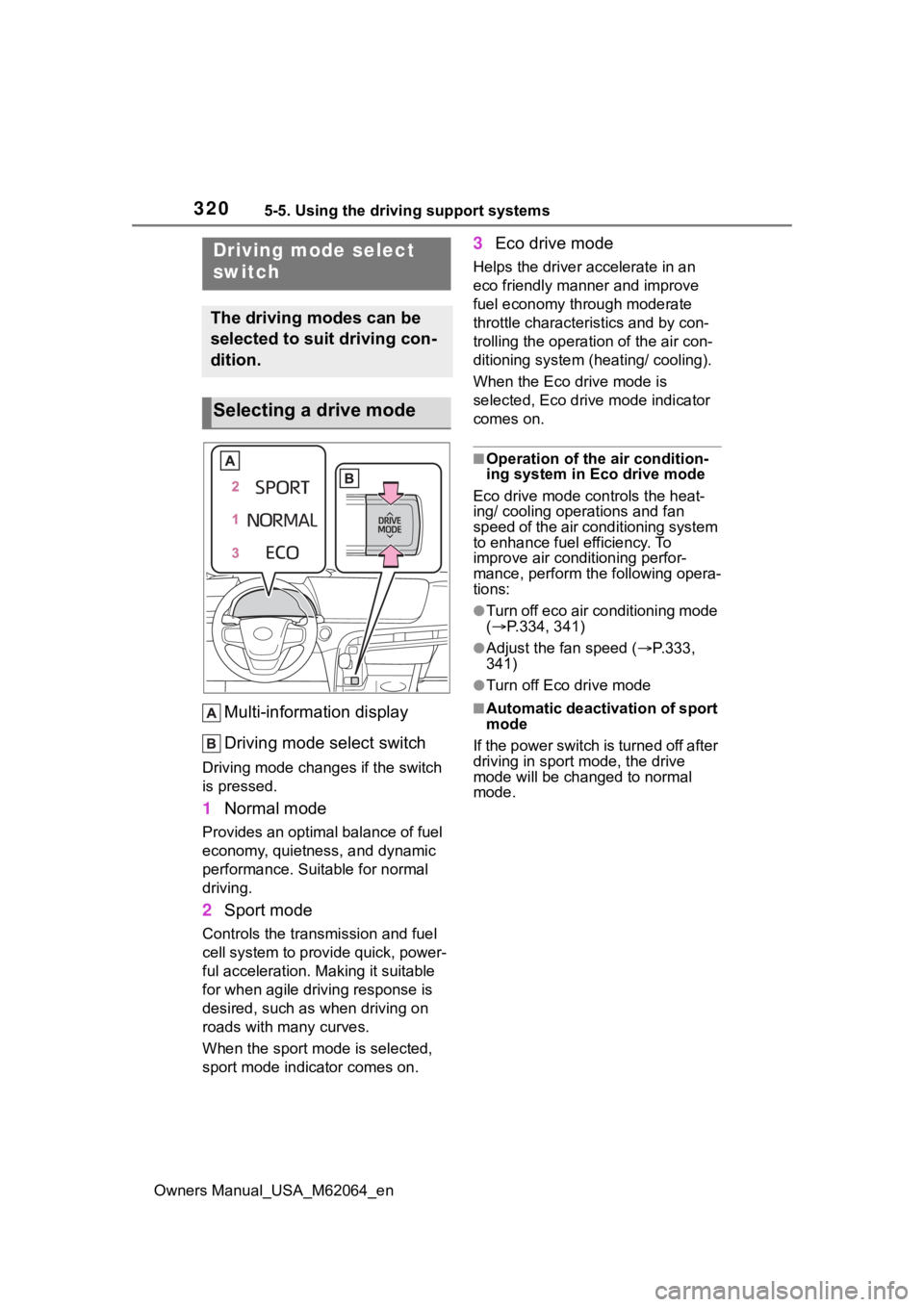
Multi-information display
Driving mode select switch
Driving mode changes if the switch
is pressed.
1 Normal mode
Provides an optimal balance of fuel
economy, quietness, and dynamic
performance. Suitable for normal
driving.
2Sport mode
Controls the transmission and fuel
cell system to provide quick, power-
ful acceleration. Making it suitable
for when agile dri ving response is
desired, such as when driving on
roads with many curves.
When the sport mod e is selected,
sport mode indicator comes on.
3 Eco drive mode
Helps the driver accelerate in an
eco friendly mann er and improve
fuel economy through moderate
throttle characteristics and by con-
trolling the operation of the air con-
ditioning system (heating/ cooling).
When the Eco drive mode is
selected, Eco drive mode indicator
comes on.
■Operation of the air condition-
ing system in Eco drive mode
Eco drive mode con trols the heat-
ing/ cooling operations and fan
speed of the air conditioning system
to enhance fuel efficiency. To
improve air conditioning perfor-
mance, perform the following opera-
tions:
●Turn off eco air conditioning mode
( P.334, 341)
●Adjust the fan speed ( P.333,
341)
●Turn off Eco drive mode
■Automatic deactivation of sport
mode
If the power switch is turned off after
driving in sport mode, the drive
mode will be change d to normal
mode.
Driving mode select
switch
The driving modes can be
selected to suit driving con-
dition.
Selecting a drive mode
Page 323 of 572
3235-5. Using the driving support systems
Owners Manual_USA_M62064_en
5
Driving
road surfaces by controlling the
brakes, fuel cell system output,
steering assist.
■The Secondary Collision
Brake
When the SRS airbag sensor
detects a collision and the sys-
tem operates, the brakes and
brake lights are automatically
controlled to reduce the vehicle
speed and help reduce the pos-
sibility of further damage due to
a secondary collision.
■When the TRAC/VSC/ABS sys-
tems are operating
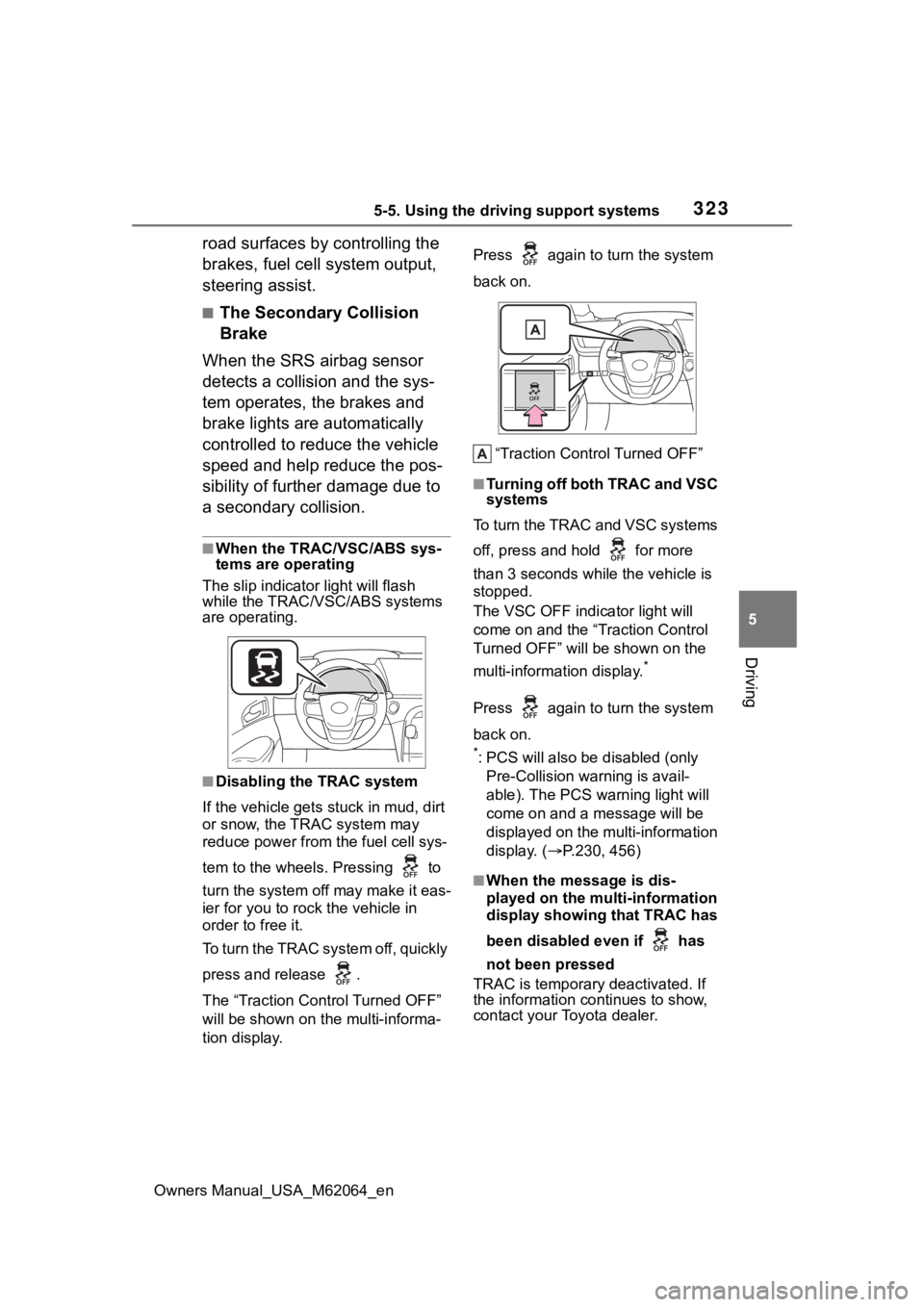
The slip indicator light will flash
while the TRAC/VSC/ABS systems
are operating.
■Disabling the TRAC system
If the vehicle gets stuck in mud, dirt
or snow, the TRAC system may
reduce power from the fuel cell sys-
tem to the wheels. Pressing to
turn the system off may make it eas-
ier for you to rock the vehicle in
order to free it.
To turn the TRAC system off, quickly
press and release .
The “Traction Control Turned OFF”
will be shown on the multi-informa-
tion display. Press again to
turn the system
back on.
“Traction Control Turned OFF”
■Turning off both TRAC and VSC
systems
To turn the TRAC and VSC systems
off, press and hold for more
than 3 seconds while the vehicle is
stopped.
The VSC OFF indicator light will
come on and the “Traction Control
Turned OFF” will be shown on the
multi-information display.
*
Press again to turn the system
back on.
*: PCS will also be disabled (only
Pre-Collision warning is avail-
able). The PCS warning light will
come on and a message will be
displayed on the multi-information
display. ( P.230, 456)
■When the message is dis-
played on the multi-information
display showing that TRAC has
been disabled even if has
not been pressed
TRAC is temporary deactivated. If
the information continues to show,
contact your Toyota dealer.
Page 324 of 572

3245-5. Using the driving support systems
Owners Manual_USA_M62064_en
■Operating conditions of hill-
start assist control
When the following five conditions
are met, the hill-start assist control
will operate:
●The shift position is in a position
other than P or N (when stating off
forward/backward on an upward
incline)
●The vehicle is stopped
●The accelerator pedal is not
depressed
●The parking brake is not engaged
●Power switch is turned to ON
■Automatic system cancelation
of hill-start as sist control
The hill-start assis t control will turn
off in any of the following situations:
●Shift the shift position to P or N
●The accelerator pedal is
depressed
●The parking brake is engaged
●2 seconds at maximum elapsed
after the brake pedal is released
●Power switch is turned to OFF
■Sounds and vibrations caused
by the ABS, brake assist, VSC,
TRAC and hill-start assist con-
trol systems
●A sound may be heard from the
fuel cell unit compartment when
the brake pedal is depressed
repeatedly, when the fuel cell sys-
tem is started or just after the vehi-
cle begins to move. This sound
does not indicate that a malfunc-
tion has occurred in any of these
systems.
●Any of the following conditions
may occur when t he above sys-
tems are operating. None of these
indicates that a malfunction has
occurred.
• Vibrations may be felt through the vehicle body and steering.
• A motor sound may be heard also
after the vehicle comes to a stop. • The brake pedal
may pulsate
slightly after the ABS is activated.
• The brake pedal may move down
slightly after the ABS is activated.
■ECB operating sound
ECB operating sound may be heard
in the following cases, but it does
not indicate that a malfunction has
occurred.
●Operating sound heard from the
fuel cell unit compartment when
the brake pedal is operated.
●Motor sound of the brake system
heard from the f ront part of the
vehicle when the driver’s door is
opened.
●Operating sound heard from the
fuel cell unit compartment when
one or two minutes passed after
the stop of the fuel cell system.
■Active Cornering Assist opera-
tion sounds and vibrations
When the Active Cornering Assist is
operated, operation sounds and
vibrations may be generated from
the brake system, but this is not a
malfunction.
■EPS operation sound
When the steering wheel is oper-
ated, a motor sound (whirring
sound) may be heard. This does not
indicate a malfunction.
■Automatic reactivation of TRAC
and VSC systems
After turning th e TRAC and VSC
systems off, the systems will be
automatically re-enabled in the fol-
lowing situations:
●When the power switch is turned
off
●If only the TRAC sy stem is turned
off, the TRAC will turn on when
vehicle speed increases
If both the TRAC and VSC sys-
tems are turned of f, automatic re-
enabling will not occur when vehi-
cle speed increases.
Page 325 of 572
3255-5. Using the driving support systems
Owners Manual_USA_M62064_en
5
Driving
■Operating conditions of Active
Cornering Assist
The system operates when the fol-
lowing occurs.
●TRAC/VSC can operate
●The driver is at tempting to accel-
erate while turning
●The system detects that the vehi-
cle is drifting to the outer side
●The brake pedal is released
■Reduced effectiveness of the
EPS system
The effectiveness of the EPS sys-
tem is reduced to prevent the sys-
tem from overheating when there is
frequent steering input over an
extended period of time. The steer-
ing wheel may feel heavy as a
result. Should this occur, refrain
from excessive steering input or
stop the vehicle and turn the fuel
cell system off. The EPS system
should return to normal within 10
minutes.
■Secondary Collision Brake
operating conditions
The system operates when the SRS
airbag sensor detects a collision
while the vehicle is in motion. How-
ever, the system does not operate in
any of the following situations.
●When driving at a low speed
●Components are damaged
■Secondary Collision Brake
automatic cancelation
The system is automatically can-
celed in any of th e following situa-
tions.
●The vehicle speed has decreased
to a certain speed
●A certain amount o f time elapses
during operation
●The accelerator pedal is
depressed a large amount
WARNING
■The ABS does not operate
effectively when
●The limits of tire gripping perfor-
mance have been exceeded
(such as excessively worn tires
on a snow covered road).
●The vehicle hydroplanes while
driving at high speed on wet or
slick roads.
■Stopping distance when the
ABS is operating may exceed
that of normal conditions
The ABS is not designed to
shorten the vehicle’s stopping dis-
tance. Always maintain a safe dis-
tance from the veh icle in front of
you, especially in the following sit-
uations:
●When driving on dirt, gravel or
snow-covered roads
●When driving with tire chains
●When driving over bumps in the
road
●When driving over roads with
potholes or uneven surfaces
■TRAC/VSC may not operate
effectively when
Directional control and power may
not be achievable while driving on
slippery road surfaces, even if the
TRAC/VSC system is operating.
Drive the vehicle carefully in con-
ditions where stability and power
may be lost.
■Active Cornering Assist does
not operate effectively when
●Do not overly rely on Active
Cornering Assist. Active Corner-
ing Assist may not operate
effectively when accelerating
down slopes or driving on slip-
pery road surfaces.
Page 334 of 572
3346-1. Using the air conditioning system and defogger
Owners Manual_USA_M62064_en
and the fan speed decrease
switch to decrease the fan
speed.
Press the “OFF” switch to turn the
fan off.
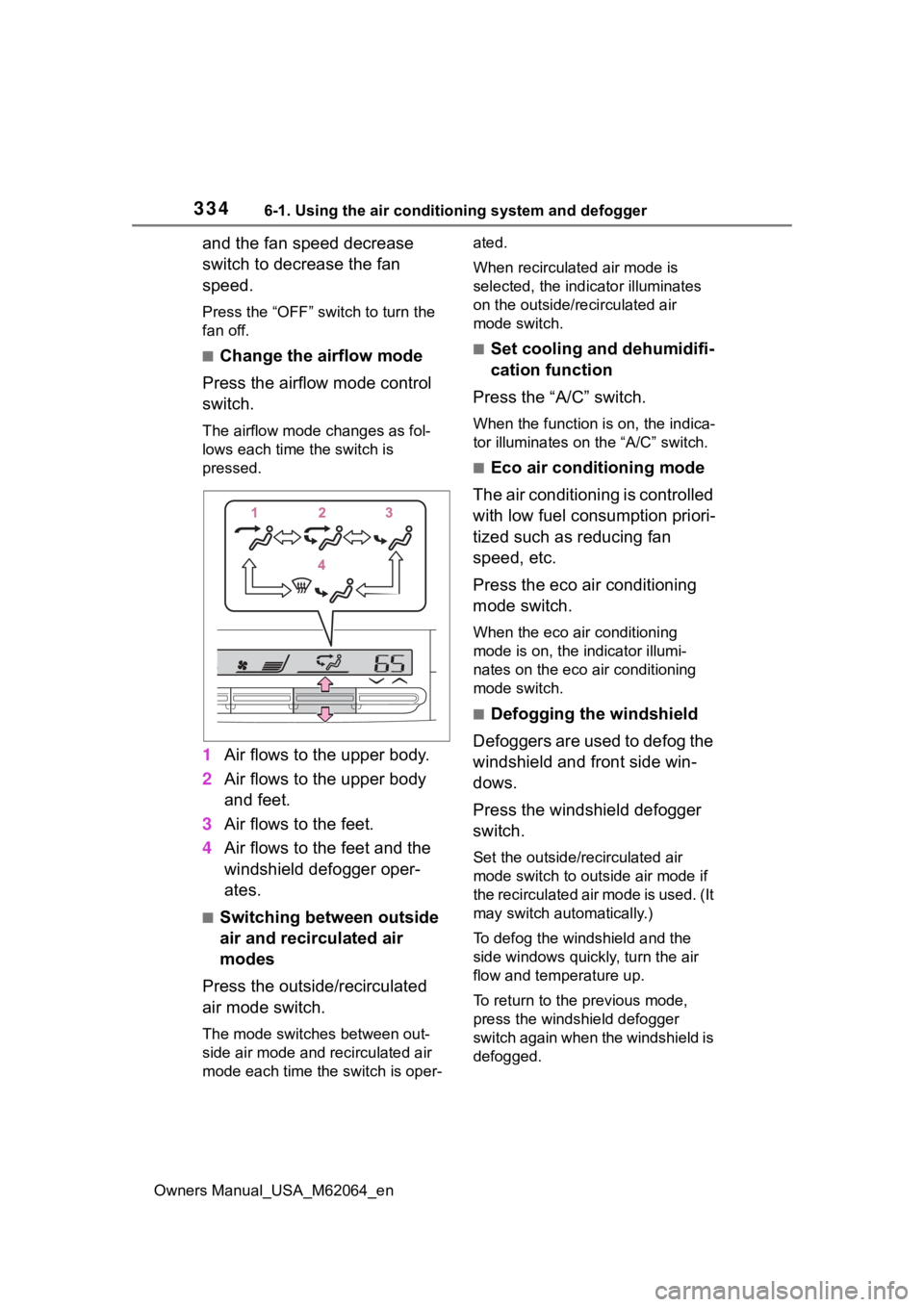
■Change the airflow mode
Press the airflow mode control
switch.
The airflow mode changes as fol-
lows each time the switch is
pressed.
1 Air flows to the upper body.
2 Air flows to the upper body
and feet.
3 Air flows to the feet.
4 Air flows to the feet and the
windshield defogger oper-
ates.
■Switching between outside
air and recirculated air
modes
Press the outside/recirculated
air mode switch.
The mode switches between out-
side air mode and recirculated air
mode each time the switch is oper- ated.
When recirculated air mode is
selected, the indicator illuminates
on the outside/recirculated air
mode switch.
■Set cooling and dehumidifi-
cation function
Press the “A/C” switch.
When the function is on, the indica-
tor illuminates on the “A/C” switch.
■Eco air conditioning mode
The air conditioning is controlled
with low fuel consumption priori-
tized such as reducing fan
speed, etc.
Press the eco air conditioning
mode switch.
When the eco air conditioning
mode is on, the indicator illumi-
nates on the eco air conditioning
mode switch.
■Defogging the windshield
Defoggers are used to defog the
windshield and front side win-
dows.
Press the windshield defogger
switch.
Set the outside/recirculated air
mode switch to outside air mode if
the recirculated air mode is used. (It
may switch automatically.)
To defog the windshield and the
side windows quickly, turn the air
flow and temperature up.
To return to the previous mode,
press the windshield defogger
switch again when the windshield is
defogged.
Page 335 of 572
3356-1. Using the air conditioning system and defogger
Owners Manual_USA_M62064_en
6
Interior features
When the windshield defogger
switch is on, the indicator illumi-
nates on the windshield defogger
switch.
■Defogging the rear window
and outside rear view mir-
rors
Defoggers are used to defog the
rear window and to remove rain-
drops, dew and frost from the
outside rear view mirrors.
Press the rear window and out-
side rear view mirror defoggers
switch.
The defoggers will automatically
turn off after 15 minutes.
When the rear window and outside
rear view mirror defoggers switch is
on, the indicator illuminates on the
rear window and ou tside rear view
mirror defoggers switch.
■When the outside temperature
exceeds 75°F (24°C) and the air
conditioning system is on
●In order to reduce the air condi-
tioning power consumption, the air
conditioning system may switch to
recirculated air mode automati-
cally.
This may also reduce fuel con-
sumption.
●Recirculated air mode is selected
as a default mode when the power
switch is turned to ON.
●It is possible to switch to outside
air mode at any time by pressing
the outside/recirculated air mode
switch.
■Fogging up of the windows
●The windows will easily fog up
when the humidity in the vehicle is
high. Turning the cooling and
dehumidification function on will dehumidify the air from the outlets
and defog the windshield effec-
tively.
●If you turn the cooling and dehu-
midification function off, the win-
dows may fog up more easily.
●The windows may fog up if the
recirculated air mode is used.
■When driving on dusty roads
Close all windows. If dust thrown up
by the vehicle is still drawn into the
vehicle after closing the windows, it
is recommended that the air intake
mode be set to outside air mode and
the fan speed to a ny setting except
off.
■Outside/recirculated air mode
●Setting to the recirculated air
mode temporarily is recom-
mended in preventing dirty air
from entering the vehicle interior
and helping to c ool the vehicle
when the outside air temperature
is high.
●Outside/recirculated air mode may
automatically switch depending on
the temperature setting or the
inside temperature.
■When the outside temperature
falls to nearly 32°F (0°C)
The dehumidification function may
not operate even when “A/C” switch
is pressed.
■Operation of the air condition-
ing system in Eco drive mode
●In Eco drive mode, the air condi-
tioning system is controlled as fol-
lows to prioritize fuel efficiency:
• Fuel cell system and compressor
operation controlled to restrict
heating/cooling capacity
• Fan speed restri cted when auto-
matic mode is selected
●To improve air conditioning perfor-
mance, perform the following
operations:
• Adjust the fan speed
• Turn off Eco drive mode ( P.320)
• Turn off Eco air conditioning mode
Page 337 of 572
3376-1. Using the air conditioning system and defogger
Owners Manual_USA_M62064_en
6
Interior features
1 Press the “AUTO” switch.
2 Adjust the temperature set-
ting.
3 To stop the operation, press
the “OFF” switch.
If the fan speed setting or air
flow modes are operated, the
automatic mode indicator goes
off. However, automatic mode
for functions other than that
operated is maintained.
■Using automatic mode
Fan speed is adjusted automati-
cally according to the temperature
setting and the ambient conditions. Therefore, the fan may stop for a
while until warm or
cool air is ready
to flow immediately after the auto-
matic mode switch is pressed.
To turn on the “SYNC” mode,
press the “SYNC” switch.
The driver’s side temperature con-
trol knob can be used to adjust the
temperature for the driver’s and
passenger’s side. To enter individ-
ual mode, operate the passenger’s
side temperature control knob or
press the “SYNC” switch again.
When the “SYNC” mode is on, the
indicator illuminates on the “SYNC”
switch.
This feature is used to prevent
ice from building up on the wind-
shield and wiper blades.
Press the switch to turn the sys-
tem on/off.
The indicator comes on when the
system is on.
The windshield wiper de-icer will
automatically turn off after approxi-
mately 15 minutes.
WARNING
■When the outside rear view
mirror defoggers are operat-
ing
Do not touch the rear view mirror
surfaces when the outside rear
view mirror defoggers are on.
NOTICE
■To prevent 12-volt battery dis-
charge
Do not leave the air conditioning
system on longer than necessary
when the fuel cell system is off.
■When repairing/replacing
parts of the air conditioning
system
Have repair/replacement per-
formed by your Toyota dealer.
When a part of the air conditioning
system, such as the evaporator, is
to be replaced, it must be
replaced with a new one.
Using automatic mode
Adjusting the temperature
for driver and passenger
seats simultaneously
(“SYNC” mode)
Windshield wiper de-icer
(if equipped)
Page 341 of 572
3416-1. Using the air conditioning system and defogger
Owners Manual_USA_M62064_en
6
Interior features
*: If equipped
■Adjusting the temperature
setting
Press of the temperature
control switches on the air con-
ditioning control panel to
increase the temperature.
Press of the temperature
control switches on the air con-
ditioning control panel to
decrease the temperature.
If the switch is pr essed and held or
selected and held, the temperature
will continuously change.
If the “A/C” indicat or is turned off,
the system will blow ambient tem-
perature air or heated air. ( P.346)
■Setting the fan speed
Press the fan speed increase
switch on the air conditioning
control panel to increase the fan
speed.
Press the fan speed decrease
switch on the air conditioning
control panel to decrease the
fan speed.
Press the “OFF” switch on the air
conditioning control panel to turn
the fan off.
■Change the airflow mode
Select the airflow mode control
switch on the air conditioning
control screen.
The airflow mode changes each
time the switch is selected.
: Air flows to the upper body
: Air flows to the upper body
and feet
: Air flows to the feet
: Air flows to the feet and the
windshield defogger operates
■Switching between outside
air and recirculated air
modes
Select the outside/recirculated
air mode switch on the air condi-
tioning control screen.
The mode switches between out-
side air mode and recirculated air
mode each time the switch is
selected.
When recirculated air mode is
selected, the indicator illuminates
on the outside/recirculated air
mode switch.
■Set cooling and dehumidifi-
cation function
Select the “A/C” switch on the
air conditioning control screen.
When the function is on, the indica-
tor illuminates on the “A/C” switch.
■Eco air conditioning mode
The air conditioning is controlled
with low fuel consumption priori-
tized such as reducing fan
speed, etc.
Select the eco air conditioning
mode switch on the air condi-
tioning control screen.