fuel TOYOTA MIRAI 2023 Manual Online
[x] Cancel search | Manufacturer: TOYOTA, Model Year: 2023, Model line: MIRAI, Model: TOYOTA MIRAI 2023Pages: 572, PDF Size: 17.71 MB
Page 198 of 572
1985-3. Operating the lights and wipers
Owners Manual_USA_M62064_en
5-3.Operating the lights and wipers
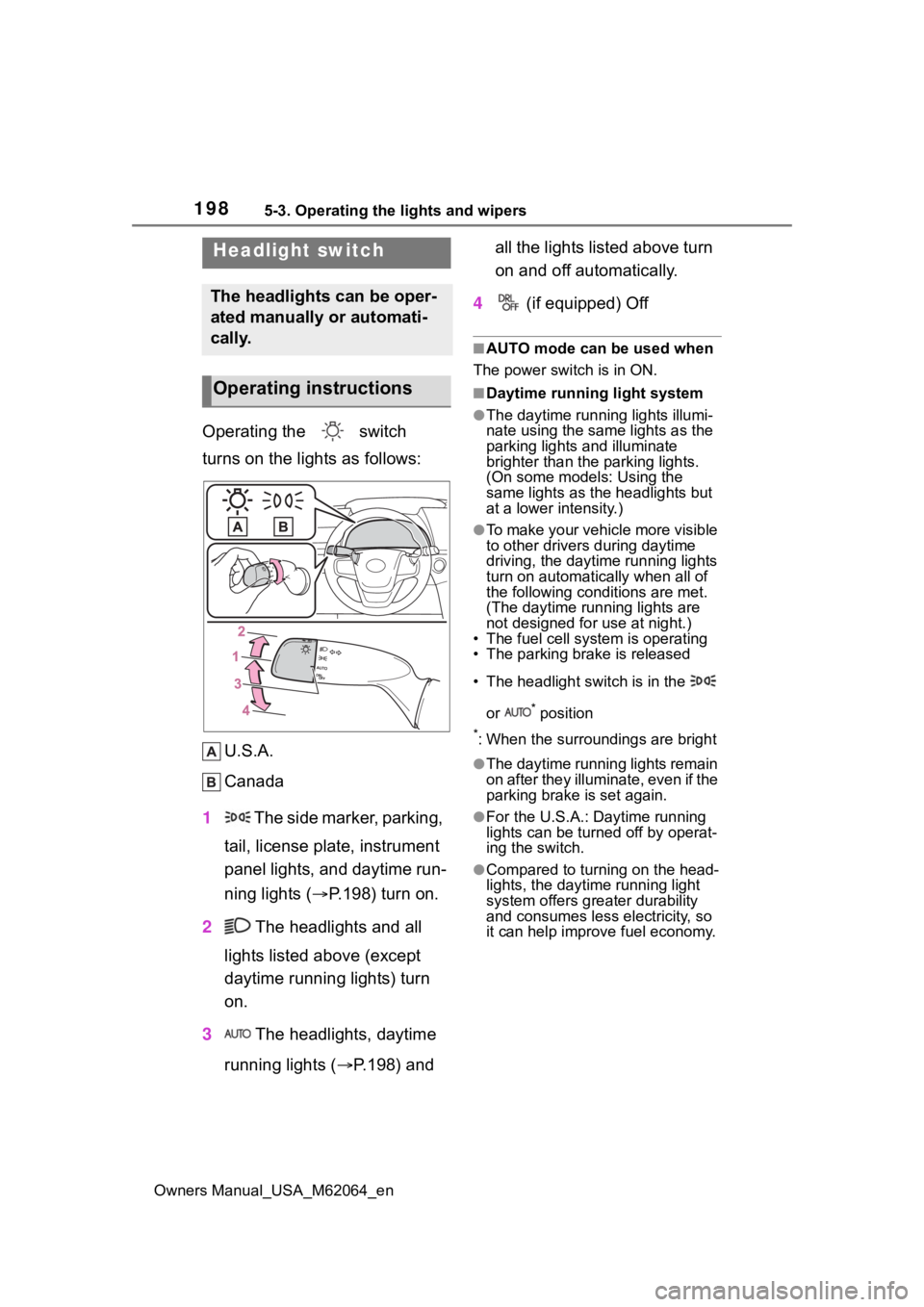
Operating the switch
turns on the lights as follows:U.S.A.
Canada
1 The side marker, parking,
tail, license plate, instrument
panel lights, and daytime run-
ning lights ( P.198) turn on.
2 The headlights and all
lights listed above (except
daytime running lights) turn
on.
3 The headlights, daytime
running lights ( P.198) and all the lights listed above turn
on and off automatically.
4 (if equipped) Off
■AUTO mode can be used when
The power switch is in ON.
■Daytime running light system
●The daytime runn ing lights illumi-
nate using the same lights as the
parking lights and illuminate
brighter than the parking lights.
(On some models: Using the
same lights as the headlights but
at a lower intensity.)
●To make your vehicle more visible
to other drivers during daytime
driving, the daytime running lights
turn on automatically when all of
the following conditions are met.
(The daytime running lights are
not designed for use at night.)
• The fuel cell system is operating
• The parking brake is released
• The headlight switch is in the
or
* position
*: When the surroundings are bright
●The daytime running lights remain
on after they illuminate, even if the
parking brake is set again.
●For the U.S.A.: Daytime running
lights can be turned off by operat-
ing the switch.
●Compared to turning on the head-
lights, the daytime running light
system offers greater durability
and consumes less electricity, so
it can help improve fuel economy.
Headlight switch
The headlights can be oper-
ated manually or automati-
cally.
Operating instructions
Page 199 of 572
1995-3. Operating the lights and wipers
Owners Manual_USA_M62064_en
5
Driving
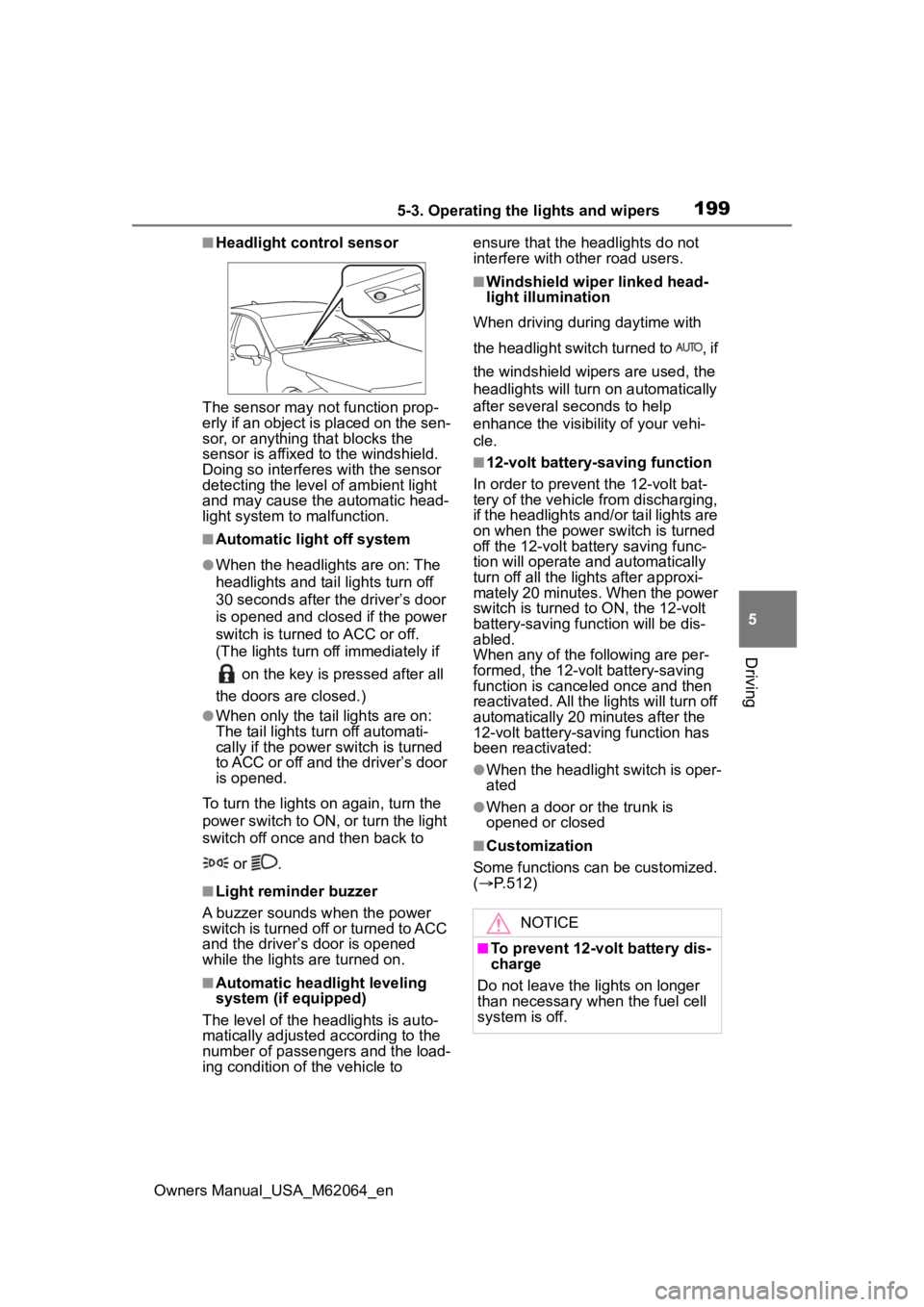
■Headlight control sensor
The sensor may not function prop-
erly if an object is placed on the sen-
sor, or anything that blocks the
sensor is affixed to the windshield.
Doing so interfere s with the sensor
detecting the level of ambient light
and may cause the automatic head-
light system to malfunction.
■Automatic light off system
●When the headlights are on: The
headlights and tail lights turn off
30 seconds after the driver’s door
is opened and clos ed if the power
switch is turned to ACC or off.
(The lights turn off immediately if
on the key is pressed after all
the doors are closed.)
●When only the tail lights are on:
The tail lights tu rn off automati-
cally if the power switch is turned
to ACC or off and the driver’s door
is opened.
To turn the lights on again, turn the
power switch to ON, or turn the light
switch off once and then back to
or .
■Light reminder buzzer
A buzzer sounds when the power
switch is turned off or turned to ACC
and the driver’s door is opened
while the lights are turned on.
■Automatic headlight leveling
system (if equipped)
The level of the headlights is auto-
matically adjusted according to the
number of passengers and the load-
ing condition of the vehicle to ensure that the headlights do not
interfere with other road users.
■Windshield wiper linked head-
light illumination
When driving during daytime with
the headlight switch turned to , if
the windshield wipers are used, the
headlights will turn o n automatically
after several seconds to help
enhance the visibility of your vehi-
cle.
■12-volt battery-saving function
In order to prevent the 12-volt bat-
tery of the vehicle from discharging,
if the headlights and/or tail lights are
on when the power switch is turned
off the 12-volt battery saving func-
tion will operate and automatically
turn off all the lig hts after approxi-
mately 20 minutes. When the power
switch is turned to ON, the 12-volt
battery-saving function will be dis-
abled.
When any of the following are per-
formed, the 12-volt battery-saving
function is canceled once and then
reactivated. All the lights will turn off
automatically 20 minutes after the
12-volt battery-saving function has
been reactivated:
●When the headlight switch is oper-
ated
●When a door or the trunk is
opened or closed
■Customization
Some functions can be customized.
( P.512)
NOTICE
■To prevent 12-volt battery dis-
charge
Do not leave the lights on longer
than necessary when the fuel cell
system is off.
Page 207 of 572
2075-3. Operating the lights and wipers
Owners Manual_USA_M62064_en
5
Driving
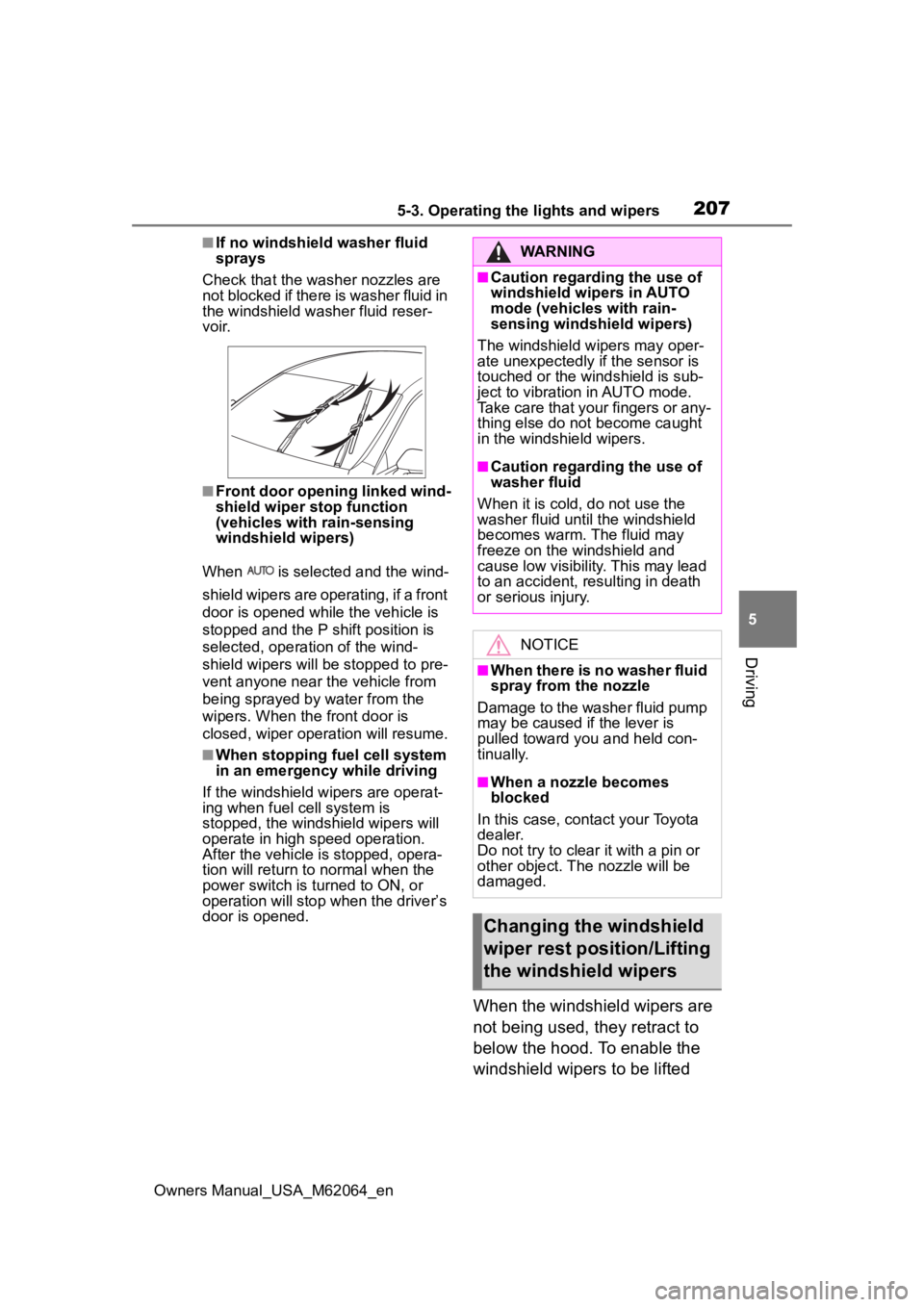
■If no windshield washer fluid
sprays
Check that the wash er nozzles are
not blocked if there is washer fluid in
the windshield washer fluid reser-
v oi r.
■Front door opening linked wind-
shield wiper stop function
(vehicles with rain-sensing
windshield wipers)
When is selected and the wind-
shield wipers are operating, if a front
door is opened while the vehicle is
stopped and the P shift position is
selected, operation of the wind-
shield wipers will be stopped to pre-
vent anyone near the vehicle from
being sprayed by water from the
wipers. When the front door is
closed, wiper operation will resume.
■When stopping fuel cell system
in an emergency while driving
If the windshield wipers are operat-
ing when fuel cell system is
stopped, the windshield wipers will
operate in high speed operation.
After the vehicle is stopped, opera-
tion will return to normal when the
power switch is turned to ON, or
operation will stop w hen the driver’s
door is opened.
When the windshield wipers are
not being used, they retract to
below the hood. To enable the
windshield wipers to be lifted
WARNING
■Caution regarding the use of
windshield wipers in AUTO
mode (vehicles with rain-
sensing windshield wipers)
The windshield wipers may oper-
ate unexpectedly if the sensor is
touched or the windshield is sub-
ject to vibration in AUTO mode.
Take care that your fingers or any-
thing else do not become caught
in the windshield wipers.
■Caution regarding the use of
washer fluid
When it is cold, do not use the
washer fluid unt il the windshield
becomes warm. The fluid may
freeze on the windshield and
cause low visibility. This may lead
to an accident, resulting in death
or serious injury.
NOTICE
■When there is no washer fluid
spray from the nozzle
Damage to the washer fluid pump
may be caused if the lever is
pulled toward you and held con-
tinually.
■When a nozzle becomes
blocked
In this case, contact your Toyota
dealer.
Do not try to clear it with a pin or
other object. The nozzle will be
damaged.
Changing the windshield
wiper rest position/Lifting
the windshield wipers
Page 210 of 572
2105-4. Refueling
Owners Manual_USA_M62064_en
5-4.Refueling
Close the all the doors and
windows.
Set the parking brake.
Shift the shift position to P.
Turn the power switch off.
Turn off the headlights.
■Fuel types
P.497
■Notes on fueling
●Fueling will not be possible if the
pressure inside the vehicle’s
hydrogen tanks is higher than the
supply pressure of the hydrogen
station. If the hydrogen tanks are
more than half full, the vehicle will
be unable to fuel at a H35 dis-
penser. A hydrogen station with a
H70 dispenser (supply pressure of
10150 psi) [70 MPa, 714 kgf/cm
2,
700 bar] is necessary to com-
pletely fill hydrogen tanks.
●If the fueling cannot be completed
due to trouble with the station
equipment, call the number indi-
cated on the equipment.
Opening the fuel door
Fuel with compressed
hydrogen gas only at hydro-
gen stations.
Fuel at hydrogen stations
conforming with the Society
of Automotive Engineers
(SAE) J2601 fueling proto-
col or laws that may super-
sede such SAE protocols.
Refer to the Mirai Station
Finder Application in Con-
nected services,
https://www.toyota.com/
connected-services/ (for
U.S. owners) or
https://www.toyota.ca/
toyota/en/about/
connected-services (for
Canadian owners), or call
1-800-331-4331 (for U.S.
owners) or 1-888-869-6828
(for Canadian owners).
Observe any notices or
instructions shown at hydro-
gen stations.
The filling time and amount
of fuel may depend on out-
side temperature and the
equipment at that hydrogen
station.
Vehicles with expired hydro-
gen tanks must not be used.
Check P.83 to learn how
and when to check the expi-
ration. Consult your Toyota
dealer.
Before filling
WARNING
■When filling
Observe the following precautions
while fueling the vehicle. Failure
to do so may result in death or
serious injury.
Page 211 of 572
2115-4. Refueling
Owners Manual_USA_M62064_en
5
Driving
WARNING
●Turn the power switch off before
fueling.
●Ensure the hydrogen gas noz-
zle is locked onto the vehicle
receptacle before filling. This
can be done by pulling on the
hydrogen gas no zzle to check
that it cannot be pulled off. Fail-
ure to do so may result in injury
or damage to the hydrogen gas
nozzle or vehicle.
●Do not smoke while fueling.
●Because the fuel is cold, the
hydrogen gas nozzle and vehi-
cle receptacle surface will
become cold, and frost may
develop. After fueling is com-
pleted, remove the hydrogen
gas nozzle by the plastic handle
only. Do not touch any other
parts of the hydrogen gas noz-
zle or vehicle receptacle with
bare hands immediately after
fueling, as frostbite may occur.
●Be sure to use hydrogen gas
nozzles at 350 bar/700 bar for
passenger vehicles.
Do not use hydrogen gas noz-
zles designed for commercial
vehicles. Check the instructions
at hydrogen station or ask the
station operator for assistance.
●Only fuel the vehicle at hydro-
gen stations designed for pas-
senger vehicles. Do not fuel the
vehicle at hydrogen stations
designed for forklifts, buses, or
trucks. Ask the station operator
for assistance.
NOTICE
■When filling
●Fuel only with compressed
hydrogen gas at stations com-
pliant with the Society of Auto-
motive Engineers (SAE) J2601
fueling protocol or laws that may
supersede such SAE protocols.
If improper fuels are used, the
fuel cell stack will be damaged.
●Do not swing or drop the hydro-
gen gas nozzle, or subject it to a
large amount of force. Doing so
may cause damage.
●If the hydrogen gas nozzle can-
not be removed after fueling, it
may be frozen to the vehicle
receptacle. Wait for the hydro-
gen gas nozzle to thaw before
attempting to r emove. Do not
pull or rotate the hydrogen gas
nozzle forcibly. Failure to follow
these precautions may cause
damage.
●Be sure to replace the cap after
filling. If foreign ma terial gets in
the vehicle receptacle, it may
cause damage.
●Do not put anything sharp, such
as a screwdriver, blade, or any
foreign object into the opening
of the vehicle receptacle. If the
vehicle receptacle is damaged,
hydrogen gas may leak during
fueling.
●If you notice anything unusual
about the vehicle receptacle,
please notify your Toyota
dealer.
●If you notice anything unusual
with the hydrogen dispenser or
hydrogen gas nozzle, please
notify the hydrogen station
operator. Contact information is
usually displayed on the dis-
penser.
Page 212 of 572
2125-4. Refueling
Owners Manual_USA_M62064_en
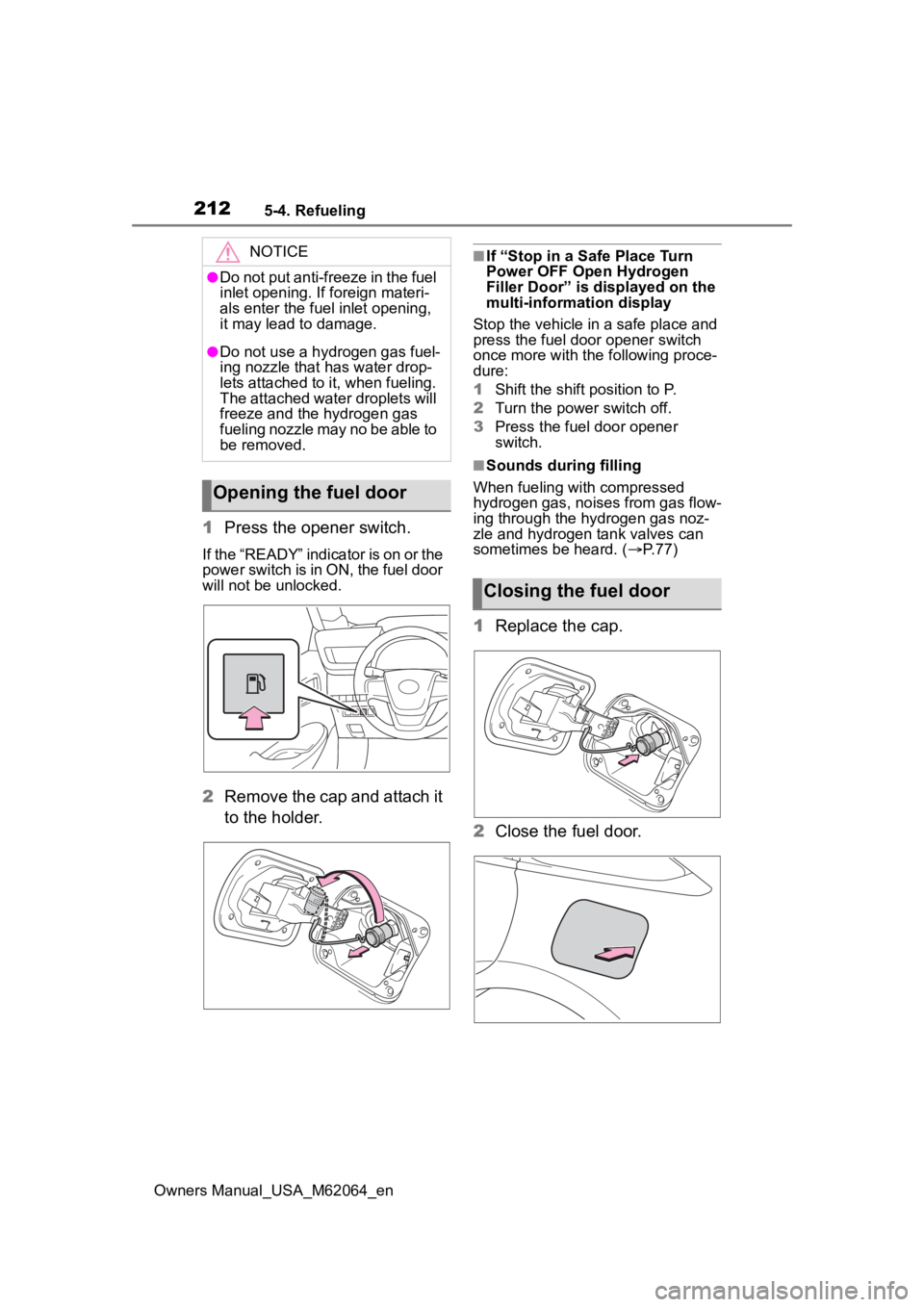
1Press the opener switch.
If the “READY” indicator is on or the
power switch is in ON, the fuel door
will not be unlocked.
2Remove the cap and attach it
to the holder.
■If “Stop in a Safe Place Turn
Power OFF Open Hydrogen
Filler Door” is displayed on the
multi-information display
Stop the vehicle in a safe place and
press the fuel door opener switch
once more with the following proce-
dure:
1 Shift the shift position to P.
2 Turn the power switch off.
3 Press the fuel door opener
switch.
■Sounds during filling
When fueling with compressed
hydrogen gas, noises from gas flow-
ing through the hydrogen gas noz-
zle and hydrogen tank valves can
sometimes be heard. ( P. 7 7 )
1Replace the cap.
2 Close the fuel door.
NOTICE
●Do not put anti-freeze in the fuel
inlet opening. If foreign materi-
als enter the fuel inlet opening,
it may lead to damage.
●Do not use a hydrogen gas fuel-
ing nozzle that has water drop-
lets attached to it, when fueling.
The attached water droplets will
freeze and the hydrogen gas
fueling nozzle may no be able to
be removed.
Opening the fuel door
Closing the fuel door
Page 213 of 572

2135-4. Refueling
Owners Manual_USA_M62064_en
5
Driving
■Error operation prevention
function
When the fuel door is open, the fuel
cell system will not start. When the
“READY” indicator is on, the fuel
door will not open.
■If “Open Filler Door Detected
Stop in a Safe Place Close
Hydrogen Filler Door” is dis-
played on the multi-information
display
The fuel door is open. Stop the vehi-
cle in a safe place and close the fuel
door.
■If “Open Filler Door Detected
Close Hydrogen Filler Door
Restart Vehicle” is displayed on
the multi-information display
The fuel door is open and the fuel
cell system cannot be started. Shift
the shift position to P and, turn the
power switch off, then:
1 Check whether the cap has been
reinstalled.
2 Close the fuel door.
If the warning message on the multi-
information display turns off at this
time, there is no malfunction. How-
ever, if the display continues to
show, the sensor may be damaged.
Have the vehicle inspected by your
Toyota dealer.
It can be started 1 time at intervals
of repeating the st arting operations
5 times (With the brake pedal
depress, press the power switch
operations 9 times within the inter-
val of 2 seconds). Operate the vehi-
cle after checking to be sure that the
hydrogen fueling nozzle is not con-
nected to the vehicle.
Page 228 of 572
2285-5. Using the driving support systems
Owners Manual_USA_M62064_en• When part of a detectable object
is hidden by an object, such as
large baggage, an umbrella, or
guardrail
• When there are many things which can reflect the radio waves
of the radar in the vicinity (tunnels,
truss bridges, gravel roads, snow
covered road that have tracks,
etc.)
• When there is an effect on the radio waves to the radar that is
installed on another vehicle
• When multiple detectable objects are close together
• If the sun or other light is shining directly on a detectable object
• When a detectable object is a
shade of white and looks
extremely bright
• When a detectable object appears
to be nearly the same color or
brightness as its surroundings
• If a detectable object cuts or sud-
denly emerges in front of your
vehicle
• When the front of your vehicle is
hit by water, snow, dust, etc.
• When a very bright light ahead, such as the sun or the headlights
of oncoming traffic, shines directly
into the front camera
• When approaching the side or
front of a vehicle ahead
• If a vehicle ahead is a motorcycle
• If a vehicle ahead is narrow, such as a personal mobility vehicle
• If a preceding vehicle has a small rear end, such as an unloaded
truck
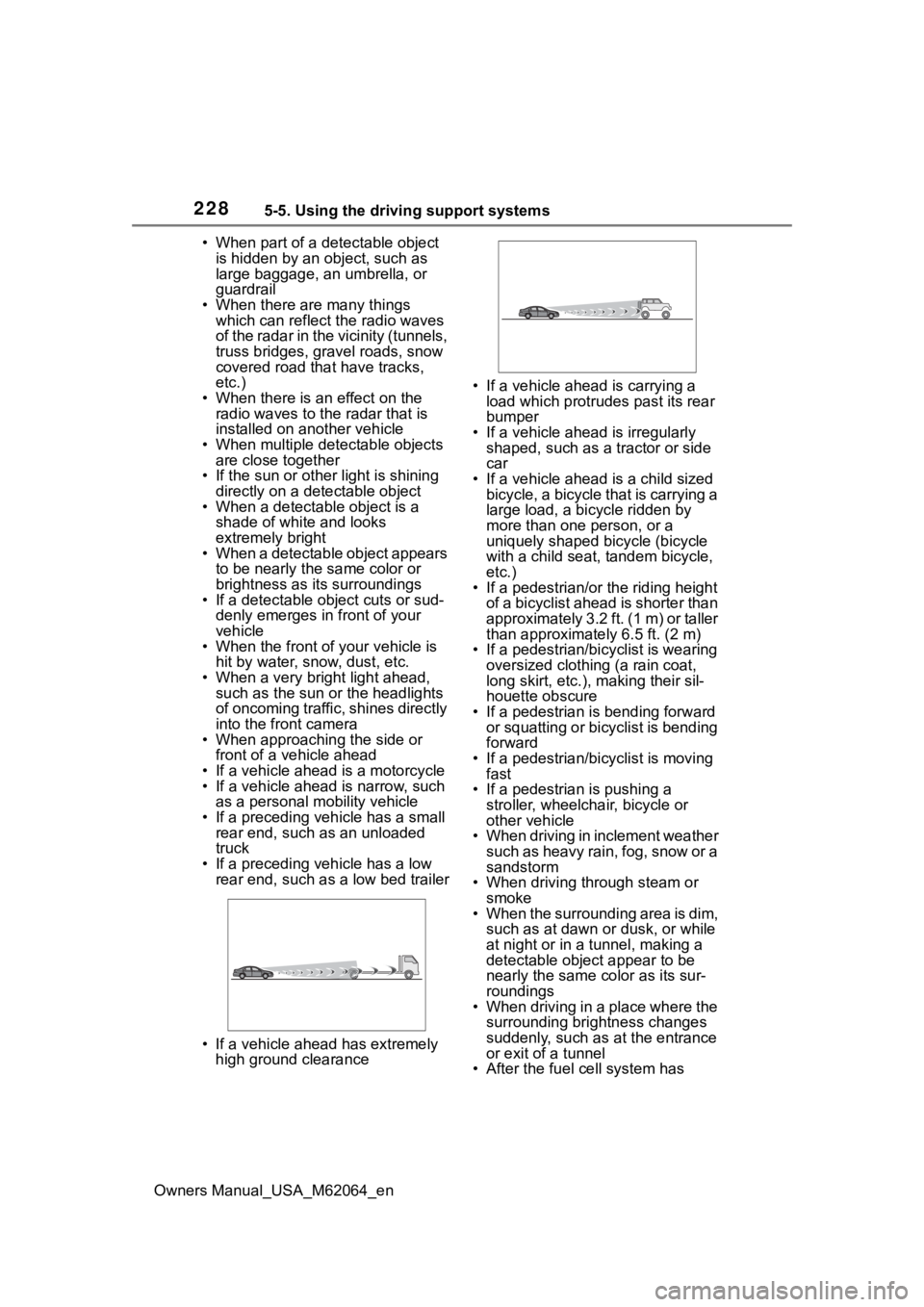
• If a preceding vehicle has a low rear end, such as a low bed trailer
• If a vehicle ahead has extremely high ground clearance • If a vehicle ahead is carrying a
load which protrudes past its rear
bumper
• If a vehicle ahead is irregularly shaped, such as a tractor or side
car
• If a vehicle ahead is a child sized bicycle, a bicycle that is carrying a
large load, a bicycle ridden by
more than one person, or a
uniquely shaped bicycle (bicycle
with a child seat, tandem bicycle,
etc.)
• If a pedestrian/or the riding height of a bicyclist ahead is shorter than
approximately 3.2 ft. (1 m) or taller
than approximate ly 6.5 ft. (2 m)
• If a pedestrian/bic yclist is wearing
oversized clothing (a rain coat,
long skirt, etc.), making their sil-
houette obscure
• If a pedestrian is bending forward or squatting or bicyclist is bending
forward
• If a pedestrian/bicyclist is moving fast
• If a pedestrian is pushing a
stroller, wheelchair, bicycle or
other vehicle
• When driving in inclement weather
such as heavy rain, fog, snow or a
sandstorm
• When driving through steam or
smoke
• When the surrounding area is dim, such as at dawn or dusk, or while
at night or in a tunnel, making a
detectable object appear to be
nearly the same co lor as its sur-
roundings
• When driving in a place where the surrounding brightness changes
suddenly, such as at the entrance
or exit of a tunnel
• After the fuel c ell system has
Page 236 of 572
2365-5. Using the driving support systems
Owners Manual_USA_M62064_en
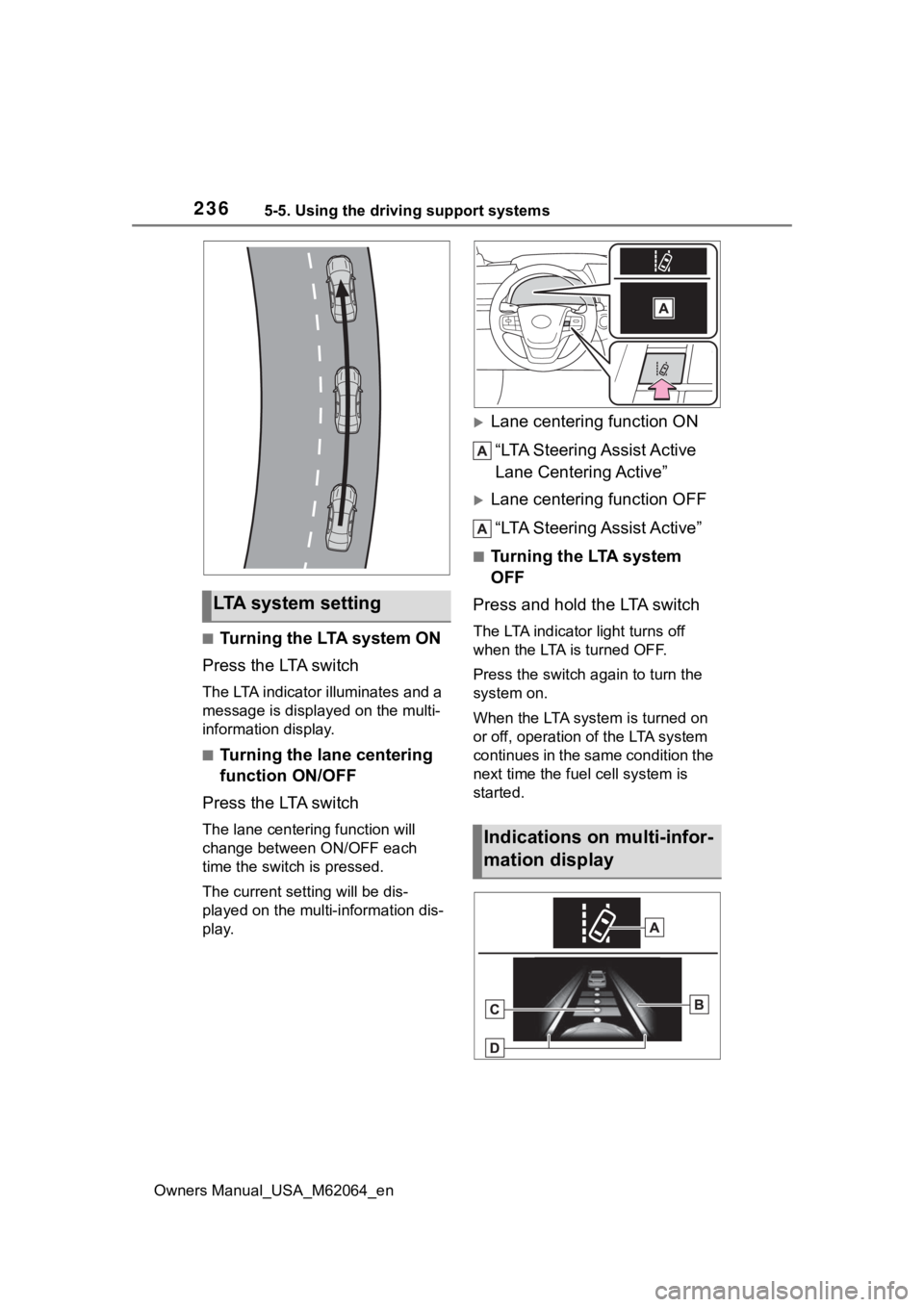
■Turning the LTA system ON
Press the LTA switch
The LTA indicator illuminates and a
message is displaye d on the multi-
information display.
■Turning the lane centering
function ON/OFF
Press the LTA switch
The lane centering function will
change between ON/OFF each
time the switch is pressed.
The current setting will be dis-
played on the multi-information dis-
play.
Lane centering function ON
“LTA Steering Assist Active
Lane Centering Active”
Lane centering function OFF“LTA Steering Assist Active”
■Turning the LTA system
OFF
Press and hold the LTA switch
The LTA indicator light turns off
when the LTA is turned OFF.
Press the switch a gain to turn the
system on.
When the LTA system is turned on
or off, operation of the LTA system
continues in the same condition the
next time the fuel cell system is
started.
LTA system setting
Indications on multi-infor-
mation display
Page 270 of 572
2705-5. Using the driving support systems
Owners Manual_USA_M62064_en
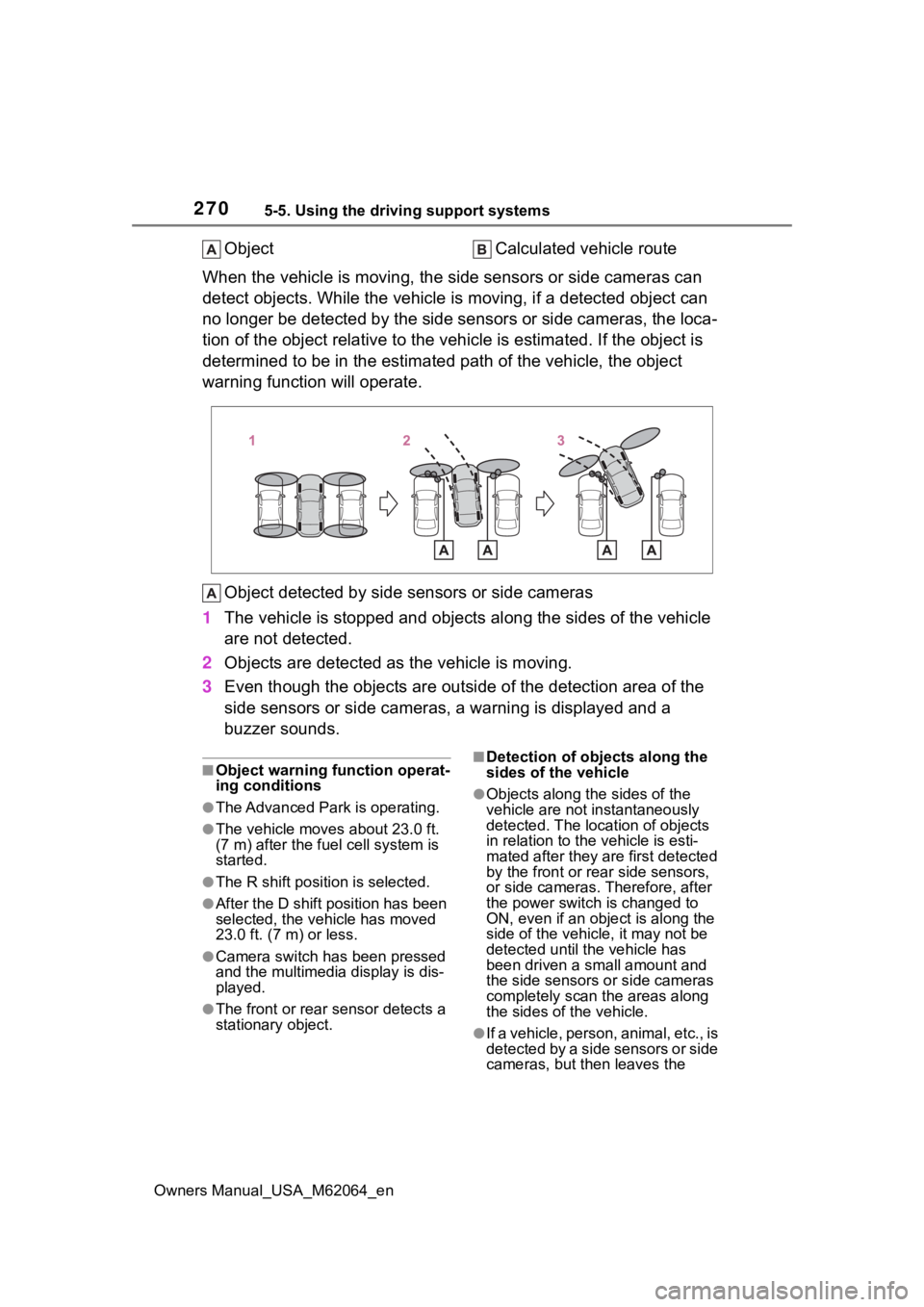
ObjectCalculated vehicle route
When the vehicle is moving, the side sensors or side cameras ca n
detect objects. While the vehicle is moving, if a detected obje ct can
no longer be detected by the side sensors or side cameras, the loca-
tion of the object relative to the vehicle is estimated. If the object is
determined to be in the estimated path of the vehicle, the obje ct
warning function will operate.
Object detected by side sensors or side cameras
1 The vehicle is stopped and objects along the sides of the vehic le
are not detected.
2 Objects are detected as the vehicle is moving.
3 Even though the objects are out side of the detection area of the
side sensors or side cameras, a warning is displayed and a
buzzer sounds.
■Object warning function operat-
ing conditions
●The Advanced Park is operating.
●The vehicle moves about 23.0 ft.
(7 m) after the fuel cell system is
started.
●The R shift position is selected.
●After the D shift position has been
selected, the vehicle has moved
23.0 ft. (7 m) or less.
●Camera switch has been pressed
and the multimedia display is dis-
played.
●The front or rear s ensor detects a
stationary object.
■Detection of objects along the
sides of the vehicle
●Objects along the sides of the
vehicle are not instantaneously
detected. The location of objects
in relation to the vehicle is esti-
mated after they are first detected
by the front or rear side sensors,
or side cameras. Therefore, after
the power switch is changed to
ON, even if an object is along the
side of the vehicle, it may not be
detected until the vehicle has
been driven a small amount and
the side sensors o r side cameras
completely scan the areas along
the sides of the vehicle.
●If a vehicle, person, animal, etc., is
detected by a side sensors or side
cameras, but then leaves the