charging TOYOTA MIRAI 2023 User Guide
[x] Cancel search | Manufacturer: TOYOTA, Model Year: 2023, Model line: MIRAI, Model: TOYOTA MIRAI 2023Pages: 572, PDF Size: 17.71 MB
Page 370 of 572
3706-4. Using the other interior features
Owners Manual_USA_M62064_en
WARNING
●Do not allow magnetic objects
to come near the wireless char-
ger
●Do not perform charging if the
charging area is dirty
●Do not cover with cloth, etc.,
and charge
NOTICE
■Conditions in which the func-
tion may not operate cor-
rectly
In the following conditions, it may
not operate correctly
●The portable device is fully
charged
●When a portable device is being
charged by a wired connection
●There is foreign matter between
the charge area and portable
device
●When the temperature near the
charging tray is 95°F (35°C) or
more due to being in direct sun-
light, etc.
●The temperature of the portable
device gets higher from
charging
●The charging surface of the por-
table device is facing up
●When a portable device is larger
than the charging tray
●The small portable device such
as foldable type is placed in an
area misaligned from the
charge area
●The camera lens protrudes 0.12
in. (3 mm) or more from the sur-
face of the portable device
●Near a TV tower, electric power
plant, gas station, radio station,
large display, a irport or other
facility that gen erates strong
radio waves or electrical noise
●The electronic key is not inside
the vehicle
●When any of the following
objects are caug ht between the
device and charging surface,
resulting in a gap of 0.08 in. (2
mm) or more between the
charging surface of a portable
device and the charging area:
• Thick cases or covers
• Thick decorations
• A case or cover with convex shape around the camera lens
• Accessories, such as finger rings, straps, etc.
●When the portable device is in
contact with, or is covered by
the following metallic objects
• Cards to which aluminum foil is attached
• Cigarette boxes that have alu- minum foil inside
• Metallic wallets or bags
• Coins
• Hand warmers made of metal
• Media such as CDs and DVDs
• Metallic decorations
• Metallic cases or covers
• A case which has magnet in it on the charging side of the por-
table device
●When other wireless keys (that
emit radio waves) are being
used nearby
Page 371 of 572
3716-4. Using the other interior features
Owners Manual_USA_M62064_en
6
Interior features
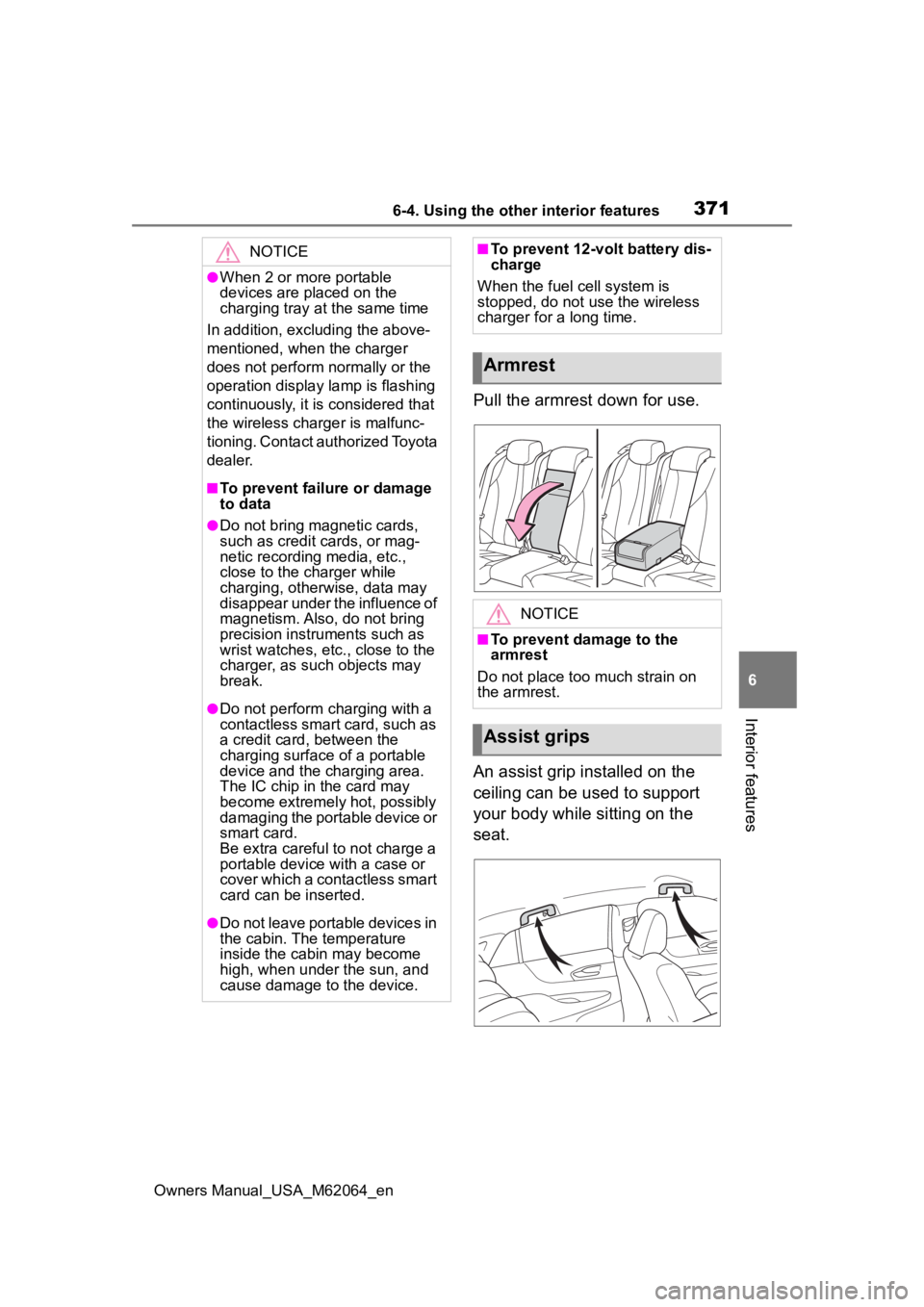
Pull the armrest down for use.
An assist grip installed on the
ceiling can be used to support
your body while sitting on the
seat.
NOTICE
●When 2 or more portable
devices are placed on the
charging tray at the same time
In addition, excl uding the above-
mentioned, when the charger
does not perform normally or the
operation display lamp is flashing
continuously, it is considered that
the wireless charger is malfunc-
tioning. Contact authorized Toyota
dealer.
■To prevent failu re or damage
to data
●Do not bring magnetic cards,
such as credit cards, or mag-
netic recording media, etc.,
close to the charger while
charging, otherwise, data may
disappear under the influence of
magnetism. Also, do not bring
precision instruments such as
wrist watches, etc ., close to the
charger, as such objects may
break.
●Do not perform c harging with a
contactless smart card, such as
a credit card, between the
charging surface of a portable
device and the c harging area.
The IC chip in the card may
become extremely hot, possibly
damaging the portable device or
smart card.
Be extra careful to not charge a
portable device with a case or
cover which a contactless smart
card can be inserted.
●Do not leave portable devices in
the cabin. The temperature
inside the cabin may become
high, when under the sun, and
cause damage to the device.
■To prevent 12-volt battery dis-
charge
When the fuel cell system is
stopped, do not use the wireless
charger for a long time.
Armrest
NOTICE
■To prevent damage to the
armrest
Do not place too much strain on
the armrest.
Assist grips
Page 372 of 572
3726-4. Using the other interior features
Owners Manual_USA_M62064_en
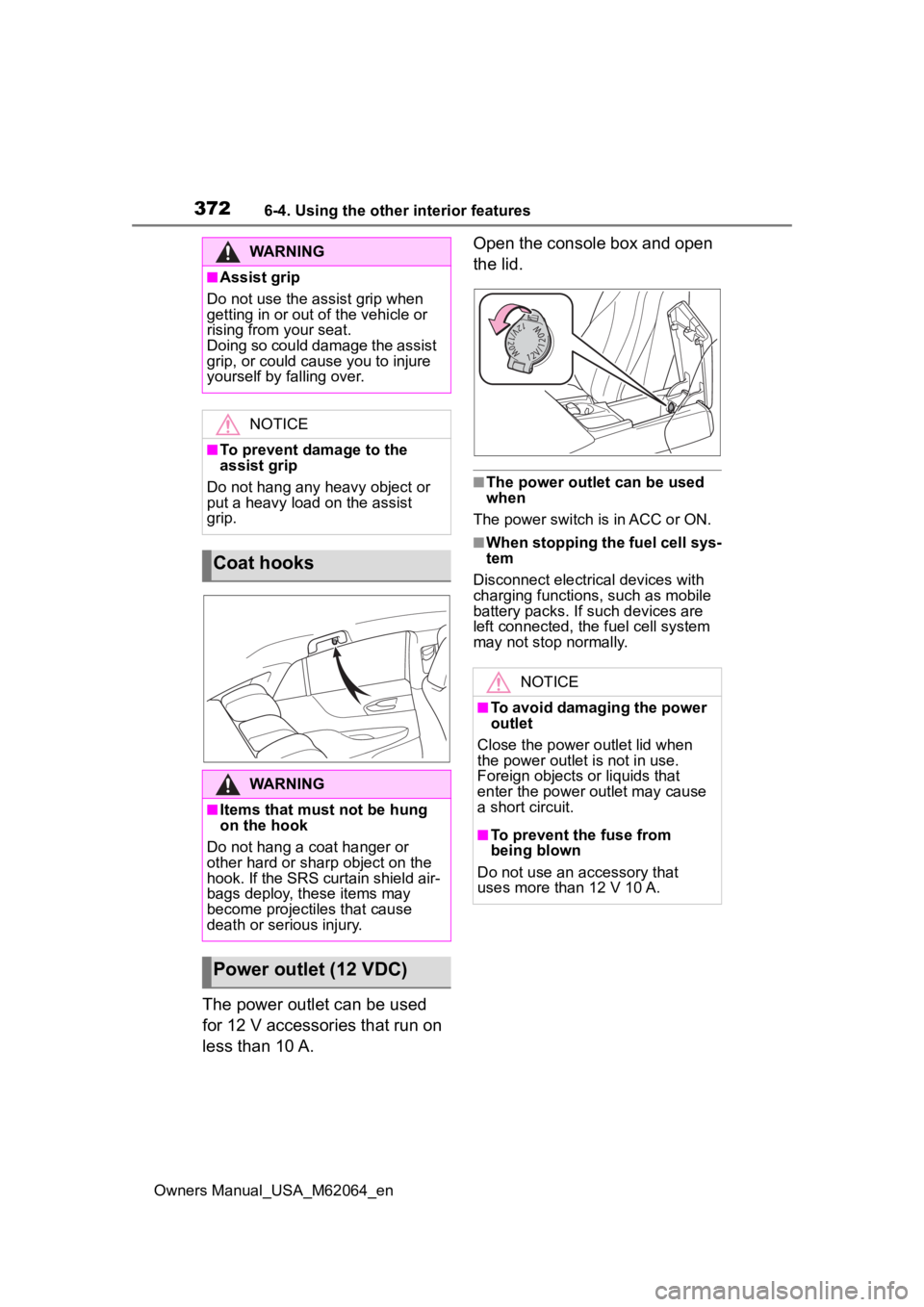
The power outlet can be used
for 12 V accessories that run on
less than 10 A.Open the console box and open
the lid.
■The power outlet can be used
when
The power switch is in ACC or ON.
■When stopping the fuel cell sys-
tem
Disconnect electrical devices with
charging functions, such as mobile
battery packs. If such devices are
left connected, the fuel cell system
may not stop normally.
WARNING
■Assist grip
Do not use the assist grip when
getting in or out o f the vehicle or
rising from your seat.
Doing so could damage the assist
grip, or could cause you to injure
yourself by falling over.
NOTICE
■To prevent damage to the
assist grip
Do not hang any heavy object or
put a heavy load on the assist
grip.
Coat hooks
WARNING
■Items that must not be hung
on the hook
Do not hang a coat hanger or
other hard or sharp object on the
hook. If the SRS curtain shield air-
bags deploy, these items may
become projectiles that cause
death or serious injury.
Power outlet (12 VDC)
NOTICE
■To avoid damaging the power
outlet
Close the power outlet lid when
the power outlet is not in use.
Foreign objects or liquids that
enter the power outlet may cause
a short circuit.
■To prevent the fuse from
being blown
Do not use an accessory that
uses more than 12 V 10 A.
Page 373 of 572
3736-4. Using the other interior features
Owners Manual_USA_M62064_en
6
Interior features
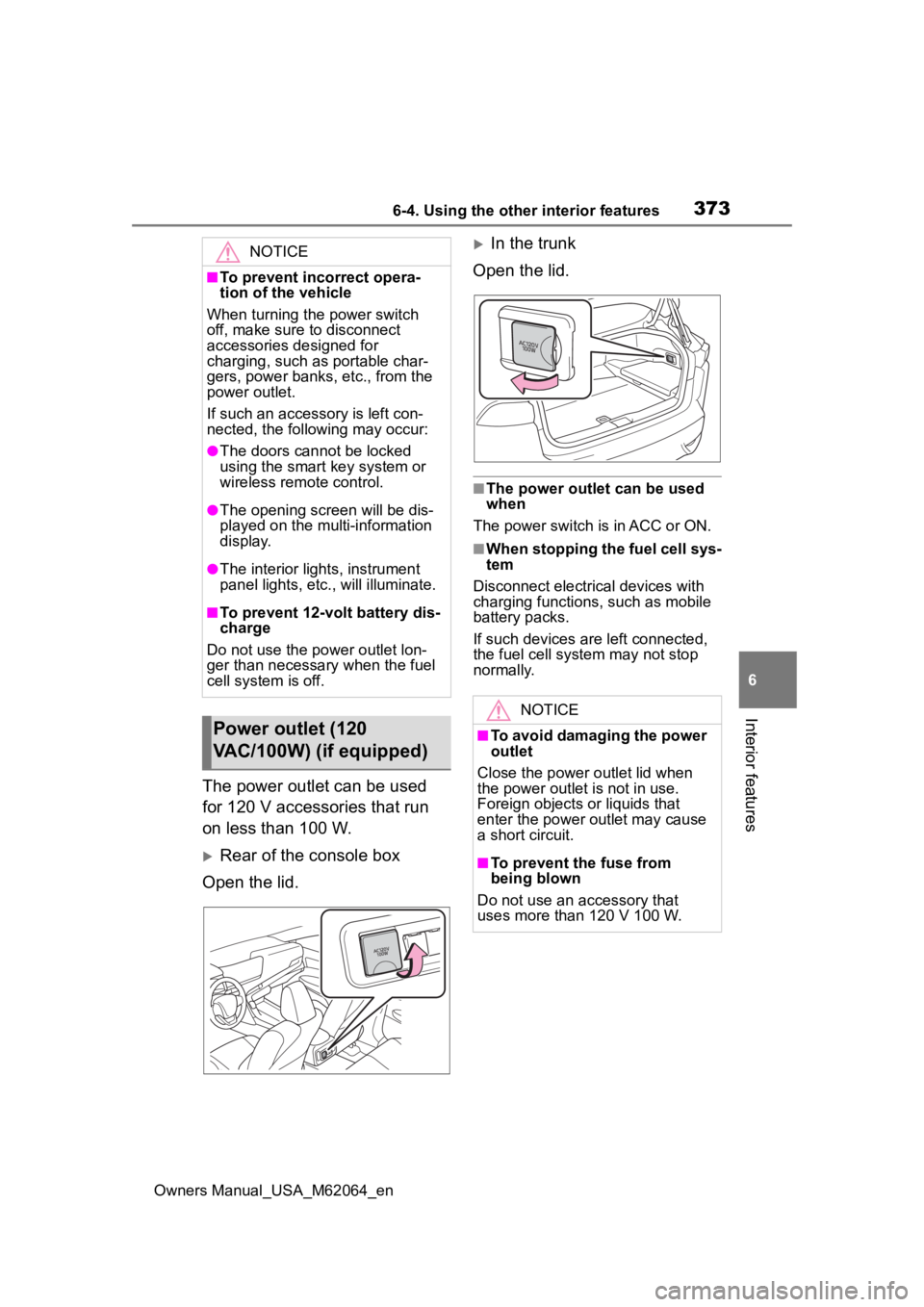
The power outlet can be used
for 120 V accessories that run
on less than 100 W.
Rear of the console box
Open the lid.
In the trunk
Open the lid.
■The power outlet can be used
when
The power switch is in ACC or ON.
■When stopping the fuel cell sys-
tem
Disconnect electrical devices with
charging functions, such as mobile
battery packs.
If such devices are left connected,
the fuel cell system may not stop
normally.
NOTICE
■To prevent incorrect opera-
tion of the vehicle
When turning the power switch
off, make sure to disconnect
accessories designed for
charging, such as portable char-
gers, power banks , etc., from the
power outlet.
If such an accessory is left con-
nected, the following may occur:
●The doors cannot be locked
using the smart key system or
wireless remote control.
●The opening scr een will be dis-
played on the multi-information
display.
●The interior lights, instrument
panel lights, etc., will illuminate.
■To prevent 12-volt battery dis-
charge
Do not use the power outlet lon-
ger than necessary when the fuel
cell system is off.
Power outlet (120
VAC/100W) (if equipped)
NOTICE
■To avoid damaging the power
outlet
Close the power outlet lid when
the power outlet is not in use.
Foreign objects or liquids that
enter the power outlet may cause
a short circuit.
■To prevent the fuse from
being blown
Do not use an accessory that
uses more than 120 V 100 W.
Page 374 of 572
3746-4. Using the other interior features
Owners Manual_USA_M62064_en
This system allows the use of
electrical devices with a total
power consumption of 1500W at
120 VAC in the vehicle. Supply-
ing power to electrical devices
outside the vehicle is not recom-
mended, as it may violate the
laws and regulations of the
country or region where it is
used. When supplying power to
electrical devices outside the
vehicle, check the laws and reg-
ulations with the relevant local
government of each country or region in advance. Also, be
careful not to drag electrical
devices and cords when moving
the vehicle.
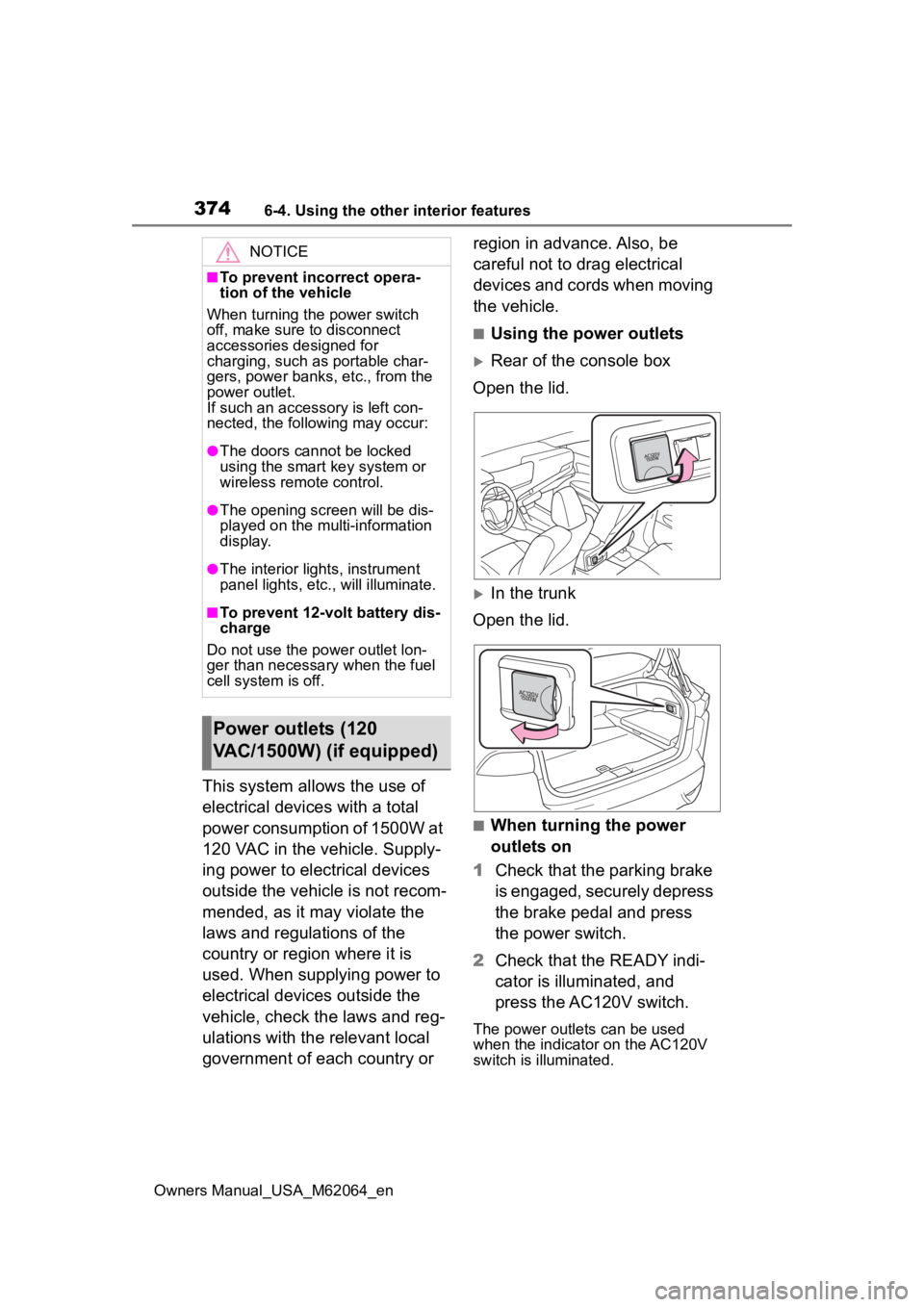
■Using the power outlets
Rear of the console box
Open the lid.
In the trunk
Open the lid.
■When turning the power
outlets on
1 Check that the parking brake
is engaged, securely depress
the brake pedal and press
the power switch.
2 Check that the READY indi-
cator is illuminated, and
press the AC120V switch.
The power outlets can be used
when the indicator on the AC120V
switch is illuminated.
NOTICE
■To prevent incorrect opera-
tion of the vehicle
When turning the power switch
off, make sure to disconnect
accessories designed for
charging, such as portable char-
gers, power banks , etc., from the
power outlet.
If such an accessory is left con-
nected, the following may occur:
●The doors cannot be locked
using the smart key system or
wireless remote control.
●The opening scr een will be dis-
played on the multi-information
display.
●The interior lights, instrument
panel lights, etc., will illuminate.
■To prevent 12-volt battery dis-
charge
Do not use the power outlet lon-
ger than necessary when the fuel
cell system is off.
Power outlets (120
VAC/1500W) (if equipped)
Page 413 of 572
4137-3. Do-it-yourself maintenance
Owners Manual_USA_M62064_en
7
Maintenance and care
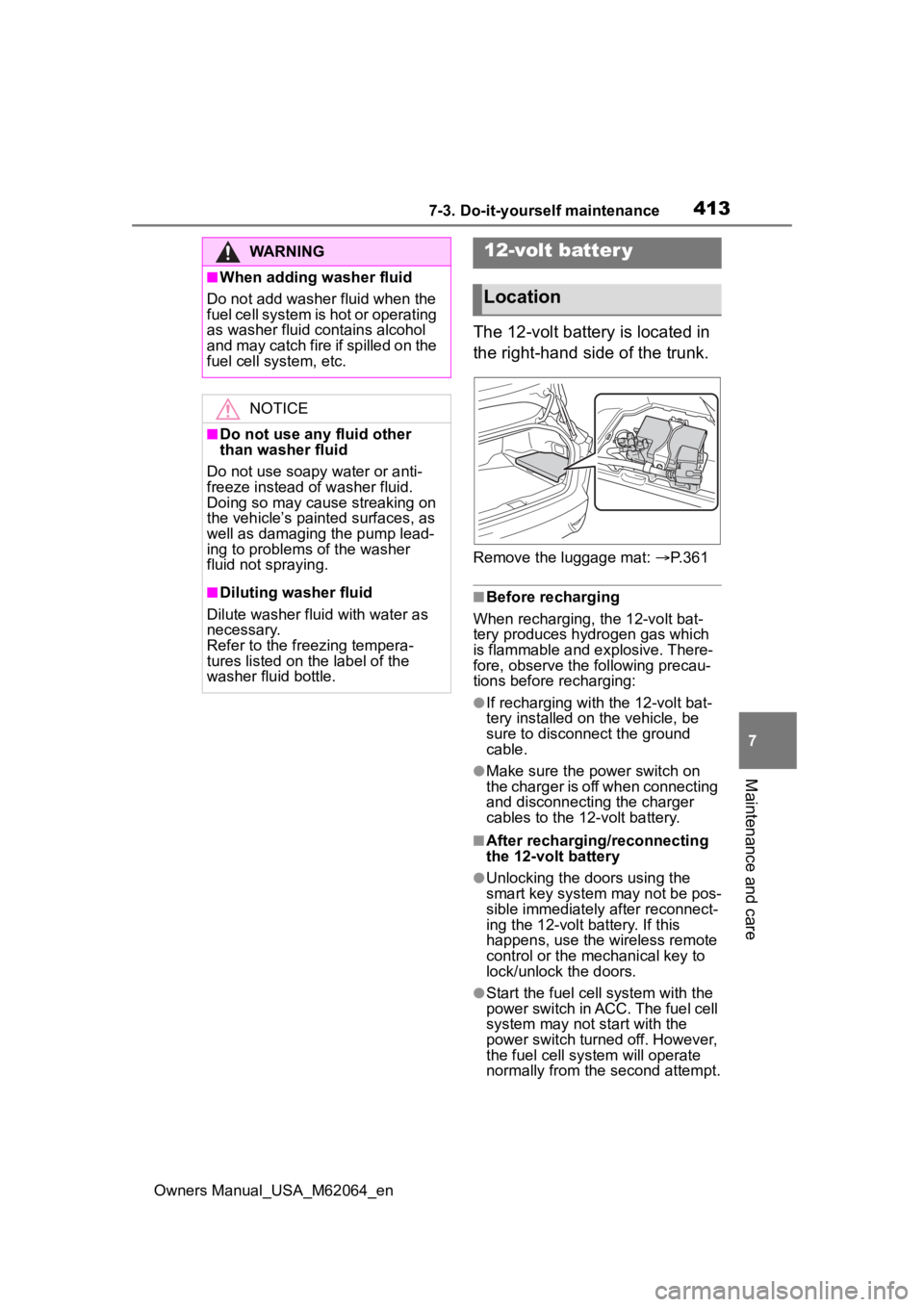
The 12-volt battery is located in
the right-hand side of the trunk.
Remove the luggage mat: P. 3 6 1
■Before recharging
When recharging, the 12-volt bat-
tery produces hydrogen gas which
is flammable and explosive. There-
fore, observe the following precau-
tions before recharging:
●If recharging with the 12-volt bat-
tery installed on the vehicle, be
sure to disconnect the ground
cable.
●Make sure the power switch on
the charger is off when connecting
and disconnecting the charger
cables to the 12-volt battery.
■After recharging/reconnecting
the 12-volt battery
●Unlocking the doors using the
smart key system may not be pos-
sible immediately after reconnect-
ing the 12-volt battery. If this
happens, use the wireless remote
control or the mechanical key to
lock/unlock the doors.
●Start the fuel cell system with the
power switch in ACC. The fuel cell
system may not start with the
power switch turned off. However,
the fuel cell system will operate
normally from the second attempt.
WARNING
■When adding washer fluid
Do not add washer fluid when the
fuel cell system is hot or operating
as washer fluid contains alcohol
and may catch fire if spilled on the
fuel cell system, etc.
NOTICE
■Do not use any fluid other
than washer fluid
Do not use soapy water or anti-
freeze instead of washer fluid.
Doing so may cause streaking on
the vehicle’s painted surfaces, as
well as damaging the pump lead-
ing to problems of the washer
fluid not spraying.
■Diluting washer fluid
Dilute washer fluid with water as
necessary.
Refer to the freezing tempera-
tures listed on the label of the
washer fluid bottle.
12-volt batter y
Location
Page 415 of 572
4157-3. Do-it-yourself maintenance
Owners Manual_USA_M62064_en
7
Maintenance and care
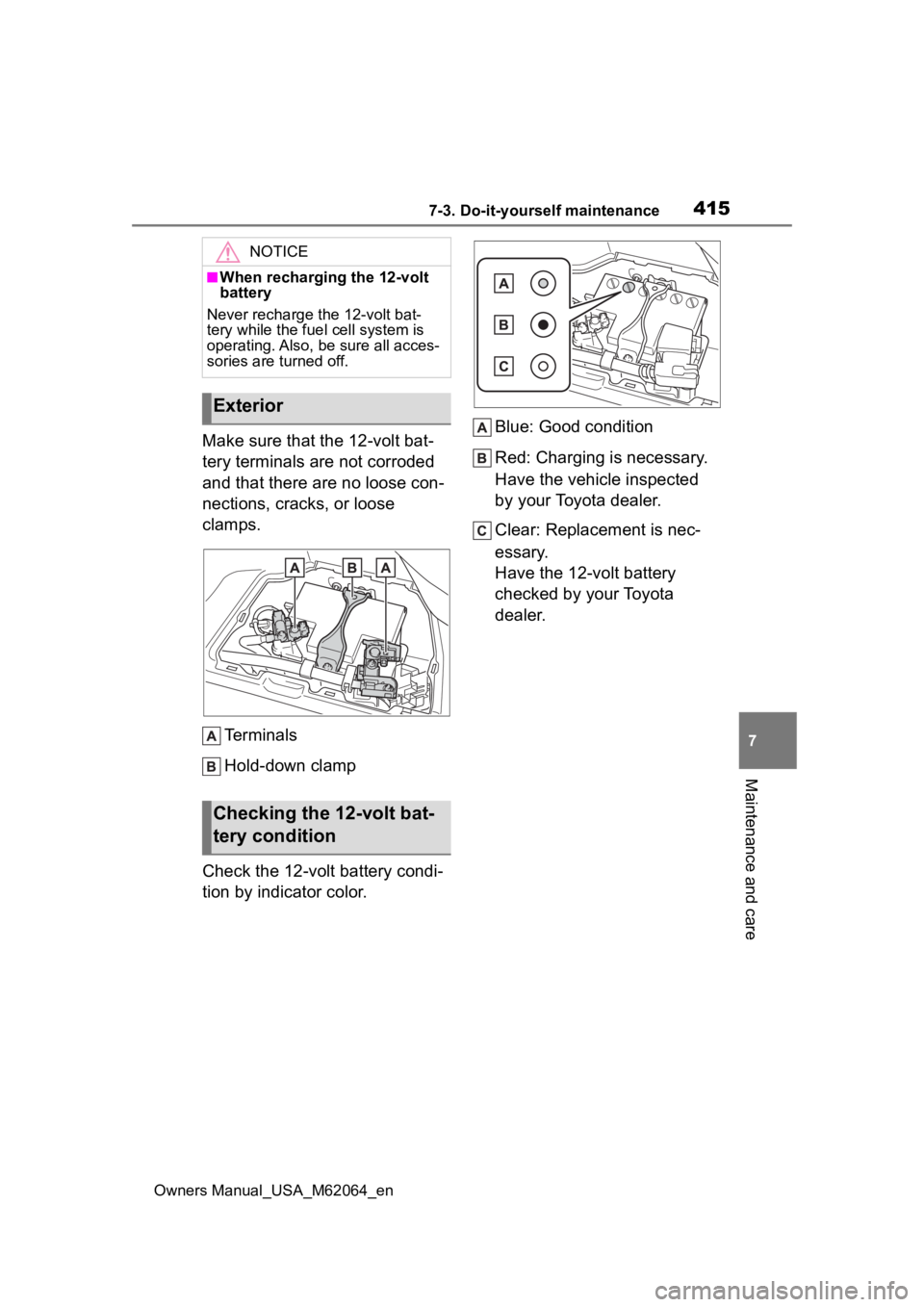
Make sure that the 12-volt bat-
tery terminals are not corroded
and that there are no loose con-
nections, cracks, or loose
clamps. Terminals
Hold-down clamp
Check the 12-volt battery condi-
tion by indicator color. Blue: Good condition
Red: Charging is necessary.
Have the vehicle inspected
by your Toyota dealer.
Clear: Replacement is nec-
essary.
Have the 12-volt battery
checked by your Toyota
dealer.
NOTICE
■When recharging the 12-volt
battery
Never recharge the 12-volt bat-
tery while the fue l cell system is
operating. Also, be sure all acces-
sories are turned off.
Exterior
Checking the 12-volt bat-
tery condition
Page 455 of 572
4558-2. Steps to take in an emergency
Owners Manual_USA_M62064_en
8
When trouble arises
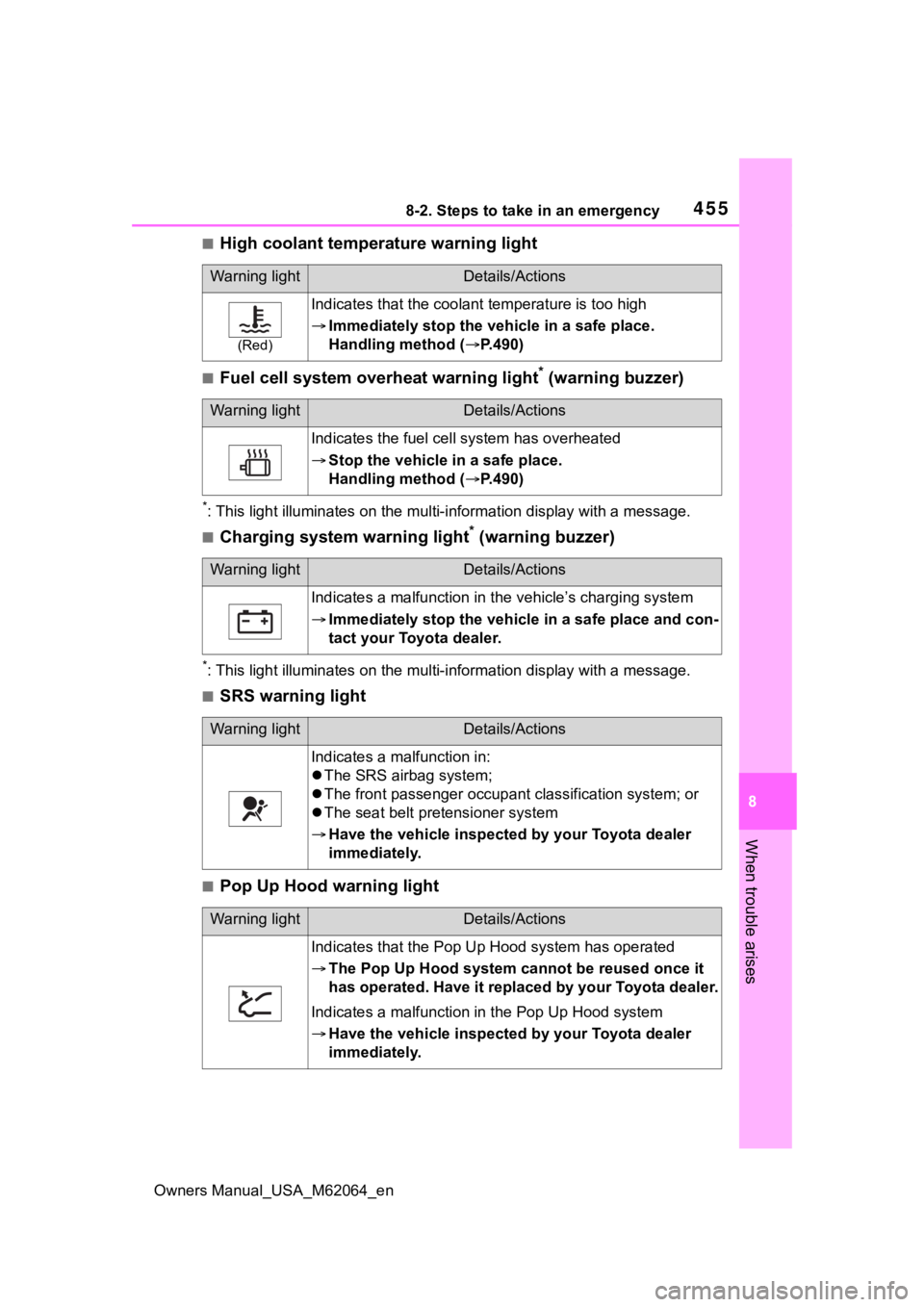
■High coolant temperature warning light
■Fuel cell system overheat warning light* (warning buzzer)
*: This light illuminates on the mu lti-information display with a message.
■Charging system warning light* (warning buzzer)
*: This light illuminates on the mu lti-information display with a message.
■SRS warning light
■Pop Up Hood warning light
Warning lightDetails/Actions
(Red)
Indicates that the coolant temperature is too high
Immediately stop the v ehicle in a safe place.
Handling method ( P.490)
Warning lightDetails/Actions
Indicates the fuel cell system has overheated
Stop the vehicle in a safe place.
Handling method ( P.490)
Warning lightDetails/Actions
Indicates a malfunction in t he vehicle’s charging system
Immediately stop the vehicle in a safe place and con-
tact your Toyota dealer.
Warning lightDetails/Actions
Indicates a malfunction in:
The SRS airbag system;
The front passenger occupant classification system; or
The seat belt pretensioner system
Have the vehicle inspecte d by your Toyota dealer
immediately.
Warning lightDetails/Actions
Indicates that the Pop Up Hood system has operated
The Pop Up Hood system can not be reused once it
has operated. Have it replaced by your Toyota dealer.
Indicates a malfunction in the Pop Up Hood system
Have the vehicle inspecte d by your Toyota dealer
immediately.
Page 487 of 572
4878-2. Steps to take in an emergency
Owners Manual_USA_M62064_en
8
When trouble arises
■Starting the fuel cell system
when the 12-volt battery is dis-
charged
The fuel cell system cannot be
started by push-starting.
■To prevent 12-volt battery dis-
charge
●Turn off the headlights and the
audio system while the fuel cell
system is off.
●Turn off any unnecessary electri-
cal components when the vehicle
is running at a low speed for an
extended period, such as in heavy
traffic.
■When the 12-volt battery is
removed or discharged
●Information stor ed in the ECU is
cleared. When the 12-volt battery
is depleted, have the vehicle
inspected at you r Toyota dealer.
●Some systems may require initial-
ization. ( P.526)
●If the 12-volt battery discharges, it
may not be possible to shift the
shift position to other positions.
In this case, the vehicle cannot be
towed without lifting both rear
wheels because the rear wheels will
be locked.
■When removing the 12-volt bat-
tery terminals
When the 12-volt battery terminals
are removed, the information stored
in the ECU is cleared. Before
removing the 12-volt battery termi-
nals, contact your Toyota dealer.
■Charging the 1 2-volt battery
The electricity stor ed in the 12-volt
battery will discharge gradually even
when the vehicle is not in use, due
to natural discharge and the drain-
ing effects of certain electrical appli-
ances. If the vehicle is left for a long
time, the 12-volt battery may dis-
charge, and the fuel cell system
may be unable to s tart. (The 12-volt battery recharges automatically
while the fuel cell
system is operat-
ing.)
■When recharging or replacing
the 12-volt battery
●In some cases, it may not be pos-
sible to unlock the doors using the
smart key system when the 12-
volt battery is discharged. Use the
wireless remote c ontrol or the
mechanical key to lock or unlock
the doors.
●The fuel cell system may not start
on the first attempt after the 12-
volt battery has recharged but will
start normally after the second
attempt. This is not a malfunction.
●The power switch mode is memo-
rized by the vehicle. When the 12-
volt battery is reconnected, the
system will return to the mode it
was in before the 12-volt battery
was discharged. Before discon-
necting the 12-volt battery, turn
the power switch off.
If you are unsure what mode the
power switch was in before the
12-volt battery discharged, be
especially careful when recon-
necting the 12-volt battery.
●When the 12-volt battery is recon-
nected, start the fuel cell system,
depress the brake pedal, and con-
firm that it is possible to shift into
each shift position.
●If the battery is removed or the ter-
minals disconnected without oper-
ating the water release function
during cold weather, the vehicle
may not start due to the fuel cell
system being frozen. To prevent
this, operate th e water release
function before removing the bat-
tery or disconnecting the termi-
nals. ( P.196)
Page 489 of 572
4898-2. Steps to take in an emergency
Owners Manual_USA_M62064_en
8
When trouble arises
WARNING
●When working with the 12-volt
battery, always wear safety
glasses and take care not to
allow any battery fluids (acid) to
come into contact with skin,
clothing or the vehicle body.
●Do not lean over the 12-volt bat-
tery.
●In the event that battery fluid
comes into contact with the skin
or eyes, immediately wash the
affected area with water and
seek medical attention. Place a
wet sponge or cloth over the
affected area until medical
attention can be received.
●Always wash your hands after
handling the 12-volt battery sup-
port, terminals, and other bat-
tery-related parts.
●Do not allow child ren near the
12-volt battery.
■After recharging the 12-volt
battery
Have the 12-volt battery
inspected at your Toyota dealer
as soon as possible.
If the 12-volt battery is deteriorat-
ing, continued use may cause the
12-volt battery to emit a malodor-
ous gas, which may be detrimen-
tal to the health of passengers.
■When replacing the 12-volt
battery
●When the vent plug and indica-
tor are close to the hold down
clamp, the battery fluid (sulfuric
acid) may leak.
●For information regarding 12-
volt battery rep lacement, con-
tact your Toyota dealer.
●After replacing, s ecurely attach
the exhaust hose and exhaust
hole plug to the exhaust hole of
the replaced 12-volt battery. If
not properly installed, gases
(hydrogen) may leak into the
vehicle interior, and there is the
possible danger of the gas ignit-
ing and exploding.
NOTICE
■When handling jumper cables
When connecting the jumper
cables, ensure that they do not
become entangled in the cooling
fan.
■When connecting jumper
cables
Make sure to connect jumper
cables to the specified terminals
and connecting point. Failure to
do so may adversely affect the
electronic devices or damage to
them.
■To prevent damaging the
vehicle
The exclusive jump starting termi-
nal is to be used when charging
the 12-volt battery from another
vehicle in an emergency. It cannot
be used to jump start another
vehicle.