height TOYOTA MIRAI 2023 User Guide
[x] Cancel search | Manufacturer: TOYOTA, Model Year: 2023, Model line: MIRAI, Model: TOYOTA MIRAI 2023Pages: 572, PDF Size: 17.71 MB
Page 276 of 572
2765-5. Using the driving support systems
Owners Manual_USA_M62064_en
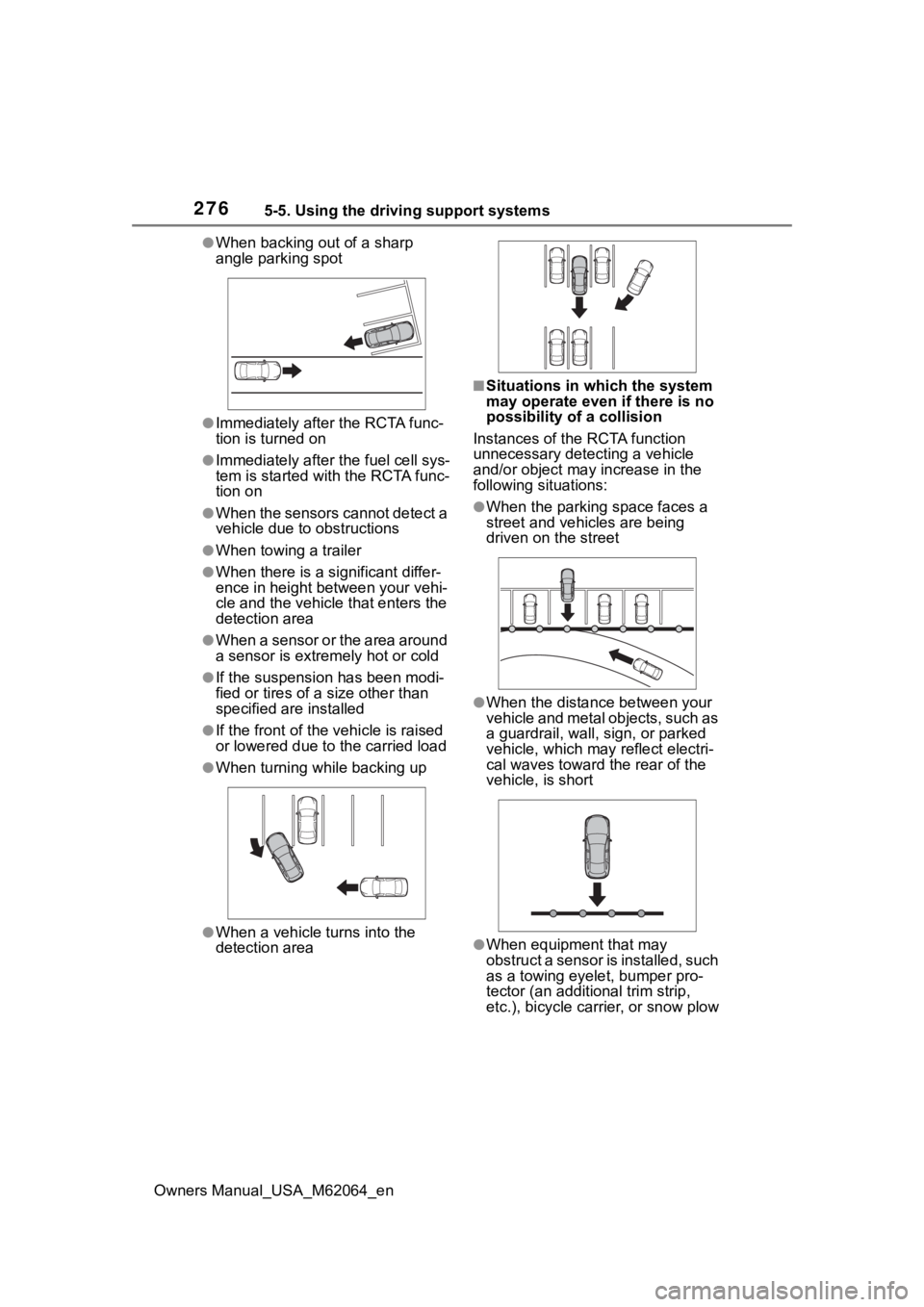
●When backing out of a sharp
angle parking spot
●Immediately after the RCTA func-
tion is turned on
●Immediately after the fuel cell sys-
tem is started with the RCTA func-
tion on
●When the sensors cannot detect a
vehicle due to obstructions
●When towing a trailer
●When there is a significant differ-
ence in height between your vehi-
cle and the vehicle that enters the
detection area
●When a sensor or the area around
a sensor is extremely hot or cold
●If the suspension has been modi-
fied or tires of a size other than
specified are installed
●If the front of the vehicle is raised
or lowered due to the carried load
●When turning while backing up
●When a vehicle turns into the
detection area
■Situations in which the system
may operate even if there is no
possibility of a collision
Instances of the RCTA function
unnecessary detec ting a vehicle
and/or object may increase in the
following situations:
●When the parking space faces a
street and vehicles are being
driven on the street
●When the distance between your
vehicle and metal objects, such as
a guardrail, wall, sign, or parked
vehicle, which may reflect electri-
cal waves toward the rear of the
vehicle, is short
●When equipment that may
obstruct a sensor is installed, such
as a towing eyelet, bumper pro-
tector (an additional trim strip,
etc.), bicycle car rier, or snow plow
Page 280 of 572
2805-5. Using the driving support systems
Owners Manual_USA_M62064_enwhen the R shift position is
selected, the rear camera lens
may be dirty. Clean the rear cam-
era lens.
■Situations in which the system
may not operate properly
●Some pedestrians, such as the
following, may not be detected by
the rear camera detection func-
tion, preventing the function from
operating properly:
• Pedestrians who are bending for-
ward or squatting
• Pedestrians who are lying down
• Pedestrians who are running
• Pedestrians who suddenly enter the detection area
• People riding a bicycle, skate-
board, or other light vehicle
• Pedestrians wearing oversized clothing such as a rain coat, long
skirt, etc., making their silhouette
obscure
• Pedestrians whose body is par-
tially hidden by an object, such as
a cart or umbrella
• Pedestrians which are obscured
by darkness, such as at night
●In some situations, such as the
following, pedestrians may not be
detected by the rear camera
detection function, preventing the
function from operating properly:
• When backing up in inclement weather (rain, snow, fog, etc.)
• When the rear camera is obscured (dirt, snow, ice, etc., are
attached) or scratched
• When a very bright light, such as the sun, or the headlights of
another vehicle, shines directly
into the rear camera
• When backing up in a place where the surrounding brightness
changes suddenly, such as at the
entrance or exit of a garage or
underground parking lot
• When backing up i n a dim envi-
ronment such as during dusk or in
an underground parking lot
• When the camera position and
direction are deviated
• When a towing hook is attached • When water droplets are flowing
on the camera lens
• When the vehicle height is
extremely changed (nose up,
nose down).
• When tire chains or an emergency
tire puncture repair kit is used
• If the suspension has been modi- fied or tires of a size other than
specified are installed
• If an electronic component, such as a backlit license plate or rear
fog light, is insta lled near the rear
camera
• If a bumper protector, such as an
additional trim strip, is installed to
the rear bumper
■Situations in which the system
may operate unexpectedly
●Even though there are no pedes-
trians in the detection area, some
objects, such as the following,
may be detected, possibly caus-
ing the rear cam era detection
function to operate.
• Three dimensional objects, such as a pole, traffic cone, fence, or
parked vehicle
• Moving objects, such as a car or motorcycle
• Objects moving to ward your vehi-
cle when backing up, such as
flags or puddles (or airborne mat-
ter, such as smoke, steam, rain, or
snow)
• Cobblestone or gravel roads, tram
rails, road repai rs, white lines,
pedestrian crossings or fallen
leaves on the road
• Metal covers (gratings), such as those used for drainage ditches
• Objects reflected in a puddle or on
a wet road surface
• Shadows on the road
●In some situations, such as the
following, the rea r camera detec-
tion function may operate even
though there are no pedestrians in
the detection area.
• When backing up toward the road- side or a bump on the road
• When backing up toward an incline/decline
Page 283 of 572
2835-5. Using the driving support systems
Owners Manual_USA_M62064_en
5
Driving
The Parking Support Brake can
be enabled/disabled on the
multi-information display. All of
the Parking Support Brake func-
tions (static objects front and
rear of the vehicle, moving vehi-
cles rear of the vehicle, pedestri-
ans rear of the vehicle and static
objects around the vehicle) are
enabled/disabled simultane-
ously.
Use the meter control switches
to enable/disable the parking
support brake. ( P.106)
1 Press or to select .
2 Press or to select
“ PKSB” and then press
.
When the Parking Support Brake is
disabled, the PKSB OFF indicator
( P.97) illuminates. To re-enable the
system when it
was disabled, select on the
multi-information display, select
“ PKSB” and then On. If dis-
abled using this method, the sys-
tem will not be re-enabled by
turning the power switch off and
then to ON.
If the fuel cell system output restric-
tion control or brake control oper-
ates, a buzzer will sound and a
message will be displayed on the
multi-information display and head-
up display (if equipped), multimedia
display, to alert the driver.
Depending on the situation, fuel cell
system output restriction control will
operate to either limit acceleration
or restrict output as much as possi-
ble.
Fuel cell system output
restriction control is operating
(acceleration restriction)
Acceleration greater than a certain
amount is restric ted by the system.
Multimedia display: No warning dis-
played
Multi-information display: “Object
Detected Acceleration Reduced”
Head-up display (if equipped): No
warning displayed
PKSB OFF indicator: Not illumi-
nated
Buzzer: Does not sound
WARNING
●When a tire chains, compact
spare tire or an emergency tire
puncture repair kit is used
●When towing with the vehicle
■Precautions for the suspen-
sion
Do not modify the suspension of
the vehicle. If the height or tilt of
the vehicle is changed, the sen-
sors may not be able to detect
detectable objects and the system
may not operate correctly, possi-
bly leading to an accident.
Enabling/Disabling the
Parking Support Brake
Display and buzzer for
fuel cell system output
restriction control and
brake control
Page 296 of 572
2965-5. Using the driving support systems
Owners Manual_USA_M62064_en
WARNING
●Do not allow anyone to put their
hands outside of a window while
this system is operating.
■To ensure correct operation
of the Advanced Park
Observe the following precau-
tions.
Failing to do so may result in the
vehicle being unable to be driven
safely and possibly cause an acci-
dent.
●Do not use this system in situa-
tions such as the following:
• When in areas other than com- mon parking spaces
• When the surface of the parking space is sand or gravel and is
not clearly defined with parking
space lines
• When the parking space is not level, such as when on a slope
or has differences in height
• Mechanical parking system
• Parking lot with a device which raises to contact the bottom of
the vehicle
• When the road s urface is fro-
zen, slick, or covered with snow
• When it is extremely hot and the asphalt is melting
• When there are objects around the vehicle
• When there is an object between your vehicle and the
target parking spot or within the
target parking spot (within the
displayed blue box)
• When there is a gutter between your vehicle and the target park-
ing space or within the target
parking spot (within the dis-
played blue box)
• When there is a hole or gutter in the exit direction
• When in high pedestrian or vehicle traffic areas
• When the parking space is in a location that is difficult to park in
(too narrow for your vehicle,
etc.)
• When images are unclear due to dirt or snow attached to the
camera lens, light being shined
into the camera or shadows
• When tire chains or a compact spare tire is installed to the vehi-
cle
• When the doors or trunk are not completely closed
• When an arm is h eld outside of
a window
• In inclement weather such as heavy rain or snow
●Make sure to use only standard
sized tires, such as those that
were installed to the vehicle
when it was shipped from the
factory. Otherwise, Advanced
Park may not operate properly.
Also, when the tires have been
replaced, the displayed position
of the lines or box displayed on
the screen may become incor-
rect. When replacing the tires,
contact your Toyota dealer.
●In situations such as the follow-
ing, it may not be possible for
the system to provide assis-
tance to a registered parking
spot:
Page 304 of 572
3045-5. Using the driving support systems
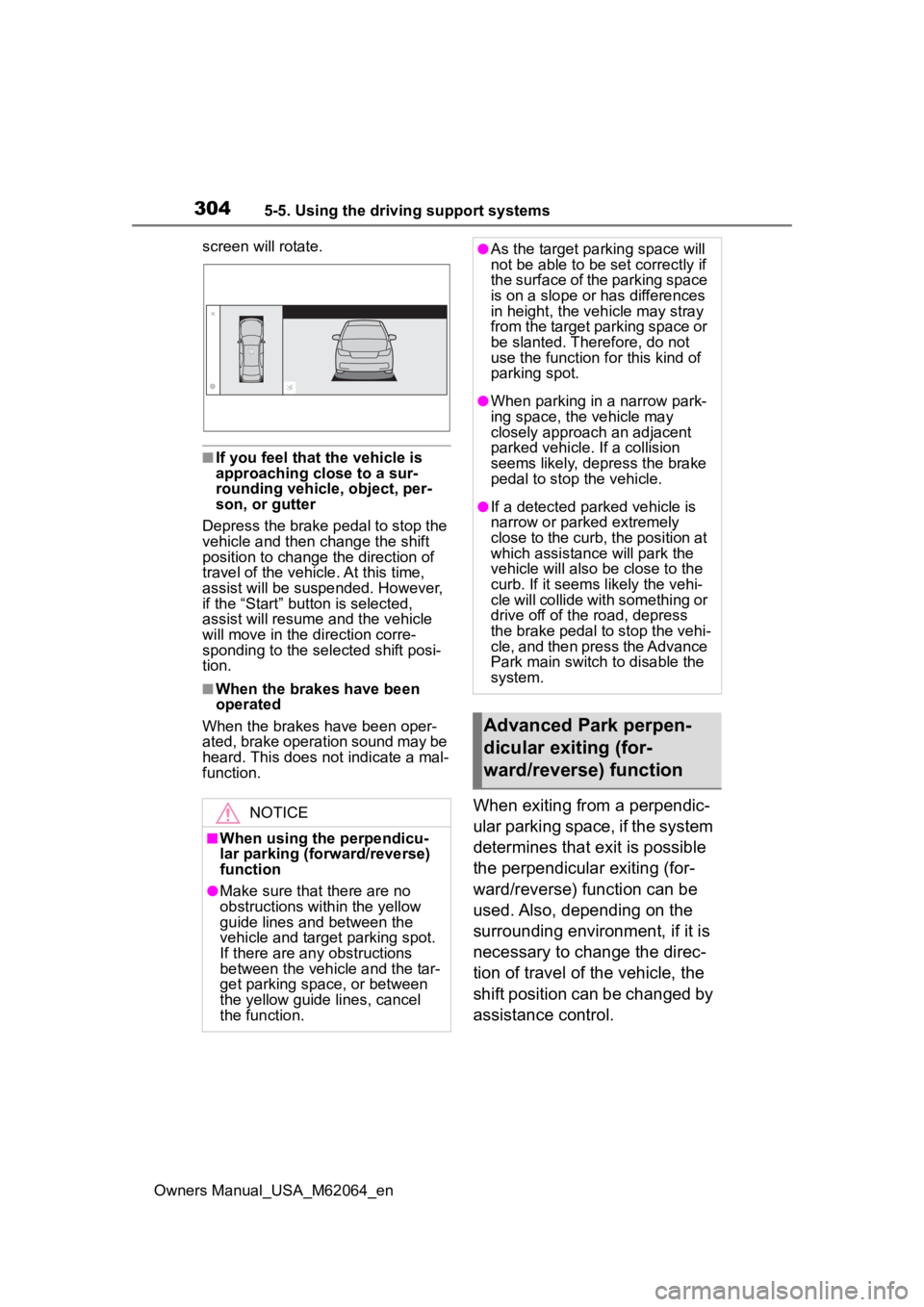
Owners Manual_USA_M62064_enscreen will rotate.
■If you feel that the vehicle is
approaching close to a sur-
rounding vehicle, object, per-
son, or gutter
Depress the brake pedal to stop the
vehicle and then ch ange the shift
position to change the direction of
travel of the vehicle. At this time,
assist will be suspended. However,
if the “Start” butt on is selected,
assist will resume and the vehicle
will move in the direction corre-
sponding to the selected shift posi-
tion.
■When the brakes have been
operated
When the brakes have been oper-
ated, brake operation sound may be
heard. This does not indicate a mal-
function.
When exiting from a perpendic-
ular parking space, if the system
determines that exit is possible
the perpendicular exiting (for-
ward/reverse) function can be
used. Also, depending on the
surrounding environment, if it is
necessary to change the direc-
tion of travel of the vehicle, the
shift position can be changed by
assistance control.NOTICE
■When using the perpendicu-
lar parking (forward/reverse)
function
●Make sure that there are no
obstructions within the yellow
guide lines and between the
vehicle and target parking spot.
If there are any obstructions
between the vehicle and the tar-
get parking space, or between
the yellow guide lines, cancel
the function.
●As the tar get parking space will
not be able to be set correctly if
the surface of the parking space
is on a slope or has differences
in height, the veh icle may stray
from the target parking space or
be slanted. Therefore, do not
use the function f or this kind of
parking spot.
●When parking in a narrow park-
ing space, the vehicle may
closely approach an adjacent
parked vehicle. If a collision
seems likely, depress the brake
pedal to stop the vehicle.
●If a detected parked vehicle is
narrow or parked extremely
close to the curb, the position at
which assistance will park the
vehicle will also be close to the
curb. If it seems likely the vehi-
cle will collide with something or
drive off of the road, depress
the brake pedal to stop the vehi-
cle, and then press the Advance
Park main switch to disable the
system.
Advanced Park perpen-
dicular exiting (for-
ward/reverse) function
Page 309 of 572
3095-5. Using the driving support systems
Owners Manual_USA_M62064_en
5
Driving
When exiting from a parallel
parking space, if the system
determines that exit is possible
the parallel exiting function can
be used. Also, depending on the
surrounding environment, if it is
necessary to change the direc-
tion of travel of the vehicle, the
shift position can be changed by
assistance control.
NOTICE
■When using the parallel park-
ing function
●Make sure that there are no
obstructions within the yellow
guide lines and between the
vehicle and target parking spot.
If any obstructions are detected
within the yellow guide lines or
between the vehicle and the tar-
get parking space, the parallel
parking function will be can-
celled or suspended.
●As the target parking space will
not be able to be set correctly if
the surface of the parking space
is on a slope or has differences
in height, the vehicle may stray
from the target parking space or
be slanted. Therefore, do not
use the parallel parking func-
tion for this kind of parking spot.
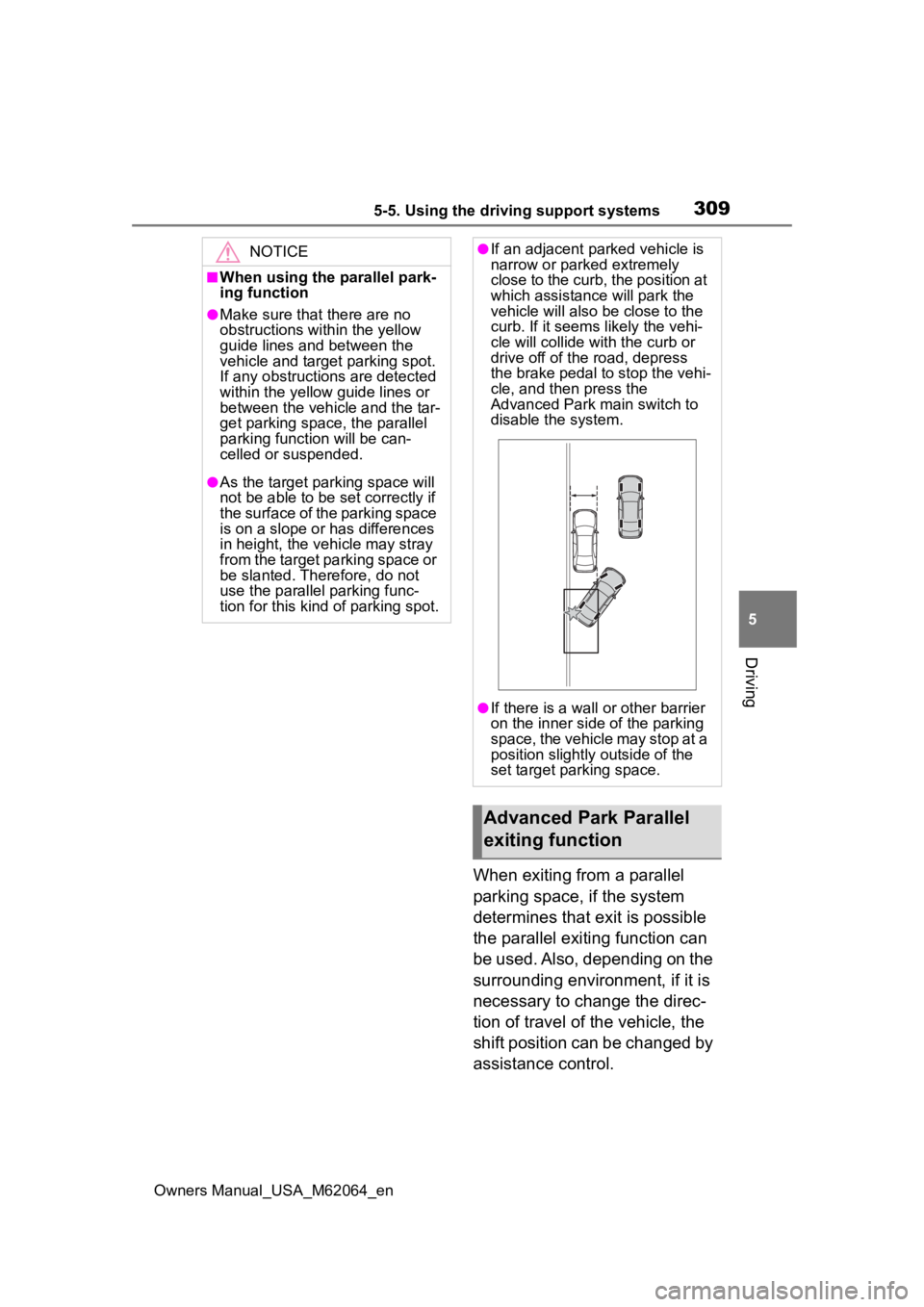
●If an adjacent parked vehicle is
narrow or parked extremely
close to the curb, the position at
which assistance will park the
vehicle will also be close to the
curb. If it seems likely the vehi-
cle will collide with the curb or
drive off of the road, depress
the brake pedal to stop the vehi-
cle, and then press the
Advanced Park main switch to
disable the system.
●If there is a wall or other barrier
on the inner side of the parking
space, the vehicle may stop at a
position slightly outside of the
set target par king space.
Advanced Park Parallel
exiting function
Page 425 of 572
4257-3. Do-it-yourself maintenance
Owners Manual_USA_M62064_en
7
Maintenance and care
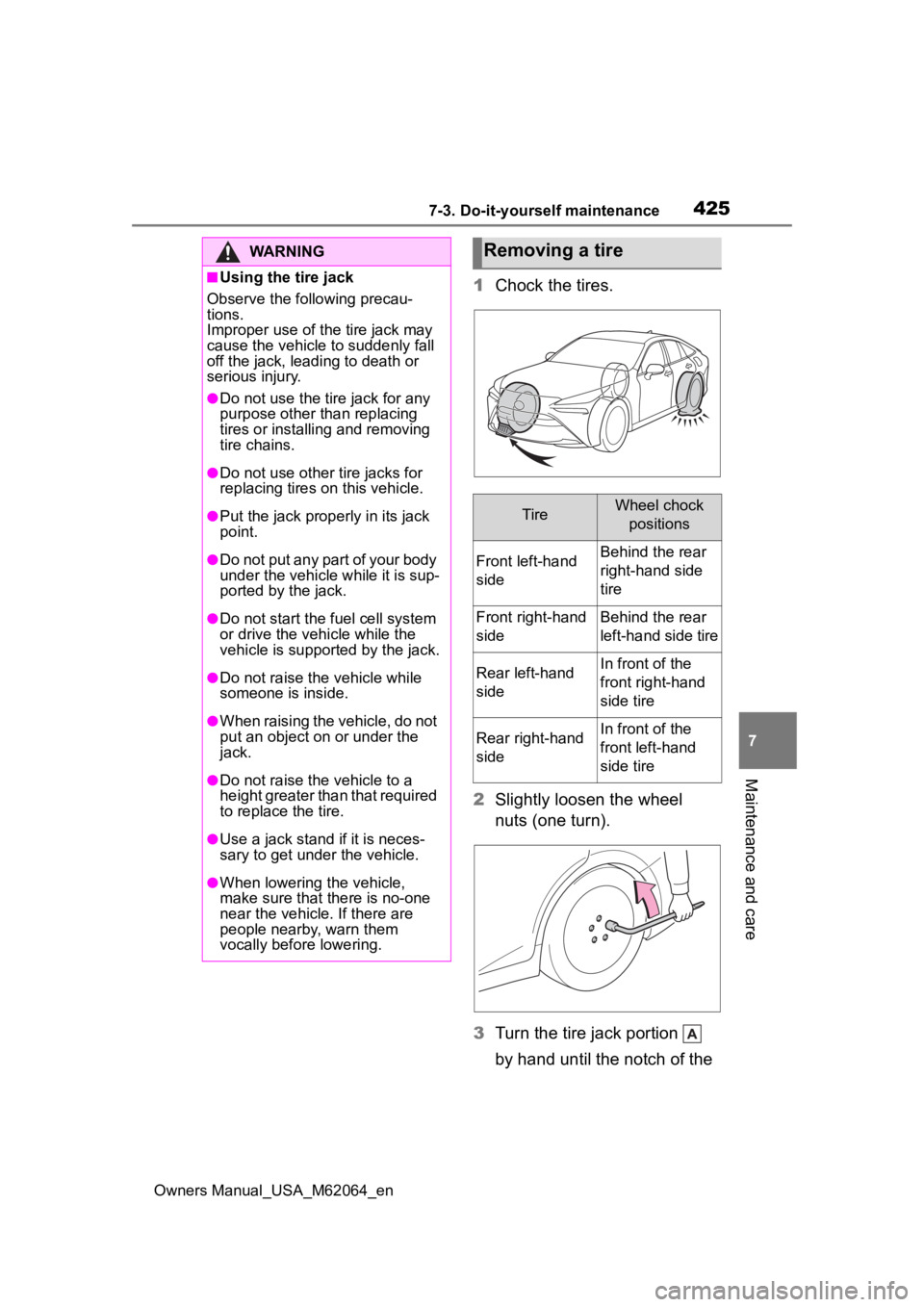
1 Chock the tires.
2 Slightly loosen the wheel
nuts (one turn).
3 Turn the tire jack portion
by hand until the notch of the
WARNING
■Using the tire jack
Observe the following precau-
tions.
Improper use of the tire jack may
cause the vehicle to suddenly fall
off the jack, leading to death or
serious injury.
●Do not use the tire jack for any
purpose other than replacing
tires or installing and removing
tire chains.
●Do not use other tire jacks for
replacing tires on this vehicle.
●Put the jack prope rly in its jack
point.
●Do not put any part of your body
under the vehicle while it is sup-
ported by the jack.
●Do not start the fuel cell system
or drive the vehicle while the
vehicle is suppor ted by the jack.
●Do not raise the vehicle while
someone is inside.
●When raising the vehicle, do not
put an object on or under the
jack.
●Do not raise the vehicle to a
height greater than that required
to replace the tire.
●Use a jack stand if it is neces-
sary to get under the vehicle.
●When lowering the vehicle,
make sure that there is no-one
near the vehicle. If there are
people nearby, warn them
vocally before lowering.
Removing a tire
TireWheel chock
positions
Front left-hand
sideBehind the rear
right-hand side
tire
Front right-hand
sideBehind the rear
left-hand side tire
Rear left-hand
sideIn front of the
front right-hand
side tire
Rear right-hand
sideIn front of the
front left-hand
side tire
Page 448 of 572
4488-1. Essential information
Owners Manual_USA_M62064_en
outside water level exceeds
half the height of the door, the
door cannot be opened from
the inside due to water pres-
sure.
■Water level exceeds the floor
When the water level exceeds the
floor and time has passed, the elec-
trical equipment will get damaged,
the power windows will not operate,
the motor stop, and the vehicle may
not be able to get moving.
■Using an emergency escape
hammer*
Laminated glass is used in the wind-
shield on this vehicle.
Laminated glass cannot be shat-
tered with an emergency hammer
*.
Tempered glass is used in the win-
dows on this vehicle.
*: Contact your Toyota dealer or aftermarket accessory manufac-
turer for further information about
an emergency hammer.
WARNING
■Caution while driving
Do not drive on roads where the
roads may be submerged or the
water may be rising. Otherwise
the vehicle may be damaged and
cannot move, as well as become
flooded and set a drift, which may
lead to death.
Page 496 of 572
4969-1. Specifications
Owners Manual_USA_M62064_en
9-1.Specifications
*1: Unladen vehicles
*2: Vehicles without electronic sunshade
*3: Vehicles with electronic sunshade
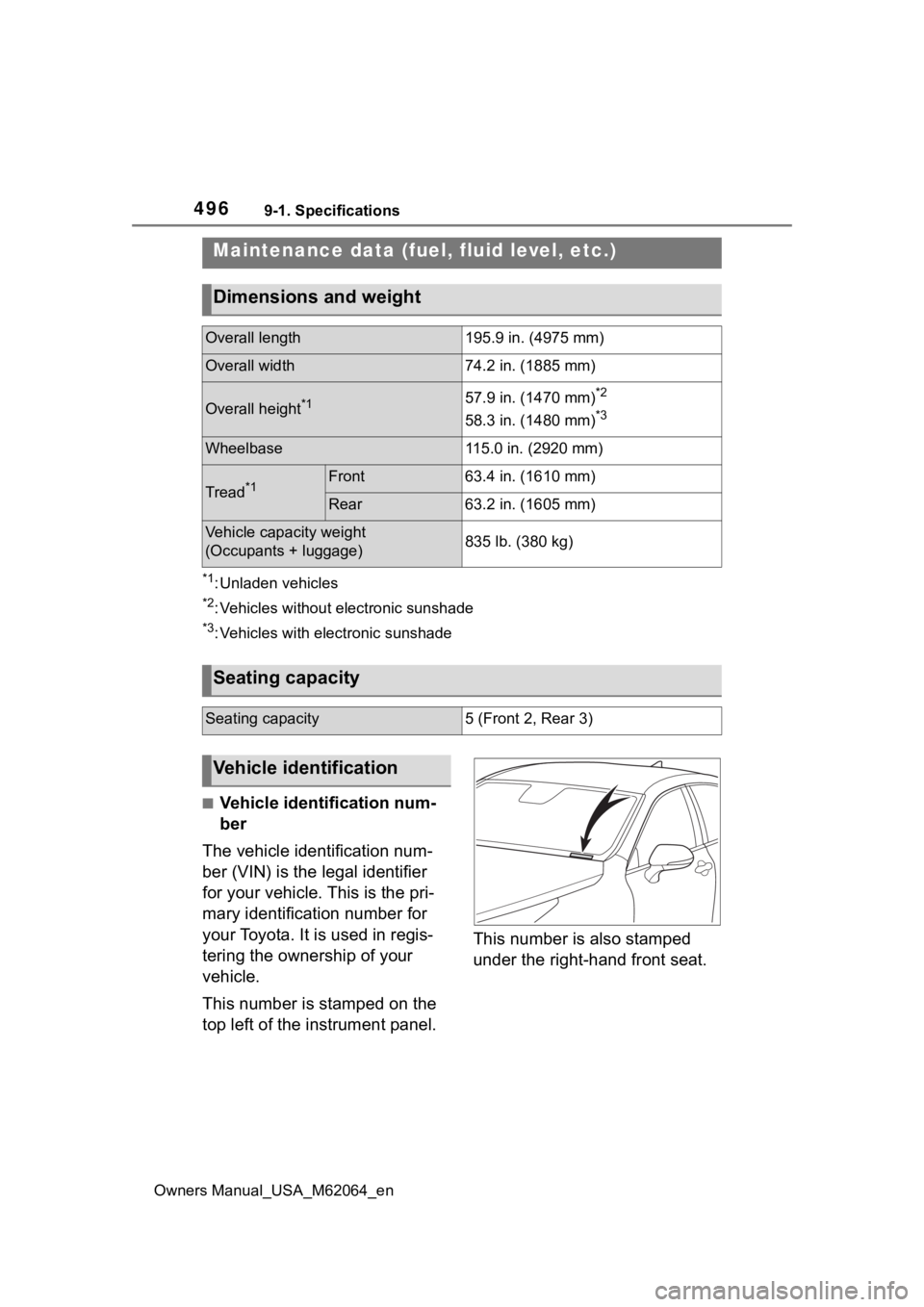
■Vehicle identification num-
ber
The vehicle identification num-
ber (VIN) is the legal identifier
for your vehicle. This is the pri-
mary identification number for
your Toyota. It is used in regis-
tering the ownership of your
vehicle.
This number is stamped on the
top left of the instrument panel. This number is also stamped
under the right-hand front seat.
Maintenance data (fuel,
fluid level, etc.)
Dimensions and weight
Overall length195.9 in. (4975 mm)
Overall width74.2 in. (1885 mm)
Overall height*157.9 in. (1470 mm)*2
58.3 in. (1480 mm)*3
Wheelbase115.0 in. (2920 mm)
Tread*1Front63.4 in. (1610 mm)
Rear63.2 in. (1605 mm)
Vehicle capacity weight
(Occupants + luggage)835 lb. (380 kg)
Seating capacity
Seating capacity5 (Front 2, Rear 3)
Vehicle identification
Page 504 of 572
5049-1. Specifications
Owners Manual_USA_M62064_en
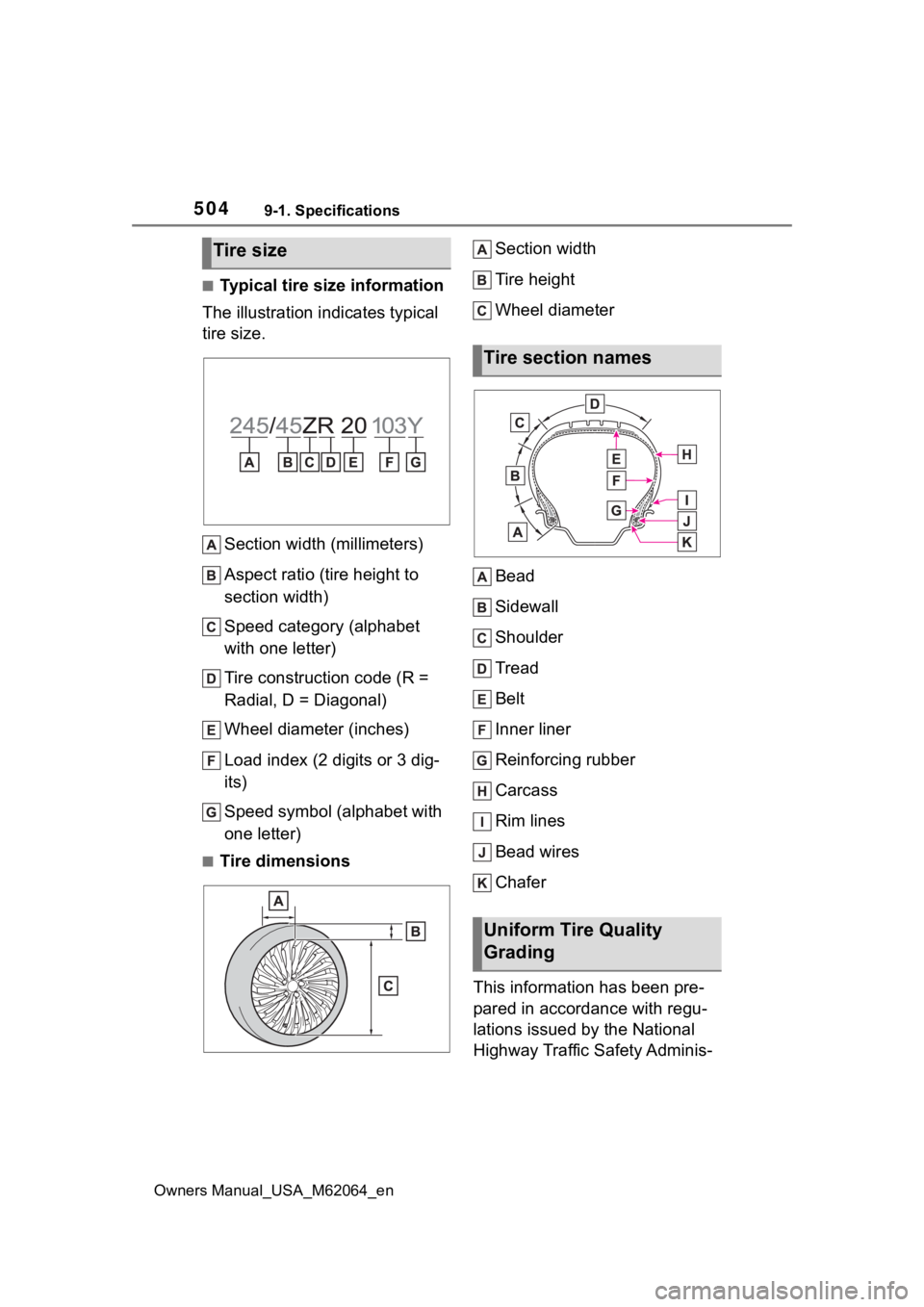
■Typical tire size information
The illustration indicates typical
tire size.
Section width (millimeters)
Aspect ratio (tire height to
section width)
Speed category (alphabet
with one letter)
Tire construction code (R =
Radial, D = Diagonal)
Wheel diameter (inches)
Load index (2 digits or 3 dig-
its)
Speed symbol (alphabet with
one letter)
■Tire dimensions Section width
Tire height
Wheel diameter
Bead
Sidewall
Shoulder
Tread
Belt
Inner liner
Reinforcing rubber
Carcass
Rim lines
Bead wires
Chafer
This information has been pre-
pared in accordance with regu-
lations issued by the National
Highway Traffic Safety Adminis-
Tire size
Tire section names
Uniform Tire Quality
Grading