lights TOYOTA MIRAI 2023 User Guide
[x] Cancel search | Manufacturer: TOYOTA, Model Year: 2023, Model line: MIRAI, Model: TOYOTA MIRAI 2023Pages: 572, PDF Size: 17.71 MB
Page 49 of 572
491-1. For safe use
Owners Manual_USA_M62064_en
1
For safety and security
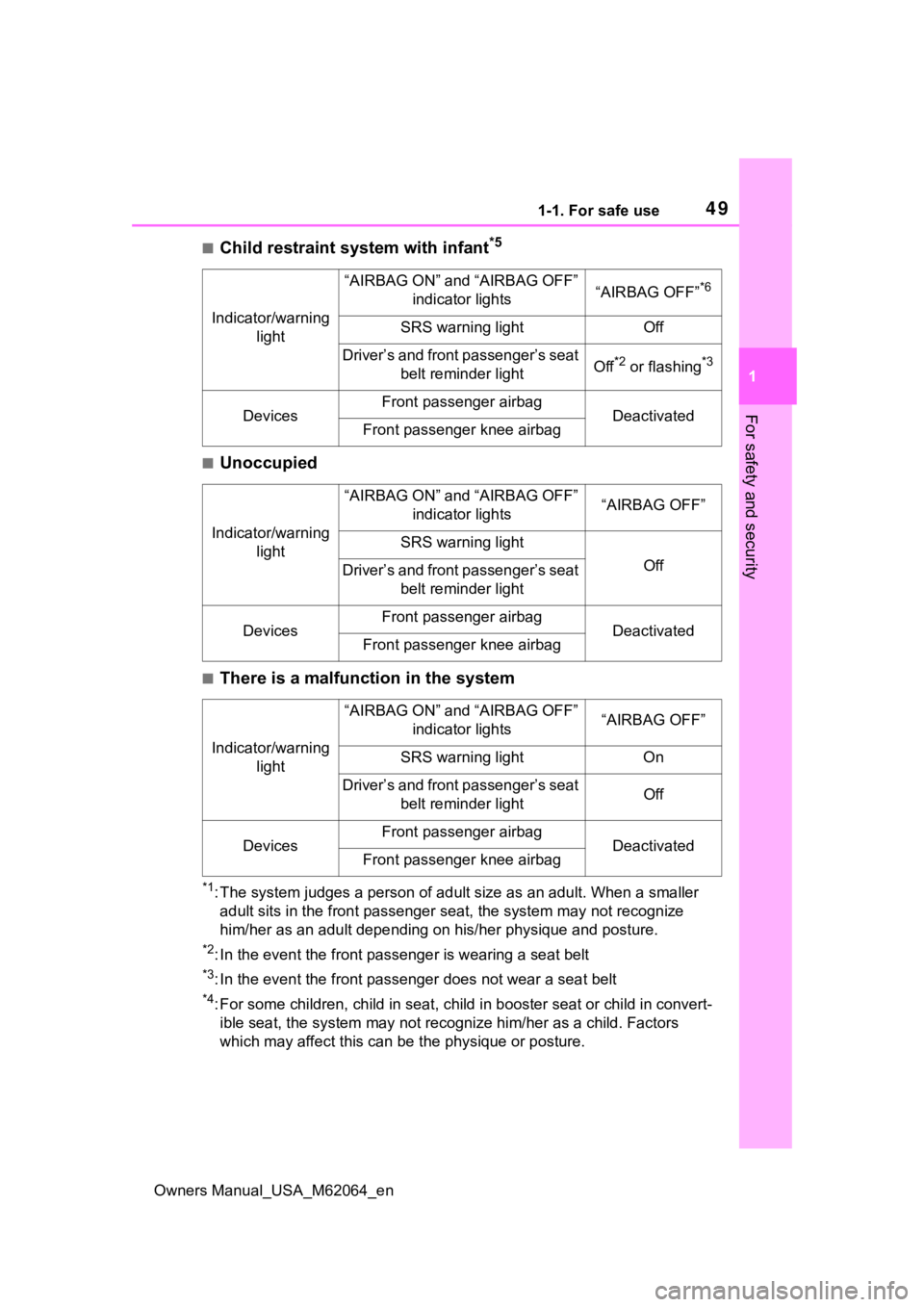
■Child restraint system with infant*5
■Unoccupied
■There is a malfunction in the system
*1: The system judges a person of adult size as an adult. When a smaller
adult sits in the front passenger seat, the system may not recognize
him/her as an adult depending on his/her physique and posture.
*2: In the event the front passenger is wearing a seat belt
*3: In the event the front passen ger does not wear a seat belt
*4: For some children, child in seat, child in booster seat or chi ld in convert-
ible seat, the system may not recognize him/her as a child. Fac tors
which may affect this can be the physique or posture.
Indicator/warning light
“AIRBAG ON” and “AIRBAG OFF” indicator lights“AIRBAG OFF”*6
SRS warning lightOff
Driver’s and front passenger’s seat belt reminder lightOff*2 or flashing*3
DevicesFront passenger airbagDeactivatedFront passenger knee airbag
Indicator/warning light
“AIRBAG ON” and “AIRBAG OFF” indicator lights“AIRBAG OFF”
SRS warning light
OffDriver’s and front passenger’s seat belt reminder light
DevicesFront passenger airbagDeactivatedFront passenger knee airbag
Indicator/warning light
“AIRBAG ON” and “AIRBAG OFF” indicator lights“AIRBAG OFF”
SRS warning lightOn
Driver’s and front passenger’s seat belt reminder lightOff
DevicesFront passenger airbagDeactivatedFront passenger knee airbag
Page 91 of 572
912-1. Fuel cell electric vehicle
Owners Manual_USA_M62064_en
2
Fuel cell systemMaintaining the Fuel cell System
Indicator to Eco area on the
multi-information display can
extend your driving range.
( P.103, 108)
Drive your vehicle smoothly.
Avoid abrupt acceleration and
deceleration.
Mild acceleration and decelera-
tion can help curb wasteful fuel
consumption.
If the brakes are operated gently
and in a timely manner, a
greater amount of electrical
energy can be regenerated
when slowing down.
Repeated acceleration and
deceleration, as well as long
waits at traffic lights, will lead to decreased fuel economy. Check
traffic reports before leaving and
avoid delays as much as possi-
ble. When driving in a con-
gested traffic situations, gently
release the brake pedal to allow
the vehicle to move forward
slightly while avoiding overuse
of the accelerator pedal. Doing
so can help control excessive
fuel consumption.
Similar to an electric vehicle, a
fuel cell electric vehicle uses the
most fuel in high output driving
such as driving on a steep uphill
or at high speeds. Moderate the
vehicle speed and maintain a
steady speed.
When using Eco drive mode, the
torque corresponding to the
accelerator pedal depression
amount can be generated more
smoothly than it is in normal
conditions. In addition, the oper-
ation of the air conditioning sys-
tem (heating/cooling) will be
minimized, improving the fuel
economy. (
P.320)
Use the air conditioning only
when necessary. Doing so
Fuel cell electric vehi-
cle driving tips
To maximize fuel economy
and range, pay attention to
the following:
Use of Fuel cell System
Indicator
Accelerator pedal/brake
pedal operation
When braking
Delays
Driving with high power
output
Using Eco drive mode
Air conditioning
Page 93 of 572
93
Owners Manual_USA_M62064_en
3
3
Vehicle status information and indicators
Vehicle status informa-tion and indicators
3-1. Instrument cluster
Warning lights and indica-tors ............................... 94
Gauges and meters (with 8- inch multi-information dis-
play) ............................. 99
Gauges and meters (With 12.3-inch multi-information
display) ...................... 102
Multi-information display .................................. 105
Head-up display .......... 114
Energy monitor/consump- tion screen/air purification
screen ....................... 119
Page 94 of 572
943-1. Instrument cluster
Owners Manual_USA_M62064_en
3-1.Instrument cluster
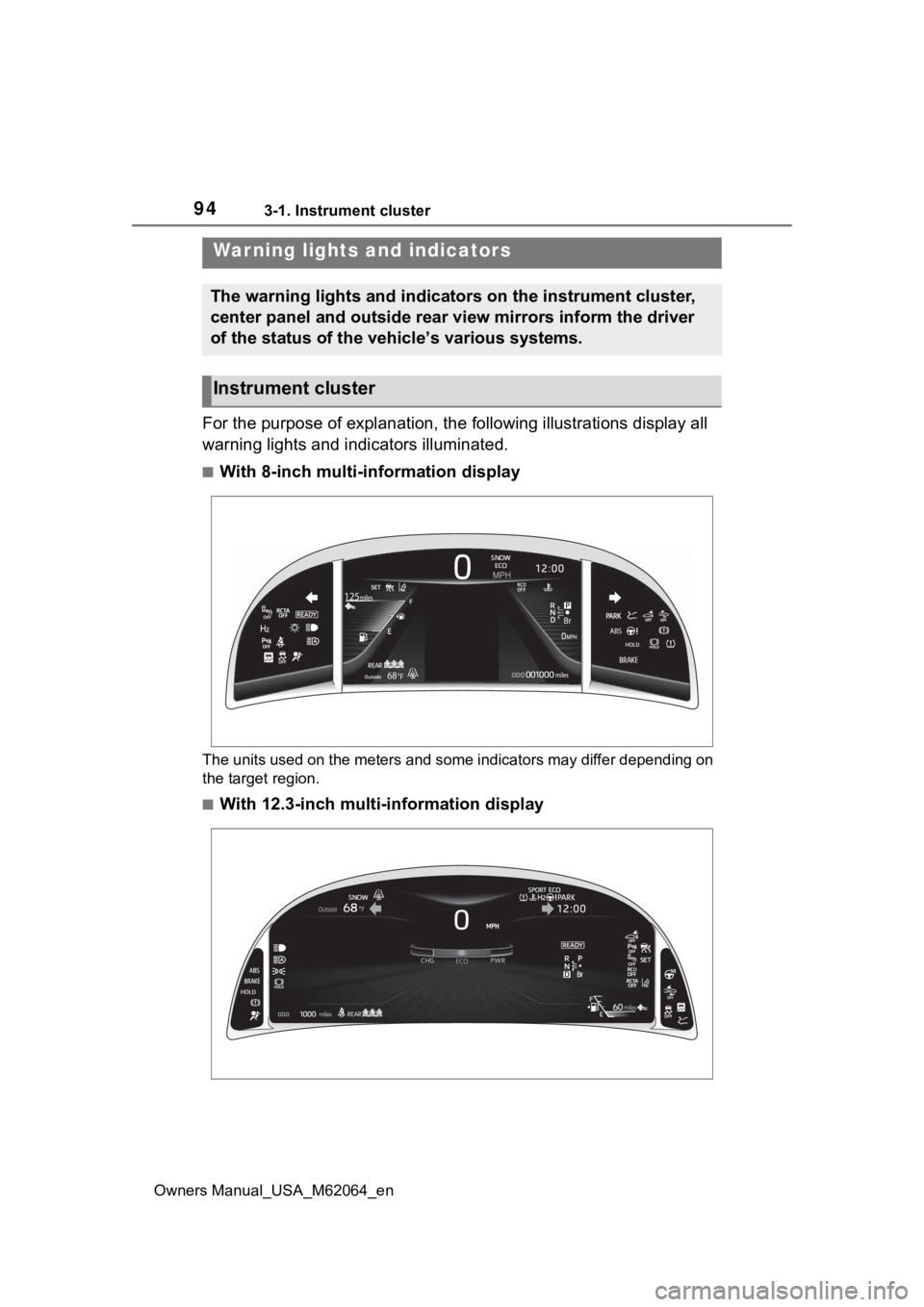
For the purpose of explanation, the following illustrations display all
warning lights and indicators illuminated.
■With 8-inch multi-information display
The units used on the meters and some indicators may differ dep ending on
the target region.
■With 12.3-inch multi-information display
War ning lights and indicators
The warning lights and indicators on the instrument cluster,
center panel and outside rear view mirrors inform the driver
of the status of the vehicle’s various systems.
Instrument cluster
Page 95 of 572
953-1. Instrument cluster
Owners Manual_USA_M62064_en
3
Vehicle status information and indicators
The units used on the meters and some indicators may differ dep ending on
the target region.
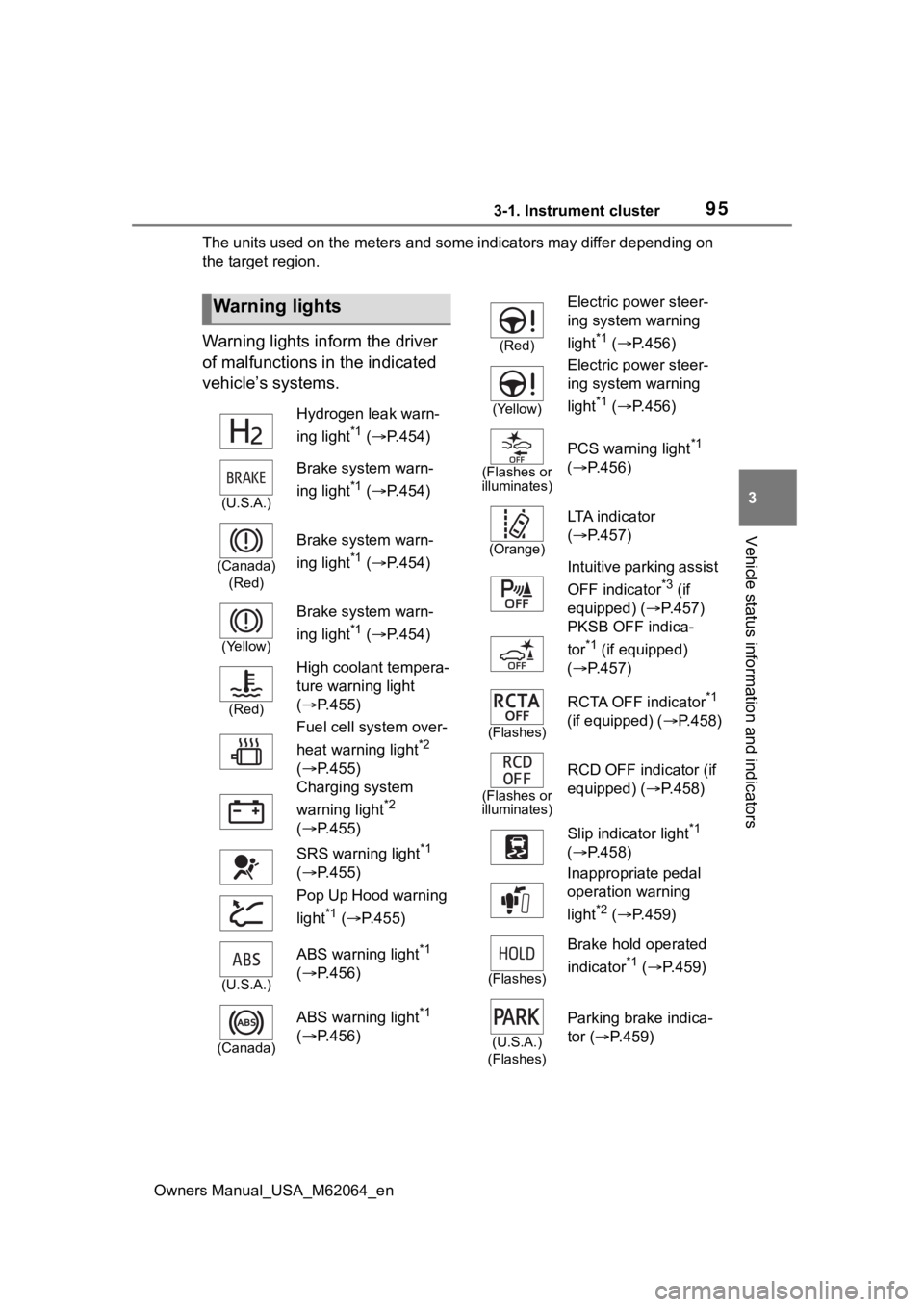
Warning lights inform the driver
of malfunctions in the indicated
vehicle’s systems.
Warning lights
Hydrogen leak warn-
ing light
*1 ( P.454)
(U.S.A.)
Brake system warn-
ing light
*1 ( P.454)
(Canada)
(Red)
Brake system warn-
ing light
*1 ( P.454)
(Yellow)
Brake system warn-
ing light
*1 ( P.454)
(Red)
High coolant tempera-
ture warning light
( P.455)
Fuel cell system over-
heat warning light
*2
( P.455)
Charging system
warning light
*2
( P.455)
SRS warning light
*1
( P.455)
Pop Up Hood warning
light
*1 ( P.455)
(U.S.A.)
ABS warning light*1
( P.456)
(Canada)
ABS warning light*1
( P.456)
(Red)
Electric power steer-
ing system warning
light
*1 ( P.456)
(Yellow)
Electric power steer-
ing system warning
light
*1 ( P.456)
(Flashes or
illuminates)
PCS warning light*1
( P.456)
(Orange)
LTA i n d i c a t o r
( P.457)
Intuitive parking assist
OFF indicator
*3 (if
equipped) ( P.457)
PKSB OFF indica-
tor
*1 (if equipped)
( P.457)
(Flashes)
RCTA OFF indicator*1
(if equipped) ( P.458)
(Flashes or
illuminates)
RCD OFF indicator (if
equipped) ( P.458)
Slip indicator light
*1
( P.458)
Inappropriate pedal
operation warning
light
*2 ( P.459)
(Flashes)
Brake hold operated
indicator
*1 ( P.459)
(U.S.A.)
(Flashes)
Parking brake indica-
tor ( P.459)
Page 96 of 572
963-1. Instrument cluster
Owners Manual_USA_M62064_en
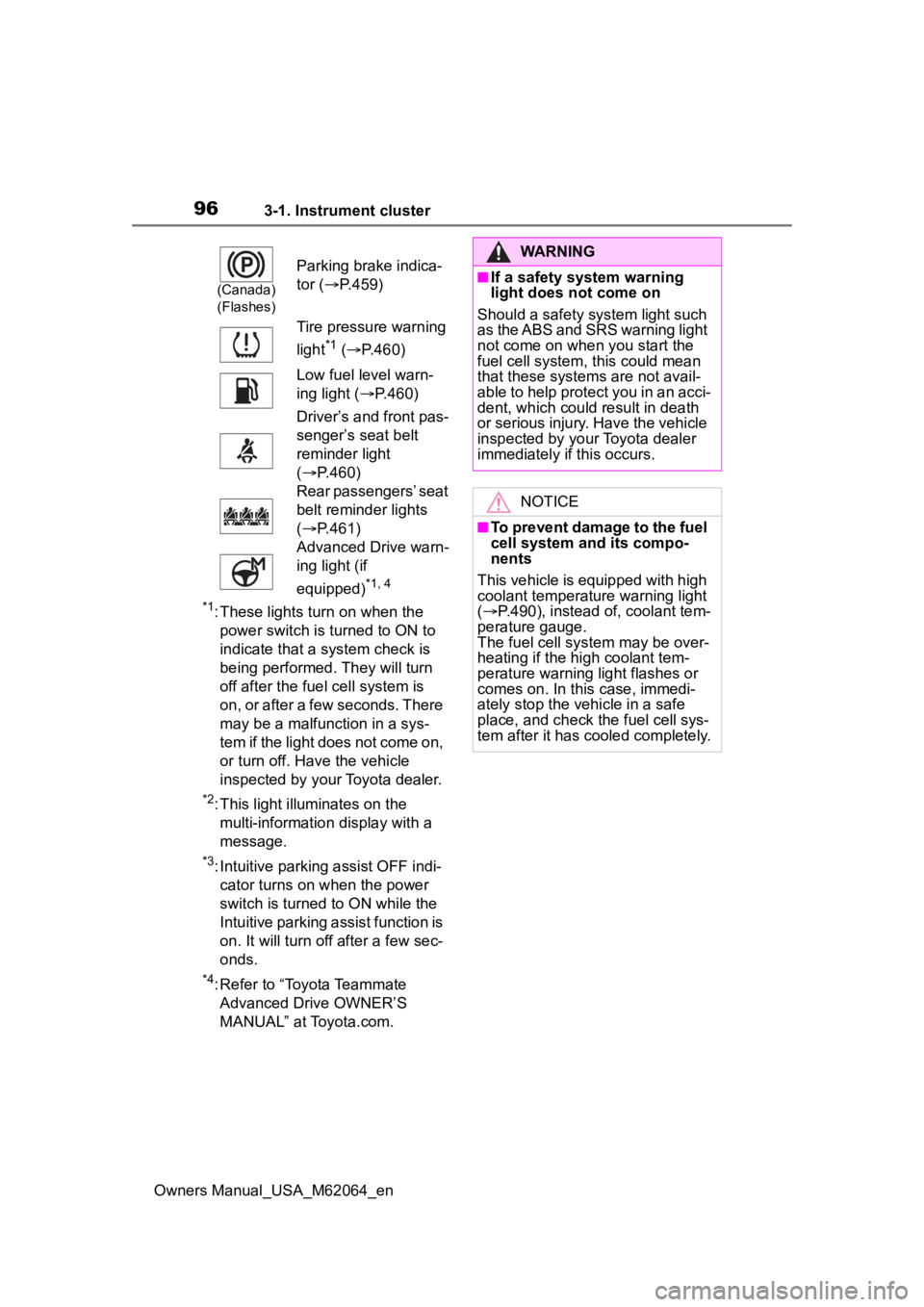
*1: These lights turn on when the power switch is turned to ON to
indicate that a system check is
being performed. They will turn
off after the fuel cell system is
on, or after a few seconds. There
may be a malfunction in a sys-
tem if the light does not come on,
or turn off. Have the vehicle
inspected by your Toyota dealer.
*2: This light illuminates on the multi-informatio n display with a
message.
*3: Intuitive parking assist OFF indi- cator turns on when the power
switch is turned to ON while the
Intuitive parking assist function is
on. It will turn off after a few sec-
onds.
*4: Refer to “Toyota Teammate Advanced Drive OWNER’S
MANUAL” at Toyota.com.
(Canada)
(Flashes)
Parking brake indica-
tor ( P.459)
Tire pressure warning
light
*1 ( P.460)
Low fuel level warn-
ing light ( P.460)
Driver’s and front pas-
senger’s seat belt
reminder light
( P.460)
Rear passengers’ seat
belt reminder lights
( P.461)
Advanced Drive warn-
ing light (if
equipped)
*1, 4
WARNING
■If a safety system warning
light does not come on
Should a safety system light such
as the ABS and SRS warning light
not come on when you start the
fuel cell system, this could mean
that these system s are not avail-
able to help protect you in an acci-
dent, which could result in death
or serious injury. Have the vehicle
inspected by you r Toyota dealer
immediately if this occurs.
NOTICE
■To prevent damage to the fuel
cell system and its compo-
nents
This vehicle is equipped with high
coolant temperature warning light
( P.490), instead of, coolant tem-
perature gauge.
The fuel cell sys tem may be over-
heating if the high coolant tem-
perature warning light flashes or
comes on. In this case, immedi-
ately stop the vehicle in a safe
place, and check the fuel cell sys-
tem after it has cooled completely.
Page 98 of 572
983-1. Instrument cluster
Owners Manual_USA_M62064_en
*1: Indicates the coolant tempera-ture is cool.
*2: This light illuminates on the multi-informatio n display with a
message.
*3: Depending on the operating con- ditions of the system, the color
and state (illuminated/blinking) of
the indicator change.
*4: The light comes on when the system is turned off.
*5: Intuitive parking assist OFF indi-cator turns on when the power
switch is turned to ON while the
Intuitive parking assist function is
on. It will turn off a fter a few sec-
onds.
*6: These lights turn on when the power switch is turned to ON to
indicate that a system check is
being performed. They will turn
off after the fuel cell system is
on, or after a few seconds. There
may be a malfunction in a sys-
tem if the lights do not turn on, or
turn off. Have the vehicle
inspected by your Toyota dealer.
*7: This light illumi nates on the out-
side rear view mirrors.
*8: This light illumi nates on the cen-
ter panel.
*9: When the outside temperature is approximately 37°F (3°C) or
lower, the indicator will flash for
approximately 10 seconds, then
stay on.
*10: Refer to “Toyota Teammate Advanced Drive OWNER’S
MANUAL” at Toyota.com.
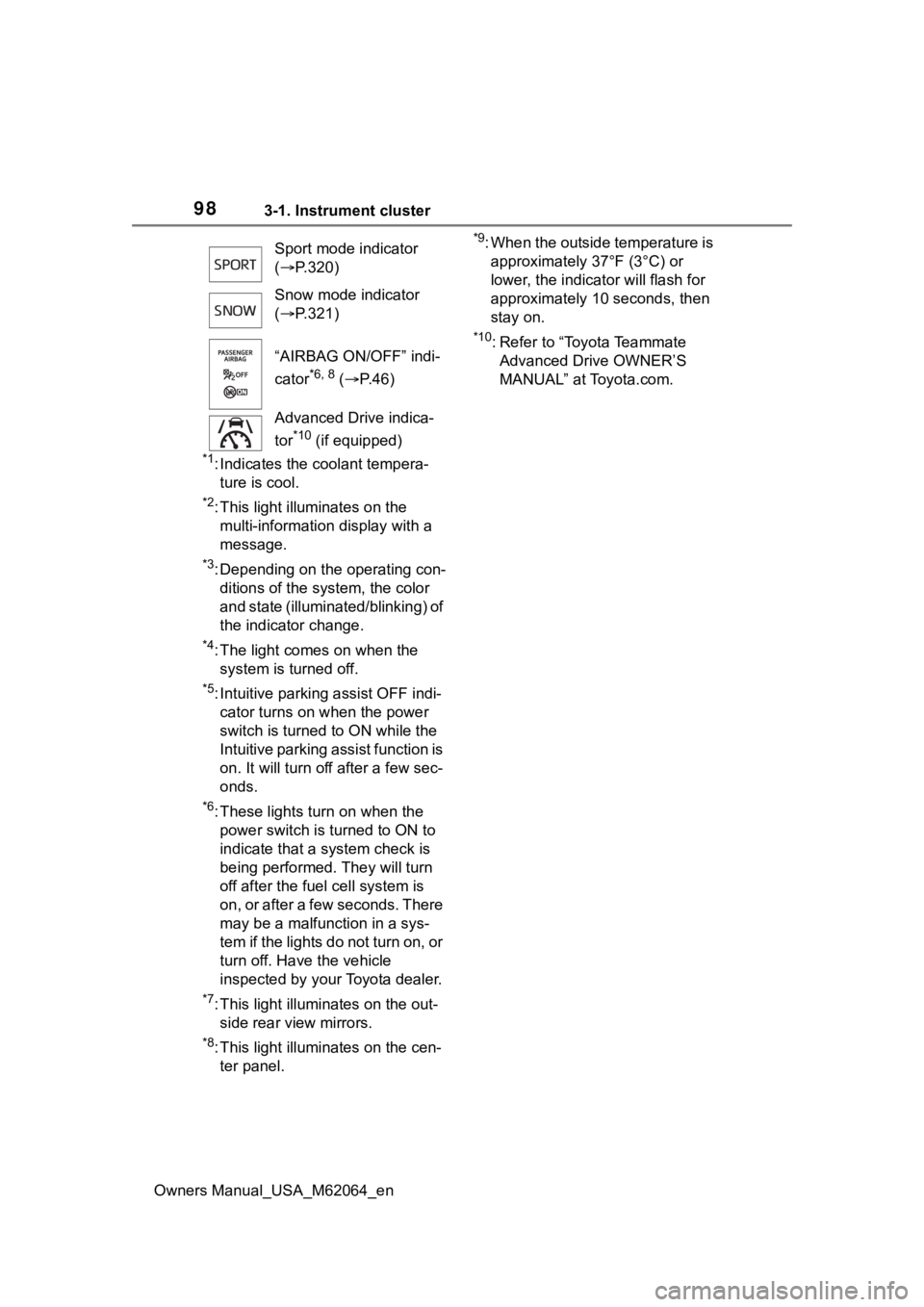
Sport mode indicator
(
P.320)
Snow mode indicator
( P.321)
“AIRBAG ON/OFF” indi-
cator
*6, 8 ( P. 4 6 )
Advanced Drive indica-
tor
*10 (if equipped)
Page 100 of 572
1003-1. Instrument cluster
Owners Manual_USA_M62064_en
■The meters and display illumi-
nate when
The power swit ch is in ON.
■When changing driving mode
Background color of the multi-infor-
mation display is changed following
the selected driving mode. ( P.320,
321)
■Clock settings screen
If “Clock :00” is displayed when
is selected on the multi-information
display, the system may be malfunc-
tioning. Have the vehicle inspected
by your Toyota dealer.
■Outside temperature display
●In the following si tuations, the cor-
rect outside tempe rature may not
be displayed, or the display may
take longer than normal to
change.
• When stopped, or driving at low speeds (less than 12 mph [20
km/h])
• When the outside temperature has changed su ddenly (at the
entrance/exit of a garage, tunnel,
etc.)
●When “--” or “E” is displayed, the
system may be malfunctioning.
Take your vehicle to your Toyota
dealer.
●Displays the outside temperature
within the range of -40°F (-40°C)
to 122°F (50°C).
●When the outside temperature is
approximately 37°F (3°C) or
lower, the indicator will flash
for approximately 10 seconds,
then stay on.
■Liquid crystal display
P. 1 0 6
■Customization
Settings (e. g. meter display) can be
changed on screen of the multi- information display. (
P.512)
■Display items
Odometer
Displays the total distance the vehi-
cle has been driven.
Trip meter A/Trip meter B
Displays the distance the vehicle
has been driven since the meter
was last reset. Trip meters A and B
can be used to record and display
different distances independently.
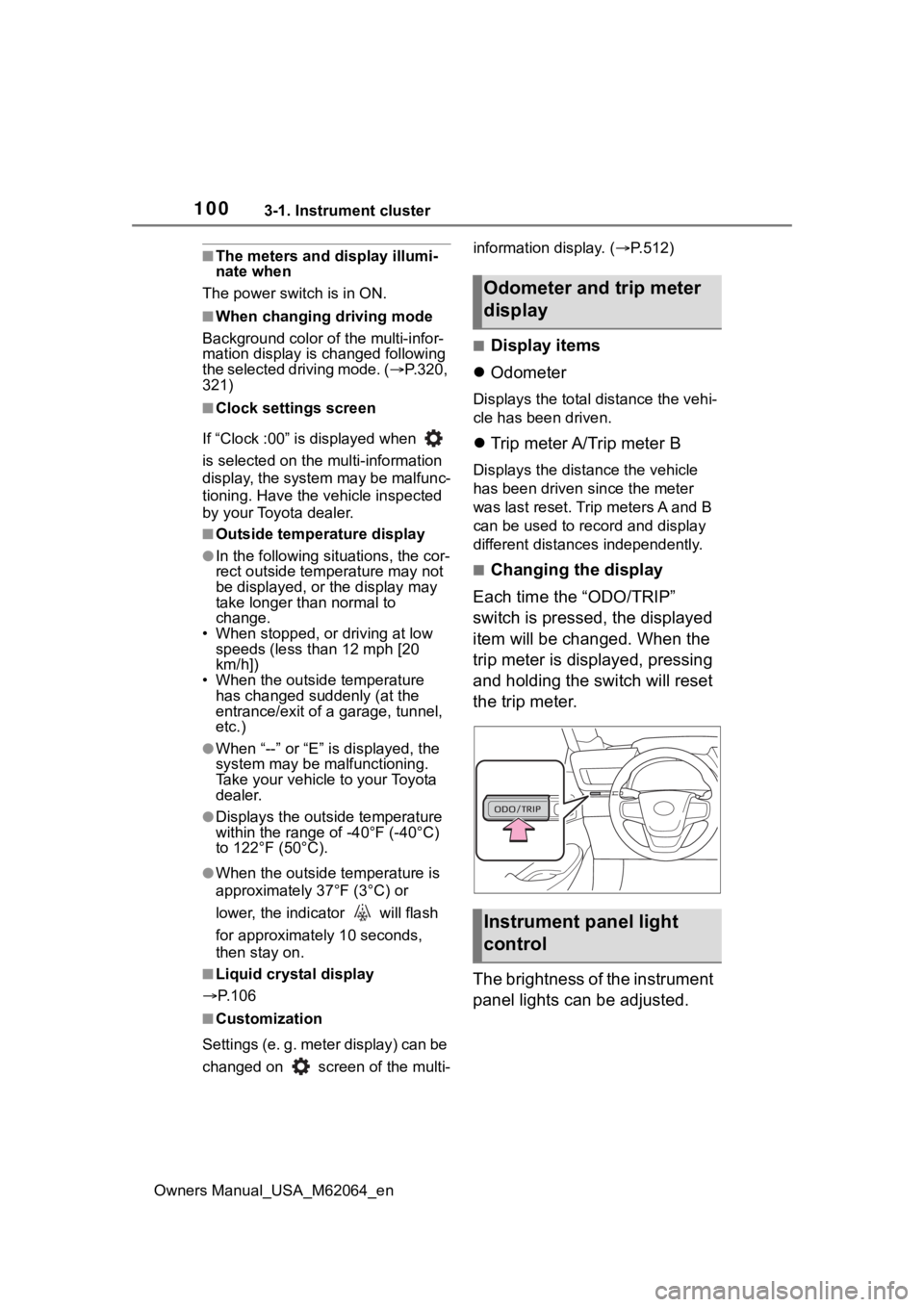
■Changing the display
Each time the “ODO/TRIP”
switch is pressed, the displayed
item will be changed. When the
trip meter is displayed, pressing
and holding the switch will reset
the trip meter.
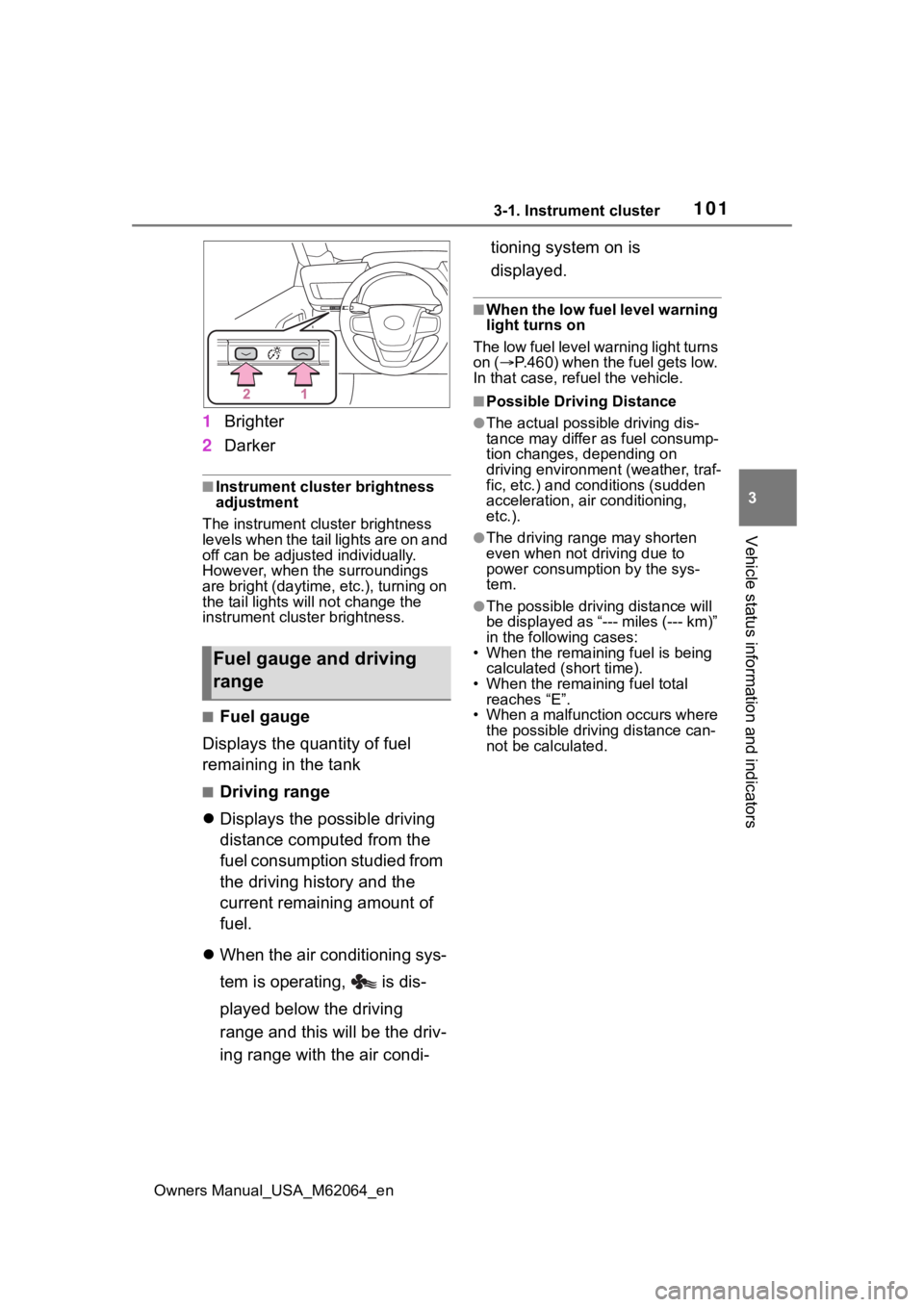
The brightness of the instrument
panel lights can be adjusted.
Odometer and trip meter
display
Instrument panel light
control
Page 101 of 572
1013-1. Instrument cluster
Owners Manual_USA_M62064_en
3
Vehicle status information and indicators
1 Brighter
2 Darker
■Instrument cluster brightness
adjustment
The instrument cluster brightness
levels when the tail lights are on and
off can be adjusted individually.
However, when the surroundings
are bright (daytime, etc.), turning on
the tail lights will not chan ge the
instrument cluster brightness.
■Fuel gauge
Displays the quantity of fuel
remaining in the tank
■Driving range
Displays the possible driving
distance computed from the
fuel consumption studied from
the driving history and the
current remaining amount of
fuel.
When the air conditioning sys-
tem is operating, is dis-
played below the driving
range and this will be the driv-
ing range with the air condi- tioning system on is
displayed.
■When the low fuel level warning
light turns on
The low fuel level warning light turns
on ( P.460) when the fuel gets low.
In that case, refuel the vehicle.
■Possible Drivi ng Distance
●The actual possible driving dis-
tance may differ as fuel consump-
tion changes, depending on
driving environment (weather, traf-
fic, etc.) and conditions (sudden
acceleration, air conditioning,
etc.).
●The driving range may shorten
even when not driving due to
power consumption by the sys-
tem.
●The possible driving distance will
be displayed as “--- miles (--- km)”
in the following cases:
• When the remaining fuel is being calculated (short time).
• When the remaining fuel total
reaches “E”.
• When a malfunction occurs where the possible driving distance can-
not be calculated.
Fuel gauge and driving
range
Page 104 of 572
1043-1. Instrument cluster
Owners Manual_USA_M62064_en
■Liquid crystal display
P. 1 0 6
■Customization
Settings (e. g. meter display) can be
changed on screen of the multi-
information display. ( P.512)
■Display items
Odometer
Displays the total distance the vehi-
cle has been driven.
Trip meter A/Trip meter B
Displays the distan ce the vehicle
has been driven si nce the meter
was last reset. Trip meters A and B
can be used to record and display
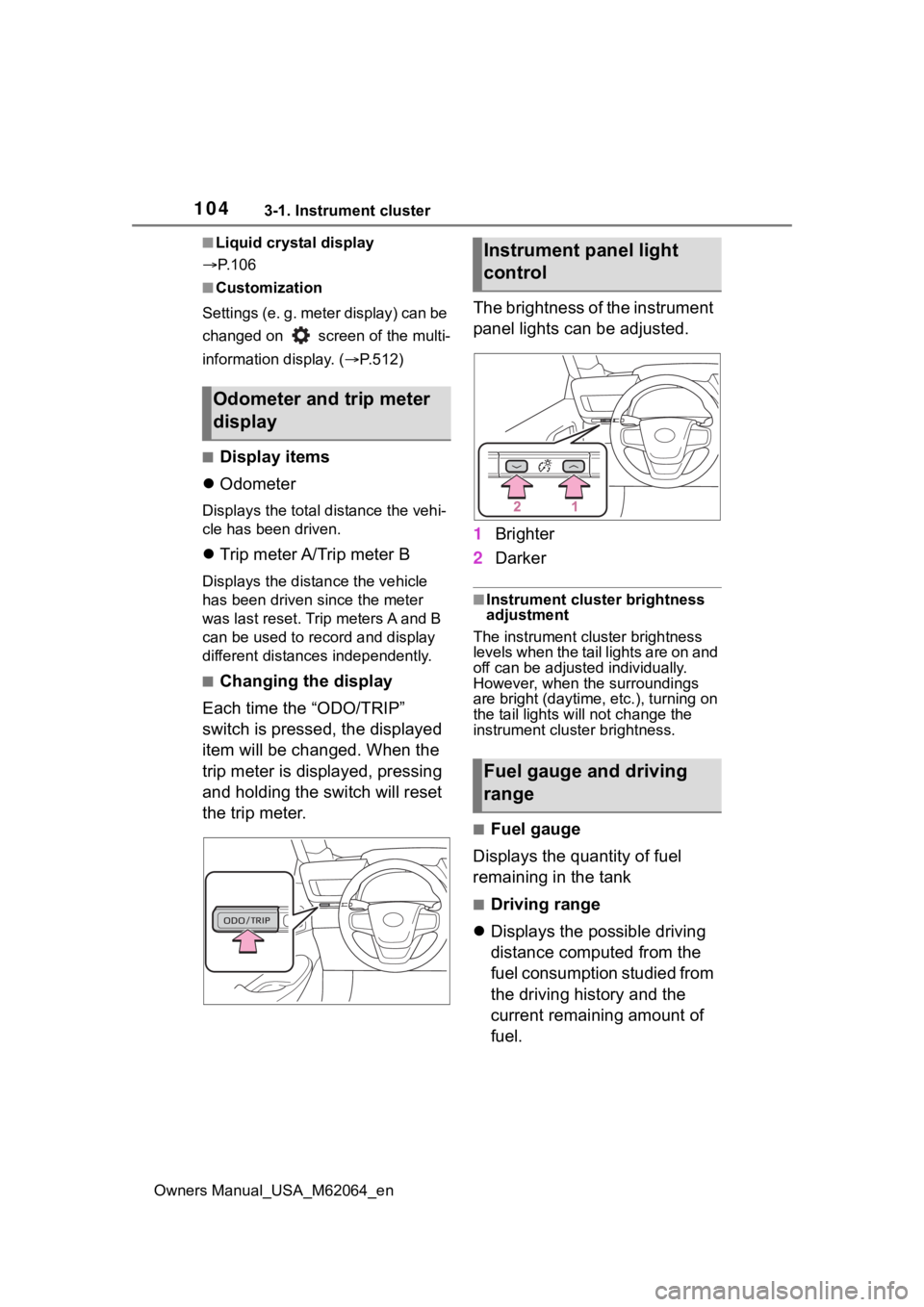
different distances independently.
■Changing the display
Each time the “ODO/TRIP”
switch is pressed, the displayed
item will be changed. When the
trip meter is displayed, pressing
and holding the switch will reset
the trip meter. The brightness of the instrument
panel lights can be adjusted.
1
Brighter
2 Darker
■Instrument cluster brightness
adjustment
The instrument cluster brightness
levels when the tail lights are on and
off can be adjusted individually.
However, when the surroundings
are bright (daytime, etc.), turning on
the tail lights will not change the
instrument cluster brightness.
■Fuel gauge
Displays the quantity of fuel
remaining in the tank
■Driving range
Displays the possible driving
distance computed from the
fuel consumption studied from
the driving history and the
current remaining amount of
fuel.
Odometer and trip meter
display
Instrument panel light
control
Fuel gauge and driving
range