reset TOYOTA MIRAI 2023 User Guide
[x] Cancel search | Manufacturer: TOYOTA, Model Year: 2023, Model line: MIRAI, Model: TOYOTA MIRAI 2023Pages: 572, PDF Size: 17.71 MB
Page 143 of 572
1434-3. Adjusting the seats
Owners Manual_USA_M62064_en
4
Before driving
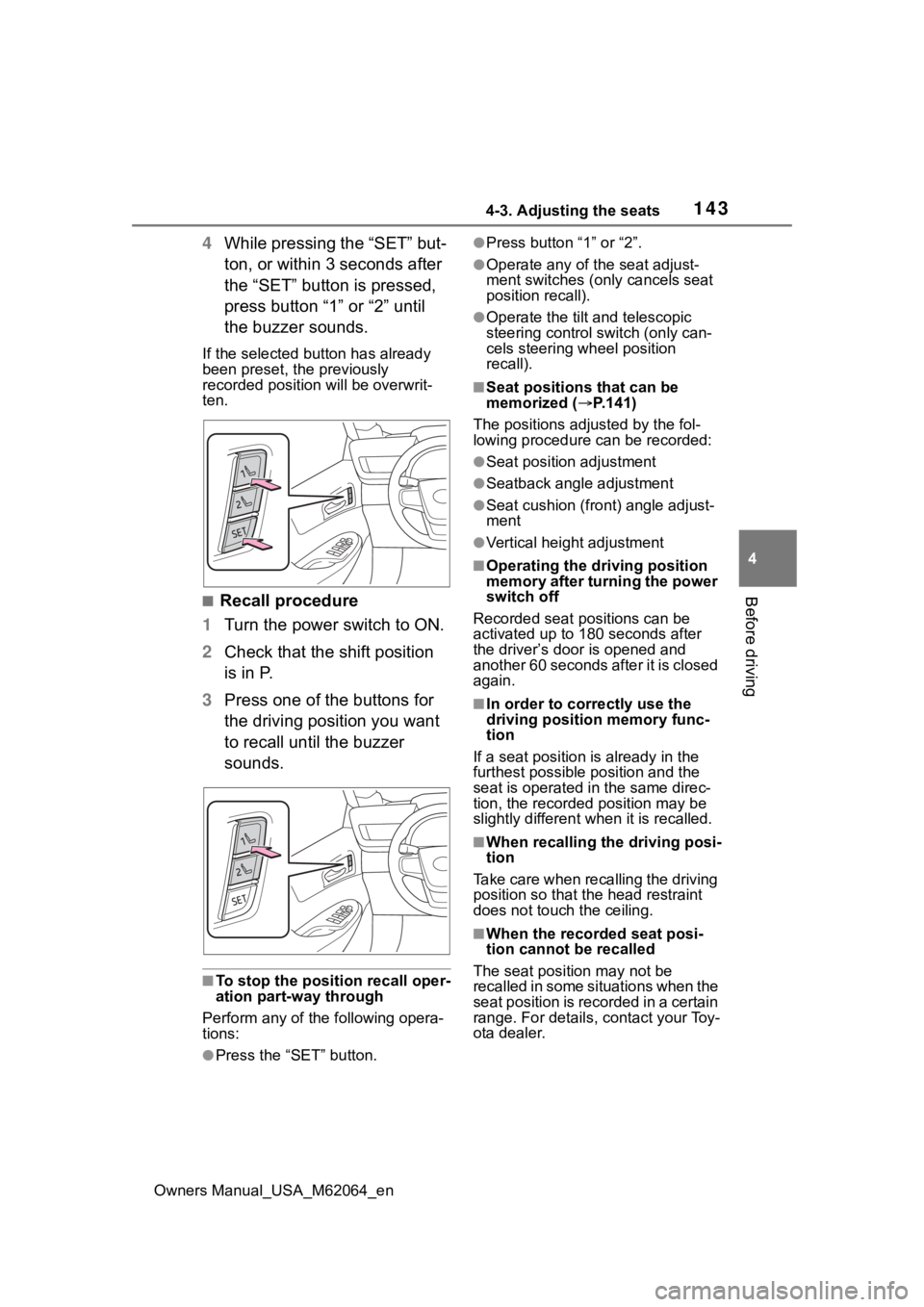
4 While pressing the “SET” but-
ton, or within 3 seconds after
the “SET” button is pressed,
press button “1” or “2” until
the buzzer sounds.
If the selected button has already
been preset, the previously
recorded position will be overwrit-
ten.
■Recall procedure
1 Turn the power switch to ON.
2 Check that the shift position
is in P.
3 Press one of the buttons for
the driving position you want
to recall until the buzzer
sounds.
■To stop the position recall oper-
ation part-way through
Perform any of the following opera-
tions:
●Press the “SET” button.
●Press button “1” or “2”.
●Operate any of t he seat adjust-
ment switches (only cancels seat
position recall).
●Operate the tilt and telescopic
steering control switch (only can-
cels steering wheel position
recall).
■Seat positions that can be
memorized ( P.141)
The positions adjusted by the fol-
lowing procedure can be recorded:
●Seat position adjustment
●Seatback angle adjustment
●Seat cushion (front) angle adjust-
ment
●Vertical height adjustment
■Operating the driving position
memory after turning the power
switch off
Recorded seat positions can be
activated up to 180 seconds after
the driver’s door is opened and
another 60 seconds after it is closed
again.
■In order to corre ctly use the
driving position memory func-
tion
If a seat position is already in the
furthest possible position and the
seat is operated in the same direc-
tion, the recorded position may be
slightly different w hen it is recalled.
■When recalling the driving posi-
tion
Take care when recalling the driving
position so that the head restraint
does not touch the ceiling.
■When the recorded seat posi-
tion cannot be recalled
The seat positi on may not be
recalled in some situations when the
seat position is recorded in a certain
range. For details, contact your Toy-
ota dealer.
Page 183 of 572
1835-2. Driving procedures
Owners Manual_USA_M62064_en
5
Driving
( P. 7 7 )
■Automatic fuel cell system shut
off feature
●The vehicle is equipped with a
feature that automatically shuts off
the fuel cell system when the shift
position is in P with the fuel cell
system operating for an extended
period.
●The fuel cell system will automati-
cally shut off after approximately 1
hour if it has been left running
while the shift position is in P.
●The timer for the automatic fuel
cell system shut off feature will
reset if the brake pedal is
depressed or if the shift position is
in a position other than P.
●After the vehicle is parked, if the
door is locked with the door lock
switch ( P.130) from the inside or
the mechanical key from the out-
side, the automat ic fuel cell sys-
tem shut off feature will be
disabled. The tim er for the auto-
matic fuel cell system shut off fea-
ture will be re- enabled if the
driver’s door is opened.
■When the shift c ontrol system
malfunctions
When attempting to turn the power
switch off while there is a malfunc-
tion in the shift control system, the
power switch mode may change to
ACC. In this cas e, ACC may be
turned off by applying the parking
brake and pressing the power
switch again.
If there is a malfunction in the sys-
tem, have the vehicle inspected by
your Toyota dealer immediately.
■Automatic P position selection
function
P. 1 8 7
■Water release (H2O switch)
P. 1 9 6
Modes can be changed by
pressing the power switch with
the brake pedal released. (The
mode changes each time the
switch is pressed.)
WARNING
■Stopping the fuel cell system
in an emergency
●If you want to stop the fuel cell
system in an emergency while
driving the vehicle, press and
hold the power s witch for more
than 2 seconds, or press it
briefly 3 times or more in suc-
cession. ( P.446)
However, do not touch the
power switch while driving
except in an emergency. Turn-
ing the fuel cell system off while
driving will not cause loss of
steering or braking control, how-
ever, power assist to the steer-
ing will be lost. This will make it
more difficult to steer smoothly,
so you should pull over and stop
the vehicle as soon as it is safe
to do so.
●If the power switch is operated
while the vehicle is running, a
warning message will be shown
on the multi-information display
and a buzzer sounds.
●When restarting the fuel cell
system after an emergency
shutdown, press the power
switch.
Changing power switch
modes
Page 421 of 572
4217-3. Do-it-yourself maintenance
Owners Manual_USA_M62064_en
7
Maintenance and care
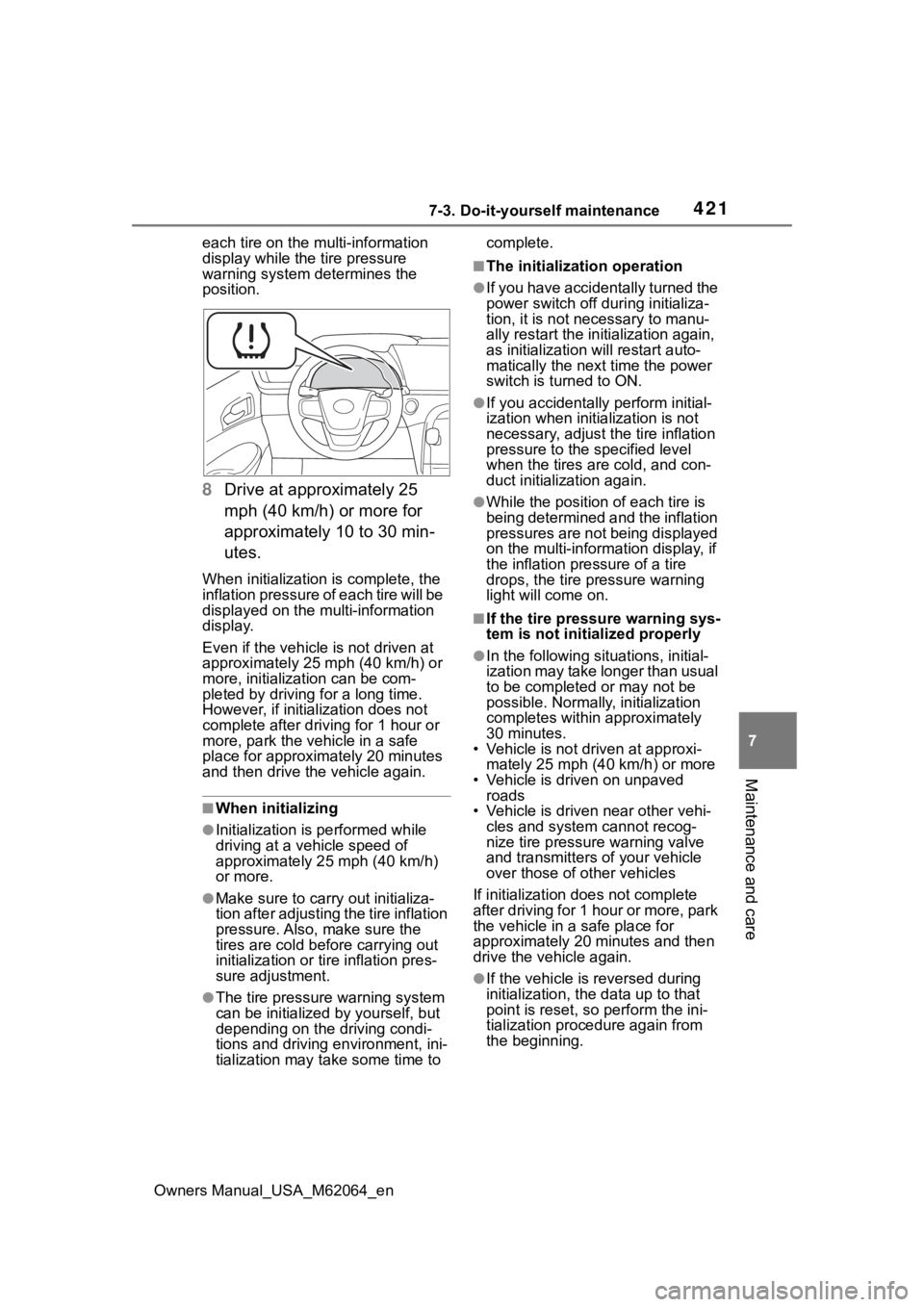
each tire on the multi-information
display while the tire pressure
warning system determines the
position.
8 Drive at approximately 25
mph (40 km/h) or more for
approximately 10 to 30 min-
utes.
When initialization is complete, the
inflation pressure of each tire will be
displayed on the multi-information
display.
Even if the vehicle is not driven at
approximately 25 mph (40 km/h) or
more, initializat ion can be com-
pleted by driving for a long time.
However, if initia lization does not
complete after driving for 1 hour or
more, park the vehicle in a safe
place for approximately 20 minutes
and then drive th e vehicle again.
■When initializing
●Initialization is performed while
driving at a vehicle speed of
approximately 25 mph (40 km/h)
or more.
●Make sure to carry out initializa-
tion after adjusting the tire inflation
pressure. Also, make sure the
tires are cold before carrying out
initialization or tir e inflation pres-
sure adjustment.
●The tire pressure warning system
can be initialized by yourself, but
depending on the driving condi-
tions and driving environment, ini-
tialization may take some time to complete.
■The initialization operation
●If you have accidentally turned the
power switch off during initializa-
tion, it is not necessary to manu-
ally restart the initialization again,
as initialization will restart auto-
matically the next time the power
switch is turned to ON.
●If you accidentally perform initial-
ization when initia
lization is not
necessary, adjust the tire inflation
pressure to the s pecified level
when the tires are cold, and con-
duct initialization again.
●While the position of each tire is
being determined and the inflation
pressures are not being displayed
on the multi-information display, if
the inflation pressure of a tire
drops, the tire pressure warning
light will come on.
■If the tire pressure warning sys-
tem is not initia lized properly
●In the following situations, initial-
ization may take longer than usual
to be completed or may not be
possible. Normally, initialization
completes within approximately
30 minutes.
• Vehicle is not dr iven at approxi-
mately 25 mph (40 km/h) or more
• Vehicle is driven on unpaved roads
• Vehicle is driven near other vehi-
cles and system cannot recog-
nize tire pressure warning valve
and transmitters o f your vehicle
over those of other vehicles
If initialization does not complete
after driving for 1 hour or more, park
the vehicle in a safe place for
approximately 20 minutes and then
drive the vehicle again.
●If the vehicle is reversed during
initialization, the data up to that
point is reset, so p erform the ini-
tialization procedure again from
the beginning.
Page 423 of 572
4237-3. Do-it-yourself maintenance
Owners Manual_USA_M62064_en
7
Maintenance and care
7 Drive at 25 mph (40 km/h) or
more for approximately 10 to
30 minutes.
Registration is complete when the
tire pressure warning light turns off
and the inflation pressure of each
tire is displayed on the multi-infor-
mation display.
Even if the vehicle is not driven at
approximately 25 mph (40 km/h) or
more, registration can be com-
pleted by driving for a long time.
However, if regist ration does not
complete after driving for 1 hour or
more, perform the procedure again
from the beginning.
8 Initialize the tire pressure
warning system. ( P.420)
■When registering ID codes
●ID code registration is performed
while driving at a vehicle speed of
approximately 25 mph (40 km/h)
or more.
●Before performin g ID code regis-
tration, make sure that no wheels
with tire pressur e warning valve
and transmitters installed are near
the vehicle.
●Make sure to initialize the tire
pressure warning system after
registering the ID codes. If the
system is initializ ed before regis-
tering the ID codes, the initialized
values will be invalid.
●ID codes can be registered by
yourself, but depending on the
driving conditions and driving
environment, registration may
take some time to complete.
■Canceling ID code registration
●To cancel ID code registration
after it has been started, turn the
power switch off before driving the
vehicle.
If the vehicle is driven after ID
code registration is started, to
cancel registration, perform the ID code registration start procedure
again and turn the power switch
off before driving.
●If ID code registration has been
canceled, the tire pressure warn-
ing light will blin
k for approxi-
mately 1 minute when the power
switch is turned to ON and then
illuminate. The tire pressure warn-
ing system will be operational
when the tire pressure warning
light turns off.
●If the warning lig ht does not turn
off even after several minutes
have elapsed, ID code registration
may not have been canceled cor-
rectly. To cancel registration, per-
form the ID code registration start
procedure again and then turn the
power switch off before driving.
■If ID codes are not registered
properly
●In the following situations, ID code
registration may take longer than
usual to be completed or may not
be possible. Normally, registration
completes within approximately
30 minutes.
• Vehicle is not parked for approxi- mately 20 minutes or more before
driving
• Vehicle is not dr iven at approxi-
mately 25 mph (40 km/h) or more
• Vehicle is driven on unpaved
roads
• Vehicle is driven near other vehi-
cles and system cannot recog-
nize tire pressure warning valves
and transmitters o f your vehicle
over those of other vehicles
• Wheel with tire p ressure warning
valve and transmitter installed is
inside or near the vehicle
If registration does not complete
after driving for 1 hour or more, per-
form the ID code registration proce-
dure again from the beginning.
●If the vehicle is reversed during
registration, the data up to that
point is reset, so p erform the reg-
istration procedure again from the
Page 514 of 572
5149-2. Customization
Owners Manual_USA_M62064_en
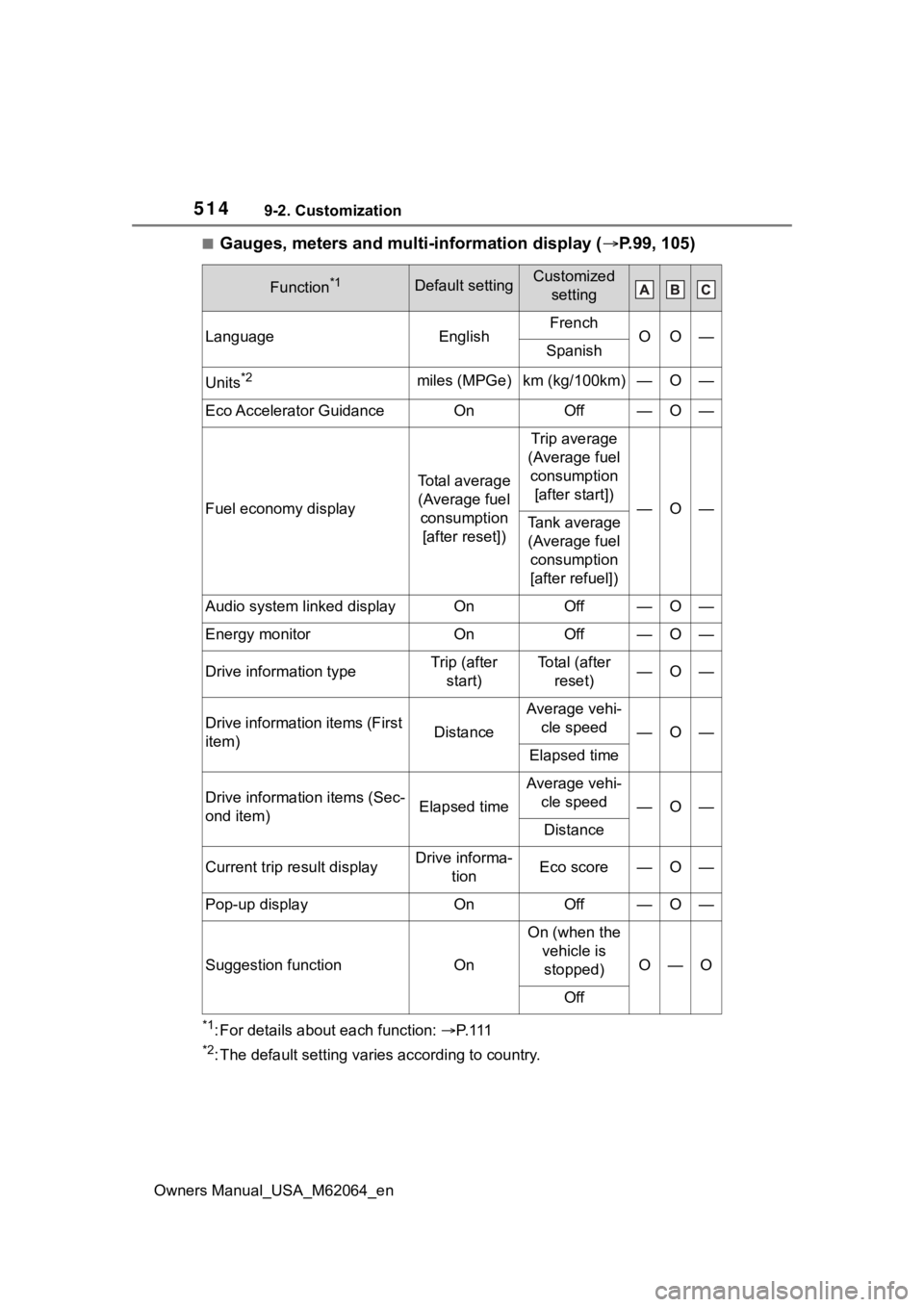
■Gauges, meters and multi-information display (P.99, 105)
*1: For details about each function: P. 1 1 1
*2: The default setting varies according to country.
Function*1Default settingCustomized
setting
LanguageEnglishFrenchOO—Spanish
Units*2miles (MPGe)km (kg/100km)—O—
Eco Accelerator GuidanceOnOff—O—
Fuel economy display
Total average (Average fuel consumption [after reset])
Trip average
(Average fuel consumption [after start])
—O—Tank average (Average fuel consumption
[after refuel])
Audio system linked displayOnOff—O—
Energy monitorOnOff—O—
Drive information typeTrip (after start)To t a l ( a f t e r reset)—O—
Drive information items (First
item)Distance
Average vehi-cle speed
—O—
Elapsed time
Drive information items (Sec-
ond item)Elapsed time
Average vehi-cle speed
—O—
Distance
Current trip result displayDrive informa- tionEco score—O—
Pop-up displayOnOff—O—
Suggestion functionOn
On (when the vehicle is stopped)
O—O
Off
Page 554 of 572

554Alphabetical Index
Owners Manual_USA_M62064_en
Speedometer .................... 99, 102
Steering wheel Adjustment ........................... 147
Heated steering wheel ......... 351
Meter control switches ......... 106
Power easy access system .. 142
Steering wheel position memory........................................... 142
Stop lights Replacing light bulbs ............ 443
Storage features ..................... 358
Storage precautions .............. 358
Stuck If the vehicle becomes stuck 494
Suggestion function............... 112
Sun visors ............................... 379
Sunshade ................................ 363
Switch Rear automatic air conditioning system ........................ 348, 349
Switches Activating the Automatic High Beam .................................. 200
ASC switch ........................... 196
Automatic High Beam .......... 200
Brake Hold switch ................ 194
Display change button.. 100, 104
Door lock switches ............... 130
Driving mode select switch... 320
Driving position memory switches ............................. 142
Dynamic radar cruise control with full-speed range switch245
Electronic sunshade switch .. 363
Emergency flashers switch .. 446
Garage door opener switches ........................................... 382
H
2O switch ........................... 196
Heated steering wheel switch ........................................... 351
HUD (Head-up display) switch ........................................... 116 Light switches .......................198
LTA (Lane Tracing Assist) switch
...........................................236
Meter control switches..........106
Outside rear v iew mirror
switches..............................160
Parking brake switch ............191
Power door lock switch.........130
Power switch ........................180
Power window switches .......162
Rear sunshade switch ..........381
Rear window and outside rear view mirror defoggers switch...................................335, 342
Seat heater switches ............351
Seat ventilator switches........351
Snow mode switch ...............321
“SOS” button ..........................65
Tilt and telescopic steering con- trol switch ...........................147
Tire pressure warning reset switch .................................420
Trunk opener main switch ....135
Trunk opener switch .............133
Vehicle-to-vehicle distance switch .................................245
VSC OFF switch ...................323
Window lock switch ..............164
Windshield defogger switch 334, 342
Windshield wiper and washer switch .................................204
Windshield wiper de-icer switch ...................................337, 347
T
Tail lights Light switch...........................198
Replacing light bulbs ............443
Tailpipe ......................................84
The Secondary Collision Brake ...............................................323