tow TOYOTA MIRAI 2023 User Guide
[x] Cancel search | Manufacturer: TOYOTA, Model Year: 2023, Model line: MIRAI, Model: TOYOTA MIRAI 2023Pages: 572, PDF Size: 17.71 MB
Page 147 of 572
1474-4. Adjusting the steering wheel and mirrors
Owners Manual_USA_M62064_en
4
Before driving
4-4.Adjusting the steering wheel and mirrors
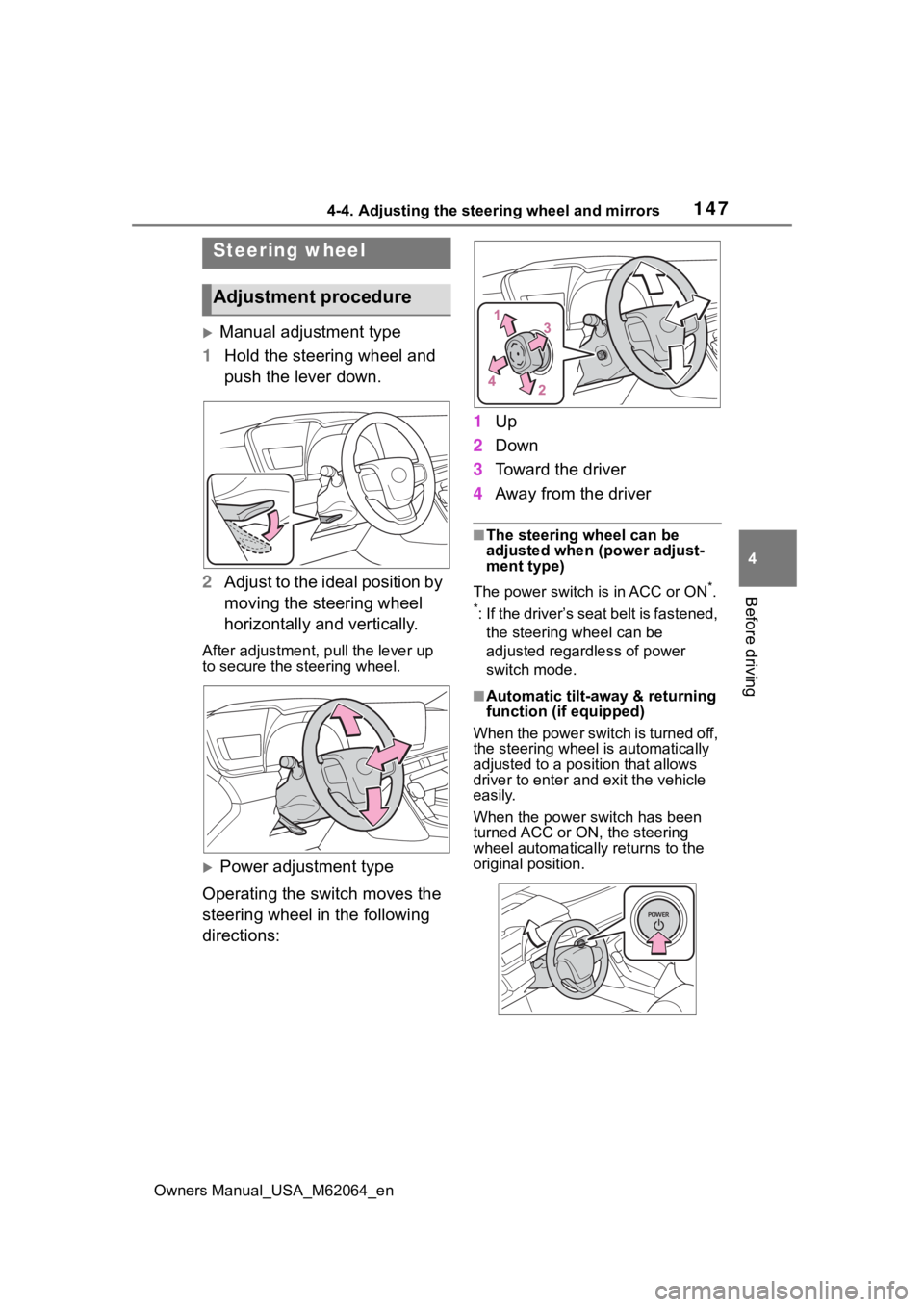
Manual adjustment type
1 Hold the steering wheel and
push the lever down.
2 Adjust to the ideal position by
moving the steering wheel
horizontally and vertically.
After adjustment, pull the lever up
to secure the steering wheel.
Power adjustment type
Operating the switch moves the
steering wheel in the following
directions: 1
Up
2 Down
3 Toward the driver
4 Away from the driver
■The steering wheel can be
adjusted when (power adjust-
ment type)
The power switch is in ACC or ON
*.
*: If the driver’s seat belt is fastened, the steering wheel can be
adjusted regardless of power
switch mode.
■Automatic tilt-away & returning
function (if equipped)
When the power switch is turned off,
the steering wheel is automatically
adjusted to a posit ion that allows
driver to enter and exit the vehicle
easily.
When the power switch has been
turned ACC or ON, the steering
wheel automatically returns to the
original position.
Steering wheel
Adjustment procedure
Page 157 of 572
1574-4. Adjusting the steering wheel and mirrors
Owners Manual_USA_M62064_en
4
Before driving
If you notice any of the following symptoms, refer to the follo wing
table for the likely cause and the solution.
If the symptom is not resolved by the solution, have the vehicl e
inspected by your Toyota dealer.
If you notice any symptoms
SymptomLikely causeSolution
The image is diffi-
cult to see.
The mirror surface is dirty.
Clean the mirror surface
gently, using a soft dry
cloth.
Sunlight or headlights are
shining directly into the Digi-
tal Rear-view Mirror.
Change to optical mirror
mode.
(If the light is coming
through the panoramic
moon roof [if equipped]
close the electronic
sunshade.)
The vehicle is in a dark
area.
The vehicle is near a TV
tower, broadcasting sta-
tion, electric power plant,
or other location where
strong radio waves or
electrical noise may be
present.
The temperature around
the camera is extremely
high/low.
The ambient temperature
is extremely low.
It is raining or humid.
Sunlight or headlights are
shining directly into the
camera lens.
The vehicle is under fluo-
rescent lights, sodium
lights, mercury lights, etc.
Water vapor from the tail-
pipe is obstructing the
camera.
Change to optical mirror
mode.
(Change back to digital
mirror mode when the
conditions have
improved.)
Page 167 of 572
167
Owners Manual_USA_M62064_en
5
5
Driving
Driving
5-1. Before drivingDriving the vehicle....... 169
Cargo and luggage ..... 175
Vehicle load limits ....... 178
Trailer towing............... 179
Dinghy towing ............. 179
5-2. Driving procedures Power switch ............... 180
Shift position ............... 185
Turn signal lever.......... 190
Parking brake .............. 191
Brake Hold .................. 194
ASC (Active Sound Control) .................................. 196
Water release (H
2O switch)
.................................. 196
5-3. Operating the lights and wipers
Headlight switch .......... 198
AHB (Automatic High Beam)........................ 200
Windshield wipers and washer....................... 204
5-4. Refueling Opening the fuel door . 2105-5. Using the dr
iving support
systems
Toyota Safety Sense 2.5 + .................................. 214
PCS (Pre-Collision System) .................................. 219
LTA (Lane Tracing Assist) .................................. 230
RSA (Road Sign Assist) .................................. 241
Dynamic radar cruise con- trol with full-speed range
.................................. 244
BSM (Blind Spot Monitor) .................................. 256
Intuitive parking assist . 261
RCTA (Rear Cross Traffic Alert) .......................... 272
RCD (Rear Camera Detec- tion) ........................... 277
PKSB (Parking Support Brake) ........................ 281
Parking Support Brake func- tion (static objects front
and rear of the vehi-
cle/static objects around
the vehicle) ................ 286
Parking Support Brake func- tion (moving vehicle rear of
the vehicle) ................ 290
Parking Support Brake func- tion (pedestrians rear of
the vehicle) ................ 291
Page 176 of 572
1765-1. Before driving
Owners Manual_USA_M62064_en
(5) Determine the combined
weight of luggage and cargo
being loaded on the vehicle.
That weight may not safely
exceed the available cargo and
luggage load capacity calcu-
lated in Step 4.
(6) If your vehicle will be towing
a trailer, load from your trailer
will be transferred to your vehi-
cle. Consult this manual to
determine how this reduces the
available cargo and luggage
load capacity of your vehicle.
(P.178)
Toyota does not recommend towing
a trailer with your vehicle. Your
vehicle is not designed for trailer
towing.
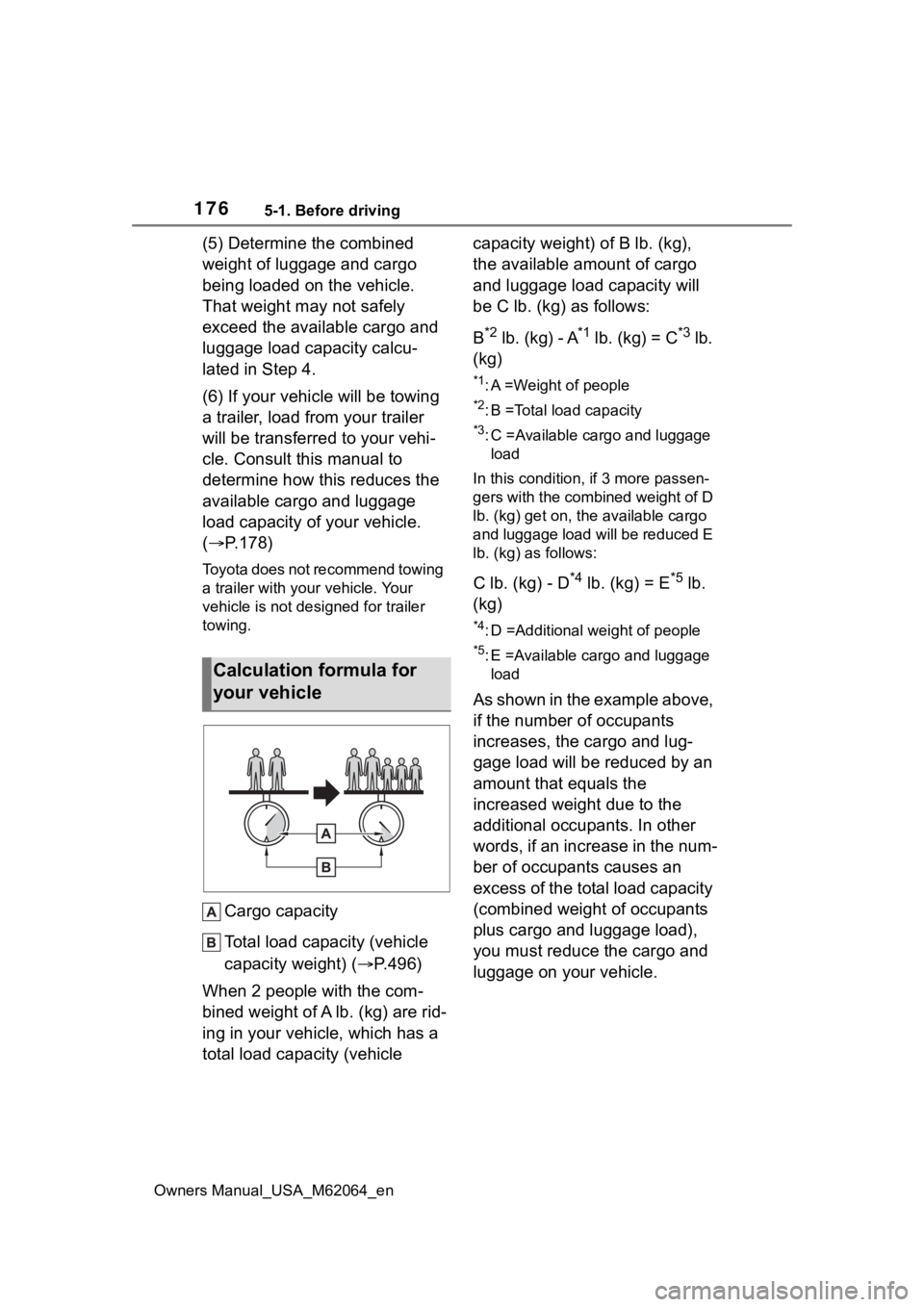
Cargo capacity
Total load capacity (vehicle
capacity weight) ( P.496)
When 2 people with the com-
bined weight of A lb. (kg) are rid-
ing in your vehicle, which has a
total load capacity (vehicle capacity weight) of B lb. (kg),
the available amount of cargo
and luggage load capacity will
be C lb. (kg) as follows:
B
*2 lb. (kg) - A*1 lb. (kg) = C*3 lb.
(kg)
*1: A =Weight of people
*2: B =Total load capacity
*3: C =Available cargo and luggage load
In this condition, if 3 more passen-
gers with the combined weight of D
lb. (kg) get on, the available cargo
and luggage load will be reduced E
lb. (kg) as follows:
C lb. (kg) - D*4 lb. (kg) = E*5 lb.
(kg)
*4: D =Additional weight of people
*5: E =Available cargo and luggage load
As shown in the example above,
if the number of occupants
increases, the cargo and lug-
gage load will be reduced by an
amount that equals the
increased weight due to the
additional occupants. In other
words, if an increase in the num-
ber of occupants causes an
excess of the total load capacity
(combined weight of occupants
plus cargo and luggage load),
you must reduce the cargo and
luggage on your vehicle.
Calculation formula for
your vehicle
Page 177 of 572
1775-1. Before driving
Owners Manual_USA_M62064_en
5
Driving
WARNING
■Things that must not be car-
ried in the trunk
The following things may cause a
fire if loaded in the trunk:
●Receptacles co ntaining gaso-
line
●Aerosol cans
■Storage precautions
Observe the following precau-
tions.
Failure to do so m ay prevent the
pedals from being depressed
properly, may block the driver’s
vision, or may result in items hit-
ting the driver or passengers, pos-
sibly causing an accident.
●Stow cargo and luggage in the
trunk whenever possible.
●Do not place cargo or luggage
in or on the following locations.
• At the feet of the driver
• On the front passenger or rear seats (when stacking items)
• On the package tray
• On the instrument panel
• On the dashboard
●Secure all items in the occupant
compartment.
■Capacity and distribution
●Do not exceed the maximum
axle weight rating or the total
vehicle weight rating.
●Even if the tota l load of occu-
pant’s weight and the cargo
load is less than the total load
capacity, do not apply the load
unevenly. Improper loading may
cause deteriorat ion of steering
or braking control which may
cause death or serious injury.
NOTICE
■Roof film (vehicles with elec-
tronic sunshade)
Do not attach a roof carrier on the
roof film. It may damage the film
surface.
Page 178 of 572
1785-1. Before driving
Owners Manual_USA_M62064_en
■Total load capacity and seating
capacity
These details are also described on
the tire and loading information
label. ( P.428)
Vehicle load limits
Vehicle load limits include
total load capacity, seating
capacity, towing capacity
and cargo capacity.
Total load capacity (vehicle
capacity weight): P.496
Total load capacity means the
combined weight of occu-
pants, cargo and luggage.
Seating capacity: P.496
Seating capacity means the
maximum number of occu-
pants whose estimated aver-
age weight is 150 lb. (68 kg)
per person.
TWR (Trailer Weight Rat-
ing)
Toyota does not recommend
towing a trailer with your vehi-
cle.
Cargo capacity
Cargo capacity may increase
or decrease depending on the
weight and the number of
occupants.
WARNING
■Overloading the vehicle
Do not overload the vehicle.
It may not only cause damage to
the tires, but also degrade steer-
ing and braking ability, resulting in
an accident.
Page 179 of 572
1795-1. Before driving
Owners Manual_USA_M62064_en
5
Driving
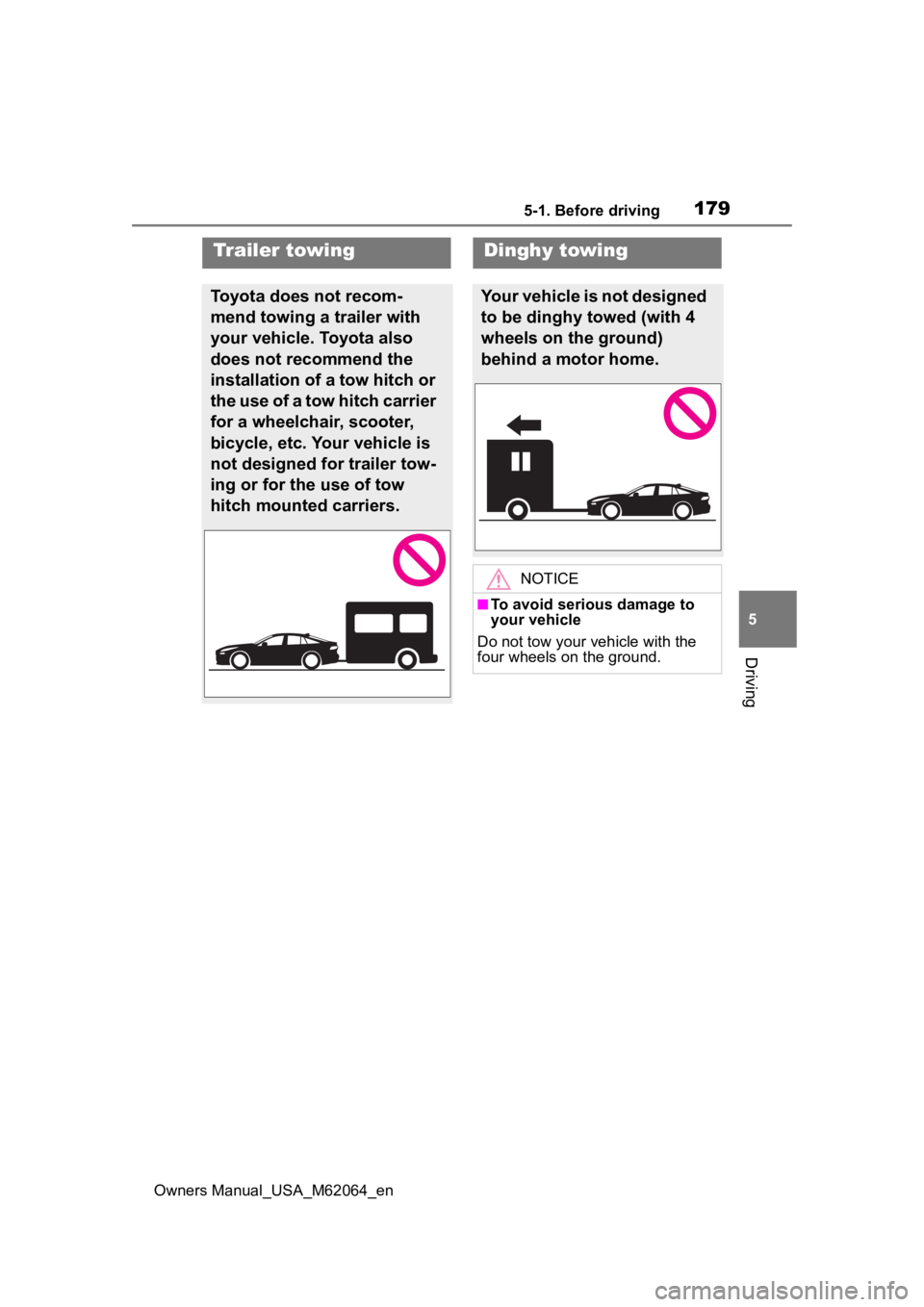
Trailer towing
Toyota does not recom-
mend towing a trailer with
your vehicle. Toyota also
does not recommend the
installation of a tow hitch or
the use of a tow hitch carrier
for a wheelchair, scooter,
bicycle, etc. Your vehicle is
not designed for trailer tow-
ing or for the use of tow
hitch mounted carriers.
Dinghy towing
Your vehicle is not designed
to be dinghy towed (with 4
wheels on the ground)
behind a motor home.
NOTICE
■To avoid serious damage to
your vehicle
Do not tow your vehicle with the
four wheels on the ground.
Page 196 of 572
1965-2. Driving procedures
Owners Manual_USA_M62064_en
*: If equipped
■Customization
Some functions can be customized.
( P.519)
■Operating conditions
When the driving mode select
switch is not in Eco drive mode.
■Temporary cancelation of the
ASC system functions
The ASC system may be temporar-
ily canceled depending on the driv-
ing conditions, such as when the
tires slip due to sudden accelera-
tion.
The tones may not sound if the driv-
ing mode is switched continuously
in short time periods.
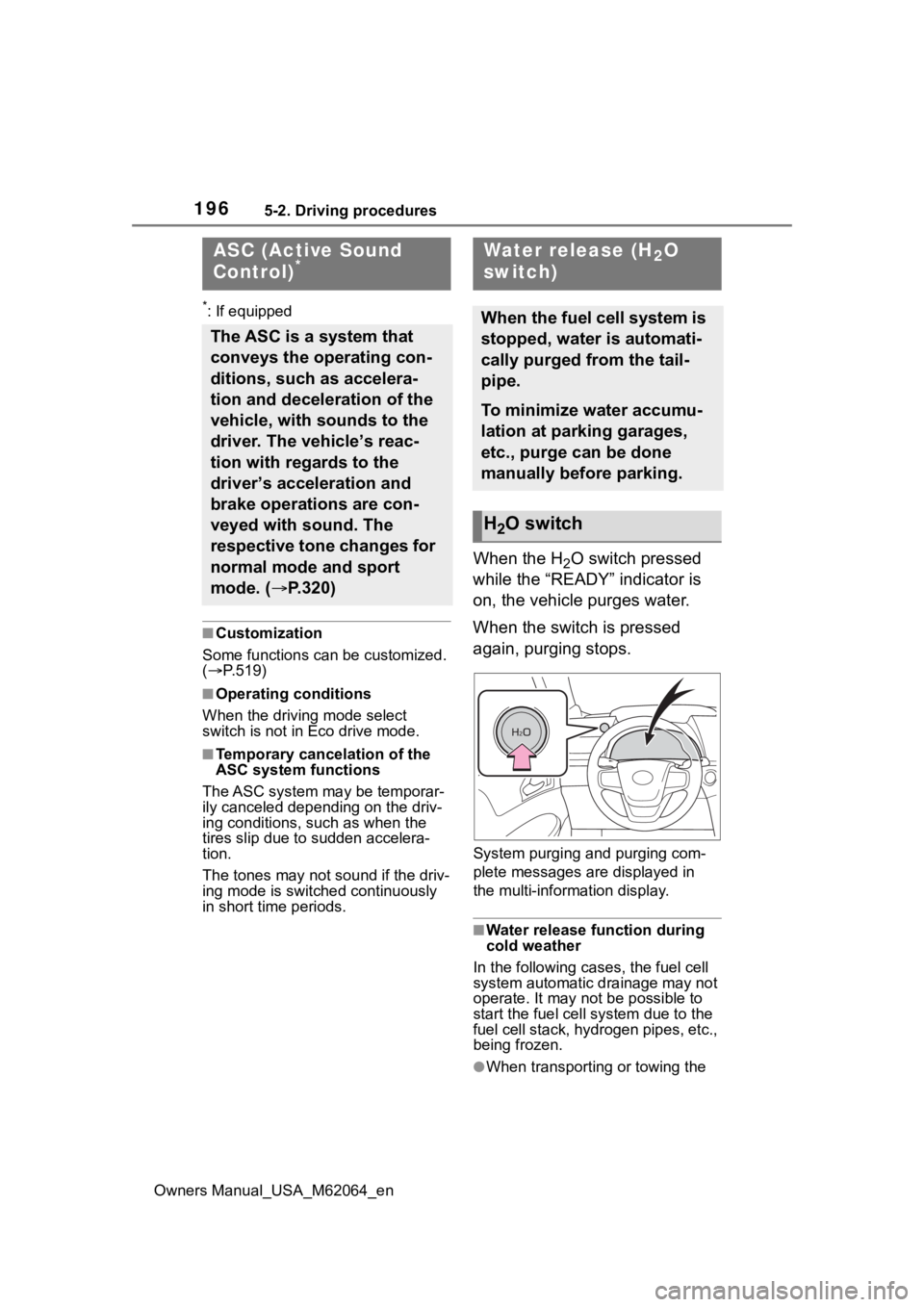
When the H2O switch pressed
while the “READY” indicator is
on, the vehicle purges water.
When the switch is pressed
again, purging stops.
System purging and purging com-
plete messages are displayed in
the multi-information display.
■Water release function during
cold weather
In the following cases, the fuel cell
system automatic drainage may not
operate. It may not be possible to
start the fuel cell system due to the
fuel cell stack, hyd rogen pipes, etc.,
being frozen.
●When transporting or towing the
ASC (Active Sound
Control)*
The ASC is a system that
conveys the operating con-
ditions, such as accelera-
tion and deceleration of the
vehicle, with sounds to the
driver. The vehicle’s reac-
tion with regards to the
driver’s acceleration and
brake operations are con-
veyed with sound. The
respective tone changes for
normal mode and sport
mode. ( P.320)
Water release (H2O
switch)
When the fuel cell system is
stopped, water is automati-
cally purged from the tail-
pipe.
To minimize water accumu-
lation at parking garages,
etc., purge can be done
manually before parking.
H2O switch
Page 200 of 572
2005-3. Operating the lights and wipers
Owners Manual_USA_M62064_en
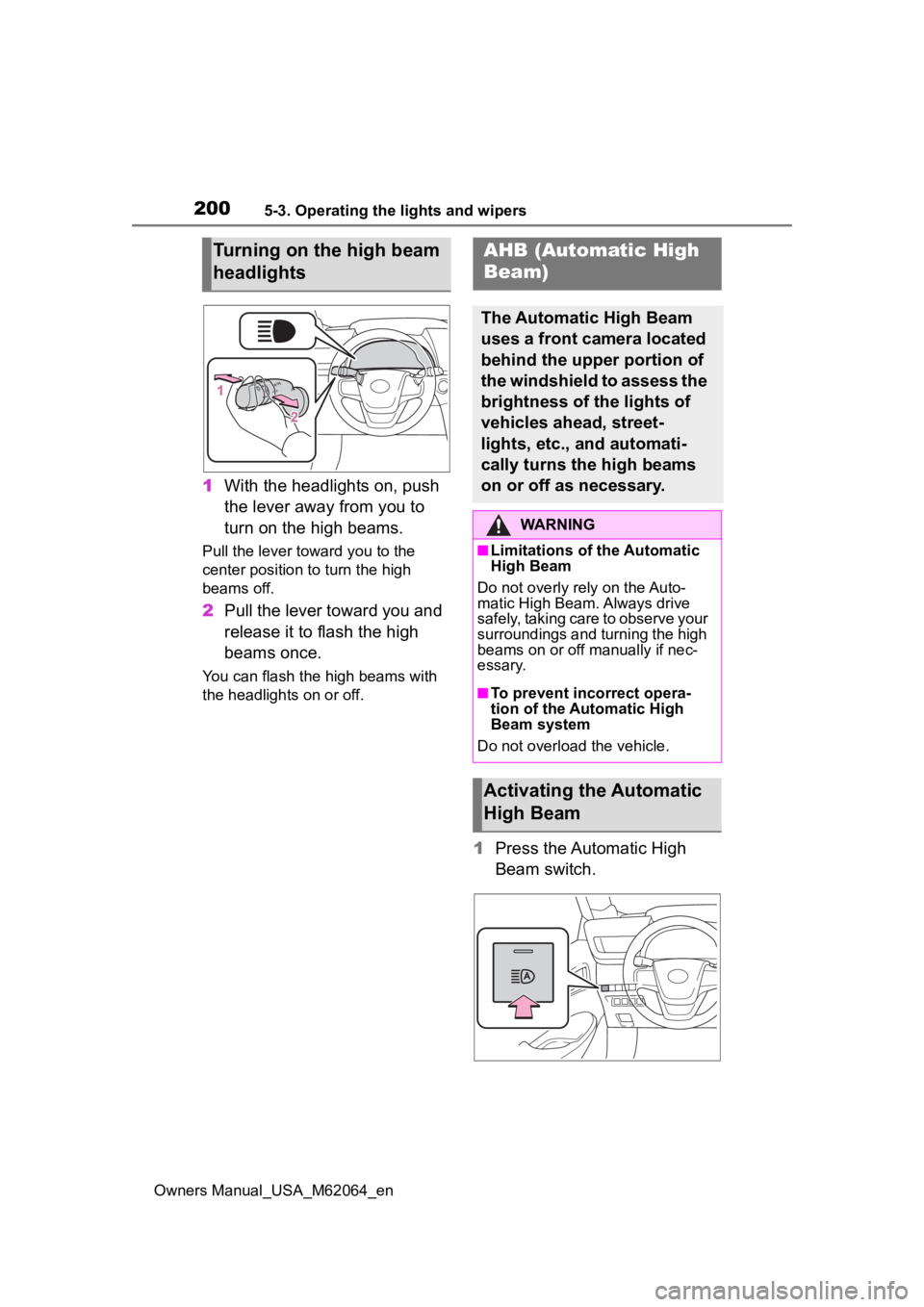
1With the headlights on, push
the lever away from you to
turn on the high beams.
Pull the lever toward you to the
center position to turn the high
beams off.
2Pull the lever toward you and
release it to flash the high
beams once.
You can flash the high beams with
the headlights on or off.
1Press the Automatic High
Beam switch.
Turning on the high beam
headlightsAHB (Automatic High
Beam)
The Automatic High Beam
uses a front camera located
behind the upper portion of
the windshield to assess the
brightness of the lights of
vehicles ahead, street-
lights, etc., and automati-
cally turns the high beams
on or off as necessary.
WARNING
■Limitations of the Automatic
High Beam
Do not overly rely on the Auto-
matic High Beam. Always drive
safely, taking care to observe your
surroundings and turning the high
beams on or off manually if nec-
essary.
■To prevent inc orrect opera-
tion of the Automatic High
Beam system
Do not overload the vehicle.
Activating the Automatic
High Beam
Page 202 of 572
2025-3. Operating the lights and wipers
Owners Manual_USA_M62064_en• When driving in inclement weather
(heavy rain, snow, fog, sand-
storms, etc.)
• When the windshield is obscured by fog, mist, ice, dirt, etc.
• When the windshield is cracked or
damaged
• When the front camera is deformed or dirty
• When the temperature of the front camera is extremely high
• When the surrounding brightness
level is equal to that of headlights,
tail lights or fog lights
• When headlights or tail lights of
vehicles ahead are turned off,
dirty, changing color, or not aimed
properly
• When the vehicle is hit by water, snow, dust, etc., from a preceding
vehicle
• When driving thr ough an area of
intermittently changing brightness
and darkness
• When frequently and repeatedly driving ascending/descending
roads, or roads with rough, bumpy
or uneven surfaces (such as
stone-paved roads, gravel roads,
etc.)
• When frequently and repeatedly taking curves or driving on a wind-
ing road
• When there is a hi ghly reflective
object ahead of th e vehicle, such
as a sign or mirror
• When the back of a preceding vehicle is highly reflective, such as
a container on a truck
• When the vehicle’s headlights are damaged or dirty, or are not aimed
properly
• When the vehicle is listing or titling due to a flat tire, a trailer being
towed, etc.
• When the headlights are changed between the high beams and low
beams repeatedly in an abnormal
manner
• When the driver believes that the high beams may be flashing or
dazzling pedestrians or other driv-
ers
■Temporarily lowering sensor
sensitivity
The sensitivity of the sensor can be
temporarily lowered.
1 Turn the power s witch off while
the following conditions are met.
●The headlight switch is in or
.
●The headlight switch lever is in
low beam position.
●Automatic High Beam switch is
on.
2 Turn the power switch to ON.
3 Within 60 seconds after step 2,
repeat pushing the headlight
switch lever to the high beam
position then pulling it to the orig-
inal position quickly 10 times,
then leave the lever in the origi-
nal position.
4 If the sensitivity is changed, the
AHB indicator is turn on and off 3
times.
■Switching to the high
beams
Push the lever away from you.
The AHB indicator will turn off and
the high beam indi cator will turn on.
Pull the lever to its original position
to activate the Automatic High
Beam system.
Turning the high beams
on/off manually