remote control TOYOTA MIRAI 2023 Owner's Manual
[x] Cancel search | Manufacturer: TOYOTA, Model Year: 2023, Model line: MIRAI, Model: TOYOTA MIRAI 2023Pages: 572, PDF Size: 17.71 MB
Page 383 of 572
3836-4. Using the other interior features
Owners Manual_USA_M62064_en
6
Interior features
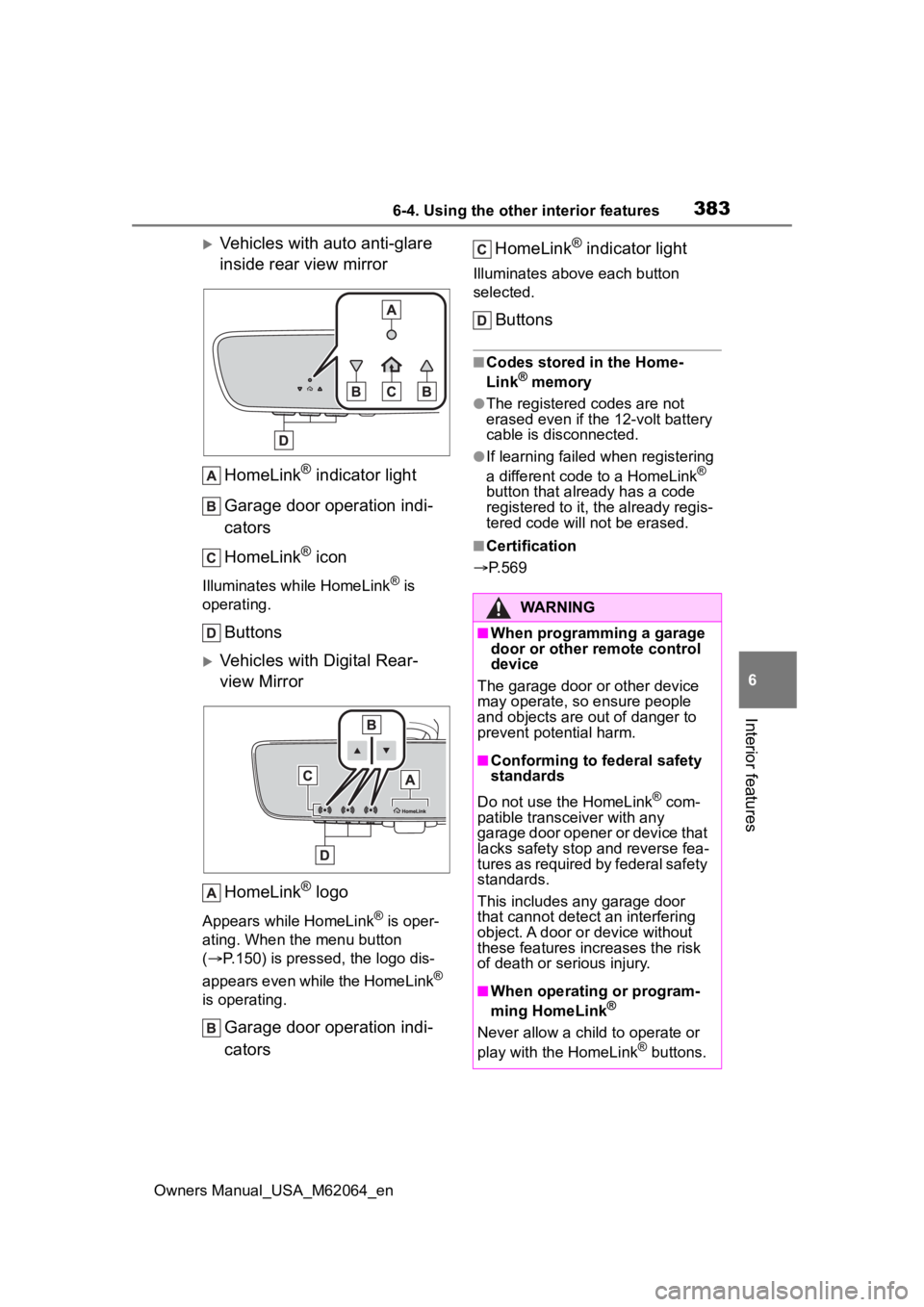
Vehicles with auto anti-glare
inside rear view mirror HomeLink
® indicator light
Garage door operation indi-
cators
HomeLink
® icon
Illuminates while HomeLink® is
operating.
Buttons
Vehicles with Digital Rear-
view Mirror
HomeLink
® logo
Appears while HomeLink® is oper-
ating. When the menu button
( P.150) is pressed, the logo dis-
appears even while the HomeLink
®
is operating.
Garage door operation indi-
cators HomeLink
® indicator light
Illuminates above each button
selected.
Buttons
■Codes stored in the Home-
Link® memory
●The registered codes are not
erased even if the 12-volt battery
cable is disconnected.
●If learning failed when registering
a different code to a HomeLink®
button that already has a code
registered to it, the already regis-
tered code will not be erased.
■Certification
P.569
WARNING
■When programming a garage
door or other remote control
device
The garage door or other device
may operate, so ensure people
and objects are out of danger to
prevent potential harm.
■Conforming to federal safety
standards
Do not use the HomeLink
® com-
patible transce iver with any
garage door opener or device that
lacks safety stop and reverse fea-
tures as required by federal safety
standards.
This includes any garage door
that cannot detect an interfering
object. A door or device without
these features increases the risk
of death or serious injury.
■When operating or program-
ming HomeLink®
Never allow a child to operate or
play with the HomeLink® buttons.
Page 384 of 572
3846-4. Using the other interior features
Owners Manual_USA_M62064_en
■Before programming Home-
Link
®
During programming, it is pos-
sible that garage doors,
gates, or other devices may
operate. For this reason,
make sure that people and
objects are clear of the
garage door or other devices
to prevent injury or other
potential harm.
It is recommended that a new
battery be placed in the
remote control transmitter for
more accurate programming.
Garage door opener motors
manufactured after 1995 may
be equipped with rolling code
protection. If this is the case,
you may need a stepladder or
other sturdy, safe device to
reach the “Learn” or “Smart”
button on the garage door
opener motor.
■Programming HomeLink®
Steps 1 through 3 must be per-
formed within 60 seconds, oth-
erwise the indicator light will
stop flashing and programming
will not be successfully com-
pleted.
1 Press and release the Home-
Link
® button you want to pro-
gram and check that the HomeLink
® indicator light
flashes (orange).
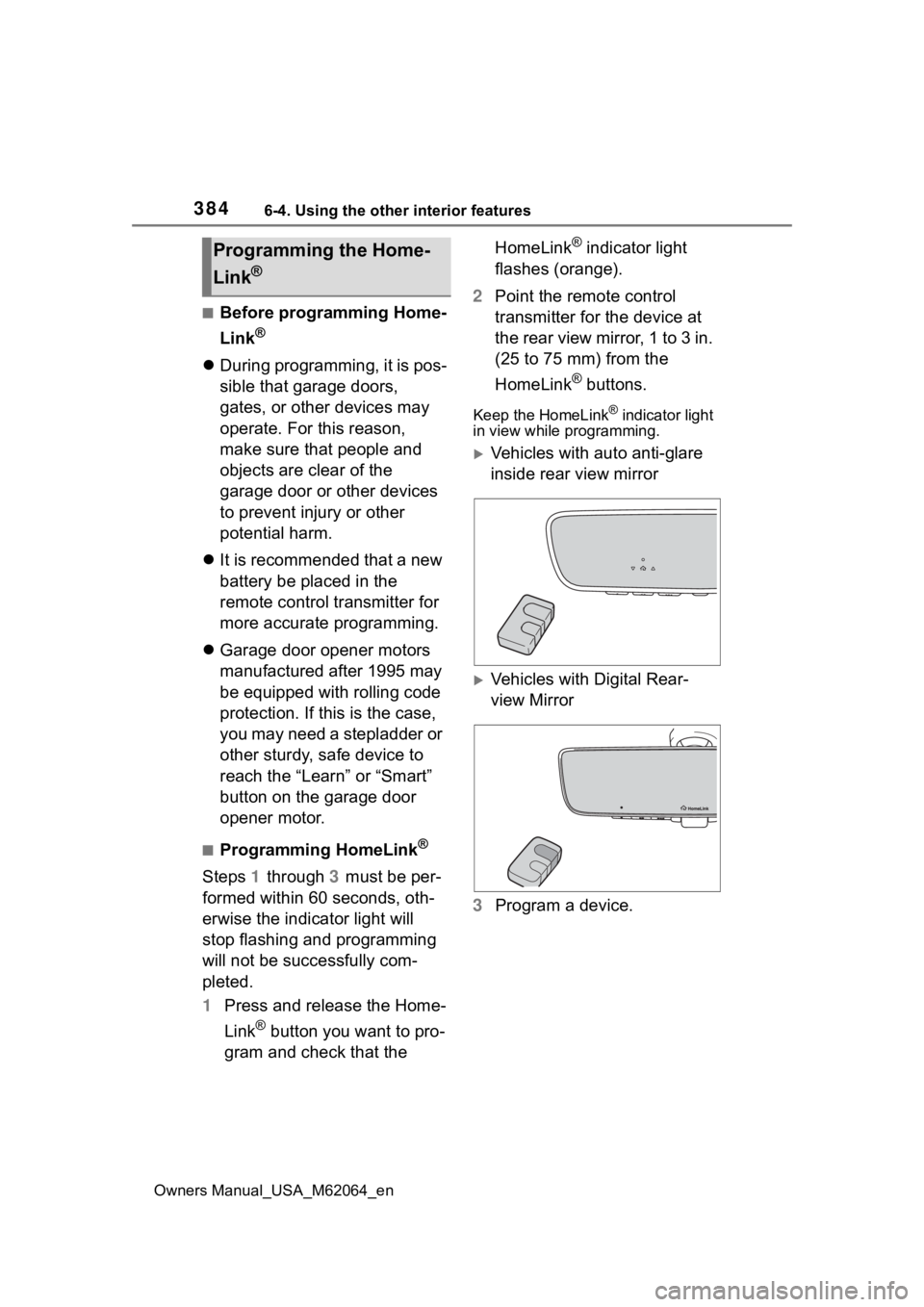
2 Point the remote control
transmitter for the device at
the rear view mirror, 1 to 3 in.
(25 to 75 mm) from the
HomeLink
® buttons.
Keep the HomeLink® indicator light
in view while programming.
Vehicles with auto anti-glare
inside rear view mirror
Vehicles with Digital Rear-
view Mirror
3 Program a device.
Programming the Home-
Link
®
Page 385 of 572
3856-4. Using the other interior features
Owners Manual_USA_M62064_en
6
Interior features
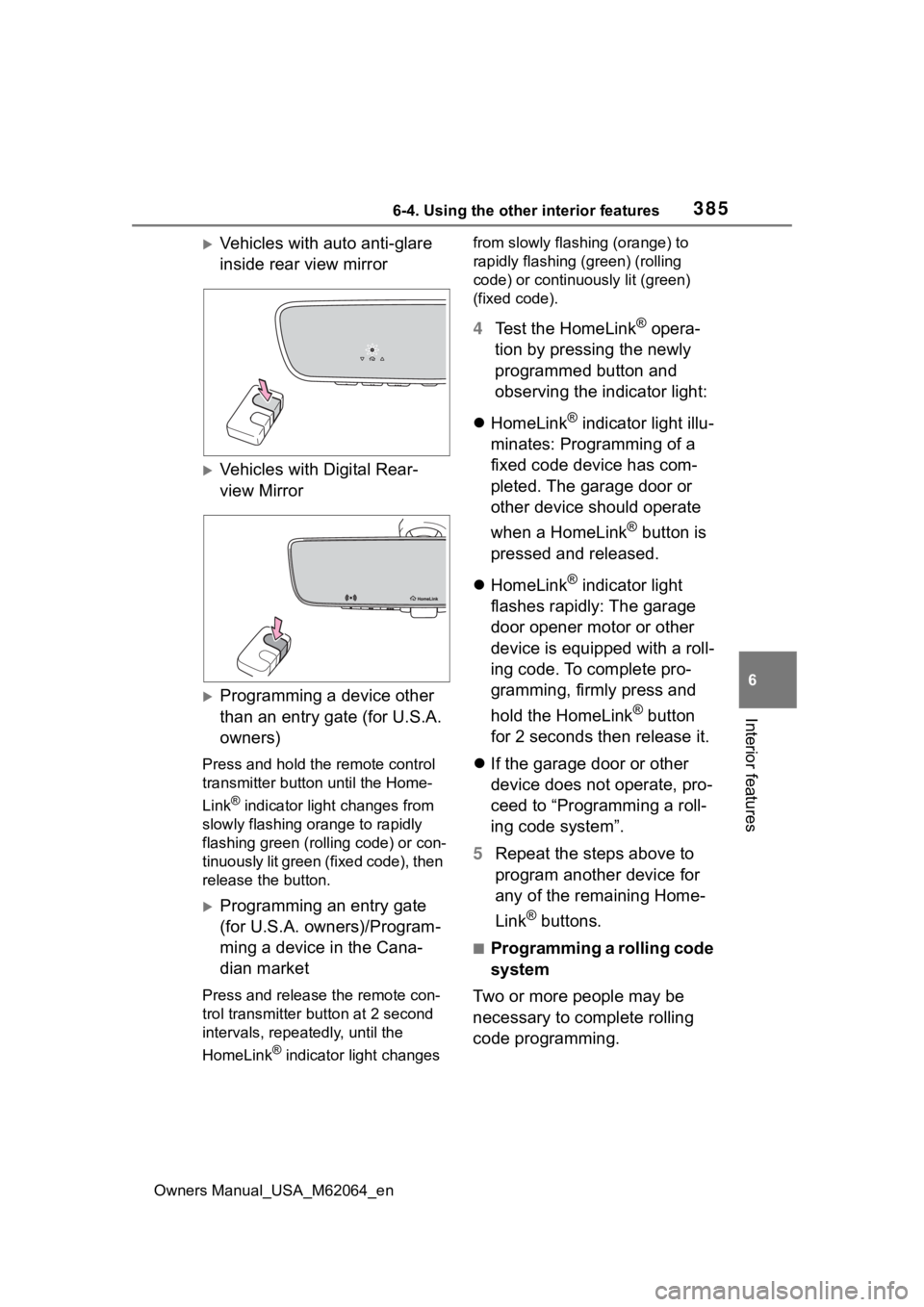
Vehicles with auto anti-glare
inside rear view mirror
Vehicles with Digital Rear-
view Mirror
Programming a device other
than an entry gate (for U.S.A.
owners)
Press and hold the remote control
transmitter button until the Home-
Link
® indicator light changes from
slowly flashing orange to rapidly
flashing green (ro lling code) or con-
tinuously lit green (fixed code), then
release the button.
Programming an entry gate
(for U.S.A. owners)/Program-
ming a device in the Cana-
dian market
Press and release the remote con-
trol transmitter button at 2 second
intervals, repeatedly, until the
HomeLink
® indicator light changes from slowly flashing (orange) to
rapidly flashing (green) (rolling
code) or continuously lit (green)
(fixed code).
4
Test the HomeLink® opera-
tion by pressing the newly
programmed button and
observing the indicator light:
HomeLink
® indicator light illu-
minates: Programming of a
fixed code device has com-
pleted. The garage door or
other device should operate
when a HomeLink
® button is
pressed and released.
HomeLink
® indicator light
flashes rapidly: The garage
door opener motor or other
device is equipped with a roll-
ing code. To complete pro-
gramming, firmly press and
hold the HomeLink
® button
for 2 seconds then release it.
If the garage door or other
device does not operate, pro-
ceed to “Programming a roll-
ing code system”.
5 Repeat the steps above to
program another device for
any of the remaining Home-
Link
® buttons.
■Programming a rolling code
system
Two or more people may be
necessary to complete rolling
code programming.
Page 413 of 572
4137-3. Do-it-yourself maintenance
Owners Manual_USA_M62064_en
7
Maintenance and care
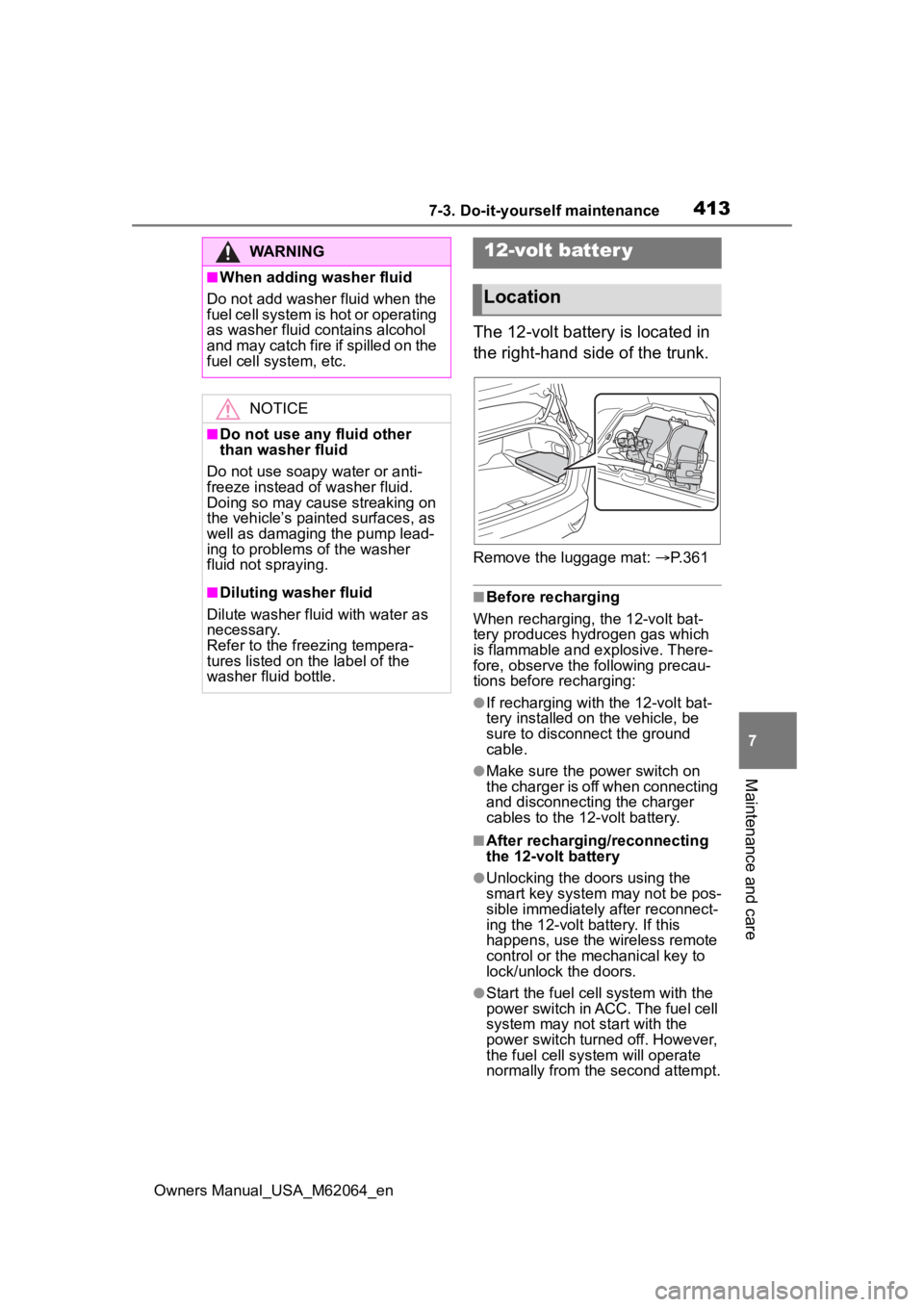
The 12-volt battery is located in
the right-hand side of the trunk.
Remove the luggage mat: P. 3 6 1
■Before recharging
When recharging, the 12-volt bat-
tery produces hydrogen gas which
is flammable and explosive. There-
fore, observe the following precau-
tions before recharging:
●If recharging with the 12-volt bat-
tery installed on the vehicle, be
sure to disconnect the ground
cable.
●Make sure the power switch on
the charger is off when connecting
and disconnecting the charger
cables to the 12-volt battery.
■After recharging/reconnecting
the 12-volt battery
●Unlocking the doors using the
smart key system may not be pos-
sible immediately after reconnect-
ing the 12-volt battery. If this
happens, use the wireless remote
control or the mechanical key to
lock/unlock the doors.
●Start the fuel cell system with the
power switch in ACC. The fuel cell
system may not start with the
power switch turned off. However,
the fuel cell system will operate
normally from the second attempt.
WARNING
■When adding washer fluid
Do not add washer fluid when the
fuel cell system is hot or operating
as washer fluid contains alcohol
and may catch fire if spilled on the
fuel cell system, etc.
NOTICE
■Do not use any fluid other
than washer fluid
Do not use soapy water or anti-
freeze instead of washer fluid.
Doing so may cause streaking on
the vehicle’s painted surfaces, as
well as damaging the pump lead-
ing to problems of the washer
fluid not spraying.
■Diluting washer fluid
Dilute washer fluid with water as
necessary.
Refer to the freezing tempera-
tures listed on the label of the
washer fluid bottle.
12-volt batter y
Location
Page 436 of 572
4367-3. Do-it-yourself maintenance
Owners Manual_USA_M62064_en
■If the electronic key battery is
depleted
The following symptoms may occur:
●The smart key system and wire-
less remote control will not func-
tion properly.
●The operational range will be
reduced.
Flathead screwdriver
Small flathead screwdriver
Lithium battery CR2032
■Use a CR2032 lithium battery
●Batteries can be purchased at
your Toyota dealer, local electrical
appliance shops or camera stores.
●Replace only with the same or
equivalent type recommended by
the manufacturer.
●Dispose of used batteries accord-
ing to local laws.
NOTICE
●Do not install anything to the air
intake vent other than the exclu-
sive filter for this vehicle or use
the vehicle without the filter
installed.
■To prevent damage to the fil-
ter
Observe the following precau-
tions.
If the filter is damaged, have it
replaced with a new filter by your
Toyota dealer.
●Do not use an air blow gun, etc.
●Do not press hard a vacuum
cleaner, etc. against the filter.
●Do not use a hard brush, such
as a metal brush.
●Do not break the fold of the fil-
t er.
Electronic key batter y
Replace the battery with a
new one if it is depleted.
As the key may be damaged
if the following procedure is
not performed properly, it is
recommended that key bat-
tery replacement be per-
formed by your Toyota
dealer.
Items to prepare
Page 438 of 572
4387-3. Do-it-yourself maintenance
Owners Manual_USA_M62064_en
1Turn the power switch off.
2 Open the fuse box cover.
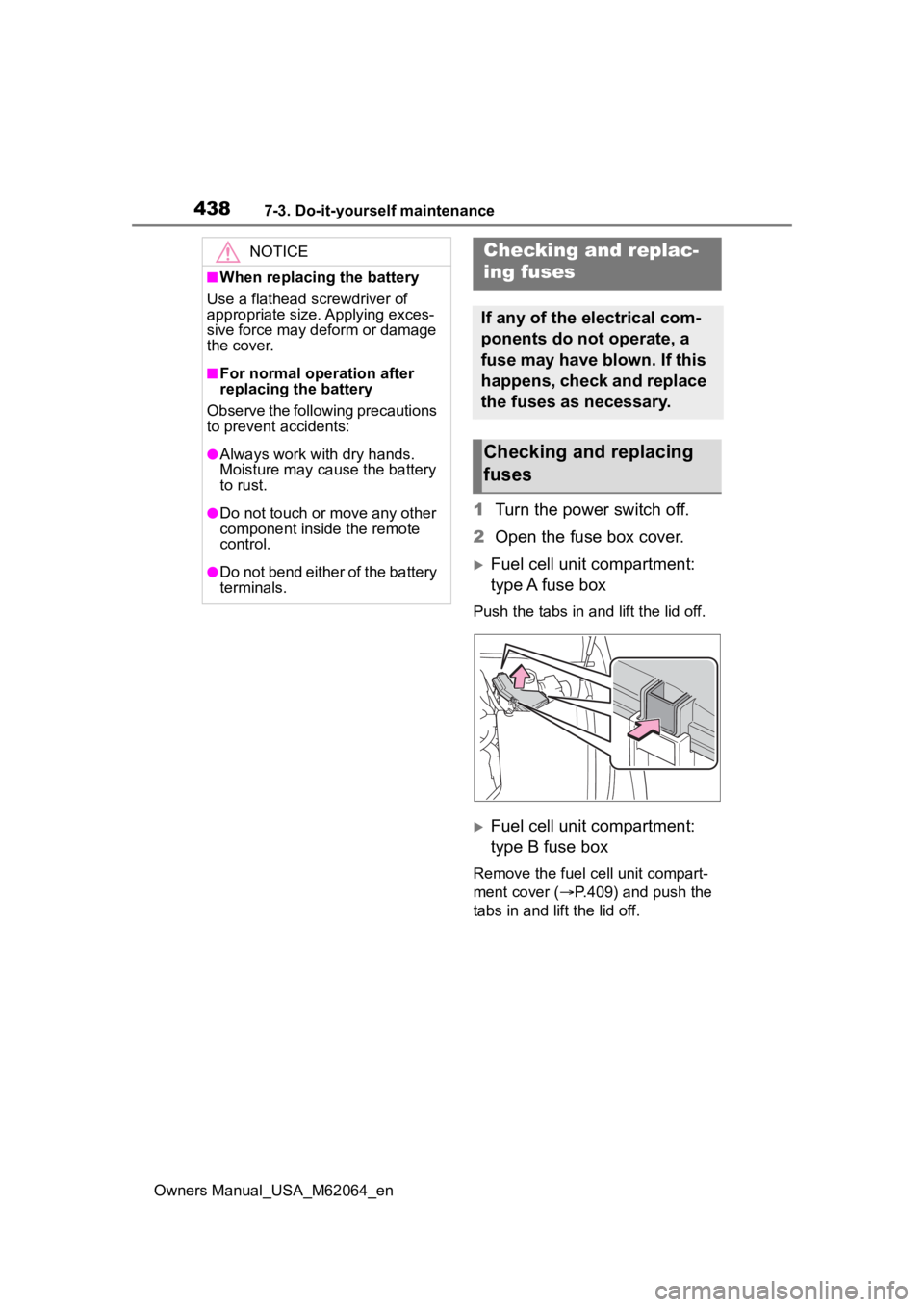
Fuel cell unit compartment:
type A fuse box
Push the tabs in and lift the lid off.
Fuel cell unit compartment:
type B fuse box
Remove the fuel cell unit compart-
ment cover ( P.409) and push the
tabs in and lift the lid off.
NOTICE
■When replacing the battery
Use a flathead screwdriver of
appropriate size. Applying exces-
sive force may deform or damage
the cover.
■For normal operation after
replacing the battery
Observe the following precautions
to prevent accidents:
●Always work with dry hands.
Moisture may cau se the battery
to rust.
●Do not touch or move any other
component inside the remote
control.
●Do not bend either of the battery
terminals.
Checking a nd replac-
ing fuses
If any of the electrical com-
ponents do not operate, a
fuse may have blown. If this
happens, check and replace
the fuses as necessary.
Checking and replacing
fuses
Page 482 of 572
4828-2. Steps to take in an emergency
Owners Manual_USA_M62064_en
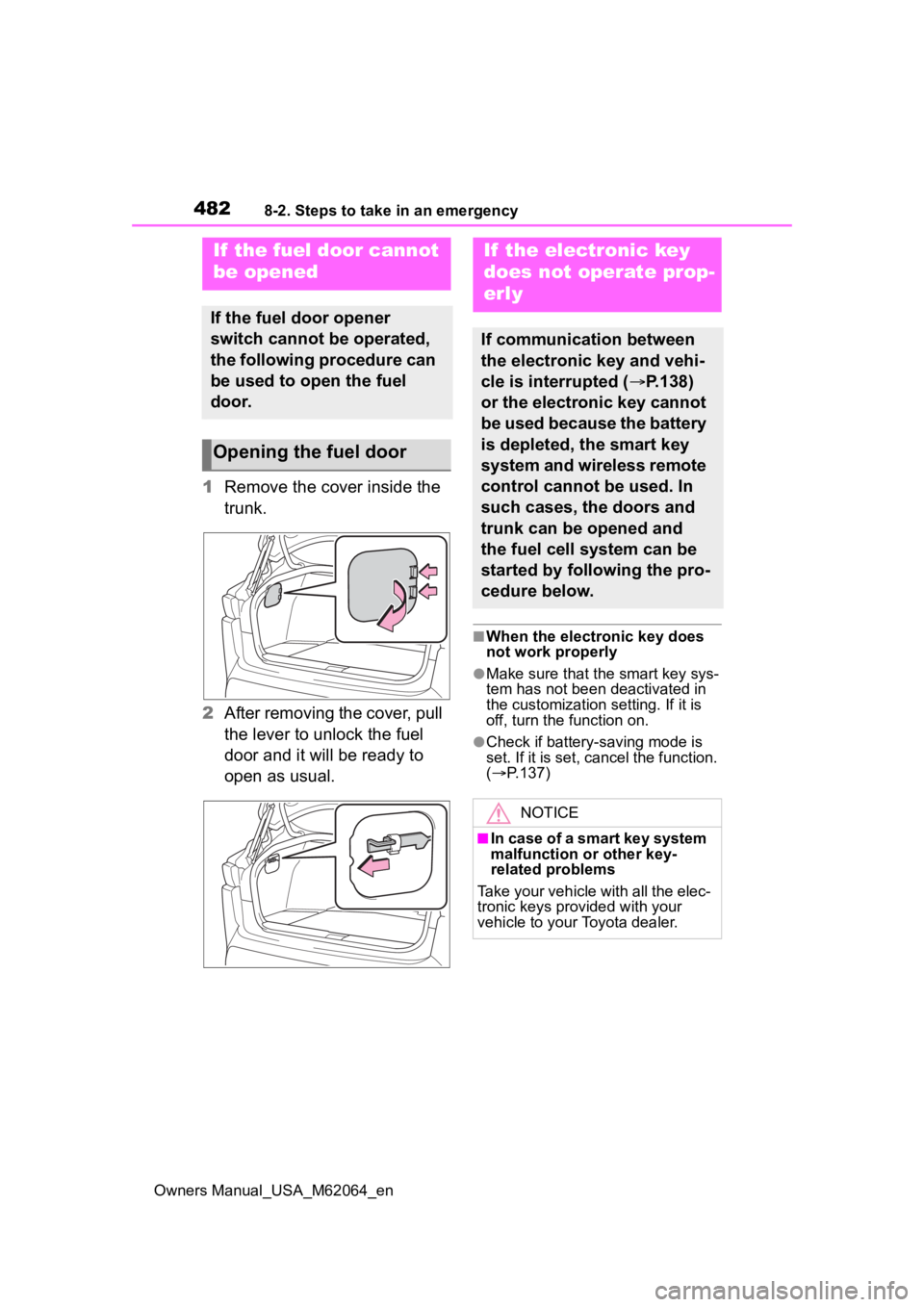
1Remove the cover inside the
trunk.
2 After removing the cover, pull
the lever to unlock the fuel
door and it will be ready to
open as usual.
■When the electronic key does
not work properly
●Make sure that the smart key sys-
tem has not been deactivated in
the customization setting. If it is
off, turn the function on.
●Check if battery-saving mode is
set. If it is set, cancel the function.
( P.137)
If the fuel door cannot
be opened
If the fuel door opener
switch cannot be operated,
the following procedure can
be used to open the fuel
door.
Opening the fuel door
If the electronic key
does not operate prop-
erly
If communication between
the electronic key and vehi-
cle is interrupted ( P.138)
or the electronic key cannot
be used because the battery
is depleted, the smart key
system and wireless remote
control cannot be used. In
such cases, the doors and
trunk can be opened and
the fuel cell system can be
started by following the pro-
cedure below.
NOTICE
■In case of a smart key system
malfunction or other key-
related problems
Take your vehicle with all the elec-
tronic keys provided with your
vehicle to your Toyota dealer.
Page 516 of 572
5169-2. Customization
Owners Manual_USA_M62064_en
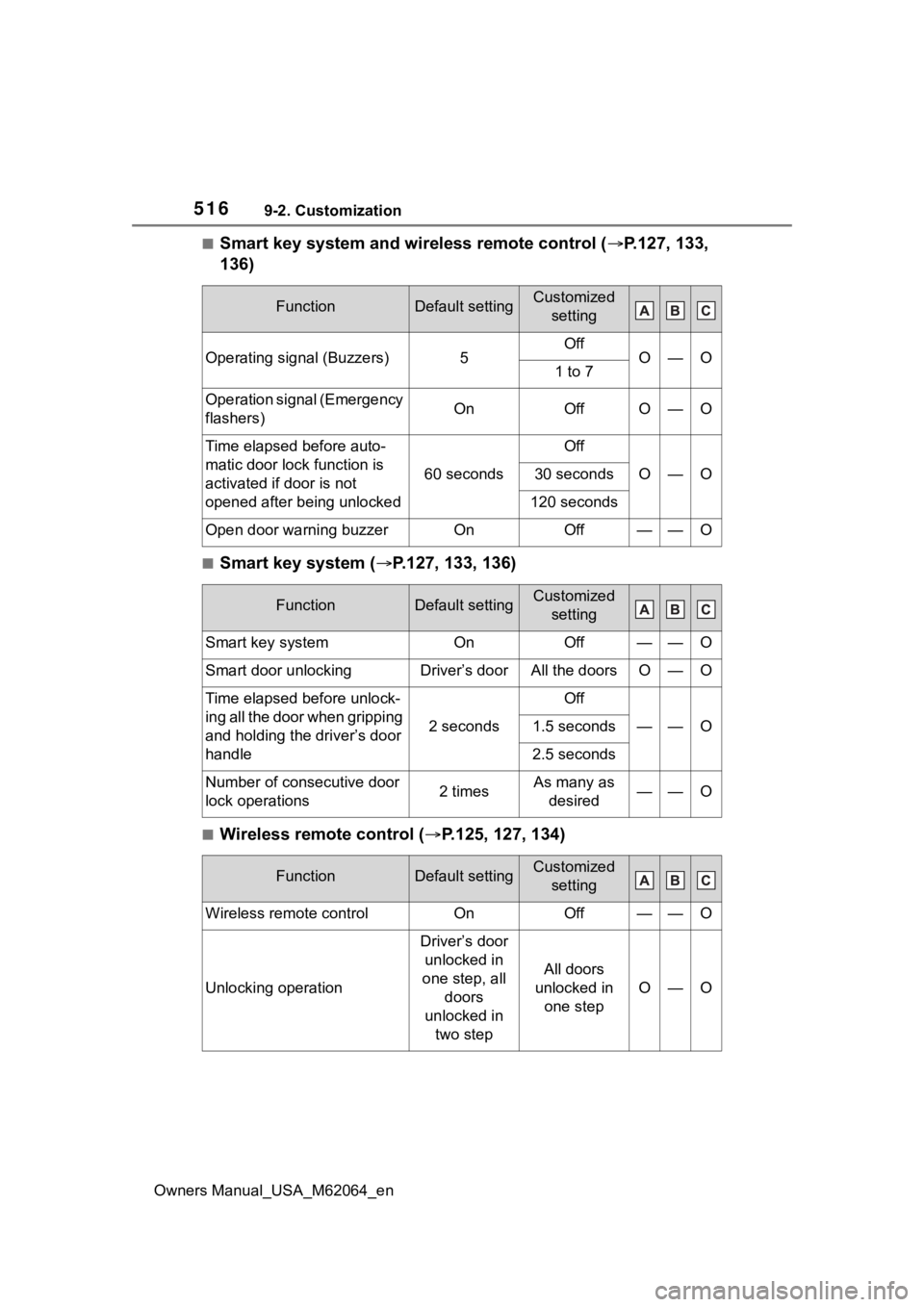
■Smart key system and wireless remote control (P.127, 133,
136)
■Smart key system ( P.127, 133, 136)
■Wireless remote control ( P.125, 127, 134)
FunctionDefault settingCustomized
setting
Operating signal (Buzzers)5OffO—O1 to 7
Operation signal (Emergency
flashers)OnOffO—O
Time elapsed before auto-
matic door lock function is
activated if door is not
opened after being unlocked
60 seconds
Off
O—O30 seconds
120 seconds
Open door warning buzzerOnOff——O
FunctionDefault settingCustomized setting
Smart key systemOnOff——O
Smart door unlockingDriver’s doorAll the doorsO—O
Time elapsed before unlock-
ing all the door when gripping
and holding the driver’s door
handle
2 seconds
Off
——O1.5 seconds
2.5 seconds
Number of consecutive door
lock operations2 timesAs many as desired——O
FunctionDefault settingCustomized setting
Wireless remote controlOnOff——O
Unlocking operation
Driver’s door unlocked in
one step, all doors
unlocked in two step
All doors
unlocked in one step
O—O
Page 518 of 572
5189-2. Customization
Owners Manual_USA_M62064_en
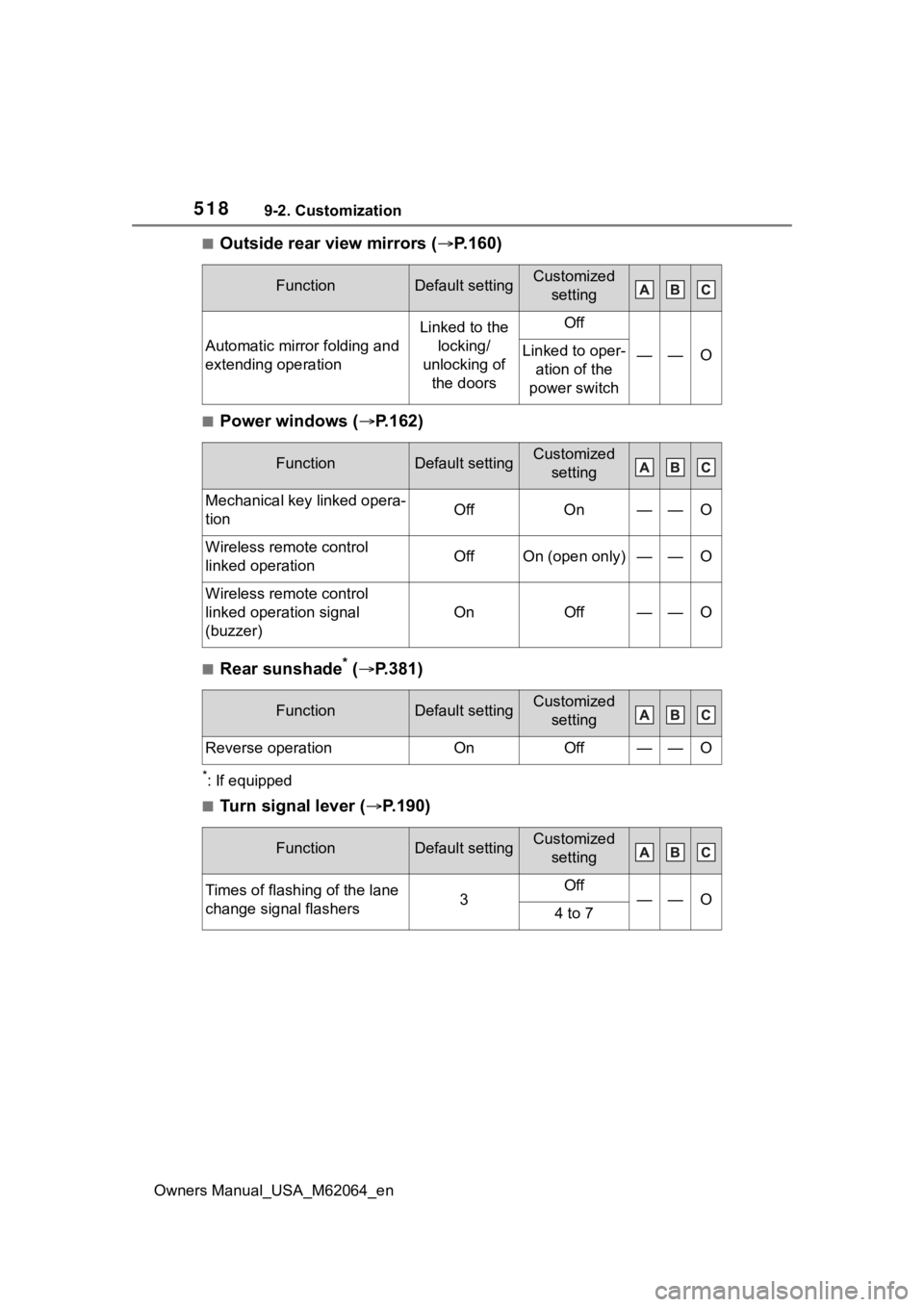
■Outside rear view mirrors (P.160)
■Power windows (P.162)
■Rear sunshade* ( P.381)
*: If equipped
■Turn signal lever ( P.190)
FunctionDefault settingCustomized
setting
Automatic mirror folding and
extending operation
Linked to the locking/
unlocking of the doorsOff
——OLinked to oper- ation of the
power switch
FunctionDefault settingCustomized setting
Mechanical key linked opera-
tionOffOn——O
Wireless remote control
linked operationOffOn (open only)——O
Wireless remote control
linked operation signal
(buzzer)
OnOff——O
FunctionDefault settingCustomized setting
Reverse operationOnOff——O
FunctionDefault settingCustomized setting
Times of flashing of the lane
change signal flashers3Off——O4 to 7
Page 545 of 572
Owners Manual_USA_M62064_en
Alphabetical Index545
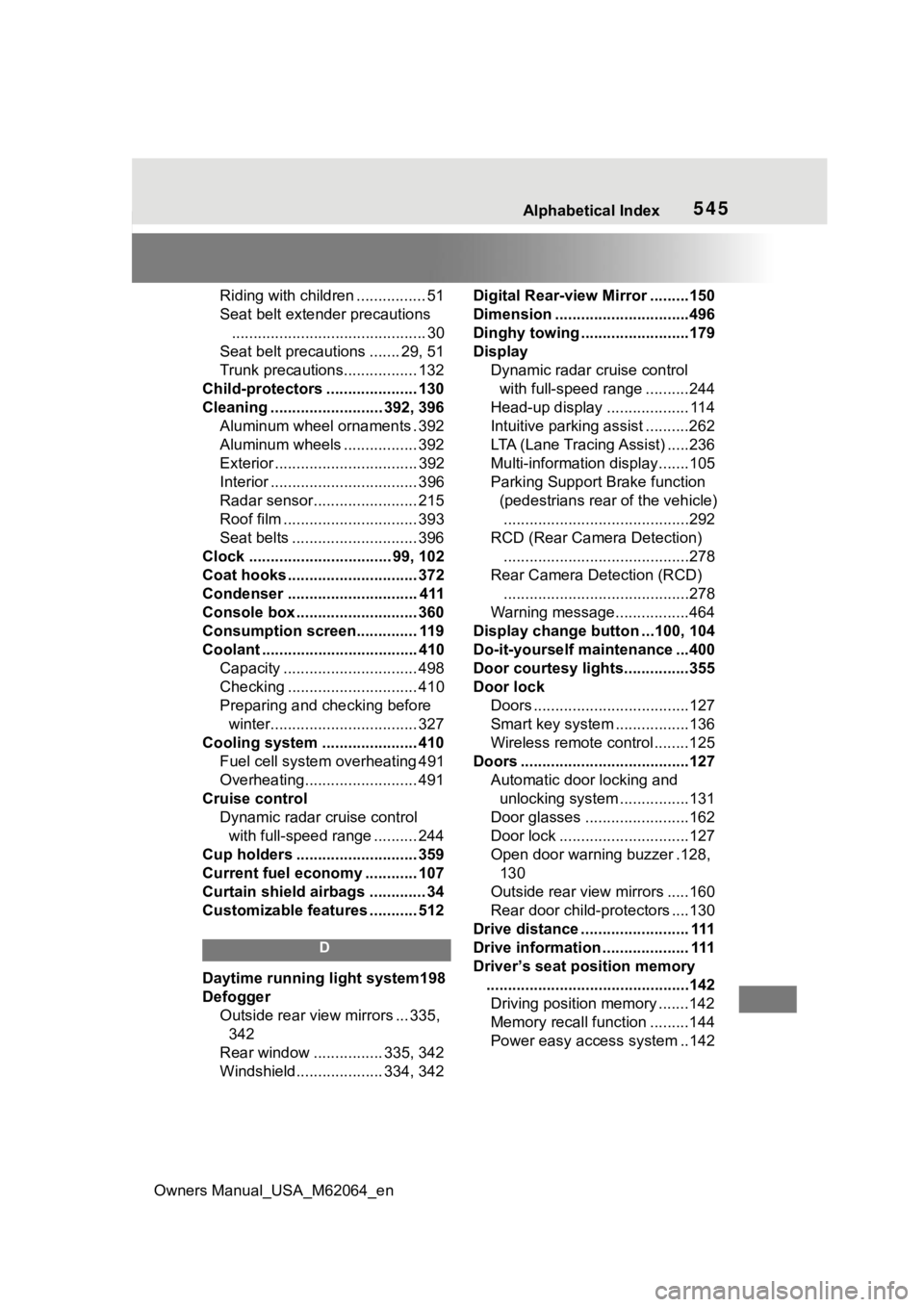
Riding with children ................ 51
Seat belt extender precautions............................................. 30
Seat belt precautions ....... 29, 51
Trunk precautions................. 132
Child-protectors ..................... 130
Cleaning .......................... 392, 396 Aluminum wheel ornaments . 392
Aluminum wheels ................. 392
Exterior ................................. 392
Interior .................................. 396
Radar sensor........................ 215
Roof film ............................... 393
Seat belts ............................. 396
Clock ................................. 99, 102
Coat hooks .............................. 372
Condenser .............................. 411
Console box ............................ 360
Consumption screen.............. 119
Coolant .................................... 410 Capacity ............................... 498
Checking .............................. 410
Preparing and c hecking before
winter.................................. 327
Cooling system ...................... 410 Fuel cell system overheating 491
Overheating.......................... 491
Cruise control Dynamic radar cruise control with full-speed range .......... 244
Cup holders ............................ 359
Current fuel economy ............ 107
Curtain shield airbags ............. 34
Customizable features ........... 512
D
Daytime running light system198
Defogger Outside rear view mirrors ... 335, 342
Rear window ................ 335, 342
Windshield.................... 334, 342 Digital Rear-view Mirror .........150
Dimension ...............................496
Dinghy towing .........................179
Display
Dynamic radar cruise control with full-speed range ..........244
Head-up display ................... 114
Intuitive parking assist ..........262
LTA (Lane Tracing Assist) .....236
Multi-information display.......105
Parking Support Brake function (pedestrians rear of the vehicle)...........................................292
RCD (Rear Camera Detection) ...........................................278
Rear Camera Detection (RCD) ...........................................278
Warning message.................464
Display change button ...100, 104
Do-it-yourself maintenance ...400
Door courtesy lights...............355
Door lock Doors ....................................127
Smart key system .................136
Wireless remote control........125
Doors .......................................127 Automatic door locking and unlocking system ................131
Door glasses ........................162
Door lock ..............................127
Open door warning buzzer .128, 130
Outside rear view mirrors .....160
Rear door child-protectors ....130
Drive distance ......................... 111
Drive information .................... 111
Driver’s seat position memory ...............................................142Driving position memory .......142
Memory recall function .........144
Power easy access system ..142