key TOYOTA MIRAI 2023 Owner's Guide
[x] Cancel search | Manufacturer: TOYOTA, Model Year: 2023, Model line: MIRAI, Model: TOYOTA MIRAI 2023Pages: 572, PDF Size: 17.71 MB
Page 163 of 572
1634-5. Opening, closing the windows
Owners Manual_USA_M62064_en
4
Before driving
5 Release the power window
switch for a m oment, resume
pushing the switch in the one-
touch opening direction, and
hold it there for a pproximately 4
seconds or more.
6 Pull and hold the power window
switch in the one-touch closing
direction again. After the side
window is completely closed,
continue holding the switch for a
further 1 second or more.
If you release the switch while the
window is moving, start again from
the beginning.
If the window reverses and cannot
be fully closed or opened, have the
vehicle inspected by your Toyota
dealer.
■Door lock linked window opera-
tion
●The power windows can be
opened and closed using the
mechanical key.
* ( P.483)
●The power windows can be
opened using the wireless remote
control.
* ( P.127)
*: These settings must be custom-
ized at your Toyota dealer.
■Power windows open warning
buzzer
A buzzer sounds and a message is
shown on the multi -information dis-
play in the instrument cluster when
the power switch is turned off and
the driver’s door is opened with the
power windows open.
■Customization
Some functions can be customized.
( P.512)
WARNING
Observe the following precau-
tions.
Failure to do so m ay result in
death or serious injury.
■Closing the windows
●The driver is responsible for all
the power window operations,
including the operation for the
passengers. In order to prevent
accidental operation, especially
by a child, do not let a child
operate the power windows. It is
possible for children and other
passengers to have body parts
caught in the power window.
Also, when ridin g with a child, it
is recommended to use the win-
dow lock switch. ( P.164)
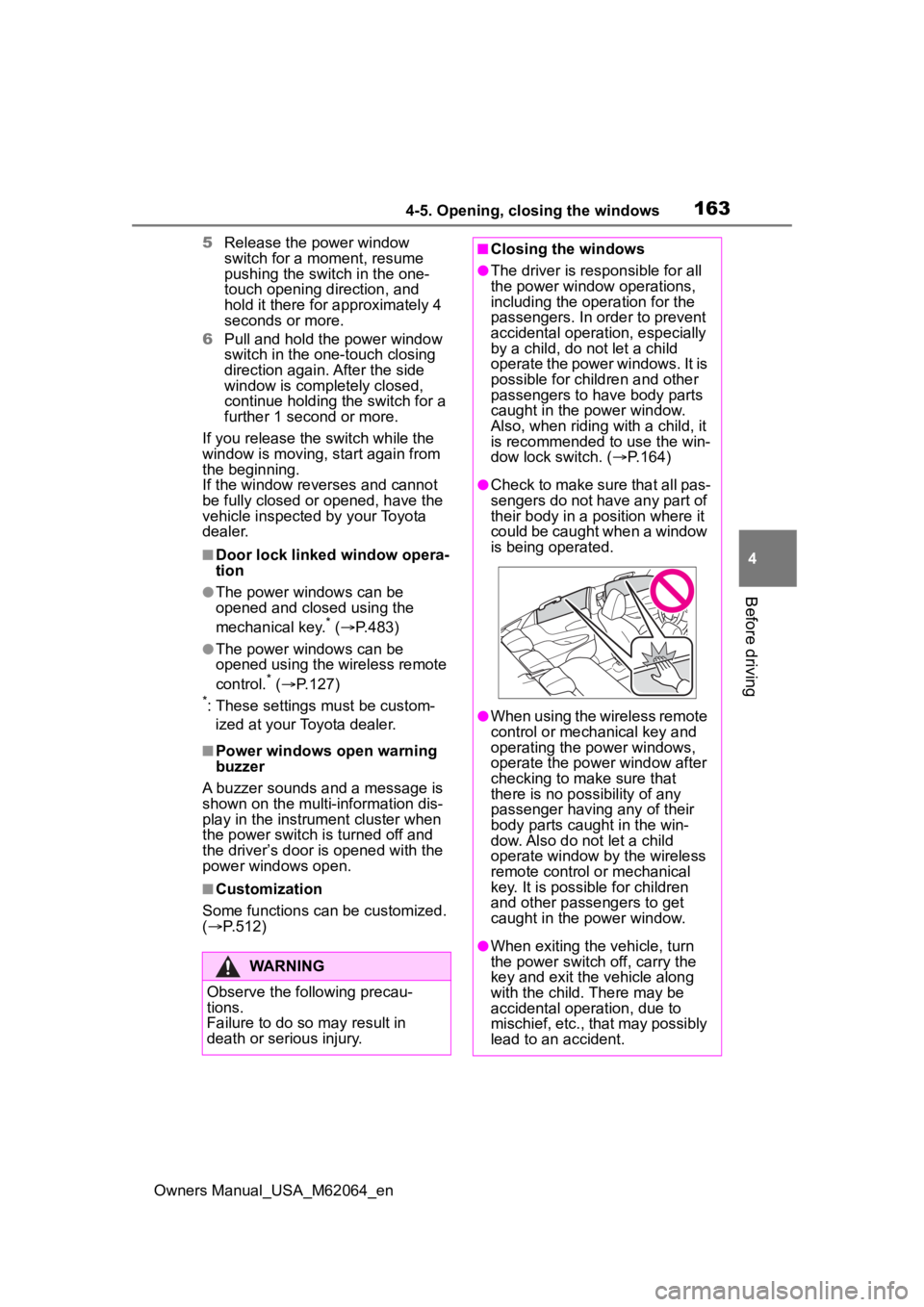
●Check to make sure that all pas-
sengers do not have any part of
their body in a position where it
could be caught when a window
is being operated.
●When using the wireless remote
control or mechanical key and
operating the power windows,
operate the power window after
checking to make sure that
there is no possibility of any
passenger having any of their
body parts caug ht in the win-
dow. Also do not let a child
operate window by the wireless
remote control or mechanical
key. It is possib le for children
and other passengers to get
caught in the power window.
●When exiting the vehicle, turn
the power switch off, carry the
key and exit the vehicle along
with the child. There may be
accidental operation, due to
mischief, etc., that may possibly
lead to an accident.
Page 169 of 572
1695-1. Before driving
Owners Manual_USA_M62064_en
5
Driving
5-1.Before driving
■Starting the fuel cell system
P. 1 8 0
■Driving
1 With the brake pedal
depressed, shift the shift
position to D.
Check that the shift position indica-
tor shows D.
2If the parking brake is set,
release the parking brake.
( P.191)
3 Gradually release the brake
pedal and gently depress the
accelerator pedal to acceler-
ate the vehicle.
■Stopping
1 Depress the brake pedal.
2 If necessary, set the parking
brake.
If the vehicle is to be stopped for an
extended period of time, shift the
shift position to P. ( P.185)
■Parking the vehicle
1 Depress the brake pedal to
stop the vehicle completely.
2 If the parking brake is
released, set the parking
brake. ( P.191) 3
Shift the shift position to P.
( P.185)
Check that the shif t position indica-
tor shows P and the parking brake
indicator is illuminated.
4 Press the power switch to
stop the fuel cell system.
5 Slowly release the brake
pedal.
6 Lock the door, making sure
that you have the electronic
key on your person.
If parking on a hill, block the wheels
as needed.
■Starting off on a steep
uphill
1 Firmly depress the brake
pedal and shift the shift posi-
tion to D.
The hill-start assist control will be
activated.
2Set the parking brake.
( P.191)
3 Release the brake pedal and
gently depress the accelera-
tor pedal to accelerate the
vehicle.
4 Release the parking brake.
( P.191)
■For fuel-efficient driving
Keep in mind that fuel cell electric
vehicles are simila r to conventional
vehicles, and it is necessary to
refrain from activities such as sud-
den acceleration. ( P. 9 1 )
■Driving in the rain
●Drive carefully whe n it is raining,
because visibility will be reduced,
the windows may become fogged-
Driving the vehicle
The following procedures
should be observed to
ensure safe driving:
Driving procedure
Page 180 of 572
1805-2. Driving procedures
Owners Manual_USA_M62064_en
5-2.Driving procedures
1Pull the parking brake switch
to check that the parking
brake is set. ( P.191)
The parking brake indicator will
come on.
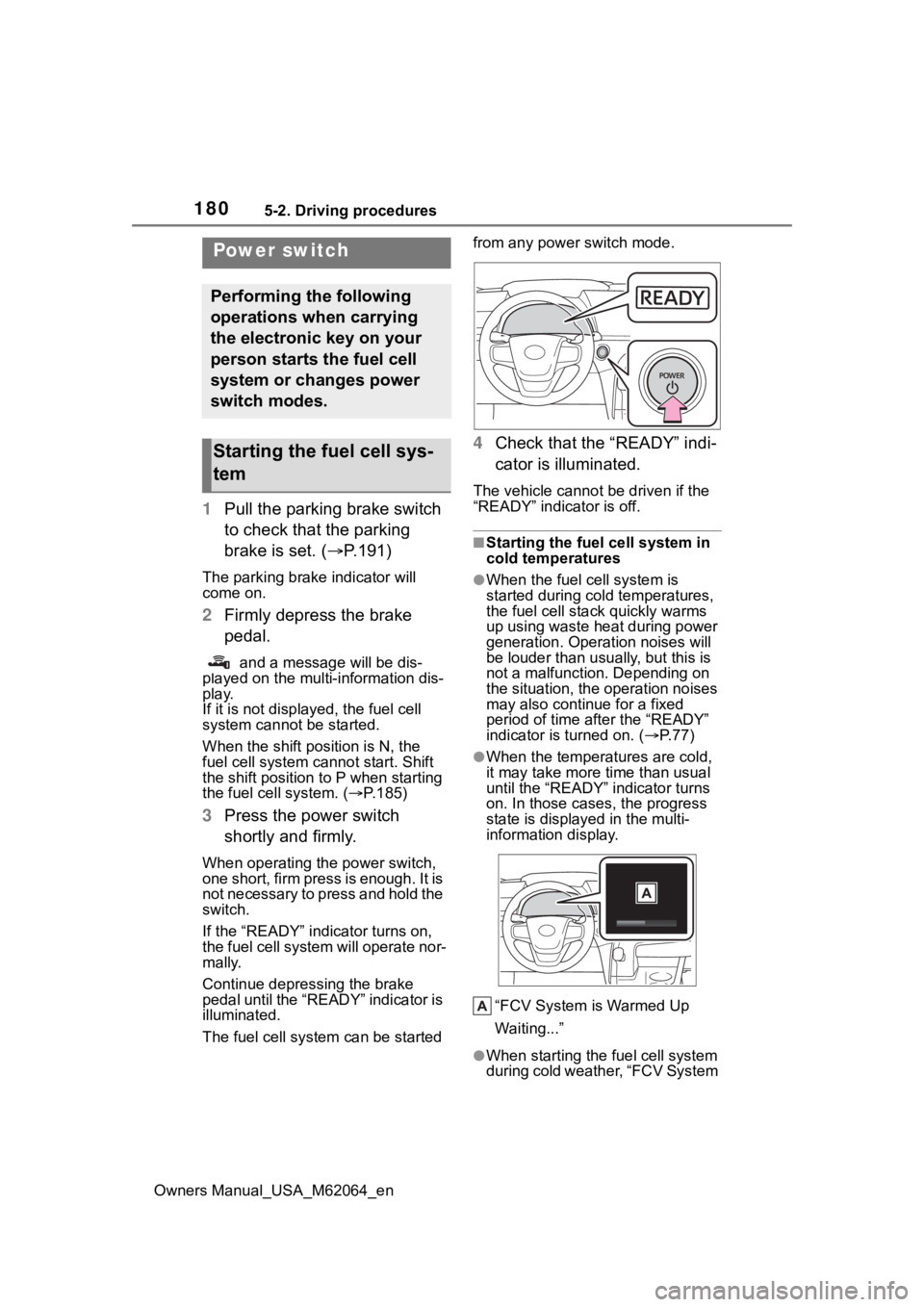
2Firmly depress the brake
pedal.
and a message will be dis-
played on the multi-information dis-
play.
If it is not displayed, the fuel cell
system cannot be started.
When the shift position is N, the
fuel cell system cannot start. Shift
the shift position to P when starting
the fuel cell system. ( P.185)
3 Press the power switch
shortly and firmly.
When operating the power switch,
one short, firm press is enough. It is
not necessary to press and hold the
switch.
If the “READY” indicator turns on,
the fuel cell system will operate nor-
mally.
Continue depressing the brake
pedal until the “READY” indicator is
illuminated.
The fuel cell system can be started from any power switch mode.
4
Check that the “READY” indi-
cator is illuminated.
The vehicle cannot be driven if the
“READY” indicator is off.
■Starting the fuel cell system in
cold temperatures
●When the fuel cell system is
started during cold temperatures,
the fuel cell stack quickly warms
up using waste heat during power
generation. Operation noises will
be louder than usually, but this is
not a malfunction. Depending on
the situation, the operation noises
may also continue for a fixed
period of time after the “READY”
indicator is turned on. ( P.77)
●When the temperatures are cold,
it may take more time than usual
until the “READY” indicator turns
on. In those case s, the progress
state is displayed in the multi-
information display.
“FCV System is Warmed Up
Waiting...”
●When starting the fuel cell system
during cold weather, “FCV System
Power switch
Performing the following
operations when carrying
the electronic key on your
person starts the fuel cell
system or changes power
switch modes.
Starting the fuel cell sys-
tem
Page 181 of 572
1815-2. Driving procedures
Owners Manual_USA_M62064_en
5
Driving
Shutdown Due to Freezing Stop in
a Safe Place See Owner’s Man-
ual” may be displayed in the multi-
information display.
The fuel cell system is frozen and
cannot be started. Contact your Toy-
ota dealer.
●The power output will be tempo-
rarily limited until the fuel cell sys-
tem reaches full operating
temperature.
●When the traction battery is
extremely cold (below approxi-
mately -22˚F [-3 0˚C]) under the
influence of outsi de temperature,
it may not be poss ible to start the
fuel cell system. In this case, try to
start the fuel ce ll system again
after the temperat ure of the trac-
tion battery increases due to the
outside temperature increase etc.
■If the fuel cell system does not
start
●The immobilizer system may not
have been deactivated. ( P. 7 0 )
Contact your Toyota dealer.
●If a message related to start-up is
shown on the multi-information
display, read the message and fol-
low the instructions.
●Check that the fuel door is closed.
When the fuel doo r is open, the
fuel cell system cannot be started.
Close the fuel door before starting
the system. ( P.212)
■Sounds and vibrations specific
to a fuel cell electric vehicle
P. 7 7
■If the 12-volt battery is dis-
charged
The fuel cell system cannot be
started using the smart key system.
Refer to P.485to res tart the fuel cell
system.
■Electronic key battery depletion
P. 1 2 4
■Conditions affecting operation
P.138
■Notes for the entry function
P.138
■If “Smart Key System Malfunc-
tion See Owner’s Manual” is
displayed on the multi-informa-
tion display
The system may be malfunctioning.
Have the vehicle inspected by your
Toyota dealer immediately.
■If the “READY” indicator does
not come on
In the event that the “READY” indi-
cator does not come on even after
performing the proper procedures
for starting the vehicle, contact your
Toyota dealer immediately.
■If the fuel cell system is mal-
functioning
P.464
■Electronic key battery
P.436
■Operation of the power switch
●If the switch is not pressed shortly
and firmly, the power switch mode
may not change or the fuel cell
system may not start.
●If attempting to restart the fuel cell
system immediately after turning
the power switch off, the fuel cell
system may not start in some
cases. After turning the power
switch off, please wait a few sec-
onds before restarting the fuel cell
system.
■Customization
If the smart key system has been
deactivated in a customized setting,
refer to P.482.
Page 183 of 572
1835-2. Driving procedures
Owners Manual_USA_M62064_en
5
Driving
( P. 7 7 )
■Automatic fuel cell system shut
off feature
●The vehicle is equipped with a
feature that automatically shuts off
the fuel cell system when the shift
position is in P with the fuel cell
system operating for an extended
period.
●The fuel cell system will automati-
cally shut off after approximately 1
hour if it has been left running
while the shift position is in P.
●The timer for the automatic fuel
cell system shut off feature will
reset if the brake pedal is
depressed or if the shift position is
in a position other than P.
●After the vehicle is parked, if the
door is locked with the door lock
switch ( P.130) from the inside or
the mechanical key from the out-
side, the automat ic fuel cell sys-
tem shut off feature will be
disabled. The tim er for the auto-
matic fuel cell system shut off fea-
ture will be re- enabled if the
driver’s door is opened.
■When the shift c ontrol system
malfunctions
When attempting to turn the power
switch off while there is a malfunc-
tion in the shift control system, the
power switch mode may change to
ACC. In this cas e, ACC may be
turned off by applying the parking
brake and pressing the power
switch again.
If there is a malfunction in the sys-
tem, have the vehicle inspected by
your Toyota dealer immediately.
■Automatic P position selection
function
P. 1 8 7
■Water release (H2O switch)
P. 1 9 6
Modes can be changed by
pressing the power switch with
the brake pedal released. (The
mode changes each time the
switch is pressed.)
WARNING
■Stopping the fuel cell system
in an emergency
●If you want to stop the fuel cell
system in an emergency while
driving the vehicle, press and
hold the power s witch for more
than 2 seconds, or press it
briefly 3 times or more in suc-
cession. ( P.446)
However, do not touch the
power switch while driving
except in an emergency. Turn-
ing the fuel cell system off while
driving will not cause loss of
steering or braking control, how-
ever, power assist to the steer-
ing will be lost. This will make it
more difficult to steer smoothly,
so you should pull over and stop
the vehicle as soon as it is safe
to do so.
●If the power switch is operated
while the vehicle is running, a
warning message will be shown
on the multi-information display
and a buzzer sounds.
●When restarting the fuel cell
system after an emergency
shutdown, press the power
switch.
Changing power switch
modes
Page 199 of 572
1995-3. Operating the lights and wipers
Owners Manual_USA_M62064_en
5
Driving
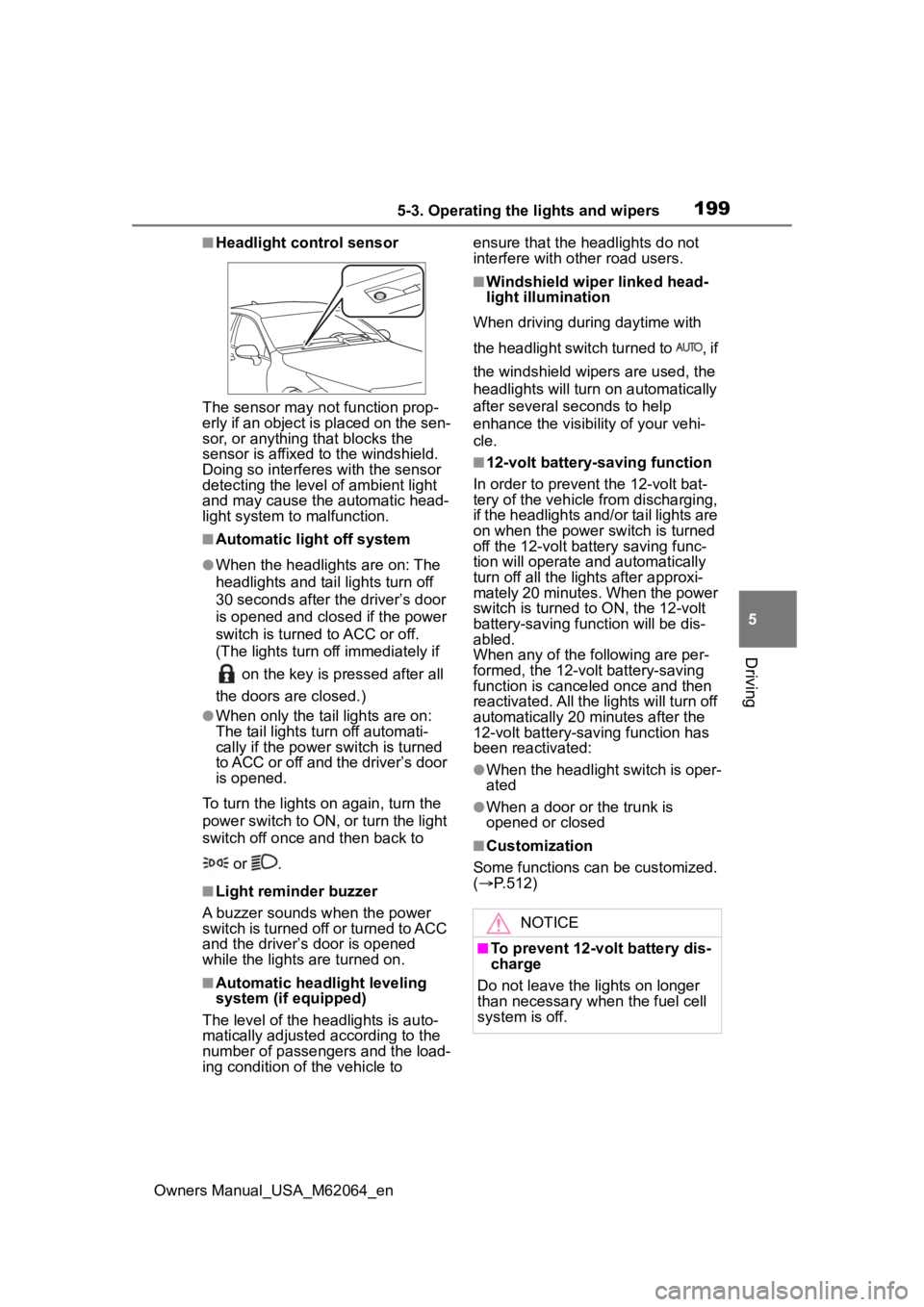
■Headlight control sensor
The sensor may not function prop-
erly if an object is placed on the sen-
sor, or anything that blocks the
sensor is affixed to the windshield.
Doing so interfere s with the sensor
detecting the level of ambient light
and may cause the automatic head-
light system to malfunction.
■Automatic light off system
●When the headlights are on: The
headlights and tail lights turn off
30 seconds after the driver’s door
is opened and clos ed if the power
switch is turned to ACC or off.
(The lights turn off immediately if
on the key is pressed after all
the doors are closed.)
●When only the tail lights are on:
The tail lights tu rn off automati-
cally if the power switch is turned
to ACC or off and the driver’s door
is opened.
To turn the lights on again, turn the
power switch to ON, or turn the light
switch off once and then back to
or .
■Light reminder buzzer
A buzzer sounds when the power
switch is turned off or turned to ACC
and the driver’s door is opened
while the lights are turned on.
■Automatic headlight leveling
system (if equipped)
The level of the headlights is auto-
matically adjusted according to the
number of passengers and the load-
ing condition of the vehicle to ensure that the headlights do not
interfere with other road users.
■Windshield wiper linked head-
light illumination
When driving during daytime with
the headlight switch turned to , if
the windshield wipers are used, the
headlights will turn o n automatically
after several seconds to help
enhance the visibility of your vehi-
cle.
■12-volt battery-saving function
In order to prevent the 12-volt bat-
tery of the vehicle from discharging,
if the headlights and/or tail lights are
on when the power switch is turned
off the 12-volt battery saving func-
tion will operate and automatically
turn off all the lig hts after approxi-
mately 20 minutes. When the power
switch is turned to ON, the 12-volt
battery-saving function will be dis-
abled.
When any of the following are per-
formed, the 12-volt battery-saving
function is canceled once and then
reactivated. All the lights will turn off
automatically 20 minutes after the
12-volt battery-saving function has
been reactivated:
●When the headlight switch is oper-
ated
●When a door or the trunk is
opened or closed
■Customization
Some functions can be customized.
( P.512)
NOTICE
■To prevent 12-volt battery dis-
charge
Do not leave the lights on longer
than necessary when the fuel cell
system is off.
Page 357 of 572
3576-2. Using the interior lights
Owners Manual_USA_M62064_en
6
Interior features
Door trim ornament lights
Cup holder lights
Instrument panel ornament
lights
1 Select .
2 Select “Illumination”.
3 Select the desired color.
■Illuminated entry system
The lights automatically turn on/off
according to the power switch
mode, the presence of the elec-
tronic key, whether the doors are
locked/unlocked, and whether the
doors are open/closed.
■To prevent the 12-volt battery
from being discharged
If the interior lights remain on when
the power switch is turned off, the
lights will go off automatically after
20 minutes.
■When the interior lights or front
personal lights do not respond
as normal
●When water, dirt, etc., have
adhered to the lens surface
●When operated with a wet hand
●When wearing gloves, etc.
■The interior lights may turn on
automatically when
If any of the SRS airbags deploy
(inflate) or in the event of a strong
rear impact, the interior lights will
turn on automatically.
The interior lights will turn off auto-
matically after approximately 20
minutes.
The interior lights can be turned off
manually. However, in order to help
prevent further collisions, it is rec-
ommended that they be left on until
safety can be ensured.
(The interior lights may not turn on
automatically depending on the force of the impact and conditions of
the collision.)
■Customization
Some functions can be customized.
( P.512)
NOTICE
■To prevent 12-volt battery dis-
charge
Do not leave the lights on longer
than necessary when the fuel cell
system is off.
■Removing light lenses
Never remove the lens for the
interior lights and front personal
lights. Otherwise, the lights will be
damaged. If a lens needs to be
removed, contact your Toyota
dealer.
Page 359 of 572
3596-3. Using the storage features
Owners Manual_USA_M62064_en
6
Interior features
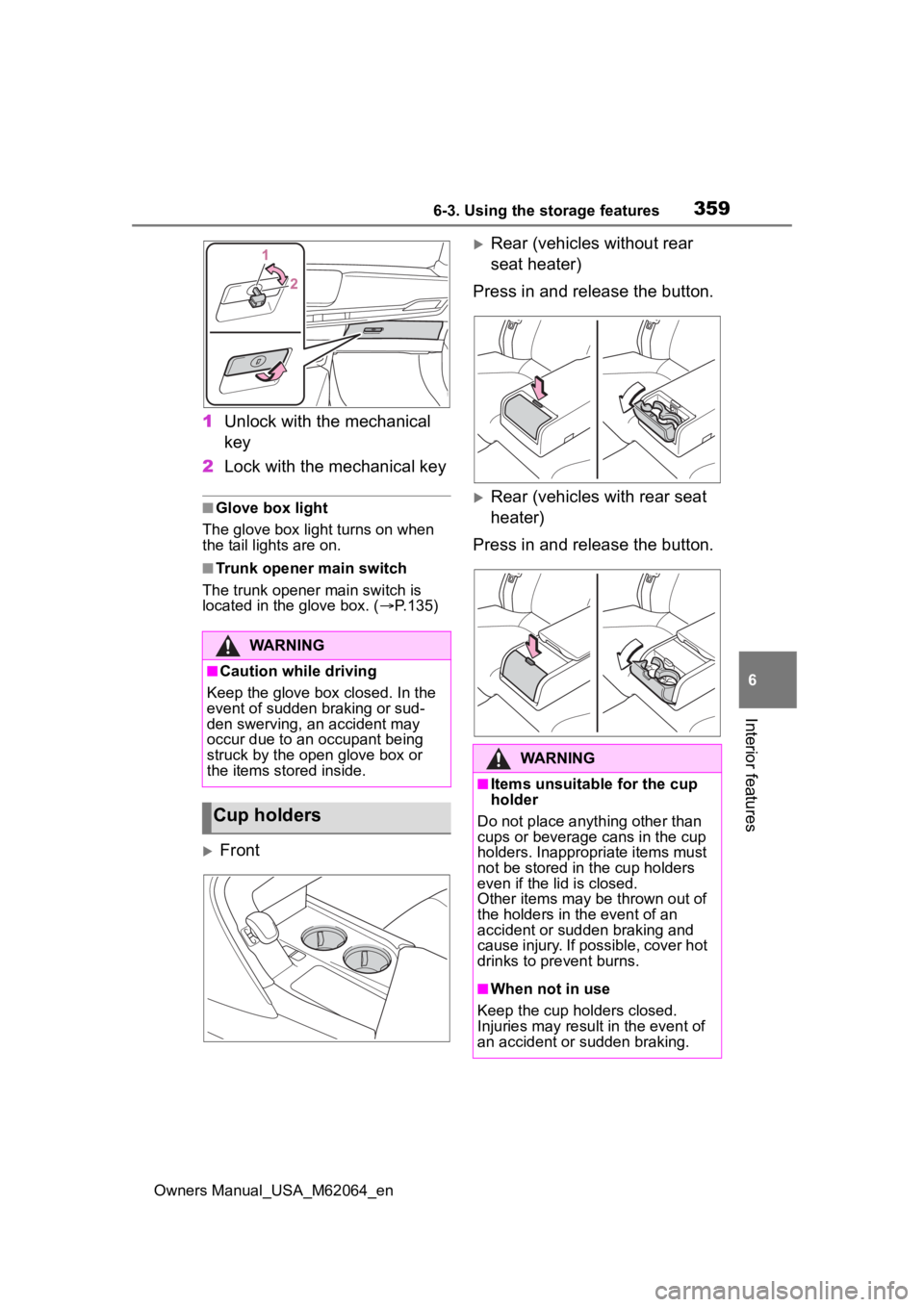
1 Unlock with the mechanical
key
2 Lock with the mechanical key
■Glove box light
The glove box light turns on when
the tail lights are on.
■Trunk opener main switch
The trunk opener main switch is
located in the glove box. ( P.135)
Front
Rear (vehicles without rear
seat heater)
Press in and release the button.
Rear (vehicles with rear seat
heater)
Press in and release the button.
WARNING
■Caution while driving
Keep the glove box closed. In the
event of sudden braking or sud-
den swerving, an accident may
occur due to an occupant being
struck by the open glove box or
the items stored inside.
Cup holders
WARNING
■Items unsuitable for the cup
holder
Do not place anyth ing other than
cups or beverage cans in the cup
holders. Inappropriate items must
not be stored in the cup holders
even if the lid is closed.
Other items may be thrown out of
the holders in the event of an
accident or sudden braking and
cause injury. If possible, cover hot
drinks to pre vent burns.
■When not in use
Keep the cup holders closed.
Injuries may resul t in the event of
an accident or sudden braking.
Page 368 of 572
3686-4. Using the other interior features
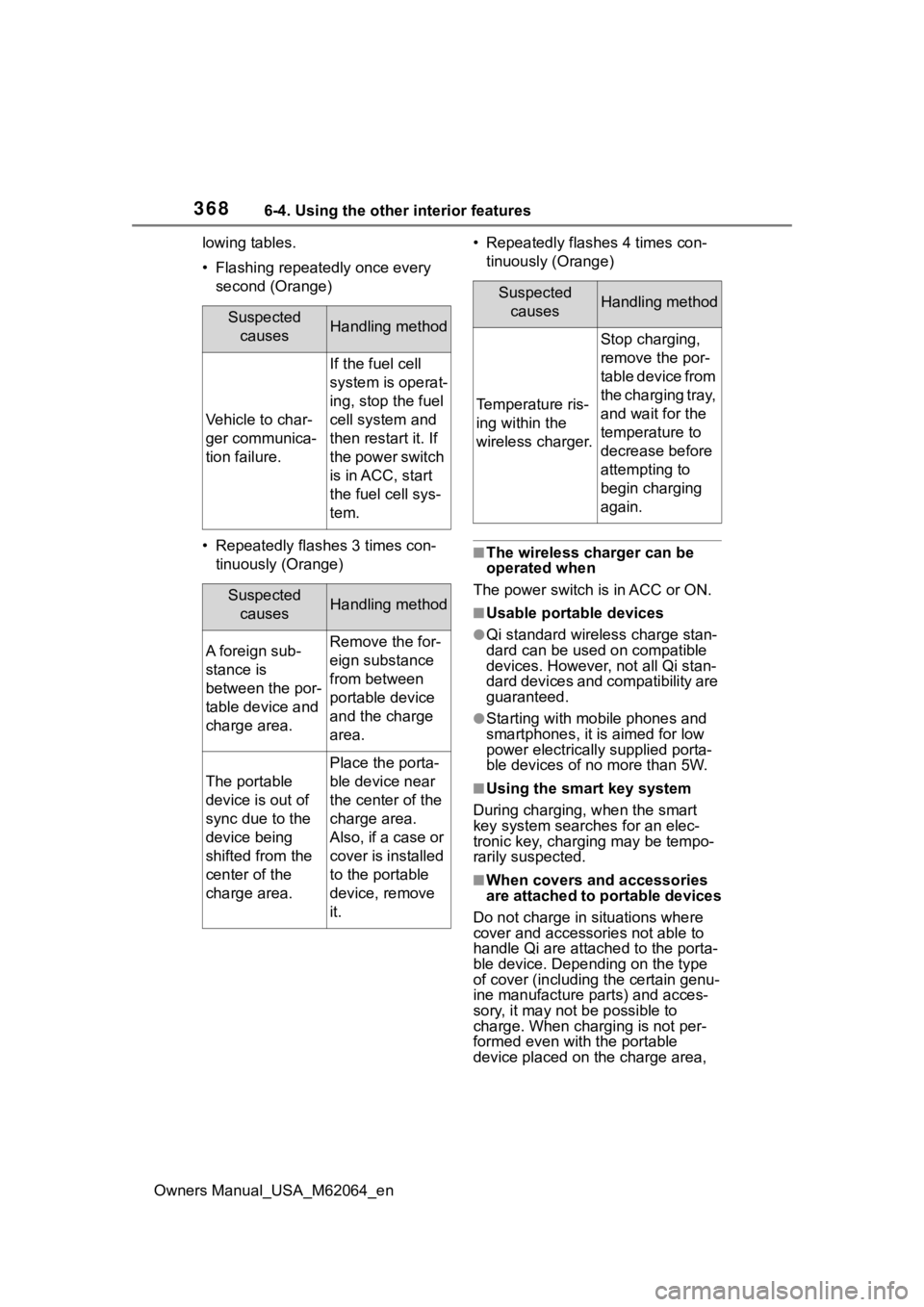
Owners Manual_USA_M62064_enlowing tables.
• Flashing repeatedly once every
second (Orange)
• Repeatedly flashes 3 times con- tinuously (Orange) • Repeatedly flashes 4 times con-
tinuously (Orange)
■The wireless charger can be
operated when
The power switch is in ACC or ON.
■Usable portable devices
●Qi standard wirel ess charge stan-
dard can be used on compatible
devices. However, not all Qi stan-
dard devices and compatibility are
guaranteed.
●Starting with mobile phones and
smartphones, it is aimed for low
power electrically supplied porta-
ble devices of no more than 5W.
■Using the smart key system
During charging, when the smart
key system searches for an elec-
tronic key, charging may be tempo-
rarily suspected.
■When covers and accessories
are attached to portable devices
Do not charge in situations where
cover and accessories not able to
handle Qi are attached to the porta-
ble device. Depending on the type
of cover (including the certain genu-
ine manufacture parts) and acces-
sory, it may not be possible to
charge. When charging is not per-
formed even with the portable
device placed on the charge area,
Suspected
causesHandling method
Vehicle to char-
ger communica-
tion failure.
If the fuel cell
system is operat-
ing, stop the fuel
cell system and
then restart it. If
the power switch
is in ACC, start
the fuel cell sys-
tem.
Suspected causesHandling method
A foreign sub-
stance is
between the por-
table device and
charge area.Remove the for-
eign substance
from between
portable device
and the charge
area.
The portable
device is out of
sync due to the
device being
shifted from the
center of the
charge area.
Place the porta-
ble device near
the center of the
charge area.
Also, if a case or
cover is installed
to the portable
device, remove
it.
Suspected causesHandling method
Temperature ris-
ing within the
wireless charger.
Stop charging,
remove the por-
table device from
the charging tray,
and wait for the
temperature to
decrease before
attempting to
begin charging
again.
Page 370 of 572
3706-4. Using the other interior features
Owners Manual_USA_M62064_en
WARNING
●Do not allow magnetic objects
to come near the wireless char-
ger
●Do not perform charging if the
charging area is dirty
●Do not cover with cloth, etc.,
and charge
NOTICE
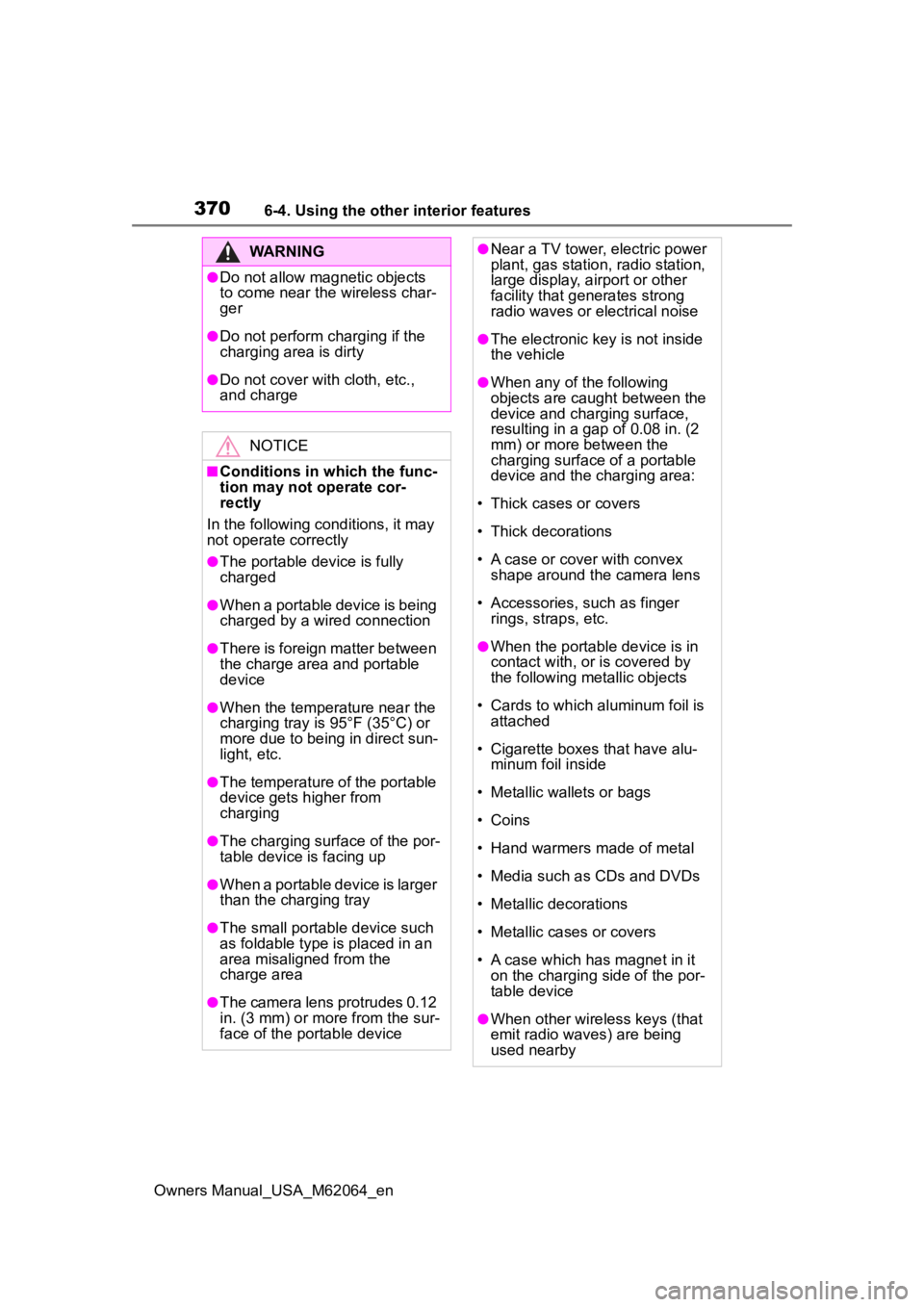
■Conditions in which the func-
tion may not operate cor-
rectly
In the following conditions, it may
not operate correctly
●The portable device is fully
charged
●When a portable device is being
charged by a wired connection
●There is foreign matter between
the charge area and portable
device
●When the temperature near the
charging tray is 95°F (35°C) or
more due to being in direct sun-
light, etc.
●The temperature of the portable
device gets higher from
charging
●The charging surface of the por-
table device is facing up
●When a portable device is larger
than the charging tray
●The small portable device such
as foldable type is placed in an
area misaligned from the
charge area
●The camera lens protrudes 0.12
in. (3 mm) or more from the sur-
face of the portable device
●Near a TV tower, electric power
plant, gas station, radio station,
large display, a irport or other
facility that gen erates strong
radio waves or electrical noise
●The electronic key is not inside
the vehicle
●When any of the following
objects are caug ht between the
device and charging surface,
resulting in a gap of 0.08 in. (2
mm) or more between the
charging surface of a portable
device and the charging area:
• Thick cases or covers
• Thick decorations
• A case or cover with convex shape around the camera lens
• Accessories, such as finger rings, straps, etc.
●When the portable device is in
contact with, or is covered by
the following metallic objects
• Cards to which aluminum foil is attached
• Cigarette boxes that have alu- minum foil inside
• Metallic wallets or bags
• Coins
• Hand warmers made of metal
• Media such as CDs and DVDs
• Metallic decorations
• Metallic cases or covers
• A case which has magnet in it on the charging side of the por-
table device
●When other wireless keys (that
emit radio waves) are being
used nearby