key TOYOTA MIRAI 2023 Workshop Manual
[x] Cancel search | Manufacturer: TOYOTA, Model Year: 2023, Model line: MIRAI, Model: TOYOTA MIRAI 2023Pages: 572, PDF Size: 17.71 MB
Page 466 of 572
4668-2. Steps to take in an emergency
Owners Manual_USA_M62064_en
■If a message that indicates the
need for visiting your Toyota
dealer is displayed
The system or part shown on the
multi-information display is malfunc-
tioning. Have the vehicle inspected
by your Toyota dealer immediately.
■If a message that indicates the
need for referring to Owner’s
Manual is displayed
●If any of the following messages
are shown on the multi-informa-
tion display, it may indicate a mal-
function. Have the vehicle
inspected by you r Toyota dealer
immediately.
• “Smart Key System Malfunction
See Owner’s Manual”
• “P Switch Malfunction Apply Park- ing Brake Securely When Parking
See Owner’s Manual”
• “Shift System Malfunction Apply Parking Brake Securely When
Parking See Owner’s Manual”
• “Shift System Unavailable Apply Parking Brake Securely When
Parking See Owner’s Manual”
• “Shift System Malfunction See Owner’s Manual”
• “Shift System Malfunction Stop in a Safe Place See Owner’s Man-
ual”
• “Battery Low Shifting Unavailable See Owner’s Manual”
• “FCV system malfunction”
• “Traction battery system malfunc-
tion”
• “Accelerator System Malfunction”
●If any of the following messages
are shown on the multi-informa-
tion display, it may indicate a mal-
function. Immediat ely stop the
vehicle and contact your Toyota
dealer.
• “Braking Power Low Stop in a Safe Place See Owner’s Manual”
• “FCV System Shutdown Due to
Hydrogen Leakage Stop in a Safe
Place See Owner’s Manual”
●If “FCV system stopped” is shown
on the multi-information display,
the vehicle may have run out of fuel. Stop the vehicle in a safe
place and, if the fuel level is low,
refuel the vehicle. (
P.83)
●If “Low Auxiliary Battery See
Owner’s Manual” is shown,
• When the display goes off after several seconds (displays for
about 6 seconds): Maintain the
fuel cell system operation for more
than 15 minutes and charge the
12-volt battery.
• When the display does not go off: Start up the fuel cell system using
the procedures: P. 4 8 5
●If “Maintenance Required for Trac-
tion Battery Cooling Parts See
Owner’s Manual” is shown, the fil-
ters may be clogged, the air intake
vents may be blocked, or there
may be a gap in the duct. There-
fore, perform the following correc-
tion procedure.
• Cleaning the traction battery air intake vents ( P.433)
If the warning message is shown
even if the vents are cleaned,
have the vehicle inspected by
your Toyota dealer.
■If “Ion Filter Maintenance
Required Visit Your Dealer” is
displayed
Ion filter replacement is necessary.
Contact your Toyota dealer.
NOTICE
■If “Low Auxiliary Battery See
Owner’s Manual” is displayed
frequently
The 12-volt battery may have
deteriorated. As the battery may
discharge in this state when left
unattended, have the battery
inspected by you r Toyota dealer.
Page 480 of 572
4808-2. Steps to take in an emergency
Owners Manual_USA_M62064_en
One of the following may be the
cause of the problem:
The electronic key may not be
functioning properly.
( P.482)
There may not be sufficient
fuel in the vehicle’s tank.
Refuel the vehicle.
The fuel door may be open.
( P.212)
There may be a malfunction
in the immobilizer system.
( P. 7 0 )
There may be a malfunction
in the shift control system.
*
( P.183, 465)
The fuel cell system may be
malfunctioning due to an elec-
trical problem such as elec-
tronic key battery depletion or
a blown fuse. However, depending on the type of mal-
function, an interim measure
is available to start the fuel
cell system. (
P.481)
There is a possibility that the
temperature of the traction
battery is extremely low
(approximately below -22˚F [-
30˚C]). ( P.85, 180)
It is possible the fuel cell sys-
tem is frozen. ( P.180)
*: It may not be possible to shift the
shift position from P.
One of the following may be the
cause of the problem:
The 12-volt battery may be
discharged. ( P.485)
The 12-volt battery terminal
connections may be loose or
corroded. ( P.413)
One of the following may be the
cause of the problem:
One or both of the 12-volt bat-
tery terminals may be discon-
nected. ( P.413)
If the fuel cell system
will not start
Reasons for the fuel cell
system not starting vary
depending on the situation.
Check the following and
perform the appropriate
procedure:
The fuel cell system will
not start even though the
correct starting procedure
is being followed.
( P.180)
The interior lights and
headlights are dim, or the
horn does not sound or
sounds at a low volume.
The interior lights and
headlights do not turn on,
or the horn does not
sound.
Page 481 of 572
4818-2. Steps to take in an emergency
Owners Manual_USA_M62064_en
8
When trouble arises
The 12-volt battery may be
discharged. ( P.485)
Contact your Toyot a dealer if the
problem cannot be repaired, or if
repair procedures are unknown.
When the fuel cell system does
not start, the following steps can
be used as an interim measure
to start the fuel cell system if the
power switch is functioning nor-
mally.
Do not use this starting proce-
dure except in cases of emer-
gency.
1 Pull the parking brake switch
to check that the parking
brake is set. ( P.191)
Parking brake indicator will come
on.
2 Turn the power switch to
ACC.
3 Press and hold the power
switch for about 15 seconds
while depressing the brake
pedal firmly.
Even if the fuel cell system can
be started using the above
steps, the system may be mal-
functioning. Have the vehicle
inspected by your Toyota dealer.
Starting the fuel cell sys-
tem in an emergency
If you lose your keys
New genuine mechanical
keys can be made by your
Toyota dealer using another
mechanical key and the key
number stamped on your
key number plate.
Keep the plate in a safe
place such as your wallet,
not in the vehicle.
NOTICE
■When an electronic key is lost
If the electronic key remains lost,
the risk of vehicle theft increases
significantly. Visit your Toyota
dealer immediately with all
remaining electronic keys that
were provided with your vehicle.
Page 482 of 572
4828-2. Steps to take in an emergency
Owners Manual_USA_M62064_en
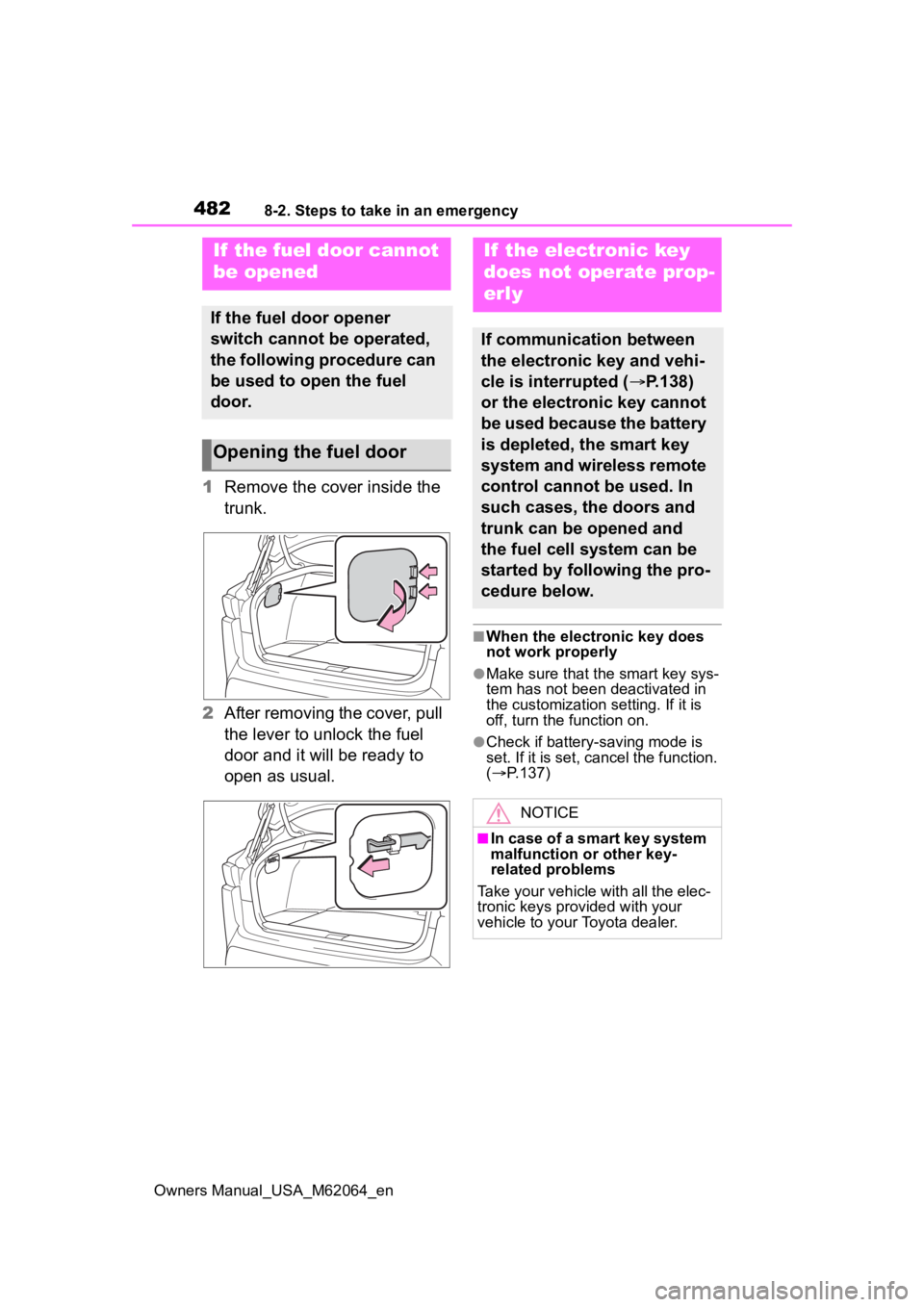
1Remove the cover inside the
trunk.
2 After removing the cover, pull
the lever to unlock the fuel
door and it will be ready to
open as usual.
■When the electronic key does
not work properly
●Make sure that the smart key sys-
tem has not been deactivated in
the customization setting. If it is
off, turn the function on.
●Check if battery-saving mode is
set. If it is set, cancel the function.
( P.137)
If the fuel door cannot
be opened
If the fuel door opener
switch cannot be operated,
the following procedure can
be used to open the fuel
door.
Opening the fuel door
If the electronic key
does not operate prop-
erly
If communication between
the electronic key and vehi-
cle is interrupted ( P.138)
or the electronic key cannot
be used because the battery
is depleted, the smart key
system and wireless remote
control cannot be used. In
such cases, the doors and
trunk can be opened and
the fuel cell system can be
started by following the pro-
cedure below.
NOTICE
■In case of a smart key system
malfunction or other key-
related problems
Take your vehicle with all the elec-
tronic keys provided with your
vehicle to your Toyota dealer.
Page 483 of 572
4838-2. Steps to take in an emergency
Owners Manual_USA_M62064_en
8
When trouble arises
■Locking and unlocking the
door
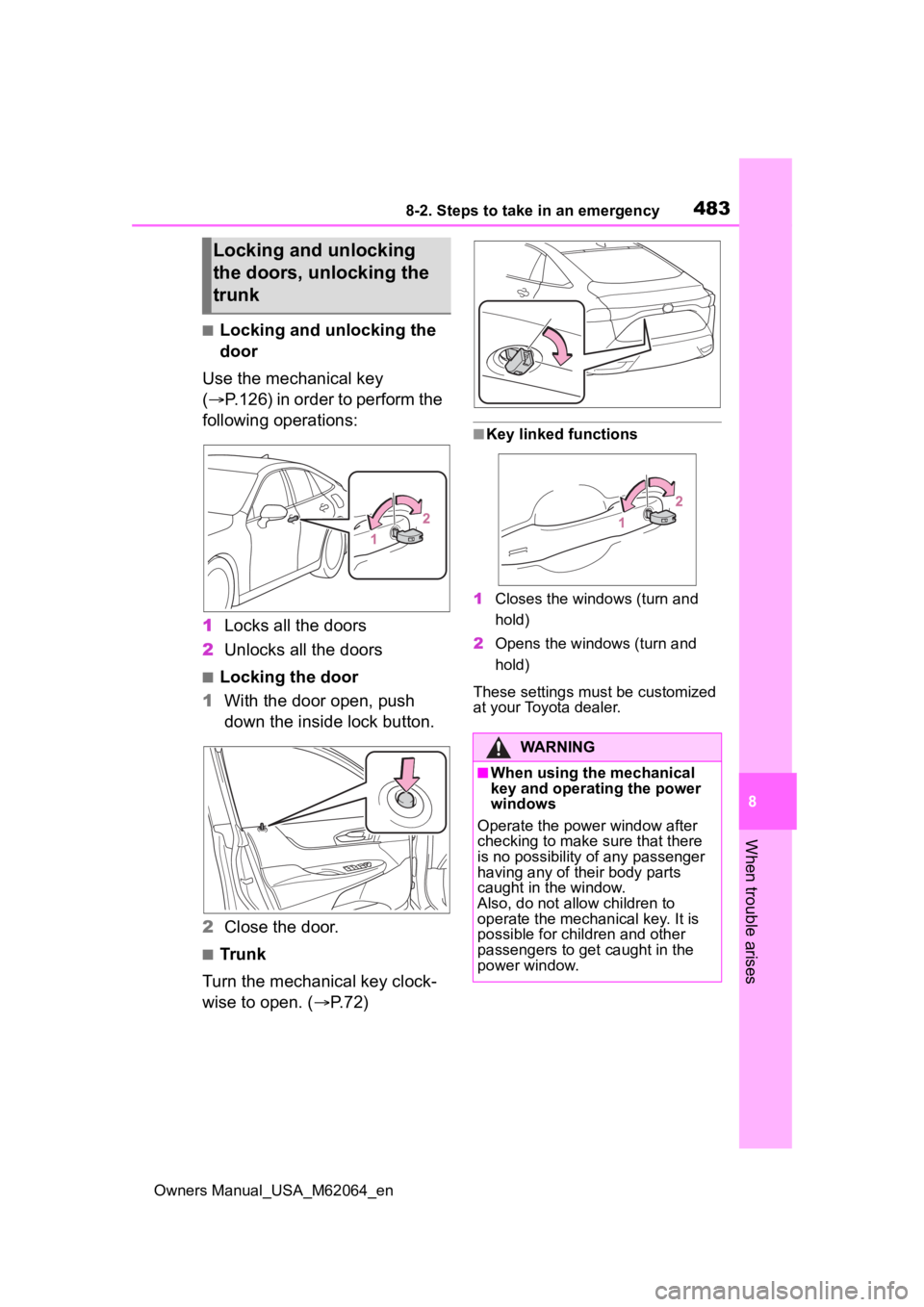
Use the mechanical key
( P.126) in order to perform the
following operations:
1 Locks all the doors
2 Unlocks all the doors
■Locking the door
1 With the door open, push
down the inside lock button.
2 Close the door.
■Trunk
Turn the mechanical key clock-
wise to open. ( P.72)
■Key linked functions
1 Closes the windows (turn and
hold)
2 Opens the windows (turn and
hold)
These settings mus t be customized
at your Toyota dealer.
Locking and unlocking
the doors, unlocking the
trunk
WARNING
■When using the mechanical
key and operating the power
windows
Operate the power window after
checking to make sure that there
is no possibility of any passenger
having any of their body parts
caught in the window.
Also, do not allo w children to
operate the mechanical key. It is
possible for children and other
passengers to get caught in the
power window.
Page 484 of 572
4848-2. Steps to take in an emergency
Owners Manual_USA_M62064_en
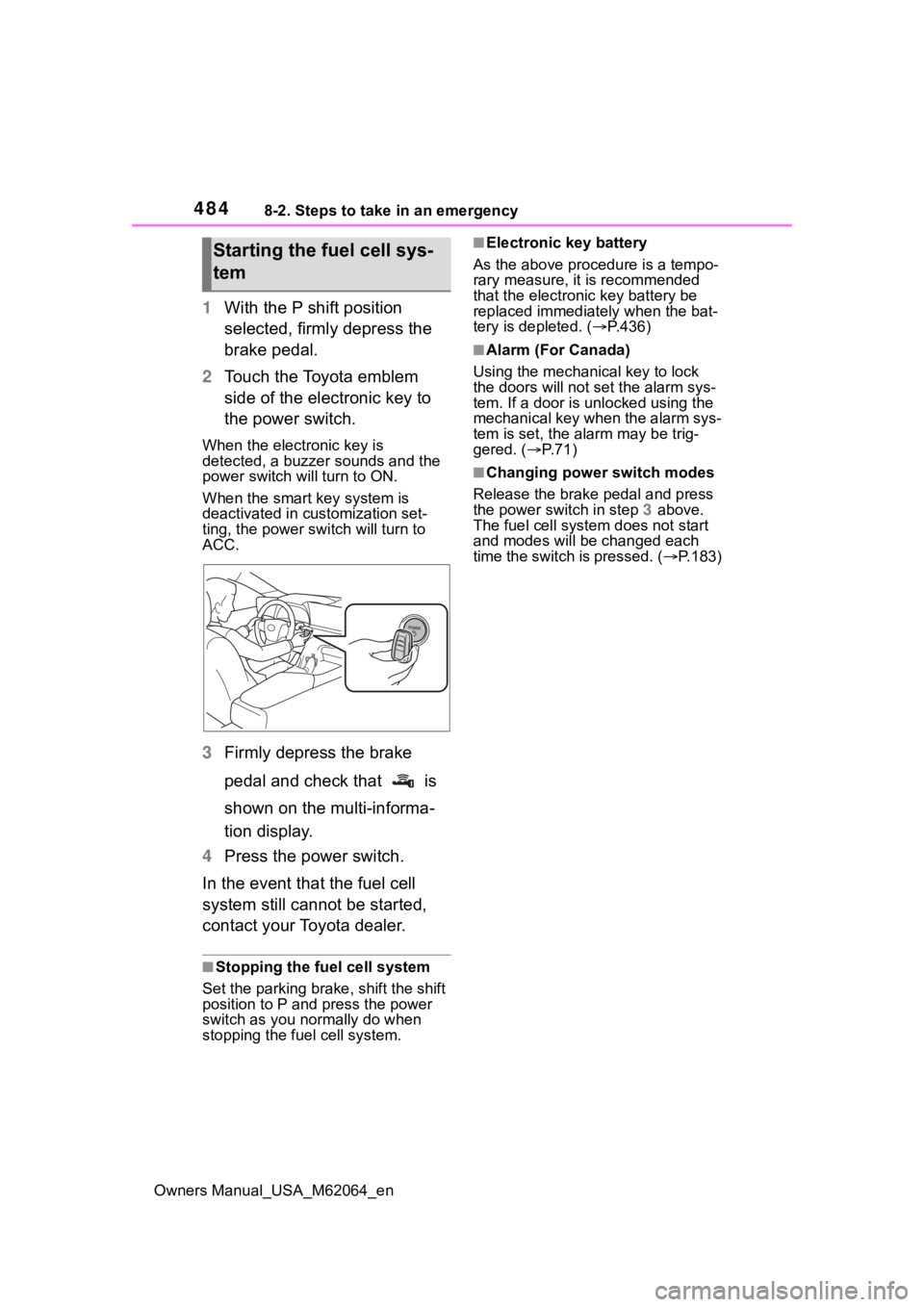
1With the P shift position
selected, firmly depress the
brake pedal.
2 Touch the Toyota emblem
side of the electronic key to
the power switch.
When the electronic key is
detected, a buzzer sounds and the
power switch will turn to ON.
When the smart key system is
deactivated in customization set-
ting, the power switch will turn to
ACC.
3Firmly depress the brake
pedal and check that is
shown on the multi-informa-
tion display.
4 Press the power switch.
In the event that the fuel cell
system still cannot be started,
contact your Toyota dealer.
■Stopping the fuel cell system
Set the parking brake, shift the shift
position to P and press the power
switch as you no rmally do when
stopping the fuel cell system.
■Electronic key battery
As the above proce dure is a tempo-
rary measure, it is recommended
that the electronic key battery be
replaced immediatel y when the bat-
tery is depleted. ( P.436)
■Alarm (For Canada)
Using the mechanical key to lock
the doors will not set the alarm sys-
tem. If a door is unlocked using the
mechanical key when the alarm sys-
tem is set, the alarm may be trig-
gered. ( P.71)
■Changing power switch modes
Release the brake pedal and press
the power switch in step 3 above.
The fuel cell system does not start
and modes will be changed each
time the switch is pressed. ( P.183)
Starting the fuel cell sys-
tem
Page 485 of 572
4858-2. Steps to take in an emergency
Owners Manual_USA_M62064_en
8
When trouble arises
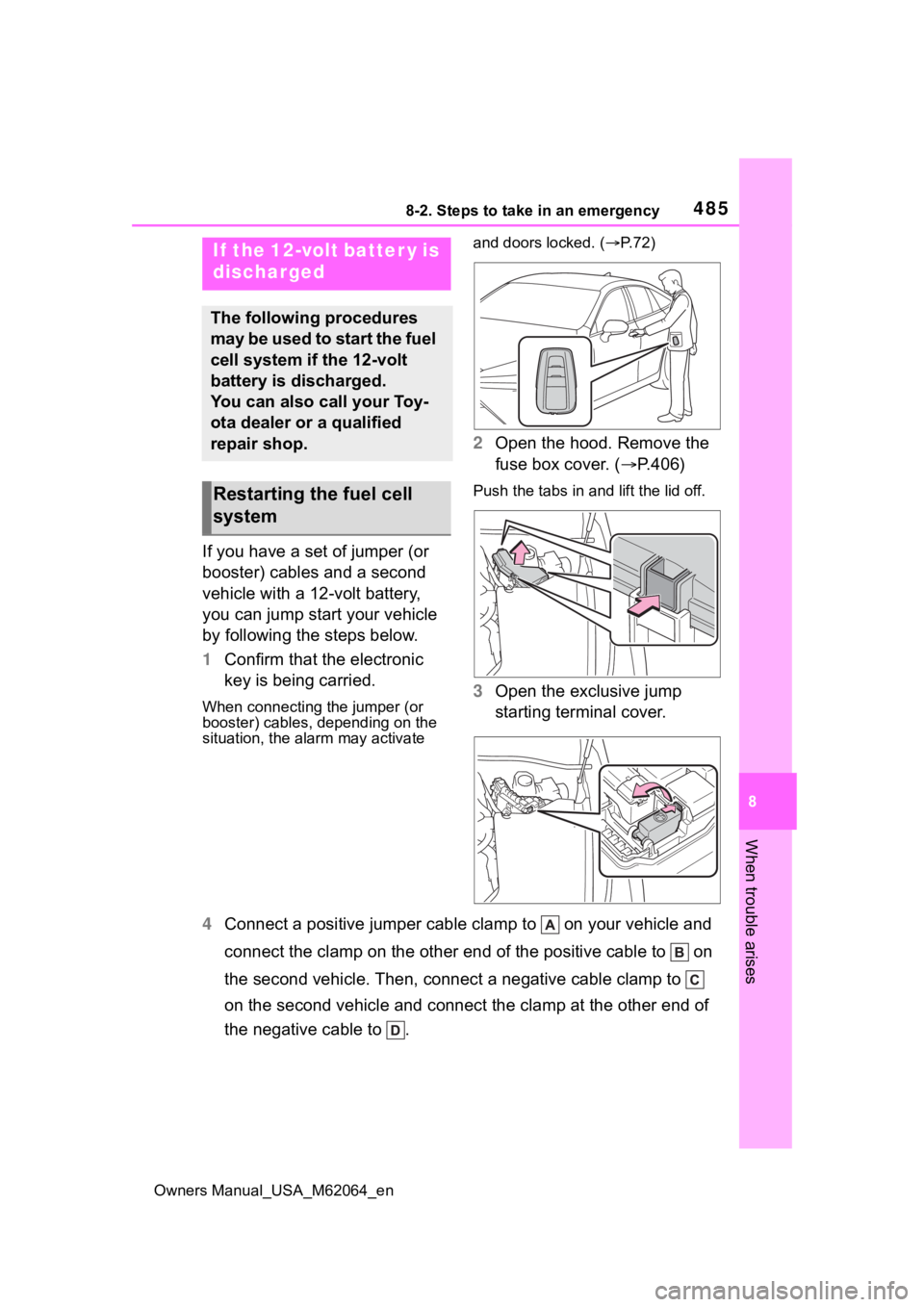
If you have a set of jumper (or
booster) cables and a second
vehicle with a 12-volt battery,
you can jump start your vehicle
by following the steps below.
1 Confirm that the electronic
key is being carried.
When connecting the jumper (or
booster) cables, depending on the
situation, the ala rm may activate and doors locked. (
P. 7 2 )
2 Open the hood. Remove the
fuse box cover. ( P.406)
Push the tabs in and lift the lid off.
3 Open the exclusive jump
starting terminal cover.
4 Connect a positive jumper cabl e clamp to on your vehicle and
connect the clamp on the other end of the positive cable to on
the second vehicle. Then, connect a negative cable clamp to
on the second vehicle and connect the clamp at the other end of
the negative cable to .
If the 12-volt batter y is
discharged
The following procedures
may be used to start the fuel
cell system if the 12-volt
battery is discharged.
You can also call your Toy-
ota dealer or a qualified
repair shop.
Restarting the fuel cell
system
Page 487 of 572
4878-2. Steps to take in an emergency
Owners Manual_USA_M62064_en
8
When trouble arises
■Starting the fuel cell system
when the 12-volt battery is dis-
charged
The fuel cell system cannot be
started by push-starting.
■To prevent 12-volt battery dis-
charge
●Turn off the headlights and the
audio system while the fuel cell
system is off.
●Turn off any unnecessary electri-
cal components when the vehicle
is running at a low speed for an
extended period, such as in heavy
traffic.
■When the 12-volt battery is
removed or discharged
●Information stor ed in the ECU is
cleared. When the 12-volt battery
is depleted, have the vehicle
inspected at you r Toyota dealer.
●Some systems may require initial-
ization. ( P.526)
●If the 12-volt battery discharges, it
may not be possible to shift the
shift position to other positions.
In this case, the vehicle cannot be
towed without lifting both rear
wheels because the rear wheels will
be locked.
■When removing the 12-volt bat-
tery terminals
When the 12-volt battery terminals
are removed, the information stored
in the ECU is cleared. Before
removing the 12-volt battery termi-
nals, contact your Toyota dealer.
■Charging the 1 2-volt battery
The electricity stor ed in the 12-volt
battery will discharge gradually even
when the vehicle is not in use, due
to natural discharge and the drain-
ing effects of certain electrical appli-
ances. If the vehicle is left for a long
time, the 12-volt battery may dis-
charge, and the fuel cell system
may be unable to s tart. (The 12-volt battery recharges automatically
while the fuel cell
system is operat-
ing.)
■When recharging or replacing
the 12-volt battery
●In some cases, it may not be pos-
sible to unlock the doors using the
smart key system when the 12-
volt battery is discharged. Use the
wireless remote c ontrol or the
mechanical key to lock or unlock
the doors.
●The fuel cell system may not start
on the first attempt after the 12-
volt battery has recharged but will
start normally after the second
attempt. This is not a malfunction.
●The power switch mode is memo-
rized by the vehicle. When the 12-
volt battery is reconnected, the
system will return to the mode it
was in before the 12-volt battery
was discharged. Before discon-
necting the 12-volt battery, turn
the power switch off.
If you are unsure what mode the
power switch was in before the
12-volt battery discharged, be
especially careful when recon-
necting the 12-volt battery.
●When the 12-volt battery is recon-
nected, start the fuel cell system,
depress the brake pedal, and con-
firm that it is possible to shift into
each shift position.
●If the battery is removed or the ter-
minals disconnected without oper-
ating the water release function
during cold weather, the vehicle
may not start due to the fuel cell
system being frozen. To prevent
this, operate th e water release
function before removing the bat-
tery or disconnecting the termi-
nals. ( P.196)
Page 513 of 572
5139-2. Customization
Owners Manual_USA_M62064_en
9
Vehicle specifications
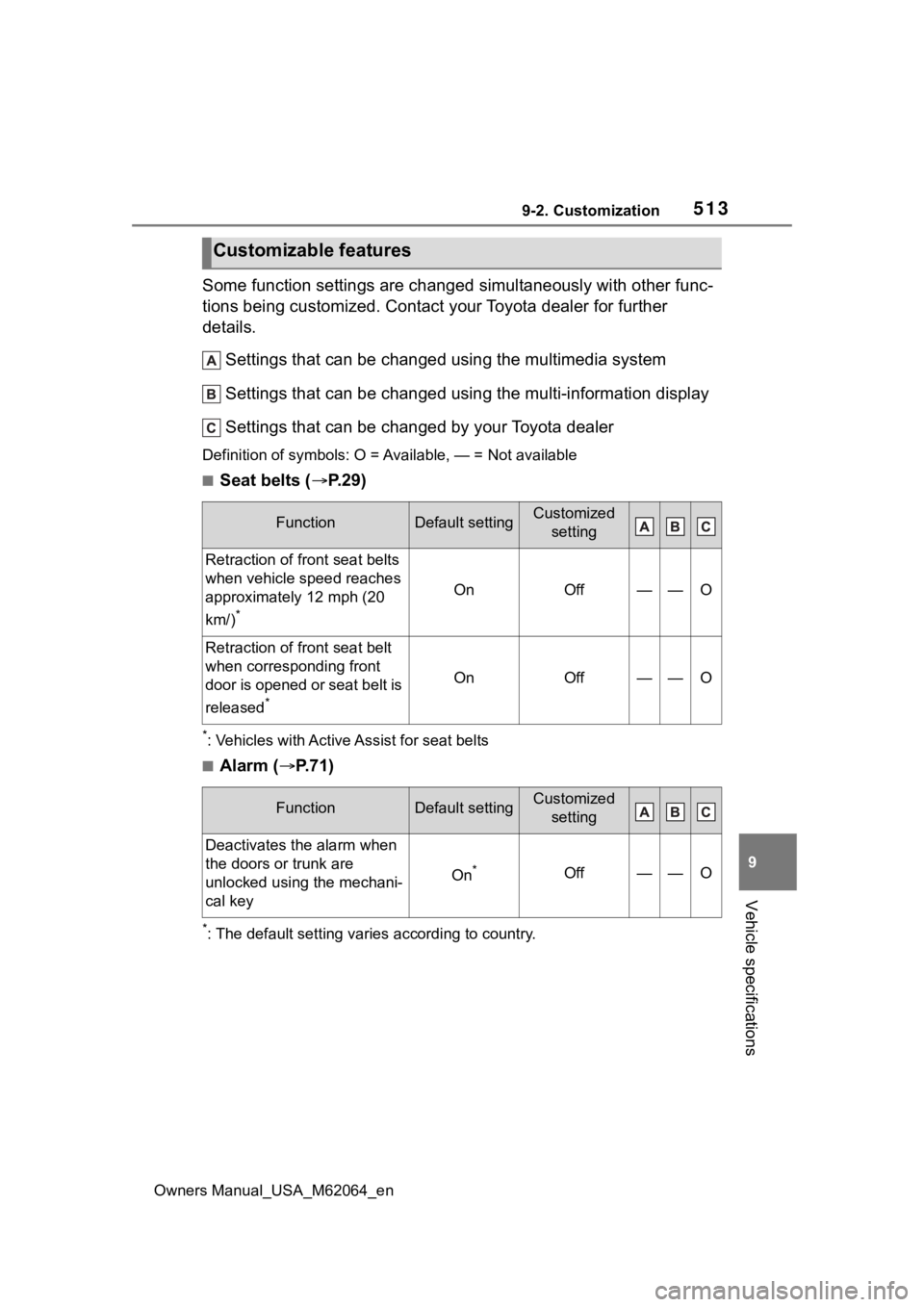
Some function settings are changed simultaneously with other func-
tions being customized. Contact y our Toyota dealer for further
details.
Settings that can be changed using the multimedia system
Settings that can be changed using the multi-information displ ay
Settings that can be changed by your Toyota dealer
Definition of symbols: O = Av ailable, — = Not available
■Seat belts (P.29)
*: Vehicles with Active Assist for seat belts
■Alarm ( P.71)
*: The default setting varies according to country.
Customizable features
FunctionDefault settingCustomized
setting
Retraction of front seat belts
when vehicle speed reaches
approximately 12 mph (20
km/)
*
OnOff——O
Retraction of front seat belt
when corresponding front
door is opened or seat belt is
released
*
OnOff——O
FunctionDefault settingCustomized setting
Deactivates the alarm when
the doors or trunk are
unlocked using the mechani-
cal key
On*Off——O
Page 515 of 572
5159-2. Customization
Owners Manual_USA_M62064_en
9
Vehicle specifications
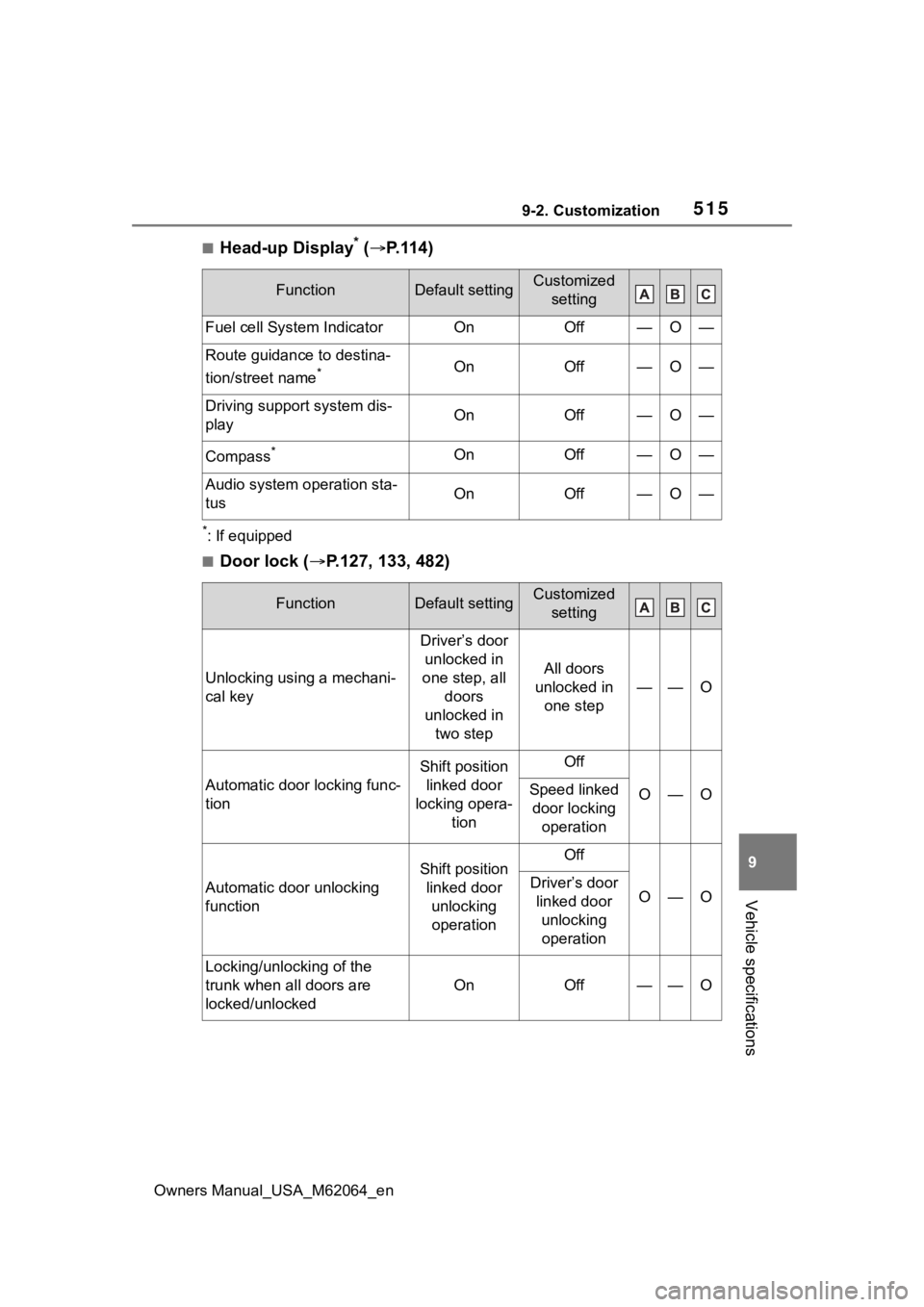
■Head-up Display* ( P.114)
*: If equipped
■Door lock ( P.127, 133, 482)
FunctionDefault settingCustomized
setting
Fuel cell System IndicatorOnOff—O—
Route guidance to destina-
tion/street name
*OnOff—O—
Driving support system dis-
playOnOff—O—
Compass*OnOff—O—
Audio system operation sta-
tusOnOff—O—
FunctionDefault settingCustomized setting
Unlocking using a mechani-
cal key
Driver’s door unlocked in
one step, all doors
unlocked in two step
All doors
unlocked in one step
——O
Automatic door locking func-
tion
Shift position linked door
locking opera- tionOff
O—OSpeed linked door locking operation
Automatic door unlocking
function
Shift position linked door unlocking operationOff
O—ODriver’s door linked door unlocking operation
Locking/unlocking of the
trunk when all doors are
locked/unlocked
OnOff——O