ECU TOYOTA MIRAI 2023 Service Manual
[x] Cancel search | Manufacturer: TOYOTA, Model Year: 2023, Model line: MIRAI, Model: TOYOTA MIRAI 2023Pages: 572, PDF Size: 17.71 MB
Page 139 of 572

1394-2. Opening, closing and locking the doors and trunk
Owners Manual_USA_M62064_en
4
Before driving
doors detecting the electronic key
can be used to unl ock the vehicle.
●Even if the electronic key is not
inside the vehicle, it may be possi-
ble to start the fuel cell system if
the electronic key is near the win-
dow.
●The doors may unlock or lock if a
large amount of water splashes on
the door handle, such as in the
rain or in a car wash, when the
electronic key is within the effec-
tive range. (The doors will auto-
matically be locked after
approximately 60 seconds if the
doors are not opened and closed.)
●If the wireless remote control is
used to lock the doors when the
electronic key is near the vehicle,
there is a possib ility that the door
may not be unlocke d by the entry
function. (Use the wireless remote
control to unloc k the doors.)
●Touching the door lock sensor
while wearing gloves may delay or
prevent lock operation.
●When the lock op eration is per-
formed using the lock sensor, rec-
ognition signals will be shown up
to two consecutive times. After
this, no recogniti on signals will be
given.
●If the door handle becomes wet
while the electronic key is within
the effective ran ge, the door may
lock and unlock repeatedly. In this
case, follow the fo llowing correc-
tion procedures to wash the vehi-
cle:
• Place the electronic key in a loca- tion 6 ft. (2 m) or more away from
the vehicle. (Take care to ensure
that the key is not stolen.)
• Set the electronic key to battery- saving mode to disable the smart
key system. ( P.137)
●If the electronic key is inside the
vehicle and a door handle
becomes wet during a car wash, a
message may be shown on the
multi-informatio n display and a buzzer will sound outside the vehi-
cle. To turn off the alarm, lock all
the doors.
●The lock sensor may not work
properly if it comes into contact
with ice, snow, m
ud, etc. Clean
the lock sensor and attempt to
operate it again.
●A sudden approach to the effec-
tive range or door handle may pre-
vent the doors from being
unlocked. In this case, return the
door handle to the original position
and check that t he doors unlock
before pulling the door handle
again.
●If there is another electronic key in
the detection area, it may take
slightly longer to unlock the doors
after the door handle is gripped.
■When the vehicle is not driven
for extended periods
●To prevent theft of the vehicle, do
not leave the electronic key within
6 ft. (2 m) of the vehicle.
●The smart key system can be
deactivated in advance.
●Setting the electronic key to bat-
tery-saving mode helps to reduce
key battery depletion. ( P.137)
■To operate the system properly
●Make sure to carry the electronic
key when operating the system.
Do not get the electronic key too
close to the vehicle when operat-
ing the system from the outside of
the vehicle.
Depending on the position and hold-
ing condition of the electronic key,
the key may not be detected cor-
rectly and the system may not oper-
ate properly. (The alarm may go off
accidentally, or the door lock pre-
vention function m ay not operate.)
●Do not leave the electronic key
inside the trunk.
The key confinement prevention
function may not operate, depend-
Page 147 of 572
1474-4. Adjusting the steering wheel and mirrors
Owners Manual_USA_M62064_en
4
Before driving
4-4.Adjusting the steering wheel and mirrors
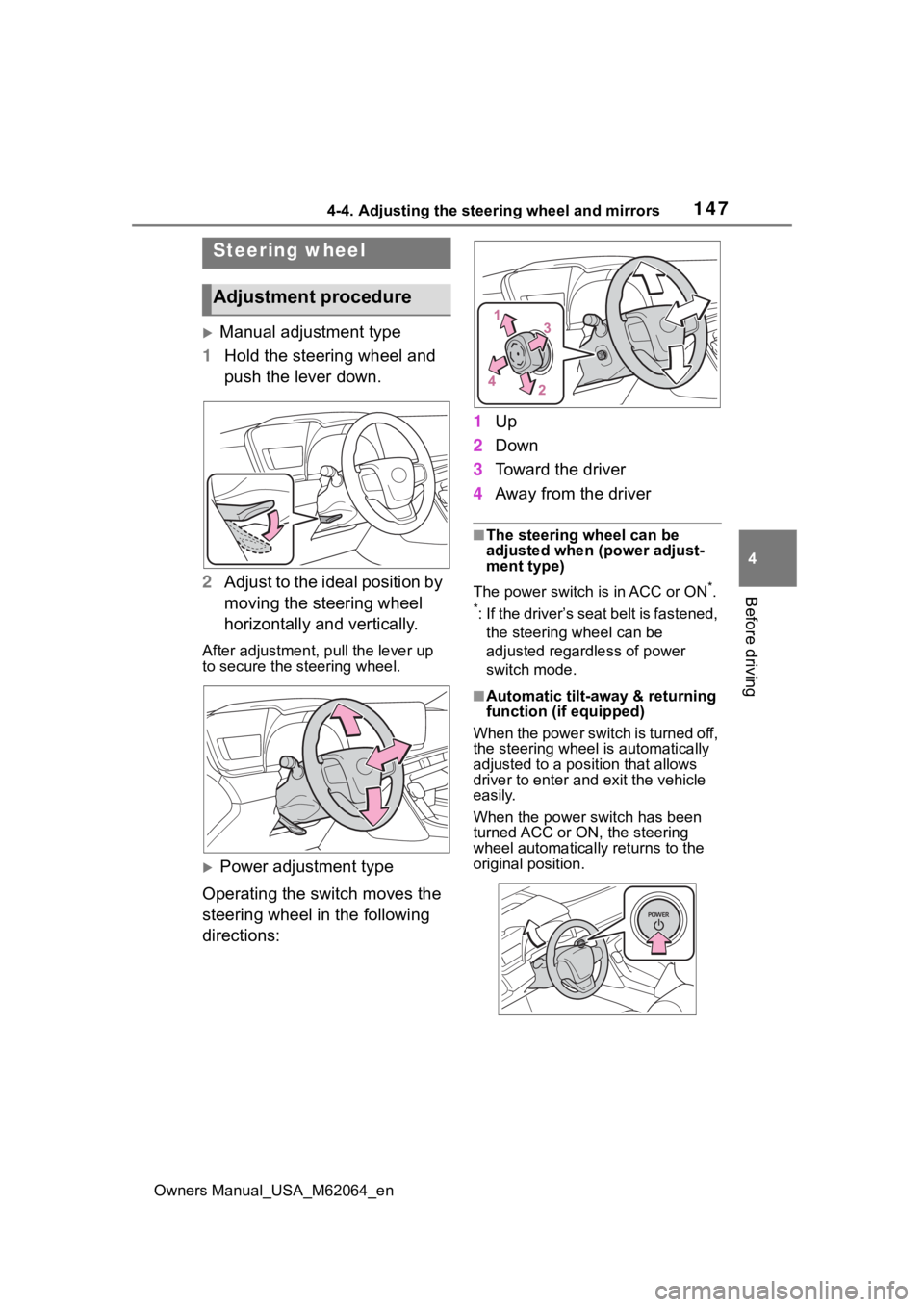
Manual adjustment type
1 Hold the steering wheel and
push the lever down.
2 Adjust to the ideal position by
moving the steering wheel
horizontally and vertically.
After adjustment, pull the lever up
to secure the steering wheel.
Power adjustment type
Operating the switch moves the
steering wheel in the following
directions: 1
Up
2 Down
3 Toward the driver
4 Away from the driver
■The steering wheel can be
adjusted when (power adjust-
ment type)
The power switch is in ACC or ON
*.
*: If the driver’s seat belt is fastened, the steering wheel can be
adjusted regardless of power
switch mode.
■Automatic tilt-away & returning
function (if equipped)
When the power switch is turned off,
the steering wheel is automatically
adjusted to a posit ion that allows
driver to enter and exit the vehicle
easily.
When the power switch has been
turned ACC or ON, the steering
wheel automatically returns to the
original position.
Steering wheel
Adjustment procedure
Page 148 of 572
1484-4. Adjusting the steering wheel and mirrors
Owners Manual_USA_M62064_en
■Automatic adjustment of the
steering position (if equipped)
A desired steering position can be
entered to memory and recalled
automatically by the driving position
memory system. ( P.142)
■Power easy access system (if
equipped)
The steering wheel and driver’s seat
move in accordance with power
switch mode and the driver’s seat
belt condition. ( P.142)
■After adjusting the steering
wheel (manual adjustment type)
Make sure that the steering wheel is
securely locked.
The horn may not sound if the steer-
ing wheel is not securely locked.
■Customization
Some functions can be customized.
( P.512)
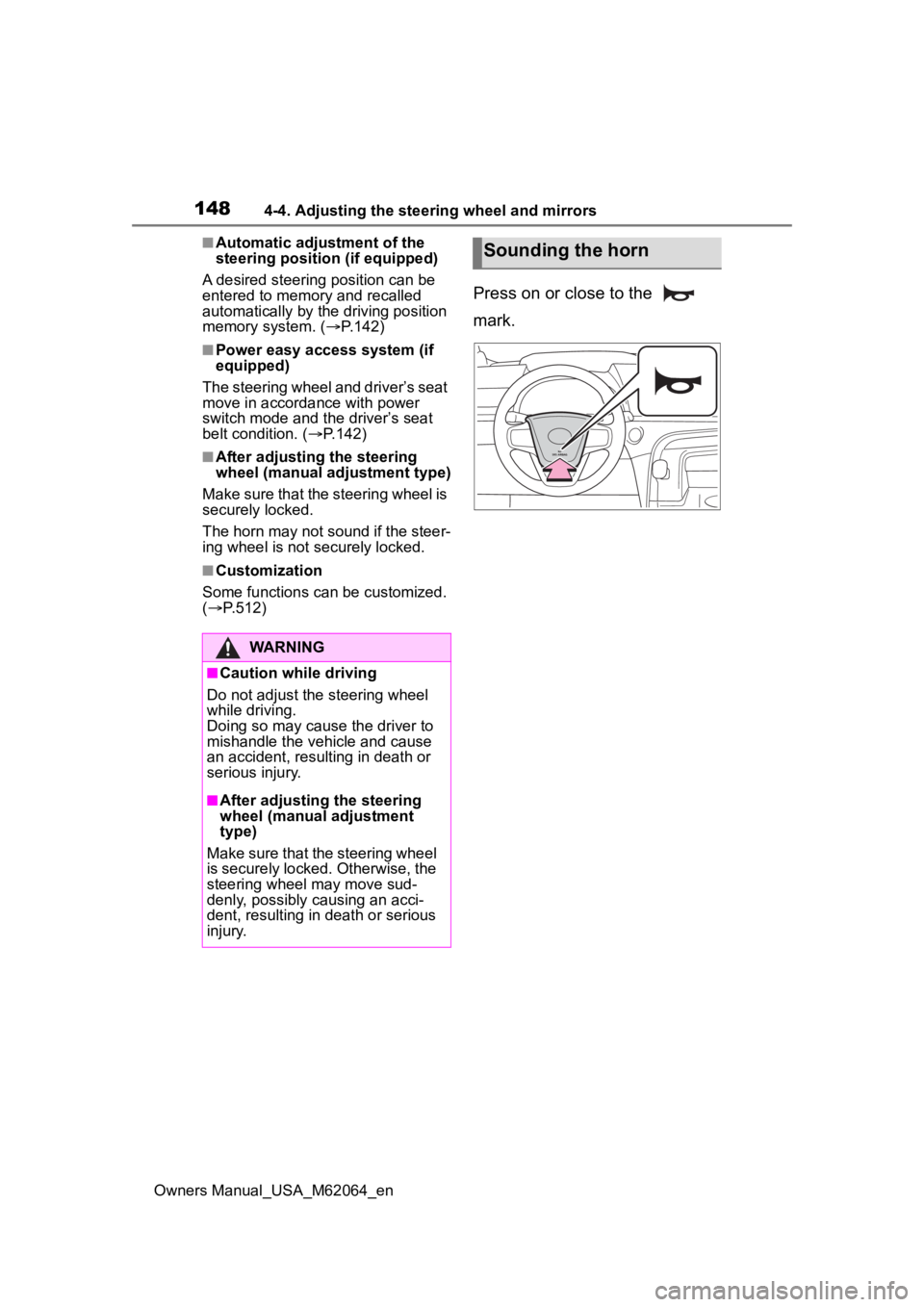
Press on or close to the
mark.
WARNING
■Caution while driving
Do not adjust the steering wheel
while driving.
Doing so may cause the driver to
mishandle the vehicle and cause
an accident, resul ting in death or
serious injury.
■After adjusting the steering
wheel (manual adjustment
type)
Make sure that the steering wheel
is securely locked. Otherwise, the
steering wheel may move sud-
denly, possibly causing an acci-
dent, resulting in death or serious
injury.
Sounding the horn
Page 173 of 572
1735-1. Before driving
Owners Manual_USA_M62064_en
5
Driving
WARNING
●If the vehicle is stopped on an
incline, in order to prevent acci-
dents caused by the vehicle roll-
ing forward or backward, always
depress the brake pedal and
securely apply the parking
brake as needed.
■When the vehicle is parked
●Do not leave glasses, cigarette
lighters, spray cans, or soft
drink cans in the vehicle when it
is in the sun.
Doing so may result in the fol-
lowing:
• Gas may leak from a cigarette lighter or spray can, and may
lead to a fire.
• The temperature inside the vehicle may cause the plastic
lenses and plastic material of
glasses to deform or crack.
• Soft drink cans may fracture, causing the contents to spray
over the interior of the vehicle,
and may also caus e a short cir-
cuit in the vehicle’s electrical
components.
●Do not leave cigarette lighters in
the vehicle. If a cigarette lighter
is in a place such as the glove
box or on the floor, it may be lit
accidentally when luggage is
loaded or the seat is adjusted,
causing a fire.
●Do not attach adhesive discs to
the windshield or windows. Do
not place containers such as air
fresheners on the instrument
panel or dashboard. Adhesive
discs or containers may act as
lenses, causing a fire in the
vehicle.
●Do not leave a door or window
open if the curved glass is
coated with a metallized film
such as a silver-colored one.
Reflected sunlight may cause
the glass to act a s a lens, caus-
ing a fire.
●Always apply the parking brake,
shift the shift position to P, stop
the fuel cell system and lock the
vehicle.
Do not leave the vehicle unat-
tended while the “READY” indi-
cator is illuminated.
If the vehicle is parked with the
shift position in P but the park-
ing brake is not set, the vehicle
may start to move, possibly
leading to an accident.
■When taking a nap in the vehi-
cle
Always turn the fuel cell system
off. Otherwise, if you accidentally
move the shift lever or depress
the accelerator pedal, causing the
vehicle to unintentionally move,
which can lead to an accident,
resulting in death o r serious injury.
■When braking
●When the brakes are wet, drive
more cautiously.
Braking distance increases
when the brakes are wet, and
this may cause one side of the
vehicle to brake d ifferently than
the other side. Also, the parking
brake may not securely hold the
vehicle.
●If the electronically controlled
brake system does not operate,
do not follow other vehicles
closely and avoid hills or sharp
turns that require braking.
In this case, braking is still pos-
sible, but the brake pedal
should be depressed more
firmly than usual. Also, the brak-
ing distance will increase. Have
your brakes fixed immediately.
Page 177 of 572
1775-1. Before driving
Owners Manual_USA_M62064_en
5
Driving
WARNING
■Things that must not be car-
ried in the trunk
The following things may cause a
fire if loaded in the trunk:
●Receptacles co ntaining gaso-
line
●Aerosol cans
■Storage precautions
Observe the following precau-
tions.
Failure to do so m ay prevent the
pedals from being depressed
properly, may block the driver’s
vision, or may result in items hit-
ting the driver or passengers, pos-
sibly causing an accident.
●Stow cargo and luggage in the
trunk whenever possible.
●Do not place cargo or luggage
in or on the following locations.
• At the feet of the driver
• On the front passenger or rear seats (when stacking items)
• On the package tray
• On the instrument panel
• On the dashboard
●Secure all items in the occupant
compartment.
■Capacity and distribution
●Do not exceed the maximum
axle weight rating or the total
vehicle weight rating.
●Even if the tota l load of occu-
pant’s weight and the cargo
load is less than the total load
capacity, do not apply the load
unevenly. Improper loading may
cause deteriorat ion of steering
or braking control which may
cause death or serious injury.
NOTICE
■Roof film (vehicles with elec-
tronic sunshade)
Do not attach a roof carrier on the
roof film. It may damage the film
surface.
Page 186 of 572
1865-2. Driving procedures
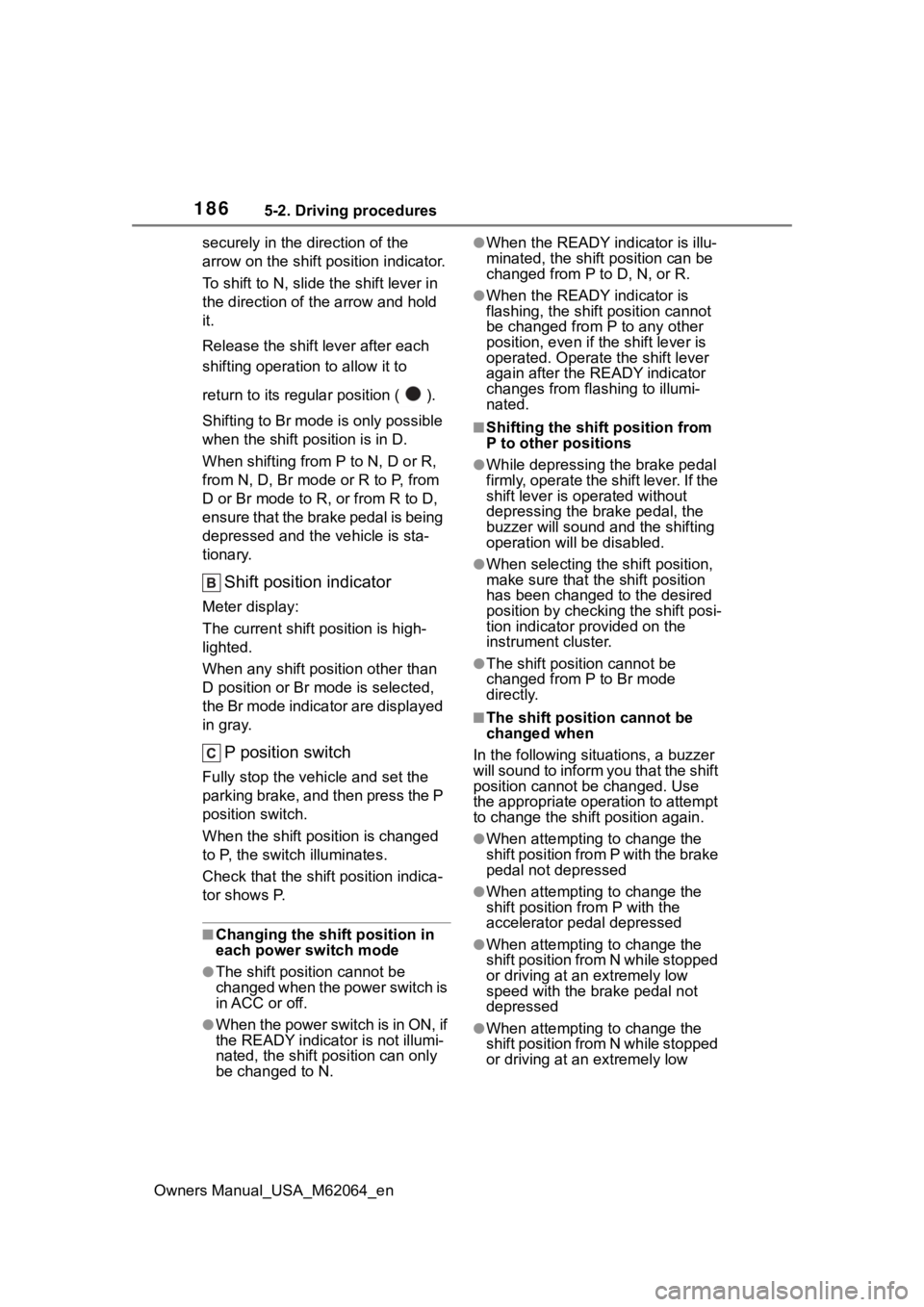
Owners Manual_USA_M62064_ensecurely in the direction of the
arrow on the shift position indicator.
To shift to N, slide the shift lever in
the direction of t
he arrow and hold
it.
Release the shift lever after each
shifting operation to allow it to
return to its regu lar position ( ).
Shifting to Br mode is only possible
when the shift position is in D.
When shifting from P to N, D or R,
from N, D, Br mode or R to P, from
D or Br mode to R, or from R to D,
ensure that the brake pedal is being
depressed and the vehicle is sta-
tionary.
Shift position indicator
Meter display:
The current shift position is high-
lighted.
When any shift position other than
D position or Br mode is selected,
the Br mode indicator are displayed
in gray.
P position switch
Fully stop the vehicle and set the
parking brake, and then press the P
position switch.
When the shift position is changed
to P, the switch illuminates.
Check that the shift position indica-
tor shows P.
■Changing the shift position in
each power switch mode
●The shift position cannot be
changed when the power switch is
in ACC or off.
●When the power switch is in ON, if
the READY indicator is not illumi-
nated, the shift position can only
be changed to N.
●When the READY indicator is illu-
minated, the shift position can be
changed from P to D, N, or R.
●When the READY indicator is
flashing, the shift position cannot
be changed from P to any other
position, even if the shift lever is
operated. Operate the shift lever
again after the READY indicator
changes from fla shing to illumi-
nated.
■Shifting the shift position from
P to other positions
●While depressing the brake pedal
firmly, operate the shift lever. If the
shift lever is operated without
depressing the brake pedal, the
buzzer will sound and the shifting
operation will be disabled.
●When selecting the shift position,
make sure that th e shift position
has been changed to the desired
position by checking the shift posi-
tion indicator provided on the
instrument cluster.
●The shift position cannot be
changed from P to Br mode
directly.
■The shift position cannot be
changed when
In the following situations, a buzzer
will sound to inform you that the shift
position cannot be changed. Use
the appropriate oper ation to attempt
to change the shift position again.
●When attempting to change the
shift position from P with the brake
pedal not depressed
●When attempting to change the
shift position from P with the
accelerator pedal depressed
●When attempting to change the
shift position from N while stopped
or driving at an extremely low
speed with the brake pedal not
depressed
●When attempting to change the
shift position from N while stopped
or driving at an extremely low
Page 261 of 572
2615-5. Using the driving support systems
Owners Manual_USA_M62064_en
5
Driving
secutive steep inclines, such as
hills, dips in the road, etc.
• When driving on roads with sharp
bends, consecutive curves, or
uneven surfaces
• When vehicle lanes are wide, or
when driving on the edge of a
lane, and the vehicle in an adja-
cent lane is far away from your
vehicle
• When an accessory (such as a bicycle carrier) is installed to the
rear of the vehicle
• When there is a significant differ- ence in height between your vehi-
cle and the vehicle that enters the
detection area
• Immediately after the Blind Spot
Monitor is turned on
●Instances of the Blind Spot Moni-
tor unnecessarily d etecting a vehi-
cle and/or object may increase in
the following situations:
• When the sensor is misaligned
due to a strong impact to the sen-
sor or its surrounding area
• When the distanc e between your
vehicle and a guardr ail, wall, etc.,
that enters the detection area is
short
• When driving up and down con- secutive steep inclines, such as
hills, dips in the road, etc.
• When vehicle lanes are narrow, or when driving on the edge of a
lane, and a vehicle traveling in a
lane other than the adjacent lanes
enters the detection area
• When driving on roads with sharp bends, consecutive curves, or
uneven surfaces
• When the tires are slipping or spinning
• When the distanc e between your
vehicle and a following vehicle is
short
• When an accessory (such as a bicycle carrier) is installed to the
rear of the vehicle
*: If equipped
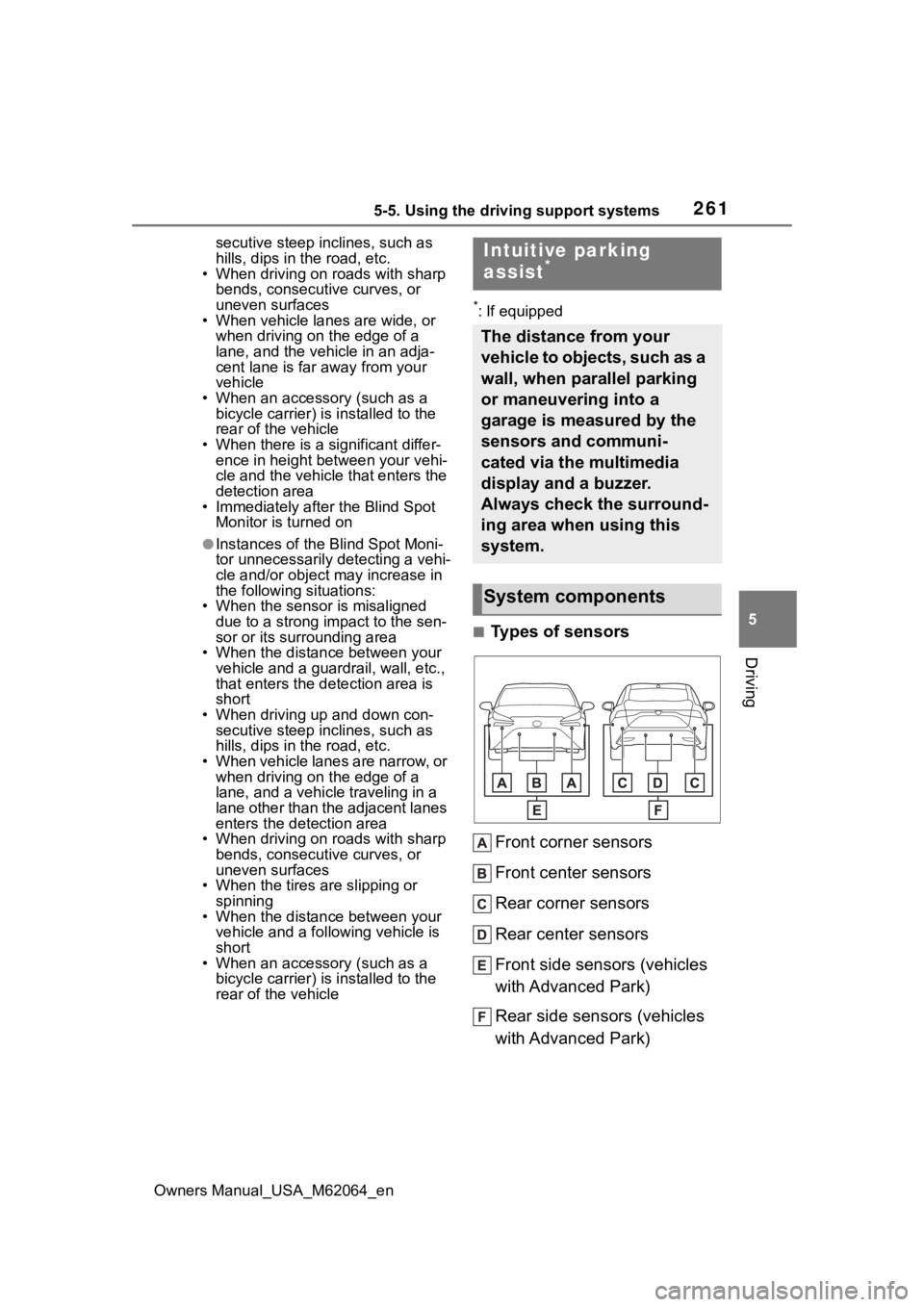
■Types of sensors
Front corner sensors
Front center sensors
Rear corner sensors
Rear center sensors
Front side sensors (vehicles
with Advanced Park)
Rear side sensors (vehicles
with Advanced Park)
Intuitive parking
assist*
The distance from your
vehicle to objects, such as a
wall, when parallel parking
or maneuvering into a
garage is measured by the
sensors and communi-
cated via the multimedia
display and a buzzer.
Always check the surround-
ing area when using this
system.
System components
Page 316 of 572
3165-5. Using the driving support systems
Owners Manual_USA_M62064_en
■Assistance will be can-
celed when
In situations such as the follow-
ing, Advanced Park operation
will be canceled. Firmly hold the
steering wheel and depress the
brake pedal to stop the vehicle.
As system operation has been can-
celed, begin the operation again or
continue parking manually, using
the steering wheel.
The Advanced Park main
switch is pushed
The shift position has been
NOTICE
• When the registered parking
space cannot be reached due to
the existence of parking blocks,
etc.
• When the road surface around the parking space has changed
(road surface has degraded or
been resurfaced)
• When the sunlight conditions differ from when registration
was performed (due to weather
or time of day)
• When the sun is shining directly into a camera, such as in the
early morning or evening
• When the color or brightness of the road surface is uneven
• When a light is temporarily shined on the parking space
(lights of another vehicle, secu-
rity light, etc.)
• When the road surface around the parking space has the same
repeating pattern
• When there is a low protrusion on the road surface near the
parking space
• When the parking space is on a slope
• When a camera has been splashed by hot or cold water
and the lens has fogged up
• When a camera lens is dirty or covered with water droplets
• When accessories which obstruct the view of the camera
are installed
If assistance is ended during reg-
istration, perform registration
again.
●When registering a parking
space to the memory function, if
the road surface cannot be
detected “No available parking
space to register” will be dis-
played.
●When using the memory func-
tion, make sure to stop immedi-
ately in front of the stop
position. Otherwise the parking
space may not be able to be
detected correctly or assis-
tance may not be provided to
the point that the vehicle is fully
parked.
●Do not use the memory function
if a camera has been subjected
to a strong impac t or images of
the panoramic view monitor are
misaligned.
●If a camera has been replaced,
as the installation angle of the
camera will have changed, it will
be necessary to reregister park-
ing spaces of the memory func-
tion.
Advanced Park cancel-
ation/suspension
Page 374 of 572
3746-4. Using the other interior features
Owners Manual_USA_M62064_en
This system allows the use of
electrical devices with a total
power consumption of 1500W at
120 VAC in the vehicle. Supply-
ing power to electrical devices
outside the vehicle is not recom-
mended, as it may violate the
laws and regulations of the
country or region where it is
used. When supplying power to
electrical devices outside the
vehicle, check the laws and reg-
ulations with the relevant local
government of each country or region in advance. Also, be
careful not to drag electrical
devices and cords when moving
the vehicle.
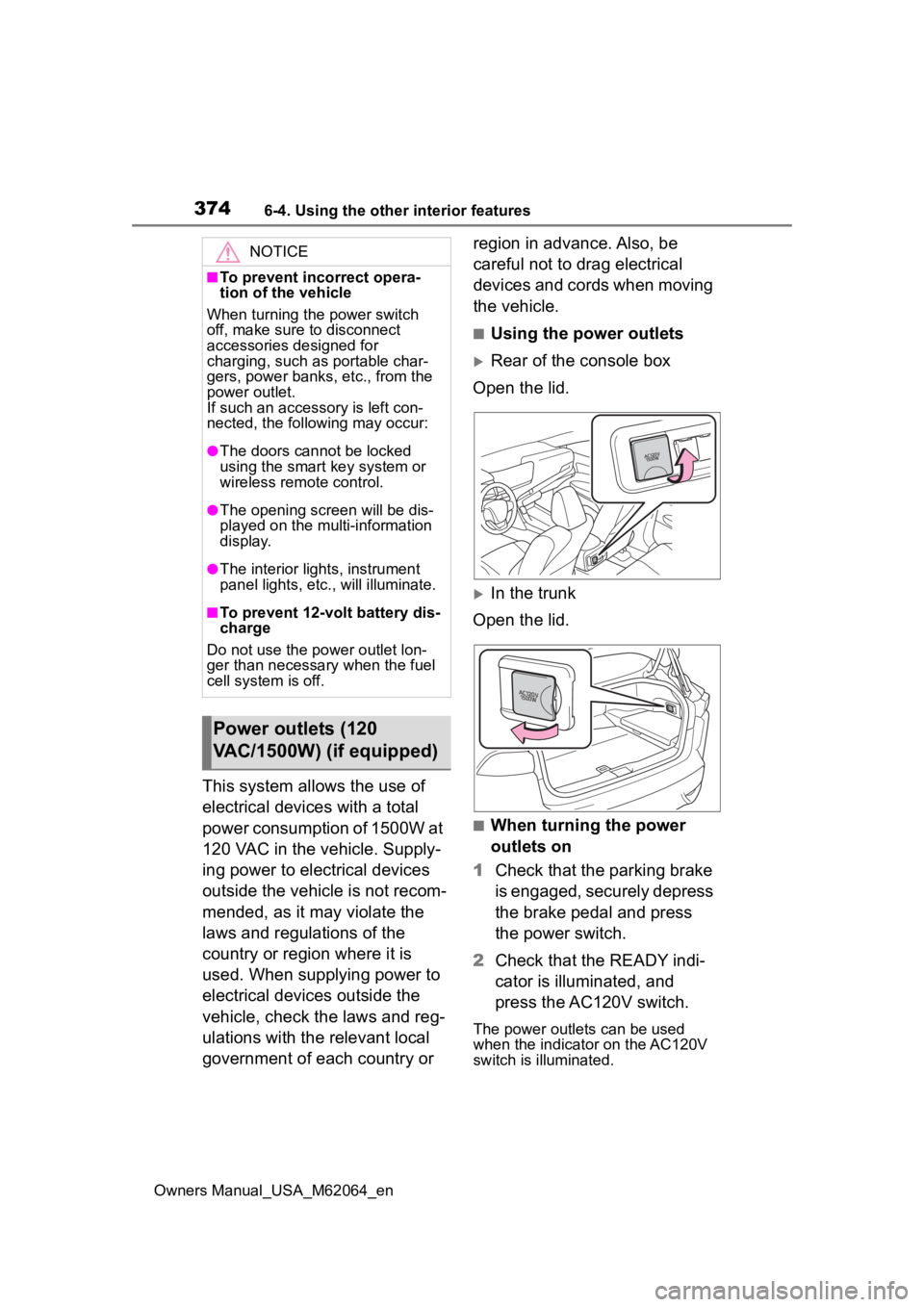
■Using the power outlets
Rear of the console box
Open the lid.
In the trunk
Open the lid.
■When turning the power
outlets on
1 Check that the parking brake
is engaged, securely depress
the brake pedal and press
the power switch.
2 Check that the READY indi-
cator is illuminated, and
press the AC120V switch.
The power outlets can be used
when the indicator on the AC120V
switch is illuminated.
NOTICE
■To prevent incorrect opera-
tion of the vehicle
When turning the power switch
off, make sure to disconnect
accessories designed for
charging, such as portable char-
gers, power banks , etc., from the
power outlet.
If such an accessory is left con-
nected, the following may occur:
●The doors cannot be locked
using the smart key system or
wireless remote control.
●The opening scr een will be dis-
played on the multi-information
display.
●The interior lights, instrument
panel lights, etc., will illuminate.
■To prevent 12-volt battery dis-
charge
Do not use the power outlet lon-
ger than necessary when the fuel
cell system is off.
Power outlets (120
VAC/1500W) (if equipped)
Page 375 of 572
3756-4. Using the other interior features
Owners Manual_USA_M62064_en
6
Interior features
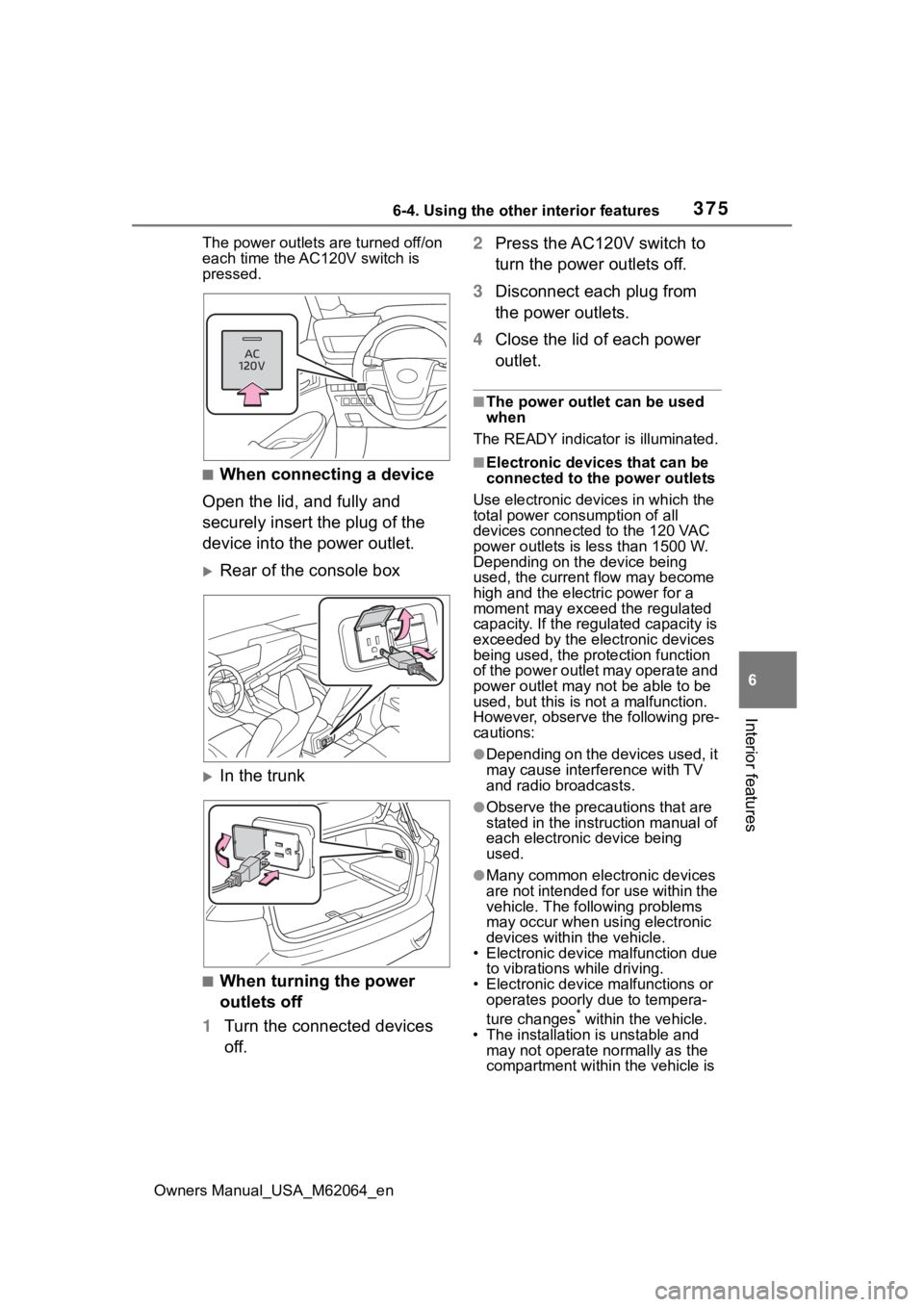
The power outlets are turned off/on
each time the AC120V switch is
pressed.
■When connecting a device
Open the lid, and fully and
securely insert the plug of the
device into the power outlet.
Rear of the console box
In the trunk
■When turning the power
outlets off
1 Turn the connected devices
off. 2
Press the AC120V switch to
turn the power outlets off.
3 Disconnect each plug from
the power outlets.
4 Close the lid of each power
outlet.
■The power outlet can be used
when
The READY indicator is illuminated.
■Electronic devices that can be
connected to the power outlets
Use electronic devices in which the
total power consumption of all
devices connected to the 120 VAC
power outlets is l ess than 1500 W.
Depending on the device being
used, the current flow may become
high and the elect ric power for a
moment may exceed the regulated
capacity. If the regulated capacity is
exceeded by the electronic devices
being used, the protection function
of the power outlet may operate and
power outlet may not be able to be
used, but this is not a malfunction.
However, observe t he following pre-
cautions:
●Depending on the devices used, it
may cause interference with TV
and radio broadcasts.
●Observe the precau tions that are
stated in the instruction manual of
each electronic device being
used.
●Many common electronic devices
are not intended for use within the
vehicle. The following problems
may occur when using electronic
devices within the vehicle.
• Electronic device malfunction due
to vibrations while driving.
• Electronic device malfunctions or operates poorly due to tempera-
ture changes
* within the vehicle.
• The installation i s unstable and
may not operate normally as the
compartment within the vehicle is