ECU TOYOTA MIRAI 2023 Workshop Manual
[x] Cancel search | Manufacturer: TOYOTA, Model Year: 2023, Model line: MIRAI, Model: TOYOTA MIRAI 2023Pages: 572, PDF Size: 17.71 MB
Page 377 of 572
3776-4. Using the other interior features
Owners Manual_USA_M62064_en
6
Interior features
●If the protection f unction activates
and power is cut, perform the fol-
lowing procedure.
1 Stop the vehicle in a safe place
and set the parking brake.
2 Ensure that the shift position is in
P or N.
3 Check that the power consumed
by the electrical devices is within
1500 W and any device has not
malfunctioned.
4 Press the AC 120 V switch.
If the inside of the vehicle is hot,
open the windows to lower the tem-
perature and turn the switch back on
once the inside o f the vehicle
reaches a normal temperature. If
following the procedure above does
not restore power, have the vehicle
inspected at your Toyota dealer.
WARNING
■For safe use
Observe the following precau-
tions.
Failure to do so may lead to an
accident, resulting in death or
serious injury.
●Do not use devices such as the
following when driving:
• Devices which cannot be prop- erly secured within the vehicle.
• Devices which may distract the driver and be a hindrance to
safe driving, such as a TV, DVD
player, etc.
• Unsecured devices which gen- erate heat, such as a toaster,
microwave, electric heater, elec-
tric kettle, coffee maker, etc., as
they may cause burns or a fire
in the case of sudden braking or
an accident.
• Devices which may fall under the pedals and prevent the
brake pedal from being
depressed.
●Do not use devices which pro-
duce steam while the windows
are closed. Doing so may cause
the windows to fog up, reducing
visibility and making it difficult to
drive safely. Also, the steam
may damage or negatively
affect other devices. If the
device must be used, stop the
vehicle and open the windows
before use.
●Do not use damag ed electronic
devices. The power supply
function may not be able to be
used.
●Do not disconnect the plug of a
device while your hands are wet
or insert a pin or other object
into the power ou tlet. Also, if a
liquid or snow is on the power
outlet, dry the outlet before
using it.
●Do not attempt to modify, disas-
semble or repair a power outlet.
For information on repairs, con-
tact your Toyota dealer.
●Do not let child ren touch the
power outlets.
●Keep the power o utlets free of
dust and foreign matter. Also,
regularly clean the power outlet.
●If the plug of a device fits
loosely in a power outlet, even
though it is fully inserted,
replace the power outlet. For
information on replacement,
contact your Toyota dealer.
Page 382 of 572
3826-4. Using the other interior features
Owners Manual_USA_M62064_en
*: If equipped
■HomeLink® programming pro-
cedure
The programming procedures can
also be found at the following URL.
Website: www.homelink.com/toyota
For support, contact customer sup-
port at the following.
Help Line: 1-800-355-3515
The HomeLink® wireless control
system in your vehicle has 3
buttons which can be pro-
grammed to operate 3 different
devices. Refer to the program-
ming methods on the following
pages to determine the method
which is appropriate for the
device.
NOTICE
■To ensure normal operation
of the rear sunshade
Observe the following precau-
tions:
●Do not place exce ssive load on
the motor or other components.
●Do not place objects where they
may hinder opening and closing
operations.
●Do not attach items to the rear
sunshade.
●Keep the opening clean and
clear of obstructions.
●Do not operate the rear sun-
shade continuously for long
periods of time.
Garage door opener*
The garage door opener can
be programmed using the
HomeLink
® to operate
garage doors, gates, entry
doors, door locks, home
lighting systems, security
systems, and other devices.
System components
Page 402 of 572
4027-2. Maintenance
Owners Manual_USA_M62064_en
Radiator/con-
denser
The radiator and
condenser should
be free from for-
eign objects.
( P.411)
Washer fluid
Is there sufficient
washer fluid?
( P.412)
Trun k
ItemsCheck points
12-volt batteryCheck the connec-
tions. ( P.413)
Vehicle interior
ItemsCheck points
Accelerator
pedal
• The accelerator
pedal should
move smoothly
(without uneven
pedal effort or
catching).
Transmission
“Park” mecha-
nism
• When parked on a slope and the
shift position is in
P, is the vehicle
securely
stopped?
ItemsCheck points
Brake pedal
• Does the brake pedal move
smoothly?
• Does the brake pedal have
appropriate
clearance from
the floor?
• Does the brake pedal have the
correct amount
of free play?
Brakes
• The vehicle should not pull to
one side when
the brakes are
applied.
• The brakes should work
effectively.
• The brake pedal should not feel
spongy.
• The brake pedal should not get
too close to the
floor when the
brakes are
applied.
Head
restraints
• Do the head restraints move
smoothly and
lock securely?
Indica-
tors/buzzers
• Do the indica-tors and buzzers
function prop-
erly?
Lights• Do all the lights come on?
ItemsCheck points
Page 403 of 572
4037-2. Maintenance
Owners Manual_USA_M62064_en
7
Maintenance and care
Parking brake
• Does the park- ing brake oper-
ate normally?
• When parked on a slope and the
parking brake is
on, is the vehicle
securely
stopped?
Seat belts
• Do the seat belts operate
smoothly?
• The seat belts should not be
damaged.
Seats
• Do the seat con-trols operate
properly?
Steering wheel
• Does the steer-ing wheel rotate
smoothly?
• Does the steer- ing wheel have
the correct
amount of free
play?
• There should not be any strange
sounds coming
from the steer-
ing wheel.
ItemsCheck pointsVehicle exterior
ItemsCheck points
Doors/trunk
• Do the doors/trunk oper-
ate smoothly?
Hood
• Does the hood lock system work
properly?
Fluid leaks
• There should not be any signs of
fluid leakage
after the vehicle
has been parked.
Tires
• Is the tire infla-tion pressure
correct?
• The tires should not be damaged
or excessively
worn.
• Have the tires been rotated
according to the
maintenance
schedule?
• The wheel nuts should not be
loose.
Windshield
wipers
• The wiper blades should not show
any signs of
cracking, split-
ting, wear, con-
tamination or
deformation.
• The wiper blades should clear the
windshield with-
out streaking or
skipping.
Page 409 of 572
4097-3. Do-it-yourself maintenance
Owners Manual_USA_M62064_en
7
Maintenance and care
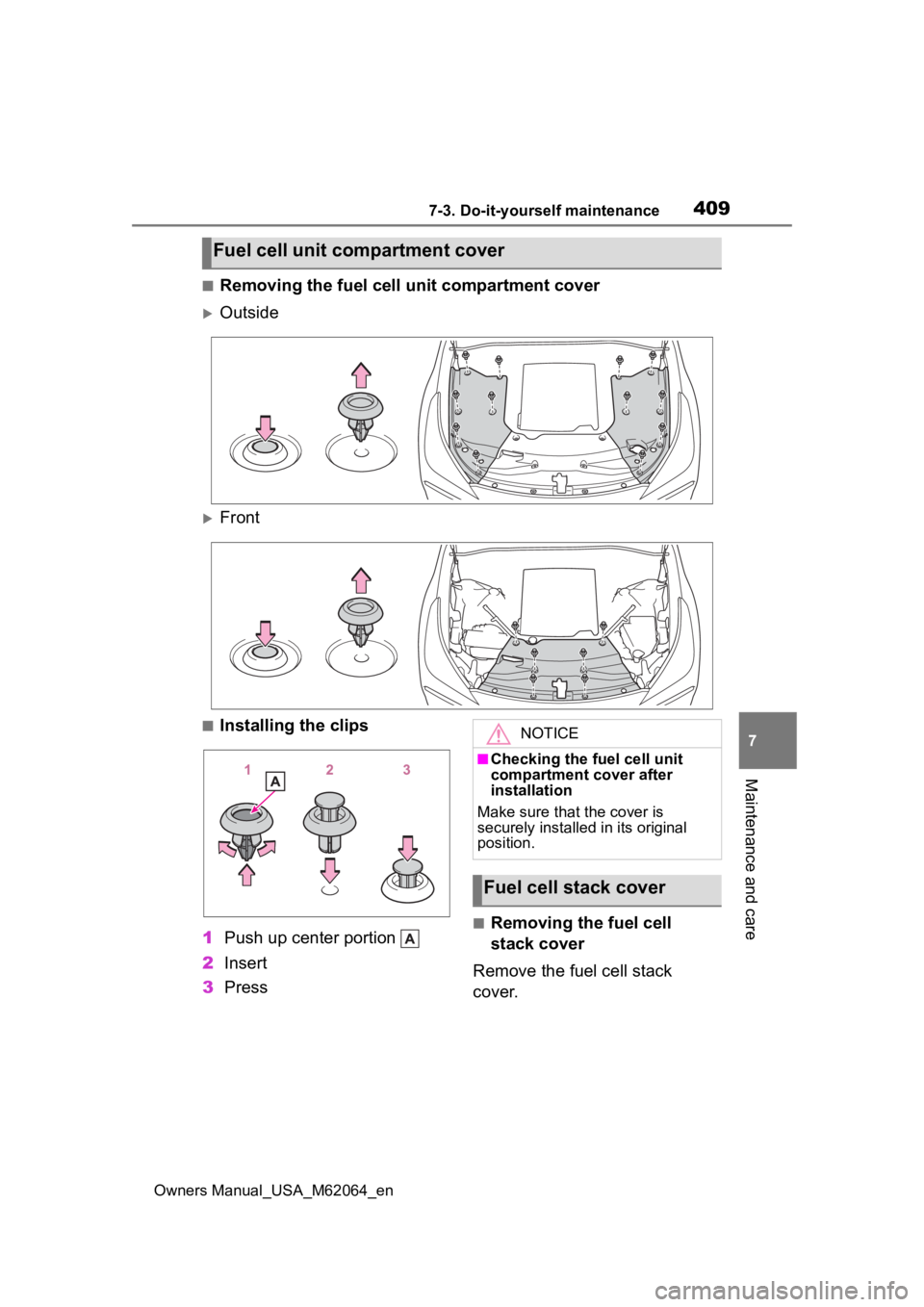
■Removing the fuel cell unit compartment cover
Outside
Front
■Installing the clips
1 Push up center portion
2 Insert
3 Press
■Removing the fuel cell
stack cover
Remove the fuel cell stack
cover.
Fuel cell unit compartment cover
NOTICE
■Checking the fuel cell unit
compartment cover after
installation
Make sure that the cover is
securely installed in its original
position.
Fuel cell stack cover
Page 410 of 572
4107-3. Do-it-yourself maintenance
Owners Manual_USA_M62064_en
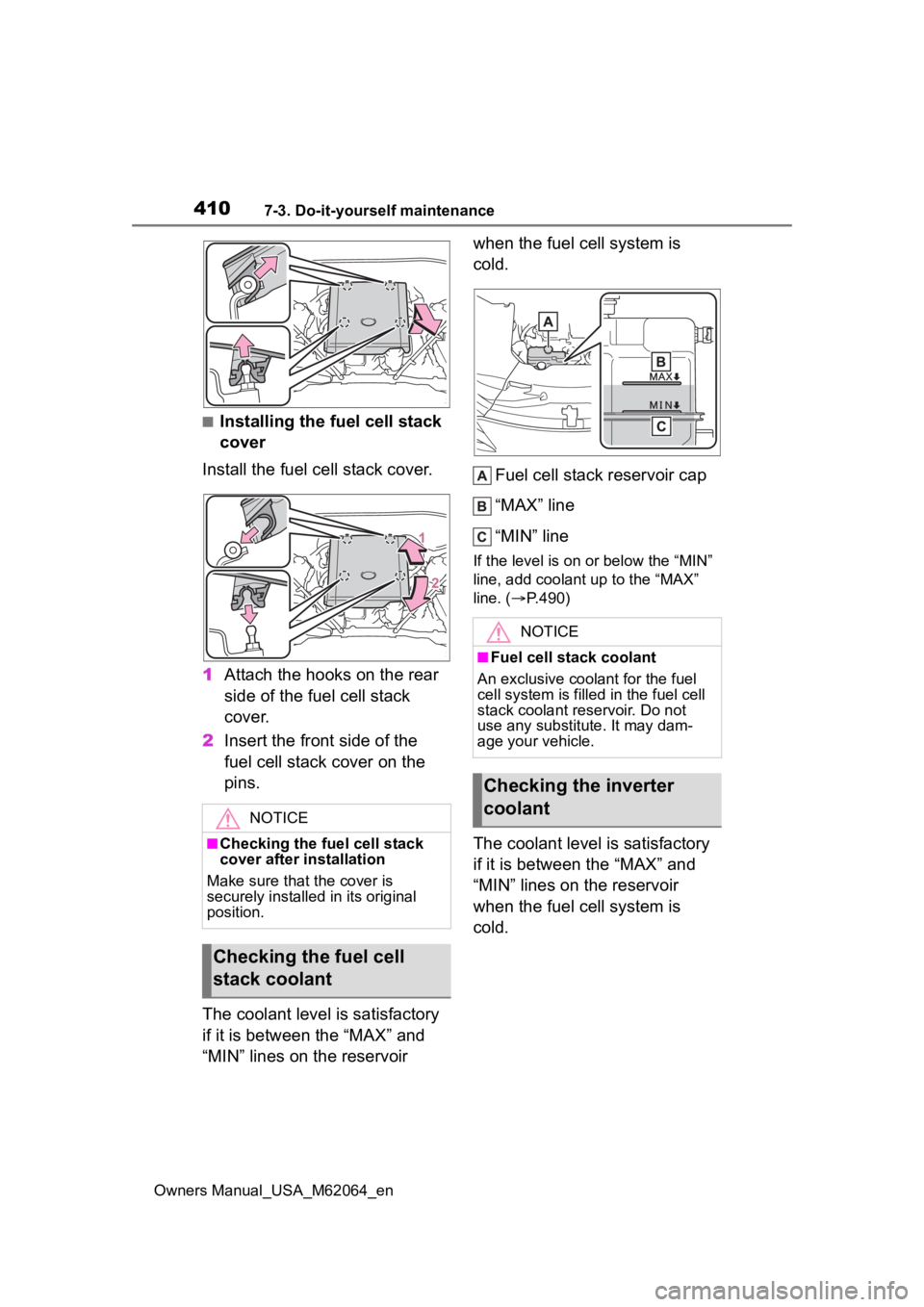
■Installing the fuel cell stack
cover
Install the fuel cell stack cover.
1 Attach the hooks on the rear
side of the fuel cell stack
cover.
2 Insert the front side of the
fuel cell stack cover on the
pins.
The coolant level is satisfactory
if it is between the “MAX” and
“MIN” lines on the reservoir when the fuel cell system is
cold.
Fuel cell stack reservoir cap
“MAX” line
“MIN” line
If the level is on or below the “MIN”
line, add coolant up to the “MAX”
line. ( P.490)
The coolant level is satisfactory
if it is between the “MAX” and
“MIN” lines on the reservoir
when the fuel cell system is
cold.
NOTICE
■Checking the fuel cell stack
cover after installation
Make sure that the cover is
securely installed in its original
position.
Checking the fuel cell
stack coolant
NOTICE
■Fuel cell stack coolant
An exclusive coola nt for the fuel
cell system is filled in the fuel cell
stack coolant reservoir. Do not
use any substitute. It may dam-
age your vehicle.
Checking the inverter
coolant
Page 441 of 572
4417-3. Do-it-yourself maintenance
Owners Manual_USA_M62064_en
7
Maintenance and care
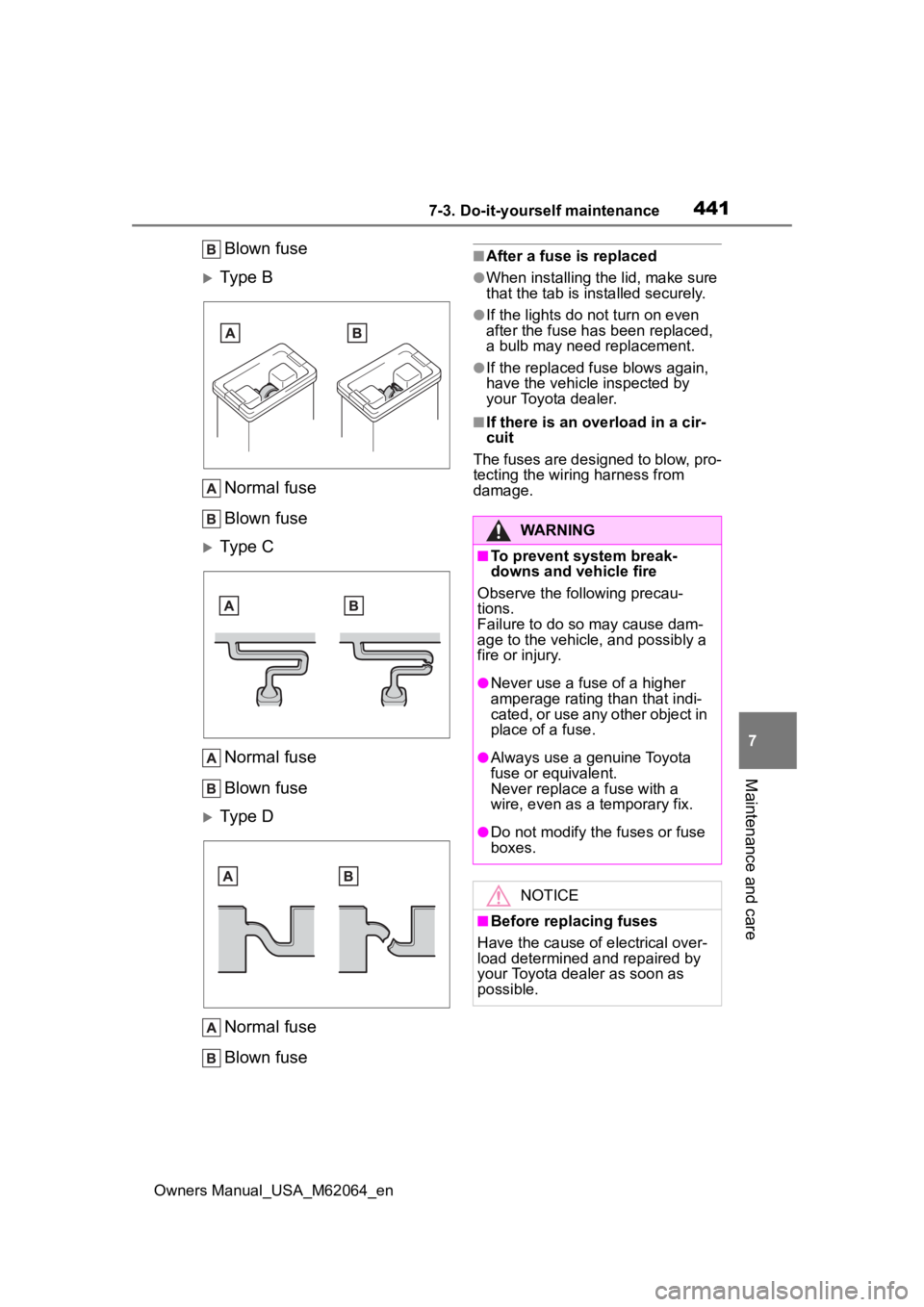
Blown fuse
Type B Normal fuse
Blown fuse
Type CNormal fuse
Blown fuse
Type DNormal fuse
Blown fuse
■After a fuse is replaced
●When installing the lid, make sure
that the tab is ins talled securely.
●If the lights do not turn on even
after the fuse has been replaced,
a bulb may need replacement.
●If the replaced fuse blows again,
have the vehicle inspected by
your Toyota dealer.
■If there is an ove rload in a cir-
cuit
The fuses are designed to blow, pro-
tecting the wiring harness from
damage.
WARNING
■To prevent system break-
downs and vehicle fire
Observe the following precau-
tions.
Failure to do so may cause dam-
age to the vehicle, and possibly a
fire or injury.
●Never use a fuse of a higher
amperage rating than that indi-
cated, or use any other object in
place of a fuse.
●Always use a genuine Toyota
fuse or equivalent.
Never replace a fuse with a
wire, even as a temporary fix.
●Do not modify the fuses or fuse
boxes.
NOTICE
■Before replacing fuses
Have the cause of electrical over-
load determined and repaired by
your Toyota dealer as soon as
possible.
Page 446 of 572
4468-1. Essential information
Owners Manual_USA_M62064_en
8-1.Essential information
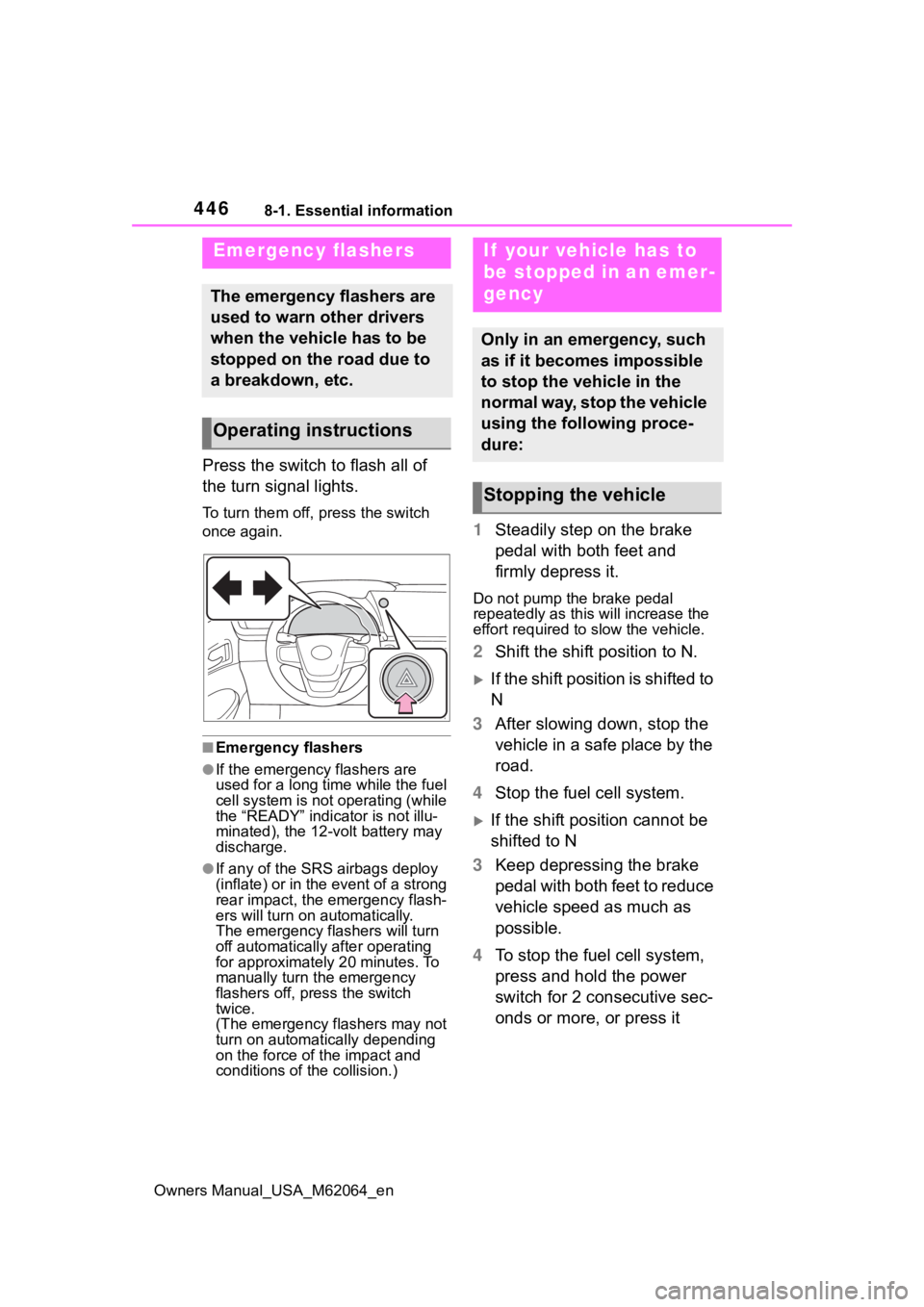
Press the switch to flash all of
the turn signal lights.
To turn them off, press the switch
once again.
■Emergency flashers
●If the emergency flashers are
used for a long time while the fuel
cell system is not operating (while
the “READY” indicator is not illu-
minated), the 12-volt battery may
discharge.
●If any of the SRS airbags deploy
(inflate) or in the event of a strong
rear impact, the emergency flash-
ers will turn on automatically.
The emergency flashers will turn
off automatically after operating
for approximately 20 minutes. To
manually turn t he emergency
flashers off, press the switch
twice.
(The emergency flashers may not
turn on automatically depending
on the force of the impact and
conditions of the collision.)
1 Steadily step on the brake
pedal with both feet and
firmly depress it.
Do not pump the brake pedal
repeatedly as this will increase the
effort required to slow the vehicle.
2Shift the shift position to N.
If the shift position is shifted to
N
3 After slowing down, stop the
vehicle in a safe place by the
road.
4 Stop the fuel cell system.
If the shift position cannot be
shifted to N
3 Keep depressing the brake
pedal with both feet to reduce
vehicle speed as much as
possible.
4 To stop the fuel cell system,
press and hold the power
switch for 2 consecutive sec-
onds or more, or press it
Emergency flashers
The emergency flashers are
used to warn other drivers
when the vehicle has to be
stopped on the road due to
a breakdown, etc.
Operating instructions
If your vehicle has to
be stopped in an emer-
gency
Only in an emergency, such
as if it becomes impossible
to stop the vehicle in the
normal way, stop the vehicle
using the following proce-
dure:
Stopping the vehicle
Page 451 of 572
4518-2. Steps to take in an emergency
Owners Manual_USA_M62064_en
8
When trouble arises
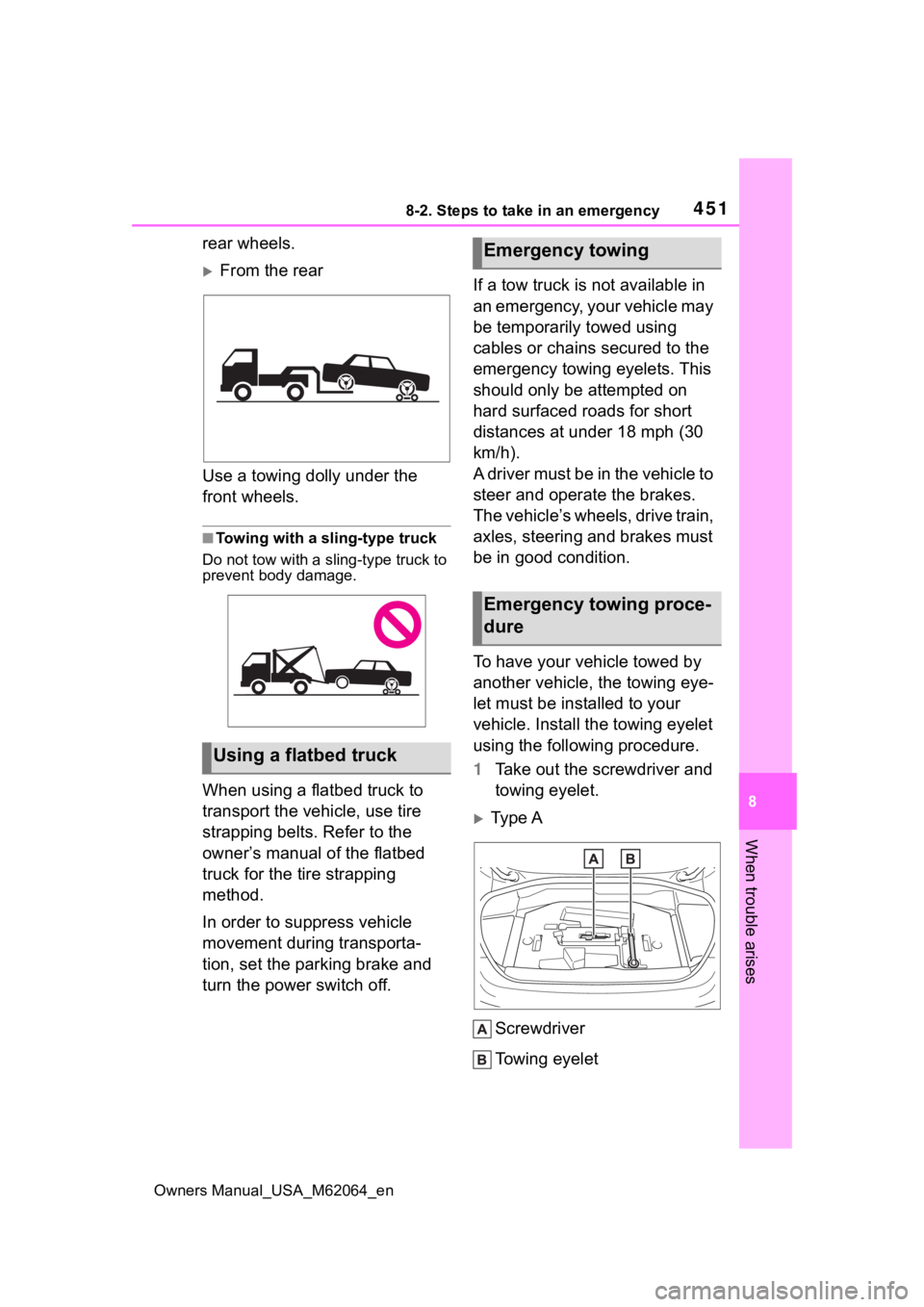
rear wheels.
From the rear
Use a towing dolly under the
front wheels.
■Towing with a sling-type truck
Do not tow with a sling-type truck to
prevent body damage.
When using a flatbed truck to
transport the vehicle, use tire
strapping belts. Refer to the
owner’s manual of the flatbed
truck for the tire strapping
method.
In order to suppress vehicle
movement during transporta-
tion, set the parking brake and
turn the power switch off. If a tow truck is not available in
an emergency, your vehicle may
be temporarily towed using
cables or chains secured to the
emergency towing eyelets. This
should only be attempted on
hard surfaced roads for short
distances at under 18 mph (30
km/h).
A driver must be in the vehicle to
steer and operate the brakes.
The vehicle’s wheels, drive train,
axles, steering and brakes must
be in good condition.
To have your vehicle towed by
another vehicle, the towing eye-
let must be installed to your
vehicle. Install the towing eyelet
using the following procedure.
1
Take out the screwdriver and
towing eyelet.
Type A
Screwdriver
To w i n g e y e l e t
Using a flatbed truck
Emergency towing
Emergency towing proce-
dure
Page 452 of 572
4528-2. Steps to take in an emergency
Owners Manual_USA_M62064_en
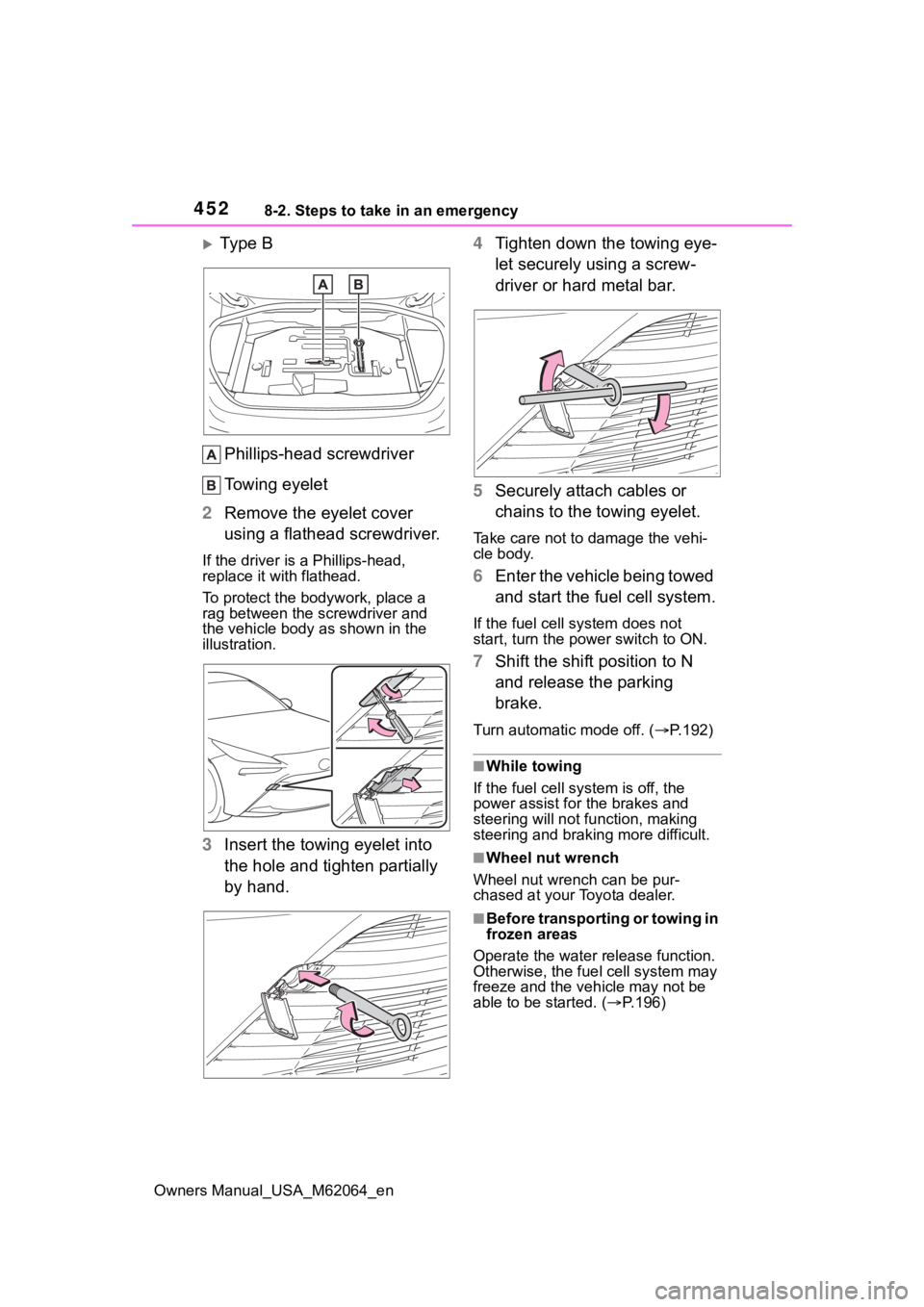
Ty p e B
Phillips-head screwdriver
Towing eyelet
2 Remove the eyelet cover
using a flathead screwdriver.
If the driver is a Phillips-head,
replace it with flathead.
To protect the bod ywork, place a
rag between the screwdriver and
the vehicle body as shown in the
illustration.
3 Insert the towing eyelet into
the hole and tighten partially
by hand. 4
Tighten down the towing eye-
let securely using a screw-
driver or hard metal bar.
5 Securely attach cables or
chains to the towing eyelet.
Take care not to damage the vehi-
cle body.
6Enter the vehicle being towed
and start the fuel cell system.
If the fuel cell system does not
start, turn the po wer switch to ON.
7Shift the shift position to N
and release the parking
brake.
Turn automatic mode off. ( P.192)
■While towing
If the fuel cell sys tem is off, the
power assist for the brakes and
steering will not function, making
steering and braking more difficult.
■Wheel nut wrench
Wheel nut wrench can be pur-
chased at your Toyota dealer.
■Before transporting or towing in
frozen areas
Operate the water release function.
Otherwise, the fue l cell system may
freeze and the veh icle may not be
able to be started. ( P.196)