light TOYOTA MIRAI 2023 Manual Online
[x] Cancel search | Manufacturer: TOYOTA, Model Year: 2023, Model line: MIRAI, Model: TOYOTA MIRAI 2023Pages: 572, PDF Size: 17.71 MB
Page 205 of 572
2055-3. Operating the lights and wipers
Owners Manual_USA_M62064_en
5
Driving
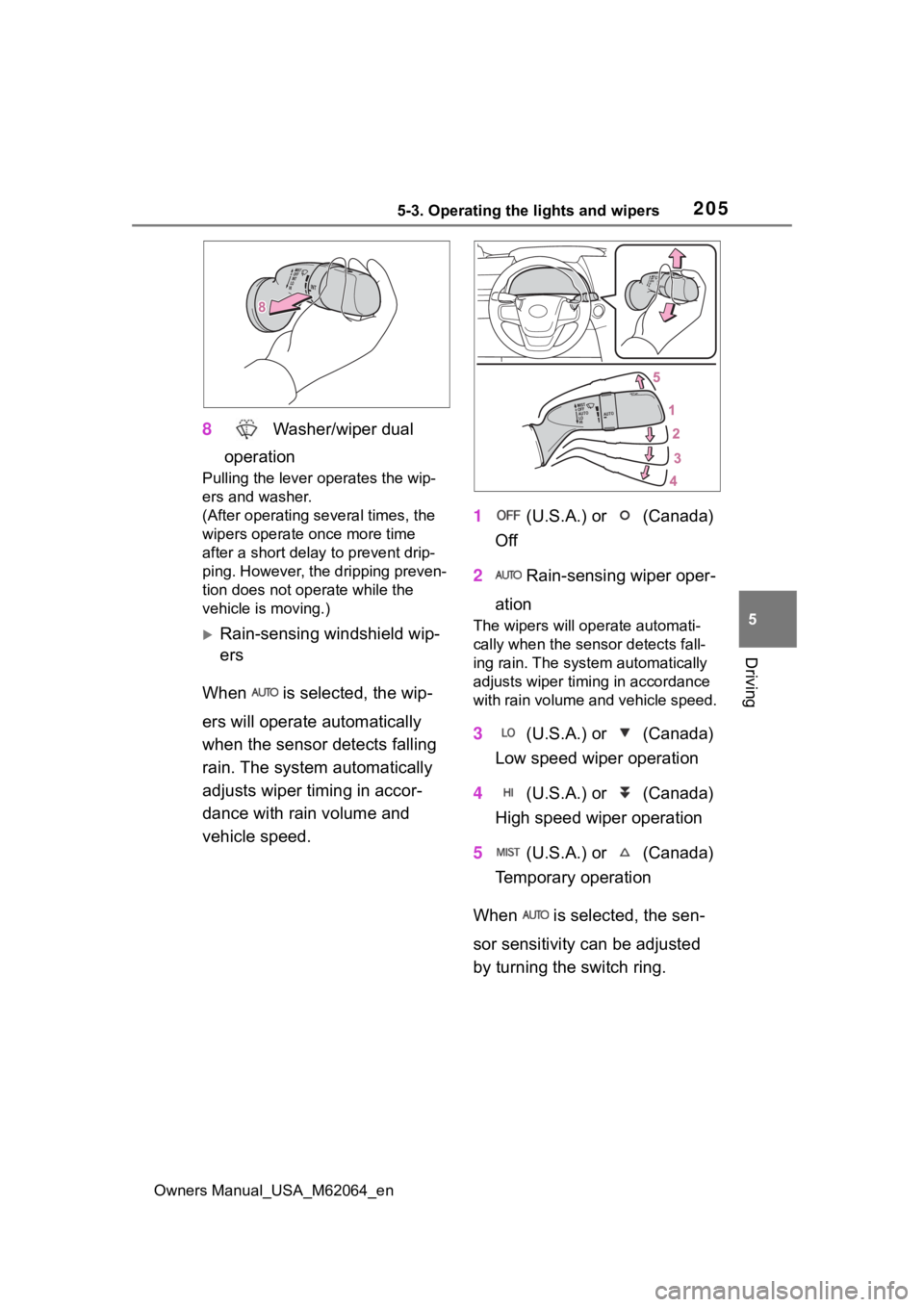
8 Washer/wiper dual
operation
Pulling the lever o perates the wip-
ers and washer.
(After operating several times, the
wipers operate once more time
after a short delay to prevent drip-
ping. However, the dripping preven-
tion does not operate while the
vehicle is moving.)
Rain-sensing windshield wip-
ers
When is selected, the wip-
ers will operate automatically
when the sensor detects falling
rain. The system automatically
adjusts wiper timing in accor-
dance with rain volume and
vehicle speed. 1
(U.S.A.) or (Canada)
Off
2 Rain-sensing wiper oper-
ationThe wipers will op erate automati-
cally when the sensor detects fall-
ing rain. The syst em automatically
adjusts wiper timi ng in accordance
with rain volume and vehicle speed.
3 (U.S.A.) or (Canada)
Low speed wiper operation
4 (U.S.A.) or (Canada)
High speed wiper operation
5 (U.S.A.) or (Canada)
Temporary operation
When is selected, the sen-
sor sensitivity can be adjusted
by turning the switch ring.
Page 206 of 572
2065-3. Operating the lights and wipers
Owners Manual_USA_M62064_en
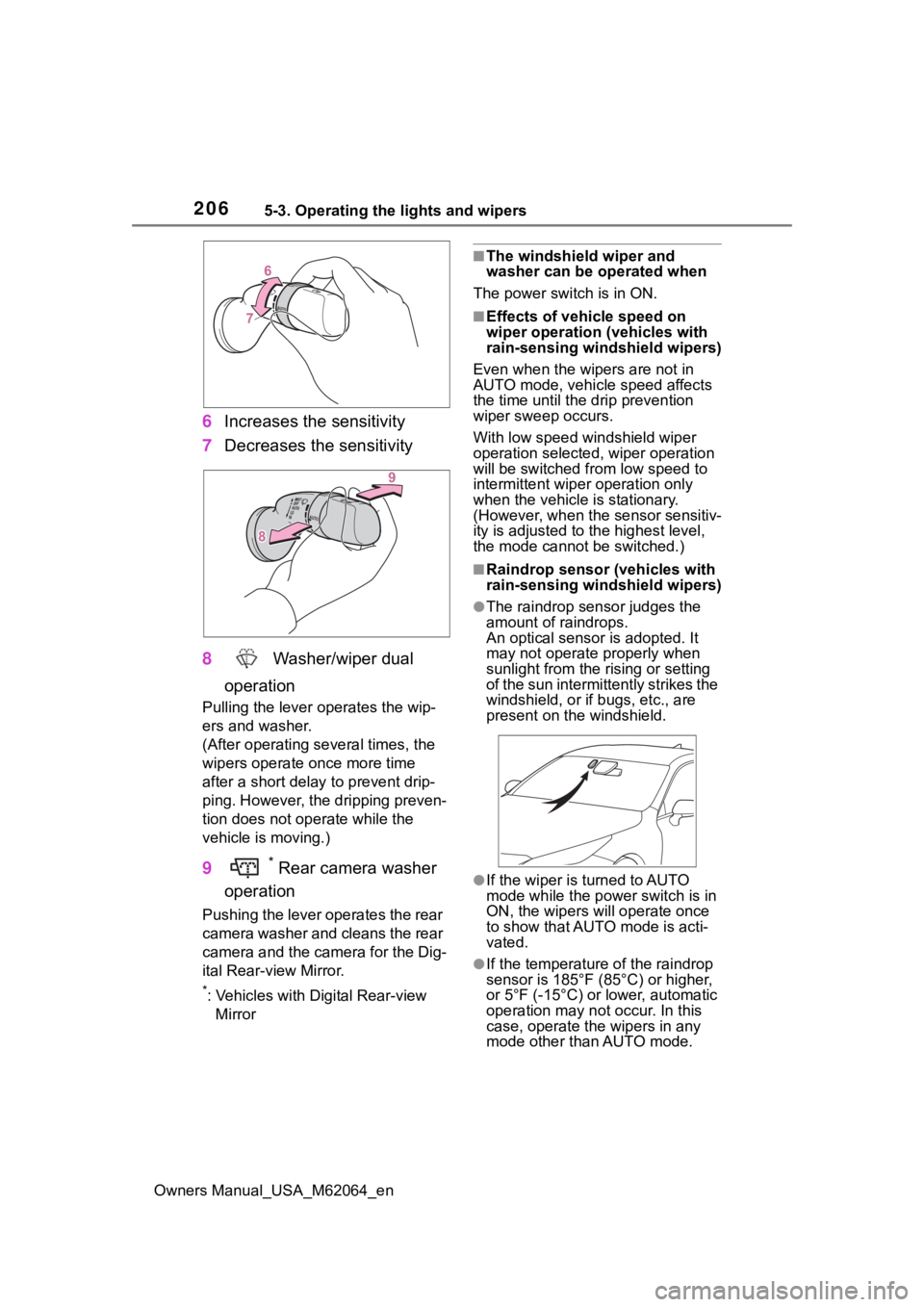
6Increases the sensitivity
7 Decreases the sensitivity
8 Washer/wiper dual
operation
Pulling the lever o perates the wip-
ers and washer.
(After operating several times, the
wipers operate once more time
after a short delay to prevent drip-
ping. However, the dripping preven-
tion does not operate while the
vehicle is moving.)
9* Rear camera washer
operation
Pushing the lever operates the rear
camera washer and cleans the rear
camera and the camera for the Dig-
ital Rear-view Mirror.
*: Vehicles with Digital Rear-view Mirror
■The windshield wiper and
washer can be operated when
The power switch is in ON.
■Effects of vehicle speed on
wiper operation (vehicles with
rain-sensing windshield wipers)
Even when the wipers are not in
AUTO mode, vehicle speed affects
the time until the drip prevention
wiper sweep occurs.
With low speed windshield wiper
operation selected, wiper operation
will be switched fro m low speed to
intermittent wiper operation only
when the vehicle is stationary.
(However, when the sensor sensitiv-
ity is adjusted to the highest level,
the mode cannot be switched.)
■Raindrop sensor (vehicles with
rain-sensing windshield wipers)
●The raindrop sensor judges the
amount of raindrops.
An optical sensor is adopted. It
may not operate properly when
sunlight from the rising or setting
of the sun intermittently strikes the
windshield, or if b ugs, etc., are
present on the windshield.
●If the wiper is turned to AUTO
mode while the power switch is in
ON, the wipers will operate once
to show that AUTO mode is acti-
vated.
●If the temperature of the raindrop
sensor is 185°F (85°C) or higher,
or 5°F (-15°C) or lower, automatic
operation may not occur. In this
case, operate the wipers in any
mode other than AUTO mode.
Page 207 of 572
2075-3. Operating the lights and wipers
Owners Manual_USA_M62064_en
5
Driving
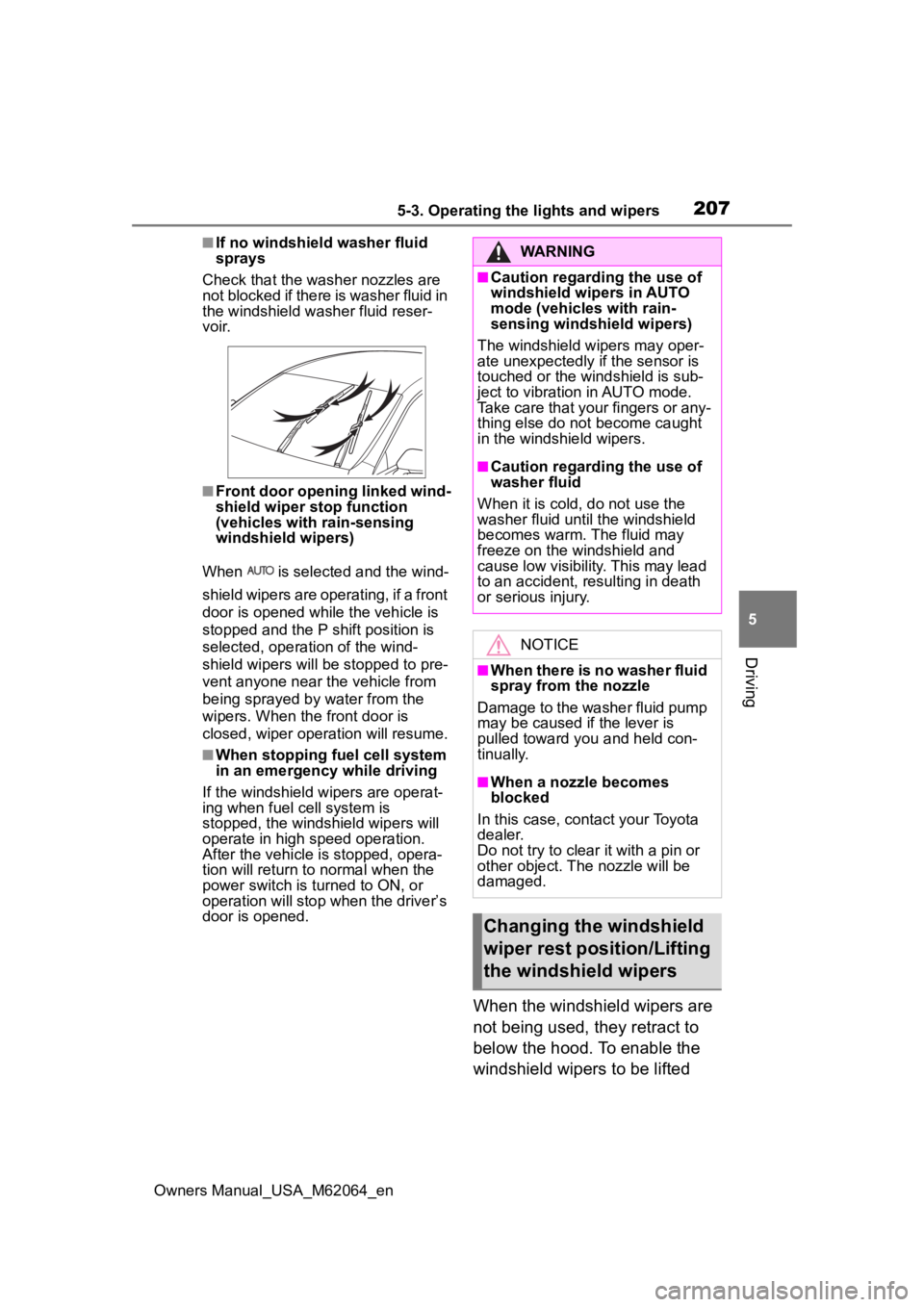
■If no windshield washer fluid
sprays
Check that the wash er nozzles are
not blocked if there is washer fluid in
the windshield washer fluid reser-
v oi r.
■Front door opening linked wind-
shield wiper stop function
(vehicles with rain-sensing
windshield wipers)
When is selected and the wind-
shield wipers are operating, if a front
door is opened while the vehicle is
stopped and the P shift position is
selected, operation of the wind-
shield wipers will be stopped to pre-
vent anyone near the vehicle from
being sprayed by water from the
wipers. When the front door is
closed, wiper operation will resume.
■When stopping fuel cell system
in an emergency while driving
If the windshield wipers are operat-
ing when fuel cell system is
stopped, the windshield wipers will
operate in high speed operation.
After the vehicle is stopped, opera-
tion will return to normal when the
power switch is turned to ON, or
operation will stop w hen the driver’s
door is opened.
When the windshield wipers are
not being used, they retract to
below the hood. To enable the
windshield wipers to be lifted
WARNING
■Caution regarding the use of
windshield wipers in AUTO
mode (vehicles with rain-
sensing windshield wipers)
The windshield wipers may oper-
ate unexpectedly if the sensor is
touched or the windshield is sub-
ject to vibration in AUTO mode.
Take care that your fingers or any-
thing else do not become caught
in the windshield wipers.
■Caution regarding the use of
washer fluid
When it is cold, do not use the
washer fluid unt il the windshield
becomes warm. The fluid may
freeze on the windshield and
cause low visibility. This may lead
to an accident, resulting in death
or serious injury.
NOTICE
■When there is no washer fluid
spray from the nozzle
Damage to the washer fluid pump
may be caused if the lever is
pulled toward you and held con-
tinually.
■When a nozzle becomes
blocked
In this case, contact your Toyota
dealer.
Do not try to clear it with a pin or
other object. The nozzle will be
damaged.
Changing the windshield
wiper rest position/Lifting
the windshield wipers
Page 208 of 572
2085-3. Operating the lights and wipers
Owners Manual_USA_M62064_en
when parking in cold conditions
or when replacing a windshield
wiper insert, change the rest
position of the windshield wipers
to the service position using the
wiper lever.
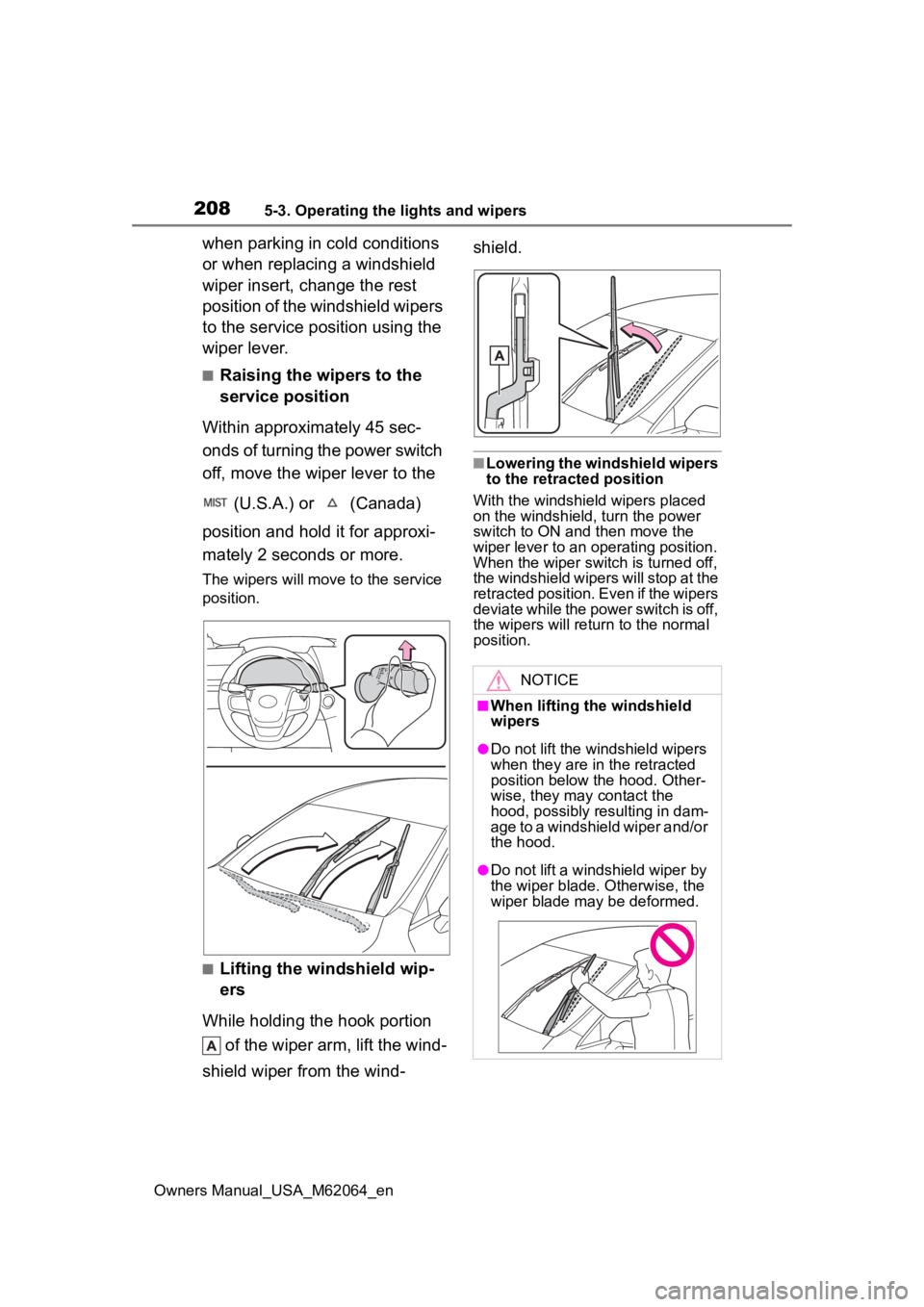
■Raising the wipers to the
service position
Within approximately 45 sec-
onds of turning the power switch
off, move the wiper lever to the (U.S.A.) or (Canada)
position and hold it for approxi-
mately 2 seconds or more.
The wipers will move to the service
position.
■Lifting the windshield wip-
ers
While holding the hook portion of the wiper arm, lift the wind-
shield wiper from the wind- shield.
■Lowering the windshield wipers
to the retracted position
With the windshield wipers placed
on the windshield, turn the power
switch to ON and then move the
wiper lever to an operating position.
When the wiper switch is turned off,
the windshield wipers will stop at the
retracted position. Even if the wipers
deviate while the power switch is off,
the wipers will return to the normal
position.
NOTICE
■When lifting the windshield
wipers
●Do not lift the windshield wipers
when they are in the retracted
position below the hood. Other-
wise, they may contact the
hood, possibly resulting in dam-
age to a windshield wiper and/or
the hood.
●Do not lift a windshield wiper by
the wiper blade. Otherwise, the
wiper blade may be deformed.
Page 209 of 572

2095-3. Operating the lights and wipers
Owners Manual_USA_M62064_en
5
Driving
NOTICE
●Do not operate the wiper lever
when the windshield wipers are
lifted. Otherwise, the wind-
shield wipers may contact the
hood, possibly resulting in dam-
age to the windshield wipers
and/or hood.
Page 210 of 572
2105-4. Refueling
Owners Manual_USA_M62064_en
5-4.Refueling
Close the all the doors and
windows.
Set the parking brake.
Shift the shift position to P.
Turn the power switch off.
Turn off the headlights.
■Fuel types
P.497
■Notes on fueling
●Fueling will not be possible if the
pressure inside the vehicle’s
hydrogen tanks is higher than the
supply pressure of the hydrogen
station. If the hydrogen tanks are
more than half full, the vehicle will
be unable to fuel at a H35 dis-
penser. A hydrogen station with a
H70 dispenser (supply pressure of
10150 psi) [70 MPa, 714 kgf/cm
2,
700 bar] is necessary to com-
pletely fill hydrogen tanks.
●If the fueling cannot be completed
due to trouble with the station
equipment, call the number indi-
cated on the equipment.
Opening the fuel door
Fuel with compressed
hydrogen gas only at hydro-
gen stations.
Fuel at hydrogen stations
conforming with the Society
of Automotive Engineers
(SAE) J2601 fueling proto-
col or laws that may super-
sede such SAE protocols.
Refer to the Mirai Station
Finder Application in Con-
nected services,
https://www.toyota.com/
connected-services/ (for
U.S. owners) or
https://www.toyota.ca/
toyota/en/about/
connected-services (for
Canadian owners), or call
1-800-331-4331 (for U.S.
owners) or 1-888-869-6828
(for Canadian owners).
Observe any notices or
instructions shown at hydro-
gen stations.
The filling time and amount
of fuel may depend on out-
side temperature and the
equipment at that hydrogen
station.
Vehicles with expired hydro-
gen tanks must not be used.
Check P.83 to learn how
and when to check the expi-
ration. Consult your Toyota
dealer.
Before filling
WARNING
■When filling
Observe the following precautions
while fueling the vehicle. Failure
to do so may result in death or
serious injury.
Page 216 of 572
2165-5. Using the driving support systems
Owners Manual_USA_M62064_en
■Certification
P.562
WARNING
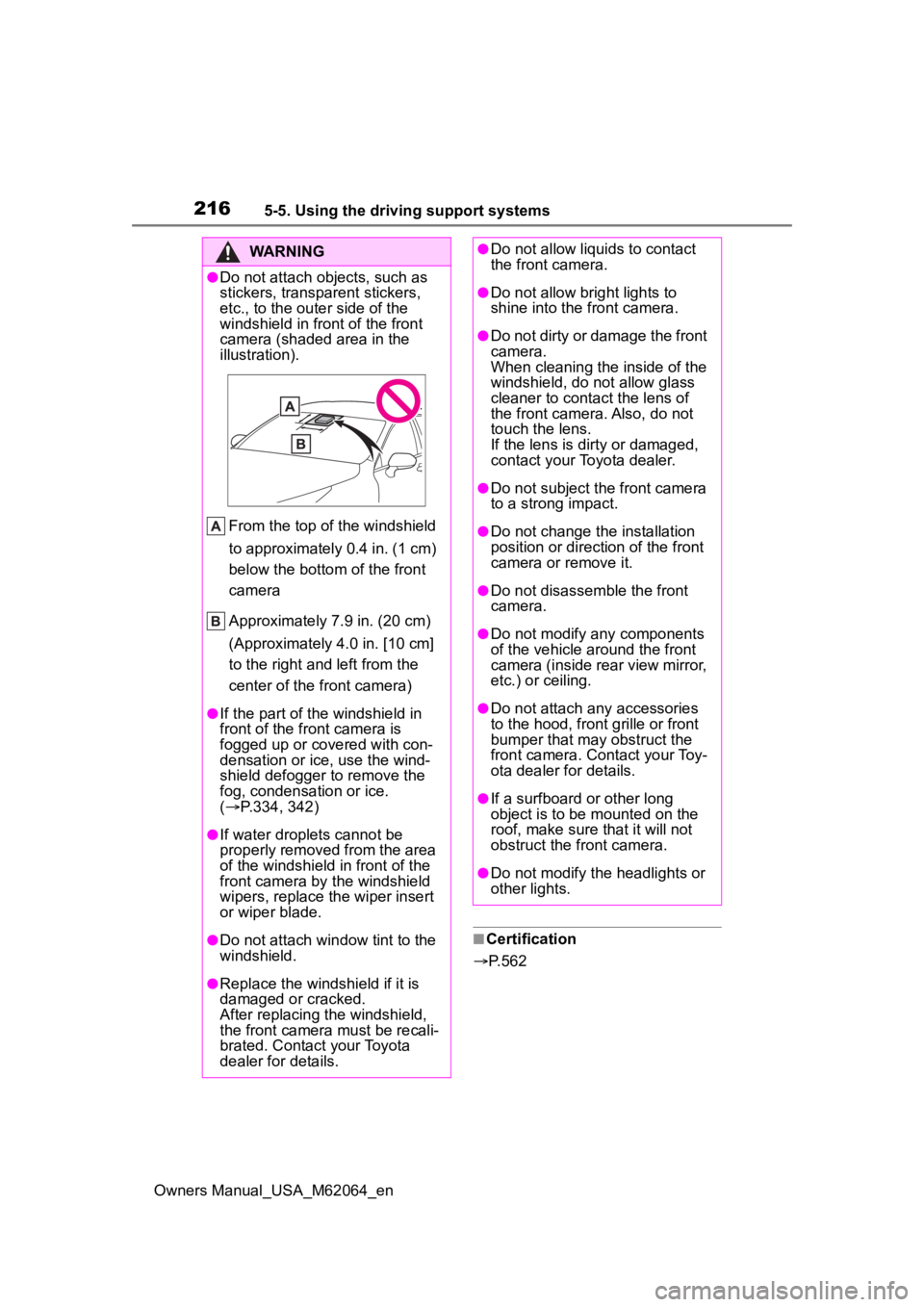
●Do not attach objects, such as
stickers, transparent stickers,
etc., to the oute r side of the
windshield in fr ont of the front
camera (shaded area in the
illustration).
From the top of the windshield
to approximately 0.4 in. (1 cm)
below the bottom of the front
camera
Approximately 7.9 in. (20 cm)
(Approximately 4.0 in. [10 cm]
to the right and left from the
center of the front camera)
●If the part of the windshield in
front of the front camera is
fogged up or covered with con-
densation or ice, use the wind-
shield defogger to remove the
fog, condensation or ice.
( P.334, 342)
●If water droplets cannot be
properly removed from the area
of the windshield in front of the
front camera by the windshield
wipers, replace the wiper insert
or wiper blade.
●Do not attach win dow tint to the
windshield.
●Replace the windshield if it is
damaged or cracked.
After replacing the windshield,
the front camera must be recali-
brated. Contact your Toyota
dealer for details.
●Do not allow liquids to contact
the front camera.
●Do not allow bright lights to
shine into the front camera.
●Do not dirty or damage the front
camera.
When cleaning the inside of the
windshield, do not allow glass
cleaner to contact the lens of
the front camera. Also, do not
touch the lens.
If the lens is dirty or damaged,
contact your Toyota dealer.
●Do not subject the front camera
to a strong impact.
●Do not change the installation
position or direction of the front
camera or remove it.
●Do not disassemble the front
camera.
●Do not modify any components
of the vehicle around the front
camera (inside rear view mirror,
etc.) or ceiling.
●Do not attach any accessories
to the hood, front grille or front
bumper that may obstruct the
front camera. Contact your Toy-
ota dealer for details.
●If a surfboard or other long
object is to be mounted on the
roof, make sure that it will not
obstruct the front camera.
●Do not modify the headlights or
other lights.
Page 217 of 572
2175-5. Using the driving support systems
Owners Manual_USA_M62064_en
5
Driving
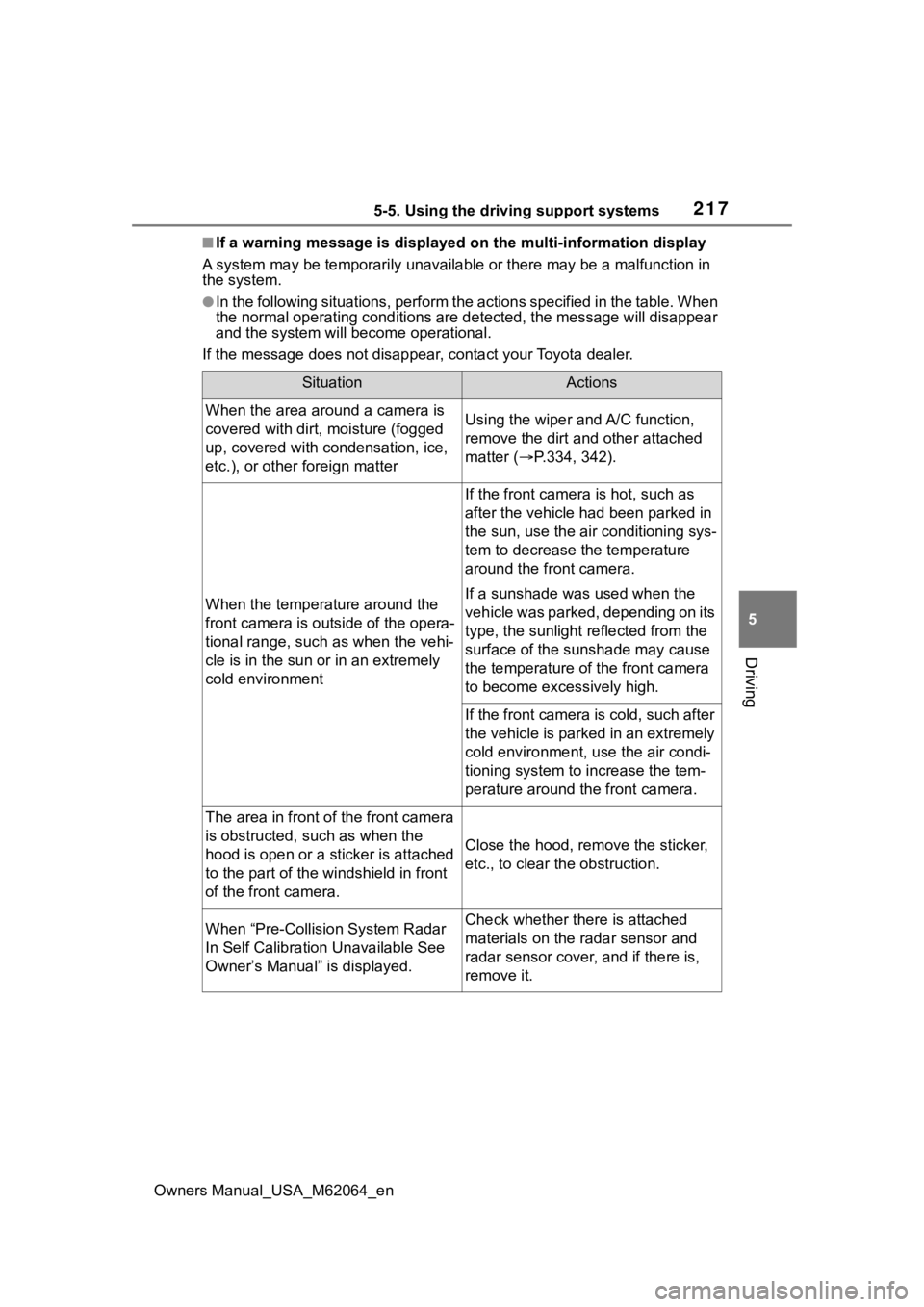
■If a warning message is displayed on the multi-information disp lay
A system may be tempor arily unavailable or there may be a malfu nction in
the system.
●In the following situations, perform the actions specified in t he table. When
the normal operating conditions are detected, the message will disappear
and the system will be come operational.
If the message does not disapp ear, contact your Toyota dealer.
SituationActions
When the area around a camera is
covered with dirt, moisture (fogged
up, covered with condensation, ice,
etc.), or other foreign matterUsing the wiper and A/C function,
remove the dirt and other attached
matter ( P.334, 342).
When the temperature around the
front camera is outside of the opera-
tional range, such as when the vehi-
cle is in the sun or in an extremely
cold environment
If the front camera is hot, such as
after the vehicle had been parked in
the sun, use the air conditioning sys-
tem to decrease the temperature
around the front camera.
If a sunshade was used when the
vehicle was parked, depending on its
type, the sunlight reflected from the
surface of the sunshade may cause
the temperature of the front camera
to become excessively high.
If the front camera is cold, such after
the vehicle is parked in an extremely
cold environment, use the air condi-
tioning system to increase the tem-
perature around the front camera.
The area in front o f the front camera
is obstructed, such as when the
hood is open or a sticker is attached
to the part of the win dshield in front
of the front camera.
Close the hood, rem ove the sticker,
etc., to clear the obstruction.
When “Pre-Collisio n System Radar
In Self Calibration Unavailable See
Owner’s Manual” is displayed.Check whether there is attached
materials on the radar sensor and
radar sensor cover, and if there is,
remove it.
Page 218 of 572

2185-5. Using the driving support systems
Owners Manual_USA_M62064_en
●In the following situations, if the situation has changed (or the vehicle has
been driven for some time) and the normal operating conditions are
detected, the message will disappear and the system will become opera-
tional.
If the message does not disappea r, contact your Toyota dealer.
• When the temperature around the radar sensor is outside of the opera-
tional range, such as when the vehicle is in the sun or in an e xtremely cold
environment
• When the front camera cannot d etect objects in front of the vehicle, such
as when driving in the dark, sno w, or fog, or when bright lights are shining
into the front camera
• Depending on the conditions in the vicinity of the vehicle, th e radar may
judge the surrounding environment can not be properly recognize d. In that
case, “Pre-Collision System Unavailable See Owner’s Manual” is dis-
played.
Page 222 of 572
2225-5. Using the driving support systems
Owners Manual_USA_M62064_en
■Enabling/disabling the pre-
collision system
The pre-collision system can be
enabled/disabled on
( P.512) of the multi-informa-
tion display.
The system is automatically
enabled each time the power
switch is turned to ON.
If the system is disabled, the
PCS warning light will turn on
and a message will be displayed
on the multi-information display.
WARNING