Eco TOYOTA PRIUS 2008 2.G Owners Manual
[x] Cancel search | Manufacturer: TOYOTA, Model Year: 2008, Model line: PRIUS, Model: TOYOTA PRIUS 2008 2.GPages: 512, PDF Size: 7.23 MB
Page 5 of 512

1
2
3
4
5
6
7
5
PRIUS_U_(L/O_0802)
5-1. Essential information ....... 416If your vehicle needs to be towed ................................ 416
If you think something is wrong ................................ 423
Event data recorder ............ 424
5-2. Steps to take in an emergency ....................... 426
If a warning light turns on or a warning buzzer
sounds... ........................... 426
If you have a flat tire............ 438
If the hybrid system will not start ................................... 448
If you lose your keys ........... 449
If the electronic key does not operate properly................ 450
If the vehicle 12 volt battery is discharged..................... 451
If your vehicle overheats ..... 456
If the vehicle becomes stuck ................................. 459 6-1. Specifications ................... 462
Maintenance data (fuel, oil level, etc.) ......................... 462
Fuel information.................. 472
Tire information .................. 475
6-2. Customization................... 488 Customizable features........ 488
6-3. Initialization....................... 491 Items to initialize ................. 491
Reporting safety defects for U.S. owners...................... 494
Seat belt instructions for Canadian owners
(in French) ........................ 495
Abbreviation list ............... 498
Alphabetical index............ 500
What to do if...................... 506
5When trouble arises6Vehicle specifications
7For owners
Index
Page 24 of 512

24 1-1. Hybrid system
PRIUS_U_(L/O_0802)
■Charging the battery
● As the gasoline engine charges the hybrid battery (traction battery), the
battery does not need to be charged from an outside source. However, if
the vehicle is left parked for a long time the hybrid battery will slowly dis-
charge. For this reason, be sure to drive the vehicle at least once every
several months for at least 30 minutes or 10 miles (16 km). If the hybrid
battery becomes fully discharged and you are unable to jump-start the
vehicle with the 12 volt battery, contact your Toyota dealer.
● If the shift lever is in “N”, the hybrid battery (traction battery) will not be
charged. When driving in heavy traffic, operate the vehicle with the shift
lever in “D” to avoid discharging the battery.
■ After the 12 volt battery has di scharged or has been changed or
removed
The gasoline engine may not stop even if the vehicle is running on the hybrid
battery (traction battery). If this continues for a few days, contact your Toyota
dealer.
Page 26 of 512
26 1-1. Hybrid system
PRIUS_U_(L/O_0802)
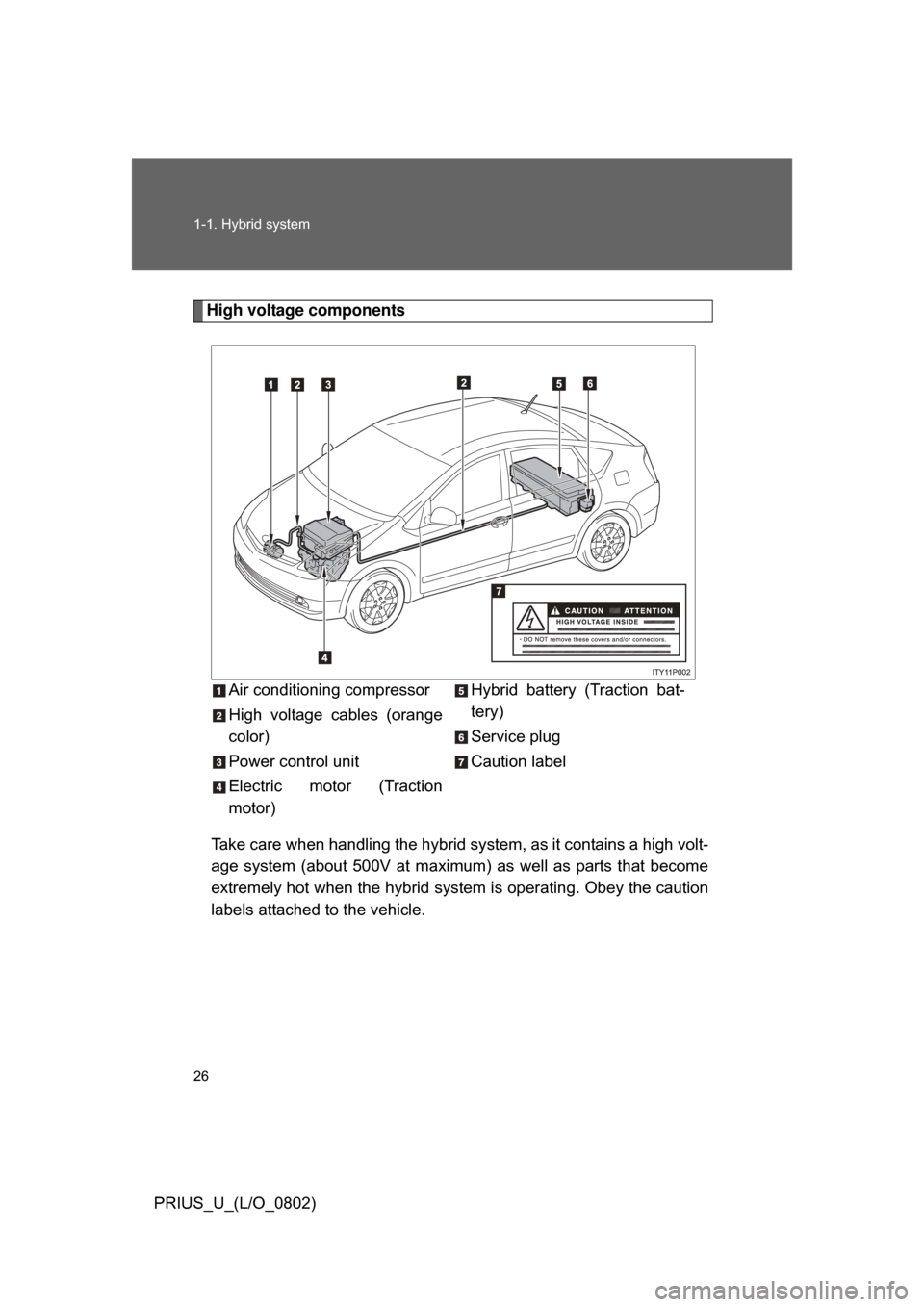
High voltage componentsTake care when handling the hybrid sy stem, as it contains a high volt-
age system (about 500V at maximum) as well as parts that become
extremely hot when the hybrid system is operating. Obey the caution
labels attached to the vehicle. Air conditioning compressor
High voltage cables (orange
color)
Power control unit
Electric motor (Traction
motor)
Hybrid battery (Traction bat-
tery)
Service plug
Caution label
Page 27 of 512
27
1-1. Hybrid system
1
Before driving
PRIUS_U_(L/O_0802)
■
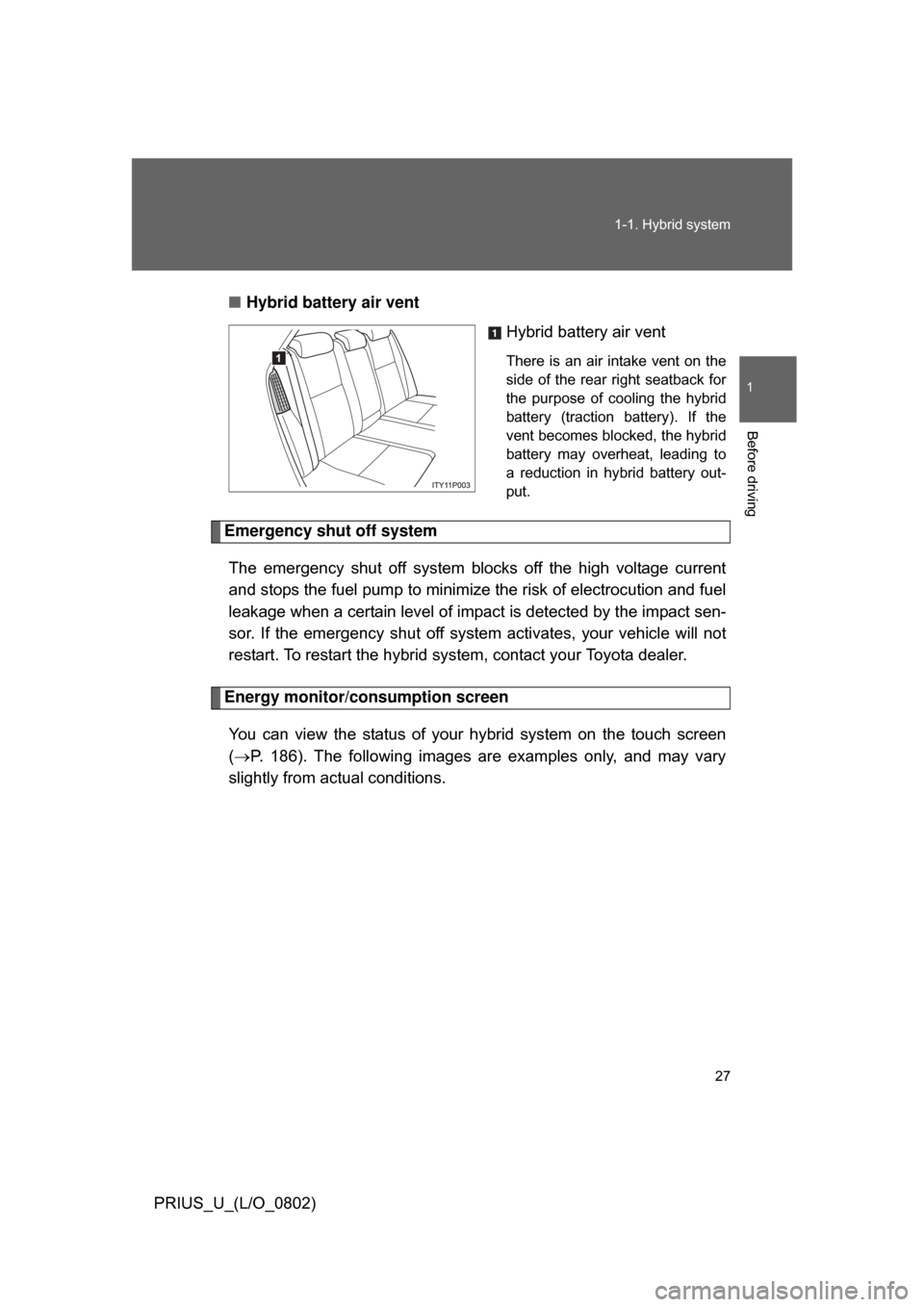
Hybrid battery air vent
Hybrid battery air vent
There is an air intake vent on the
side of the rear right seatback for
the purpose of cooling the hybrid
battery (traction battery). If the
vent becomes blocked, the hybrid
battery may overheat, leading to
a reduction in hybrid battery out-
put.
Emergency shut off system
The emergency shut off system blocks off the high voltage current
and stops the fuel pump to minimize the risk of electrocution and fuel
leakage when a certain level of impact is detected by the impact sen-
sor. If the emergency shut off syste m activates, your vehicle will not
restart. To restart the hybrid system, contact your Toyota dealer.
Energy monitor/consumption screen
You can view the status of your hybrid system on the touch screen
( P. 186). The following images are examples only, and may vary
slightly from actual conditions.
Page 32 of 512

32 1-1. Hybrid system
PRIUS_U_(L/O_0802)
CAUTION
■High voltage precautions
The vehicle has high voltage DC and AC systems as well as a 12 volt sys-
tem. DC and AC high voltage is very dangerous and can cause severe burns
and electric shock that may result in death or serious injury.
● Never touch, disassemble, remove or replace the high voltage parts,
cables and their connectors.
● The hybrid system will become hot after starting as the system uses high
voltage. Be careful of both the high voltage and the high temperature, and
always obey the caution labels attached to the vehicle.
● Never try to open the service plug access hole located in the luggage com-
partment. The service plug is used only when the vehicle is serviced and is
subject to high voltage.
■ Nickel-metal hydride battery
Your vehicle contains a sealed nicke l-metal hydride battery. If disposed of
improperly, it is hazardous to the environment and there is a risk of severe
burns and electrical shock that may result in death or serious injury.
■ Emergency shut off system
● Carefully check to see if there are exposed high voltage parts or cables.
Never touch the parts or cables. (
P. 26)
● Carefully inspect the ground under the vehicle. If you find that liquid has
leaked onto the ground, the fuel system may have been damaged. Leave
the vehicle as soon as possible.
Page 37 of 512
37
1-3. Opening, closing and locking the doors and back door
1
Before driving
PRIUS_U_(L/O_0802)
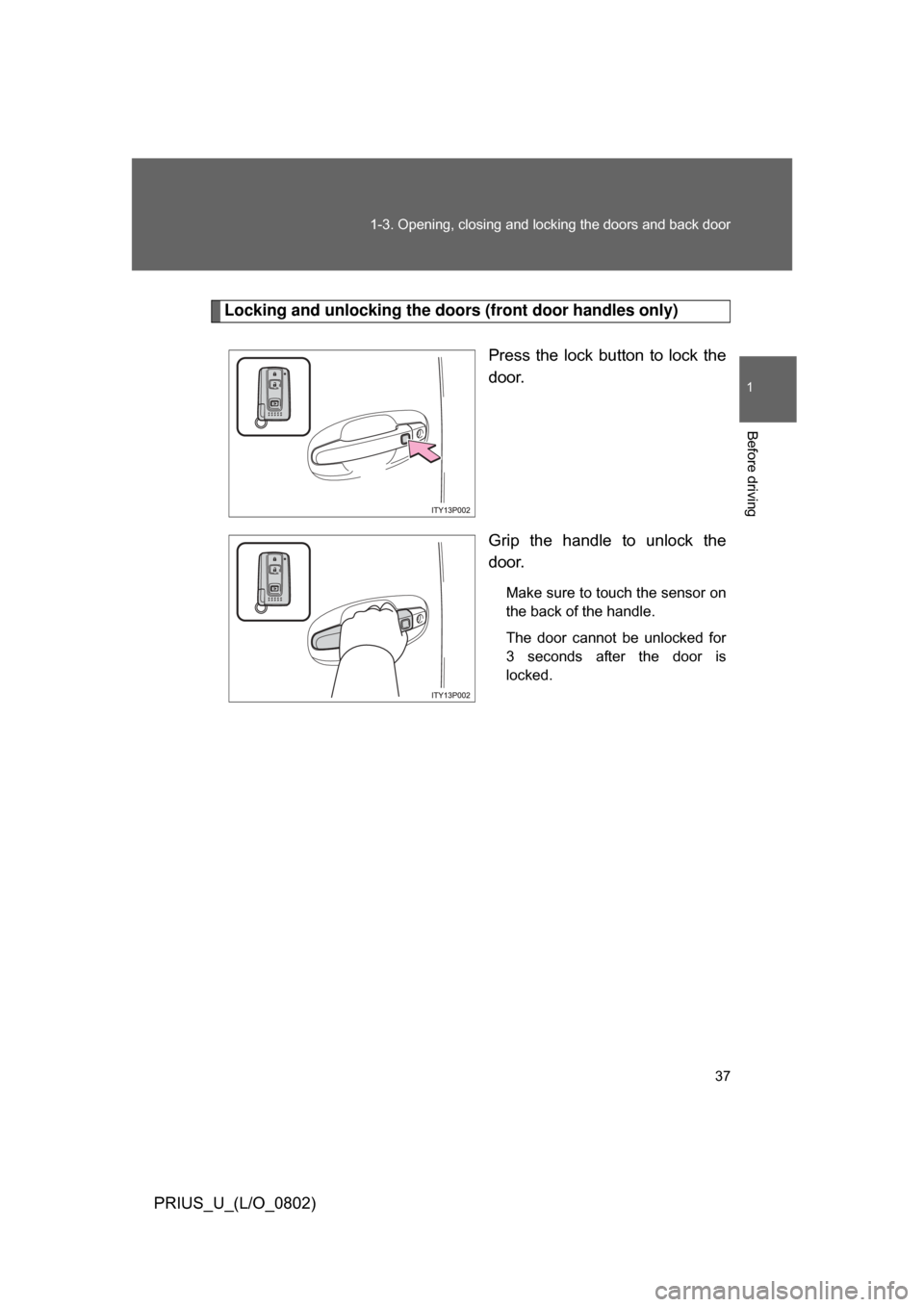
Locking and unlocking the doors (front door handles only)
Press the lock button to lock the
door.
Grip the handle to unlock the
door.
Make sure to touch the sensor on
the back of the handle.
The door cannot be unlocked for
3 seconds after the door is
locked.
Page 38 of 512
38 1-3. Opening, closing and locking the doors and back door
PRIUS_U_(L/O_0802)
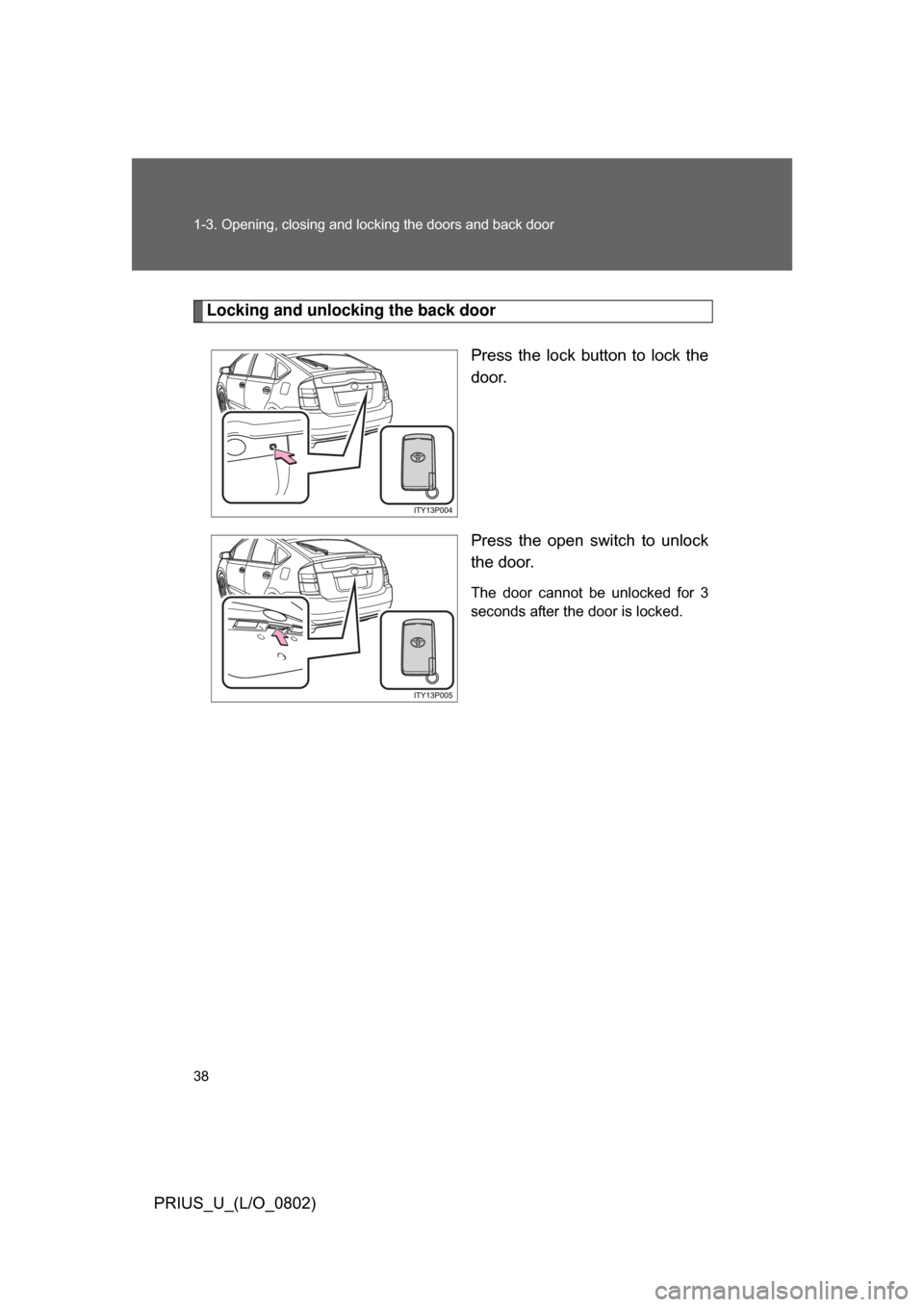
Locking and unlocking the back doorPress the lock button to lock the
door.
Press the open switch to unlock
the door.
The door cannot be unlocked for 3
seconds after the door is locked.
Page 43 of 512
43
1-3. Opening, closing and locking the doors and back door
1
Before driving
PRIUS_U_(L/O_0802)
■
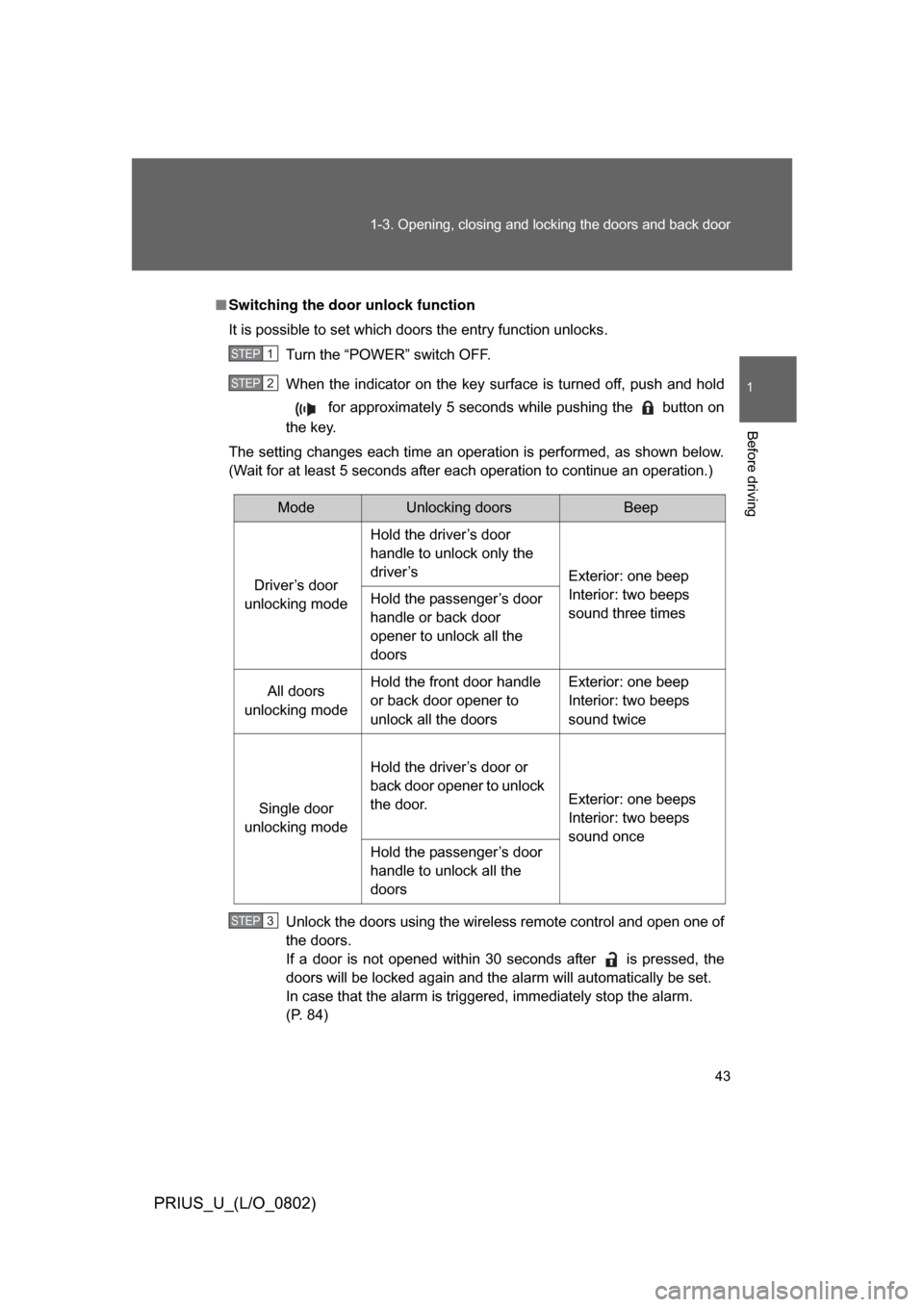
Switching the door unlock function
It is possible to set which doors the entry function unlocks.
Turn the “POWER” switch OFF.
When the indicator on the key surface is turned off, push and hold for approximately 5 seconds while pushing the button on
the key.
The setting changes each time an operation is performed, as shown below.
(Wait for at least 5 seconds after each operation to continue an operation.)
Unlock the doors using the wireless remote control and open one of
the doors.
If a door is not opened within 30 seconds after is pressed, the
doors will be locked again and the alarm will automatically be set.
In case that the alarm is triggered, immediately stop the alarm.
(P. 84)
STEP1
STEP2
ModeUnlocking doorsBeep
Driver’s door
unlocking mode Hold the driver’s door
handle to unlock only the
driver’s
Exterior: one beep
Interior: two beeps
sound three times
Hold the passenger’s door
handle or back door
opener to unlock all the
doors
All doors
unlocking mode Hold the front door handle
or back door opener to
unlock all the doors Exterior: one beep
Interior: two beeps
sound twice
Single door
unlocking mode Hold the driver’s door or
back door opener to unlock
the door.
Exterior: one beeps
Interior: two beeps
sound once
Hold the passenger’s door
handle to unlock all the
doors
STEP3
Page 44 of 512

44 1-3. Opening, closing and locking the doors and back door
PRIUS_U_(L/O_0802)
■Battery-saving function
In the following circumstances, the entry function is disabled in order to pre-
vent the vehicle and electronic key batteries from discharging.
● When the entry function has not been used for 2 weeks or more
● When the electronic key has been left within approximately 3 ft. (1 m) of
the vehicle for 10 minutes or more
The system will resume operation when...
● The vehicle is locked using the door handle lock switch
● The vehicle is locked/unlocked using the wireless remote control function
(P. 49) or the mechanical key ( P. 450)
■ Electronic key battery depletion
● The standard battery life is 1 to 3 years. (The battery becomes depleted
even if the electronic key is not used.) If the smart key system or the
wireless remote control function does not operate, or the detection area
becomes smaller, the battery may be depleted. Replace the battery when
necessary. ( P. 396)
● To avoid serious deterioration, do not leave the electronic key within 3 ft.
(1 m) of the following electrical appliances.
•TVs
• Personal computers
• Recharging cellular phones or cordless phones
• Table lamps
■ To operate the system properly
Make sure to carry the electronic key when operating the system. Do not get
the electronic key too close to the vehicle when operating the system from
the outside of the vehicle.
Depending on the position and holding condition of the electronic key, the
key may not be detected correctly and the system may not operate properly.
(The alarm may go off accidentally, or the door lock prevention may not func-
tion.)
Page 45 of 512

45
1-3. Opening, closing and locking the doors and back door
1
Before driving
PRIUS_U_(L/O_0802)
■
Note for the smart key system
● Even when the electronic key is within the effective range (detection
areas), the system may not operate properly in the following cases.
• The electronic key is too close to the window or outside door handle,
near the ground, or in a high place when the doors are locked or
unlocked.
• The electronic key is on the instrument panel, luggage cover, floor or in the glove box when the engine is started or engine switch modes are
changed.
● The doors may unlock if a large amount of water splashes on the door
handle, such as in the rain or in a car wash. (The doors will automatically
be locked after approximately 30 seconds if the doors are not opened
and closed.)
● Gripping the door handle when wearing a glove may not unlock the door.
● If the wireless remote control is used to lock the doors when the elec-
tronic key is near the vehicle, there is a possibility that the door may not
be unlocked by the entry function. (Use the wireless remote control to
unlock the doors.)
■ When the vehicle is not dr iven for extended periods
To prevent theft of the vehicle, do not leave the electronic key within 6 ft. (2
m) of the vehicle.
■ Security feature
If a door is not opened within approximately 30 seconds after the vehicle is
unlocked, the anti-theft system automatically locks the vehicle again.