display TOYOTA PRIUS 2012 3.G Owner's Manual
[x] Cancel search | Manufacturer: TOYOTA, Model Year: 2012, Model line: PRIUS, Model: TOYOTA PRIUS 2012 3.GPages: 636, PDF Size: 11.02 MB
Page 51 of 636
51
1-1. Hybrid system
1
Before driving
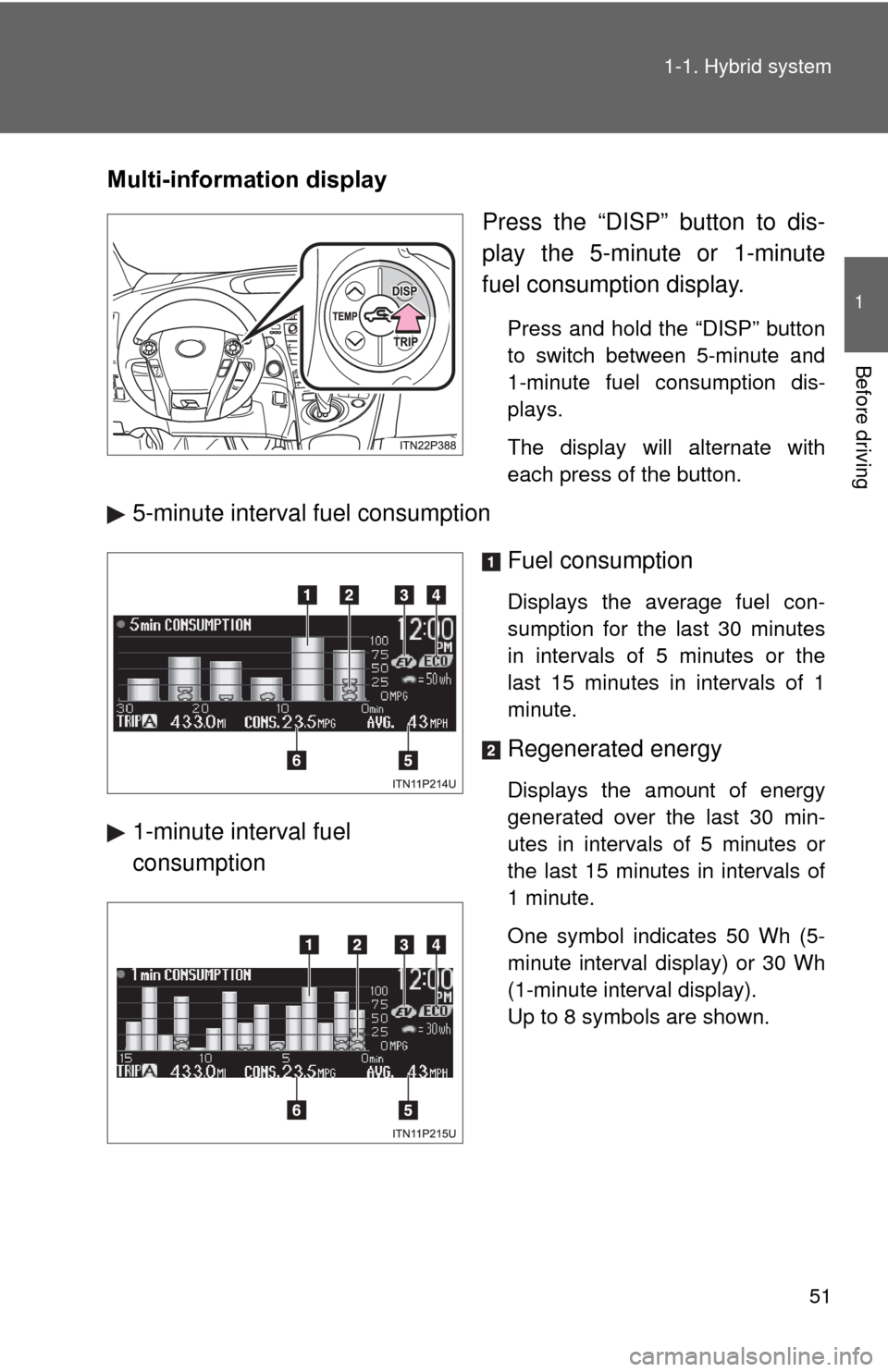
Multi-information display
Press the “DISP” button to dis-
play the 5-minute or 1-minute
fuel consumption display.
Press and hold the “DISP” button
to switch between 5-minute and
1-minute fuel consumption dis-
plays.
The display will alternate with
each press of the button.
5-minute interval fuel consumption
Fuel consumption
Displays the average fuel con-
sumption for the last 30 minutes
in intervals of 5 minutes or the
last 15 minutes in intervals of 1
minute.
Regenerated energy
Displays the amount of energy
generated over the last 30 min-
utes in intervals of 5 minutes or
the last 15 minutes in intervals of
1 minute.
One symbol indicates 50 Wh (5-
minute interval display) or 30 Wh
(1-minute interval display).
Up to 8 symbols are shown.
1-minute interval fuel
consumption
Page 52 of 636

52 1-1. Hybrid system
EV indicator*1
Eco Driving Indicator Light*1
Average speed*2
Average fuel consumption/eco
savings
*2
Use the displayed average fuel
consumption as a reference.
*1: P. 225
*2:The current amount since the tripmeter was reset will be displayed.
These functions can be reset by
pressing and holding the “TRIP”
button when either the 5-minute
or 1-minute interval fuel con-
sumption display is being shown.
The display can be switched
between average fuel consump-
tion/average speed and eco sav-
ings. ( P. 232)
Page 53 of 636
53
1-1. Hybrid system
1
Before driving
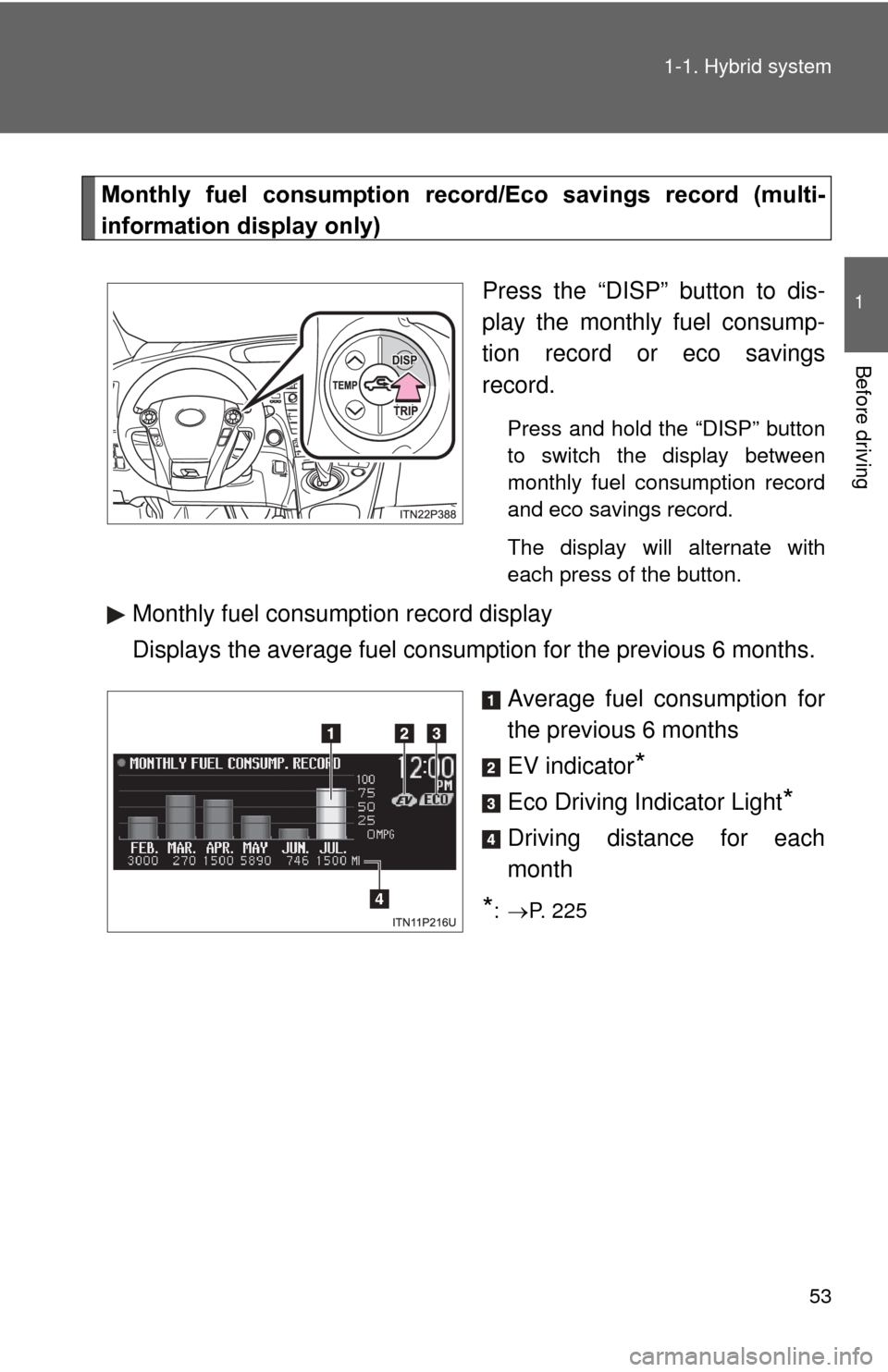
Monthly fuel consumption record
/Eco savings record (multi-
information display only)
Press the “DISP” button to dis-
play the monthly fuel consump-
tion record or eco savings
record.
Press and hold the “DISP” button
to switch the display between
monthly fuel consumption record
and eco savings record.
The display will alternate with
each press of the button.
Monthly fuel consumption record display
Displays the average fuel consumption for the previous 6 months.
Average fuel consumption for
the previous 6 months
EV indicator
*
Eco Driving Indicator Light*
Driving distance for each
month
*: P. 225
Page 54 of 636
54 1-1. Hybrid system
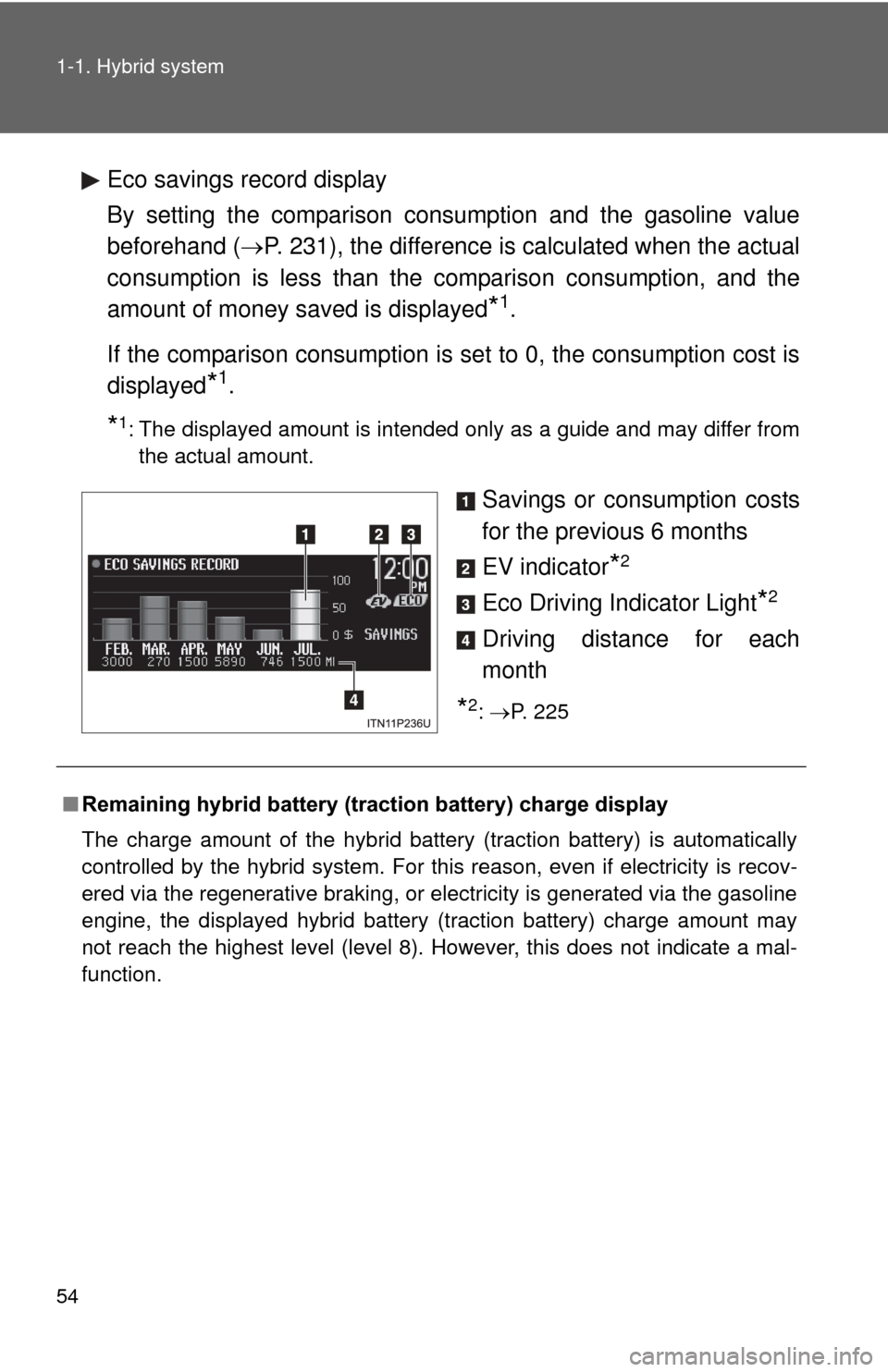
Eco savings record display
By setting the comparison consumption and the gasoline value
beforehand (P. 231), the difference is calculated when the actual
consumption is less than the comparison consumption, and the
amount of money saved is displayed
*1.
If the comparison consumption is set to 0, the consumption cost is
displayed
*1.
*1: The displayed amount is intended only as a guide and may differ from the actual amount.
Savings or consumption costs
for the previous 6 months
EV indicator
*2
Eco Driving Indicator Light*2
Driving distance for each
month
*2: P. 225
■ Remaining hybrid battery (traction battery) charge display
The charge amount of the hybrid battery (traction battery) is automatically
controlled by the hybrid system. For this reason, even if electricity is recov-
ered via the regenerative braking, or electricity is generated via the gasoline
engine, the displayed hybrid battery (traction battery) charge amount may
not reach the highest level (level 8). However, this does not indicate a mal-
function.
Page 55 of 636

55
1-1. Hybrid system
1
Before driving
■
Resetting the consumption data
Display Audio system
Selecting “Clear” on the “Consumption” screen will reset the fuel consump-
tion and the regenerated energy for the past 30 minutes.
Selecting “Yes” on the following screen will confirm resetting of all the data.
Navigation system
Selecting “Clear” on the “Consumption” screen will reset the fuel consump-
tion and the regenerated energy for the past 30 minutes.
Selecting “Yes” on the following screen will confirm resetting of all the data.
Multi-information display
If the “POWER” switch is turned OFF, average fuel consumption and regen-
erated energy data will be reset.
■ Resetting the monthly fuel consumption/eco savings record
Press and hold the “TRIP” button while the monthly fuel consumption/eco
savings record is displayed.
A confirmation message will be displayed.
Press and hold the “TRIP” button to reset the data.
Press the “DISP” button to cancel the reset operation. The screen will return
to the previous display if no buttons are pressed for approximately 10 sec-
onds.
■ Cruising range
Displays the estimated maximum distance that can be driven with the quan-
tity of fuel remaining.
This distance is computed based on your average fuel consumption.
As a result, the actual distance that can be driven may differ from that dis-
played.
■ Odometer/trip meter/distance to empty
The odometer/trip meter/distance to empty will not be displayed while the
monthly fuel consumption record or the eco savings record is being dis-
played.
Page 67 of 636
67
1-3. Opening, closing and locking the doors
1
Before driving
■
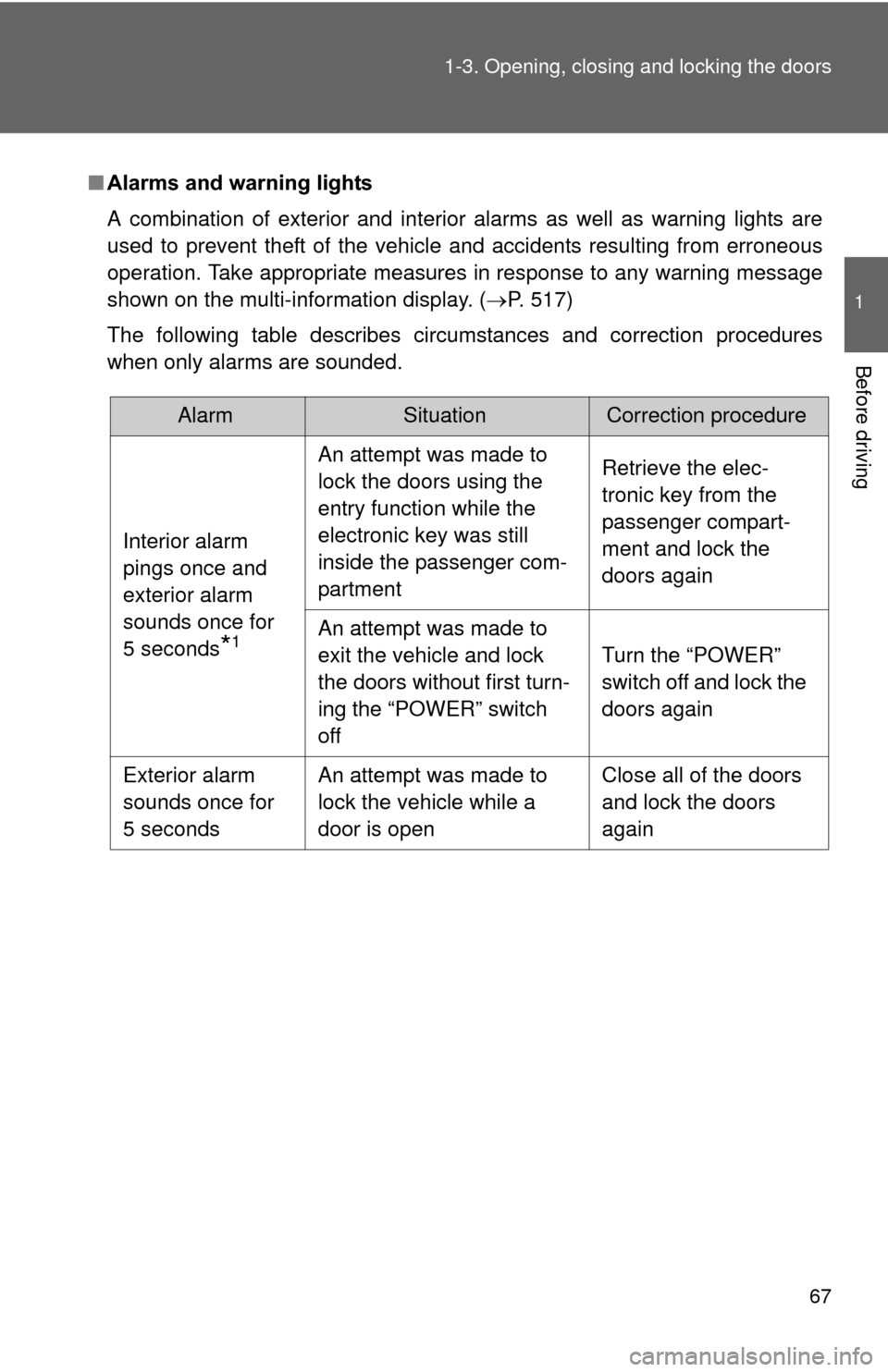
Alarms and warning lights
A combination of exterior and interior alarms as well as warning lights are
used to prevent theft of the vehicle and accidents resulting from erroneous
operation. Take appropriate measures in response to any warning message
shown on the multi-information display. ( P. 517)
The following table describes circumstances and correction procedures
when only alarms are sounded.
AlarmSituationCorrection procedure
Interior alarm
pings once and
exterior alarm
sounds once for
5 seconds
*1
An attempt was made to
lock the doors using the
entry function while the
electronic key was still
inside the passenger com-
partment Retrieve the elec-
tronic key from the
passenger compart-
ment and lock the
doors again
An attempt was made to
exit the vehicle and lock
the doors without first turn-
ing the “POWER” switch
off Turn the “POWER”
switch off and lock the
doors again
Exterior alarm
sounds once for
5 seconds An attempt was made to
lock the vehicle while a
door is open Close all of the doors
and lock the doors
again
Page 69 of 636
69
1-3. Opening, closing and locking the doors
1
Before driving
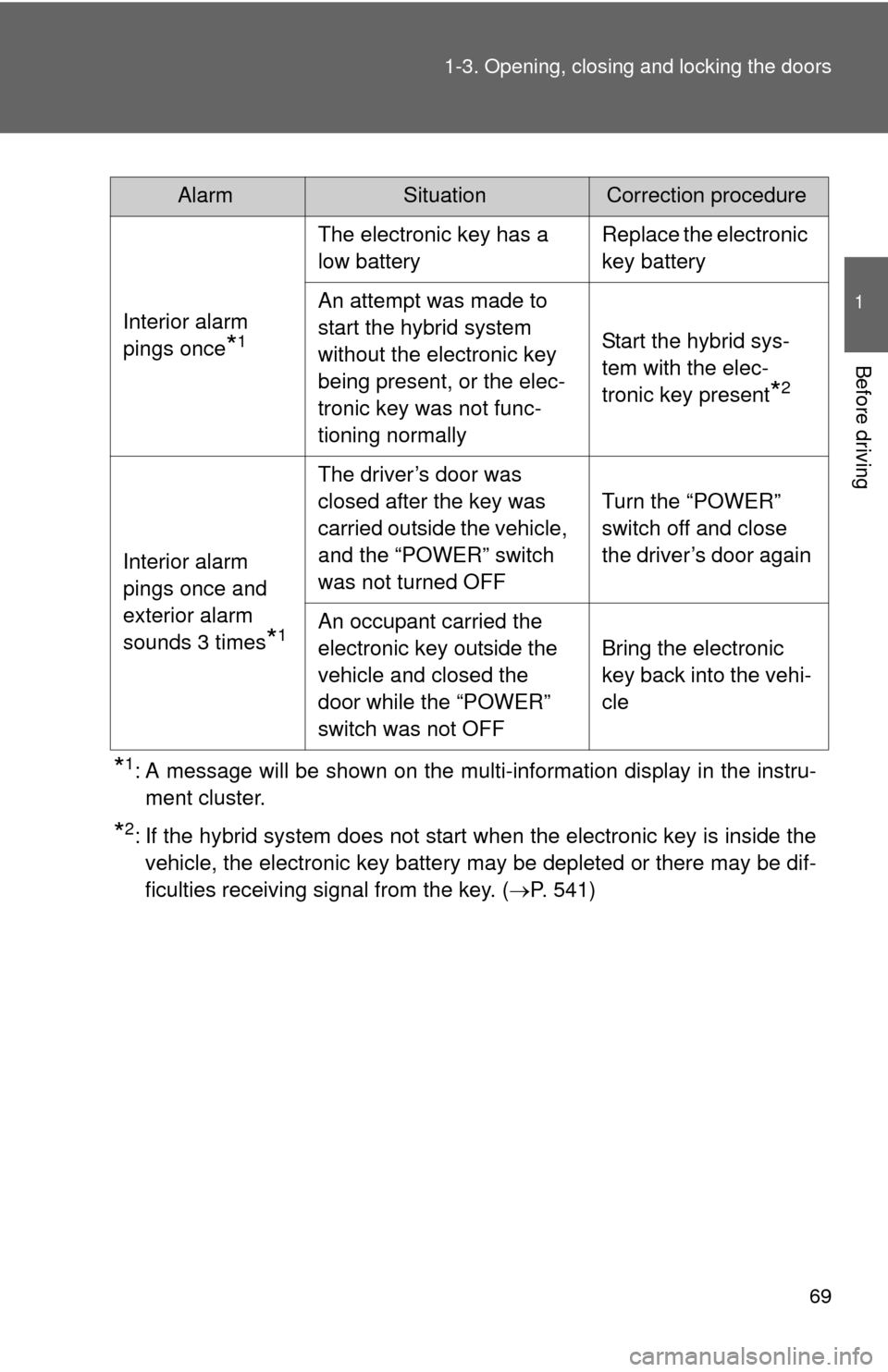
*1: A message will be shown on the multi-information display in the instru-
ment cluster.
*2: If the hybrid system does not start when the electronic key is inside thevehicle, the electronic key battery may be depleted or there may be dif-
ficulties receiving signal from the key. ( P. 541)
AlarmSituationCorrection procedure
Interior alarm
pings once
*1
The electronic key has a
low battery Replace the electronic
key battery
An attempt was made to
start the hybrid system
without the electronic key
being present, or the elec-
tronic key was not func-
tioning normally Start the hybrid sys-
tem with the elec-
tronic key present
*2
Interior alarm
pings once and
exterior alarm
sounds 3 times
*1
The driver’s door was
closed after the key was
carried outside the vehicle,
and the “POWER” switch
was not turned OFF
Turn the “POWER”
switch off and close
the driver’s door again
An occupant carried the
electronic key outside the
vehicle and closed the
door while the “POWER”
switch was not OFF Bring the electronic
key back into the vehi-
cle
Page 70 of 636
70 1-3. Opening, closing and locking the doors
■Security feature
If a door is not opened within approximately 60 seconds after the vehicle is
unlocked, the security feature automatically locks the vehicle again.
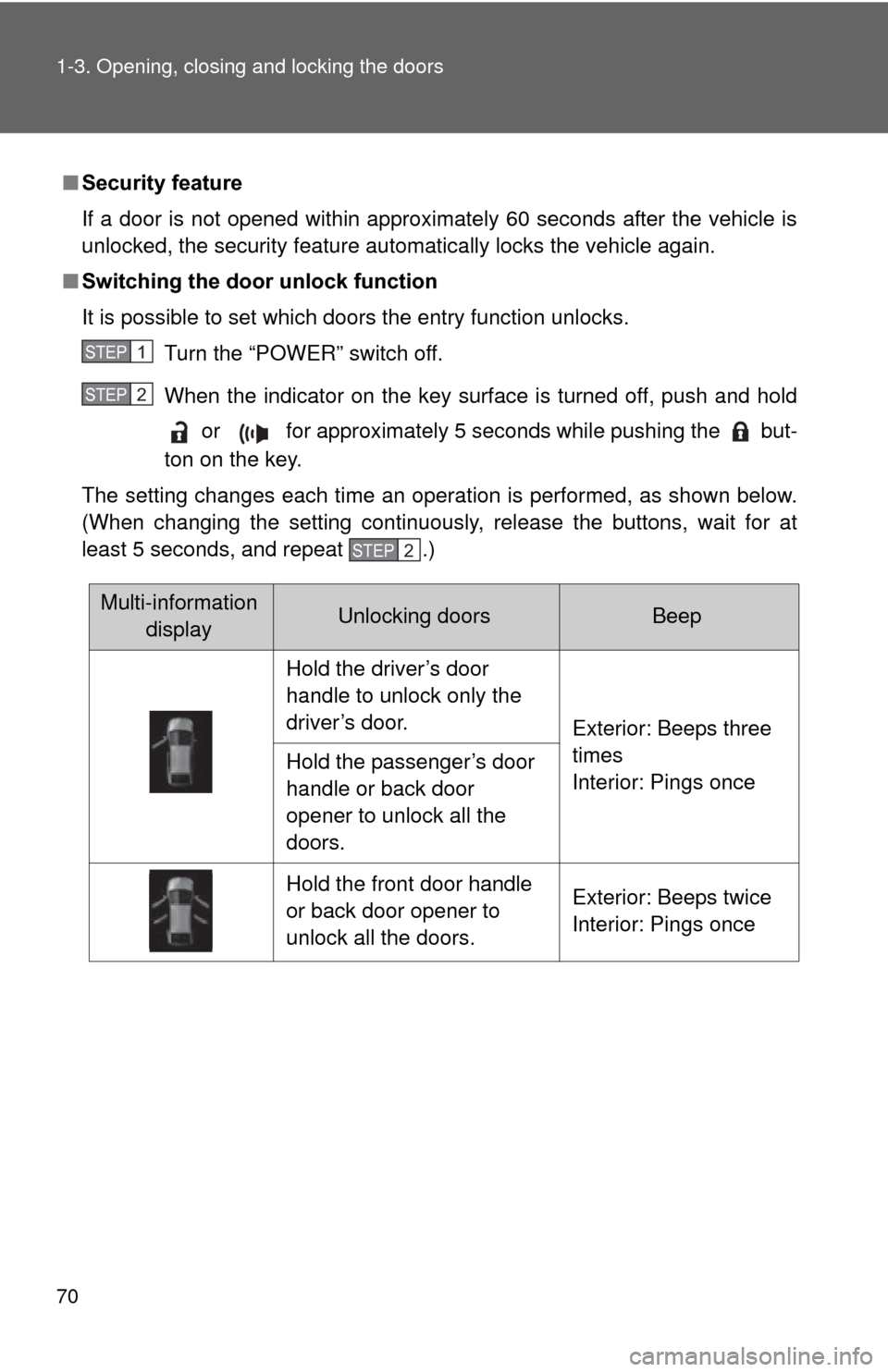
■ Switching the door unlock function
It is possible to set which doors the entry function unlocks.
Turn the “POWER” switch off.
When the indicator on the key surface is turned off, push and hold or for approximately 5 seconds while pushing the but-
ton on the key.
The setting changes each time an operation is performed, as shown below.
(When changing the setting continuously, release the buttons, wait for at
least 5 seconds, and repeat .)
STEP 1
STEP 2
STEP 2
Multi-information displayUnlocking doorsBeep
Hold the driver’s door
handle to unlock only the
driver’s door. Exterior: Beeps three
times
Interior: Pings once
Hold the passenger’s door
handle or back door
opener to unlock all the
doors.
Hold the front door handle
or back door opener to
unlock all the doors. Exterior: Beeps twice
Interior: Pings once
Page 78 of 636

78 1-3. Opening, closing and locking the doors
CAUTION
■Caution regarding interfer ence with electronic devices
● People with implanted pacemakers or cardiac defibrillators should keep
away from the smart key system antennas. ( P. 64)
The radio waves may affect the operation of such devices. If necessary,
the entry function can be disabled. Ask your Toyota dealer for details, such
as the frequency of radio waves and timing of emitting the radio waves.
Then, consult your doctor to see if you should disable the entry function.
● Users of any electrical medical device other than implanted pacemakers
and implanted cardiac defibrillators should consult the manufacturer of the
device for information about its operation under the influence of radio
waves.
Radio waves could have unexpected effects on the operation of such
medical devices.
Ask your Toyota dealer for details on disabling the entry function.
On vehicles with the Display Audio system or the navigation system, the
entry function can be disabled personally. ( P. 590)
Page 82 of 636
82 1-3. Opening, closing and locking the doors
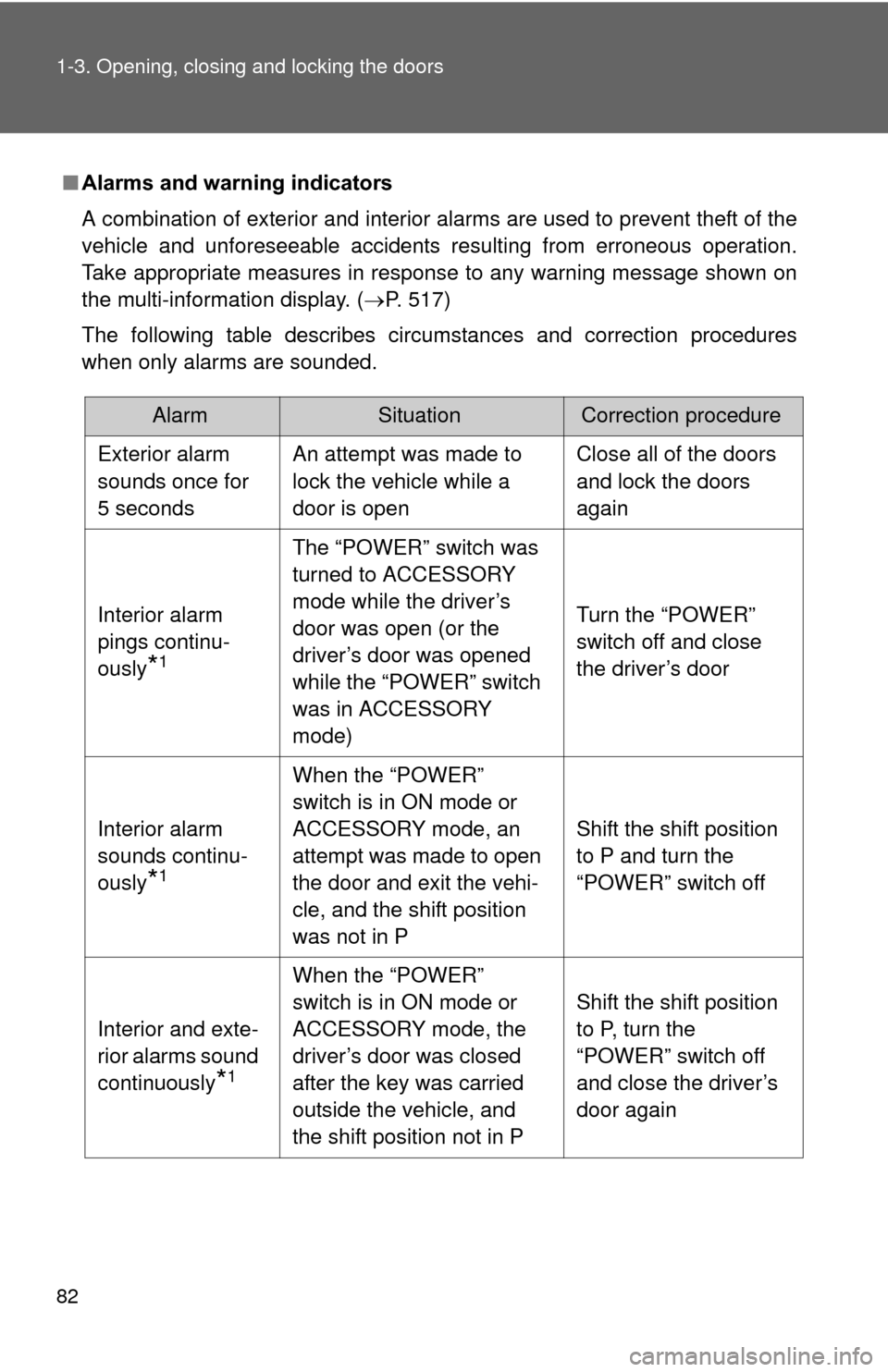
■Alarms and warning indicators
A combination of exterior and interior alarms are used to prevent theft of the
vehicle and unforeseeable accidents resulting from erroneous operation.
Take appropriate measures in response to any warning message shown on
the multi-information display. (P. 517)
The following table describes circumstances and correction procedures
when only alarms are sounded.
AlarmSituationCorrection procedure
Exterior alarm
sounds once for
5 seconds An attempt was made to
lock the vehicle while a
door is open Close all of the doors
and lock the doors
again
Interior alarm
pings continu-
ously
*1
The “POWER” switch was
turned to ACCESSORY
mode while the driver’s
door was open (or the
driver’s door was opened
while the “POWER” switch
was in ACCESSORY
mode) Turn the “POWER”
switch off and close
the driver’s door
Interior alarm
sounds continu-
ously
*1
When the “POWER”
switch is in ON mode or
ACCESSORY mode, an
attempt was made to open
the door and exit the vehi-
cle, and the shift position
was not in P Shift the shift position
to P and turn the
“POWER” switch off
Interior and exte-
rior alarms sound
continuously
*1
When the “POWER”
switch is in ON mode or
ACCESSORY mode, the
driver’s door was closed
after the key was carried
outside the vehicle, and
the shift position not in P Shift the shift position
to P, turn the
“POWER” switch off
and close the driver’s
door again