button TOYOTA PRIUS 2017 4.G Repair Manual
[x] Cancel search | Manufacturer: TOYOTA, Model Year: 2017, Model line: PRIUS, Model: TOYOTA PRIUS 2017 4.GPages: 796, PDF Size: 20.13 MB
Page 562 of 796

562
PRIUS_OM_OM47B54U_(U)
6-4. Using the other interior features
■Automatic Collision Notification
In case of either airbag deployment or severe rear-end collision, the
system is designed to automatically call the response center. The
responding agent receives the ve hicle’s location and attempts to
speak with the vehicle occupants to assess the level of emergency.
If the occupants are unable to communicate, the agent automati-
cally treats the call as an emergency, contacts the nearest emer-
gency services provider to descri be the situation, and requests that
assistance be sent to the location.
■Stolen Vehicle Location
If your vehicle is stolen, Safety Connect can work with local author-
ities to assist them in locating and recovering the vehicle.
After filing a police report, call the Safety Connect response center
at 1-800-25-TOYOTA (1-800-255-3987) and follow the prompts for
Safety Connect to initiate this service.
In addition to assisting law enforcement with recovery of a stolen
vehicle, Safety-Connect-equipped vehicle location data may, under
certain circumstances, be shared with third parties to locate your
vehicle. Further information is available at Toyota.com.
■Emergency Assistance Button (“SOS”)
In the event of an emergency on the road, push the “SOS” button to
reach the Safety Connect respons e center. The answering agent
will determine your vehicle’s location, assess the emergency, and
dispatch the necessary assistance required.
If you accidentally press the “SOS” button, tell the response-center
agent that you are not experiencing an emergency.
Safety Connect services
Page 748 of 796
748
PRIUS_OM_OM47B54U_(U)
9-2. Customization
Customizable features
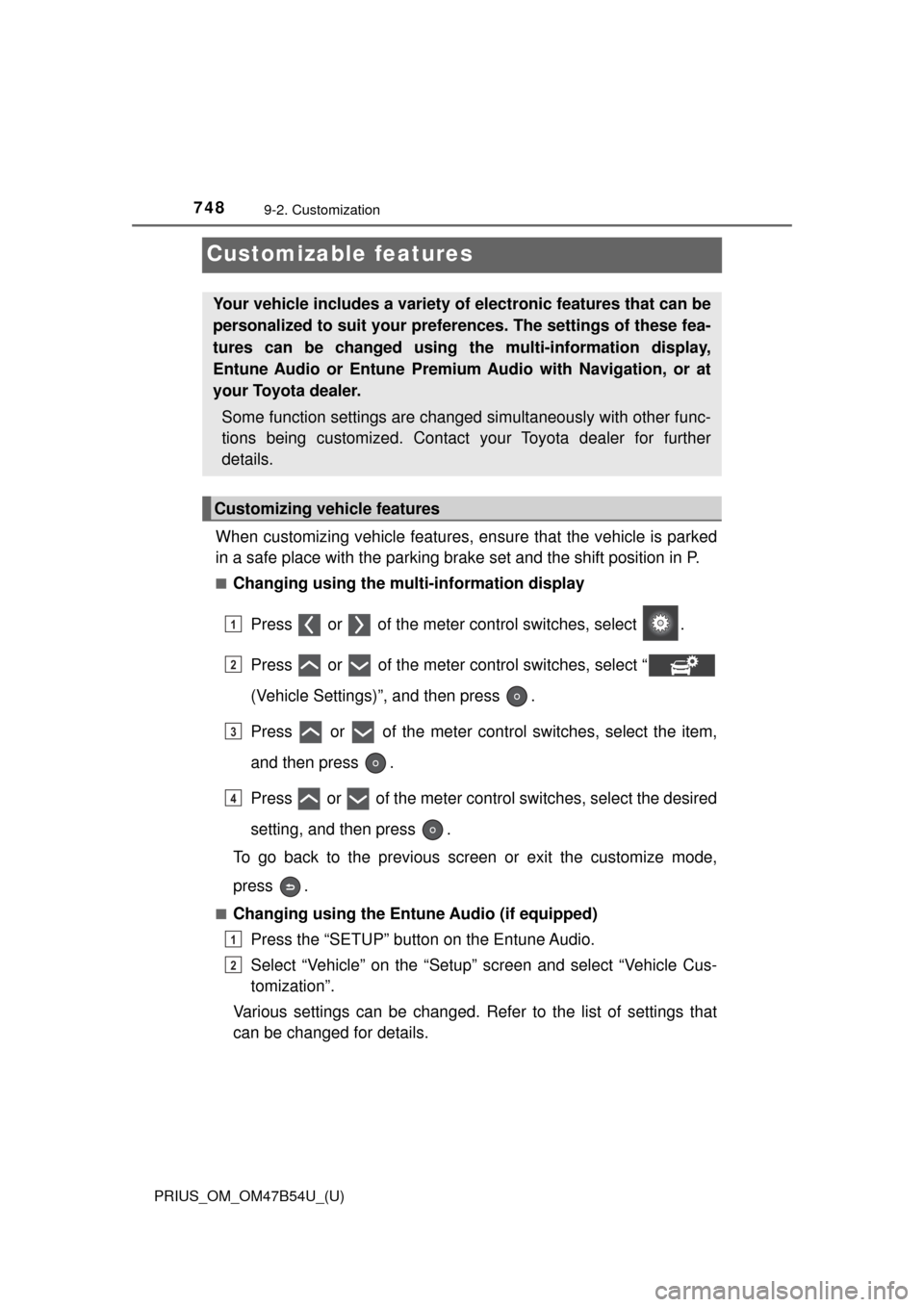
When customizing vehicle features, ensure that the vehicle is parked
in a safe place with the parking brake set and the shift position in P.
■Changing using the multi-information display
Press or of the meter control switches, select .
Press or of the meter control switches, select “
(Vehicle Settings)”, and then press .
Press or of the meter control switches, select the item,
and then press .
Press or of the meter control switches, select the desired
setting, and then press .
To go back to the previous screen or exit the customize mode,
press .
■Changing using the Ent une Audio (if equipped)
Press the “SETUP” button on the Entune Audio.
Select “Vehicle” on the “Setup” screen and select “Vehicle Cus-
tomization”.
Various settings can be changed. Refer to the list of settings that
can be changed for details.
Your vehicle includes a variety of electronic features that can be
personalized to suit your prefer ences. The settings of these fea-
tures can be changed using th e multi-information display,
Entune Audio or Entune Premium Audio with Navigation, or at
your Toyota dealer.
Some function settings are changed simultaneously with other func-
tions being customized. Contact your Toyota dealer for further
details.
Customizing vehicle features
1
2
3
4
1
2
Page 749 of 796
PRIUS_OM_OM47B54U_(U)
7499-2. Customization
9
Vehicle specifications
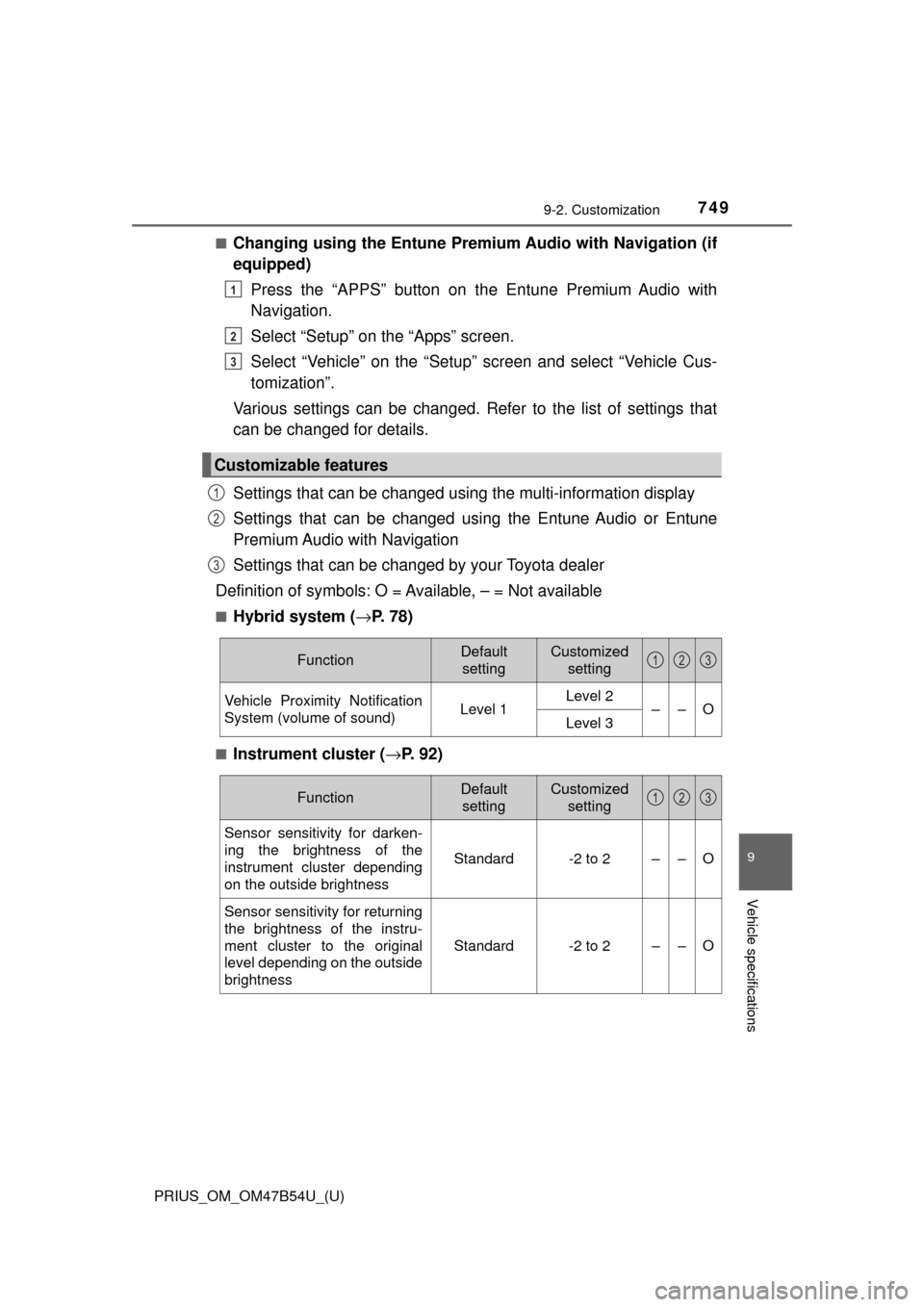
■Changing using the Entune Premium Audio with Navigation (if
equipped)
Press the “APPS” button on th e Entune Premium Audio with
Navigation.
Select “Setup” on the “Apps” screen.
Select “Vehicle” on the “Setup” screen and select “Vehicle Cus-
tomization”.
Various settings can be changed. Refer to the list of settings that
can be changed for details.
Settings that can be changed using the multi-information display
Settings that can be changed using the Entune Audio or Entune
Premium Audio with Navigation
Settings that can be changed by your Toyota dealer
Definition of symbols: O = Available, – = Not available
■Hybrid system ( →P. 7 8 )
■Instrument cluster ( →P. 92)
Customizable features
1
2
3
1
2
3
FunctionDefault
settingCustomized setting
Vehicle Proximity Notification
System (volume of sound)Level 1Level 2––OLevel 3
123
FunctionDefault settingCustomized setting
Sensor sensitivity for darken-
ing the brightness of the
instrument cluster depending
on the outside brightness
Standard-2 to 2––O
Sensor sensitivity for returning
the brightness of the instru-
ment cluster to the original
level depending on the outside
brightness
Standard-2 to 2––O
123
Page 791 of 796

791Alphabetical index
PRIUS_OM_OM47B54U_(U)
Smart key system .................... 176Antenna location ................... 176
Entry functions ...................... 165
Starting the hybrid system .... 225
Snow tires ................................ 412
“SOS” button ........................... 559
Spare tire Inflation pressure .................. 730
Storage location .................... 671
Spark plug ................................ 728
Specifications .......................... 722
Speedometer ............................ 108
SRS airbags ............................... 36
Steering wheel Adjustment ............................ 192
Audio switches ...................... 422
Meter control switches ............ 93
Telephone switches .............. 482
TRIP switch............................. 93
Stop/tail lights .......................... 641
Storage feature ........................ 526
Storage precautions ................ 526
Stuck
If the vehicle becomes stuck ................................... 719
Sun visors ................................ 540
Sunshade Moon roof.............................. 203 Switch
Audio remote control
switches ............................. 422
Automatic High Beam switch ................................. 247
Cruise control switch .... 298, 313
Door lock switches................ 167
Driving mode select switch ................................. 318
Emergency flashers switch ................................. 644
Engine switch ....................... 225
EV drive mode switch ........... 231
Fog light switch ..................... 252
Garage door opener switches ............................. 552
“HUD” (Head-up display)
switch ................................. 146
Ignition switch ....................... 225
LDA (Lane Departure Alert with steering control)) ......... 291
Light switch ........................... 242
Moon roof switches............... 202
Meter control switches ............ 93
Outside rear view mirror switches ............................. 196
Page 792 of 796

792Alphabetical index
PRIUS_OM_OM47B54U_(U)
Power door lock switches ..... 167
Power switch......................... 225
Power window switch............ 198
Rear window wiper and washer switch ..................... 260
Rear window and outside rear view mirror
defoggers switch ................ 515
Seat heater switches ............ 522
“SOS” button ......................... 559
S-APGS switch ..................... 360
Talk switch ............................ 482
Telephone switches .............. 482
TRIP switch............................. 93
Vehicle-to-vehicle distance button ................... 305
VSC OFF switch ................... 404
Window lock switch............... 198
Windshield wipers and washer switch ..................... 254
Wireless charger power supply switch ...................... 542 Tail lights
Light switch ........................... 242
Replacing light bulbs ............ 641
Talk switch ............................... 482
Telephone switch .................... 482
Theft deterrent system Immobilizer system .. ............... 89
Tire inflation pressure
Maintenance data ................. 730
Warning light......................... 656
Tire pressure warning system
Function ................................ 606
Initializing .............................. 606
Initializing procedures ........... 607
Installing tire pressure warning valves and
transmitters ........................ 606
Registering ID codes ............ 607
Warning light......................... 656
Tire information ....................... 736T