button TOYOTA PRIUS 2017 4.G Owner's Manual
[x] Cancel search | Manufacturer: TOYOTA, Model Year: 2017, Model line: PRIUS, Model: TOYOTA PRIUS 2017 4.GPages: 796, PDF Size: 20.13 MB
Page 195 of 796
1953-4. Adjusting the steering wheel and mirrors
3
Operation of each component
PRIUS_OM_OM47B54U_(U)
Auto anti-glare inside rear view mirror
Responding to the level of brightne ss of the headlights of vehicles
behind, the reflected light is automatically reduced.
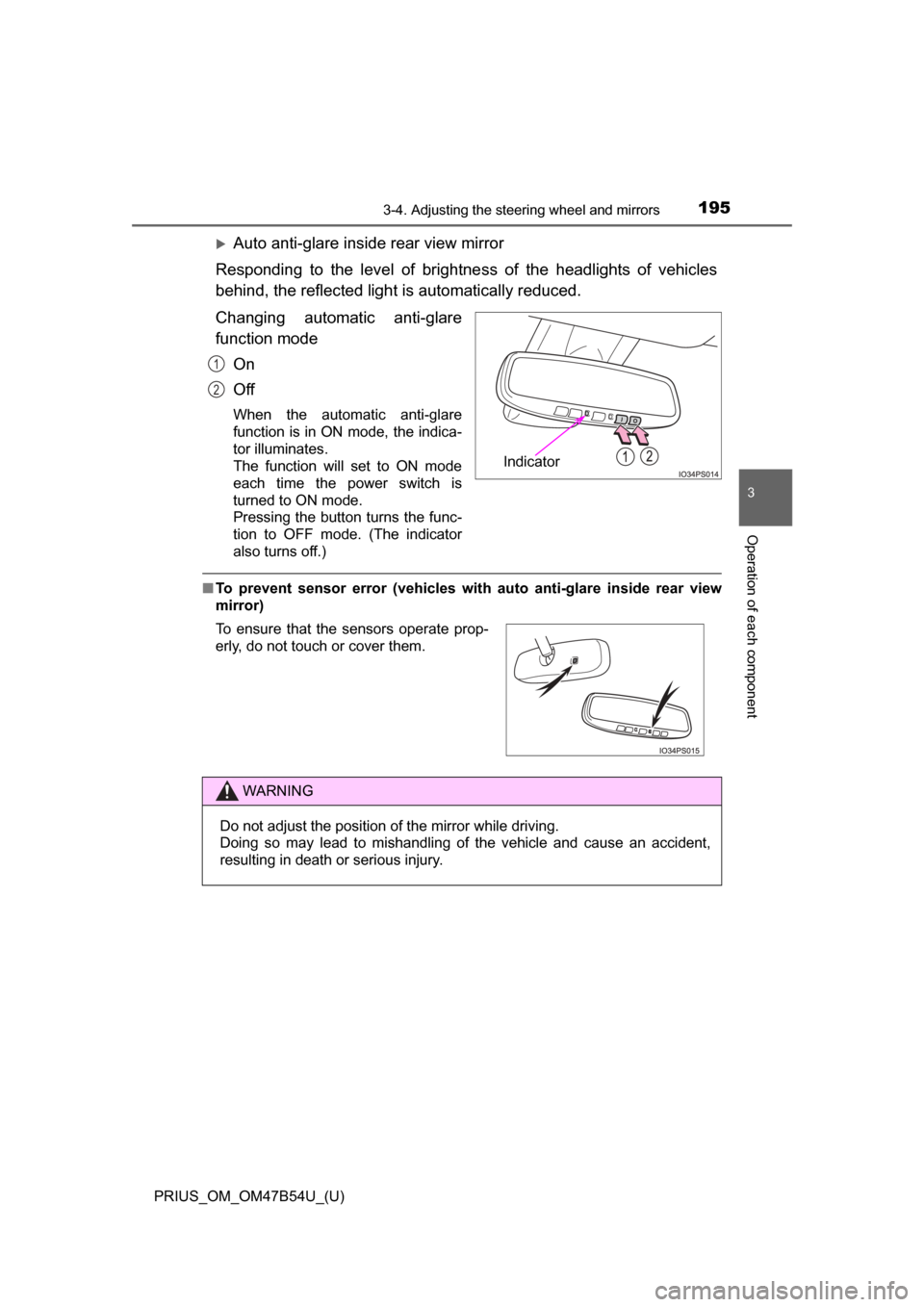
Changing automatic anti-glare
function mode
On
Off
When the automatic anti-glare
function is in ON mode, the indica-
tor illuminates.
The function will set to ON mode
each time the power switch is
turned to ON mode.
Pressing the button turns the func-
tion to OFF mode. (The indicator
also turns off.)
■To prevent sensor error (vehicles with auto anti-glare inside rear view
mirror)
Indicator
1
2
To ensure that the sensors operate prop-
erly, do not touch or cover them.
WARNING
Do not adjust the position of the mirror while driving.
Doing so may lead to mishandling of the vehicle and cause an accident,
resulting in death or serious injury.
Page 300 of 796
300
PRIUS_OM_OM47B54U_(U)
4-5. Using the driving support systems
WARNING
■To avoid inadvertent dynamic rada r cruise control with full-speed
range activation
Switch the dynamic radar cruise control with full-speed range off using the
“ON-OFF” button when not in use.
■ Situations unsuitable for dynamic radar cruise control with full-speed
range
Do not use dynamic radar cruise control with full-speed range in any of the
following situations.
Doing so may result in inappropriate speed control and could cause an acci-
dent resulting in death or serious injury.
● Roads where there are pedestrians, cyclists, etc.
● In heavy traffic
● On roads with sharp bends
● On winding roads
● On slippery roads, such as those covered with rain, ice or snow
● On steep downhills, or where there are sudden changes between sharp up
and down gradients
Vehicle speed may exceed the set speed when driving down a steep hill.
● At entrances to freeways and highways
● When weather conditions are bad enough that they may prevent the sen-
sors from detecting correctly (fog, snow, sandstorm, heavy rain, etc.)
● When there is rain, snow, etc. on the front surface of the radar sensor or
camera sensor
● In traffic conditions that require frequent repeated acceleration and decel-
eration
● When your vehicle is towing a trailer or during emergency towing
● When an approach warning buzzer is heard often
Page 302 of 796

302
PRIUS_OM_OM47B54U_(U)
4-5. Using the driving support systems
Example of constant speed cruising
When there are no vehicles ahead
The vehicle travels at the speed set by the driver. The desired vehicle-to-
vehicle distance can also be set by operating the vehicle-to-vehicle dis-
tance button.
Example of deceleration cruising and follow-up cruising
When a preceding vehicle driving slower than the set speed
appears
When a vehicle is detected running ahead of you, the system automatically
decelerates your vehicle. When a greater reduction in vehicle speed is
necessary, the system applies the brakes (the stop lights will come on at
this time). The system will respond to changes in the speed of the vehicle
ahead in order to maintain the vehicle-to-vehicle distance set by the driver.
Approach warning warns you when the system cannot decelerate suffi-
ciently to prevent your vehicle from closing in on the vehicle ahead.
When the vehicle ahead of you stops, your vehicle will also stop (vehicle is
stopped by system control). After the vehicle ahead starts off, pushing the
cruise control lever up or depressing the accelerator pedal will resume fol-
low-up cruising.
Example of acceleration
When there are no longer any preceding vehicles driving slower
than the set speed
The system accelerates until the set speed is reached. The system then
returns to constant speed cruising.
1
2
3
Page 303 of 796
PRIUS_OM_OM47B54U_(U)
3034-5. Using the driving support systems
4
Driving
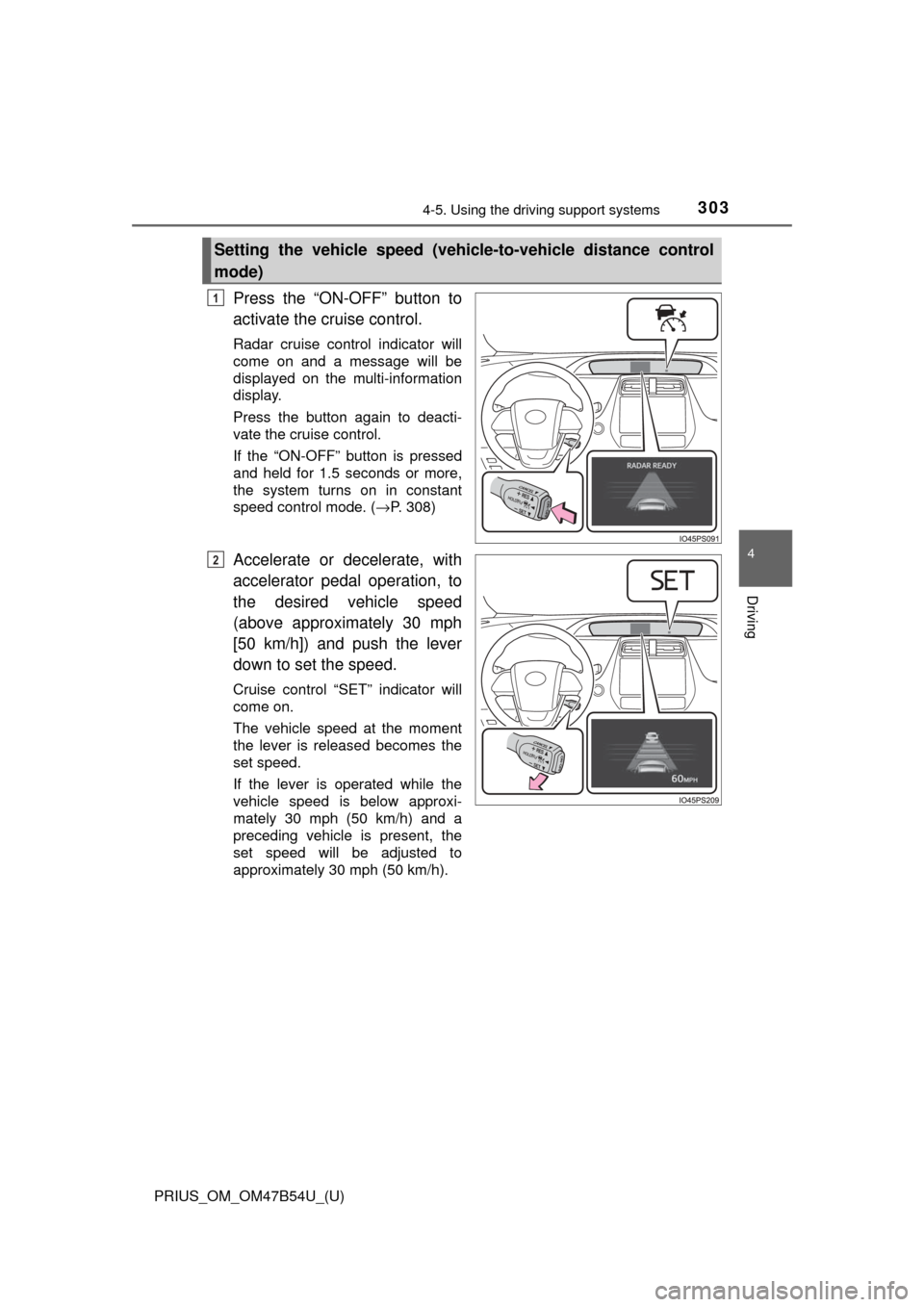
Press the “ON-OFF” button to
activate the cruise control.
Radar cruise control indicator will
come on and a message will be
displayed on the multi-information
display.
Press the button again to deacti-
vate the cruise control.
If the “ON-OFF” button is pressed
and held for 1.5 seconds or more,
the system turns on in constant
speed control mode. ( →P. 308)
Accelerate or decelerate, with
accelerator pedal operation, to
the desired vehicle speed
(above approximately 30 mph
[50 km/h]) and push the lever
down to set the speed.
Cruise control “SET” indicator will
come on.
The vehicle speed at the moment
the lever is released becomes the
set speed.
If the lever is operated while the
vehicle speed is below approxi-
mately 30 mph (50 km/h) and a
preceding vehicle is present, the
set speed will be adjusted to
approximately 30 mph (50 km/h).
Setting the vehicle speed (vehicle-to-vehicle distance control
mode)
1
2
Page 305 of 796
PRIUS_OM_OM47B54U_(U)
3054-5. Using the driving support systems
4
Driving
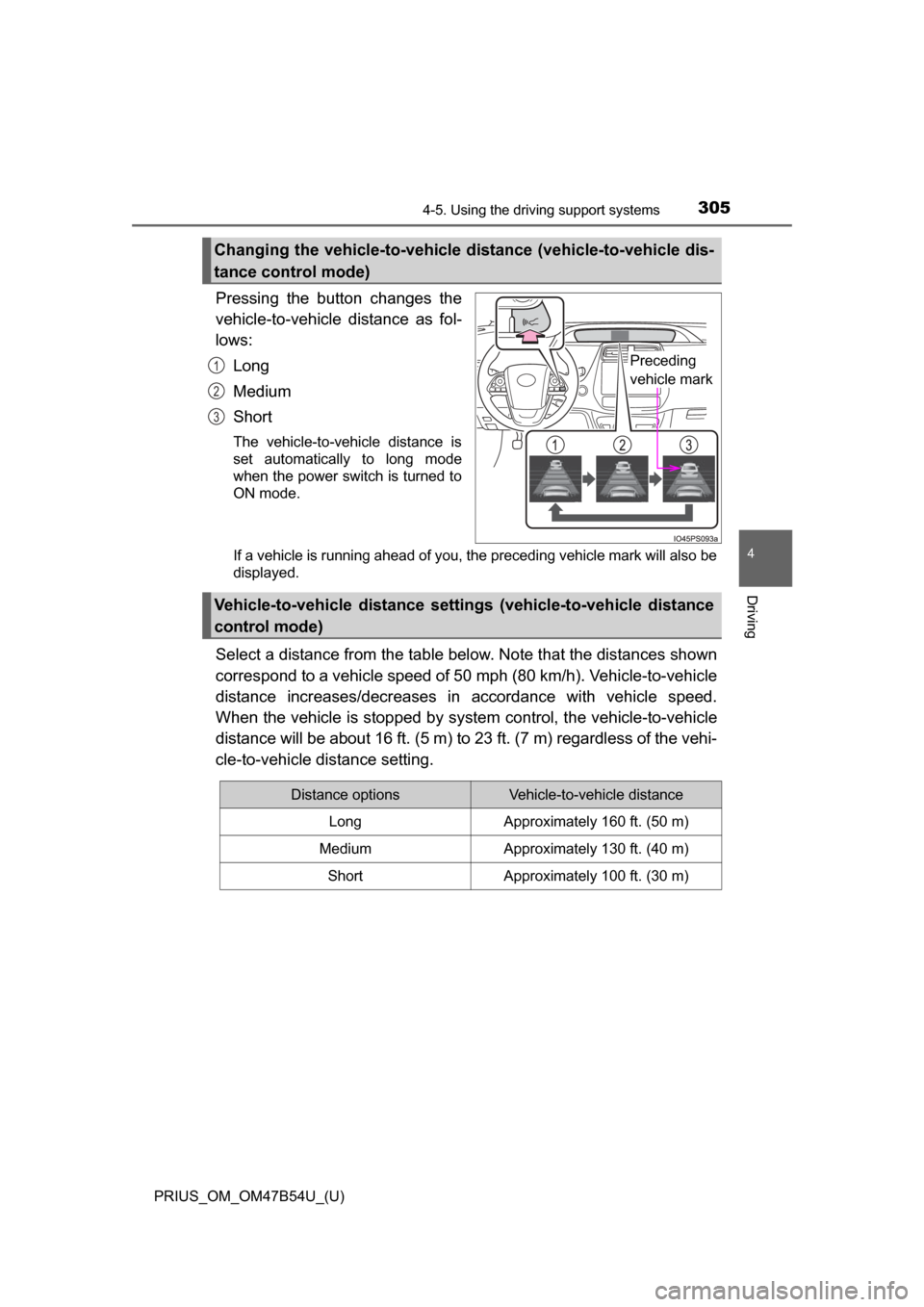
Pressing the button changes the
vehicle-to-vehicle distance as fol-
lows:Long
Medium
Short
The vehicle-to-vehicle distance is
set automatically to long mode
when the power switch is turned to
ON mode.
If a vehicle is running ahead of you, the preceding vehicle mark will also be
displayed.
Select a distance from the table bel ow. Note that the distances shown
correspond to a vehicle speed of 50 mph (80 km/h). Vehicle-to-vehicle
distance increases/decreases in accordance with vehicle speed.
When the vehicle is stopped by system control, the vehicle-to-vehicle
distance will be about 16 ft. (5 m) to 23 ft. (7 m) regardless of the vehi-
cle-to-vehicle distance setting.
Changing the vehicle-to-vehicle di stance (vehicle-to-vehicle dis-
tance control mode)
Preceding
vehicle mark1
2
3
Vehicle-to-vehicle distance settings (vehicle-to-vehicle distance
control mode)
Distance optionsVehicle-to-vehicle distance
LongApproximately 160 ft. (50 m)
MediumApproximately 130 ft. (40 m)
ShortApproximately 100 ft. (30 m)
Page 308 of 796
308
PRIUS_OM_OM47B54U_(U)
4-5. Using the driving support systems
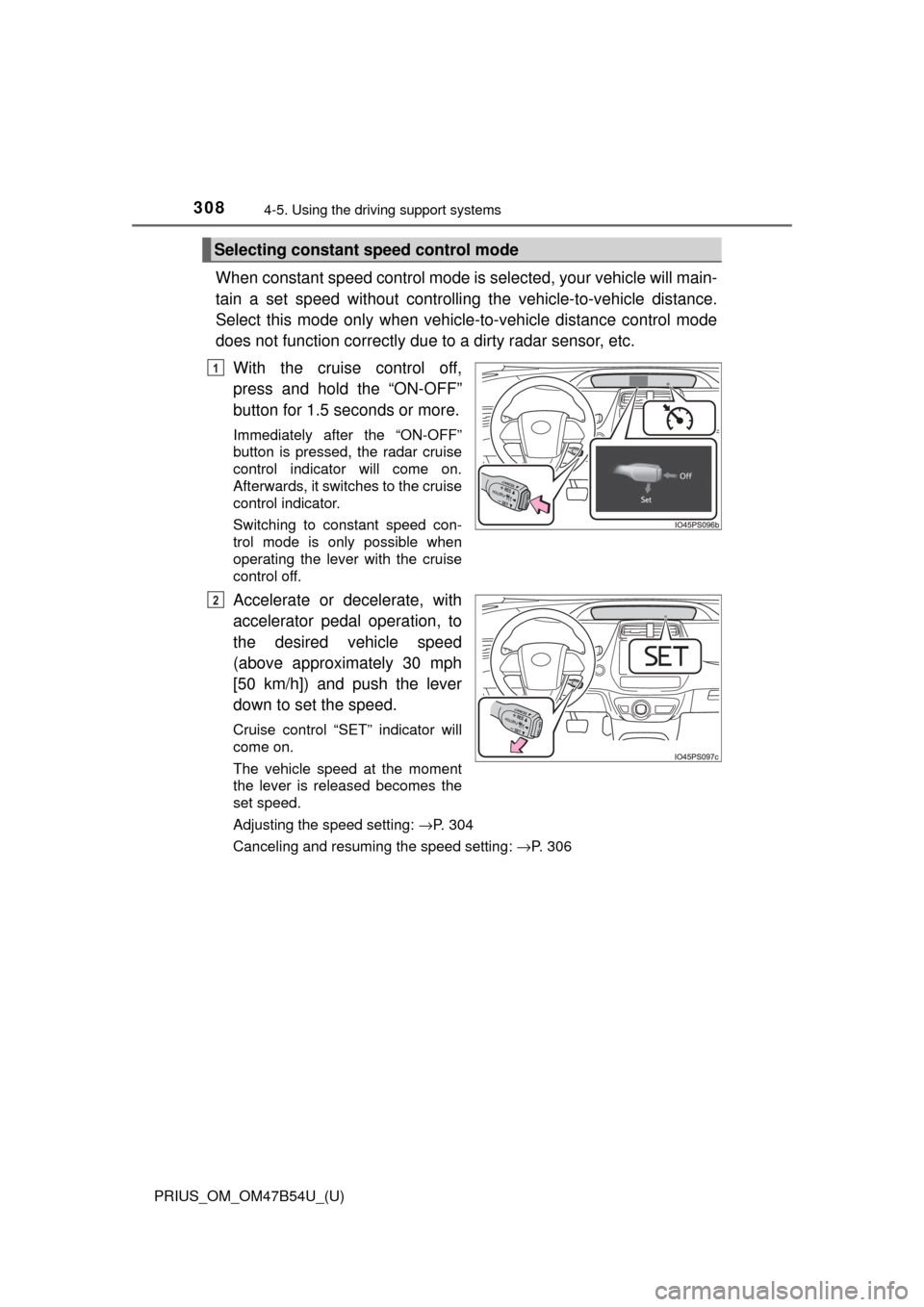
When constant speed control mode is selected, your vehicle will main-
tain a set speed without controllin g the vehicle-to-vehicle distance.
Select this mode only when vehicle-to-vehicle distance control mode
does not function co rrectly due to a dirty radar sensor, etc.
With the cruise control off,
press and hold the “ON-OFF”
button for 1.5 seconds or more.
Immediately after the “ON-OFF”
button is pressed, the radar cruise
control indicator will come on.
Afterwards, it switches to the cruise
control indicator.
Switching to constant speed con-
trol mode is only possible when
operating the lever with the cruise
control off.
Accelerate or decelerate, with
accelerator pedal operation, to
the desired vehicle speed
(above approximately 30 mph
[50 km/h]) and push the lever
down to set the speed.
Cruise control “SET” indicator will
come on.
The vehicle speed at the moment
the lever is released becomes the
set speed.
Adjusting the speed setting: →P. 304
Canceling and resuming the speed setting: →P. 306
Selecting constant speed control mode
1
2
Page 313 of 796
313
PRIUS_OM_OM47B54U_(U)
4-5. Using the driving support systems
4
Driving
Cruise control∗
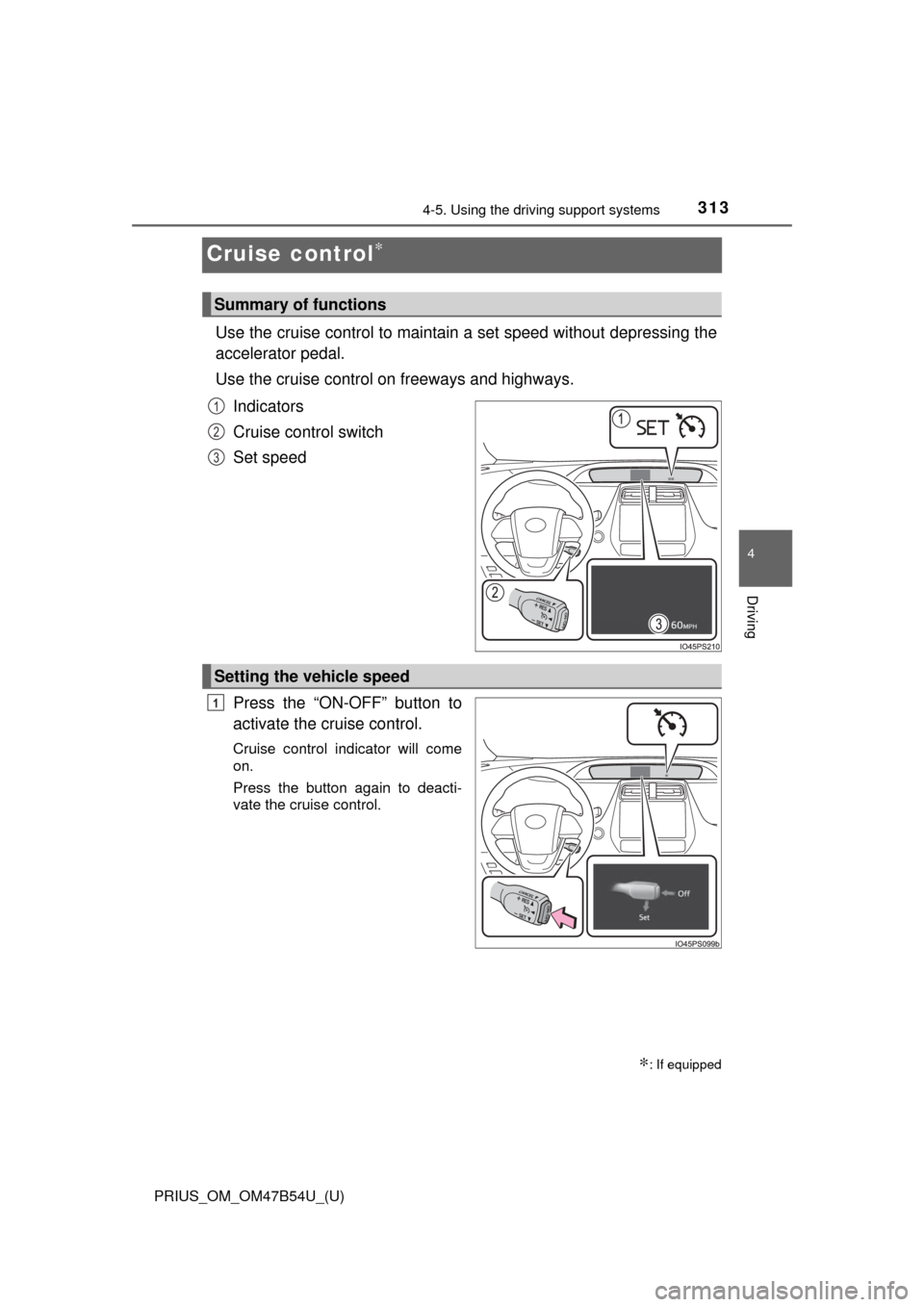
Use the cruise control to maintain a set speed without depressing the
accelerator pedal.
Use the cruise control on freeways and highways.
Indicators
Cruise control switch
Set speed
Press the “ON-OFF” button to
activate the cruise control.
Cruise control indicator will come
on.
Press the button again to deacti-
vate the cruise control.
∗: If equipped
Summary of functions
1
2
3
Setting the vehicle speed
1
Page 316 of 796

316
PRIUS_OM_OM47B54U_(U)
4-5. Using the driving support systems
■Cruise control can be set when
●The shift position is in D.
● Vehicle speed is above approximately 25 mph (40 km/h).
■ Accelerating after setting the vehicle speed
●The vehicle can be accelerated by operating accelerator pedal. After accel-
erating, the set speed resumes.
● Even without canceling the cruise control, the set speed can be increased
by first accelerating the vehicle to the desired speed and then pushing the
lever down to set the new speed.
■ Automatic cancelation of cruise control
Cruise control is automatically canceled in any of the following situati\
ons.
●Actual vehicle speed falls more than approximately 10 mph (16 km/h) below
the set speed.
At this time, the memorized set speed is not retained.
● Actual vehicle speed is below approximately 25 mph (40km/h).
● VSC is activated.
● TRAC is activated for a period of time.
● When the VSC or TRAC system is turned off by pressing the VSC OFF
switch.
● Intelligent Clearance Sonar is operated. (if equipped)
■ If “Check Cruise Control System Visi t Your Dealer” is displayed on the
multi-information display
Press the “ON-OFF” button once to deactivate the system, and then press
the button again to reactivate the system.
If the cruise control speed cannot be set or if the cruise control cancels imme-
diately after being activated, there may be a malfunction in the cruise control
system. Have the vehicle inspected by your Toyota dealer.
Page 317 of 796
PRIUS_OM_OM47B54U_(U)
3174-5. Using the driving support systems
4
Driving
WARNING
■To avoid operating the cruise control by mistake
Switch the cruise control off using the “ON-OFF” button when not in use.
■ Situations unsuitable for cruise control
Do not use cruise control in any of the following situations.
Doing so may result in loss of control and could cause an accident resulting
in death or serious injury.
● Roads where there are pedestrians, cyclers, etc.
● In heavy traffic
● On roads with sharp bends
● On winding roads
● On slippery roads, such as those covered with rain, ice or snow
● On sharp inclines or declines
Vehicle speed may exceed the set speed when driving down a steep hill.
Page 419 of 796
419
PRIUS_OM_OM47B54U_(U)
5-1. Basic Operations
5
Audio system
Audio system∗
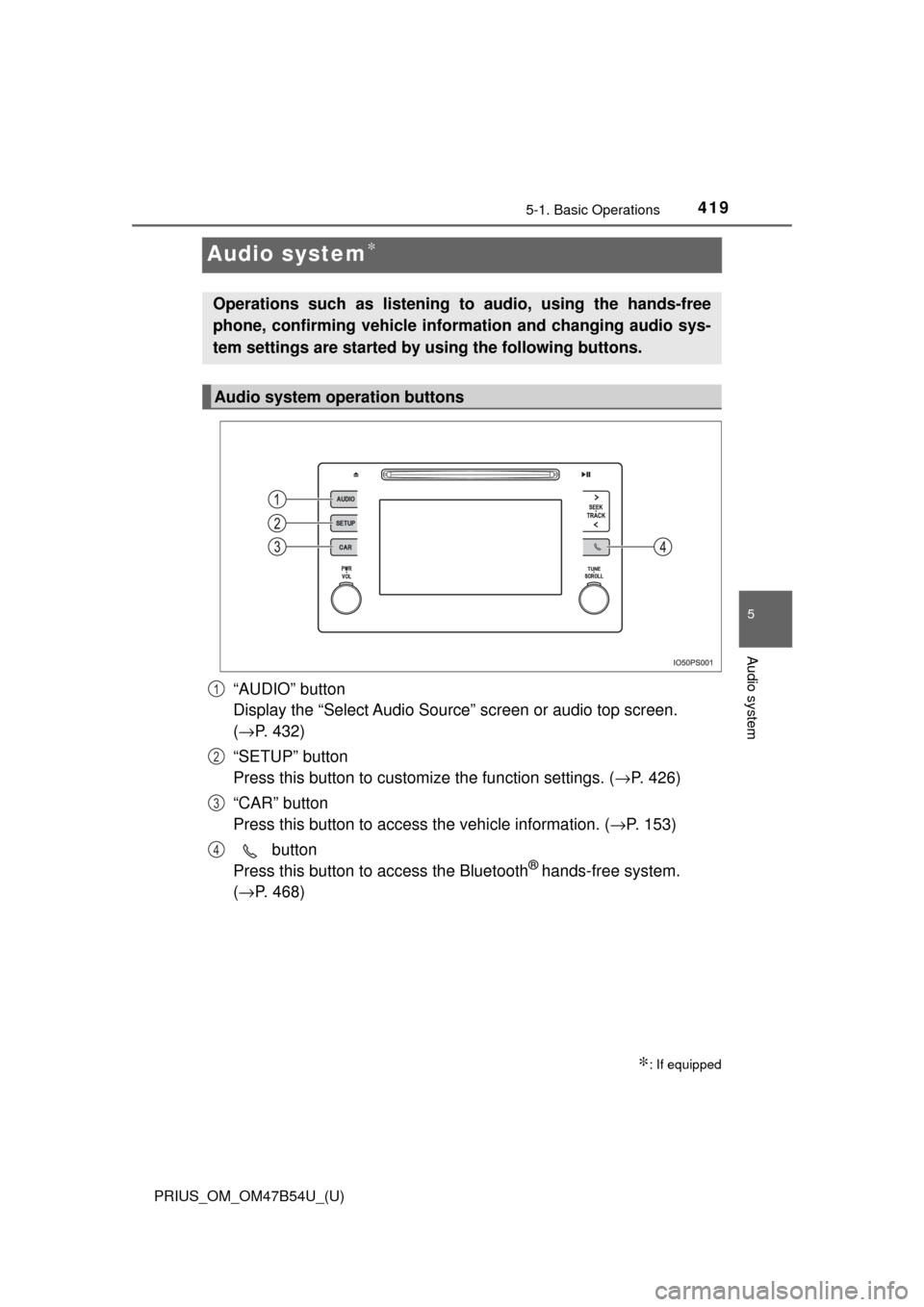
“AUDIO” button
Display the “Select Audio Source” screen or audio top screen.
(→ P. 432)
“SETUP” button
Press this button to customize the function settings. ( →P. 426)
“CAR” button
Press this button to access the vehicle information. ( →P. 153)
button
Press this button to access the Bluetooth
® hands-free system.
( → P. 468)
∗: If equipped
Operations such as listening to audio, using the hands-free
phone, confirming vehicle inform ation and changing audio sys-
tem settings are started by using the following buttons.
Audio system operation buttons
1
2
3
4