display TOYOTA PRIUS 2018 Accessories, Audio & Navigation (in English)
[x] Cancel search | Manufacturer: TOYOTA, Model Year: 2018, Model line: PRIUS, Model: TOYOTA PRIUS 2018Pages: 294, PDF Size: 4.43 MB
Page 40 of 294
40
1. BASIC INFORMATION BEFORE OPERATION
PRIUS_Navi_OM47C01U_(U)
17.08.28 17:21
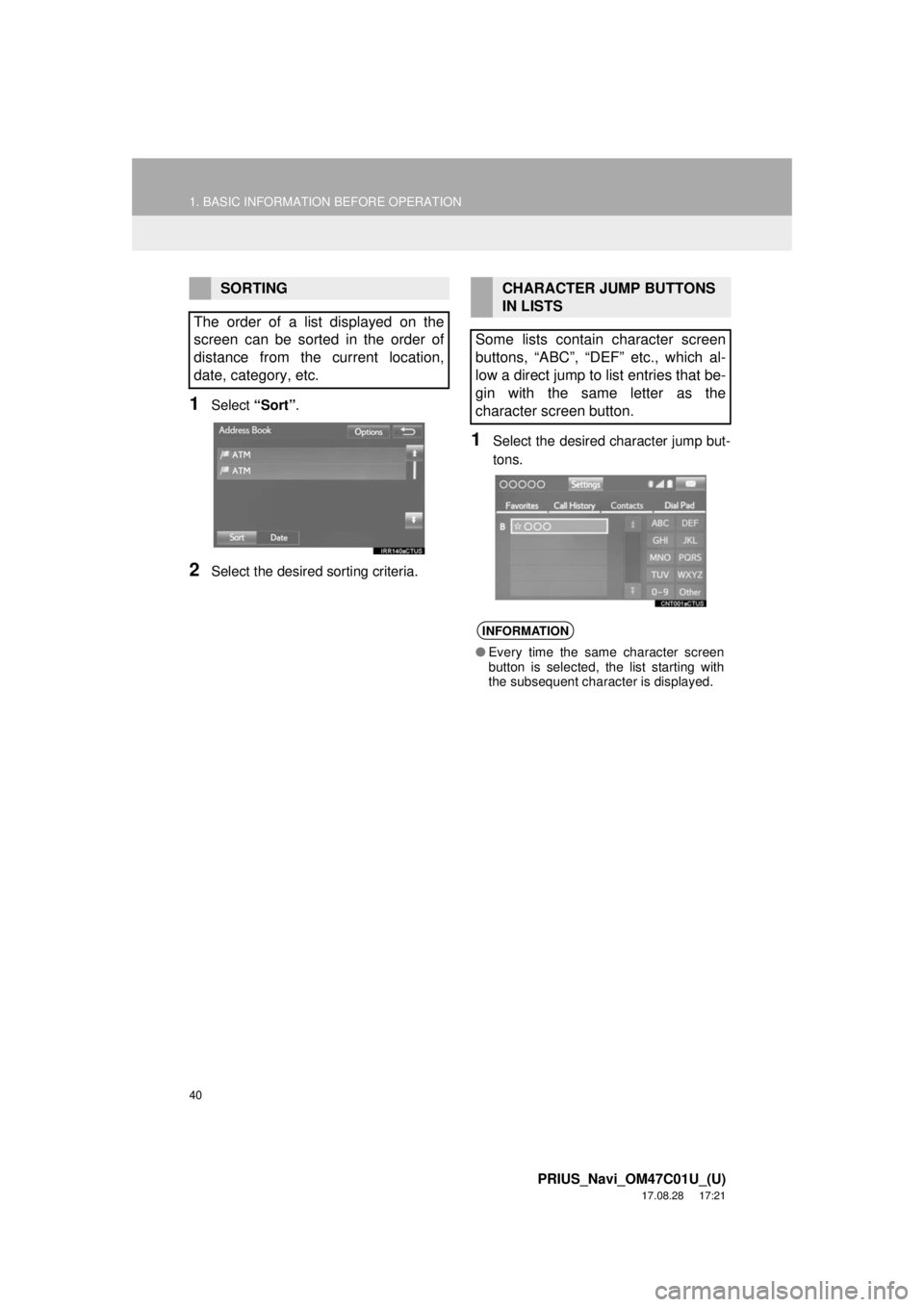
1Select “Sort”.
2Select the desired sorting criteria.
1Select the desired character jump but-
tons.
SORTING
The order of a list displayed on the
screen can be sorted in the order of
distance from the current location,
date, category, etc.CHARACTER JUMP BUTTONS
IN LISTS
Some lists contain character screen
buttons, “ABC”, “DEF” etc., which al-
low a direct jump to list entries that be-
gin with the same letter as the
character screen button.
INFORMATION
● Every time the same character screen
button is selected, the list starting with
the subsequent character is displayed.
Page 41 of 294
41
1. BASIC INFORMATION BEFORE OPERATION
PRIUS_Navi_OM47C01U_(U)
17.08.28 17:21
BASIC FUNCTION
2
7. SCREEN ADJUSTMENT
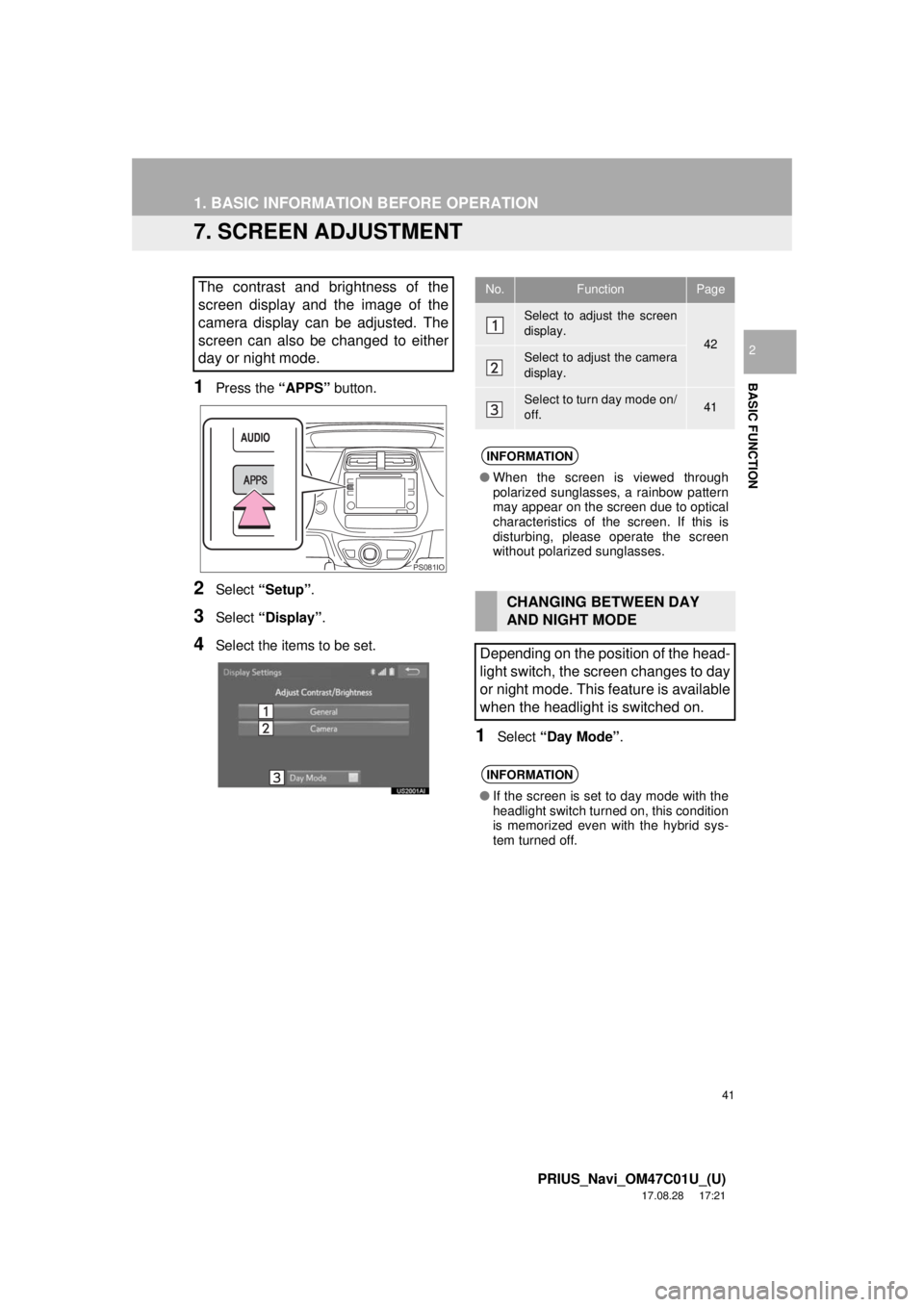
1Press the “APPS” button.
2Select “Setup” .
3Select “Display” .
4Select the items to be set.
1Select “Day Mode” .
The contrast and brightness of the
screen display and the image of the
camera display can be adjusted. The
screen can also be changed to either
day or night mode.
PS081IO
No.FunctionPage
Select to adjust the screen
display.
42Select to adjust the camera
display.
Select to turn day mode on/
off.41
INFORMATION
●When the screen is viewed through
polarized sunglasses, a rainbow pattern
may appear on the screen due to optical
characteristics of the screen. If this is
disturbing, please operate the screen
without polarized sunglasses.
CHANGING BETWEEN DAY
AND NIGHT MODE
Depending on the position of the head-
light switch, the screen changes to day
or night mode. This feature is available
when the headlight is switched on.
INFORMATION
● If the screen is set to day mode with the
headlight switch turned on, this condition
is memorized even with the hybrid sys-
tem turned off.
Page 43 of 294

43
1. BASIC INFORMATION BEFORE OPERATION
PRIUS_Navi_OM47C01U_(U)
17.08.28 17:21
BASIC FUNCTION
2
8. LINKING MULTI-INFORMATION DISPLAY AND NAVIGATION SYSTEM
The following functions of the navigation system are linked with the multi-informa-
tion display in the instrument cluster:
• Navigation
• Audio
etc.
These functions can be operated using multi-information display control switches
on the steering wheel. For details, refer to “Owner’s Manual”.
Page 44 of 294
44
PRIUS_Navi_OM47C01U_(U)
17.09.11 13:53
2. Bluetooth® SETTINGS
1. REGISTERING/CONNECTING Bluetooth® DEVICE
1Turn the Bluetooth® connection setting
of your cellular phone on.
This function is not available when
Bluetooth® connection setting of your cel-
lular phone is set to off.
2Press the “APPS” button.
3Select “Phone” .
Operations up to this point can also be
performed by pressing the switch on
the steering wheel or switch on the
control panel.
4Select “Yes” to register a phone.
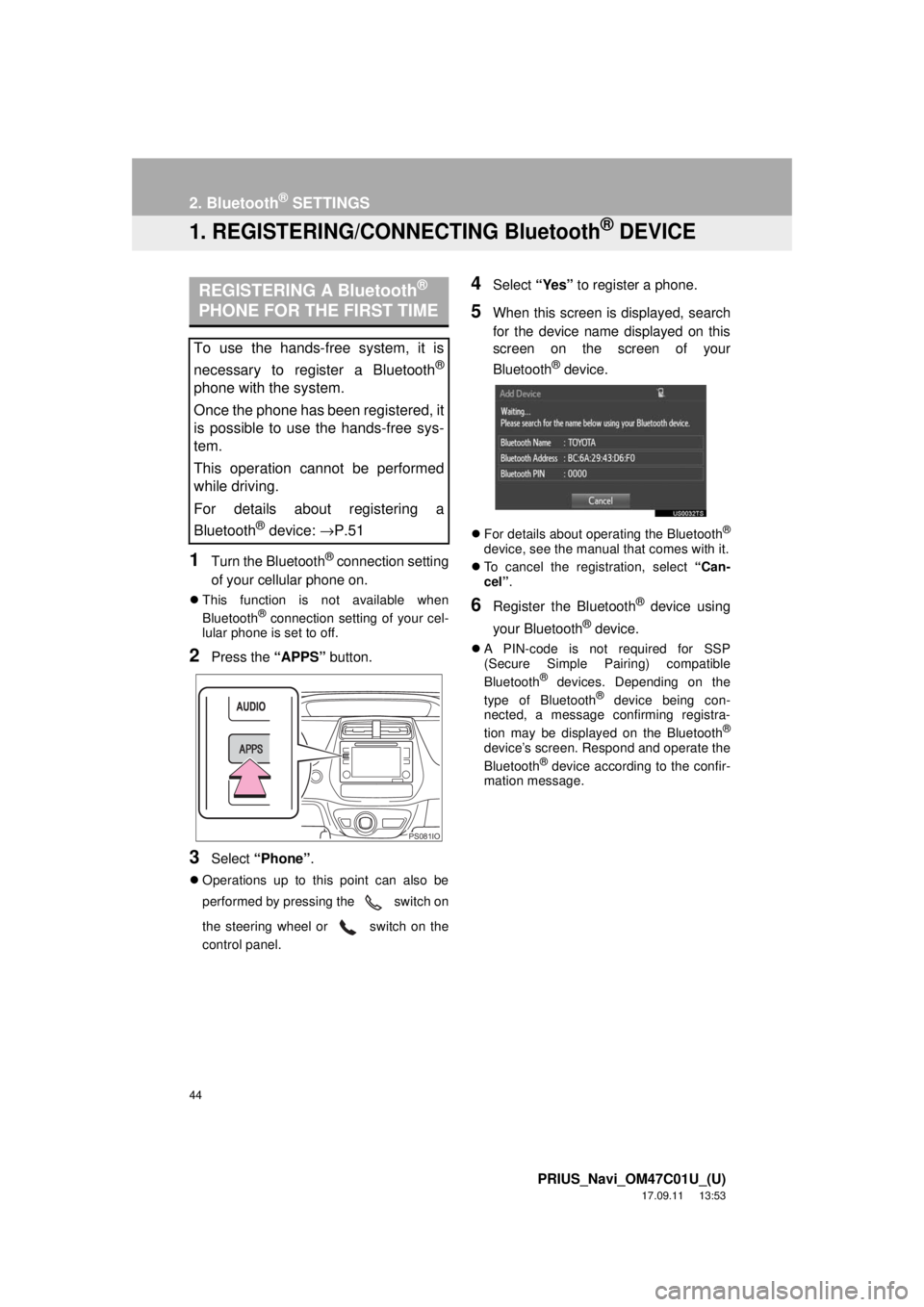
5When this screen is displayed, search
for the device name displayed on this
screen on the screen of your
Bluetooth
® device.
For details about operating the Bluetooth®
device, see the manual that comes with it.
To cancel the registration, select “Can-
cel”.
6Register the Bluetooth® device using
your Bluetooth
® device.
A PIN-code is not required for SSP
(Secure Simple Pairing) compatible
Bluetooth
® devices. Depending on the
type of Bluetooth® device being con-
nected, a message confirming registra-
tion may be displayed on the Bluetooth
®
device’s screen. Respond and operate the
Bluetooth® device according to the confir-
mation message.
REGISTERING A Bluetooth®
PHONE FOR THE FIRST TIME
To use the hands-free system, it is
necessary to register a Bluetooth
®
phone with the system.
Once the phone has been registered, it
is possible to use the hands-free sys-
tem.
This operation cannot be performed
while driving.
For details about registering a
Bluetooth
® device: →P.51
PS081IO
Page 45 of 294
45
2. Bluetooth® SETTINGS
PRIUS_Navi_OM47C01U_(U)
17.09.11 13:53
BASIC FUNCTION
2
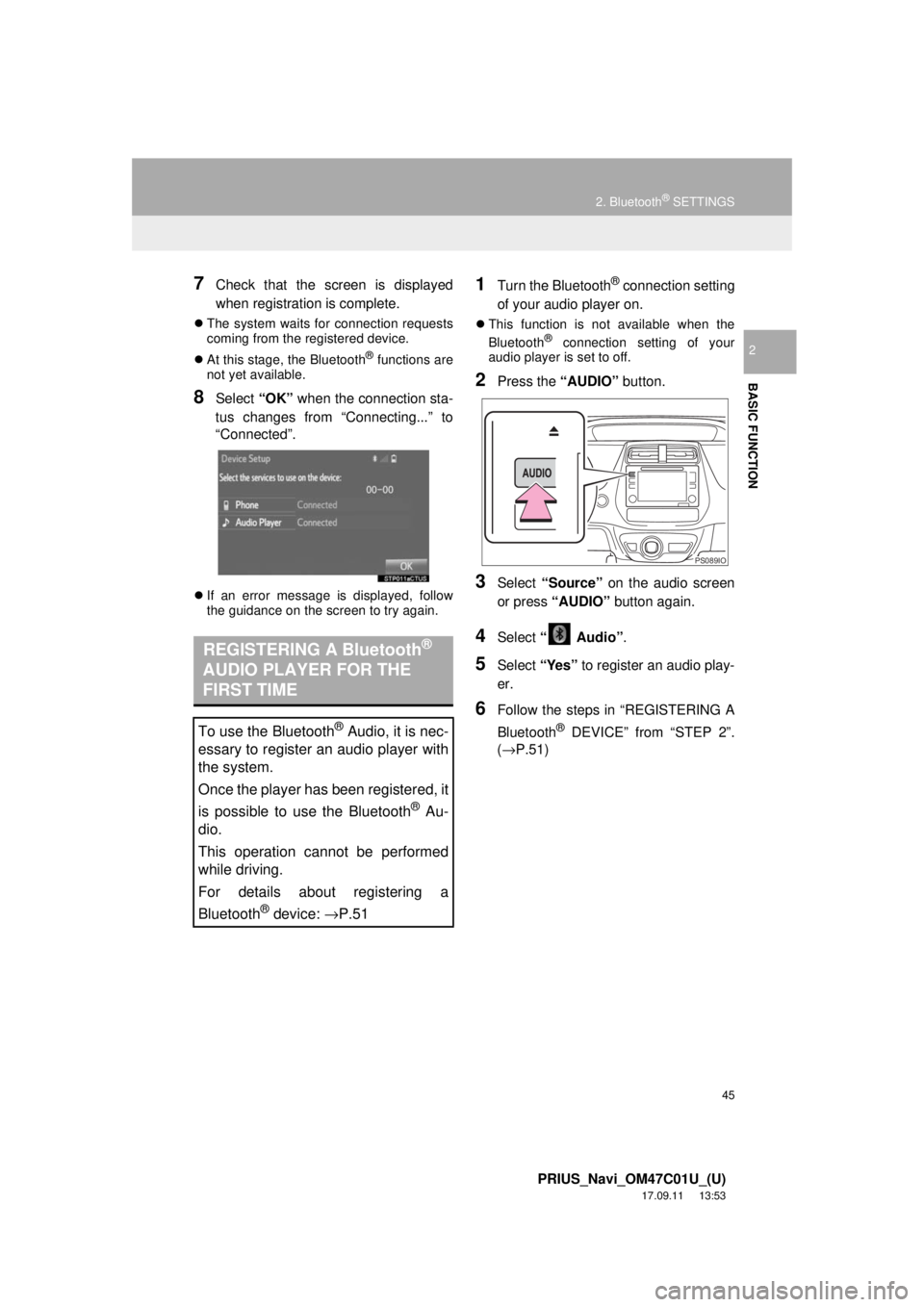
7Check that the screen is displayed
when registration is complete.
The system waits for connection requests
coming from the registered device.
At this stage, the Bluetooth
® functions are
not yet available.
8Select “OK” when the connection sta-
tus changes from “Connecting...” to
“Connected”.
If an error message is displayed, follow
the guidance on the screen to try again.
1Turn the Bluetooth® connection setting
of your audio player on.
This function is not available when the
Bluetooth® connection setting of your
audio player is set to off.
2Press the “AUDIO” button.
3Select “Source” on the audio screen
or press “AUDIO” button again.
4Select “ Audio” .
5Select “Yes” to register an audio play-
er.
6Follow the steps in “REGISTERING A
Bluetooth
® DEVICE” from “STEP 2”.
(→P.51)
REGISTERING A Bluetooth®
AUDIO PLAYER FOR THE
FIRST TIME
To use the Bluetooth® Audio, it is nec-
essary to register an audio player with
the system.
Once the player has been registered, it
is possible to use the Bluetooth
® Au-
dio.
This operation cannot be performed
while driving.
For details about registering a
Bluetooth
® device: →P.51
PS089IO
Page 51 of 294
51
2. Bluetooth® SETTINGS
PRIUS_Navi_OM47C01U_(U)
17.09.11 13:53
BASIC FUNCTION
2From the phone/message settings
screen
1Press the “APPS” button.
2Select “Setup” .
3Select “Phone” .
4Select “Connect Phone” .
From the status display
1Select status display area on the
screen.
1Display the “Bluetooth* Setup” screen.
(→P.50)
2Select “Add”.
When another Bluetooth
® device is con-
nected
To disconnect the Bluetooth® device,
select “Yes”.
When 5 Bluetooth® devices have al-
ready been registered
A registered device needs to be replaced.
Select “Yes”, and select the device to be
replaced.
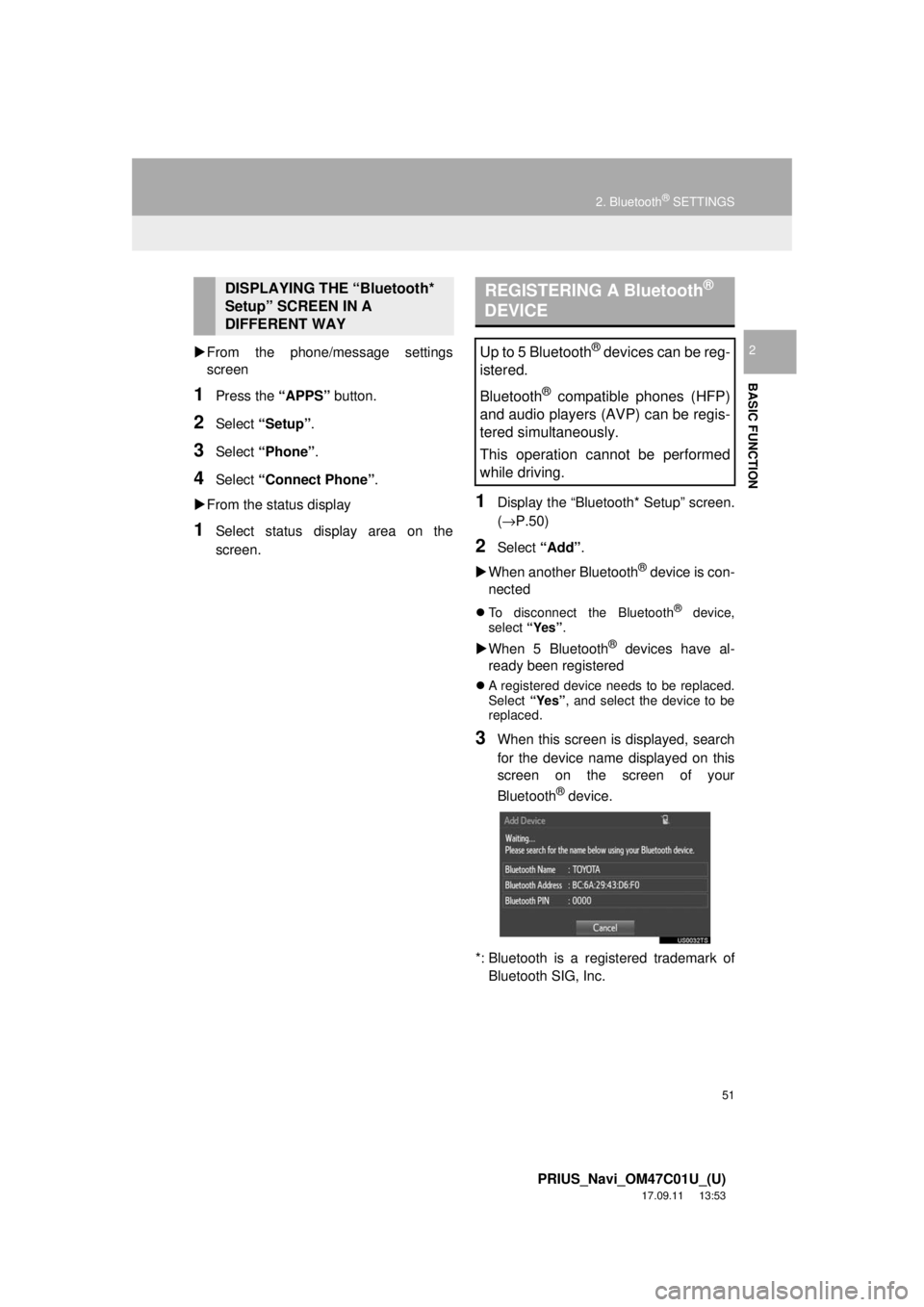
3When this screen is displayed, search
for the device name displayed on this
screen on the screen of your
Bluetooth
® device.
*: Bluetooth is a regi stered trademark of
Bluetooth SIG, Inc.
DISPLAYING THE “Bluetooth*
Setup” SCREEN IN A
DIFFERENT WAY REGISTERING A Bluetooth®
DEVICE
Up to 5 Bluetooth® devices can be reg-
istered.
Bluetooth
® compatible phones (HFP)
and audio players (AVP) can be regis-
tered simultaneously.
This operation cannot be performed
while driving.
Page 52 of 294
52
2. Bluetooth® SETTINGS
PRIUS_Navi_OM47C01U_(U)
17.09.11 13:53
For details about operating the Bluetooth®
device, see the manual that comes with it.
To cancel the registration, select “Can-
cel”.
4Register the Bluetooth® device using
your Bluetooth
® device.
A PIN-code is not required for SSP
(Secure Simple Pairing) compatible
Bluetooth
® devices. Depending on the
type of Bluetooth® device being con-
nected, a message confirming registra-
tion may be displayed on the Bluetooth
®
device’s screen. Respond and operate the
Bluetooth® device according to the confir-
mation message.
5Check that the screen is displayed
when registration is complete.
The system waits for connection requests
coming from the registered device.
At this stage, the Bluetooth
® functions are
not yet available.
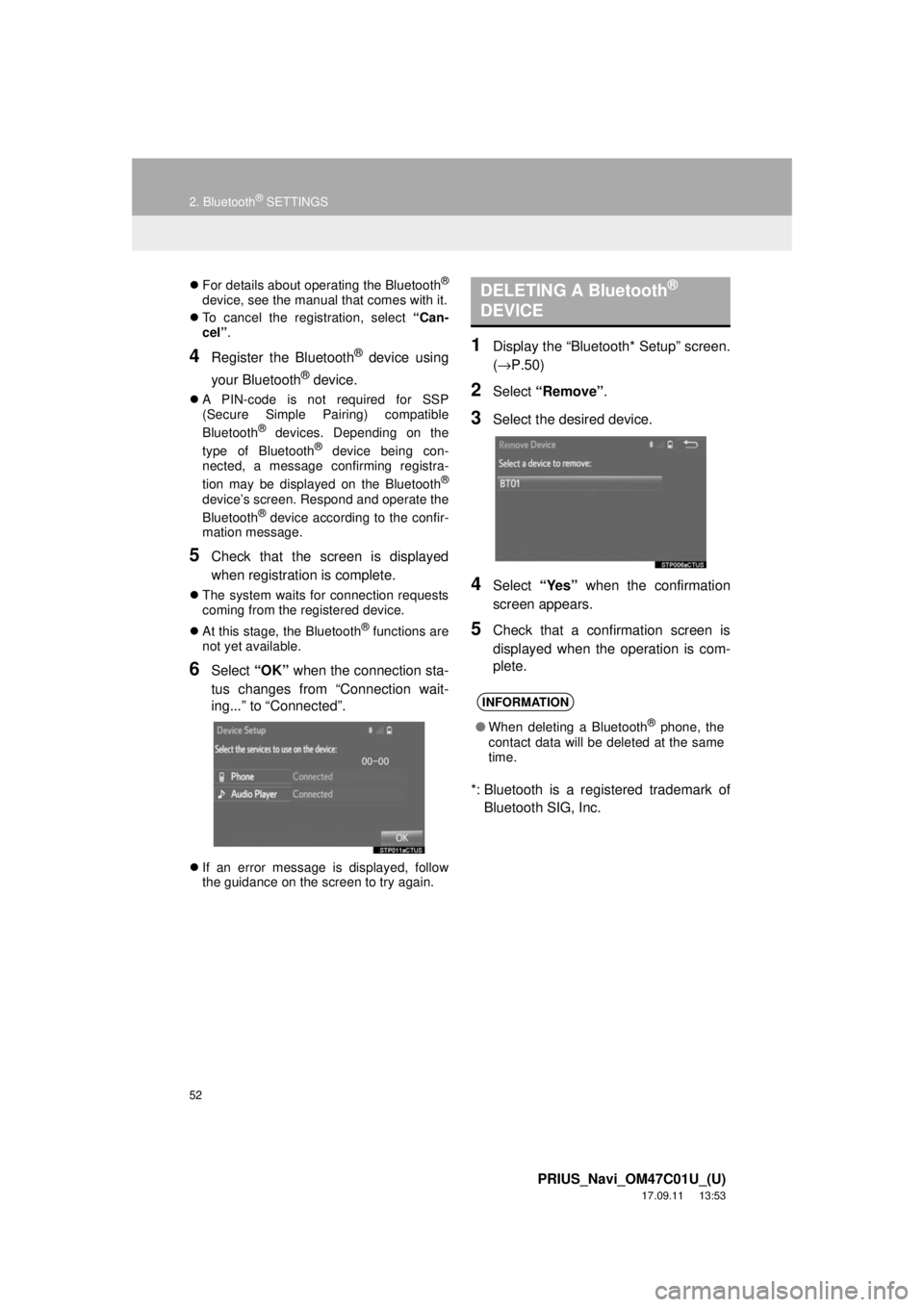
6Select “OK” when the connection sta-
tus changes from “Connection wait-
ing...” to “Connected”.
If an error message is displayed, follow
the guidance on the screen to try again.
1Display the “Bluetooth* Setup” screen.
(→ P.50)
2Select “Remove” .
3Select the desired device.
4Select “Yes” when the confirmation
screen appears.
5Check that a confirmation screen is
displayed when the operation is com-
plete.
*: Bluetooth is a registered trademark of Bluetooth SIG, Inc.
DELETING A Bluetooth®
DEVICE
INFORMATION
● When deleting a Bluetooth® phone, the
contact data will be deleted at the same
time.
Page 53 of 294
53
2. Bluetooth® SETTINGS
PRIUS_Navi_OM47C01U_(U)
17.09.11 13:53
BASIC FUNCTION
2
1Display the “Bluetooth* Setup” screen.
(→P.50)
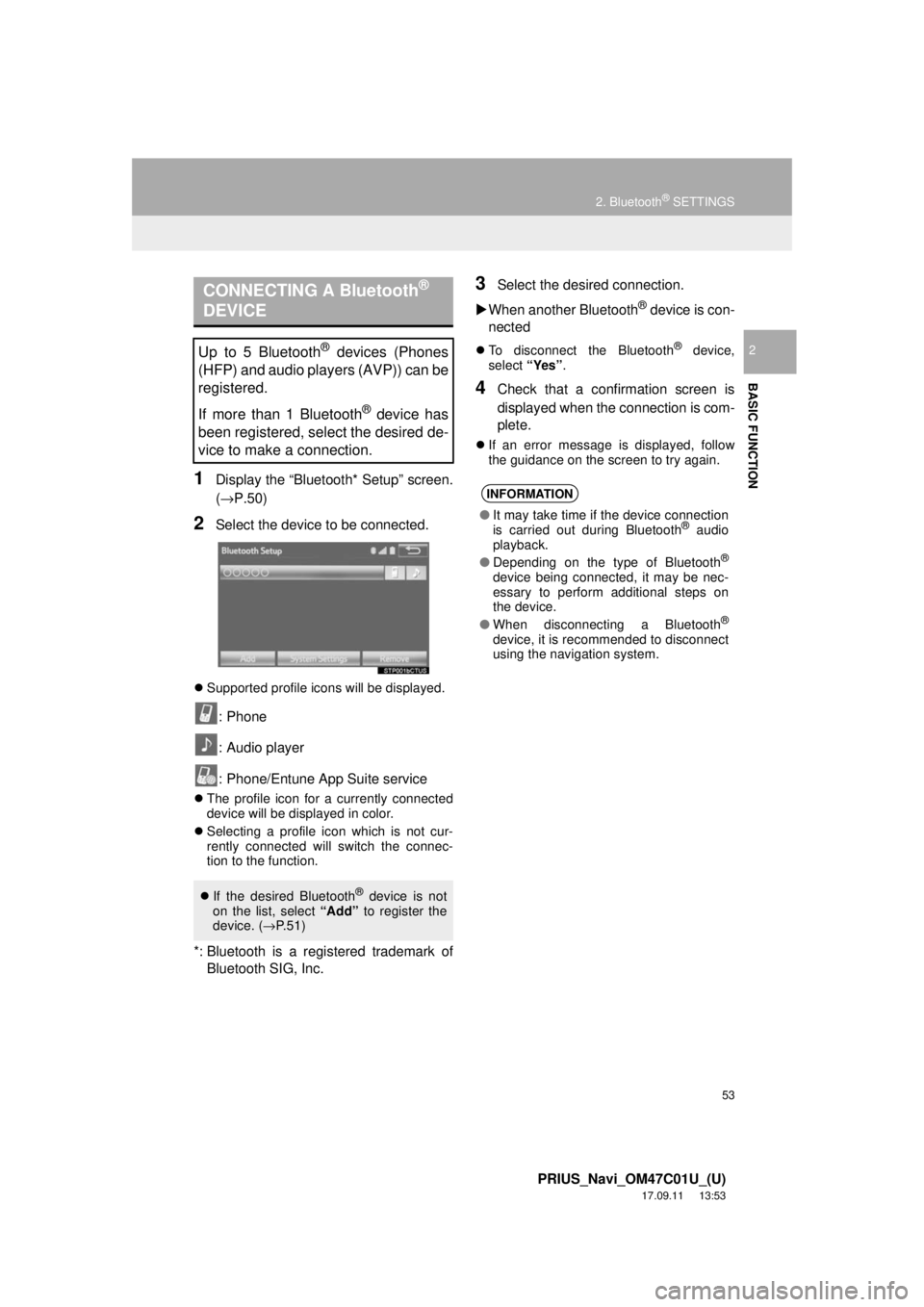
2Select the device to be connected.
Supported profile icons will be displayed.
: Phone
: Audio player
: Phone/Entune App Suite service
The profile icon for a currently connected
device will be displayed in color.
Selecting a profile icon which is not cur-
rently connected will switch the connec-
tion to the function.
*: Bluetooth is a registered trademark of
Bluetooth SIG, Inc.
3Select the desired connection.
When another Bluetooth
® device is con-
nected
To disconnect the Bluetooth® device,
select “Yes”.
4Check that a confirmation screen is
displayed when the connection is com-
plete.
If an error message is displayed, follow
the guidance on the screen to try again.
CONNECTING A Bluetooth®
DEVICE
Up to 5 Bluetooth® devices (Phones
(HFP) and audio players (AVP)) can be
registered.
If more than 1 Bluetooth
® device has
been registered, select the desired de-
vice to make a connection.
If the desired Bluetooth® device is not
on the list, select “Add” to register the
device. ( →P.51)
INFORMATION
● It may take time if the device connection
is carried out during Bluetooth® audio
playback.
● Depending on the type of Bluetooth
®
device being connected, it may be nec-
essary to perform additional steps on
the device.
● When disconnecting a Bluetooth
®
device, it is recommended to disconnect
using the navigation system.
Page 55 of 294
55
2. Bluetooth® SETTINGS
PRIUS_Navi_OM47C01U_(U)
17.09.11 13:53
BASIC FUNCTION
2
1Display the “Bluetooth* Setup” screen.
(→P.50)
2Select the desired device to be edited.
3Select “Device Info” .
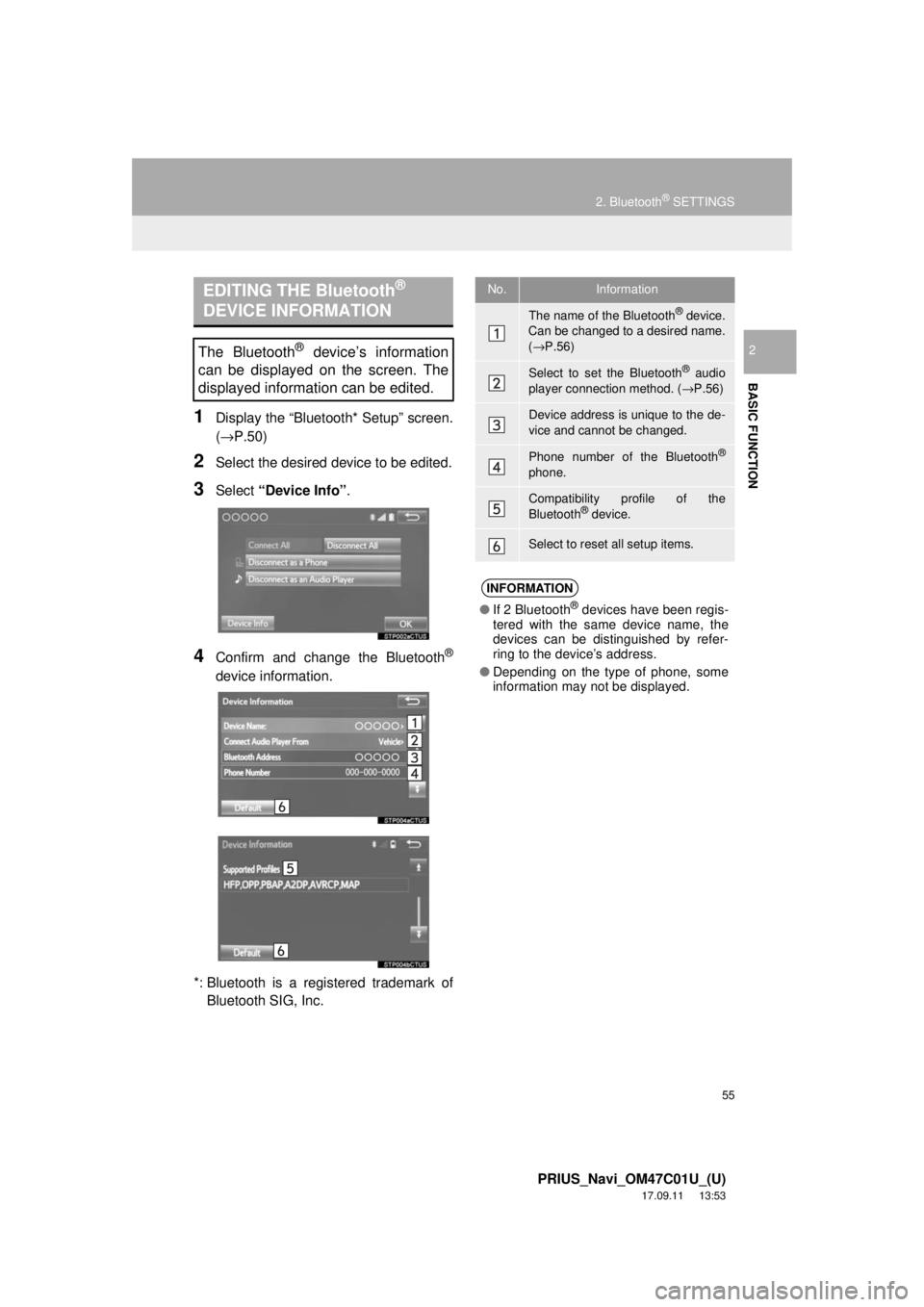
4Confirm and change the Bluetooth®
device information.
*: Bluetooth is a registered trademark of Bluetooth SIG, Inc.
EDITING THE Bluetooth®
DEVICE INFORMATION
The Bluetooth® device’s information
can be displayed on the screen. The
displayed information can be edited.
No.Information
The name of the Bluetooth® device.
Can be changed to a desired name.
( → P.56)
Select to set the Bluetooth® audio
player connection method. ( →P.56)
Device address is unique to the de-
vice and cannot be changed.
Phone number of the Bluetooth®
phone.
Compatibility profile of the
Bluetooth® device.
Select to reset all setup items.
INFORMATION
● If 2 Bluetooth® devices have been regis-
tered with the same device name, the
devices can be distinguished by refer-
ring to the device’s address.
● Depending on the type of phone, some
information may not be displayed.
Page 56 of 294
56
2. Bluetooth® SETTINGS
PRIUS_Navi_OM47C01U_(U)
17.09.11 13:53
1Select “Device Name” .
2Enter the name and select “OK”.
1Select “Connect Audio Player
From” .
2Select the desired connection method.
“Vehicle” : Select to connect the audio
system to the audio player.
“Device” : Select to connect the audio
player to the audio system.
Depending on the audio player, the “Vehi-
cle” or “Device” connection method may
be best. As such, refer to the manual that
comes with the audio player.
To reset the connection method, select
“Default”.
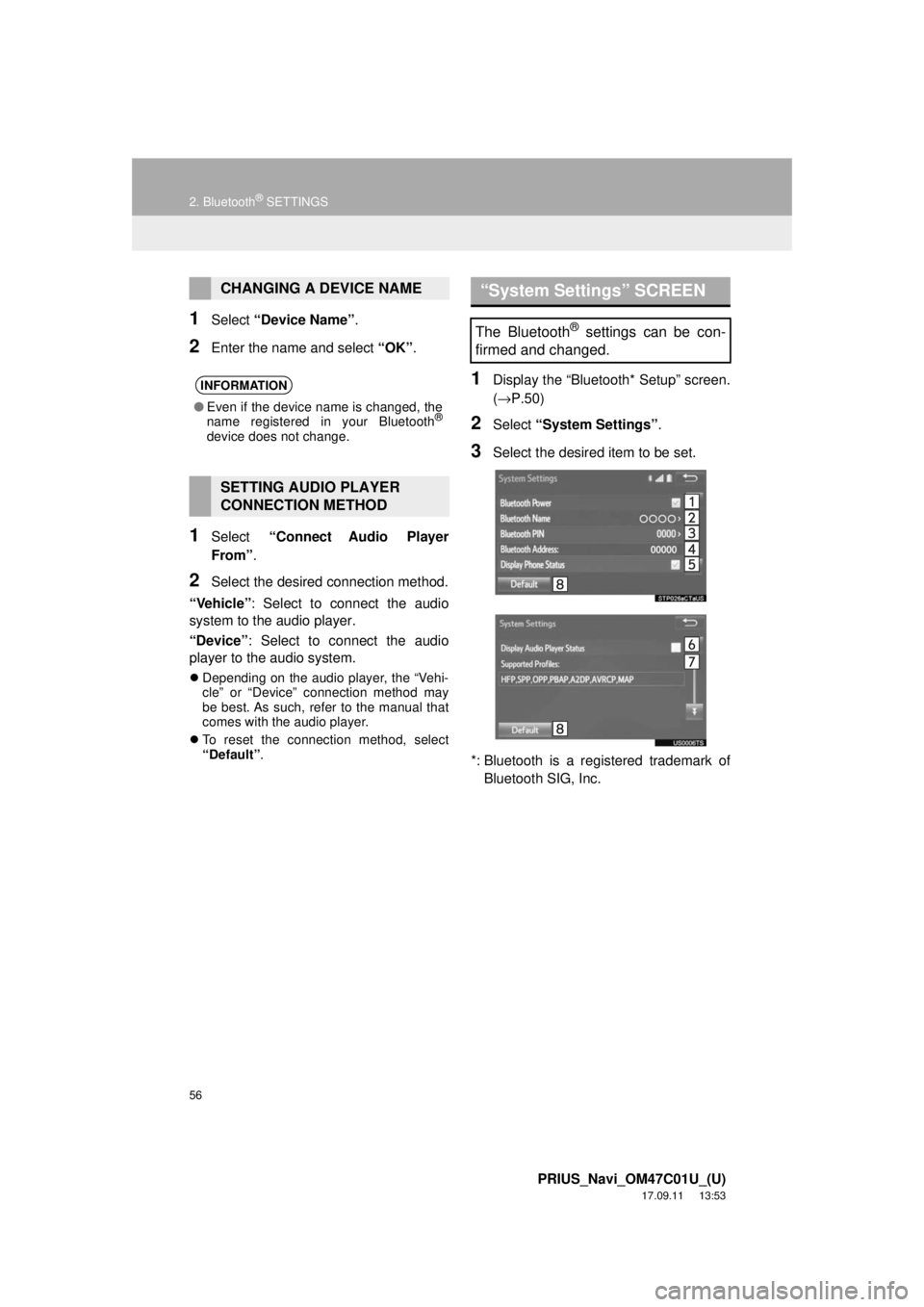
1Display the “Bluetooth* Setup” screen.
(→ P.50)
2Select “System Settings” .
3Select the desired item to be set.
*: Bluetooth is a registered trademark of Bluetooth SIG, Inc.
CHANGING A DEVICE NAME
INFORMATION
● Even if the device name is changed, the
name registered in your Bluetooth®
device does not change.
SETTING AUDIO PLAYER
CONNECTION METHOD
“System Settings” SCREEN
The Bluetooth® settings can be con-
firmed and changed.