stop start TOYOTA PRIUS 2023 Owner's Guide
[x] Cancel search | Manufacturer: TOYOTA, Model Year: 2023, Model line: PRIUS, Model: TOYOTA PRIUS 2023Pages: 770, PDF Size: 122.55 MB
Page 256 of 770
2544-2. Driving procedures
PRIUS_OM_OM47F32E_(EE)
*: For good fuel economy and noise reduction, the D position should usually
be used.
P. 3 5 1
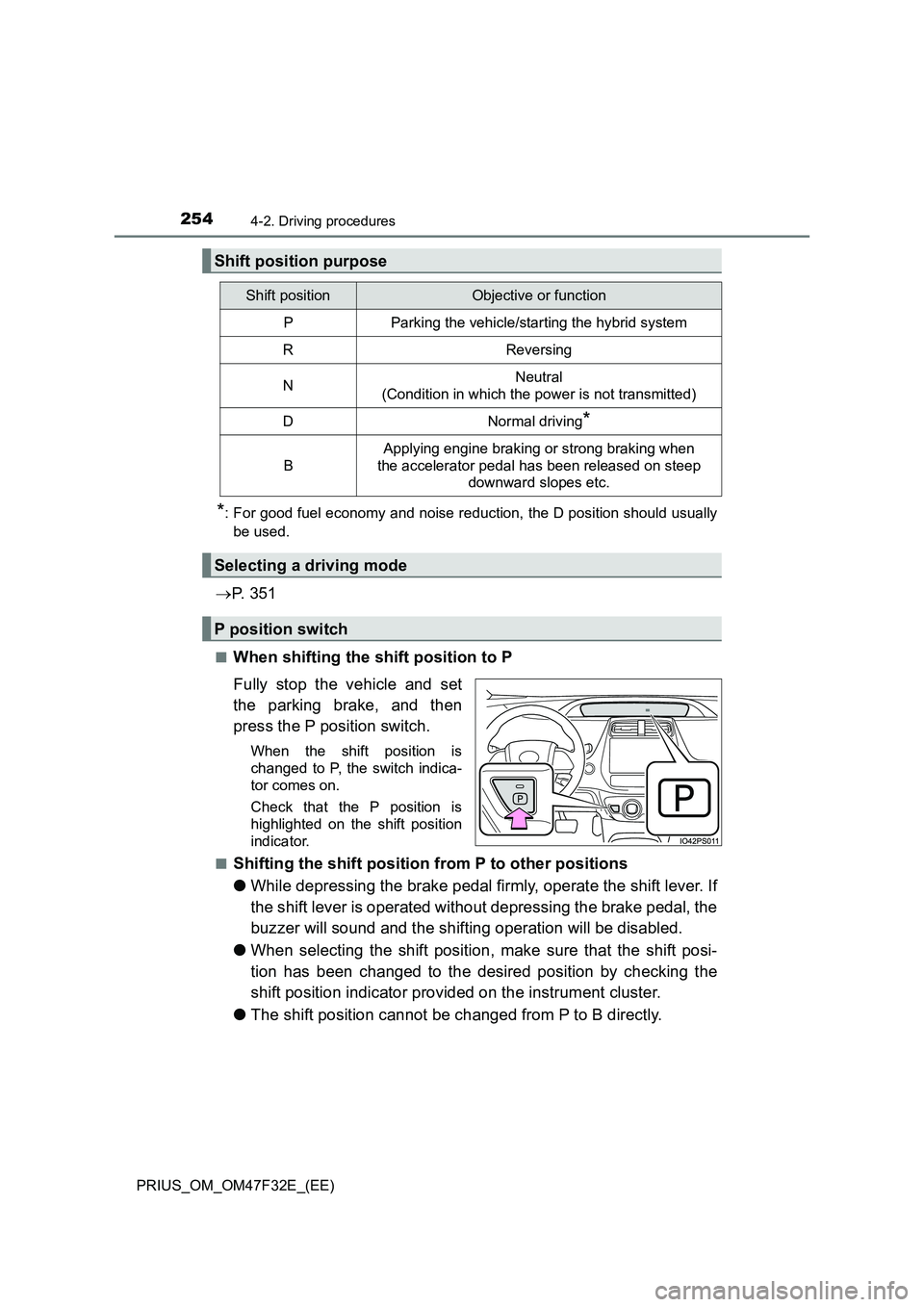
■When shifting the shift position to P
Fully stop the vehicle and set
the parking brake, and then
press the P position switch.
When the shift position is
changed to P, the switch indica-
tor comes on.
Check that the P position is
highlighted on the shift position
indicator.
■
Shifting the shift position from P to other positions
●While depressing the brake pedal firmly, operate the shift lever. If
the shift lever is operated without depressing the brake pedal, the
buzzer will sound and the shifting operation will be disabled.
●When selecting the shift position, make sure that the shift posi-
tion has been changed to the desired position by checking the
shift position indicator provided on the instrument cluster.
●The shift position cannot be changed from P to B directly.
Shift position purpose
Shift positionObjective or function
PParking the vehicle/starting the hybrid system
RReversing
NNeutral
(Condition in which the power is not transmitted)
DNormal driving*
B
Applying engine braking or strong braking when
the accelerator pedal has been released on steep
downward slopes etc.
Selecting a driving mode
P position switch
Page 258 of 770
2564-2. Driving procedures
PRIUS_OM_OM47F32E_(EE)■Restraining sudden start (Drive-Start Control)
P. 222
■Automatic P position selection function
In the following situations, the shift position is automatically changed to P.
●When pressing the power switch with the vehicle stopped while the power
switch is in ON mode and the shift position is in a position other than P (after
the shift position has changed to P, the power switch will turn off)
*
●If the driver’s door is opened and all of the following conditions are met,
while the shift position is in a position other than P
• The power switch is in ON mode.
• The driver is not wearing the seat belt.
• The brake pedal is not depressed.
To start off the vehicle after the shift position is changed to P, operate the
shift lever again.
*: When the power switch is pressed while driving at extremely slow speeds,
such as immediately before stopping the vehicle, the shift position may
automatically change to P. Make sure that the vehicle is completely stopped
before pressing the power switch.
The shift position may also automatically switch to P if one of the following
conditions is detected while the vehicle is stopped by dynamic radar cruise
control with full-speed range (if equipped).
●Driver’s seat belt is not fastened
●Driver’s door is opened
●Approximately 3 minutes elapse after the vehicle stopped
■If the shift position cannot be shifted from P
There is a possibility that the 12-volt battery is discharged. Check the 12-volt
battery in this situation. (P. 639)
■About engine braking
When shift position B is selected, releasing the accelerator pedal will apply
engine braking.
●When the vehicle is driven at high speeds, compared to ordinary gasoline-
fueled vehicles, the engine braking deceleration is felt less than that of other
vehicles.
●The vehicle can be accelerated even when shift position B is selected.
If the vehicle is driven continuously in the B position, fuel efficiency will
become low. Usually, select the D position.
■After recharging/reconnecting the 12-volt battery
P. 523
Page 336 of 770
3344-5. Using the driving support systems
PRIUS_OM_OM47F32E_(EE)
Example of constant speed cruising
When there are no vehicles ahead
The vehicle travels at the speed set by the driver.
Example of deceleration cruising and follow-up cruising
When a preceding vehicle driving slower than the set speed
appears
When a vehicle is detected running ahead of you, the system automatically
decelerates your vehicle. When a greater reduction in vehicle speed is
necessary, the system applies the brakes (the stop lights will come on at
this time). The system will respond to changes in the speed of the vehicle
ahead in order to maintain the vehicle-to-vehicle distance set by the driver.
Approach warning warns you when the system cannot decelerate suffi-
ciently to prevent your vehicle from closing in on the vehicle ahead.
When the vehicle ahead of you stops, your vehicle will also stop (vehicle is
stopped by system control). After the vehicle ahead starts off, pushing the
cruise control lever up or depressing the accelerator pedal (start-off opera-
tion) will resume follow-up cruising. If the start-off operation is not per-
formed, system control continues to keep your vehicle stopped.
When the turn signal lever is operated and your vehicle moves to an over-
taking lane while driving at 80 km/h (50 mph) or more, the vehicle will
accelerate to help to overtake a passing vehicle.
The system’s identification of what is an overtaking lane may be deter-
mined solely based on the location of the steering wheel in the vehicle (left
side driver position versus right side driver position.) If the vehicle is driven
to a region where the overtaking lane is on a different side from where the
vehicle is normally driven, the vehicle may accelerate when the turn signal
lever is operated in the opposite direction to the overtaking lane (e.g., if the
driver normally operates the vehicle in a region where the overtaking lane
is to the right but then drives to a region where the overtaking lane is to the
left, the vehicle may accelerate when the right turn signal is activated).
Example of acceleration
When there are no longer any preceding vehicles driving slower
than the set speed
The system accelerates until the set speed is reached. The system then
returns to constant speed cruising.
1
2
3
Page 340 of 770
3384-5. Using the driving support systems
PRIUS_OM_OM47F32E_(EE)
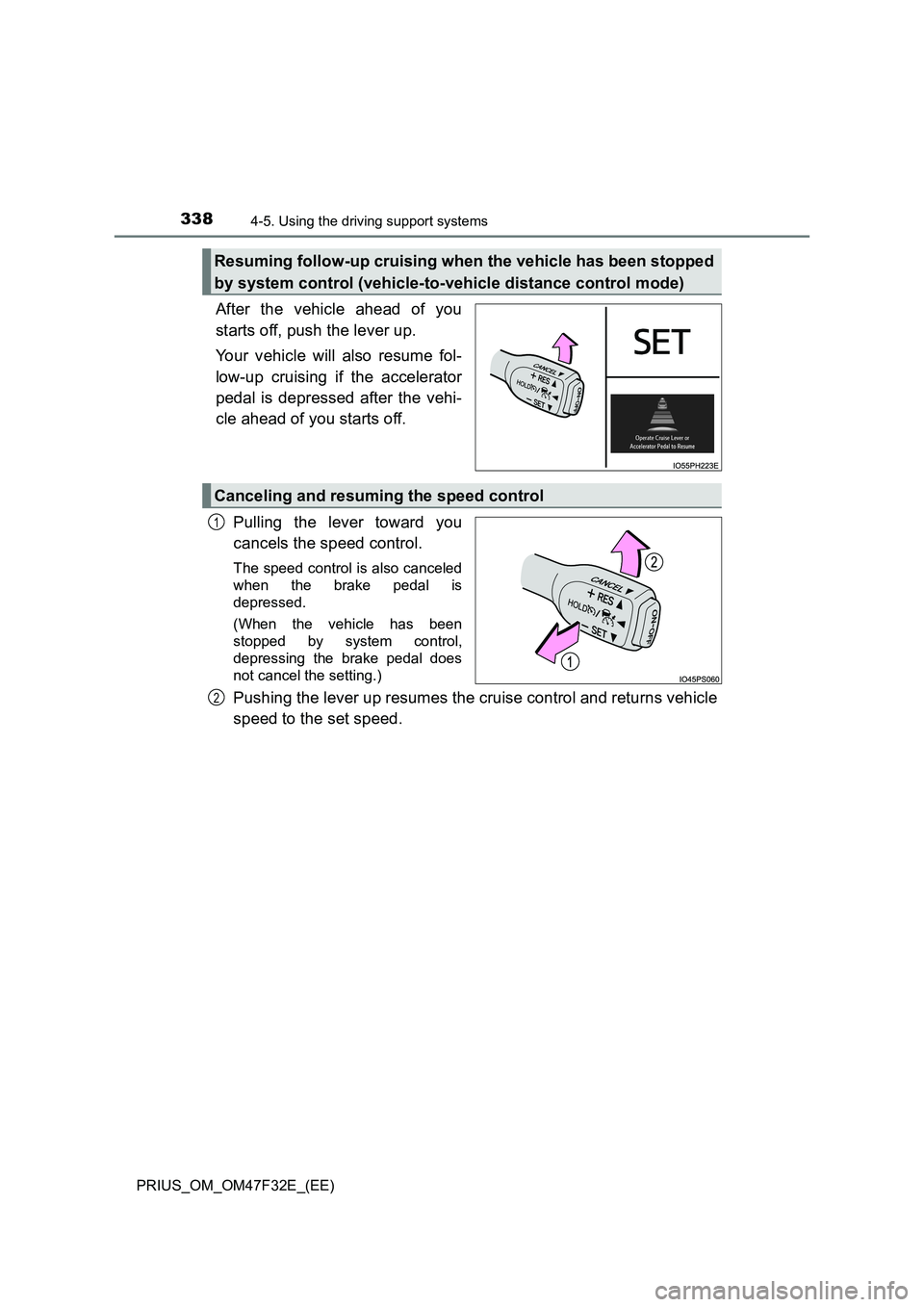
After the vehicle ahead of you
starts off, push the lever up.
Your vehicle will also resume fol-
low-up cruising if the accelerator
pedal is depressed after the vehi-
cle ahead of you starts off.
Pulling the lever toward you
cancels the speed control.
The speed control is also canceled
when the brake pedal is
depressed.
(When the vehicle has been
stopped by system control,
depressing the brake pedal does
not cancel the setting.)
Pushing the lever up resumes the cruise control and returns vehicle
speed to the set speed.
Resuming follow-up cruising when the vehicle has been stopped
by system control (vehicle-to-vehicle distance control mode)
Canceling and resuming the speed control
1
2
Page 344 of 770
3424-5. Using the driving support systems
PRIUS_OM_OM47F32E_(EE)
■Dynamic radar cruise control with full-speed range can be set when
●The shift position is in D.
●The desired set speed can be set when the vehicle speed is approximately
30 km/h (20 mph) or more.
(However, when the vehicle speed is set while driving at below approxi-
mately 30 km/h [20 mph], the set speed will be set to approximately 30 km/h
[20 mph].)
■Accelerating after setting the vehicle speed
The vehicle can accelerate by operating the accelerator pedal. After acceler-
ating, the set speed resumes. However, during vehicle-to-vehicle distance
control mode, the vehicle speed may decrease below the set speed in order
to maintain the distance to the preceding vehicle.
■When the vehicle stops while follow-up cruising
●Pushing the lever up while the vehicle ahead stops will resume follow-up
cruising if the vehicle ahead starts off within approximately 3 seconds after
the lever is pushed up.
●If the vehicle ahead starts off within 3 seconds after your vehicle stops, fol-
low-up cruising will be resumed.
■Automatic cancelation of vehicle-to-vehicle distance control mode
Vehicle-to-vehicle distance control mode is automatically canceled in the fol-
lowing situations.
●VSC is activated.
●TRC is activated for a period of time.
●When the VSC or TRC system is turned off.
●The sensor cannot detect correctly because it is covered in some way.
●When the brake control or output restriction control of a driving support sys-
tem operates. (For example: Pre-Collision System, Drive-Start Control)
●The parking brake is operated.
●The vehicle is stopped by system control on a steep incline.
●The following are detected when the vehicle has been stopped by system
control:
• The driver is not wearing a seat belt.
• The driver’s door is opened.
• The vehicle has been stopped for about 3 minutes.
The shift position may automatically change to P. (P. 256)
If vehicle-to-vehicle distance control mode is automatically canceled for any
reasons other than the above, there may be a malfunction in the system.
Contact any authorized Toyota retailer or Toyota authorized repairer, or any
reliable repairer.
Page 376 of 770
3744-5. Using the driving support systems
PRIUS_OM_OM47F32E_(EE)■Conditions under which the system may not function correctly
●The Blind Spot Monitor function may not detect vehicles correctly in the fol-
lowing situations:
• When the sensor is misaligned due to a strong impact to the sensor or its
surrounding area
• When mud, snow, ice, a sticker, etc. is covering the sensor or surround-
ing area on the rear bumper
• When driving on a road surface that is wet with standing water during bad
weather, such as heavy rain, snow, or fog
• When multiple vehicles are approaching with only a small gap between
each vehicle
• When the distance between your vehicle and a following vehicle is short
• When there is a significant difference in speed between your vehicle and
the vehicle that enters the detection area
• When the difference in speed between your vehicle and another vehicle
is changing
• When a vehicle enters a detection area traveling at about the same
speed as your vehicle
• As your vehicle starts from a stop, a vehicle remains in the detection area
• When driving up and down consecutive steep inclines, such as hills, dips
in the road, etc.
• When driving on roads with sharp bends, consecutive curves, or uneven
surfaces
• When vehicle lanes are wide, or when driving on the edge of a lane, and
the vehicle in an adjacent lane is far away from your vehicle
• When a bicycle carrier or other accessory is installed to the rear of the
vehicle
• When there is a significant difference in height between your vehicle and
the vehicle that enters the detection area
• Immediately after the Blind Spot Monitor function is turned on
●Instances of the Blind Spot Monitor function unnecessarily detecting a vehi-
cle and/or object may increase in the following situations:
• When the sensor is misaligned due to a strong impact to the sensor or its
surrounding area
• When the distance between your vehicle and a guardrail, wall, etc. that
enters the detection area is short
• When driving up and down consecutive steep inclines, such as hills, dips
in the road, etc.
• When vehicle lanes are narrow, or when driving on the edge of a lane,
and a vehicle traveling in a lane other than the adjacent lanes enters the
detection area
• When driving on roads with sharp bends, consecutive curves, or uneven
surfaces
• When the tires are slipping or spinning
• When the distance between your vehicle and a following vehicle is short
• When a bicycle carrier or other accessory is installed to the rear of the
vehicle
Page 401 of 770
3994-5. Using the driving support systems
4
Driving
PRIUS_OM_OM47F32E_(EE)■
Operation starting conditions
When the PKSB OFF indicator is not illuminated or flashing
(P. 402, 580) and all of the following conditions are met, the
system operates.
Hybrid system output restriction control
●The Parking Support Brake function is on.
●The vehicle speed is approximately 15 km/h (10 mph) or less.
●There is an obstacle in the traveling direction of the vehicle
(approximately 2 to 4 m [6 to 13 ft.] ahead).
●The system determined that a stronger-than-normal brake opera-
tion was necessary to avoid a collision.
Brake control
●Hybrid system output restriction control is being performed.
●The system determined that an emergency brake operation was
necessary to avoid a collision.
■Operation ending conditions
In any of the following situations, the system stops operating.
Hybrid system output restriction control
●The Parking Support Brake function has been turned off
(stopped).
●The collision became avoidable with normal brake operation.
●The obstacle is no longer in the traveling direction of the vehicle
(approximately 2 to 4 m [6 to 13 ft.] ahead).
Brake control
●The Parking Support Brake function has been turned off
(stopped).
●Approximately 2 seconds elapsed after the vehicle was stopped
by brake control.
●The brake pedal was depressed after the vehicle was stopped by
brake control.
●The obstacle is no longer in the traveling direction of the vehicle
(approximately 2 to 4 m [6 to 13 ft.] ahead).
Operation conditions
Page 403 of 770
4014-5. Using the driving support systems
4
Driving
PRIUS_OM_OM47F32E_(EE)
■Sensor detection range
The detection range of the Parking Support Brake function differs from the
detection range of the Toyota parking assist-sensor. (P. 386)
Therefore, even if the Toyota parking assist-sensor detects an obstacle and
provides a warning, the Parking Support Brake function may not start operat-
ing.
■System operation
When the vehicle is stopped by system operation, the Parking Support Brake
function stops and the PKSB OFF indicator illuminates.
■System recovery
When the Parking Support Brake function is stopped by system operation
and you would like to resume operation, either turn the Parking Support
Brake function on again (P. 396), or turn the power switch off and then back
on. Furthermore, when the vehicle moves with an obstacle no longer in the
traveling direction of the vehicle, or when the traveling direction of the vehicle
changes (such as when switching from moving forward to backing up, and
vice versa), system operation automatically resumes.
■Obstacles not detected by the sensors
The following obstacles may not be detected by the sensors.
●Objects such as people, cloth and snow, that are difficult for sonic waves to
reflect off of. (In particular, people may also not be detected depending on
the type of clothing they are wearing.)
●Objects not perpendicular with the ground, objects not at a right angle to the
traveling direction of the vehicle, uneven objects or waving objects
●Low objects
●Thin objects such as wires, fences, ropes and signposts
●Objects that are extremely close to the bumper
■Situations in which the system may not operate properly
P. 389
■Situations in which the system may operate even if there is no possibil-
ity of a collision
P. 390
■In the unlikely event that the Parking Support Brake function mistakenly
operates at a crossing or elsewhere
Even in the unlikely event that the Parking Support Brake function mistakenly
operates at a crossing or elsewhere, brake control is canceled after approxi-
mately 2 seconds, allowing you to proceed forward and leave the area. Fur-
thermore, brake control is also canceled when the brake pedal is depressed.
Depressing the accelerator pedal again allows you to proceed forward and
leave the area.
Page 408 of 770
4064-5. Using the driving support systems
PRIUS_OM_OM47F32E_(EE)
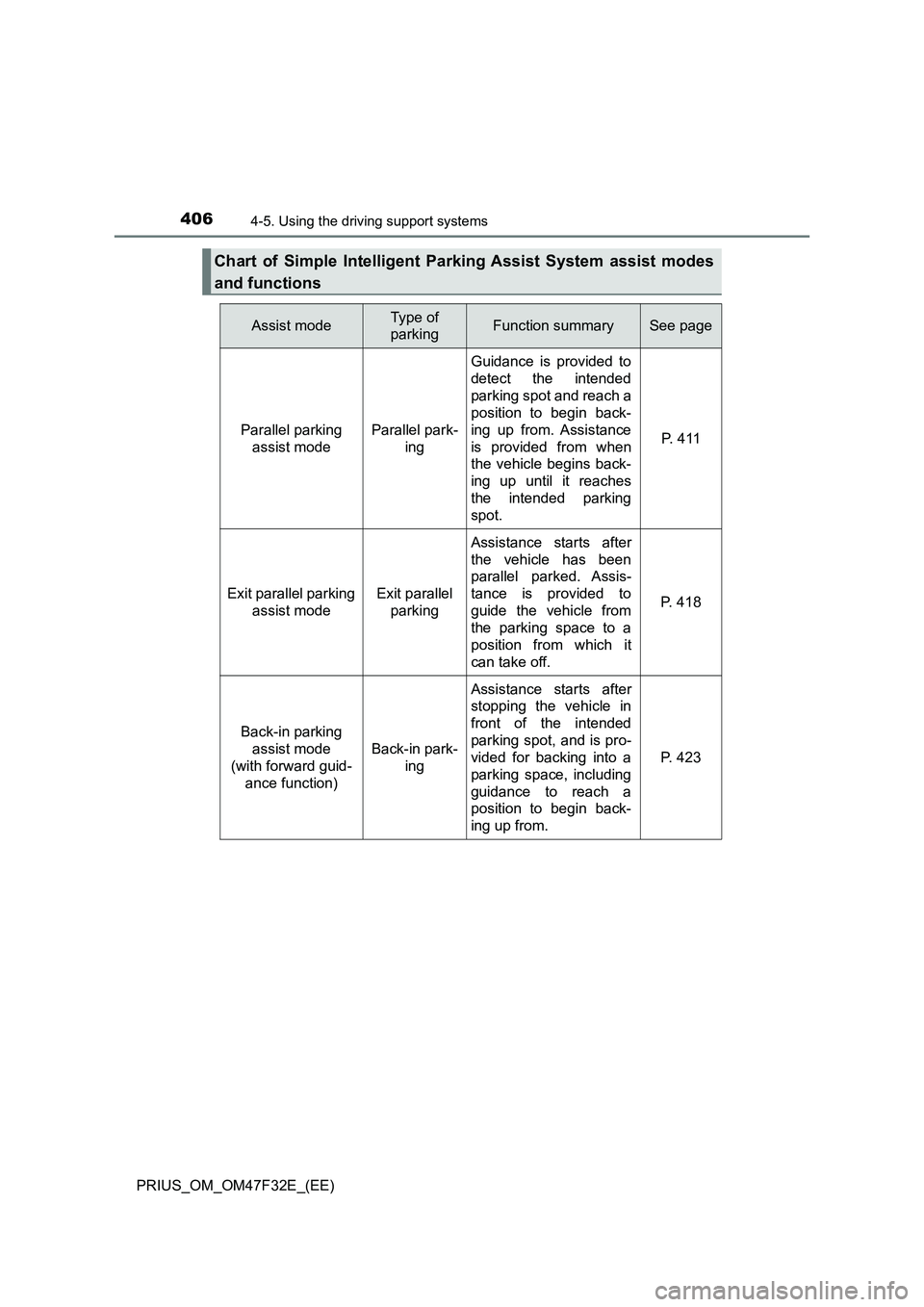
Chart of Simple Intelligent Parking Assist System assist modes
and functions
Assist modeType of
parkingFunction summarySee page
Parallel parking
assist modeParallel park-
ing
Guidance is provided to
detect the intended
parking spot and reach a
position to begin back-
ing up from. Assistance
is provided from when
the vehicle begins back-
ing up until it reaches
the intended parking
spot.
P. 4 1 1
Exit parallel parking
assist modeExit parallel
parking
Assistance starts after
the vehicle has been
parallel parked. Assis-
tance is provided to
guide the vehicle from
the parking space to a
position from which it
can take off.
P. 418
Back-in parking
assist mode
(with forward guid-
ance function)
Back-in park-
ing
Assistance starts after
stopping the vehicle in
front of the intended
parking spot, and is pro-
vided for backing into a
parking space, including
guidance to reach a
position to begin back-
ing up from.
P. 423
Page 412 of 770
4104-5. Using the driving support systems
PRIUS_OM_OM47F32E_(EE)
Assist mode will be canceled or stopped in the following cases.
■Assist control is canceled when
●The system temperature preservation function operates
●There is a system malfunction
●System determined that the parking environment is not suitable
for assist to continue
When assist control is canceled, firmly grasp the steering wheel,
depress the brake pedal and stop the vehicle.
Start again from the beginning, as the system will already be can-
celed. When continuing to park manually, operate the steering
wheel as you normally would.
■Assist control is stopped when
●The steering wheel is operated
●The vehicle speed exceeds 7 km/h (4 mph) during assist control
●The Parking Support Brake function operates
When assist control is stopped, it can be resumed by following the
guidance shown on the screen.
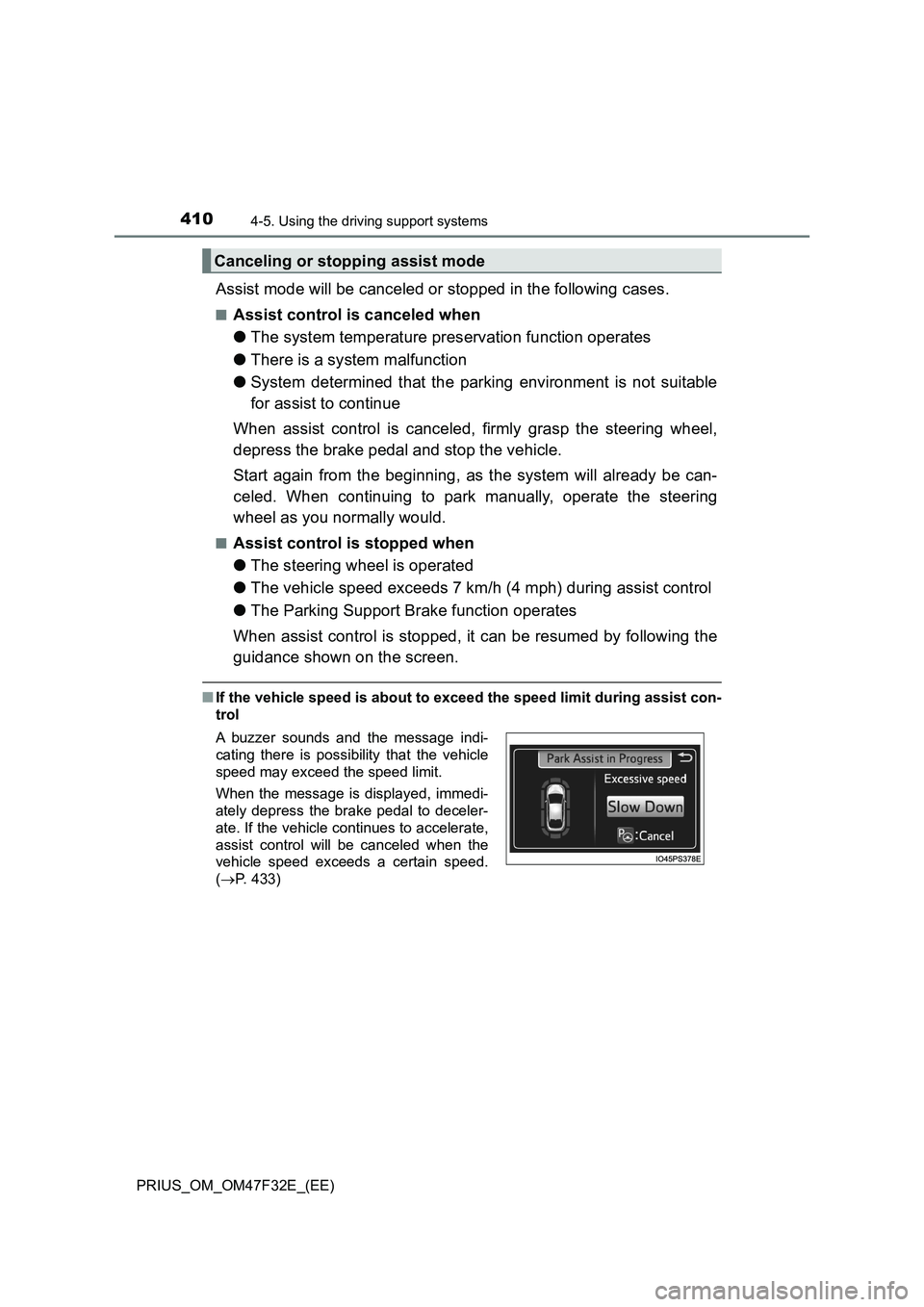
■If the vehicle speed is about to exceed the speed limit during assist con-
trol
Canceling or stopping assist mode
A buzzer sounds and the message indi-
cating there is possibility that the vehicle
speed may exceed the speed limit.
When the message is displayed, immedi-
ately depress the brake pedal to deceler-
ate. If the vehicle continues to accelerate,
assist control will be canceled when the
vehicle speed exceeds a certain speed.
(P. 433)