stop start TOYOTA PRIUS 2023 Workshop Manual
[x] Cancel search | Manufacturer: TOYOTA, Model Year: 2023, Model line: PRIUS, Model: TOYOTA PRIUS 2023Pages: 770, PDF Size: 122.55 MB
Page 443 of 770
441
4
4-5. Using the driving support systems
Driving
PRIUS_OM_OM47F32E_(EE)
Driving assist systems
◆ECB (Electronically Controlled Brake System)
The electronically controlled system generates braking force corre-
sponding to the brake operation
◆ABS (Anti-lock Brake System)
Helps to prevent wheel lock when the brakes are applied suddenly,
or if the brakes are applied while driving on a slippery road surface
◆Brake assist
Generates an increased level of braking force after the brake pedal
is depressed when the system detects a panic stop situation
◆VSC (Vehicle Stability Control)
Helps the driver to control skidding when swerving suddenly or
turning on slippery road surfaces.
◆VSC+ (Vehicle Stability Control+)
Provides cooperative control of the ABS, TRC, VSC and EPS.
Helps to maintain directional stability when swerving on slippery
road surfaces by controlling steering performance.
◆TRC (Traction Control)
Helps to maintain drive power and prevent the drive wheels from
spinning when starting the vehicle or accelerating on slippery roads
◆Active Cornering Assist (ACA)
Helps to prevent the vehicle from drifting to the outer side by per-
forming inner wheel brake control when attempting to accelerate
while turning
To keep driving safety and performance, the following systems
operate automatically in response to various driving situations.
Be aware, however, that these systems are supplementary and
should not be relied upon too heavily when operating the vehi-
cle.
Page 446 of 770
4444-5. Using the driving support systems
PRIUS_OM_OM47F32E_(EE)■Operating conditions of hill-start assist control
When the following four conditions are met, the hill-start assist control will
operate:
●The shift position is in a position other than P or N (when starting off forward/
backward on an upward incline)
●The vehicle is stopped
●The accelerator pedal is not depressed
●The parking brake is not engaged
■Automatic system cancelation of hill-start assist control
The hill-start assist control will turn off in any of the following situations:
●Shift the shift position to P or N
●The accelerator pedal is depressed
●The parking brake is engaged
●No more than 2 seconds have elapsed after the brake pedal is released.
■Sounds and vibrations caused by the ABS, brake assist, VSC, TRC and
hill-start assist control systems
●A sound may be heard from the engine compartment when the brake pedal
is depressed repeatedly, when the hybrid system is started or just after the
vehicle begins to move. This sound does not indicate that a malfunction has
occurred in any of these systems.
●Any of the following conditions may occur when the above systems are
operating. None of these indicates that a malfunction has occurred.
• Vibrations may be felt through the vehicle body and steering.
• A motor sound may be heard also after the vehicle comes to a stop.
■ECB operating sound
ECB operating sound may be heard in the following cases, but it does not
indicate that a malfunction has occurred.
●Operating sound heard from the engine compartment when the brake pedal
is operated.
●Motor sound of the brake system heard from the front part of the vehicle
when the driver’s door is opened.
●Operating sound heard from the engine compartment when one or two min-
utes passed after the stop of the hybrid system.
■Active Cornering Assist operation sounds and vibrations
When the Active Cornering Assist is operated, operation sounds and vibra-
tions may be generated from the brake system, but this is not a malfunction.
■EPS operation sound
When the steering wheel is operated, a motor sound (whirring sound) may be
heard. This does not indicate a malfunction.
Page 449 of 770
4474-5. Using the driving support systems
4
Driving
PRIUS_OM_OM47F32E_(EE)
WARNING
■The ABS does not operate effectively when
● The limits of tire gripping performance have been exceeded (such as
excessively worn tires on a snow covered road).
● The vehicle hydroplanes while driving at high speed on wet or slick roads.
■ Stopping distance when the ABS is operating may exceed that of nor-
mal conditions
The ABS is not designed to shorten the vehicle’s stopping distance. Always
maintain a safe distance from the vehicle in front of you, especially in the
following situations:
● When driving on dirt, gravel or snow-covered roads
● When driving with tire chains
● When driving over bumps in the road
● When driving over roads with potholes or uneven surfaces
■ TRC/VSC may not operate effectively when
Directional control and power may not be achievable while driving on slip-
pery road surfaces, even if the TRC/VSC system is operating. Drive the
vehicle carefully in conditions where stability and power may be lost.
■ Active Cornering Assist does not operate effectively when
● Do not overly rely on Active Cornering Assist. Active Cornering Assist may
not operate effectively when accelerating down slopes or driving on slip-
pery road surfaces.
● When Active Cornering Assist frequently operates, Active Cornering
Assist may temporarily stop operating to ensure proper operation of the
brakes, TRC and VSC.
■ Hill-start assist control does not operate effectively when
● Do not overly rely on hill-start assist control. Hill-start assist control may
not operate effectively on steep inclines and roads covered with ice.
● Unlike the parking brake, hill-start assist control is not intended to hold the
vehicle stationary for an extended period of time. Do not attempt to use
hill-start assist control to hold the vehicle on an incline, as doing so may
lead to an accident.
■ When the TRC/ABS/VSC is activated
The slip indicator light flashes. Always drive carefully. Reckless driving may
cause an accident. Exercise particular care when the indicator light flashes.
Page 466 of 770
4645-1. Using the air conditioning system and defogger
PRIUS_OM_OM47F32E_(EE)
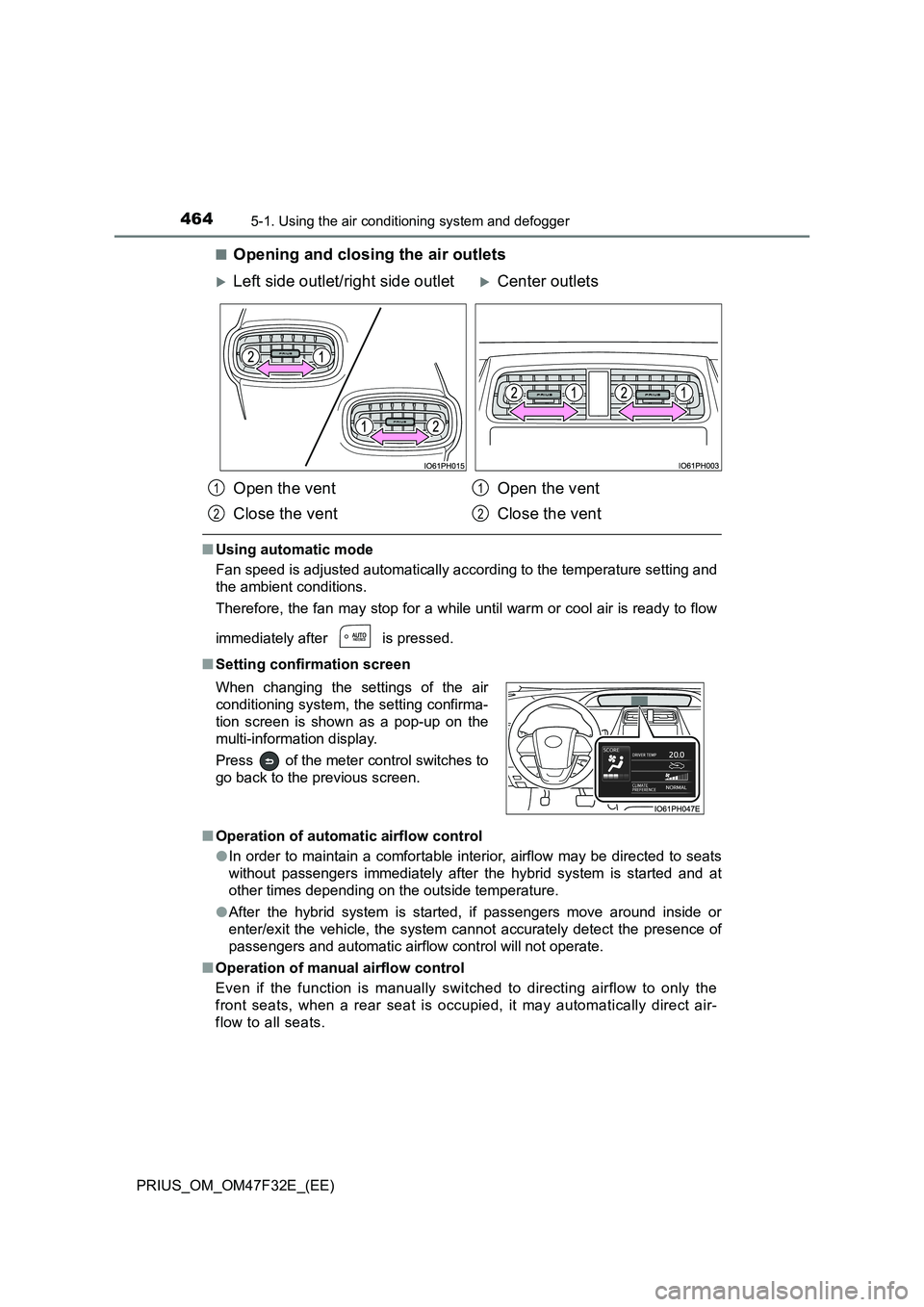
■Opening and closing the air outlets
■ Using automatic mode
Fan speed is adjusted automatically according to the temperature setting and
the ambient conditions.
Therefore, the fan may stop for a while until warm or cool air is ready to flow
immediately after is pressed.
■ Setting confirmation screen
■ Operation of automatic airflow control
● In order to maintain a comfortable interior, airflow may be directed to seats
without passengers immediately after the hybrid system is started and at
other times depending on the outside temperature.
● After the hybrid system is started, if passengers move around inside or
enter/exit the vehicle, the system cannot accurately detect the presence of
passengers and automatic airflow control will not operate.
■ Operation of manual airflow control
Even if the function is manually switched to directing airflow to only the
front seats, when a rear seat is occupied, it may automatically direct air-
flow to all seats.
Left side outlet/right side outletCenter outlets
Open the vent
Close the vent
Open the vent
Close the vent
When changing the settings of the air
conditioning system, the setting confirma-
tion screen is shown as a pop-up on the
multi-information display.
Press of the meter control switches to
go back to the previous screen.
1
2
1
2
Page 490 of 770
488
PRIUS_OM_OM47F32E_(EE)
5-4. Using the other interior features
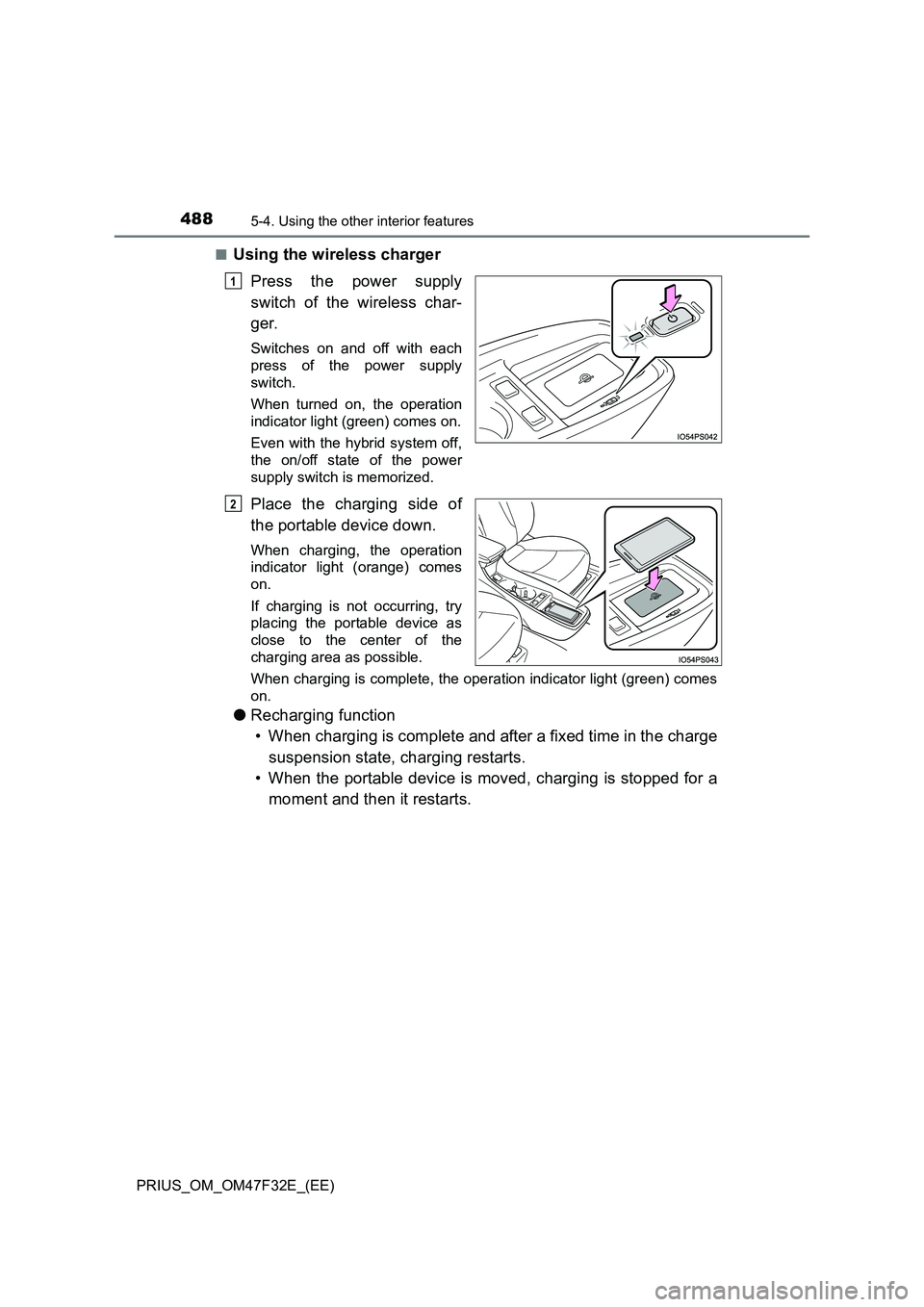
■Using the wireless charger
Press the power supply
switch of the wireless char-
ger.
Switches on and off with each
press of the power supply
switch.
When turned on, the operation
indicator light (green) comes on.
Even with the hybrid system off,
the on/off state of the power
supply switch is memorized.
Place the charging side of
the portable device down.
When charging, the operation
indicator light (orange) comes
on.
If charging is not occurring, try
placing the portable device as
close to the center of the
charging area as possible.
When charging is complete, the operation indicator light (green) comes
on.
● Recharging function
• When charging is complete and after a fixed time in the charge
suspension state, charging restarts.
• When the portable device is moved, charging is stopped for a
moment and then it restarts.
1
2
Page 491 of 770
4895-4. Using the other interior features
PRIUS_OM_OM47F32E_(EE)
5
Interior features
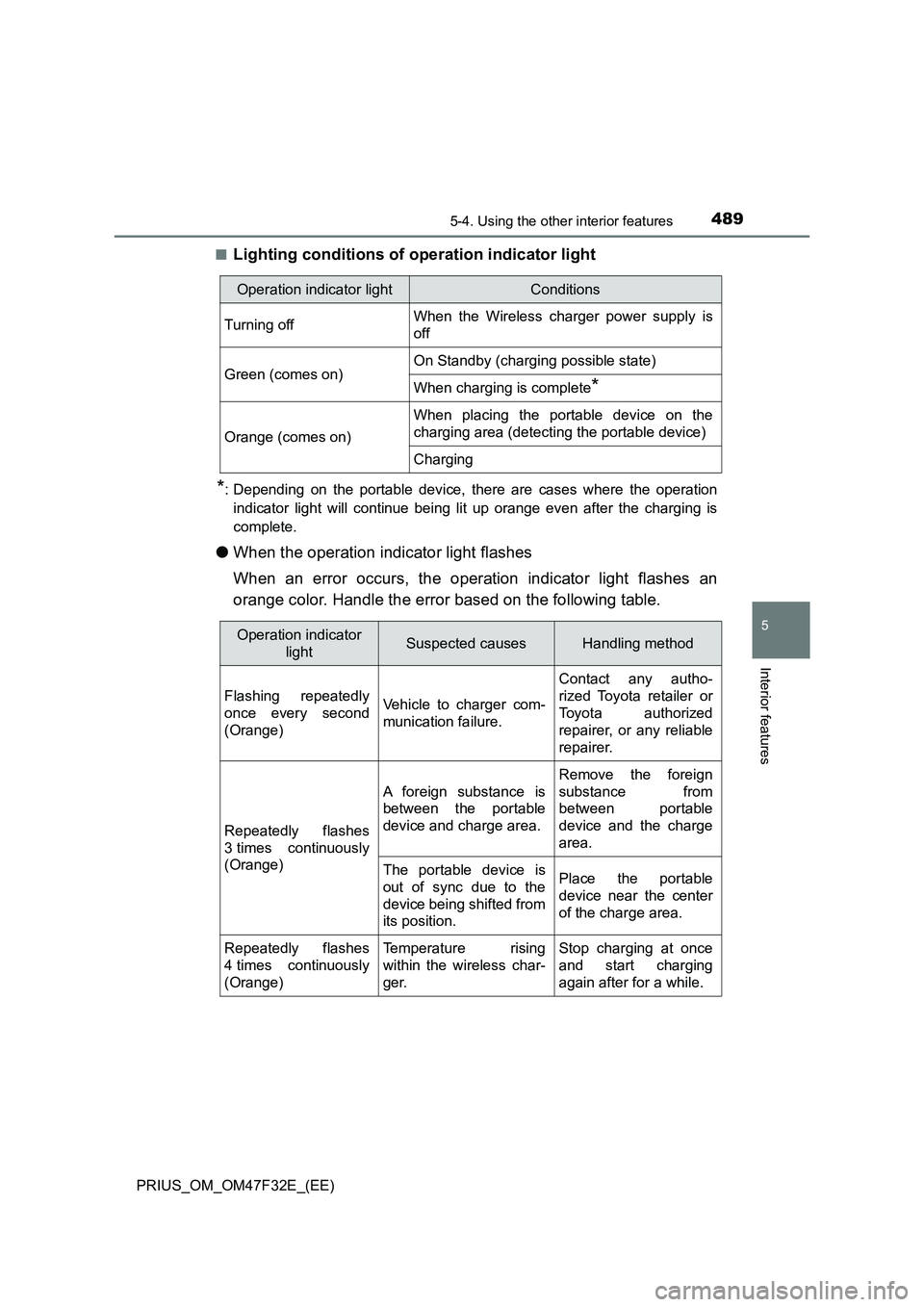
■Lighting conditions of operation indicator light
*: Depending on the portable device, there are cases where the operation
indicator light will continue being lit up orange even after the charging is
complete.
●When the operation indicator light flashes
When an error occurs, the operation indicator light flashes an
orange color. Handle the error based on the following table.
Operation indicator lightConditions
Turning offWhen the Wireless charger power supply is
off
Green (comes on)On Standby (charging possible state)
When charging is complete*
Orange (comes on)
When placing the portable device on the
charging area (detecting the portable device)
Charging
Operation indicator
lightSuspected causesHandling method
Flashing repeatedly
once every second
(Orange)Vehicle to charger com-
munication failure.
Contact any autho-
rized Toyota retailer or
Toyota authorized
repairer, or any reliable
repairer.
Repeatedly flashes
3 times continuously
(Orange)
A foreign substance is
between the portable
device and charge area.
Remove the foreign
substance from
between portable
device and the charge
area.
The portable device is
out of sync due to the
device being shifted from
its position.Place the portable
device near the center
of the charge area.
Repeatedly flashes
4 times continuously
(Orange)Temperature rising
within the wireless char-
ger.Stop charging at once
and start charging
again after for a while.
Page 492 of 770
490
PRIUS_OM_OM47F32E_(EE)
5-4. Using the other interior features
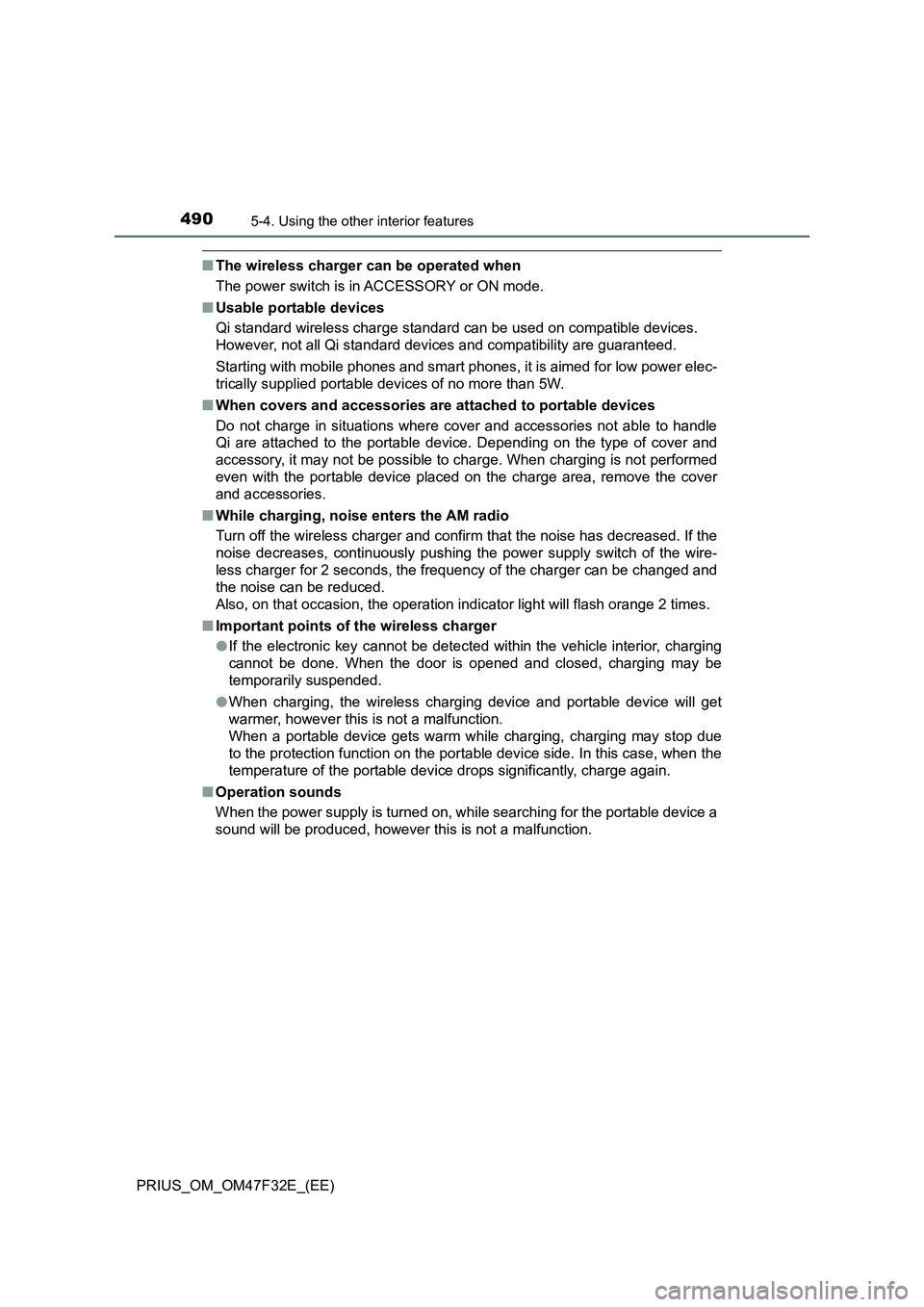
■The wireless charger can be operated when
The power switch is in ACCESSORY or ON mode.
■Usable portable devices
Qi standard wireless charge standard can be used on compatible devices.
However, not all Qi standard devices and compatibility are guaranteed.
Starting with mobile phones and smart phones, it is aimed for low power elec-
trically supplied portable devices of no more than 5W.
■When covers and accessories are attached to portable devices
Do not charge in situations where cover and accessories not able to handle
Qi are attached to the portable device. Depending on the type of cover and
accessory, it may not be possible to charge. When charging is not performed
even with the portable device placed on the charge area, remove the cover
and accessories.
■While charging, noise enters the AM radio
Turn off the wireless charger and confirm that the noise has decreased. If the
noise decreases, continuously pushing the power supply switch of the wire-
less charger for 2 seconds, the frequency of the charger can be changed and
the noise can be reduced.
Also, on that occasion, the operation indicator light will flash orange 2 times.
■Important points of the wireless charger
●If the electronic key cannot be detected within the vehicle interior, charging
cannot be done. When the door is opened and closed, charging may be
temporarily suspended.
●When charging, the wireless charging device and portable device will get
warmer, however this is not a malfunction.
When a portable device gets warm while charging, charging may stop due
to the protection function on the portable device side. In this case, when the
temperature of the portable device drops significantly, charge again.
■Operation sounds
When the power supply is turned on, while searching for the portable device a
sound will be produced, however this is not a malfunction.
Page 550 of 770
5486-3. Do-it-yourself maintenance
PRIUS_OM_OM47F32E_(EE)
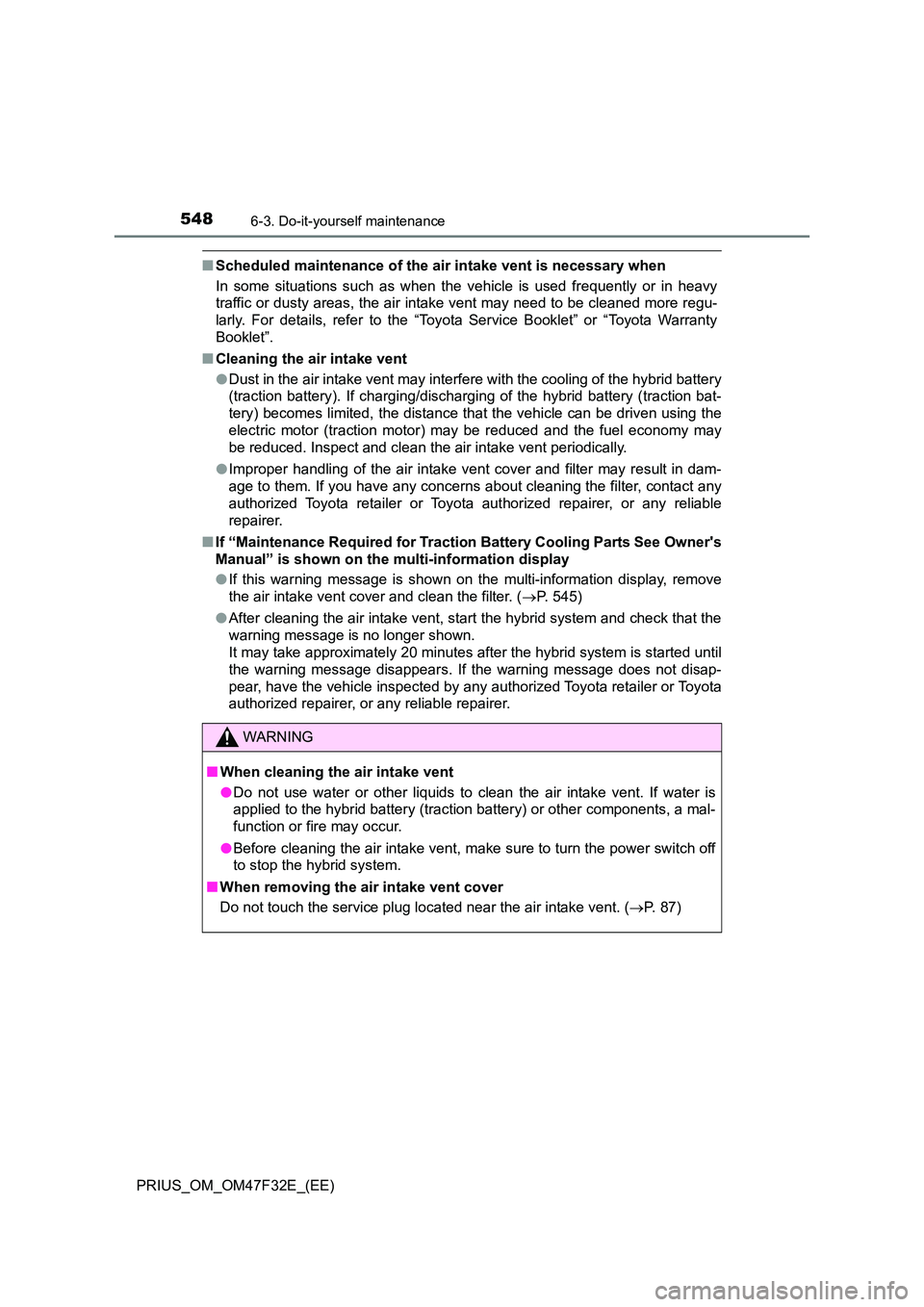
■Scheduled maintenance of the air intake vent is necessary when
In some situations such as when the vehicle is used frequently or in heavy
traffic or dusty areas, the air intake vent may need to be cleaned more regu-
larly. For details, refer to the “Toyota Service Booklet” or “Toyota Warranty
Booklet”.
■ Cleaning the air intake vent
● Dust in the air intake vent may interfere with the cooling of the hybrid battery
(traction battery). If charging/dischargi ng of the hybrid battery (traction bat-
tery) becomes limited, the distance that the vehicle can be driven using the
electric motor (traction motor) may be reduced and the fuel economy may
be reduced. Inspect and clean the air intake vent periodically.
● Improper handling of the air intake vent cover and filter may result in dam-
age to them. If you have any concerns about cleaning the filter, contact any
authorized Toyota retailer or Toyota authorized repairer, or any reliable
repairer.
■ If “Maintenance Required for Traction Battery Cooling Parts See Owner's
Manual” is shown on the multi-information display
● If this warning message is shown on the multi-information display, remove
the air intake vent cover and clean the filter. ( P. 545)
● After cleaning the air intake vent, start the hybrid system and check that the
warning message is no longer shown.
It may take approximately 20 minutes after the hybrid system is started until
the warning message disappears. If the warning message does not disap-
pear, have the vehicle inspected by any authorized Toyota retailer or Toyota
authorized repairer, or any reliable repairer.
WARNING
■ When cleaning the air intake vent
● Do not use water or other liquids to clean the air intake vent. If water is
applied to the hybrid battery (traction battery) or other components, a mal-
function or fire may occur.
● Before cleaning the air intake vent, make sure to turn the power switch off
to stop the hybrid system.
■ When removing the air intake vent cover
Do not touch the service plug located near the air intake vent. ( P. 87)
Page 554 of 770
5526-3. Do-it-yourself maintenance
PRIUS_OM_OM47F32E_(EE)
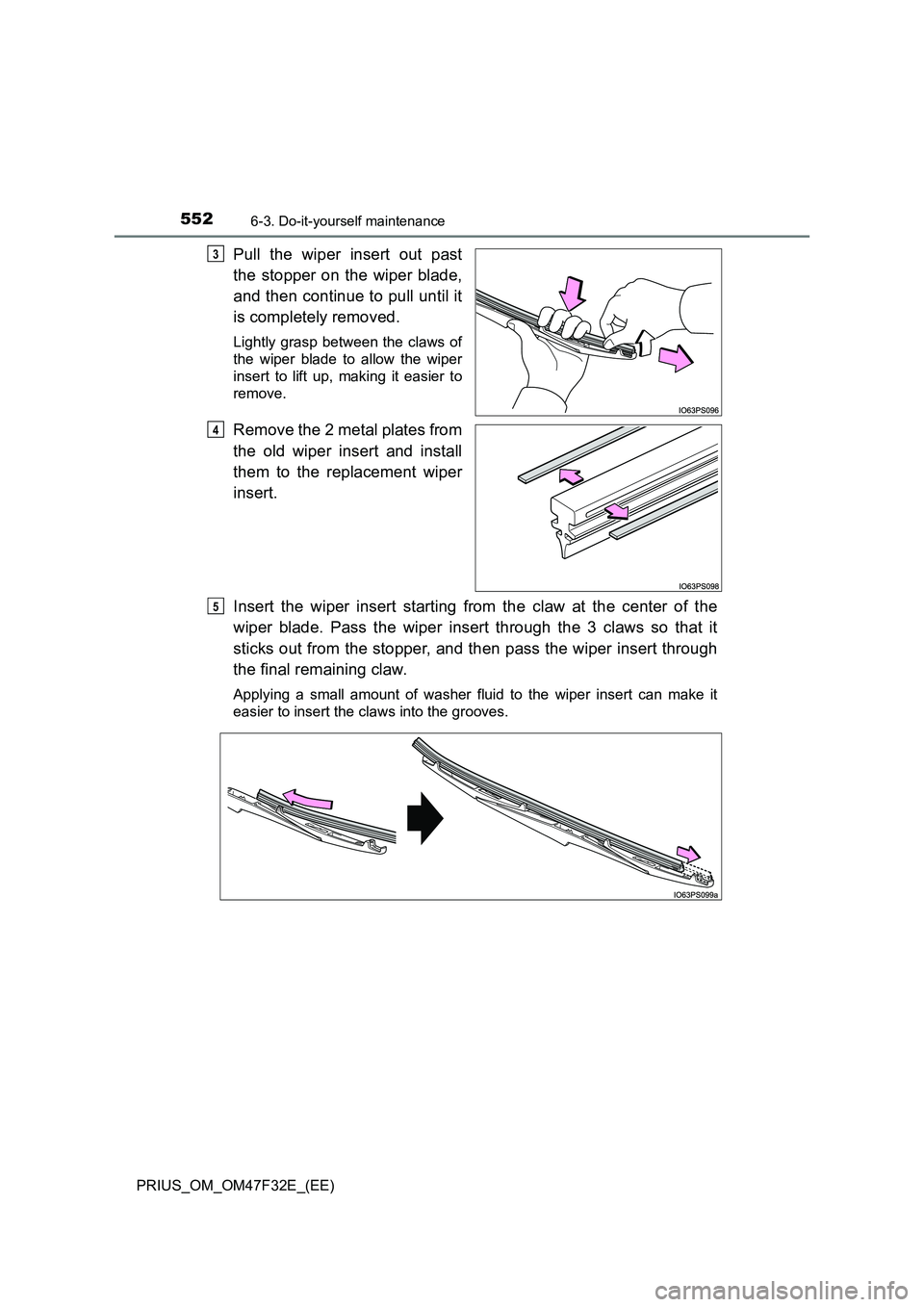
Pull the wiper insert out past
the stopper on the wiper blade,
and then continue to pull until it
is completely removed.
Lightly grasp between the claws of
the wiper blade to allow the wiper
insert to lift up, making it easier to
remove.
Remove the 2 metal plates from
the old wiper insert and install
them to the replacement wiper
insert.
Insert the wiper insert starting from the claw at the center of the
wiper blade. Pass the wiper insert through the 3 claws so that it
sticks out from the stopper, and then pass the wiper insert through
the final remaining claw.
Applying a small amount of washer fluid to the wiper insert can make it
easier to insert the claws into the grooves.
3
4
5
Page 558 of 770
5566-3. Do-it-yourself maintenance
PRIUS_OM_OM47F32E_(EE)
WARNING
■Battery precautions
Observe the following precautions.
Failure to do so may result in death or serious injury.
● Do not swallow the battery. Doing so may cause chemical burns.
● A coin battery or button battery is used in the electronic key. If a battery is
swallowed, it may cause severe chemical burns in as little as 2 hours and
may result in death or serious injury.
● Keep away new and removed batteries from children.
● If the cover cannot be firmly closed, stop using the electronic key and stow
the key in the place where children cannot reach, and then contact any
authorized Toyota retailer or Toyota authorized repairer, or any reliable
repairer as soon as possible.
● If you accidentally swallow a battery or put a battery into a part of your
body, get emergency medical attention immediately.
■ To prevent battery explosion or leakage of flammable liquid or gas
● Replace the battery with a new battery of the same type. If a wrong type of
battery is used, it may explode.
● Do not expose batteries to extremely low pressure due to high altitude or
extremely high temperatures.
● Do not burn, break or cut a battery.
■ Certification for the smart entry & start system
CAUTION
RISK OF EXPLOSION IF BATTERY IS REPLACED BY AN INCORRECT
TYPE.
DISPOSE OF USED BATTERIES ACCORDING TO THE INSTRUCTIONS
NOTICE
■ For normal operation after replacing the battery
Observe the following precautions to prevent accidents:
● Always work with dry hands.
Moisture may cause the battery to rust.
● Do not touch or move any other component inside the remote control.
● Do not bend either of the battery terminals.